

Page 1
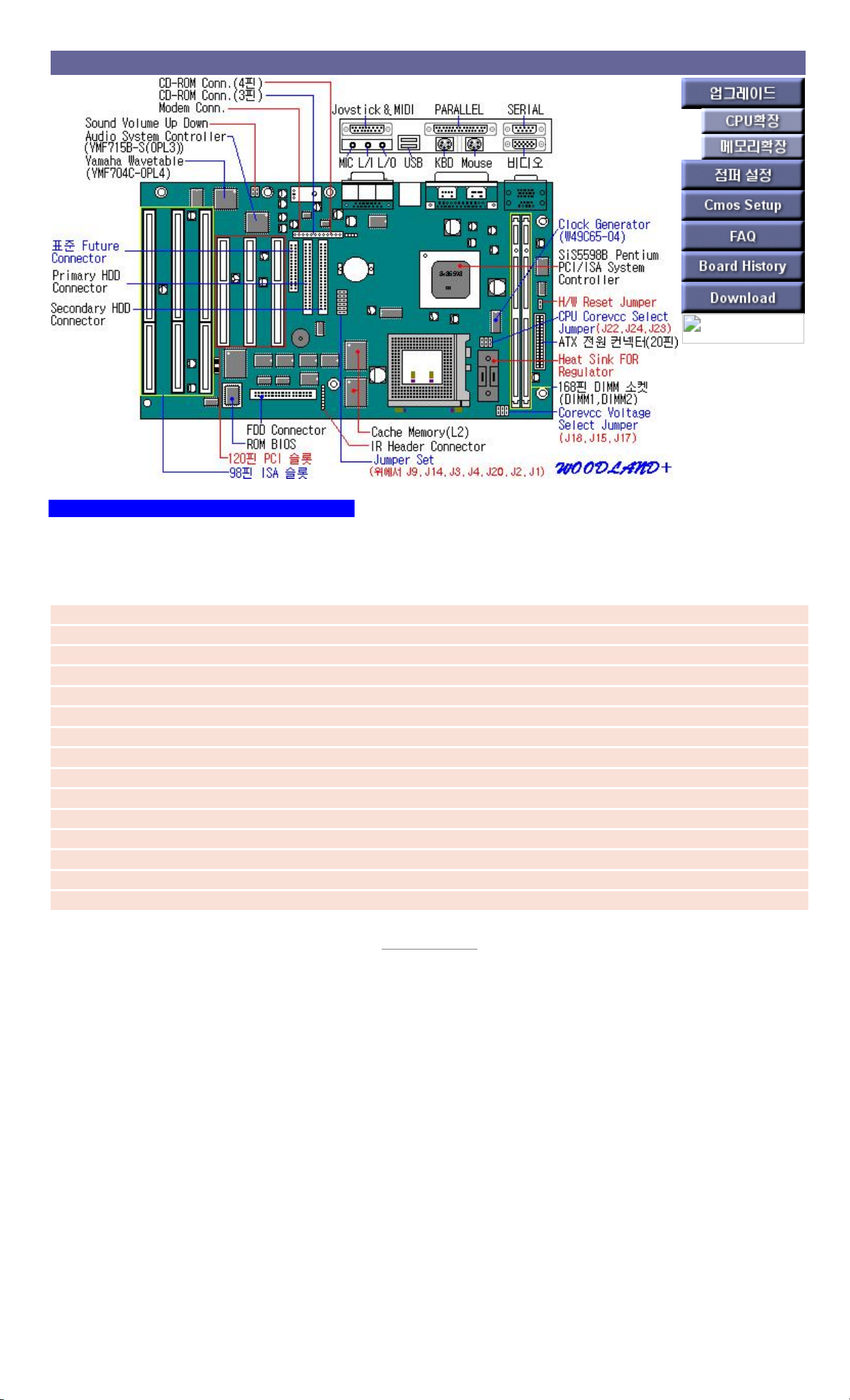
WOODLAND+ Main Board
WOODLAND+ Motherboard Features
characteristic
The WOODLAND+ motherboard includes the following features:
Intel Pentium P54C 75~233 MHz, P55C, AMD K5, K6, Cyrix M1,M2 support
Expandable up to 256MB using 2DIMMs
UMA Graphics Controller Built-in
Pipelined Burst 256KB SRAM Built-in
Math coprocessor built into the microprocessor chip
Built-in 16-bit Audio(YMF715)
Built-in Wavetable(YMF704-OPL4)
Bus Mastering IDE (DMA-33)
Two built-in serial ports and one parallel port
Built-in IBM PS/2 compatible keyboard and mouse ports
Three 32-bit PCI bus slots and four 16-bit ISA slots
Built-in MIDI, Joy stick port
Built-in Video Connector
Two built-in USB ports
Built-in MIC, Line-in, Stereo Line-out Jack
[ Back to Previous ]
Page 2

WOODLAND+ CPU
CPU
Supported CPUs:
Intel Pentium P54c(S) 75/90/100/120/133/150/166/200MHz
Intel Pentium P55c(MMX) 166/200/233 MHz
AMD-K6 166/200/233MHz
socket : Comes with 321-pin Socket 7
P54CTB(Pentium OverDrive Processor), P55C
Clock Speed : 50/60/66Mhz
P54C(S) CPU runs on 3.3Volt.
P55C(MMX) CPU operates at 2.8Volt & 3.3Volt.
< Jumper Settings >
Processor Bus Fraction Jumpers (J20, J1, J2)
J20 J2 J1
Frequency Ratio
P54C,K5,M1
Pentium Processor
MMX,K6
Speed/Clock
2-3 1-2 2-3 2.5 2.5 150/60,166/66
2-3 1-2 1-2 3 3 150/50,180/60,200/66
2-3 2-3 2-3 2 2 100/50,120/60,133/66
2-3 2-3 1-2 1.5 3.5 75/50,90/60,100/66/233
Page 3
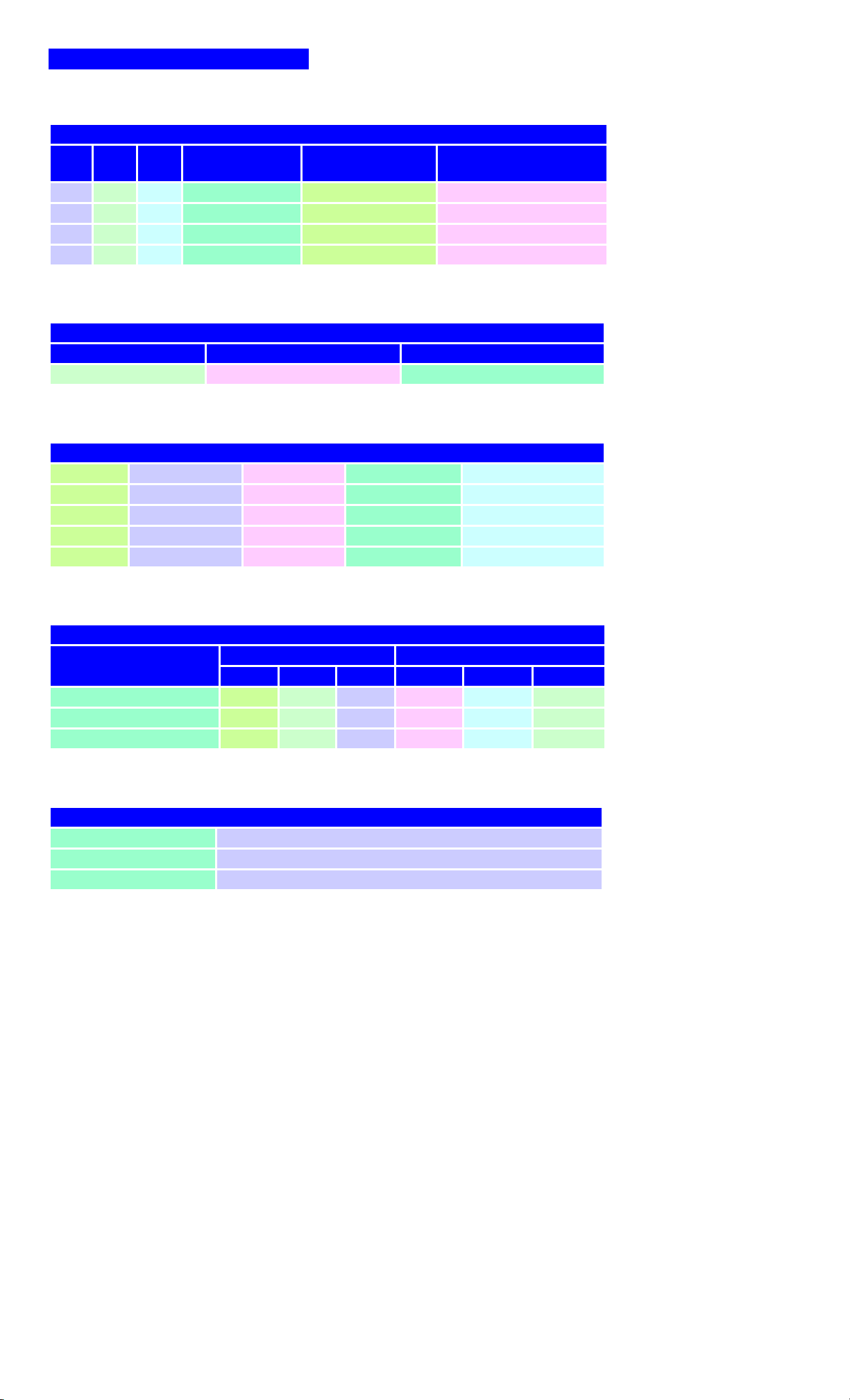
WOODLAND+ Jumper Settings
< Jumper Settings >
Processor Bus Fraction Jumpers (J20, J1, J2)
J20 J2 J1
Frequency Ratio
P54C,K5,M1
Pentium Processor
MMX,K6
Speed/Clock
2-3 1-2 2-3 2.5 2.5 150/60,166/66
2-3 1-2 1-2 3 3 150/50,180/60,200/66
2-3 2-3 2-3 2 2 100/50,120/60,133/66
2-3 2-3 1-2 1.5 3.5 75/50,90/60,100/66/233
CMOS CLEAR Jumper(J9)
Jumper CLEAR NORMAL
J9 2-3 1-2
Host and PCI Clock selection(J14, J3, J4)
J14 J3 J4 Host Clock PCI Clock
1-2 2-3 1-2 50MHz 25MHz
1-2 2-3 2-3 60MHz 30MHz
1-2 1-2 1-2 66MHz 33MHz
1-2 1-2 2-3 55MHz 27.5MHz
Processor Voltage Selection(J15, J17, J18, J22, J23, J24)
CPU Voltage
Core Voltage I/O Voltage
J18 J15 J17 J22 J23 J24
3.3V(P54C, P54C, M1, K5) OPEN OPEN CLOSE 2-3 2-3 2-3
3.2V(K6-233) OPEN CLOSE OPEN 1-2 1-2 1-2
2.85V(MMX, K6, M2) CLOSE OPEN OPEN 1-2 1-2 1-2
Floppy Write Protect (J7)
JP7 Function
1-2 Normal
2-3 Write Protect
Page 4

WOODLAND+ Memory Settings
Cache Memory
Volume : 256 KB or 512 KB
Main Memory
standard :
JEDEC 168핀 3.3V Unbuffered DIMM
type : EDO, Synchronous DRAM DIMMING
type : 8BM, 16MB, 32MB, 64MB, 128MB
Maximum Supported Memory: 256MB (64MB supported in DOS mode)
BANK composition
memory size Bank 0,1 (DIMM1) Bank 2,3 (DIMM2)
8m 8m --
16M 8m 8m
16M --
24M 16M 8m
32m 16M 16M
32m --
40M 32m 8m
48M 32m 16M
64M 32m 32m
64M --
72m 64M 8m
80M 64M 16M
96M 64M 32m
128M 64M 64M
128M --
132M 128M 4M
136M 128M 8m
144M 128M 16M
160M 128M 32m
192M 128M 64M
256M 128M 128M
Page 5
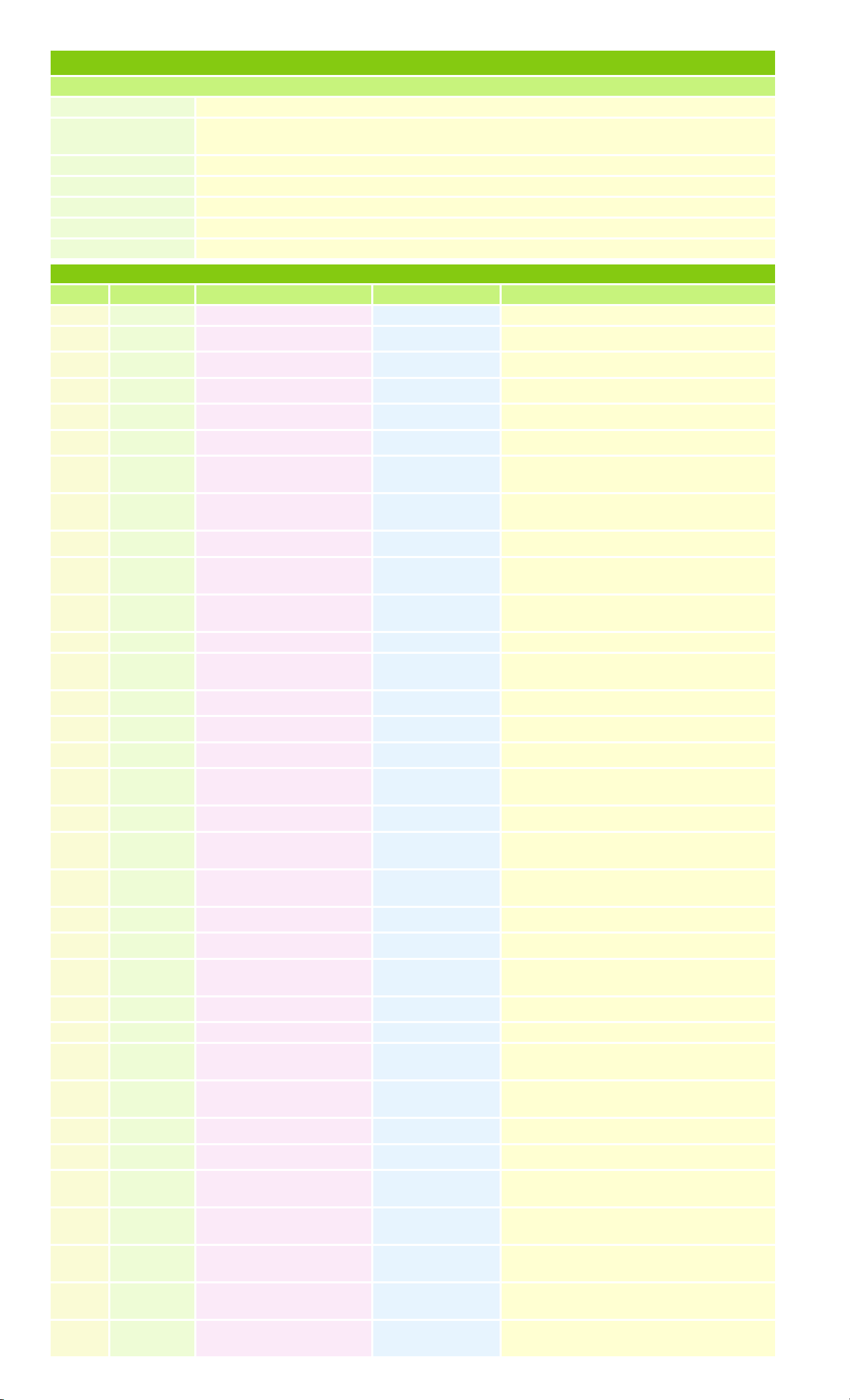
WOODLAND+ Main B/D CMOS SETUP
use key
mouse Select each item (press the left button)
Movement between each
group
<Tap> key
Move between each item arrow keys
select each item <Enter> key
move all screen <Esc> key
When saving <ALT> + <Space> keys
Help <ALT> + <H>
When booting, press DEL KEY (press when Hit DEL if you want to run SETUP message)
Level 1 Step 2 Step 3 Step 4 optional
Setup Standard Pri Master Type 1~46, User, Auto, CD-ROM
LBA/Large Mode Off, On
Black Mode Off, On
32Bit Mode Off, On
PIO Mode Auto, 0~4, 5
Pri Slave Same as Pri Master
Sec Master
Option of Secondary Slave HDD or CD-ROM
setting. The method is the same as Pri Master
Sec Slave
Option of Secondary Slave HDD or CD-ROM
setting. The method is the same as Pri Master
Date/Time Set date and time
Floppy A
Not / 360K 5.¼/ 1.2M 5.¼ / 720KB ½ / 1.44M ½
/ 2.88M ½
Floppy B
Not / 360K 5.¼/ 1.2M 5.¼ / 720KB ½ / 1.44M ½
/ 2.88M ½
Advanced Quick Boot Enabled, Disabled
BootUp Sequence
A:, C:, CD-ROM / C:, A:, CD-ROM / CD-ROM,
A:, C: (select boot order)
Boot Up Num-Lock On, Off
Floppy Drive Swap Disabled, Enabled
PS/2 Mouse Support Disabled, Enabled
Primary display
Absent, VGA/EGA, CGA 40*25, CGA 80*25,
Mono
Password Check Setup, Always
O/S 2 Compatible Mode
Disabled, Enabled (set when using OS/2 after
installing 64MB or more of system memory)
External Cache
Disabled, Enabled (whether external cache is
used)
System BIOS Cacheable Disabled, Enabled
C000/C400, 16k Shadow Enabled, Disabled (if using ISA video card)
C800, CC00, D000, D400,
D800, DC00,
16K Shadow Enabled, Disabled
Chipset On-Chip VGA Enabled, Disabled
VGA Shared Memory
Size
1M, 2M, 3M, 4M
VGA Frequency
When using 40Mhz, On B/D Video, video
memory clock setting.
Floppy Access Control Normal, Read Only
HDD Access Control Normal, Read Only
Power
Control
Power Management/APM Enabled, Disabled
Green PC Monitor
Power State
Disabled, Off, Standby, Suspend
Video Power Down
Mode
Disabled, Standby, Suspend, Off
Standby Time Out
(Minute)
Disabled, 5min, 10min, 15min, 20min, 25min,
30min
Suspend Time Out
(minutes)
Disabled, 5min, 10min, 15min, 20min, 25min,
30min
Page 6

IRQ 3 Ignore, monitor
IRQ 5 Ignore, monitor
IRQ 7 Ignore, monitor
IRQ 9 Ignore, monitor
IRQ 10 Ignore, monitor
IRQ 11 Ignore, monitor
IRQ 13 Ignore, monitor
IRQ 14 Ignore, monitor
IRQ 15 Ignore, monitor
PCI/PnP Plug and Play Aware OS Yes, No (whether the OS supports PnP)
PCI Latency Timer (PCI
Clocks)
32, 64, 96, 128, 160, 192, 224, 248
PCI VGA Palette Snoop Disabled, Enabled
DMA Channel 0 Yes, No
DMA Channel 1 Yes, No
DMA Channel 3 Yes, No
DMA Channel 5 Yes, No
DMA Channel 6 Yes, No
DMA Channel 7 Yes, No
IRQ 3 Yes, No
IRQ 4 Yes, No
IRQ 5 Yes, No
IRQ 7 Yes, No
IRQ 9 Yes, No
IRQ 10 Yes, No
IRQ 11 Yes, No
Peripheral OnBoard SOUND Enabled, Disabled
OnBoard FDC Enabled, Disabled, Auto
OnBoard Serial Port 1 Auto, Disabled, 3F8h, 2F8h, 3E8h, 2E8h
OnBoard Serial Port 2 Auto, Disabled, 3F8h, 2F8h, 3E8h, 2E8h
OnBoard Parallel Port Auto, Disabled, 378h, 278h, 3BCh
Parallel Port Mode Bi-dir, EPP, ECP
Parallel Port DMA
Channel
0, 1, 3(Parallel Port Mode를 ECP로 Onboard
Parallel Port가 Auto로 설정된 경우)
Parallel Port IRQ
5, 7(Onboard Parallel Port Mode가 Auto가 아닐
경우)
OnBoard PCI IDE Disabled, Primary, Secondary, Both
Utility Detect IDE
Pri Master, Pri Slave, Sec Master, Sec Slave(HDD, CD-ROM 자동 검출)
Color Set SKY, Army, Pastel, LCD
Security Supervisor
Press Enter(암호 설정)
User
Press Enter(암호 설정)
Setup Advenced
Security Security
Utility Color Set
Anti-Virus(Virus Protection) Enabled, Disabled
Default Original
셋업 수행 전 상태로 복귀
Optimal
최적 환경으로 자동 설정
 Loading...