

Page 1
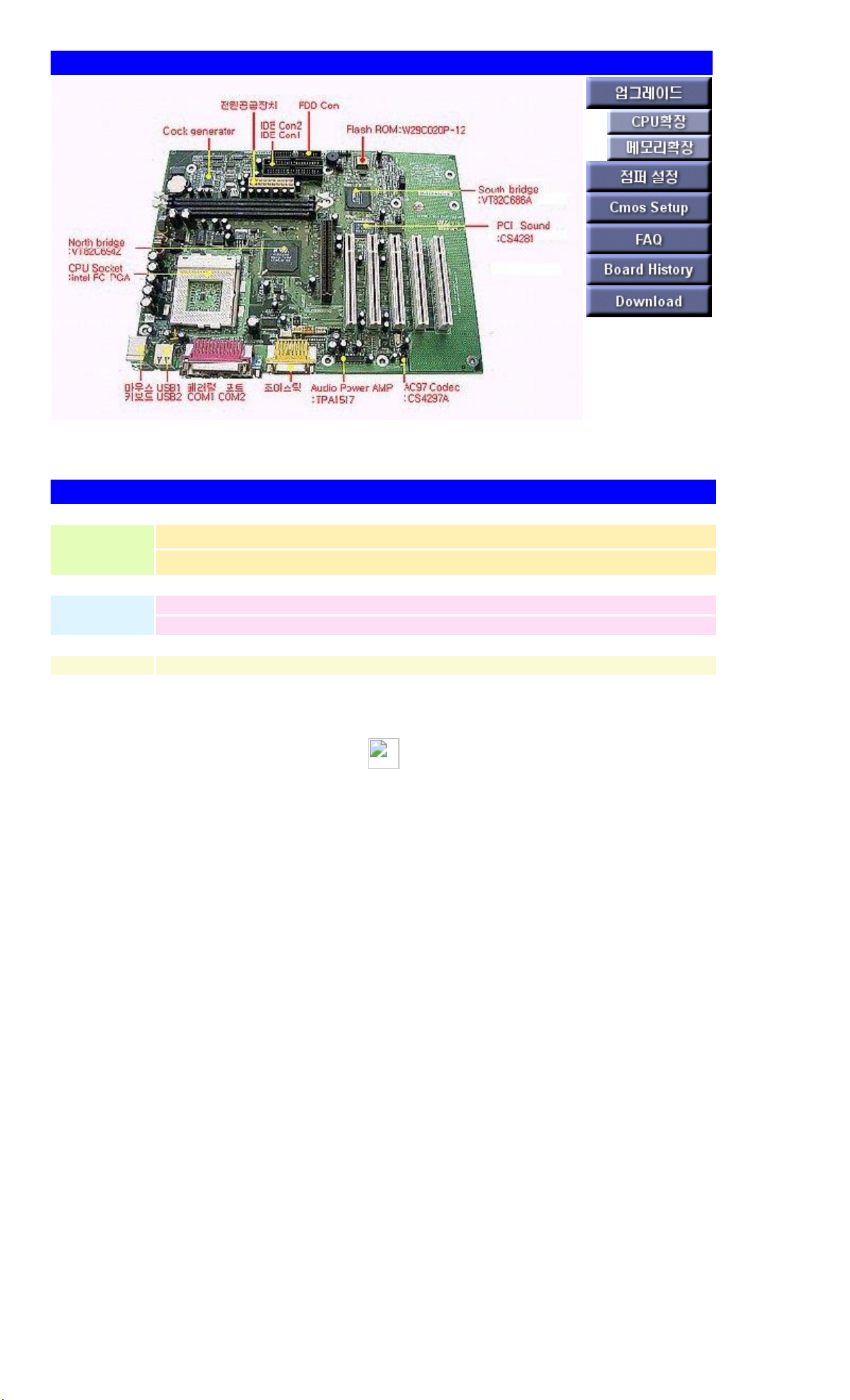
NARA-A Main Board
Features of NARA-A Main B/D
ChipSet
Main Chipset : VIA VT82C694X
PCI Audio Controller : CS4281 PCI Audio Controller / CS4297A Codec
expansion slot
4 x 120Pin Master PCI slots, 1 x Slave PCI slot
1 x AGP slot (Supports AGP 4X)
Board Size 228mm * 296mm * 1.6t(4 Layer)
Page 2

NARA-A DIP S/W setting
DIP S/W function 1-2(Default) 2-3
J6 CMOS RAM function Enable write/save Clear CMOS RAM
J7 Password function Enable password Clear password
J8
Whether or not CMOS
setting is possible
Enable Disable
J9 FDD write protect Disable Enable
J1 PCI Audio Enable(Default) Disable
Page 3

NARA-A supportable CPU (Auto Setting
division detail
socket Intel Socket-370 (370pin PGA370 Socket)
Supported Processors Cu-256K 500E MHz ~ 800EB MHz (FC-PGA Type)
Support Bus Clock 66MHz / 100MHz / 133MHz
Page 4
NARA-A memory settings
Supportable Memory Specifications
division detail
standard 168Pin 3.3V Unbuffered DIMM Type Module (SDRAM)
type Dual Inline Memory Module(DIMM) : 16M~512MB, 100/133 MHz
socket Provides two 168Pin 3.3V Unbuffered DIMM type sockets
max expandable 1GB
%. Main B/D Bus Clock supports 133MHz, but memory for PC-133 cannot be used.
Changed to NARA-A2 B/D to support memory for PC-133.
Page 5

NARA-A Main B/D CMOS SETUP
use key
Movement between
each group
Tap key
Move between each
item
Directional movement keys (cursor keys)
select each item Enter
exit the screen ESC key
When saving ALT + Space key
Help ALT + H
When booting, press DEL KEY (press when Hit DEL if you want to run SETUP message)
Level 1 Step 2 Step 3 Step 4 optional
Setup Standard At Master Type 1~46, Auto, User Type, CD-ROM, ARMD
LBA/Large
Mode
On, Off
Block Mode On, Off
32Bit Mode On, Off
PIO Mode Auto, 0~5
At Slave Same as Pri Master
Sec Master
Option of Secondary Slave HDD or CD-ROM setting. The
method is the same as Pri Master
Sec Slave
Option of Secondary Slave HDD or CD-ROM setting. The
method is the same as Pri Master
Date/Time Set date and time
Floppy A
Not / 360K 5.¼/ 1.2M 5.¼ / 720KB ½ / 1.44M ½ / 2.88M
½
Floppy B
Not / 360K 5.¼/ 1.2M 5.¼ / 720KB ½ / 1.44M ½ / 2.88M
½
Advanced If you set Boot Device to 1 st, 2 nd, 3 rd as Disabled, it will not boot.
Logo Display Enabled, Disabled
Quick Boot Enabled, Disabled
1 st Boot Device
Floppy, CD-ROM, IDE 1/2/3, ARMD-FDD, ARMD-HDD,
SCSI, Network, Disabled
2 nd Boot Device
Floppy, CD-ROM, IDE 1/2/3, ARMD-FDD, ARMD-HDD,
SCSI, Network, Disabled
3 rd Boot Device
Floppy, CD-ROM, IDE 1/2/3, ARMD-FDD, ARMD-HDD,
SCSI, Network, Disabled
Boot Up Num-Lock On, Off
PS/2 Mouse Support Disabled, Enabled
Primary Display Absent, VGA/EGA, CGA 40*25, CGA 80*25, Mono
Password Check Setup, Always
Boot to OS2 Yes, No (related to OS/2 Warp version 3.0)
Processor Serial Number Enabled, Disabled
L1 Cache Disabled, Enabled
L2 Cache Disabled, Enabled
System BIOS Cacheable
Disabled, Enabled
C000,32K Shadow
Disabled, Enabled
C800,16K Shadow
Disabled, Enabled
CC00,16K Shadow
Disabled, Enabled
D000,16K Shadow
Disabled, Enabled
D400,16K Shadow
Disabled, Enabled
D800,16K Shadow
Disabled, Enabled
DC00,16K Shadow
Disabled, Enabled
Chipset
USB Legacy surpport Disabled, Enabled
AGP Aperture Size 4MB, 8MB, 16MB, 32MB, 64MB, 128MB, 256MB
Memory Hole Enabled, Disabled (Conflicts when using ISA cards)
Power
Control
ACPI Aware O/S (applied to
some models only)
Enabled, Disabled
Page 6

Power Management/APM Enabled, Disabled
Power Button Function Suspend, On/Off
AC Power Default Status
Enabled, Disabled
Suspend Time Out Disabled, 4Min, 8Min, 508Min
PCI/PnP Plug and Play Aware OS Yes, No (whether the OS supports PnP)
Default Primary Video
Adapter
PCI/AGP Video (Select a video card to use as the main
video device when using the multi-monitor function in an
O/S that supports multi-monitor)
PCI Latency Timer(PCI
Clocks)
64
PCI VGA Palette Snoop Disabled, Enabled
Peripheral OnBoard IDE Disabled, Primary, Secondary, Both
OnBoard Serial Port 1 Auto, Disabled, 3F8h, 2F8h, 3E8h, 2E8h
OnBoard Serial Port 2 Auto, Disabled, 3F8h, 2F8h, 3E8h, 2E8h
OnBoard Parallel Port Auto, Disabled, 378h, 278h, 3BCh
Parallel Port
Mode
Normal, EPP, ECP
Parallel Port
IRQ
5, 7
Parallel Port
DMA Channel
0, 1, 3
OnBoard FDC Enabled, Disabled, Auto
Utility Detect IDE Utility(Auto Detection status)
Pri Master, Pri Slave, Sec Master, Sec Slave(HDD, CDROM 자동 검출)
Color Set
Utility
SKY, Army, Pastel, LCD
Security Supervisor
Press Enter(암호 설정)
User
Press Enter(암호 설정)
Anti-Virus(Virus Protection) Enabled, Disabled
Default Original
셋업 수행 전 상태로 복귀
Optimal
최적 환경으로 자동 설정
{button Detroit 관련 항목 보기, Klink(Detroit)}
 Loading...