

Page 1

Hardware Document
Doc_Form# :RPR404-IB1 Board Development Team
TriGem Computer Inc. 1/188 R&D Center
TriGem Micro-ATX Motherboard (Anaheim2A)
Hardware Document
February, 03, 2000
Revision 1.2
Prepared by Chang Yu
Approved by YC Park
Page 2
Hardware Document
Doc_Form# :RPR404-IB1 Board Development Team
TriGem Computer Inc. 2/188 R&D Center
Document Revision History
Released date Revision Description
August, 31 1999 Rev. 0.9 First released version for this document.
This document describes the major specification of the Anaheim2
motherboard and the functional feature to be extended by the customer.
The motherboard revision number is EVT1(PR1)
September 17,1999 Rev.1.0 Mass product version for eMachines configuration
January 27,2000 Rev.1.1 Added to Supported Processor type
Added to Sound/USB Interface to Front daughter Board
February 03,2000 Rev.1.2 I/O Controller Hub is changed.(FW82801ABÆFW82801AA)
Audio Chipset is changed. (CS4280ÆCS4281)
Form a new model Anaheim2A
Marketing Information
Address 1055 Shingil-Dong, Ansan, Kyunggi-Do, Korea
Telephone 82-345-491-9528 (International Business Team)
Fax 82-2-491-7554
82-2-495-9478
Email
dcchang
@trigem.co.kr (Dong Chun Chang)
Technical Support
Address 1055 Shingil-Dong, Ansan, Kyunggi-Do, Korea
Telephone 82-345-491-9528 (Ext. 608)
Fax 82-345-593-6721
Email ycpark@trigem.co.kr (Young chel Park)
hkbaek@trigem.co.kr (Hyenki Baek)
scyou@trigem.co.kr (Chang Yu)
User’s Notice
No part of this product, including the schematics and BIOS may be reproduced, transmitted,
transcribed, stored in a retrieval system, or translated into any language in any form by any means
without the express written permission of TriGem Computer Inc. except the document kept by the
purchaser for backup purposes.
© Copyright 2000 TriGem Computer Inc. All rights reserved
Page 3

Hardware Document
Doc_Form# :RPR404-IB1 Board Development Team
TriGem Computer Inc. 3/188 R&D Center
Contents of Table
I. Introduction
1. Generation Description ------------------------------------------------------------ 4
2. Function Block Diagram ------------------------------------------------------------ 6
II. System Overview
1. Major Units ----------------------------------------------------------------------------- 7
2. Upgrade ability ------------------------------------------------------------------------- 8
2-1. Processor -------------------------------------------------------------------------- 8
2-2. Main chipset Configuration ---------------------------------------------------- 9
2-3. Memory ----------------------------------------------------------------------------- 8
2-4. BIOS --------------------------------------------------------------------------------- 9
2-5. Expansion Slot -------------------------------------------------------------------- 9
2-6. Advanced Configuration and Power Interface (ACPI) ------------------- 10
2-7. Manufacturing Options ---------------------------------------------------------- 10
III. Jumper & Connector Description
1. Motherboard Jumper Setting ------------------------------------------------------ 11
1-1. Selection for Processor CPU Clock ------------------------------------------ 11
1-2. Other functionality --------------------------------------------------------------- 11
1-3. PCI graphics device function ------------------------------------------------- 12
1-4. OEM/ODM selector -------------------------------------------------------------- 12
2. Motherboard Connector Description --------------------------------------------- 14
2-1.Motherboard Internal Connector --------------------------------------------- 14
2-2.Motherboard External I/O Port ------------------------------------------------ 16
Page 4

Hardware Document
Doc_Form# :RPR404-IB1 Board Development Team
TriGem Computer Inc. 4/188 R&D Center
I. Introduction
The Anaheim2A Micro ATX motherboard offers a time to market consumer and corporate desktop
solution featuring the Intel Celeron PPGA or FC-PGA processor with 66/100MHz front side bus and the Whitney
chipsets in a Micro ATX low profile motherboards. In addition, the integrated onchip graphics controller supports
4MB of SDRAM purpose of Display cache memory.
The Anaheim2A motherboard was designed to be highly minimized system cost. In this effort, a smaller
form factor, Micro-ATX, gives the greater space economy and more affordable systems. Integrating onchip graphics
controller and SDRAM, as well as AC’97 audio solution with AC97 Codec onto the motherboard eliminates the
need for more expensive graphic and audio add-in cards. The end result is a system platform with a primary
component level of integration with translates into affordable solution for entry level users.
1. General description
T Motherboard
• Small PCB size in the Micro ATX form factor (ATX V1.2 form factor)
• 238mm * 238mm * 1.6t (4 Layers)
T Processor
• Intel Socket-370 (Socket-370)
- Intel Celeron 300/333/366/400/433/466/500/533MHz processor(PPGA-Type)@66MHZ Host clock
- Intel Celeron Coppermine 566/600MHz processor (FC-PGA Type) @66MHZ Host clock
- Intel TBD @100MHZ Host clock
• Cyrix Socket-370 (370pin PPGA Socket)
- Cyrix Goby TBD @66MHZ Host clock
T Main Chipset
• Graphics and Memory Controller Hub (GMCH) : Intel FW82810-DC100 / FW82810
• I/O Controller Hub (ICH) : Intel FW82801AA
• PCI Audio : Cirrus CS4281
• Audio Codec : Cirrus CS4297A-JQ
• Super I/O : ITE IT8702F-A
• DC-DC Converter : HARRIS HIP6021CB
• Clock : ICS 9250BF-10 (66/100MHz host clock,
100Mhz SDRAM Clock support)
T Memory Configuration
• System Memory
- Two banks of 3.3V SDRAM (168pin unbuffered DIMM) with max 256MB
- SDRAM operation in 100MHz front side bus
• Display Cache Memory (option)
- Two 1M*16 3.3V SDRAM (4MB)
- SDRAM operation in 100MHz
• Flash Memory
- Intel N82802AB, 4Mb PLCC Type
- Firm Ware Hub (FWH) Interface for platform operation
- Address/Address Multiplexed Interface for programming during manufacturing
T I/O Feature
• Integrated standard I/O functions in the rear side
- One multi-mode parallel port
- One FIFO serial ports and optional port by header type
- PS/2 styles keyboard and mouse port
- One USB port
- Three audio jack for Speaker output, Line input and MIC input
• Integrated standard I/O functions in the front side (Factory Option for eMachines)
- One Joystick port
- One USB port
• I/O Controller (IT8702)
- Low Pin Count (LPC) interface with Host controller (ICH)
- FDC, Parallel, Serial, keyboard/Mouse supported
Page 5

Hardware Document
Doc_Form# :RPR404-IB1 Board Development Team
TriGem Computer Inc. 5/188 R&D Center
T Audio Subsystem
• Crystal CS4281 PCI audio controller with fully DOS Games compatibility via PC/PCI, DDMA support
• Compatible with sound blaster, sound blaster pro, and window sound system
• Enhanced Stereo full duplex operation
• Advanced MPC3-compatible input and output mixer
• Joystick port and MPU-401 compatible MIDI interface
• PC97 and PC98 compliance (and compliance with preliminary PC99)
T GMCH Subsystem
• Host/Memory(DRAM) Controller features
- 66/100Mhz System Bus Frequency
- 100Mhz system memory bus frequency
- Refresh mechanism: CBR only supported
- Support for Asymmetrical DRAM addressing only
- Support for Asymmetrical DRAM addressing only
- Support for 64-bit data interface
- Suspend to RAM support
• Graphics Controller features
- 3D Hyper Pipelined Architecture (PDP, PPI)
- Full 2D H/W Acceleration
- Motion Video Acceleration
- H/W motion Compensation Assistance for S/W MPEG2 Decode
- Software DVD at 30fps
• 3D Graphics features
- Flat & Gouraud Shading
- Mip Maps with Bilinear and Anisotropic Filtering
- Fogging Atmospheric Effects
- Z Buffering
- 3D Pipe 2D Clipping
- Backface Culling
- Per Pixel Perspective Correction Texture Mapping
- Texture Compositing
- Texture Color Keying/Croma Keying
• Display features
- Integrated 24-bit 230Mhz RAMDAC
- Gamma Corrected Video
- DDC2B Compliant
• Graphics memory controller features
- Intel D.V.M Technology (Dynamic Video Memory)
• Display Cache Interface (82810-DC100 only)
T ICH Subsystem
• PCI Bus Interface
• Integrated IDE controller
• USB
• AC’97 Link for Audio and Modem
• Interrupt Controller
• Low Pin Count Interface
• SM Bus
• Firmware Hub Interface
T GMCH,ICH vs GMCH0,ICH0 Configuration Difference
GMCH, ICH
GMCH0, ICH0
Display Cache (4MB) Support
No Display Cache (4MB) Support
Up to Ultra 66 ATA Spec. Support
Up to Ultra 33 ATA Spec. Support
6 PCI Slots Support
4 PCI Slots Support
Alert on LAN Support
N/A
Page 6
Hardware Document
Doc_Form# :RPR404-IB1 Board Development Team
TriGem Computer Inc. 6/188 R&D Center
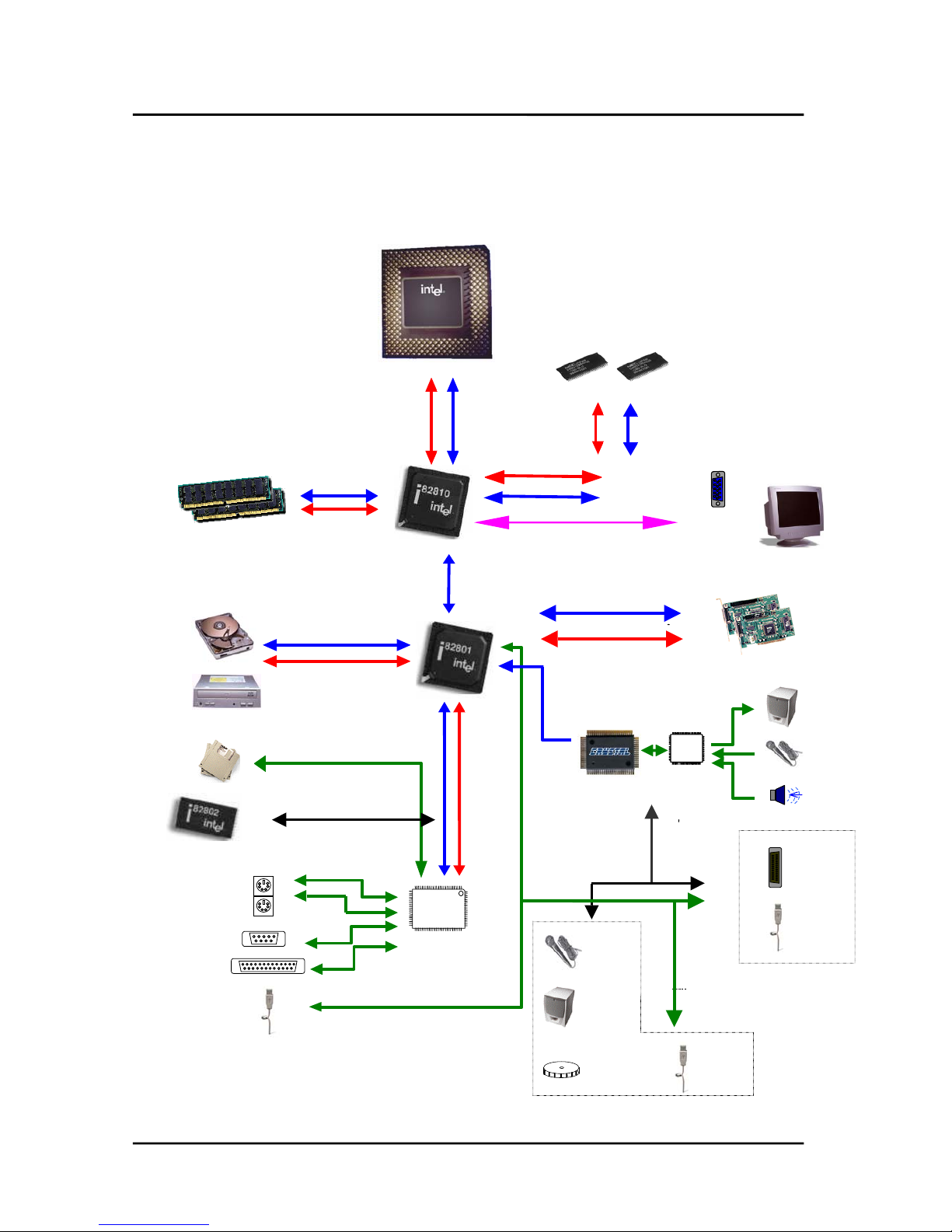
2. Function Block Diagram
DCMD
DCMA
RGB
Hub
Intel Celeron
PGA 370
DIMM Modules
MD
MA
HAHD
Video
[ Real Side
Port ]
Codec
CS4297A
HDD
CDROM
HD Data
HA Address
PCI Slot
Speaker
MIC
Line in
Keyboard
Mouse
Serial
Parallel
USB
I/O
IT8702F
SDRAM
GMCH / GMCH0
DCMD
DCMA
ICH
CS4281
USB
Joystick
AD
SD
Vol ume
Control
Speaker
MIC
USB
Option
Option
Page 7

Hardware Document
Doc_Form# :RPR404-IB1 Board Development Team
TriGem Computer Inc. 7/188 R&D Center
II. System Overview
1. Major Units
Intel
PCI sound
CS4281-CM
PGA 370
Intel
82810
Clock
ICS9250BF-10
2 DIMM
Sockets
AC97 Codec
CS4297A
Super I/O
IT8702F
Regulator
HIP6021CB4
82801
Display Cache
4M SDRAM
Battery(3V)
CR2032
CPU
Flash ROM
82802AB
Page 8

Hardware Document
Doc_Form# :RPR404-IB1 Board Development Team
TriGem Computer Inc. 8/188 R&D Center
2. Upgradeability
2-1. Processor
Anaheim2A motherboard provides the 370pin PGA370 socket that is not backward compatible with ZIF
socket-7 processors The Processor’s VID pins automatically program the voltage regulator on the
motherboard to the required processor voltage. The motherboard supports processors that run internally at
300/333/366/400 /433/466/500/533MHz.
T Supported Intel Celeron Processors (PPGA Socket Type)
• Host Clock 66MHz : Celeron 400MHz : Celeron 433MHz
: Celeron 466MHz : Celeron 500MHz
: Celeron 533MHz
: Celeron 533AMHz(FC-PGA)
: Celeron 566MHz(FC-PGA)
: Celeron 600MHz(FC-PGA)
• Host Clock 100MHz : tbd
T Supported Cyrix Goby Processors (PPGA Socket Type)
• Host Clock 66MHz : tbd
2-2. Main Chipset Configuration
Anaheim2A Motherboard has two main chipset configurations.
T 810DC100 Configuration
• GMCH + ICH : 82810DC100 + 82801AA
T 810L Configuration
• GMCH0 + ICH : 82810 + 82801AA
2-3. Memory
The motherboard has two, dual inline memory module (DIMM), minimum 16MB to maximum 256MB memory
size. The BIOS can automatically detect the memory type, size, and speed through SMBUS interface between
the core chipset and DIMM module.
The motherboard supports the following memory features
• 3.3V and unbuffered168-pin DIMM
Voltage detection
3.3V Version 5V Version
Unbuffered detection
Unbuffered Buffered
• 100MHz unbuffered SDRAM (PC100)
• Non-ECC memory only
• Single or double-sided DIMM with the following types (per each side of each DIMM)
DIMM size Non-ECC memory DIMM size Non-ECC memory
8MB 4*(1M * 16 bit) 64MB 8*(8M * 8 bit)
16MB 8*(2M * 8 bit) 64MB 4*(8M * 16 bit)
32MB 4*(4M * 16 bit) 128MB 8*(16M * 8 bit)
32MB 2*(4M * 32 bit)
Page 9

Hardware Document
Doc_Form# :RPR404-IB1 Board Development Team
TriGem Computer Inc. 9/188 R&D Center
2-4 BIOS
The motherboard uses a TriGem-Phoenix BIOS, which is stored in flash memory and can be upgraded using a
disk-based program. A new version of the BIOS can be upgraded from a diskette using the Flash Memory
Update utility.
T Flash memory organization
Address (Hex) Size Functional description
FFFF0000 – FFFFFFFF 64KB Boot block
FFF82000 – FFFEFFFF 440KB Main BIOS block
FFF80000 - FFF81FFF 8KB ESCD block
T On-board device management
The BIOS can manage the devices on the motherboard over the CMOS setup menu.
Device Description CMOS setup menu Default value
PS/2 Mouse Intel 82801AA (ICH) Enable / Disable / Auto Detect Auto Detect
Regacy USB
Function
Intel 82801AA (ICH) Enable / Disable Disable
On board FDC Super I/O (ITE8702) Enable / Disable Enable
On board serial Super I/O (ITE8702) Enable / Disable Enable
On board parallel Super I/O (ITE8702) Enable / Disable Enable
Midi port Super I/O (ITE8702) Enable / Disable / Auto Auto
Game port Super I/O (ITE8702) Enable / Disable / Auto Auto
2-5. Expansion Slot
The motherboard support PCI and GMCH function. PCI functions are extended to the additional slot with 3 PCI,
and GMCH function is designed in the motherboard with Integrated System/Graphics controller.
T PCI configuration space map
Bus number Device number Function number Device
00 30 00 Intel 82801AA(ICH) PCI Bridge
00 31 00 Intel 82801AA(ICH) LPC Bridge
00 31 01 Intel 82801AA(ICH) Bus master IDE
00 31 02 Intel 82801AA(ICH) USB Host Controller
00 31 03 Intel 82801AA(ICH) SM Bus Controller
00 31 04 Reserved
00 31 05 Intel 82801AA(ICH) AC’97 Audio Controller
00 31 06 Intel 82801AA(ICH) AC’97 Modem Controller
00 31 07 Reserved
00 00 00 Intel 82810DC100(GMCH) System/Graphics
Controller
00 01 00 Intel 82810DC100(GMCH) Internal Graphics
Device
00 0B 00 CS4281 PCI Audio
01 0E 00 PCI slot1
01 0D 00 PCI slot2
01 0C 00 PCI slot3
Page 10

Hardware Document
Doc_Form# :RPR404-IB1 Board Development Team
TriGem Computer Inc. 10/188 R&D Center
T PCI interrupt & master number routing map
Intel 82801AA (ICH) PCI bridge has four programmable interrupt request input signals. Any PCI interrupt source
connects to one of these interrupts signals and assigned to the free proper interrupt number by PnP BIOS.
ICH INT
signals
First
PCI slot
Second
PCI slot
Third
PCI slot
ICH
USB device
ICH
SM Bus
PIRQA INTA INTB INTC
PIRQB INTB INTC INTD
PIRQC INTC INTD INTA
PIRQD INTD INTA INTB INTC INTB
Master REQ0 REQ1 REQ2
IDSEL AD30 AD29 AD27
ICH INT
signals
ICH
AC’97 Audio
ICH
AC’97 Audio
GMCH
Internal Graphics Device
PIRQA
PIRQB
PIRQC
PIRQD INTB INTB INTA
Master
IDSEL
2-6. Advanced Configuration and Power Interface (ACPI)
The motherboard and system BIOS support the ACPI that requires an ACPI-aware operating system such as
Windows-NT 5.0 or Windows 98 SE. ACPI feature include
• Plug and play and APM functionality normally contained in the BIOS
• Power management control of individual devices : add-in cards, hard disk drives, USB devices, and
Video
• A soft-off feature that enables operating system to power off the computer
• Support for multiple wakeup events
• Indication LED for normal mode (Green), standby mode (Blinking Green), and suspend mode (Blinking
Green) but this function is dependent on the LED logic.
T Wakeup devices and events
Wakeup device Wakeup events and functionality
Power switch Wakeup from Power-off status and S1Status
LAN Wakeup from S1 status
Modem Wakeup from S1 status
2-7. Manufacturing Options
The motherboard has several manufacturing options according to OEM/ODM requirement. Make sure that
these options can be applied in the assembly stage, and it’s impossible to upgrade or change in the customer
field.
Option items Selectable functionality Feature changes
Joystick port
Front side / Rear side Use additional board or not
USB port
Front side / Rear side Use additional board or not
Super I/O
IT8712 / IT8702 Include H/W monitoring or not
Graphics controller
FW82810 / FW82810-DC100 Display Cache or not
Display Cache memory
None / 4MB Display Cache or not
Page 11

Hardware Document
Doc_Form# :RPR404-IB1 Board Development Team
TriGem Computer Inc. 11/188 R&D Center
III. Jumper & Connector Description
1. Motherboard Jumper Setting
1-1. Selection for Processor CPU Clock
Intel Celeron PPGA Processor is auto set the core to bus frequency ratio.
1-2. System functionality
Jumper Pin Function
1-2(Default)
2-3
J4
FDD write protect
Enable write/save Enable to
write data
Disable to write data
to Floppy disk
J5
CMOS setup function
Enable to edit CMOS
contents
Disable to edit CMOS contents
J6
CMOS RAM function
Normal
Clear CMOS RAM
J7 Audio Function(AMR) Primary_down enable Primary_down disable
J8
Password function
Enable password
disable password
1-3. PCI graphics device function
No jumper does set the functionality of the GMCH graphics controller
PCI Graphics device operates automatically if PCI Graphics card is inserted .
J1 – J8
J9
Page 12

Hardware Document
Doc_Form# :RPR404-IB1 Board Development Team
TriGem Computer Inc. 12/188 R&D Center
1-4. OEM/ODM selector
(TG Option)
These jumpers (J1, J2 & J3) will be optional parts for the OEM/ODM logo message selector of Trigem.
J2(2-3), J3(2-3),J4(2-3) Reserved J2(2-3), J3(2-3),J4(1-2) Reserved
J2(2-3), J3(1-2), J4(2-3) Reserved J2(2-3), J3(1-2), J4(1-2) Reserved
J2(1-2), J3(2-3), J4(2-3) Reserved J2(1-2), J3(2-3), J4(1-2) Reserved
BIOS
Factory
Setting
(J1,2,3)
J2(1-2), J3(1-2), J4(2-3) Reserved
J2(1-2), J3(1-2), J4(1-2)
Reserved
* Factory Default Setting - bold type text
1-5. Other option Jumper
Jumper Pin Function
1-2(Default)
2-3
J9
On board PCI Audio
Enable/Disable
Enable
Disable
Page 13

Hardware Document
Doc_Form# :RPR404-IB1 Board Development Team
TriGem Computer Inc. 13/188 R&D Center
2. I/O Header Connector Description
2-1. Motherboard Internal Connector
T CPU FAN connector (CN53)
Pin number Signal description
1GND
2FAN power
3 Tachometer (speed)
T System Chassis FAN connector (CN54)
Pin number Signal description
1GND
2 FAN control
3 Tachometer
(Speed)(GND)
1 2 3
CN53
1 2 3
CPU Fan
(CN53)
Modem Sound
(CN46,CN6)
CD Sound
(CN44)
Joystick & USB
Header (CN72)
PC/PCI
Header (CN72)
Modem wake up
(CN51)
Lan wake up
(CN50)
Indicator Header
(CN48)
Aux-Indicator
Header(CN49)
FDD Connector
(CN9)
Sec_IDE
Connector(CN11)
Pri_IDE
Connector(CN10)
ATX PSU
Connector(CN7)
Dimm Modules
(CN3,4)
Case Fan
(CN54)
Front Audio
Control Out
(CN75)
Front USB Out
(CN74)
Page 14

Hardware Document
Doc_Form# :RPR404-IB1 Board Development Team
TriGem Computer Inc. 14/188 R&D Center
T PC/PCI connector (CN23) (TG Option)
Pin Signal description Pin Signal description
1/PCGNTA 4/PCREQA
2GND 5N.C
3Key 6SER_IRQ
T Joystick & USB connector (CN72) (TG Option)
Pin Signal description Pin Signal description
1VCC 9VCC
2 GD(4) 10 GD(6)
3GD(0) 11GD(2)
4 GND 12 MIDI OUT
5GND 13GD(3)
6 GD(1) 14 GD(7)
7 GD(5) 15 MIDI IN
8VCC 16Key
1 GND 3 Positive DATA
2 Negative DATA 4 VCC
T Modem Sound (CN46, CN6) (TG Option)
Pin Signal description Pin Signal description
1MIC 4GND
2 GND 5 MONO IN
3 MONO OUT
Pin Signal description Pin Signal description
1 MONO IN 3 GND
2GND 4MIC
T CD Sound (CN43(TG Option), CN44)
Pin Signal description Pin Signal description
1GND 3GND
2 Left Sound 4 Right Sound
T LAN Wakeup (CN50) (TG Option)
Pin Signal description Pin Signal description
1 +5VSB 3 LANWK
2GND
T Modem Wakeup (CN51) (TG Option)
Pin Signal description Pin Signal description
1 Modem Ring 3 +5VSB
2GND
2 4 6
1 3 5
1 2 3 4 5
CN46
1 2 3 4
CN6
1 2 3 4
Mitsumi CD (CN44)
1 2 3 4
1 2 3 4
3 1 8 7 6 5 4 3 2 1
4 2 16 15 14 13 12 11 10 9
Page 15

Hardware Document
Doc_Form# :RPR404-IB1 Board Development Team
TriGem Computer Inc. 15/188 R&D Center
T HPD Indicator Header (CN73) (TG Option)
Pin Signal description
1NC
2GND
3 LED POWER
4NC
5 LED POWER
6 HDD access signal
7GND
8 Power-ON switch signal
T Aux. Indicator Header (CN49) (TG Option)
Pin Signal description Pin Signal description
1 Key lock Signal to Super I/O 2 GND
3 Key 4 Reset signal
5GND 6 Key
7 Sleep Function signal 8 GND
T Front Audio Control Connector (CN75) (TG Option)
Pin Signal description
1 LEFT_MIC_INPUT
2+5VA
3AGND
4 RIGHT_DAC_OUT
5 LEFT_DAC_OUT
6AGND
7NC
8NC
T Front USB Connector (CN74) (TG Option)
Pin Signal description
1VCC
2 Negative DATA
3 Positive DATA
4GND
Sleep Reset Keylock
8 7 5 4 12
1 2 3 4
Front USB (CN44)
1 2 3 4 5 4 6 7 8
Front Audio (CN75)
PWR HDD DC/SW
7 865321
Page 16

Hardware Document
Doc_Form# :RPR404-IB1 Board Development Team
TriGem Computer Inc. 16/188 R&D Center
2-2. Motherboard External I/O Port
SpeakLine-inMic in
Joystic
Printer
Port
Video
Serial
USB
Keyboard
Mouse
Page 17

Hardware Document
Doc_Form# :RPR404-IB1 Board Development Team
TriGem Computer Inc. 17/188 R&D Center
3. Joystick & USB daughter board (eMachines Option)
Joystick USB
20pin Flat Cable
4. LED & Power S/W board (eMachines Option)
Power LED color : Green (normal working)
Blinking Green (power management mode)
HDD LED color : Green light on (HDD access)
Light off (no access to HDD device)
4. USB, Sound Controller and LED & Power S/W board (SOTEC Option)
* If used USB/Sound and Power-SW Control Board to Front Port. MIC, In rear port, does not to
work. In this case, It’s to work only Front port MIC
USB MIC SPK Vol. Control
P/W LED HDD LED
Audio Connector Power/HDD LED Connector Power S/W
Power LED
Power Switch
HDD Access
LED
LED board to board
connector
Page 18

Hardware Document
Doc_Form# :RPR404-IB1 Board Development Team
TriGem Computer Inc. 18/188 R&D Center
Trademarks
Microsoft, Windows and Windows NT are registered trademarks of Microsoft Corporation.
 Loading...