

Page 1

ElEctra SerieS
charging casE
Instructional Booklet
Instruction Manual
Mode d’Emploi
Gebrauchsanweisung
Folheto de Instruções
取扱説明書
Page 2

contEnts
Features and Specs
Turning On/Off
Charging the Electra
Charging Case
Power Level Indicator
Charging Status
Charging the Device
Important Information
Warranty
Customer Service
Social Media
4
6
8
10
12
14
15
20
23
24
Page 3

charging casE
FEaturEs
LED Indicator Power Button spEcs
• Removable lithium polymer battery:
3.8V/2600mAh
• Input Voltage: DC 5.0V
• Input Current: Max 1000mA
• Output Voltage: DC 5.0V
• Output Current: 1000mA
• Cycle Life: ≥ 300 times
Charging Port
Input
Charging Port
Output
(Must be plugged
into device)
4 5
• Charges in approximately 3.5 hours
Page 4

turning on/oFF
1. Press the power button once to turn
on the Electra Charging Case. The LED
power indicator will turn on for 5 seconds,
displaying current battery life. If it is not
attached to a device within 30 seconds, it
will power off automatically.
2. When the Electra Charging Case is not
plugged into a Micro USB charging cable,
hold the power button for 2 seconds to turn
off the Electra Charging Case.
3. Sleep function: When phone and Micro
USB charging cable (not included) are not
plugged in, the Electra Charging Case will
enter sleep mode. During sleep mode,
discharge rate under 100uA.
6 7
Page 5

charging thE ElEctra
charging casE
1. Insert a Micro USB charging cable connector
(not included) into the Electra Charging Case
charging port input.
2. Insert the USB Type A connector into a USB
port of an operating computer, or insert the
Type A connector into a USB port of an AC
adapter or DC adapter (not included).
OR
OR
8 9
Page 6
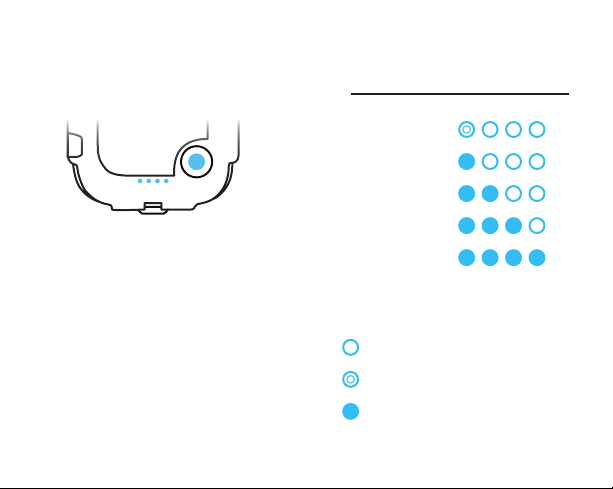
powEr lEvEl indicator
powEr indicator whilE not charging
Almost Out
1. The Electra Charging Case comes with 4
LED power level indicators.
2. Press the power button once during standby
mode and the LED indicators will light up to
show the current power level. One ashing
LED light indicates that it is almost empty.
Four solid LED lights indicate the device is
fully charged.
Fully Charged
LED Off
LED Flashing
LED On
10 11
Page 7
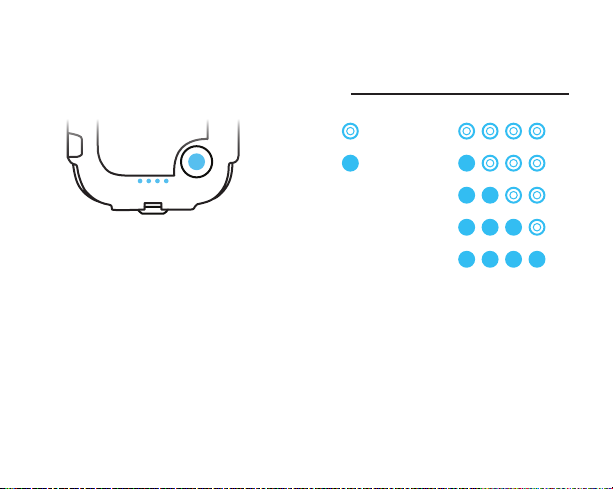
charging status
powEr indicator whilE charging
LED Flashing
LED On
1. While charging, the LED will continuously
ash, indicating that the Electra Charging
Case is charging.
2. The LED will continue to ash throughout the
charging process until the Electra Charging
Case is fully charged.
12 13
Page 8

charging thE dEvicE
important inFormation
1. When the Electra Charging Case is
plugged into a Micro USB charging cable
the default is set to charge the phone.
When charging the phone, once the phone
battery is full, Electra Charging Case
will automatically switch to charge the
external battery.
2. During the charging cycle, it is normal for
the temperature on the battery and Electra
Charging Case to be higher. Once the
charge is full, the temperature will return
to normal. During the charge cycle: battery
is ≤ 55°C (room temperature 25°C) and
Electra Charging Case is ≤ 60°C (room
temperature 25°C).
1. Failure to follow these guidelines and
instructions in Instructional Booklet, could
result in serious bodily injury, will void
this warranty, and Trident Case will not
be responsible for any loss or damage
caused by or attributable to such use.
2. Misuse of the Electra Charging Case may
cause the battery to get hot, rupture, or
ignite and cause serious injury.
3. Do not disassemble, open, or attempt
to repair the Electra Charging Case, or
related accessories.
4. Please use an adapter with an output
voltage of DC4.75V-5.25V or computer
USB port to charge the Electra Charging
Case.
5. Use only with compatible devices.
6. Do not expose the Electra Charging
Case to water or moisture, fire, high
temperature (including prolonged or
intense sunlight exposure), or low
14 15
Page 9

temperature environments. Do not put
the Electra Charging Case in microwave
ovens, stoves, high-pressure containers,
or on induction cookware. Doing so may
cause the Electra Charging Case to get
hot, rupture, or ignite and cause serious
injury.
7. Do not puncture or hit the Electra Charging
Case with any object that may cause it
to crack or open. If the Electra Charging
Case is dropped, punctured or otherwise
damaged, discontinue use immediately.
8. If the Electra Charging Case leaks uid,
do not touch the uid or allow it to
touch one’s skin or get into one’s eye. If
one’s skin is exposed to uid from the
Electra Charging Case seek medical care
immediately. If left untreated, the uid
could cause bodily damage.
9. If the Electra Charging Case does not
properly function, including overheating,
emitting unusual smell, feels hot, changes
shape, or other abnormal behaviors,
discontinue use immediately and contact
the manufacturer.
10. The Electra Charging Case and included
accessories are not for children. Parental
supervision is required.
11. Failure to follow these guidelines could
result in serious bodily injury.
12. If the Electra Charging Case, or compatible
device, does not recharge within the
specied period of time, do not continue
charging the Electra Charging Case or
compatible device, and discontinue use
immediately.
13. Accessories included with the Electra
Charging Case are for use with the Electra
Charging Case only, and not intended to
be used with other products.
14. Disposal of battery products is subject
to local, state and national laws. Please
contact your local battery recycling center
for proper procedures.
15. The charging current must be less than
the maximum charge current of 0.5C. The
discharge current must be less than the
maximum discharge current of 0.5C.
16 17
Page 10

16. Charging voltage must be less than
the maximum nominal voltage, and the
charging voltage upper limit is 4.3V (single
pack).
17. Temperature and humidity: the Electra
Charging Case works properly in
temperatures between 0°C~+45°C
for discharge, and 0°C~+45°C for
charge, relative humidity 45~85%, and
atmospheric pressure to 86kpa-106kpa.
If the Electra Charging Case will be
used for long periods of time under the
temperature of 0°C, the capacity of the
case will reduce or will cease to work
properly.
18. Since charging is done with a constant
current or a constant voltage, reverse
charging is prohibited.
19. Transportation and storage: For short
periods of less than one month, the
Electra Charging Case must be stored
in a location where the temperature
is between -20°C~55°C and relative
humidity ≤65%. For long periods of less
than three months, the Electra Charging
Case must be stored in a location where
the temperature is between -10°C~45°C
and relative humidity ≤65%. For long
periods greater than three months, the
Electra Charging Case must be stored
in a location where the temperature
is between 20°C~45°C and relative
humidity ≤65%. If the Electra Charging
Case will not be used for long periods of
time, completely charge and discharge
the battery once a month at least. Store
the battery with a 50% charge (two LED
lights).
18 19
Page 11

warranty
The Electra Charging Case is intended for
use only with compatible electronic devices
and otherwise in accordance with the
provided instructions. Any other use will void
this warranty, and Trident Case will not be
responsible for any loss or damage caused
by or attributable to such use. In addition,
if you use the Electra Charging Case with
incompatible devices or in any manner not
in accordance with the instructions, then
you agree to indemnify Trident Case and its
affiliates, suppliers and distributors against
any claims for loss or damages resulting from
such use.
This Warranty only covers the repair or
replacement of the Electra Charging Case if
it fails to operate as intended due to defects
in materials or workmanship. In no event will
Trident Case be responsible for damage to any
other electronic device, even if such damage is
caused by the Electra Charging Case.
Warranty will be void if repair has been
attempted by anyone other than an authorized
service center. Trident Case is not liable for
claims and damages that may result from the
unauthorized repair of the product. Electra is
a [registered] trademark of AFC Trident, Inc.
All other trademarks are the property of their
respective owners. All rights reserved.
Note: This equipment has been tested and
found to comply with the limits for a Class
B digital device, pursuant to part 15 of the
FCC Rules. These limits are designed to
provide reasonable protection against harmful
interference in a residential installation.
This equipment generates, uses and can
radiate radio frequency energy and, if not
installed and used in accordance with the
instructions, may cause harmful interference
to radio communications. However, there is
no guarantee that interference will not occur
in a particular installation. If this equipment
does cause harmful interference to radio or
television reception, which can be determined
20 21
Page 12

by turning the equipment off and on, the user is
encouraged to try to correct the interference by
one or more of the following measures:
•Reorientorrelocatethereceivingantenna.
•Increasetheseparationbetweenthe
equipment and receiver.
•Connecttheequipmentintoanoutletona
circuit different from that to which the receiver
is connected.
•Consultthedealeroranexperiencedradio/TV
technician for help. Modifications not expressly
approved by the manufacturer could void the
user’s authority to operate the equipment under
FCC rules.
customEr sErvicE
Are you satised with your product? Tell
us: • ¿Es satisfecho de su producto? Lo
dijiste a nosotros… • Vous êtes satisfait
de votre produit ? Dîtes-le nous… •
Você está satisfeito com o seu produto?
Informe-nos.
www.tridentcase.com
www.tridentcase.eu
www.tridentcase.jp
22 23
Page 13

social mEdia
www.facebook.com/tridentcase
www.twitter.com/tridentcase
www.youtube.com/tridentcase
www.pinterest.com/tridentcase
Google Plus: Trident Case
Instagram: @tridentcase
Vine: Trident Case
Optional Perseus A.M.S. cases available at
www.tridentcase.com
24
Page 14

European Union Consumer Protection
laws may afford additional rights.
For more information, visit their website:
DBA Trident Case. All Rights Reserved.
ec.europa.eu
1 Year limited warranty
1 Año de garantía limitada
Garantie limitée d’un an
1 ano de garantia limitada
© 2010-2014 AFC Trident™, Inc.
 Loading...