

Page 1
500TT-US-W
www.tricklestar.com
© TrickleStar
DAILY TIMER 500TT-US-W
INSTRUCTIONS (ENGLISH)
Introduction
Thank you for purchasing this TrickleStarTM product. This product
provides enhanced timer control to reduce wasteful energy
consumption of appliances, which do not include timer controls.
This product is suitable for a wide range of appliances including:
heaters, fans, water pumps, hot water urns, water coolers,
photocopiers etc.
Features
The Product has the following key features:
• 6 daily programs
• 5 minute programming increments
• Random ON/OFF security (+/- 30 minutes variance from
programmed time)
• Manual override button: temporary, for one program
period only, and permanent override.
• Integrated battery backup – rechargeable battery
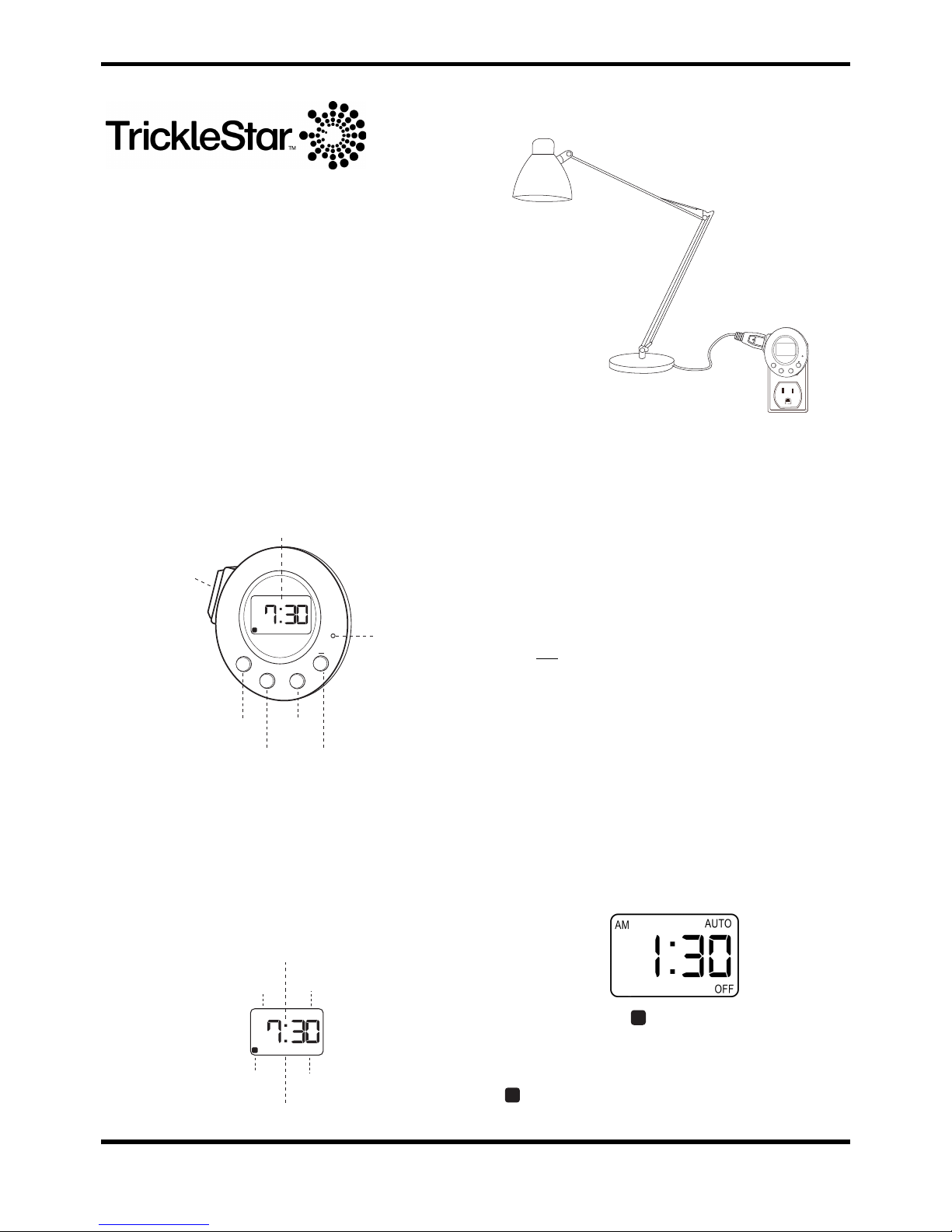
MANUAL
: change power Control Socket On/Off
SET
: set time and program
+ (UP)
: increment settings
: hold for 1 sec and time will increment continuously
- (DOWN)
: decrement settings
: hold for 1 sec and time will decrement continuously
RESET
: resets product to factory defaults
LCD Display
Application / Installation
Plug the product into a wall outlet and plug an appliance to be
controlled into the Control Socket.
Factory Default Setting
The factory default settings are:
Time “AM 12:00”, “PROG OFF” and the Control Socket will be Off.
Set Clock and Program Set-Up
To set the clock:
1. Press the ʻSETʼ button. The hour digits will flash on display.
2. Use ʻ+ʼ or ʻ-ʻ button to set the hour.
3. Press the button ʻ SETʼ again to set minutes. The minute digits
will flash on display.
4. Use the ʻ+ʼ or ʻ-ʻ button set the minutes.
If you only want to set the clock leave the display flashing for 15
seconds and the values will be stored. If you also want to make
programs then:
5. Press the ʻSETʼ button to set the first ʻONʼ program time. The
ʻPROG 1 ONʼ will appear on the display and flash.
6. Use the ʻ+ʼ or ʻ-ʻ button to set the ON time of the first program.
When pressing the ʻ+ʼ or ʻ-ʻ button the time will
increment/decrement with 5 minute intervals.
7. Press the SET button again to set the first program OFF time.
The ʻPROG 1 OFFʼ will appear on the display and flash.
8. Use the ʻ+ʼ or ʻ-ʻ button set the first program OFF time.
9. Pressing ʻ+ʼ and ʻ -ʻ buttons simultaneously will cancel the
current program setting.
10. Repeat step 5-9 to set up additional ON/OFF times (up to 6).
11. When wanted programs have been made leave the display
flashing for 15 seconds, the product will leave the setting
mode automatically programs stored.
Random Mode
Random Mode varies programmed ON/OFF times by +/- 30
minutes.
Press the ‘SET’ and ‘MANUAL’ button simultaneously to switch
between Normal Mode and Random Modes.
appears in the display when Random On/Off Mode is active.
AM
OFF
Manual
Button
Set
Button
Up
Button
Down
Button
Reset
+
MANUAL
SET
RESET
R
Control
Socket
LCD
Display
AM
OFF
AUTO
AM / PM
Time
ON
PM
PROG 123456
Program
Number
R
Auto Mode
Status
Random Mode
Status
Control Socket
Status
307
!"
#$$
+
!"#$"%
&'(
)'&'(
:
R
R
Page 2
500TT-US-W
www.tricklestar.com
© TrickleStar
Manual Override
Using the MANUAL button you can toggle between Program Mode
(Auto will appear in display), Manual ON (ON will appear in
display) and Manual OFF (OFF will appear in display).
If the product has been set to Manual and is returned to Program
Mode, the Control Socket will stay in its current state until a
Program is executed where the Control Outlet is programmed to
change state.
Note that the Manual Override will cancel the Random On/Off
function.
Restore Factory Defaults
Press the Reset Button to clears all timer settings.
Battery
The product contains a rechargeable battery to store settings if
power is removed. If no text is displayed plug the product into a
wall receptacle for 1 hour to recharge the battery.
If the battery is fully discharged, the factory defaults will be
restored.
Electrical and Environmental Specifications
Voltage
125 VAC / 60Hz
Power Rating:
8A / 1000W – Resistive Load
4.6A / 575W – Inductive Load
Operating Temperature
0° to 45°C
Storage Temperature
-10ºC to 70ºC
Operating Humidity
5 to 95% N/C
IMPORTANT SAFETY NOTICES
• Fans or other appliances with exposed elements should not
be left unattended.
• FOR INDOOR USE ONLY
• SUITABLE FOR NON-CONDENSING ENVIRONMNENTS
ONLY.
Approvals
US ELECTRICAL & SAF ETY
OTHER
ETL
2002/95/EG (RoHs)
2002/96/EC (WEEE)
1999/5/EC (RTTE)
Warranty
www.tricklestar.com/warranty
Copyright & Disclaimer
© TrickleStar Ltd. All rights reserved.
TrickleStarTM is a registered trademark of TrickleStar Ltd.
Disclaimer: TrickleStar reserves the right to change specifications
or designs described in this manual without notice and without
obligation. Any typographical, clerical or other error or omission in
this document or other documents or information issued by
TrickleStar shall be subject to correction without any liability on the
part of TrickleStar without notice.
Conserving Energy. Improving Life
www.tricklestar.com
 Loading...