

Page 1
Z-Wave Remote Control Instructions
200ZW-US-W & 200ZW-EU-W
© 2008 Copyright TrickleStar Ltd.
All rights reserved.
TrickleStar is a registered trademark of TrickleStar Ltd.
All other logos and trademarks are the property of their respective owners.
Disclaimer: TrickleStar reserves the right to change specifications or designs described in this manual without
notice and without obligation. Any typographical, clerical or other error or omission in this document or other
documents or information issued by TrickleStar shall be subject to correction without any liability on the part of
TrickleStar without notice.
Save Money. Save Power. Saver Earth
www.tricklestar.com
Page 2

Z-Wave Remote Control Instructio ns
TrickleStar Ltd 2008 2
Contents
1 Introduction ................................................................................................................................................................................ 3
2 Product Overview.......................................................................................................................................................................4
3 Specifications ............................................................................................................................................................................. 5
3.1 Specifications & Approvals ................................................................................................................................................5
4 Getting Started ...........................................................................................................................................................................6
4.1 Battery – Charging & Indication.........................................................................................................................................6
4.2 Configuration and Operation Mode....................................................................................................................................6
4.3 Device Installation & Set-Up Recommendations ............................................................................................................... 7
4.4 Including Devices to a Network ......................................................................................................................................... 7
4.5 Excluding Devices from a Network....................................................................................................................................8
4.6 Associating Devices to Remote Operation Buttons ........................................................................................................... 8
4.7 Clearing Group Association............................................................................................................................................... 9
4.8 Enabling All On / Off Functionality.....................................................................................................................................9
4.9 Resetting the Controller..................................................................................................................................................... 9
4.10 Operation – On / Off / Dim............................................................................................................................................10
4.11 Operation - All On / Off................................................................................................................................................. 10
5 Advanced Features ..................................................................................................................................................................10
5.1 Replicating Network Information to another Controller .................................................................................................... 10
5.2 Replicating Network Information from another Controller................................................................................................11
5.3 Create Assigned Association........................................................................................................................................... 12
5.4 Remove Assigned Association ........................................................................................................................................ 12
5.5 Other Advanced Z-Wave Network Management Features..............................................................................................13
6 Troubleshooting ....................................................................................................................................................................... 13
7 FCC Statement.......................................................................................................................................................................... 13
8 Warranty.................................................................................................................................................................................... 14
9 WEEE......................................................................................................................................................................................... 15
10 Glossary................................................................................................................................................................................. 16
Page 3

Z-Wave Remote Control Instructio ns
TrickleStar Ltd 2008 3
1 Introduction
Thank you for purchasing this TrickleStar product.
With this product you will be able to control a range of Z-Wave™ devices.
Z-Wave™ is an interoperable two way RF mesh networking technology.
The TrickleStar Remote Control is a Z-Wave™ enabled device and is compatible with Z-Wave™ enabled devices from a
range of manufacturers. Each device in a Z-Wave™ network is designed to act as a repeater. Repeaters can re-transmit
the RF signal to ensure that the signal is received by its intended destination by routing the signal around obstacles and
radio dead spots.
The Z-Wave Remote Control is designed to be used with a range of other Z-Wave compliant devices such as dimmers,
drape controllers and motorised screens. The product is simple yet supports a range of Z-Wave network functionality.
A Configuration Switch changes between Normal Mode and Configuration Mode. In Configuration Mode the product can
Include, Exclude and create / remove Assigned Associations, as well as replicate the Routing Table to and from other ZWave devices. This makes it ideal as a small, inexpensive and simple to use Portable Controller for installing and
configuring Z-Wave networks. The product can act as a Z-Wave Inclusion Controller in networks containing a Z-Wave
Static Controller (SIS) such as Gateways, Controls Panels, Set Top Boxes etc.
The product has 2 buttons available with On/Off or Arrow Up/Down buttons. The 2 state buttons control a single load or a
Group and provides confidence of the state that they are switching controlled loads to - as opposed to a simple one button
toggle type remote control. The buttons can be configured to provide On/Dim Up, Off/Dim Down or All On/Off switching.
The product is powered by a rechargeable lithium battery.
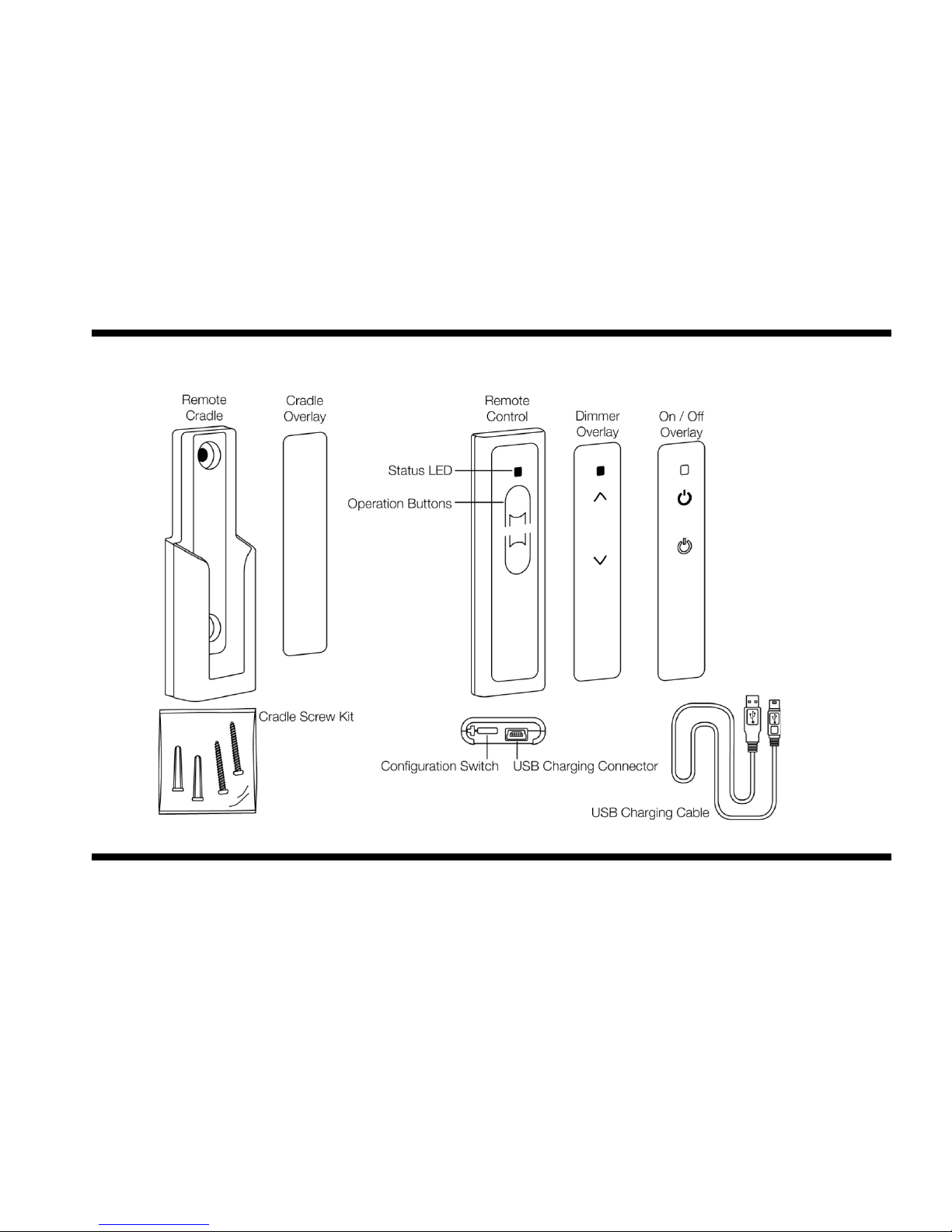
The product includes a mini USB connector (which is hidden under a rubber end cap) to allow for recharging via a standard
PC / Apple Mac USB port. The product can be wall mounted using the wall-mounting cradle.
Page 4
Z-Wave Remote Control Instructio ns
TrickleStar Ltd 2008 4
2 Product Overview
Page 5
Z-Wave Remote Control Instructio ns
TrickleStar Ltd 2008 5
3 Specifications
3.1 Specifications & Approvals
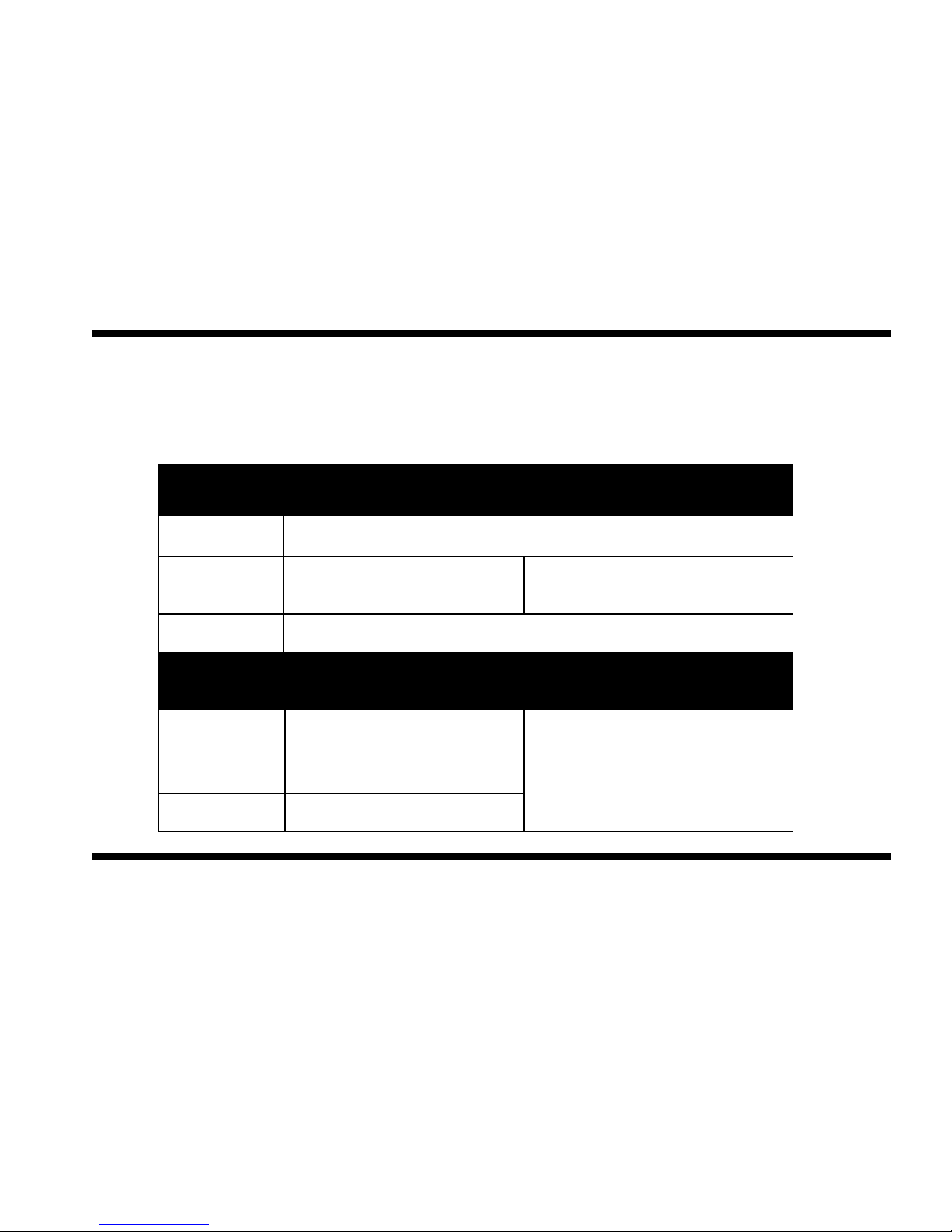
Z-Wave Protocol Release 5.01
Operating Temp 0° to 45°C
EU
US
RF Data Rate
9.6kbps / 40kbps
RF Frequency
9.6kbps:868.42 MHz
40kbps: 868.40 MHz
9.6kbps:908.42 MHz
40kbps: 908.40 MHz
RF Range
Typical 30 meters
RF
Other
EU
CE
US
FCC, CSA
2002/95/EG (RoHs)
2002/96/EC (WEEE)
1999/5/EC (RTTE)
Z-WaveTM Certified
Page 6
Z-Wave Remote Control Instructio ns
TrickleStar Ltd 2008 6
4 Getting Started
4.1 Battery – Charging & Indication
Before using the Remote Control, the battery must be fully charged to obtain the maximum battery lifetime.
1. Open the Rubber Cap at the bottom of the remote.
2. Insert the mini USB connector on the supplied USB Cord into the USB connector in the remote.
3. Connect the USB A connector of the USB cord to any USB port on a PC or other devices having a standard
USB port.
4. Charge the battery for 4 hours to fully charge the battery.
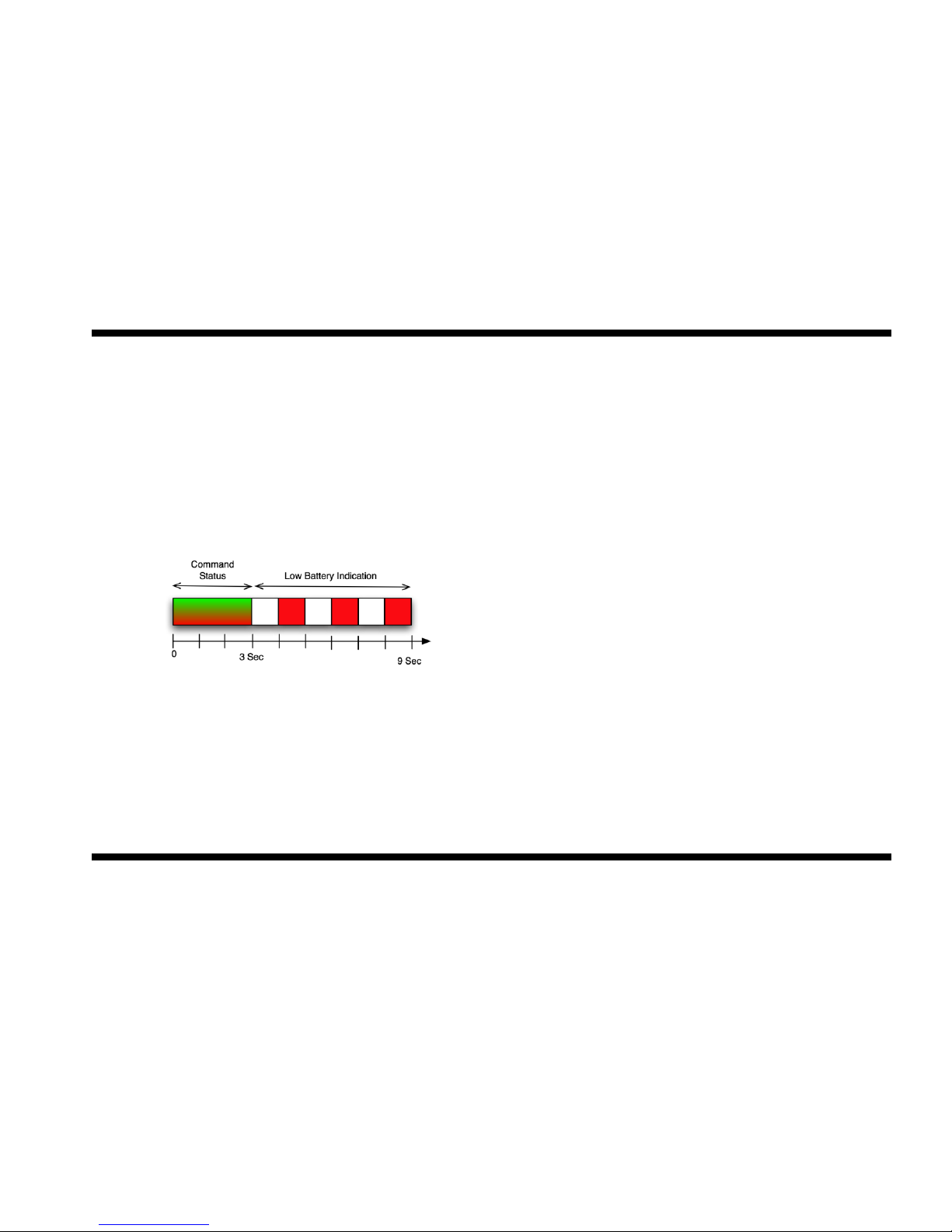
When the battery level is low, the LED Indicator will blink Red 3 times (1 sec On, 1 sec Off, 1 sec On etc.) after Operation.
When the Remote is being charged, the LED Indicator will blink Green as long the battery is being charged. When fully
charged, the LED Indicator will extinguish.
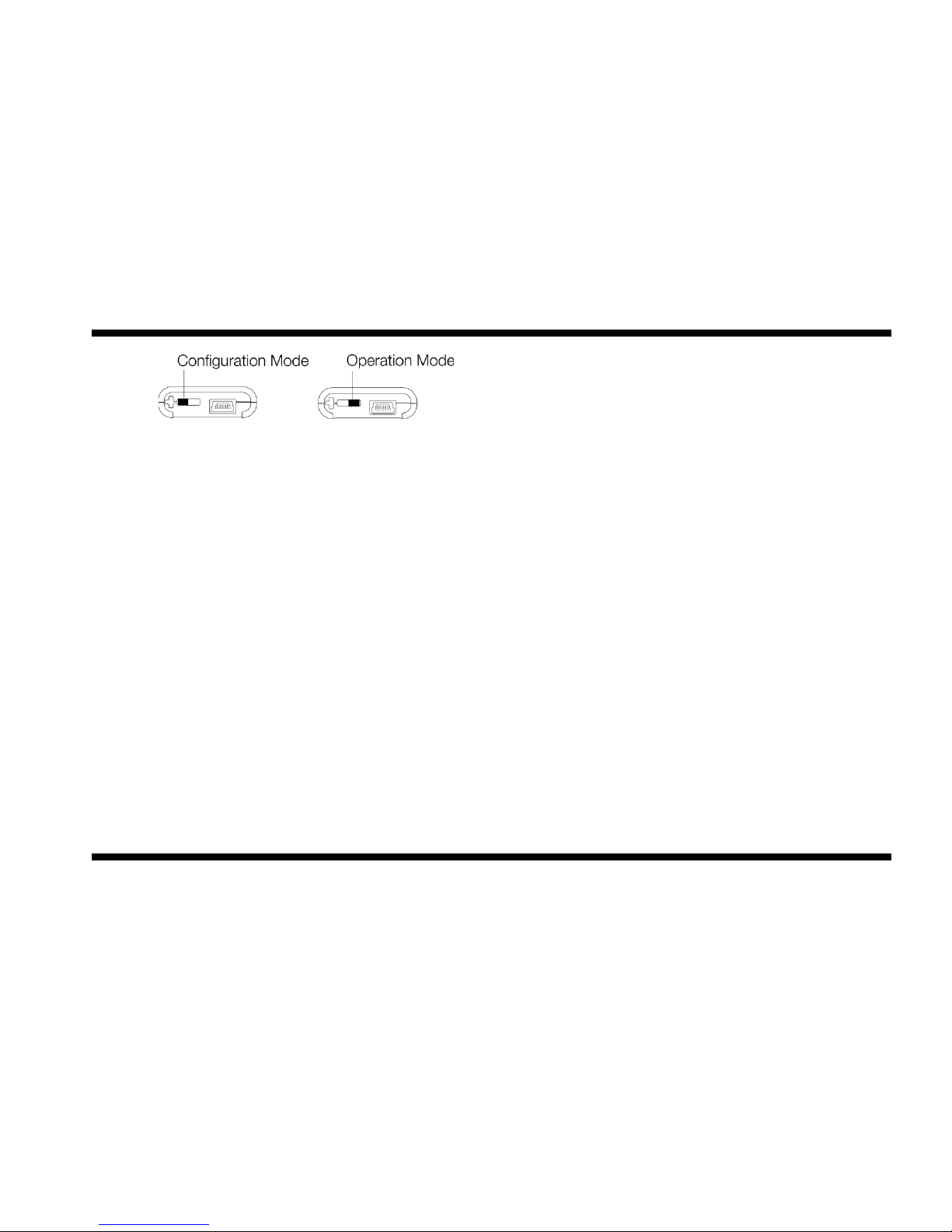
4.2 Configuration and Operation Mode
To access the Configuration Switch gently open the Rubber Cap at the bottom of the remote.
Slide the Configuration Switch to the left for Configuration Mode.
Slide the Configuration Switch to the right for Operation Mode.
Page 7
Z-Wave Remote Control Instructio ns
TrickleStar Ltd 2008 7
4.3 Device Installation & Set-Up Recommendations
Z-Wave Modules should be plugged-in or hardwired into the location where they will be used.
For best results, do not move or relocate modules after they have been Included into the network. If you wish to re-locate
or move a module from a particular location, first delete it from the network, then include it back to the network after you
have re-located it.
Some Z-Wave Devices only permit a maximum range of 6 ft. between the Remote Control and the Device being Included
as they communicate with low radio transmission power when in their Inclusion mode.
Always make sure that ALL devices to be inserted into a Network have been Reset.
Devices which have already been Included into a network, cannot be Included into a new Network before the have been
Excluded/Reset.
4.4 Including Devices to a Network
1. Put the Configuration Switch in “Configuration Mode”.
2. Press-and-hold “Up” Operation button for 2 seconds to enter Configuration Mode. LED Indicator will illuminate
Green.
3. Short-press the “Up” Operation Button one time to put the device into Inclusion Mode.
4. Press the Inclusion Initiator of the Device to be Included.
5. LED Indicator on the Remote will illuminate Green when device is successfully included and illuminate Red if
the operation is unsuccessful.
Repeat steps 2-5 for each Device to be Included to the Network.
Note: When a Device is Included to the Network it cannot be controlled by the Remote as is must be Associated to the
Remote Operation Buttons.
Page 8

Z-Wave Remote Control Instructio ns
TrickleStar Ltd 2008 8
4.5 Excluding Devices from a Network
1. Put the Configuration Switch in “Configuration Mode”.
2. Press-and-hold “Up” Operation button for 2 seconds to enter Configuration Mode. LED Indicator will illuminate
Green.
3. Short-press the “Down” Operation Button one time to put the device into Exclusion Mode.
4. Press the Exclusion Initiator of the Device to be Included (normally the same button as the Inclusion Initiator).
5. LED Indicator on the Remote will illuminate Green when device is successfully excluded and illuminate Red if
the operation is unsuccessful.
Repeat steps 2-5 for each Device to be Excluded from the Network.
Note 1: When the Device is Excluded from the Network it can be moved to another location and be re-Included to the
same Network or be Included into another Network.
Note 2: When Excluding a Device from a Network, its Association to the Operations Buttons will also be deleted.
4.6 Associating Devices to Remote Operation Buttons
1. Put the Configuration Switch in “Configuration Mode”.
2. Press-and-hold “Up” Operation button for 2 seconds to enter Configuration Mode. LED Indicator will illuminate
Green.
3. Press the Association Initiator of the Device to be Associated to the Remote Operation Buttons (normally the
same button as the Inclusion Initiator).
4. LED Indicator on the Remote will illuminate Green when device is successfully Associated and illuminate Red
if the operation is unsuccessful.
Repeat steps 2-4 for each Device you wish to Associate to the Remote Control Operation Buttons.
Note: Dimmer devices already Associated to the Remote Operation Buttons will start to Dim Up when additional devices
are Associated to the Operation Button by long pressing the “Up” Operation Button.
Page 9

Z-Wave Remote Control Instructio ns
TrickleStar Ltd 2008 9
4.7 Clearing Group Association
Devices which are Associated to the Group Buttons can be cleared by:
1. Put the Configuration Switch in “Configuration Mode”.
2. Press-and-hold “Up” Operation button for 2 seconds to enter Configuration Mode. LED Indicator will illuminate
Green.
3. Short-press the “Up” Operation Button three times within 1.5sec to put the device into Clear Group
Associations Mode.
LED Indicator on the Remote will illuminate Green when Group Associations are cleared successfully and illuminate Red if
the operation is unsuccessful.
4.8 Enabling All On / Off Functionality
The Remote control can act as an All On / All Off Controller, which allows all the devices in the Network to be turned On or
Off at the same time.
1. Put the Configuration Switch in “Configuration Mode”.
2. Press-and-hold “Up” Operation button for 2 seconds to enter Configuration Mode. LED Indicator will illuminate
Green.
3. Short-press the “Up” Operation Button five times within 2.5sec to configure the device to become an All
On/Off Controller.
Note 1: All Associations which have previously been made to the Operation Buttons will be deleted.
Note 2: If one or more Associations are made as described in 4.5 the All On/Off functionality will automatically be disabled.
4.9 Resetting the Controller
1. Put the Configuration Switch in “Configuration Mode”.
2. Press-and-hold “Up” Operation button for 2 seconds to enter Configuration Mode. LED Indicator will illuminate
Green.
Page 10

Z-Wave Remote Control Instructio ns
TrickleStar Ltd 2008 10
3. Press-and-hold “Up” Operation button for 10 seconds - this will initiate a reset of the Controller. LED Indicator
will alternate Red, Yellow and Green while remote is being reset.
4. LED Indicator on the Remote will illuminate Green when Reset is successfully completed and illuminate Red
if the operation is unsuccessful.
4.10 Operation – On / Off / Dim
ON: Press-and-release the ʻUpʼ button.
OFF: Press-and-release the ʻDownʼ button.
DIM UP: Press-and-hold the ʻUpʼ button (LED Indicator will blink Green).
DIM DOWN: Press-and-hold the ʻDownʼ button (LED Indicator will blink Yellow).
When an operation is completed successfully (all Associated devices were controlled) the Remote Control LED Indicator
will illuminate Green for 3 sec. and Red for 3 sec. if the operation was unsuccessful.
Note: Relay devices (binary switches) will stay in their current state when dimming up or down.
4.11 Operation - All On / Off
When Remote Control is configured as an All On/Off controller:
ALL ON: Press-and-release the ʻUpʼ button.
ALL OFF: Press-and-release the ʻDownʼ button.
5 Advanced Features
5.1 Replicating Network Information to another Controller
In basic Z-Wave Networks two types of Controllers exist:
(1) Primary Controllers and
(2) Secondary Controllers.
Page 11

Z-Wave Remote Control Instructio ns
TrickleStar Ltd 2008 11
The Primary Controller is the one containing the updated Network Information. Every time Network changes are made
(Devices Included or Excluded) the Network Information of the Primary should be Replicated to all the Secondary
Controllers to obtain optimal network performance.
To Replicate the Network from the Remote Control (if Primary) to another Controller (Secondary) the following steps should
be followed:
1. Put the Switch in “Configuration Mode”.
2. Press-and-hold “Up” Operation button for 2 seconds to enter Configuration Mode. LED Indicator will illuminate
Green.
3. Short-press the “Up” Operation Button one times within 1sec to put the device into Replication Transmit
Mode.
4. Press the Controller Replication Receive initiator on the Secondary Controller.
5. Replication will start and Remote Control LED Indicator will blink Green when transferring Network
Information.
6. LED Indicator on the Remote will illuminate Green for 3 sec when Replication is completed successfully and
illuminate Red if the operation is unsuccessful.
5.2 Replicating Network Information from another Controller
To Replicate the Network to the Remote Control (if Secondary) from another Controller (Primary) following steps should be
followed:
1. Put the Switch in “Configuration Mode”.
2. Press-and-hold “Up” Operation button for 2 seconds to enter Configuration Mode. LED Indicator will illuminate
Green.
3. Short-press the “Up” Operation Button once within 1sec to put the device into Replication Transmit Mode.
4. Press the Controller Replication Transmit initiator on the Primary Controller.
5. Replication will start and Remote Control LED Indicator will blink Green when transferring Network
Information.
Page 12

Z-Wave Remote Control Instructio ns
TrickleStar Ltd 2008 12
6. LED Indicator on the Remote will illuminate Green for 3 sec when Replication is completed successfully and
illuminate Red if the operation is unsuccessful.
5.3 Create Assigned Association
1. Put the Switch in “Configuration Mode”.
2. Press-and-hold “Up” Operation button for 2 seconds to enter Configuration Mode. LED Indicator will illuminate
Green.
3. Short-press the “Up” Operation Button two times within 1sec to put the device into Assigned Association
Mode.
4. With Remote Control in hand press the Association Initiator on the Device to be controlled.
5. With Remote Control in hand press the Association Initiator on the Device controlling the other device.
LED Indicator on the Remote will illuminate Green when Assigned Association is successfully and illuminate Red if the
operation is unsuccessful.
5.4 Remove Assigned Association
1. Put the Switch in “Configuration Mode”.
2. Press-and-hold “Up” Operation button for 2 seconds to enter Configuration Mode. LED Indicator will illuminate
Green.
3. Short-press the “Down” Operation Button two times within 1sec to put the device into Assigned DisAssociation Mode.
4. With Remote Control in hand press the Association Initiator on the Device to be controlled.
5. With Remote Control in hand press the Association Initiator on the Device controlling the other device.
LED Indicator on the Remote will illuminate Green when Assigned Dis-Association is successfully and illuminate Red if the
operation is unsuccessful.
Page 13
Z-Wave Remote Control Instructio ns
TrickleStar Ltd 2008 13
5.5 Other Advanced Z-Wave Network Management Features
The TrickleStar Remote Control has a range of Automatic Network Management features, which can assist in more robust
network performance. For detailed description and configuration options please go to www.tricklestar.com
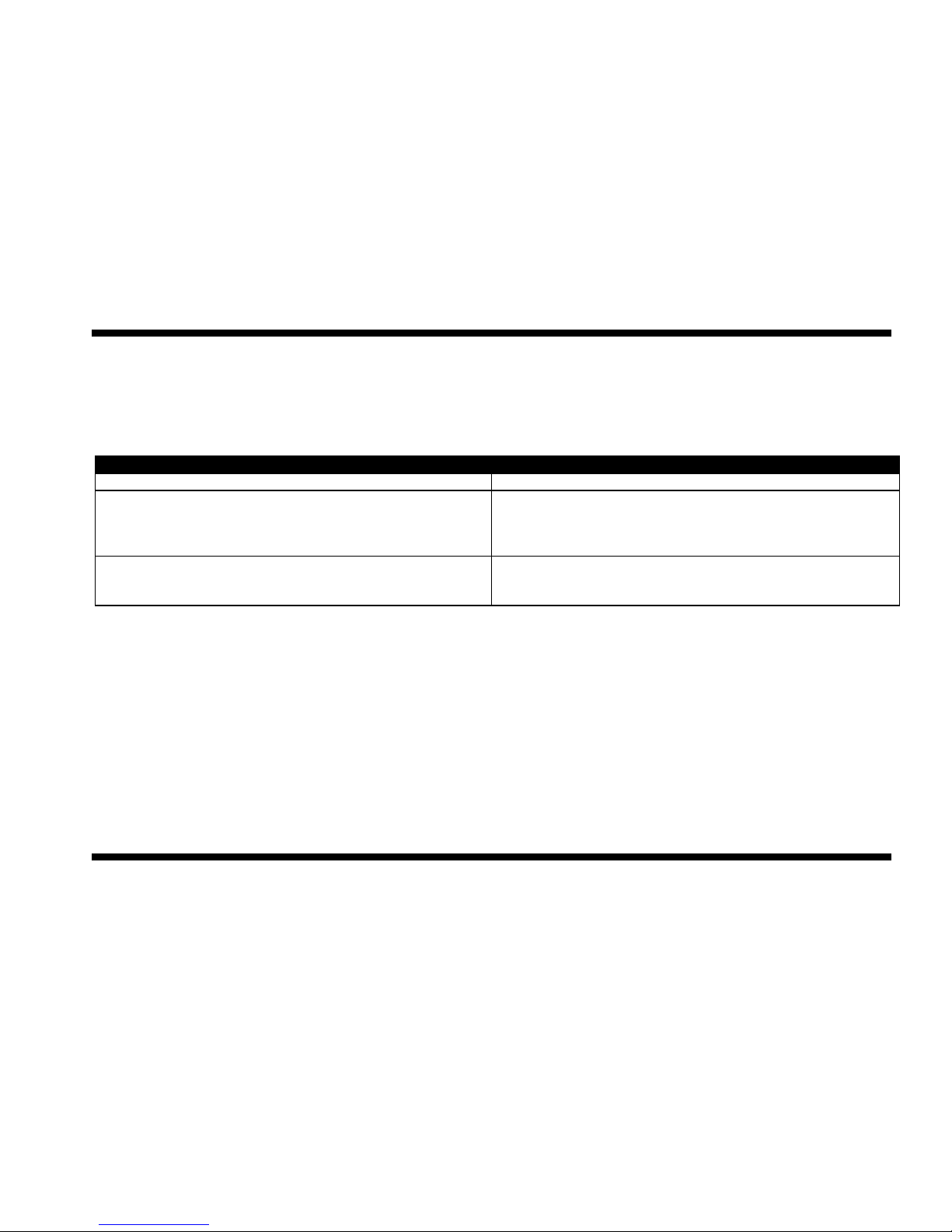
6 Troubleshooting
Problem
Solution
I cannot Switch On, Off or Dim my devices.
The switch might be in “Configuration Mode” position
Every time I try to Include Devices to my network, I keep
getting errors (Red LED)
The controller might be a Secondary Controller. Only a Primary
Controller may be used to Include Devices into a network.
The module might be part of a different network. Reset the
Device by performing an Exclude.
I am trying to turn On/Off a Device Associated to the
Operation Button, but it will not turn On/Off.
Check to be sure there is power supplied to the Device.
• The module might not have be Associated to the Operation
Buttons. Try to create an Association.
7 FCC Statement
This device complies with part 15 of the FCC rules. Operation of this device is subject to the following conditions;
• This device may not cause harmful interference, and
• This device must accept any interference including
interference that may cause undesired operation.
Note: This equipment has been tested and found to comply with the limits for a Class B digital device, pursuant to Part 15 of the FCC
Rules. These limits are designed to provide reasonable protection against harmful interference in a residential installation. The
equipment generates, uses and can radiate radio frequency energy and if not installed and used in accordance with the instructions,
may cause harmful interference to radio communications. However, there is no guarantee that interference will not occur in a
particular installation. If this equipment does cause harmful interference to radio or television reception, which can be determined by
turning the equipment on and off, the user is encouraged to try to correct the interference by one or more of the following measures;
Page 14

Z-Wave Remote Control Instructio ns
TrickleStar Ltd 2008 14
• Reorient or relocate the receiving antenna or device.
• Increase the separation between the equipment and the receiver.
• Connect the equipment into an outlet on a different circuit to which the receiver is connected.
• Consult TrickleStar or an experienced radio / TV technician for help.
8 Warranty
Unless specified otherwise, TrickleStar warrants that TrickleStar Products will be free from defects in materials and
workmanship affecting normal use for a period of one year from invoice date (“Standard Warranty”). This warranty is
extended to the original purchaser only and is not transferable.
This Standard Warranty does not cover damage, fault, failure or malfunction due to external causes, including accident,
abuse, misuse, problems with electrical power, servicing not authorized by TrickleStar, usage and/or storage and/or
installation not in accordance with Product instructions, normal wear and tear, act of God, fire, flood, war, act of violence or
any similar occurrence. Any attempt by any person other than TrickleStar personnel or any person authorized by
TrickleStar, to adjust or repair the Products shall void the warranty.
During the one-year period beginning on the invoice date, TrickleStar will repair or replace Products returned to
TrickleStarʼs facility. Customer must prepay shipping and transportation charges, and insure the shipment or accept the
risk of loss or damage during such shipment and transportation. TrickleStar will ship the repaired or replacement products
to Customer freight prepaid.
TrickleStar does not give any warranty that the Products are fit for any particular purpose and this Standard Warranty is
given in place of all warranties, conditions, terms, undertakings and obligations implied by statute, common law, trade
usage, course of dealing or otherwise including warranties or conditions of merchantability, fitness for purpose, satisfactory
quality and/or compliance with description, all of which are hereby excluded to the fullest extent permitted by law.
If any provision of these Terms and Conditions is held by any competent authority to be invalid or unenforceable in whole
or in part, the validity of the other provisions of these Terms and Conditions and the remainder of the provisions in question
shall not be affected thereby. Where implied conditions and warranties cannot be excluded due to local trade practices
legislation,
TrickleStarʼs liability for breach of such conditions and warranties shall be limited, at TrickleStarʼs option, to
Page 15

Z-Wave Remote Control Instructio ns
TrickleStar Ltd 2008 15
(a) in the case of products, the replacement of the products or the supply of equivalent products; the repair of such
products; the payment of the cost of replacing the products or of acquiring equivalent products; or the payment of the cost
of having the products repaired OR (b) in the case of services, the supplying of services again; or the payment of the cost
of having the services supplied again. TrickleStarʼs total liability in respect of each event or series of connected events
shall not exceed the total price paid for the purchase of product/s.
TrickleStar shall not be liable for Products not being available for use, or for data or software which is lost, corrupted,
deleted or altered. TrickleStar shall not be liable to the Customer for any incidental, indirect, special or consequential
damages arising out of or in connection with the purchase, use or performance of products or services, even if TrickleStar
has been advised of their possibility.
9 WEEE
This product complies with the WEEE Directive (2002/96/EC) marking requirements. The affixed label indicates that you
must not discard this electrical / electronic product in domestic household waste. Product Category: With reference to the
equipment types in the WEEE Directive Annex 1, this product is classed as category 9 “Monitoring and Control
Instrumentation product”.
DO NOT DISPOSE IN DOMESTIC HOUSEHOLD WASTE.
To return unwanted products, contact the manufacturers website shown on the product or your local sales office or
distributor.
Page 16

Z-Wave Remote Control Instructio ns
TrickleStar Ltd 2008 16
10 Glossary
Association: a ʻbindingʼ between the Remote Operation Buttons and a Device, i.e. On, Off, Dim Up, Dim Down etc.
Device: Any item that is Associated to the Controller
Group: A “Group” is a group of devices, which are controlled simultaneously by the Group Operation Buttons. The Remote
controls up to 32 Devices in the Group.
Primary Controller: The first Controller used to setup the a Network in a Primary/Secondary Controller network. It contains
network information about other devices within the Network. Only Primary Controller can Include Devices to a Network.
Secondary Controller: Additional Controller used in a Network. It contains network information about other devices within
the Network. Primary Controllers cannot Include new Devices to a Network.
Inclusion Controller: Controller within a SUC/SIS Network used to configure a Network. It contains network information
about other devices within the Network.
Include: Devices Included into a Network using a Primary/Inclusion Controller is inserted into the Network and can be there
after be controlled by the Devices in the Network.
Exclude: Devices Excluded from a Network using a Primary /Inclusion Controller is removed from the Network and can no
longer be controlled by the Devices in the Network.
Page 17

FCC ID: V8MTS200ZW
FCC Compliance and Advisory Statement
This device complies with Part 15 of the FCC rules. Operation is subject to the following two
conditions:(1) this device may not cause harmful interference, and (2) this device must accept
any interference received, including interference that may cause undesired operation.
This equipment has been tested and found to comply with the limits for a Class B digital device,
according to Part 15 of the FCC rules. These limits are designed to provide reasonable
protection against harmful interference in a residential installatio n. This equipment generates,
uses and can radiate radio frequency energy and if not installed and used in accordance with
the instructions, may cause harmful interference to radio communications. However, there is
no guarantee that interference will not occur in a particular installation. If this equipment does
cause harmful interference to radio or television reception, which can be determined by turning
the equipment off and on, the user is encouraged to try correct the interference b y one or more
of the following measures:
1.Reorient the receiving antenna.
2.Increase the separation between the equipment and receiver.
3.Connect the equipment into and outlet on a circuit different from that to which the receiver is
connected.
4.Consult the dealer or an experienced radio/TV technician for help.
Any special accessories needed for compliance must be specified in the instruction manual.
Warning: A shielded-type power cord is required in order to meet FCC emission limits and
also to prevent interference to the nearby radio and television reception. It is essential that
only the supplied power cord be used. Use only shielded cables to connect I/O devices to this
equipment.
CAUSION: Any changes or modifications not expressly approved by the party responsible for
compliance could void your authority to operate the equipment.
 Loading...