

Page 1
Mode d’emploi & Garantie
Owner’s manual & Warranty
475 Avenue Flandres Dunkerque - ZI Les Étomelles
02200 Villeneuve-Saint-Germain FRANCE
TRIANGLE Hi-Fi
Page 2

Page 3

SOMMAIRE / SUMMARY
MODE D’EMPLOI - FRANÇAIS 5
• Déballage et contenus 6
• Précautions d’installation et mise en place 7
• Branchements des enceintes 8
• Descriptif de l’enceinte 9
• Descriptif de la télécommande 11
• Désactiver le témoin lumineux 11
• Guide d’installation réseau 12
• Mise en route 13
• Installation Wi-Fi 13
• Présentation de l’application mobile 14
• Connexion des sources 20
• En cas de panne 25
• Foire aux Questions 26
• Spécifications techniques 27
• Instructions de sécurité 52
• Garantie 54
USER MANUAL - ENGLISH 29
• Unpacking and contents 30
• Installation precautions and set up 31
• Connecting the speakers 32
• Speaker description 32
• Remote control description 35
• Deactivate front LED 35
• Network setup guide 36
• Getting started 37
• Wi-Fi configuration 37
• App overview 38
• Connecting sources 44
• Troubleshooting 49
• Frequently Asked Questions 50
• Technical informations 51
• Safety instructions 53
• Warranty 54
33
Page 4

Page 5

MODE D’EMPLOI
FR
FRANÇAIS
5
Page 6
FR
DÉBALLAGE
Ouvrir le carton puis sortir les enceintes.
Lors du déballage, si vous remarquez un défaut sur un élément, contactez votre revendeur.
Vos enceintes sont des objets précieux, il est recommandé de les manipuler avec
précaution. Avant de jeter les emballages, vérifiez qu’il ne reste rien à l’intérieur.
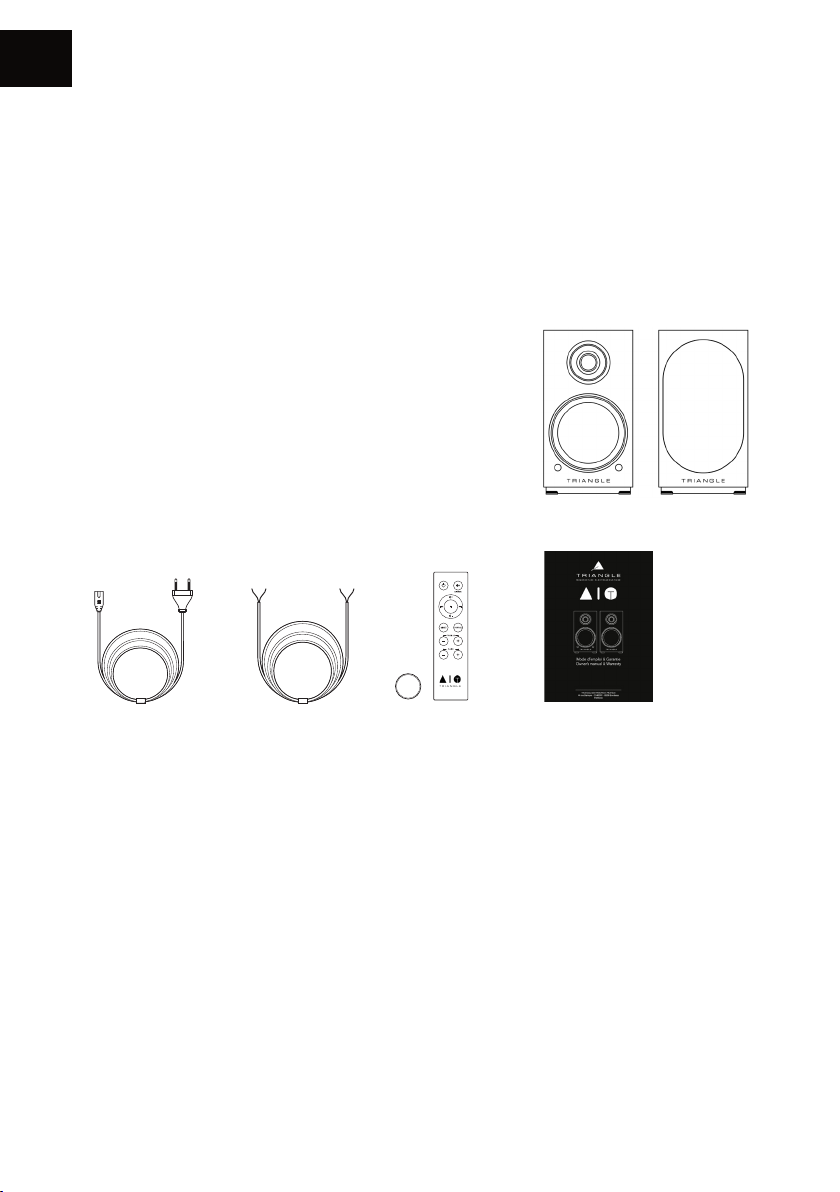
CONTENU DU PACK
• 1 x enceinte active AIO TWIN* (A)
• 1 x enceinte passive AIO TWIN* (B)
• 2 x grilles de protection aimantées*
• 1 x câble d’alimentation secteur
• 1 x câble HP de 3m pour la liaison des enceintes
• 1 x télécommande avec pile (réf: CR2032)
• 1 x mode d’emploi
CR2032
A B
* Pour un usage optimal et une parfaite reproduction du son, il est recommandé de retirer les grilles
aimantées lors de l’écoute.
6
Page 7

PRÉCAUTIONS D’INSTALLATION
Avant l’installation
Avant de procéder à tout branchement sur vos enceintes AIO TWIN, vérifiez la stabilité des
supports. Veillez toujours à mettre l’interrupteur de l’enceinte active sur OFF avant de retirer ou de
brancher des câbles de connexion. Ne pas brancher le cordon d’alimentation avant d’avoir terminé
toutes les connexions.
Déplacement de l’appareil
Toujours débrancher le cordon d’alimentation et déconnecter les câbles de connexion entre tous
les autres composants audio lors du déplacement de l’appareil. Ceci afin d’éviter un court-circuit
ou l’endommagement des prises et des câbles de connexion.
Emplacements à éviter
Évitez de placer vos enceintes à proximité de lieux humides ou exposés à un ensoleillement
excessif. Il est préférable de les placer dans un endroit tempéré.
Recyclage
Protection de l’environnement : vos produits contiennent de nombreux matériaux valorisables ou
recyclables. Utilisez pour ces produits des points de collecte appropriés.
FR
7
Page 8
FR
CONNECT
BRANCHEMENT DES ENCEINTES
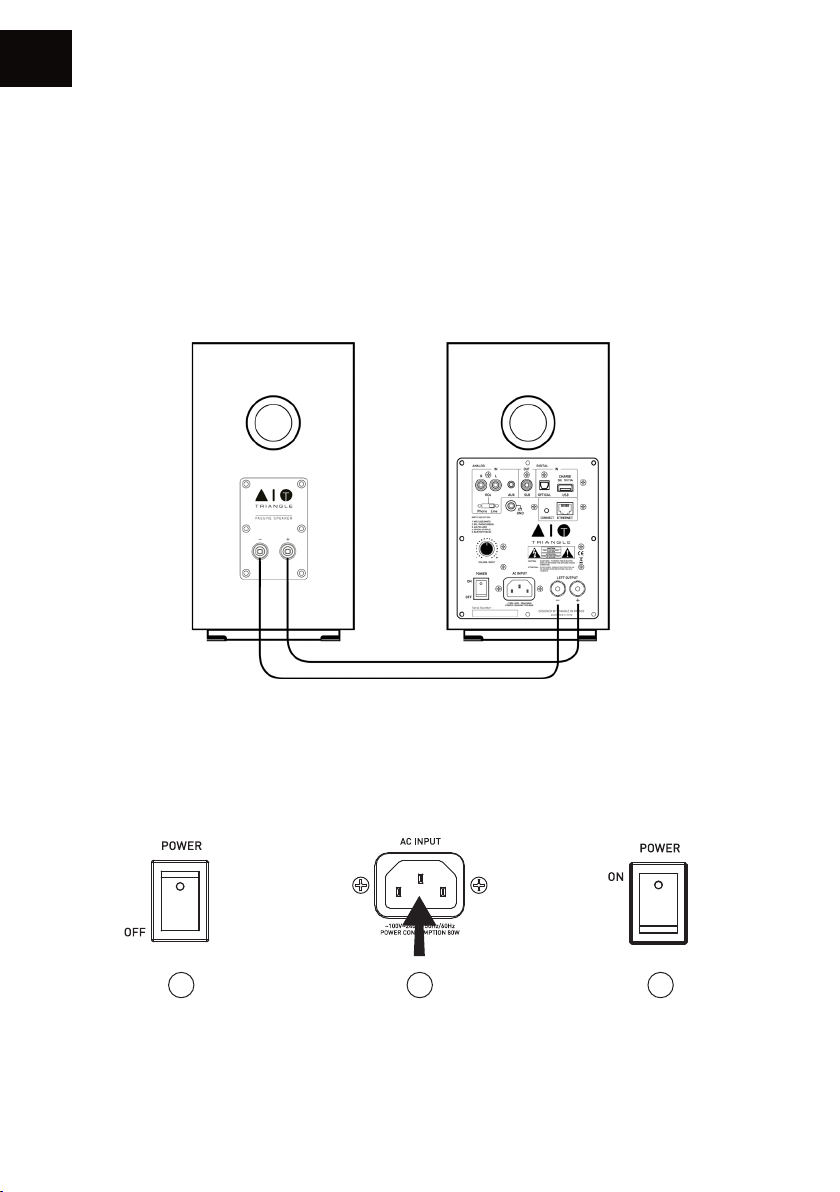
Les enceintes doivent être connectées l’une à l’autre grâce au câble HP fourni. (Câble noir portant
la mention «High performance OFC cable»).
Veillez à respecter la polarité des enceintes : Les bornes rouges et noires de l’enceinte passive et
active doivent être connectées respectivement entre elles. Pour faciliter la mise en place, le câble
de liaison comporte une inscription «TRIANGLE High performance OFC cable» dédiée à la borne
rouge (+).
Mise sous tension
Après avoir vérifié que l’amplificateur sur l’enceinte active est bien sur la position «OFF», branchez
le câble d’alimentation sur la prise dédiée puis sur une prise secteur. Allumez ensuite l’enceinte
active, vos enceintes sont prêtes à être écoutées.
1 2 3
8
Page 9
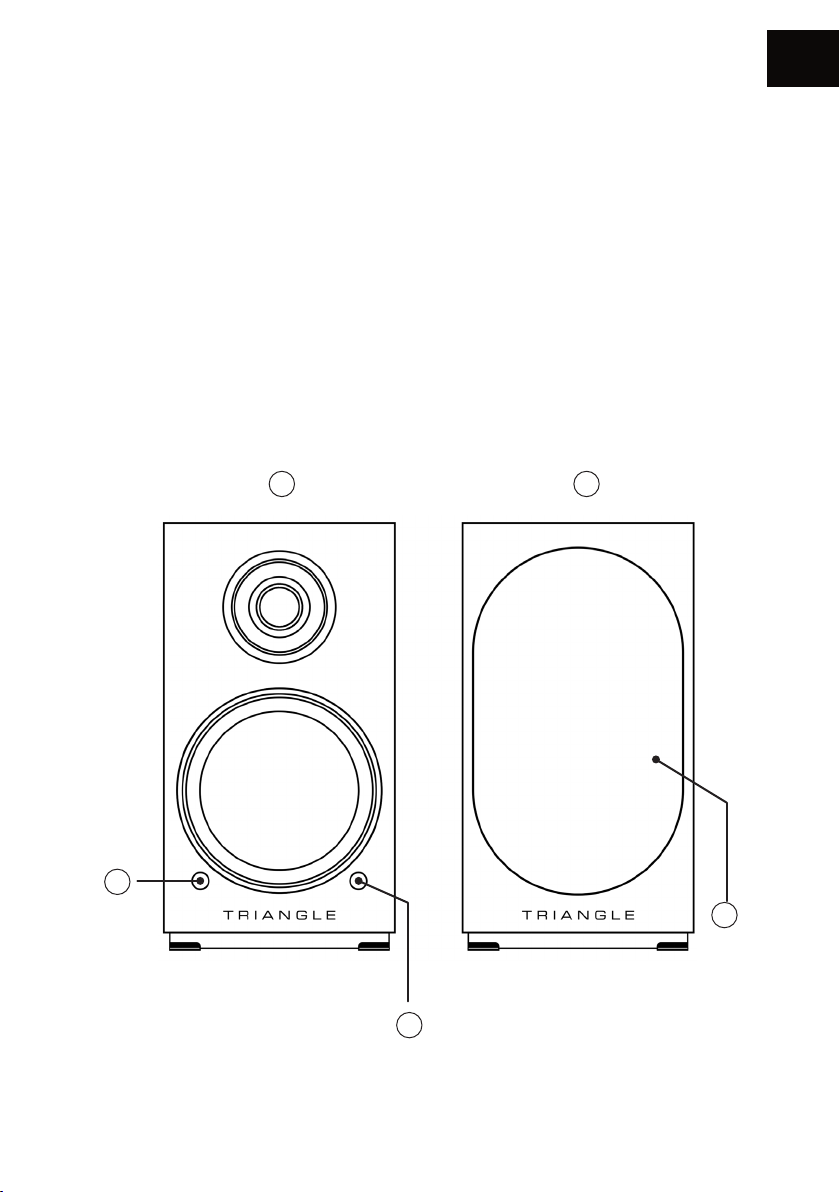
DESCRIPTIF ENCEINTE (FACE AVANT)
1. Enceinte active
2. Enceinte passive
3. Récepteur infra-rouge
4. Indication sources :
Wi-Fi / USB : LED Blanche
RCA / Phono : LED Verte
Auxiliaire : LED Jaune
Optique : LED Violette
Bluetooth : LED Bleue
Veille : LED Rouge
5. Grille de protection aimantée*
1 2
FR
4
5
3
* Pour un usage optimal et une parfaite reproduction de son, il est recommandé de retirer les grilles
magnétiques lors de l’écoute.
9
Page 10
FR
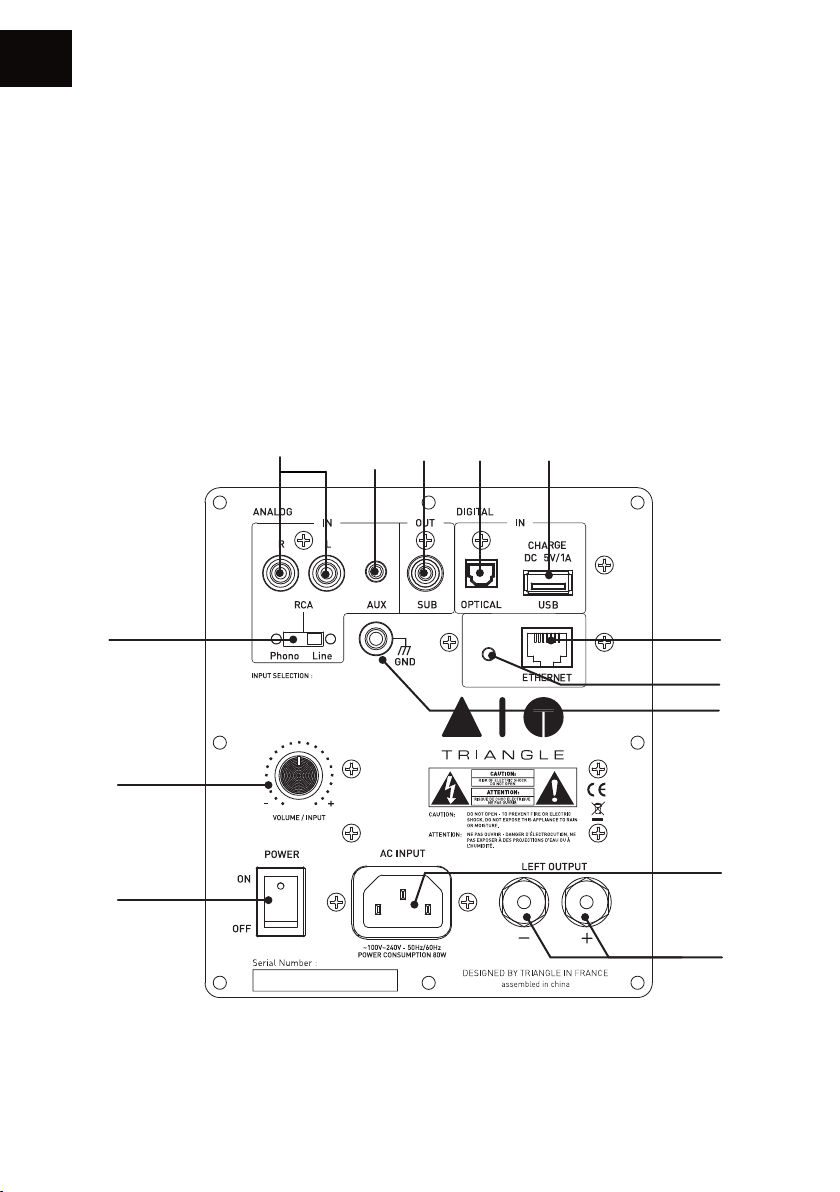
DESCRIPTIF ENCEINTE (FACE ARRIÈRE)
1. Entrée RCA (line/phono (MM))
2. Entrée auxiliaire (Mini-Jack 3.5mm)
3. Sortie subwoofer
4. Entrée optique TOSLINK
5. Entrée USB / Recharge
6. Sélecteur RCA (line/phono (MM))
7. -> Réglage du volume
->Sélection de la source par pression
8. Interrupteur Marche/Arrêt
1 2 3 4 5
9. Prise secteur
10. Bornier de connexion de l’enceinte passive
11. Prise RJ45 pour câble Ethernet
12. Appairage Wi-Fi
13. Connecteur de masse entrée phono
6
1. WIFI / USB (WHITE)
2. RCA / PHONO (GREEN)
3. AUX (YELLOW)
4. OPTICAL (PURPLE)
5. BLUETOOTH (BLUE)
CONNECT
11
12
13
7
9
8
10
10
Page 11
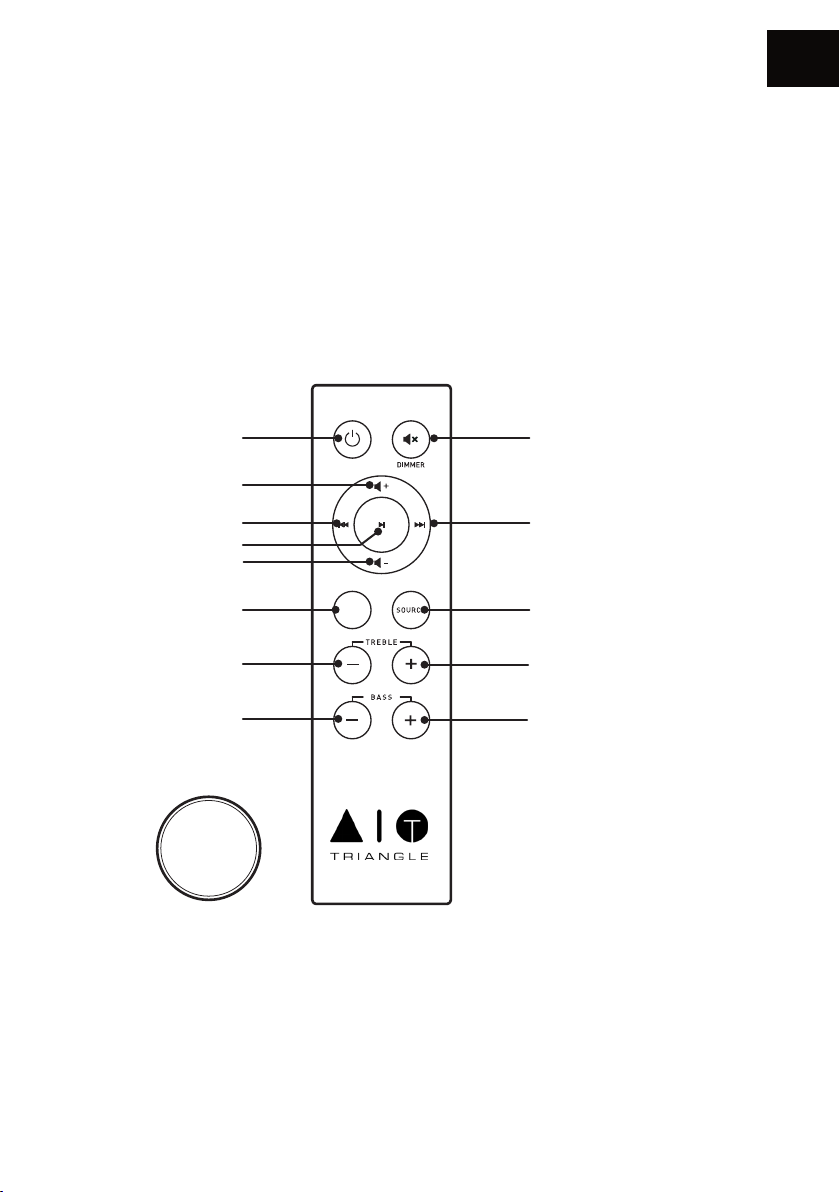
DESCRIPTIF TÉLÉCOMMANDE
1. Mise en veille / Marche
2. Augmenter le volume
3. Diminuer le volume
4. Mettre en lecture / pause
5. Piste précédente
6. Piste suivante
7. Réinitialiser le réglage des basses et des
aigus
FR
8. Mode sourdine
9. Sélection de la source
10. Diminuer les aigus
11. Augmenter les aigus
12. Diminuer les basses
13. Augmenter les basses
12
1
2
5
4
3
7
EQ
RESET
8
6
9
1110
13
CR2032
Lors de l’utilisation de la télécommande, diriger cette dernière vers le récepteur situé en façade de
l’enceinte active. La LED en façade clignote sous l’action de la télécommande.
DÉSACTIVER LE TÉMOIN LUMINEUX
Pour désactiver le témoin lumineux, faite un appui long de 6 secondes sur le bouton « Sourdine
» et relâcher ce bouton. Le témoin lumineux clignotera uniquement lors de l’utilisation de la
télécommande
11
Page 12
FR
GUIDE D’INSTALLATION RÉSEAU
Téléchargez l’application TRIANGLE AIO sur votre magasin d’application (App Store pour iOS ou
Google Play pour Android.
appareil mobile.
Vous devez disposer d’une box connectée à internet en haut-débit afin de profiter au mieux des
services de streaming.
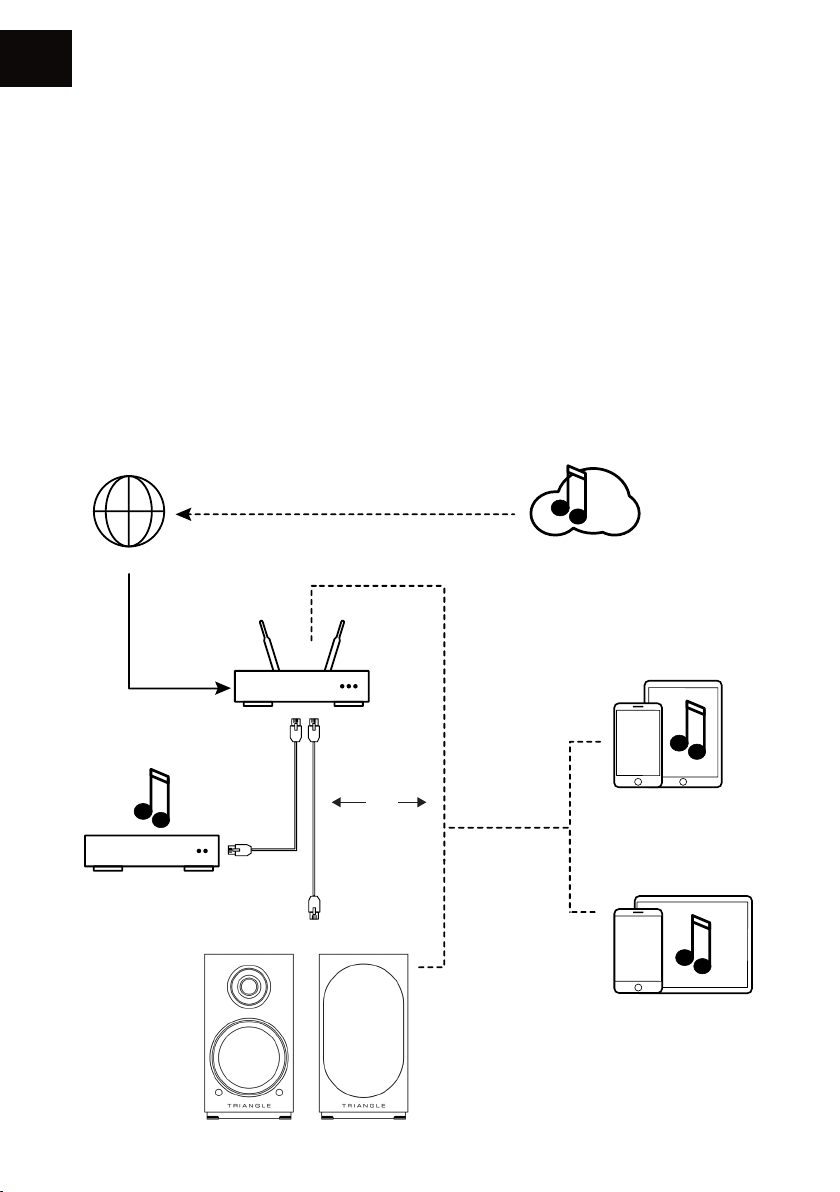
Les enceintes AIO TWIN peuvent être branchées à votre réseau internet au choix :
• par un câble Ethernet (non fourni) entre la box de votre fournisseur internet et l’enceinte
active AIO TWIN, dans ce cas, allez directement p.14.
• par une liaison sans fil Wi-Fi entre la box de votre fournisseur et l’enceinte active AIO TWIN.
Pensez à bien vérifier la qualité de réception de votre réseau Wi-Fi pour le placement de votre
produit, une mauvaise réception peut nuire à la fluidité et la qualité d’écoute (voir p.21 « Information
sur l’appareil »). Votre appareil mobile doit être connecté au même réseau Wi-Fi que celui de votre
système AIO.
Vous devez autoriser l’application à lire le contenu musical de votre
INTERNE T
NAS
BOX - ROUTEU R
AIO TWIN
Ou
Wi-Fi
Services de streaming
eaming
Appareil iOS
Appareil Android
12
Page 13
MISE EN ROUTE
Branchez le câble d’alimentation de vos AIO TWIN à la prise de courant. Appuyez sur le bouton Power.
• Une fois le produit initialisé, la LED blanche s’illumine et 3 notes de musique retentissent.
NE FAITES AUCUNE ACTION AVANT CETTE ÉTAPE.
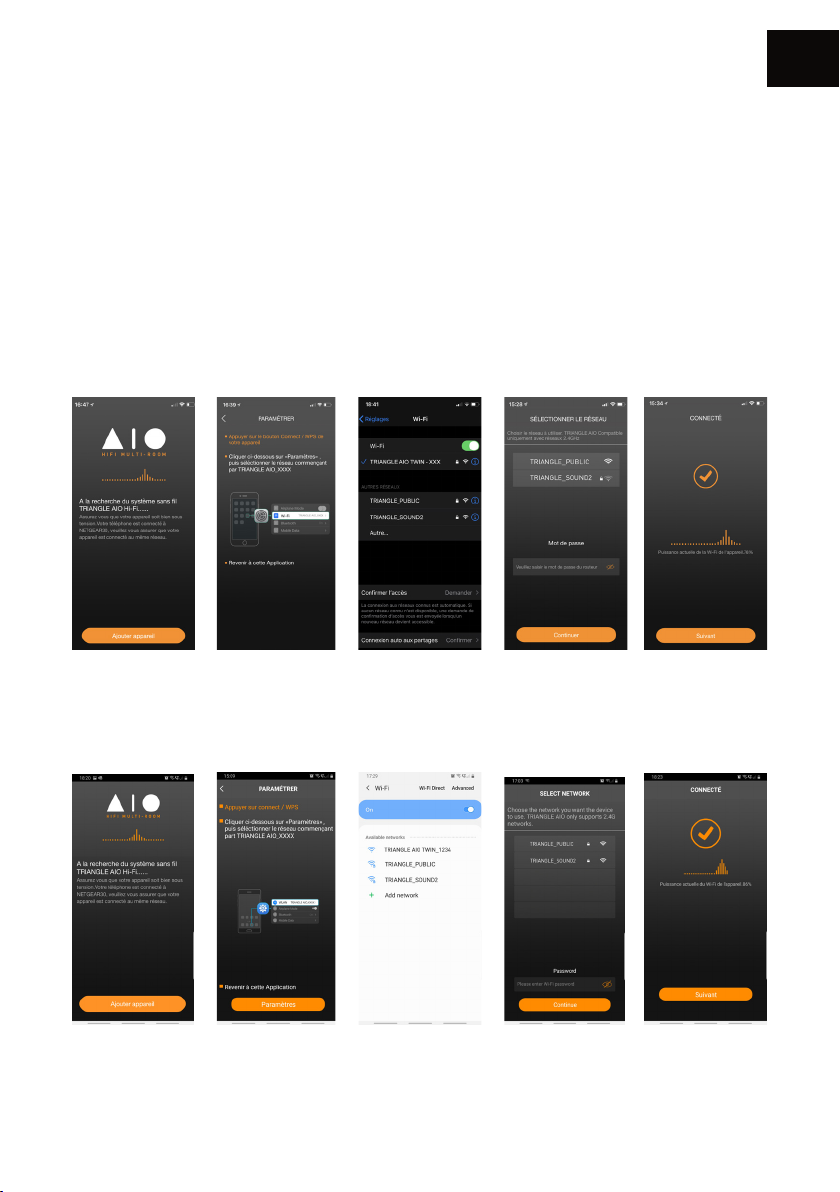
INSTALLATION Wi-Fi
• Appuyez sur le bouton Connect de votre enceinte active AIO TWIN sur la face arrière de
l’enceinte active.
• Lancez l’application puis suivez les instructions suivantes :
Pour les produits iOS
FR
1. Appuyez sur
«Ajouter appareil».
2. La fenêtre suivante
s’affic he. Allez ensuite
dans la fenêtre de
paramétrage Wi-Fi de
votre appareil
Pour les produits Android
1. Appuyez sur
«Ajouter appareil».
2. La fenêtre suivante
s’affiche.
Cliquez sur paramètres
3. Sélectionnez le
réseau Wi-Fi :
«TRIANGLE AIO TWIN-xxx»
revenez sur l’application
TRIANGLE AIO
3. Sélectionnez le
réseau Wi-Fi :
«TRIANGLE AIO TWIN-xxx»
revenez sur l’application
TRIANGLE AIO
13
4. Sélectionnez
votre réseau Wi-Fi et
indiquez le mot de
passe associé.
4. Sélectionnez
votre réseau Wi-Fi et
indiquez le mot de
passe associé.
5. Vos AIO TWIN sont
prêtes à fonctionner.
4. Vos AIO TWIN sont
prêtes à fonctionner.
Page 14
FR
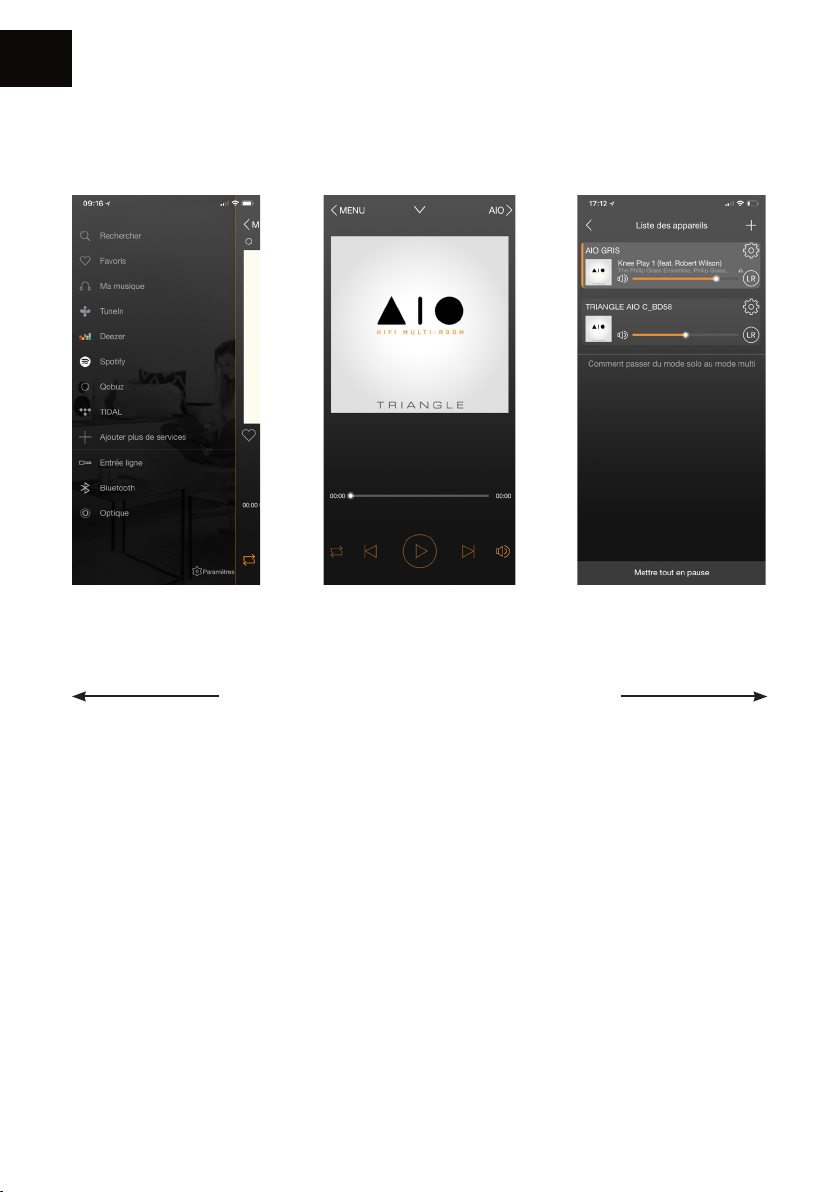
PRÉSENTATION DE L’APPLICATION
Les sources Ecran de lecture en cours Les appareils AIO
La navigation se passe en 3 volets. Il vous suffit de
balayer l’écran de gauche à droite pour les faire
apparaître.
présents sur votre réseau
14
Page 15
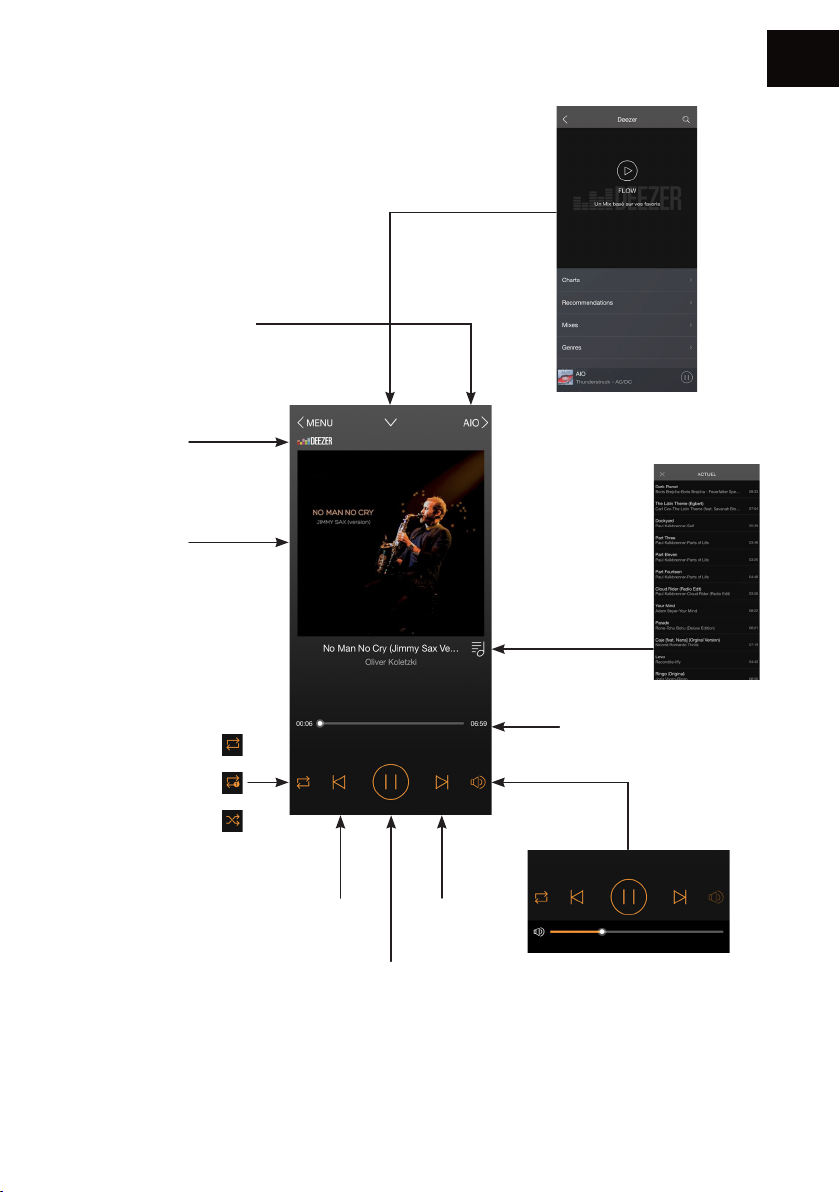
1. Ecran de lecture en cours
Appareil sur lequel la
musique est jouée /
Revenir sur l’écran de
sélection des appareils AIO
Source audio
Couverture de
l’album
FR
Revenir à l’écran
précédent
Liste de lecture
Lecture en boucle
Répéter un morceau
Lecture aléatoire
Morceau
précédent
Lecture/Pause
Barre de progression
de la piste
Gestion
du volume
Morceau
suivant
Attention : Si vous modifiez le
volume via les boutons de votre
appareil mobile, il peut y avoir une
latence et des paliers importants.
Pour un réglage plus fin, utilisez
l’écran de l’application ou la
télécommande
15
Page 16
FR
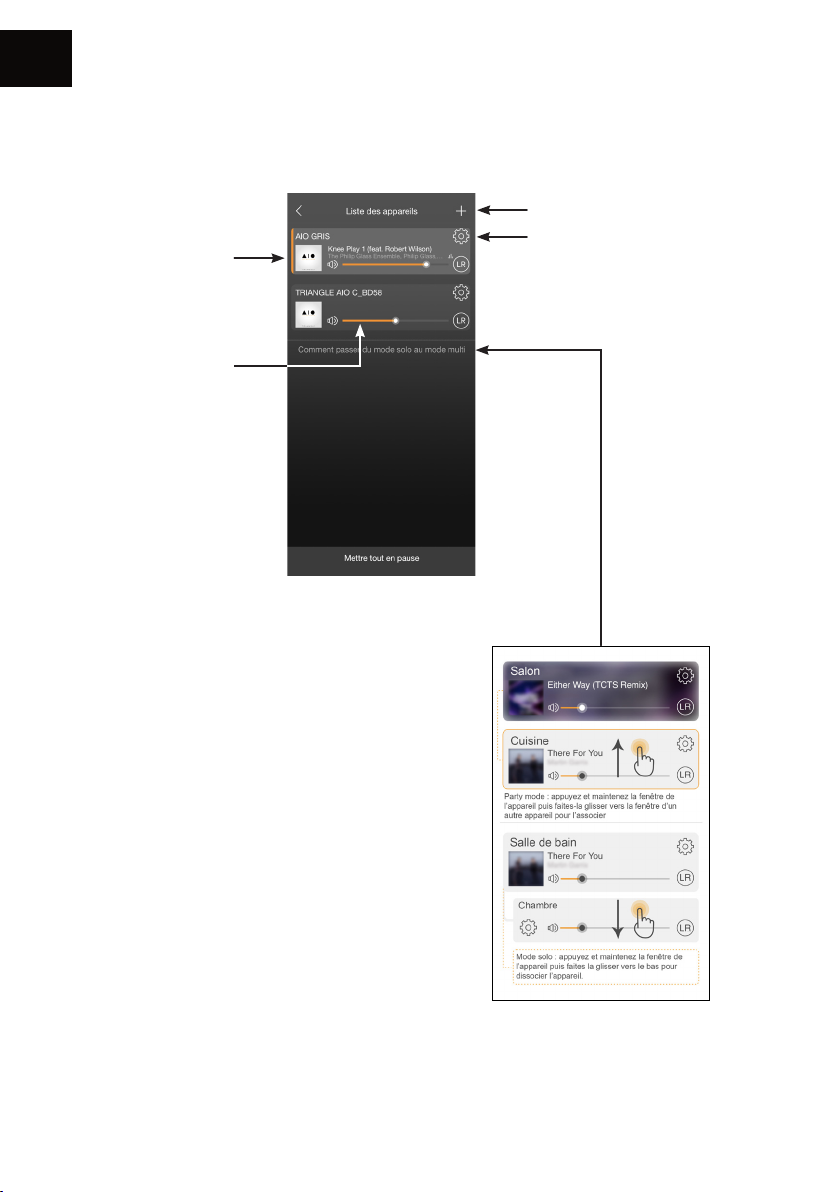
2. Les appareils AIO présents sur votre réseau
Pochette du morceau
à l’écoute.
Chaque enceinte
peut avoir un
morceau différent.
Volume de l’enceinte
Ajouter un appareil AIO
au réseau (p.12)
Réglages
Groupement AIO
Le « Party Mode » permet de
grouper plusieurs produits
AIO pour diffuser les mêmes
morceaux de manière
synchronisée .
-> jusqu’à 5 appareils
synchronisés en Wi-Fi et 10 en
Ethernet.
16
Page 17
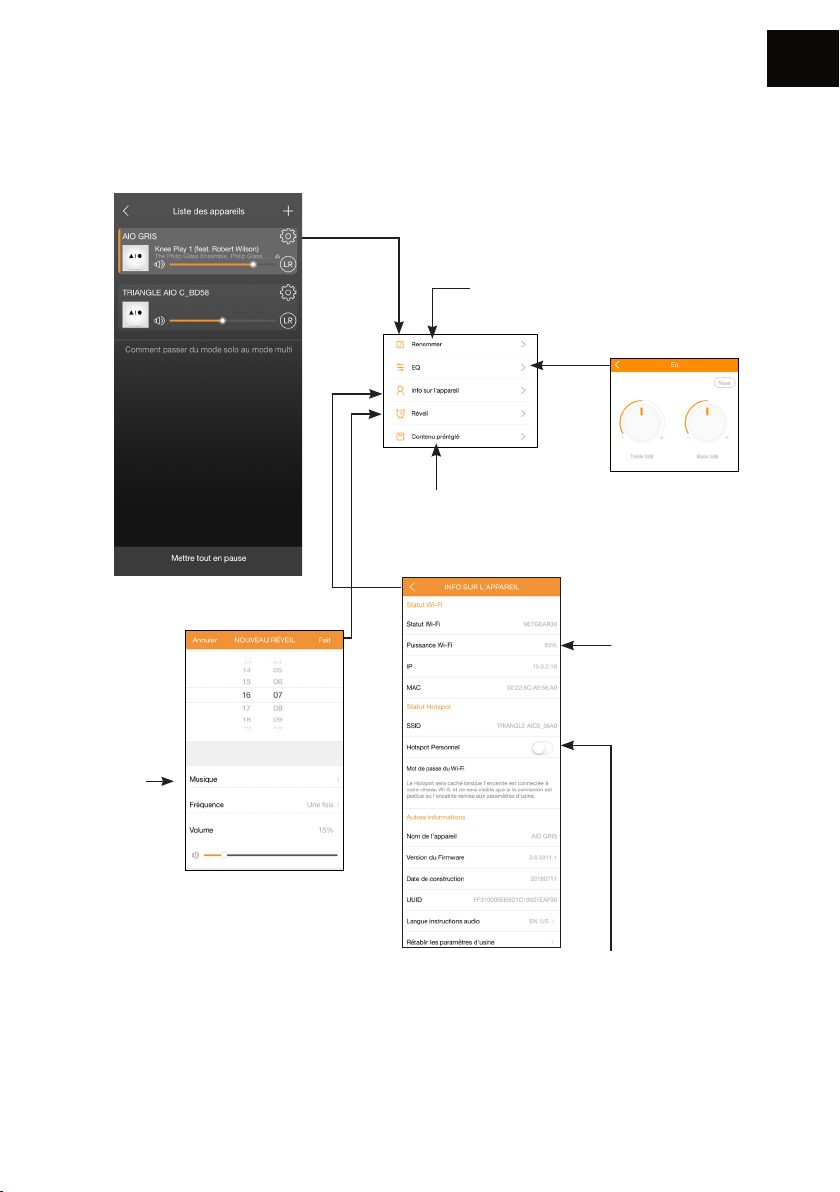
3. Réglages
FR
Renommer
l’enceinte
Choix de
la musique
du réveil
Réglage de l’alarme
Afin que l’alarme
fonctionne, veillez à
laisser votre appareil
allumé.
Favoris
Informations sur l’AIO
Votre AIO TWIN possède la fonction « Hot
spot », il peut donc gérer son propre réseau
Wi-Fi. Vous devez être connecté à votre
réseau internet avec un câble Ethernet
Il vous suffit d’activer cette fonction dans
l’application sur ce bouton et de définir un
mot de passe de connexion.
Réglages des
tonalités
Qualité de la
réception Wi-Fi
17
Page 18
FR
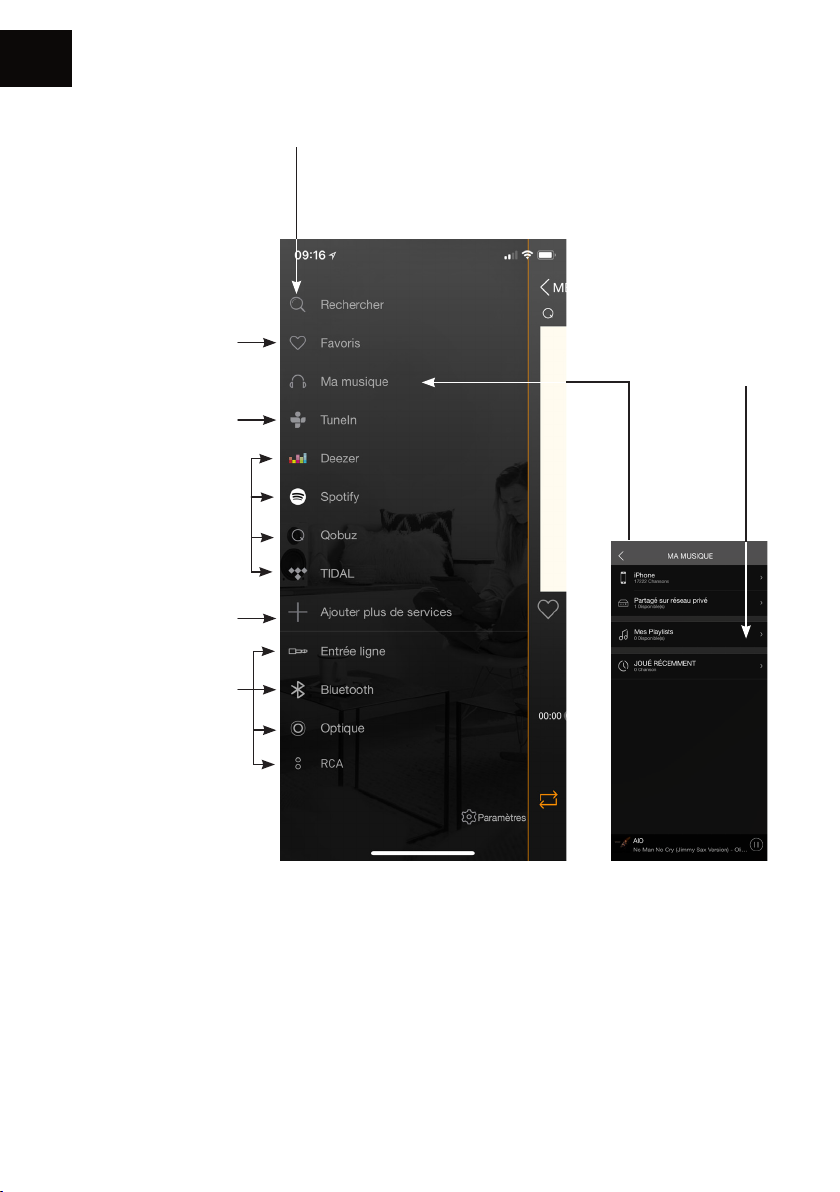
4. Les sources
Favoris : pour accéder
rapidement à un
morceau favori contenu
dans votre appareil
mobile.
Tune In vous permet
d’accéder à toutes les
radios numériques.
Deezer - Qobuz - Tidal
Vous avez besoin d‘un
abonnement pour
accéder au service.
Spotify : voir page
suivante.
Ajouter ou supprimer
des services du menu
Rechercher : pour
accéder rapidement à la
musique contenue dans
votre appareil mobile.
Mes playlists :
créez une liste de
lecture à partir
des morceaux
contenus dans
votre appareil
mobile.
Sélection de la
source
Ma musique : AIO vous permet de lire la musique téléchargée dans votre smartphone ou
d’accéder à la musique stockée dans un NAS de votre réseau ou sur votre clé USB connectée sur
l’enceinte active.
Vous devez autoriser l’application à lire le contenu musical de votre appareil mobile lors de la
configuration de l’application (voir Paramètres de l’app TRIANGLE AIO dans le menu général de
votre appareil mobile en fonction de votre système iOS ou Android).
Certains titres peuvent être protégés par des DRM qui bloqueront la lecture.
18
Page 19
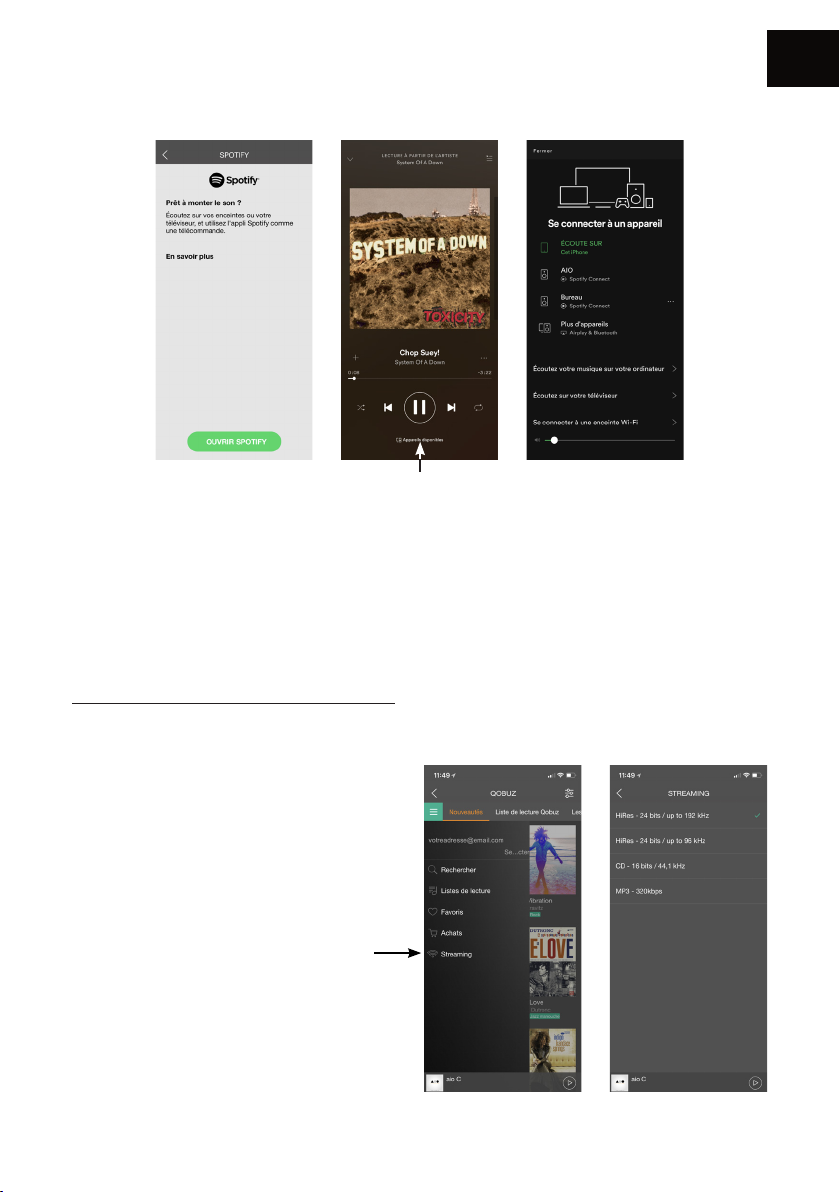
Spotify :
Choisir votre enceinte
Écoutez votre musique avec Spotify Connect :
1. Connectez votre appareil TRIANGLE AIO à votre réseau internet.
2. Ouvrez l’application Spotify sur votre téléphone, votre tablette ou votre ordinateur en utilisant
le même réseau internet que votre AIO.
3. Écoutez une chanson et sélectionner le périphérique AIO de votre choix.
Le logiciel Spotify est soumis à une licence tierce disponible ici :
www.spotify.com/connect/third-party-licences
FR
Ecoutez de la musique en haute
dénition :
Pour écouter de la musique en haute
définition, vous devez disposer d’un
abonnement auprès d’un fournisseur et
configurer l’application dédiée.
Exemple sur l’application Qobuz >>
19
Page 20

FR
CONNEXION PAR BLUETOOTH
Grâce au procédé Bluetooth de dernière génération 5.0 aptX profitez de la musique avec une
qualité sonore proche du CD. La portée est environ de 10 mètres, selon l’environnement et les
obstacles rencontrés.
Les enceintes AIO TWIN permettent d’écouter de la musique depuis toute source disposant du
Bluetooth : smartphone, tablette, ordinateur...
Pour cela :
• Mettez vos enceintes AIO TWIN en fonctionnement, l’interrupteur arrière sur ON, ou utilisez la
télécommande si votre produit était en veille.
• Bien attendre la fin de la séquence de démarrage indiqué par les 3 notes de musique et la LED
blanche fixe, avant toute action.
• Sélectionnez l’entrée «Bluetooth» à l’aide du bouton «INPUT» à l’arrière de l’enceinte ou depuis
la télécommande ou de l’application TRIANGLE AIO. La LED bleu indique que la AIO est bien
sur la position «Bluetooth».
• La LED bleue clignote, le système est alors en mode d’appairage avec votre source compatible
Bluetooth (smartphone, tablette...).
• Effectuez une recherche sur votre source Bluetooth (consulter le mode d’emploi si nécessaire),
les enceintes apparaissent sous le nom « TRIANGLE AIO TWIN », connectez-vous alors à ces
dernières. Vos enceintes sont à présent reliées à votre source Bluetooth. La connexion se fera
automatiquement lors de la prochaine mise en route de vos enceintes, si la source Bluetooth est
sélectionnée et si le Bluetooth de votre appareil est activé.
• Si vous souhaitez connecter une autre source Bluetooth alors que la précédente est toujours
connectée, éteignez le Bluetooth de votre première source Bluetooth. La LED clignotera de
nouveau pour indiquer la disponibilité du Bluetooth.
• Grâce à la télécommande de votre AIO TWIN, vous pouvez changer de pistes, les mettre en
lecture ou pause sans passer par votre source bluetooth.
• Le volume de votre AIO TWIN est indépendant du volume de votre source Bluetooth.
20
Page 21
CONNEXION PAR CÂBLES
FR
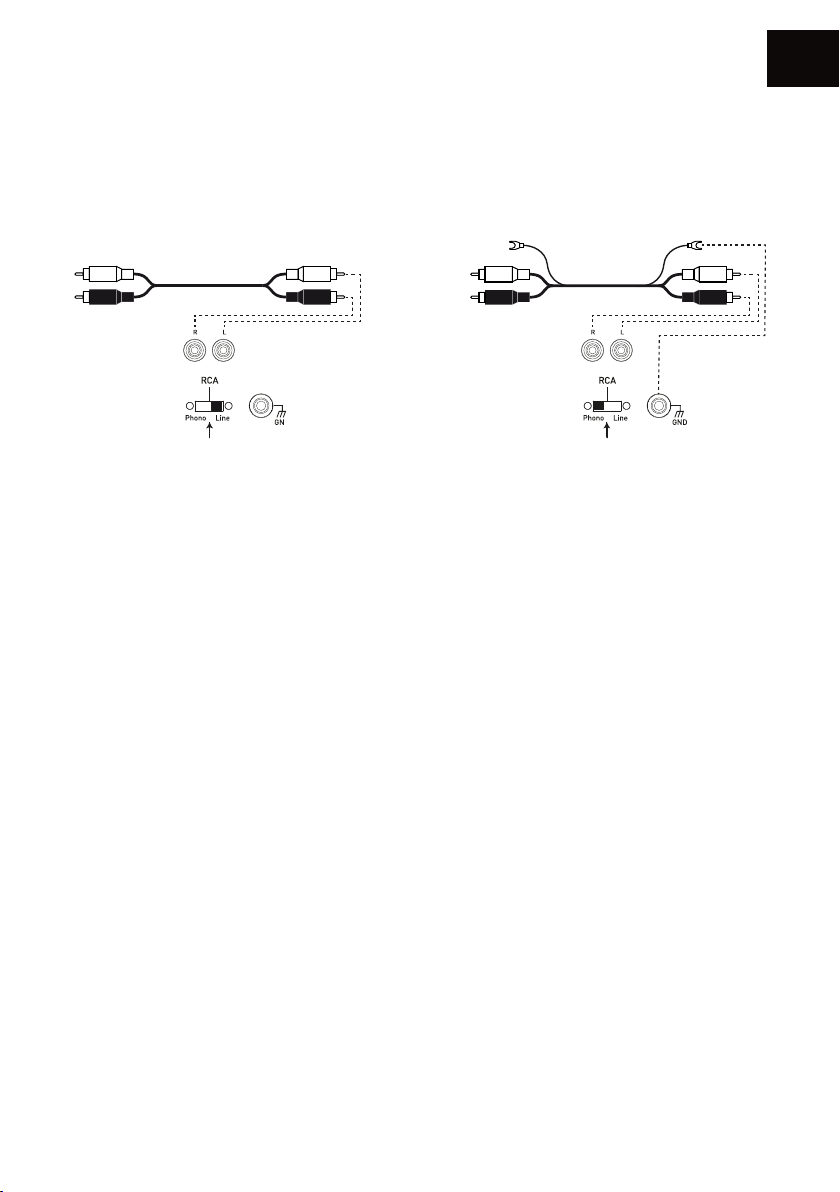
Connexion par câble RCA
FR
line
ou
L’entrée RCA permet de connecter vos enceintes à votre télévision, platine CD, vinyle ou tout autre
périphérique avec sortie analogique.
Pour cela :
• Reliez les connecteurs rouges et blancs à l’arrière de l’enceinte active en respectant les couleurs
et faites de même sur votre source.
• Assurez vous que le sélecteur PHONO/LINE est bien en position «LINE».
• Mettez vos enceintes AIO TWIN en fonctionnement, l’interrupteur arrière sur ON, ou utilisez la
télécommande si votre produit était en veille.
• Bien attendre la fin de la séquence de démarrage indiquée par les 3 notes de musique et la LED
blanche fixe, avant toute action.
• Sélectionnez l’entrée «RCA» à l’aide de la télécommande ou du bouton «INPUT» (bouton de
volume) à l’arrière de l’enceinte active (l’ordre de sélection des sources est indiqué au dessus du
bouton «INPUT») ou directement via l’application mobile. La LED verte indique que votre AIO
TWIN est bien sur l’entrée «RCA». Votre système est alors prêt à fonctionner.
phono
Connexion d’une platine vinyle
Dans le cas du branchement d’une platine vinyle (sans pré-amplificateur phono intégré), positionnez
le sélecteur «PHONO/LINE» vers PHONO pour activer le pré-amplificateur MM phono intégré à
votre enceinte AIO TWIN. Connectez le câble de masse sur la borne dévissable prévue à cet effet
à l’arrière de votre enceinte active ainsi que sur votre platine.
21
Page 22
FR
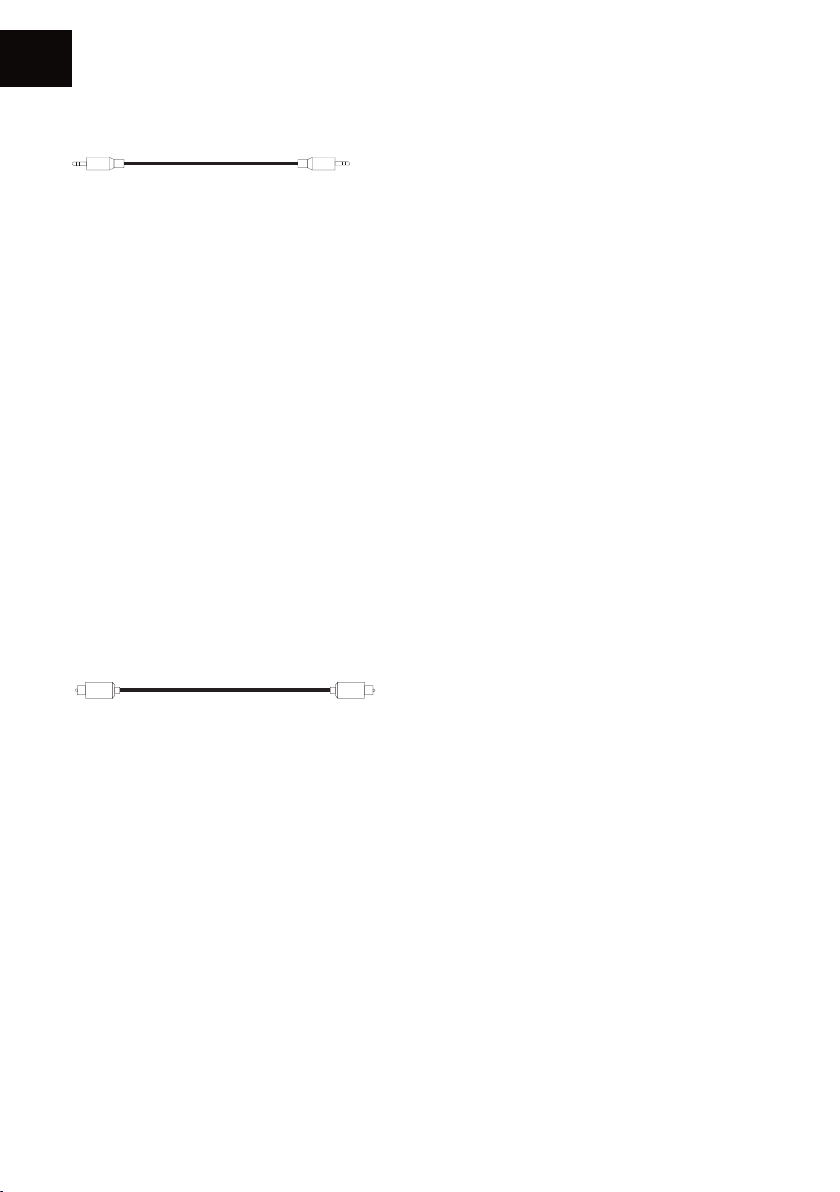
Connexion par câble Mini-Jack 3.5mm
Un câble Jack 3.5mm permet de connecter vos enceintes à de nombreux périphériques :
smartphone, lecteur audio, tablette, ordinateur, télévision...
Pour cela :
• Reliez le connecteur Jack à la borne « ANALOG IN / AUX » puis l’autre extrémité à votre
périphérique.
• Mettez vos enceintes AIO TWIN en fonctionnement, l’interrupteur arrière sur ON, ou utilisez la
télécommande si votre produit était en veille.
• Bien attendre la fin de la séquence de démarrage indiquée par les 3 notes de musique et la LED
blanche fixe, avant toute action.
• Sélectionnez l’entrée « AUX » à l’aide de la télécommande ou du bouton «INPUT» (bouton de
volume) à l’arrière de l’enceinte active (l’ordre de sélection des sources est indiqué au dessus du
bouton «INPUT») ou directement via l’application mobile. La LED Jaune indique que votre AIO
TWIN est bien sur l’entrée «AUX». Votre système est alors prêt à fonctionner.
Connexion par câble optique
L’entrée optique permet de connecter vos enceintes à tous les périphériques audio disposant
d’une sortie optique : lecteur audio, lecteur DVD, télévision...
Pour cela :
• Reliez votre câble optique à l’arrière de l’enceinte active à l’emplacement « DIGITAL IN /
OPTICAL », puis à votre périphérique.
• Mettez vos enceintes AIO TWIN en fonctionnement, l’interrupteur arrière sur ON, ou utilisez la
télécommande si votre produit était en veille.
• Bien attendre la fin de la séquence de démarrage indiquée par les 3 notes de musique et la LED
blanche fixe, avant toute action.
• Sélectionnez l’entrée «OPTICAL» à l’aide de la télécommande, du bouton «INPUT» (bouton de
volume) à l’arrière de l’enceinte active (l’ordre de sélection des sources est indiqué au dessus du
bouton «INPUT») ou directement via l’application mobile. La LED violette indique que votre AIO
TWIN est bien sur l’entrée «OPTICAL». Votre système est alors prêt à fonctionner.
22
Page 23
Connexion par USB
L’entrée USB permet de connecter vos périphérique de stockage USB type, clé USB ou disque dur
portable.
Pour cela :
• Reliez le périphérique de stockage à l’arrière de l’enceinte active à l’emplacement «DIGITAL IN
/ USB».
• Mettez vos enceintes AIO TWIN en fonctionnement, l’interrupteur arrière sur ON, ou utilisez la
télécommande si votre produit était en veille.
• Bien attendre la fin de la séquence de démarrage indiquée par les 3 notes de musique et la LED
blanche fixe, avant toute action.
• Sélectionnez l’entrée «Wi-Fi» à l’aide de la télécommande, du bouton «INPUT» (bouton de
volume) à l’arrière de l’enceinte active (l’ordre de sélection des sources est indiqué au dessus du
bouton «INPUT») ou directement via l’application mobile. La LED blanche indique que votre AIO
TWIN est bien sur l’entrée «USB». Votre système est alors prêt à fonctionner.
• Sélectionnez par l’intermédiaire de l’application TRIANGLE AIO les pistes que vous souhaitez
écouter sur vos enceintes AIO TWIN. (voir page 18)
• A noter la prise USB peut également recharger vos produits type smartphone, baladeur
numérique,...
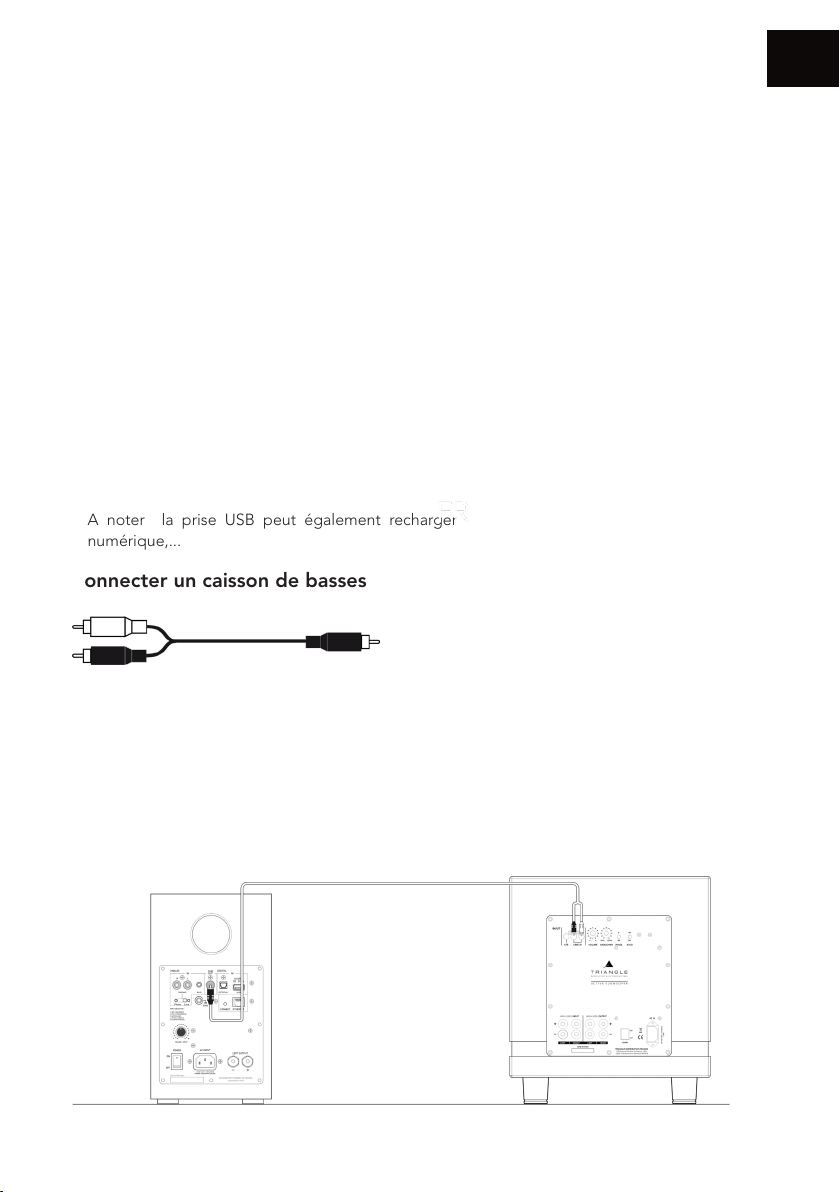
Connecter un caisson de basses
FR
Les enceintes AIO TWIN sont dotées d’une sortie Subwoofer permettant le branchement d’un
caisson de basses.
Un câble RCA vers 2 RCA (câble en Y) doit relier la sortie SUB de l’enceinte amplifiée et les 2
entrées LINE IN de votre caisson de basses. Réglez le volume du caisson de basses et sa fréquence
de coupure (Crossover) de sorte à avoir une cohérence sonore entre vos enceintes et le caisson
de basses. Le caisson de basses doit s’intégrer harmonieusement à vos enceintes sans être
omniprésent.
23
Page 24
FR
RÉGLAGE DES FRÉQUENCES BASSES ET DES AIGUS
Vos enceintes AIO TWIN disposent d’un égaliseur permettant d’ajuster à votre convenance les
fréquences basses et aigus.
Réglages des basses (+/-6db) :
Accentuer le niveau des basses fréquences grâce au bouton de la télécommande « BASS +»
Diminuer le niveau des basses fréquences grâce au bouton de la télécommande « BASS -»
Réglages des aigus (+/- 7 db) :
Accentuer le niveau des fréquences aigus grâce au bouton de la télécommande « TREBLE +»
Diminuer le niveau des fréquences aigus grâce au bouton de la télécommande « TREBLE -»
Pour remettre les réglages en configuration usine, il suffit de presser le bouton «EQ RESET» de la
télécommande.
ATTENTION
Ne jamais ouvrir l’enceinte, risque d’électrocution.
24
Page 25
EN CAS DE PANNE
Si l’appareil ne fonctionne pas correctement, vérifiez les points énumérés ci-dessous. Si le problème
persiste, il peut y avoir un mauvais fonctionnement. Débranchez immédiatement le cordon
d’alimentation et contactez votre revendeur.
OBSERVATION SOLUTION
Vérifiez que votre appareil mobile soit connecté au réseau
sur lequel vous tentez de connecter votre AIO.
FR
Je ne trouve pas mon produit
AIO dans l’application
TRIANGLE AIO
La musique se coupe ou
saccade.
Le volume de ma platine
vinyle est très faible
Pas de son par la prise
optique
Placez votre AIO plus proche de votre routeur.
Branchez un câble Ethernet entre votre routeur et l’AIO.
Vérifiez que votre application est bien à jour, ou réinstallez
l’application.
Redémarrez votre mobile et votre réseau.
Vérifiez la connexion internet.
Vérifiez si votre réseau ou un autre appareil n’est pas en
train d’utiliser une grande partie de votre bande passante.
Vérifiez la puissance de réception du signal Wi-Fi.
Vérifiez que votre application est bien à jour, ou réinstallez
l’application.
Redémarrez votre mobile et votre réseau.
Vérifiez que le sélecteur PHONO/LINE est bien sur
PHONO.
Vérifiez sur votre source optique (TV, décodeur, lecteur
DVD) que la sortie est configurée en «stéréo» ou «PCM».
25
Page 26
FR
FOIRE AUX QUESTIONS
Combien d’enceintes puis-je
grouper ?
Que se passe-t-il quand on
m’appelle sur mon téléphone
mobile alors que j’utilise
l’application ?
AIO peut-il lire des morceaux
haute résolution (High Res) ?
Ne jamais ouvrir l’enceinte, risque d’électrocution.
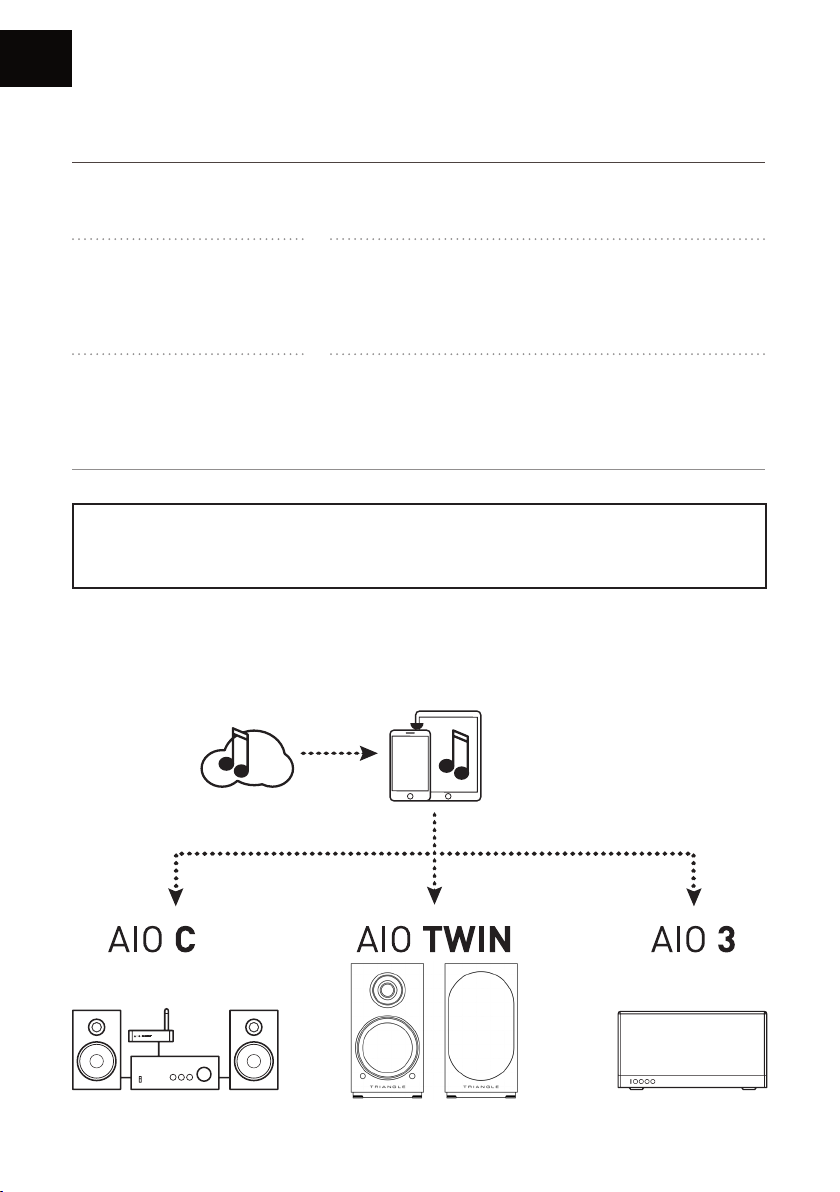
ECOSYSTEME TRIANGLE AIO
AIO peut grouper jusqu’à 5 enceintes en Wi-Fi, 10 via
Ethernet, si la connexion est de bonne qualité.
La musique continue de jouer sur votre enceinte sans
interruption.
AIO peut lire des morceaux jusqu’en 24 bits/192 kHz, mais
il faut que votre connexion internet soit de bonne qualité,
bien configurer votre application de streaming (page 19) et
vérifier que votre abonnement le permet.
ATTENTION
26
Page 27
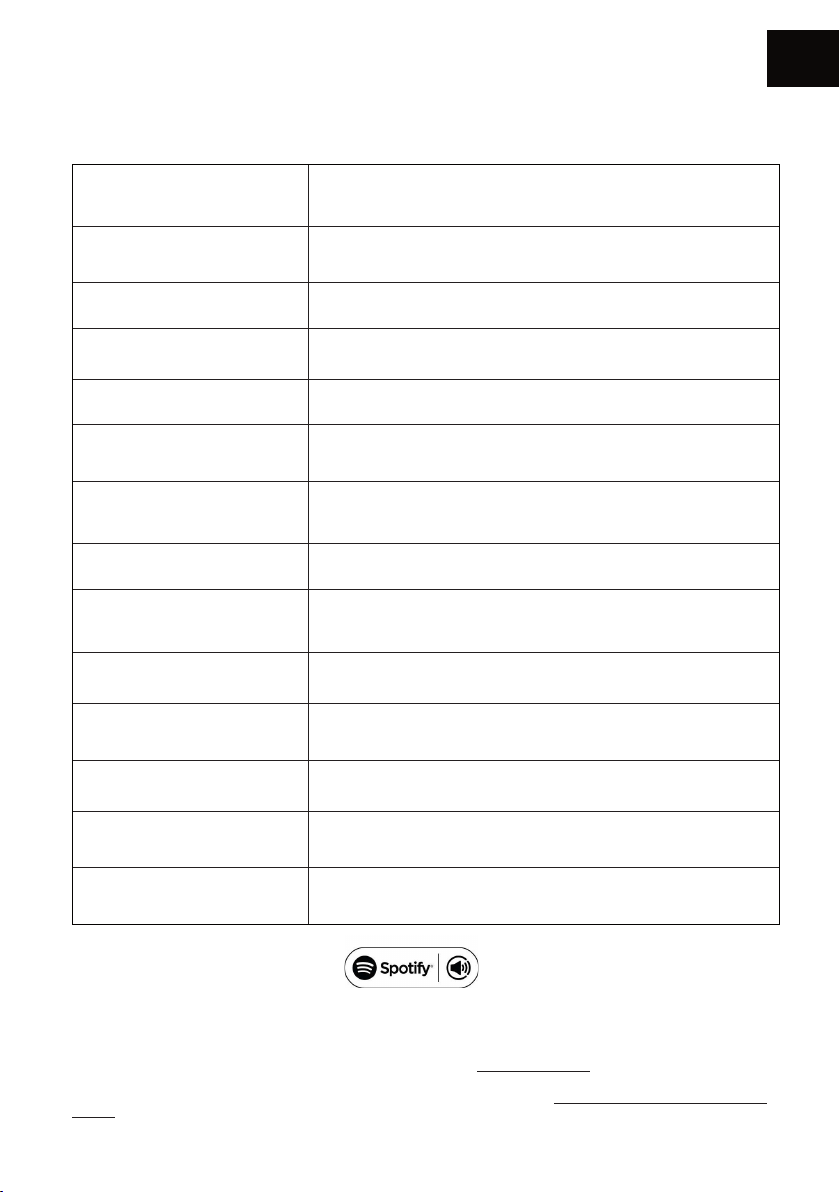
SPÉCIFICATIONS TECHNIQUES
Spécications techniques AIO TWIN
Haut-parleurs Tweeter : 25mm / Basse : 13cm
Wi-Fi IEEE 802.11 b/g/n Standard 2.4Ghz
Échantillonnage Jusqu’à 24 bit/192 kHz
Bluetooth Bluetooth 5.0, aptX, aptX HD, aptX LL, SBC, AAC
Entrées audio Wi-Fi , RCA / Phono, Mini-Jack 3.5mm, Optique , Bluetooth, USB
Sortie audio Sortie caisson de basse
USB USB2.0, USB FlashDisk. Max power 5V/1A
LAN RJ45 10/100M LAN
FR
Application ofcielle TRIANGLE AIO : iOS, Android
Formats audio
Puissance 2 x 50W, 4Ω
Dimensions enceinte (L x P x H) 165 x 304 x 235 mm
Poids Net 10,3 kg
Spotify Connect est intégré à votre nouvelle enceinte.
Spotify Connect vous permet de contrôler la musique diffusée sur votre appareil à l’aide de l’application Spotify sur votre
mobile, votre tablette ou votre PC. L’écoute est uide. Vous pouvez passer des appels, jouer à des jeux et même éteindre
votre téléphone, le tout sans interrompre la musique. En savoir plus sur spotify.com/connect
Le logiciel Spotify est soumis aux licences de tiers disponibles à l’adresse suivante: www.spotify.com/connect/third-partylicenses
APE, FLAC, WAV, Apple Lossless (ALAC), AAC, AAC-LC, HE-AAC,
HE-AAC v2, MP3, CBR/VBR
27
Page 28

28EN29
Page 29

USER MANUAL
EN
ENGLISH
Page 30
EN
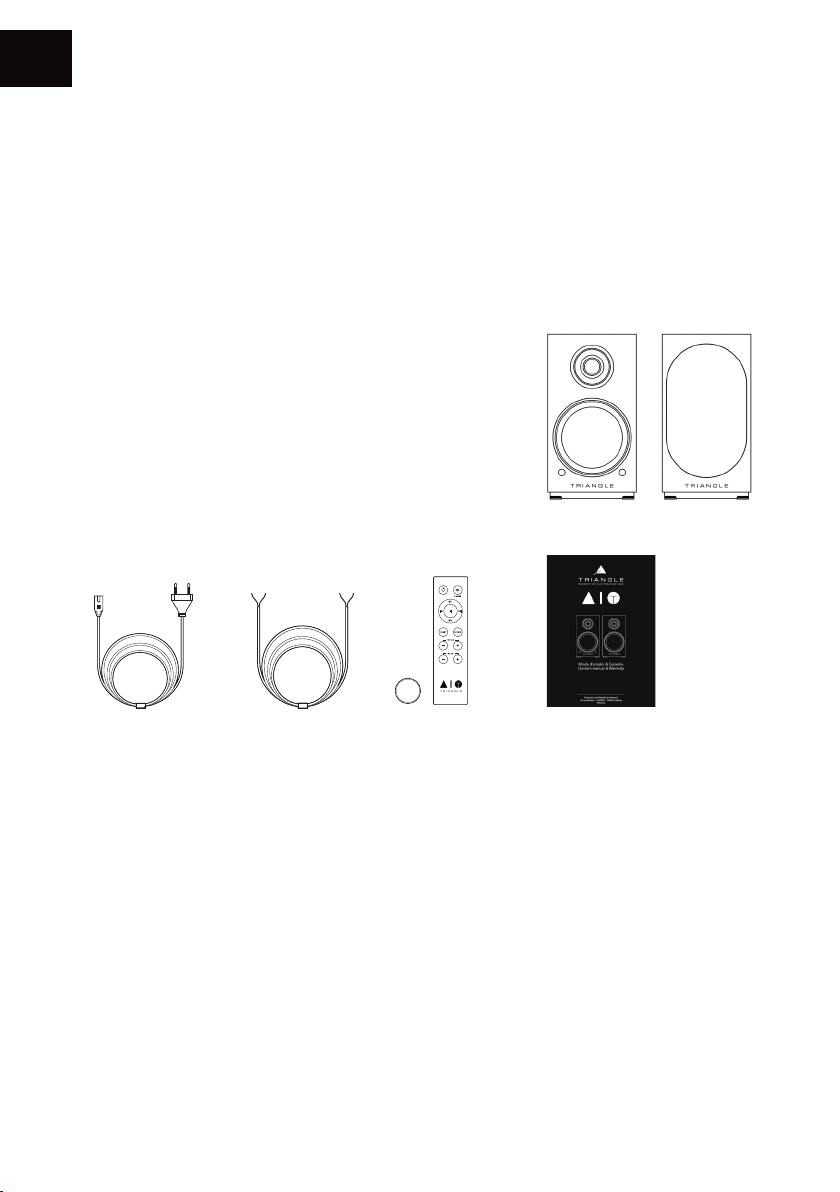
UNPACKING
Open the box and take out the speakers.
If you notice any defects in one of the elements as you unpack, please get in touch with your reseller.
Your speaker is fragile and it is recommended to handle it carefully. Before disposing of the
packaging, make sure there is nothing left inside.
EACH BOX CONTAINS
Î 1 x active loudspeaker AIO TWIN* (A)
Î 1 x passive loudspeaker AIO TWIN* (B)
Î 2 x magnetic grill*
Î 1 x power cable
Î 1 x 3 meters speaker cable to link the loudspeakers
Î 1 x remote control + Battery (ref: CR2032)
Î 1 x user manual
CR2032
A B
* For optimal use and perfect sound reproduction, it is recommended to remove the magnetic grill
during listening.
30
Page 31

INSTALLATION PRECAUTIONS
Before the installation
Before connecting your AIO TWIN speakers, check the stability of the surface you want to install
them on. Be sure to always set the active speaker switch to OFF before removing or plugging
connection cables. Do not plug in the power cord before all connections are made.
Moving the device
Always remove the power cord and disconnect the cables between all audio components when
moving the device. This will prevent a short-circuit or the damage to the plugs or connection cables.
Locations to avoid
Avoid humid locations or direct sunlight. It is preferable to install your speaker in a temperate place.
Recycling
Protection of the environment: your products contain valuable materials which can be recovered or
recycled. Take them to the appropriate collection points.
EN
31
Page 32
EN
CONNECT
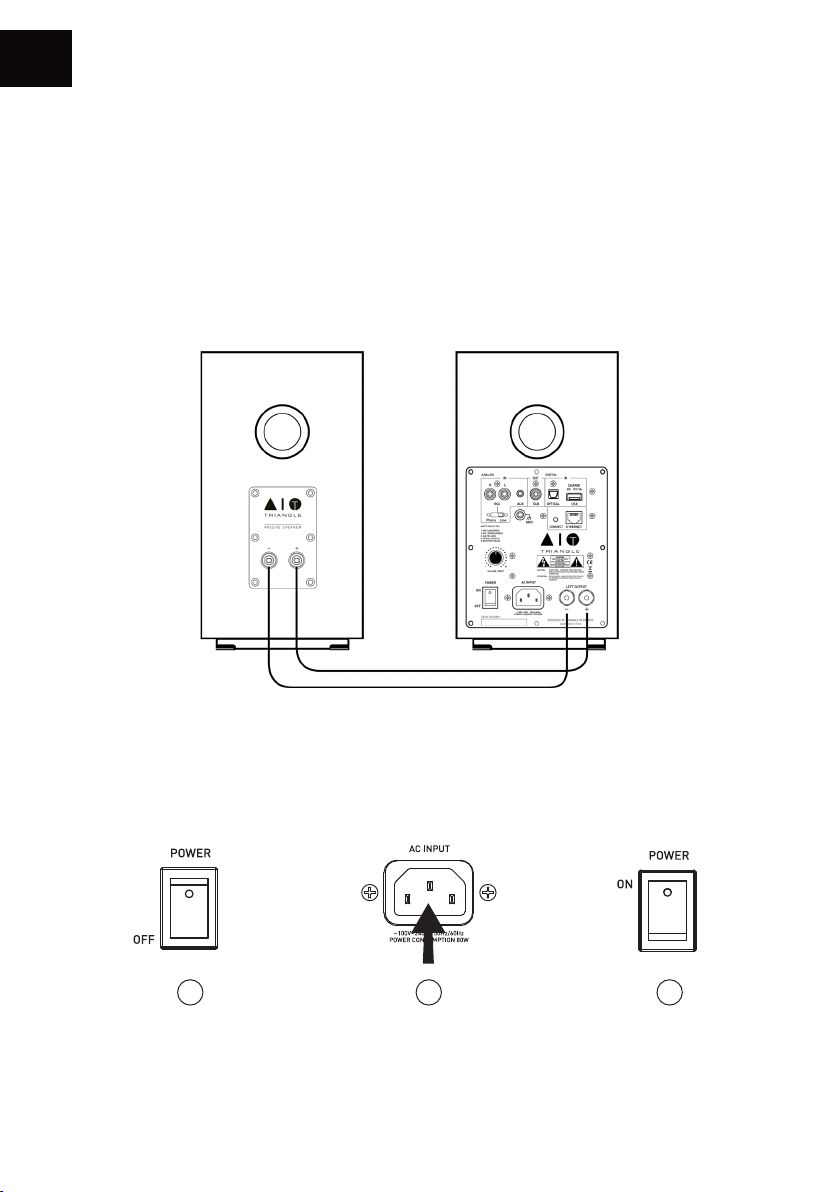
CONNECTING THE SPEAKERS
The speakers must be interconnected with the speaker cable provided.
(Black cable mentioning “High performance OFC cable”).
Ensure that the speaker connection polarity is correct: the red and black terminals on the passive
and active speakers must be connected respectively to one another. To aid with the set-up, the
connection cable indicates “TRIANGLE High performance OFC cable” and is dedicated to the red
terminal (+).
Powering on
Once you have checked the amplifier on the active speaker is set to the “OFF” position, plug the
power cord into the designated input and into an AC power outlet. Then turn “ON” the active
speaker, your speakers are ready for use.
1 2 3
32
Page 33
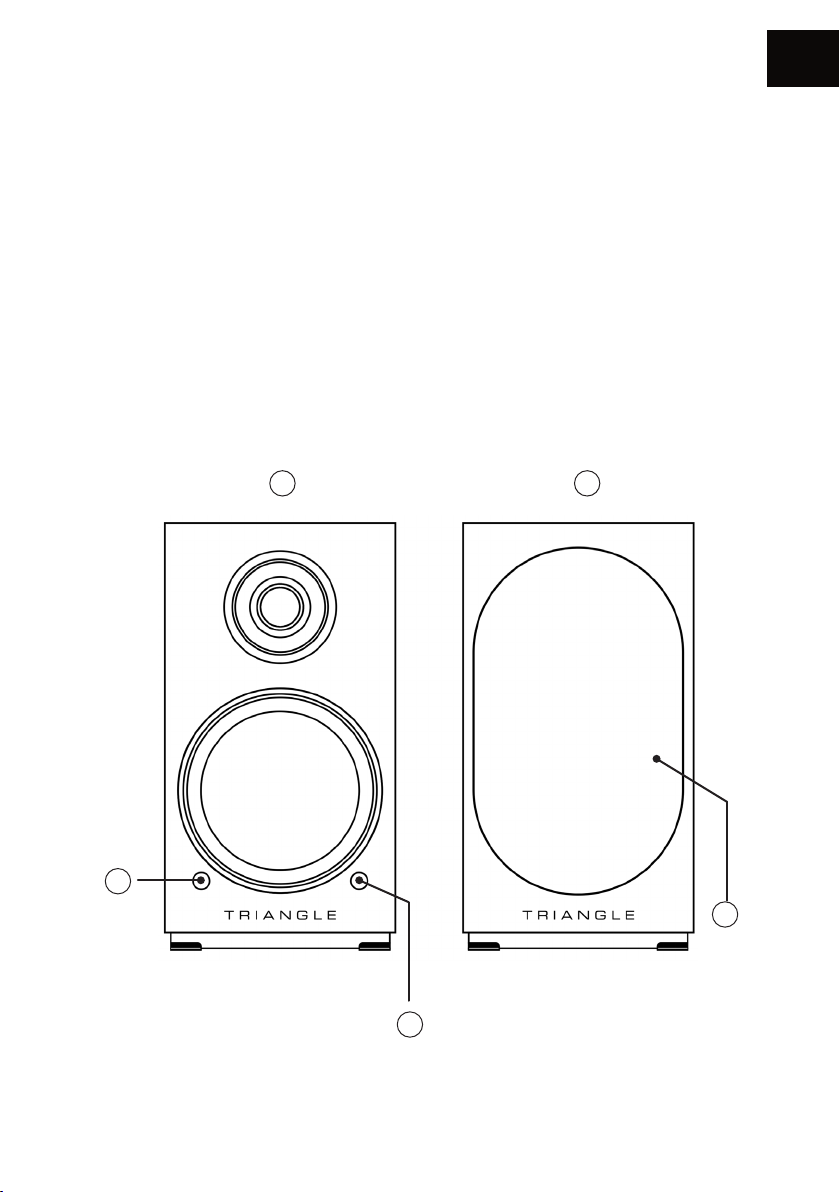
DESCRIPTION OF THE SPEAKER (FRONT PANEL)
1. Active speaker
2. Passive speaker
3. IR receiver
4. SOURCE indication:
Wi-Fi/USB: White LED
RCA/Phono: Green LED
Auxiliary: Yellow LED
LED optical: Purple LED
Bluetooth: Blue LED
Standby: Red LED
5. Magnetic grill*
1 2
EN
4
5
3
* For optimal use and perfect sound reproduction, it is recommended to remove the magnetic grill
during listening.
33
Page 34
EN
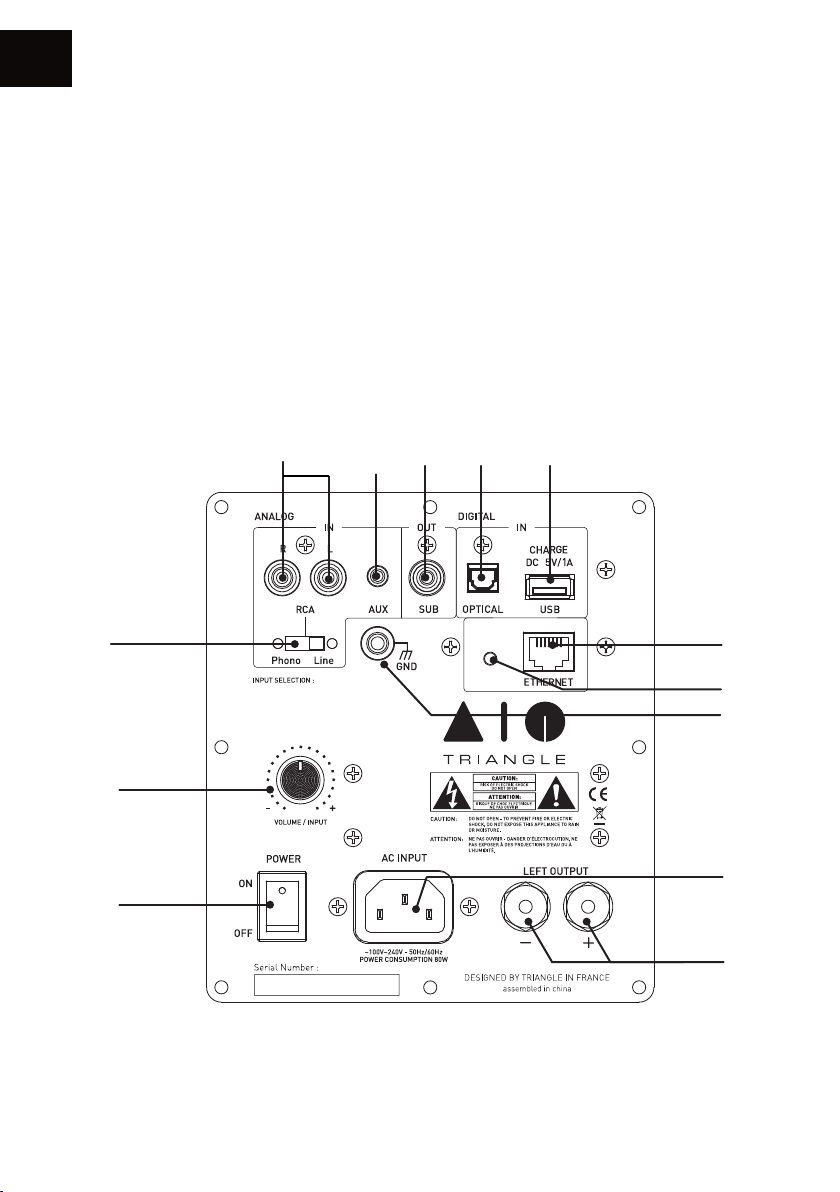
DESCRIPTION OF THE SPEAKER (REAR PANEL)
1. RCA input (line/phono (MM))
2. Auxiliary input (3.5mm Mini-Jack)
3. Subwoofer output
4. Optical input
5. Charge and USB Input
6. RCA switch (line/phono (MM))
7. -> Volume control
-> Push for source selection
8. Power switch
9. AC outlet
10. Terminal of the passive speaker
11. RJ45 socket for Ethernet cable
12. Wi-Fi pairing
13. Ground Connector/Phono input
1
6
1. WIFI / USB (WHITE)
2. RCA / PHONO (GREEN)
3. AUX (YELLOW)
4. OPTICAL (PURPLE)
5. BLUETOOTH (BLUE)
2 3 4 5
CONNECT
11
12
13
7
9
8
10
34
Page 35
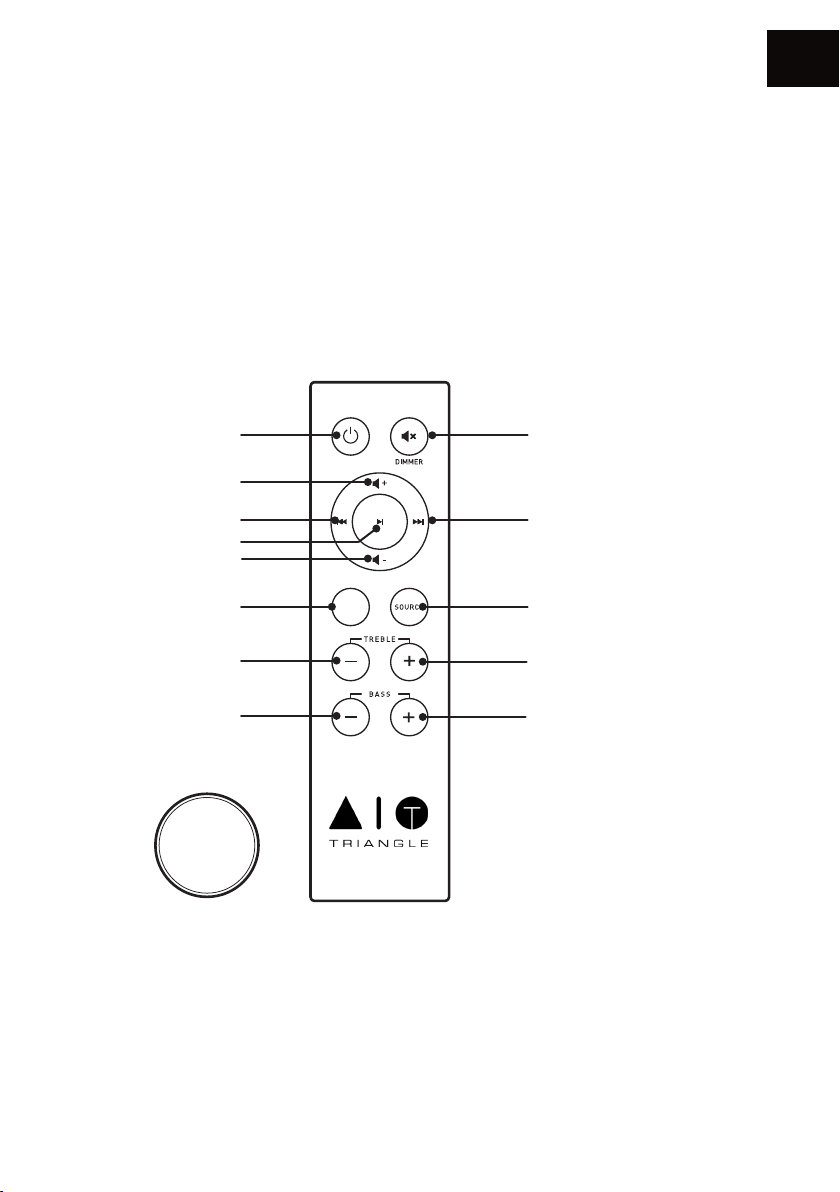
DESCRIPTION OF THE REMOTE
1. Power ON/Standby
2. Increasing the volume
3. Decreasing the volume
4. Play / Pause
5. Track backward
6. Track forward
7. Reset bass and treble adjustment
EN
8. Mute mode
9. Source selection
10. Lowering treble
11. Increasing treble
12. Lowering bass
13. Increasing bass
12
1
2
5
4
3
7
EQ
RESET
8
6
9
1110
13
CR2032
When using the remote, direct it towards the receiver on the front of the active speaker. The LED on
the front panel blinks when the remote is being used.
DEACTIVATE FRONT LED
To deactivate the front LED, make a long push of 6 seconds on the remote « Mute » button and
release. The front LED will still work when using the remote
35
Page 36
EN
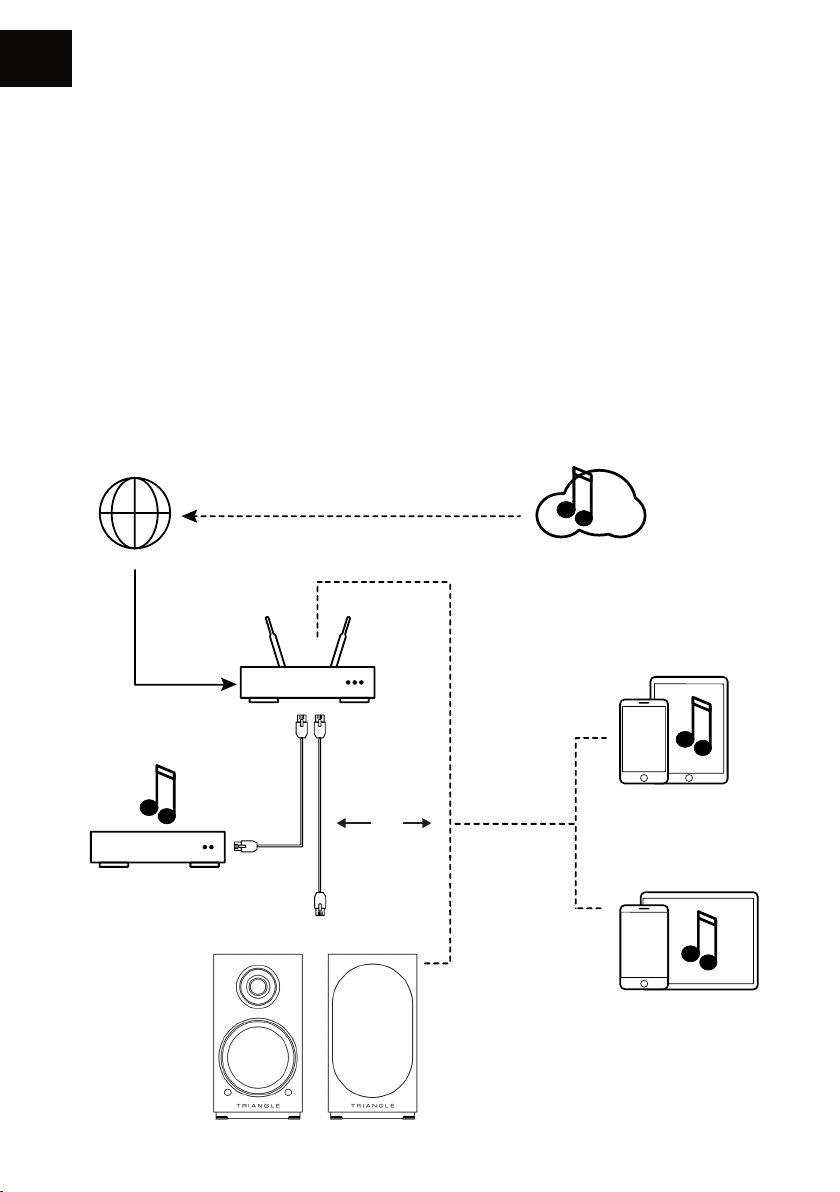
NETWORK SETUP GUIDE
Download the AIO TRIANGLE app from your app store (App Store for iOS or Google Play for
Android). You must allow the app to play the musical content on your mobile device. You must
have a router connected to broadband Internet in order to make the most of the streaming
services.
The AIO TWIN speakers can be connected to your Internet network either:
• With an Ethernet cable (not supplied) between the router from your Internet service provider and
the AIO TWIN active speaker, in this case go directly to p.38.
• With a wireless Wi-Fi connection between the router of your service provider and the AIO TWIN
active speaker.
Remember to check the reception quality of your Wi-Fi network when setting up your product. A
poor reception can affect the smoothness and the quality of your sound (see p.45 “Details of the
device”). Your mobile device must be connected to the same Wi-Fi network as your AIO system.
INTERNE T
NAS
BOX - ROUTEU R
AIO TWIN
Streaming services
Wi-Fi
R
eaming
iOS
Or
Android
36
Page 37
GETTING STARTED
Insert the power cord into the active speaker. Press the Power button on the back panel.
Once your speaker is starting, the white LED light up and you can hear 3 music notes.
DO NOT DO ANYTHING BEFORE THAT HAPPENS.
Wi-Fi CONFIGURATION
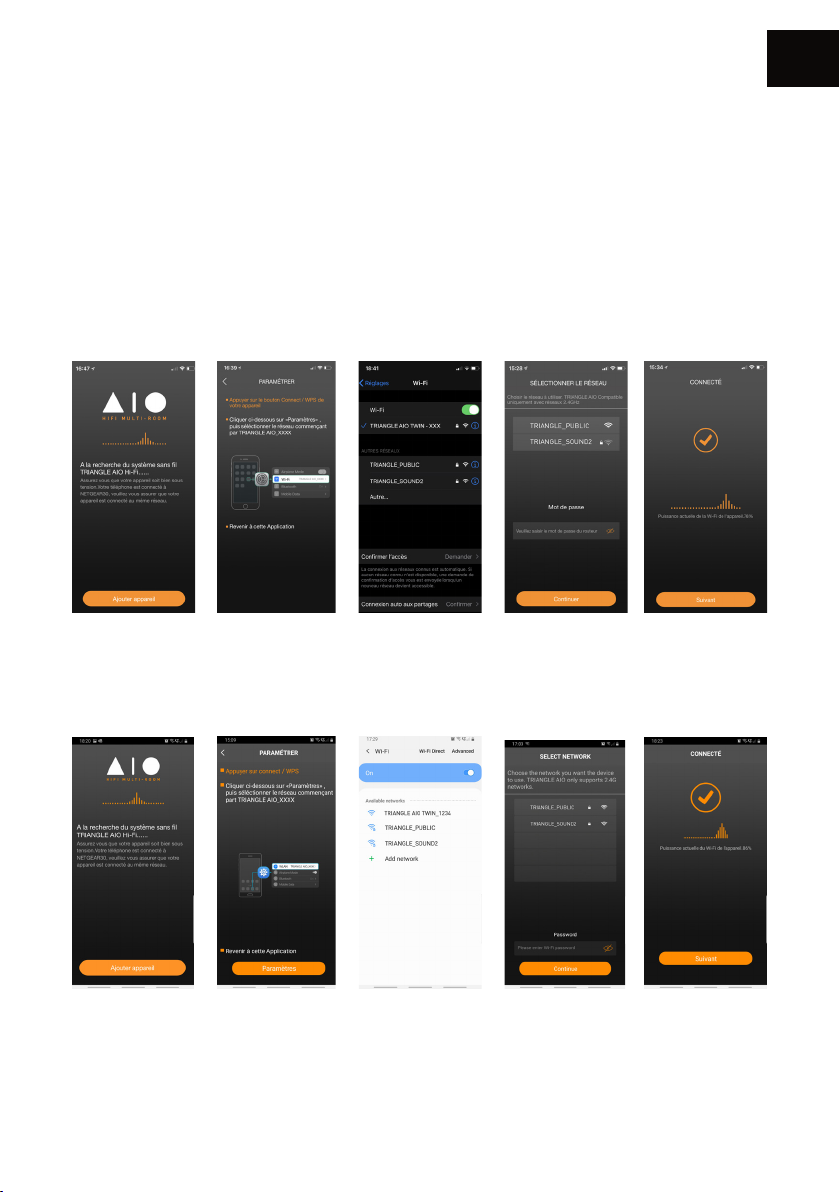
• Press the Connect button on the back of your AIO TWIN active speaker.
• Launch the app and follow the instructions:
For iOS products
EN
1. Press “Add device”.
2. The following
window opens. Then
go to the Wi-Fi setup
window of your
device.
For Android products
1. Press “Add device”.
2. The following
window opens.
Click on Settings.
3. Select the Wi-Fi
network: “TRIANGLE
AIO TWIN-xxx”,
then go back to the
TRIANGLE AIO app.
3. Select the Wi-Fi
network: “TRIANGLE
AIO TWIN-xxx”,
then go back to the
TRIANGLE AIO app.
37
4. Select your Wi-Fi
network and enter the
password.
4. Select your Wi-Fi
network and enter the
password.
5. Your AIO TWIN are
ready to operate.
4. Your AIO TWIN are
ready to operate.
Page 38
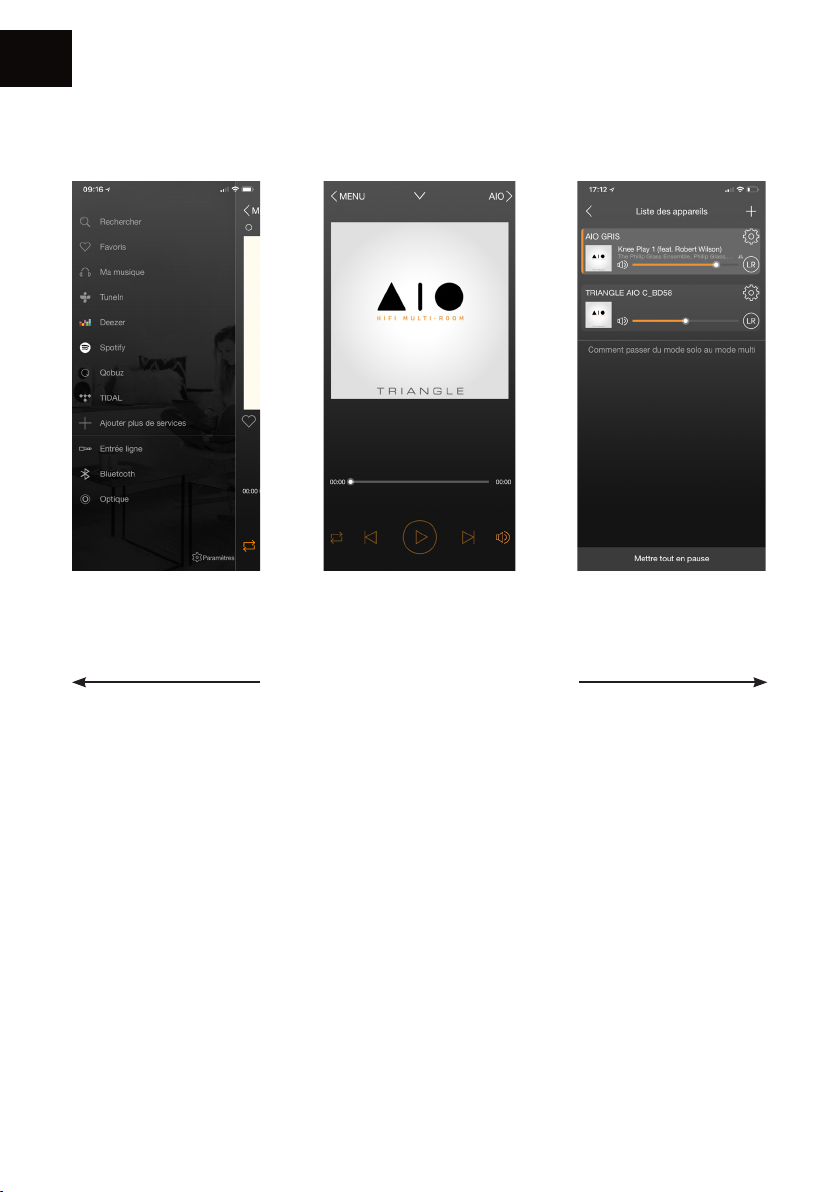
EN
APP OVERVIEW
Sources Now Playing screen The AIO devices
available on your
network
The navigation is in 3 panels.
Just swipe the screen from left to right to
make them appear.
38
Page 39
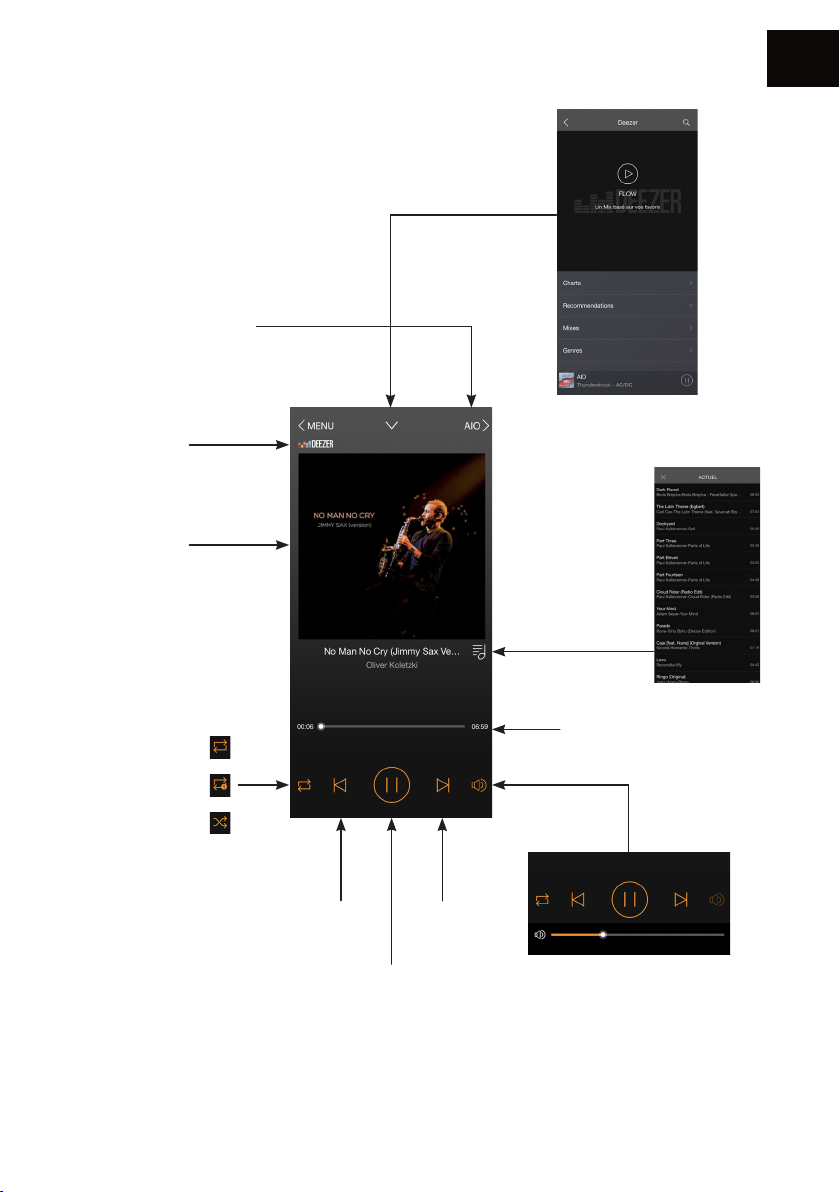
1. Now Playing screen
Device on which the music
is played. Go back to the
screen where you can select
the AIO devices
Audio source
Album cover
EN
Go back to the
previous screen
Playlist
Repeat all
Repeat one
Shuffle play
Previous
track
Play/Pause
Track progress bar
Volume
control
Next
track
Caution: If you change the volume
using the buttons on your mobile
device, there may be some latency
and large increments. For finer
adjustments, use the screen of the
app or the remote control.
39
Page 40
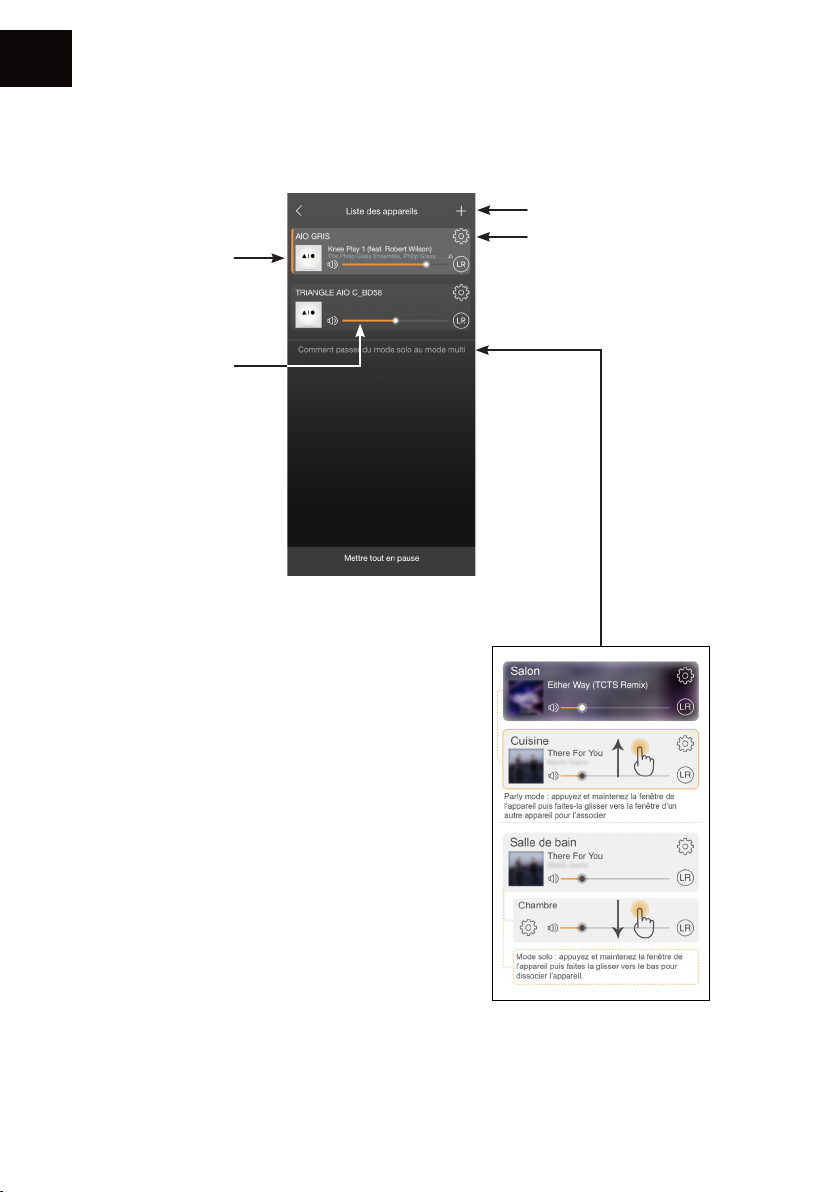
EN
2. The AIO devices available on your network
Album cover of the
track being played.
Each speaker can
play a different song.
Speaker volume
Add an AIO device to the
network (p.40)
Settings
Grouping AIO devices
The “Party Mode” allows to
connect various AIO devices to
play the same music at the same
time.
-> up to 5 devices using one
Wi-Fi connection and up to
10 devices using an Ethernet
connection.
40
Page 41
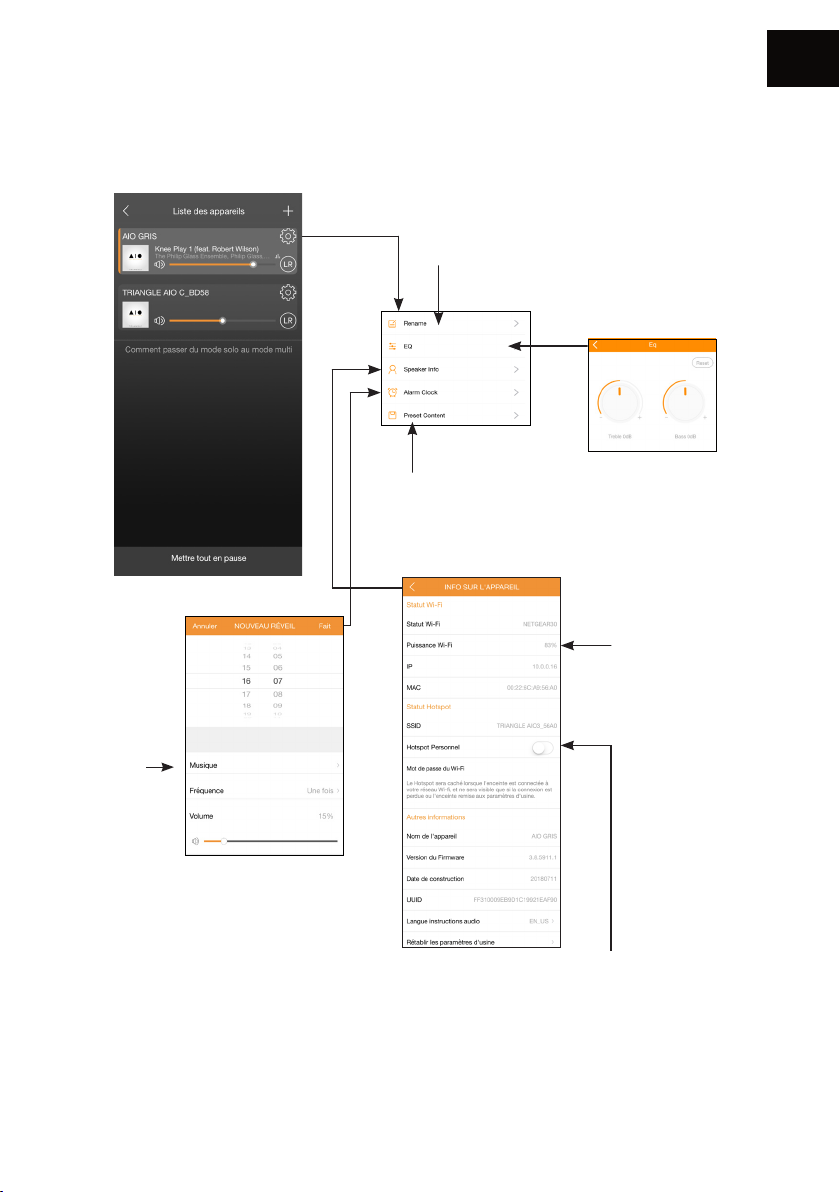
3. Settings
EN
Rename
the speaker
Choice of
the music
played by
the wakeup alarm
Setting the alarm
In order to ensure
that the alarm works,
leave your device
turned on.
Favourites
Details of the AIO
Your AIO TWIN has a “Hot spot” feature and
it can therefore manage its own Wi-Fi network.
You must be connected to your Internet
network with an Ethernet cable.
You just need to enable this feature in the app
on this button and to define a password.
Tone settings
Quality of the
Wi-Fi signal
41
Page 42
EN
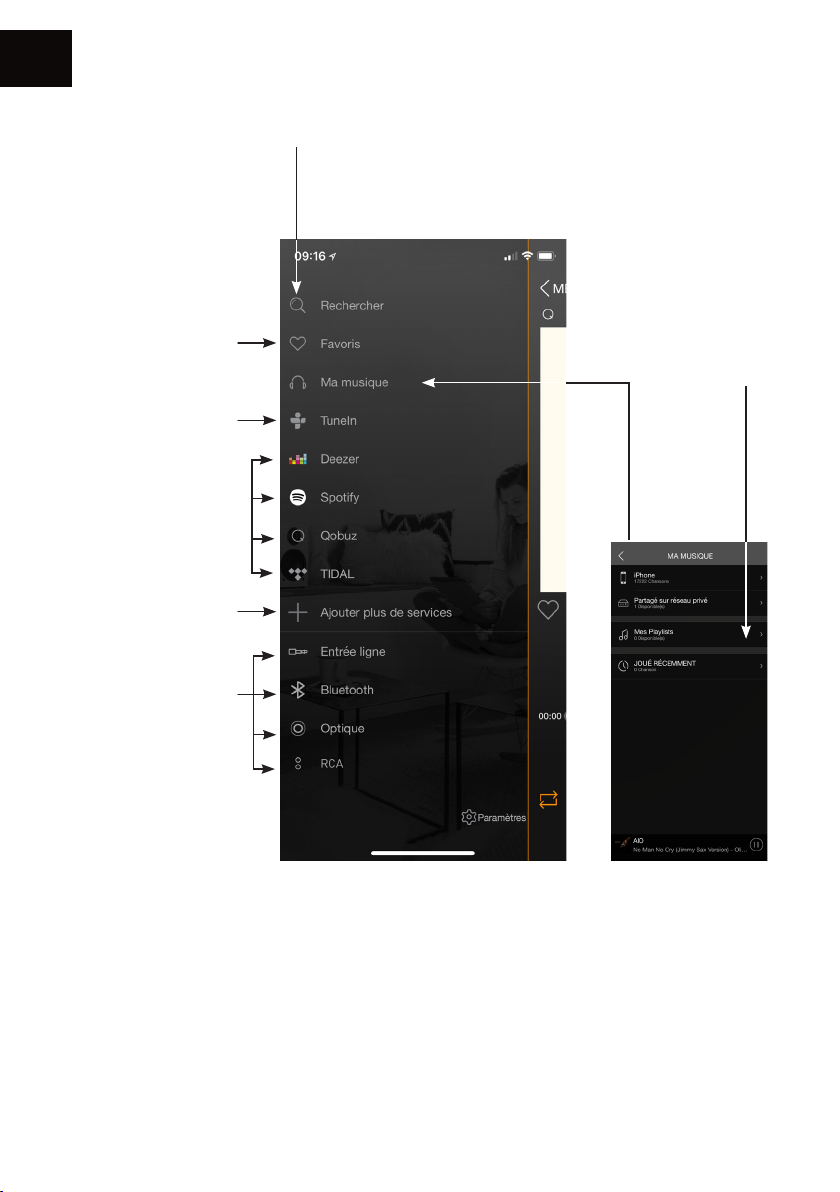
4. Sources
Search: To quickly
access the music on
your mobile device.
Favourites: To quickly
access your favourite
track on your mobile
device.
Tune In gives you
access to all the digital
radios.
Deezer - Qobuz - Tidal
You need a subscription
to access these services.
Spotify : See next
page.
Adding or removing
services from the
menu
Source selection
My Playlists:
Create a playlist
from the songs
on your mobile
device.
My Music: The AIO speaker lets you play music you downloaded on your smartphone and access
the music stored on a NAS drive on your network or on your USB drive connected on the back
panel of the active speaker.
You must allow the app to read the musical content on your mobile device when you set-up
the app (see Settings of the TRIANGLE AIO app in the general menu on your mobile device
depending on your iOS or Android system).
Some tunes might be protected by DRM technology which will prevent you from playing them.
42
Page 43
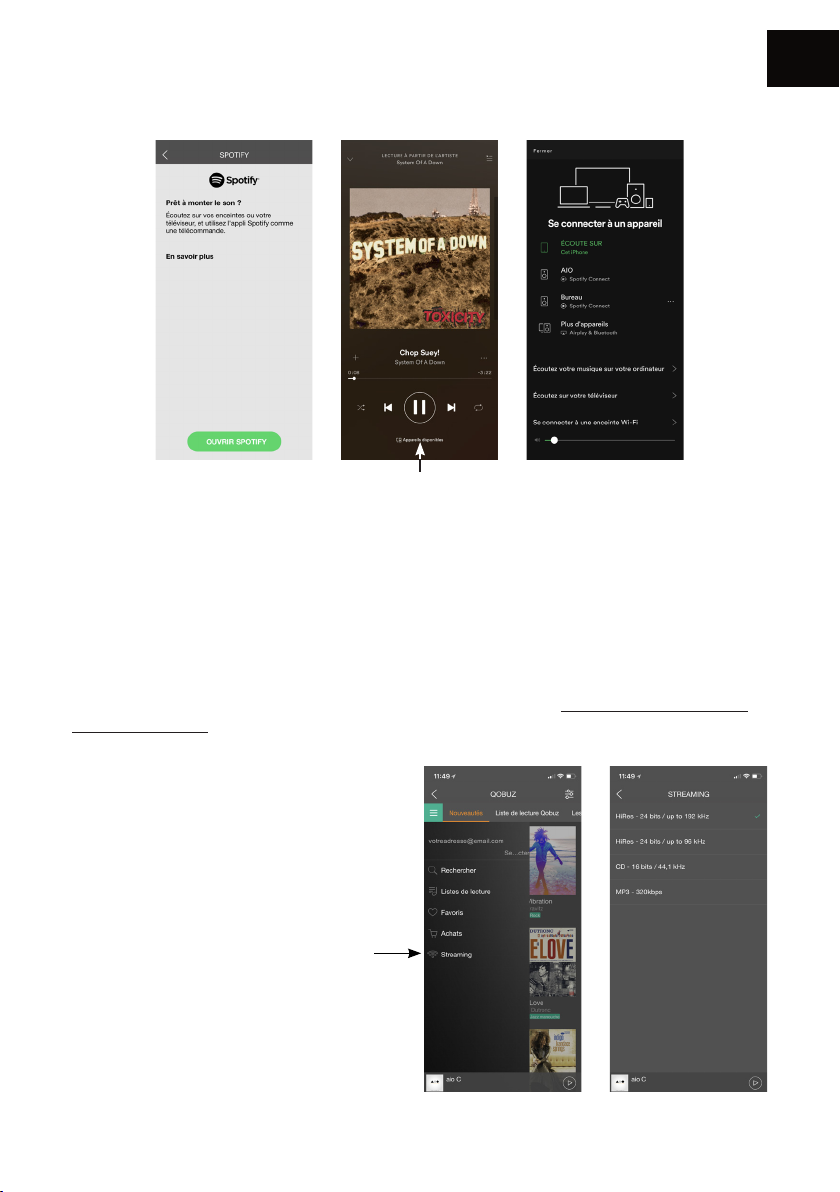
Spotify :
Choose your speaker
Listen to your music with Spotify Connect:
1. Connect your TRIANGLE AIO device to your Internet network.
2. Open the Spotify app on your phone, your tablet or your computer using the same Internet
network as your AIO.
EN
3. Listen to a song and select the AIO device of your choice.
The Spotify software is subject to a third-party license available here: www.spotify.com/connect/
third-party-licences
Listening to music in high denition:
To listen to music in high definition,
you must have a subscription with a
provider and set up the dedicated app.
Example on the Qobuz app >>
43
Page 44

EN
CONNECTION VIA BLUETOOTH
Thanks to the latest Bluetooth 5.0 aptX technology, enjoy the music with a sound quality close to
CD. The range is approximately 10 meters, according to the environment and the obstacles met.
The AIO TWIN speakers let you play music from any Bluetooth-enabled sources: smartphone,
tablet, computer...
To do so:
• Slide the power switch on the back to the ON position to activate your AIO TWIN speakers, or
use the remote if your product was in Standby.
• Wait until the end of the start-up sequence indicated by 3 music notes and the white LED glowing
solid white, before taking any action.
• Select the “Bluetooth” input using the “INPUT” button on the back of the speaker, the remote
or the TRIANGLE AIO app. The blue LED indicates that the AIO is connected via “Bluetooth”.
• When the LED is blinking blue, it indicates that the system is seeking to connect to a Bluetoothenabled device (smartphone, tablet...).
• When you search on your Bluetooth source (refer to the source’s user manual if needed), the
speakers should appear under the name “TRIANGLE AIO TWIN”, you can then connect to them.
Your speakers are now linked to your Bluetooth source. The connection will be done automatically
next time you switch ON your speakers if Bluetooth is selected and enabled on your device.
• If you want to connect another Bluetooth source while the previous one is still connected, turn off
the Bluetooth of the first source. The LED will blink again to indicate the Bluetooth is available.
• Using the remote of your AIO TWIN, you can change tracks, play or pause them without going
through your Bluetooth source.
• The AIO TWIN volume is independant of the Bluetooth source volume.
44
Page 45
WIRED CONNECTION
FR
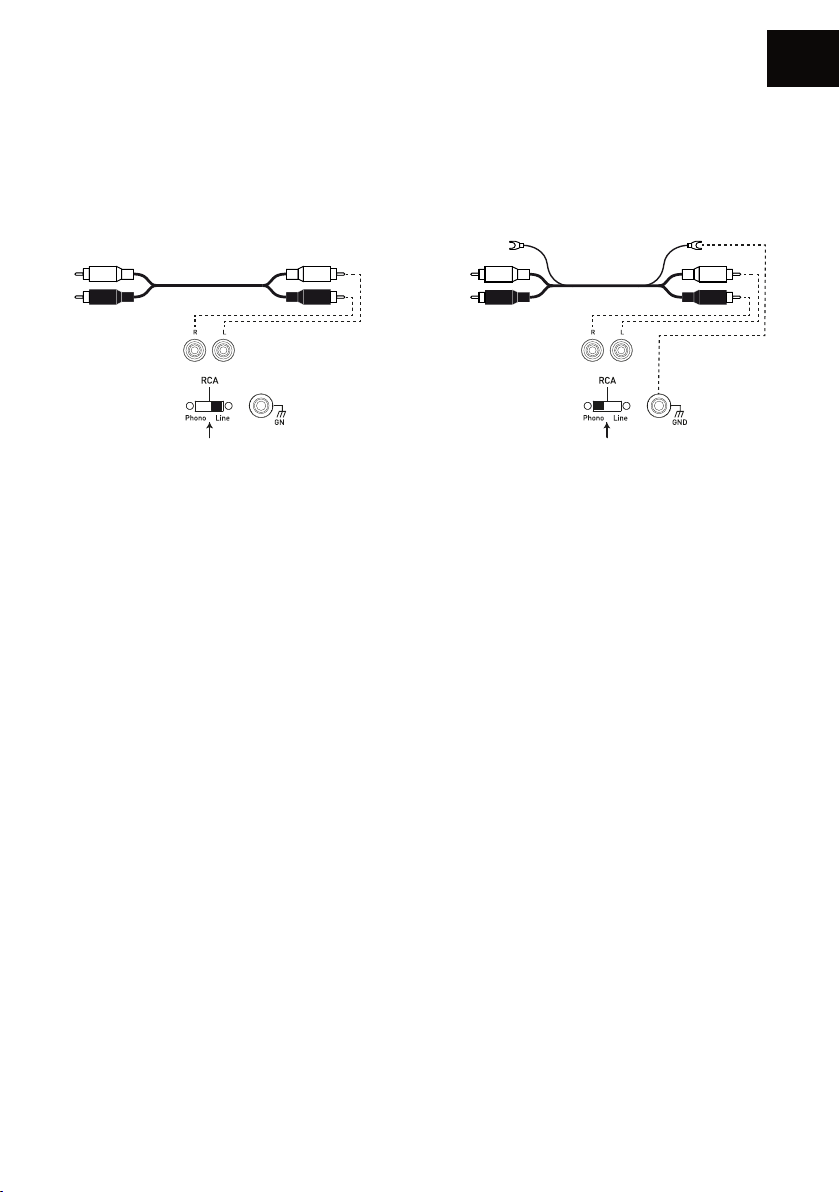
Connection via an RCA cable
EN
line
ou
The RCA input enables you to connect your speakers to your television, CD player, turntable or
other devices.
To do so:
• Plug the red and white connectors into “RCA INPUT” on the back of the active speaker, following
the colours and do the same on the source.
• Check that the PHONO/LINE selector is on “LINE”.
• Slide the power switch on the back to the ON position to activate your AIO TWIN speakers, or
use the remote if your product was in Standby.
• Wait until the end of the start-up sequence indicated by 3 music notes and the white LED glowing
solid white, before taking any action.
• Select the “RCA” input using the remote or the “INPUT” button (volume button) on the back
of the active speaker (the order in which the sources need to be selected is indicated above the
“INPUT“ button) or directly via the mobile app. The green LED indicates that your AIO TWIN is
connected to the “RCA” input. Your system is ready to operate.
phono
Connecting a turntable
If you connect a turntable (without a built-in phono preamplifier), place the “PHONO/LINE”
selector on PHONO to activate the phono preamplifier MM, built into your AIO TWIN speaker.
Connect the ground cable connector to the designated terminal on the back of your active speaker
and on your turntable.
45
Page 46
EN
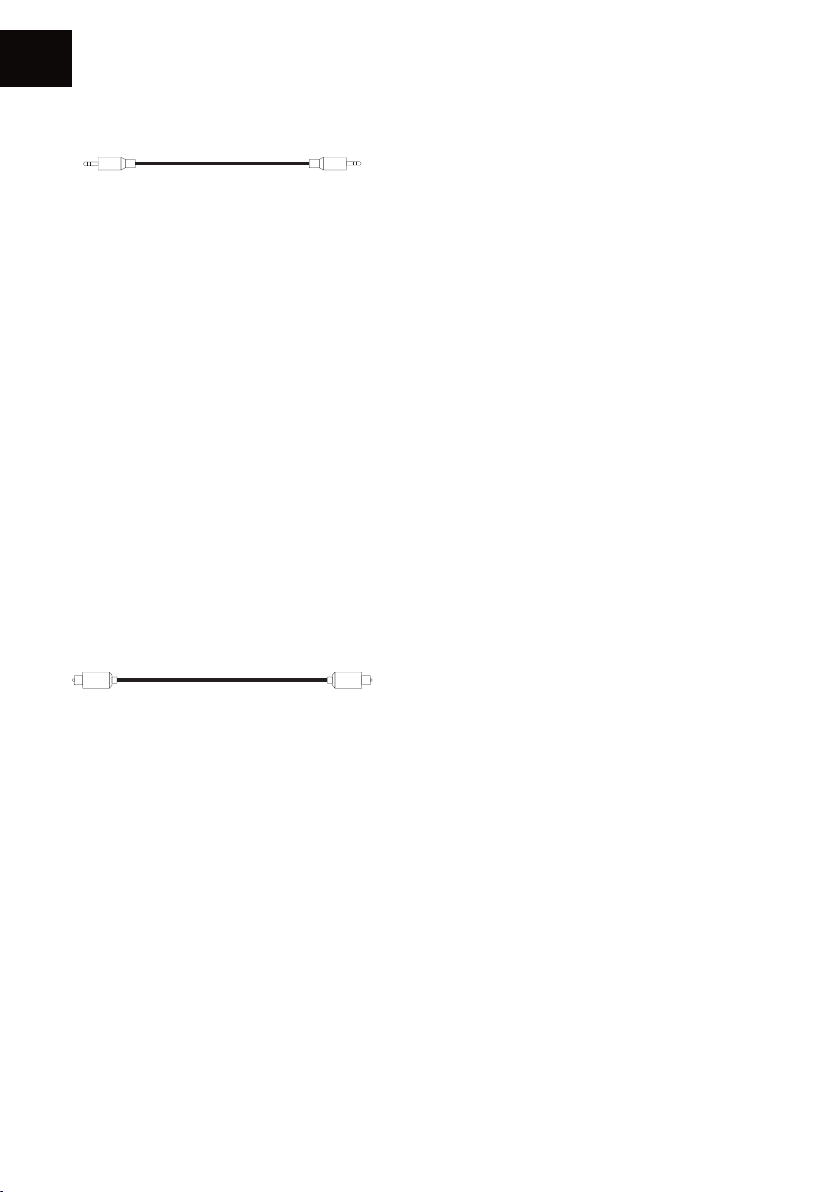
Connection via a 1/8-inch (3.5mm) Mini-Jack cable
A 1/8-inch (3.5mm) jack cable enables you to connect your speakers to many devices: smartphone,
audio player, tablet, computer, television...
To do so:
• Plug one end of the jack connector into the “ANALOG IN / AUX” terminal and the opposite end
into your device.
• Slide the power switch on the back to the ON position to activate your AIO TWIN speakers, or
use the remote if your product was in Standby.
• Wait until the end of the start-up sequence indicated by 3 music notes and the white LED glowing
solid white, before taking any action.
• Select the “AUX” input using the remote or the “INPUT” button (volume button) on the back
of the active speaker (the order in which the sources need to be selected is indicated above
the“INPUT” button) or directly via the mobile app. The yellow LED indicates that your AIO TWIN
is connected to the “AUX” input. Your system is ready to operate.
Connection via an optical cable
The optical input enables you to connect your speakers to any audio devices with an optical
output: audio player, DVD player, television...
To do so:
• Plug one end of the optical cable into the back of the active speaker in the “DIGITAL IN /
OPTICAL” and the opposite end into your device.
• Slide the power switch on the back to the ON position to activate your AIO TWIN speakers, or
use the remote if your product was in Standby.
• Wait until the end of the start-up sequence indicated by 3 music notes and the white LED glowing
solid white, before taking any action.
• Select the “OPTICAL” input using the remote or the “INPUT” button (volume button) on the
back of the active speaker (the order in which the sources need to be selected is indicated above
the “INPUT” button) or directly via the mobile app. The purple LED indicates that your AIO TWIN
is connected to the “OPTICAL” input. Your system is ready to operate.
46
Page 47
Connecting a USB drive
The USB input allows you to connect your USB storage devices, USB drive or portable hard drive.
To do so:
• Connect the storage device to the back of the active speaker in the “DIGITAL IN / USB”.
• Slide the power switch on the back to the ON position to activate your AIO TWIN speakers, or
use the remote if your product was in Standby.
• Wait until the end of the start-up sequence indicated by 3 music notes and the white LED glowing
solid white, before taking any action.
• Select the“Wi-Fi” input using the remote or the “INPUT” button (volume button) on the back
of the active speaker (the order in which the sources need to be selected is indicated above the
“INPUT“ button) or directly via the mobile app. The white LED indicates that your AIO TWIN is
connected to the “USB” input. Your system is ready to operate.
• Using the TRIANGLE AIO app, select the tracks you want to listen to on your AIO TWIN speakers.
(see page 42)
• Important: You can also use the USB plug to charge devices like your smartphone, portable audio
player…
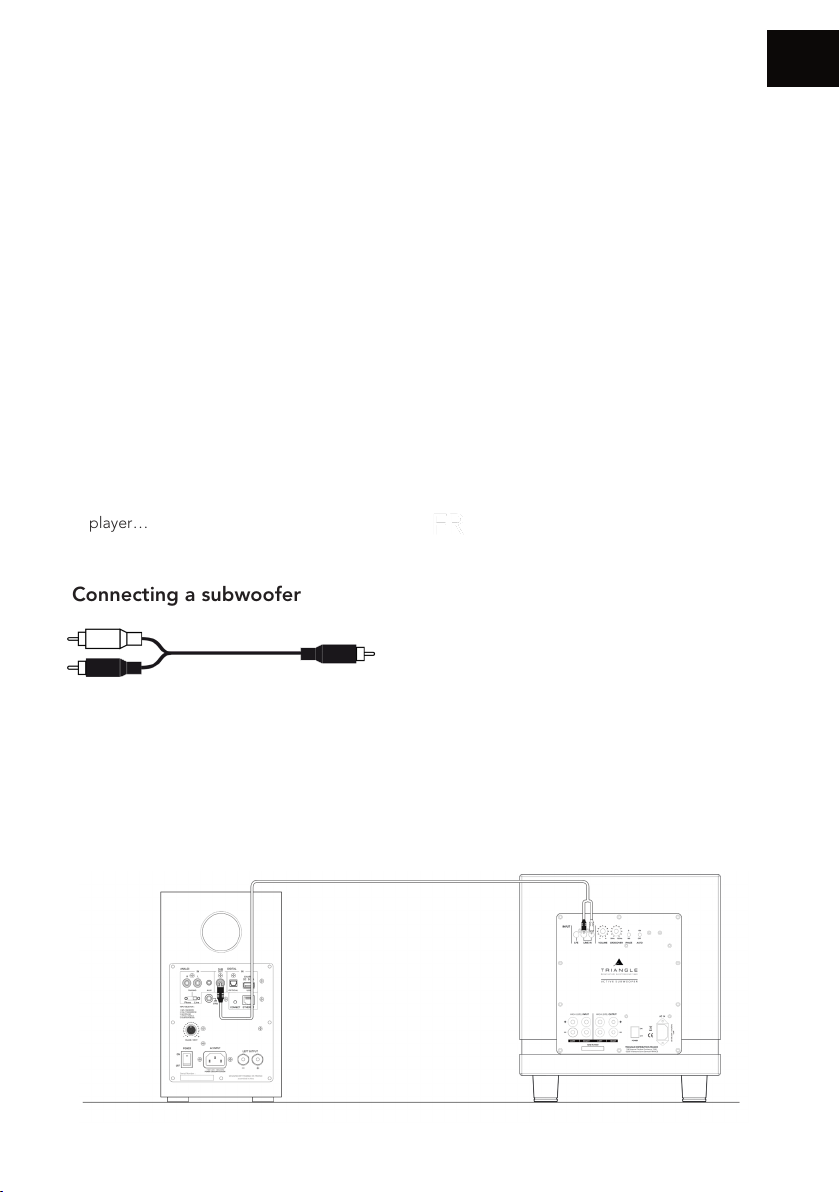
Connecting a subwoofer
EN
The AIO TWIN speakers include a subwoofer output allowing the connection of a subwoofer.
A RCA to 2 RCA cable (Y cable) must connect the SUB output of the AIO TWIN to the 2 LINE IN
of the subwoofer. Set the subwoofer volume and cut-off frequency (Crossover) so that you get a
proper sound coherence between the AIO TWIN and the subwoofer. Subwoofer sound needs to
be heard without being too powerful.
47
Page 48
EN
LOW FREQUENCIES AND TREBLE ADJUSTMENT
Your AIO TWIN speakers have an equalizer that enables you to adjust the low and high
frequencies as you like.
Bass adjustments (+/- 6db):
Increase the low-frequency output by pressing the “BASS +” button on the remote control;
decrease it by pressing the “BASS -” button.
Treble adjustments (+/- 7db):
Increase the high-frequency output by pressing the “TREBLE +” button on the remote control;
decrease it by pressing the “TREBLE -” button.
To restore adjustement to the factory presets, you just need to press the “RESET” button on the
remote (page 39).
CAUTIONS
To avoid the risk of electric shock, do not open the speaker.
48
Page 49
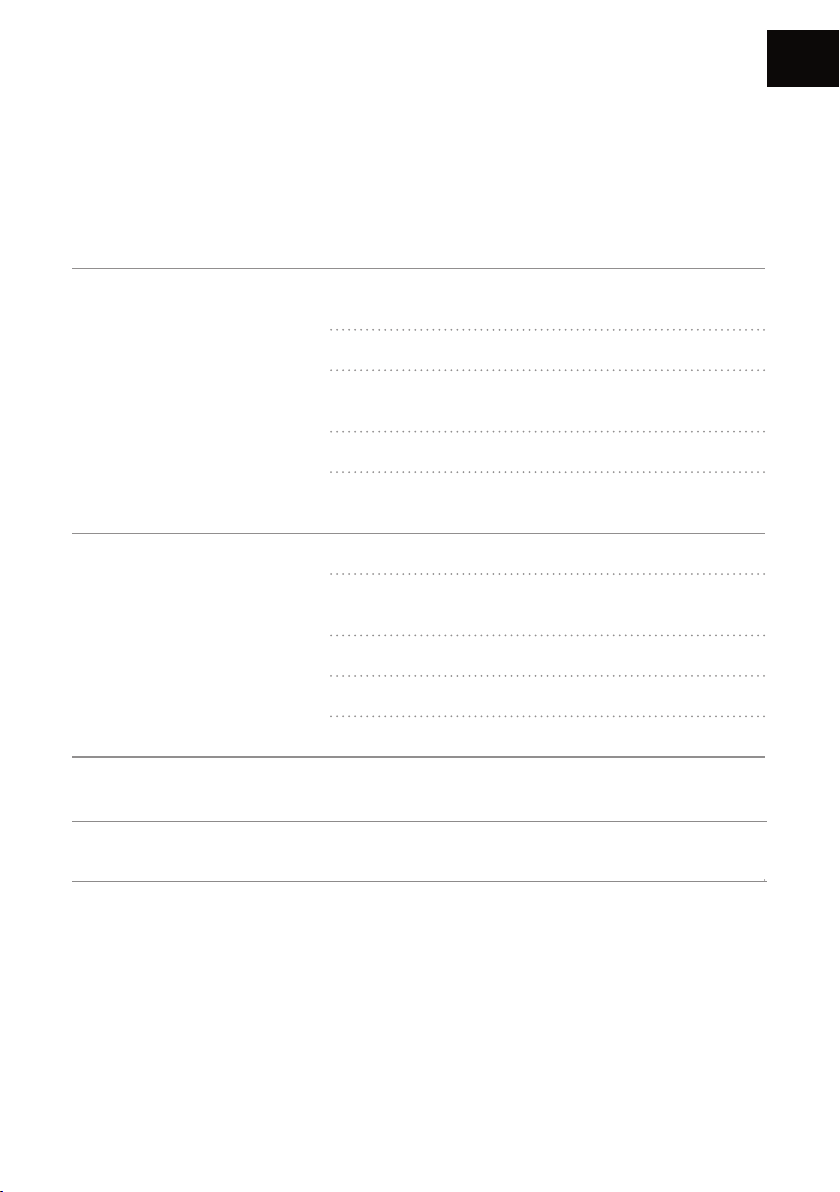
TROUBLESHOOTING
If the device does not work correctly, check the points listed below. If the problem persists, the
device may not operate normally. Unplug the power cord immediately and get in touch with your
reseller.
OBSERVATION SOLUTION
Check that your mobile device is connected to the
network on which you are trying to connect your AIO.
Place your AIO closer to the router.
EN
I do not find my IOA product
in the TRIANGLE AIO app.
The music is cutting out or
jerky.
The volume of my turntable
is very low.
No sound from the optical
jack
Connect an Ethernet cable between your router and the
AIO.
Check that your app is up to date or reinstall it.
Restart your mobile phone and your network. Check the
Internet connection.
Check the Internet connection.
Make sure your network or another device is not using a
large part of your bandwidth.
Check the Wi-Fi signal strength.
Check that your app is up to date or reinstall it.
Restart your mobile phone and your network.
Check that the PHONO/LINE selector is on PHONO.
Check on your optical source (TV, Set-Top Box, DVD
player) that the output is set to «stereo» or «PCM».
49
Page 50
EN
FREQUENTY ASKED QUESTIONS
How many speakers can I
group?
What happens when I get
a call on my mobile phone
while I use the app?
Can the AIO play songs in
high resolution (High Res)?
To avoid the risk of electric shock, do not open the speaker.
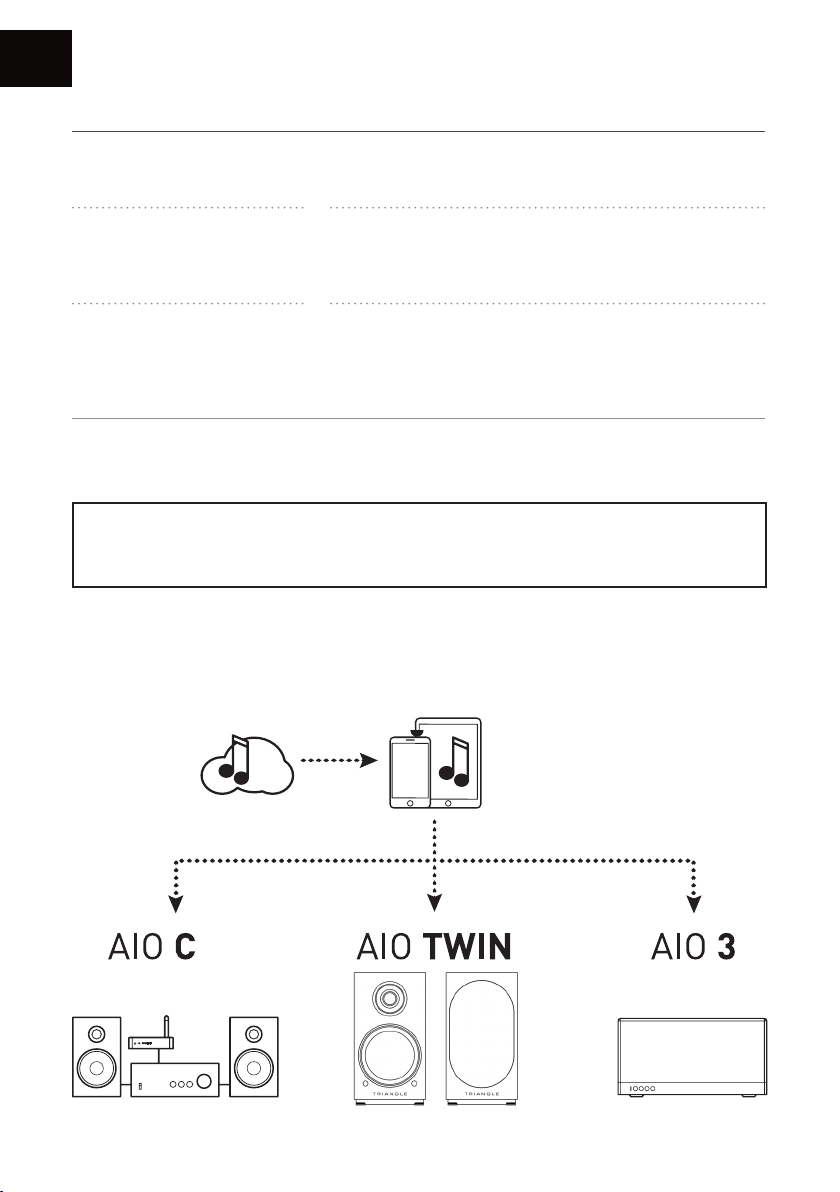
TRIANGLE AIO ECOSYSTEM
AIO can group up to 5 speakers in Wi-Fi, 10 via Ethernet, if
the quality of the connection is good enough.
The music continues to play on your speaker without
interruption.
The AIO can play songs up to 24 bit/192 kHz, you must
have a good Internet connection, your streaming app must
be set-up correctly (page 43) and you need a subscription
to access this streaming service.
CAUTIONS
50
Page 51
TECHNICAL INFORMATIONS
Technical specications AIO TWIN
Drivers Tweeter : 25mm / Woofer : 13cm
WiFi IEEE 802.11 b/g/n Standard 2.4Ghz
Sampling Up to 24 bit/192 kHz
Bluetooth Bluetooth 5.0, aptX, aptX HD, aptX LL, SBC, AAC
Audio inputs Wi-Fi, RCA / Phono, Mini-Jack 3.5mm, Optical, Bluetooth, USB
Audio output Subwoofer output
USB USB2.0, USB FlashDisk. Max power 5V/1A
LAN RJ45 10/100M LAN
EN
Ofcial app TRIANGLE AIO : iOS, Android
Audio formats
Power handling 2 x 50W, 4Ω
Speaker dimensions (W x D x L) 6,5 x 11,96 x 9,25 inches
Net Weight 22,7 lbs
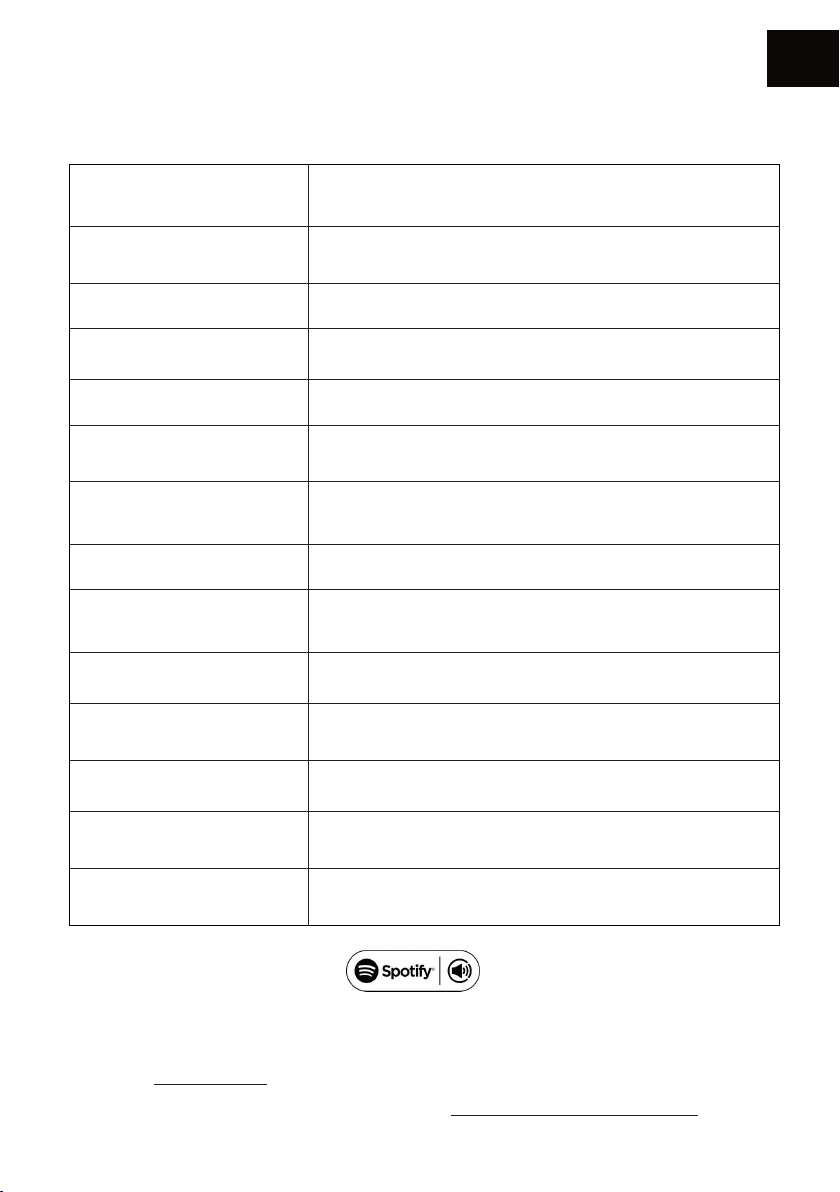
Your new speaker has Spotify Connect built in.
Spotify Connect lets you control the music playing on your device, using the Spotify app on your mobile, tablet or PC.
Listening is seamless. You can take calls, play games, even switch your phone off – all without interrupting the music.
Learn more at spotify.com/connect
The Spotify software is subject to third party licenses found here: www.spotify.com/connect/third-party-licenses
APE, FLAC, WAV, Apple Lossless (ALAC), AAC, AAC-LC, HE-AAC,
HE-AAC v2, MP3, CBR/VBR
51
Page 52

INSTRUCTIONS DE SÉCURITÉ
AVERTISSEMENT : Veuillez lire attentivement l’intégralité des instructions et consignes de
sécurité avant d’utiliser l’équipement.
• Conserver ces instructions et consignes de sécurité pour une consultation ultérieure.
• Ne pas utiliser l’appareil à proximité d’eau ou de liquides.
• Nettoyer uniquement avec un chiffon doux, sec et non pelucheux.
• Ne pas obstruer les ouvertures (évents) de l’appareil.
• Ne pas installer à proximité d’une source de chaleur, tels qu’un radiateur, poêle, ou tout autre
appareil produisant de la chaleur (y compris des amplificateurs).
• Utiliser uniquement des accessoires spécifiés par le fournisseur.
• S’assurer que le support d’utilisation est suffisamment rigide pour recevoir le produit (pied,
étagère, meuble...).
• Protéger le câble d’alimentation de tout pincement ou écrasement, en particulier au niveau des
prises, protéger également l’entrée de l’alimentation sur l’appareil.
• Débrancher l’appareil durant les orages ou pendant une longue période de non-utilisation.
• La prise d’un appareil électrique doit être adaptée à la prise du secteur. Ne jamais modifier la
prise d’aucune façon. L’appareil doit être connecté à une prise principale munie d’une protection
reliée à la terre.
• Se référer à votre revendeur agréé TRIANGLE si l’appareil est endommagé de quelque manière
que ce soit : si le câble ou la prise d’alimentation sont endommagés, si un liquide ou un
objet tombe sur cet appareil, une exposition à la pluie ou à l’humidité, s’il ne fonctionne pas
correctement ou encore si l’appareil chute.
52
Page 53

SAFETY INSTRUCTIONS
WARNING: Read carefully all the safety instructions before using the device.
• Keep these safety instructions for future reference.
• Do not use this apparatus near water or liquid.
• Only clean with a dry and soft cloth.
• Make sure the openings (vents) on the device are not blocked.
• Do not install near any heat sources such as radiators, stoves, or any other apparatus (including
amplifiers) that produce heat.
• Only use accessories specified by the manufacturer.
• Be sure that the stand/table/furniture is strong enough to support the apparatus (stand, shelf,
furniture...).
• Protect the power cord from being walked on or pinched, particularly at the plugs, and protect
the connector where it exits from the apparatus.
• Unplug the apparatus during lightning storms or when it’s unused for long periods of time.
• The plug of the apparatus must fit with the outlet. Never modify the plug in any way. The
apparatus should be connected to a mains socket outlet with protective earthing connection.
• Refer to your authorized TRIANGLE dealer or qualified service personnel if the apparatus is
damaged in any way. For example, if the power cord or the wall outlet is damaged, liquid has
been spilled or objects have fallen on the apparatus, the apparatus has been exposed to rain or
moisture, does not operate normally, or has been dropped.
53
Page 54

GARANTIE / WARRANTY
Félicitations pour l’achat de vos enceintes TRIANGLE.
Afin de profiter de votre achat au maximum, nous vous proposons un enregistrement de votre
produit. Cet enregistrement vous permettra de bénéficier des conseils de nos équipes, de recevoir
des offres spéciales et d’obtenir une garantie de 2 ans sur vos enceintes TRIANGLE.
1- Enregistrement en ligne
Rien de plus simple, vous pouvez vous enregistrer en deux clics à l’adresse suivante :
http://register.trianglehifi.com/
2- Enregistrement par coupon de garantie
Si vous souhaitez vous enregistrer via le coupon de garantie, il vous faut compléter le coupon de
garantie et nous l’expédier à l’adresse suivante :
TRIANGLE Hi-Fi
475 Avenue Flandres Dunkerque
02200 Villeneuve-Saint-Germain
FRANCE
Thanks for buying a TRIANGLE product.
We want you to enjoy your purchase to the fullest. The first step is an easy registration of your
product. By doing this, you will benefit from helpful tips, products support, special offers and 2
years warranty.
1- Online registration
Register your product easily online at the following address:
http://register.trianglehifi.com/
2- Warranty card
You can also register your product and validate your warranty by filling the warranty card and
sending it to:
TRIANGLE Hi-Fi
475 Avenue Flandres Dunkerque
02200 Villeneuve-Saint-Germain
FRANCE
54
Page 55

Note sur la garantie
Vos enceintes TRIANGLE bénécient d’une garantie de 2 ans. Cette garantie prend effet à
partir de la date d’achat et couvre tous les défauts de fabrication ou les dommages que pourraient
subir vos enceintes, résultant de ces mêmes défauts. Cette garantie est accordée uniquement au
premier utilisateur du produit et seulement après l’enregistrement en ligne ou la réception du
coupon de garantie par la société TRIANGLE. Elle n’est pas transmissible en cas de revente dudit
produit. De plus, elle cesserait de plein droit en cas de panne résultant d’un mauvais traitement ou
d’une mauvaise manipulation.
Sont exclus de la garantie :
• Bobine brûlée par excès de puissance
• Toutes pannes résultant d’une utilisation à des fins professionnelles (sonorisation, public address
etc.)
• Toutes pannes résultant d’un stockage dans une pièce trop humide
• Membrane crevée ou arrachée
• Suspension déchirée
• Toutes pannes résultant d’un choc mécanique (chute, écrasement, etc.)
• Toutes pannes résultant de l’intervention d’une personne non habilitée par TRIANGLE
• Impacts sur l’ébénisterie (rayures, écrasement, chocs divers)
Note on the warranty
Your TRIANGLE loudspeakers are warranted for 2 years. This warranty takes effect from the date
of purchase and covers any manufacturing defect or damage your loudspeakers could suffer as a
result of these same defects. This warranty is granted solely to the first owner of the product and is
not transmittable in the case of resale. To validate your warranty, you will need to register online
or mail the warranty coupon to TRIANGLE. Please note, this warranty is voided if any fault arises
from ill-treatment or careless handling of the product.
The following are excluded from this warranty:
• A burned voice-coil caused by overloading the loudspeaker
• Any fault occurring from professional usage (public sound systems, PA systems, etc.)
• Any fault resulting from storage in areas of high humidity
• A pierced or torn membrane
• A torn suspension
• Any fault resulting from a mechanical shock (e.g. if dropped or handled roughly)
• Any fault arising from servicing by anyone other than an authorized TRIANGLE service technician
• Damaged cabinets due to mishandling
55
Page 56

www.trianglehi.com
SITE INTERNET / WEBSITE
f
facebook.com/trianglehifi
I
instagram.com/trianglehifi
t
twitter.com/trianglehifi
56
Page 57

57
Page 58

Version 1.8 - 20211216
- DESIGN BY TRIANGLE IN FRANCE
 Loading...