

Page 1
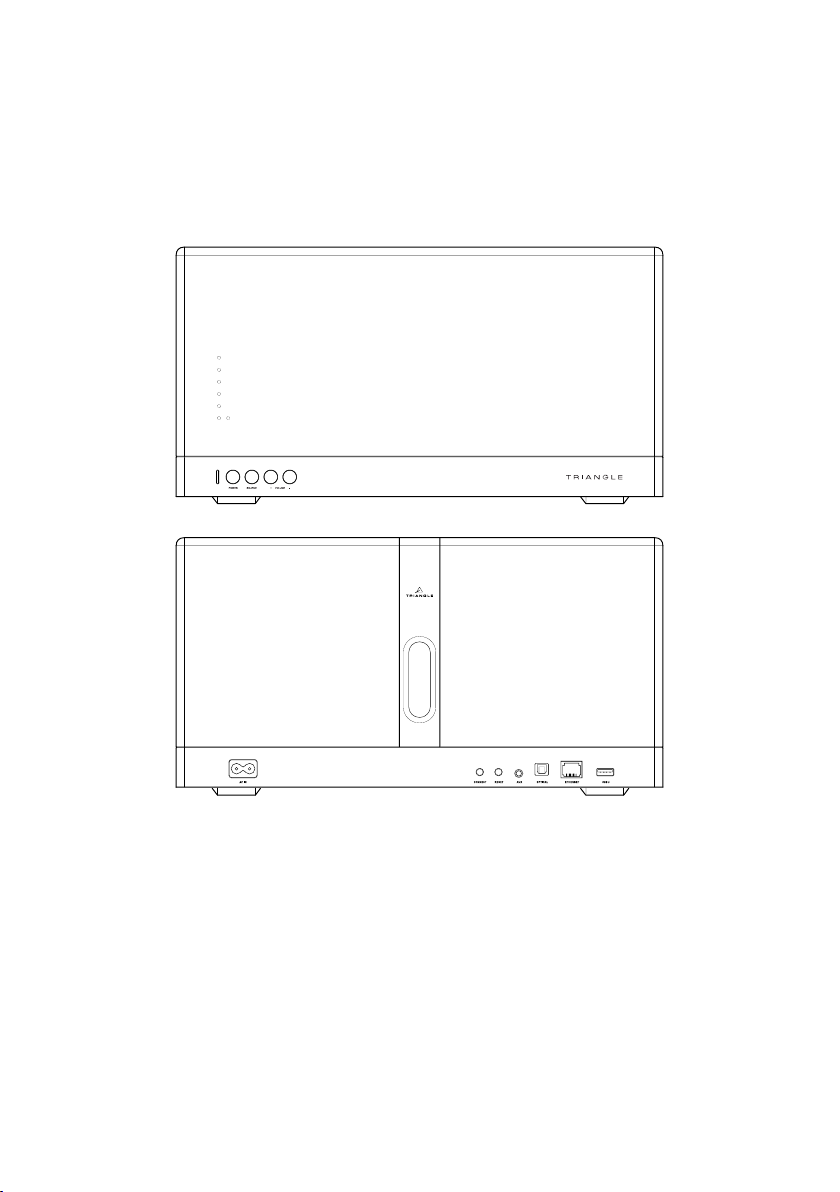
Mode d’emploi & Garantie
Owner’s manual & Warranty
TRIANGLE DISTRIBUTION FRANCE
44 rue Barreyre - CS40099 - 33300 Bordeaux
FRANCE
Page 2

Page 3

INSTRUCTIONS DE SÉCURITÉ
AVERTISSEMENT : Veuillez lire attentivement l’intégralité des instructions et consignes de
sécurité avant d’utiliser l’équipement.
Î Conserver ces instructions et consignes de sécurité pour une consultation ultérieure.
Î Ne pas utiliser l’appareil à proximité d’eau ou de liquides.
Î Nettoyer uniquement avec un chiffon doux, sec et non pelucheux.
Î Ne pas obstruer les ouvertures (évents) de l’appareil.
Î Ne pas installer à proximité d’une source de chaleur, tels qu’un radiateur, poêle, ou tout autre
appareil produisant de la chaleur (y compris des amplicateurs).
Î Utiliser uniquement des accessoires spéciés par le fournisseur.
Î S’assurer que le support d’utilisation est sufsamment rigide pour recevoir le produit (pied,
étagère, meuble...).
Î Protéger le câble d’alimentation de tout pincement ou écrasement, en particulier au niveau des
prises, protéger également l’entrée de l’alimentation sur l’appareil.
Î Débrancher l’appareil durant les orages ou pendant une longue période de non-utilisation.
Î La prise d’un appareil électrique doit être adaptée à la prise du secteur. Ne jamais modier la
prise d’aucune façon. L’appareil doit être connecté à une prise principale munie d’une protection
reliée à la terre.
Î Se référer à votre revendeur agréé TRIANGLE ou tout autre personne qualiée si l’appareil
est endommagé de quelque manière que ce soit : si le câble ou la prise d’alimentation sont
endommagés, si un liquide ou un objet tombe sur cet appareil, une exposition à la pluie ou à
l’humidité, s’il ne fonctionne pas correctement ou encore si l’appareil chute.
SAFETY INSTRUCTIONS
WARNING : Read carefully all the safety instructions before using the device.
Î Keep these safety instructions for future references.
Î Do not use this apparatus near water or liquid.
Î Only clean with a dry and soft cloth.
Î Do not block any aperture (vents) of the device.
Î Do not install near any heat sources such as radiators, stoves, or any other apparatus (including
ampliers) that produce heat.
Î Only use accessories specied by the manufacturer.
Î Be sure that the stand/table/furniture is strong enough to support the apparatus.
Î Protect the power cord from being walked on or pinched particulary at the plugs and also protect
the connector where it exit from the apparatus.
Î Unplug the apparatus during lightning storms or when it’s unused for long periods of time.
Î The plug of the apparatus must t with the outlet. Never modify the plug in any way. Apparatus
should be connected to a mains socket outlet with protective earthing connection.
Î Refer to your authorized TRIANGLE dealer or qualied service personnel if the apparatus is
damaged in any way, such as power supply cord or plug is damaged, liquid has been spilled or
objects have fallen on the apparatus, the apparatus has been exposed to rain or moisture, does
not operate normally, or has been dropped.
Page 4

安全说明
警告:在使用该设备之前仔细阅读所有的安全说明。
ÎÎ 保存这些安全指示以备将来参考。Î
ÎÎ 不要在水或液体附近使用此设备。Î
ÎÎ 只用干布和软布清洁擦拭。Î
ÎÎ 不要阻塞设备的任何孔(通风口)。Î
ÎÎ 不要安装在任何热源附近,例如散热器、炉子或任何其他产生热量的设备(包括放大器)。Î
ÎÎ 只使用制造商指定的附件。Î
ÎÎ 确保支架/桌子/家具足够坚固以支撑设备。Î
ÎÎ 保护电源线不被踩踏到,当没有连接设备时也要保护好连接头。Î
ÎÎ 在雷暴期间或未长时间使用时拔掉设备。Î
ÎÎ 设备的插头必须与插座相配合,永远不要修改插头。设备应连接到与有地线保护的电源插座。Î
ÎÎ 如果设备有任何方式损坏,如电源线或插头损坏、液体溢出或物品落到设备上、设备已暴露于雨水
或湿气中、不正常操作,或者已经被掉在地上,请向授权的TRIANGLE经销商或合格服务人员咨询。
Page 5

www.trianglehi.com
SITE INTERNET / WEBSITE
resellers.trianglehi.com
NOS REVENDEURS / RESELLERS
support.trianglehi.com
SUPPORT & FAQ
f
facebook.com/trianglehi
t
twitter.com/trianglehi
Page 6

SOMMAIRE
/ SUMMARY / 总结
GARANTIE / WARRANTY / 保证 7
MODE D’EMPLOI - FRANÇAIS 11
Î Déballage 12
Î Descriptif enceinte 13
Î Descriptif télécommande 14
Î Guide d’installation réseau 15
Î Installation 16
Î Présentation de l’application mobile 17
Î En cas de panne 24
Î Foire aux Questions 25
USER MANUAL - ENGLISH 27
Î Unpacking 28
Î Speaker description 29
Î Remote description 30
Î Network setup guide 31
Î Installation 32
Î App overview 33
Î Troubleshooting 40
Î Frequently Asked Questions 41
使用手册 43
ÎÎ 打开包装 44
ÎÎ 音箱描述 45
ÎÎ 遥控器按钮描述 46
ÎÎ 网络设置指南 47
ÎÎ 安装 48
ÎÎ APP图示 49
ÎÎ 疑难解答 56
ÎÎ 一般疑问 57
INFORMATIONS TECHNIQUES / TECHNICAL INFORMATIONS 58
/ 技术参数
Page 7

GARANTIE / WARRANTY
Félicitations pour l’achat de vos enceintes TRIANGLE.
An de proter de votre achat au maximum, nous vous proposons un enregistrement de votre
produit. Cet enregistrement vous permettra de bénécier des conseils de nos équipes, de recevoir
des offres spéciales et d’obtenir une garantie de 2 ans sur vos enceintes TRIANGLE.
1- Enregistrement en ligne
Rien de plus simple, vous pouvez vous enregistrer en deux clics à l’adresse suivante :
http://register.trianglehi.com/
2- Enregistrement par coupon de garantie
Si vous souhaitez vous enregistrer via le coupon de garantie, il vous faut compléter le bon et nous
l’expédier à l’adresse suivante :
TRIANGLE DISTRIBUTION FRANCE
44 rue Barreyre - CS 40099
33300 Bordeaux Cedex FRANCE
Thanks for buying a TRIANGLE product.
We want you to enjoy your purchase to the fullest. The rst step is an easy registration of your
products. By doing this, you will benet from helpful tips, products support, special offers and 2
years warranty.
1- Online registration
Register your product easily online at the following address :
http://register.trianglehi.com/
2- Warranty card
You can also register your product and validate your warranty by lling the warranty card and
sending it to :
TRIANGLE DISTRIBUTION FRANCE
44 rue Barreyre - CS 40099
33300 Bordeaux Cedex FRANCE
7
Page 8
Note sur la garantie
Vos enceintes TRIANGLE bénécient d’une
garantie de 2 ans. Cette garantie prend effet
à partir de la date d’achat et couvre tous les
défauts de fabrication ou les dommages que
pourraient subir vos enceintes, résultant de ces
mêmes défauts. Cette garantie est accordée
uniquement au premier utilisateur du
produit et seulement après l’enregistrement
en ligne ou la réception du coupon de
garantie par la société TRIANGLE. Elle n’est
pas transmissible en cas de revente dudit
produit. De plus, elle cesserait de plein droit en
cas de panne résultant d’un mauvais traitement
ou d’une mauvaise manipulation.
Note on the warranty
Your TRIANGLE loudspeakers are warranted
for 2 years. This warranty takes effect from the
date of purchase and covers any manufacturing
defect or damage your loudspeakers could
suffer as a result of these same defects. This
warranty is granted solely to the rst owner
of the product, and is not transmittable in
the case of resale. To validate your warranty,
you will need to register online or mail the
warranty coupon to TRIANGLE. Please note,
this warranty is voided if any fault arises from illtreatment or careless handling of the product.
The following are not guaranteed :
Sont exclus de la garantie :
Î A burned voice-coil caused by overloading
the driver
Î Bobine brûlée par excès de puissance
Î Toute panne résultant d’une utilisation à des
ns professionnelles (sonorisation, public
address etc.)
Î Toute panne résultant d’un stockage dans
une pièce trop humide
Î Membrane crevée ou arrachée
Î Suspension déchirée
Î Toute panne résultant d’un choc mécanique
(chute, écrasement, etc.)
Î Toute panne résultant de l’intervention
d’une personne non habilitée par TRIANGLE
Î Any fault occurring from professional usage
(public sound systems, PA systems, etc.)
Î Any fault resulting from storage in areas of
high humidity
Î A pierced or torn membrane
Î A torn suspension
Î Any fault resulting from a mechanical shock
(ex if dropped or handled roughly)
Î Any fault arising from servicing by anyone
other than an authorized TRIANGLE service
technician
Î Damaged cabinets due to mishandling
Î Impacts sur l’ébénisterie (rayures,
écrasement, chocs divers)
Nom de l’acheteur / Buyer’s name / 购买者姓名:
Adresse personnelle / Personal Address / 个人地址Î::
Email / 邮箱 Date d’achat / Date of purchase / 购买日期 :
Nom du revendeur / Reseller’s name / 经销商名称:
Modèle / Model / 产品 : N° Série / Serial Number / 序列号:
1er produit TRIANGLE / 1st TRIANGLE model / 首个TRIANGLE型号Î: Oui/Yes Non/No
Précédent modèle TRIANGLE / Previous TRIANGLE model / 先前的TRIANGLE型号:
J’ai choisi le matériel TRIANGLE pour la raison suivante / I chose TRIANGLE product for the following reason / 我选择
TRIANGLE产品的以下理由 :
Conseil d’amis / Friend’s advice /Î朋友推荐
Conseil d’un revendeur / Dealer’s advice / 经销商推荐
Démonstration lors d’une exposition / Demonstration during an exhibition / 展会上推荐
Recommandation d’un journal ou site spécialisé / Recommandation from a magazine or website / 杂志或网站介绍
Lequel / which one / 哪一个 :
GARANTIE / WARRANTY / 保证卡
Page 9

保证卡
谢谢您购买法国Triangle的产品。Î
我们希望您能购物愉快。第一步请轻松注册您的产品,这样做,您将受益于有用的提示,产品支持,特
别优惠和2年保修服务。
1.在线注册
在以下地址轻松注册您的产品:Î
HTTP://Reavest.TangangLeHIIF.COM/Î
2.保修卡
您也可以注册您的产品和通过填写保修卡验证您的保修,并将其发送到:
TRIANGLEÎDISTRIBUTIONÎFRANCE
44ÎrueÎBarreyreÎ-ÎCSÎ40099
33300ÎBordeauxÎCedexÎFRANCE
保修提示
我们的TRIANGLE音响承保2年,本保修书自购买之日起生效,保修范围包括任何制造缺陷或因这些缺
陷而导致产品的损坏。此保修仅授予产品的第一所有者,在转售的情况下我们不负责保修。为了验证
您的保修,您将需要在网上注册或邮寄保修券TRIANGLE。请注意,如果因产品的错误处理或粗心处理
而出现故障,本保修无效。
以下情况不在保修范围内:
ÎÎ 因喇叭过载而引起的音圈烧坏Î
ÎÎ 从专业用途(公共音响系统、PA系统等)发生的任何故障Î
ÎÎ 由于存放在高湿度地区引发的任何故障Î
ÎÎ 刺破或撕破音膜/鼓纸
ÎÎ 喇叭弹波撕裂Î
ÎÎ 由机械冲击引起的任何故障(如掉落或鲁莽处理)Î
ÎÎ 除授权的TRIANGLE维修技师以外的任何人所造成的任何故障Î
ÎÎ 因处理不当而损坏的音箱箱体Î
9
Page 10
Spotify Connect est intégré à votre nouveau haut-parleur.
Spotify Connect vous permet de contrôler la musique diffusée sur votre appareil à
l’aide de l’application Spotify sur votre mobile, votre tablette ou votre PC. L’écoute
est uide. Vous pouvez passer des appels, jouer à des jeux et même éteindre votre
téléphone, le tout sans interrompre la musique. En savoir plus sur spotify.com/connect
Le logiciel Spotify est soumis aux licences de tiers disponibles à l’adresse suivante:
www.spotify.com/connect/third-party-licenses
Page 11

MODE D’EMPLOI
FR
FRANÇAIS
11
Page 12

FR
DÉBALLAGE
Ouvrir le carton, puis sortir l’enceinte.
Lors du déballage, si vous remarquez un défaut sur un élément, contactez votre
revendeur. Votre enceinte est un objet précieux, il est recommandé de la manipuler avec
précaution.
Avant de jeter les emballages, vériez qu’il ne reste rien à l’intérieur.
CONTENU DU PACK
Î Une enceinte AIO
Î Télécommande + pile
Î Mode d’emploi
Î Câble secteur
PRÉCAUTIONS D’INSTALLATION
Avant l’installation
Avant de procéder à tout branchement sur votre AIO3, vériez la stabilité du support et réduire
autant que possible la distance avec votre box/routeur.
Déplacement de l’appareil
Toujours débrancher le cordon d’alimentation et déconnecter les câbles de connexion entre tous
les autres composants audio lors du déplacement de l’appareil. Ceci an d’éviter un court-circuit
ou l’endommagement des prises et des câbles de connexion.
Emplacements à éviter
Évitez de placer votre enceinte à proximité des lieux humides ou exposés à un ensoleillement
excessif. Il est préférable de la placer dans un endroit tempéré.
Recyclage
Protection de l’environnement : vos produits contiennent de nombreux matériaux valorisables ou
recyclables. Utilisez pour ces produits des points de collecte.
12
Page 13
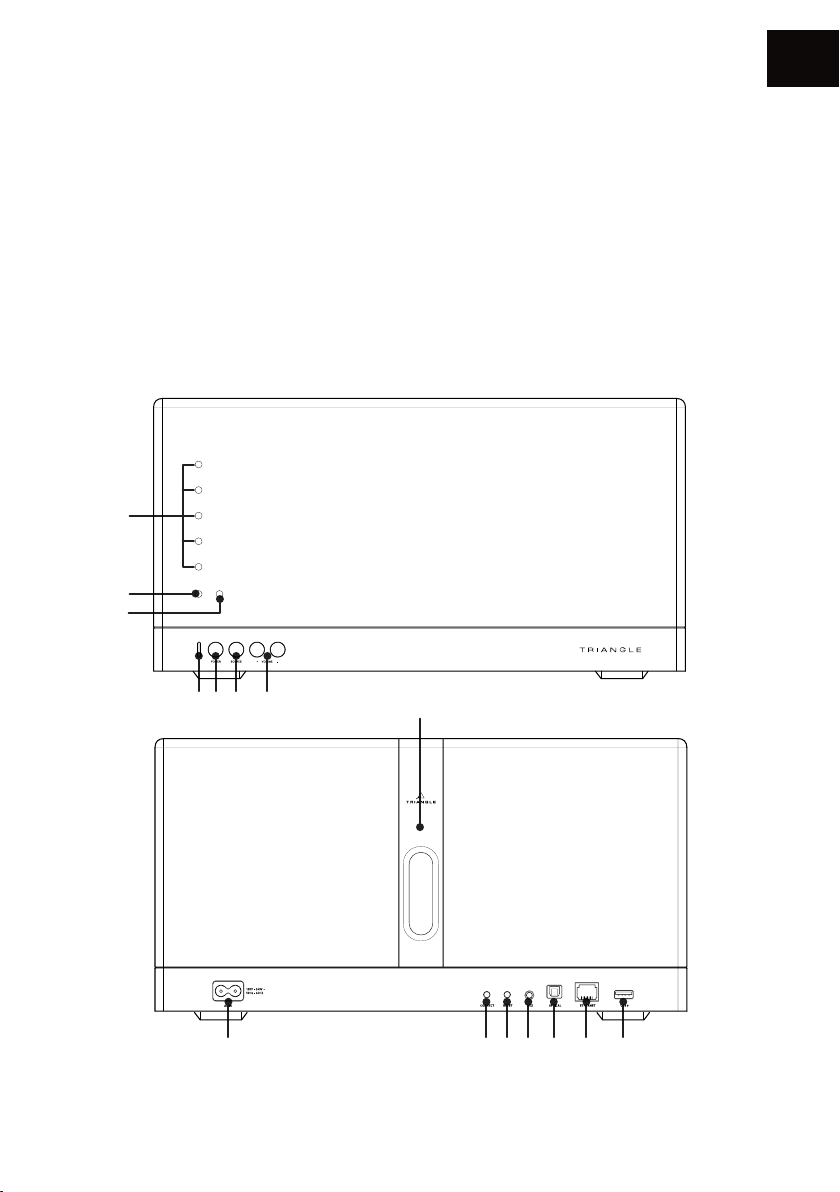
DESCRIPTIF ENCEINTE
1. LED Volume
2. LED Action de la télécommande
3. LED Mise en veille / Démarrage
4. LED Source sélectionnée :
Blanc : WIFI / USB
Vert : AUXILIAIRE
Orange : OPTIQUE
Bleu : BLUETOOTH
5. Bouton Marche/Arrêt
6. Sélection de la source
1
2
3
FR
7. Volume
8. Prise secteur
9. Appairage réseau
10. Remise à zéro de la conguration
11. Entrée auxiliaire Jack 3.5mm
12. Entrée optique
13. Câble Ethernet
14. USB (pour lecture clé et recharge)
15. Zone pour la connexion NFC
4 5 6 7 15
8 9 10 11 12 13 14
13
Page 14
FR
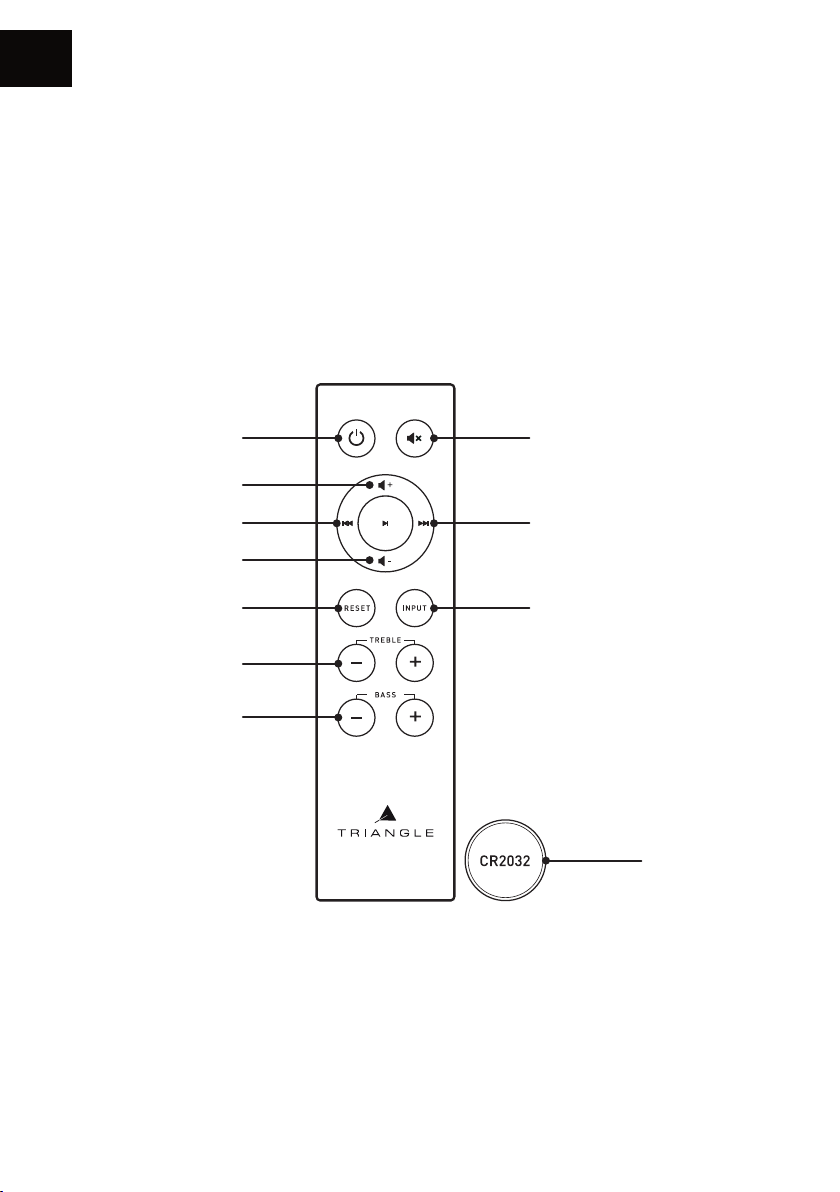
DESCRIPTIF TÉLÉCOMMANDE
1. Marche / Arrêt
2. Volume +
3. Piste précédente
4. Volume -
5. Remise à zéro des réglages Aigus/Basses
6. Réglages Aigus
7. Réglages Basses
8. Mode Sourdine
9. Piste suivante
10. Sélection des sources
11. Pile fournie
1
2
3
4
5
6
7
8
9
10
11
14
Page 15
GUIDE D’INSTALLATION RÉSEAU
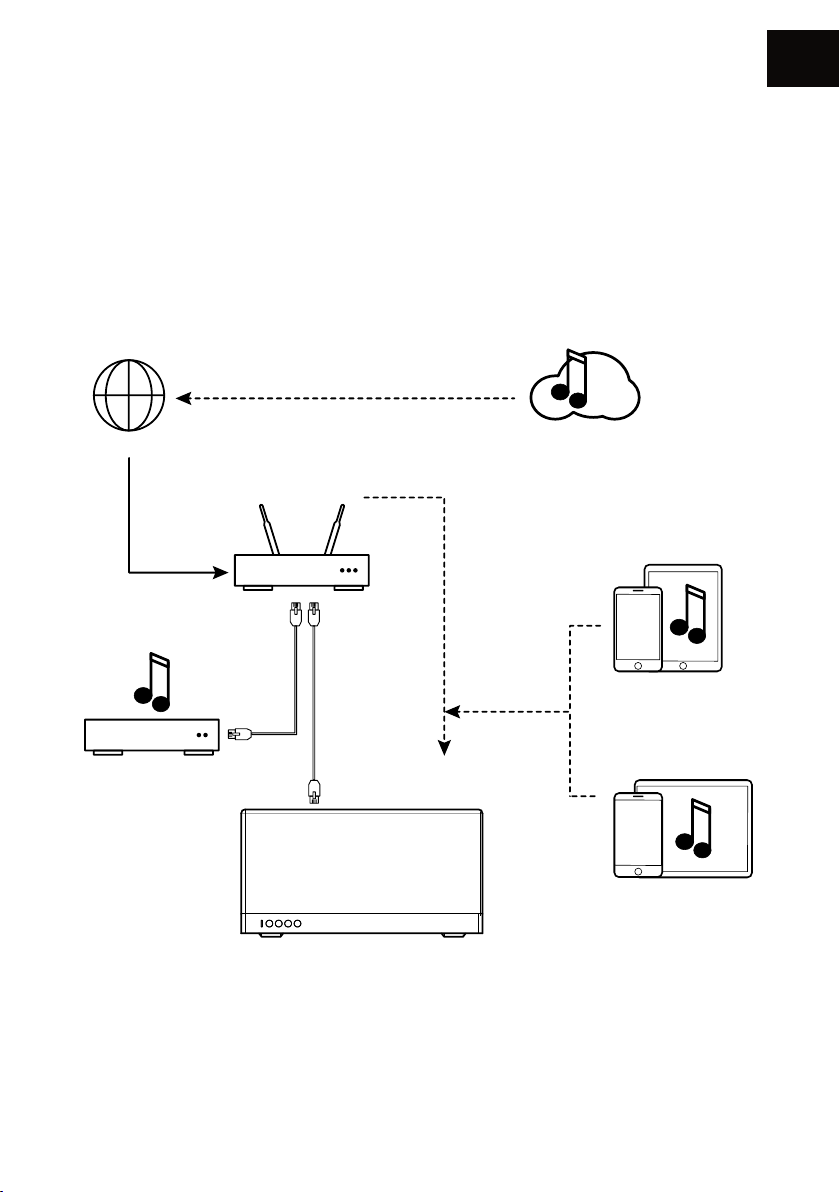
RÉSEAU : vous devez disposer d’une box connectée à internet en haut débit an de proter au
mieux des services de streaming.
Pensez à bien vérier la qualité de réception de votre réseau WiFi pour le placement de votre
produit ; une mauvaise réception peut nuire à la uidité et la qualité d’écoute (voir p.20 « Information
sur l’appareil »)
Votre appareil mobile doit être connecté au même réseau WiFi que celui de votre système AIO.
FR
INTERNET
BOX - ROUTEUR
NAS
Attention : le câble Ethernet n’est pas fourni.
WIFI
Services de streaming
eaming
Appareil iOS
Appareil Android
15
Page 16
FR
INSTALLATION
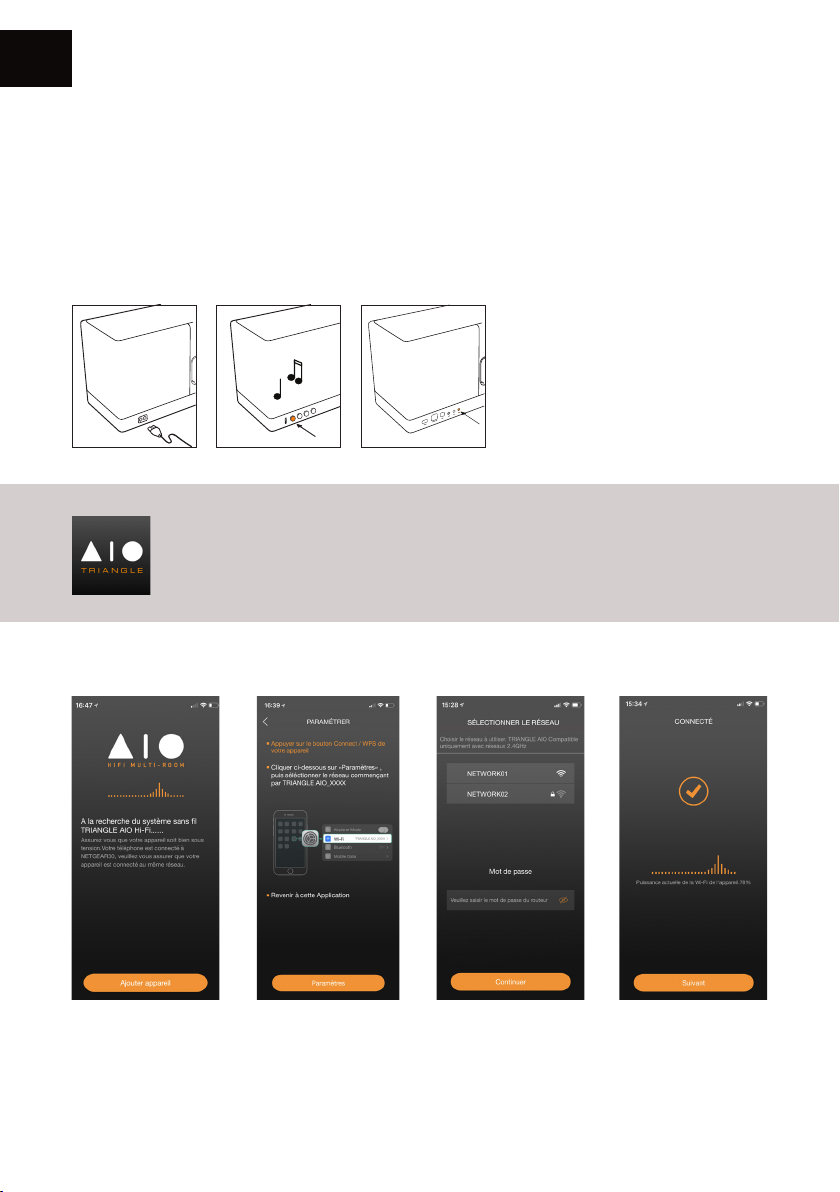
Î Branchez le câble d’alimentation de votre AIO à la prise de courant.
Î Si besoin, branchez le câble Ethernet. Dans ce cas, votre AIO 3 sera automatiquement reconnu
sur votre réseau sans conguration nécessaire.
Î Appuyez sur le bouton Power.
Î Appuyez sur le bouton Connect de votre AIO 3.
Durant le temps de conguration de
votre AIO 3 (environ 20 sec), la LED
orange de mise en veille clignote.
Une fois le produit conguré, la LED
blanche de sélection s’illumine et 3
notes de musique retentissent. Ne
faites aucune action avant cette
étape.
Télécharger l’application
Rendez-vous sur votre store (App Store ou Google Play) et téléchargez l’application
TRIANGLE AIO.
Lancer l’application puis suivre les instructions
1. Appuyez sur «Ajouter
appareil».
2. L’application ouvre
votre congurateur an
de trouver le réseau
WiFi «TRIANGLE AIO3XXX».
3. Une fois connecté sur
le WiFi de votre AIO 3,
revenez sur l’application.
Sélectionnez votre
réseau WIFI et indiquez
le mot de passe associé.
16
4. Votre AIO 3 est prêt
à fonctionner.
Page 17
PRÉSENTATION DE L’APPLICATION
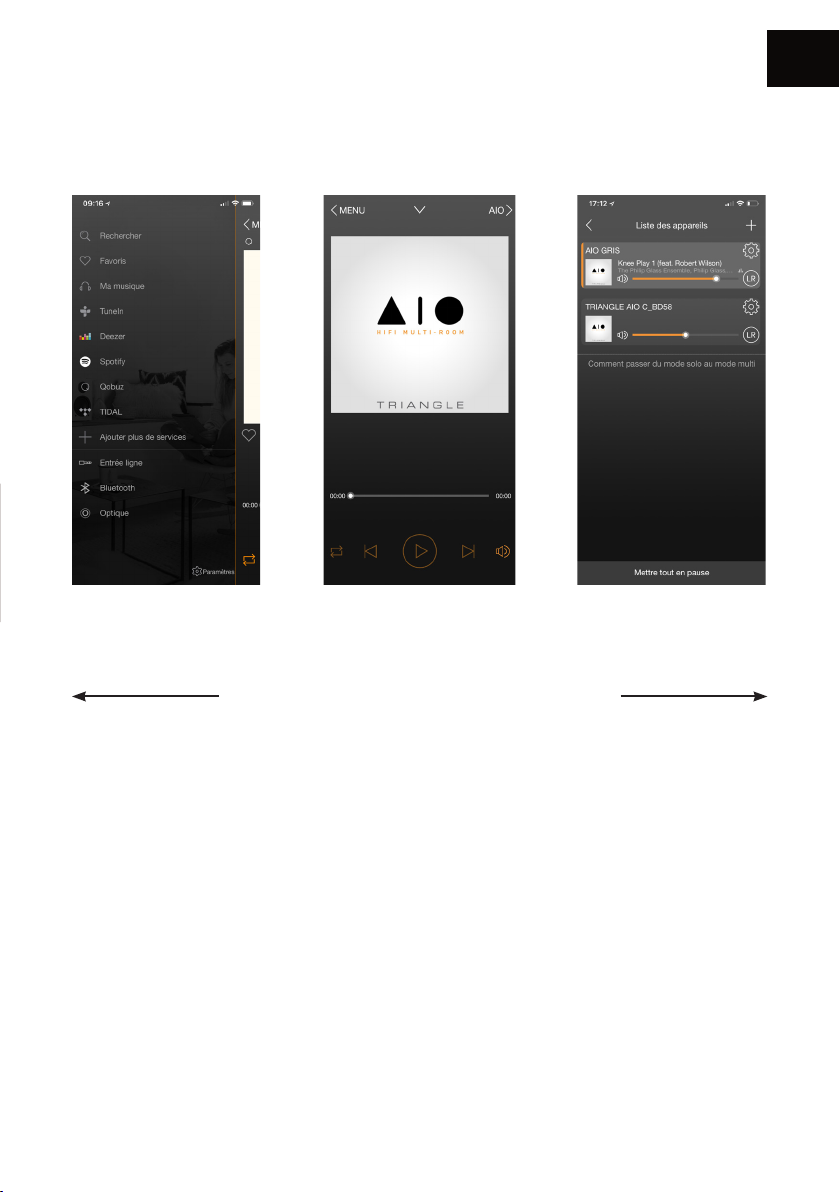
Les sources Ecran de lecture Les appareils AIO
FR
La navigation se passe en 3 volets. Il vous suft de
balayer l’écran de gauche à droite pour les faire
apparaître.
17
Page 18
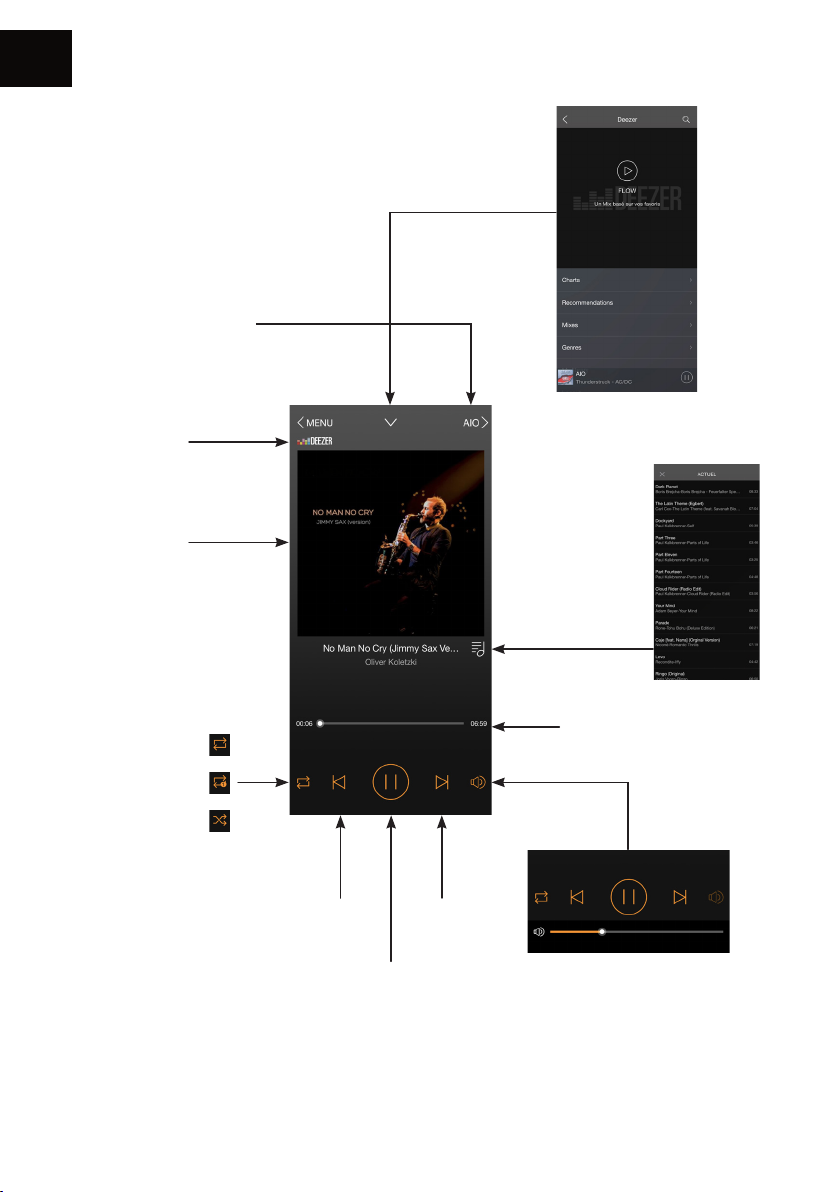
FR
1. Ecran de lecture
Appareil sur lequel la
musique est jouée
Source audio
Couverture de
l’album
Revenir à l’écran
précédent de la
source
Playlist par titre
Lecture continue
Lecture en boucle
Lecture aléatoire
Morceau
précédent
Lecture/Pause
Barre de progression
du morceau
Gestion
du volume
Morceau
suivant
Attention : Si vous modiez le
volume via les boutons de votre
appareil mobile, il peut y avoir une
latence et des paliers importants.
Pour un réglage n, utilisez l’écran de
l’application.
18
Page 19
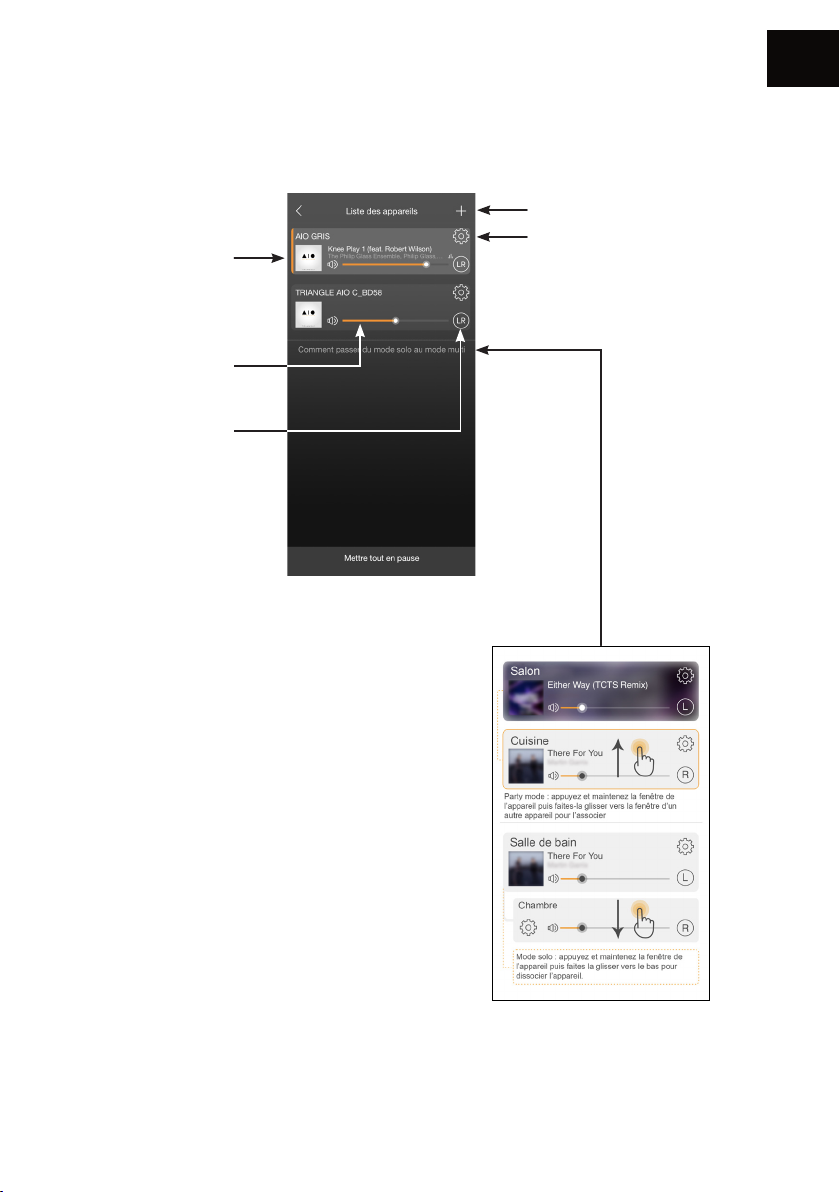
2. Liste des AIO connectés
Pochette du morceau
à l’écoute.
Chaque enceinte
peut avoir un
morceau différent.
Volume de l’enceinte
Le réglage par défaut
est en stéréo (LR).
Il est possible
d’assigner une
enceinte uniquement
sur la voie droite ou
gauche en appuyant
sur cette fonction.
FR
Ajouter un appareil AIO
au réseau (p.15)
Réglages
Groupement AIO
Le « Party Mode » permet
jusqu’à 5 appareils en
connexion WiFi, et jusqu’à
10 appareils en connexion
Ethernet.
Il est possible de qualier
l’enceinte en tant qu’enceinte
Gauche (L) ou Droite (R).
Le réglage par défaut est en
mixte des voies gauche et droite
(LR).
19
Page 20
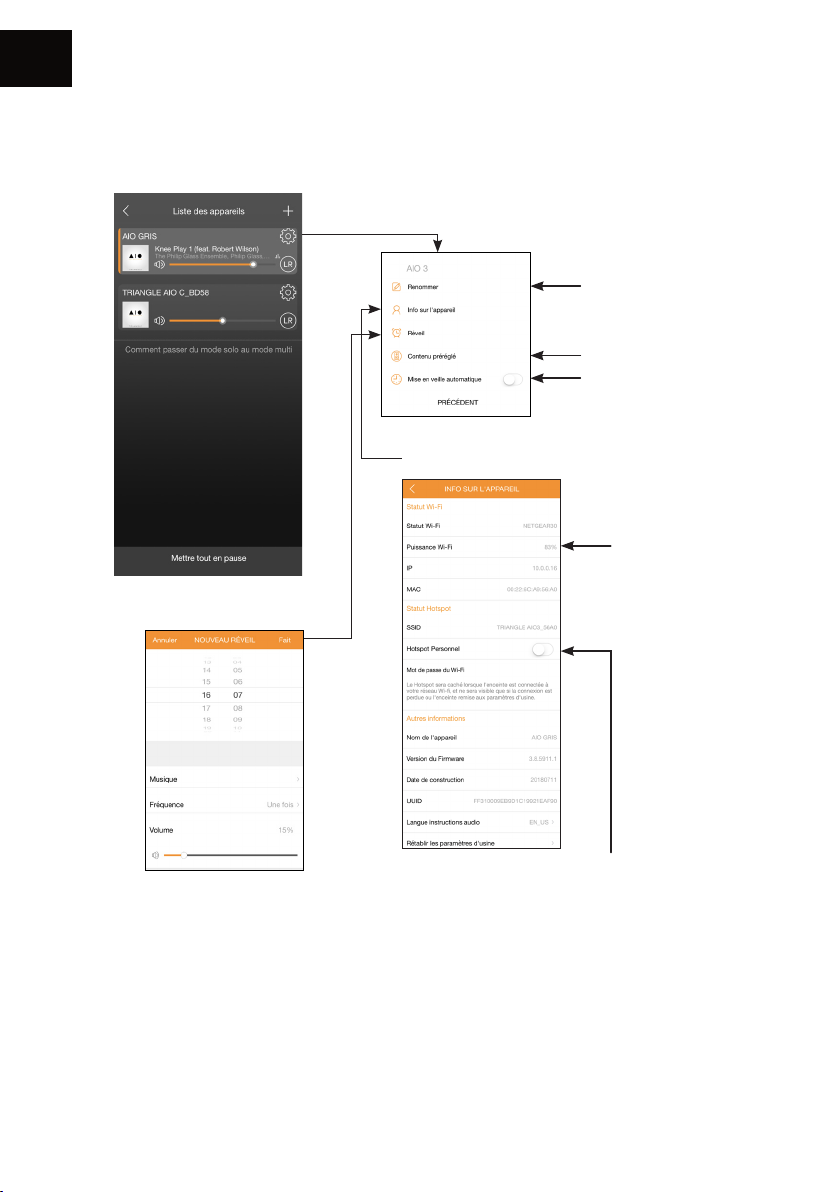
FR
3. Réglages
Renommer l’enceinte
Favoris
Réglage de l’arrêt
automatique (arrêt du
son, mais l’appareil reste
connecté)
Informations sur l’AIO
Qualité de la
réception WiFi
Réglage de l’alarme
An que l’alarme
fonctionne, veillez
bien à laisser votre
appareil allumé.
Votre AIO3 possède la fonction « Hot spot »,
il peut donc gérer son propre réseau WIFI et
ainsi étendre la portée de votre réseau WIFI
actuel.
Il vous suft d’activer cette fonction dans
l’application sur ce bouton et de dénir un
mot de passe de connexion.
20
Page 21
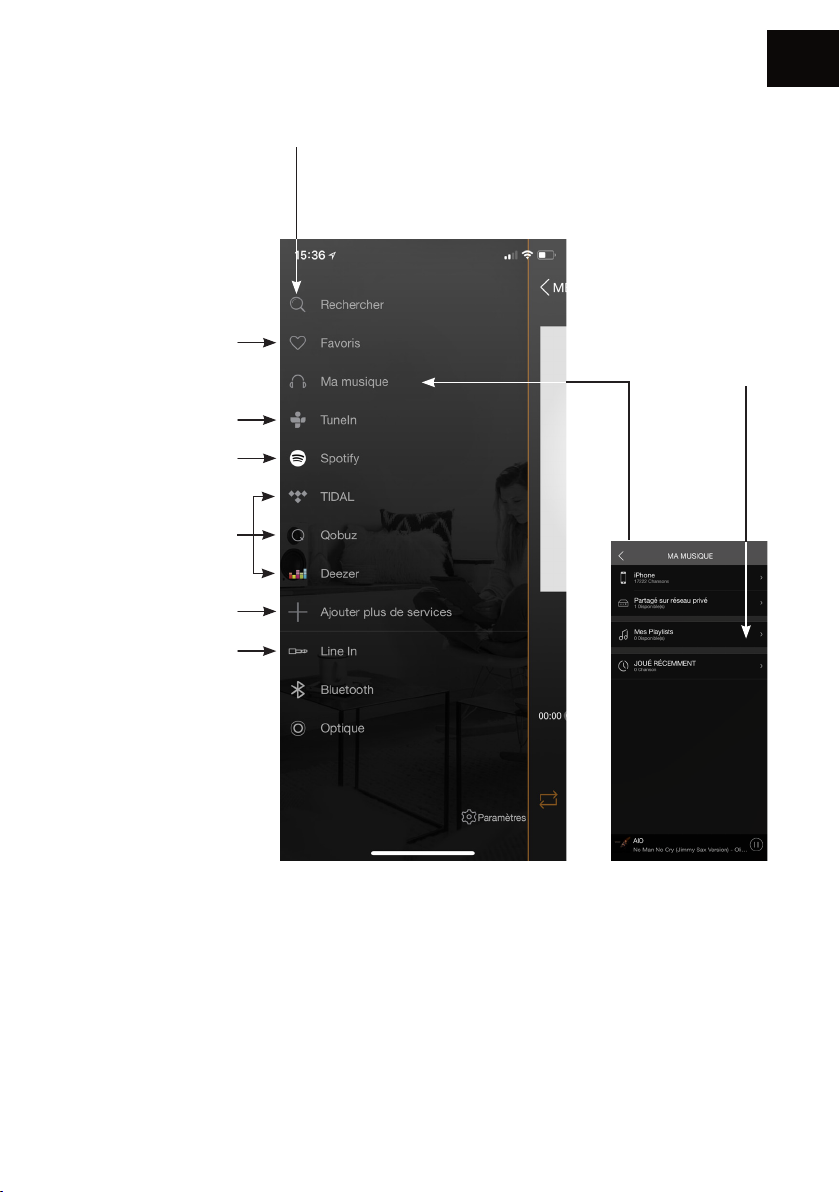
4. Les sources
Favoris : pour accéder
rapidement à un
morceau favori contenu
dans votre appareil
mobile.
TuneIn vous permet
d’accéder à toutes les
radios numériques.
Spotify : voir page
suivante.
Deezer - Qobuz - Tidal
Vous avez besoin d‘un
abonnement pour
accéder au service.
Ajouter ou supprimer
des services du menu
Sélection de la
source
FR
Rechercher : pour
accéder rapidement à la
musique contenue dans
votre appareil mobile.
Mes playlists :
créez une liste de
lecture à partir
des morceaux
contenus dans
votre appareil
mobile.
Ma musique : AIO vous permet de lire la musique téléchargée dans votre téléphone et d’accéder
à la musique stockée dans un NAS de votre réseau ou sur votre clé USB connectée.
Vous devez autoriser l’application à lire le contenu musical de votre appareil mobile (voir
Paramètres de l’app TRIANGLE AIO dans le menu général de votre appareil mobile en fonction
de votre système iOS ou Android).
Vos morceaux doivent être enregistrés directement sur votre téléphone pour pouvoir y accéder.
Certains titres peuvent être protégés par des DRM qui bloqueront la lecture.
21
Page 22
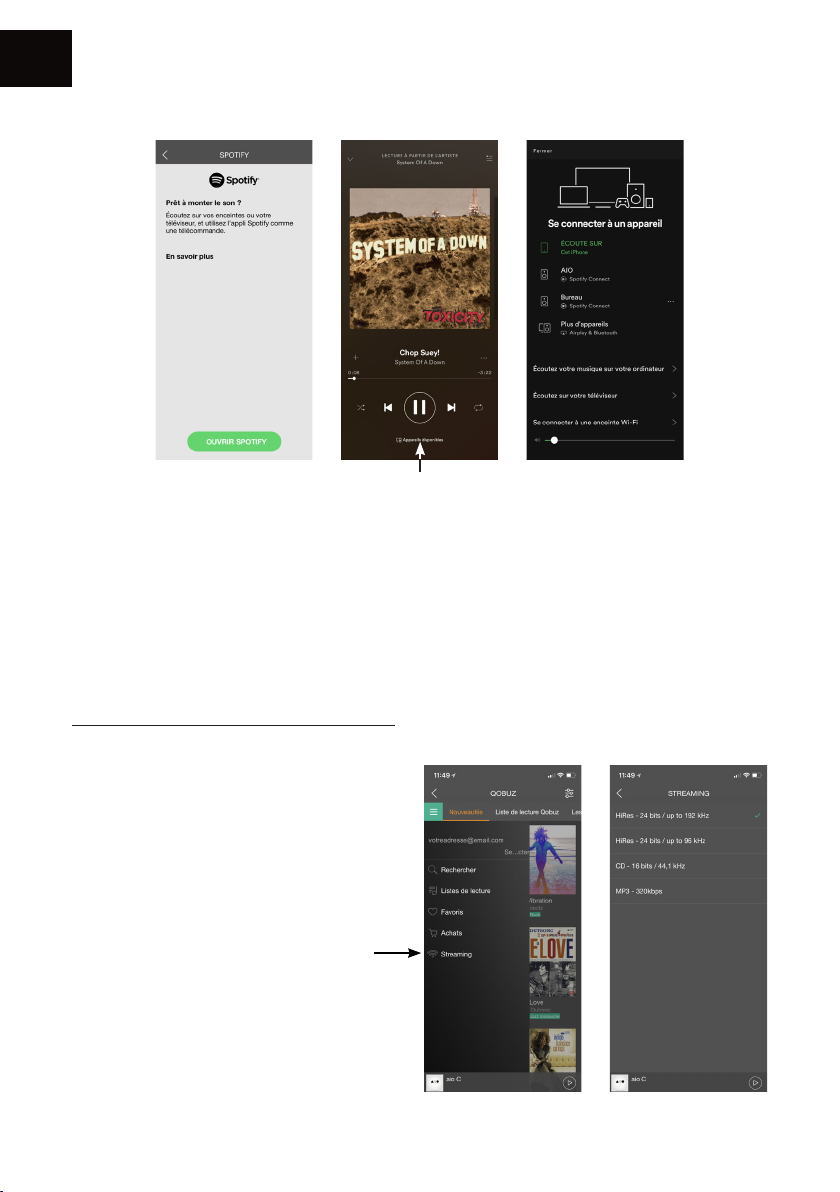
FR
Spotify :
Choisir votre enceinte
Écoutez votre musique avec Spotify Connect
1. Connectez votre appareil TRIANGLE AIO à votre réseau Wi-Fi.
2. Ouvrez l’application Spotify sur votre téléphone, votre tablette ou votre ordinateur portable en
utilisant le même réseau Wi-Fi.
3. Écouter une chanson et sélectionner le périphériques disponibles
4. Sélectionnez votre appareil TRIANGLE AIO et commencez à écouter
Le logiciel Spotify est soumis à une licence tierce disponible ici :
www.spotify.com/connect/third-party-licences
Ecouter de la musique en haute
dénition :
Pour écouter de la musique en haute
dénition, vous devez disposer d’un
abonnement auprès d’un fournisseur et
congurer l’application dédiée.
Exemple sur l’application Qobuz >>
22
Page 23
5. Connexion avec d’autres sources
• JACK 3.5MM :
Reliez un câble Jack 3.5mm ou RCA à votre source externe, puis sélectionnez la source.
• OPTIQUE :
Reliez un câble optique à votre source externe puis sélectionnez la source.
• BLUETOOTH
Î Sélectionnez la source Bluetooth
- soit via l’application TRIANGLE AIO (voir p.21)
- soit en appuyant sur le bouton de votre enceinte AIO (voir p.13, n°6) ou de la
télécommande.
Î Une fois la source Bluetooth sélectionnée, la LED devient bleue. L’appairage se lance
automatiquement (la LED va se mettre à clignoter et un bip sonore retentira lors de la
connexion).
Î Veillez à bien déconnecter votre appareil si un autre utilisateur souhaite prendre la main.
FR
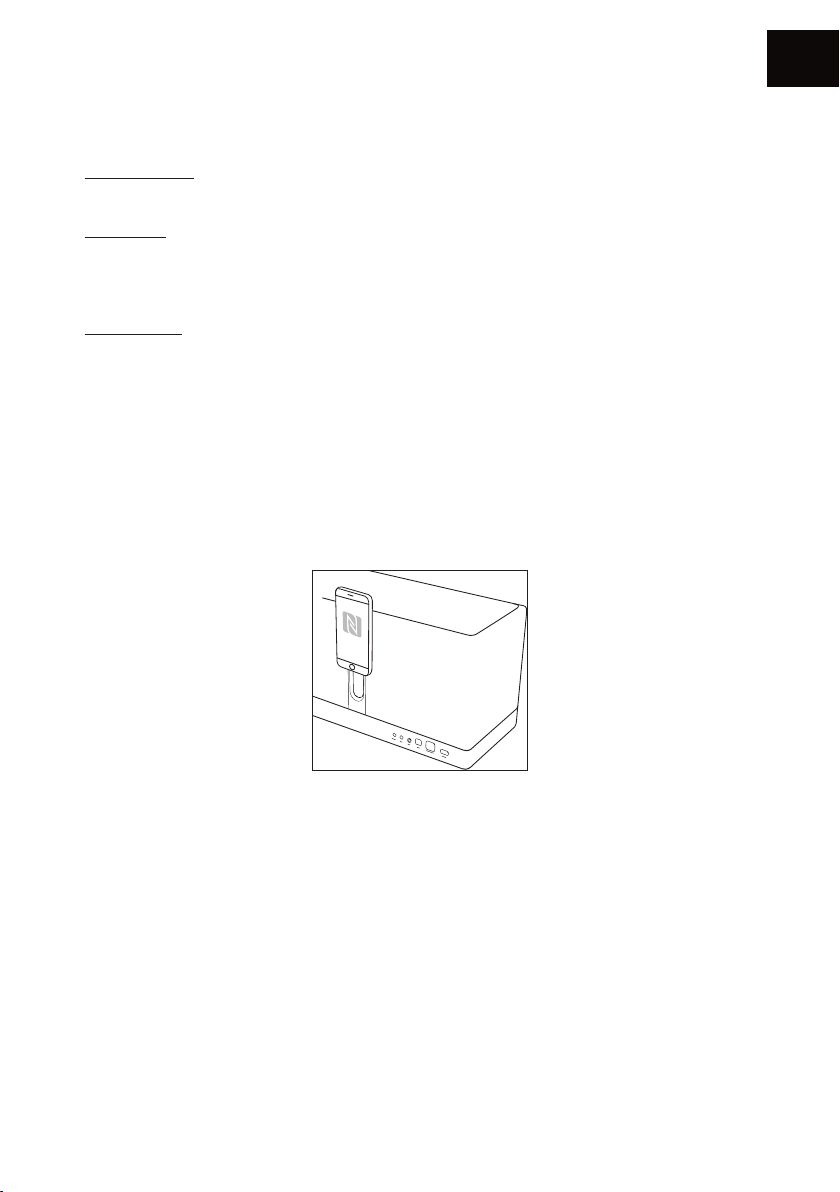
1. NFC
Î Approchez votre smartphone contre l’enceinte pour un appairage automatique NFC.
2. Classique
Î Allez dans les paramètres Bluetooth de votre appareil mobile.
Î Sélectionnez la source : TRIANGLE AIO3. Lorsque la connexion sera établie, la LED bleue
deviendra statique et l’enceinte émettra 3 notes de musique.
23
Page 24
FR
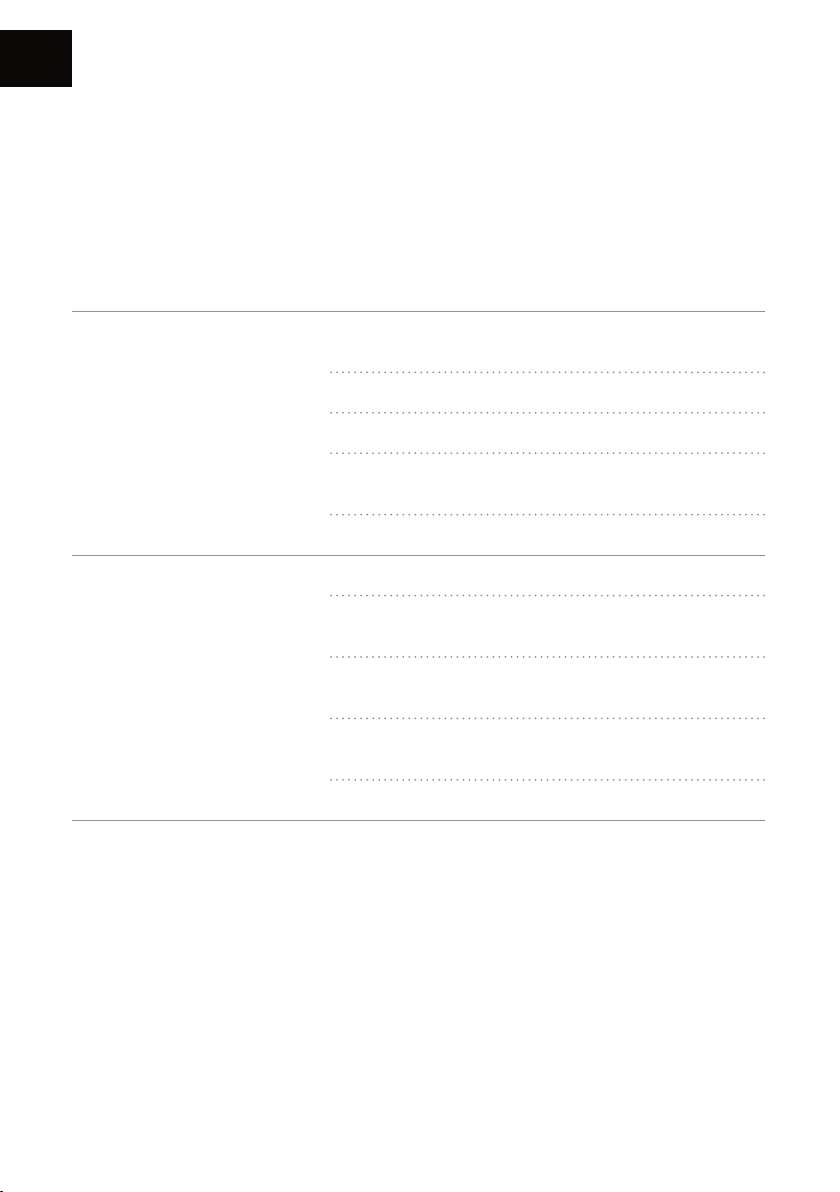
EN CAS DE PANNE
Si l’appareil ne fonctionne pas correctement, vériez les points énumérés ci-dessous. Si le problème
persiste, il peut y avoir un mauvais fonctionnement. Débranchez immédiatement le cordon
d’alimentation et contactez votre revendeur.
OBSERVATION SOLUTION
Vériez que votre appareil mobile soit connecté au réseau
sur lequel vous tentez de connecter votre AIO.
Placez votre AIO plus proche de votre routeur.
Mon AIO ne se connecte pas
au réseau.
Branchez un câble Ethernet entre votre routeur et l’AIO.
Vériez que votre application est bien à jour, ou réinstallez
l’application.
Redémarrez votre mobile et votre réseau.
Vériez la connexion internet.
Vériez si votre réseau ou un autre appareil n’est pas en
train d’utiliser une grande partie de votre bande passante.
La musique se coupe ou
saccade.
Vériez la puissance de réception du signal WiFi (voir
p.20)
Vériez que votre application est bien à jour, ou réinstallez
l’application.
Redémarrez votre mobile et votre réseau.
24
Page 25
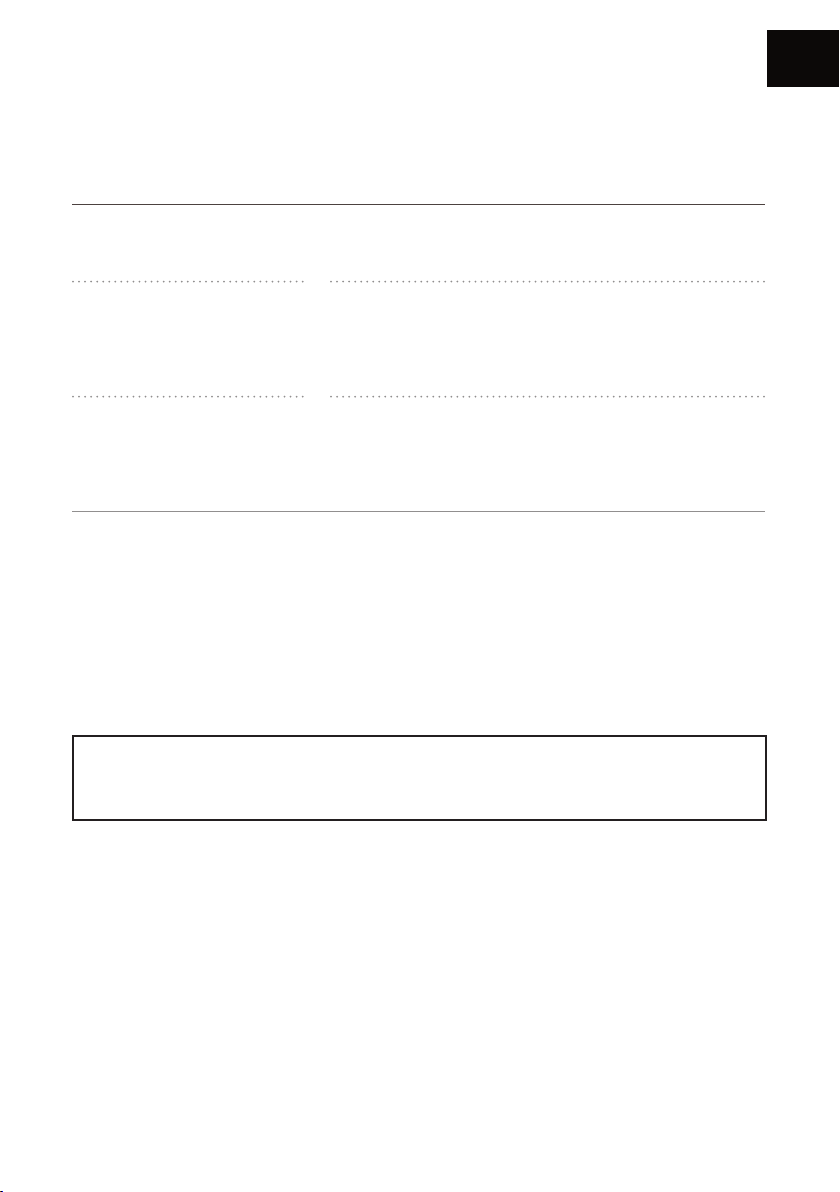
FOIRE AUX QUESTIONS
FR
Combien d’enceintes puis-je
grouper ?
Que se passe-t-il quand on
m’appelle sur mon téléphone
mobile alors que j’utilise
l’application ?
AIO peut-il jouer des
morceaux haute résolution
(High Res) ?
Ne jamais ouvrir l’enceinte, risque d’électrocution.
AIO peut grouper jusqu’à 5 enceintes en WiFi, 10 via
Ethernet, si la connexion est de bonne qualité.
La musique continue de jouer sur votre enceinte sans
interruption.
AIO peut lire des morceaux jusqu’en 24 bit/192 kHz, mais
attention, il faut que votre connexion internet soit de
bonne qualité, et bien congurer votre application de
streaming.
ATTENTION
25
Page 26
Your new speaker has Spotify Connect built in.
Spotify Connect lets you control the music playing on your device, using the
Spotify app on your mobile, tablet or PC. Listening is seamless. You can take
calls, play games, even switch your phone off – all without interrupting the music.
Learn more at spotify.com/connect
The Spotify software is subject to third party licenses found here:
www.spotify.com/connect/third-party-licenses
Page 27

USER MANUAL
EN
ENGLISH
27
Page 28
EN
UNPACKING
Open the box and take out the speaker.
If you notice any defects in one of the elements as you unpack, please get in touch with your
reseller. Your speaker is fragile and it is recommended to handle it carefully.
Before disposing of the packaging, make sure there is nothing left inside.
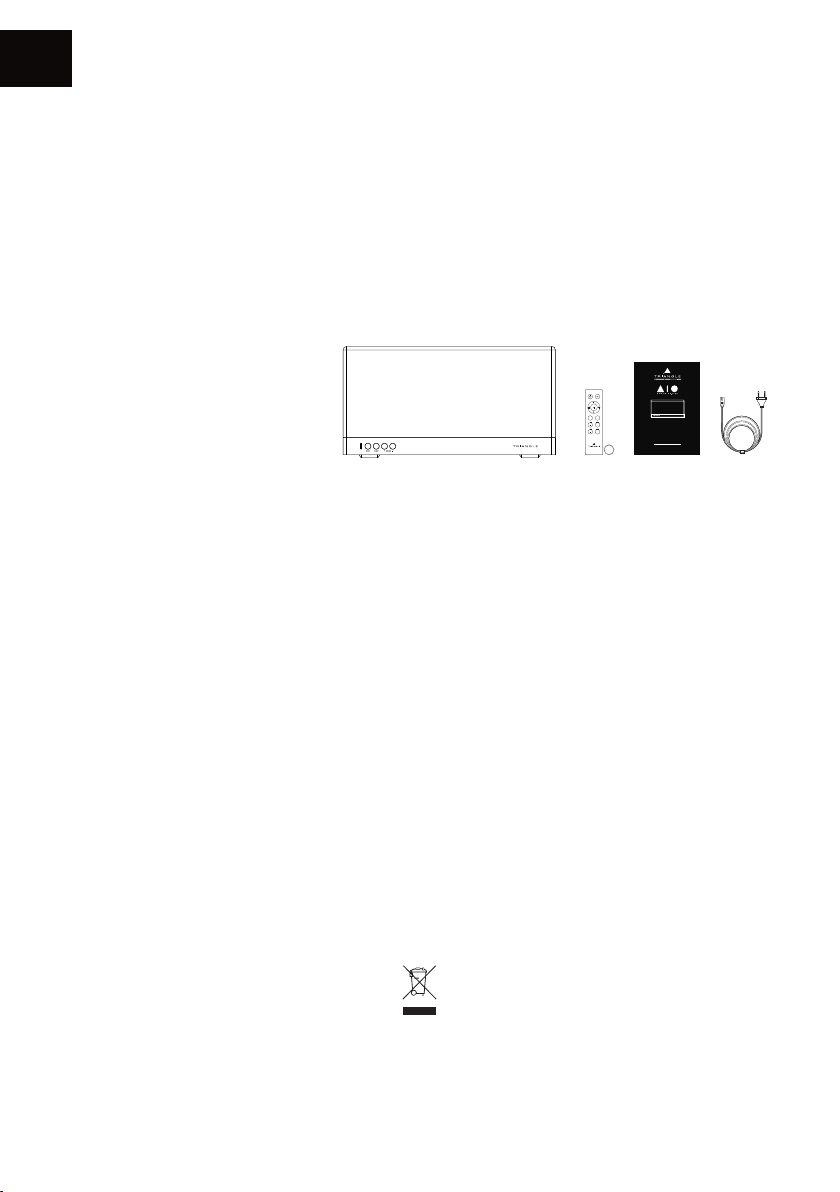
EACH BOX CONTAINS:
Î An AIO 3 speaker
Î Remote control + battery
Î User manual
Î Power cord
INSTALLATION PRECAUTIONS
Before the installation
Before connecting your AIO 3, check the stability of the surface you want to install it on and reduce
the distance between the speaker and your router as much as possible.
+
-
INPUT
RESET
TREBLE
-
+
BASS
-
+
CR2032
Mode d’emploi & Garantie
Owner’s manual & Warranty
TRIANGLE DISTRIBUTION FRANCE
44 rue Barreyre - CS40099 - 33300 Bordeaux
FRANCE
Moving the device
Always remove the power cord and disconnect the cables between all audio components when
moving the device. This will prevent a short-circuit or the damage to the plugs or connection
cables.
Locations to avoid
Avoid humid locations or direct sunlight. It is preferable to install your speaker in a temperate place.
Recycling
Protection of the environment: your products contain valuable materials which can be recovered or
recycled. Take them to the appropriate collection points.
28
Page 29
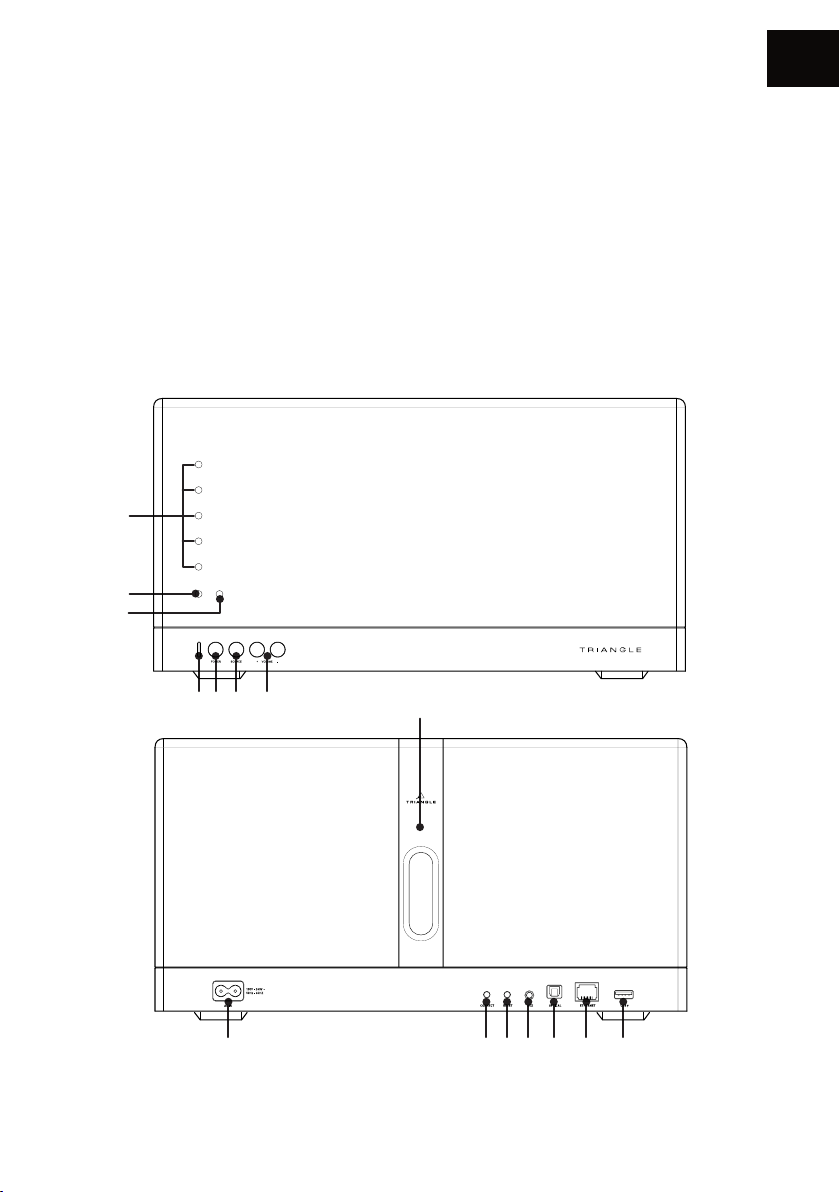
SPEAKER DESCRIPTION
1. Volume LED
2. Action on the remote control LED
3. Standby/Start LED
4. Selected source LED:
White : WIFI / USB
Green : AUXILIARY
Orange : OPTICAL
Blue : BLUETOOTH
5. Power switch
6. Source selection
1
2
3
EN
7. Volume
8. AC outlet
9. Network pairing
10. Resetting the conguration
11. Auxiliary input (1/8-inch (3.5mm) Jack)
12. Optical input
13. Ethernet cable
14. USB (to read ash drive or charge)
15. Area for NFC pairing
4 5 6 7 15
8 9 10 11 12 13 14
29
Page 30
EN
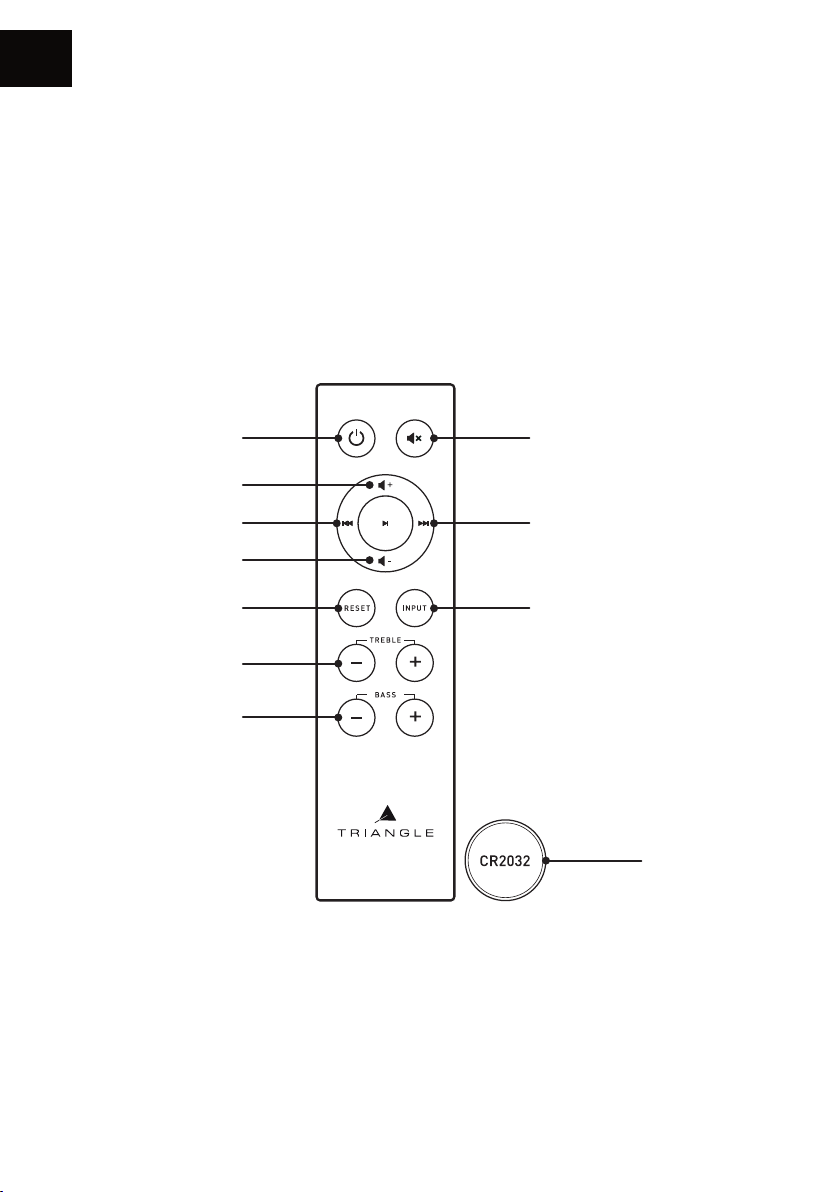
REMOTE DESCRIPTION
1. On / Off
2. Volume +
3. Track backward
4. Volume -
5. Resetting the bass/treble adjustments
6. Treble adjustments
7. Bass adjustments
8. Mute mode
9. Track forward
10. Source selection
11. Battery included
1
2
3
4
5
6
7
8
9
10
11
30
Page 31
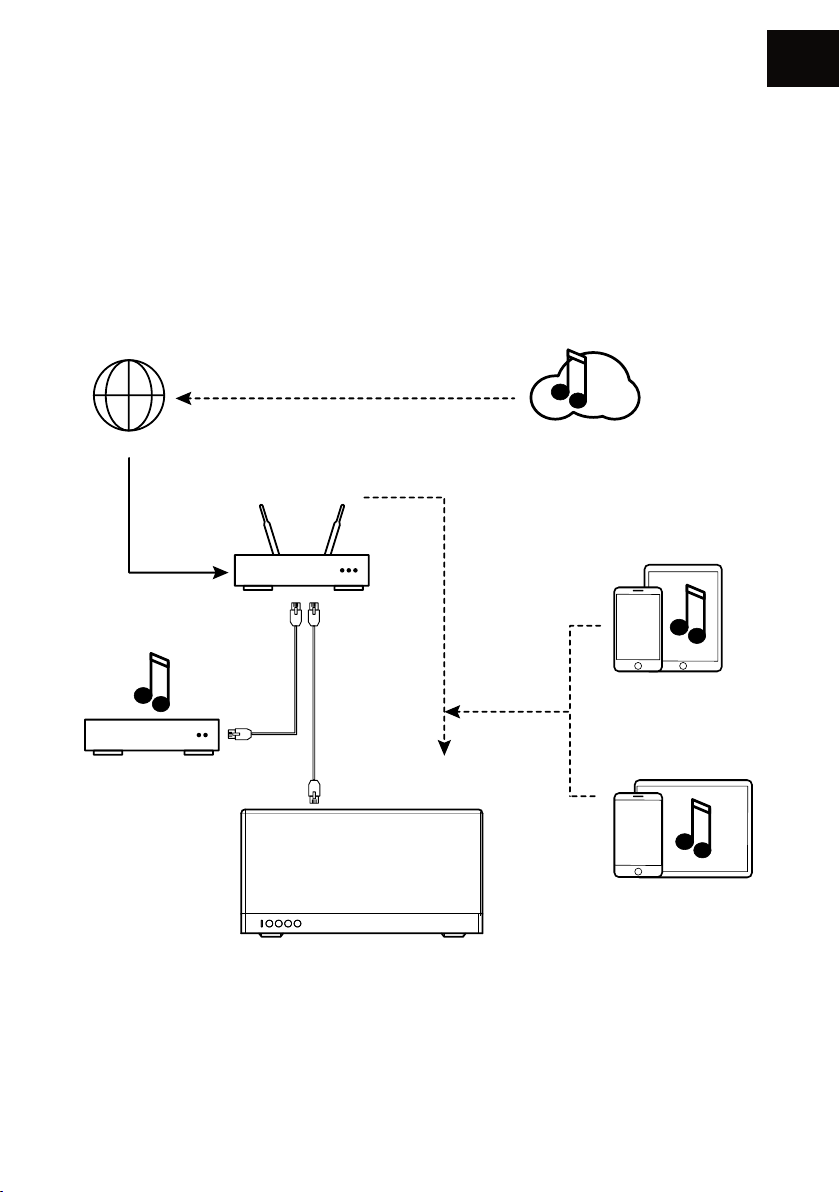
NETWORK SETUP GUIDE
Network: You must have a router connected to broadband Internet to make the most of the
streaming services.
Remember to check the reception quality of your WiFi network when setting up your product.
A poor reception can affect the smoothness and the quality of your sound (see p.36 “Details of the
device”).
Your mobile device must be connected to the same WiFi network as your AIO system.
EN
INTERNET
ROUTER
BOX - ROUTEUR
NAS
Note : the Ethernet cable is not provided.
WIFI
Streaming services
eaming
iOs device
Appareil iOS
Android device
Appareil Android
31
Page 32
EN
INSTALLATION
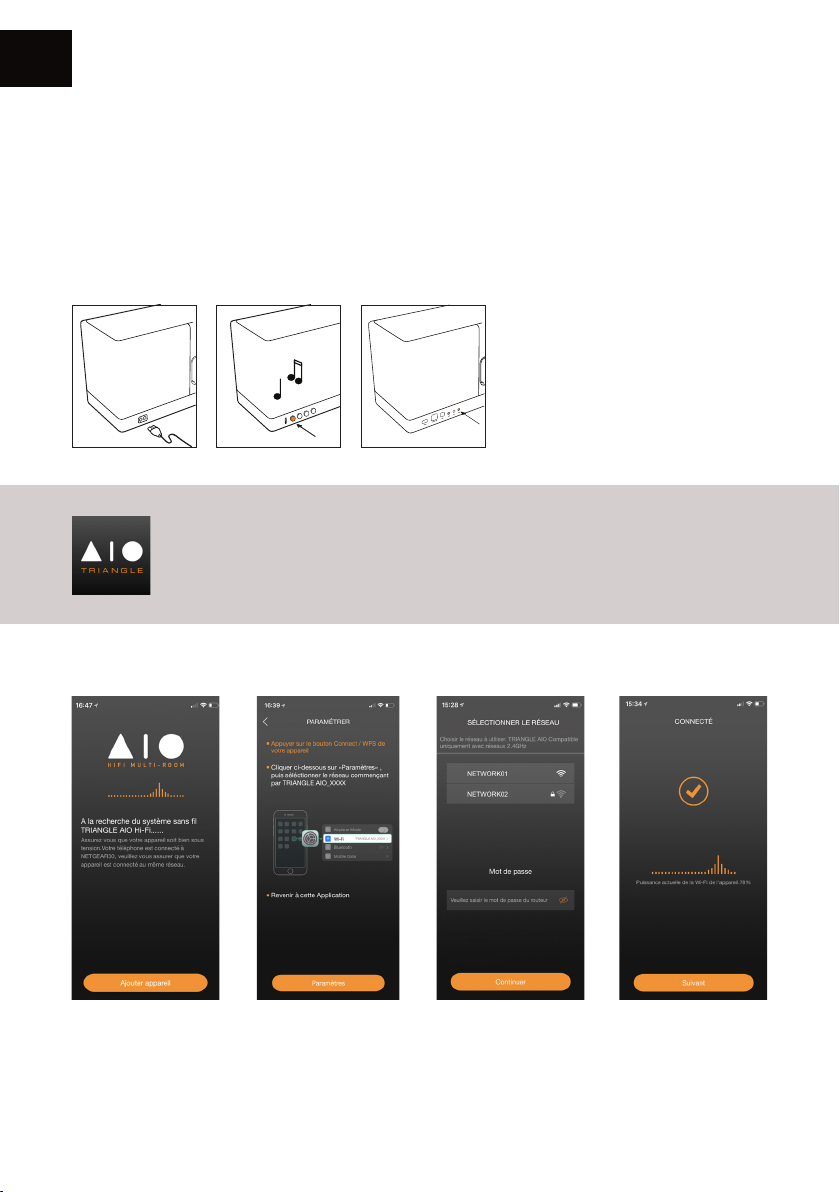
Î Plug your AIO’s power cord into a power outlet.
Î If necessary, connect the Ethernet cable. Your AIO 3 will be then automatically recognized on
your network without requiring a setup.
Î Press the Power button.
Î Press the Connect button on your AIO.
During the setup of your AIO 3
(approximately 20 seconds) the
standby LED is blinking amber.
Once your speaker is set-up, the
white LED indicating the selected
source glows and you can hear 3
music notes. Do not do anything
before that happens.
Download the app
Go to your store (App Store or Google Play) and download the app
TRIANGLE AIO.
Launch the app and follow the instructions.
1. Press «Add device». 2. The app opens your
conguration tool to
nd the WiFi network
«TRIANGLE AIO3XXX».
3. Once you are
connected to the WiFi
of your AIO 3, go back
to the app. Select your
WiFi network and enter
the password.
32
4. Your AIO 3 is ready
to operate.
Page 33
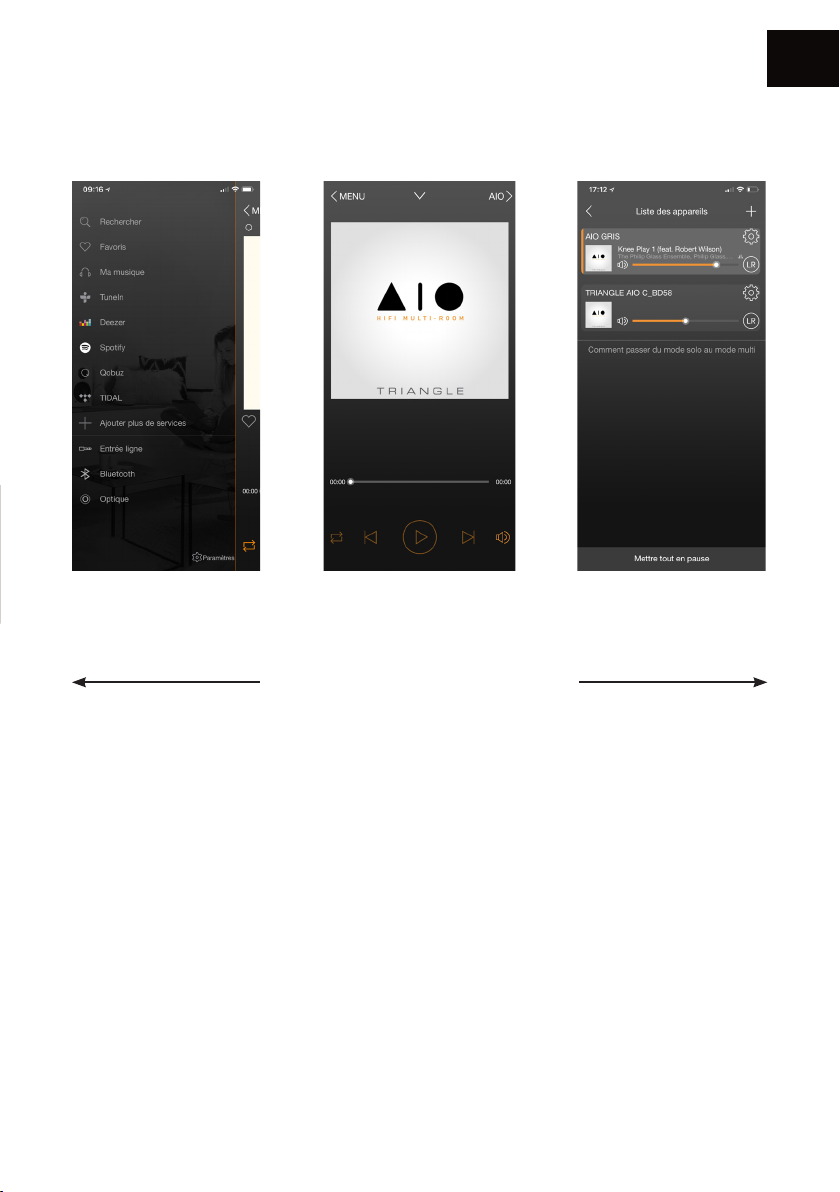
APP OVERVIEW
Sources Playback Screen AIO devices
EN
The navigation is in 3 panels.
Just swipe the screen from left to right
to make them appear.
33
Page 34
EN
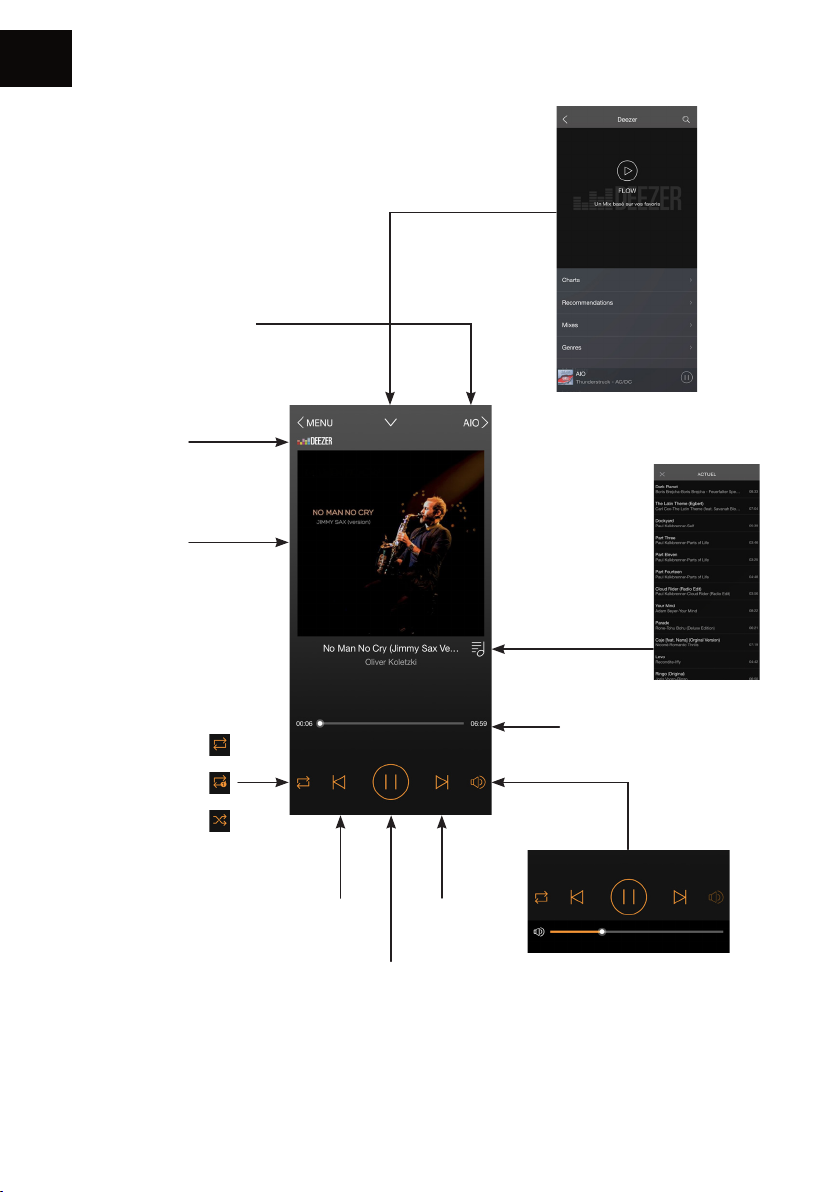
1. Playback screen
Device on which the
music is played
Audio source
Album cover
Go back to the
previous screen
Playlist by title
Repeat all
Repeat one
Shufe play
Previous
track
Play / Pause
Track progress bar
Volume
button
Next
track
Caution: If you change the
volume using the buttons on
your mobile device, there may
be some latency and large
increments. For ne adjustments,
use the screen of the app.
34
Page 35
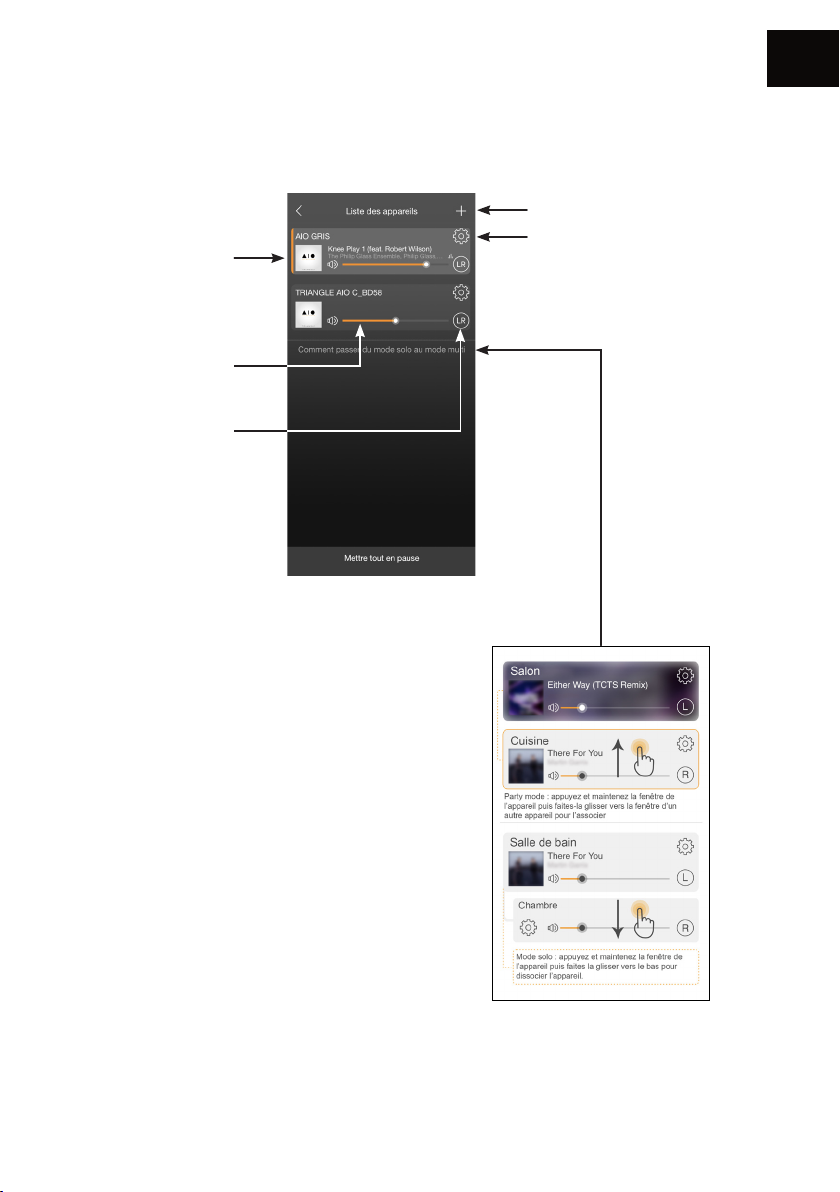
2. List of connected AIO
Album cover of the
track being played
Each speaker can
play a different song.
Speaker volume
The default setting is
in stereo (LR).
It is possible to assign
a speaker only to the
right channel or to the
left one by pressing
this function.
EN
Add an AIO device to the
network (p.31)
Settings
Grouping AIO devices
The “Party Mode” allows to
connect up to 5 devices using
one WiFi connection and up to
10 devices using an Ethernet
connection.
It is possible to designate the
speaker as a Left speaker (L) or
a Right speaker (R).
The default setting is in mixed
mode (left and right - LR).
35
Page 36
EN
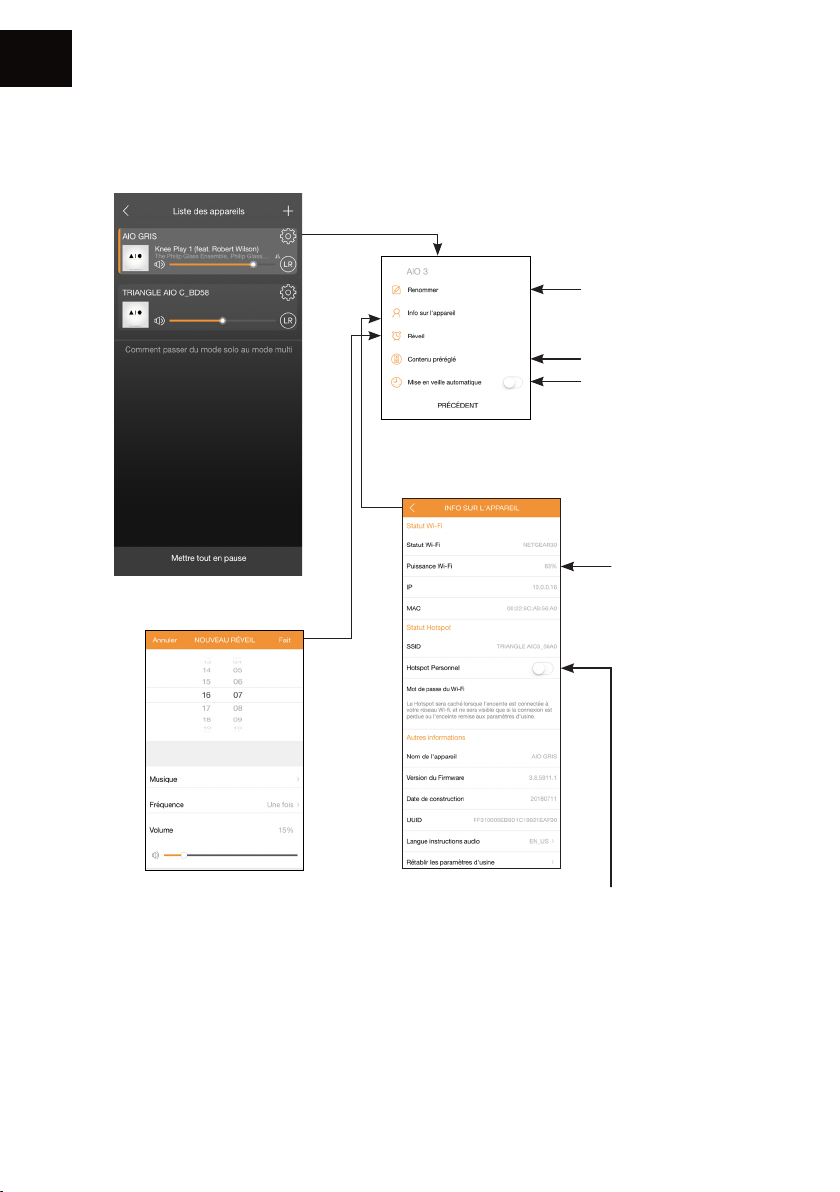
3. Settings
Details of the AIO
Renaming the speaker
Favorites
Setting the Auto
Power-Down (the
sound stops but
the device remains
connected)
Quality of the
WiFi signal
Setting the alarm
In order to ensure
that the alarm works,
leave your device
turned on.
AIO3 has the “hot spot” function, it can
manage your own WIFI network and extend
your current WIFI network.
You just need to activate this function in the
APP and dene a password.
36
Page 37
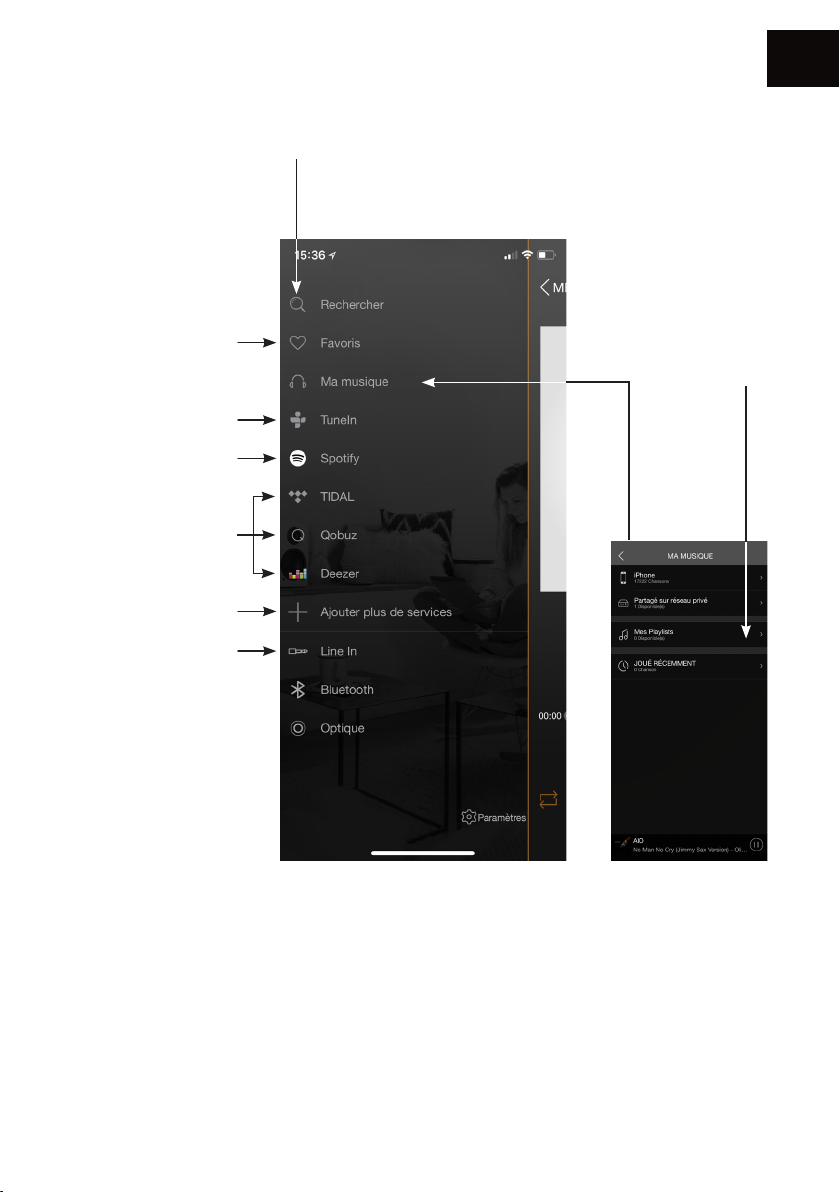
4. Sources
EN
Search : to quickly
access the music saved
on your mobile device.
Favorites : To quickly
access your favorite
track on your mobile
device.
TuneIn gives you
access to all the
digital radios.
Spotify : see next
page.
Deezer - Qobuz - Tidal
You need a
subscription to
access these services.
Adding or removing
services from the menu
Source selection
My playlists :
Create a playlist
from the songs
saved on your
mobile device.
My music : The AIO speaker lets you play music you downloaded on your phone and access the
music stored on a NAS drive on your network or on your connected USB drive.
You must allow the app to read the musical content on your mobile device (see Settings of the
TRIANGLE AIO app in the general menu on your mobile device depending on your iOS or
Android system).
To be able to access your songs, they must be saved directly on your phone. Some tunes might
be protected by DRM technology which will prevent you from playing them.
37
Page 38
EN
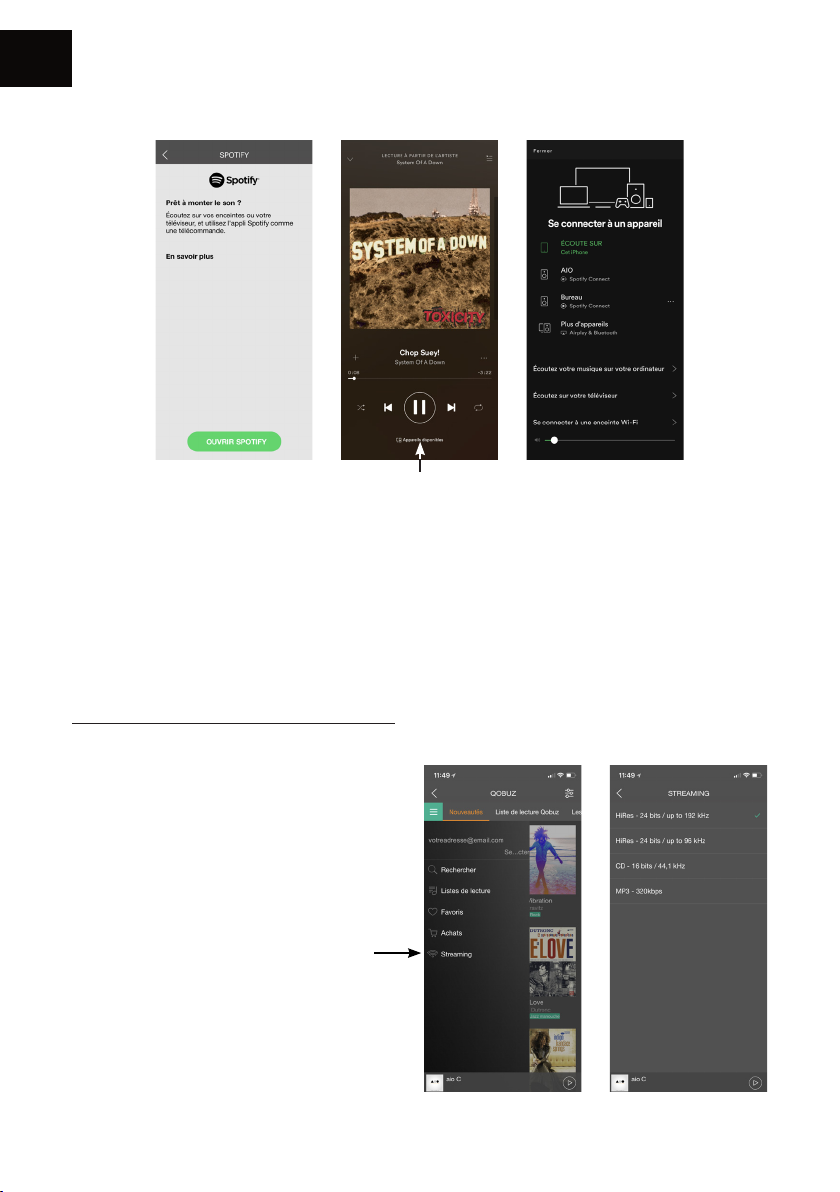
Spotify:
Choosing your speaker
Listen out loud with Spotify connect
1. Connect your TRIANGLE AIO device to your WI-Fi network
2. Open up the Spotify app on your phone, tablet or laptop using the same Wi-Fi network
3. Play a song and select Devices Available
4. Select your TRIANGLE AIO device and start listening
The Spotify software’s subject to third party licence four here:
www.spotify.com/connect/third-party-licences
Listening yo music in high denition:
To listen to music in high denition, you
must have a subscription with a provider
and set up the dedicated app.
Example on the Qobuz app >>
38
Page 39
5. Connection to other sources
• 1/8-INCH (3.5MM) JACK:
Connect a 1/8-inch (3.5mm) jack cable or an RCA cable to your external source, then select the
source.
• OPTICAL :
Connect an optical cable to your external source, then select the source.
• BLUETOOTH
Î Select the Bluetooth source
- either via the TRIANGLE AIO app (see p.37)
- or by pressing the button on your AIO speaker (see p.29, n°6) or on the remote control.
Î Once the Bluetooth source is selected, the LED turns blue. The pairing will automatically start
(the LED will start blinking and you will hear a beep when the connection is made).
Î Make sure you disconnect your device in case another user wants to take over.
EN
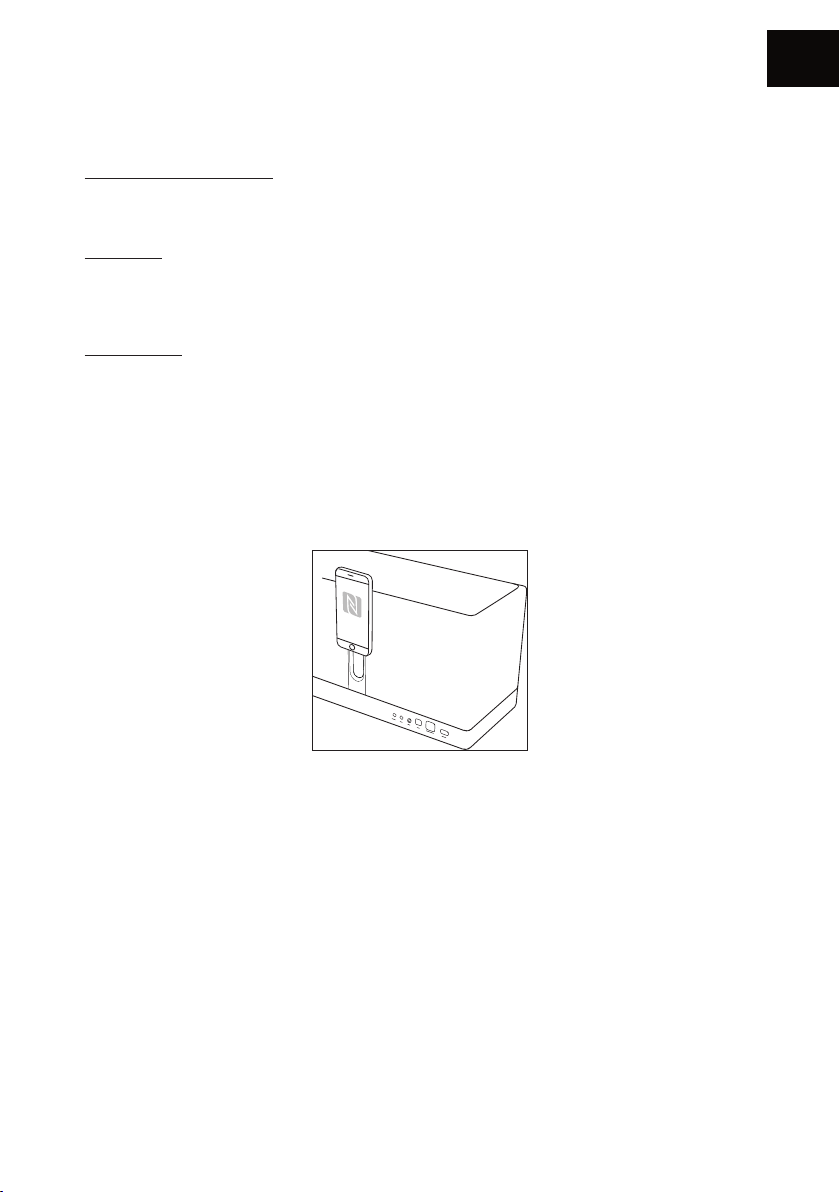
1. NFC
Î For an automatic NFC pairing, bring your smartphone close to your speaker.
2. Standard
Î Go to the Bluetooth settings on your mobile device.
Î Select the source: TRIANGLE AIO3. Once the connection is established, the LED will turn solid
blue and you will hear 3 music notes.
39
Page 40

EN
TROUBLESHOOTING
If the device does not work correctly, check the points listed below. If the problem persists, the
device may not operate normally. Unplug the power cord immediately and get in touch with your
reseller.
OBSERVATION SOLUTION
Check that your mobile device is connected to the network
on which you are trying to connect your AIO.
My AIO does not connect
to the network.
The music is cutting out or
jerky.
Place your AIO closer to the router.
Connect an Ethernet cable between your router and the AIO.
Check that your app is up to date, or reinstall it.
Restart your mobile phone and your network.
Check the Internet connection.
Make sure your network or another device is not using a
large part of your bandwidth.
Check the power of the WiFi signal (see p.36)
Check that your app is up to date, or reinstall it.
Restart your mobile phone and your network.
40
Page 41
FREQUENTLY ASKED QUESTIONS
EN
How many speakers can I
group?
What happens when I get
a call on my mobile phone
while I use the app?
Can the AIO play songs in
high resolution (High Res)?
To avoid the risk of electric shock, do not open the speaker.
AIO can group up to 5 speakers in WiFi, 10 via Ethernet, if
the quality of the connection is good enough.
The music continues to play on your speaker without
interruption.
The AIO can play songs up to 24 bit/192 kHz, but be
careful, you must have a good Internet connection and
your streaming app must be set-up correctly.
CAUTION
41
Page 42

Page 43

USER MANUAL
CN
使用手册
43
Page 44
CN
打开包装
打开包装箱取出音箱。
假如你发现有任何瑕疵,请联络您的经销商。音箱易碎,建议小心轻放。
.在扔掉包装箱之前,请确保里面无任何东西遗留。
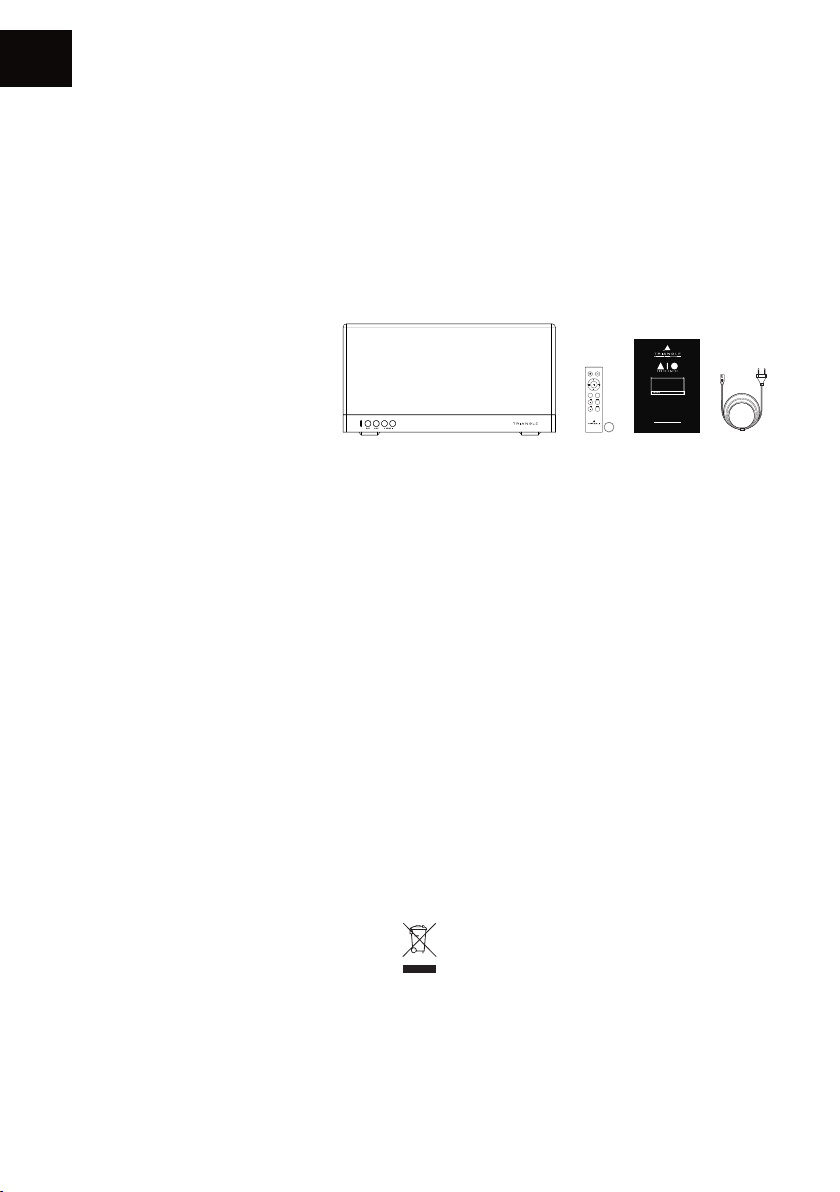
每个纸箱包含:
ÎÎ 一部ÎAIOÎ3Î音箱
ÎÎ Î遥控器+电池
ÎÎ 使用手册
ÎÎ 电源线
Î
安装注意事项
安装前
连接您的AIOÎ3之前,检查您要放置音箱的平面的稳定性,尽可能减少路由器与音箱的距离。
+
-
INPUT
RESET
TREBLE
-
+
BASS
-
Mode d’emploi & Garantie
Owner’s manual & Warranty
+
TRIANGLE DISTRIBUTION FRANCE
44 rue Barreyre - CS40099 - 33300 Bordeaux
FRANCE
CR2032
设备移动
在移动设备时,总是移除电源线并断开所有音频组件之间的电缆,这将防止短路或损坏插头或连接电
缆 。Î
放置环境
避免潮湿的地方或阳光直射,最好把音箱放在一个合适的地方。Î
回收Î
保护环境:您的产品包含有价值的材料,可以重复利用或回收,请把它们送到适当的收集点。Î
44
Page 45
音箱描述
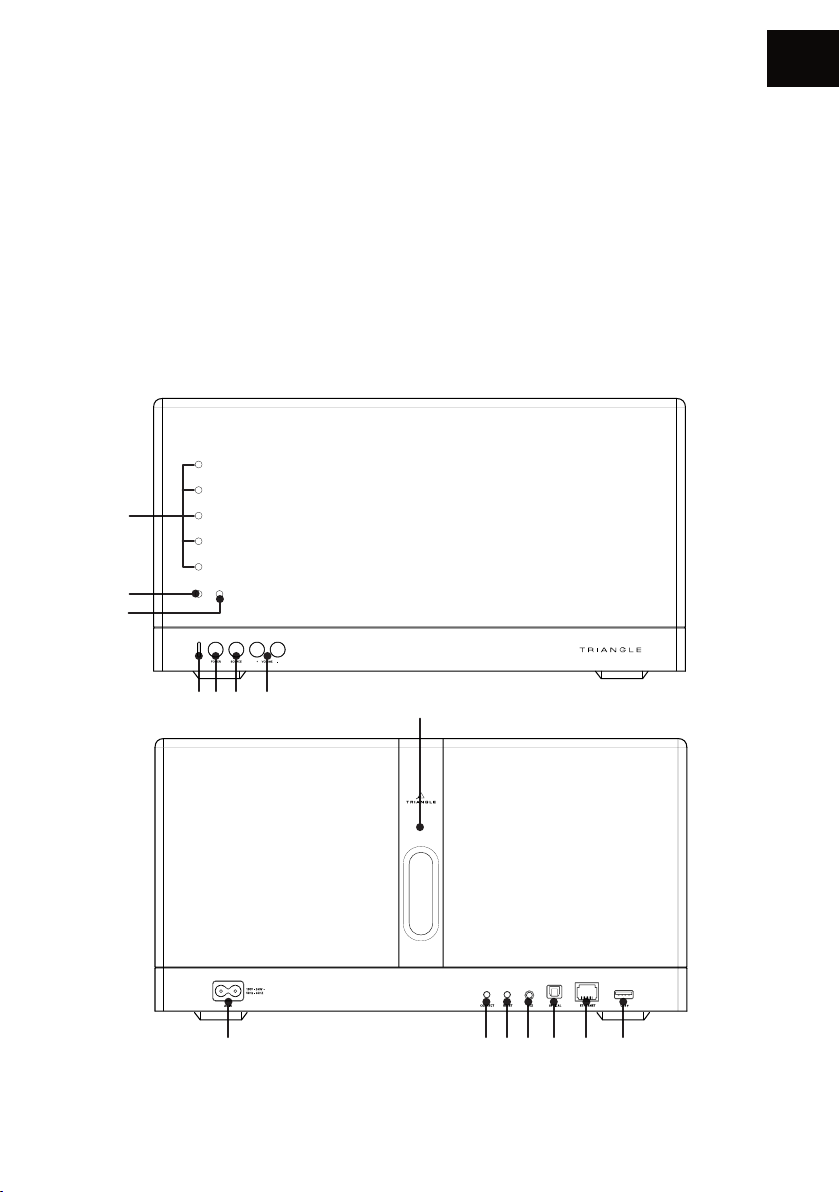
1.Î 音量LED灯
2.Î 遥控器按键提示LED灯
3.Î 待机/Î开始ÎLED灯
4.Î 音源选择LED灯:ÎÎ
Î 白色Î:ÎWIFIÎ/ÎUSBÎ
Î 绿色Î:Î辅助输入Î
Î 黄色Î:Î光纤输入Î
Î 蓝色Î:Î蓝牙输入
5.Î 电源开关
6.Î 音源选择
1
2
3
CN
7.Î Î音 量
8.Î 电源插口
9.Î 网络配对
10.Î 重置
11.Î 辅助音频输入
12.Î 光纤输入
13.Î 以太网接口
14.Î USBÎ(读取闪存盘或充电)
15.Î NFC配对区域Î
4 5 6 7 15
8 9 10 11 12 13 14
45
Page 46
CN
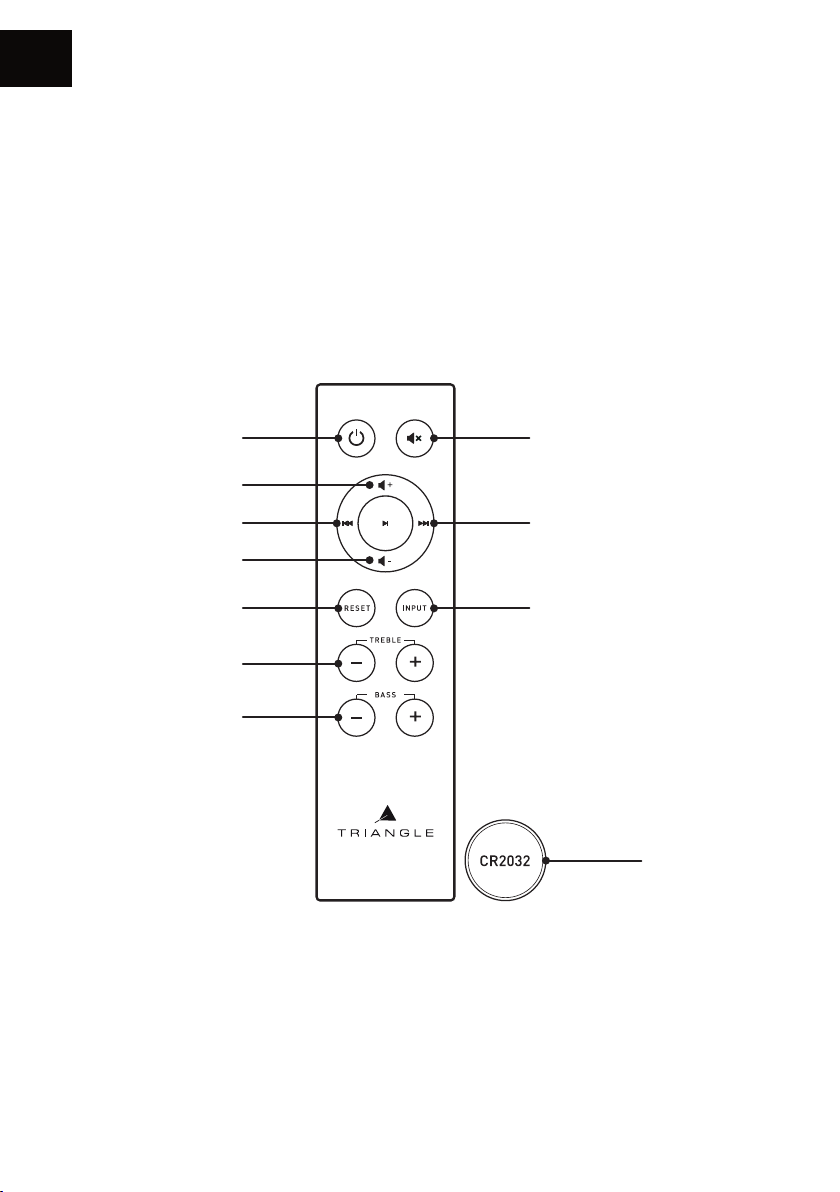
遥控器按钮描述
1.Î 开/关
2.Î 加大音量
3.Î 后退
4.Î 减小音量
5.Î 重置低音Î/Î高音
6.Î 调整高音
7.Î 调整低音
8.Î 静音模式
9.Î Î前 进
10.Î Î音源选择
11.Î 已含电池Î
1
2
3
4
5
6
7
8
9
10
11
46
Page 47
网络设置指南Î
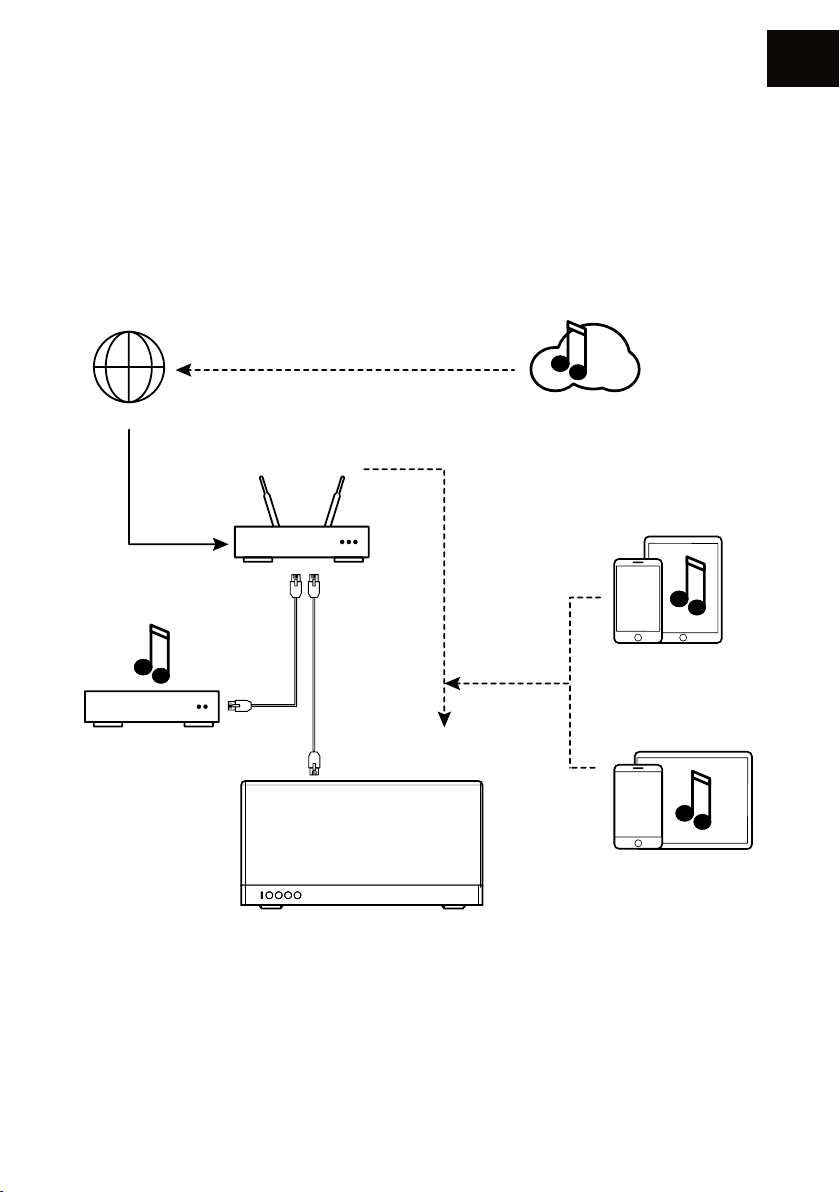
网络:你必须有一个路由器连接到宽带互联网,以充分利用流媒体服务。
记得在安装你的产品时检查你的WiFi网络的接收质量。接收不良会影响声音的平滑性和音质(请参阅
P.52“设备细节”)。
您的移动设备必须与您的AIO系统连接到相同的WiFi网络。
eaming
INTERNET
Î互联网
BOX - ROUTEUR
路由器
WIFI
流媒体服务
Appareil iOS
iOSÎÎ设备
CN
NAS
注意:不提供以太网线
47
Appareil Android
ÎÎ安卓设备
Page 48
CN
安装
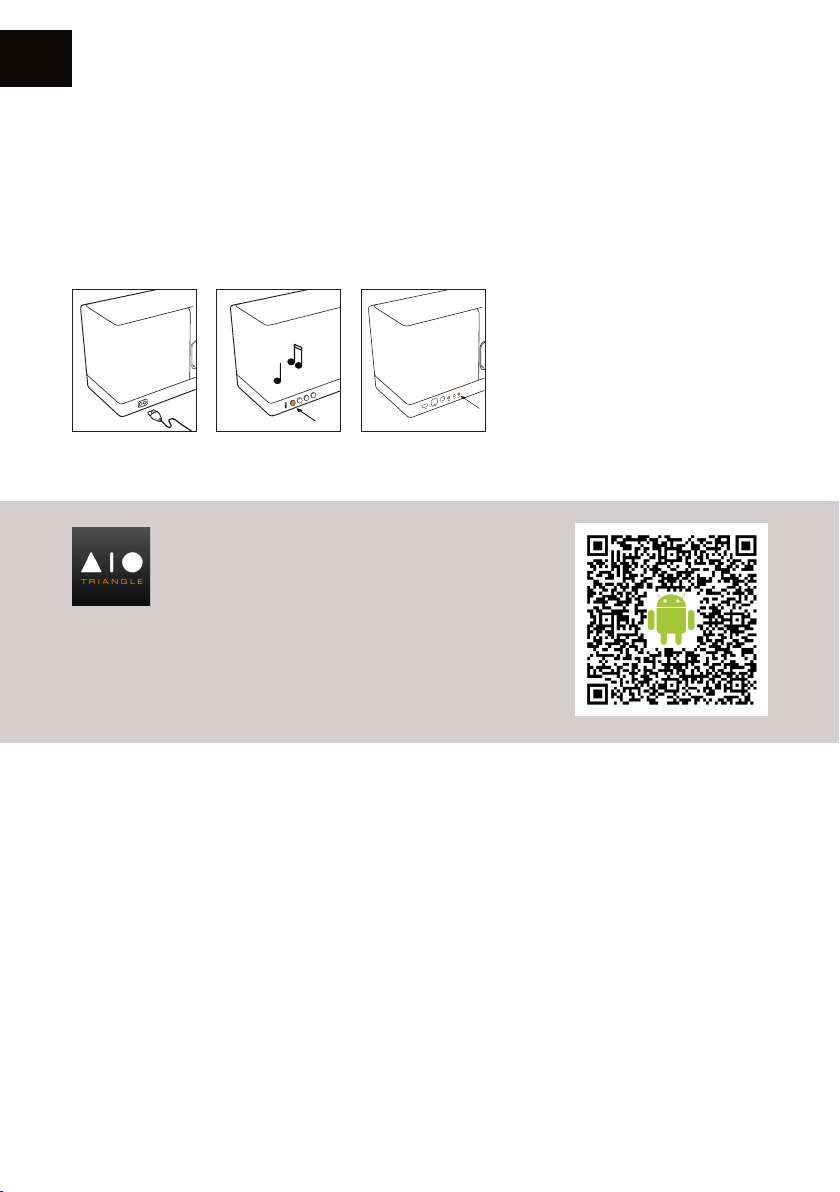
ÎÎ 将AIO的电源线插入电源插座
ÎÎ 必要时,连接以太网电缆,您的AIOÎ3将在您的网络上自动识别,而不需要安装。
ÎÎ 按下电源按钮
ÎÎ 按下您的AIO上的”connect”连接按钮
下载app应用程序
Î进入您的商店Î(AppÎStoreÎ或ÎGoogleÎPaly)Î下
载ÎTRIANGLEÎAIOÎapp.安卓手机请进入官方网
站:Îhttp://www.triangle-fr.com/en/aioÎ下载Î
TRIANGLEÎAIOÎappÎ,ÎÎ或直接扫描右边二维码下载Î.Î
ÎÎÎÎ
在设置您的AI0Î 3时(大约20秒),待机
LED会闪烁。
当您的音箱设置完成,白色LED灯亮显
示您选定的音源启动完成,您会听到三
声提示音,在这之前不要做任何操作。
48
Page 49
启动app并遵循指令
CN
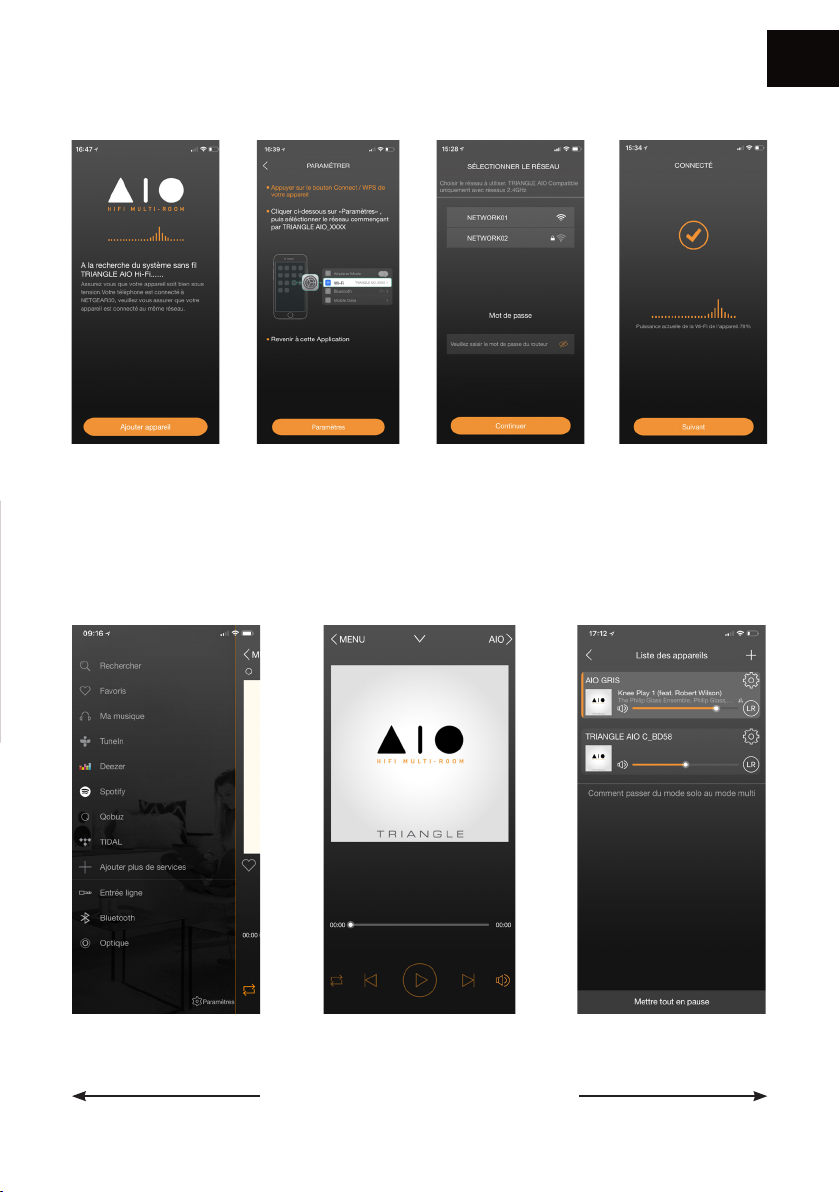
1.Î按“添加设备” 2.ÎApp会打开您的配置
工具找到无线WiFi网络
《TRIANGLEÎAIOÎ3ÎXXX》
3.Î一旦您连接到AIO3Î
WiFi无线网络,回到app,
选择您的WIFI网络并输
入密码。
APP图示
流媒体音源 播放界面 多房间推送界面
4.Î您的AIO3已准备好
播放了。
在三个界面上左右滑动切换APP界面。
49
Page 50
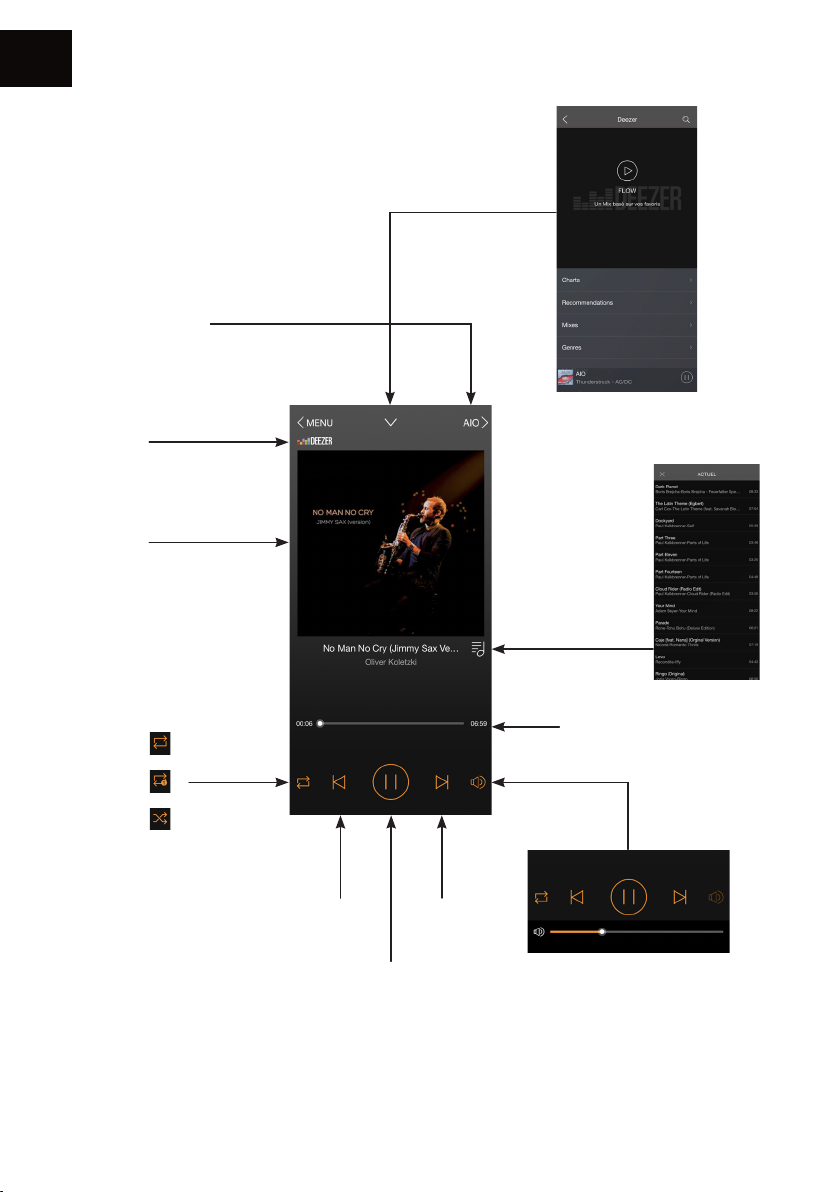
CN
1. 播放界面
正在播放的设备名
音源
专辑封面
回到APP上一级界面
播放列表
循环播放
上一曲
随机播放
上一曲 下一曲
播放/暂停
50
播放进度条
音量键
注意:Î当您使用手机音量键调节音
量时,或许会出现一些延时或大声
的情况,属正常现象,为了平滑调节
音量,请使用app音量调节键
Page 51
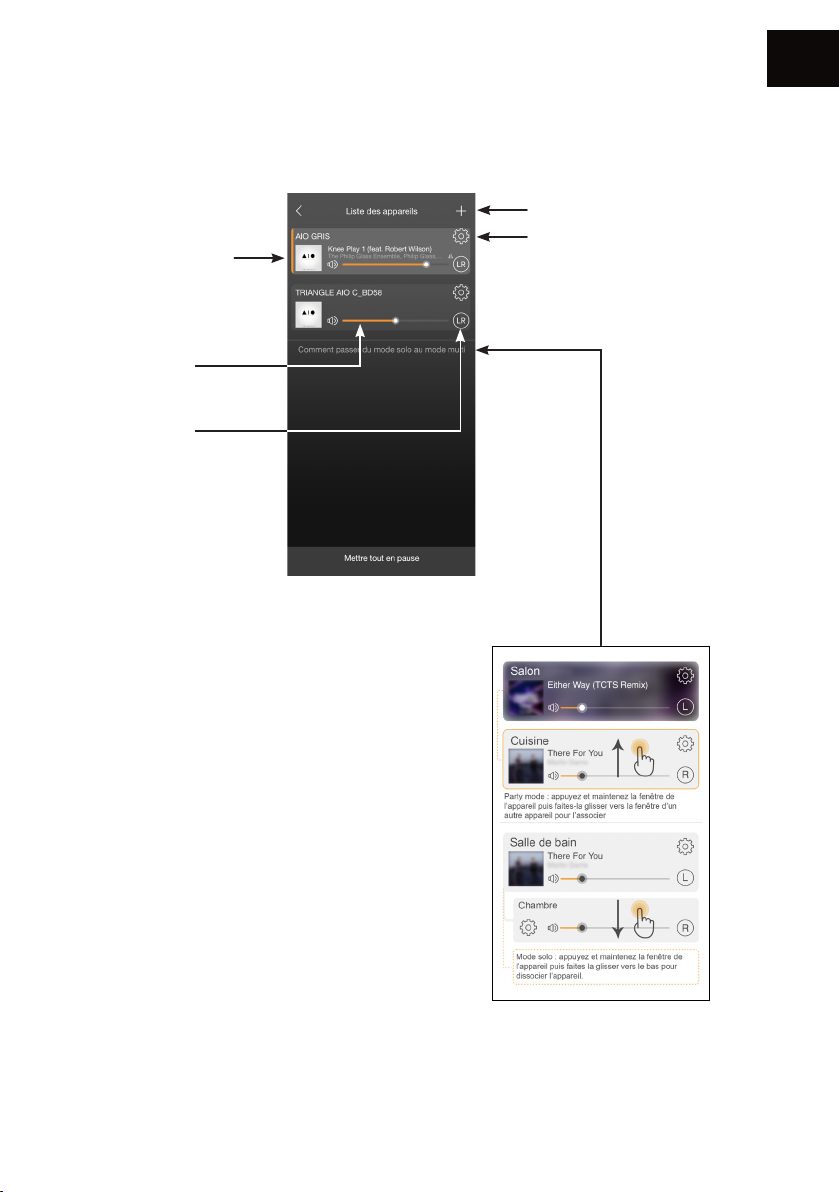
2. AIO 设置控器界面
CN
正在播放的曲目专辑
封面
每个音箱可播放不同
歌曲
设备音量
默认立体声(LR)Î
按该功能可左右声道
切换
设备添加到网络Î(p.47)
设置
多房间推送控制
“派对模式“可允许使用一个
WiFi连接最多5个设备,使用
以太网连接最多10个设备
可把单台音箱设置为左声道
或右声道
默认立体声模式
51
Page 52
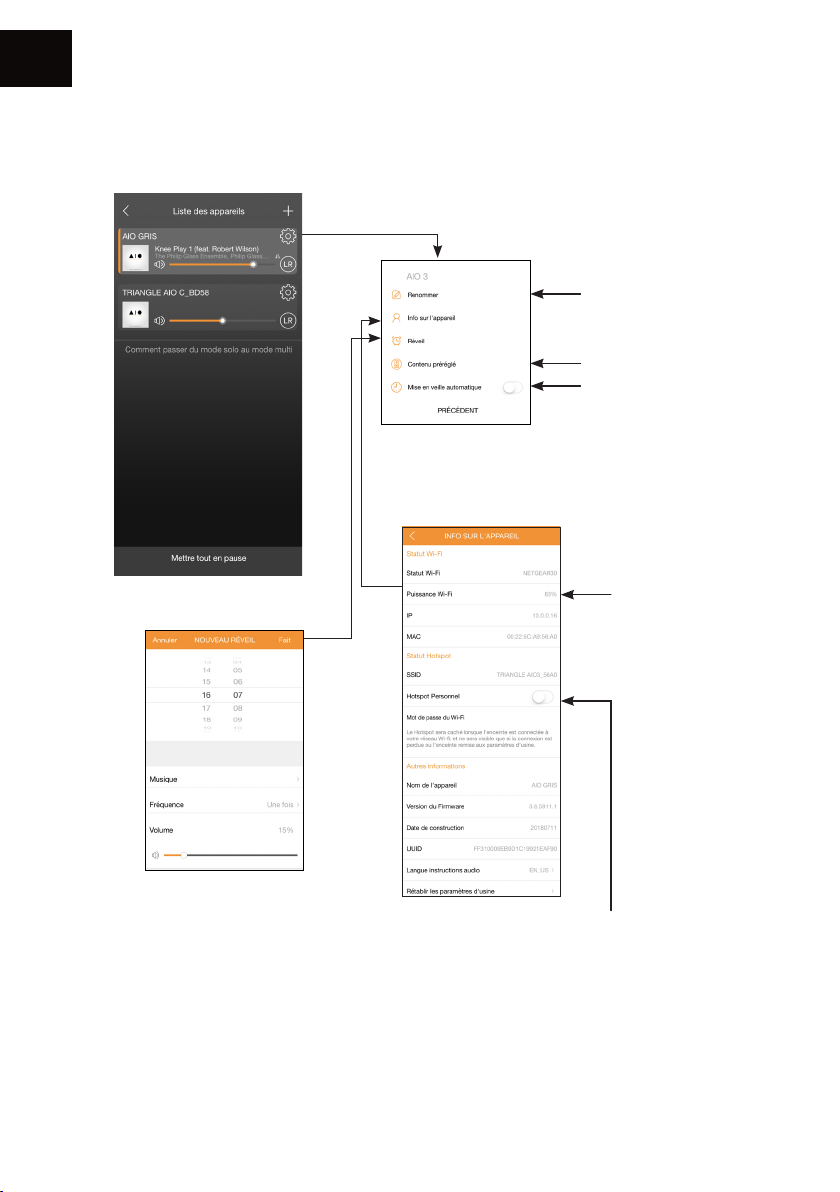
CN
3. 设置
设备重命名
收藏夹设置
自动停电设置(自动关
闭时,声音停止但设
备保持连接)
设备信息
Wi-FiÎ信号强度
设置闹钟
为了确保闹钟设置有
效,请让设备处于开
机状态Î.
AIOÎ3Î具有ÎWiFiÎ热点功能,它可以管理你自己
的WIFI网络,也可扩展Î你目前Î的WiFiÎ信号覆盖
范围Î。
您只需要在ÎAPPÎ里激活这个个人热点功能并设
置Î一个Î热点密码Î。
52
Page 53
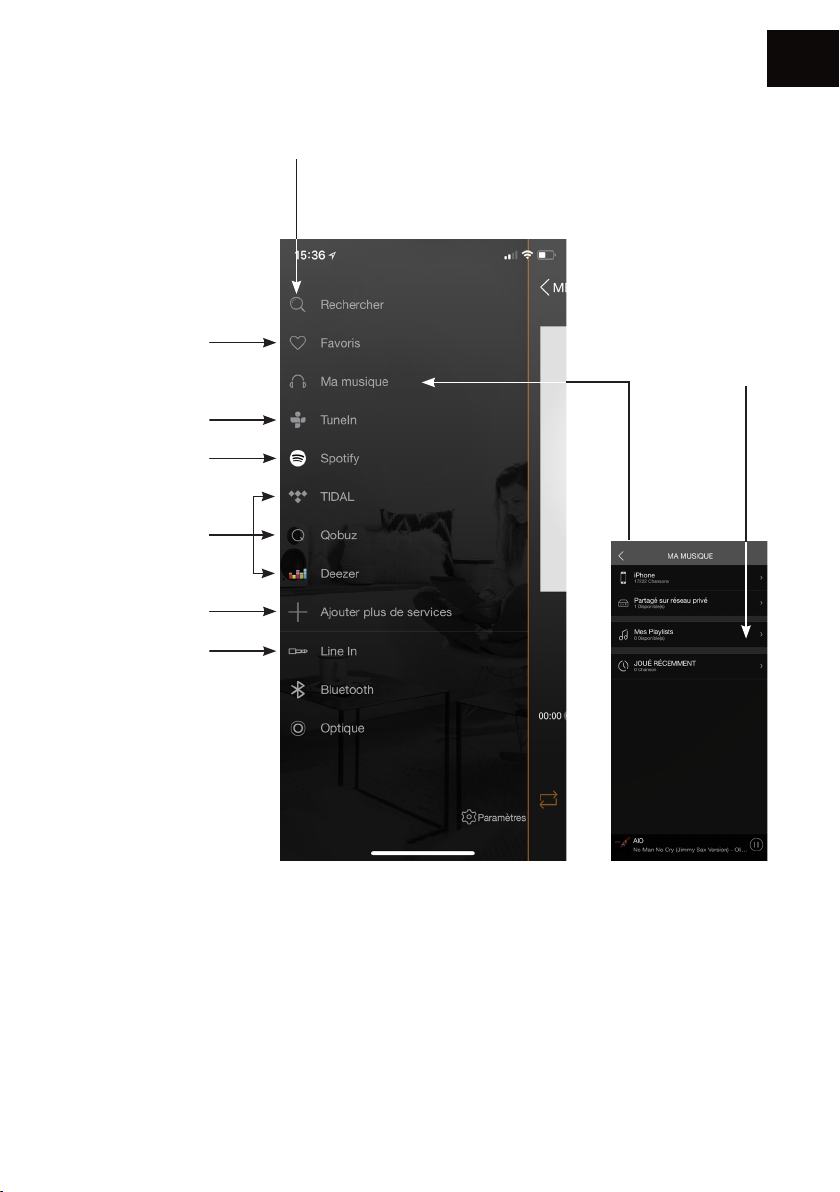
4. 音源
CN
搜索:Î快速访问保存在您
移动设备上的音乐。
我的最爱:快速访问
您移动设备上最喜
爱的曲目
在线电台:播放全球
在线数字电台
Spotify(见下页)
Deezer-QobuzTidal(需客户自己
注册帐号)
从菜单中添加或删
除服务
音源选择
我的播放列表:Î从
保存在移动设备
上的歌曲创建播
放列表。
我的音乐:AIO音箱允许播放您在手机上下载的音乐,访问存储在您网络上的NAS音乐,或者你连接的
USB上的音乐。
您必须允许app读取移动设备上的音乐内容(参见移动设备上的常规菜单中的TriangleÎAIO应用程序
的设置,这取决于您是iOS或Android系统)
您可以访问直接保存在您手机上的歌曲,有些曲目可能受到DRM技术的保护而阻止您播放它们。
53
Page 54
CN
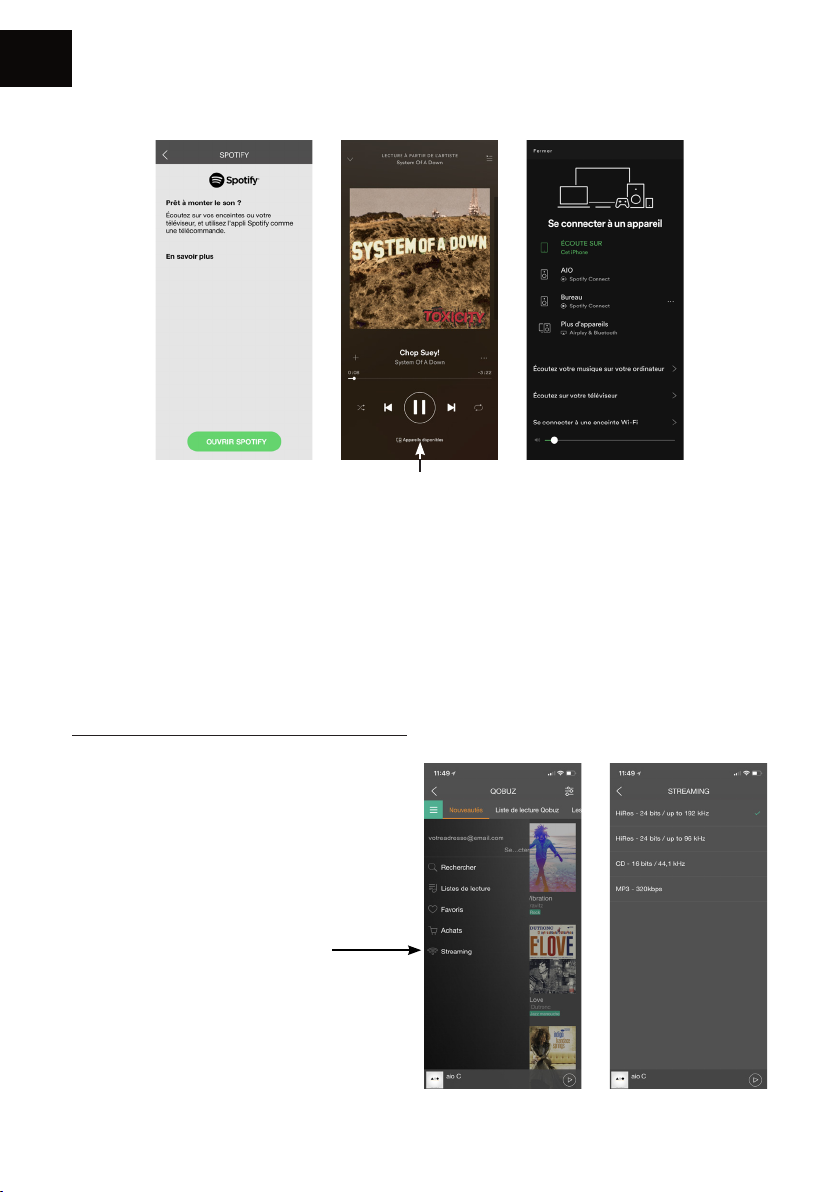
Spotify:
选择您的设备
用 Spotify Connect 聆听
1、将TRIANGLEÎAIO设备连接到Wi-Fi或以太网网络
2、使用同在一个局域网的手机、平板电脑或笔记本电脑上打开Spotify应用程序
3、选择播放的歌曲
4、选择您的TRIANGLEÎAIO设备并开始聆听。
Spotify软件受第三方许可的约束:Î
www.spotify.com/connect/third-party-licencesÎ
Î
Î
Î
Î
在高清模式下播放音乐
请下载相应的流媒体并建立专门的
app,才能在高清模式下播放音乐
Î请参看右图QobuzÎappÎ>>Î
54
Page 55
5. 连接到其它音源
Î
• 1/8” 3.5MM 音频接口
连接一条1/8”Î3.5mm音频线或一条RCA音频线到您的外置音源,并选择音源
• 光纤接口
连接一条光纤线到您的外置音源,并选择音源
• 蓝牙
ÎÎ 选择蓝牙音源Î
Î -Î可通过TRIANGLEÎAIOÎapp(参看p.53)Î
Î -Î或者通过按AIOÎ音箱的”SOURCE”按钮(参看p.45,În°6)Î,或者通过遥控器连接
ÎÎ 当选择了蓝牙音源,蓝色LED亮,并开始自行配对模式(LED灯开始闪烁,Î当连接成功时您会听
到’beep’一声)Î
ÎÎ 当不使用时,Î请确保您的设备退出蓝牙连接,以便于下一位使用
CN
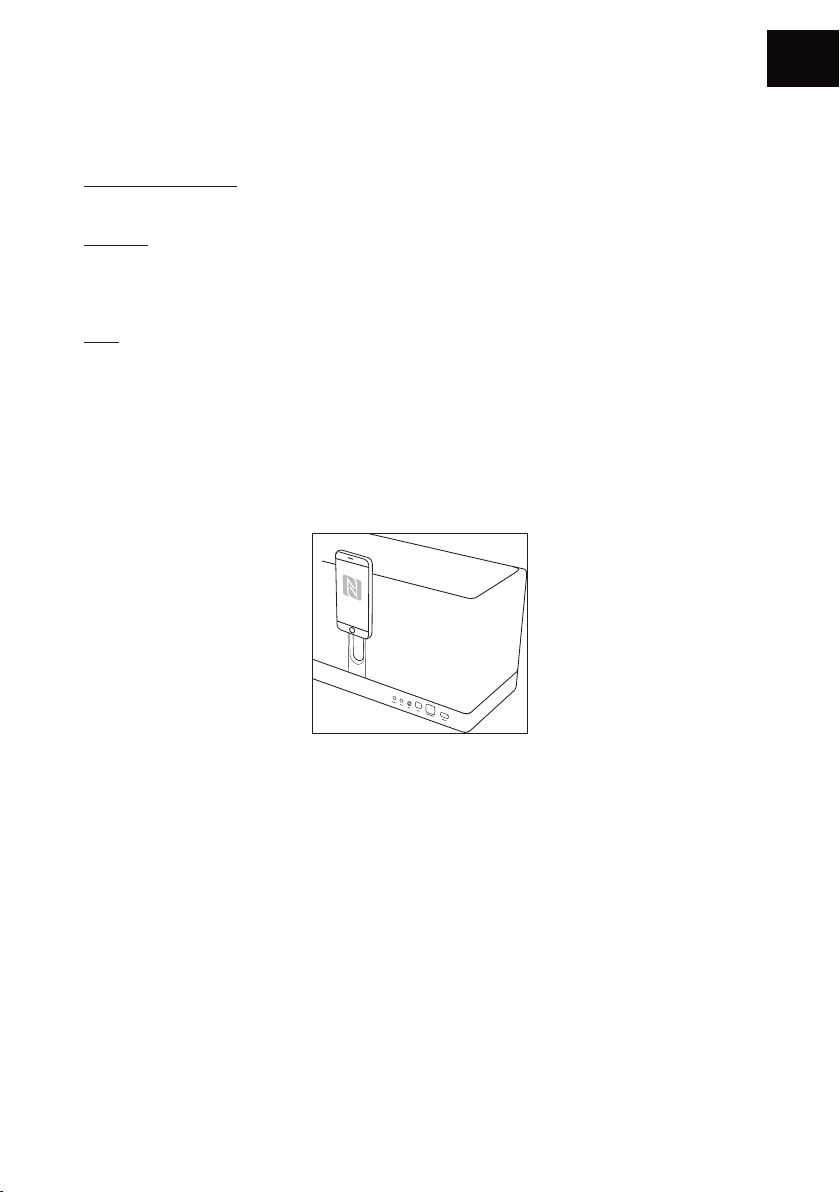
1. N F C
ÎÎ NFC自动对接模式,请将您的智能手机靠近AIOÎ音箱指定的NFC范围(如上图示)
2. 设置标准
ÎÎ 进入您的移动设备上的蓝牙设置
ÎÎ 选择音源名称:ÎTRIANGLEÎAIOÎ3.ÎÎ当连接成功,LED灯恒亮,同时听到提示声
55
Page 56

CN
疑难解答
如果您的设备无法正常工作,请查看如下疑难解答列表.Î 如果问题持续,Î 设备仍无法正常工作,Î请立即
拔下电源,并联系您的经销商。
问题点 解决方案
检查您的移动设备是否连接到您正试图连接AIO的网络
请将您的AIO音箱靠近路由器
我的AIO无法连接网络
播放的音乐断开或不稳定
请用以太网线连接您的路由器和AIO音箱
请检查您的app是否更新,或重新下载更新版本
请重启您的手机和网络
请检查网络连接是否正常
请确保您的网络或其它设备没有占用您的大部份宽带
请检查WiFi信号的强度(参看p.52)
请检查您的app是否更新,或重新下载更新版本
请重启您的手机和网络
56
Page 57
一般疑问
Î
CN
可以连接几台音箱组成多房间
系统?
当正使用app时Î如有电话进来
会如何?
AIO音箱可以播放高清音源吗?
Î
如果网络连接信号足够好,WiFi模式可连接5台音箱,网线模
式可连接10台音箱
音乐持续播放,不会造成干扰
AIOÎ音箱可以播放高达24Îbit/192ÎkHz高清歌曲,但前提您的
网络状态需良好,并且您的流媒体app需正确设置
警告
为避免电击风险,请不要打开音箱
57
Page 58
ENCEINTE AIO
/ AIO SPEAKER / 参数规格
Spécications techniques
Technical specications
技术参数
Haut-parleurs
Drivers
喇叭配置
Système
System
适用系统
Tweeter : 2 x 25mm / Basse : 2 x 10cm
Tweeter : 2 x 1" / Woofer : 2 x 3.9"
高音:Î2ÎxÎ1"Î/Î低音:Î2ÎxÎ3.9"
iOs, Android, Windows, Mac
AIO 3
WiFi / 无线
Décodeur
Set-Top Box
解码
Bluetooth / 蓝牙 Bluetooth AptX v4.2 / 蓝牙ÎAptXÎ4.2
Entrées audio
Audio inputs
音频输入
LAN / 以太网口 RJ45 10/100M LAN / 端口
USB
Intégré
Integrated
集成技术
Application ofcielle
Ofcial app
官方app系统
Formats audio
Audio format
音频格式
Puissance
Power handling
操作功率
Dimensions / 尺寸
Poids
Weight
重量
APE, FLAC, WAV, Apple Lossless (ALAC) (苹果Î无损), AAC, AAC-LC,
IEEE 802.11 b/g/n Standard / Î标准
Up to 24 bit/192 kHz
达到24Îbit/192ÎkHz
Jack 3.5mm - Optique - USB
Jack 3.5mm - Optical - USB
3.5mmÎ音频Î-Î光纤Î-ÎUSB
USB2.0, USB FlashDisk. Max power 5V/1A
USB2.0, USB (闪存). 最大功率 5V/1A
WiFi / Bluetooth
WiFi / 蓝牙
iOs, Android
iOS, 安卓
HE-AAC, HE-AAC v2, MP3, CBR/VBR
2 x 45W, 8Ω
H195 x L360 x P150 mm
H7.67 x W14.17 x D5.9"
高195ÎxÎ宽360ÎxÎ深150mm
5,1 kg
11.24 lbs
58
Page 59
100V - 240V ~
50Hz - 60HZ
AIO 3
59
Page 60

- DESIGN BY TRIANGLE IN FRANCE
 Loading...