

Page 1
OUTPUT
INPUT
INFRARED
ETHERNET
SPEAKER INPUT
+
-
R
L
+
-
USB
INPUT
LFE
OUTPUT
L
R
OUTPUTINPUT
LV TRIGGER
INPUT
OUTPUT
+-+
-
4Ω minimum
+
05.02.2016
RackAmp 700 DSP Quick Start Guide - P1
RackAmp 700 DSP
A
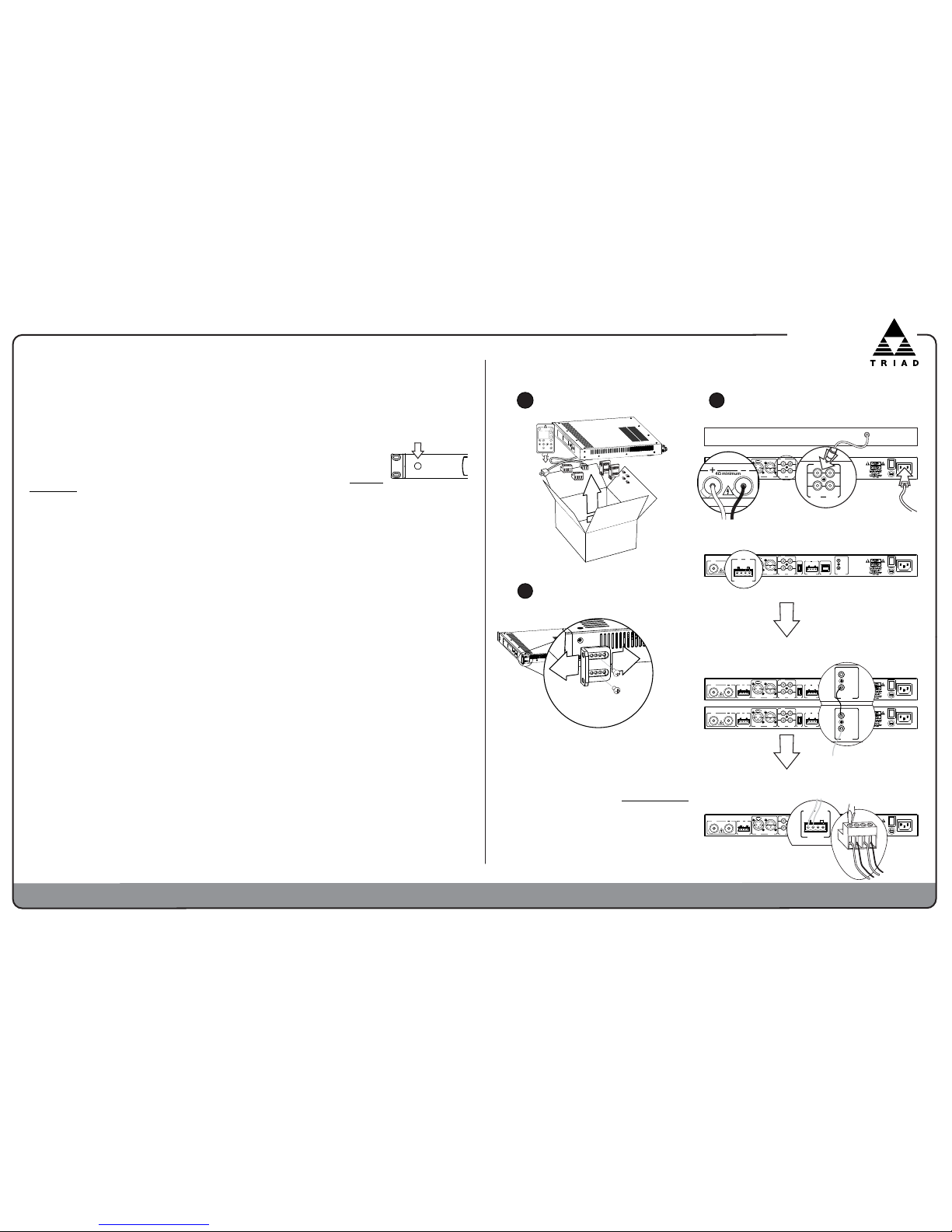
Unpacking / Contents
B
Rack Installation.
C
OUTPUT
INPUT
INFRARED
ETHERNET
SPEAKER INPUT
+
-
R
L
+
-
USB
INPUT
LFE
OUTPUT
L
R
OUTPUTINPUT
LV TRIGGER
INPUT
OUTPUT
+-+
-
4Ω minimum
+
INPUT
LFE
OUTPUT
L
R
RED BLACK
To single 4 ohm Silver, Gold, &
Platinum subs and single or dual
8 ohm Mini & Bronze subs only.
Daisy chain multiple amps by sending
Unbalanced RCA or Balanced XLR
source signal from Outputs to the next
amp’s Inputs.
OUTPUT
INPUT
INFRARED
ETHERNET
SPEAKER INPUT
+
-
R
L
+
-
USB
INPUT
LFE
OUTPUT
L
R
OUTPUTINPUT
LV TRIGGER
INPUT
OUTPUT
+-+
-
4Ω minimum
+
IR Input - Accepts feed from IR distribution using cables with 3.5 mm plugs.
Plugged Input disables front panel IR eye. Daisy-chain IR to multiple
RackAmps from IR Output to next amp's IR Input.
Output (to subwoofer), Inputs, AC Cord
OUTPUT
INPUT
INFRARED
ETHERNET
SPEAKER INPUT
+
-
R
L
+
-
USB
INPUT
LFE
OUTPUT
L
R
OUTPUTINPUT
LV TRIGGER
INPUT
OUTPUT
+-+
-
4Ω minimum
+
LV TRIGGER
INPUT
OUTPUT
+-+
-
Connections
CINEMA
NORMAL
MUTE
OFF ON
enter
back
presets
USER 1 USER 2 USER 3
volume
PEQ
NIGHT
ON
OFF
RACKAMP 700 DSP
OUTPUT
INPUT
INFRARED
OUTPUT
INPUT
INFRARED
Preprocessor LFE or AV Receiver OUT
4Ω minimum
+
Install rack ears with pre-packaged screws. Keep ventilation
slots clear for airflow, particularly right front top & bottom.
Low Voltage Trigger - Via snap-in/pull-out phoenix connector. Input from
low voltage (3-15V) trigger source. Daisy-chain LV Output to next amp's Input.
RackAmps.
Helpful Information - Triad RackAmp 700 DSP
RackAmp 700 has many significant changes from previous Triad RackAmps. They are highlighted in bold italic.
You MUST Select The Triad Subwoofer Model that RackAmp 700 DSP will drive when the amp is first powered up
or after every factory reset. Once confirmed, subwoofer model can only be changed in the Installer Setup Menu. Triad
In-Wall and InCeiling subwoofer model names are labeled on their front baffles. RackAmp 700 DSP now has EQ
Profiles for all current Triad Sub models (some require 8 ohm enclosures). A new FLAT selection has no model EQ and its
Sub High Pass Filter is switched OFF.
If you do NOT see your Triad subwoofer model, please contact Triad for help
.
Power On Methods - Default is (Auto) Sense. Other Power On Methods are Trigger (low voltage),
IR/IP & Manual (front panel button). IR/IP must be selected for infrared Power ON/OFF com-
mands to function; all other IR commands work with all other Power On Methods. For re-
mote trouble shooting or setup changes, amp can power On & Off to Standby via IP from any modern web browser when set to IR/IP; see "IP Setup and Advanced Features" document at www.triad
speakers.com. Press front standby button to temporarily disable amp in all Power On Methods
except Manual; light flashes blue to show amp is disabled. This no longer turns Power On
Method to Manual. To resume normal function, press front Standby button again. Solid blue
light shows amp is ON. Red light shows amp is in Standby. Flashing red indicates amp is in Protection.
Protection - No output? Front panel light ring flashes red when amp is in protection. Press any button for the display to show
protection mode (short, thermal,over voltage). Check subwoofer speaker cable for shorts and check amp for inadequate ventilation. If
hot, power amp OFF and let it cool down (can take up to 30 min). Reset RackAmp 700 DSP by switching off its Mains power
switch, next to back panel power cord, for 30+ seconds. Questions? Contact Triad sales & support at 1.800.666.6316.
Input Selection & Outputs - In User Menu select desired Input from default RCA (LFE unbalanced), XLR (balanced), and
Speaker. Only the selected input gets amplified. Speaker Level Inputs cannot pass thru to any output. For daisy chaining, only
the selected XLR or RCA Input now passes thru to its Output. And now both XLR and RCA Outputs can be highpass
filtered & delayed either for bass management & time alignment of 2-channel systems or for multiple subs to produce different
parts of the bass spectrum.
Menus - Menu changes now affect all inputs: RCA (unbalanced), XLR (Balanced) and Speaker inputs can now be filtered.
Menu changes occur in real time. What you see is what you hear. All changes are saved instantly and automatically. Volume
changes are no longer volatile. User Volume default is still 00dB but switching amp to Standby no longer resets Volume to
default. User Volume should now be used for permanent gain matching; there is no Input Gain adjustment in Installer Menu.
Presets change sound to suit your circumstances. Default Preset is Normal (identical to previous model's Reference Preset).
Cinema Preset boosts bottom end at 40Hz for extra oomph during movies. Night preset reduces deep subwoofer frequencies under
35Hz as a courtesy to family, friends, and neighbors. User 1, User 2, and User 3 custom presets are configured via IP (only) for
special circumstances or different listeners using 2 parametric filters & a separate default Volume per User Preset. The amplifier
maintains its preset when put into standby. For repeatability, calibrate to default Normal preset.
RackAmp 700 DSP drives speaker loads of 4 ohms or higher. Use with 8 ohm Mini & Bronze subs only, as singles or in pairs.
Advanced Features: To set up 6 Band Room EQ & 3 User Presets via computer IP, connect via LAN or directly using
standard Ethernet Cable. See "IP Setup and Advanced Features" document on our website, www.TriadSpeakers.com.
IR Input/Output - Input accepts feed from IR distribution. Output allows daisy-chaining IR control of multiple RackAmp
700 DSP amplifiers. Inserting a 3.5mm (mono) plug into IR Input disables front panel infrared receiving eye.
Setup Instructions are for typical multichannel home theater applications with AVR or preamp-processor.
Input Voltage & Fuses - RackAmp 700 DSP automatically adapts to accept either 110VAC or 220VAC. The
only change necessary is an IEC power cord appropriate for local conditions. Fuse values do not change. There are no internal
fuses. The only accessible fuse is to the left of the IEC power cord socket.
Firmware Updates can be made in the field. Contact Triad for information.
Specifications - 700 Watts; 3.5 Amps/220VAC, 7 Amps/110; 10AL250VP Fuse; 3mS latency.
OUTPUT
INPUT
INFRARED
ETHERNET
SPEAKER INPUT
+
-
R
L
+
-
USB
INPUT
LFE
OUTPUT
L
R
OUTPUTINPUT
LV TRIGGER
INPUT
OUTPUT
+-+
-
4Ω minimum
+
SPEAKER INPUT
+
-
R
L
+
-
New on the RackAmp 700 DSP is speaker level input
Triad North American Warranty
Triad amplifiers are warranted to be free from defects in materials and workmanship
for a period of three (3) years, when operated under normal conditions.
This limited warranty period begins on the date of purchase, is extended only to Triad
products (consequential damage is excluded) and is expressly in lieu of all other
warranties expressed or implied. Should any defect in materials or workmanship
occur within the limited warranty period, customers in the United States should
contact Triad Customer Service at 1-503-517-2668 or [email protected]
to obtain a Return Authorization (RA) Number. Customers outside the U.S. should
contact their dealer for service. The product should be returned in its original
packaging together with proof and date of purchase with the RA number clearly
visible on outside of the box. At our discretion, we will repair or replace the product
and return it, free from charge. If you do not have the original packaging for the
product, contact your dealer or Triad Service, and we can sell you a replacement.
TriadSpeakers, Inc.
15835 NE Cameron Blvd. • Portland, Oregon 97230
800-666-6316 Sales • 503-517-2668 Service
Page 2
05.02.2016
RackAmp 700 DSP Quick Start Guide - P2
xxx.xxx.xxx.xx
IP Address
< Bronze SlimSub >
Current Sub Model EQ
Installer Menu
Shows selected sub model EQ
profile. Change the selected
sub to any current Triad
model. Flat has no EQ.
12 < 24 > 48
Sub Lowpass Slope
OFF < 20Hz > 21Hz
Sub Highpass Filter
300Hz< Thru > 30Hz
Line Output Highpass
Line < Off > Sub
Route Delay to
Line, Sub, Off
Applies time delay to line outputs
, sub
output,
or
neither.
Used
to
time-align
sub
to
speakers
or
to
additional
subs.
25.0 < 00.0 > 00.5
Delay in mS or (Ft)
IR < Sense >Trigg
Power On Method
00mS to 25mS
1mS delay equals 1 foot of distance.
03mV < 06mV > 09mV
Sense On Threshold
RackAmp 700 DSP
Bronze SlimSub
TRIAD SPEAKERS INC
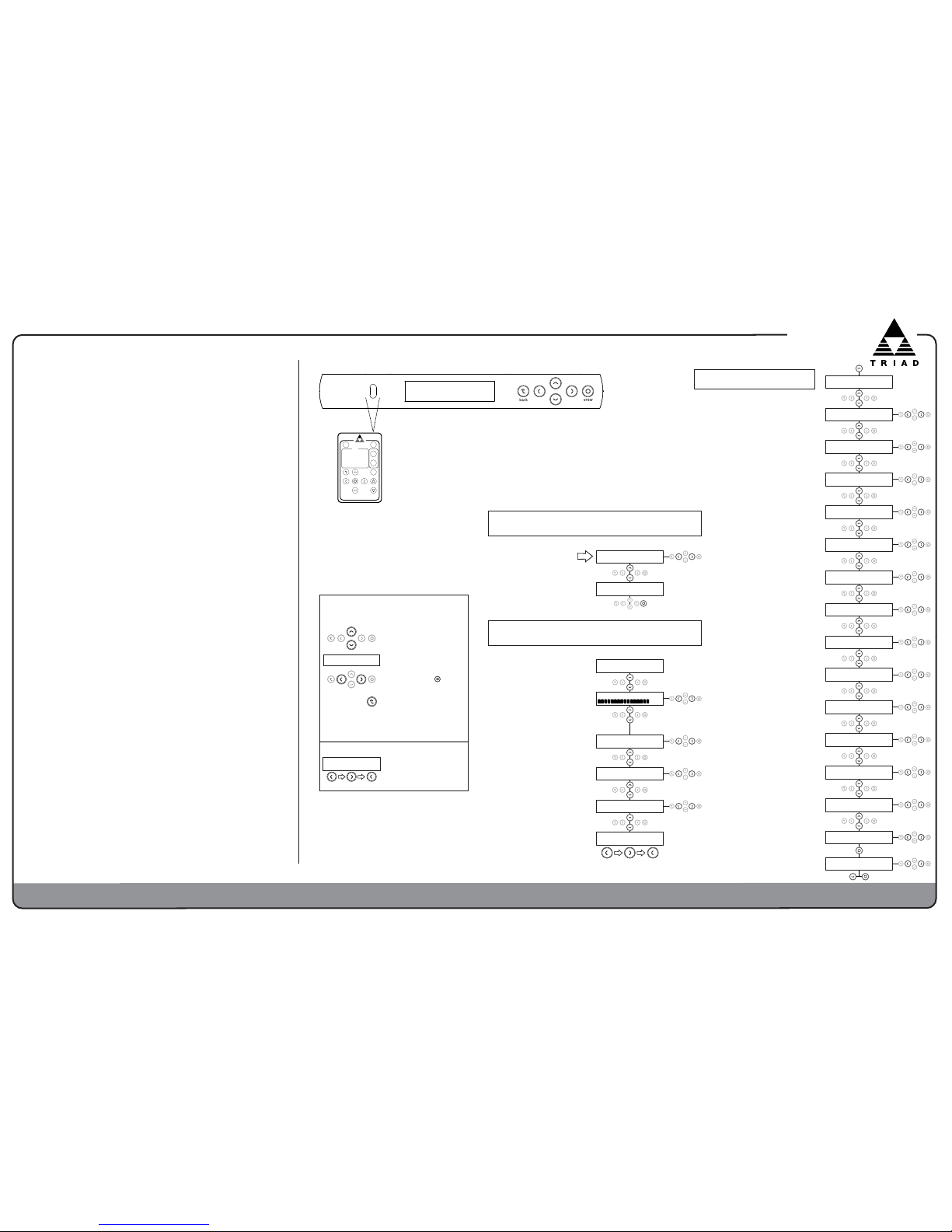
Menus and Setup
Use cursor and Enter buttons on
remote control or front panel
CINEMA
NORMAL
MUTE
OFF ON
enter
back
presets
USER 1 USER 2 USER 3
volume
PEQ
NIGHT
ON
OFF
RACKAMP 700 DSP
First Power On
Select Triad subwoofer model this amp will power.
< Bronze SlimSub >
Sub Model EQ Press
Bronze SlimSub
Confirm Model Press
+
.
.
.
.
+
.
.
.
.
Select Bronze SlimSub for
all current Bronze Slim Sub
Models. Flat has no EQ or
Sub HighPass Filter set.
User Menu
Bronze SlimSub
TRIAD SPEAKERS INC
0000000000000000
Volume <+00dB>
XLR < RCA > Speak
Input Source Select
User3 <Normal> Cinem
Preset Selection
Low <Medium> High
Display Brightness
Enter Code ***
Installer Menu
Current sub model EQ is shown.
Wait a few seconds to continue.
MUTE, -40dB to +11dB
Changing Volume is the only
way to adjust Input Gain.
Changes are permanent, not
volatile as before.
XLR, RCA, Speak
Select between balanced
(XLR), unbalanced (RCA), or
speaker inputs
Normal,
Cinema, Night,
User1, User2,
User3
Allow user
to select preset EQ profiles.
Low, Medium, High
Adjusts display brightness
on front of amplifier.
To enter Installer Menu,
press these three buttons
in sequence:
Menu Navigation, Operation,
and Saving:
Use Left and Right buttons to
change values. Enter is not
needed unless prompted.
All changes are saved
instantly. To exit Installer
Menu, press Back.
Submenus appear only when
relevant. For example, you can
only see & select a Delay
amount when Delay is active.
Access to the Installer Menu is
located at the bottom of the User
Menu. The code consists of
pressing Left, Right, Left in
sequence.
Enter Code ***
Installer Menu
Use Up and Down buttons to
navigate through menus
Item between arrows is
selected and active immediately
300Hz< LFE > 30Hz
Sub Lowpass Filter
INSTALLER MENU CODE
Features and Benefits - Triad RackAmp 700 DSP
Significant changes from previous Triad RackAmps are highlighted in bold italic.
Powerful RackAmp 700 DSP Class D amplifier technology provides
superior bass, setup, calibration, and control. It teams with Triad
subwoofers, singly or in multiples, to produce extended, high-impact,
& explosive bass for movies plus nuanced & detailed bass for music.
You will hear the difference.
Performance - Now with 700 Watts & built-in EQ profiles for
Triad's complete current subwoofer line to ensure peak performance for
each Triad model. New Flat setting lets it drive any subwoofer.
Size - Taking up just a single rack space (1RU), RackAmp 700 DSP saves
rack and shelf space.
Energy Star Compliant - High efficiency saves energy and money.
Balanced Input & Output - RackAmp 700 DSP mates with high-end multi-
channel and 2 channel systems using Balanced XLR connections .
Speaker Level Input
s - Let you add subs to any system, even house music.
3 Convenient Setup Methods.
1. Use RackAmp 700 DSP as-is for high-performance plug-&-play.
2. Front panel display and menus access a broad array of DSP filters &
control options to refine system performance and integration. Available
manually and with IR remote control.
3. For ultimate set up via computer, use any modern web browser over
IP to custom-tailor every aspect of RackAmp 700 DSP. IP lets you set
up & calibrate your system remotely when your amp is not in your
listening room. IP also gives you 2 Advanced Features: Create one Room
EQ profile with 6 manual PEQ filters to optimize your sub(s) to your room.
Customize up to 3 User presets, each with two additional parametric
filters and preset volumes, for different listening styles & circumstances.
2-Channel Bass Management with Crossovers and Delay (time alignment)
on Unbalanced and now on Balanced Line Outputs improves the sound of
your 2-channel music system.
Unique Multi-Sub Setup - Delays, filters, and level adjustments provide
increased control over daisy-chained subwoofers. Experience better bass
impact, dynamics, and accuracy when all your subwoofers work together.
4 Power/Control Options. Sense, Trigger (low-voltage), IR/IP (infrared),
and Manual power-on methods let you integrate RackAmp 700 DSP into
every type of control system.
Dynamic Menu. Menu changes take effect instantly so you hear changes
as you make them. All changes are now saved instantly.
Questions? Contact Triad sales & support at 1.800.666.6316
03mV, 06mV, 09mV, 12mV, 15mV
Sets the audio signal level threshold
to bring RackAmp 700 DSP out of
standby when in Sense mode.
5, 10, 20, 30, 60 minutes
Amount of time with no signal above
the Sense On Threshold, until
amplifier goes to standby.
10 < 20 > 30
Sense Off in Minutes
Yes, No
Resets RackAmp 700 DSP to factory
defaults. Requires confirmation below.
Yes < No > Yes
Factory Reset Press
+
.
.
.
.
180 < 00 > 180
Phase
0°, 180°
Invert phase of sub output
300Hz< LFE > 30Hz
Sub Lowpass Filter
30Hz to 300 Hz, LFE
Filters Sub output only. LFE by-
passes filter when using Sub cross-
over in your AVR or pre-processor.
12, 24, 48
Sets the rolloff slope (in dB/Octave)
of the Sub Lowpass filter.
20Hz to 100Hz,
OFF
Sets low-end extension for Sub
output only. Increase frequency for
more headroom. Do NOT turn OFF.
CA-RAN-RN8
SetsAtheArolloffAslopeA6inAdGQAof
Sub Highpass filter.
24 < 48 > 12
Sub Highpass Slope
Yes < No > Yes
Confirm Full Reset
Yes, No
Confirms a full factory reset of the
RackAmp 700 DSP.
+
.
.
.
.
30Hz to 300Hz, Thru
Removes lower frequencies from line
outputs. For 2-channel systems without
bass management & for tiered subs.
12, 24, 48
Sets the rolloff slope (in dB) of the
Line Output Highpass filter.
48 < 12 > 24
Line Highpass Slope
Manual, IR/IP, Sense, Trigger
Selects how the RackAmp 700
DSP powers ON out of standby.
 Loading...