

Page 1

getting started
Page 2

congratulations!
You’re only treatments away from having
the sensuous smooth skin you desire.
We recommend reading this guide and referring to the
Instructions for Use booklet for additional information
before using the TRIA Laser.
enjoy!
Page 3

Page 4
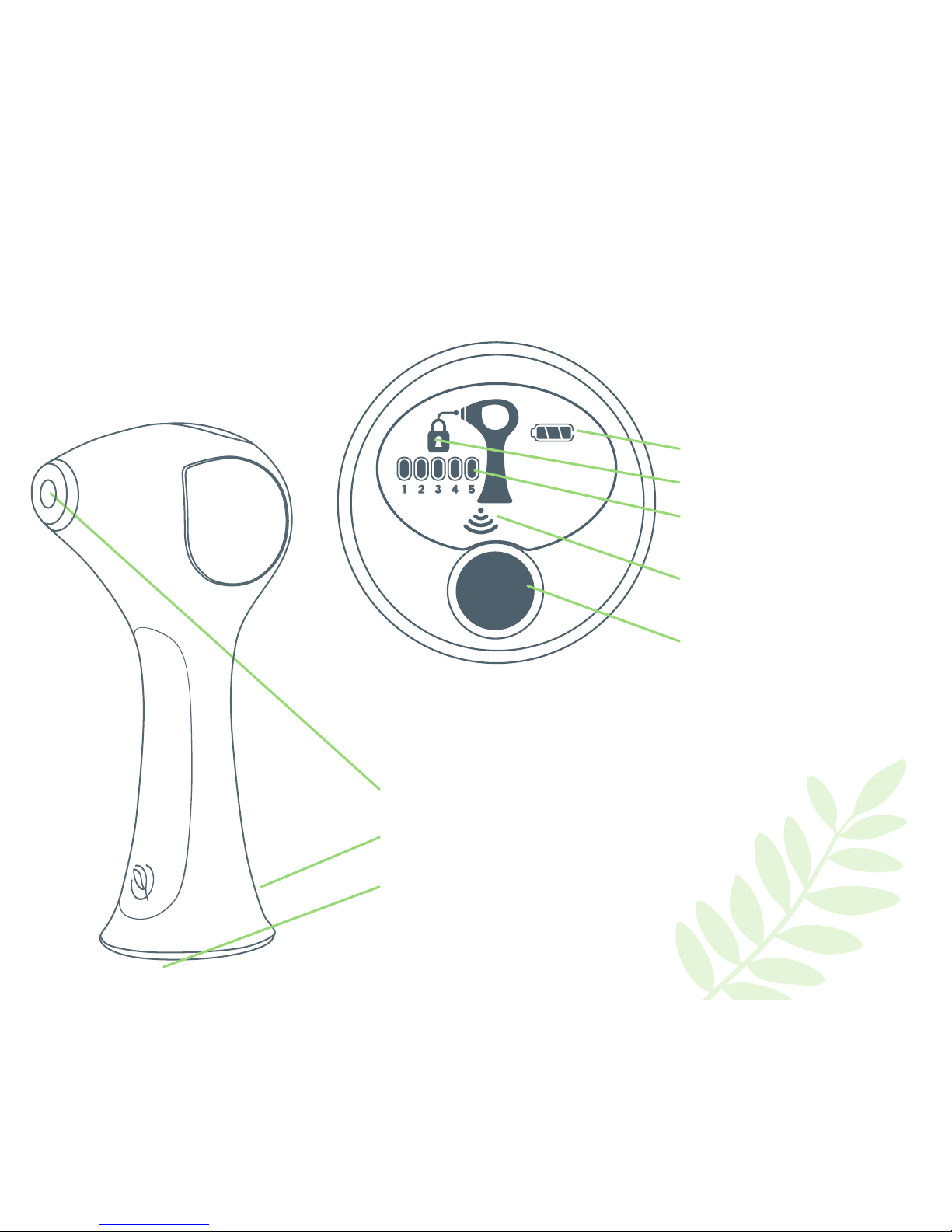
getting to know your TRIA Laser
Battery Indicator
Lock
Treatment Level
Choose from levels 1-5, to get a
custom treatment and best results
Skin Sensor Indicator
When this light turns on, the TRIA
Laser is ready to use
Power Button
Adjusts the treatment setting and
turns the TRIA Laser on and o
Treatment Window
Delivers laser light during treatments
Charger Socket
Plug the battery charger into this socket
Skin Sensor
Safety feature located inside the base
of the TRIA Laser
Display Window
Page 5

check the skin tone chart
Match the skin in the area you wish to treat to the
range of skin tones shown on this chart. If your
skin tone matches any of the skin tones labeled
“Not Safe” for treatment, then DO NOT USE
the TRIA Laser.
Charge your TRIA Laser
Charge the TRIA Laser for 2 hours before you use it for the rst
time. Plug the battery charger into the TRIA Laser charger socket,
then into a power outlet. The battery indicator will show it is “lling
up.” When the TRIA Laser is fully charged the battery light will stay on.
Activate your TRIA Laser
A one-time online or telephone activation is required before you
can use the TRIA Laser. Go to TRIABeauty.com/Activate or call
TRIA Beauty Customer Care at 1-877-321-TRIA (8742). Activation
takes less than 5 minutes to complete. The TRIA Laser will not
work until it’s been activated.
Perform a patch test
Before your rst full treatment on a new area of your body, we
recommend you test the TRIA Laser on a patch of skin there and
try dierent energy levels.
1. Wash, shave and dry the treatment area. Next, unlock the
TRIA Laser with the Skin Sensor (see page 6).
2. Place the Treatment Window at against your skin, and test
one laser pulse.
3. If the Level 1 setting was comfortable for you, then move to
another test area and increase to Level 2, testing a patch at
that level with one laser pulse. Continue increasing levels and
changing test locations until you reach the highest level that
you can tolerate.
4. Wait 24 hours and then examine the test area. If your skin
looks normal, start your rst treatment at the highest level that
is comfortable to you. Contact Customer Care or your doctor
if your skin does not look normal aer the patch test.
White
Ivory
Beige
Medium Brown
Light Brown
Dark Brown/Black
INTENDED FOR THESE SKIN TONES
NOT SAFE FOR THESE SKIN TONES—DO NOT USE
before your rst treatment
Page 6

before every treatment
Get your skin ready
1. Wash the treatment area thoroughly.
2. Shave the treatment area. If possible, use a new razor to make sure you get an extra close
shave. (Shaving helps reduce discomfort during treatment because the TRIA Laser works on
the hair inside the follicle, below the surface of the skin.)
3. Wipe your skin with a cool, damp cloth to dry the area and remove any shaving cream or soap.
Unlock the TRIA Laser with the Skin Sensor
The Skin Sensor is a built-in safety feature located inside the base of your TRIA Laser.
To unlock the laser with the Skin Sensor:
1. Turn on the TRIA Laser.
2. Hold the base of the TRIA Laser over the skin in the area you wish to treat. The
Skin Sensor will automatically sense and check your skin. If it’s safe for you to use the
TRIA Laser, it will emit a series of beeps and unlock.
3. If the TRIA Laser does not unlock, then it may not be safe for you to use. Or, you may
be using the Skin Sensor incorrectly and need to try again. To try again, li the Skin
Sensor from your skin and follow steps 1 and 2 above. If you still aren’t able to unlock
the TRIA Laser, contact Customer Care. When not in use for approximately ve
minutes, the TRIA Laser will automatically lock.
Set the TRIA Laser to your comfort level
Refer to the Display Window to nd the current treatment level. To increase the level
of your treatment setting (Levels 1-5), press the Power Button. Each time you press
the Power Button, the level will increase. Once the TRIA Laser is at Level 5, press
the Power Button again to return to Level 1. For best results, choose the highest
treatment level that you can tolerate.
Page 7
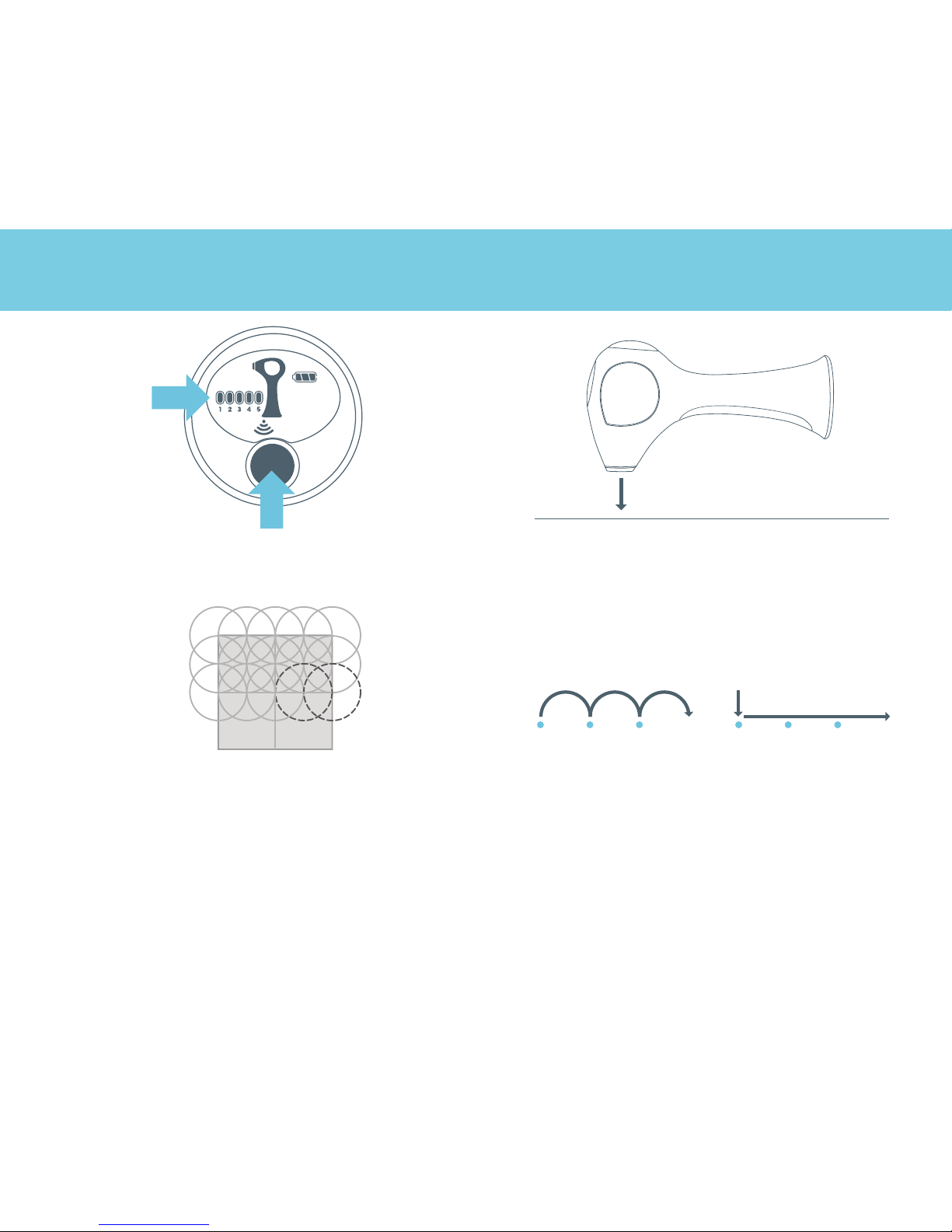
how to use the TRIA Laser
Cleanse, shave and dry the treatment area
thoroughly. Using the Power Button, choose the
highest treatment level you can tolerate.
Touch the TRIA Laser’s Treatment Window to the
area you wish to treat, making sure that it is at
against the skin. Hold the Treatment Window in
place until you hear a beep. The beep signals
that the laser has pulsed.
1 2
or
glideli-and-place
Aer the beep, li and place the Treatment Window
on the next area, making sure that it slightly overlaps
the last area that you treated, as shown.
Please note: Always move the Treatment Window
to a new area aer you hear the TRIA Laser beep.
Failure to do so may result in discomfort or skin
heating, which could cause skin injury.
Continue treating in this two-step motion: Wait for
the beep, and then place or glide the Treatment
Window to the next treatment area.
Please note: There are two ways to move the
Treatment Window to the next treatment area:
You may li and place it onto the next treatment
area at your own pace, or you may quickly glide
it to the next treatment area and the laser will
pulse automatically.
3 4
Page 8

what to expect
For best results, treat twice a month for the rst 3
months, and then once a month until you’re done.
What does a TRIA Laser treatment feel like?
The sensation varies, depending on the person and treatment
area itself. Some feel a warm, prickling sensation. If you don’t feel
anything during treatment, we recommend you increase a level
until you’ve reached the highest setting that you can tolerate. It’s
easy to customize your treatments, using its ve comfort levels.
Aer your rst treatment
There will be no visible change to the hair or the
appearance of the skin. Shave between treatments,
but don’t pluck or wax hair.
Aer 2 months
Hair growth will begin to lighten and become ner.
Aer 3 months
You will begin to see a visible reduction in the amount
of re-growth, especially where hair growth is dense.
Aer 6-8 months
Hair follicles that have been disabled by the TRIA
Laser will not grow back.
Page 9

notes
Page 10

troubleshooting
your question it’s possible that... how to troubleshoot
My TRIA Laser won’t turn on. Your TRIA Laser needs to be
activated.
Complete the one-time activation process.
Your TRIA Laser is not
completely charged.
Charge your TRIA Laser.
While I’m charging my TRIA Laser,
the battery indicator on the display
doesn’t “ll up.”
Your TRIA Laser isn’t
connected properly.
Conrm that your TRIA Laser is rmly plugged into
the charger and the wall outlet.
Your TRIA Laser is already
fully charged and ready
to use.
Unplug the Battery Charger from the wall and
from the TRIA Laser.
Even aer I charge my TRIA Laser, the
battery indicator is still “lling up.”
Your TRIA Laser isn’t fully
charged.
Charge your TRIA Laser.
I can’t use my TRIA Laser, and an
image of a lock shows on the Display
Window.
Your TRIA Laser is locked. For your safety, the TRIA Laser will lock when it’s
not in use. Unlock your TRIA Laser with the Skin
Sensor.
When I put my TRIA Laser against my
skin, nothing happens.
Your TRIA Laser is locked. For your safety, the TRIA Laser will lock when it’s
not in use. Unlock your TRIA Laser again.
Your TRIA Laser is plugged
into the Battery Charger.
Your TRIA Laser won’t work when it’s plugged in
to the Battery Charger. Unplug your TRIA Laser.
The Treatment Window isn’t
completely in contact with
your skin.
Conrm that the Treatment Window is completely
at against your skin.
The area you’re trying to
treat is too small.
Try again, pulling the skin at. If you can’t get the
whole Treatment Window to touch the treatment
area, then the TRIA Laser won’t work.
Please call TRIA Beauty Customer Care at 1-877-321-TRIA (8742) for additional help.
Page 11

troubleshooting
your question it’s possible that... how to troubleshoot
The Display Window is ashing
quickly.
Your TRIA Laser is not
working properly.
Please call Customer Care for assistance.
Dirt or debris is stuck to the window
on the laser.
Your TRIA Laser needs to be
cleaned.
If you can’t get the area clean, call Customer
Care for assistance.
I tried to unlock my TRIA Laser, but it’s
still locked.
It may not be safe for you
to use the TRIA Laser.
Match your skin tone to the Skin Tone Chart on
page 5 of this booklet, and contact Customer
Care with any questions.
You didn’t use the Skin
Sensor correctly.
Try again, holding the Skin Sensor at and rm
against your skin.
When I reposition my TRIA Laser, it
seems to take a long time before the
next pulse of laser light.
It’s too warm to use the
TRIA Laser
User the TRIA Laser in a cooler environment. The
temperature should be less than 80ºF (27ºC).
My TRIA Laser was working properly,
but then it stopped working. The
display is o and does not turn on
even when I press the Power Button.
The battery needs to be
charged.
Recharge your TRIA Laser.
When I’m using my TRIA Laser, I can
hear a fan working.
This is normal. Continue your treatment.
Page 12

TRIA Beauty
4160 Dublin Boulevard, Suite 200
Dublin, CA 94568
Customer Care
Call 1-877-321-TRIA (8742)
E-mail [email protected]
Visit TRIABeauty.com
©2011 TRIA Beauty, Inc.
All rights reserved.
TRIA, TRIA Beauty, and the TRIA logo are
trademarks of TRIA Beauty, Inc.
Covered by one or more of the following patents:
U.S. patents 7,118,563; D535,746; 7,250,045; 7,413,567; 7,452,356.
Additional patents pending.
Please refer to the Instructions for Use booklet for complete information
about using the laser, warnings, and contraindications.
9466B
 Loading...