

Page 1
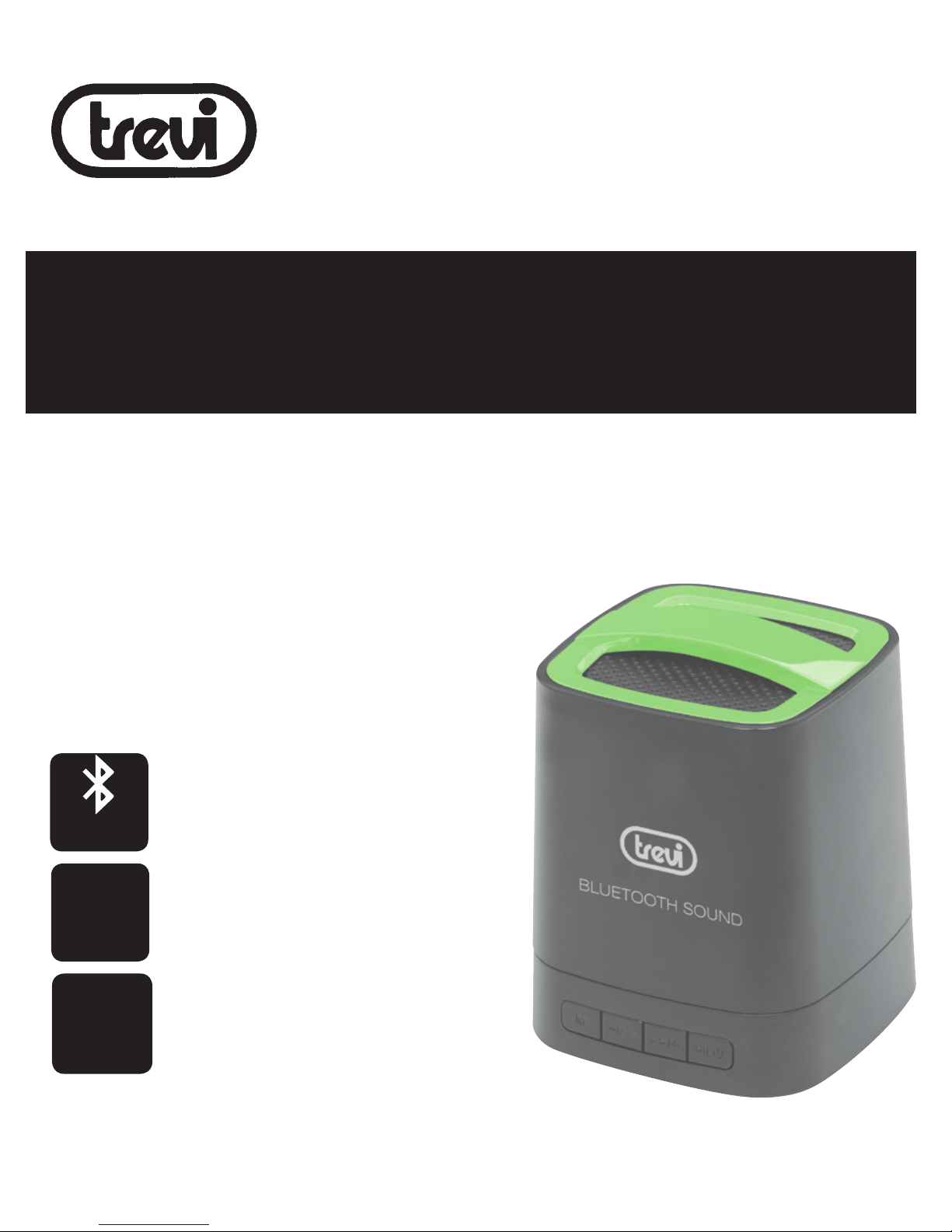
XP 72 BT
Guida d’uso - User guide
ALTOPARLANTE AMPLIFICATO
CON CONNESSIONE BLUETOOTH
®
Manuale d'uso e collegamento
AMPLIFIED SPEAKERS
WITH BLUETOOTH
®
CONNECTION
Connection and Operation Manual
AUX IN
BLUETOOTH
CONNECTION
* Per informazioni integrative e aggiornamenti di questo prodotto vedi: www.trevi.it
* For additional information and updates of this product see: www.trevi.it
3 W
MAX
Italiano - English - Francaise - Deutsch - Espanol
Page 2

XP 72 BT
INTRODUZIONE
TREVI XP 72 BT rappresenta una innovazione nell’intrattenimento musicale. Grazie alla
tecnologia Bluetooth® permette di essere collegato immediatamente, senza fili, a tutti i
dispositivi Bluetooth® che utilizzano i profili A2DP, ACRCP o HFP e di ascoltare tutta la
musica contenuta nel telefonino, nel Tablet o nel PC.
Inoltre al suo interno vi è collegato un microfono così da poter essere utilizzato anche
come risponditore viva voce di conversazioni telefoniche, controllabile direttamente dalla
sua semplice tastiera senza dover agire sul telefonino.
NOTE D’USO
Questo apparecchio è uno strumento elettronico di alta precisione, evitate quindi di
utilizzarlo nei seguenti casi:
- Vicino a fonti di calore come caloriferi e stufe.
- In luoghi molto umidi come stanze da bagno, piscine, ecc...
- In luoghi molto polverosi.
- In luoghi soggetti a forti vibrazioni.
- Posizionare l’apparecchio in modo che ai suoi lati ci sia sempre abbastanza spazi
per la libera circolazione di aria (almeno 5 cm).
- Non utilizzare alimentatori esterni con caratteristiche differenti da quelle indicate, per
evitare danni allo speaker e alla batteria.
- Se dei liquidi penetrano all’interno dell’apparecchio portarlo immediatamente al più
vicino centro assistenza autorizato TREVI.
CURA E MANUTENZIONE
Per la pulizia si consiglia l’uso di un panno morbido, leggermente inumidito. Evitate solventi
o sostanze abrasive.
IMPORTANTE
La buona costruzione di questo apparecchio ne garantisce per lungo tempo il perfetto
funzionamento. Se tuttavia dovesse presentarsi qualche inconveniente, sarà opportuno
consultare il più vicino Centro Assistenza autorizzato.
TREVI
Persegue una politica di continua ricerca e sviluppo. Pertanto i prodotti possono presentare
caratteristiche diverse da quelle descritte.
ITALIANO
Page 3
XP 72 BT
CONTENUTO DELLA CONFEZIONE
- Cassa
- Cavo USB/Micro USB
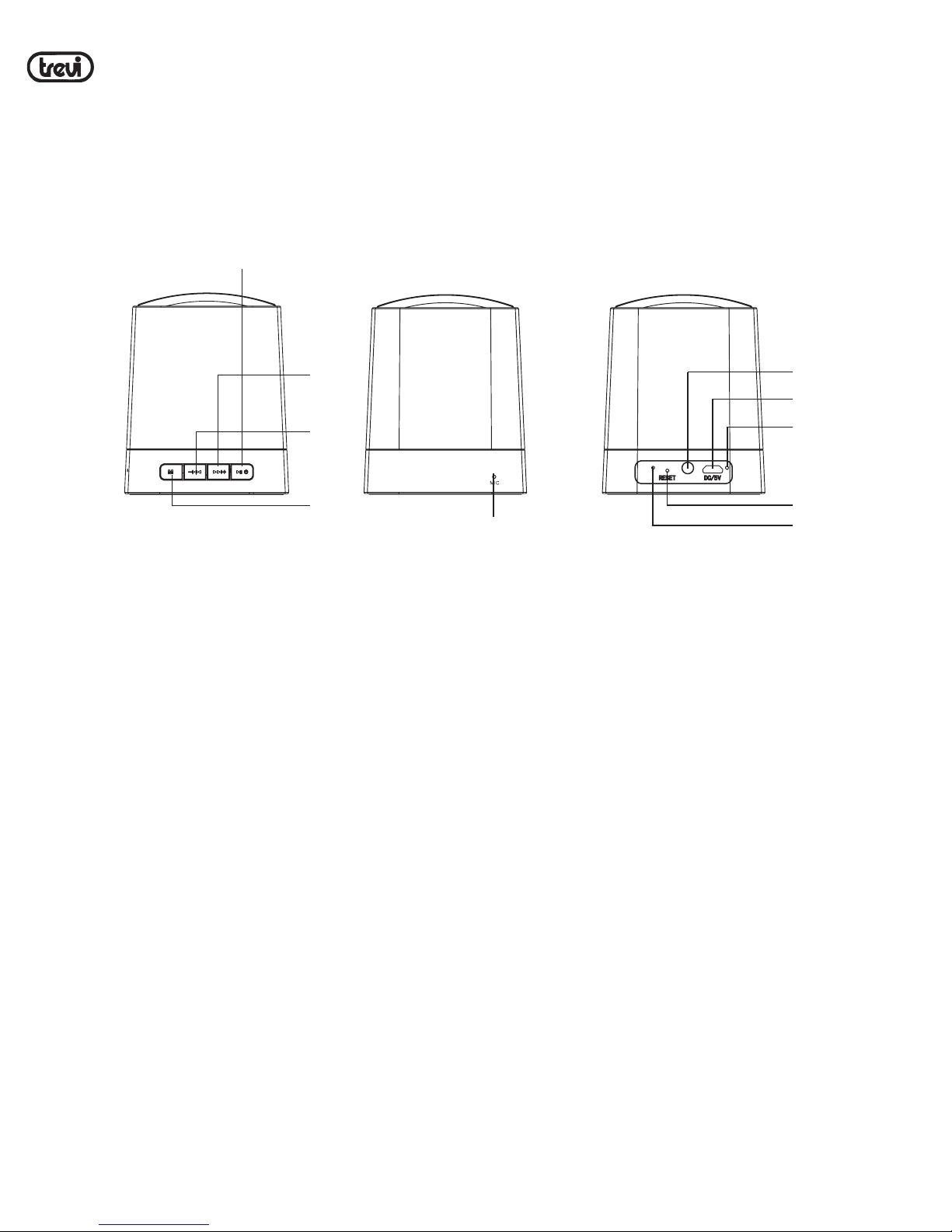
DESCRIZIONE COMANDI
- Cavo stereo Jack/Jack 3.5mm
- Manuale Istruzioni
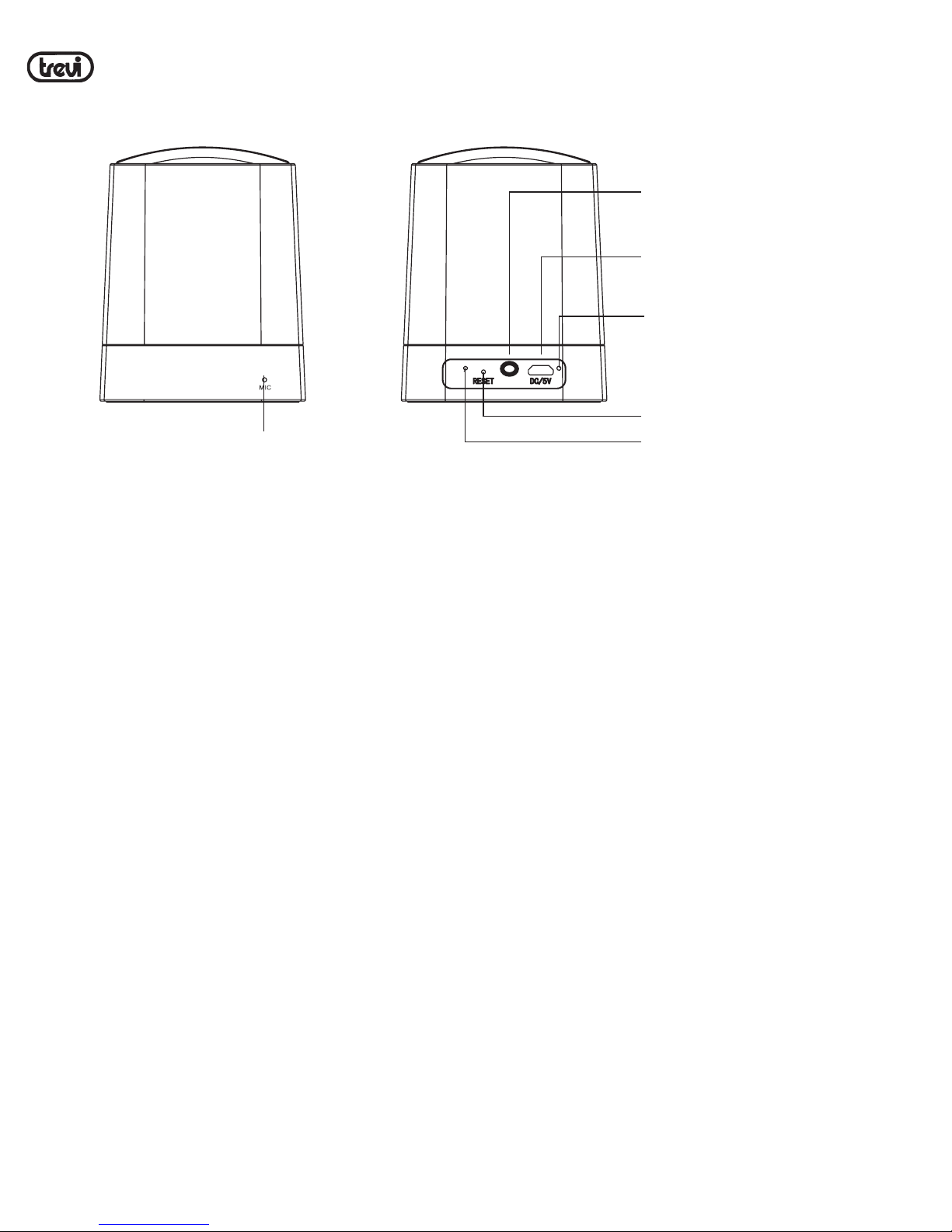
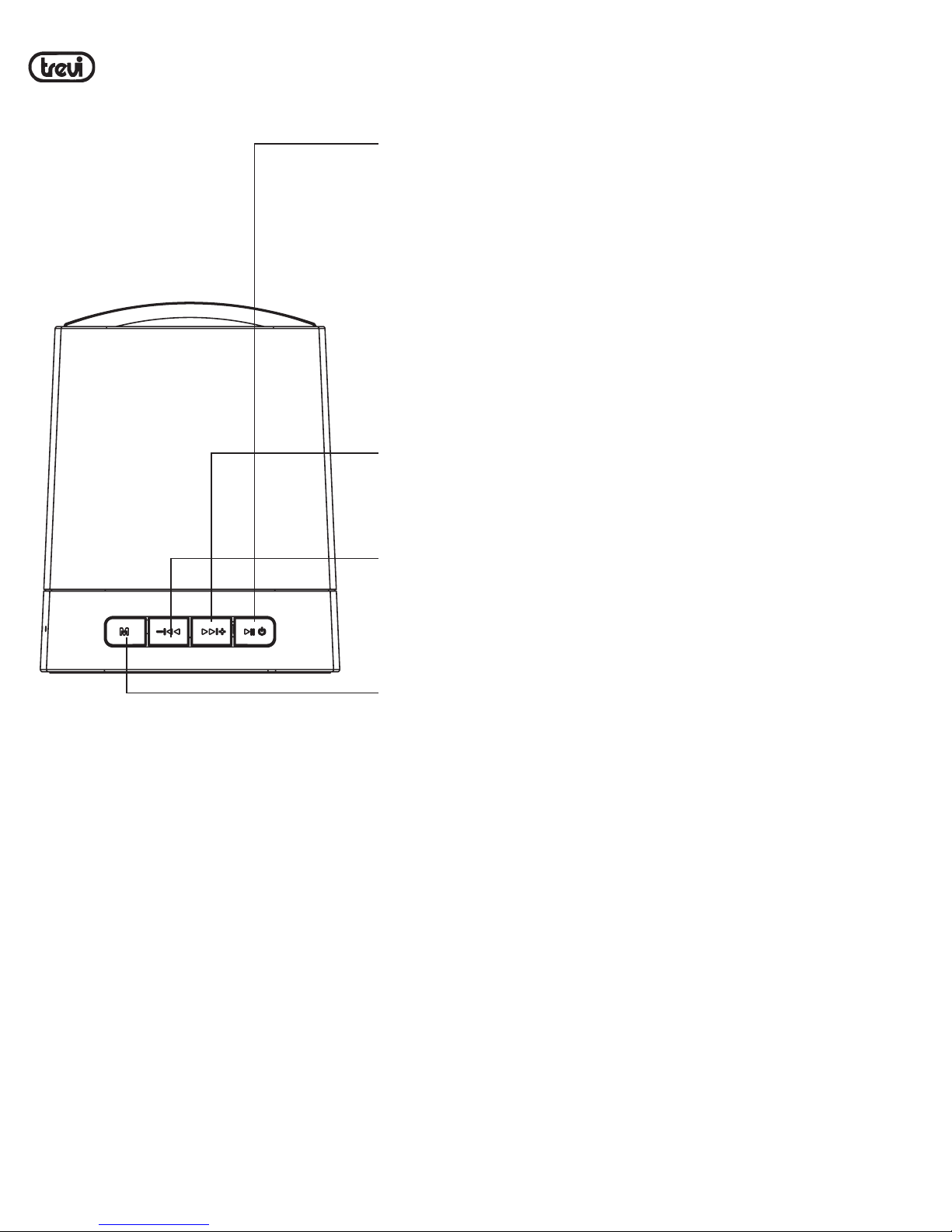
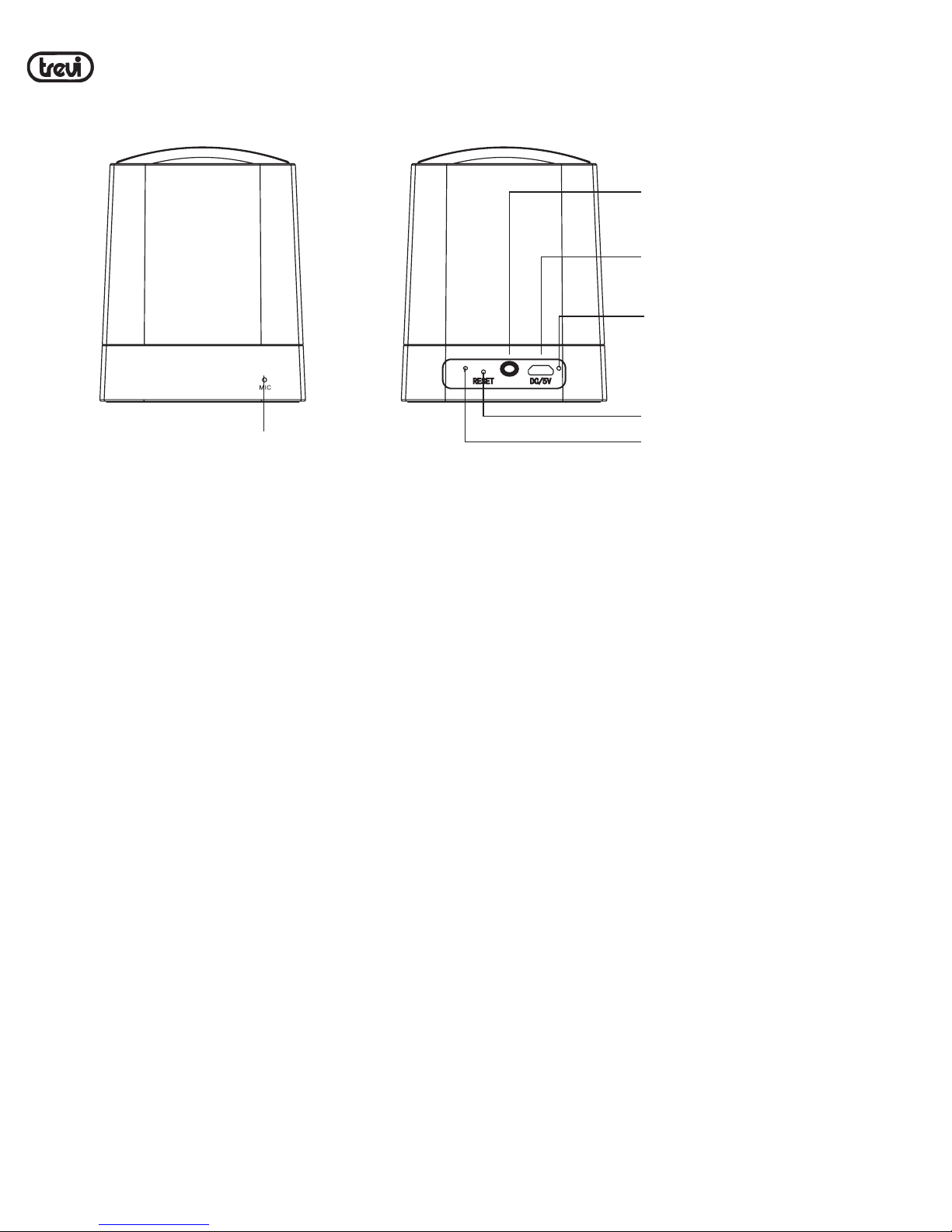
1. Tasto ON/OFF / Play/Pausa
2. Tasto >>I / Vol+
3. Tasto <<I / Vol-
4. Tasto M
5. Microfono
6. Indicatore Bluetooth/AUX (blu)
7. Tasto Reset
8. Indicatore di carica (rosso)
9. Micro USB
10. AUX
Avvertenza: l’archetto colorato presente nella parte superiore del prodotto e’ solo per
decorazione; non utilizzarlo come maniglia o come punto di aggancio di un cordino per
il trasporto dell’altoparlante.
RICARICA
Il diffusore può essere ricaricato sia da spento che da acceso, noi consigliamo di ricaricarlo
sempre da spento .
1. Tramite il cavo USB in dotazione, collegare il lato con la presa Micro USB allo speaker
(9) e l’altra estremità alla porta USB del PC o alimentatore esterno USB (non fornito).
2. L’indicatore di carica (8) si accenderà ad indicare lo stato di carica.
3. Scollegare l’apparecchio quando l’indicatore di carica (8) si spegnerà.
4. Quando la batteria e’ in fase di esaurimento, l’apparecchio emettera’ un BEEP
intermittente per alcuni minuti prima di spegnersi.
3.Please do not throw the item to prevent damage from
dropping.
4.Please do not cover the holes on the unit, do not insert
anything into the holes on the unit.
5.Please do not put the item close to any heat-source.
6.If the connecting cable not match the item, please
contact with retailers.
7.Users should not disassemble, repair, modify the
item by their own.
8.Please charge the item with charger not exceed 5V.
9.Long time use with high-volume may damage your
hearing. Pls use the item with lower volume.
10.User's disassembling will make the item out of
warranty.
Charging indicator
Reset
Bluetooth pairing instruction:
Default setting as un-paired(LED indicator fast flashing in blue),
while unit paired, indicator will turn to slow flashing in blue.
For quit from paired mode, long pressing M button(about 4 seconds),
the LED indicator will change to fast flashing in blue. User can
search on other Bluetooth devices for the unit named "BTS07-C"
for pairing. Indicator will change to slow flashing in blue while
paired success.
Buttons
ON/OFF/PLAY/PAUSE:
Long press for ON/OFF;
in Bluetooth mode, short press for
play/pause; when coming calls,
short press for answer/hang up call,
long press for reject call; in Bluetooth
mode while no coming call, double-click
for re-dial last dialed phone number.
Right arrow:
Long press for increasing volume,
short press for next music.
Left arrow:
Long press for decreasing volume,short
press for previous music.
AUX
1.
2.
3.
4.
8.
7.
6.
9.
10.
5.
ITALIANO
Page 4

XP 72 BT
FUNZIONAMENTO DI BASE
1. Tenere premuto il tasto ON/OFF (1) per accendere lo speaker.
- In modo AUX, l’indicatore a luce blu(6) si accenderà e rimarra’ fisso.
- In modo BT (Bluetooth), lo speaker emetterà un suono di risposta e il Led blu (6)
comincerà a lampeggiare, la funzione Bluetooth è così attiva.
2. Tenere premuto il tasto ON/OFF (1) per spegnere lo speaker.
FUNZIONAMENTO AUX
- Tenere premuto il tasto ON/OFF (1) per accendere lo speaker.
- Collegare il cavo Jack alla presa (10) e l’altra estremità all’apparecchio esterno, lo
speaker attivera’ automaticamente la riproduzione da ingresso AUX.
- avviare la riproduzione dall’apparecchio esterno.
Nota1: Tramite il tasto M(4) e’ possibile passare dal modo AUX al modo BT e viceversa.
Nota2: Il modo AUX e’ disponibile solo con un cavo jack inserito nella presa AUX(10).
FUNZIONAMENTO BLUETOOTH
ACCOPPIAMENTO AI DISPOSITIVI
Si prega di estrarre il cavo dalla presa AUX prima di accoppiare l’altoparlante Bluetooth.
1. Posizionare lo speaker vicino al dispositivo Bluetooth da accoppiare.
2. Tenere premuto il tasto ON/OFF (1) per accendere lo speaker, verra’ emesso un
suono di risposta e il Led blu (6) comincerà a lampeggiare, lo speaker è così in
modalità accoppiamento.
3. Seguire le istruzioni del vostro dispositivo per ricercare lo speaker.
4. Ricercare lo speaker nominato “XP 72 BT” e inserire il PIN “0000” se richiesto.
5. Ad accoppiamento avvenuto il Led blu (6) lampeggerà più lentamente.
6. Premere a lungo il tasto M(4) per disaccoppiare il dispositivo collegato ed effettuare
una nuova operazione di accoppiamento.
NOTE:
- L’altoparlante Bluetooth andrà in modalità di riposo automaticamente dopo un certo
tempo di inutilizzo emettendo un suono di avviso, per riattivarlo basterà premere di
nuovo il tasto ON/OFF (1).
- L’altoparlante Bluetooth funziona solamente con una connessione alla volta, la
connessione non può essere interrotta durante il normale funzionamento.
- La funzione Vivavoce è attivabile solamente in modalità Bluetooth.
ITALIANO
Page 5
XP 72 BT
- Quando l’accoppiamento Bluetooth con dispositivi esterni fallisce, eliminare un altro
dispositivo Bluetooth nell’elenco delle connessioni, riavviare l’altoparlante Bluetooth
e cercare nuovamente il segnale.
- In caso di funzionamento non corretto del dispositivo, premere il tasto Reset(7) per
alcuni secondi.
COMANDI DISPONIBILI IN MODALITA’ BLUETOOTH
- Premere a lungo i tasti Vol - (3) o Vol + (2) per regolare il volume.
- Premere una volta il tasto “
“ (3) per passare al brano precedente, premere una
volta il tasto “ “ (2) per passare al brano successivo.
- In modalità riproduzione premere il tasto “
“ (1) per attivare la funzione Pausa,
ripremerlo per riprendere la riproduzione.
- Quando si riceve una chiamata l’apparecchio emetterà un suono di avviso, premere
una volta il tasto “
“ (1) per attivare la funzione vivavoce, ripremerlo per terminare
la chiamata. Per rifiutare la chiamata premere a lungo il tasto M(4).
- Durante la conversazione premere a lungo il tasto M(4) per passare l’audio dal
vivavoce allo smartphone e viceversa.
- Premere due volte velocemente il tasto “
“ per chiamare l’ultimo numero chiama-
to col cellulare connesso allo speaker.
CORRETTO UTILIZZO DELLA BATTERIA RICARICABILE
Ricaricare la batteria ad una temperatura compresa tra i 5°C e i 35°C.
Non prolungare la ricarica oltre le 6 ore per evitare il rischio di surriscaldamento e scoppio.
La ricarica della batteria oltre i tempi indicati o un prolungato periodo di inattività possono
ridurne la durata.
La batteria ricaricabile è soggetta ad usura e la sua capacità diminuisce gradualmente.
Per prolungare la durata della batteria, utilizzarla quando è completamente carica fino al
completo scaricamento, quindi ricaricarla completamente di nuovo prima di utilizzarla
nuovamente. Mettendo in carica una batteria non completamente esaurita, la sua durata
risulterà ridotta. In questo caso, ripetere il ciclo caricamento/scaricamento completo più volte.
CARATTERISTICHE TECNICHE PRODOTTO:
Batteria Ricaricabile: Interna al Lithio
Alimentazione: DC 5V
Dimensioni: 70 x 70 x 85 mm
Peso: 185 gr.
ITALIANO
Page 6
XP 72 BT
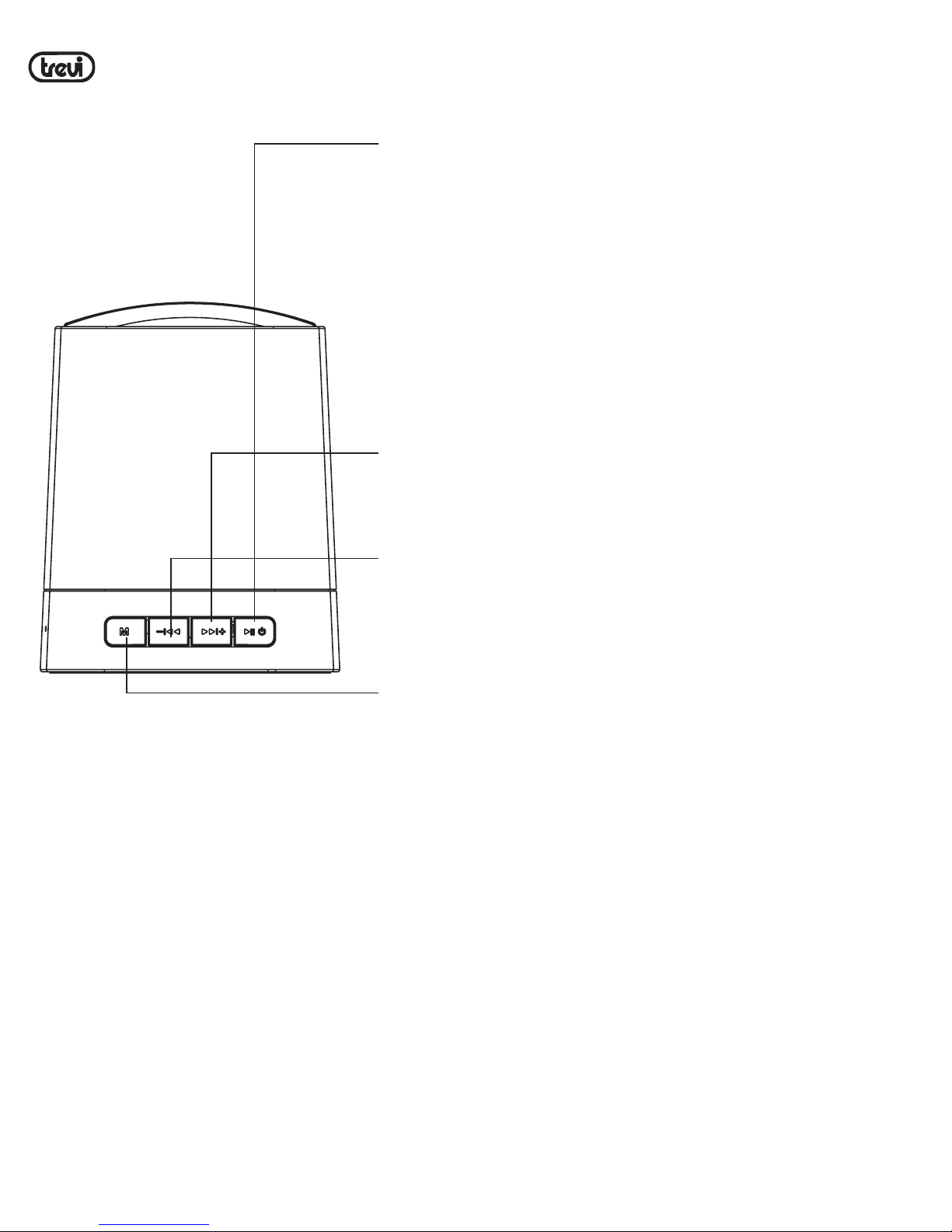
Buttons
ON/OFF/PLAY/PAUSE:
Long press for ON/OFF;
in Bluetooth mode, short press for
play/pause; when coming calls,
short press for answer/hang up call,
long press for reject call; in Bluetooth
mode while no coming call, double-click
for re-dial last dialed phone number.
Right arrow:
Long press for increasing volume,
short press for next music.
Left arrow:
Long press for decreasing volume,short
press for previous music.
M button:
ON/OFF/PLAY/PAUSE:
Long press for ON/OFF; in Bluetooth mode, short press
for play/pause; when coming calls, short press for
answer/hang up call; in Bluetooth mode while no coming
call, double-click for re-dial last dialed phone number.
Right arrow:
Long press for increasing volume, short press for
next music.
Left arrow:
Long press for decreasing volume,short press for
previous music.
M button:
In Bluetooth mode while playing music, long press for
disconnecting with current device, back to waiting for
pair mode; when coming call was answered, long
press for switching voice from Bluetooth speaker
to Smartphone.
Only when other devices connected to line-in port,
short press can switch to Audio-in mode.In bluetooth
mode, when coming calls, long press for reject call
ENGLISH
Warning: top trim cover is just for color decoration; it is not for carry and user can not
wear a string to carry the device.
Page 7
XP 72 BT
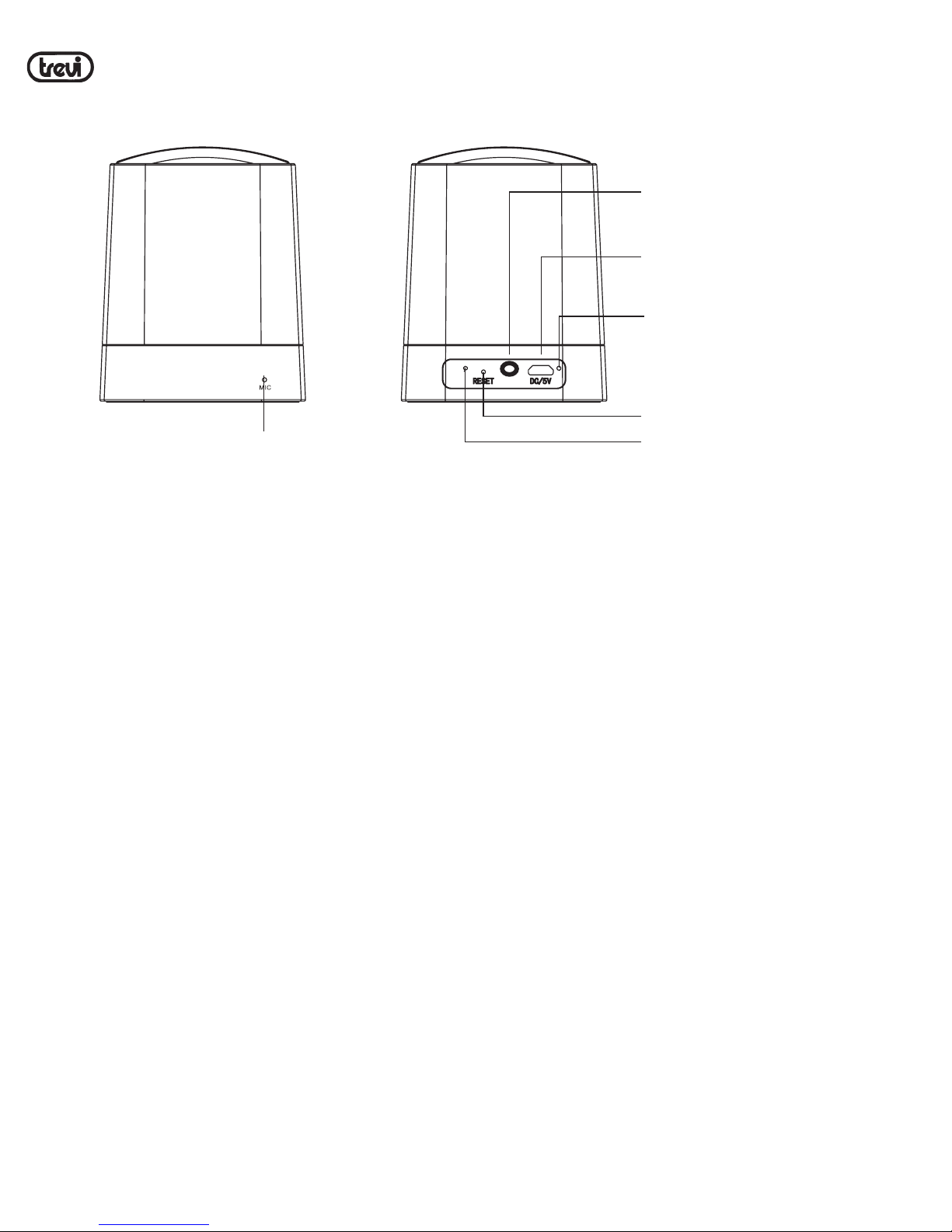
Power on:
LED indicator fast flashing in blue, waiting for pair. After pair with other device, LED
indicator will slow flashing.
Waiting for pair:
Fast flashing in blue.
Paired:
Slow flashing in blue.
Charging:
Charging indicator keep lighting in red, and turn off when full charged.
Reset:
If the unit was freeze, press reset to shut down unit and press power button for restart.
Bluetooth pairing instruction:
Default setting as un-paired(LED indicator fast flashing in blue), while unit paired, indicator
will turn to slow flashing in blue.
For quit from paired mode, long pressing M button(about 4 seconds), the LED indicator
will change to fast flashing in blue. User can search on other Bluetooth devices for the
unit named “XP 72 BT” for pairing. Indicator will change to slow flashing in blue while
paired success. If a code was required, please input “0000”.
ENGLISH
USER MANUAL
7.Users should not disassemble, repair, modify the
item by their own.
8.Please charge the item with charger not exceed 5V.
9.Long time use with high-volume may damage your
hearing. Pls use the item with lower volume.
10.User's disassembling will make the item out of
warranty.
LED indicator
Charging indicator
Led indicator
Microphone
Reset
Bluetooth pairing instruction:
Default setting as un-paired(LED indicator fast flashing in blue),
while unit paired, indicator will turn to slow flashing in blue.
For quit from paired mode, long pressing M button(about 4 seconds),
the LED indicator will change to fast flashing in blue. User can
search on other Bluetooth devices for the unit named "BTS07-C"
for pairing. Indicator will change to slow flashing in blue while
paired success.
Common problems
AUX
AUX Input
DC Input
Page 8
XP 72 BT
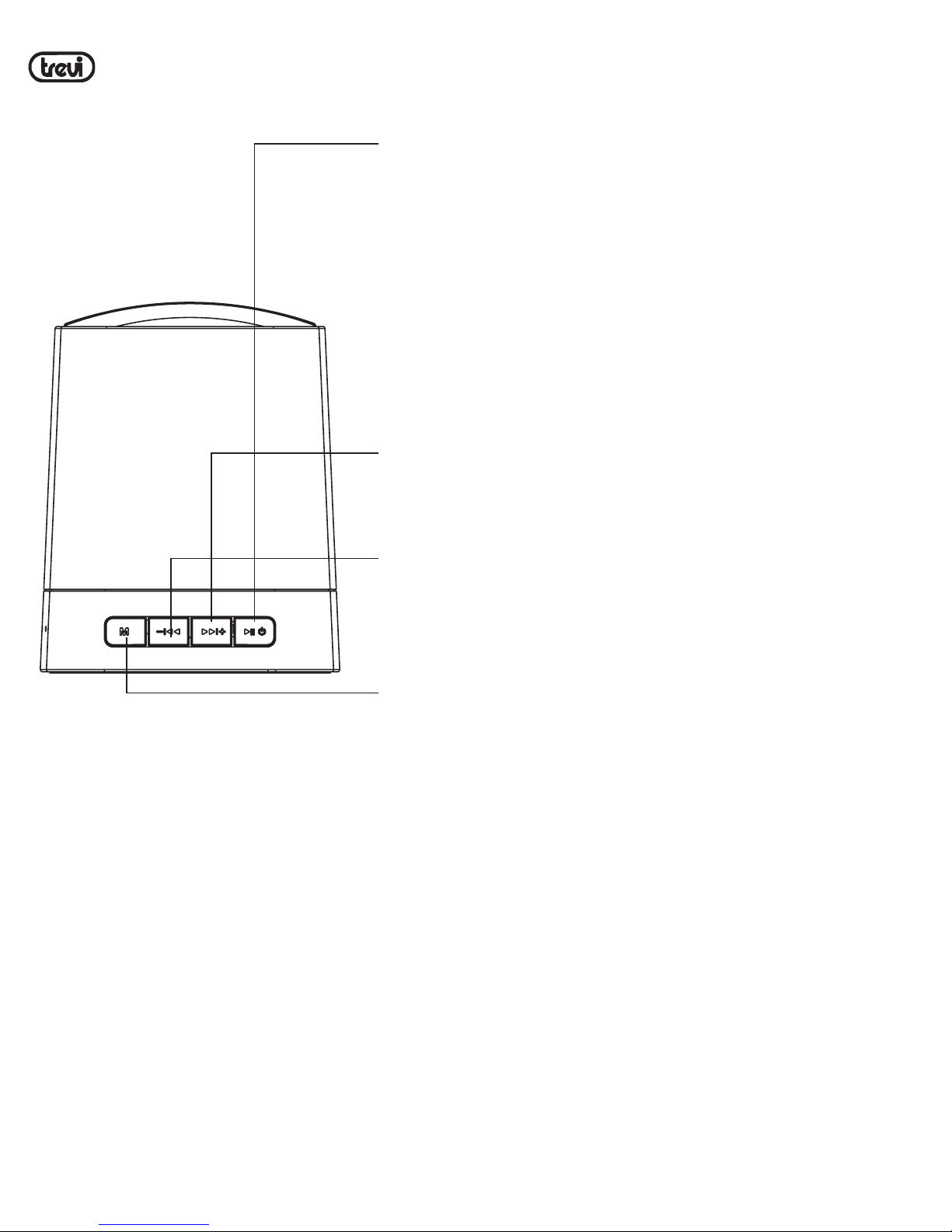
Buttons
ON/OFF/PLAY/PAUSE:
Long press for ON/OFF;
in Bluetooth mode, short press for
play/pause; when coming calls,
short press for answer/hang up call,
long press for reject call; in Bluetooth
mode while no coming call, double-click
for re-dial last dialed phone number.
Right arrow:
Long press for increasing volume,
short press for next music.
Left arrow:
Long press for decreasing volume,short
press for previous music.
M button:
ON / OFF / PLAY / PAUSE:
Appui long pour ON / OFF; en mode Bluetooth, appuyez
brièvement pour lecture / pause; appels lorsque venir,
à court presse pour répondre / raccrocher appel; en
mode Bluetooth alors qu’aucun appel entrant, doublecliquez sur le numéro de téléphone pour recomposer
dernier composé.
Flèche droite:
Appuyez longuement pour augmenter le volume,
appuyez brièvement sur la musique suivante.
Flèche gauche:
Appui long pour diminuer le volume, appuyez brièvement sur la musique précédente.
M bouton:
En mode Bluetooth tout en jouant de la musique,
appuyez longuement sur pour déconnecter avec le
dispositif actuel, revenir à attendre
mode de paire; en venant appel a été répondu, appuyez
longuement sur pour la commutation voix du hautparleur Bluetooth pour Smartphone.
Seulement lorsque d’autres périphériques connectés
au port Line-In, à court presse peut passer à Audio-in
mode.In mode bluetooth, lorsque les appels entrants,
appuyez longuement sur pour rejeter un appel
FRANCAISE
Attention: le couvercle supérieur est juste pour décoration; il est pas pour le report et
l’utilisateur ne peut pas porter une chaîne pour transporter l’appareil.
Page 9
XP 72 BT
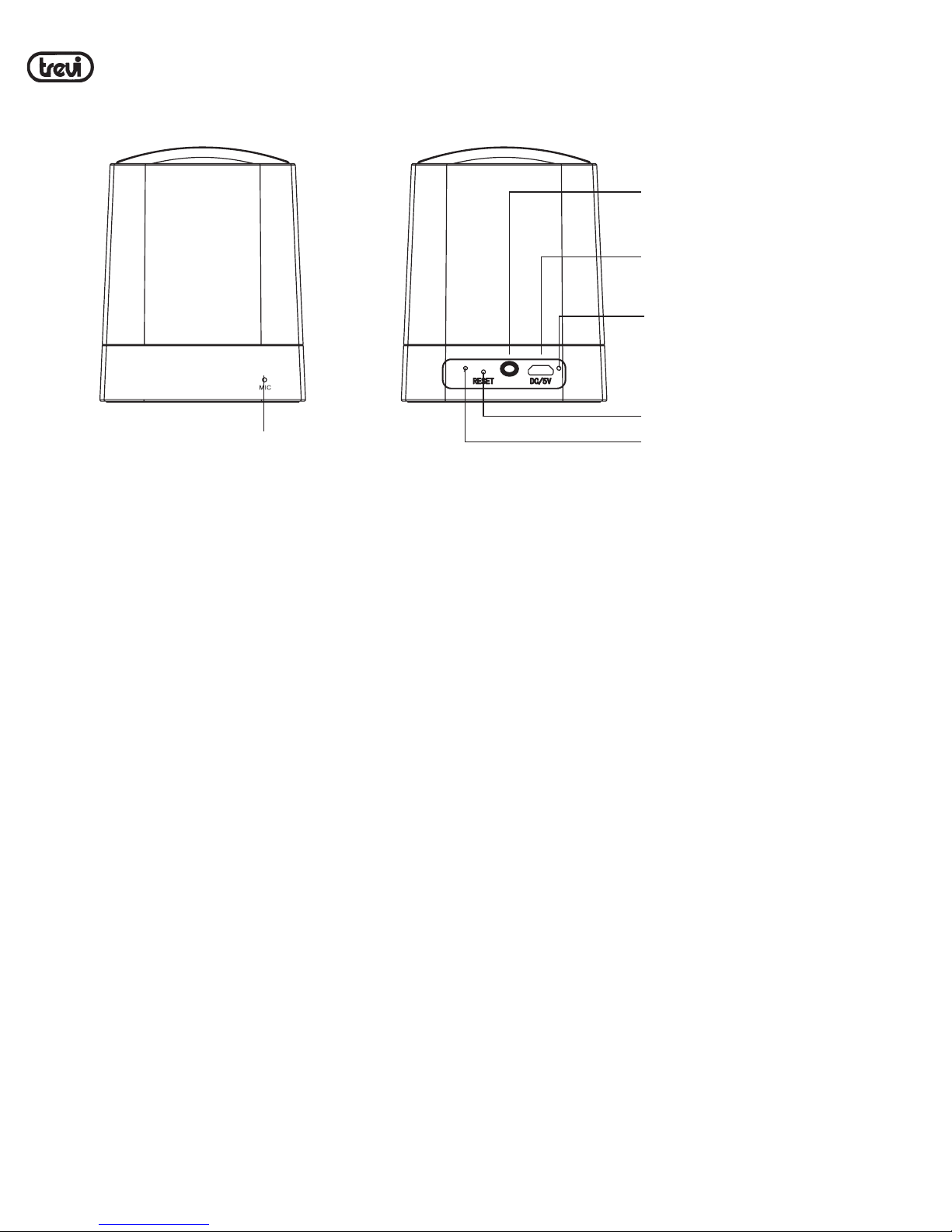
Power on:
Indicateur LED clignote rapidement en bleu, en attendant paire. Après paire avec un autre
dispositif, indicateur LED clignotement lent.
En attente de la paire:
Clignotement rapide en bleu.
Jumelé:
Clignotement lent en bleu.
En charge:
Indicateur de charge de garder l’éclairage en rouge, et éteignez complètement chargé.
Reset:
Si l’appareil ne fonctionne pas correctement, appuyez sur RESET pour éteindre l’unité, et
le bouton d’alimentation de la presse pour le redémarrage.
Bluetooth instruction d’appariement:
Le réglage par défaut comme non apparié (indicateur LED clignotement rapide en bleu),
tandis que l’unité jumelé, le voyant tourner à ralentir clignoter en bleu.
Pour quitter le mode jumelé, un appui long sur la touche M (environ 4 secondes), l’indicateur
LED va changer de jeûner à clignoter en bleu. L’utilisateur peut rechercher sur d’autres
appareils Bluetooth pour l’unité nommée “XP 72 BT” pour le jumelage. Indicateur va
changer pour ralentir clignotant dans tout bleu succès apparié. Si un code est nécessaire,
veuillez saisir “0000”.
FRANCAISE
USER MANUAL
7.Users should not disassemble, repair, modify the
item by their own.
8.Please charge the item with charger not exceed 5V.
9.Long time use with high-volume may damage your
hearing. Pls use the item with lower volume.
10.User's disassembling will make the item out of
warranty.
LED indicator
Charging indicator
Led indicator
Microphone
Reset
Bluetooth pairing instruction:
Default setting as un-paired(LED indicator fast flashing in blue),
while unit paired, indicator will turn to slow flashing in blue.
For quit from paired mode, long pressing M button(about 4 seconds),
the LED indicator will change to fast flashing in blue. User can
search on other Bluetooth devices for the unit named "BTS07-C"
for pairing. Indicator will change to slow flashing in blue while
paired success.
Common problems
AUX
AUX Input
DC Input
Page 10
XP 72 BT
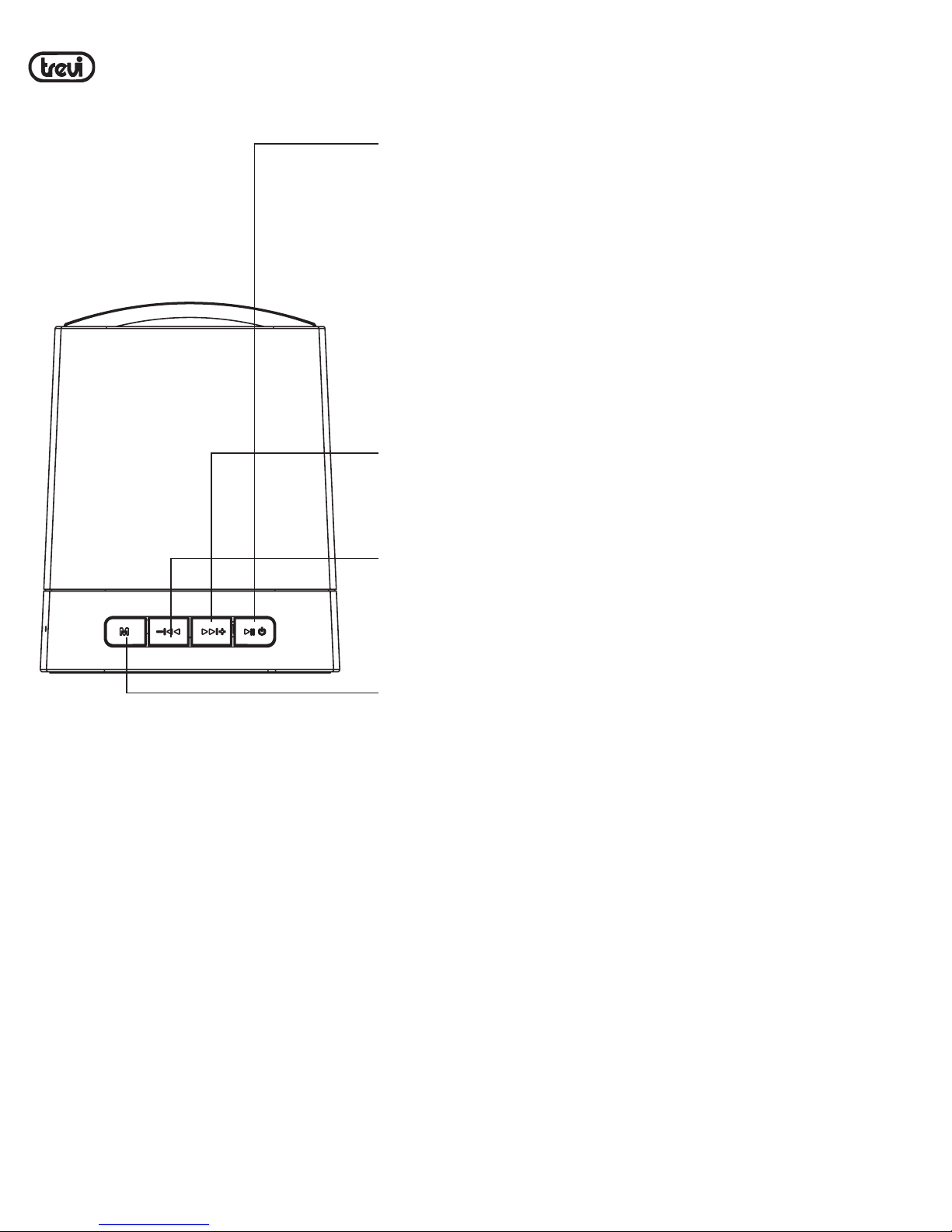
Buttons
ON/OFF/PLAY/PAUSE:
Long press for ON/OFF;
in Bluetooth mode, short press for
play/pause; when coming calls,
short press for answer/hang up call,
long press for reject call; in Bluetooth
mode while no coming call, double-click
for re-dial last dialed phone number.
Right arrow:
Long press for increasing volume,
short press for next music.
Left arrow:
Long press for decreasing volume,short
press for previous music.
M button:
ON / OFF / PLAY / PAUSE:
Drängen lang auf ON / OFF; in den Bluetooth-Modus,
drücken Sie kurz für Wiedergabe / Pause; wenn
eingehende Anrufe, drücken Sie kurz für Antworten /
Auflegen Anruf, drücken Sie lange für Anruf abzuweisen;
in den Bluetooth-Modus, wenn kein Anruf kommt,
doppelklicken Sie für die Wahlwiederholung der zuletzt
gewählten Rufnummer.
Pfeil nach rechts:
Long für das steigende Volumen, kurz drücken für
die nächste Musik.
Pfeil nach links:
Long für das abnehmende Volumen, kurz drücken zum
vorherigen Musik.
M-Taste:
Kurz drücken, Bluetooth, Audio-in-Modi zu wechseln.
Im Bluetooth-Modus während der Wiedergabe von
Musik, lange drücken zum Trennen mit aktuellen Geräte,
zurück zu warten
Paar-Modus; wenn kommender Anruf beantwortet
wurde, lange drücken zum Umschalten Stimme vom
Bluetooth-Lautsprecher auf Smartphone.
Nur wenn andere Geräte mit der Leitung-in-Anschluss,
können kurz drücken, um Audio-in mode.In BluetoothModus, wenn eingehende Anrufe, drücken Sie lange
für Anruf abzulehnen wechseln
DEUTSCH
Warnung: top Bezugs ist nur für Farb Dekoration; es ist nicht für Carry und Benutzer
können nicht tragen eine Zeichenfolge in das Gerät zu tragen.
Page 11
XP 72 BT
Ein:
LED-Anzeige schnell blau zu blinken, warten auf Paar. Nach Paar mit einem anderen Gerät,
werden LED-Anzeige blinkt langsam.
Warten auf Paar:
Blinkt schnell blau.
Gepaart:
Langsames Blinken in blau.
Aufladung:
Ladeanzeige halten Beleuchtung in rot, und schalten Sie bei voller Aufladung.
Reset:
Wenn das Gerät wurde gefrier, RESET drücken, um zum Neustart abschalten Gerät, und
drücken Sie Power-Taste.
Bluetooth-Pairing-Anweisung:
Standardeinstellung als un-gekoppelten (LED-Anzeige schnell blau zu blinken), während
Einheit gekoppelt ist, Anzeige leuchtet, langsamer blinkt in Blau.
Für von gepaarten Modus zu verlassen, lange drücken M-Taste (ca. 4 Sekunden), wird
die LED-Anzeige zu ändern, um schnell blau zu blinken. Der Benutzer kann auf andere
Bluetooth-Geräte für das Gerät mit dem Namen “XP 72 BT” für die Paarung zu suchen.
Anzeige ändert sich langsam blau zu blinken, während Gekoppelte Erfolg. Wenn ein Code
erforderlich war, geben Sie bitte “0000”.
DEUTSCH
USER MANUAL
7.Users should not disassemble, repair, modify the
item by their own.
8.Please charge the item with charger not exceed 5V.
9.Long time use with high-volume may damage your
hearing. Pls use the item with lower volume.
10.User's disassembling will make the item out of
warranty.
LED indicator
Charging indicator
Led indicator
Microphone
Reset
Bluetooth pairing instruction:
Default setting as un-paired(LED indicator fast flashing in blue),
while unit paired, indicator will turn to slow flashing in blue.
For quit from paired mode, long pressing M button(about 4 seconds),
the LED indicator will change to fast flashing in blue. User can
search on other Bluetooth devices for the unit named "BTS07-C"
for pairing. Indicator will change to slow flashing in blue while
paired success.
Common problems
AUX
AUX Input
DC Input
Page 12
XP 72 BT
Buttons
ON/OFF/PLAY/PAUSE:
Long press for ON/OFF;
in Bluetooth mode, short press for
play/pause; when coming calls,
short press for answer/hang up call,
long press for reject call; in Bluetooth
mode while no coming call, double-click
for re-dial last dialed phone number.
Right arrow:
Long press for increasing volume,
short press for next music.
Left arrow:
Long press for decreasing volume,short
press for previous music.
M button:
ON / OFF / PLAY / PAUSA:
Pulsación larga para ON / OFF; en el modo Bluetooth,
pulse brevemente para reproducir / pausa; cuando
vienen las llamadas, pulse brevemente para responder
/ colgar llamadas; en el modo Bluetooth mientras no
hay ninguna llamada que viene, haga doble clic para
llamar el ultimo numero en rubrica.
Flecha derecha:
Mantenga pulsado para aumentar el volumen, pulse
brevemente para la próxima pieza musical.
Flecha izquierda:
Mantenga pulsado para disminuir el volumen, presione
brevemente para la pieza musical anterior.
Botón M:
En el modo Bluetooth mientras se reproduce la música,
mantenga pulsado para desconectar el dispositivo
actual, de nuevo a la espera de modo de par; cuando
viene la llamada para contestar, pulsación larga para
la conmutación de voz desde el altavoz Bluetooth
para Smartphone.
Sólo cuando otros dispositivos conectados a la línea
AUX, pulsación corta puede cambiar a entrada de
audio. In modo bluetooth, cuando vienen las llamadas,
pulsación larga para rechazar llamadas
ESPANOL
Advertencia: el arco superior del producto es sólo para la decoración de color; no es
por acarreo y el usuario no puede usar una cadena para transportar el dispositivo.
Page 13
XP 72 BT
Encendido:
Indicador LED parpadea rápidamente en color azul, a la espera de par. Después de pareja
con otro dispositivo, el indicador LED se ralentizará parpadeo.
Esperando el dispositivo BT:
Parpadeo rápido en azul.
Conectado BT:
Parpadeo lento en azul.
Carga:
Indicador de carga a mantener la iluminación en rojo y se apaga cuando está completamente cargada.
Reset:
Si la unidad no funciona correctamente, presione RESET para apagar la unidad y pulse el
botón de encendido para reiniciar.
Instrucciones de emparejamiento Bluetooth:
Para default la unidad esta un-emparejada (indicador LED parpadea rápidamente en color
azul), mientras cuando la unidad es emparejada, el indicador se encenderá a parpadear lento
en azul. Para salir del modo de emparejado, presionando a largo botón M (aproximadamente
4 segundos), el indicador LED cambiará a ayunar a parpadear en azul. El usuario puede
buscar en otros dispositivos Bluetooth la unidad “XP 72 BT” para el emparejamiento. Si
se requiere un código, por favor introduzca “0000”.
ESPANOL
USER MANUAL
7.Users should not disassemble, repair, modify the
item by their own.
8.Please charge the item with charger not exceed 5V.
9.Long time use with high-volume may damage your
hearing. Pls use the item with lower volume.
10.User's disassembling will make the item out of
warranty.
LED indicator
Charging indicator
Led indicator
Microphone
Reset
Bluetooth pairing instruction:
Default setting as un-paired(LED indicator fast flashing in blue),
while unit paired, indicator will turn to slow flashing in blue.
For quit from paired mode, long pressing M button(about 4 seconds),
the LED indicator will change to fast flashing in blue. User can
search on other Bluetooth devices for the unit named "BTS07-C"
for pairing. Indicator will change to slow flashing in blue while
paired success.
Common problems
AUX
AUX Input
DC Input
Page 14

XP 72 BT
INFORMATIVA SULLA RIMOZIONE E LO SMALTIMENTO DELLA
BATTERIA
Attenzione: Questa operazione è riservata esclusivamente al personale tecnico
specializzato!
PROCEDURA PER LA RIMOZIONE DELLA BATTERIA
1. Rimuovere il mobile inferiore.
2. Individuare la batteria.
3. Scollegarla e rimuoverla.
Qualunque sia il tipo di batteria esaurita, essa non deve essere gettata tra i rifiuti domestici,nel
fuoco o nell’acqua. Ogni tipo di batteria esaurita deve essere, riciclata oppure smaltita
presso gli appositi centri raccolta dedicati.
INFORMATION NOTE ON THE REMOVAL AND DISPOSAL OF BATTERIES
Warning: Only high-qualified personnel should perform this operation!
BATTERY REMOVAL
1) Remove the down part of the appliance.
2) Disconnect and remove the battery.
Used batteries should not be disposed of with household waste or thrown into fire or water.
Used batteries should be recycled or disposed of in separate waste collection centres.
Page 15

XP 72 BT
Avvertenze per il corretto smaltimento
del prodotto.
Il simbolo riportato sull’apparecchiatura indica che il rifiuto
deve essere oggetto di “raccolta separata” per tanto il prodotto
non deve essere smaltito insieme ai rifiuti urbani.
L’utente dovrà consegnare il prodotto presso gli appositi
“centri di raccolta differenziata” predisposti dalle amministrazioni comunali, oppure consegnarlo al rivenditore contro
acquisto di un nuovo prodotto.
La raccolta differenziata del rifiuto e le successive operazioni
di trattamento, recupero e smaltimento favoriscono la produzione di apparecchiature con materiali riciclati e limitano
gli effetti negativi sull’ambiente e sulla salute causati da una
gestione impropria del rifiuto.
Lo smaltimento abusivo del prodotto compor ta l’applicazione
di sanzioni amministrative.
Precautions for correct disposal of the product.
The symbol shown on the equipment indicates that waste
must be disposed of in “separate collection” and so the
product must not be disposed of together with urban waste.
The user must take the product to special “separate waste
collection centres” provided by local government, or deliver
it to the retailer against the purchase of a new product.
Separate collection of waste and subsequent treatment,
recycling and disposal operations promotes the production
of equipment with recycled materials and limits negative
effects on the environment and on health caused by improper
handling of waste.
Illegal disposal of the product leads to the enforcement of
administrative penalties.
Recommandations pour l’élimination correcte
du produit.
Le symbole figurant sur l’appareil indique que le produit
fait l’objet d’une “ collecte séparée “. C’est pourquoi, le
produit ne doit pas être éliminé avec les déchets urbains.
L’utilisateur doit remettre le produit auprès de “ décharges
spécialisées de collecte séparée “ prévues par les autorités
locales, ou bien le rendre au revendeur quand il achètera un
nouvel appareil équivalent.
La collecte séparée du produit et les opérations succes-
sives de traitement, recyclage et élimination favorisent
la production d’appareils composés par des matériaux
recyclés ainsi que permettent d’éviter des effets négatifs
sur l’environnement et sur la santé des personnes suite à
une gestion impropre du déchet.
Toute élimination abusive du produit entraîne l’application
de sanctions administratives.
Hinweise zur ordnungsgemäßen Entsorgung
des Produkts.
Das auf dem Gerät angebrachte Symbol weist darauf
hin, dass das Altgerät “getrennt zu sammeln” ist und das
Produkt daher nicht zusammen mit dem Gemeindeabfall
entsorgt werden darf.
Der Benutzer muss das Produkt zu den entsprechenden, von
der Gemeindeverwaltung eingerichteten “Wer tstoffsammelstellen” bringen oder dem Händler beim Kauf eines neuen
Produkts übergeben.
Die getrennte Müllsammlung und anschließende Aufbereitung, Wiederverwertung und Entsorgung fördern die
Herstellung von Geräten unter Verwendung wiederver werteter
Materialien und vermindern die negativen Auswirkungen
auf die Umwelt und Gesundheit in Folge einer falschen
Müllverwaltung.
Die widerrechtliche Entsorgung des Produkts führt zur
Auferlegung von Verwaltungsstrafen.
Advertencias para la correcta eliminación del
producto.
El símbolo que aparece en el aparato indica que el residuo
debe ser objeto de “recogida selectiva” por tanto el producto
no se debe eliminar junto con residuos urbanos.
El usuario deberá entregar el producto a los “centros de recogida selectiva” creados por las administraciones municipales
o bien al distribuidor cuando adquiera un nuevo producto.
La recogida selectiva del residuo y las sucesivas operaciones
de tratamiento, recuperación y eliminación favorecen la
fabricación de aparatos con materiales reciclados y limitan los
efectos negativos en el medio ambiente y la salud causados
por una gestión incorrecta del residuo.
La eliminación abusiva del producto da lugar a la aplicación
de sanciones administrativas.
Page 16
TREVI S.p.A.
Strada Consolare Rimini-San Marino 62, 47924 Rimini (RN) Italy - Tel. 0541-756420 - Fax 0541-756430
www.trevi.it e-mail: [email protected]
MADE IN CHINA
 Loading...