

Page 1
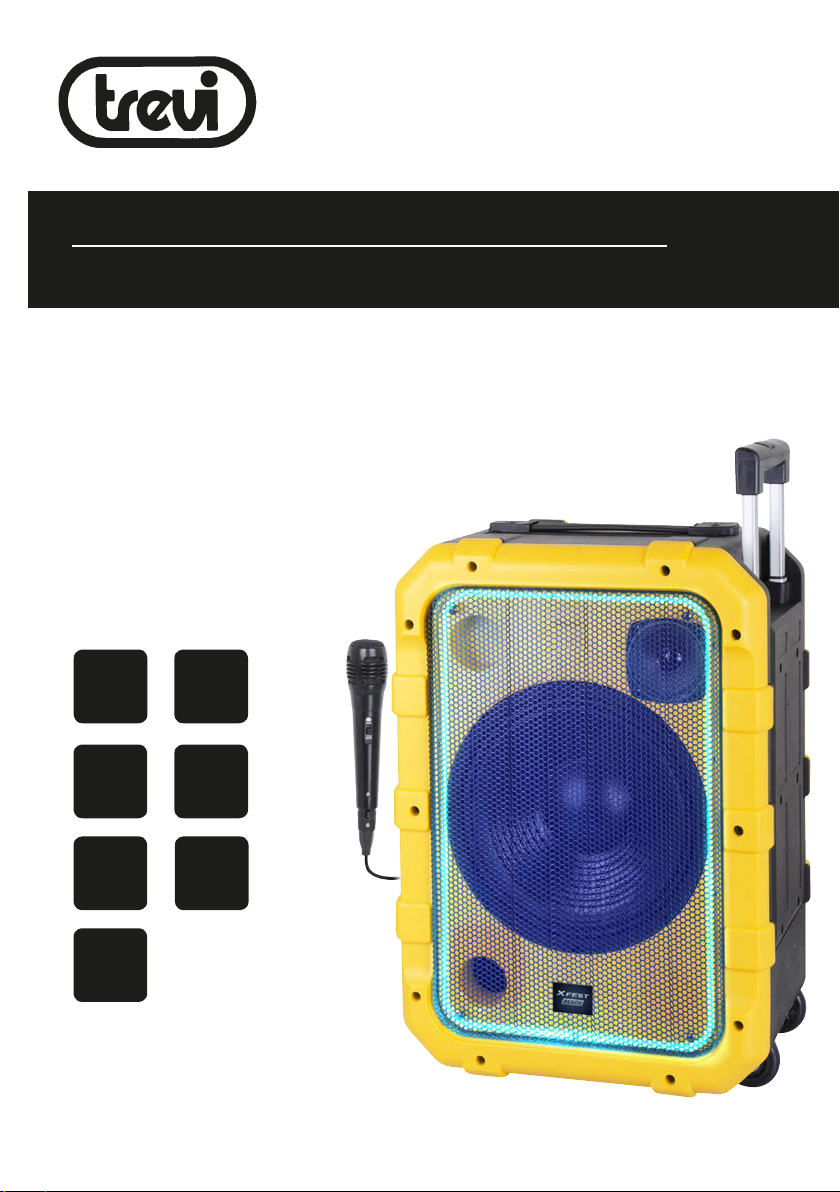
XF 1300 BEACH
Guida d’uso
User guide
ALTOPARLANTE AMPLIFICATO ALTA POTENZA
Manuale d'uso e collegamento
HIGH POWER PORTABLE SPEAKER
Connection and Operation Manual
HAUT-PARLEUR PORTABLE AMPLIFIE
Mode d'emploi et branchement
BEWEGLICHER LAUTSPRECHER
Gebrauchs- und Anschlusshandbuch
ALTAVOZ AMPLIFICADO PORTATIL
Manual para el uso y la conexión
BT
BLUETOOTH
DISCO
LIGHT
80 W
MAX
USB
PLAYER
IPX4
BASS
REFLEX
LED
DISPLAY
Per informazioni integrative ed aggiornamenti su questo prodotto visita www.trevi.it
For additional information and updates of this product see www.trevi.it
Page 2

Page 3
WARNINGS
ATTENZIONE
RISCHIO DI SCOSSE
ELETTRICHE!
NON ESPORRE A PIOGGIA E
UMIDITÀ
ATTENZIONE: NON APRITE L'APPARECCHIO. ALL'INTERNO NON VI SONO
COMANDI MANIPOLABILI DALL'UTENTE NE PARTI DI RICAMBIO. PER TUTTE
LE OPERAZIONI DI SERVIZIO RIVOLGERSI AD UN CENTRO DI ASSISTENZA
AUTORIZZATO TREVI
ATTENTION
RISQUE DE DECHARGES
ELECTRIQUES
NE PAS EXPOSER A LA PLUIE ET A
L’HUMIDITE
ATTENTION: NE PAS OUVRIR L’APPAREIL, A L’INTERIEUR IL N’Y A PAS DE
COMMANDES A MANIPULER PAR L’UTILISATEUR OU DE PIECES DE RECHANGE.
POUR TOUTES LES OPERATIONS DE SERVICE IL FAUT S’ADRESSER A UN
SERVICE D’ASSISTANCE AUTORISE TREVI.
ATENCION
PELIGRO DE CHOQUES
ELECTRICOS
NO EXPONER A LLUVIA Y
HUMEDAD
ATENCION: NO ABRIR EL APARATO, EN SU INTERIOR NO HAY MANDOS QUE
PUEDAN SER MANIPULADOS POR EL USUARIO NI PARTES DE REPUESTO.
PARA TODAS LAS OPERACIONES DE SERVICIO DIRIGIRSE A UN CENTRO DE
ASISTENCIA AUTORIZADO TREVI.
WARNING!
DANGER OF ELECTRIC SHOCK!
DO NOT EXPOSE TO
RAIN OR HUMIDITY
WARNING: DO NOT OPEN THE SET. NEITHER CONTROLS OR SPARE PARTS TO
BE USED BY THE USER ARE TO BE FOUND INSIDE IT. APPLY TO AUTHORISED
TREVI CENTERS FOR SERVICE OPERATIONS.
ACHTUNG
GEFAHR ELEKTRISCHER SCHLÄGE
NICHT DER FEUCHTIGKEIT UND
DEM REGEN AUSSETZEN
ACHTUNG: DAS GERÄT NICHT ÖFFNEN. IM INNERN BEFINDEN SICH KEINE VOM
BENUTZER SELBST INSTANDSETZBAREN TEILE UND AUCH KEINE ERSATZTEILE.
FÜR JEGLICHE SERVICEARBEITEN, WENDEN SIE SICH BITTE AN EINE TREVI
AUTORISIERTEN KUNDENDIENSTSTELLE.
Per evitare possibili danni all’udito,
limitare il tempo di ascolto a volumi elevati
To avoid possible hearing damage,
limit the listening time to high volumes
Pour éviter d'éventuels dommages auditifs,
limiter la durée d'écoute à volume élevé
Um mögliche Hörschäden zu vermeiden,
begrenzen die Höhe der Zeit bei hohen Lautstärke
hören
Para evitar posibles daños a la audición,
limitar la cantidad de tiempo de escucha a un
volumen alto
Page 4
ITALIANO
XF 1300 BEACH
NOTE D'USO
Ascoltare a volume alto per lungo tempo, potrebbe danneggiare il vostro udito.
Evitare di posizionare il riproduttore:
- Vicino a campi magnetici.
- Vicino a fonti di calore come caloriferi e stufe.
- In luoghi molto umidi come stanze da bagno, piscine, ecc...
- In luoghi molto polverosi.
- In luoghi soggetti a forti vibrazioni.
- Non avvicinare l’orecchio all’altoparlante durante le fasi di messa punto e regolazioni del volume, e in particolare di tenere il
volume al minimo nella fase di accensione.
- Posizionare l’apparecchio in modo che ai suoi lati ci sia sempre abbastanza spazio per la libera circolazione di aria (almeno
5 cm).
- Se dei liquidi penetrano all’interno dell’apparecchio scollegare immediatamente la spina dalla presa e portare l’apparecchio
al più vicino centro assistenza autorizato TREVI.
- Controllare sempre prima di ricaricare l’apparecchio, che i cavi di alimentazione e di collegamento siano installati correttamente.
- Nessuna sorgente di fiamma nuda, quali candele accese, dovrebbe essere posta sull’apparecchio.
- L’apparecchio non deve essere esposto a stillicidio o a spruzzi d’acqua e nessun oggetto pieno di liquido, quali vasi, deve
essere posto sull’apparecchio.
- Istruire al corretto utilizzo bambini e persone con scarse conoscenze del prodotto.
- Conservare il presente manuale per futuri riferimenti.
CURA E MANUTENZIONE
Per la pulizia si consiglia l’uso di un panno morbido, leggermente inumidito. Evitate solventi o sostanze abrasive.
IMPORTANTE
Questo dispositivo e' progettato per uso domestico non professionale. La buona costruzione di questo apparecchio ne garantisce
per lungo tempo il perfetto funzionamento. Se tuttavia dovesse presentarsi qualche inconveniente, sarà opportuno consultare il
più vicino Centro Assistenza autorizzato TREVI.
TREVI persegue una politica di continua ricerca e sviluppo. Pertanto i prodotti possono presentare caratteristiche diverse da
quelle descritte.
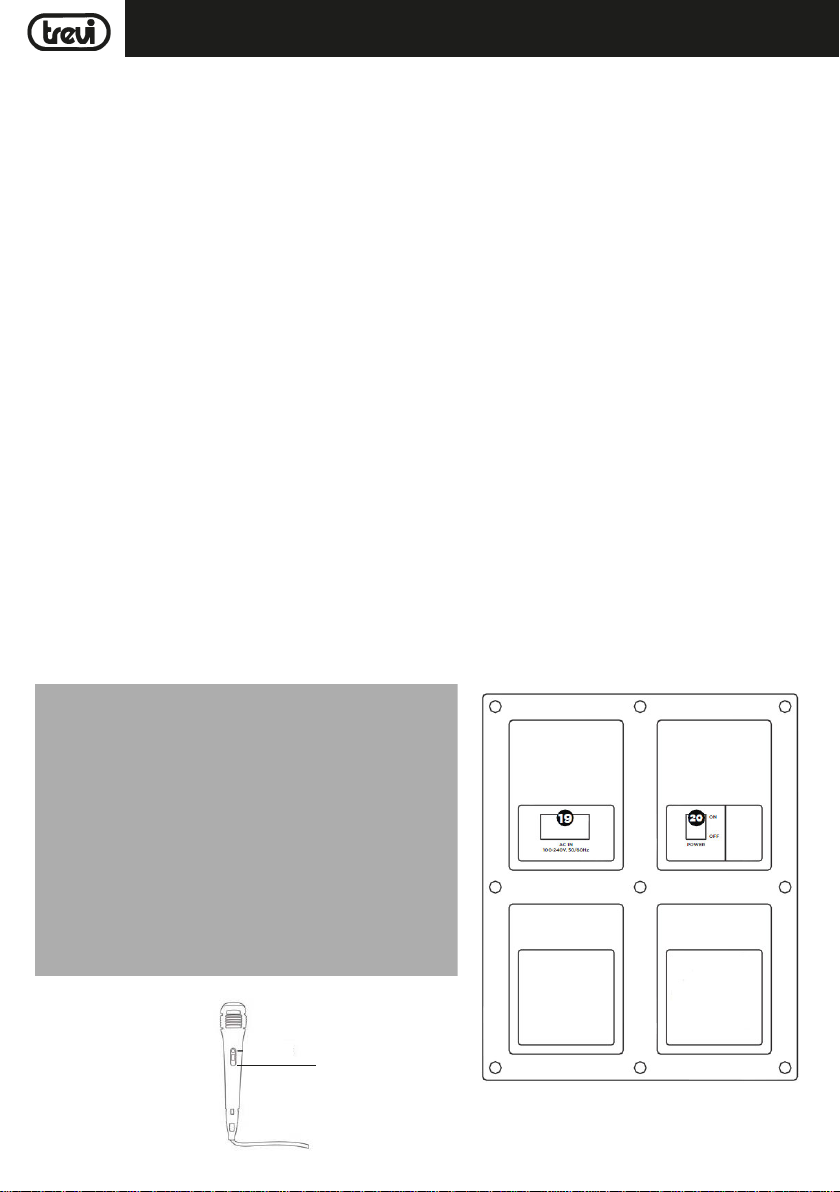
DESCRIZIONE COMANDI
29
4
Page 5
XF 1300 BEACHITALIANO
1. Display
2. Ingresso MIC 1/Chitarra
3. Ingresso MIC 2/Chitarra
4. MIC1 VOL, regolazione Volume Microfono/Chitarra
5. MIC2 VOL, regolazione Volume Microfono/Chitarra
6. Regolazione ECHO microfono
7. Ingresso AUX IN
8. Presa USB
9. Ricevitore telecomando
10. Tasto <, precedente
11. Tasto SOURCE, selezione funzione
12. Tasto , Bluetooth
13. Tasto LIGHTS, attivazione/disattivazione Led frontali/
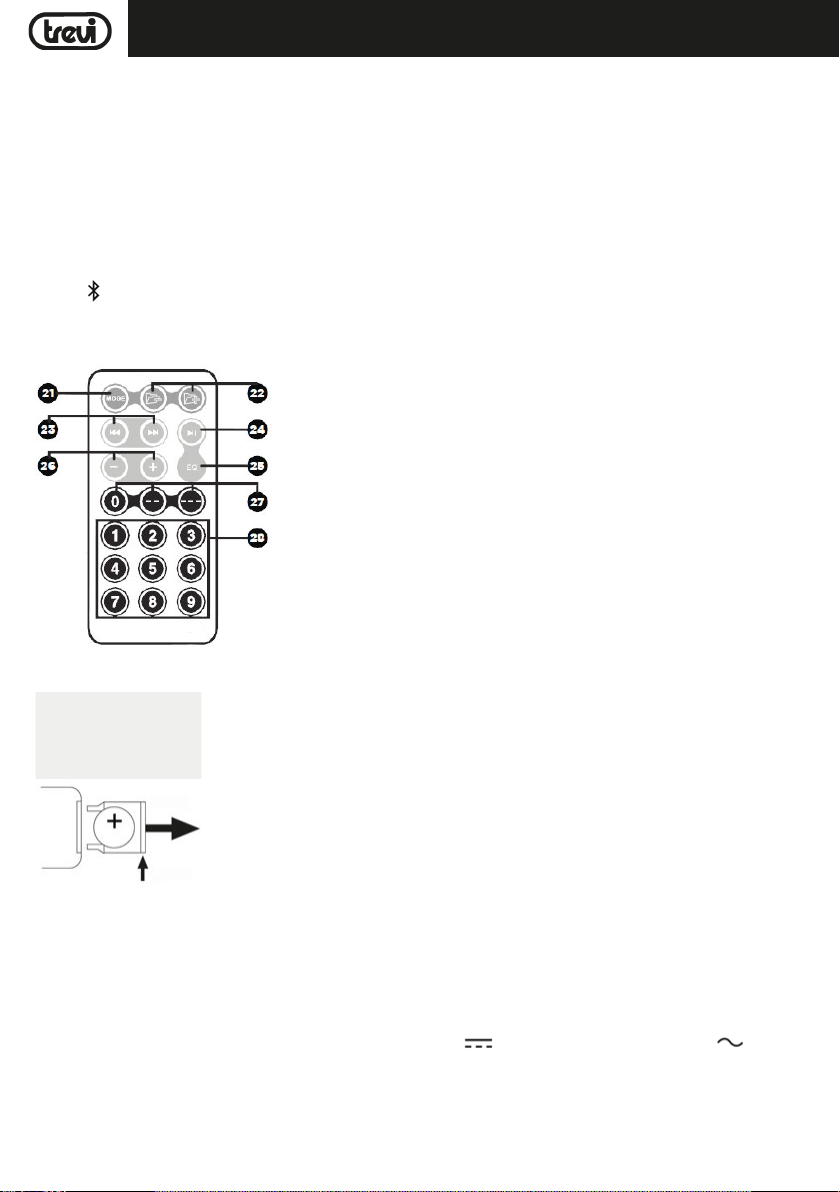
TELECOMANDO
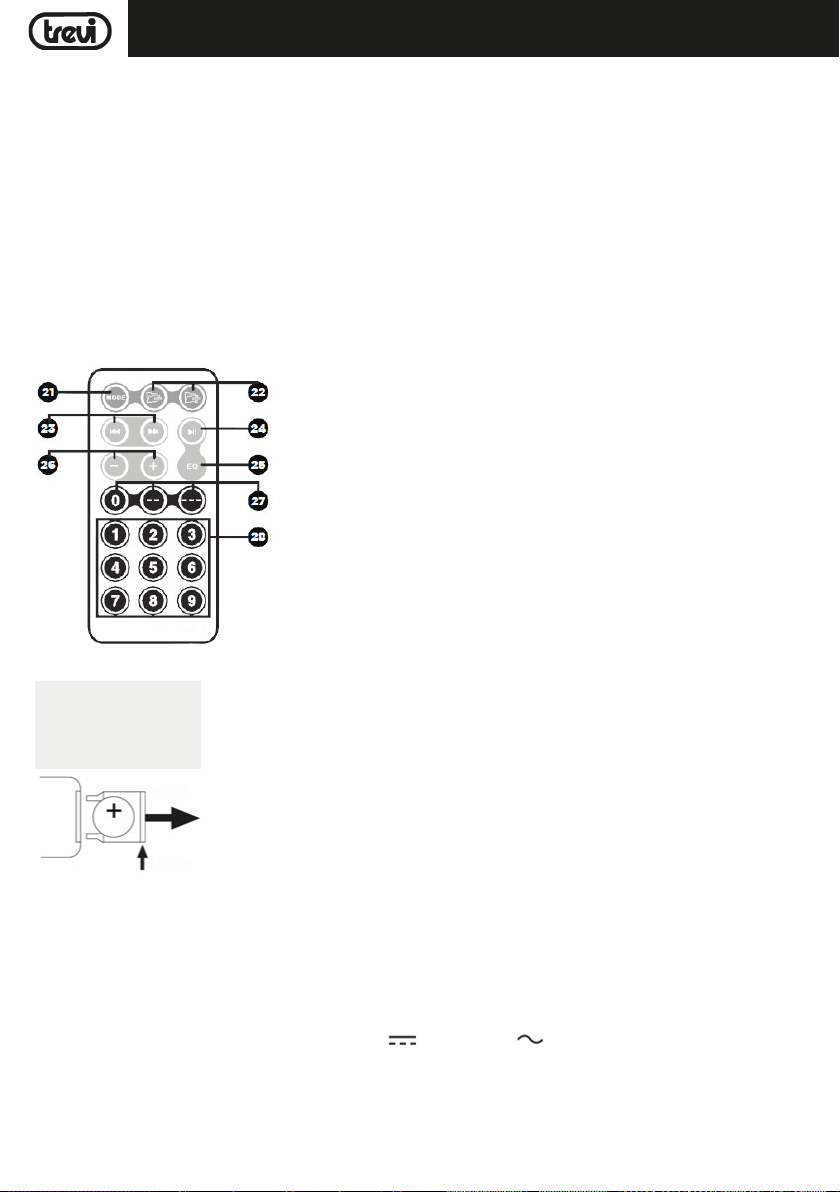
21. Tasto MODE: selezione funzione
22. Cartella precedente /cartella successiva; passaggio a Cartella precedente
o successiva
23. Tasto
24. Tasto
25. Tasto EQ: equalizzazioni DSP pre-impostate
26. Tasti -/+, regolazione Volume generale
27. Tasti 0/--/---, tasti di inserimento diretto per inserire decine e centinaia
28. Tasti numerici
posteriori (Disco Light)
14. Tasto >, successivo
15. Tasto, Play/Pausa, tenendolo premuto: selezione
cartella
16. Pre equalizzazioni DSP: NORMAL/POP/ROCK
17. Regolazione Volume generale, premendolo regolazione toni
Bassi e Alti
18. Pre equalizzazioni DSP: CLASSICAL/COUNTRY/JAZZ
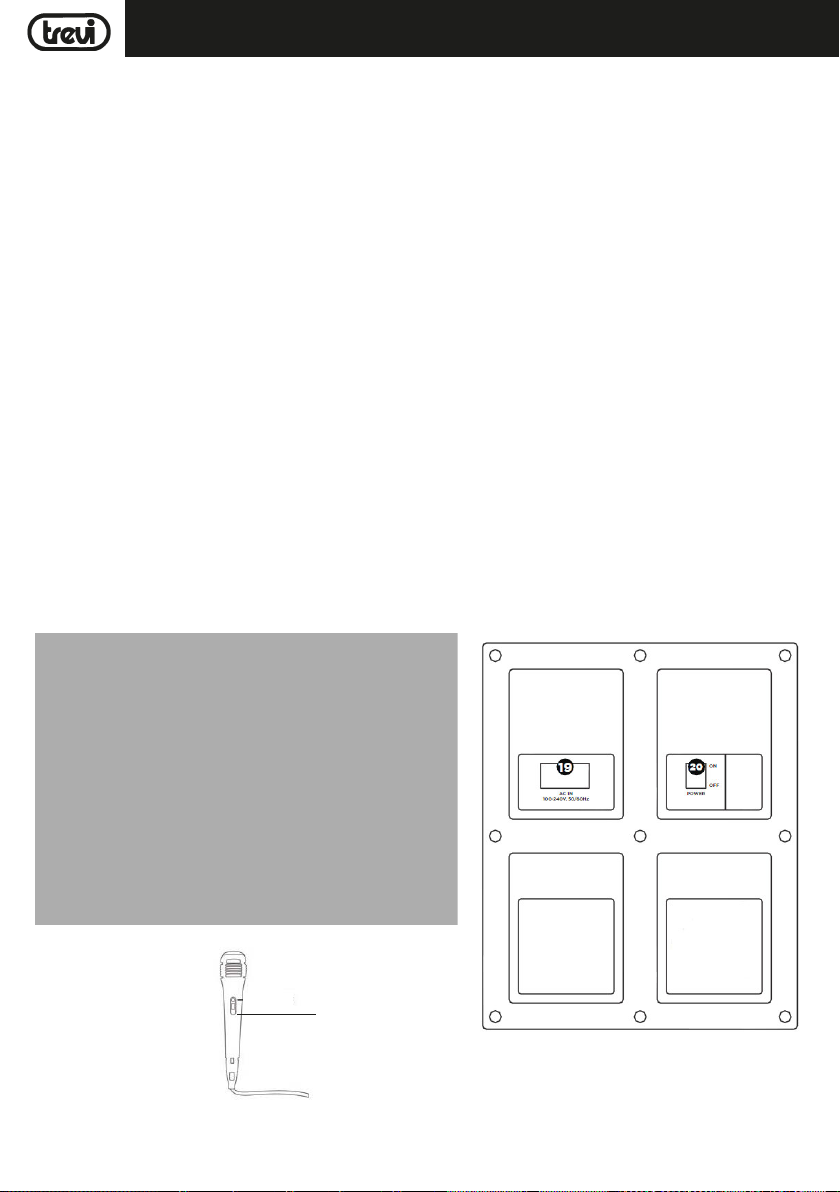
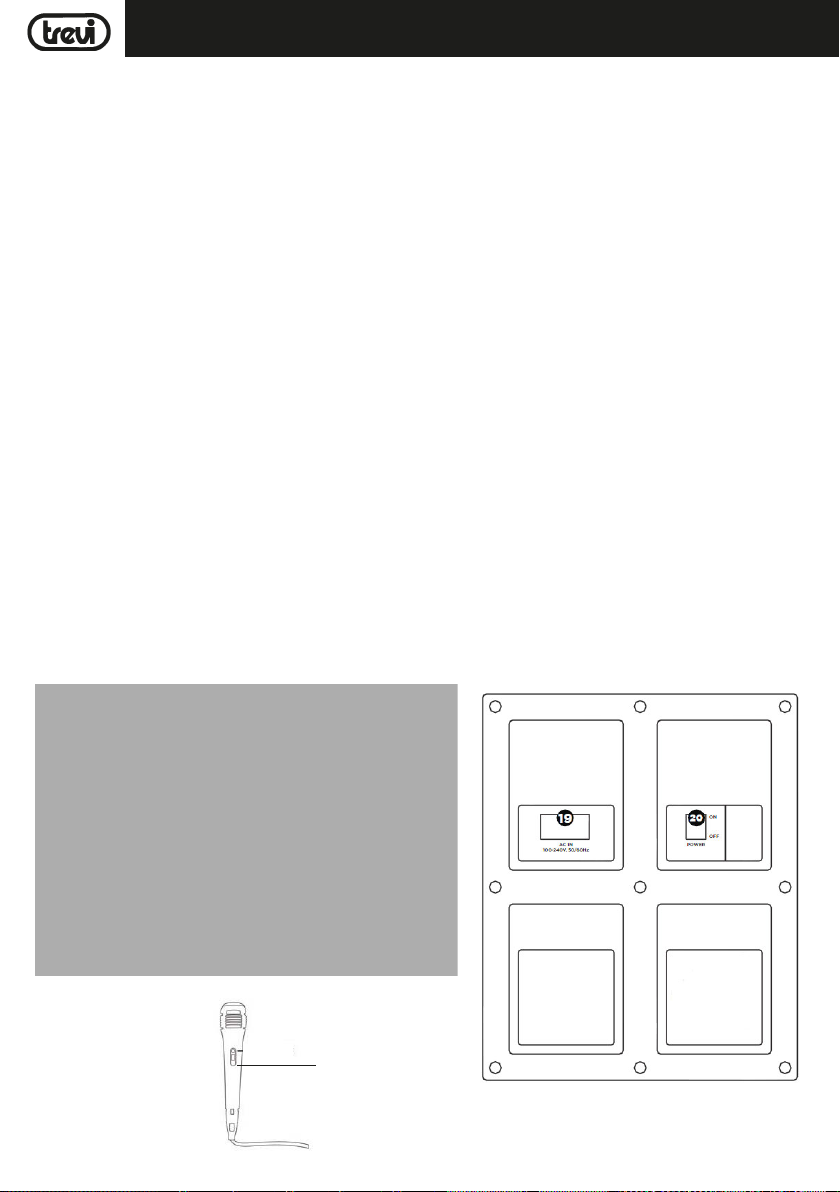
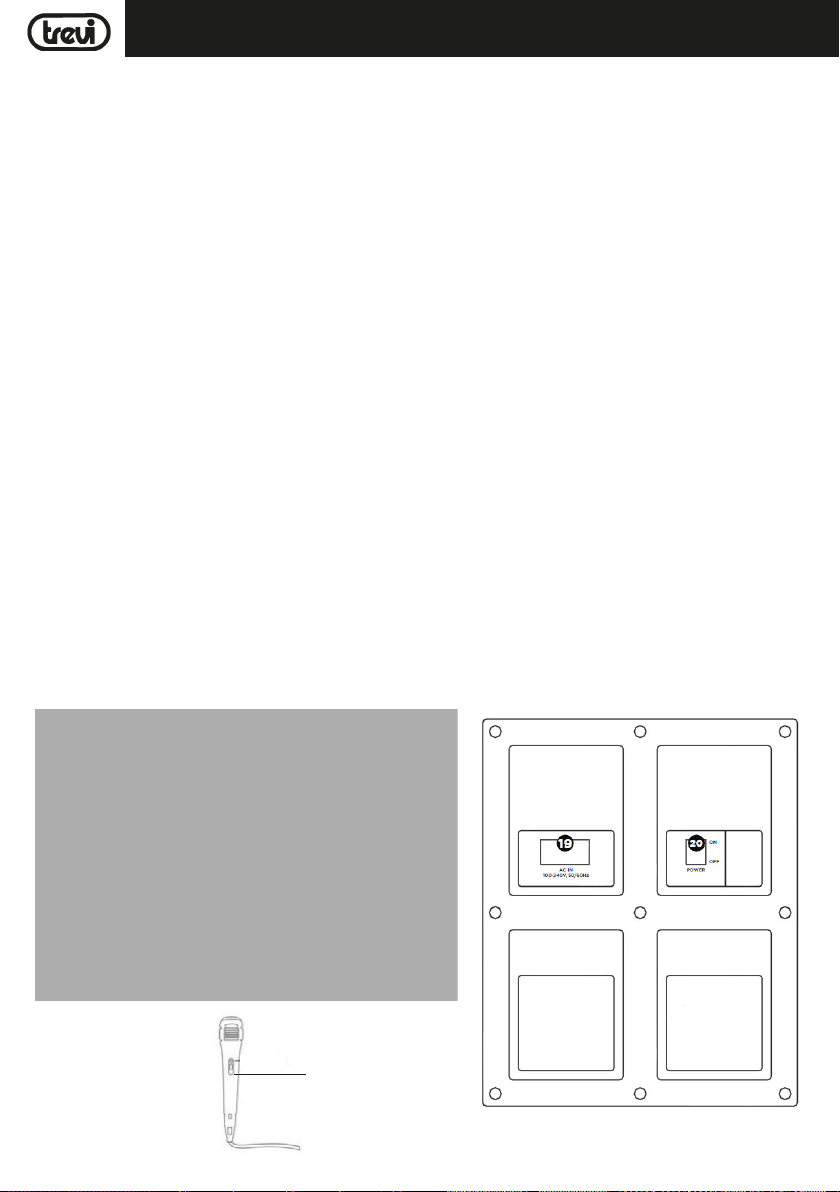
19. Presa per inserimento cavo di alimentazione da rete
20. Interruttore principale POWER ON/OFF (accensione/
spegnimento)
29. Microfono
9/:, selezione traccia precedente/ successiva
, Play/Pausa
ATTIVAZIONE E SOSTITUZIONE DELLA BATTERIA DEL TELECOMANDO
TIRARE LA LINGUETTA
2- TIRARE
1- SPINGERE
Il telecomando monta una batteria tipo CR2025
Per attivare la batteria del telecomando (inclusa) togliere la linguetta plastica
di protezione.
Per la sostituzione della batteria:
1. Spingere il fermo plastico dell’alloggiamento porta batteria verso destra;
2. Estrarre l’alloggiamento porta batteria;
3. Inserire una batteria nuova facendo attenzione a rispettare le polarità;
4. Richiudere l'alloggiamento porta batteria.
TRASPORTO
Premere il pulsante presente sulla maniglia del trolley, alzare il manico fino al blocco (si udira' uno scatto metallico). Per il trasporto,
agendo sulla maniglia del trolley, piegare leggermente l'apparecchio e sfruttare le due ruote laterali.
Per lo sblocco e chiusura del trolley, premere nuovamente il pulsante sulla maniglia ed abbassare completamente il manico.
ALIMENTAZIONE/RICARICA BATTERIA
Questa unità funziona con batteria interna ricaricabile al piombo da 12V , 4,5Ah o alimentazione di rete 230V 50Hz.
Quando la batteria è in fase di esaurimento o l'apparecchio non si accende, portare l'interruttore principale POWER ON/OFF(20) in
posizione "OFF", inserire il cavo di alimentazione nella presa(19) del dispositivo e la spina in una presa di corrente per effettuare
la ricarica della batteria interna; i segmenti dell'icona della batteria sul display(1) cominceranno a lampeggiare.
A carica ultimata i segmenti dell'icona della batteria rimarranno fissi.
Nota: Non collegare l'apparecchio a prese con tensione diversa da quella indicata.
5
Page 6

ITALIANO
XF 1300 BEACH
FUNZIONI DI BASE
ACCENSIONE/SPEGNIMENTO
Portare l'interruttore principale POWER ON/OFF(20) in posizione "ON" per accendere e utilizzare l'apparecchio con la sua batteria
interna.
Portare l'interruttore principale POWER ON/OFF(20) in posizione "OFF" per spegnere completamente l'apparecchio o per ricaricare
la batteria.
TASTI A DOPPIA FUNZIONE
I seguenti tasti sull'unità hanno una doppia funzione a seconda del tempo con cui vengono premuti:
- Tasto <(10): una breve pressione riproduce l'ultima traccia riprodotta o la riproduzione del brano precedente. Premere a lungo
per abbassare il volume.
- Tasto >(14): una breve pressione riproduce il brano successivo successivo. Premere a lungo per aumentare il volume.
- Tasto,(15) Play/Pause: una breve pressione attiva la pausa della traccia corrente oppure l'avvio della riproduzione. Una
lunga pressione mette l'unità in "Modalità cartella", permettendoti di navigare dentro e fuori le eventuali cartelle presenti nella
memoria USB, utilizzando i tasti <(10) e >(14).
- Manopola Volume generale(17): una lunga pressione mette l'unità in modalità "Mute" (silenzioso), premerlo nuovamente per
ripristinare il suono.
SELEZIONE DELLA FUNZIONE
Per cambiare la modalità di funzionamento, premere piu' volte il tasto SOURCE(11) sull'unità o premere il tasto MODE(21) sul
telecomando per selezionare: BLUETOOTH (sul display compare "BLUE"), RADIO(sul display compare la frequenza), USB (solo se
sulla presa USB(8) vi è collegata una memoria, sul display compare una piccola scritta "USB"), AUX-IN (sul display compare "LINE").
REGOLAZIONE DEL VOLUME
1. Ruotare la manopola del VOLUME(17) per aumentare o diminuire il volume generale di riproduzione oppure utilizzare i tasti
-/+(26) sul telecomando;
2. Ruotare la manopola MIC VOL1(4) o MIC VOL2(5) per regolare il volume del segnale sull'ingresso MIC1(2) o MIC 2(3).
PRE-EQUALIZZAZIONI
Questa unità ha un sistema di equalizzazioni audio pre impostate. Premere più volte il tasto EQ(5) sul telecomando per selezionare
una delle 6 equalizzazioni audio disponibili oppure selezionarla direttamente attraverso il tasto corrispondente tra quelle indicate
sull'unità(16 e 18) e che meglio si adatta alla riproduzione sonora in corso.
REGOLAZIONE TONI ALTI E BASSI
Per regolare separatamente il suono dei bassi e degli acuti:
1. Premere una volta la manopola del VOLUME(17) sull'unità per regolare i toni bassi, una "b" apparirà sul display. Ruotare la
manopola per effettuare la regolazione;
2. Premere una seconda volta la manopola del VOLUME(17) sull'unità per regolare i toni alti, una "t" apparirà sul display. Ruotare
la manopola per effettuare la regolazione;
3. Premere una terza volta la manopola del VOLUME(17) sull'unità per tornare alla regolazione del volume (indicato sul display
con una "v").
EFFETTO ECHO
Ruotare la manopola ECHO(6) per aumentare o diminuire l'effetto eco sugli ingressi MIC1 e MIC2.
Nota: l'effetto eco agisce unicamente sugli ingressi microfonici.
EFFETTO DISCO-LIGHT
Per attivare l'effetto Disco-Light premere il tasto LIGHTS(13) sull'unità.
Per disattivare l'effetto Disco-Light, premere nuovamente il tasto LIGHTS(13) sull'unità.
PRESA USB CHARGE
La presa USB(8) è in grado di caricare dispositivi esterni, come smartphone e tablet.
- Collegare alla presa USB(8) il vostro dispositivo portatile tramite apposito cavo (non in dotazione);
- L'indicatore di carica sul dispositivo mobile esterno, indicherà lo stato di ricarica in corso.
6
Page 7

ITALIANO
XF 1300 BEACH
MODALITA' RADIO FM
RICERCA AUTOMATICA
Per utilizzare la modalità FM, è necessario prima eseguire una scansione/memorizzazione delle stazioni più forti nella vostra zona.
1. Accendere l'apparecchio e premere più volte il tasto SOURCE(11) sull'unità, o il tasto MODE(21) sul telecomando e selezionare
la funzione RADIO (sul display comparirà l'indicazione della frequenza);
2.
Premere il tasto
ricerca automatica delle stazioni radio e le salva automaticamente in memoria). Il numero delle stazioni memorizzate dipende
dal segnale radio nella vostra zona. Durante la ricerca premere il tasto
3. Una volta completata la scansione, utilizzare i tasti <(10) e >(14)
Nota:
-
La ricezione in FM dipende molto dal luogo dove è posto l’apparecchio.
- La vicinanza di apparecchi TV, lampade al neon o altri elettrodomestici può provocare disturbi nella ricezione di
programmi radio, in questo caso allontanate l'apparecchio.
(15)
sull'unità per attivare la ricerca e memorizzazione automatica delle emittenti (la radio inizia una
(15)
sull'unità
sull'unità per arrestare la memorizzazione;
per muoversi tra i preset della stazione salvate.
FUNZIONAMENTO BLUETOOTH
1. Accendere l'apparecchio e premere il tasto (12) sull'unità o premere il tasto MODE(21) sul telecomando e selezionare la
funzione bluetooth, sul display compare la scritta "BLUE";
2. Nella modalità Bluetooth, la scritta "BLUE" sul display comincerà a lampeggiare e il sistema si porterà automaticamente in
modalità ricerca;
3. Attivare la funzionalità Bluetooth sul dispositivo esterno da accoppiare;
4. Avviare la ricerca dei dispositivi. Al termine selezionare il dispositivo "XF 1300 BEACH";
5. Inserire la password "0000" se richiesto;
6. Premere il tasto
sull'unità, oppure i tasti 9/:(23) sul telecomando per la selezione dei brani.
(15) sull'unità oppure sul telecomando
per avviare la riproduzione e utilizzare i tasti <(10) o >(14)
RIPRODUZIONE SU INGRESSO USB
1. Accendere l'apparecchio;
2. Inserire una memoria USB nella presa(8). La riproduzione viene avviata automaticamente;
3. Per mettere in pausa la riproduzione, premere il tasto
display comparirà la scritta "PAUS";
4. Per riprendere la riproduzione, premere nuovamente il tasto
5. Utilizzare i tasti(22) del telecomando per selezionare eventualmente una cartella specifica all'interno della memoria USB;
6. Premere il tasto >(14) sull'unità o il tasto :(23) sul telecomando, durante l’ascolto, per passare alla traccia successiva.
Premere il tasto <(10) sull'unità o il tasto 9(23) sul telecomando per passare ai brani precedenti;
7. Utilizzando la tastiera numerica(28) del telecomando è possibile digitare direttamente il numero del brano musicale che si
vuole riprodurre.
Nota:
- Il lettore potrebbe non supportare alcuni dispositivi USB, questo è dovuto all'incompatibilità di alcuni processori.
- Per evitare interferenze dannose, collegare sempre le periferiche USB direttamente all'unità, non utilizzare cavi di prolunga.
- Dal computer formattare le memorie USB in FAT (16 o 32).
(15) sull'unità oppure il tasto
(15) sull'unità o (24) sul telecomando
(24) del telecomando
;
; sul
AUX-IN
1. Premere il tasto SOURCE(11) sull'unità o premere il tasto MODE(21) sul telecomandoe e selezionare la funzione "LINE IN";
2. Collegare una qualsiasi unità provvista di uscita audio tramite l'apposito cavo Jack da 3,5mm (non in dotazione) all'ingresso
AUX IN(7);
3. Regolare il dispositivo esterno dai propri comandi.
7
Page 8
ITALIANO
XF 1300 BEACH
UTILIZZO DEI MICROFONI
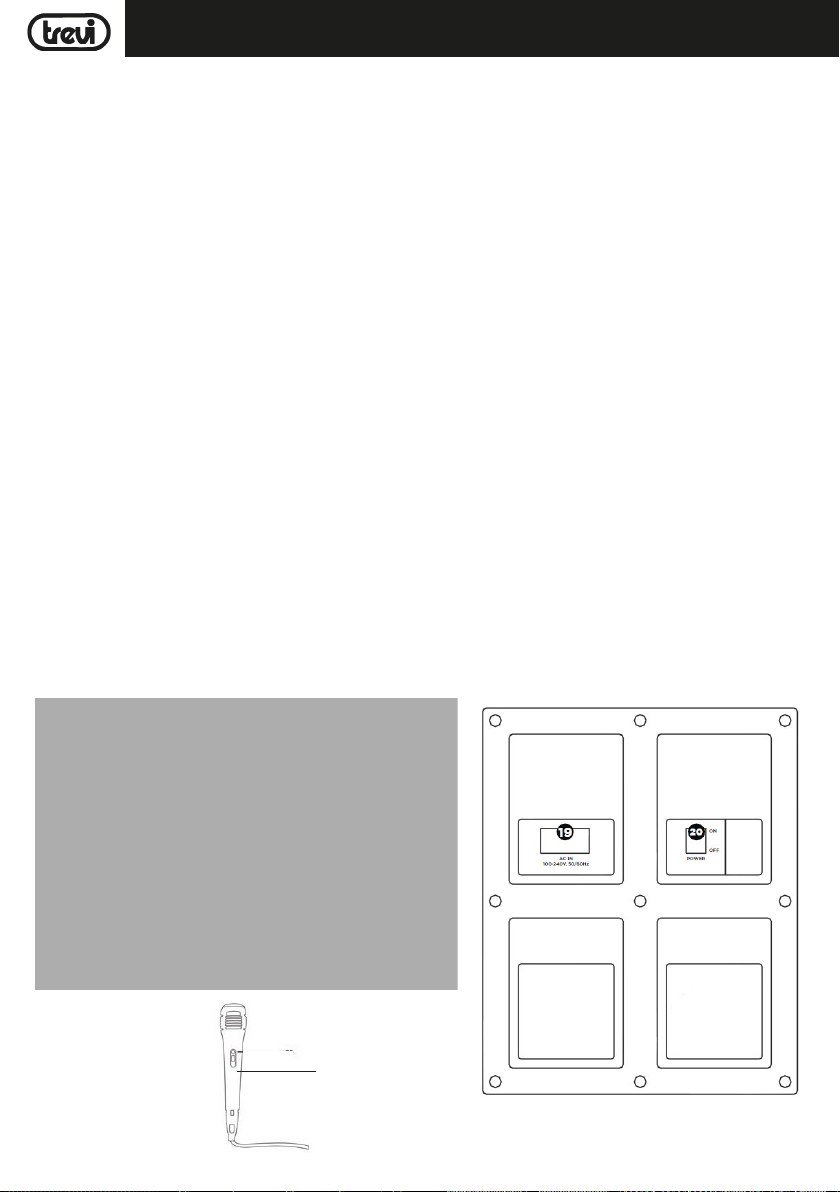
1. Collegare il microfono in dotazione all'ingresso MIC1(2) o MIC2(3);
2. Accendere il microfono agendo sull'interruttore presente sul manico del microfono stesso portandolo in posizione ON;
3. Regolare il volume di ingresso del microfono e l'effetto eco come desiderato tramite gli appositi comandi (4/5/6).
RISOLUZIONE DEI PROBLEMI
Se si verifica un problema, attenersi alla procedura descritta nella seguente tabella.
Se il problema non può essere risolto, contattare il rivenditore o il centro assistenza.
Problema Possibili cause Soluzione
Nessun suono riprodotto quando l'apparecchio viene acceso
Suono distorto 1. Volume troppo alto
Nessun suono dal microfono 1. La presa del microfono può non
Nessun suono quando si inserisce un dispositivo USB
Impossibile caricare la batteria
o la batteria ha una durata breve
Dagli altoparlanti si sentono
forti rumori
1. Nessuna sorgente sonora in ingresso
2. Manopola Volume a livello 0
3. Nessun dispositivo USB collegato
2. Errore file Audio
essere collegata correttamente.
2. L'interrutore di accensione sul
microfono può essere in posizione
"spento".
3. Volume del microfono basso.
1. Formato file non supportato
2. USB non collegata correttamente
1. Il cavo di alimentazione non è inserito
bene nella presa
2. La batteria non è completamente
carica
3. La batteria potrebbe aver terminato il
suo ciclo di vita
1. Microfono acceso ma troppo vicino
all'altoparlante
2. Microfono acceso ma non viene
utilizzato
8
1. Collegare un dispositivo all'ingresso AUX-IN
2. Regolare il volume
3. Collegare una memoria USB, riprodurre MP3
1. Abbassare il volume
2. Controllare e riprodurre un'altro file Audio
1. Assicurarsi che il microfono sia collegato
correttamente alla presa.
2. Accendere il microfono.
3. Regolare correttamente il volume del
microfono
1. Il formato dei file audio deve essere MP3
2. Collegare l'apparecchio USB correttamente
1. Controllare se il cavo di alimentazione è
collegato in modo corretto
2. Normalmente ci vogliono 5-6 ore per ricaricare completamente la batteria
3. Sostituire la vecchia batteria con una nuova
avente le stesse specifiche tecniche
1. Tenere il microfono alla distanza di 2 metri
dal diffusore
2. Spegnere il microfono se non utilizzato
Page 9
ITALIANO
XF 1300 BEACH
Dagli altoparlanti si sentono
forti rumori
3. Il Volume del microfono potrebbe
essere troppo alto
4. Un cellulare viene utilizzato troppo
vicino all'altoparlante
5. Apparecchi senza fili possono essere
molto vicini a chi sta utilizzando il
microfono
3. Abbassare il volume del microfono
4. Tenere il cellulare lontano dall'altoparlante
mentre si effettua una chiamata.
5. Tenere il diffusore lontano da apparecchi
wireless
INFORMATIVA SULLA RIMOZIONE E LO SMALTIMENTO DELLE BATTERIE
Attenzione: Questa operazione è riservata esclusivamente al personale tecnico specializzato!
PROCEDURA PER LA RIMOZIONE DELLA BATTERIA DALL’ALTOPARLANTE AMPLIFICATO
Operare esclusivamente in assenza di collegamento dell’apparecchio alla rete elettrica!
1. Rimuovere le viti che serrano il pannello plastico posteriore;
2. Rimuoverlo e individuare la batteria;
3. Scollegare la batteria e rimuoverla.
SMALTIMENTO DELLA BATTERIA
Qualunque sia il tipo di batteria esaurita, essa non deve essere gettata tra i rifiuti domestici, nel fuoco o nell’acqua. Ogni tipo di
batteria esaurita deve essere riciclata oppure smaltita presso gli appositi centri di raccolta dedicati.
INFORMAZIONI AGLI UTENTI
ai sensi del Decreto Legislativo N° 49 del 14 Marzo 2014
“Attuazione della Direttiva 2012/19/UE sui rifiuti di apparecchiature elettriche ed elettroniche (RAEE)”
Il simbolo del cassonetto barrato riportato sull’apparecchiatura indica che il prodotto alla fine della propria vita utile deve essere
raccolto separatamente dagli altri rifiuti. L’utente dovrà, pertanto, conferire l’apparecchiatura integra dei componenti essenziali
giunta a fine vita agli idonei centri di raccolta differenziata dei rifiuti elettronici ed elettrotecnici, oppure riconsegnarla al rivenditore al
momento dell’acquisto di nuova apparecchiatura di tipo equivalente, in ragione di uno a uno, oppure 1 a zero per le apparecchiature
aventi lato maggiore inferiore a 25cm. L’adeguata raccolta differenziata per l’avvio successivo dell’apparecchiatura dimessa al
riciclaggio, al trattamento e allo smaltimento ambientale compatibile contribuisce ad evitare possibili effetti negativi sull’ambiente
e sulla salute e favorisce il riciclo dei materiali di cui è composta l’apparecchiatura. Lo smaltimento abusivo del prodotto da parte
dell’utente comporta l’applicazione delle sanzioni amministrative di cui al D.Lgs n. Decreto Legislativo N° 49 del 14 Marzo 2014.
CARATTERISTICHE TECNICHE
GENERALI
Alimentazione: ....................................................... 100-230V 50/60Hz
batteria interna ricaricabile al piombo 12V , 4,5Ah
Consumo: .............................................................................. Max 80W
IPX: ...................................................... 4 (resistente agli spruzzi)
Potenza massima Audio: ..................................................................................... 80W
Woofer: ....................................................................................... 10"
Tweeter: ......................................................................................... 3"
Risposta in frequenza: ...................................................................... 55Hz - 18KHz
Sensibilità d'ingresso: ................................................................. 96±2db 1W/1M
Classe di Potenza Bluetooth: .......................................................................................... 2
Potenza di trasmissione di picco Bluetooth:
Potenza di trasmissione max Bluetooth:
Banda di trasmissione Bluetooth:
Dimensioni: ................................................................. 520x365x258mm
Peso: .................................................................................. 9,5 Kg
................................................................................. 2,4GHz
................................................................. 2,5mW
....................................................................... 1,9mW
9
Page 10
ENGLISH
XF 1300 BEACH
NOTES ON USE
Listening at high volume for a long time may damage your hearing.
This is a precision electronic appliance; avoid using it in the following cases:
- Near magnetic fields.
- Near heat sources such as heaters and heaters.
- In very humid places like bathrooms, swimming pools, etc...
- In very dusty places.
- In places subject to strong vibrations.
- Do not place your ear near the loudspeaker during the set-up and volume adjustment phases, and in par ticular keep the volume
at minimum during the ignition phase.
- Position the appliance so that there is always enough space on its sides for the free circulation of air (at least 5 cm).
- If liquids enter the appliance, immediately disconnect the plug from the socket and take the appliance to the nearest authorized
TREVI service center.
- Always check before recharging the appliance, that the power and connection cables are installed correctly.
- No naked flame sources, such as lighted candles, should be placed on the appliance.
- The appliance must not be exposed to dripping or splashing water and no objects filled with liquids, such as vases, must be
placed on the appliance.
- Instruct children and people with poor knowledge of the product to use correctly.
- Keep this manual for future reference.
CARE AND MAINTENANCE
Use a slightly damp soft cloth for cleaning. Do not use solvents and abrasive substances.
IMPORTANT
This device is designed for non-professional home use. The good construction of this device guarantees its perfect functioning
for a long time. If, however, a problem should arise, it is advisable to consult the nearest TREVI Authorized Service Center.
TREVI follows a policy of ongoing research and development. Therefore products may have different features from those described.
LOCATION OF CONTROL
29
10
Page 11
1. LED Display
2. Connector for Microphone 1 or Guittar
3. Connector for Microphone 2 or Guittar
4. Volume knob for Mic 1 input
5. Volume knob for Mic 2 input
6. Echo knob: Effect adjustment for Mic and Guitar input
7. AUX Input
8. USB Port
9. Receiver for Remote Control
10. < Button: Short press: Switch Previous Song, Long press
Voice DOWN
11. Press switch between USB/RADIO/BLUETOOTH/Line Input
12. Bluetooth mode
REMOTE CONTROL
21. MODE Button: Select Audio Source (USB/Bluetooth)
22. BACK/FWD Folder Buttons Navigate to Previous or Next Folder
23.
9/: Track Buttons: Play Previous or Next Track
24.
,Play or Pause the current Track
25. EQ mode key
26. -/+ Volume Buttons: Increase or Decrease Volume
27. 0/--/--- Direct Entry Buttons: To enter tens and hundreds
28. Number Buttons: For Numeric Entry
XF 1300 BEACHENGLISH
13. LED light power switch
14. > Button: Short press: Switch next Song, Long press
Voice UP
15. Short press: Play/Pause, Long press for FOLDER tracking
16. Music Style with preset modes: NORMAL/POP/ROCK
17. Turn around for Volume control of amplifier, Press down
for DSP-Digital signal processing
18. Music Style with preset modes: CLASSICAL/COUNTRY/
JAZZ
19. AC Power Socket input
20. Power button
29. Microphone
ACTIVATION AND REPLACEMENT REMOTE CONTROL'S BATTERY
PULL THE PLASTIC PART
2- PULL
1- PUSH
The remote control is equipped with a CR2025 battery.
To activate the battery of the remote control (included), remove the plastic
protection tab.
For battery replacement:
1. Push the battery's plastic holder compartment to the right;
2. Remove the battery compartment;
3. Insert a new battery, taking care to respect the polarities;
4. Close the battery compartment.
TRANSPORTATION
Press the button on the handle of the trolley, lift the handle up to the block (you will hear a metallic click). For transport, by acting
on the handle of the trolley, slightly bend the appliance and take advantage of the two side wheels.
To unlock and close the trolley, press the button on the handle again and lower the handle completely.
POWER
This unit works with internal rechargeable lead battery 12V , 4,5Ah or 230V 50Hz mains power supply.
When the battery is not charge or the unit does not turn on, turn the main POWER ON/OFF switch(20) to the "OFF" position, inser t
the power cord into the socket(19) of the device and plug it into a power outlet to recharge the internal battery; the segments of
the battery icon on the display(1) will start to flash.
Once the charge is complete, the segments of the battery icon will remain fixed.
Note: Do not connect the appliance to an outlet with a voltage other than that indicated.
11
Page 12

ENGLISH
XF 1300 BEACH
BASIC FUNCTIONS
POWER ON/OFF
Set the main switch POWER ON/OFF(20) to "ON" to turn on and use the device with its internal battery.
Set the main switch POWER ON/OFF(20) to "OFF" to completely switch off the device or charge the battery.
DOUBLE FUNCTION KEYS
The following keys on the unit have a double function depending on how long they are pressed:
- <(10) key: a short press plays the last track played or the previous track. Long press to lower the volume.
- >(14) key: a short press plays the next following track. Long press to increase the volume.
- ,(15) Play/Pause key: a short press activates the pause of the current track or the start of playback. A long press puts
the unit in "Folder mode", allowing you to navigate in and out any folders in the USB memory, using the <(10) and >(14)
keys
- General Volume knob(17): a long press puts the unit in "Mute" mode, press it again to restore the sound.
MODE FUNCTION
To change the operating mode, press several times the SOURCE button(11) on the unit or press the MODE button(21) on the remote
control to select: BLUETOOTH ("BLUE" appears on the display), RADIO (the frequency appears on the display), USB (only if on the
USB socket (8) a memory is connected, a small "USB" message appears on the display), AUX-IN ("LINE" appears on the display).
ADJUSTING THE VOLUME
1. Turn the VOLUME knob(17) to increase or decrease the general playback volume or use the -/+ keys(26) on the remote
control;
2. Turn the MIC VOL1(4) or MIC VOL2(5) knob to adjust the volume of the signal at the MIC1(2) or MIC 2(3) input.
PRE-EQUALIZER
This unit has a pre-set audio equalization system. Press several times EQ button(5) on the remote control to select one of the 6
available audio equalizers or select it directly using the corresponding button among those indicated on the unit (16 and 18) and
which is best suited to the current sound reproduction.
SETTING TONE TREBLE AND BASS
To separately adjust the bass and treble sound:
1. Press the VOLUME knob(17) on the unit once to adjust the bass tones, a "b" will appear on the display. Turn the knob to make
the adjustment;
2. Press the VOLUME knob(17) on the unit a second time to adjust the high tones, a "t" will appear on the display. Turn the knob
to make the adjustment;
3. Press the VOLUME knob(17) on the unit a third time to return to volume control (shown on the display with a "v").
ECHO EFFECT
Turn the ECHO knob(6) to increase or decrease the echo effect on the input MIC1/2.
Note: the echo only works on microphone input.
DISCO-LIGHT EFFECTS
Press the LIGHTS button(13) on the unit to activate the Disco-Light effect.
To deactivate the Disco-Light effect, press the LIGHTS button(13) on the unit again.
USB CHARGE OUTPUT
The USB socket(8) can be used to charge external devices, like smartphones or tablets.
- Connect your external device to the USB socket(8) using the appropriate cable (not supplied);
- The charge indicator on the external device will indicate the charging status in progress.
FM RADIO MODE
To use FM mode, you will first need to scan for strong stations in your area. To begin the scan, press the(15) button on unit.
This will begin scanning, and any strong signals will be saved as presets.
Once scanning is complete, you will be able to use the
numbered, and the FM frequency will be displayed.
<(10) and >(14) buttons to jump to the saved station presets. Presets will be
12
Page 13

ENGLISH
XF 1300 BEACH
BLUETOOTH FUNCTION
1. Switch on the appliance and press the button (12) on the unit or press the MODE button(21) on the remote control and
select the bluetooth function; the word "BLUE" will appear on the display;
2. In the Bluetooth mode, the word "BLUE" on the display will start to flash and the system will automatically go into search
mode;
3. Activate the Bluetooth feature on the external device to be coupled;
4. Initiate a search for devices. After select the "XF 1300 BEACH";
5. Enter the password "0000" if required;
6. Press the
unit, or the
button(15) on the unit or on the remote control to start playback and use the <(10) or >(14) buttons on the
9/: buttons(23) on the remote control to select the tracks.
PLAY ON INPUT USB
1. Switch the appliance on;
2. Insert a USB memory into the socket(8). Playback starts automatically;
3. To pause playback, press thebutton(15) on the unit or thebutton(24) on the remote control; the word "PAUS" will
appear on the display;
4. To resume playback, press the
5. Use the buttons (22) on the remote control to select a specific folder in the USB memory;
6. Press the >(14) button on the unit or the button 9(23) on the remote control, while listening, to go to the next track. Press
the <(10) button on the unit or the :(23) button on the remote control to skip to the previous tracks;
7. Using the numeric keypad(28) on the remote control, you can directly enter the number of the music track you want to play.
Note:
- The player may not support some USB devices, this is due to the incompatibility of some processors.
- To avoid harmful interference, always connect USB devices directly to the unit, do not use extension cords.
- From the computer to format the USB memory FAT (16 or 32).
(15)
on the unit or on the remote control;
AUX-IN
1. Press the SOURCE button(11) on the unit or press the MODE button(21) on the remote control and select the "LINE IN" function;
2. Connect any unit with audio output through the appropriate 3.5mm jack cable (not supplied) to the AUX IN input(7);
3. Adjust the external device from your commands.
13
Page 14
ENGLISH
XF 1300 BEACH
USING THE MICROPHONE
1. Connect the supplied microphone to the MIC1(2) or MIC2(3) input;
2. Turn on the microphone by turning the switch on the microphone handle to the ON position;
3. Adjust the microphone input volume and the echo effect as desired using the appropriate commands (4/5/6).
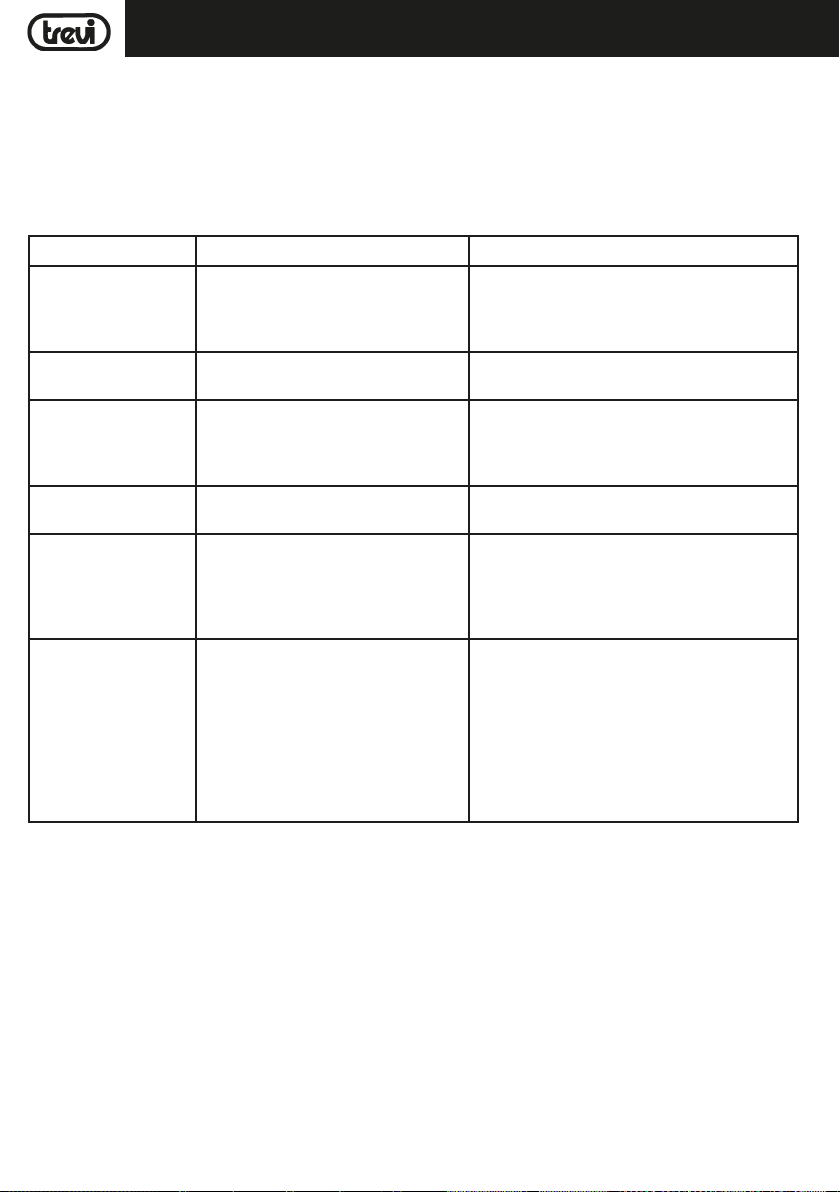
TROUBLESHOOTING
If a problem occurs, follow the steps in the table below.
If the problem still can’t be solved, please contact your retailer.
Problem Possible cause Solution
No sound when power is
turned ON
Distorted sound 1. Volume is too loud
No sound from the microphone
No sound comes after
inserting USB
Unable to charge or the
battery works only for
short duration
Speaker makes loud
noises
1. No input sound source comes
2. Volume knob in the lowest position
3. Voice switch off
4. USB card not plugged
2. Audio file error
1. Microphone socket may not be plugged
properly.
2. Microphone switch may not be on.
3. Microphone volume is on lowest mode.
1. Incorrect file format
2. USB may not be plugged properly
1. Connect with power cord to charge
2. Battery not fully charged
3. Battery life may have ended
1. Microphone switched on but may too
close to the speaker
2. Microphone switched on but is not
being used
3. Microphone volume may be too loud
4. Mobile phone is being used too close
to the speaker
5. Other wireless equipment may be
placed very close to the speaker
1. Input AUX signal
2. Adjust volume
3. Turn on voice switch
4. Plug USB play MP3
1. Turn the volume down
2. Check and change the audio file
1. Ensure the microphone is correctly plugged into
the socket.
2. Turn on the microphone
3. Adjust the microphone volume as per users wish
1. File format should be MP3
2. Plug USB correctly
1. Check if power cord connected properly
2. Extend charging time;normally it takes 5-6 hour
to fully charge
3. Replace old batteries with the same specification
as the old batteries.
1. Keep the microphone 2 meters away from the
speaker
2. Turn off microphone if not in use.
3. Adjust microphone volume to lower mode
4. Keep mobile away from the speaker whilst a
ending a call.
5. Keep the speaker away from other wireless
equipment
INFORMATION NOTE ON THE REMOVAL BATTERY
Warning: Only high-qualified personnel should perform this operation!
BATTERY REMOVAL
The appliance should not be plugged to the mains socket when performing this operation!
1. Remove the screws that tighten the rear plastic panel;
2. Remove it and locate the battery;
3. Disconnect the battery and remove it.
INFORMATION ON DISPOSAL BATTERY
Used batteries should not be disposed of with household waste or thrown into fire or water. Used batteries should be recycled or
disposed of in separate waste collection centres.
14
Page 15

XF 1300 BEACHENGLISH
INFORMATION TO USERS
pursuant to Legislative Decree No. 49 of March 14, 2014
"Implementation of Directive 2012/19/EU on Waste Electrical and Electronic Equipment (WEEE)"
This wheeled bin symbol on the product indicates that at the end of its life must be collected separately from other waste. The
user must, therefore, take the remote control integrates the essential components that got to its life to the appropriate differentiated collection centers for electronic and electro-technical waste, or return it to the dealer when purchasing a new appliance of
equivalent type, in terms of one to one, or one to zero for equipment having longer side of less than 25cm. Appropriate separate
collection for the decommissioned equipment for recycling, processing and environmentally compatible disposal helps prevent
negative impact on the environment and human health and promotes recycling of the materials making up the product. Illegal
dumping of the product by the user entails the application of administrative sanctions stated in Legislative Decree n. Legislative
Decree No. 49 of March 14, 2014.
TECHNICAL SPECIFICATIONS
Power Supply: ....................................................... 100-230V 50/60Hz
internal lead acid rechargeable battery 12V 4,5Ah
Power consumption: .............................................................................. Max 80W
IPX: ................................................................... 4 (Splash proof)
Output Audio power: ..................................................................................... 80W
Woofer: ....................................................................................... 10"
Tweeter: ......................................................................................... 3"
Frequency response: ...................................................................... 55Hz - 18KHz
Input sensitivity: ................................................................. 96±2db 1W/1M
Class Bluetooth: .......................................................................................... 2
Bluetooth peak transmission power:
Bluetooth max power transmission:
Band transmission Bluetooth: ................................................................................. 2,4GHz
Dimensions: ................................................................. 520x365x258mm
Weight: ...................................................................................9,5 kg
............................................................................ 2,5mW
............................................................................. 1,9mW
15
Page 16
FRANCAIS
XF 1300 BEACH
NOTES D’EMPLOI
Écouter à fort volume pendant une longue période peut endommager votre audition.
Cet appareil est un instrument électronique de haute précision, évitez donc de l’utiliser dans les cas suivants:
- Près des champs magnétiques.
- À proximité de sources de chaleur telles que des radiateurs et des radiateurs.
- Dans des endroits très humides tels que salles de bains, piscines, etc...
- Dans des endroits très poussiéreux.
- Dans des endroits soumis à de fortes vibrations.
- Ne placez pas votre oreille près du haut-parleur pendant les phases de réglage et de réglage du volume, et en particulier
maintenez le volume au minimum pendant la phase d'allumage.
- Placez l'appareil de sorte qu'il y ait toujours assez de place sur les côtés pour permettre la libre circulation de l'air (au moins
5 cm).
- Si des liquides pénètrent dans l'appareil, débranchez immédiatement la fiche de la prise de courant et portez-le au centre de
réparation TREVI le plus proche.
- Vérifiez toujours, avant de recharger l'appareil, que les câbles d'alimentation et de connexion sont correctement installés.
- Ne placez aucune source de flamme nue, telle que des bougies allumées, sur l'appareil.
- L'appareil ne doit pas être exposé à des gouttes d'eau ni à des éclaboussures d'eau et aucun objet contenant des liquides,
tels que des vases, ne doit être placé sur l'appareil.
- Demandez aux enfants et aux personnes ayant une faible connaissance du produit d’utiliser correctement.
- Conservez ce manuel pour référence ultérieure.
MANIEMENT ET ENTRETIEN
Pour le nettoyage, il est conseillé d’utiliser un chiffon doux légèrement humide. Évitez l’emploi de solvants ou de substances abrasives.
IMPORTANT
Cet appareil est conçu pour un usage domestique (usage non professionnel). La bonne fabrication de cet appareil garantit un
fonctionnement parfait pour une longue période. Si toutefois quelques inconvénients devaient se présenter, adressez-vous au
Centre d’Assistance agréé TREVI le plus proche.
TREVI observe une politique de recherche et de développement continus. C’est pourquoi ses produits peuvent présenter des
caractéristiques différentes par rapport à celles qui sont décrites.
DESCRIPTION DES CONNECTEURS ET DES COMMANDES
29
16
Page 17
XF 1300 BEACHFRANCAIS
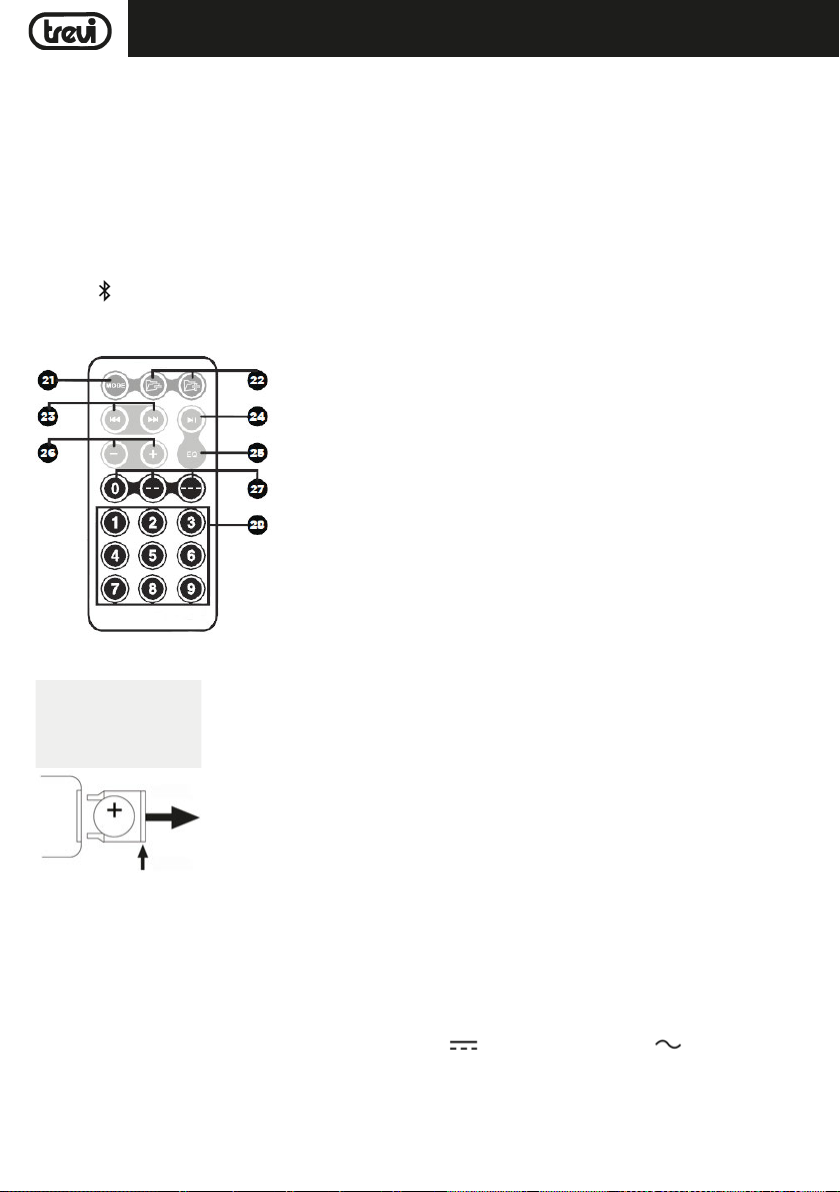
1. Affichage
2. Entrée MIC 1/guitare
3. Entrée MIC 2/guitare
4. MIC1 VOL, Réglage du volume du microphone/de la guitare
5. MIC2 VOL, Réglage du volume du microphone/de la guitare
6. Réglage du microphone ECHO
7. Entrée AUX IN
8. Prise USB
9. Récepteur de télécommande
10. Bouton <, précédente
11. Bouton SOURCE, sélection de fonction
12. Bouton , Bluetooth
TÉLÉCOMMANDE
21. Bouton MODE: Sélection de la source audio (USB/Bluetooth)
22. Boutons BACK/FWD Folder Accéder au dossier précédent ou suivant
23. Bouton de piste
24. Bouton
25. Button EQ
26. Boutons Volume -/+: augmenter ou diminuer le volume
27. 0/--/--- Touches de saisie directe: pour entrer des dizaines et des centaines
28. Bouton numériques: pour la saisie numérique
13. Bouton LIGHTS, activation/désactivation des LED avant/
arrière (Disco Light)
14. Bouton >, suivante
15.
button,
des dossiers
16. Pré-égalisation DSP: NORMAL/POP/ROCK
17. Réglage du volume général, en appuyant dessus pour
régler les graves et les aigus
18. Pré-égalisation DSP: CLASSICAL/COUNTRY/JAZZ
19. Prise pour l'insertion du câble d'alimentation
20. Interrupteur POWER ON/OFF (marche/arrêt)
29. Microphone
Lecture/Pause, appui long pour le suivi
9/:: Lecture de la piste précédente ou suivante
: Lecture ou pause de la piste en cours
ACTIVATION ET REMPLACEMENT DE LA BATTERIE DE TÉLÉCOMMANDE
TIRER LA PROTECTION
2- TIRER
1- POUSSER
La télécommande est équipée d'une pile CR2025
Pour activer la pile de la télécommande (fournie), retirez la protection en plastique.
Pour le remplacement de la batterie:
1. Poussez le support en plastique du compartiment à piles vers la droite;
2. Retirez le compartiment à piles;
3. Insérez une nouvelle pile en prenant soin de respecter les polarités;
4. Fermez le compartiment à piles.
TRANSPORT
Appuyez sur le bouton de la poignée du chariot, soulevez-la jusqu'au bloc (vous entendrez un clic métallique). Pour le transport,
en agissant sur la poignée du chariot, pliez légèrement l’appareil et tirez parti des deux roues latérales.
Pour déverrouiller et fermer le chariot, appuyez à nouveau sur le bouton de la poignée et abaissez-la complètement.
ALIMENTATION
Cet appareil fonctionne avec une batterie au plomb rechargeable 12V , 4,5Ah et alimentation 230V 50Hz.
Lorsque la batterie n'est pas chargée ou que l'appareil ne s'allume pas, mettez l'interrupteur principal POWER ON/OFF(20) en
position "OFF", insérez le cordon d'alimentation dans la prise(19) de l'appareil et branchez-le prise de courant pour recharger la
batterie interne; les segments de l'icône de la batterie sur l'écran(1) commencent à clignoter.
Une fois la charge terminée, les segments de l'icône de la batterie resteront fixes.
Remarque: Ne connectez pas l'appareil à une prise avec une tension autre que celle indiquée.
17
Page 18

FRANCAIS
XF 1300 BEACH
FONCTIONS
MARCHE/ARRÊT
Réglez l'interrupteur principal POWER ON/OFF(20) sur "ON" pour allumer et utiliser l'appareil avec sa batterie interne.
Réglez l'interrupteur principal POWER ON/OFF(20) sur "OFF" pour éteindre complètement l'appareil ou charger la batterie.
BOUTON DE DOUBLE FONCTION
Les touches suivantes de l'appareil ont une double fonction selon la durée pendant laquelle elles sont enfoncées:
- Bouton <(10): une pression courte permet de lire la dernière piste lue ou la piste précédente. Appuyez longuement pour
baisser le volume.
- Bouton >(14): un appui bref permet de lire la piste suivante. Appuyez longuement pour augmenter le volume.
- Bouton,(15) Lecture/Pause: un appui bref active la pause de la piste en cours ou le début de la lecture. Un appui long
met l'appareil en "mode dossier", vous permettant de naviguer dans tous les dossiers de la mémoire USB, à l'aide des touches
<(10) et >(14).
- Bouton de volume général(17): un appui long met l'appareil en mode "Mute", appuyez à nouveau pour rétablir le son.
SELECTION DE LA FONCTION
Pour changer le mode de fonctionnement, appuyez plusieurs fois sur la touche SOURCE(11) de l'appareil ou appuyez sur
la touche MODE(21) de la télécommande pour sélectionner: BLUETOOTH ("BLUE" apparaît à l'écran), RADIO (la fréquence
apparaît à l'écran), USB (uniquement si Prise USB(8) une mémoire est connectée, un petit message "USB" apparaît à l'écran),
AUX-IN ("LINE" apparaît à l'écran).
AJUSTEMENT DU VOLUME
1. Tournez le bouton VOLUME(17) pour augmenter ou diminuer le volume général de la lecture ou utilisez les touches -/+(26)
de la télécommande;
2. Tournez le bouton MIC VOL1(4) ou MIC VOL2(5) pour régler le volume du signal à l'entrée MIC1(2) ou MIC 2(3).
PRE-EGALISATION
Cette unité dispose d'un système d'égalisation audio prédéfini. Appuyez plusieurs fois sur le bouton EQ(5) de la télécommande
pour sélectionner l'un des 6 égaliseurs audio disponibles ou sélectionnez-le directement à l'aide du bouton correspondant à ceux
indiqués sur l'appareil (16 et 18) et qui vous convient le mieux à la reproduction sonore actuelle.
REGLAGE TONALITE AIGUS ET DES GRAVES
Pour régler séparément les sons graves et aigus:
1. Appuyez une fois sur le bouton VOLUME(17) de l'appareil pour régler les basses, un "b" apparaît sur l'affichage. Tournez le
bouton pour effectuer le réglage;
2. Appuyez une seconde fois sur le bouton VOLUME(17) de l'appareil pour régler les tonalités aiguës. Un "t" apparaît à l'écran.
Tournez le bouton pour effectuer le réglage;
3. Appuyez une troisième fois sur le bouton VOLUME(17) de l'appareil pour revenir au contrôle du volume (indiqué à l'écran par
un "v").
ECHO EFFET
Tournez le ECHO(6) pour augmenter ou diminuer l'effet d'écho sur les entrées MIC1/2.
Remarque: l'écho ne fonctionne que sur les entrées MIC.
EFFET DE LUMIÈRE DISQUE
Appuyez sur le bouton LIGHTS(13) de l’appareil pour activer l’effet Disco-Light.
Pour désactiver l'effet Disco-Light, appuyez à nouveau sur le bouton LIGHTS(13) de l'appareil.
USB DE CHARGE
La prise USB(8) peut être utilisée pour charger des périphériques externes, tels que des smartphones ou des tablettes.
- Connectez votre périphérique externe à la prise USB(8) à l'aide du câble approprié (non fourni).
- L’indicateur de charge sur le périphérique externe indiquera l’état de charge en cours.
18
Page 19

XF 1300 BEACHFRANCAIS
MODE RADIO FM
Pour utiliser le mode FM, vous devez d’abord numériser pour les stations fortes dans votre région. Pour commencer le numériser,
appuyez sur le bouton
préréglages.
Une fois la numérisation terminée, vous serez capable d'utiliser les boutons
tionnées. Les préréglages seront numéroté et la fréquence FM sera affiché.
BLUETOOTH FONCTIONNEMENT
1. Mettez l'appareil en marche et appuyez sur le bouton (12) de l'appareil ou appuyez sur le bouton MODE(21) de la télécommande et sélectionnez la fonction Bluetooth; le mot "BLEU" apparaît à l'écran;
2. En mode Bluetooth, le mot "BLEU" sur l’afficheur se mettent à clignoter et le système passe automatiquement en mode de
recherche;
3. Activez la fonction Bluetooth sur le périphérique externe à coupler;
4. Lancer une recherche de périphériques. Après sélectionnez "XF 1300 BEACH";
5. Entrez le mot de passe "0000" si nécessaire;
6. Appuyez sur le bouton
<
(10) ou >(14) de l'appareil ou les bouton
ENTRÉE USB
1. Allumez l'appareil;
2. Insérez une clé USB dans la prise(8). La lecture commence automatiquement;
3. Pour suspendre la lecture, appuyez sur le bouton(15) de l'appareil ou sur le bouton(24) de la télécommande; le
mot "PAUS" apparaîtra à l'écran;
4. Pour reprendre la lecture, appuyez sur le bouton
5. Utilisez les boutons(22) de la télécommande pour sélectionner un dossier spécifique dans la clé USB;
6. Appuyez sur le bouton >(14) de l'appareil ou sur le bouton 9(23) ode la télécommande pendant l'écoute pour passer à
la plage suivante. Appuyez sur le bouton <(10) de l’appareil ou sur le bouton :(23) de la télécommande pour passer aux
pistes précédente;
7. A l'aide du clavier numérique(28) de la télécommande, vous pouvez directement entrer le numéro de la piste musicale que
vous souhaitez lire.
Remarque:
- Le joueur peut ne pas supporter certains périphériques USB, cela est dû à l'incompatibilité de certains processeurs.
- Pour éviter les interférences nuisibles, toujours connecter des périphériques USB directement à l'appareil, ne pas utiliser de
rallonges.
- De l'ordinateur pour formater la mémoire USB FAT (16 ou 32).
(15) de l'appareil
. Cette volonté commencer à balayer, et tout signal fort sera enregistré en tant que
<(10) et >(14) pour accéder à les stations présélec-
button(15) de l'appareil ou de la télécommande pour lancer la lecture et utilisez les touches
9/:de la télécommande, pour sélectionner les pistes.
(15)
de l'appareil ou de la télécommande;
AUX-IN
1. Appuyez sur le bouton SOURCE(11) de l’appareil ou sur le bouton MODE(21) de la télécommande et sélectionnez la fonction
"LINE IN";
2. Connectez toute unité avec une sortie audio via le câble jack 3,5 mm approprié (non fourni) à l'entrée AUX IN(7);
3. Réglez l'appareil externe de leurs commandes.
19
Page 20
FRANCAIS
XF 1300 BEACH
UTILISATION DU MICROPHONE
1. Connectez le microphone fourni dans la prise MIC1(2) ou MIC2(3);
2. Allumez le microphone en tournant l’interrupteur de la poignée du microphone sur la position ON;
3. Réglez le volume d'entrée du microphone et l'effet d'écho à votre guise à l'aide des commandes appropriées (4/5/6).
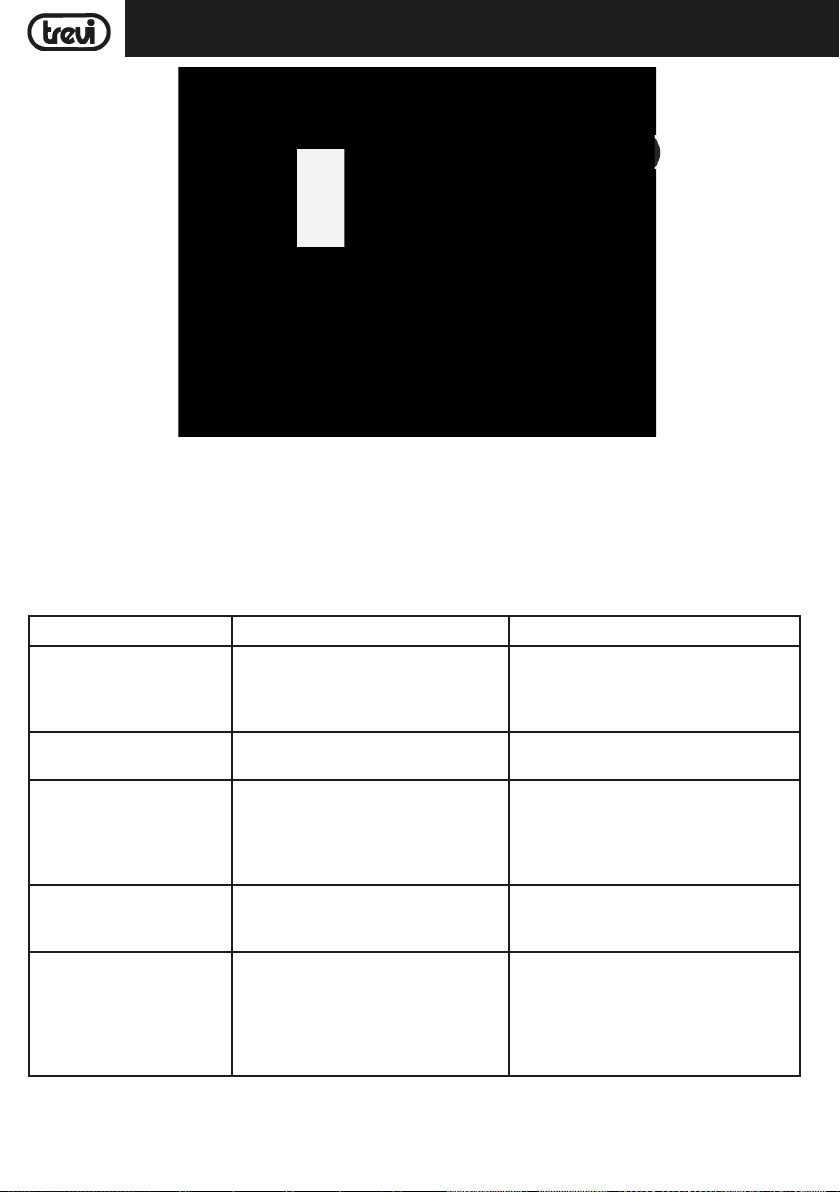
DÉPANNAGE
Si un problème se produit, suivez les étapes dans le tableau suivant.
Si le problème ne peut être résolu, contactez votre revendeur.
Problème Causes possibles Solution
Aucun son lorsque l'appareil est
en marche
Distorsion du son 1. Volume trop élevé
Aucun son du microphone 1. La prise de microphone ne peut pas être
Pas de son lorsque vous insérez
un périphérique USB
Vous ne pouvez pas charger
la batterie ou la batterie a un
court-terme
1. Sans Source sonore
2. Manopola Volume au niveau 0
3. Voce off Guide
4. Nessun Dispositif USB connecté
2. Errore Fichiers audio
correctement connecté.
2. Le contacteur d'allumage sur le microphone peut être en position "off".
3. Volume du microphone de basse.
1. Format de fichier non pris en charge
2. USB est pas correctement connecté
1. Branchez le cordon d'alimentation pour
recharger
2. La batterie est pas complètement
chargée
3. La batterie peut avoir exécuter son cycle
de vie
1. Connectez un appareil à la prise AUX-IN
2. Réglez le volume
3. Attivare le guidage vocal
4. Connecter USB jouer MP3
1. Baissez le volume
2. Vérifier et lire un autre fichier audio
1. Assurez-vous que le microphone est
correctement branché.
2. Allumez le microphone.
3. Réglez correctement le volume du
microphone
1. Le format de fichier audio doit être MP3
2. Connectez le périphérique USB correctement
1. Vérifiez si le câble d'alimentation est
correctement connecté
2. Normalement, il prend 5-6 heures pour
charger complètement la batterie
3. Remplacez la pile par une nouvelle avec
les mêmes spécifications techniques
20
Page 21
FRANCAIS
XF 1300 BEACH
Les haut-parleurs que vous
entendez des bruits forts
1. Microphone sur mais trop près
2. Microphone sur mais non utilisés
3. Volume du microphone peut être trop
élevé
4. Une cellule est utilisé trop près
5. Équipements sans fil peut être très proche de ceux qui utilisent le microphone
1. Tenez le microphone à 2 mètres du hautparleur
2. Éteignez le microphone si non utilisé
3. Abaisser le volume du microphone
4. Gardez le téléphone de haut-parleur
pendant un appel.
5. Gardez le haut-parleur loin de périphériques sans fil
NOTE D'INFORMATION SUR LE RETRAIT ET ÉLIMINATION DES BATTERIES
Attention: Seul le personnel de haute qualifié doit effectuer cette opération!
RETRAIT DE LA BATERIE
L'appareil ne doit pas être branché à la prise de courant lors de l'exécution de cette opération!
1. Retirez les vis qui resserrent le panneau en plastique arrière;
2. Retirez-le et localisez la batterie;
3. Déconnectez la batterie et retirez-la.
ÉLIMINATION DE LA BATTERIE
Les piles usagées ne doivent pas être jetés avec les déchets ménagers ou jetés dans le feu ou l'eau. Les batteries usagées doivent
être recyclés ou éliminés dans les centres de collecte de déchets séparés.
INFORMATIONS AUX UTILISATEURS
conformément au décret législatif N° 49 du 14 Mars, 2014
"La mise en œuvre de la directive 2012/19/UE relative aux déchets d'équipements électriques et électroniques (DEEE)"
Ce symbole de poubelle sur roues sur le produit indique que, à la fin de sa durée de vie doit être collecté séparément des autres
déchets. L'utilisateur doit donc prendre le contrôle à distance intègre les éléments essentiels qui ont obtenu à sa vie dans les centres
de collecte différenciés appropriés pour les déchets électroniques et électro-technique, ou le retourner chez le concessionnaire
lors de l'achat d'un nouvel appareil de type équivalent, en termes de un à un, ou une à zéro pour un équipement ayant le côté
plus long de moins de 25cm. collecte séparée appropriée pour l'équipement mis hors service pour le recyclage, le traitement
et l'élimination respectueuse de l'environnement contribue à éviter les effets négatifs sur l'environnement et la santé humaine et
favorise le recyclage des matériaux qui composent le produit. le dumping illégal du produit par l'utilisateur substitutions l'application
des sanctions administratives prévues par le décret législatif n. Décret législatif n° 49 du 14 Mars 2014.
CARACTÉRISTIQUES
Alimentation: ....................................................... 100-230V 50/60Hz
batterie interne plomb-acide rechargeable 12V , 4,5Ah
Consommation: ............................................................................. Max 80W
IPX: ...............................................4 (résistant aux éclaboussures)
Power Audio Maximum: ..................................................................................... 80W
Woofer: ....................................................................................... 10"
Tweeter: ......................................................................................... 3"
Réponse en fréquence: ....................................................................... 55Hz - 18KHz
Sensibilité d'entrée: ................................................................. 96±2db 1W/1M
Bluetooth Power Class: .......................................................................................... 2
Bluetooth de puissance d'émission de crête:
Transmission de puissance max Bluetooth:
Transmission de bande Bluetooth:
Dimensions: ................................................................. 520x365x258mm
Poids: .................................................................................. 9.5 Kg
............................................................................... 2,4GHz
................................................................ 2,5mW
.................................................................. 1,9mW
21
Page 22
DEUTSCH
XF 1300 BEACH
GEBRAUCHSHINWEISE
Wenn Sie längere Zeit mit hoher Lautstärke hören, kann dies Ihr Gehör schädigen.
Positionieren Sie den Player nicht:
- In der Nähe von Magnetfeldern.
- In der Nähe von Wärmequellen wie Heizungen und Heizungen.
- An sehr feuchten Orten wie Badezimmern, Schwimmbädern usw.
- An sehr staubigen Orten.
- An Orten, die starken Vibrationen ausgesetzt sind.
- Platzieren Sie Ihr Ohr während der Einstell- und Lautstärkeeinstellungen nicht in der Nähe des Lautsprechers. Halten Sie
insbesondere während der Zündphase die Lautstärke auf ein Minimum.
- Stellen Sie das Gerät so auf, dass an den Seiten immer genügend Platz für die freie Luftzirkulation vorhanden ist (mindestens
5 cm).
- Wenn Flüssigkeiten in das Gerät gelangen, ziehen Sie sofort den Stecker aus der Steckdose und bringen Sie das Gerät zum
nächsten autorisierten TREVI-Servicecenter.
- Prüfen Sie vor dem Aufladen des Geräts immer, ob die Netz- und Verbindungskabel korrekt installiert sind.
- Stellen Sie keine offenen Flammen wie z. B. brennende Kerzen auf das Gerät.
- Das Gerät darf keinem tropfenden oder spritzenden Wasser ausgesetzt werden. Es dürfen keine mit Flüssigkeiten gefüllten
Gegenstände (z. B. Vasen) auf dem Gerät abgestellt werden.
- Weisen Sie Kinder und Personen mit unzureichenden Kenntnissen des Produkts an, sie richtig zu verwenden.
- Bewahren Sie dieses Handbuch zum späteren Nachschlagen auf.
PFLEGE UND WARTUNG
Für die Reinigung wird die Verwendung eines leicht angefeuchteten, weichen Tuchs empfohlen. Der Einsatz von Lösungsmitteln
oder scheuernden Substanzen sollte vermieden werden.
WICHTIG
Dieses Gerät ist für den Heimgebrauch (nicht professionellen Gebrauch). Der fachgemäße Bau dieses Geräts gewährleistet
langfristig einen einwandfreien Betrieb. Sollten dennoch Betriebsstörungen auftreten, wenden Sie sich bitte an nächstgelegene
autorisierte TREVI-Kundendienststelle.
Die Firma TREVI verfolgt eine Politik ständiger Forschung und Weiterentwicklung. Die Produkte können daher andere als die
beschriebenen Eigenschaften aufweisen.
BESCHREIBUNG DER ANSCHLÜSSE/BEDIENELEMENTE
29
22
Page 23
XF 1300 BEACHDEUTSCH
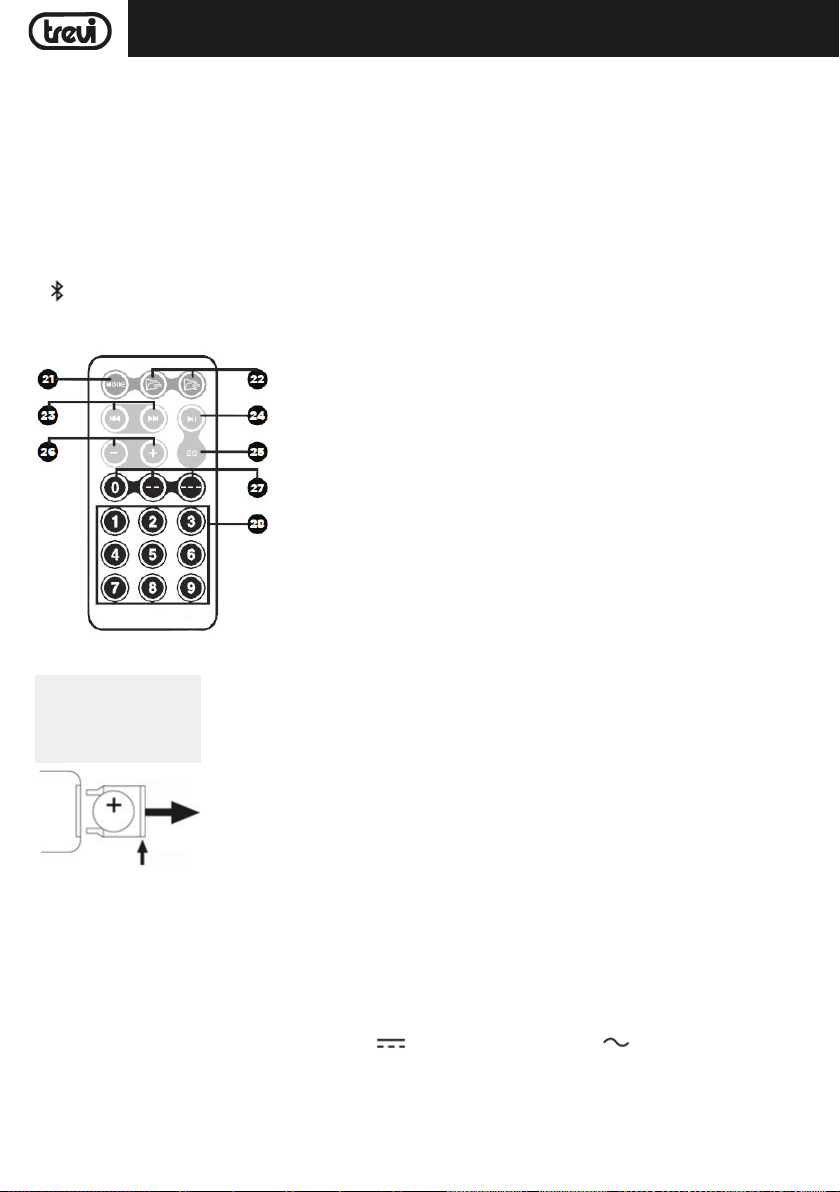
1. Anzeige
2. MIC 1/ Gitarreneingang
3. MIC 2/ Gitarreneingang
4. MIC1 VOL, Lautstärkeeinstellung für Mikrofon / Gitarre
5. MIC2 VOL, Lautstärkeeinstellung für Mikrofon / Gitarre
6. ECHO-Mikrofoneinstellung
7. AUX IN-Eingang
8. USB-Buchse
9. Fernbedienungsempfänger
10. <Taste, vorheriger
11. SOURCE-Taste, Funktionsauswahl
12. -Taste, Bluetooth
FERNBEDIENUNG
21. MODE-Taste: Audioquelle auswählen (USB/Bluetooth)
22. BACK/FWD-Ordnerschaltflächen Navigieren Sie zum vorherigen oder nächsten
Ordner
23. 9/: Track-Buttons: Vorherigen oder nächsten Track abspielen
24. ,Play, Wiedergabe oder Pause des aktuellen Titels
25. EQ-Modus-Taste
26. - / + Lautstärketasten: Lautstärke erhöhen oder verringern
27. 0/--/--- Direkteingabetasten: Zur Eingabe von Zehnern und Hunderten
28. Nummerntasten: Für numerische Eingabe
13. Taste LIGHTS, Aktivierung/Deaktivierung der vorderen/
hinteren LEDs (Disco Light)
14. >Taste, weiter
15. taste: Wiedergabe/Pause-Taste, gedrückt halten:
Ordnerauswahl
16. DSP vor der Entzerrung: NORMAL/POP/ROCK
17. Stellen Sie die allgemeine Lautstärke ein und drücken Sie
sie, um die Bässe und Höhen einzustellen
18. Pre-Equalization DSP: CLASSICAL/COUNTRY/JAZZ
19. Buchse zum Einstecken des Netzkabels
20. POWER ON/OFF-Schalter (Ein/Aus)
29. Mikrofon
AKTIVIERUNG UND ERSATZ DER BATTERIE DER FERNBEDIENUNG
ZIEHEN SIE DEN
KUNSTSTOFFTEIL
2- ZIEHEN
1- DRÜCKEN
Die Fernbedienung ist mit einer CR2025-Batterie ausgestattet
Um die Batterie der Fernbedienung (im Lieferumfang enthalten) zu aktivieren,
entfernen Sie die Plastikschutzlasche.
Für den Batteriewechsel:
1. Schieben Sie das Kunststofffach des Akkus nach rechts;
2. Entfernen Sie das Batteriefach;
3. Legen Sie eine neue Batterie ein und achten Sie auf die Polarität;
4. Schließen Sie das Batteriefach.
TRANSPORT
Drücken Sie die Taste am Griff des Wagens, heben Sie den Griff bis zum Block (Sie hören ein metallisches Klicken). Zum Transport
biegen Sie das Gerät durch Betätigen des Griffs des Wagens leicht und nutzen Sie die beiden seitlichen Räder.
Zum Entriegeln und Schließen des Wagens drücken Sie erneut die Taste am Griff und senken Sie den Griff vollständig ab.
BATTERIEVERSORGUNG/AUFLADUNG
Dieses Gerät arbeitet mit wiederaufladbaren Blei und 12V , 4,5Ah, Stromversorgung 230V 50Hz.
Wenn der Akku nicht aufgeladen ist oder sich das Gerät nicht einschalten lässt, stellen Sie den Hauptschalter(20) auf "OFF"(AUS),
stecken Sie das Netzkabel in die Buchse(19) des Geräts und stecken Sie es in eine Steckdose zum Aufladen der internen Batterie;
Die Segmente des Akkusymbols im Display(1) beginnen zu blinken.
Wenn der Ladevorgang abgeschlossen ist, bleiben die Segmente des Akkusymbols unverändert.
Hinweis: Schließen Sie das Gerät nicht an eine Steckdose mit einer anderen als der angegebenen Spannung an.
23
Page 24

DEUTSCH
XF 1300 BEACH
GRUNDFUNKTIONEN
EIN/AUSSCHALTEN
Stellen Sie den Hauptschalter POWER ON/OFF(20) auf "ON", um das Gerät einzuschalten und das Gerät mit seiner internen
Batterie zu verwenden.
Stellen Sie den Hauptschalter POWER ON/OFF(20) auf "OFF", um das Gerät vollständig auszuschalten oder den Akku aufzuladen.
DOPPELFUNKTIONSTASTEN
Die folgenden Tasten am Gerät haben eine Doppelfunktion, je nachdem, wie lange sie gedrückt werden:
- Taste <(10): Durch kurzes Drücken wird der zuletzt gespielte Titel oder der vorherige Titel abgespielt. Lang drücken, um die
Lautstärke zu verringern.
- Taste >(14): Durch kurzes Drücken wird der nächste nachfolgende Titel abgespielt. Lang drücken, um die Lautstärke zu
erhöhen.
- -Taste(15): Durch kurzes Drücken wird die Pause des aktuellen Titels oder der Start der Wiedergabe aktiviert. Durch
langes Drücken wird das Gerät in den "Ordnermodus" versetzt, so dass Sie mit den Tasten <(10) und >(14) alle Ordner im
USB-Speicher navigieren können.
- Allgemeiner Lautstärkeregler(17): Langes Drücken versetzt das Gerät in den "Mute" -Modus. Drücken Sie es erneut, um den
Ton wiederherzustellen.
MODUS EINSTELLUNG FUNKTION
Um den Betriebsmodus zu ändern, drücken Sie mehrmals die SOURCE-Taste(11) am Gerät oder drücken Sie die MODE-Taste(21)
an der Fernbedienung, um auszuwählen: BLUETOOTH ("BLUE" erscheint im Display), RADIO (die Frequenz erscheint im Display),
USB (nur wenn auf der Fernbedienung USB-Buchse(8) Wenn ein Speicher angeschlossen ist, erscheint eine kleine "USB" -Meldung
im Display), AUX-IN ("LINE" erscheint im Display).
LAUTSTÄRKE
1. Drehen Sie den VOLUME-Regler(17), um die allgemeine Wiedergabelautstärke zu erhöhen oder zu verringern, oder verwenden
Sie die Tasten -/+(26) auf der Fernbedienung.
2. Drehen Sie den Regler MIC VOL1(4) oder MIC VOL2(5), um die Lautstärke des Signals am Eingang MIC1(2) oder MIC 2(3)
einzustellen.
PRE-EQUALIZER
Dieses Gerät verfügt über ein voreingestelltes Audio-Entzerrungssystem. Drücken Sie mehrmals die EQ-Taste(5) auf der Fernbedienung, um einen der 6 verfügbaren Audio-Equalizer auszuwählen, oder wählen Sie ihn direkt mit der entsprechenden Taste
unter den auf der Einheit (16 und 18) angegebenen Tasten aus, die für die aktuelle Klangwiedergabe am besten geeignet sind .
EINSTELLUNG TONE HöHEN UND BäSSE
So stellen Sie den Bass- und Höhenklang separat ein:
1. Drücken Sie den VOLUME-Knopf(17) einmal am Gerät, um die Basstöne einzustellen. Im Display erscheint ein "b". Drehen Sie
den Knopf, um die Einstellung vorzunehmen.
2. Drücken Sie den VOLUME-Knopf(17) am Gerät ein zweites Mal, um die hohen Töne einzustellen. Auf dem Display wird ein "t"
angezeigt. Drehen Sie den Knopf, um die Einstellung vorzunehmen.
3. Drücken Sie den VOLUME-Regler(17) ein drittes Mal, um zur Lautstärkeregelung zurückzukehren (im Display mit "v" angezeigt).
ECHO EFFECT
Drehen Sie den ECHO-Knopf(6), um den Echoeffekt am Eingang MIC1/2 zu erhöhen oder zu verringern.
Hinweis: das Echo funktioniert nur auf Mikrofoneingänge.
DISCO-LICHTEFFEKTE
Drücken Sie die LIGHTS-Taste(13) am Gerät, um den Disco-Light-Effekt zu aktivieren.
Um den Disco-Light-Effekt zu deaktivieren, drücken Sie erneut die LIGHTS-Taste(13) am Gerät.
USB-LADEAUSGANG
Über die USB-Buchse(8) können externe Geräte wie Smartphones oder Tablets aufgeladen werden.
- Schließen Sie Ihr externes Gerät mit dem entsprechenden Kabel (nicht mitgeliefert) an die USB-Buchse(8) an.
- Die Ladeanzeige am externen Gerät zeigt den aktuellen Ladestatus an.
24
Page 25

DEUTSCH
XF 1300 BEACH
UKW-FUNK-MODUS
Um den FM-Modus zu verwenden, müssen Sie zuerst scannen für starke Stationen in Ihrer Nähe. Um das zu beginnen Scannen,
drücken Sie die -Taste(15). Dieser Wille Beginnen Sie mit dem Scannen, und alle starken Signale werden angezeigt als
Voreinstellungen gespeichert.
Sobald der Scanvorgang abgeschlossen ist, werden Sie es tun können Sie mit den Tasten
gespeicherten Stationsvoreinstellungen. Presets werden sein nummeriert, und die UKW-Frequenz wird sein angezeigt.
<(10) und >(14) zu springen die
BLUETOOTH-BETRIEB
1. Schalten Sie das Gerät ein und drücken Sie die Taste (12) am Gerät oder drücken Sie die MODE-Taste(21) an der Fernbedienung und wählen Sie die Bluetooth-Funktion. Auf dem Display erscheint das Wort "BLUE";
2. IIm Bluetooth-Modus blinken Wort "BLUE" im Display und das System wechselt automatisch in den Suchmodus;
3. Aktivieren Sie die Bluetooth-Funktion des zu koppelnden externen Geräts;
4. Starten Sie eine Suche nach Geräten. Wählen Sie anschließend "XF 1300 BEACH" aus;
5. Eben Sie ggf. das Passwort "0000" ein;
6. Drücken Sie die
Tasten <(10) oder >(14) am Gerät oder die Tasten
-Taste(15) am Gerät oder an der Fernbedienung, um die Wiedergabe zu star ten, und verwenden Sie die
9/: der Fernbedienung Steuerung zum Auswählen der Titel.
SPIELEN SIE AUF INPUT USB
1. Schalten Sie das Gerät ein;
2. Stecken Sie einen USB-Speicher in die Buchse(8). Die Wiedergabe startet automatisch;
3. Um die Wiedergabe zu unterbrechen, drücken Sie die-taste(15) am Gerät oder die-taste (24) der Fernbedienung.
Auf dem Display erscheint das Wort "PAUS";
4. Um die Wiedergabe fortzusetzen, drücken Sie
5. Wählen Sie mit den Tasten (22) der Fernbedienung einen bestimmten Ordner im USB-Speicher aus;
6. Drücken Sie während des Abspielens die Taste >(14) am Gerät oder die 9-taste(23) der Fernbedienung, um zum nächsten
Titel zu gelangen. Drücken Sie die Taste <(10) am Gerät oder die :-taste(23) der Fernbedienung, um zum vorherigen Titel
zu springen;
7. Mit dem Ziffernblock(28) der Fernbedienung können Sie die Nummer des Musiktitels direkt eingeben, den Sie abspielen
möchten.
Hinweis:
- Der Player unterstützt möglicherweise einige USB-Geräte nicht. Dies ist auf die Inkompatibilität einiger Prozessoren
zurückzuführen.
- Zur Vermeidung funktechnischer Störungen, immer eine Verbindung USB-Geräte direkt an das Gerät, verwenden Sie keine
Verlängerungskabel.
- Vom Computer zum Formatieren des USB-Speichers FAT (16 oder 32).
-taste(15)
am Gerät oder auf der Fernbedienung;
AUX-IN
1. Drücken Sie die SOURCE-Taste(11) am Gerät oder drücken Sie die MODE-Taste(21) der Fernbedienung und wählen Sie die
Funktion "LINE IN";
2. Verbinden Sie ein beliebiges Gerät mit Audioausgang über das entsprechende 3,5-mm-Klinkenkabel (nicht mitgeliefert) mit
dem Eingang AUX IN(7);
3. Passen Sie das externe Gerät über Ihre Befehle an.
25
Page 26
DEUTSCH
XF 1300 BEACH
MIKROFON
1. Schließen Sie das mitgelieferte Mikrofon an den Eingang MIC1(2) oder MIC2(3) an;
2. Schalten Sie das Mikrofon ein, indem Sie den Schalter am Mikrofongriff auf ON stellen;
3. Passen Sie die Mikrofonlautstärke und den Echoeffekt mit den entsprechenden Befehlen (4/5/6) wie gewünscht an.
FEHLERBEHEBUNG
Wenn ein Problem auftritt, führen Sie die Schritte in der folgenden Tabelle.
Wenn das Problem nicht behoben werden kann, kontaktieren Sie Ihren Händler.
Problem Mögliche Ursachen Lösung
Kein Ton, wenn das Gerät eingeschaltet ist
Verzerrter Ton 1. Die Lautstärke ist zu hoch
Kein Ton aus dem Mikrofon 1. Die Mikrofonbuchse kann nicht richtig
Kein Ton, wenn Sie ein USB
einsetzen
Kann nicht den Akku laden oder
die Batterie hat eine kurzfristige
1. Keine Quelle Ton
2. Lautstärkeregler auf Stufe 0
3. USB-Gerät angeschlossen
2. Dateifehler Audio
angeschlossen werden.
2. Das Zündschloss am Mikrofon kann
in Stellung "Aus" sein.
3. Lautstärke des Bass-Mikrofon.
1. Dateiformat wird nicht unterstützt
2. USB ist nicht richtig angeschlossen
1. Schließen Sie das Netzkabel zum
Aufladen
2. Die Batterie ist nicht vollständig
geladen
3. Die Batterie kann haben seinen
Lebenszyklus laufen
1. Schließen Sie ein Gerät an den AUX-IN
2. Stellen Sie die Lautstärke
3. Verbinden Sie USB spielen MP3
1. Drehen Sie die Lautstärke
2. Überprüfen Sie und spielen eine andere Datei
Audio
1. Stellen Sie sicher, dass das Mikrofon richtig
angeschlossen ist.
2. Schalten Sie das Mikrofon.
3. richtig einstellen Die Lautstärke des Mikrofons
1. Die Audio-Dateiformat muss MP3 sein
2. Verbinden Sie das USB-Gerät richtig
1. Überprüfen Sie, ob das Netzkabel richtig
angeschlossen ist
2. Normalerweise dauert es 5-6 Stunden
vollständig um die Batterie aufzuladen
3. Setzen Sie die alte Batterie durch eine neue
mit den gleichen technischen Spezifikationen
26
Page 27
DEUTSCH
XF 1300 BEACH
Die Lautsprecher hören Sie laute
Geräusche
1. Mikrofon auf, aber zu nah
2. Mikrofon auf, aber nicht verwendet
3. Lautstärke des Mikrofons kann zu
hoch sein,
4. Eine Zelle verwendet wird, zu nahe an
5. Drahtlose Geräte können zu denen
sehr nahe sein, die das Mikrofon
verwenden
1. Halten Sie das Mikrofon zu 2 Meter entfernt
vom Lautsprecher
2. Schalten Sie das Mikrofon, wenn nicht
verwendet
3. Senken Sie die Lautstärke des Mikrofons
4. Halten Sie das Telefon aus dem Lautsprecher
entfernt, während Sie einen Anruf tätigen.
5. Halten Sie den Lautsprecher weg von
Wireless-Geräten
INFORMATIONEN HINWEIS AUF DIE ENTFERNUNG UND ENTSORGUNG VON BATTERIEN
Achtung: Nur qualitativ qualifiziertes Personal darf diese Operation durchzuführen!
BATTERIE AUSBAUEN
Das Gerät darf nicht an die Netzsteckdose angeschlossen werden um diesen Vorgang auszuführen!
1. Entfernen Sie die Schrauben, mit denen die hintere Kunststoffplatte befestigt ist;
2. Nehmen Sie es heraus und suchen Sie die Batterie;
3. Trennen Sie die Batterie und entfernen Sie sie.
INFORMATIONEN ÜBER DIE ENTSORGUNG VON AKKU
Verbrauchte Batterien gehören nicht in den Hausmüll entsorgt werden oder in Feuer oder Wasser geworfen. Gebrauchte Batterien
müssen recycelt oder in separaten Sammelstellen entsorgt werden.
Informationen für die Nutzer
gemäß Gesetzesdekret Nr 49 von 14, März 2014
"Die Umsetzung der Richtlinie 2012/19/EU über die Entsorgung von Elektro- und Elektronik-Altgeräte (WEEE)"
Dieses Symbol der Mülltonne auf dem Produkt weist darauf hin, dass das Produkt am Ende seiner Lebensdauer getrennt von
anderem Abfall gesammelt werden muss. Der Benutzer muss daher die Fernbedienung dazu bringen, die wesentlichen Bestandteile,
die zu seinem Leben geführt haben, in die entsprechenden, differenzier ten Sammelstellen für Elektronik- und Elektrotechnik-Abfälle
zu integrieren, oder diese beim Kauf eines neuen Geräts des gleichwertigen Typs an den Händler zurückzusenden von eins zu
eins oder eins zu null für Geräte mit einer längeren Seite von weniger als 25cm. Eine geeignete getrennte Sammlung der außer
Betrieb genommenen Geräte für das Recycling, die Verarbeitung und die umweltgerechte Entsorgung trägt dazu bei, negative
Auswirkungen auf die Umwelt und die menschliche Gesundheit zu vermeiden, und fördert das Recycling der Materialien, aus
denen das Produkt besteht. Illegales Dumping des Produkts durch den Benutzer führt zur Anwendung von Verwaltungssanktionen
gemäß Gesetzesdekret Nr. N. Gesetzesdekret Nr. 49 vom 14. März 2014..
TECHNISCHE DATEN
Stromversorgung: ....................................................... 100-230V 50/60Hz
Verbrauch: ............................................................................. Max 80W
IPX: ..................................................... 4 (spritzwassergeschützt)
Maximale Audio-Leistungs: ..................................................................................... 80W
Woofer: ....................................................................................... 10"
Tweeter: ......................................................................................... 3"
Frequenzgang: ...................................................................... 55Hz - 18KHz
Eingangsempfindlichkeit: ................................................................. 96±2db 1W/1M
Bluetooth Power Class: .......................................................................................... 2
Spitzensendeleistung Bluetooth: ................................................................................. 2,5mW
Sendeleistung max Bluetooth: ................................................................................. 1,9mW
Band Übertragung Bluetooth: ................................................................................. 2,4GHz
Größe: ................................................................. 520x365x258mm
Gewicht: .................................................................................. 9,5 Kg
interne wiederaufladbare Blei-Säure-Batterie 12V , 4,5Ah
27
Page 28
ESPANOL
XF 1300 BEACH
NOTAS PARA EL USO
Escuchar a un volumen alto durante mucho tiempo puede dañar su audición.
Este aparato es un instrumento electrónico de alta precisión; por lo tanto debe evitar utilizarlo en los siguientes casos:
- Cerca de fuertes fuentes de calor como caloríferos y estufas.
- Escuchar un volumen alto durante mucho tiempo podría dañar su audición.
- No cierre el oído al altavoz durante el ajuste por pasos y los ajustes de volumen y, en particular, mantenga el volumen bajo
en el encendido
- En lugares muy húmedos como cuartos de baño, piscinas, etc...
- En lugares muy polvorientos.
- En lugares sujetos a fuertes vibraciones.
- Posicione el aparato de manera que el espacio circundante sea amplio para la libre circulación del aire (por lo menos 5cm).
- No obstruya las ranuras de ventilación.
- Si penetran líquidos dentro del aparato, desconecte inmediatamente el enchufe de la toma de corriente y lleve el aparato al
centro de asistencia autorizado TREVI más cercano.
- Siempre compruebe que los cables de alimentación y de conexión estén instalados correctamente antes de encender el
aparato.
- El aparato no debe exponerse a goteos o salpicaduras de agua. Los objetos que contengan líquidos, como floreros, debe ser
colocado en la unidad.
- No hay fuente de llamas, como una vela encendida, se deben colocar en.
- Mantenga este manual.
CUIDADO Y MANTENIMIENTO
Para efectuar la limpieza se aconseja utilizar un paño suave, ligeramente humedecido. Evite solventes o sustancias abrasivas.
IMPORTANTE
Este dispositivo está diseñado para uso doméstico (uso no profesional). La buena construcción del aparato garantiza su perfecto
funcionamiento durante mucho tiempo. Si se presentase algún inconveniente, será oportuno consultar al Centro de Asistencia
autorizado TREVI más cercano.
TREVI cultiva una política de investigación y desarrollo continuos. Por consiguiente, los productos pueden presentar características
distintas a las descritas.
DESCRIPCIÓN DE LOS CONECTORES/MANDOS
29
28
Page 29
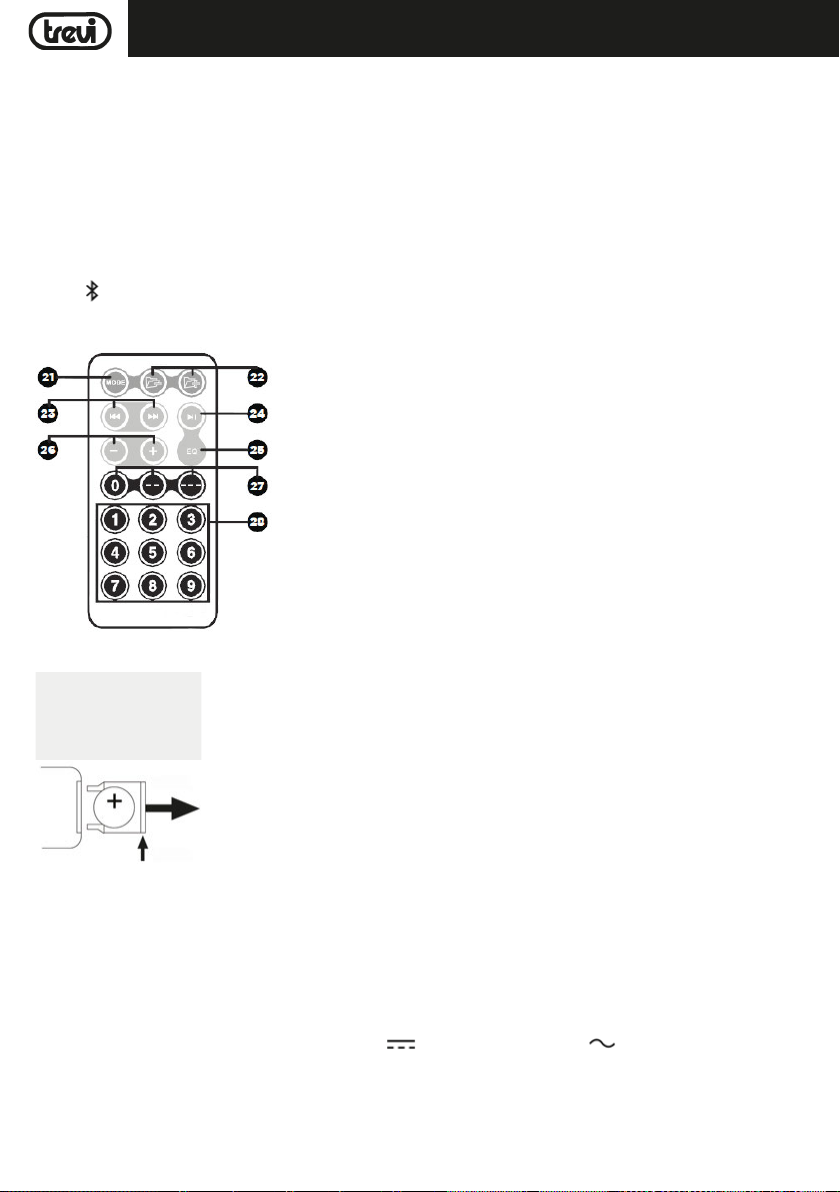
ELLEHNIKA
ESPANOL
XF 1300 BEACH
1. Display
2. MIC 1/entrada de guitarra
3. MIC 2/entrada de guitarra
4. MIC1 VOL, ajuste de volumen de micrófono/guitarra
5. MIC2 VOL, ajuste de volumen de micrófono/guitarra
6. Ajuste del micrófono ECHO
7. Entrada AUX IN
8. Conector USB
9. Receptor de control remoto
10. < tecla, anterior
11. Botón SOURCE, selección de función
12. Tecla , Bluetooth
MANDO A DISTANCIA
21. Botón MODE: Seleccione la fuente de audio (USB / Bluetooth)
22. Botones de la carpeta BACK/FWD Navegar a la carpeta Previous o Next
23. 9/:Botones de pista: Reproducir pista anterior o siguiente
24. Reproducir o pausar la pista actual
25. Tecla de modo EQ
26. -/+ Botones de volumen: aumentar o disminuir el volumen
27. 0/--/--- Botones de entrada directa: para introducir decenas y centenas.
28. Botones numéricos: para entrada numérica
13. Tecla LIGHTS, activación/desactivación de los LED delanteros/traseros (Disco Light)
14. > tecla, siguiente
15. Tecla, botón Reproducir/Pausa, presionando: selección de carpeta
16. DSP pre-ecualización: NORMAL/POP/ROCK
17. Ajustando el volumen general, presionándolo para ajustar
los tonos graves y agudos
18. DSP de pre-ecualización: CLASSICAL/COUNTRY/JAZZ
19. Conector para la inserción del cable de alimentación.
20. Interruptor POWER ON/OFF (encendido/apagado)
29. Micrófono
ACTIVACIÓN Y REEMPLAZO DE LA BATERÍA DE CONTROL REMOTO
TENER LA LINGUETTA
2- TIRE
1- EMPUJAR
El mando a distancia está equipado con una batería CR2025
Para activar la batería del control remoto (incluido), retire la pestaña de protección de plástico.
Para reemplazar la batería:
1. Empuje el soporte de plástico del compartimiento de la batería hacia la
derecha;
2. Retire el compartimiento de la batería;
3. Inserte una nueva batería cuidando de respetar las polaridades;
4. Cierre el compartimiento de la batería.
TRANSPORTE
Presione el botón en el asa del carro, levante el asa hasta el bloque (oirá un clic metálico). Para el transporte, actuando sobre el
asa del carro, doble ligeramente el aparato y aproveche las dos ruedas laterales.
Para desbloquear y cerrar el carro, vuelva a presionar el botón de la palanca y baje la palanca por completo.
ALIMENTACION
Esta unidad funciona con batería de plomo recargable 12V , 4,5Ah y red eléctrica 230V , 50Hz.
Cuando la batería no esté cargada o la unidad no se encienda, gire el interruptor principal de POWER ON/OFF(20) a la posición
"OFF", inserte el cable de alimentación en el enchufe(19) del dispositivo y enchúfelo a un Toma de corriente para recargar la
batería interna; Los segmentos del ícono de la batería en la pantalla(1) comenzarán a parpadear.
Una vez que se complete la carga, los segmentos del ícono de la batería permanecerán fijos.
Nota: No conecte el dispositivo a un tomacorriente con un voltaje diferente al indicado.
29
Page 30

ESPANOL
XF 1300 BEACH
FUNCIONES BÁSICAS
ENCENDIDO/APAGADO
Ajuste el interruptor principal POWER ON/OFF(20) en "ON" para encender y usar el dispositivo con su batería interna.
Ajuste el interruptor principal POWER ON/OFF(20) en "OFF" para apagar completamente el dispositivo o cargar la batería.
DOBLE TECLAS DE FUNCION
Las siguientes teclas de la unidad tienen una función doble según el tiempo que se presionen:
- Tecla <(10): una pulsación corta reproduce la última pista reproducida o la pista anterior. Mantenga pulsado para bajar el
volumen.
- Tecla >(14) tecla: una pulsación corta reproduce la siguiente pista siguiente. Mantenga pulsado para aumentar el volumen.
- ,(15) Tecla Reproducir / Pausa: una breve pulsación activa la pausa de la pista actual o el inicio de la reproducción. Una
pulsación larga pone la unidad en "Modo de carpeta", lo que le permite navegar dentro y fuera de las carpetas en la memoria
USB, usando las teclas <(10) y >(14).
- Botón de volumen general(17): una pulsación larga pone la unidad en modo "Mute", presiónelo nuevamente para restaurar el
sonido.
SELECION DE LAS FUNCIÓN
Para cambiar el modo de funcionamiento, presione varias veces el botón SOURCE(11) en la unidad o presione el botón MODE(21)
en el control remoto para seleccionar: BLUETOOTH ("BLUE" aparece en la pantalla), RADIO (la frecuencia aparece en la pantalla),
USB (solo si está en la pantalla Enchufe USB(8) una memoria está conectada, aparece un pequeño mensaje "USB" en la pantalla),
AUX-IN ("LINE" aparece en la pantalla).
AJUSTE DEL VOLUMEN
1. Gire la perilla VOLUME(17) para aumentar o disminuir el volumen general de reproducción o use las teclas -/+(26) en el
control remoto;
2. Gire la perilla MIC VOL1(4) o MIC VOL2(5) para ajustar el volumen de la señal en la entrada MIC1(2) o MIC 2(3).
ECUALIZADOR
Esta unidad tiene un sistema de ecualización de audio preestablecido. Presione varias veces el botón EQ(5) en el control remoto
para seleccionar uno de los 6 ecualizadores de audio disponibles o selecciónelo directamente usando el botón correspondiente
entre los indicados en la unidad (16 y 18) y que mejor se adapte a la reproducción de sonido actual.
AJUSTE DE TONO AGUDOS Y BASS
Para ajustar por separado el sonido de graves y agudos:
1. Presione el perilla VOLUME(17) en la unidad una vez para ajustar los tonos bajos, aparecerá una "b" en la pantalla. Gire la
perilla para hacer el ajuste;
2. Presione la perilla VOLUME(17) en la unidad por segunda vez para ajustar los tonos altos, aparecerá una "t" en la pantalla.
Gire la perilla para hacer el ajuste;
3. Presione la perilla VOLUME(17) en la unidad por tercera vez para regresar al control de volumen (que se muestra en la pantalla
con una "v").
EFECTO ECHO
Gire el mando ECHO(6) para aumentar o disminuir el efecto de eco en la entrada MIC1/2.
Nota: el eco sólo funciona en las entradas de micrófono.
EFECTO DISCO-LIGHT
Presione el botón LIGHTS(13) en la unidad para activar el efecto Disco-Light.
Para desactivar el efecto Disco-Light, presione nuevamente el botón LIGHTS(13) en la unidad.
SALIDA DE CARGA USB
- Conecte su dispositivo externo a la toma USB(8) usando el cable apropiado (no suministrado);
- El indicador de carga en el dispositivo externo indicará el estado de carga en progreso.
30
Page 31

XF 1300 BEACHESPANOL
MODO DE RADIO FM
Para usar el modo FM, primero deberá buscar estaciones fuertes en su área. Para comenzar el escaneo, presione el botón
(15). Esto comenzará a escanear, y cualquier señal fuerte será guardado como presets.
Una vez que se haya completado el escaneo, podrá usar los botones
estación. Los preajustes se numerarán y se mostrará la frecuencia de FM.
OPERACIÓN DE BLUETOOTH
1. Encienda el aparato y presione el botón (12) en la unidad o presione el botón MODE(21) en el control remoto y seleccione
la función bluetooth; la palabra "BLUE" aparecerá en la pantalla;
2. En el modo Bluetooth, la palabra "BLUE" en la pantalla comenzarán a parpadear y el sistema pasará automáticamente al modo
de búsqueda;
3. Active la función Bluetooth en el dispositivo externo que se va a acoplar;
4. Iniciar una búsqueda de dispositivos. Después de seleccionar el "XF 1300 BEACH";
5. Introduzca la contraseña "0000" si es necesario;
6. Presione el botón
o >(14) en la unidad, o los botones
button(15) en la unidad o en el control remoto para iniciar la reproducción y use los botones <(10)
9/:(23) en el control remoto Control para seleccionar las pistas.
REPRODUCCIÓN DE ENTRADA USB
1. Encienda el aparato;
2. Inserte una memoria USB en el zócalo(8). La reproducción comienza automáticamente;
3. Para pausar la reproducción, presione el botón(15) en la unidad o el botónen el control remoto; la palabra "PAUS"
aparecerá en la pantalla;
4. Para reanudar la reproducción, presione
5. Use los botones(22) en el control remoto para seleccionar una carpeta específica en la memoria USB;
6. Presione el botón >(14) en la unidad o el botón 9(23) en el control remoto, mientras escucha, para pasar a la siguiente
pista. Presione el botón <(10) en la unidad o el botón :(23) en el control remoto para saltar a las pistas anteriores;
7. Usando el teclado numérico(28) en el control remoto, puede ingresar directamente el número de la pista de música que desea
reproducir.
Nota:
- Es posible que el reproductor no admita algunos dispositivos USB, esto se debe a la incompatibilidad de algunos procesadores.
- Para evitar interferencias perjudiciales, siempre conecte los dispositivos USB directamente a la unidad, no use cables de
extensión.
- Desde la computadora para formatear la memoria USB FAT (16 o 32).
(15)
en la unidad o en el control remoto;
<(10) y >(14) para saltar a los presets guardados de la
AUX-IN
1. Presione el botón SOURCE(11) en la unidad o presione el botón MODE(21) en el control remoto y seleccione la función "LINE
IN";
2. Conecte cualquier unidad con salida de audio a través del cable jack de 3.5mm apropiado (no suministrado) a la entrada AUX
IN(7);
3. Ajuste el dispositivo externo de sus comandos.
31
Page 32
ESPANOL
XF 1300 BEACH
USANDO EL MICRÓFONO
1. Conecte el micrófono suministrado a la entrada MIC1(2) o MIC2(3);
2. Encienda el micrófono girando el interruptor de la manija del micrófono a la posición ON;
3. Ajuste el volumen de entrada del micrófono y el efecto de eco según lo desee utilizando los comandos apropiados (4/5/6);
SOLUCIÓN DE PROBLEMAS
Si se produce un problema, siga los pasos descritos en la siguiente tabla.
Si el problema no se puede resolver, póngase en contacto con su distribuidor.
Problema Posibles causas Solución
No hay sonido cuando la unidad
está encendida
Sonido distorsionado 1. El volumen es demasiado alto
No hay sonido desde el micrófono
No hay sonido cuando se inserta
una tarjeta de dispositivo USB
No se puede cargar la batería o
la batería tiene un corto plazo
1. No hay sonido de la fuente
2. Regulador de volumen en el nivel 0
3. Elemento de guía
4. No hay ningún dispositivo USB
conectado
2. Error de archivo de audio
1. La toma de micrófono no se puede
conectar correctamente.
2. El interruptor de encendido en el
micrófono puede estar en la posición
"off".
3. Volumen del micrófono bajo.
1. Formato de archivo no admitido
2. USB no está conectado correctamente
1. Conectar el cable de alimentación
para recargar
2. La batería no está completamente
cargada
3. La batería puede haber llegado a su
ciclo de vida
32
1. Conectar un dispositivo a la toma AUX-IN
2. Ajuste el volumen
3. Active la guía de voz
4. Conexión USB reproducir MP3
1. Bajar el volumen
2. Comprobar y reproducir otro archivo de
audio
1. Asegúrese de que el micrófono está conectado correctamente.
2. Encender el micrófono.
3. Ajuste correctamente el volumen del
micrófono
1. El formato de archivo de audio debe ser MP3
2. Conectar el dispositivo de tarjeta USB
correctamente
1. Compruebe si el cable de alimentación está
conectado correctamente
2. Normalmente se tarda 5-6 horas para cargar
completamente la batería
3. Vuelva a colocar la batería vieja por una
nueva con las mismas especificaciones
técnicas
Page 33
ESPANOL
XF 1300 BEACH
Los altavoces se oyen ruidos
fuertes
1. Micrófono en pero demasiado cerca
2. micrófono utilizado en acción, sin
3. Volumen del micrófono puede ser
demasiado alto
4. Una célula se utiliza demasiado cerca
5. Los equipos inalámbricos puede estar
muy cerca de aquellos que están
usando el micrófono
1. Mantenga el micrófono a 2 metros de distancia desde el altavoz
2. Apagar el micrófono si no se usa
3. Bajar el volumen del micrófono
4. Mantenga el teléfono lejos del altavoz mientras realiza una llamada.
5. Mantenga el altavoz alejado de dispositivos
inalámbricos
NOTA INFORMATIVA SOBRE LA ELIMINACIÓN Y TRATAMIENTO DE LAS PILAS
Advertencia: Sólo el personal de alta cualificación deberían poder realizar esta operación!
REMOCIÓN DE LA BATERÍA
¡El aparato no debe enchufarse a la toma de corriente al realizar esta operación!
1. Retire los tornillos que aprietan el panel de plástico trasero;
2. Retíralo y ubica la batería;
3. Desconecte la batería y retírela.
ELIMINACIÓN DE LA BATERÍA
Las pilas usadas no se deben tirar con la basura doméstica o arrojados al fuego o al agua. Las baterías usadas deben reciclarse
o desecharse en centros de recogida de residuos separados.
Información a los usuarios
el marco del Decreto Legislativo N° 49 del 14 de marzo 2014
"Aplicación de la Directiva 2012/19/UE sobre residuos de aparatos eléctricos y electrónicos (RAEE)"
Este símbolo de contenedor de ruedas en el producto indica que al final de su vida útil debe ser recogido separadamente de
los demás residuos. El usuario debe, por lo tanto, tomar el control remoto integra los componentes esenciales que llegaron
a su vida útil a los centros adecuados de recogida de residuos electrónicos y electrotécnicos, o devolverlo al distribuidor al
comprar un nuevo aparato de tipo equivalente, en términos de uno a uno, o uno a cero para el equipo que tiene lado más largo
de menos de 25cm. la recogida selectiva apropiado para el equipo fuera de servicio para su reciclaje, tratamiento y eliminación
ambientalmente compatible ayuda a prevenir el impacto negativo sobre el medio ambiente y la salud, favoreciendo el reciclaje
de los materiales que componen el producto. El vertido ilegal del producto por los usuarios conlleva la aplicación de las
sanciones administrativas establecidas en el Decreto Legislativo n. Decreto Legislativo N° 49 de 14 de marzo de 2014.
ESPECIFICACIONES
Fuente de alimentación: ....................................................... 100-230V 50/60Hz
batería de plomo recargable interna 12V , 4,5Ah
Consumo: ............................................................................. Max 80W
IPX: ................................................ 4 (resistencia a salpicaduras)
Potencia máxima de audio: ..................................................................................... 80W
Woofer: ....................................................................................... 10"
Tweeter: ......................................................................................... 3"
Respuesta de frecuencia: ...................................................................... 55Hz - 18KHz
Sensibilidad de entrada: ................................................................. 96±2db 1W/1M
Clase de potencia de Bluetooth: .......................................................................................... 2
Conexión Bluetooth de transmisión máxima:
Bluetooth potencia máxima de transmisión:
Bluetooth transmisión de banda: ................................................................................. 2,4GHz
Dimensiones: ................................................................. 520x365x258mm
Peso: .................................................................................. 9,5 Kg
................................................................ 2,5mW
................................................................. 1,9mW
33
Page 34
Dichiarazione di conformità UE semplificata
XF 1300 BEACH
Il fabbricante TREVI S.p.a. dichiara che il tipo di apparecchiatura "Speaker portatile" modello XF 1300 BEACH
Il testo completo della dichiarazione di conformità UE è disponibile al seguente indirizzo internet: www.trevi.it
é conforme alla direttiva 2014/53/EU.
Simplified EU Declaration Of Conformity
Hereby TREVI S.p.a declares that equipment type
"Power portable speaker with trolley" model XF 1300 BEACH
is in compliance with Directive 2014/53/EU.
The full text of the EU declaration of conformity is available at the following internet address www.trevi.it
34
Page 35

Page 36
Trevi S.p.A.
Strada Consolare Rimini-San Marino, 62
47924 Rimini (Rn) Italia
Tel. 0541/756420 Fax 0541/756430
www.trevi.it e-mail: [email protected]
Made in CHINA
 Loading...