

Page 1
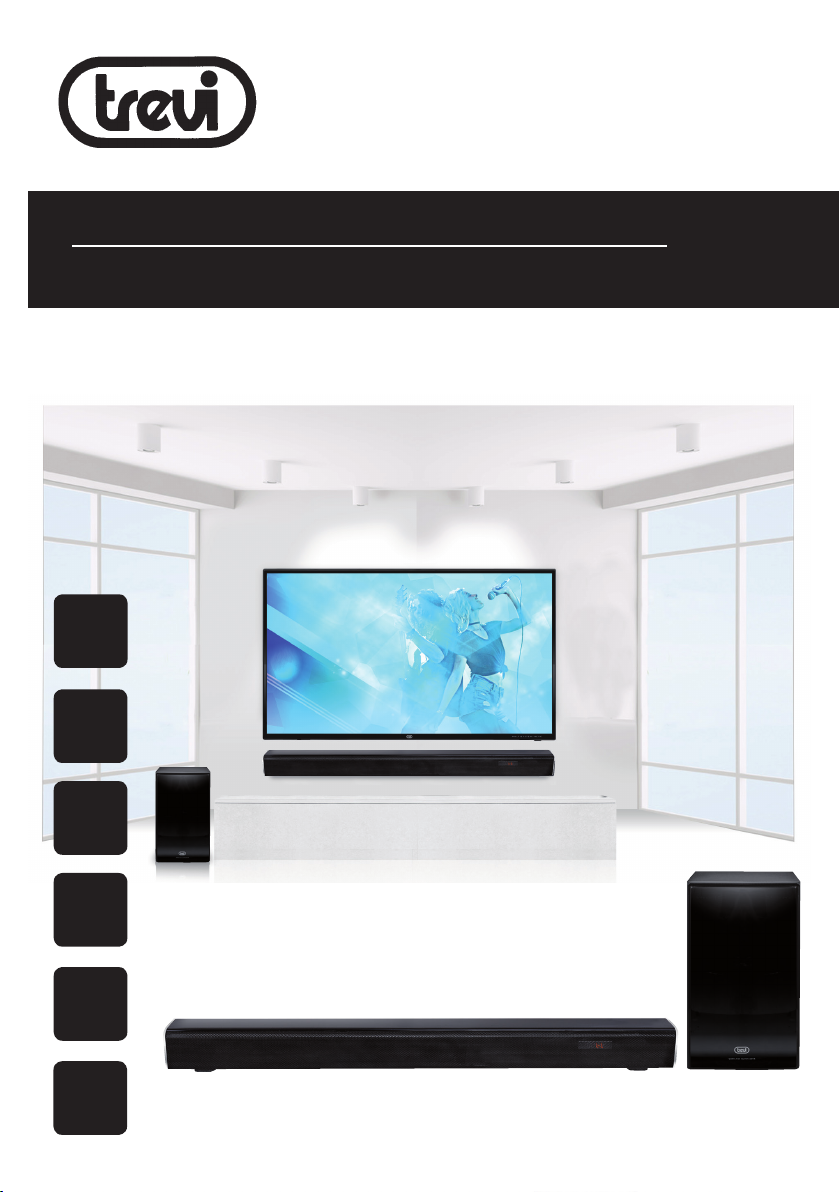
SB 8370 SW
Guida d’uso
User guide
SISTEMA STEREO 2.1 SOUNDBAR CON WIRELESS
SUBWOOFER
Manuale d'uso e collegamento
STEREO SISTEM 2.1 SOUNDBAR WITH WIRELESS
SUBWOOFER
Connection and Operation Manual
STEREO SISTEM 2.1 SOUNDBAR AVEC SUBWOOFER
SANS FIL
Mode d'emploi et branchement
BT
BLUETOOTH
2.1
SOUND
80 W
Wi
reless
Subwoofer
STEREO SISTEM 2.1 SOUNDBAR MIT DRAHTLOSEM SUBWOOFER
Gebrauchs- und Anschlusshandbuch
SISTEMA STEREO 2.1 BARRA DE SONIDO CON SUBWOOFER
INALÁMBRICO
Manual para el uso y la conexión
USB
player
OPTICAL
input
Per informazioni integrative ed aggiornamenti su questo prodotto visita www.trevi.it
For additional information and updates of this product see www.trevi.it
Page 2

Page 3
WARNING!
SB 8370 SW
ATTENZIONE
RISCHIO DI SCOSSE
ELETTRICHE!
NON ESPORRE A PIOGGIA E
UMIDITÀ
ATTENZIONE: NON APRITE L'APPARECCHIO. ALL'INTERNO NON VI
SONO COMANDI MANIPOLABILI DALL'UTENTE NE PARTI DI RICAMBIO.
PER TUTTE LE OPERAZIONI DI SERVIZIO RIVOLGERSI AD UN CENTRO
DI ASSISTENZA AUTORIZZATO TREVI
ATTENTION
RISQUE DE DECHARGES
ELECTRIQUES
NE PAS EXPOSER A LA PLUIE ET
A L’HUMIDITE
ATTENTION: NE PAS OUVRIR L’APPAREIL, A L’INTERIEUR IL N’Y A PAS
DE COMMANDES A MANIPULER PAR L’UTILISATEUR OU DE PIECES
DE RECHANGE. POUR TOUTES LES OPERATIONS DE SERVICE IL
FAUT S’ADRESSER A UN SERVICE D’ASSISTANCE AUTORISE TREVI.
ATENCION
PELIGRO DE CHOQUES
ELECTRICOS
NO EXPONER A LLUVIA Y
HUMEDAD
ATENCION: NO ABRIR EL APARATO, EN SU INTERIOR NO HAY MANDOS
QUE PUEDAN SER MANIPULADOS POR EL USUARIO NI PARTES DE
REPUESTO. PARA TODAS LAS OPERACIONES DE SERVICIO DIRIGIRSE
A UN CENTRO DE ASISTENCIA AUTORIZADO TREVI.
WARNING!
DANGER OF ELECTRIC SHOCK!
DO NOT EXPOSE TO
RAIN OR HUMIDITY
WARNING: DO NOT OPEN THE SET. NEITHER CONTROLS OR SPARE
PARTS TO BE USED BY THE USER ARE TO BE FOUND INSIDE IT.
APPLY TO AUTHORISED TREVI CENTERS FOR SERVICE OPERATIONS.
ACHTUNG
GEFAHR ELEKTRISCHER SCHLÄGE
NICHT DER FEUCHTIGKEIT UND
DEM REGEN AUSSETZEN
ACHTUNG: DAS GERÄT NICHT ÖFFNEN. IM INNERN BEFINDEN SICH
KEINE VOM BENUTZER SELBST INSTANDSETZBAREN TEILE UND
AUCH KEINE ERSATZTEILE. FÜR JEGLICHE SERVICEARBEITEN,
WENDEN SIE SICH BITTE AN EINE TREVI AUTORISIERTEN KUNDENDIENSTSTELLE.
UK PLUG ONLY
WIRES CONNECTIONS TO A UK THREE-PIN PLUG
The wires in this mains lead are coloured in accordance with the
following wiring codes:
Blue: ........................................ Neutral
Brown: ..................................... Live
The wires in this mains lead must be connected to the terminals in
the plug as follows:
Blue wire:.................................N or Black
Brown wire: ............................. L or Red
Neither wire is to be connected to the earth (E or W) terminal of
three-pin plug.
Should the fuse fail in the plug remove the plug form the wall socket
and replace the fuse with a 3 Amp. ASTA approved BS 1362 fuse.
3
Page 4
ITALIANO
SB 8370 SW
NOTE D'USO
● Posizionare l’apparecchio su una superficie piana.
● Posizionare l’apparecchio in modo che ai suoi lati ci sia sempre abbastanza spazio per la libera circolazione di
aria (almeno 5 cm).
● Ascoltare a volume alto per lungo tempo, potrebbe danneggiare il vostro udito.
● Tenere l’apparecchio lontano dai seguenti luoghi:
- Vicino a campi magnetici.
- Vicino a fonti di calore come caloriferi e stufe.
- In luoghi molto umidi come stanze da bagno, piscine, ecc...
- In luoghi molto polverosi.
- In luoghi soggetti a forti vibrazioni.
● Non collocare nessun oggetto sopra l’apparecchio.
● L’apparecchio non deve essere esposto a stillicidio o a spruzzi d’acqua e nessun oggetto pieno di liquido, quali
vasi, deve essere posto sull’apparecchio.
● Se dei liquidi penetrano all’interno dell’apparecchio scollegare immediatamente la spina dalla presa e portare
l’apparecchio al più vicino centro assistenza autorizato TREVI.
● Nessuna sorgente di fiamma nuda, quali candele accese, dovrebbe essere posta sull’apparecchio.
● I cavi devono essere nascosti e protetti onde evitare l’inciampo da parte di qualcuno e la conseguente caduta
dell’apparecchio.
● Scollegare il cavo di alimentazione durante i temporali o per lunghi periodi di inutilizzo.
● Istruire al corretto utilizzo bambini e persone con scarse conoscenze del prodotto.
● Conservare il presente manuale per futuri riferimenti.
Per evitare possibili danni all’udito, limitare il tempo di ascolto a volumi elevati
CURA E MANUTENZIONE
Per la pulizia si consiglia l’ uso di un panno morbido, leggermente inumidito. Evitate solventi o sostanze abrasive.
IMPORTANTE
La buona costruzione di questo apparecchio ne garantisce per lungo tempo il perfetto funzionamento. Se tuttavia
dovesse presentarsi qualche inconveniente, sarà oppor tuno consultare il più vicino Centro Assistenza autorizzato TREVI.
TREVI persegue una politica di continua ricerca e sviluppo. Pertanto i prodotti possono presentare caratteristiche
diverse da quelle descritte.
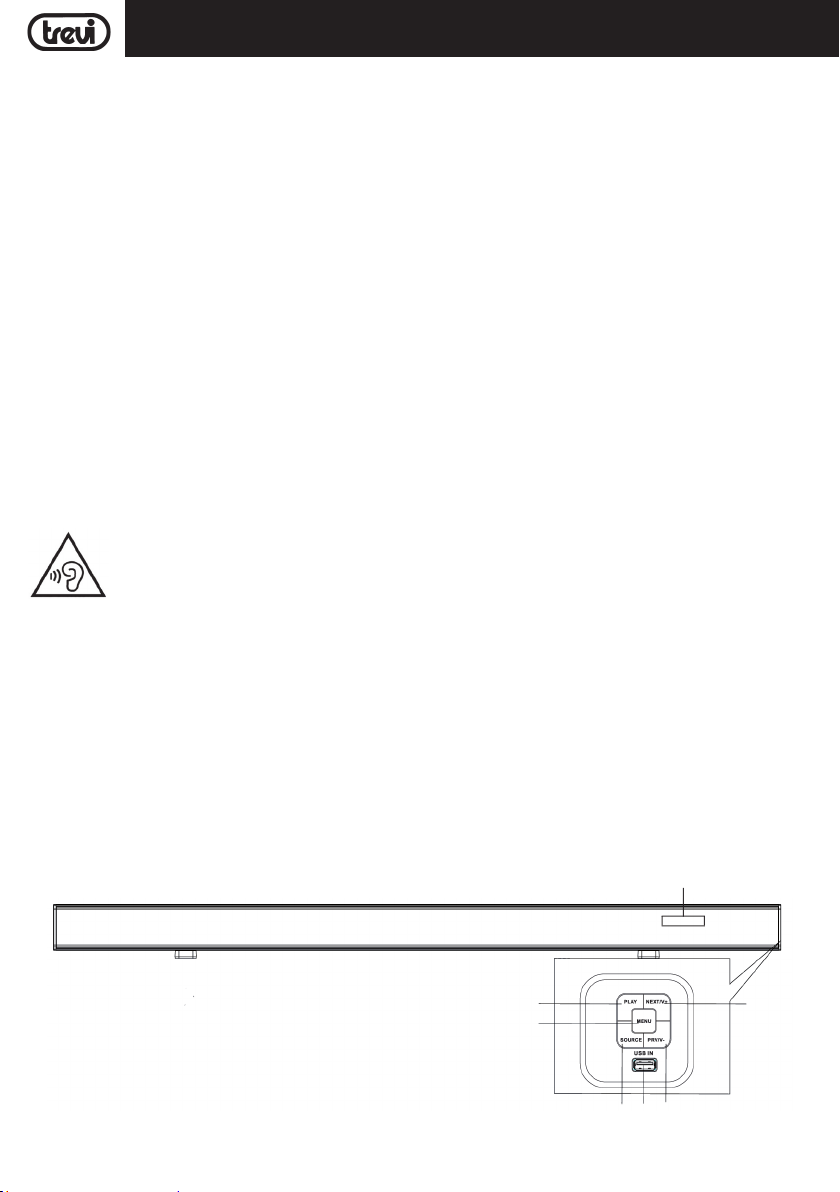
DESCRIZIONE COMANDI E COLLEGAMENTI
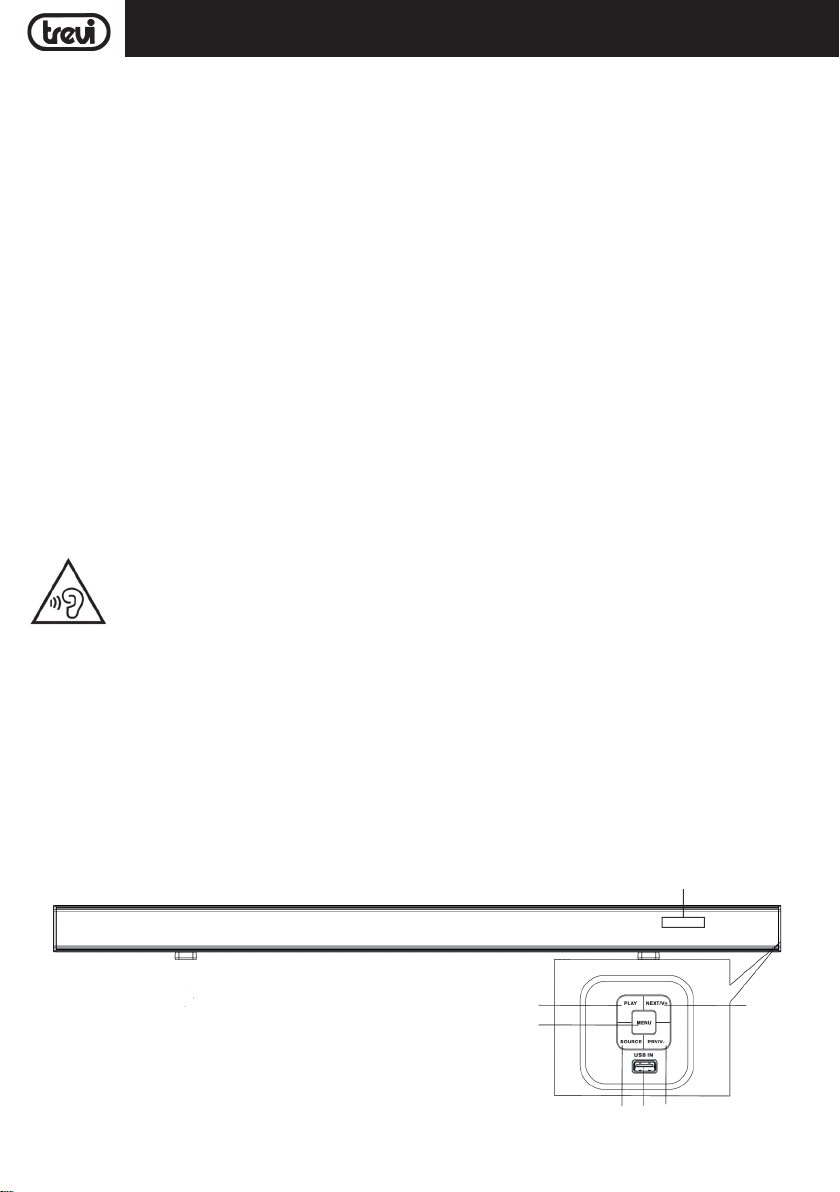
Pannello frontale
1
2
4
14
6
3 4 5
Page 5
ITALIANO
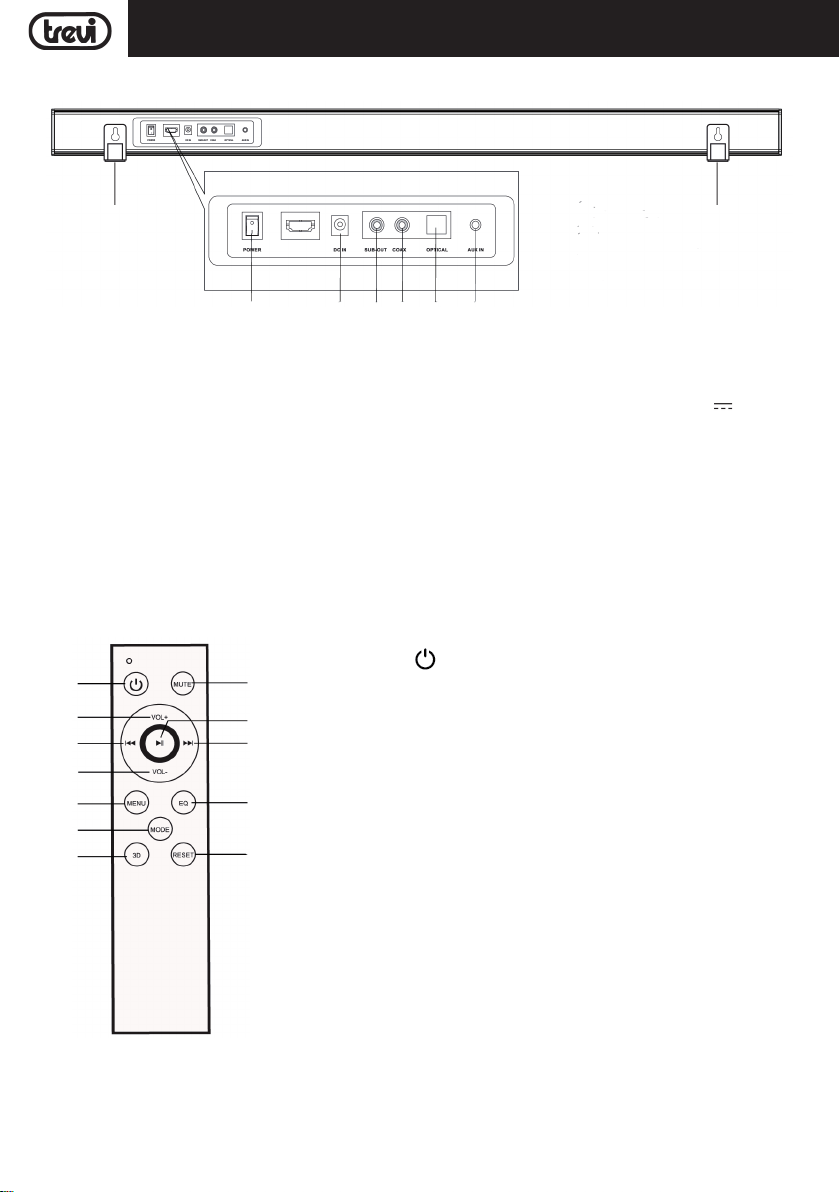
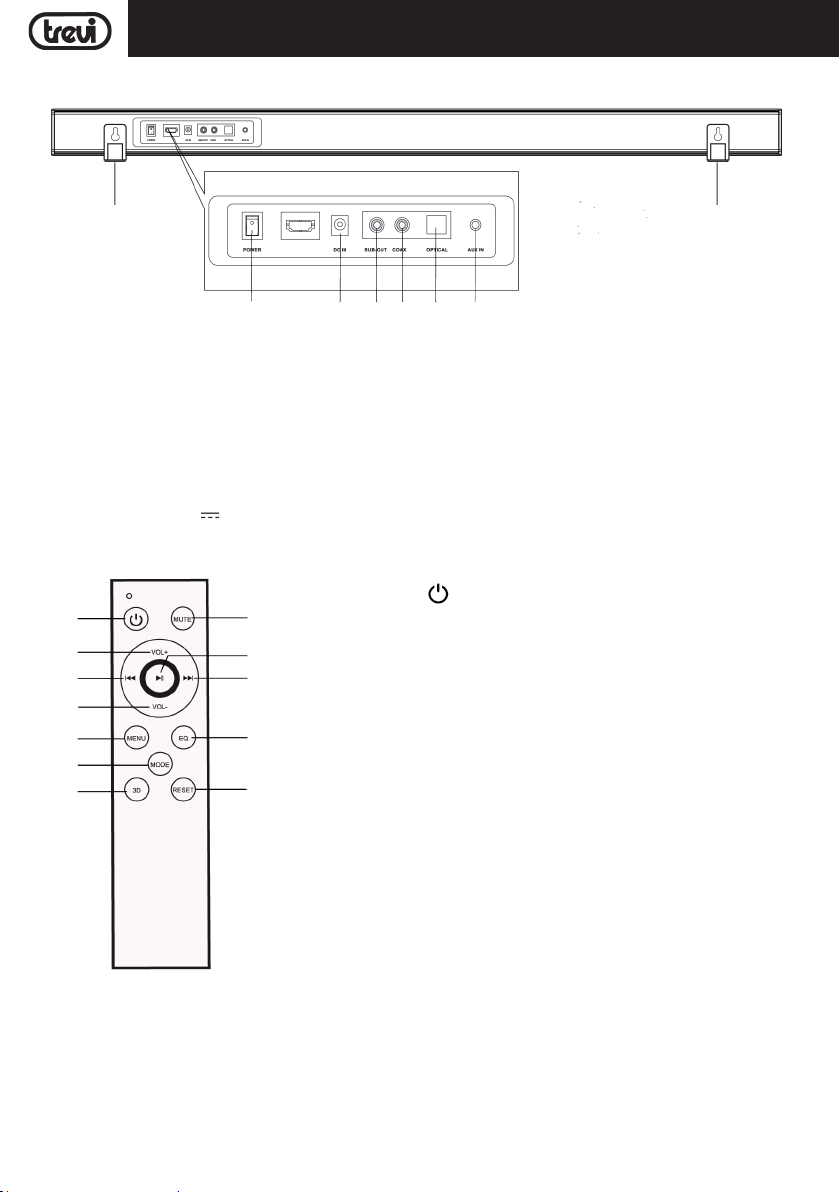
Pannello posteriore
SB 8370 SW
13
7 8 9 10 11
1. Tasto PLAY: avvio/arresto della riproduzione.
2. Tasto MENU: premere più volte per selezionare "bass",
"trab" e "sub". Tenere premuto per qualche secondo
per passare alla regolazione Volume.
3. Tasto SOURCE: premere più volte per selezionare i
vari ingressi.
4. Ingresso USB.
5. Tasto PREV/V-; selezione traccia precedente, diminuzione Volume.
6. Tasto NEXT/V+; selezione traccia successiva, aumento
Volume.
TELECOMANDO
13. Tasto : accensione/spegnimento.
13
14
15
16
17
18
19 20
24
23
22
21
14. Tasto VOL +: regolazione Volume +
15. Tasto 9, selezione traccia precedente.
16. Tasto VOL -: regolazione Volume -.
17. Tasto MENU, premere più volte per selezionare "bass", "trab" e "sub".
18. Tasto MODE, premere più volte per selezionare i vari ingressi.
19. Tasto 3D, effetto surround.
20. Tasto RESET, ritornare alle impostazioni di fabbrica.
21. Tasto EQ, selezione dell'equalizzazione audio (3).
22. Tasto :, selezione traccia successiva.
23. Tasto , riproduzione/pausa.
24. Tasto MUTE, disattivazione/attivazione audio.
13
12
7. Interruttore ON/OFF, accensione/spegnimento
soundbar.
8. Presa di alimentazione soundbar 19V
3,42A.
9. Uscita SUB -OUT, per collegamento ad altro Subwoofer
via cavo.
10. Ingresso Audio COASSIALE.
11. Ingresso Audio digitale Ottico.
12. Ingresso AUX-IN (jack 3.5mm stereo).
13. Supporti per montaggio a parete.
14. Display.
BATTERIE DEL TELECOMANDO
Il telecomando funziona con due batterie tipo "AAA" (non fornite) da inserire nel vano batterie posto sul retro.
All'inserimento delle batterie, rispettare le polarita' indicate nel vano batterie.
5
Page 6
ITALIANO
SB 8370 SW
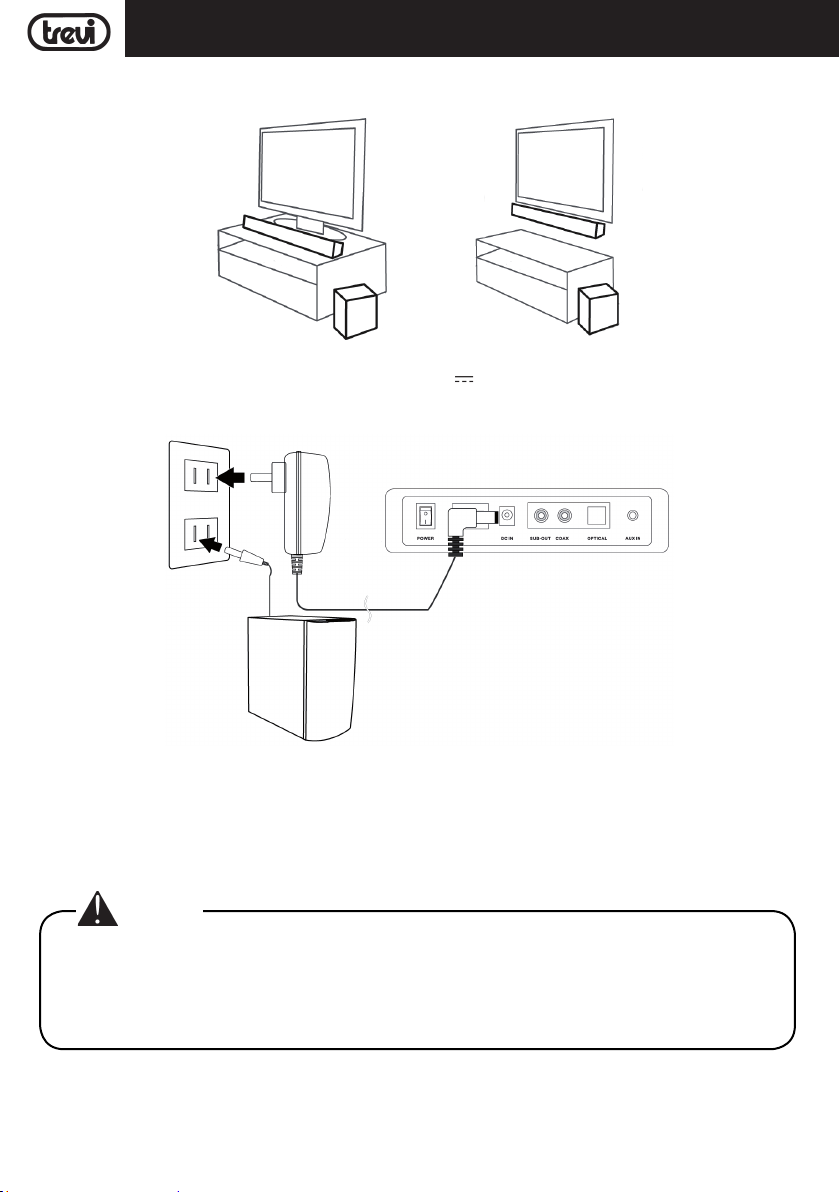
INSTALLAZIONE
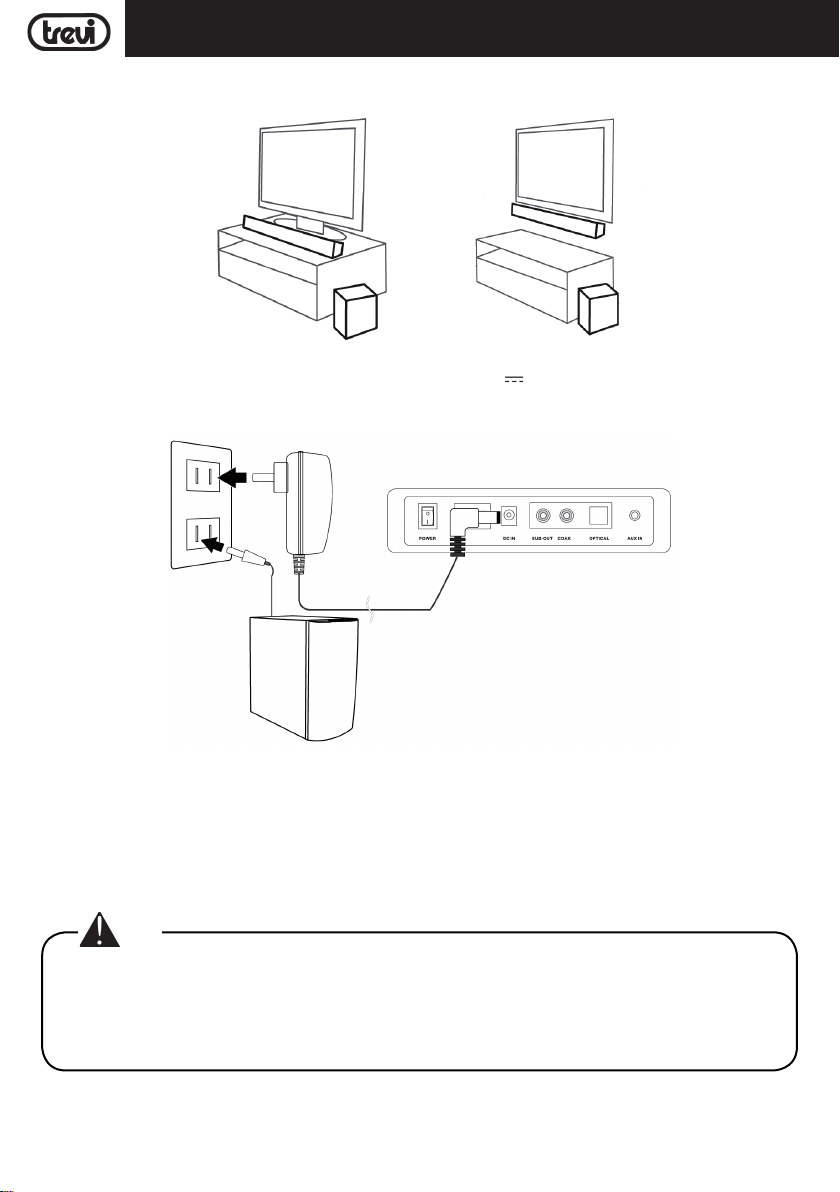
La Soundbar può essere installata sia su mobile che a parete:
ALIMENTAZIONE
- Collegare lo spinotto dell’alimentatore in dotazione alla presa 19V 3,42A (8) posta sul retro della sound bar
e collegare l'alimentatore ad una presa di corrente.
- Inserire la spina del cavo di alimentazione del Subwoofer ad una presa elettrica.
ACCENSIONE/SPEGNIMENTO E FUNZIONE AUTO POWER OFF
Accensione
1. Premere l'interruttore ON/OFF (7) sulla Sound bar e portarlo in posizione "I" per accendere l'apparecchio.
2. Premere l'interruttore ON/OFF posizionato dietro al Subwoofer e portarlo in posizione "I" per accendere l'apparecchio.
3. Il collegamento wireless tra la soundbar e il subwoofer avverrà in maniera automatica, se questo non dovesse
avvenire, spegnere e riaccendere entrambi gli apparecchi.
Nota:
• Per la connesione tra Soundbar e Subwoofer sono necessari alcuni secondi (o un periodo maggiore).
• Più la Soundbar e il subwoofer sono vicini, migliore sarà la qualità del suono. Si consiglia di posizionare la Soundbar e il Subwoofer il più vicino possibile ed evitare: --Ostacoli tra la Soundbar e il
Subwoofer. --Dispositivi che utilizzano la stessa frequenza della connessione wireless, ad esempio
forno a microonde, router LAN wireless, apparecchi medici.
Spegnimento
1. Premere l'interruttore ON/OFF (7) sulla Sound bar e portarlo in posizione "0" per spegnere l'apparecchio.
2. Premere l'interruttore ON/OFF posizionato dietro al Subwoofer e portarlo in posizione "0" per pegnere l'apparecchio.
6
Page 7
ITALIANO
Stand-by
1. Premere il tasto
anche il Subwoofer si porterà in modalità Stand-by automaticamente.
2. Premere il tasto
si accenderà automaticamente.
Questo dispositivo è dotato di funzione AutoPower Off; questa funzione permette lo spegnimento automatico dopo
alcuni minuti in assenza di segnale audio sugli ingressi o a Volume 0.
Nota:
• Nel caso la Sound bar non rispondesse ai comandi o non funzionasse correttamente, scollegare
l'alimentatore dalla presa di rete per 30 secondi per effettuare un reset (vedi capitolo "Problemi e
soluzioni").
(13) sul telecomando per portare la Sound bar in modalità Stand-by; dopo qualche minuto
(13) sul telecomando per accendere la Sound bar; dopo qualche secondo anche il Subwoofer
SB 8370 SW
REGOLAZIONE VOLUME E FUNZIONE MUTE
1. Premere il tasto VOL + (14) sul telecomando oppure tenere premuto per qualche secondo il tasto NEXT/V+ (6)
sull'unità
2. Premere il tasto VOL - (16) sul telecomando oppure tenere premuto
sull'unità per diminuire il volume.
per aumentare il volume del dispositivo.
per qualche secondo il tasto PREV/V- (5)
Note:
• In caso di collegamento all'uscita cuffie di un Tv o di un dispositivo dotato di altoparlanti propri,
questi, solitamente, verranno disattivati e per avere un buon segnale in uscita e' necessario regolare
il volume al massimo livello tramite i comandi propri del Tv (o del dispositivo).
• In caso di collegamento all'uscita audio-scart di un Tv (o una qualunque uscita audio che non sia la
presa cuffie di un altro dispositivo), il livello dell'audio in uscita e' costante e non e' regolabile tramite i
comandi propri del Tv (o del dispositivo); gli altoparlanti del Tv (o del dispositivo) non verrano disattivati
e se si desidera silenziarli e' necessario abbassare completamente il volume altrimenti e' possibile
regolarli per una riproduzione sonora che si va ad aggiungere a quella della Soundbar.
Funzione MUTE: e' possibile attivare la funzione di esclusione audio dell'apparecchio tramite il tasto MUTE (24) sul
telecomando. Per riattivare l'ascolto premere nuovamente il tasto MUTE (24).
Attenzione:
• Alcune uscite audio a cui si collega la Soundbar (come la presa uscita cuffie) possono avere una
propria regolazione del volume: assicurarsi di aver regolato sul dispositivo sorgente un adeguato
livello audio in uscita altrimenti la Soundbar anche al massimo volume suonera' piano.
• In caso il suono riprodotto dalla Soundbar risulti distorto significa che il segnale in ingresso e' troppo
forte: abbassare il volume della Soundbar o regolare sul dispositivo sorgente un livello audio in uscita
piu' basso.
• Nel caso di collegamento ad un Tv tramite uscita cuffie, puo' capitare che l'audio riprodotto dalla
Soundbar risulti basso anche al massimo volume; in questo caso provare a collegare la Soundbar
all'uscita audio-scart tramite un adattatore (non fornito).
INGRESSO USB
1. Inserire una memoria USB nell'ingresso (4);
2. Accendere l'apparecchio. Verrà automaticamente riprodotto il contenuto della USB;
3. Premere il tasto(23) del telecomando oppure il tasto PLAY (1) sull'unità, per arrestare momentaneamente la
riproduzione. Ripremerlo per riprendere la riproduzione;
4. Premere il tasto 9 (15) o : (22) del telecomando oppure i tasti PREV/V - (5) o NEXT/V + (6) sull'unità, per
7
Page 8
ITALIANO
passare alla traccia precedente o successiva.
SB 8370 SW
INGRESSO AUX
1. Utilizzare un cavo con presa jack 3.5mm Stereo per collegare l'ingresso AUX (12) posto sul retro della sound bar
all'uscita cuffie/audio del TV o di un altro dispositivo sorgente;
2. Accendere l'apparecchio; premere il tasto MODE (18) del telecomando, oppure il tasto SOURCE (3) sull'unità e
selezionare l'ingresso AUX;
3. Per una corretta riproduzione sonora fare riferimento al capitolo REGOLAZIONE VOLUME E FUNZIONE MUTE.
INGRESSO OTTICO
1. Utilizzare un cavo ottico digitale (non inluso) per collegare l'ingresso OPTICAL (11) all'uscita ottica digitale del TV
o di un altro dispositivo sorgente;
2. Accendere l'apparecchio; premere il tasto MODE (18) del telecomando, oppure il tasto SOURCE (3) sull'unità e
selezionare l'ingresso OPtl.
Note:
• Prima di connettere il cavo ottico, assicurarsi di rimuovere il coperchio di protezione della spina se
il vostro cavo ne è dotato.
• Su alcuni TV o dispositivi e' necessario abilitare l'uscita ottica digitale.
• Per la riproduzione da questo ingresso e' necessario impostare sul dispositivo sorgente l'audio
digitale PCM.
FUNZIONAMENTO BLUETOOTH
1. Accendere l'apparecchio; premere il tasto MODE (18) del telecomando, oppure il tasto SOURCE (3) sull'unità e
selezionare la funzione BLUETOOTH;
2. Il sistema si porterà automaticamente in modalità accoppiamento;
3. Attivare la funzionalità Bluetooth sul dispositivo esterno da accoppiare;
4. Avviare la ricerca dei dispositivi. Al termine selezionare il dispositivo "SB 8370 SW";
5. Inserire la password "0000" se richiesto;
6. Premere il tasto(23) del telecomando oppure il tasto PLAY (1) sull'unità per avviare la riproduzione e i tasti
9 (15) o : (22) del telecomando oppure i tasti PREV/V - (5) o NEXT/V + (6) sull'unità per selezionare i brani.
PRE EQUALIZZAZIONI
La sound bar dispone di un sistema di equalizzazione pre impostato, premere più volte il tasto EQ (21) durante la
riproduzione per selezionare la dinamica audio che meglio si adatta allo stile musicale in riproduzione.
Premere il tasto 3D (19) per avere un effetto surround.
REGOLAZIONE TONI BASSI, ALTI E SUBWOOFER
E' possibile anche regolare singolarmente i toni bassi, alti e la presenza del sub woofer:
- Premere il tasto MENU (17) del telecomando, sul display comparirà la scritta "bass";
- Utilizzare i tasti VOL+ (14) e VOL- (16) del telecomando per aumentare o diminuire i toni bassi;
- Premere nuovamente il tasto MENU (17) del telecomando, sul display comparirà la scritta "trab";
- Utilizzare i tasti VOL+ (14) e VOL- (16) del telecomando per aumentare o diminuire i toni alti;
- Premere nuovamente il tasto MENU (17) del telecomando, sul display comparirà la scritta "Sub";
- Utilizzare i tasti VOL+ (14) e VOL- (16) del telecomando per aumentare o diminuire la presenza del subwoofer;
PROBLEMI E SOLUZIONI
Se la vostra Sound bar non funzionasse correttamente controllare questa breve lista prima di portarla presso un
centro assistenza autorizzato TREVI.
8
Page 9

ITALIANO
In ogni caso non tentare di riparare l’apparecchio da soli, questo farebbe decadere la garanzia. Solo i centri assistenza
tecnica TREVI sono autorizzati ad eseguire interventi su questo prodotto.
Assenza di suono:
Controllare che non sia inserita la funzione MUTE.
Controllare di avere selezionato l'ingresso corretto.
Controllare e regolare il volume della Sound Bar e del Tv (o del dispositivo collegato).
La Sound Bar non si accende o si spegne automaticamente:
Controllare di avere correttamente inserito il cavo di alimentazione.
Qualora la Sound Bar non riceva un segnale per un certo tempo oppure abbia il Volume a livello 0, questa si
spegnerà automaticamente (risparmio energetico).
Problemi di accoppiamento con dispositivi Bluetooth:
Se dopo l'accoppiamento Bluetooth con un dispositivo esterno la qualità audio è scarsa, portare il dispositivo
esterno più vicino alla soundbar o rimuovere qualsiasi ostacolo tra di loro.
Se la connessione tra la soundbar e il dispositivo non avviene, verificare che la funzione di accoppiamento del
dispositivo sia abilitata; fare riferimento al manuale del dispositivo per abilitare la funzione.
Se l'accoppiamento con il dispositivo esterno si attiva e disattiva continuamente, portare il dispositivo esterno
più vicino alla sound bar o rimuovere qualsiasi ostacolo tra di loro. Con alcuni dispositivi esterni l'accoppiamento
Bluetooth può disattivarsi automaticamente per salvaguardare i consumi della sua batteria, questo non è un
malfunzionamento dell'apparecchio.
La soundbar non si collega al Subwoofer:
Il collegamento Wireless potrebbe non funzionare normalmente in un’area in cui il segnale è debole.
Si prega di installare a Soundbar abbastanza vicina al subwoofer wireless.
Non installare la Soundbar o il Subwoofer su un mobile di metallo se si desidera ottenere una performance ottimale.
Evitare ostacoli tra la Soundbar e il Subwoofer.
SB 8370 SW
Il telecomando non funziona:
Sostituire la batteria.
I comandi non rispondono:
Scollegare l'alimentatore dalla presa di rete per 30 secondi per effettuare un reset.
CARATTERISTICHE TECNICHE
GENERALI
Alimentazione Sound bar: ..................................... 19V
Alimentazione Subwoofer: ..................................... 100-240V
Consumo elettrico Sound bar: .................................... 34W
Consumo elettrico Subwoofer: ................................... 51W
Consumo in Stand-by: ..................................... <0,5W
Potenza totale massima in uscita: ............................... 80W (4x10W+40W)
Risposta in frequenza:
Sound Bar ..................................... 500Hz-20KHz
Subwoofer ..................................... 20Hz-300Hz
Rapporto segnale rumore: ..................................... ≥75db
Potenza di trasmissione Bluetooth: ............................. 1mW
Frequenza di trasmissione Bluetooth: .......................... 2,4GHz
Dimensioni Sound bar: ..................................... 900x60x60mm
Dimensioni Subwoofer: ..................................... 160x310x265mm
Peso totale: ..................................... 4,5 Kg
9
3,42A
50-60Hz
Page 10
ENGLISH
SB 8370 SW
NOTES ON USE
● Place the device on a flat surface.
● Place the device so that its sides there is always enough space for air to circulate freely (at least 10 cm).
● Do not place anything on top of the unit.
● The apparatus shall not be exposed to dripping or splashing water. No objects filled with liquid, such as vases,
should be placed on the unit.
● If liquids penetrate inside the device immediately disconnect the plug from the socket and take it to the nearest
service center autorizato TREVI.
● No naked flame sources, such as lighted candles, should be placed on.
● Cables should be hidden and protected in order to avoid stumbling from someone and the consequent fall of the
appliance.
● Keep the unit away from the following places.
- Near strong heat sources, such as central heating plants or stoves.
- In very humid places such as bathrooms, swimming pools, etc...
- In very dusty places.
- In places subject to strong vibrations.
● Unplug the power cable during thunderstorms or long periods of inactivity.
● Instruct children and people with little knowledge of the product for proper use.
● Listen at high volume for a long time, can damage your hearing.
● Keep the following user manual.
To prevent possible hearing damage, do not listen at high volumes levels for long periods.
CARE AND MAINTENANCE
Use a slightly damp soft cloth for cleaning. Do not use solvents and abrasive substances.
IMPORTANT
This appliance has been carefully built to ensure long-lasting perfect per formance. However, should any inconvenience
occur, please contact your local authorised TREVI Service Centre.
TREVI follows a policy of ongoing research and development. Therefore products may have different features from
those described.
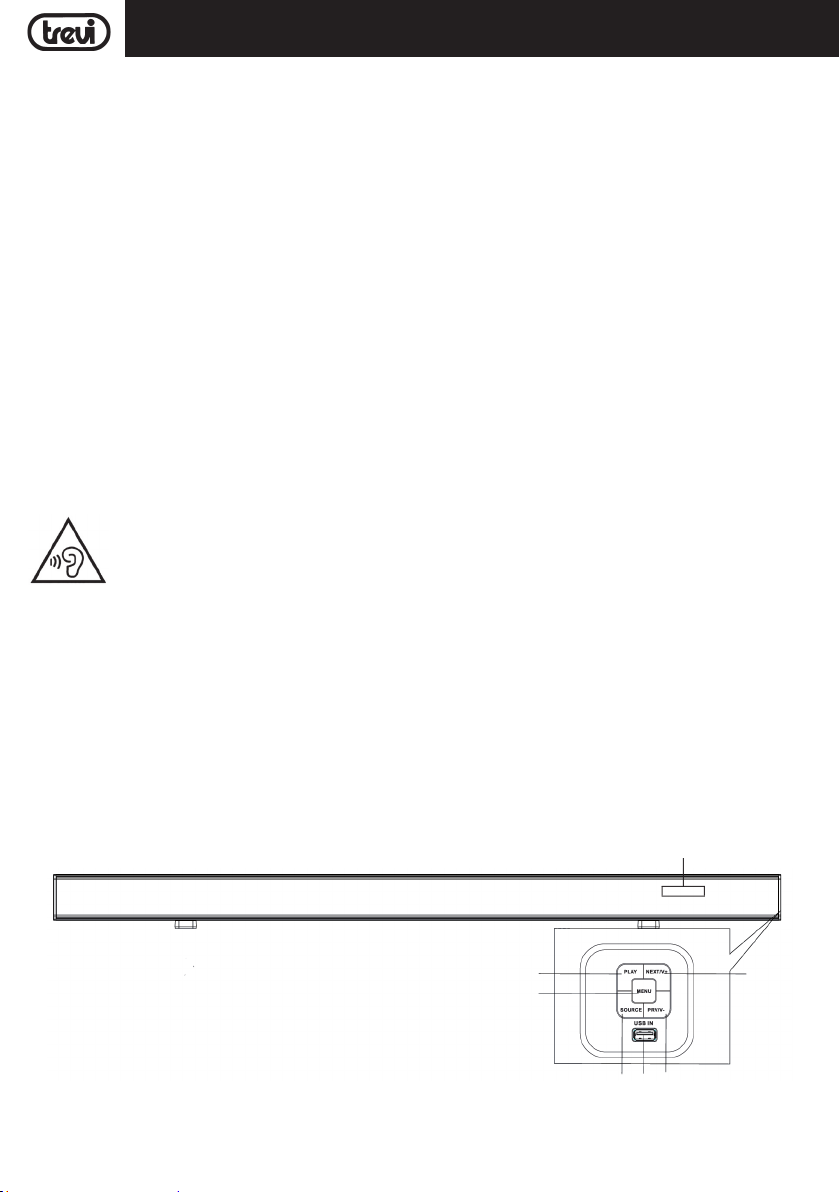
DESCRIPTION OF CONNECTORS/CONTROLS
Front panel
1
2
10
14
6
3 4 5
Page 11
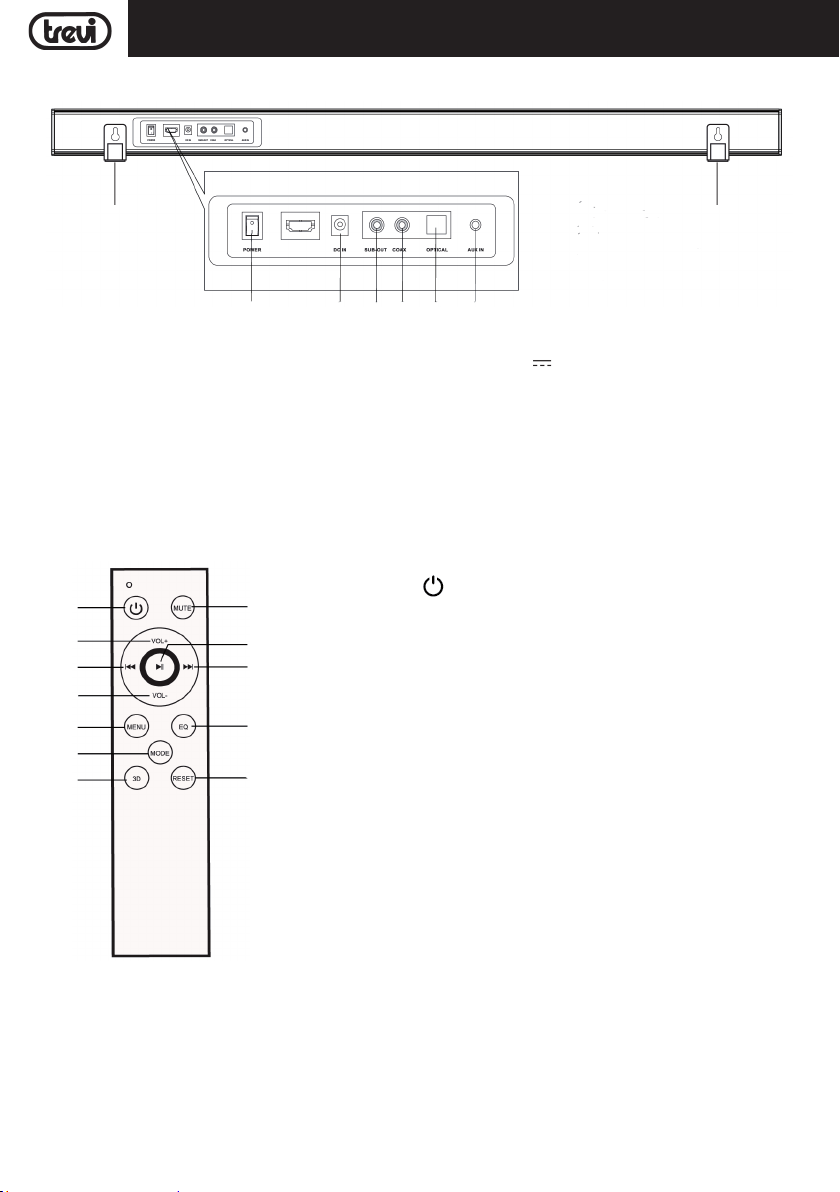
Back panel
SB 8370 SWENGLISH
13
7 8 9 10 11 12
1. PLAY/PAUSE button.
2. MENU button.
3. SOURCE button.
4. USB IN.
5. PREV/V- button.
6. NEXT/V+ button.
7. Power Switch.
REMOTE CONTROL DESCRIPTION
13
14
15
16
17
18
19 20
24
23
22
21
8. DC IN 19V
9. SUB-OUT.
10. COAXIAL INPUT.
11. OPTICAL INPUT.
12. AUX INPUT.
13. Wall mounting holes.
14. Display.
13. Button , power/Stand-by.
14. VOL + button.
15. 9 button.
16. VOL - button.
17. MENU button.
18. MODE button.
19. 3D button.
20. RESET button.
21. EQ button.
22. : button.
23. button, play/pause.
24. MUTE button.
13
3,42A.
REMOTE CONTROL BATTERIES
Insert two "AAA" batteries according to the markings inside compartment
11
.
Page 12
ENGLISH
SB 8370 SW
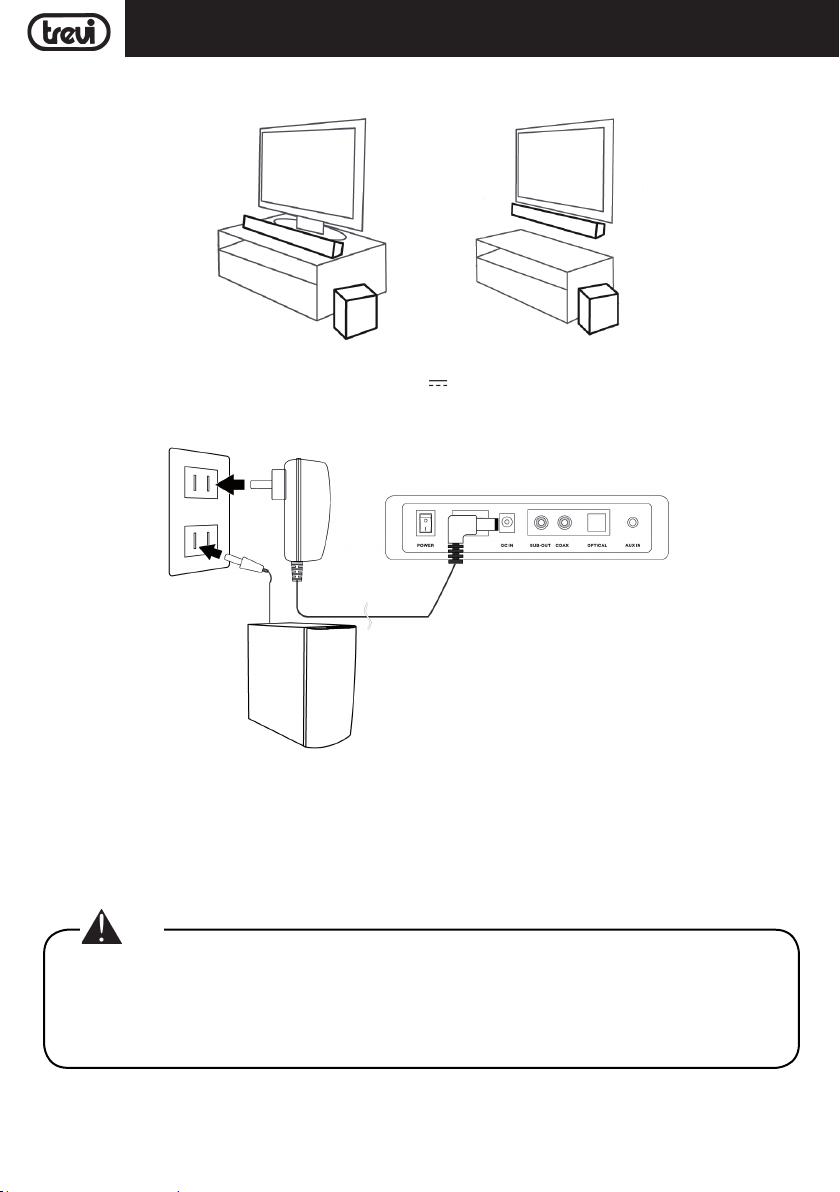
PLACEMENTS
The Soundbar can be place both on the mobile and on the wall:
POWER SUPPLY
- Connect the plug of power adaptor supply to the 19V 3,42A socket (8) on the back of the sound bar and
connect the power supply to a power outlet.
- Insert the plug of the Subwoofer power cord into an electrical outlet.
POWER ON/OFF AND AUTO POWER OFF FUNCTION
Power ON
1. Press the ON/OFF switch (7) on the Sound bar and turn it to the "I" position to switch the appliance on.
2. Press the ON/OFF switch located behind the Subwoofer and set it to the "I" position to turn the unit on.
3. The wireless connection between the soundbar and the subwoofer will take place automatically, if this does not
happen, switch off and switch on both devices.
Note:
• It takes a few seconds (or longer) for the connection between the Soundbar and Subwoofer.
• The closer the Soundbar and the subwoofer are, the better the sound quality will be. We recommend
placing the Soundbar and Subwoofer as close as possible and avoiding: --stacles between the
Soundbar and the Subwoofer. -- Devices that use the same frequency as the wireless connection,
such as a microwave oven, wireless LAN router, medical equipment.
12
Page 13
SB 8370 SWENGLISH
Power OFF
1. Press the ON/OFF switch (7) on the Sound bar and turn it to the "0" position to switch off the appliance.
2. Press the ON/OFF switch located behind the Subwoofer and turn it to the "0" position to turn off the unit.
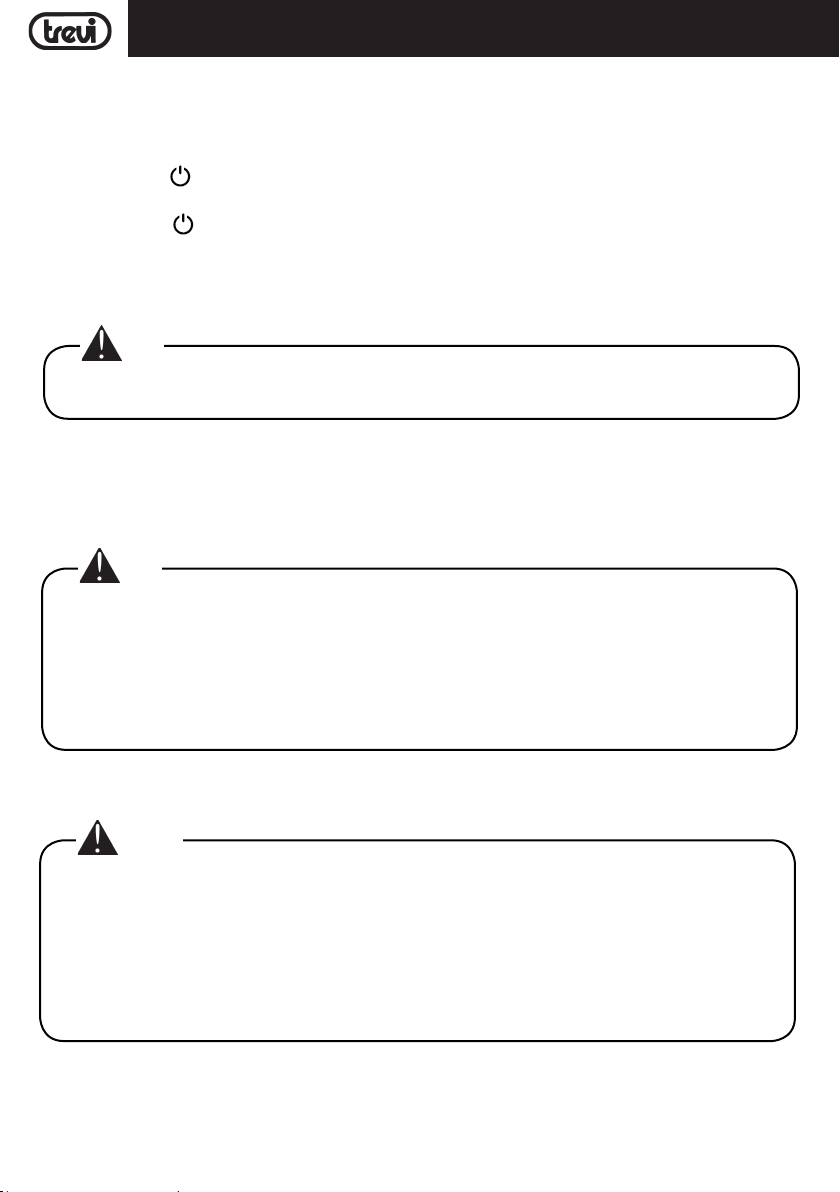
Stand-by
1. Press the button
the Subwoofer will also go into Stand-by mode automatically.
2. Press the button
will also switch on automatically.
This device is equipped with the AutoPower Off function; this function allows automatic switching off after a few
minutes in the absence of an audio signal on the inputs or at Volume 0.
Nota:
• If the sound Base does not react to any operation or does not work properly, disconnect the power
cable for 30 seconds to reset the device.
VOLUME ADJUSTMENT AND MUTE FUNCTION
1. Press the VOL + (14) button on the remote control or press and hold the NEXT/V + (6) button on the unit for a
few seconds to increase the volume of the device.
2. Press the VOL - (16) button on the remote control or press and hold the PREV/V - (5) button on the unit for a few
seconds to decrease the volume.
Note:
• When connecting to the headphone output of a TV or a device that has its own speakers, these usually
are disabled and to have a good output signal need to adjust the volume to the maximum level through
the commands of TV (or device).
• When connecting to the audio output of a TV-Scart (or any audio output that is not the headphone jack
of another device), the level of the sound output is constant and not adjustable via the command own
the TV (or device); the speakers of the TV (or device) is not disabled and if you want to silence them
need to lower the volume completely otherwise the reproduction is in addition to the Sound Base.
(13) on the remote control to bring the Sound bar into Stand-by mode; after a few minutes
(13) on the remote control to turn on the Sound bar; after a few seconds the Subwoofer
MUTE function: it is possible to activate the device mute function by means of the MUTE button (24) on the remote
control. To reactivate listening, press the MUTE button (24) again.
Caution:
• Some audio outputs which you connect the Sound Bar (like headphone output) can have its own
volume control: make sure you have set on the source device an adequate level audio output otherwise
the Sound Bar will sound even at maximum volume.
• If the sound played by the Sound Bar be distorted means that the input signal is too strong: lower the
volume of the Sound Bar or paid on a level audio source device output more low.
• In case of connection to a TV by headphone output, it may happen that the sound reproduced by the
Soundbar is low even at maximum volume; in this case try connecting the Soundbar to the audio-scart
output using an adapter (not supplied).
13
Page 14
ENGLISH
SB 8370 SW
USB INPUT
1. Insert a USB memory into the input (4);
2. Turn ON the unit. The contents of the USB will automatically be played;
3. Press(23) button on the remote control or PLAY (1) button on the unit, to stop playback temporarily. Press
it again to resume playback;
4. Press 9 (15) or : (22) button on the remote control or the PREV/V - (5) or NEXT/V + (6) buttons on the unit
to move to the previous or next track.
AUX-IN
1. Use a 3.5mm Stereo jack cable to connect the AUX input (12) on the back of the sound bar to the headphone/
audio output of the TV or other source device;
2. Turn on the nit; press the MODE button (18) on the remote control or the SOURCE (3) button on the unit and select
the AUX input;
3. For correct sound reproduction refer to the VOLUME ADJUSTMENT AND MUTE FUNCTION chapter.
OPTICAL INPUT
1. Use a digital optical cable (not included) to connect the OPTICAL input (11) to the digital optical output of the TV
or other source device;
2. Turn on the appliance; press the MODE button (18) on the remote control or the SOURCE button (3) on the unit
and select the OPtl input.
Note:
• Before connecting the optical cable, be sure to remove the plug protection cover if your cable is
equipped with it.
• Some TVs or devices is necessary to enable the digital optical output.
• PCM digital audio must be set on the source device for playback from this input.
BLUETOOTH OPERATION
1. Turn on the appliance; press the MODE button (18) on the remote control or the SOURCE button (3) on the unit
and select the BLUETOOTH function;
2. The system will automatically go into pairing mode;
3. Activate the Bluetooth functionality on the external device to be paired;
4. Start the device search. At the end select the "SB 8370 SW" device;
5. Enter the password "0000" if required;
6. Press(23) button on the remote control or the PLAY (1) button on the unit to start playback and the 9 (15)
or : (22) buttons on the remote control or the PREV/V - buttons (5) or NEXT/V + (6) on the unit to select tracks.
EQUALIZER
The sound bar has a pre-set equalizer system, repeatedly press the EQ button (21) during playback to select the
audio dynamic that best suits the music style being played.
Press the 3D button (19) to have a surround effect.
TROUBLESHOOTING
If the Sound Bar does not work properly, check this short list before taking it to a TREVI authorised service centre.
In any case, do not try to repair the device, this will void the warranty. Only TREVI authorised service centres are
authorised to perform operations on this product.
No Sound:
Check that the MUTE function is not activated.
Check that the correct input has been selected.
14
Page 15

ENGLISH
Check and adjust the volume of the Sound Bar and the TV (or the device connected).
The Sound Bar does not turn on or turns off automatically:
Check that the power cable is correctly inserted.
If the Sound Bar does not receive any signal for some time it automatically turns to standby mode.
Pairing problems with Bluetooth devices:
If the audio quality is poor after pairing Bluetooth with an external device, bring the external device closer to the
soundbar or remove any obstructions between them.
If the connection between the soundbar and the device does not occur, check that the coupling function of the
device is enabled; refer to the device manual to enable the function.
If the coupling with the external device is activated and deactivated continuously, bring the external device closer
to the soundbar or remove any obstacle between them. In some external devices, the Bluetooth pairing can be
switched off automatically to safeguard the consumption of its battery, this is not a malfunction of the device.
I can't find the Bluetooth name of this unit on my Bluetooth device for Bluetooth pairing:
Ensure that the unit is switched on.
Ensure that the Bluetooth function is activated on your Bluetooth device.
The soundbar does not connect to the Subwoofer:
Wireless connection may not work normally in an area where the signal is weak.
Please install the Soundbar close enough to the wireless subwoofer.
For optimal performance do not install the Soundbar or Subwoofer on a metal cabinet.
Avoid obstacles between the Soundbar and the Subwoofer.
The remote control does not work:
Replace the battery.
SB 8370 SW
The device does not react to any operation:
Disconnect the power cable from the device for 30 seconds to reset it.
TECHNICAL FEATURES
GENERAL FEATURES
Sound bar power supply: ..................................... 19V
Subwoofer power supply: ..................................... 100-240V
Sound bar consunption: ..................................... 34W
Subwoofer consunption: ..................................... 51W
Stand-by consunption: ..................................... <0,5W
Maximum output power: ..................................... 80W (4x10W+40W)
Frequency response:
Sound bar: ..................................... 500Hz-20KHz
Subwoofer: ..................................... 20Hz-300Hz
S/N Ratio: ..................................... ≥75db
Bluetooth transmission power: ................................... 1mW
Bluetooth transmission: ..................................... 2,4GHz
Sound Bar size: ..................................... 900x60x60mm
Subwoofer size: ..................................... 160x310x265mm
Weight: ..................................... 4,5 Kg
15
3,42A
50-60Hz
Page 16
FRANÇAIS
SB 8370 SW
NOTES D’EMPLOI
● Placer l'appareil sur une surface plane.
● Placer l'appareil de sorte que ses côtés, il y a toujours assez d'espace pour l'air de circuler librement (au moins
10cm).
● Ne placez rien sur le dessus de l'appareil.
● L'appareil ne doit pas être exposé à des éclaboussures d'eau. Aucun objet rempli de liquide, comme des vases,
doivent être placés sur l'appareil.
● Si des liquides pénètrent à l’intérieur de l’appareil, débranchez-le immédiatement et portez-le au centre d’assistance
agréé TREVI le plus proche.
● Aucune source de flamme nue, telle que des bougies allumées, doivent être placés sur.
● Les câbles doivent être cachés et protégés afin d'éviter d'achoppement de quelqu'un et la chute conséquente de
l'appareil.
● Gardez l'appareil dans les endroits suivants:
- Près de grosses sources de chaleur comme des radiateurs et des poêles.
- Dans des endroits très humides comme les salles de bains, les piscines, etc...
- Dans des endroits très poussiéreux.
- Dans des endroits exposés à de fortes vibrations.
● Débranchez le câble d'alimentation pendant les orages ou de longues périodes d'inactivité.
● Demandez à la bonne utilisation des enfants et des personnes avec peu de connaissance du produit.
● Écoutez à un volume élevé pendant une longue période, peut endommager votre ouïe.
● Conservez le mode d'emploi ci-dessous.
Pour éviter d'endommager votre ouïe, n'écoutez pas à des volumes élevés pendant de longues périodes.
SOIN ET MAINTENANCE
Pour le nettoyage, il est conseillé d’utiliser un chiffon doux légèrement humide. N'utilisez pas de solvants et de
substances abrasives.
IMPORTANT
La bonne fabrication de cet appareil garantit un fonctionnement parfait pour une longue période. Si toutefois quelques
inconvénients devaient se présenter, adressez-vous au Centre d’Assistance agréé TREVI le plus proche.
TREVI observe une politique de recherche et de développement continus. C’est pourquoi ses produits peuvent
présenter des caractéristiques différentes par rapport à celles qui sont décrites.
DESCRIPTION DES CONNECTEURS ET DES COMMANDES
Panneau avant
1
2
16
14
6
3 4 5
Page 17
Panneau arrière
SB 8370 SWFRANÇAIS
13
7 8 9 10 11 12
1. Bouton PLAY/PAUSE.
2. Bouton MENU.
3. Bouton SOURCE.
4. Entrée USB.
5. Bouton PREV/V-.
6. Bouton NEXT/V+.
7. Interrupteur pour allumer/arrêter l'appareil.
8. Prise de courant 19V
3,42A.
TÉLÉCOMMANDE
13
14
15
16
17
18
19 20
24
23
22
21
13
9. Sortie SUB-OUT, pour la connexion à un autre
subwoofer.
10. Entrée COAXIAL.
11. Entrée OPTICAL.
12. Entrée AUX.
13. Trous de montage mural.
14. Afficher.
13. Bouton : Marche/Veille.
14. Bouton VOL +.
15. Bouton 9, sélectionnez piste précédente.
16. Bouton VOL -.
17. Bouton MENU.
18. Bouton MODE, sélecteur fonction.
19. Bouton 3D, effet surround.
20. Bouton RESET.
21. Bouton EQ, sélection de son.
22. Bouton :, sélectionnez piste suivante.
23. Bouton , lecture/pause.
24. Bouton MUTE.
LA PILE DE LA TÉLÉCOMMANDE
La télécommande fonctionne avec deux piles de type "AAA" (non fournies) à insérer dans le compartiment des piles
à l'arrière.
Lorsque vous insérez les piles, respectez les polarités indiquées dans le compartiment des piles.
17
Page 18
FRANÇAIS
SB 8370 SW
PLACEMENT
La Soundbar peut être installée à la fois sur le mobile et sur le mur:
CONNEXION À L'ALIMENTATION
- Connectez la fiche de l'alimentation fournie à la prise 19V 3,42A (8) située à l'arrière de la barre de son et
branchez l'alimentation à une prise de courant.
- Insérez la fiche du câble d'alimentation du subwoofer dans une prise électrique.
MARCHE ET ARRÊT AUTOMATIQUE
Marche
1. Appuyez sur l'interrupteur ON/OFF (7) de la barre de son et tournez-le sur la position "I" pour allumer l'appareil.
2. Appuyez sur l'interrupteur ON/OFF situé derrière le Subwoofer et réglez-le sur la position "I" pour allumer l'appareil.
3. La connexion sans fil entre la barre de son et le subwoofer se fera automatiquement, si ce n'est pas le cas, éteignez
et allumez les deux appareils.
Remarque:
• Cela prend quelques secondes (ou plus) pour la connexion entre la Soundbar et le Subwoofer.
• Plus la barre de son et le subwoofer sont proches, meilleure sera la qualité du son. Nous vous recommandons de placer la Soundbar et le Subwoofer aussi près que possible et d'éviter: -- les obstacles
entre la Soundbar et le Subwoofer. -- Appareils utilisant la même fréquence que la connexion sans
fil, tels qu'un four à micro-ondes, un routeur LAN sans fil, un équipement médical.
Arrêter
1. Appuyez sur l'interrupteur ON/OFF (7) de la barre de son et tournez-le sur la position "0" pour éteindre l'appareil.
2. Appuyez sur l'interrupteur ON/OFF situé derrière le Subwoofer et tournez-le sur la position "0" pour éteindre
l'appareil.
18
Page 19
SB 8370 SWFRANÇAIS
Fonction de veille
1. Appuyez sur le bouton
minutes, le subwoofer passe automatiquement en mode veille.
2. Appuyez sur le bouton
subwoofer s'allume automatiquement.
Cet appareil est équipé de la fonction AutoPower Off; cette fonction permet l'extinction automatique après quelques
minutes en l'absence d'un signal audio sur les entrées ou au volume 0.
Remarque:
• Si la sound bar de son ne réagit pas à toute opération ou ne fonctionne pas correctement, débranchez
le câble d'alimentation pendant 30 secondes pour réinitialiser l'appareil.
RÉGLAGE DU VOLUME ET FONCTION MUTE
1. Appuyez sur le bouton VOL + (14) de la télécommande ou maintenez enfoncé le bouton NEXT/V + (6) de l'appareil
pendant quelques secondes pour augmenter le volume de l'appareil.
2. Appuyez sur le bouton VOL - (16) de la télécommande ou maintenez enfoncé le bouton PREV/V - (5) de l'appareil
pendant quelques secondes pour diminuer le volume.
Remarque:
• Lors de la connexion à la sortie casque d'un téléviseur ou d'un dispositif qui a ses propres hautparleurs, ceux-ci sont généralement handicapés et d'avoir une bonne nécessité de signal de sortie
pour régler le volume au niveau maximum à travers les commandes de la télévision (ou dispositif).
• Lors de la connexion à la sortie audio d'un téléviseur à péritel (ou ne importe quelle sortie audio qui
ne est pas la prise casque d'un autre appareil), le niveau de la sortie sonore est constante et non
réglable via la commande propriétaire du téléviseur (ou périphérique); les haut-parleurs du téléviseur
(ou dispositif) ne est pas désactivé et si vous voulez faire taire leur besoin de baisser le volume
complètement sinon la reproduction est en plus de la base Sound.
(13) de la télécommande pour mettre la barre de son en mode veille; Après quelques
(13) de la télécommande pour activer la barre de son; Après quelques secondes, le
MUTE: Pour activer la fonction de coupure de l'appareil via le bouton MUTE (24) sur la télécommande; pour réactiver
l'écoute appuyez sur le bouton MUTE (24).
Remarque:
• Quelques sorties audio auxquels vous vous connectez la barre de son (comme sortie casque) peut
avoir sa propre commande de volume: assurez-vous que vous avez réglé sur l'appareil source une
sortie audio de niveau adéquat sinon la sound bar sonore retentit même au volume maximum.
• Si le son joué par la sound bar de son être déformée signifie que le signal d'entrée est trop fort:
baisser le volume de la sound bar de son ou payé sur une sortie du dispositif de source audio de
niveau plus faible.
• En cas de connexion à un téléviseur via la sortie casque, il peut arriver que le son reproduit par la
Soundbar soit faible même au volume maximum; Dans ce cas, essayez de connecter la Soundbar à
la sortie audio-péritel à l'aide d'un adaptateur (non fourni).
ENTRÉE USB
1. Insérez une clé USB dans l'entrée (4);
2. Allumez l'appareil. Le contenu de l'USB sera automatiquement lu;
19
Page 20
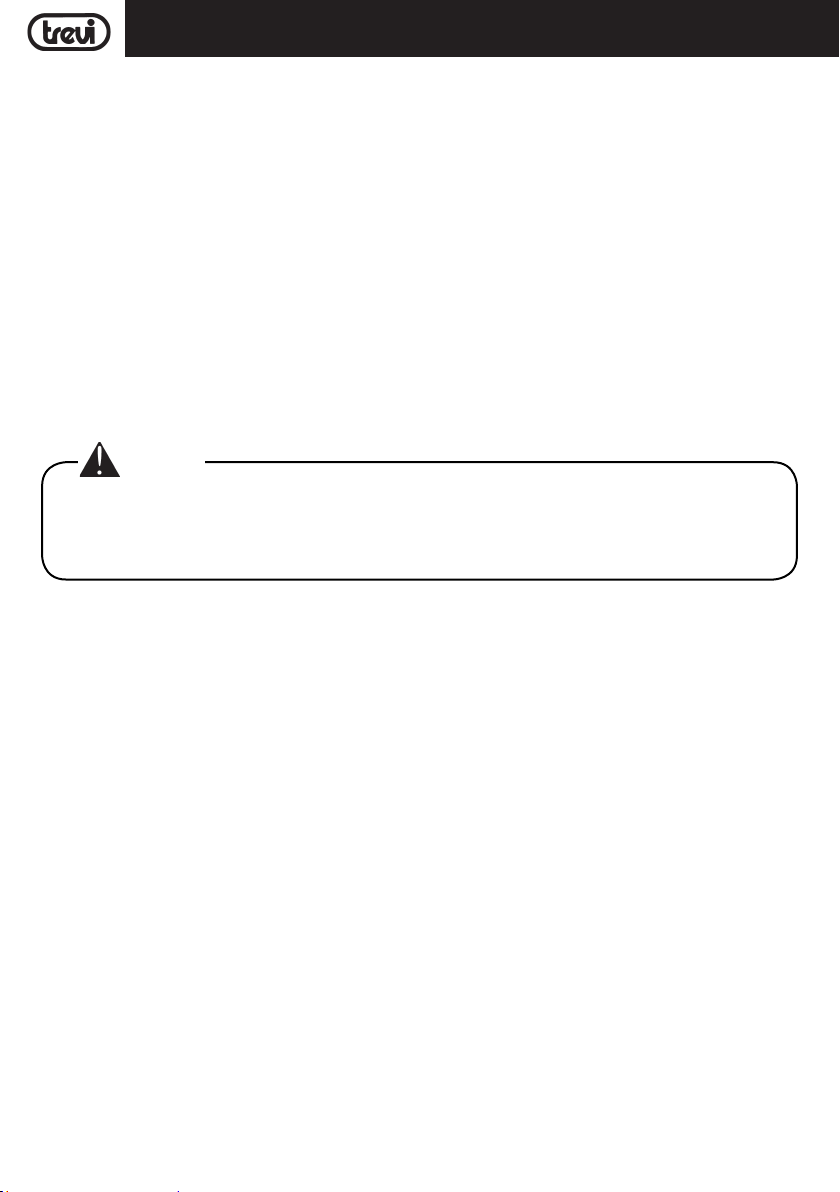
FRANÇAIS
3. Appuyez sur le bouton(23) de la télécommande ou sur le bouton PLAY (1) de l'appareil pour arrêter temporairement la lecture. Appuyez à nouveau pour reprendre la lecture;
4. Appuyez sur le bouton 9 (16) ou : (14) de la télécommande ou sur les boutons PREV/ V - (5) ou NEXT/ V +
(6) de l'appareil pour passer à la plage précédente ou suivante.
SB 8370 SW
ENTRÉE AUX
1. Utilisez un câble jack stéréo 3,5 mm pour raccorder l'entrée AUX (12) à l'arrière de la barre de son à la sortie
casque/audio du téléviseur ou de tout autre appareil source;
2. Allumez l'appareil. appuyez sur le bouton MODE (18) de la télécommande ou sur le bouton SOURCE (3) de l'appareil
et sélectionnez l'entrée AUX;
3. Pour une reproduction correcte du son, reportez-vous au chapitre REGLAGE DU VOLUME ET MUTE.
ENTRÉE OPTIQUE
1. Utilisez un câble optique numérique (non fourni) pour raccorder l'entrée OPTICAL (11) à la sor tie optique numérique
du téléviseur ou de tout autre appareil source;
2. Allumez l'appareil. Appuyez sur le bouton MODE (18) de la télécommande ou sur le bouton SOURCE (3) de
l'appareil et sélectionnez l'entrée OPtl;
Remarque:
• Avant de brancher le câble optique, assurez-vous de retirer le couvercle de protection de la prise si
votre câble en est équipé.
• Sur certains téléviseurs ou appareils, il est nécessaire d'activer la sortie optique numérique.
• L'audio numérique PCM doit être réglé sur le périphérique source pour la lecture à partir de cette entrée.
BLUETOOTH FONCTIONNEMENT
1. Allumez l'appareil. appuyez sur le bouton MODE (18) de la télécommande ou sur le bouton SOURCE (3) de l'appareil
et sélectionnez la fonction BLUETOOTH;
2. Le système passe automatiquement en mode d'appairage;
3. Activez la fonctionnalité Bluetooth sur l'appareil externe à jumeler;
4. Lancez la recherche de l'appareil. A la fin, sélectionnez l'appareil "SB 8370 SW";
5. Entrez le mot de passe "0000" si nécessaire;
6. Appuyez sur le bouton(23) de la télécommande ou sur le bouton PLAY (1) de l'appareil pour démarrer la
lecture et les boutons 9 (15) ou : (22) sur la télécommande ou les boutons PREV/V - (5) ou NEXT/V + (6)
sur l'appareil pour sélectionner les pistes;
FONCTION EQUALIZER
La barre de son est dotée d'un système d'égaliseur prédéfini. Appuyez plusieurs fois sur le bouton EQ (21) pendant
la lecture pour sélectionner la dynamique audio qui convient le mieux au style de musique en cours de lecture.
Appuyez sur le bouton 3D (19) pour avoir un effet surround.
PROBLÈMES ET SOLUTIONS
Si votre Sound Bar ne fonctionne pas correctement, lisez attentivement cette liste avant de confier l'appareil à un
centre d’assistance agréé TREVI.
De toute façon, ne cherchez pas à réparer vous-mêmes l’appareil, car la garantie ne serait plus valable. Seuls les
centres d'assistance technique TREVI sont autorisés à effectuer des interventions sur cette sound bar.
Son inaudible:
Vérifiez que la fonction MUTE n’est pas activée.
Vérifiez que l'entrée correcte a été sélectionnée.
20
Page 21

SB 8370 SWFRANÇAIS
Vérifiez et réglez le volume de la Sound Bar et de la télé (ou du dispositif connecté).
La Sound Bar ne s'allume pas ou s'éteint automatiquement:
Vérifiez que le câble d'alimentation est branché correctement.
Si la Sound Bar ne reçoit pas de signal pendant quelques instants (une minute environ), elle se met automatique-
ment en mode veille.
Jumelage des problèmes avec les appareils Bluetooth:
Si la qualité audio est médiocre après l'appariement Bluetooth avec un appareil externe, rapprochez l'appareil
externe de la barre de son ou éliminez toute obstruction entre eux.
Si la connexion entre la barre de son et l'appareil ne se produit pas, vérifiez que la fonction de couplage de l'appareil
est activée; reportez-vous au manuel du périphérique pour activer la fonction.
Si le couplage avec l'appareil externe est activé et désactivé en permanence, rapprochez l'appareil externe de la
barre de son ou éliminez tout obstacle entre eux. Dans certains appareils externes, l'appariement Bluetooth peut
être automatiquement désactivé pour protéger la consommation de sa batterie, il ne s'agit pas d'un dysfonctionnement de l'appareil.
Je ne trouve pas le nom Bluetooth de cet appareil sur mon appareil Bluetooth pour l'association Bluetooth:
Assurez-vous que l'appareil est allumé.
Assurez-vous que la fonction Bluetooth est activée sur votre appareil Bluetooth.
La barre de son ne se connecte pas au subwoofer:
La connexion sans fil peut ne pas fonctionner normalement dans une zone où le signal est faible.
Veuillez installer la Soundbar suffisamment près du subwoofer sans fil.
N'installez pas la Soundbar ou le Subwoofer sur une armoire métallique si vous voulez des performances optimales.
Evitez les obstacles entre la Soundbar et le Subwoofer.
La télécommande ne marche pas:
Remplacez la batterie.
Les commandes ne répondent pas:
Débranchez l’appareil de la prise d’alimentation pendant 30 secondes pour effectuer la remise à zéro.
CARACTÉRISTIQUES TECHNIQUES
GÉNÉRALITÉS
Alimentation Sound bar: ..................................... 19V
Alimentation Subwoofer: ..................................... 100-240V
Consommation Sound bar: ..................................... 34W
Consommation Subwwofer: ..................................... 51W
Consumo en veille: ..................................... <0,5W
Puissance de sortie maximale: ................................... 80W (4x10W+40W)
Frequency response:
Sound bar: ..................................... 500Hz-20KHz
Subwoofer: ..................................... 20Hz-300Hz
S/N Ratio: ..................................... ≥75db
Puissance de transmission Bluetooth: ........................ 1mW
Bande passante de transmission Bluetooth: ................ 2,4GHz
Dimensions Barre de son: ..................................... 900x60x60mm
Dimensions caisson de basses: ................................. 160x310x265mm
Poids: ..................................... 4,5 Kg
21
3,42A
50-60Hz
Page 22
DEUTSCH
SB 8370 SW
GEBRAUCHSHINWEISE
● Stellen Sie das Gerät auf eine ebene Fläche.
● Stellen Sie das Gerät so, dass seine Seiten immer genügend Raum für die Luft frei zirkulieren kann (mindestens
10cm).
● Stellen Sie nichts oben auf das Gerät.
● Das Gerät darf nicht mit Wasser oder Spritzwasser ausgesetzt werden. Keine Gegenstände, die mit Flüssigkeit
gefüllt ist, wie Vasen, auf das Gerät gestellt werden.
● Wenn Flüssigkeiten in das Gerät sofort den Stecker aus der Steckdose eindringen und es zum nächsten Service-
Center TREVI nehmen.
● Keine offenen Flammen, wie brennende Kerzen, platziert werden.
● Die Kabel sollten versteckt, um und geschützt werden, um zu verhindern, jemand stolpert und der daraus resul-
tierenden Sturz des Gerätes.
● Halten Sie das Gerät aus folgenden Orten:
- In der Nähe von Wärmequellen wie Heizkörpern und Öfen.
- In sehr feuchten Räumen wie Badezimmern, Schwimmbädern usw.
- In sehr staubigen Räumen.
- An Orten, die starken Schwingungen ausgesetzt sind.
● Ziehen Sie das Netzkabel während eines Gewitters oder längerer Inaktivität.
● Weisen Sie die richtigen Gebrauch Kinder und Menschen mit wenig Wissen über das Produkt.
● Bei hoher Lautstärke für eine lange Zeit hören, kann das Gehör schädigen.
● Halten Sie die folgende Bedienungsanleitung.
Um mögliche Gehörschäden zu vermeiden, sollten Sie nicht lange auf hohe Lautstärkepegel hören.
PFLEGE UND WARTUNG
Für die Reinigung wird die Verwendung eines leicht angefeuchteten, weichen Tuchs empfohlen. Der Einsatz von
Lösungsmitteln oder scheuernden Substanzen sollte vermieden werden.
WICHTIG
Der fachgemäße Bau dieses Geräts gewährleistet langfristig einen einwandfreien Betrieb. Sollten dennoch Betriebsstörungen auftreten, wenden Sie sich bitte an nächstgelegene autorisierte TREVI-Kundendienststelle.
Die Firma TREVI verfolgt eine Politik ständiger Forschung und Weiterentwicklung. Die Produkte können daher andere
als die beschriebenen Eigenschaften aufweisen.
BESCHREIBUNG DER ANSCHLÜSSE/BEDIENELEMENTE
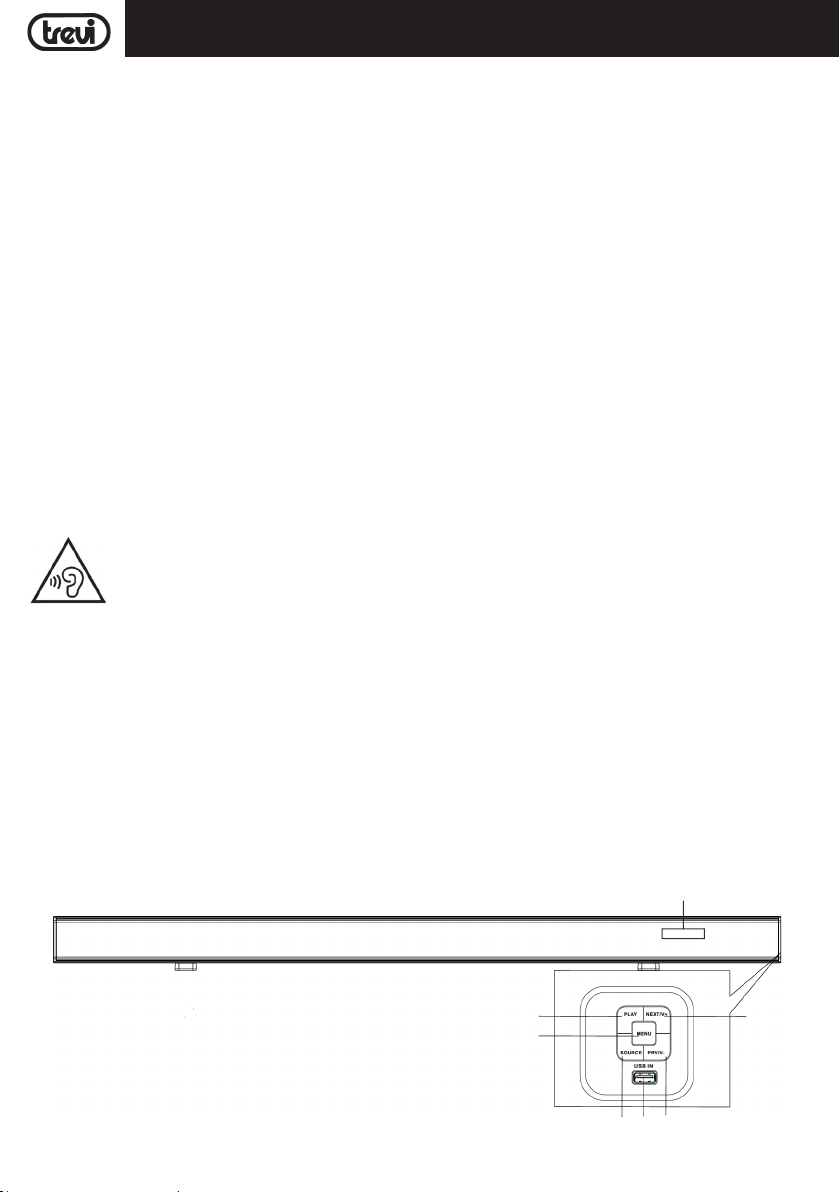
Frontblende
1
2
22
14
6
3 4 5
Page 23
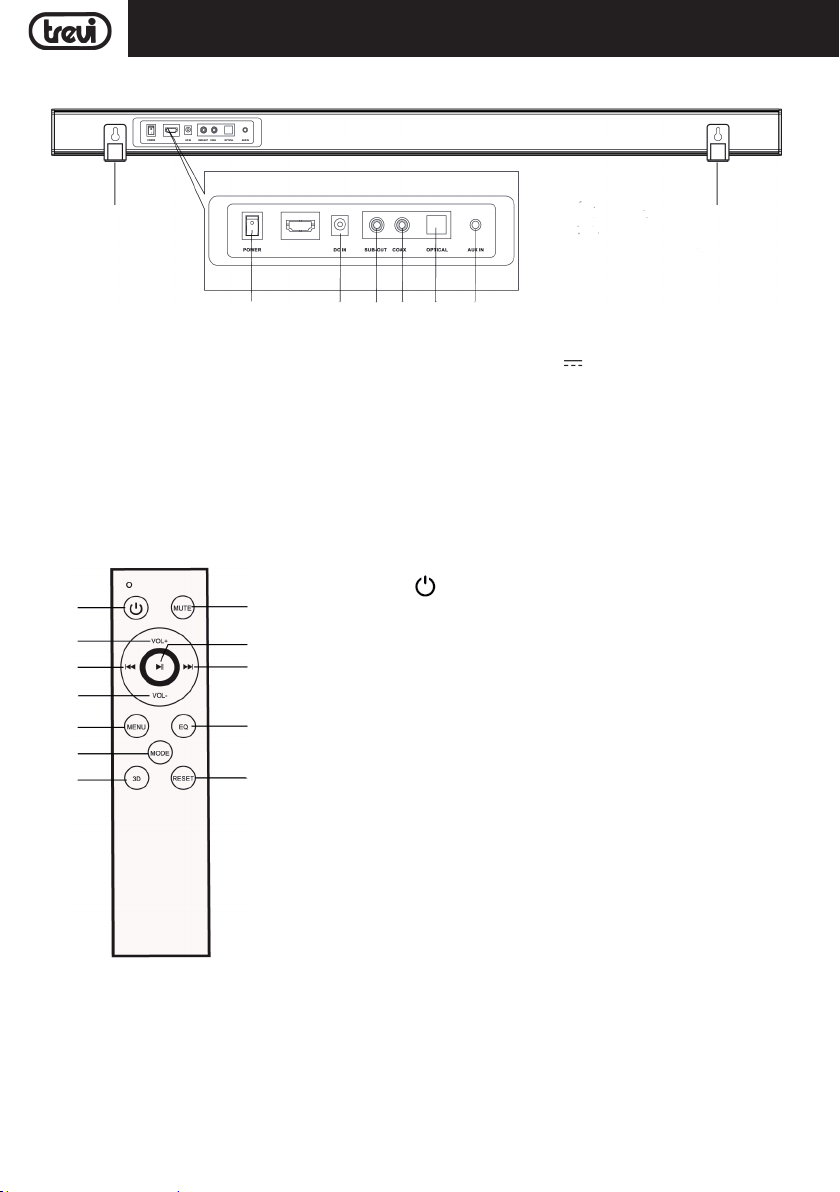
Rückseite
SB 8370 SWDEUTSCH
13
7 8 9 10 11 12
1. PLAY/PAUSE Taste.
2. MENU Taste.
3. SOURCE Taste.
4. USB Eingabe.
5. PREV/V - Taste.
6. NEXT/V+ Taste.
7. Stromschalter.
REMOTE CONTROL DESCRIPTION
13
14
15
16
17
18
19 20
24
23
22
21
8. Steckdose 19V
3,42A.
9. SUB-OUT Eingabe.
10. COAXIAL Eingabe.
11. OPTICAL Eingabe.
12. AUX Eingabe.
13. Wandbefestigungslöcher.
14.Anzeige.
13. Taste , ON/OFF.
14. VOL + Taste, Lautstärketasten +.
15. 9 Taste, Wählen vorherigen.
16. VOL - Taste, Lautstärketasten -.
17. MENU Taste.
18. MODE Taste.
19. 3D Taste.
20. RESET Taste.
21. EQ Taste, Klangauswahl.
22. : Taste, Wählen nächsten.
23. Taste, play/pause.
24. MUTE Taste, die Aktivierung der MUTE-Funktion.
13
FERNBEDIENBATTERIEN
Die Fernbedienung funktioniert mit zwei Batterien vom Typ "AAA" (nicht mitgeliefert), die in das Batteriefach auf der
Rückseite eingesetzt werden.
Beachten Sie beim Einlegen der Batterien die im Batteriefach angegebenen Polaritäten.
23
Page 24
DEUTSCH
SB 8370 SW
PLATZIERUNG
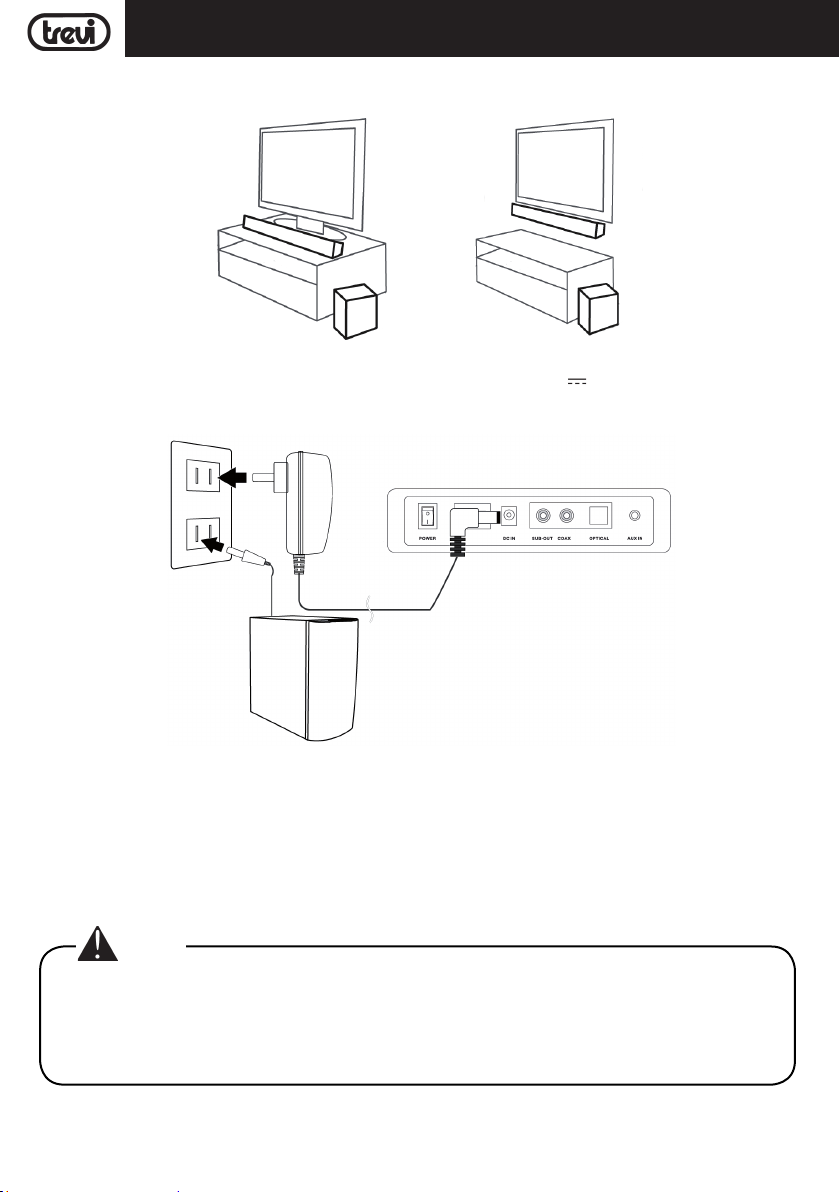
Die Soundbar kann sowohl am Handy als auch an der Wand installiert werden:
ANSCHLUSS AN DAS STROMNETZ
- Verbinden Sie den Stecker des mitgelieferten Netzteils mit der Buchse 19V 3,42A (8) auf der Rückseite der
Soundbar und schließen Sie das Netzteil an eine Steckdose an.
- Stecken Sie den Stecker des Subwoofer-Stromkabels in eine Steckdose.
POWER ON/OFF UND AUTOMATISCHE ABSCHALTUNG FUNKTION
Schaltung
1. Drücken Sie den ON/OFF-Schalter (7) an der Soundbar und drehen Sie ihn in die Position "I", um das Gerät einzuschalten.
2. Drücken Sie den ON/OFF-Schalter hinter dem Subwoofer und stellen Sie ihn auf "I", um das Gerät einzuschalten.
3. Die kabellose Verbindung zwischen Soundbar und Subwoofer erfolgt automatisch, wenn dies nicht geschieht,
beide Geräte ausschalten und einschalten.
Hinweis:
• Es dauert ein paar Sekunden (oder länger) für die Verbindung zwischen Soundbar und Subwoofer.
• Je näher die Soundbar und der Subwoofer sind, desto besser ist die Klangqualität. Wir empfehlen,
die Soundbar und den Subwoofer so nah wie möglich zu platzieren und zu vermeiden: -- Hindernisse
zwischen der Soundbar und dem Subwoofer. -- Geräte, die die gleiche Frequenz wie die drahtlose
Verbindung verwenden, z. B. Mikrowellenherd, WLAN-Router, medizinische Geräte.
24
Page 25
DEUTSCH
Stilllegung
1. Drücken Sie den ON/OFF-Schalter (7) an der Soundbar und drehen Sie ihn in die Position "0", um das Gerät
auszuschalten.
2. Drücken Sie den ON/OFF-Schalter hinter dem Subwoofer und drehen Sie ihn in die Position "0", um das Gerät
auszuschalten.
Stand-by-Funktion
1. Drücken Sie die Taste
einigen Minuten schaltet sich der Subwoofer automatisch in den Stand-by-Modus.
2. Drücken Sie die Taste
schaltet sich der Subwoofer automatisch ein.
Dieses Gerät ist mit der AutoPower Off-Funktion ausgestattet; Diese Funktion ermöglicht das automatische Ausschalten
nach ein paar Minuten in Abwesenheit eines Audiosignals an den Eingängen oder bei Lautstärke 0.
Hinweis:
• Wenn der Ton Basis gilt nicht für den Betrieb reagiert oder nicht ordnungsgemäß funktioniert, ziehen
Sie das Netzkabel für 30 Sekunden, um das Gerät zurückzusetzen.
(13) auf der Fernbedienung, um die Soundbar in den Stand-by-Modus zu bringen; Nach
(13) auf der Fernbedienung, um die Soundbar einzuschalten. Nach einigen Sekunden
SB 8370 SW
LAUTSTARKEREGELUNG UND MUTE-FUNKTION
1. Drücken Sie die Taste VOL + (14) auf der Fernbedienung, oder halten Sie die Taste NEXT/V + (6) am Gerät für
einige Sekunden gedrückt, um die Lautstärke des Geräts zu erhöhen.
2. Drücken Sie die Taste VOL - (16) auf der Fernbedienung, oder halten Sie die Taste PREV/V - (5) am Gerät einige
Sekunden lang gedrückt, um die Lautstärke zu verringern.
Hinweis:
• Beim Anschluss an den Kopfhörerausgang ein Fernsehgerät oder ein Gerät, das einen eigenen
Lautsprecher besitzt, diese in der Regel deaktiviert, und um eine gute Ausgangssignal notwendig,
um die Lautstärke auf den Höchstwert durch die Befehle der TV (oder Gerät) anpassen.
• Beim Anschluss an den Audioausgang des TV-Scart (oder einem Audio-Ausgang, die nicht die
Kopfhörerbuchse des anderen Geräts), der Ebene der Soundausgabe ist konstant und nicht einstellbar über den Befehl besitzen die TV (oder Gerät); die Lautsprecher des Fernsehers (oder Gerät) nicht
deaktiviert ist und wenn man zum Schweigen sie brauchen, um die Lautstärke zu senken wollen ganz
anders die Reproduktion ist zusätzlich zum Ton Basis.
MUTE-Funktion: Drücken Sie die MUTE-Taste (24) auf der Fernbedienung, um die Mute-Funktion zu aktivieren. Um
die Wiedergabe zu reaktivieren, drücken Sie erneut die MUTE-Taste (24).
Hinweis:
• Einige Audio-Ausgänge, die Sie die Sound Bar anzuschließen (wie Kopfhörer-Ausgang) kann eine eigene
Lautstärkeregelung: sicherzustellen, dass Sie auf dem Quellgerät ein angemessener Audioausgang
sonst die Klangbasis wird auch bei maximaler Lautstärke Sound eingestellt haben.
• Wenn der Ton durch die solide Basis verzerrt gespielt bedeutet, dass das Eingangssignal zu stark ist: die
Lautstärke des Klangdatenbank oder auf einer ebenen Audiogerät ausgegeben mehr schlecht bezahlt.
• Bei Anschluss an ein Fernsehgerät über den Kopfhörerausgang kann es vorkommen, dass der von der
Soundbar wiedergegebene Ton selbst bei maximaler Lautstärke gering ist; In diesem Fall versuchen
Sie, die Soundbar über einen Adapter (nicht mitgeliefert) mit dem Audio-Scar t-Ausgang zu verbinden.
25
Page 26
DEUTSCH
SB 8370 SW
USB-EINGANG
1. Stecken Sie einen USB-Speicher in den Eingang (4);
2. Schalten Sie das Gerät ein. Der Inhalt des USB wird automatisch abgespielt;
3. Drücken Sie die Taste(23) auf der Fernbedienung oder die Taste PLAY (1) am Gerät, um die Wiedergabe
vorübergehend zu stoppen. Drücken Sie die Taste erneut, um die Wiedergabe fortzusetzen;
4. Drücken Sie die Taste 9 (15) oder : (22) auf der Fernbedienung oder die Tasten PREV/V - (5) oder NEXT/V +
(6) am Gerät, um zum vorherigen oder nächsten Titel zu springen.
AUX-EINGANG
1. Verwenden Sie ein 3,5-mm-Stereo-Klinkenkabel, um den AUX-Eingang (12) auf der Rückseite der Soundbar mit
dem Kopfhörer/Audio-Ausgang des Fernsehgeräts oder eines anderen Quellgeräts zu verbinden;
2. Schalten Sie die Nisse an; Drücken Sie die MODE-Taste (18) auf der Fernbedienung oder die SOURCE (3) -Taste
am Gerät und wählen Sie den AUX-Eingang;
3. Für eine korrekte Tonwiedergabe siehe Kapitel VOLUMENEINSTELLUNG UND STUMMFUNKTION.
OPTISCHER EINGANG
1. Verwenden Sie ein optisches Digitalkabel (nicht im Lieferumfang enthalten), um den OPTICAL-Eingang (11) mit
dem digitalen optischen Ausgang des Fernsehgeräts oder eines anderen Quellgeräts zu verbinden;
2. Schalten Sie das Gerät ein. Drücken Sie die MODE-Taste (18) auf der Fernbedienung oder die SOURCE-Taste (3)
am Gerät und wählen Sie den OPtl-Eingang;
Hinweis:
• Bevor Sie das optische Kabel anschließen, achten Sie darauf, die Steckerschutzabdeckung zu entfernen, wenn Ihr Kabel damit ausgestattet ist.
• Bei einigen Fernsehgeräten oder Geräten muss der digitale optische Ausgang aktiviert werden.
• PCM Digital Audio muss auf dem Quellgerät für die Wiedergabe von diesem Eingang eingestellt sein.
BLUETOOTH-BETRIEB
1. Schalten Sie das Gerät ein. Drücken Sie die MODE-Taste (18) auf der Fernbedienung oder die SOURCE-Taste (3)
am Gerät und wählen Sie die BLUETOOTH-Funktion;
2. Das System wechselt automatisch in den Pairing-Modus;
3. Aktivieren Sie die Bluetooth-Funktionalität auf dem externen Gerät, das gepaart werden soll;
4. Starten Sie die Gerätesuche. Am Ende wählen Sie das Gerät "SB 8370 SW";
5. Geben Sie bei Bedarf das Passwort "0000" ein;
6. Drücken Sie die Taste(23) auf der Fernbedienung oder die Taste PLAY (1) am Gerät, um die Wiedergabe zu
starten und die Tasten 9 (15) oder : (22) auf der Fernbedienung oder die PREV/ V - Tasten ( 5) oder NEXT/ V
+ (6) am Gerät, um Tracks auszuwählen.
EQUALIZER FUNKTION
Die Soundbar verfügt über ein voreingestelltes Equalizersystem. Drücken Sie während der Wiedergabe wiederholt die
EQ-Taste (21), um die Audiodynamik auszuwählen, die am besten zum Musikstil passt.
Drücken Sie die 3D-Taste (19), um einen Surround-Effekt zu erhalten.
PROBLEME UND LÖSUNGEN
Weist die Sound Bar Betriebsstörungen auf, sollte die folgende kurze Liste durchgesehen werden, bevor die Sound
Bar zu einer autorisierten TREVI-Kundendienststelle gebracht wird.
In keinem Fall sollte versucht werden, das Gerät selbstständig zu reparieren. Dies führt zu Garantieverfall. Nur die
TREVI-Kundendienststellen sind zu Eingriffen an diesem Fernsehgerät autorisiert.
26
Page 27

SB 8370 SWDEUTSCH
Kein Ton:
Überprüfen, ob die MUTE-Funktion aktiviert wurde.
Darauf achten, dass der korrekte Eingang gewählt wurde.
Die Lautstärke der Sound Bar und des Fernsehers (oder des angeschlossenen Geräts) überprüfen und einstellen.
Die Sound Bar schaltet nicht ein oder schaltet automatisch aus:
Sicherstellen, dass das Netzkabel richtig eingesteckt ist.
Wenn die Sound Bar für eine gewisse Zeit (ca. eine Minute) kein Signal empfängt, wird sie automatisch in den
Stand-by-Modus versetzt.
Pairing-Probleme mit Bluetooth-Geräten:
Wenn die Audioqualität nach dem Pairing von Bluetooth mit einem externen Gerät schlecht ist, bringen Sie das
externe Gerät näher an die Soundbar oder entfernen Sie alle Hindernisse zwischen ihnen.
Wenn die Verbindung zwischen der Soundbar und dem Gerät nicht besteht, überprüfen Sie, ob die Kopplungsfunktion
des Geräts aktiviert ist. Informationen zur Aktivierung der Funktion finden Sie im Gerätehandbuch.
Wenn die Kopplung mit dem externen Gerät kontinuierlich aktiviert und deaktiviert wird, bringen Sie das externe
Gerät näher an die Soundbar oder entfernen Sie ein Hindernis zwischen ihnen. Bei einigen externen Geräten kann
die Bluetooth-Kopplung automatisch ausgeschaltet werden, um den Verbrauch der Batterie zu gewährleisten. Dies
ist keine Fehlfunktion des Geräts.
Die Soundbar ist nicht mit dem Subwoofer verbunden:
Die drahtlose Verbindung funktioniert möglicherweise nicht in einem Bereich, in dem das Signal schwach ist.
Bitte installieren Sie die Soundbar so nah wie möglich am kabellosen Subwoofer.
Installieren Sie die Soundbar oder den Subwoofer nicht auf einem Metallgehäuse, wenn Sie eine optimale Leistung
wünschen.
Vermeiden Sie Hindernisse zwischen der Soundbar und dem Subwoofer.
Die Fernbedienung funktioniert nicht:
Die Batterie ersetzen.
DIE Bedienelemente des Geräts reagieren nicht:
Den Versorgungsstecker des Geräts während 30 Sekunden herausziehen, um ein Reset durchzuführen.
TECHNISCHE EIGENSCHAFTEN
Soundbar Stromversorgung: ..................................... 19V 3,42A
Subwoofer-Netzteil: ..................................... 100-240V
Sound bar Verbrauch: ..................................... 34W
Subwooferverbrauch: ..................................... 51W
Stand-by-Verbrauch: ..................................... <0,5W
Maximale Ausgangsleistung: ..................................... 80W (4x10W+40W)
Frequenzgang:
Sound bar: ..................................... 500Hz-20KHz
Subwoofer: ..................................... 20Hz-300Hz
S/N-Verhältnis: ..................................... ≥75db
Bluetooth-Sendeleistung: ..................................... 1mW
Bluetooth Übertragungsbandbreite: ............................. 2,4GHz
Abmessungen Sound Bar: ..................................... 900x60x60mm
Abmessungen Subwoofer: ..................................... 160x310x265mm
Gewicht: ..................................... 4,5 Kg
27
50-60Hz
Page 28
ESPAÑOL
SB 8370 SW
NOTAS PARA EL USO
Este aparato es un instrumento electrónico de alta precisión; por lo tanto debe evitar utilizarlo en los siguientes casos:
• Coloque el dispositivo sobre una superficie plana.
• Coloque el dispositivo de modo que sus lados siempre hay espacio suficiente para que el aire circule libremente
(por lo menos 10cm).
• No coloque nada encima de la unidad.
• El aparato no debe exponerse a goteos o salpicaduras de agua. Los objetos que contengan líquidos, como floreros,
debe ser colocado en la unidad.
• Si los líquidos penetren en el interior del dispositivo desconecte inmediatamente el enchufe de la toma y llevarlo
al centro de servicio más cercano autorizato TREVI.
• No hay fuente de llamas, como una vela encendida, se deben colocar en.
• Los cables deben estar ocultos y protegidos con el fin de evitar el tropiezo de alguien y la consiguiente caída del aparato.
• Mantenga la unidad alejada de los lugares siguientes:
- cerca de campos magnéticos;
- fuentes cercanas de calor (radiadores, estufas, luz solar directa, etc...);
- cerca de zonas húmedas (baños, piscinas, etc...);
- áreas polvorientas, áreas sujetas a fuertes vibraciones.
• Desconecte el cable de alimentación durante tormentas eléctricas o largos períodos de inactividad.
• Instruir al uso de los niños y las personas con poco conocimiento adecuado del producto.
• Escuche a un volumen alto durante mucho tiempo, puede dañar su audición.
• Mantenga el siguiente manual de usuario.
To prevent possible hearing damage, do not listen at high volumes levels for long periods.
CUIDADO Y MANTENIMIENTO
Para efectuar la limpieza se aconseja utilizar un paño suave, ligeraente humedecido. Evite solventes o sustancias
abrasivas.
IMPORTANTE
La buena construcción del aparato garantiza su perfecto funcionamiento durante mucho tiempo. Si se presentase
algún inconveniente, será oportuno consultar al Centro de Asistencia autorizado TREVI más cercano.
TREVI cultiva una política de investigación y desarrollo continuos. Por consiguiente, los productos pueden presentar
características distintas a las descritas.
DESCRIPCIÓN DE LOS CONECTORES/MANDOS
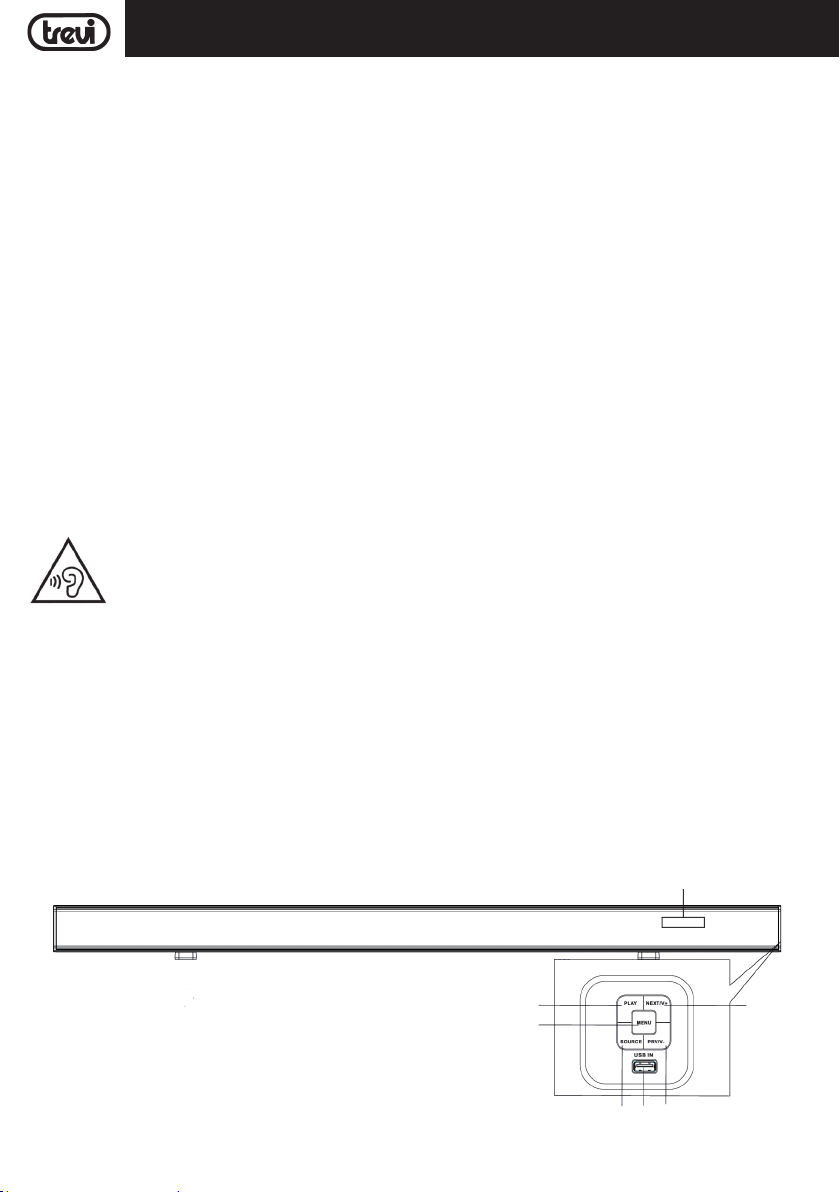
Panel frontal
1
2
28
14
6
3 4 5
Page 29
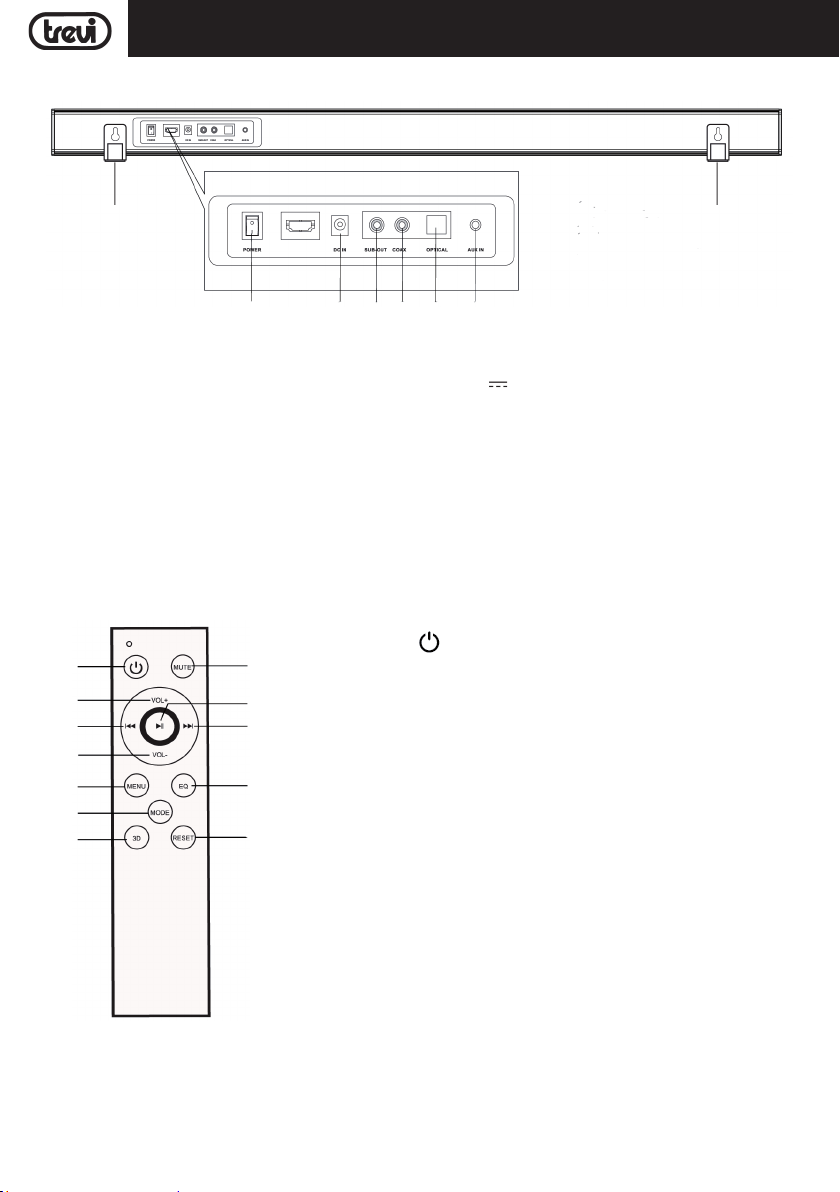
Panel trasero
ELLEHNIKA
ESPAÑOL
SB 8370 SW
13
7 8 9 10 11 12
1. Botón PLAY: para encender/apagar el aparato.
2. Botón MENU.
3. Botón SOURCE: para seleccionar la función/entradas.
4. Entrada USB.
5. Botón PREV/V-; para que coincida con las pistas
anteriores, para minimizar el volumen.
6. Botón NEXT/V+; para ir a las siguientes pistas, para
aumentar el volumen.
7. Interruptor ON/OFF, barra de sonido activada/desactivada.
MANDO A DISTANCIA
13. Botón , Encendido/Espera.
13
14
15
16
17
18
19 20
24
23
22
21
14. Botón VOL +.
15. Botón 9, seleccione pista anterior.
16. Botón VOL -.
17. Botón MENU.
18. Botón MODE, para seleccionar la función/entradas.
19. Botón 3D, efecto envolvente.
20. Botón RESET, volver a la configuración de fábrica.
21. Botón EQ, selección de sonido.
22. Botón :, seleccione pista siguiente.
23. Botón , reproducción/pausa.
24. Botón MUTE, desactivación/activación de audio.
13
8. Toma para la fuente de alimentación barra de sonido
19V
3,42A.
9. Salida SUB-OUT, para la conexión a otro subwoofer
de cable.
10. Entrada Audio COASSIALE.
11. Entrada Audio digitale Ottico.
12. Entrada AUX-IN (estéreo de 3,5mm).
13.Soporte de montaje en pared.
14. Monitor.
BATERIAS DEL MANDO A DISTANCIA
El mando a distancia funciona con dos pilas tipo "AAA" (no incluidas) para insertarlas en el compartimento de la
batería en la parte posterior.
Cuando inserte las baterías, respete las polaridades indicadas en el compartimiento de la batería.
29
Page 30
ESPAÑOL
SB 8370 SW
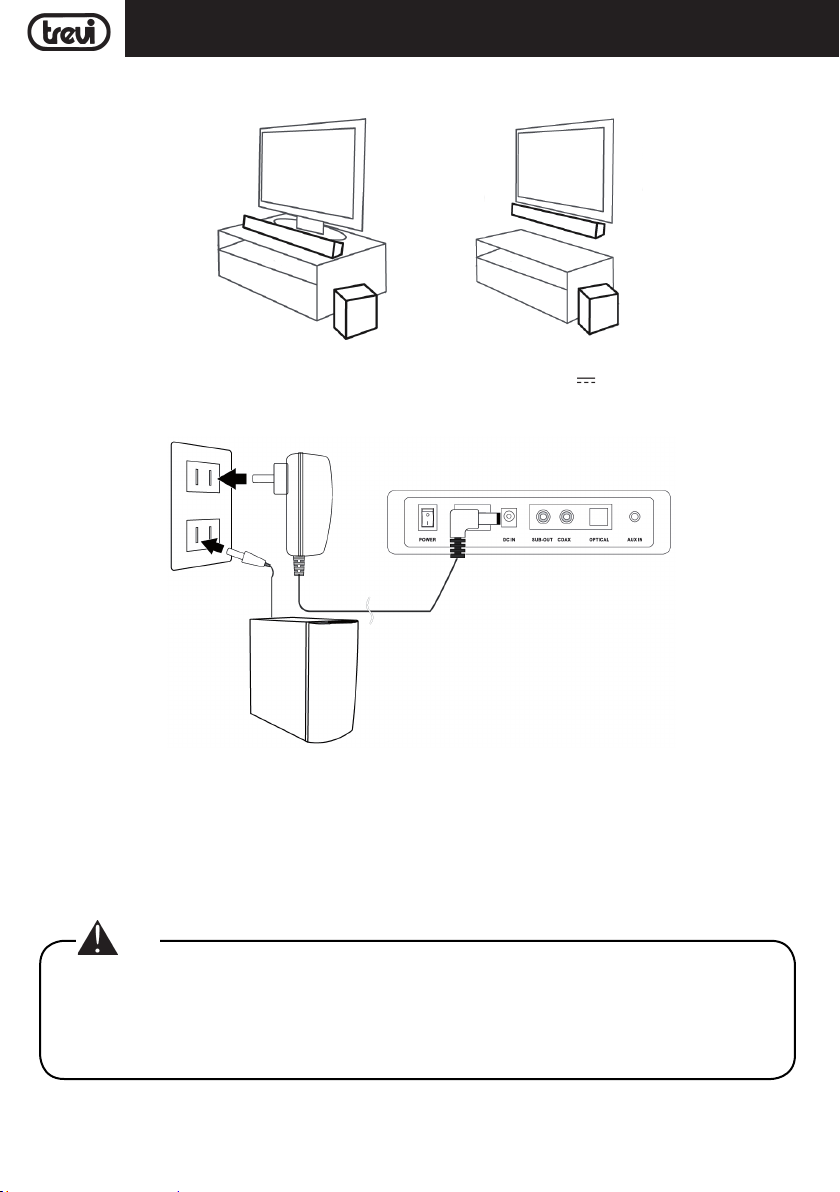
INSTALACIÓN
Soundbar se puede instalar tanto en el móvil como en la pared:
CONEXIÓN A LA RED ELÉCTRICA
- Conecte el enchufe de la fuente de alimentación suministrada a la toma 19V 3,42A (8) en la parte posterior
de la barra de sonido y conecte la fuente de alimentación a una toma de corriente.
- Inserte el enchufe del cable de alimentación del Subwoofer en una toma de corriente.
ENCENDIDO/APAGADO Y FUNCIÓN DE APAGADO AUTOMÁTICO
Encender el aparato
1. Presione el interruptor ON/OFF (7) en la barra de sonido y gírelo a la posición "I" para encender el aparato.
2. Presione el interruptor ON/OFF ubicado detrás del subwoofer y colóquelo en la posición "I" para encender la
unidad.
3. La conexión inalámbrica entre la barra de sonido y el subwoofer se llevará a cabo automáticamente, si esto no
sucede, apague y encienda ambos dispositivos.
Nota:
• La conexión entre la barra de sonido y el subwoofer demora unos segundos (o más).
• Cuanto más cerca estén Soundbar y el subwoofer, mejor será la calidad del sonido. Recomendamos
colocar la barra de sonido y el subwoofer lo más cerca posible y evitar: -- los obstáculos entre la barra
de sonido y el subwoofer. -- Dispositivos que usan la misma frecuencia que la conexión inalámbrica,
como un horno de microondas, enrutador de LAN inalámbrica, equipo médico.
Apagar el aparato
1. Presione el interruptor ON/OFF (7) en la barra de sonido y gírelo a la posición "0" para apagar el aparato.
2. Presione el interruptor ON/OFF ubicado detrás del subwoofer y gírelo a la posición "0" para apagar la unidad.
30
Page 31
SB 8370 SWESPAÑOL
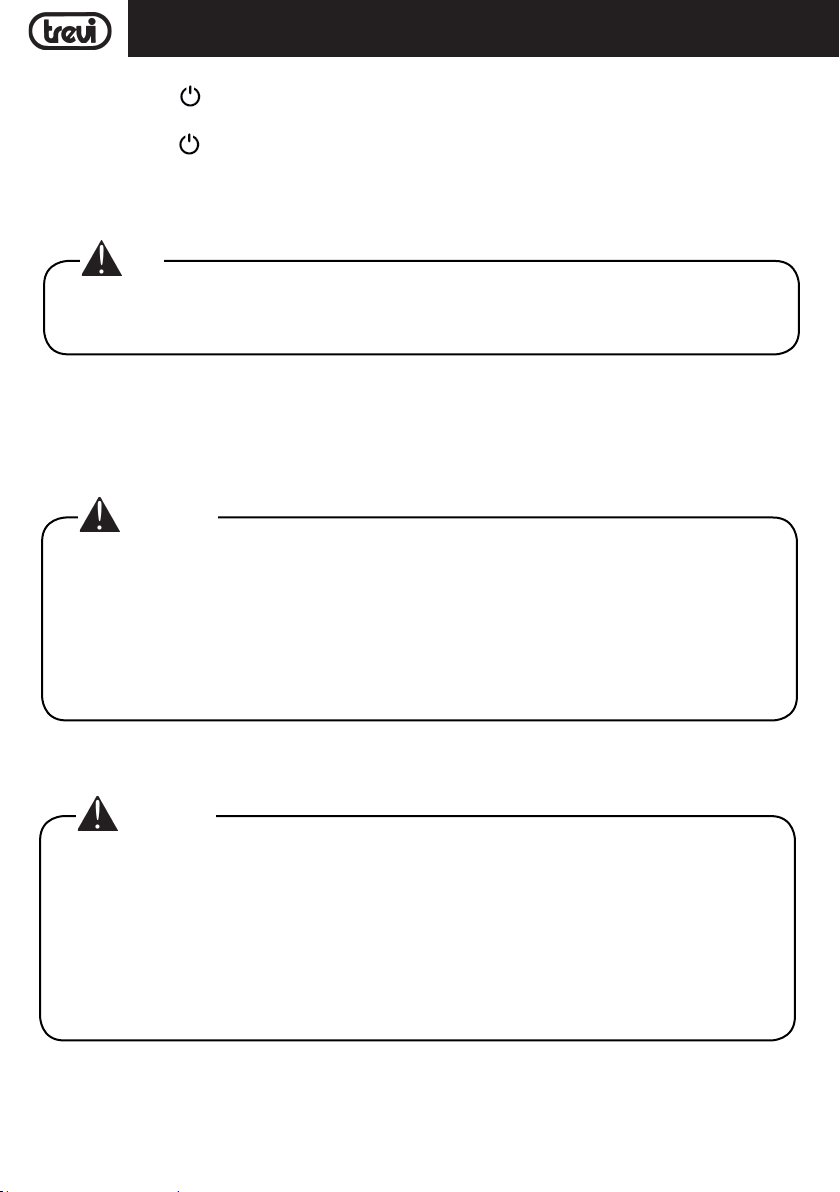
Función de espera
1. Presione el botón
de unos minutos, el subwoofer también pasará al modo de espera automáticamente.
2. Presione el botón
el subwoofer también se encenderá automáticamente.
Este dispositivo está equipado con la función Apagado automático; esta función permite la desconexión automática
después de unos minutos en ausencia de una señal de audio en las entradas o en el Volumen 0.
Nota:
• Si la barra de sonido no responde a los comandos o no funciona correctamente, desconecte la clavija
de alimentación del dispositivo durante 30 segundos para reiniciar (consulte el capítulo Problemas
y soluciones).
AJUSTE DE VOLUMEN Y FUNCIÓN DE SILENCIO
1. Presione el botón VOL + (14) en el control remoto o presione y mantenga presionado el botón NEXT/V + (6) en
la unidad durante unos segundos para aumentar el volumen del dispositivo.
2. Presione el botón VOL - (16) en el control remoto o presione y mantenga presionado el botón PREV/V - (5) en la
unidad durante unos segundos para disminuir el volumen.
Advertencia:
• En caso de conexión a la salida de auriculares de un televisor o un dispositivo con sus propios
altavoces, estos generalmente se desactivarán y para tener una buena señal de salida es necesario
ajustar el volumen al nivel máximo a través de los propios comandos del televisor (o dispositivo).
• En caso de conexión a la salida de audio-scart de un televisor (o cualquier salida de audio que
no sea la toma de auriculares de otro dispositivo), el nivel de la salida de audio es constante y no
puede controlarse con el comando adecuado del televisor (o del dispositivo); los altavoces de TV (o
dispositivo) no se desactivarán y si desea silenciarlos, es necesario bajar el volumen por completo
o bien puede ajustarlos para una reproducción de sonido que se agrega a la de la barra de sonido.
(13) en el control remoto para poner la barra de sonido en el modo de espera; después
(13) en el control remoto para encender la barra de sonido; después de unos segundos,
Función MUTE: es posible activar la función de exclusión de audio del dispositivo utilizando el botón MUTE (24) en
el control remoto. Para reactivar la escucha, presione el botón MUTE (24) nuevamente.
Advertencia:
• Algunas salidas de audio conectadas a la barra de sonido (como la salida de auriculares) pueden
tener su propio ajuste de volumen: asegúrese de haber ajustado un nivel de salida de audio apropiado
en el dispositivo fuente o la barra de sonido incluso con el volumen máximo sonará plana.
• En caso de que el sonido reproducido por la barra de sonido esté distorsionado significa que la señal
de entrada es demasiado fuerte: baje el volumen de la barra de sonido o ajuste un nivel de salida de
audio inferior en el dispositivo de origen.
• En caso de conexión a un televisor a través de la salida de auriculares, puede ocurrir que el sonido
reproducido por la barra de sonido sea bajo incluso al volumen máximo; en este caso intente conectar
la barra de sonido a la salida de audio-scart usando un adaptador (no suministrado).
ENTRADA USB
1. Inserte una memoria USB en la entrada (4);
2. Encienda el aparato. El contenido del USB se reproducirá automáticamente;
3. Presione el botón(23) en el control remoto o el botón PLAY (1) en la unidad, para detener la reproducción
31
Page 32
ESPAÑOL
temporalmente. Presiónelo nuevamente para reanudar la reproducción;
4. Presione el botón 9 (15) o : (22) en el control remoto o los botones PREV/V - (5) o NEXT/V + (6) en la unidad
para moverse a la pista anterior o siguiente.
SB 8370 SW
ENTRADA AUX
1. Use un cable jack estéreo de 3.5 mm para conectar la entrada AUX (12) en la parte posterior de la barra de sonido
a la salida de auriculares/audio del televisor u otro dispositivo fuente;
2. Encienda el aparato; presione el botón MODE (18) en el control remoto o el botón SOURCE (3) en la unidad y
seleccione la entrada AUX;
3. Para una reproducción de sonido correcta, consulte el capítulo AJUSTE DE VOLUMEN Y FUNCIÓN DE SILENCIO.
ENTRADA ÓPTICA
1. Use un cable óptico digital (no incluido) para conectar la entrada OPTICAL (11) a la salida óptica digital del televisor
u otro dispositivo fuente;
2. Encienda el aparato; presione el botón MODE (18) en el control remoto o el botón SOURCE (3) en la unidad y
seleccione la entrada OPtl;
Nota:
• Antes de conectar el cable óptico, asegúrese de quitar la cubierta de protección del enchufe si el
cable está equipado con él.
• En algunos televisores o dispositivos, es necesario habilitar la salida óptica digital.
• El audio digital PCM debe configurarse en el dispositivo fuente para reproducir desde esta entrada.
OPERACIÓN BLUETOOTH
1. Encienda el aparato; presione el botón MODE (18) en el control remoto o el botón SOURCE (3) en la unidad y
seleccione la función BLUETOOTH;
2. El sistema entrará automáticamente en modo de sincronización;
3. Active la funcionalidad Bluetooth en el dispositivo externo que se emparejará;
4. Comience la búsqueda del dispositivo. Al final, seleccione el dispositivo "SB 8370 SW";
5. Ingrese la contraseña "0000" si es necesario;
6. Presione el botón(23) en el control remoto o el botón PLAY (1) en la unidad para iniciar la reproducción y
los botones 9 (15) o : (22) en el control remoto o los botones PREV/V - (5) o NEXT/V + (6) en la unidad para
seleccionar pistas.
FUNCIONES DE IGUALACIÓN
La barra de sonido tiene un sistema de ecualizador preestablecido, presione repetidamente el botón EQ (21) durante la
reproducción para seleccionar la dinámica de audio que mejor se adapte al estilo de música que se está reproduciendo.
Presione el botón 3D (19) para tener un efecto envolvente.
PROBLEMAS Y SOLUCIONES
Si su Barra de sonido no funciona correctamente, compruebe esta breve lista antes de llevarlo a un centro de asistencia técnica autorizado TREVI.
En cualquier caso, no trate de arreglar el aparato por si mismo ya que esto invalidaría la garantía. Sólo los centros
de asistencia técnica TREVI están autorizados a realizar intervenciones en este producto.
Ausencia de sonido:
Compruebe que la función MUTE no haya sido activada.
Compruebe haber seleccionado la entrada correcta.
Compruebe y ajuste el volumen de la Barra de sonido y del TV (o del dispositivo conectado).
32
Page 33

ESPAÑOL
La Barra de sonido no se enciende o se apaga automáticamente:
Compruebe haber conectado correctamente el cable de alimentación.
Si la Barra de sonido no recibe señales por determinado tiempo (aproximadamente un minuto), se pone automáti-
camente en modo stand-by.
Problemas de emparejamiento con dispositivos Bluetooth:
Si la calidad del audio es baja después de vincular Bluetooth con un dispositivo externo, acerque el dispositivo
externo a la barra de sonido o elimine cualquier obstrucción entre ellos.
Si la conexión entre la barra de sonido y el dispositivo no ocurre, verifique que la función de acoplamiento del
dispositivo esté habilitada; consulte el manual del dispositivo para habilitar la función.
Si el acoplamiento con el dispositivo externo se activa y desactiva continuamente, acerque el dispositivo externo
a la barra de sonido o elimine cualquier obstáculo entre ellos. En algunos dispositivos externos, el emparejamiento Bluetooth se puede apagar automáticamente para proteger el consumo de su batería, esto no es un mal
funcionamiento del dispositivo.
La barra de sonido no se conecta al subwoofer:
La conexión inalámbrica puede no funcionar normalmente en un área donde la señal es débil.
Instale la barra de sonido lo suficientemente cerca del subwoofer inalámbrico.
No instale Soundbar o Subwoofer en un armario metálico si desea un rendimiento óptimo.
Evitar obstáculos entre la barra de sonido y el subwoofer.
El mando a distancia no funciona:
Sustituya la batería.
Los mandos no responden:
Desconecte la toma de alimentación del aparato durante 30 segundos para efectuar un reset.
SB 8370 SW
CARACTERÍSTICAS TÉCNICAS
GENERALES
Alimentación de barra de sonido:................................ 19V
Alimentación de Subwoofer: ..................................... 100-240V
Consumo eléctrico Barra de sonido: ........................... 34W
Consumo de energía Subwoofer: ................................ 51W
Consumo en espera: ..................................... <0,5W
Potencia máxima de salida: ..................................... 80W (4x10W+40W)
Respuesta de frecuencia:
Barra de sonido ..................................... 500Hz-20KHz
Subwoofer ..................................... 20Hz-300Hz
Relación de S/N: ..................................... ≥75db
Potencia de transmisión Bluetooth: ............................. 1mW
Banda de transmisión Bluetooth: ................................ 2,4GHz
Dimensiones Sound Bar: ..................................... 900x60x60mm
Dimensiones del Subwoofer: ..................................... 160x310x265mm
Peso: ..................................... 4,5 Kg
33
3,42A
50-60Hz
Page 34
AVVERTENZE SMALTIMENTO PRODOTTO - CORRECT DISPOSAL WARNINGS
INFORMAZIONI AGLI UTENTI ai sensi del Decreto
Legislativo N° 49 del 14 Marzo 2014
“Attuazione della Direttiva 2012/19/UE sui rifiuti di
apparecchiature elettriche ed elettroniche (RAEE)”
Il simbolo del cassonetto barrato riportato sull’apparecchiatura indica che il prodotto alla fine della propria vita
utile deve essere raccolto separatamente dagli altri rifiuti.
L’utente dovrà, pertanto, conferire l’apparecchiatura integra
dei componenti essenziali giunta a fine vita agli idonei centri
di raccolta differenziata dei rifiuti elettronici ed elettrotecnici,
oppure riconsegnarla al rivenditore al momento dell’acquisto
di nuova apparecchiatura di tipo equivalente, in ragione di
uno a uno, oppure 1 a zero per le apparecchiature aventi
lato maggiore inferiore a 25 cm. L’adeguata raccolta differenziata per l’avvio successivo dell’apparecchiatura dimessa
al riciclaggio, al trattamento e allo smaltimento ambientale
compatibile contribuisce ad evitare possibili effetti negativi
sull’ambiente e sulla salute e favorisce il riciclo dei materiali
di cui è composta l’apparecchiatura. Lo smaltimento abusivo
del prodotto da parte dell’utente compor ta l’applicazione delle
sanzioni amministrative di cui al D.Lgs n. Decreto Legislativo
N° 49 del 14 Marzo 2014.
Precautions for correct disposal of the product.
The symbol shown on the equipment indicates that waste must
be disposed of in “separate collection” and so the product
must not be disposed of together with urban waste. The user
must take the product to special “separate waste collection
centres” provided by local government, or deliver it to the
retailer against the purchase of a new product.
Separate collection of waste and subsequent treatment,
recycling and disposal operations promotes the production
of equipment with recycled materials and limits negative
effects on the environment and on health caused by improper
handling of waste. Illegal disposal of the product leads to the
enforcement of administrative penalties.
Recommandations pour l’élimination correcte
du produit.
Le symbole figurant sur l’appareil indique que le produit fait
l’objet d’une “collecte séparée“. C’est pourquoi, le produit
ne doit pas être éliminé avec les déchets urbains. L’utilisateur
doit remettre le produit auprès de “décharges spécialisées de
SB 8370 SW
collecte séparée“ prévues par les autorités locales, ou bien
le rendre au revendeur quand il achètera un nouvel appareil
équivalent. La collecte séparée du produit et les opérations
successives de traitement, recyclage et élimination favorisent la production d’appareils composés par des matériaux
recyclés ainsi que permettent d’éviter des effets négatifs sur
l’environnement et sur la santé des personnes suite à une
gestion impropre du déchet. Toute élimination abusive du
produit entraîne l’application de sanctions administratives.
Hinweise zur ordnungsgemäßen Entsorgung
des Produkts.
Das auf dem Gerät angebrachte Symbol weist darauf hin, dass
das Altgerät “getrennt zu sammeln” ist und das Produkt daher
nicht zusammen mit dem Gemeindeabfall entsorgt werden
darf. Der Benutzer muss das Produkt zu den entsprechenden,
von der Gemeindeverwaltung eingerichteten “Wer tstoffsammelstellen” bringen oder dem Händler beim Kauf eines neuen
Produkts übergeben.
Die getrennte Müllsammlung und anschließende Aufbereitung,
Wiederverwertung und Entsorgung fördern die Herstellung
von Geräten unter Verwendung wiederverwer teter Materialien
und vermindern die negativen Auswirkungen auf die Umwelt
und Gesundheit in Folge einer falschen Müllverwaltung. Die
widerrechtliche Entsorgung des Produkts führt zur Auferlegung von Verwaltungsstrafen.
Advertencias para la correcta eliminación
del producto.
El símbolo que aparece en el aparato indica que el residuo
debe ser objeto de “recogida selectiva” por tanto el producto
no se debe eliminar junto con residuos urbanos. El usuario
deberá entregar el producto a los “centros de recogida
selectiva” creados por las administraciones municipales o
bien al distribuidor cuando adquiera un nuevo producto. La
recogida selectiva del residuo y las sucesivas operaciones
de tratamiento, recuperación y eliminación favorecen la
fabricación de aparatos con materiales reciclados y limitan
los efectos negativos en el medio ambiente y la salud causados por una gestión incorrecta del residuo. La eliminación
abusiva del producto da lugar a la aplicación de sanciones
administrativas.
34
Page 35

Page 36
DICHIARAZIONE DI CONFORMITÀ UE
SEMPLIFICATA
SIMPLIFIED EU DECLARATION OF
CONFORMITY
Il fabbricante TREVI dichiara che il tipo di
apparecchiatura SB 8370 SW è conforme alla
direttiva 2014/53/UE.
Il testo completo della dichiarazione di
conformità EU è disponibile al seguente indirizzo
Internet
https://www.trevi.it/dms/zidi/TREVI/DOCSB8370SW.pdf
Hereby TREVI Spa declares that the equipment
type SB 8370 SW is in compliance with directive
2014/53/EU.
The full text of the EU declaration of conformity
is available at the following internet address
https://www.trevi.it/dms/zidi/TREVI/DOCSB8370SW.pdf
Trevi S.p.A.
Strada Consolare Rimini-San Marino, 62 47924 Rimini (RN) Italy
Tel. 0541/756420 - Fax 0541/756430 - www.trevi.it - e-mail: [email protected]
Made in CHINA
 Loading...