

Page 1
MPV
1703 S
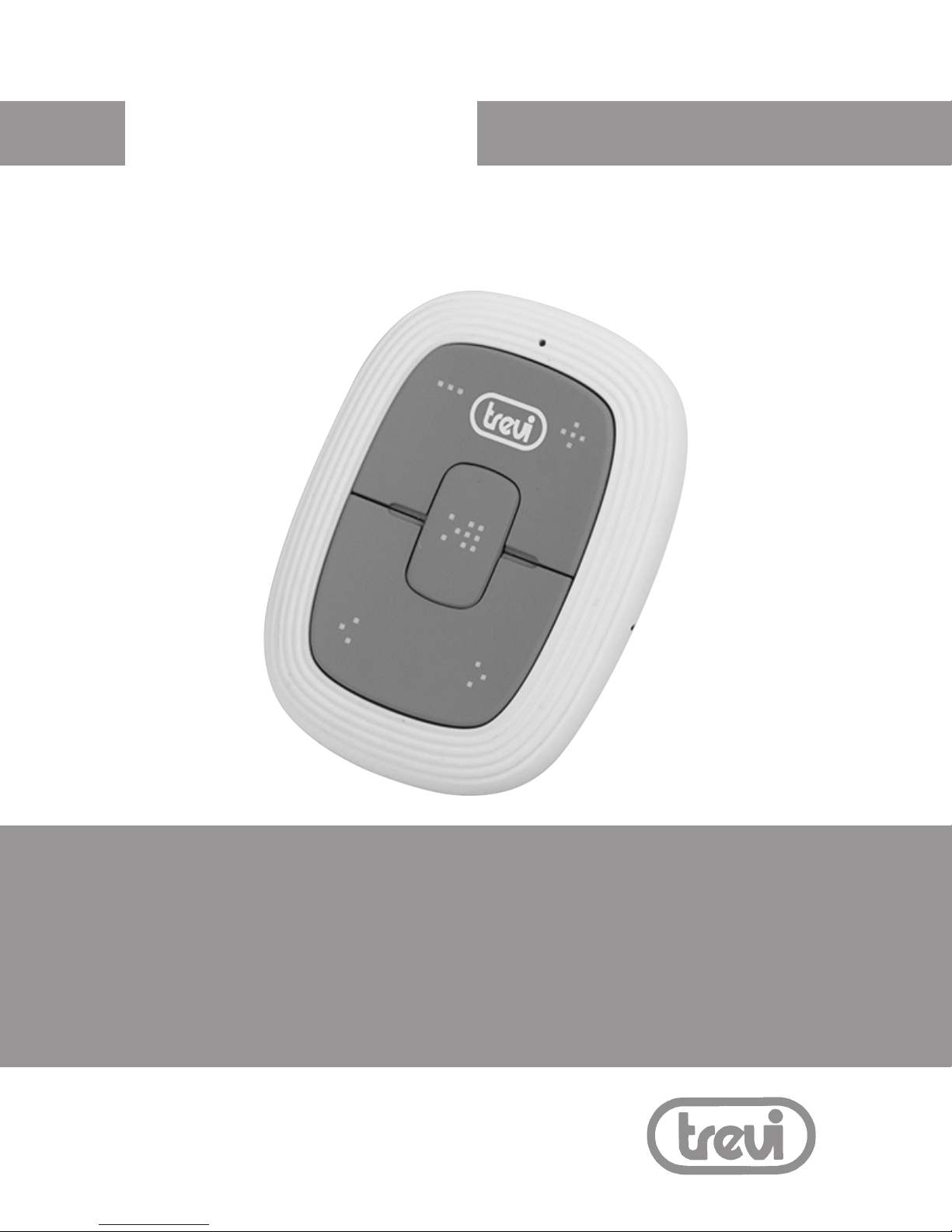
Mini lettore MP3 con clip
Mini MP3 player with clip
Mini lecteur MP3 avec clip
Mini MP3 Player mit clip
Mini reproductor MP3 con clip
Page 2

MPV 1703 S
2
MANUALE UTENTE
Le informazioni contenute in questo documento sono soggette a variazioni
senza preavviso.
Il presente documento non può essere riprodotto o trasferito, neppure
parzialmente, in alcun modo e con nessun mezzo, elettronico o meccanico,
né tanto meno fotocopiato, copiato o tradotto verso altre lingue per nessun
scopo senza esplicito consenso da parte del costruttore.
I nomi, i disegni e i marchi registrati presenti in questo manuale sono proprietà dei rispettivi proprietari.
Leggere attentamente il presente libretto di istruzioni e seguire attentamente
le informazioni riportate prima di utilizzare il prodotto.
AVVERTENZA PER IL CORRETTO UTILIZZO DELLA BATTERIA
RICARICABILE
- Ricaricare la batteria ad una temperatura compresa tra i 5°C e i 35°C.
- Non prolungare la ricarica oltre i tempi indicati per evitare il rischio di
surriscaldamento e scoppio.
- La ricarica della batteria oltre i tempi indicati o un prolungato periodo
di inattività possono ridurne la durata.
- La batteria ricaricabile è soggetta ad usura e la sua capacità diminuisce
gradualmente.
- Per prolungare la durata della batteria, utilizzarla quando è completamente
carica no al completo scaricamento, quindi ricaricarla completamente di
nuovo prima di utilizzarla nuovamente. Mettendo in carica una batteria
non completamente esaurita, la sua durata risulterà ridotta. In questo
caso, ripetere il ciclo caricamento/scaricamento completo più volte.
Attenzione!
L’uso inappropriato della batteria può causare esplosioni
o surriscaldamenti della stessa.
Italiano
Page 3
MPV 1703 S
3
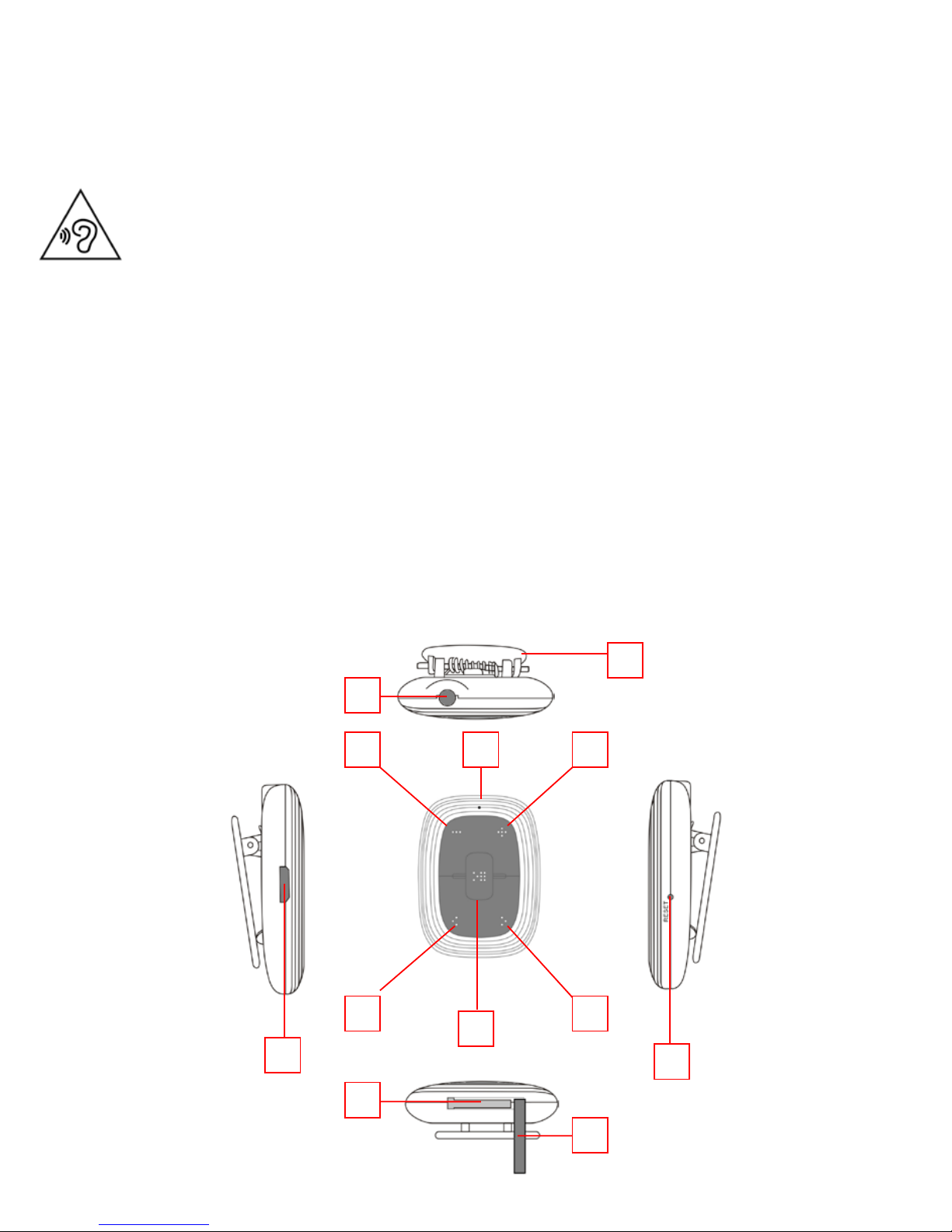
DESCRIZIONE COMANDI
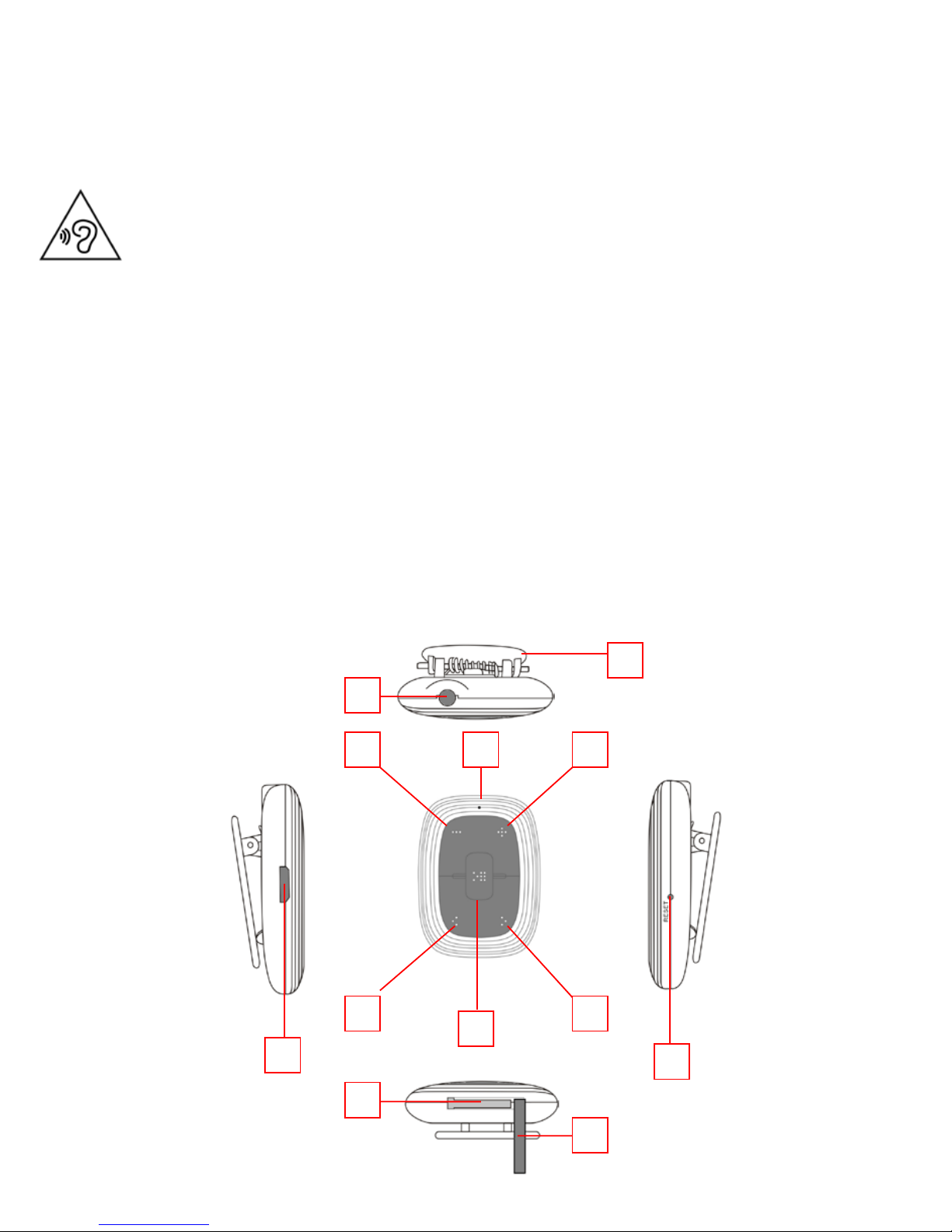
1. Clip a molla
2. Presa cufa
3. LED di stato
4. Tasto VOL-
5. Tasto VOL+
6. Tasto I<< PREV
7. Tasto >>I NEXT
8. Tasto >II PLAY/PAUSA / Accensione/Spegnimento
9. Presa microUSB
10. Tasto RESET
11. Ingresso microSD Card
12. Copertura ingresso microSD Card
Italiano
Per evitare possibili danni all’udito, limitare il tempo di ascolto a
volumi elevati.
3 4 5
6 7
8
9
10
2
1
11
12
Page 4

MPV 1703 S
4
CARICAMENTO DELLA BATTERIA
L’MPV 1703S ha al suo interno una batteria ricaricabile al Lithio.
1) Collegare l’MPV 1703S ad un computer dotato di presa USB. Il LED di
stato (3) lampeggerà rosso.
2) Ricaricare il lettore per un tempo non superiore alle 2 ore. A ricarica
terminata il LED di stato (3) rimarrà acceso rosso.
NB: La durata della batteria completamente carica si aggira intorno
alle 8 ore e 30 minuti di riproduzione continua.
INSERIMENTO DELLA microSD
1) Inserire la scheda microSD (non in dotazione) tenendo la supercie con
il lato scritto rivolto verso il basso e inserirla delicatamente nell’apposito
ingresso (11) no a sentire un click. A questo punto il lettore è in grado
di riprodurre i brani musicali presenti nella scheda microSD.
2) Per rimuovere la scheda microSD, premere contro essa.
TRASFERIMENTO FILE AUDIO MP3/WMA/WAV DA PC NELLA
MEMORIA micro-SD
1) Collegare l’MPV 1703S ad un computer dotato di presa USB.
2) La memoria della microSD verrà riconosciuta automaticamente dal
computer.
3) Copiare i le audio MP3/WMA/WAV dal computer alla microSD.
NB: Per la rimozione della memoria della micro-SD utilizzare la
“Rimozione sicura dell’hardware”.
Italiano
Page 5

MPV 1703 S
5
ACCENSIONE/SPEGNIMENTO, RIPRODUZIONE TRACCE
E FUNZIONI PRINCIPALI
1) Premere il tasto >II PLAY/PAUSA (8) per 2 secondi per accendere il
lettore. In presenza di le audio il lettore avvierà automaticamente la
riproduzione. Il LED di stato (3) lampeggerà blu.
NB: In caso di assenza di le audio il lettore si spegnerà
automaticamente.
2) Premere il tasto >II PLAY/PAUSA (8) per arrestare momentaneamente
la riproduzione. Il LED di stato (3) rimarrà acceso blu.
3) Premere nuovamente il tasto >II PLAY/PAUSA (8) per tornare alla normale
riproduzione.
4) Premere il tasto >>I NEXT (7) per passare alla traccia successiva.
5) Premere il tasto I<< PREV (6) per passare alla traccia precedente.
6) Premere il tasto VOL+ (5) per aumentare il volume.
NB: Un segnale acustico avviserà quando si è raggiunto il livello
massimo del volume.
7) Premere il tasto VOL- (4) per diminuire il volume.
8) Premere il tasto >II PLAY/PAUSA (8) per 2 secondi per spegnere il lettore.
NB: In caso di blocco del lettore premere il tasto RESET (10) per
effettuare un reset.
SPECIFICHE TECNICHE
Sistema operativo ...............................Windows® 2000/XP/Vista/7/8/10
................................................................ Mac OS 9.2 o superiore
Versione USB ...................................... microUSB 2.0
Capacità ................................................ microSD Card no a 32GB
Formati audio supportati .................. MP3, WMA,WAV
Risposta in frequenza ........................20-20000Hz
Rapporto S/N ...................................... 80dB
Alimentazione ..................................... Batteria al Lithio ricaricabile tramite presa USB
Dimensioni ........................................... 24x24x14mm
Italiano
Page 6
MPV 1703 S
6
INFORMATIVA SULLA RIMOZIONE E LO SMALTIMENTO
DELLA BATTERIA
Attenzione: Questa operazione è riservata esclusivamente al
personale tecnico specializzato!
PROCEDURA PER LA RIMOZIONE DELLA BATTERIA
Operare esclusivamente in assenza di collegamento dell’apparecchio alla rete elettrica!
1. Rimuovere il mobile inferiore dagli incastri;
2. Individuare la batteria, scollegarla e rimuoverla.
Qualunque sia il tipo di batteria esaurita, essa non deve essere gettata tra i
riuti domestici,nel fuoco o nell’acqua. Ogni tipo di batteria esaurita deve
essere, riciclata oppure smaltita presso gli appositi centri raccolta dedicati.
INFORMAZIONI AGLI UTENTI ai sensi del Decreto
Legislativo N° 49 del 14 Marzo 2014
“Attuazione della Direttiva 2012/19/UE sui riuti di
apparecchiature elettriche ed elettroniche (RAEE)”
Il simbolo del cassonetto barrato riportato sull’apparecchiatura indica che il prodotto alla
ne della propria vita utile deve essere raccolto separatamente dagli altri riuti. L’utente
dovrà, pertanto, conferire l’apparecchiatura integra dei componenti essenziali giunta a
ne vita agli idonei centri di raccolta differenziata dei riuti elettronici ed elettrotecnici,
oppure riconsegnarla al rivenditore al momento dell’acquisto di nuova apparecchiatura
di tipo equivalente, in ragione di uno a uno, oppure 1 a zero per le apparecchiature aventi
lato maggiore inferiore a 25 cm. L’adeguata raccolta differenziata per l’avvio successivo
dell’apparecchiatura dimessa al riciclaggio, al trattamento e allo smaltimento ambientale
compatibile contribuisce ad evitare possibili effetti negativi sull’ambiente e sulla salute e
favorisce il riciclo dei materiali di cui è composta l’apparecchiatura. Lo smaltimento abusivo
del prodotto da parte dell’utente comporta l’applicazione delle sanzioni amministrative
di cui al D.Lgs n. Decreto Legislativo N° 49 del 14 Marzo 2014.
TREVI persegue una politica di continua ricerca e sviluppo, pertanto i prodotti possono
presentare caratteristiche diverse da quelle descritte.
Italiano
Page 7
MPV 1703 S
7
English
`
USER’S MANUAL
MPV 1703 S
MP3 Player
With
Micro SD Card Slot
Page 8
MPV 1703 S
8
English
To avoid possible hearing damage, limit the time listening at high
volumes.
WARNING FOR A CORRECT USE OF RECHARGEABLE
BATTERY
- Recharge the battery in an ambient temperature between 5°C and 35°C.
- When the recharge is complete the device shows a message/signal (check
the user’s guide).
- Don’t recharge more than the suitable period to prevent the risk of
overheating and burst.
- Recharging the battery over the suitable period or an extended period
of inactivity may reduce battery duration.
- Rechargeable battery is liable to wear and tear and its performance will
reduce gradually.
- To extend the duration of the battery use it when is completely charged
up to the complete discharging, then recharge it fully before use it again.
Recharge a battery not completely consumed, will result a reduced duration. In this case, repeat the full charging/discharging cycle many times.
- Avoid recharge the battery for the whole night.
Warning!
Misuse of the battery may cause explosion or overheating
of the battery.
Page 9
MPV 1703 S
9
English
Cautions
• Do not place naked flames, such as lighted candles on or near the
product.
• Do not place objects filled with liquids, such as vases on or near the
product.
• Do not use or store this product in a place where it is subject to direct
sunlight, heat, excessive dust or vibration.
• Do not keep or store this product in wet conditions for long period.
• Do not clean this product with other liquids.
• Do not block or cover the slots and holes in the product.
• Do not push foreign objects into the slots or holes in the product.
• Do not attempt to open this product yourself. There are no user
serviceable parts inside.
• Do not allow children access to plastic bags.
Safety Warnings
• Before using this product, read and follow all warnings and instructions.
• This product is not intended for use by young children. Young children
should be properly supervised.
• This product is intended for household use only and not for commercial
or industrial use.
• Do not expose to dripping or splashing.
• No naked flame sources, such as lighted candles, should be placed on the
product.
• Ventilation should not be impeded by covering ventilation openings with
items such as newspapers, table cloths, curtains and the like.
• Make sure the unit is adjusted to a stable position. Damage caused by
using this product in an unstable position or by failure to follow any other
warning or precaution contained within this user manual will not be
covered by warranty.
We, suggest retaining the packaging in case for future transport of the
product.
If at any time in the future you should need to dispose of this product
please note that: All batteries and accumulators need to be removed from
this product (Removal of Waste Batteries and Accumulators).
WARNING:
• When participating in the traffic listening to a personal
music player can make the listener less aware of potential
dangers such as approaching cars.
WARNING:
• Prolonged exposure to loud sounds from personal music
players may lead to temporary or permanent hearing loss.
Page 10
MPV 1703 S
10
English
Special Features
• Elegant appearance and easy to use.
• Playback from Micro SD Memory Card.
• Multi-Code Player - Supporting MP3, WMA and WAV formats.
Brief View of Player
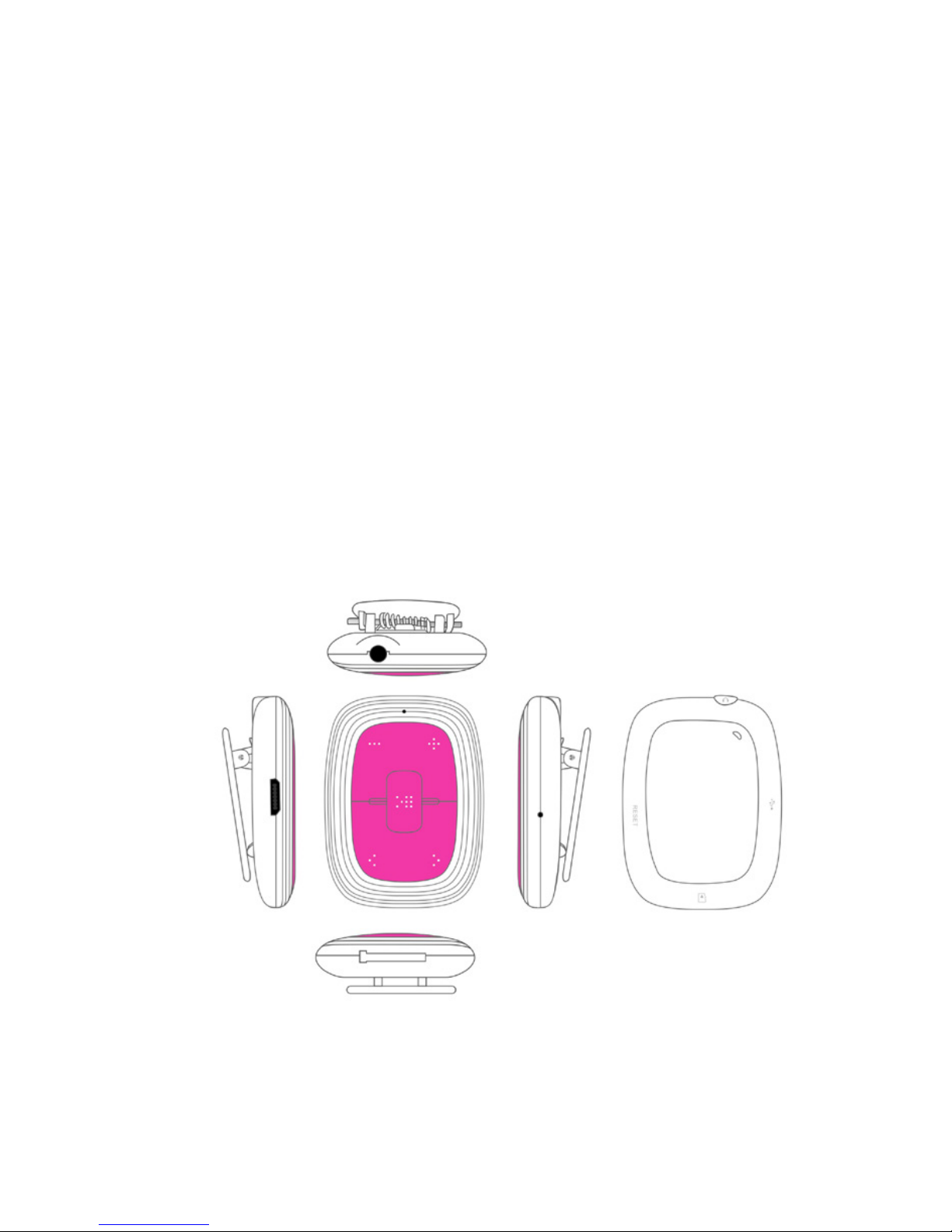
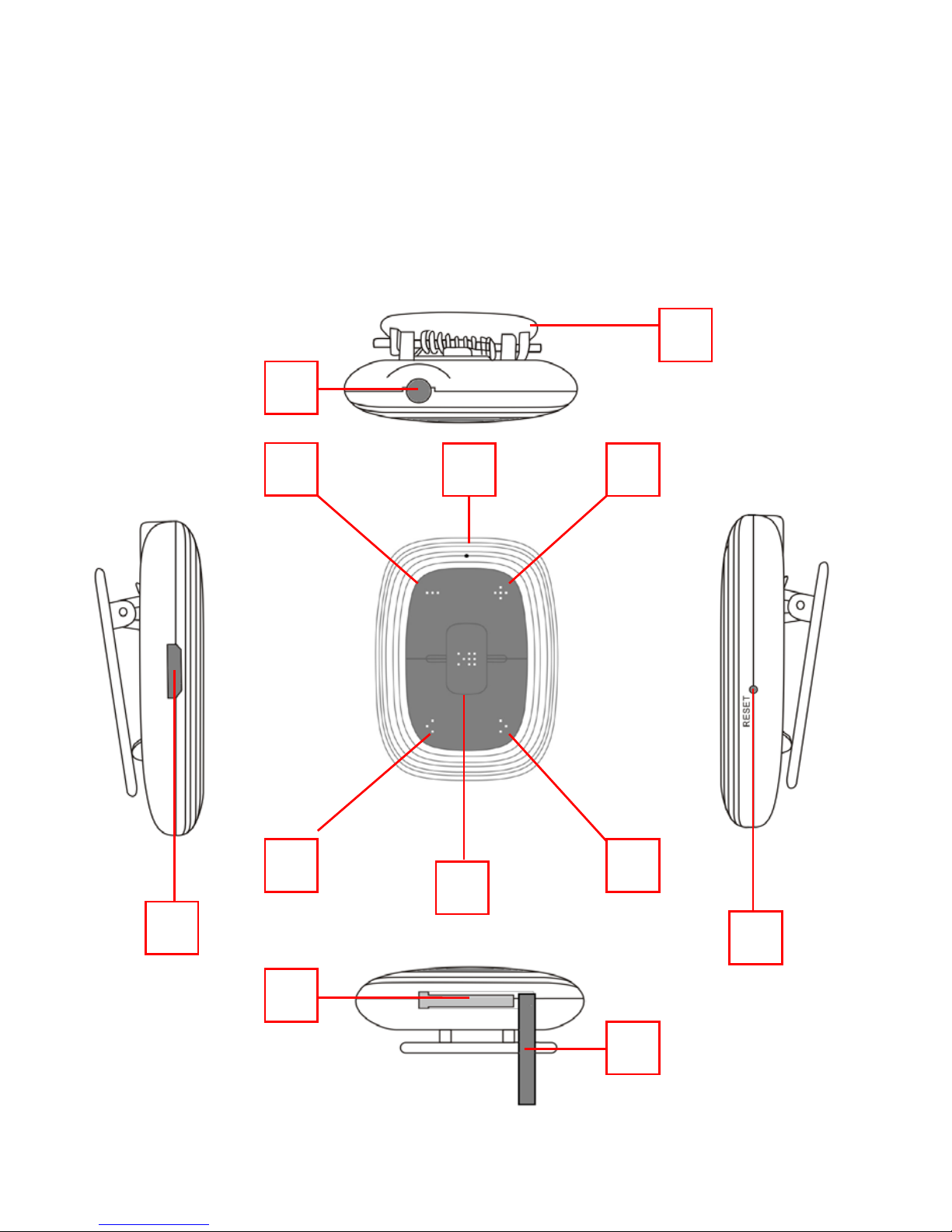
A. Outlook and Controls
3 4 5
6 7
8
9
10
2
1
11
12
Page 11

MPV 1703 S
11
English
1. Clip
2. 3.5mm Jack : Earphone output
3. Status LED : For charge / play status
4.
button : Decrease volume
5. button : Increase volume
6.
button : Play previous song, Previous folder
7. button : Play next song, Next folder
8. button : On / Off, Play / Pause, Normal/Shuffle
9. Micro USB Port : For PC connect, Charge
10. Reset Hole : For reset device
11. Memory Card Slot : For micro SD memory card
12. Card Slot Silicon Cover
B. Insert Micro SD Memory Card (not included)
This device is design without an internal memory; before you use it,
insert a Micro SD memory card into player for music playback.
1. Turn “Off” the play, open the “Card Slot Silicon Cover (12)”, then plug in
the Micro SD memory card into player’s memory card slot and close the
card slot silicon cover.
2. Now you can use the player for upload / download the desired media
files with your PC computer.
3. Or, Upload the desired media files direct to the Micro SD memory card
direct with your computer before insert it into player.
Note:
1. Make sure the player power is in “Off” status when insert / remove the
Micro SD memory card from memory card slot. Otherwise, the player
functional may result dead halt or the internal data / files will be lost /
damaged.
2. The player will turn off in seconds automatically if no Micro SD memory
card inserted or no supported music file(s) detected in memory card.
C. About player’s battery
Player has an internal, non–user-replaceable rechargeable lithium
battery. For best results, the first time you use the player, let it charging for
about 1 ~ 2 hours or until the charging “Status LED (3)” to long light (solid)
from blinking red before you use it.
Maintain battery life: Player may continue using battery power energy
after it’s been turned off. For maintain the battery life and performance, if
unit isn’t used for a while, the battery need to be recharged, recharging the
battery at least once per month.
1 Charging the Battery:
1.1 You can charge the Player’s battery in two ways;
1.2 Connect player to your computer. Or;
1.3 Use the USB power charger. (not included)
Page 12

MPV 1703 S
12
English
2 To Charge battery
2.1 Plug the USB plug of USB cable to the Player’s “USB micro port (9)”;
2.2 The “Status LED (3)” will light blinking red, for every 1 second, it is in
charging.
2.3 The “Status LED (3)” will long light red when the battery is fully
charged.
2.4 Disconnect the USB cable when it is done.
D. Connect Computer and Charge
You can connect the player to your computer to upload or download
those wanted music files, and charging the battery.
1 To Connect PC:
1.1 Plug the USB plug of USB cable to the Player’ “USB micro port (9)”,
then plug the other side USB plug into a USB port on your computer;
1.2 The computer will detect and installing necessary driver
automatically. And removable disk drive(s) will display in “My
computer” folder. (For Windows system). Or;
1.3 An “Untitled” icon will display on desktop indicating the player is
removable disk(s). (for MAC system)
1.4 Now the player is ready for music files upload or download with
your computer. And the Player battery is in charging at background.
1.5 You can transfer the music files by using the computer mouse and
drag and place, or copy and paste, in between the player and
computer.
Note: In USB power charger or PC connection mode, the player can play
music if you press or press and hold the
(8) button.
2 Disconnect from computer :
It’s important not to disconnect player while it’s syncing. Don’t
disconnect, if you have uploading or downloading music files with your
computer.
2.1 If you’re using a Windows system PC, you can disconnect the player
in My Computer or by clicking the “Safely Remove Hardware” icon
in the Windows system tray, select the correspondence name of
USB Device and choose Stop > Confirm > Confirm follow by the
pop-up dialog from computer.
2.2 If you’re using a Mac system PC, you can also disconnect player by
dragging the player icon on the desktop to the Trash.
2.3 And, now is safe to disconnect the player with your computer,
unplug the player from your computer.
2.4 If you’re accidentally disconnect player without disconnect it,
reconnect it to your computer and sync again. However, some
media file will be loss if this circumstance happens.
Note: The player will go to play mode automatically when is disconnected
with computer. Please turn it off when you don’t use it.
Page 13
MPV 1703 S
13
English
E. Getting start player
1 Turn On / Off
1.1 Plug-in the earphone set into Player’s “3.5mm jack (2)”.
1.2 Press and hold the “
(8)” button for until the “Status LED (3)”
light blue, the player is turning on and the music will play in seconds
automatically.
1.3 To Turn Off, press and hold the “ (8)” button until “Status LED
(3)” light Off.
2 Play / Pause Music
2.1 Short press the “
(8)” button to pause the playing music,
2.2 Short press the “
(8)” button again to resume.
2.3 If player is in pause state for 3 minutes, it will be turned to Off
automatically.
3 Play Next / Previous Music
3.1 Short press the “
(7)” button to select next music.
3.2 Short press the “ (6)” button to select previous music.
4 Switch Previous Folder / Next Folder
4.1 In music playing, press and hold the “
(7)” button to switch direct
to next folder’s song to play.
4.2 In music playing, press and hold the “
(6)” button to switch direct
to previous folder’s song to play.
5 Adjust Volume
5.1 Press and hold the “
(5)” button to increase volume level.
5.2 Press and hold the “ (4)” button to decrease volume level.
5.3 For hearing protection; a beep warning will be heard from earphone
every time you increase the volume level and reach to the default
setting level, which may exceed 85dB. Press the “
(8)” button to
accept the warning then press and hold the “ (5)” button again to
increase the level until to maximum level.
Important:
1. In order to protect your hearing and normal functions of the music player,
please do not continue listening to music at a high volume levels for
more than 20 hours, please restart the music player in 20 hours.
2. Ensure your player at low volume levels or turn it off before you leaving.
6 Switch Normal / Shuffle Play mode
6.1 Press twice the “
(8)” button in second to switch from “Normal”
to “Shuffle” play mode. Two beeps will sound and LED will flash 3
seconds once.
6.2 Press twice the “
(8)” button in second again to switch from
“shuffle” to “Normal” play mode. One beep will sound and LED will
flash 1 second once.
Page 14
MPV 1703 S
14
English
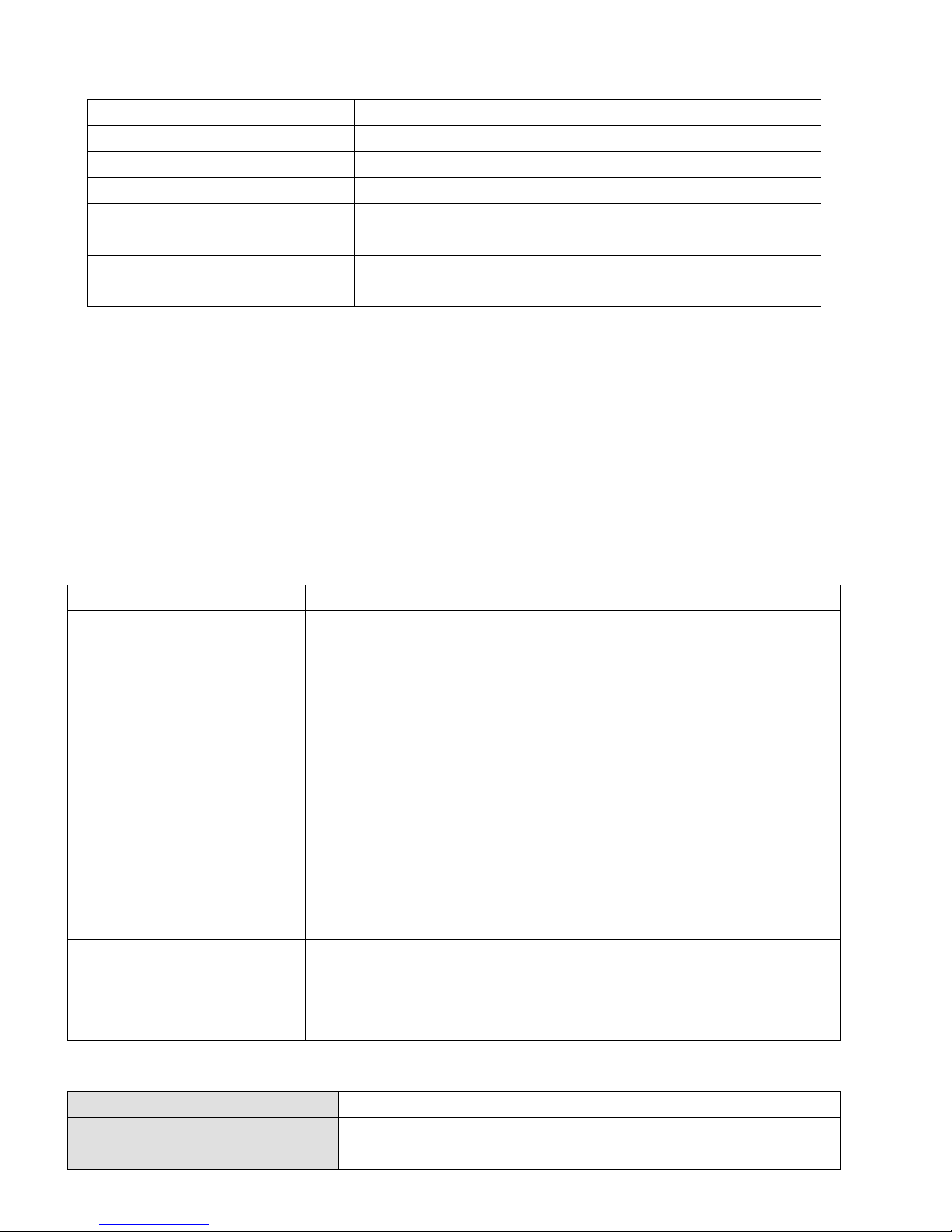
F. Indicator light function
Mode
Light Method
Normal playing mode
Blue light flashing 1 seconds once.
Shuffle playing mode
Blue light flashing 3 seconds once.
Pause mode
Blue light solid.
PC connecting mode
Blue light will flash when data transferring.
In charging Mode
Red light flashing 1 seconds once.
Charged
Red light solid
Low battery in 20%
Red light flashing
G. Reset the device
1. In some circumstances the device’s function may hanging and need to
reset. To reset the device;
2. Use a 0.8 ~ 1 mm stick or similar object (like tooth stick), and carefully
insert the stick, use dull side, into the “Reset Hole (10)” until you feel
to hit the end. Actually that is the tact switch button surface.
3. Then add a bit of force and you will get a click sound and feeling return
from switch. The device is reset and restart in seconds.
H. Troubleshooting
Play cannot turn ON
• Check whether battery have enough energy.
No sound is heard
• Check whether Volume is set to “minimum” and
connect the earphone plugs firmly.
• Check whether the earphone plug is dirty.
• Corrupted WMA / MP3 may make a
static noise
and the sound may cut off. Make sure that the
music files are not corrupted.
• Check whether music files format are support.
Download music files
fail.
• Check whether USB plug of USB cable is
connected properly.
• Check whether driver is installed correctly.
•
Check whether memory card is installed firmly
and correctly.
• Check whether the player’s memory is in full.
No FM station
• Check whether signal strength of broadcasting is
good enough in that area.
• Move location closer
to open area if you using
device inside your house.
I. Specification
Dimension
48mm (H) x 36.6mm (W) x 16.6mm (D)
Weight
15.5g (approximate)
PC Connection
USB 2.0 (High Speed)
Page 15
MPV 1703 S
15
English
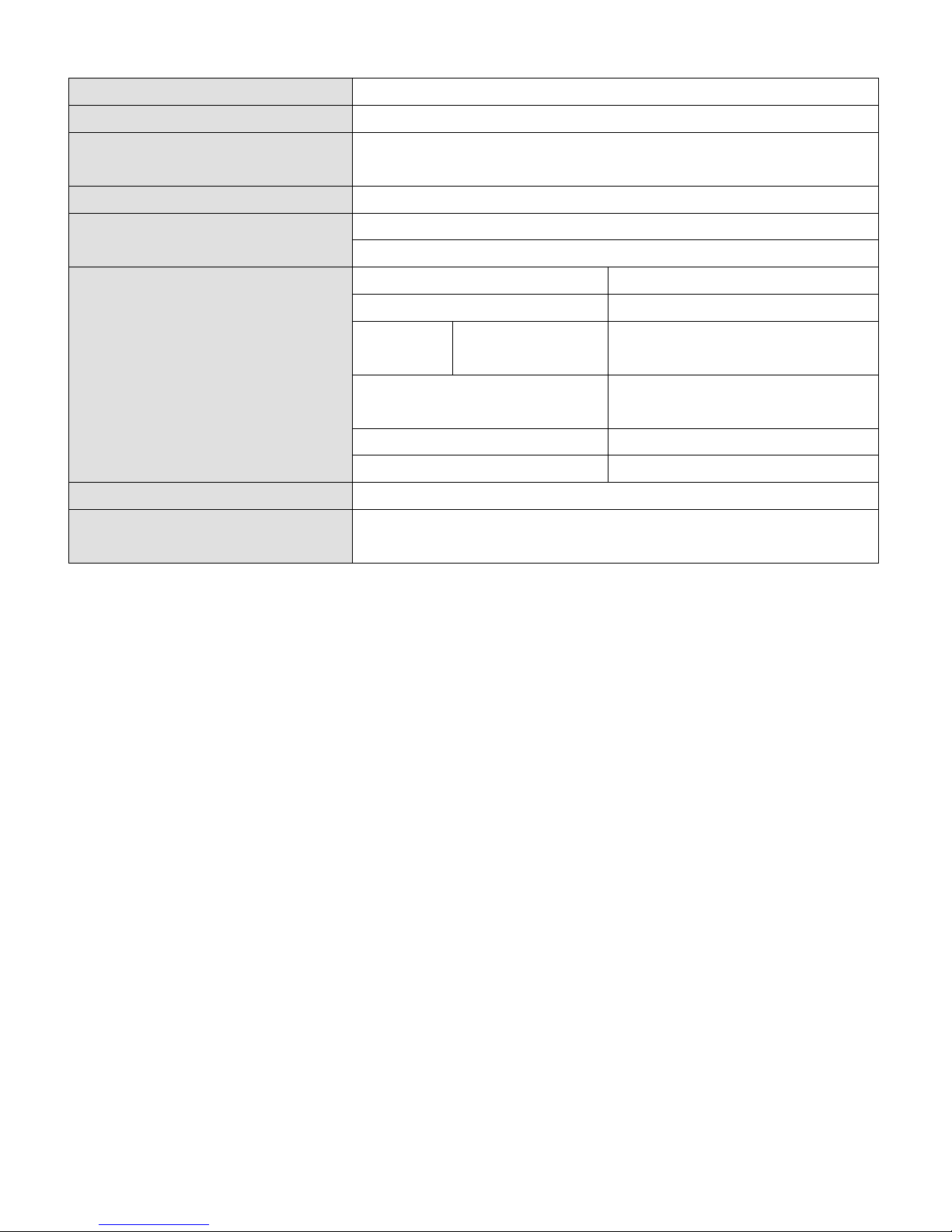
Earphone Impedance
32 Ohm
Internal Memory
Not Applicable
Memory Card Slot
Micro SD Memory Card
(Support up to 32GB and possible to 64GB)
Power Source
DC Input: DC 5V 500mA
Battery
Lithium-Polymer (3.7V 110mAh)
Playing Time: 6 ~ 7 hours
Supports Music Format
MP3
32kbps - 320kbps
WMA
32kbps - 384kbps
WAV
IMA-ADPCM
PCM
32kbps - 384kbps
128kbps - 1536kbps
Earphone Output
2mW x 2 channels
(at 32 Ohm)
Freq. Response
20Hz – 20,000Hz
SNR
80dB
Operation Temperature
0°C - 40°C
Operation Systems
Windows 2000/XP/Vista/Win7/Win8 /10
MAC 9.2 or above
J. Disclaimer
Updates to Firmware and/or hardware components are made regularly.
Therefore some of the instruction, specifications and pictures in this
documentation may differ slightly from your particular situation. All items
described in this guide for illustration purposes only and may not apply to
particular situation. No legal right or entitlements may be obtained from
the description made in this manual.
Page 16
MPV 1703 S
16
INFORMATION NOTE ON THE REMOVAL AND DISPOSAL
OF BATTERIES
Warning: Only high-qualified personnel should perform this
operation!
BATTERY REMOVAL
1) Remove the back part of the appliance from cogs;
2) Select the battery;
3) Disconnect and remove the battery.
Used batteries should not be disposed of with household waste or thrown
into re or water. Used batteries should be recycled or disposed of in
separate waste collection centres.
Precautions for correct disposal of the product.
The symbol shown on the equipment indicates that waste must be disposed
of in “separate collection” and so the product must not be disposed of
together with urban waste.
The user must take the product to special “separate waste collection cen-
tres” provided by local government, or deliver it to the retailer against the
purchase of a new product.
Separate collection of waste and subsequent treatment, recycling and disposal
operations promotes the production of equipment with recycled materials
and limits negative effects on the environment and on health caused by
improper handling of waste.
Illegal disposal of the product leads to the enforcement of administrative
penalties.
English
Page 17

MPV 1703 S
17
Français
MANUEL DE L’UTILISATEUR
Les informations contenues dans ce document sont sujet à changement
sans préavis.
Ce document ne peut pas être reproduit ou transféré, même partiellement,
de quelque manière et par quelque moyen, électronique, mécanique, photocopie, ni copié ou traduit dans d’autres langues pour n’importe quel but
sans autorisation expresse du fabricant.
Noms, dessins et marques de commerce gurant dans ce manuel sont la
propriété de leurs propriétaires respectifs.
Attentivement lire ce mode d’emploi et suivre attentivement les informations
suivantes avant d’utiliser ce produit.
AVERTISSEMENT POUR UNE UTILISATION CORRECTE DE
LA BATTERIE RECHARGEABLE
- La température de recharge doit être comprise entre 5°C et 35°C.
- Ne prolongez pas la recharge plus du temps indiqué pour éviter le risque
de surchauffement et explosion.
- Recharger la batterie plus du temps indiques ou temps prolongés de
inactivité peuvent diminuer la durée de la batterie.
- La batterie rechargeable est susceptible à l’usure et sa capacité diminue
graduellement
- Pour prolonger la durée de la batterie, utilisez-le jusqu’à quand elle est
complètement déchargée, ensuite rechargez-le complètement avant de
l’utiliser une autre fois. Recharger une batterie pas complètement déchargée
peut diminuer sa capacité. Dans ce cas, répétez le cycle charge/décharge
plusieurs fois.
Attention!
Utilisation abusive de la batterie peut provoquer une explosion
ou une surchauffe de la même.
Page 18
MPV 1703 S
18
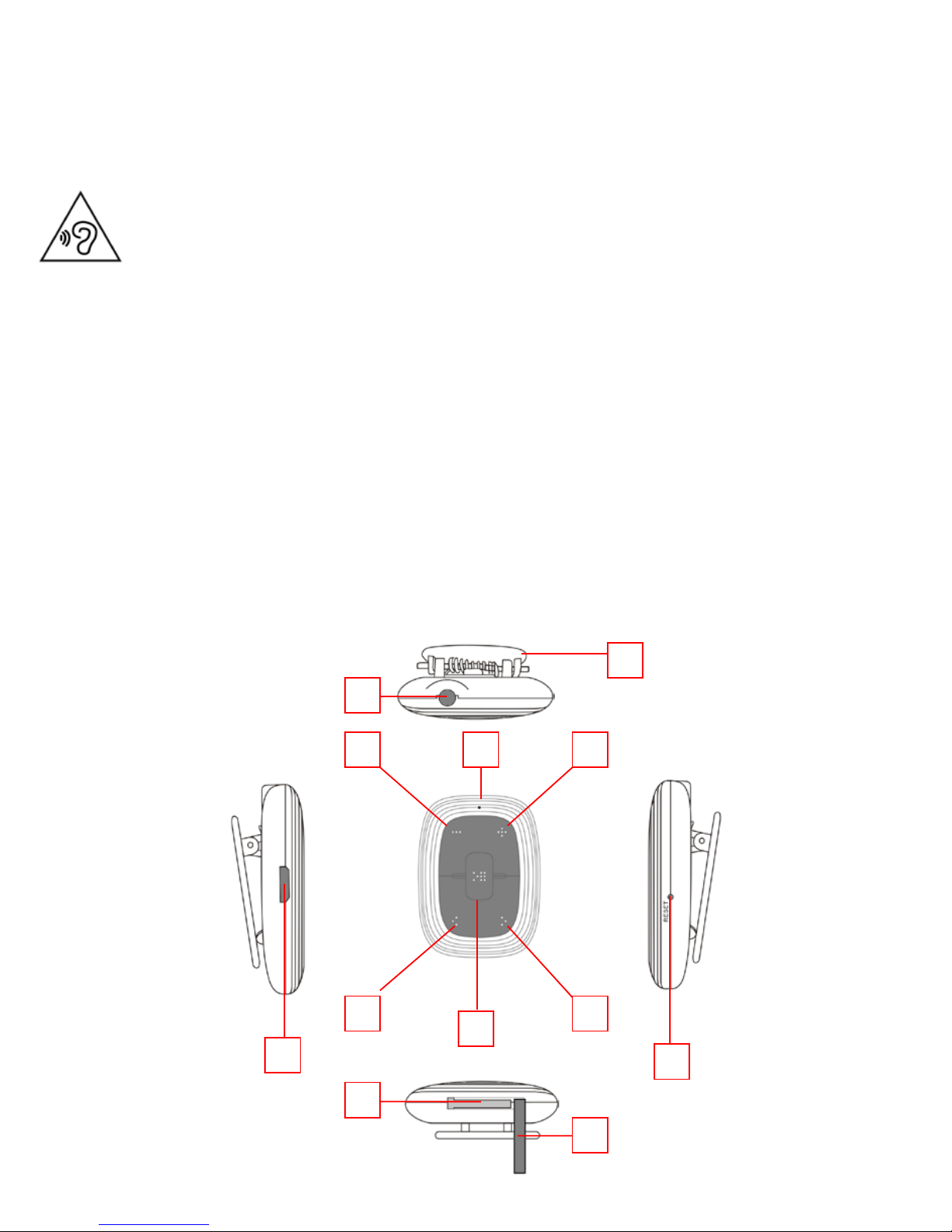
DESCRIPTION ET FONCTIONS CLÉS
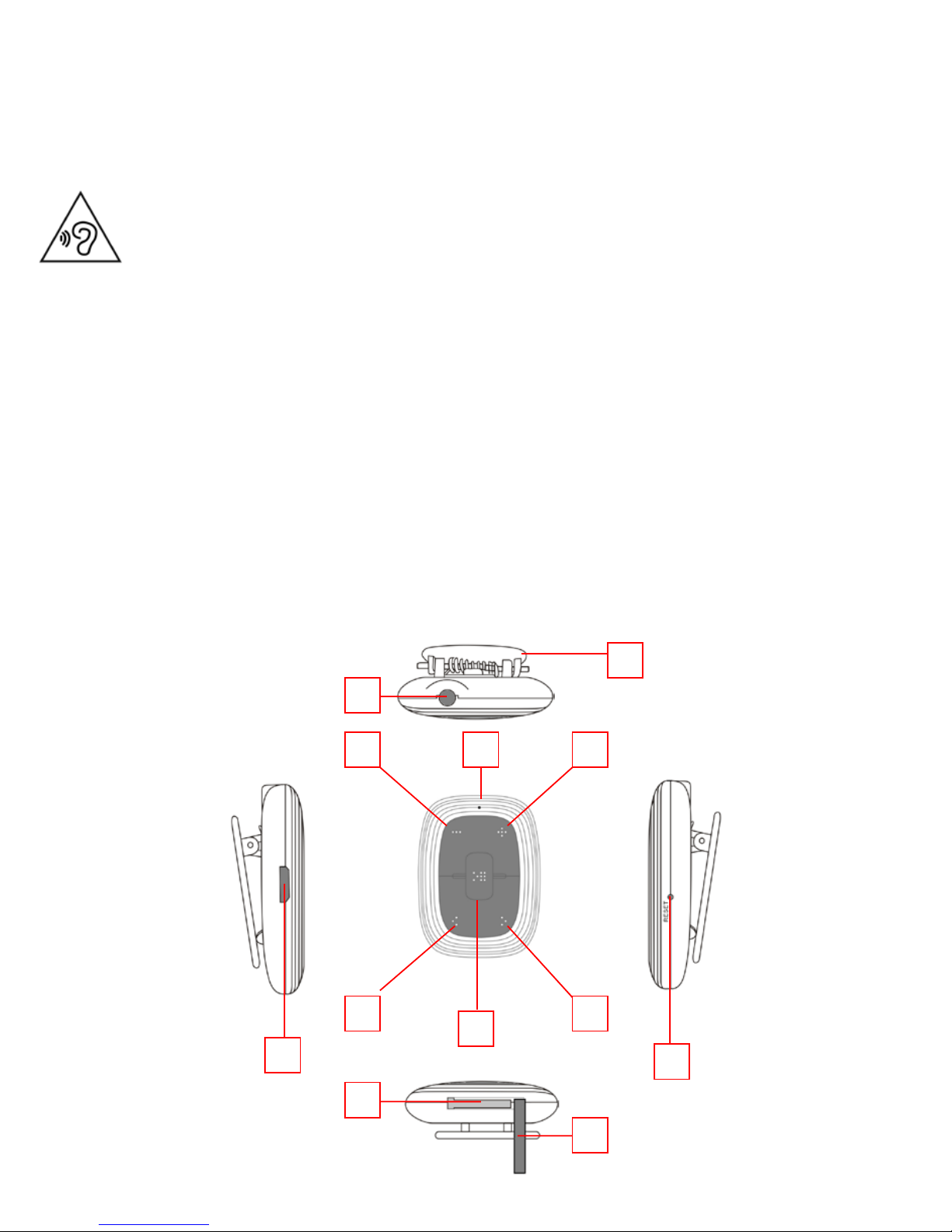
1. Pince à ressort
2. Prise pour casque
3. LED d’État
4. VOL-
5. VOL+
6. I<< PREV
7. >>I NEXT
8. >II PLAY/PAUSA / Alimentation marche/arrêt
9. microUSB
10. RESET
11. microSD
12. Couverture de silicium pour le slot microSD
Français
Pour éviter d’éventuels dommages auditifs, limiter le temps
d’écoute à volume élevé.
3 4 5
6 7
8
9
10
2
1
11
12
Page 19

MPV 1703 S
19
Français
CHARGEMENT DE LA BATTERIE
Le MPV 1703S a à sa base une batterie rechargeable au lithium.
1) Connectez le MPV 1703S à un ordinateur avec un port USB. Le LED
d’État (3) clignotera en rouge.
2) Recharger le lecteur pendant pas plus de 2 heures. Lorsque la charge est
terminée, le LED d’État (3) restera allumé en rouge.
Remarque: vie de la batterie complètement chargée rôde environ 8
heures et 30 minutes de lecture en continu.
INSÉREZ LA CARTE micro-SD
1) Insérer la parementure de carte micro-SD (non inclus) avec la surface
(côté écrite) vers le bas et placez-le délicatement dans la fente (11) jusqu’à
ce que vous entendiez un clic. À ce stade, le joueur est en mesure de
jouer les chansons présentes dans la carte micro-SD.
2) Retirez la carte micro SD en pressant contre elle.
TRANSFERT DE FICHIERS AUDIO MP3/WMA/WAV
D’ORDINATEUR MÉMOIRE micro-SD
1) Connecter le MPV 1703S à un ordinateur avec un port USB.
2) La mémoire micro-SD sera automatiquement reconnue par l’ordinateur.
3) Copier les chiers audio MP3/WMA/WAV depuis votre ordinateur, la
carte micro-SD.
Remarque: Pour supprimer l’utilisation de mémoire micro SD le
«retirer le périphérique en toute sécurité».
Page 20

MPV 1703 S
20
Français
ALIMENTATION MARCHE/ARRÊT, LECTURE DE PISTES ET
PRINCIPALES FONCTIONS
1) Appuyez sur la touche >II PLAY/PAUSE (8) pendant 2 secondes pour
allumer le lecteur. En présence de chiers audio le lecteur démarre
automatiquement la lecture. Le LED d’État (3) clignotera en bleu.
Remarque: En cas d’absence d’audio les la volonté du joueur éteint
automatiquement.
2) Appuyez sur la touche >II PLAY/PAUSE (8) pour arrêter temporairement
la lecture. Le LED d’État (3) restera allumé en bleu.
3) Appuyez sur la touche >II PLAY/PAUSE (8) pour revenir en lecture normale.
4) Appuyez sur la touche >>I NEXT (7) pour sélectionner la piste suivante.
5) Appuyez sur la touche I<< PREV (6) pour sélectionner la piste précédente.
6) Appuyez sur la touche VOL+ (5) pour augmenter le volume.
Remarque: Un signal sonore vous avertit lorsque vous avez atteint le
niveau de volume maximum.
7) Appuyez sur la touche VOL- (4) pour diminuer le volume.
8) Appuyez sur la touche >II PLAY/PAUSE (8) pendant 2 seconde pour
éteindre le lecteur.
Remarque: Lors du verrouillage du lecteur en même temps, appuyez
sur la touche RESET (10) pour effectuer une réinitialisation.
SPÉCIFICATIONS TECHNIQUES
Système d’exploitation ...................... Windows® 2000/XP/Vista/7/8/10
................................................................ Mac OS 9.2 ou supérieur
Version USB ......................................... microUSB 2.0
Stockage externe ............................... Carte microSD jusqu’à 32GB
Formats audio pris en charge .........MP3, WMA, WAV
Réponse en fréquence ...................... 20-20000Hz
Rapport Signal/Bruit .......................... 80dB
Bloc d’alimentation ............................ Batterie au Lithium rechargeable avec port USB
Taille ...................................................... 24x24x14mm
Page 21
MPV 1703 S
21
Français
NOTE D’INFORMATION SUR LE RETRAIT ET ÉLIMINATION
DES BATTERIES
Attention: Seul le personnel de haute qualié doit effectuer cette
opération!
RETRAIT DE LA BATTERIE
1) Retirer le carter inférieur de joints;
2) Trouver la batterie, débrancher et retirer.
Les piles usagées ne doivent pas être jetés avec les déchets ménagers ou
jetés dans le feu ou l’eau. Les batteries usagées doivent être recyclés ou
éliminés dans les centres de collecte de déchets séparés.
Recommandations pour l’élimination correcte du produit.
Le symbole gurant sur l’appareil indique que le produit fait l’objet d’une
“collecte séparée“. C’est pourquoi, le produit ne doit pas être éliminé avec
les déchets urbains.
L’utilisateur doit remettre le produit auprès de “ décharges spécialisées de
collecte séparée “ prévues par les autorités locales, ou bien le rendre au
revendeur quand il achètera un nouvel appareil équivalent.
La collecte séparée du produit et les opérations successives de traitement,
recyclage et élimination favorisent la production d’appareils composés par
des matériaux recyclés ainsi que permettent d’éviter des effets négatifs sur
l’environnement et sur la santé des personnes suite à une gestion impropre
du déchet.
Toute élimination abusive du produit entraîne l’application de sanctions
administratives.
Page 22

MPV 1703 S
22
Deutsch
BENUTZERHANDBUCH
In diesem Dokument enthaltene Informationen ist ohne vorherige Ankündigung vorbehalten.
IDieses Dokument darf nicht reproduziert oder übertragen, auch nur teilweise, in keiner Weise und mit welchen Mitteln, elektronisch oder mechanisch,
fotokopiert, noch kopiert oder anderen Zwecken ohne ausdrückliche
Genehmigung vom Hersteller in andere Sprachen übersetzt.
Namen, Designs und in diesem Handbuch enthaltenen Marken sind Eigentum
ihrer jeweiligen Inhaber.
Sorgfältig lesen Sie diese Bedienungsanleitung und befolgen Sie sorgfältig die
folgende Informationen, bevor Sie dieses Produkt verwenden.
HINWEISE FÜR DEN KORREKTEN GEBRAUCH DER
AUFLADBAREN BATTERIE
- Die Ladung der Batterie sollte bei einer Temperatur zwischen 5°C und
35°C erfolgen.
- Die Ladezeit sollte die angegebenen Zeiten nicht überschreiten, um die
Gefahr der Überhitzung und Explosion zu vermeiden.
- Die Ladung der Batterie über die angegebenen Zeiträume hinaus oder
eine längere Nichtbenutzung können deren Lebensdauer reduzieren.
- Die auadbare Batterie ist ein Verschleißteil, ihre Ladekapazität reduziert
sich allmählich.
- Um die Lebensdauer der Batterie zu erhöhen, sollte diese stets komplett
aufgeladen und vollständig entleert werden. Vor der erneuten Benutzung
sollte sie wieder komplett aufgeladen werden. Wird eine nicht vollständig
entleerte Batterie aufgeladen, so wird deren Ladeautonomie reduziert.
In diesem Falle sollte der Zyklus der vollständigen Ladung/Entleerung
mehrmals wiederholt werden.
Achtung!
Missbrauch der Batterie kann Explosion oder der gleichen
Überhitzung verursachen.
Page 23
MPV 1703 S
23
TASTEN BESCHREIBUNG UND FUNKTIONEN
1. Federklemme
2. Kopfhörer-Buchse
3. Status-LEDs
4. VOL-
5. VOL+
6. I<< PREV
7. >>I NEXT
8. >II PLAY/PAUSA / Ein-/ausschalten
9. microUSB
10. RESET
11. microSD
12. Silizium-Steckplatzabdeckung microSD
Deutsch
Um Hörschäden zu vermeiden, begrenzen Sie die Zeit bei hoher
Lautstärke zu hören.
3 4 5
6 7
8
9
10
2
1
11
12
Page 24

MPV 1703 S
24
Deutsch
AUFLADEN DES AKKUS
Der MPV-1703S hat im Kern eine wiederauadbare Lithium-Batterie.
1) MPV-1703S an einen Computer mit USB-Anschluss anschließen. Die
Status-LED (3) blinkt rot.
2) Laden Sie den Player nicht mehr als 2 Stunden. Wenn der Ladevorgang
abgeschlossen ist, die Status-LED (3) bleibt beleuchtet blau.
Hinweis: Lebensdauer der Batterie voll aufgeladen geht etwa 8
Stunden und 30 Minuten kontinuierliche Wiedergabe.
LEGEN SIE DIE micro-SD
1) Legen Sie die Micro-SD-Karte (nicht im Lieferumfang enthalten) mit der
Oberäche (Seite geschrieben) nach unten und setzen es vorsichtig in den
Steckplatz (11), bis Sie ein Klicken hören. An dieser Stelle ist der Spieler
in der Lage, spielen Sie die Songs in der Micro-SD-Karte vorhanden.
2) Entfernen Sie die micro SD-Karte durch Drücken der Taste dagegen.
TRANSFER VON AUDIO-DATEIEN MP3/WMA/WAV VON
COMPUTER-Micro-SD-MEMORY
1) Der MPV-1703S an einen Computer mit USB-Anschluss anschließen.
2) Der Micro-SD-Speicher wird automatisch vom Computer erkannt.
3) Kopieren von MP3/WMA/WAV-Audiodateien von Ihrem Computer der
Micro-SD.
Hinweis: Entfernen Sie die micro SD Speicherverwendung der
“Hardware sicher entfernen”.
Page 25

MPV 1703 S
25
Deutsch
EINSCHALTEN AUSSCHALTEN, WIEDERGABE VON TRACKS
UND MAIN FUNKTIONEN
1) Drücken Sie die Taste >II PLAY/PAUSE (8), 2 Sekunden lang gedrückt,
um den Player zu aktivieren. In Anwesenheit von audio-Dateien wird der
Spieler automatisch Wiedergabe gestartet. Die Status-LED (3) blinkt blau.
Hinweis: Im Falle der Abwesenheit von Audio-Dateien der Wille zur
Macht Spieler ausschalten automatisch.
2) Drücken Sie die Taste >II PLAY/PAUSE (8) vorübergehend stoppen der
Wiedergabe. Die Status-LED (3) bleibt beleuchtet blau.
3) Drücken Sie die Taste >II PLAY/PAUSE (8) um zur normalen Wiedergabe
zurückzukehren.
4) Drücken Sie die Taste >>I NEXT (7) zurück zum nächste Titel auswählen.
5) Drücken Sie die Taste I<< PREV (6) zurück zum vorherigen Titel auswählen.
6) Drücken Sie die Taste VOL+ (5) um die Lautstärke zu erhöhen.
Hinweis: Ein Signalton warnt Sie, wenn Sie die maximale Lautstärke
erreicht haben.
7) Drücken Sie die Taste VOL- (4) um die Lautstärke zu verringern.
8) Drücken Sie die Taste >II PLAY/PAUSE (8), 2 Sekunden lang gedrückt, um
den Player zu deaktivieren.
Hinweis: Beim Sperren des Spielers gleichzeitig drücken Sie die Taste
RESET (10) ein Reset durchzuführen.
TECHNISCHE DATEN
Betriebssystem.................................... Windows® 2000/XP/Vista/7/8/10
................................................................ Mac OS 9.2 oder höher
USB-Version ........................................ microUSB 2.0
Externer Speicher .............................. microSD-Karte bis zu 32GB
Unterstützte Audioformate ............ MP3, WMA, WAV
Frequenzgang ......................................20-20000Hz
Signal/Rausch-Verhältnis ................... 80dB
Netzteil ................................................. Lithium-Akku mit USB-Anschluss
Größe ................................................... 24x24x14mm
Page 26

MPV 1703 S
26
Deutsch
INFORMATIONEN HINWEIS AUF DIE ENTFERNUNG UND
ENTSORGUNG VON BATTERIEN
Achtung: Nur qualitativ qualiziertes Personal darf diese Operation durchzuführen!
BATTERIE AUSBAUEN
1) Das untere Gehäuse aus Fugen entfernen;
2) Suchen Sie den Akku, trennen Sie sie und entfernen Sie es.
Verbrauchte Batterien gehören nicht in den Hausmüll entsorgt werden oder
in Feuer oder Wasser geworfen. Gebrauchte Batterien müssen recycelt oder
in separaten Sammelstellen entsorgt werden.
Hinweise zur ordnungsgemäßen Entsorgung des Produkts.
Das auf dem Gerät angebrachte Symbol weist darauf hin, dass das Altgerät
“getrennt zu sammeln” ist und das Produkt daher nicht zusammen mit dem
Gemeindeabfall entsorgt werden darf.
Der Benutzer muss das Produkt zu den entsprechenden, von der Gemeindeverwaltung eingerichteten “Wertstoffsammelstellen” bringen oder dem
Händler beim Kauf eines neuen Produkts übergeben.
Die getrennte Müllsammlung und anschließende Aufbereitung, Wiederverwertung und Entsorgung fördern die Herstellung von Geräten unter
Verwendung wiederverwerteter Materialien und vermindern die negativen
Auswirkungen auf die Umwelt und Gesundheit in Folge einer falschen
Müllverwaltung.
Die widerrechtliche Entsorgung des Produkts führt zur Auferlegung von
Verwaltungsstrafen.
Page 27

MPV 1703 S
27
Español
MANUAL DE USUARIO
La información contenida en este documento está sujeta a cambios sin
previo aviso.
Este documento no puede ser reproducido o transferido, aunque sea parcialmente, en cualquier forma y por cualquier medio, electrónico, mecánico,
fotocopiado, ni copiados o traducidos a otros idiomas para ningún propósito
sin autorización expresa del fabricante.
Nombres, diseños y marcas registradas contenidas en este manual son
propiedad de sus respectivos propietarios.
Cuidadosamente Lea y siga cuidadosamente la siguiente información antes
de usar este producto.
COMO UTILIZAR CORECTAMENTE LA BATERIA
RECARGABLE
- Recargar la baterìa en un ambiente de temperatura compresa entre 5°C
y 35°C.
- No alargar la recarga màs del tiempo indicado para evitar riesgos de
recalentamiento o de explosiòn.
- Cargar la baterìa por màs del tiempo aconsejado o un largo periodo de
inactividad pueden perjudicarne la duraciòn.
- La baterìa recargable està sometida a desgasto y su capacidad se reduce
progresivamente.
- A n de prolongar la duraciòn de la baterìa utilizarla desde cuando es
completamente carga hasta su completa descarga, luego recargarla completamente de nuevo antés de utilizarla. Si se pone en carga una baterìa
que no està completamente descargada, su duraciòn serà reducida. En
esto caso repetir el ciclo carga/descarga completo màs veces.
Atención!
Uso incorrecto de la batería puede causar explosión o
sobrecalentamiento de las mismas.
Page 28
MPV 1703 S
28
DESCRIPCIÓN Y FUNCIONES DE LAS TECLAS
1. Clip de resorte
2. Toma de auriculares
3. Indicadores LED de estado
4. VOL-
5. VOL+
6. I<< PREV
7. >>I NEXT
8. >II PLAY/PAUSA / Encendido On/Off
9. microUSB
10. RESET
11. microSD
12. Cubierta de silicona de la ranura de microSD
Español
Para evitar posibles daños a la audición, limitar el tiempo de
escuchar a un volumen alto.
3 4 5
6 7
8
9
10
2
1
11
12
Page 29

MPV 1703 S
29
Español
CARGA DE LA BATERÍA
El MPV 1703S tiene en su base una batería recargable de litio.
1) Conecte el MPV 1703S a un ordenador con un puerto USB. El LED de
estado (3) parpadeará en rojo.
2) Recargue el jugador por no más de 2 horas. Cuando se haya completado
la carga, el LED de estado (3) permanecerá iluminado de color rojo.
Nota: duración de la batería completamente cargada ronda
alrededor de 8 horas y 30 minutos de reproducción continua.
INSERTAR LA micro-SD
1) Inserte la tarjeta micro-SD (no incluida) con la supercie (cara escrita)
hacia abajo y coloque suavemente en la ranura (11) hasta que oiga un clic.
En este punto el jugador es capaz de reproducir las canciones presentes
en la tarjeta micro-SD.
2) Retire la tarjeta SD micro presionando contra él.
TRANSFERENCIA DE ARCHIVOS DE AUDIO MP3/WMA/WAV
DE PC MEMORIA micro-SD
1) Conecte el MPV 1703S a un ordenador con un puerto USB.
2) La memoria micro SD se reconocerá automáticamente por la computadora.
3) Copiar archivos de audio MP3/WMA/WAV desde la computadora micro-
SD.
Nota: Para eliminar el uso de memoria micro SD la “Quitar
hardware con seguridad”.
Page 30

MPV 1703 S
30
Español
ENCENDIDO ON/OFF, REPRODUCCIÓN DE PISTAS Y
PRINCIPALES FUNCIONES
1) Presione el botón >II PLAY/PAUSE (8) por 2 segundos para encender el
reproductor. En presencia de archivos de audio el reproductor comenzará
automáticamente la reproducción. El LED de estado (3) parpadeará en azul.
Nota: En caso de ausencia de audio archivos la fuerza de voluntad
reproductor apagado automáticamente.
2) Presione el botón >II PLAY/PAUSE (8) para detener temporalmente la
reproducción. El LED de estado (3) permanecerá iluminado de color azul.
3) Presione el botón >II PLAY/PAUSE (8) para volver a la reproducción normal.
4) Presione el botón >>I NEXT (7) para seleccionar la pista siguiente.
5) Presione el botón I<< PREV (6) para seleccionar la pista anterior.
6) Presione el botón VOL+ (5) para aumentar el volumen.
Nota: Una señal sonora le avisa cuando han alcanzado el nivel de
volumen máximo.
7) Presione el botón VOL- (4) para disminuir el volumen.
8) Presione el botón >II PLAY/PAUSE (8) por 2 segundos para apagar el
reproductor.
Nota: Cuando cierre el jugador al mismo tiempo Presione el botón
RESET (10) llevar a cabo un reajuste.
ESPECIFICACIONES TÉCNICAS
Sistema operativo ...............................Windows® 2000/XP/Vista/7/8/10
................................................................ Mac OS 9.2 o superior
Versión USB ......................................... microUSB 2.0
Almacenamiento externo ................. Tarjeta microSD hasta 32GB
Formatos de audio soportados ..... MP3, WMA, WAV
Respuesta de frecuencia ................... 20-20000Hz
Relación Señal/Ruido ......................... 80dB
Fuente de alimentación ..................... Batería de litio recargable con puerto USB
Tamaño ................................................. 24x24x14mm
Page 31

MPV 1703 S
31
Español
NOTA INFORMATIVA SOBRE LA ELIMINACIÓN Y
TRATAMIENTO DE LAS PILAS
Advertencia: Sólo el personal de alta cualicación deberían poder
realizar esta operación!
REMOCIÓN DE LA BATERÍA
1) Retire la carcasa inferior de las articulaciones;
2) Localice la batería, desconecte y retírela.
Las pilas usadas no se deben tirar con la basura doméstica o arrojados al
fuego o al agua. Las baterías usadas deben reciclarse o desecharse en centros
de recogida de residuos separados.
Advertencias para la correcta eliminación del producto.
El símbolo que aparece en el aparato indica que el residuo debe ser objeto
de “recogida selectiva” por tanto el producto no se debe eliminar junto
con residuos urbanos.
El usuario deberá entregar el producto a los “centros de recogida selectiva”
creados por las administraciones municipales o bien al distribuidor cuando
adquiera un nuevo producto.
La recogida selectiva del residuo y las sucesivas operaciones de tratamiento,
recuperación y eliminación favorecen la fabricación de aparatos con materiales reciclados y limitan los efectos negativos en el medio ambiente y la
salud causados por una gestión incorrecta del residuo.
La eliminación abusiva del producto da lugar a la aplicación de sanciones
administrativas.
Page 32
Trevi S.p.A. - Strada Consolare Rimini-San Marino, 62
47924 Rimini (RN) Italy www.trevi.it - [email protected]
MADE IN CHINA
 Loading...