

Page 1
QUICK REFERENCE
MPV MPV
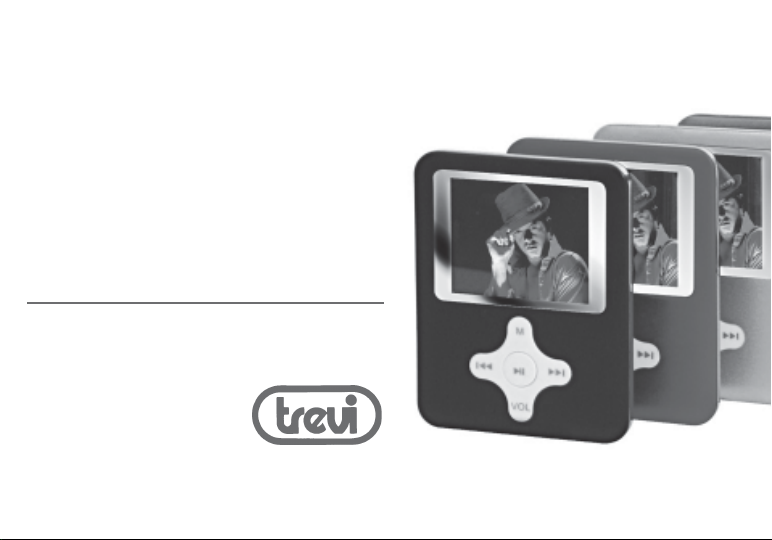
MPV 1702 / 1704 / 1708
MPV MPV
MP3 / VIDEO player / FM RADIO / JPGMP3 / VIDEO player / FM RADIO / JPG
MP3 / VIDEO player / FM RADIO / JPG
MP3 / VIDEO player / FM RADIO / JPGMP3 / VIDEO player / FM RADIO / JPG
lettore MP3 / VIDEO / FM RADIO / JPGlettore MP3 / VIDEO / FM RADIO / JPG
lettore MP3 / VIDEO / FM RADIO / JPG
lettore MP3 / VIDEO / FM RADIO / JPGlettore MP3 / VIDEO / FM RADIO / JPG
mini lettore VIDEO/Jpg/MP3 WMA/registratore vocale
with voice recorderwith voice recorder
with voice recorder
with voice recorderwith voice recorder
mini VIDEO/Jpg/MP3 WMA player/voice recorder
con registratore vocalecon registratore vocale
con registratore vocale
con registratore vocalecon registratore vocale
con altoparlante
with speaker
Page 2

QUICK REFERENCEQUICK REFERENCE
QUICK REFERENCE
QUICK REFERENCEQUICK REFERENCE
Accensione / Spegnimento
Per iniziare ad utilizzare il vostro lettore multimediale, spostare il selettore ON/OFF (2) verso la
posizione ON e il lettore sarà pronto per la riproduzione. E’ possibile portare il vostro lettore nella
funzione STAND-BY tenedo premuto per qualche istante il tasto PLAY/PAUSE (6).Per riavviare il
lettore dalla funzione STAND-BY premere nuovamente per qualche istante il tasto PLAY/PAUSE
(6).Portare il selettore ON/OFF(2)sulla posizione OFF per uno spegnimento completo.
Alimentazione tramite alimentatore a presa USB 230V
1. Inserire il cavo USB fornito in dotazione nella presa USB (1) del lettore.
2. Collegare il cavo USB all’alimentatore 230V con presa USB.
3. Inserire l’alimentatore 230V ad una presa standard della corrente.
Alimentazione tramite PC
italiano
1. Inserire il cavo USB fornito in dotazione, nella presa USB (1) del lettore.
2. Collegare il cavo USB ad un dispositivo USB del vostro PC.
Controllo volume
Premere il tasto VOL (7), l’icona in alto a destra inizia a lapeggiare.
Tramite il controllo NEXT (4) o PREV (3), aumentare o diminuire il volume.
Premere nuovamente VOL (7) per confermare.
Riproduzione dei brani
Dal menu principale scegliere MUSIC tramite il controllo NEXT (4) o PREV(3)
premere il tasto MENU (5) per confermare.
1. Premere il controllo NEXT (4) per passare alla traccia successiva.
MPVMPV
MPVMPV
MPV 1702 - 1704 - 1708
2. Premere il controllo PREV (3) per passare alla traccia precedente.
22
2
22
Page 3

QUICK REFERENCEQUICK REFERENCE
QUICK REFERENCE
QUICK REFERENCEQUICK REFERENCE
3. Per riprodurre un file .MP3, premere il tasto PLAY/PAUSE (6).
4. Durante la riproduzione del brano, tenere premuto il controllo NEXT(4) per
riprodurre il brano velocemente, PREV (3) per retrocedere in maniera veloce.
5. Premere il tasto PLAY/PAUSE (6) per fermare momentaneamente la riproduzione
premere nuovamente il tasto PLAY/PAUSE (6) per ripristinarla.
6. Per visualizzare le Lyrics durante la riproduzione tenere premuto il tastoMENU(5) per
qualche istante, per visualizzarle.Premere nuovamente MENU(5) per tornare alla
schermata di riproduzione.
Riproduzione di filmati
Dal menu principale scegliere AMV PLAY tramite il controllo NEXT(4) o PREV(3)
per la riproduzione dei filmati in formato AMV, premere il tasto M ENU (5) per confermare.
1. Premere il controllo NEXT (4) per selezionare il file video successivo.
2. Premere il controllo PREV (3) per selezionare il file video precedente.
3. Per iniziare la riproduzione premere il tasto PLAY/PAUSE (6), per fermare momentanea
mente la riproduzione premere nuovamente il tasto PLAY/PAUSE 6).
Modalità Modalità
Modalità FM MODE
Modalità Modalità
Dal menu principale scegliere FM MODE tramite il controllo NEXT(4) o PREV(3), per
avviare l’ascolto della radio in digitale, premere MENU (5) per confermare.
1. Premere ripetutamente il controllo NEXT(4) o PREV(3), per effettuare una ricerca
passo a passo sulla scala sintonia.
2. Tenere premuto per qualche secndo il controlloNEXT(4) o PREV(3) per avviare la
ricerca automatica della stazione.
33
3
33
MPV 1702 - 1704 - 1708
MPVMPV
MPVMPV
italiano
Page 4

QUICK REFERENCEQUICK REFERENCE
QUICK REFERENCE
QUICK REFERENCEQUICK REFERENCE
On/off Switching
To start using your media player, switch the ON/OFF (2) selector to ON. The player will be ready for
playback. It is possible to switch the player into STAND-BY mode by pressing the PLAY/PAUSE (6)
key for a few seconds. To restart the player from the STAND-BY mode press the PLAY/PAUSE (6) key
again for a few seconds. Switch the ON/OFF (2) selector to the OFF position for a complete
switching off.
Power Supply through a USB Port 230V adapter
1. Insert the USB cable (provided with the player) into the player’s USB port (1).
2. Connect the USB cable to the USB port 230 V adapter.
3. Insert the 230 V adapter into the power socket.
english
Power Supply through PC
1. Insert the USB cable (provided with the player) into the player’s USB port (1).
2. Connect the USB cable to a USB port on your PC.
Volume Control
Press the VOL (7) key, the icon at top right will start blinking.
Increase or decrease the volume by using the NEXT (4) or PREV (3) control.
Press VOL (7) again to confirm.
Track Playback
Select MUSIC from the main menu by using NEXT (4) or PREV (3) control
press the MENU (5) key to confirm.
1. Press the NEXT (4) control to skip to the next track.
MPVMPV
MPVMPV
MPV 1702 - 1704 - 1708
2. Press the PREV (3) control to skip to the previous track.
44
4
44
Page 5

QUICK REFERENCEQUICK REFERENCE
QUICK REFERENCE
QUICK REFERENCEQUICK REFERENCE
3. To play an .MP3 file, press the PLAY/PAUSE (6) key.
4. During track playback, press NEXT (4) for a few seconds to fast forward the track, or
press PREV (3) to fast backward the track.
5. Press the PLAY/PAUSE (6) key to pause the playback, press the PLAY/PAUSE (6) key
again to resume it.
6. To display the lyrics during the playback, press the MENU (5) key for a few seconds.
Press MENU (5) again to return to the playback screen.
Movie Playback
Select AMV PLAY from the main menu by using the NEXT (4) or PREV (3) controls
for the AMV movie playback, press the MENU (5) key to confirm.
1. Press NEXT (4) to select the next video file.
2. Press PREV (3) to select the previous video file.
3. Press the PLAY/PAUSE (6) key to start playback, press the PLAY/PAUSE (6) key again to
pause playback.
FM MODE
To start the digital radio listening, select FM MODE from the main menu using the NEXT (4) or
PREV (3) controls, then press MENU (5) to confirm.
1. Press the NEXT (4) or PREV (3) control repeatedly to perform a “step-by-step” search
on the tuning scale.
2. Press the NEXT (4) or PREV (3) control for a few seconds to start an automatic search
for the station.
55
5
55
MPV 1702 - 1704 - 1708
MPVMPV
MPVMPV
english
Page 6

QUICK REFERENCEQUICK REFERENCE
QUICK REFERENCE
QUICK REFERENCEQUICK REFERENCE
Allumage / Extinction
Pour démarrer l’utilisation de votre lecteur multimédia, déplacez le sélecteur ON/OFF (2) vers la
position ON : le lecteur est prêt pour la lecture. Il est possible de mettre le lecteur dans la fonction
STAND-BY en gardant la touche PLAY/PAUSE (6) appuyée pendant quelques instants. Pour
redémarrer le lecteur de la fonction STAND-BY, appuyez de nouveau sur la touche PLAY/PAUSE (6)
pendant quelques instants. Positionnez le sélecteur ON/OFF (2) sur OFF pour l’arrêt complet.
Alimentation par alimentateur à prise USB 230V
1. Branchez le câble USB fourni en dotation sur la prise USB (1) du lecteur.
2. Connectez le câble USB à l’alimentateur 230V avec prise USB.
3. Branchez l’alimentateur 230V sur une prise standard de courant.
français
Alimentation par PC
1. Branchez le câble USB fourni en dotation sur la prise USB (1) du lecteur.
2. Connectez le câble USB à un dispositif USB de votre PC.
Réglage du volume
Appuyez sur la touche VOL (7), l’icône en haut à droite commence à clignoter.
Augmentez ou réduisez le volume à l’aide du réglage NEXT (4) ou PREV (3).
Confirmez en appuyant de nouveau sur la touche VOL (7).
Lecture des morceaux
À partir du menu principal, choisissez MUSIC à l’aide des touches NEXT (4) ou PREV (3)
appuyez sur la touche MENU (5) pour confirmer.
1. Appuyez sur la touche NEXT (4) pour passer à la piste suivante.
MPVMPV
MPVMPV
MPV 1702 - 1704 - 1708
2. Appuyez sur la touche PREV (3) pour passer à la piste précédente.
66
6
66
Page 7

QUICK REFERENCEQUICK REFERENCE
QUICK REFERENCE
QUICK REFERENCEQUICK REFERENCE
3. Appuyez sur la touche PLAY/PAUSE (6) pour lire un fichier .MP3.
4. Pendant la lecture du morceau, gardez la touche NEXT(4) appuyée pour avancer
rapidement, ou bien PREV (3) pour reculer rapidement.
5. Appuyez sur la touche PLAY/PAUSE (6) pour arrêter momentanément la lecture, appuyez
de nouveau sur la touche PLAY/PAUSE (6) pour la rétablir.
6. Pour afficher les Lyrics pendant la lecture, gardez la touche MENU (5) appuyée pendant
quelques instants. Appuyez de nouveau sur MENU (5) pour revenir à la page-écran de lecture.
Lecture de vidéos
À partir du menu principal, choisissez AMV PLAY à l’aide des touches NEXT (4) ou PREV (3)
pour la lecture des vidéos en format AMV, appuyez sur la touche MENU (5) pour confirmer.
1. Appuyez sur la touche NEXT (4) pour sélectionner le fichier vidéo suivant.
2. Appuyez sur la touche PREV (3) pour sélectionner le fichier vidéo précédent.
3. Pour commencer la lecture appuyez sur la touche PLAY/PAUSE (6) ; pour arrêter
momentanément la lecture appuyez de nouveau sur la touche PLAY/PAUSE (6).
Mode Mode
Mode FM MODE
Mode Mode
À partir du menu principal, choisissez FM MODE à l’aide des touches NEXT(4) et PREV(3) pour
l’écoute de la radio en mode numérique ; appuyez sur la touche MENU (5) pour confirmer.
1. Appuyez plusieurs fois sur les touches NEXT (4) ou PREV (3) pour effectuer une
recherche « pas à pas » sur le cadran d’accord.
2. Gardez la touche NEXT (4) ou la touche PREV (3) appuyée pendant quelques instants pour
lancer la recherche automatique de la station.
77
7
77
MPV 1702 - 1704 - 1708
MPVMPV
MPVMPV
français
Page 8

QUICK REFERENCEQUICK REFERENCE
QUICK REFERENCE
QUICK REFERENCEQUICK REFERENCE
Einschalten / Ausschalten
Für den Betrieb des Multimedia-Players wird der Wahlschalter ON/OFF (2) in die Position ON
gebracht. Nun ist das Gerät für die Wiedergabe bereit. Es besteht die Möglichkeit, das Gerät in den
STANDBY-Betrieb zu bringen. Dazu die Taste PLAY/PAUSE (6) für einige Sekunden gedrückt halten.
Zum Wiedereinschalten des Gerätes aus dem STANDBY-Betrieb erneut für einige Sekunden die
Taste PLAY/PAUSE (6) gedrückt halten.Den Wahlschalter ON/OFF(2) auf die Position OFF stellen,
um das Gerät vollständig auszuschalten.
Versorgung über das Netzgerät 230V an der USB-Anschlussbuchse
1. Das USB-Kabel aus dem Lieferumfang in die USB-Anschlussbuchse (1) des Geräts einstecken.
2. Das USB-Kabel über die USB-Anschlussbuchse an das Netzgerät 230 V anschließen.
3. Das Netzgerät 230 V an eine Standard-Steckdose anschließen.
deutsch
Versorgung über den PC
1. Das USB-Kabel aus dem Lieferumfang in die USB-Anschlussbuchse (1) des Geräts einstecken.
2. Das USB-Kabel an einen USB-Port des PCs anschließen.
Lautstärkeregler
Die Taste VOL (7) drücken. Das Symbol oben rechts beginnt zu blinken.
Mit dem Regler NEXT (4) bzw. PREV (3) die Lautstärke erhöhen bzw. reduzieren.
Zur Bestätigung erneut VOL (7) drücken.
Wiedergabe der Titel
Im Hauptmenü mit den Tasten NEXT (4) bzw. PREV (3) die Funktion MUSIC anwählen.
Mit der Taste MENU (5) die Wahl des Titels bestätigen.
MPVMPV
MPVMPV
MPV 1702 - 1704 - 1708
1. Den Regler NEXT (4) für die Anwahl das nächsten Titels drücken.
88
8
88
Page 9

QUICK REFERENCEQUICK REFERENCE
QUICK REFERENCE
QUICK REFERENCEQUICK REFERENCE
2. Den Regler PREV (3) für die Anwahl das vorigen Titels drücken.
3. Für die Wiedergabe von MP3-Dateien wird die Taste PLAY/PAUSE (6) gedrückt.
4. Für die schnelle Wiedergabe des Titels wird der Regler NEXT (4) während der
Wiedergabe des Stücks gedrückt. Für den schnellen Rücklauf wird der Regler PREV (3) gedrückt.
5. Die Taste PLAY/PAUSE (6) drücken, um die Wiedergabe kurz zu unterbrechen. Bei
erneutem Druck der Taste PLAY/PAUSE (6) wird die Wiedergabe fortgesetzt.
6. Für die Anzeige der Liedtexte während der Wiedergabe die Taste MENU (5) für einige
Sekunden gedrückt halten, um sie anzuzeigen. Erneut MENU (5) drücken, um zur
Wiedergabe zurückzukehren.
Wiedergabe von Filmen
Im Hauptmenü mit dem Regler NEXT (4) bzw. PREV (3) die Funktion AMV PLAY anwählen.
für die Wiedergabe von Filmen im Format AMV. Zur Bestätigung die Taste MENU (5) drücken.
1. Den Regler NEXT (4) für die Anwahl der nächsten Video-Datei drücken.
2. Den Regler PREV (3) für die Anwahl der vorigen Video-Datei drücken.
3. Die Taste PLAY/PAUSE (6) drücken, um die Wiedergabe zu starten. Erneut die Taste
PLAY/PAUSE (6) drücken. um die Wiedergabe kurzzeitig zu unterbrechen.
Modus Modus
Modus FM MODE
Modus Modus
Im Hauptmenü mit den Tasten NEXT (4) bzw. PREV (3) die Funktion FM MODE für den digitalen
Radioempfang anwählen. Durch Druck der Taste MENU (5) bestätigen.
1. Den Regler NEXT(4) bzw. PREV(3) mehrmals drücken, um einen “schrittweisen” Suchlauf
auf der Abstimmungsskala durchzuführen.
2. Den Regler NEXT (4) bzw. PREV (3) einige Sekunden lang gedrückt halten, um den
automatischen Sendersuchlauf zu starten.
99
9
99
MPV 1702 - 1704 - 1708
MPVMPV
MPVMPV
deutsch
Page 10

QUICK REFERENCEQUICK REFERENCE
QUICK REFERENCE
QUICK REFERENCEQUICK REFERENCE
Encendido / Apagado
Para empezar a utilizar su reproductor multimedia, coloque el selector ON/OFF (2) en posición ON
y el reproductor estará listo para la reproducción. Al mantener pulsado durante algunos instantes
el botón PLAY/PAUSE (6), se activará la función STAND-BY de su reproductor. Para reiniciar el
reproductor, pulse nuevamente durante unos instantes el botón PLAY/PAUSE (6). Coloque el
selector ON/OFF (2) en posición OFF para apagarlo completamente.
Alimentación mediante alimentador 230V con puerto USB
1. Conecte el cable USB suministrado al puerto USB (1) del reproductor.
2. Conecte el cable USB del alimentador 230V con puerto USB.
3. Conecte el alimentador 230V a una toma de corriente estándar.
espanol
Alimentación mediante PC
1. Conecte el cable USB suministrado al puerto USB (1) del reproductor.
2. Conecte el cable USB al dispositivo USB de su ordenador.
Control volumen
Pulse el botón VOL (7). El icono de arriba a la derecha comenzará a parpadear.
Para subir o bajar el volumen, utilice el control NEXT (4) o PREV (3).
Pulse de nuevo VOL (7) para confirmar.
Reproducción de pistas
Desde el menú principal, seleccione MUSIC utilizando el control NEXT (4) o PREV (3).
Pulse el botón MENU (5) para confirmar.
1. Pulse el control NEXT (4) para pasar a la pista siguiente.
MPVMPV
MPVMPV
MPV 1702 - 1704 - 1708
2. Pulse el control PREV (3) para pasar a la pista anterior.
1010
10
1010
Page 11

QUICK REFERENCEQUICK REFERENCE
QUICK REFERENCE
QUICK REFERENCEQUICK REFERENCE
3. Para reproducir un archivo .MP3, pulse el botón PLAY/PAUSE (6).
4. Durante la reproducción de la pista, mantenga pulsado el control NEXT (4) para
avanzar rápidamente y PREV (3) para retroceder rápidamente.
5. Pulse el botón PLAY/PAUSE (6) para detener momentáneamente la reproducción.
Vuelva a pulsarlo para reanudarla.
6. Para visualizar las letras durante la reproducción, mantenga pulsado el botón MENU
(5) durante unos instantes. Pulse de nuevo MENU (5) para volver a la pantalla de
reproducción.
Reproducción de vídeos
Desde el menú principal, seleccione AMV PLAY utilizando el control NEXT (4) o PREV (3)
para la reproducción de vídeos en formato AMV. Pulse el botón MENU (5) para confirmar.
1. Pulse el control NEXT (4) para seleccionar el archivo de vídeo siguiente.
2. Pulse el control PREV (3) para seleccionar el archivo de vídeo anterior.
3. Para comenzar la reproducción, pulse el botón PLAY/PAUSE (6). Para detener
momentáneamente la reproducción, pulse de nuevo el botón PLAY/PAUSE (6).
Modo Modo
Modo FM MODE
Modo Modo
Desde el menú principal, seleccione FM MODE mediante los controles NEXT (4) y PREV (3)
para activar la escucha de la radio digital. Pulse el botón MENU (5) para confirmar.
1. Pulse repetidamente el control NEXT (4) o PREV (3) para realizar una búsqueda manual en
la escala de sintonización.
2. Mantenga pulsado durante unos instantes el control NEXT (4) o PREV (3) para iniciar la
búsqueda automática de la emisora.
1111
11
1111
MPV 1702 - 1704 - 1708
MPVMPV
MPVMPV
espanol
Page 12

QUICK REFERENCEQUICK REFERENCE
QUICK REFERENCE
QUICK REFERENCEQUICK REFERENCE
Ligar / Desligar
Para iniciar a utilizar o seu leitor multimédia, desloque o selector ON/OFF (2) para a posição ON e o
leitor estará pronto para a reprodução. É possível colocar o seu leitor na função STAND-BY
mantendo pressionada durante alguns instantes a tecla PLAY/PAUSE (6). Para reinicia o leitor da
função STAND-BY, pressione novamente durante alguns instantes a tecla PLAY/PAUSE (6). Coloque
o selector ON/OFF (2) na posição OFF para desligar totalmente.
Alimentação através do alimentador com tomada USB 230V
1. Introduza o cabo USB fornecido com o equipamento, na tomada USB (1) do leitor.
2. Ligue o cabo USB ao alimentador 230V com tomada USB.
3. Introduza o alimentador 230V numa tomada de corrente padrão.
Alimentação através de PC
portugues
1. Introduza o cabo USB fornecido com o equipamento, na tomada USB (1) do leitor.
2. Ligue o cabo USB a um dispositivo USB do seu PC.
Controlo do volume
Pressione a tecla VOL (7), o ícone superior direito inicia a piscar.
Através do controlo NEXT (4) ou PREV (3), aumente ou diminua o volume.
Pressione novamente VOL (7) para confirmar.
Riprodução das faixas
Do menu principal escolha MUSIC através das teclas NEXT (4) ou PREV (3)
pressione a tecla MENU (5) para confirmar.
1. Pressione o controlo NEXT (4) para passar à faixa sucessiva.
MPVMPV
MPVMPV
MPV 1702 - 1704 - 1708
2. Pressione o controlo PREV (3) para passar à faixa anterior.
1212
12
1212
Page 13

QUICK REFERENCEQUICK REFERENCE
QUICK REFERENCE
QUICK REFERENCEQUICK REFERENCE
3. Para reproduzir um ficheiro .MP3, pressione a tecla PLAY/PAUSE (6).
4. Durante a reprodução da faixa, tenha pressionado o controlo NEXT (4) para reproduzir a
faixa rapidamente, PREV (3) para retroceder de maneira rápida.
5. Pressione a tecla PLAY/PAUSE (6) para parar momentaneamente a reprodução, pressione
novamente a tecla PLAY/PAUSE (6) para a restabelecer.
6. Para visualizar as Lyrics durante a reprodução, tenha pressionada a tecla MENU (5)
durante alguns instantes, para as visualizar. Pressione novamente MENU (5) para voltar
ao ecrã de reprodução.
Reprodução de filmes
Do menu principal escolha AMY PLAY através dão controlo NEXT (4) ou PREV (3)
para a reprodução dos filmes em formato AMV, pressione a tecla M ENU (5) para confirmar.
1. Pressione o controlo NEXT (4) para seleccionar o ficheiro vídeo sucessivo.
2. Pressione o controlo PREV (3) para seleccionar o ficheiro vídeo anterior.
3. Para iniciar a reprodução pressione a tecla PLAY/PAUSE 6), para parar momentaneamente
a reprodução, pressione novamente a tecla PLAY/PAUSE (6).
Modalidade Modalidade
Modalidade FM MODE
Modalidade Modalidade
Do menu principal escolha FM MODE através do controlo NEXT (4) ou PREV (3), para iniciar a
ouvir a rádio em digital, pressione MENU (5) para confirmar.
1. Pressione repetidamente o controlo NEXT (4) ou PREV (3), para efectuar uma pesquisa
passo a passo na escala de sintonia.
2. Tenha pressionado por alguns segundos o controlo NEXT (4) ou PREV (3) para iniciar uma
procura automática da estação.
1313
13
1313
MPV 1702 - 1704 - 1708
MPVMPV
MPVMPV
portugues
Page 14

QUICK REFERENCEQUICK REFERENCE
QUICK REFERENCE
QUICK REFERENCEQUICK REFERENCE
¢нбммб / УвЮуймп
Гйб нб бсчЯуефе нб чсзуймпрпйеЯфе фз ухукехЮ бнЬгнщузт рплхмЭущн убт, мефбкйнЮуфе фпн ерйлпгЭб
ПН/OFF (2) рспт фз иЭуз ПН кбй з ухукехЮ бнЬгнщузт иб еЯнбй Эфпймз гйб фзн бнбрбсбгщгЮ.
МрпсеЯфе нб иЭуефе фз ухукехЮ бнЬгнщузт убт уфз лейфпхсгЯб STAND-BY ксбфюнфбт рбфзмЭнп гйб
месйкЬ дехфесьлерфб фп кпхмрЯ PLAY/PAUSE (6). Гйб нб иЭуефе обнЬ уе кЯнзуз фз ухукехЮ
бнЬгнщузт брь фз лейфпхсгЯб STAND-BY, рбфЮуфе кбй рЬлй гйб месйкЬ дехфесьлерфб фп кпхмрЯ PLAY/
PAUSE (6). ЦЭснефе фпн ерйлпгЭб ON/OFF(2) уфз иЭуз OFF гйб Энб рлЮсз увЮуймп.
ФспцпдпуЯб мЭущ фспцпдпфйкпэ ме хрпдпчЮ USB 230V
1. РесЬуфе фп кблюдйп USB рпх рбсЭчефбй ме фпн еопрлйумь уфзн хрпдпчЮ USB (1) фзт
ellhnika
ухукехЮт бнЬгнщузт.
2. УхндЭуфе фп кблюдйп USB уфп фспцпдпфйкь 230V ме хрпдпчЮ USB.
3. ФпрпиефЮуфе фп фспцпдпфйкь 230V уе мЯб уфЬнфбс злекфсйкЮ рсЯжб.
ФспцпдпуЯб мЭущ З/Х
1. ФпрпиефЮуфе фп кблюдйп USB рпх рбсЭчефбй ме фпн еопрлйумь, уфзн хрпдпчЮ USB (1) фзт
ухукехЮт бнЬгнщузт.
2. УхндЭуфе фп кблюдйп USB уе мЯб дйЬфбоз USB фпх З/Х убт.
Дйбкьрфзт сэимйузт Энфбузт
РбфЮуфе фп кпхмрЯ VOL (7), з ейкьнб рпх всЯукефбй шзлЬ кбй деойЬ бсчЯжей нб бнбвпувЮней.
Дйб мЭупх фпх схимйуфЮ NEXT (4) Ю PREV (3), бхоЬнефе Ю мейюнефе фзн Энфбуз.
РбфЮуфе кбй рЬлй VOL (7) гйб ерйвевбЯщуз.
БнбрбсбгщгЮ фщн брпурбумЬфщн
MPVMPV
MPVMPV
MPV 1702 - 1704 - 1708
Брь фп кэсйп менпэ ерйлЭофе MUSIC дйЬ мЭупх фпх схимйуфЮ NEXT (4) Ю PREV(3)
рбфЮуфе фп кпхмрЯ MENU (5) гйб ерйвевбЯщуз.
1414
14
1414
Page 15

QUICK REFERENCEQUICK REFERENCE
QUICK REFERENCE
QUICK REFERENCEQUICK REFERENCE
1. РбфЮуфе фп схимйуфЮ NEXT (4) гйб нб ресЬуефе уфп ерьменп кпммЬфй.
2. РбфЮуфе фп схимйуфЮ PREV (3) гйб нб ресЬуефе уфп рспзгпэменп кпммЬфй.
3. Гйб нб бнбрбсЬгефе Энб бсчеЯп .MP3, рбфЮуфе фп кпхмрЯ PLAY/PAUSE (6).
4. КбфЬ фзн бнбрбсбгщгЮ фпх брпурЬумбфпт, ксбфЮуфе рбфзмЭнп фп схимйуфЮ NEXT(4)
гйб нб бнбрбсЬгефе фп брьурбумб гсЮгпсб, PREV (3) гйб нгхсЯуеферЯущгсЮгпсб.
5. РбфЮуфе фп кпхмрЯ PLAY/PAUSE (6) гйб нб уфбмбфЮуефе уфйгмйбЯб фзн бнбрбсбгщгЮ,
рбфЮуфе кбй рЬлй фп кпхмрЯ PLAY/PAUSE (6) гйб нб фзн ербнбцЭсефе.
6. Гйб нб прфйкпрпйзипэн пй Lyrics кбфЬ фзн бнбрбсбгщгЮ, ксбфЮуфе рбфзмЭнп фп кпхмрЯ
MENU (5) гйб месйкЬ дехфесьлерфб, гйб нб фйт прфйкпрпйЮуефе. РбфЮуфе кбй рблЯ
MENU(5) гйб нб ерйуфсЭшефе уфзн пиьнз бнбрбсбгщгЮт.
БнбрбсбгщгЮ вЯнфеп
Брь фп кэсйп менпэ ерйлЭофе AMV PLAY дйЬ мЭупх фпх схимйуфЮ NEXT(4) Ю PREV(3)
гйб фзн бнбрбсбгщгЮ фщн вЯнфеп уе мпсцЮ AMV, рбфЮуфе фп кпхмрЯ MENU (5) гйб ерйвевбЯщуз.
1. РбфЮуфе фп схимйуфЮ НЕЧФ (4) гйб нб ерйлЭоефе фп ерьменп бсчеЯп вЯнфеп.
2. РбфЮуфе фп схимйуфЮ PREV (3) гйб нб ерйлЭоефе фп рспзгпэменп бсчеЯп вЯнфеп.
3. Гйб нб оекйнЮуефе фзн бнбрбсбгщгЮ рбфЮуфе фп кпхмрЯ PLAY/PAUSE (6), гйб нб
уфбмбфЮуефе уфйгмйбЯб фзн бнбрбсбгщгЮ рбфЮуфе кбй рЬлй фп кпхмрЯ PLAY/PAUSE (6).
ЛейфпхсгЯб FM MODE
Брь фп кэсйп менпэ ерйлЭофе FM MODE дйЬ мЭупх фпх схимйуфЮ NEXT (4) Ю PREV (3), гйб нб
оекйнЮуефе фзн бксьбуз фпх сбдйпцюнпх шзцйбкЬ, рбфЮуфе MENU (5) гйб ерйвевбЯщуз.
1. РбфЮуфе ербнблзрфйкЬ фп схимйуфЮ NEXT(4) Ю PREV(3), гйб нб екфелЭуефе мйб
бнбжЮфзуз вЮмб вЮмб уфз клЯмбкб ухнфпнйумпэ.
2. КсбфЮуфе рбфзмЭнп гйб месйкЬ дехфесьлерфб фп схимйуфЮ NEXT (4) Ю PREV (3) гйб
нб оекйнЮуефе фзн бхфьмбфз бнбжЮфзуз фпх уфбимпэ.
1515
15
1515
MPV 1702 - 1704 - 1708
MPVMPV
MPVMPV
ellhnika
Page 16
DICHIARAZIONE DI CONFORMITÀ
SI DICHIARA CHE:
L'apparecchio lettore mp3 multimediale marca TREVI
modello Mpv 1702 - 1704 - 1708
risponde alle prescrizioni dell'art. 2 comma 1 del D.M. 28
agosto 1995, n° 548
Coriano, 10 / 04 / 08 TREVI S.p.A.
Trevi S.p.A. - Via Ausa 173, 47853
Coriano (Rn) Italy - www.trevi.it [email protected]
Via Ausa 173
47853 Coriano (Rn)
MADE IN P.R.C.
 Loading...