

Page 1
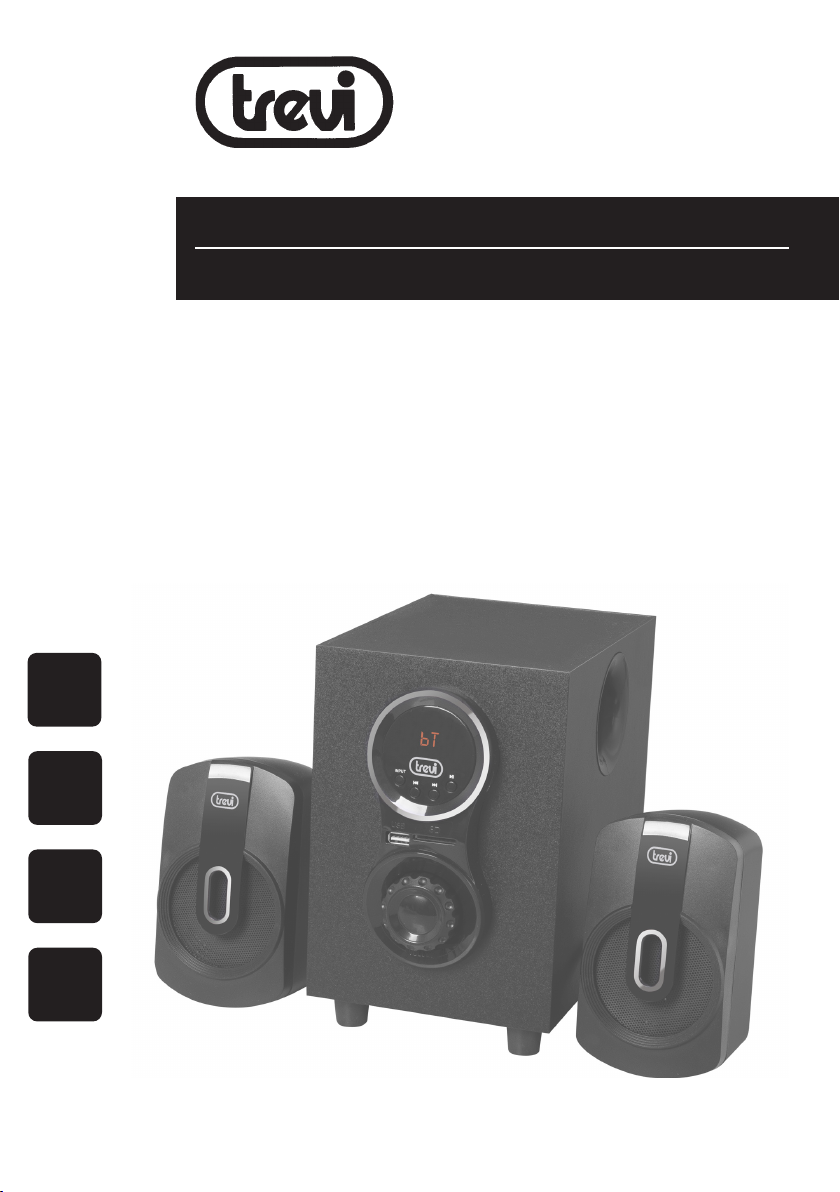
AVX 615 BT
MANUALE ISTRUZIONI
INSTRUCTION'S MANUAL
BT
USB/SD
BASS
REFLEX
DIFFUSORI AMPLIFICATI ALTA
POTENZA CON LETTORE
BT/MP3/USB/SD/AUX IN
Manuale d'uso e collegamento
HIGH POWER SPEAKERS WITH
BT/MP3/USB/SD/AUX PLAYER
Connection and Operation Manual
HAUT-PARLERURS AMPLIFIEE DANS
BT/MP3/USB/SD/AUX
Mode d'emploi et branchement
HIGH POWER
AKTIVLAUTSPRECHER MIT
BT/MP3/USB/SD/AUX
Gebrauchs- und Anschlusshandbuch
ATLAVOZ AMPLIFICADO DE ALTA
POTENCIA CON LECTOR DE
BT/MP3/USB/SD/AUX IN
Manual para el uso y la conexión
30 W
MAX
Page 2
ATTENZIONE!/WARNING!
AVX 615 BT
ATTENZIONE
RISCHIO DI SCOSSE
ELETTRICHE!
NON ESPORRE A PIOGGIA
E UMIDITÀ
ATTENZIONE: NON APRITE L'APPARECCHIO. ALL'INTERNO NON VI
SONO COMANDI MANIPOLABILI DALL'UTENTE NE PARTI DI RICAMBIO.
PER TUTTE LE OPERAZIONI DI SERVIZIO RIVOLGERSI AD UN CENTRO
DI ASSISTENZA AUTORIZZATO TREVI
ATTENTION
RISQUE DE DECHARGES
ELECTRIQUES
NE PAS EXPOSER A LA PLUIE ET
A L’HUMIDITE
ATTENTION: NE PAS OUVRIR L’APPAREIL, A L’INTERIEUR IL N’Y A PAS
DE COMMANDES A MANIPULER PAR L’UTILISATEUR OU DE PIECES
DE RECHANGE. POUR TOUTES LES OPERATIONS DE SERVICE IL FAUT
S’ADRESSER A UN SERVICE D’ASSISTANCE AUTORISE TREVI.
ATENCION
PELIGRO DE CHOQUES
ELECTRICOS
NO EXPONER A LLUVIA Y
HUMEDAD
WARNING!
DANGER OF ELECTRIC SHOCK!
DO NOT EXPOSE TO
RAIN OR HUMIDITY
WARNING: DO NOT OPEN THE SET. NEITHER CONTROLS OR
SPARE PARTS TO BE USED BY THE USER ARE TO BE FOUND INSIDE IT.
APPLY TO AUTHORISED TREVI CENTERS FOR SERVICE OPERATIONS.
ACHTUNG
GEFAHR ELEKTRISCHER SCHLÄGE
NICHT DER FEUCHTIGKEIT UND
DEM REGEN AUSSETZEN
ACHTUNG: DAS GERÄT NICHT ÖFFNEN. IM INNERN BEFINDEN SICH
KEINE VOM BENUTZER SELBST INSTANDSETZBAREN TEILE UND AUCH
KEINE ERSATZTEILE. FÜR JEGLICHE SERVICEARBEITEN, WENDEN SIE
SICH BITTE AN EINE TREVI AUTORISIERTEN KUNDENDIENSTSTELLE.
ATENÇÃO
PERIGO DE CHOQUES ELÉTRICOS
NÃO EXPOR A CHUVA E UMIDADE
ATENCION: NO ABRIR EL APARATO, EN SU INTERIOR NO HAY MANDOS QUE PUEDAN SER MANIPULADOS POR EL USUARIO NI PARTES
DE REPUESTO. PARA TODAS LAS OPERACIONES DE SERVICIO DIRIGIRSE
A UN CENTRO DE ASISTENCIA AUTORIZADO TREVI.
PROSOCH
KINDUNOS HLEKTROPLHXIAS
MHN EKQETETE
SE BROCH KAI UGRASIA
PROSOCH. MHN ANOIGETE THN SUSKEUH. DEN UPARCOUN
STO ESWTERIKO THS ENTOLES POU NA MPOREI NA CEIRISTEI
O KATANALWTHS OUTE ANTALLAKTIKA TMHMATA. GIA OPO-
IADHPOTE EPISKEUH H¢ SUNTHRHSH APEUQUNQEITE SE ENA
APO TA EXOUSIODOTHMENA KENTRA ANTIPROSWPEIAS TREVI.
ATENÇÃO: NÃO ABRIR O APARELHO. NO INTERIOR DO MESMO
NÃO EXISTEM COMANDOS OU PEÇAS DE SUBSTITUIÇÃO QUE
POSSAM SER MANIPULADOS PELO USUÁRIO. EM CASO DE EVENTUAL
OPERAÇÃO DE SERVIÇO, DIRIGIR-SE A UM CENTRO DE ASSISTÊNCIA
AUTORIZADO TREVI
2
Page 3
ITALIANO
COMANDI
AVX 615 BT
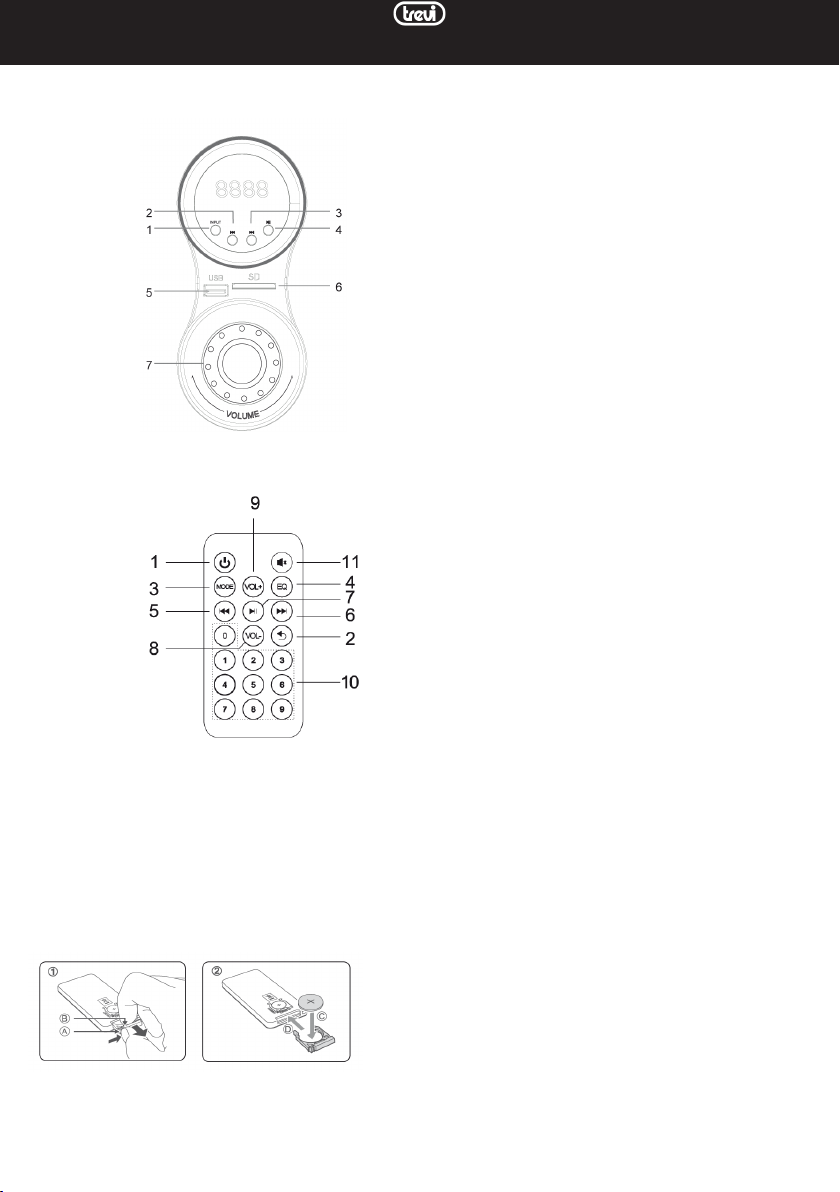
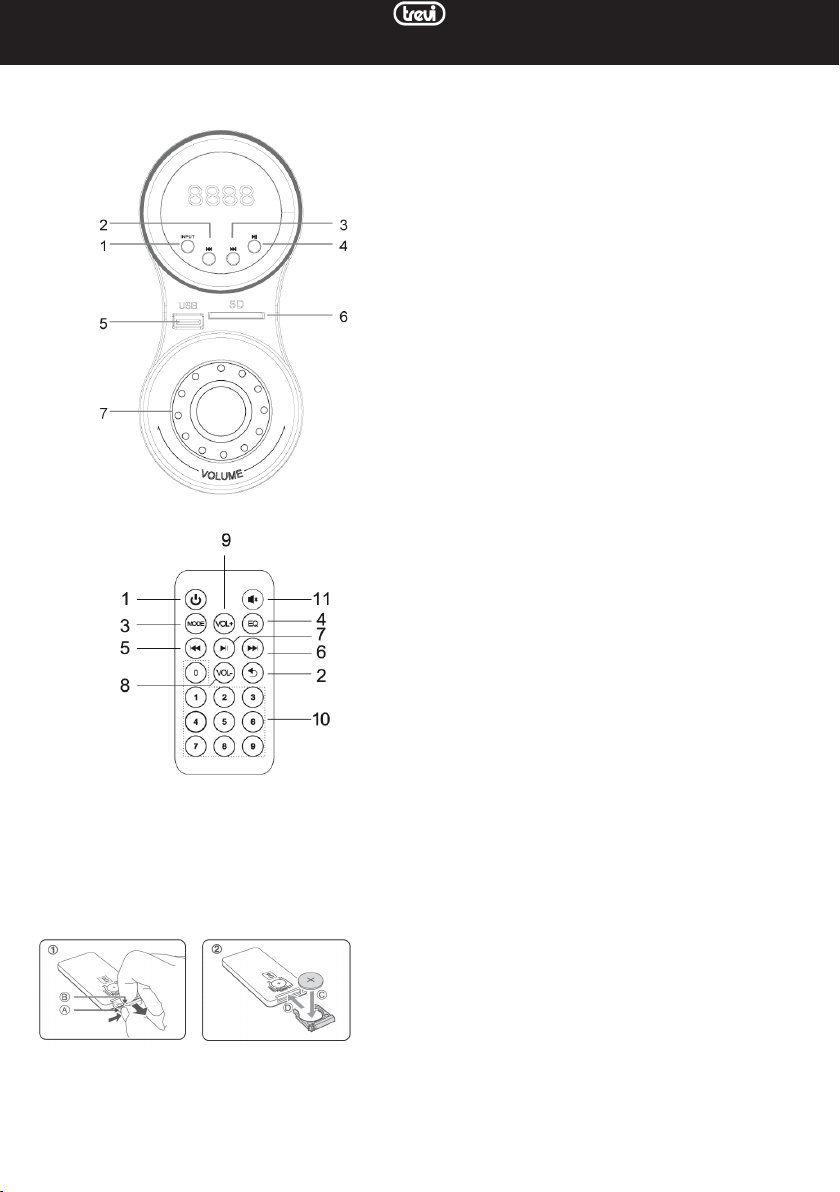
DESCRIZIONE COMANDI
1. Tasto INPUT, per cambiare la sorgente in riproduzione
2. Tasto PREV , traccia precedente
3. Tasto NEXT , traccia successiva
4. Tasto PLAY/PAUSE , avvia/sospende la riproduzione
5. Ingresso per memoria USB
6. Ingresso per memoria SD
7. Controllo volume
Sul retro dell'altoparlante principale e'possibile trovare:
Interruttore POWER: agire su questo interruttore per
accendere (ON) o spegnere (OFF) l'apparecchio.
Prese RCA OUTPUT: presa di collegamento per gli alto-
parlanti destro (R) e sinistro (L).
Prese RCA INPUT: ingresso ausiliario per sorgente esterna.
Cavo alimentazione di rete: collegare questo cavo alla
presa di rete per alimentare l'apparecchio.
TELECOMANDO
Il ricevitore si trova sulla parte frontale dell'altoparlante
principale, puntare il telecomando in quella direzione.
1. Tasto accensione/standby
2. Tasto REPEAT, ripetizione automatica dei brani
3. Tasto MODE, per cambiare la sorgente in riproduzione
4. Tasto EQ, equalizzatore preimpostato
5. Tasto PREV , traccia precedente
6. Tasto NEXT , traccia successiva
7. Tasto PLAY/PAUSE , avvia/sospende la riproduzione
8. Tasto VOL -
9. Tasto VOL +
10. Tasti numerici, per riproduzione diretta di una traccia
11. Tasto MUTE, silenziamento degli altoparlanti
NOTE D'USO
Questo apparecchio è uno strumento elettronico di alta precisione; evitate quindi di utilizzarlo nei seguenti casi:
• Vicino a forti fonti di calore come caloriferi e stufe.
ATTIVAZIONE E SOSTITUZIONE DELLA BATTERIA DEL TELECOMANDO
Il telecomando monta una batteria tipo CR2025
Per attivare la batteria del telecomando (inclusa) togliere la linguetta plastica di protezione.
Per la sostituzione della batteria (fare riferimento all'immagine presente sul dorso del telecomando):
1. Spingere la linguetta verso destra
2. Estrarre l’alloggiamento porta batteria
3. Sostituire la batteria con una dello stesso tipo CR2025
3
Page 4
AVX 615 BT
NOTE D'USO
Questo apparecchio è uno strumento elettronico di alta precisione; evitate quindi di utilizzarlo nei seguenti casi:
• Vicino a forti fonti di calore come caloriferi e stufe.
• In luoghi molto umidi come stanze da bagno, piscine, ecc.
• In luoghi molto polverosi.
• In luoghi soggetti a forti vibrazioni.
• Posizionate l'apparecchio in modo che ai suoi lati ci sia sempre abbastanza spazio per la libera circolazione di aria (almeno
5 cm).
• Non ostruite le feritoie di ventilazione.
• Se dei liquidi penetrano all'interno dell'apparecchio scollegate immediatamente la spina dalla presa e portate l'apparecchio
al più vicino centro assistenza autorizzato TREVI.
• Controllate sempre prima di accendere l'apparecchio che i cavi di alimentazione e di collegamento siano installati
correttamente.
• L'apparecchio non deve essere esposto a stillicidio o a spruzzi d'acqua. Nessun oggetto pieno di liquido, quali vasi, deve
essere posto sull'apparecchio.
• Nessuna sorgente di fiamma nuda, quali candele accese, deve essere posta sull'apparecchio.
• Conservare questo manuale.
CURA E MANUTENZIONE
Per la pulizia si consiglia l’uso di un panno morbido, leggermente inumidito. Evitate solventi o sostanze abrasive.
IMPORTANTE
La buona costruzione di questo apparecchio ne garantisce per lungo tempo il perfetto funzionamento. Se tuttavia dovesse
presentarsi qualche inconveniente, sarà opportuno consultare il più vicino Centro Assistenza autorizzato.
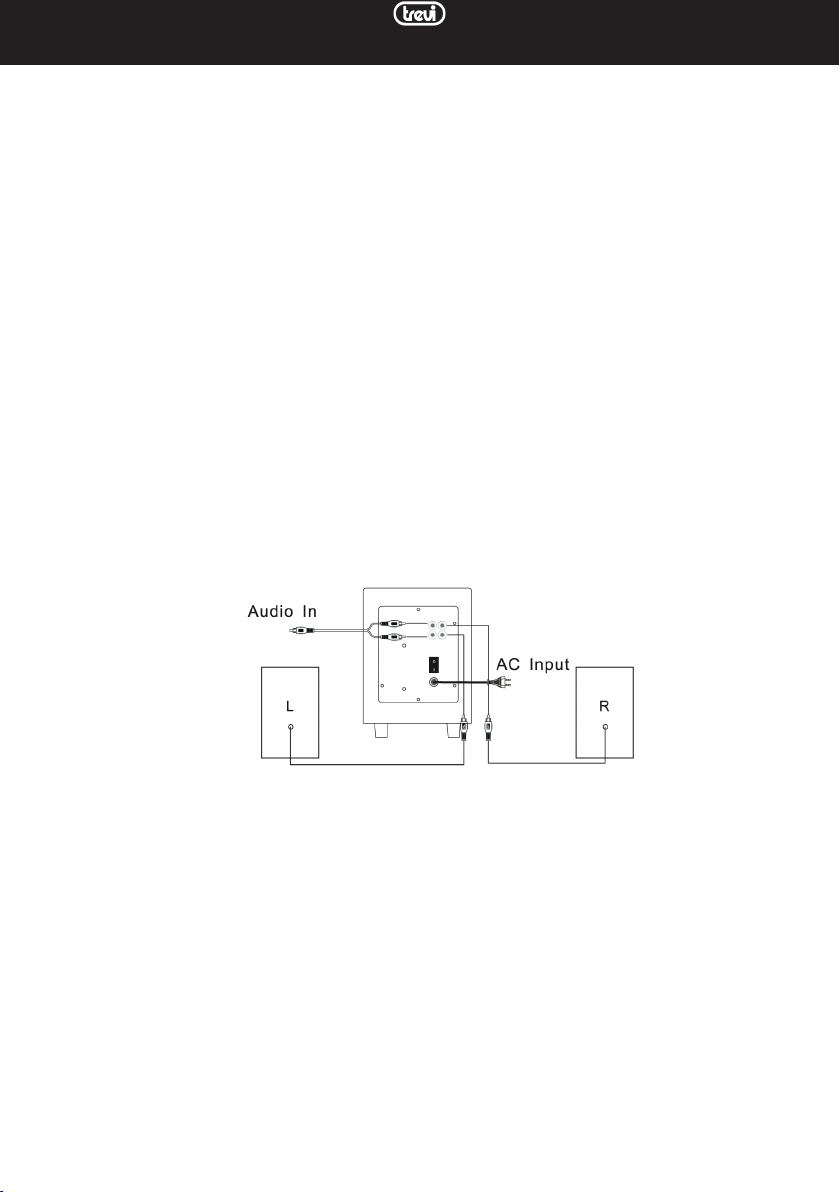
COLLEGAMENTO DEGLI ALTOPARLANTI
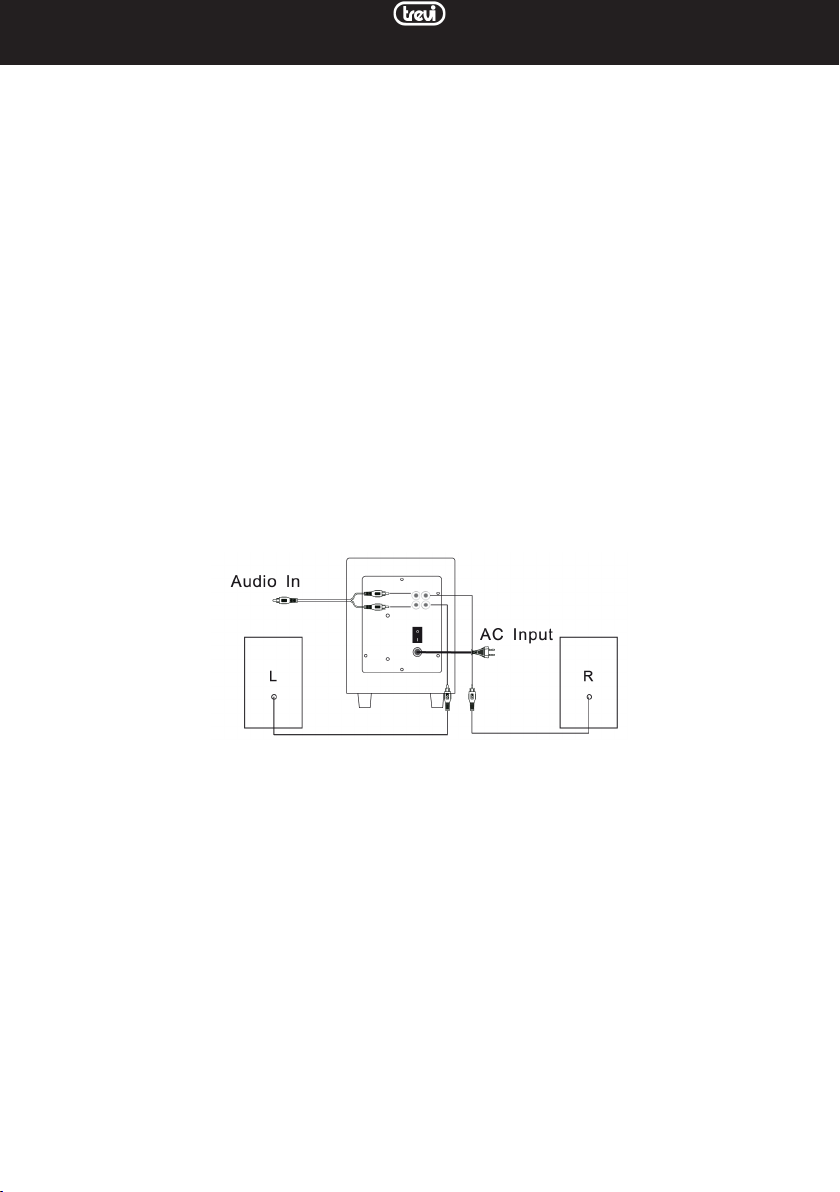
1. Ad apparecchio scollegato, inserire il cavo con presa RCA rossa dell'altoparlante destro nella presa OUTPUT rossa
(R)e il cavo con presa RCA bianca dell'altoparlante sinistro nella presa OUTPUT bianca (L). Le prese OUTPUT sono
posizionate sul retro dell'unità comandi.
ACCENSIONE E REGOLAZIONI
1. Portare l’interruttore di accensione POWER su ON per accendere l’apparecchio.
2. Avviare la riproduzione della sorgente audio desiderata. Per cambiare sorgente premere il tasto INPUT(1).
3. Regolare il volume tramite il relativo controllo (7) sull'altoparlante principale oppure tramite i tasti VOL+ e Vol- del
telecomando.
Nota: le due regolazioni sono indipendenti, in caso di volume basso accer tarsi che la regolazione tramite telecomando sia impostata
al massimo livello.
Premere il tasto MUTE(11) del telecomando per silenziare immediatamente gli altoparlanti; premerlo di nuovo per
riattivare l'audio.
4. Portare l’interruttore di accensione POWER su OFF per spegnere l’apparecchio.
UTILIZZO DEL LETTORE MP3
1. Inserire una memoria SD nell’ingresso (6) con i contatti elettrici rivolti verso l'alto o un dispositivo USB nell’ingresso
(5). La riproduzione si avvierà automaticamente.
2. Premere il tasto PLAY/PAUSE (4) per arrestare momentaneamente la riproduzione. Ripremerlo per riavviarla.
3. Premere il tasto NEXT (3) o PREV (2) per portarsi sulla traccia successiva o precedente.
4. Premere il tasto INPUT (1) per commutare tra gli ingressi USB, SD, BT e LINE.
4
Page 5

AVX 615 BT
UTILIZZO DELL'INGRESSO INPUT
1. Collegare i connettori RCA del cavo audio alla presa INPUT sul retro dell'unità comandi e il jack del cavo alla presa
cufa o all’uscita line-out di una sorgente audio (TV/Monitor, Tablet, lettori DVD/Mepg4, schede audio per computer,
telefoni cellulari, lettori MP3, ecc...).
NOTA: si consiglia di non impostare un volume troppo alto della sorgente audio per non saturare l’ingresso dei diffusori.
UTILIZZO DELLA SORGENTE BLUETOOTH
1. Accendere l'apparecchio e premere più volte il tasto INPUT(1), oppure, premere più volte il tasto MODE(3) del tele-
comando no a far comparire sul display l'indicazione BT.
2. La scritta BT comincerà a lampeggiare alla ricerca di dispositivi da accoppiare.
3. Avviare la funzione Bluetooth sul dispositivo da accoppiare e ricercare lo speaker nominato "AVX 615 BT".
4. Ad accoppiamento avvenuto la scritta BT rimarrà ssa. Avviare la riproduzione dal proprio dispositivo.
5. Utilizzare i tasti, , (4, 2, 3 dell'altoparlante oppure 7, 6, 8 del telecomando) per gestire i brani riprodotti, come
per l'utilizzo del lettore MP3.
FUNZIONE EQUALIZZATORE
La soundbar dispone di un sistema di equalizzazione pre impostato, premere il pulsanti del telecomando EQ(4) durante la
riproduzione per selezionare la dinamica audio che meglio si adatta allo stile musicale in riproduzione (Classic, Pop, Jazz,
Rock, Normal, Auto).
FUNZIONE RIPETIZIONE
Premere il tasto REPEAT(2) del telecomando per attivare la ripetizione automatica di tutti i brani (led di stato
lampeggiante veloce).
CARATTERISTICHE TECNICHE
Alimentazione: ............. 220V-240V ~ 50Hz
Potenza massima assorbita: ....................................... 20W
Potenza di trasmissione Bluetooth: ............................ 2,5mW
Frequenza di trasmissione Bluetooth: .......................2,4GHz
Potenza Audio massima: ...................15W+7,5W(x2)
Risposta in frequenza: ...................... 80Hz - 20KHz
Dimensioni subwoofer: .................150x230x220mm
Dimensioni altioparlanti: ..................... 85x155x85mm
INFORMAZIONI AGLI UTENTI ai sensi del Decreto Legislativo N° 49 del 14 Marzo 2014
“Attuazione della Direttiva 2012/19/UE sui rifiuti di apparecchiature elettriche ed elettroniche (RAEE)”
Il simbolo del cassonetto barrato riportato sull’apparecchiatura indica che il prodotto alla fine della propria vita utile deve
essere raccolto separatamente dagli altri rifiuti. L’utente dovrà, pertanto, conferire l’apparecchiatura integra dei componenti
essenziali giunta a fine vita agli idonei centri di raccolta differenziata dei rifiuti elettronici ed elettrotecnici, oppure riconsegnarla al rivenditore al momento dell’acquisto di nuova apparecchiatura di tipo equivalente, in ragione di uno a uno, oppure
1 a zero per le apparecchiature aventi lato maggiore inferiore a 25 cm. L’adeguata raccolta differenziata per l’avvio successivo
dell’apparecchiatura dimessa al riciclaggio, al trattamento e allo smaltimento ambientale compatibile contribuisce ad evitare
possibili effetti negativi sull’ambiente e sulla salute e favorisce il riciclo dei materiali di cui è composta l’apparecchiatura. Lo
smaltimento abusivo del prodotto da parte dell’utente comporta l’applicazione delle sanzioni amministrative di cui al D.Lgs
n. Decreto Legislativo N° 49 del 14 Marzo 2014.
5
Page 6
ENGLISH
CONTROLS
AVX 615 BT
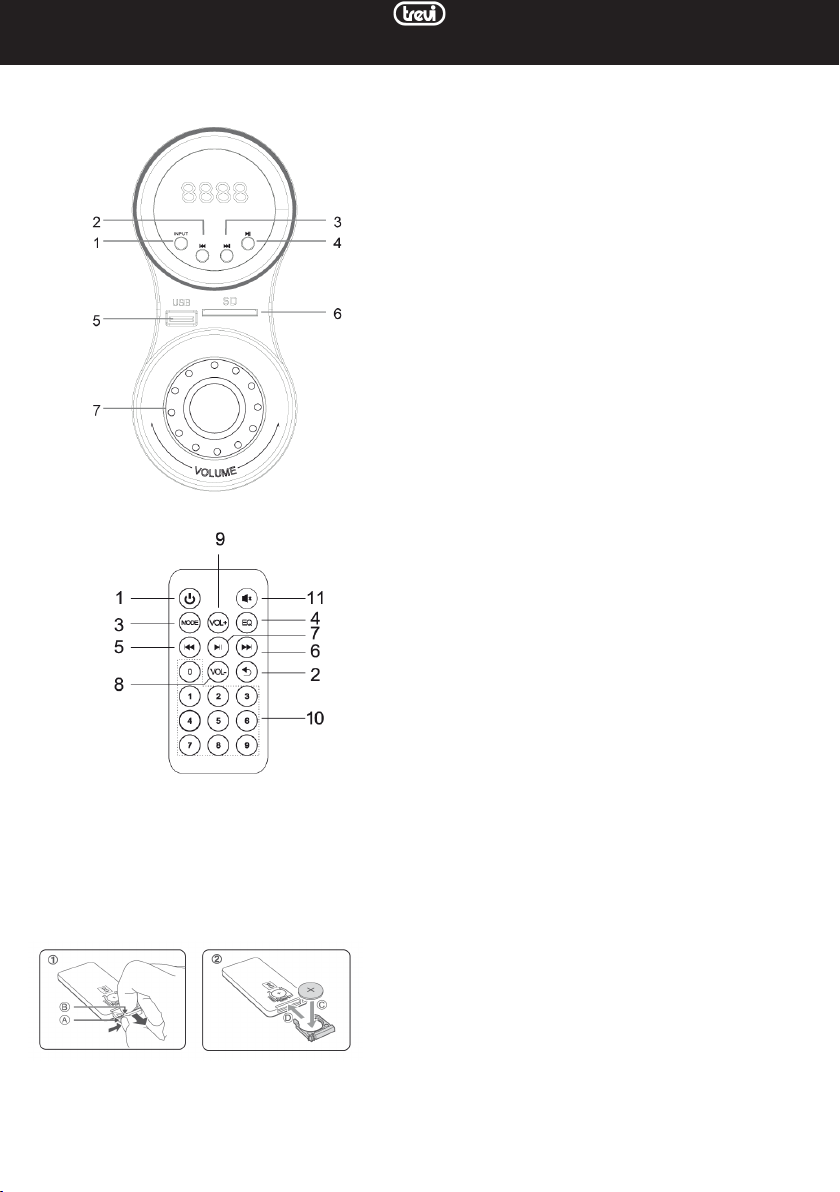
COMMANDS DESCRIPTION
1. INPUT button, to change the source being played
2. PREV button, previous track
3. NEXT button, next track
4. PLAY / PAUSE button, starts / pauses playback
5. USB memory input
6. SD memory slot
7. Volume control
On the back of the main speaker you can find:
POWER switch: Use this switch to turn the unit ON or OFF.
RCA OUTPUT sockets: connection socket for the right
(R) and left (L) speakers.
RCA INPUT sockets: auxiliary input for external source.
Mains Power Cable: Connect this cable to the wall socket
to power the unit.
REMOTE CONTROLLER
1. On / standby button
2. REPEAT button, automatic track repeat
3. MODE button, to change the source being played
4. EQ button, preset equalizer
5. PREV button, previous track
6. NEXT button, next track
7. PLAY / PAUSE button, starts / pauses playback
8. VOL - button
9. VOL + button
10. Numeric keys, for direct playback of a track
11. MUTE button, speaker mute
ACTIVATION AND REPLACEMENT OF THE REMOTE CONTROL BATTERY
The remote control is equipped with a CR2025 battery
To activate the remote control battery (included) remove the protective plastic tab.
To replace the battery (refer to the image on the back of the remote control):
1. Push the tab to the right
2. Remove the battery holder housing
3. Replace the battery with one of the same type CR2025
6
Page 7
AVX 615 BT
NOTES OF USE
This device is a high precision electronic instrument; therefore avoid using it in the following cases:
• Near strong heat sources such as heaters and stoves.
• In very humid places such as bathrooms, swimming pools, etc.
• In very dusty places.
• In places subject to strong vibrations.
• Position the appliance so that there is always enough space on its sides for free circulation of air (at least 5 cm).
• Do not block the ventilation slots.
• If liquids penetrate inside the appliance, immediately disconnect the plug from the socket and take the appliance to the
nearest TREVI authorized service center.
• Always check before switching on the appliance that the power and connection cables are correctly installed.
• The appliance must not be exposed to dripping or splashing water. No objects filled with liquid, such as vases, should
be placed on the apparatus.
• No naked flame sources, such as lighted candles, should be placed on the apparatus.
• Keep this manual.
CARE AND MAINTENANCE
For cleaning, we recommend using a soft, slightly damp cloth. Avoid solvents or abrasive substances.
IMPORTANT
The good construction of this device guarantees its perfect functioning for a long time. However, should any problems arise,
it will be advisable to consult the nearest authorized Service Center.
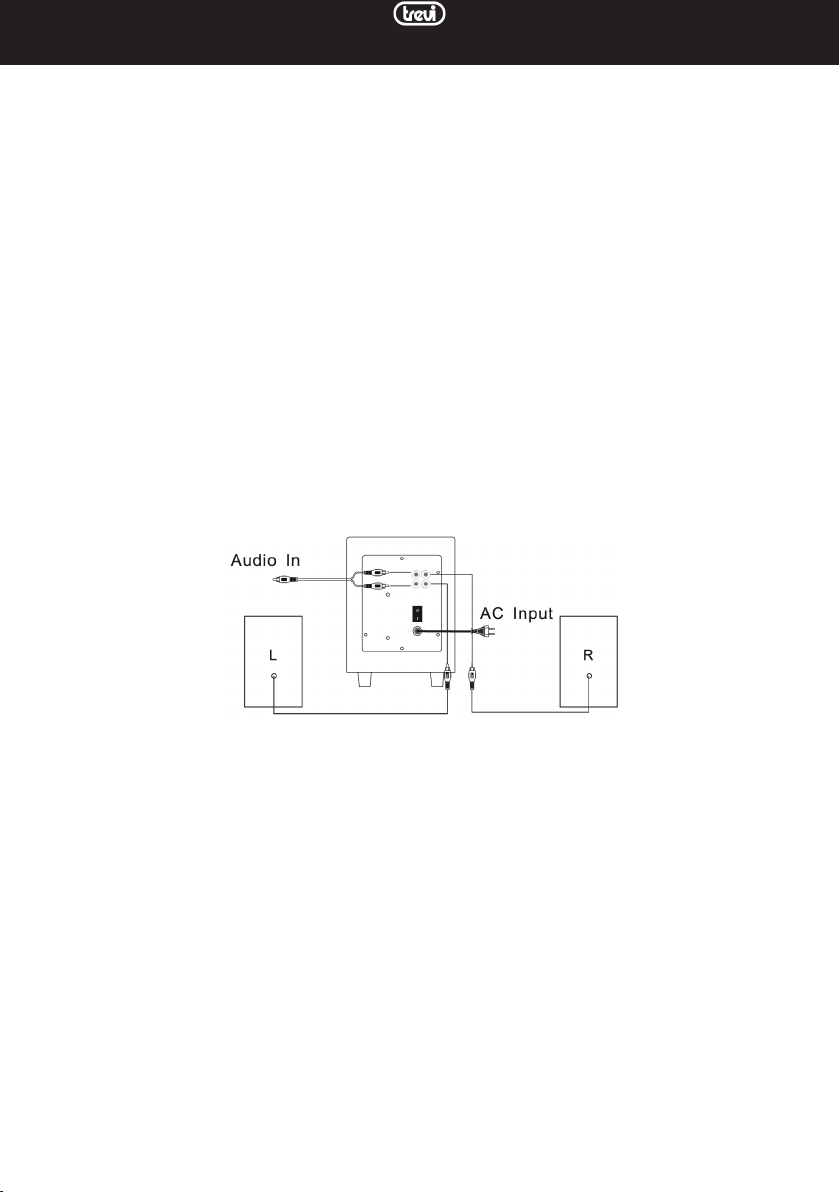
CONNECTING THE SPEAKERS
1. With the device disconnected, insert the red RCA plug cable from the right speaker into the red OUTPUT socket (R)
and the white RCA plug cable from the left speaker into the white OUTPUT socket (L). The OUTPUT sockets are
located on the rear of the control unit.
POWER ON/OFF AND ADJUSTMENTS
1. Turn the POWER switch to ON to turn on the device.
2. Start playing the desired audio source. To change source, press the INPUT button (1).
3. Adjust the volume using the volume control (7) on the main speaker or using the VOL + and Vol- buttons on the remote
control.
Note: the two adjustments are independent, in case of low volume make sure that the adjustment via the remote control is set
to the maximum level.
Press the MUTE button (11) on the remote control to immediately mute the speakers; press it again to turn the sound
back on.
4. Turn the POWER switch to OFF to turn off the appliance.
MP3 PLAYER
1. Insert an SD memory in the input (6) with the electrical contacts facing upwards or a USB device in the input (5).
Playback will start automatically.
2. Press the PLAY / PAUSE (4) button to momentarily stop playback. Press it again to restart it.
3. Press the NEXT (3) or PREV (2) button to move to the next or previous track.
4. Press the INPUT button (1) to switch between the USB, SD, BT and LINE inputs.
LINE IN
1. Connect the RCA connectors of the audio cable to the INPUT socket on the back of the control unit and the cable
jack to the headphone socket or line-out of an audio source (TV / Monitor, Tablet, DVD / Mepg4 players, audio for
computers, mobile phones, MP3 players, etc ...).
NOTE: it is advisable not to set the volume of the audio source too high in order not to saturate the speaker input.
7
Page 8

AVX 615 BT
BLUETOOTH SOURCE
1. Turn on the device and press the INPUT button (1) several times, or, repeatedly press the MODE button (3) on the
remote control until the indication BT appears on the display.
2. BT will start blinking looking for devices to be paired.
3. Start the Bluetooth function on the device to be paired and search for the speaker named "AVX 615 BT".
4. After pairing, the message BT will remain fixed. Start playback from your device.
5. Use the keys 4, 2, 3 on the speaker or 7, 6, 8 on the remote control to manage the tracks played, as for using the MP3
player.
EQUALIZER FUNCTION
The soundbar has a pre-set equalization system, press the remote control EQ buttons (4) during playback to select the
audio dynamics that best suit the playing style of music (Classic, Pop, Jazz, Rock, Normal, Auto) .
REPEAT FUNCTION
Press the REPEAT button (2) on the remote control to activate the automatic repeat of all the tracks (status LED flashing
quickly).
TECHNICAL FEATURES
Power supply: ............. 220V-240V ~ 50Hz
Maximum absorbed power: ....................................... 20W
Bluetooth transmission power: ..................................2.5mW
Bluetooth transmission frequency: ............................2.4GHz
Maximum Audio Power: ...............15W + 7.5W (x2)
Frequency response: ...................... 80Hz - 20KHz
Subwoofer dimensions: .................150x230x220mm
Speakers size: ..................... 85x155x85mm
Precautions for correct disposal of the product.
The symbol shown on the equipment indicates that waste must be disposed of in “separate collection” and so the product
must not be disposed of together with urban waste.
The user must take the product to special “separate waste collection centres” provided by local government, or deliver it
to the retailer against the purchase of a new product.
Separate collection of waste and subsequent treatment, recycling and disposal operations promotes the production of
equipment with recycled materials and limits negative effects on the environment and on health caused by improper
handling of waste.
Illegal disposal of the product leads to the enforcement of administrative penalties.
8
Page 9
FRANCAIS
COMMANDES
AVX 615 BT
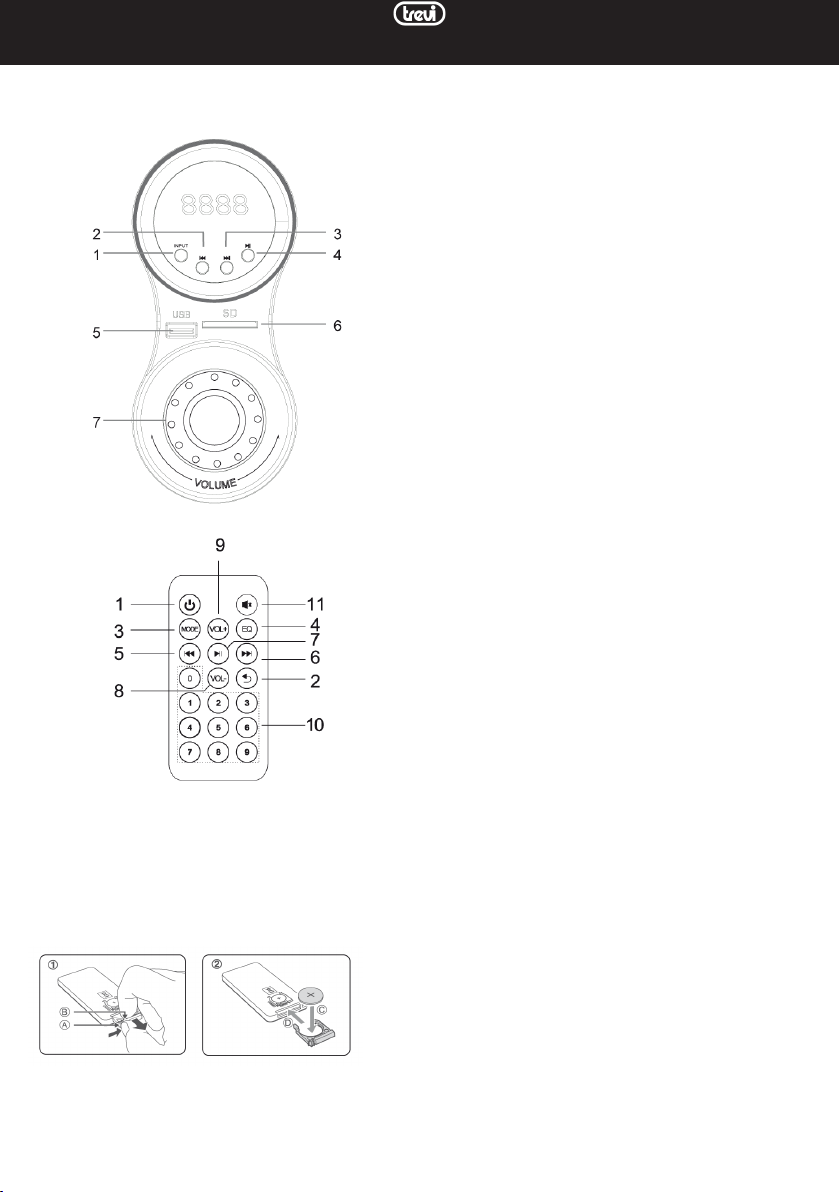
DESCRIPTION DES COMMANDES
1. Touche INPUT, pour changer la source en cours de lecture
2. Touche PREV, piste précédente
3. Bouton NEXT, piste suivante
4. Bouton PLAY / PAUSE, démarre / met la lecture en pause
5. Entrée mémoire USB
6. Emplacement de mémoire SD
7. Contrôle du volume
À l'arrière de l'enceinte principale, vous pouvez trouver:
Interrupteur POWER: utilisez cet interrupteur pour mettre
l'appareil sous ou hors tension.
Prises RCA OUTPUT: prise de connexion pour les enceintes
droite (R) et gauche (L).
Prises RCA INPUT: entrée auxiliaire pour source externe.
Câble d'alimentation secteur: connectez ce câble à la prise
murale pour alimenter l'unité.
TÉLÉCOMMANDE
1. Bouton marche / veille
2. Bouton REPEAT, répétition automatique de la piste
3. Touche MODE, pour changer la source en cours de lecture
4. Bouton EQ, égaliseur préréglé
5. Bouton PREV, piste précédente
6. Bouton SUIVANT, piste suivante
7. Bouton PLAY / PAUSE, démarre / met la lecture en pause
8. Bouton VOL -
9. Bouton VOL +
10. Touches numériques, pour la lecture directe d'une piste
11. Bouton MUTE, haut-parleur muet
ACTIVATION ET REMPLACEMENT DE LA BATTERIE DE LA TÉLÉCOMMANDE
La télécommande est équipée d'une pile CR2025
Pour activer la pile de la télécommande (incluse), retirez la languette de protection en plastique.
Pour remplacer la pile (reportez-vous à l'image au dos de la télécommande):
1. Poussez l'onglet vers la droite
2. Retirez le boîtier du support de batterie
3. Remplacez la pile par une du même type CR2025
9
Page 10
AVX 615 BT
NOTES D'UTILISATION
Cet appareil est un instrument électronique de haute précision; évitez donc de l'utiliser dans les cas suivants:
• À proximité de sources de chaleur fortes telles que des appareils de chauffage et des poêles.
• Dans des endroits très humides comme les salles de bain, les piscines, etc.
• Dans des endroits très poussiéreux.
• Dans des endroits soumis à de fortes vibrations.
• Positionnez l'appareil de manière à ce qu'il y ait toujours suffisamment d'espace sur ses côtés pour une libre circulation
de l'air (au moins 5 cm).
• Ne bloquez pas les fentes de ventilation.
• Si des liquides pénètrent à l'intérieur de l'appareil, débranchez immédiatement la fiche de la prise et apportez l'appareil
au centre de service agréé TREVI le plus proche.
• Vérifiez toujours avant d'allumer l'appareil que les câbles d'alimentation et de connexion sont correctement installés.
• L'appareil ne doit pas être exposé à des gouttes d'eau ou des éclaboussures. Aucun objet rempli de liquide, comme des
vases, ne doit être placé sur l'appareil.
• Aucune source de flamme nue, telle que des bougies allumées, ne doit être placée sur l'appareil.
• Conservez ce manuel.
ENTRETIEN ET MAINTENANCE
Pour le nettoyage, nous vous recommandons d'utiliser un chiffon doux légèrement humide. Évitez les solvants ou les
substances abrasives.
IMPORTANT
La bonne construction de cet appareil garantit son parfait fonctionnement pendant longtemps. Cependant, en cas de problème, il est conseillé de consulter le centre de service autorisé le plus proche.
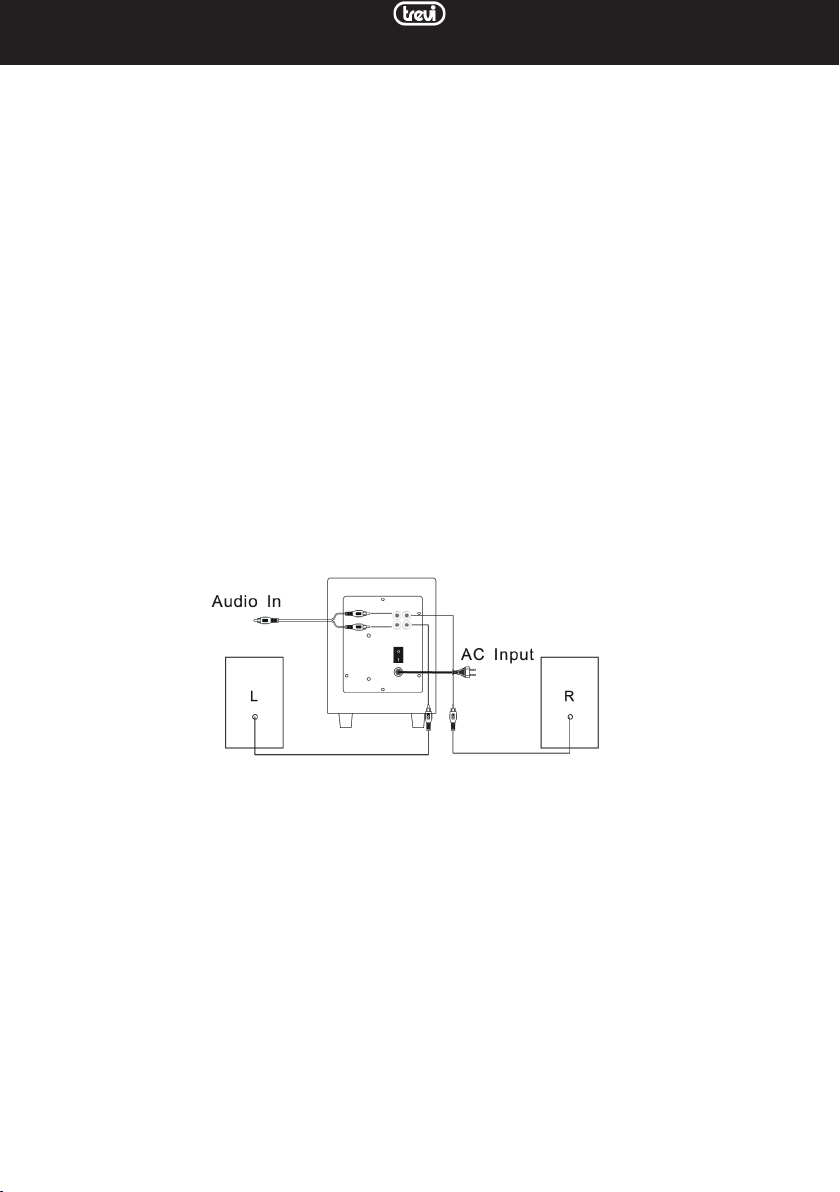
CONNEXION DES HAUT-PARLEURS
1. L'appareil étant déconnecté, insérez le câble de prise RCA rouge du haut-parleur droit dans la prise de SORTIE rouge
(R) et le câble de prise RCA blanc du haut-parleur gauche dans la prise de SORTIE blanche (L). Les prises OUTPUT
sont situées à l'arrière de l'unité de contrôle.
MARCHE / ARRÊT
1. Mettez le commutateur POWER sur ON pour mettre l'appareil sous tension.
2. Démarrez la lecture de la source audio souhaitée. Pour changer de source, appuyez sur le bouton INPUT (1).
3. Réglez le volume à l'aide de la commande de volume (7) sur le haut-parleur principal ou à l'aide des touches VOL + et
Vol- de la télécommande.
Remarque: les deux réglages sont indépendants, en cas de faible volume assurez-vous que le réglage via la télécommande est
réglé au niveau maximum.
Appuyez sur le bouton MUTE (11) de la télécommande pour couper immédiatement les haut-parleurs; appuyez à
nouveau pour réactiver le son.
4. Mettez l'interrupteur POWER sur OFF pour éteindre l'appareil.
LECTEUR MP3
1. Insérez une mémoire SD dans l'entrée (6) avec les contacts électriques vers le haut ou un périphérique USB dans l'entrée
(5). La lecture démarre automatiquement.
2. Appuyez sur le bouton PLAY / PAUSE (4) pour arrêter momentanément la lecture. Appuyez à nouveau pour le redémarrer.
3. Appuyez sur le bouton NEXT (3) ou PREV (2) pour passer à la piste suivante ou précédente.
4. Appuyez sur le bouton INPUT (1) pour basculer entre les entrées USB, SD, BT et LINE.
LINE IN
1. Connectez les connecteurs RCA du câble audio à la prise INPUT à l'arrière de l'unité de contrôle et la prise du câble
à la prise casque ou à la sortie ligne d'une source audio (TV / moniteur, tablette, lecteurs DVD / Mepg4, audio pour
ordinateurs, téléphones portables, lecteurs MP3, etc ...).
REMARQUE: il est conseillé de ne pas régler le volume de la source audio trop haut afin de ne pas saturer l'entrée haut-parleur.
10
Page 11

AVX 615 BT
BLUETOOTH
1. Allumez l'appareil et appuyez plusieurs fois sur le bouton INPUT (1) ou appuyez plusieurs fois sur le bouton MODE
(3) de la télécommande jusqu'à ce que l'indication BT apparaisse sur l'écran.
2. BT commencera à clignoter à la recherche d'appareils à appairer.
3. Démarrez la fonction Bluetooth sur l'appareil à appairer et recherchez l'enceinte nommée «AVX 615 BT».
4. Après l'appairage, le message BT restera fixe. Démarrez la lecture à partir de votre appareil.
5. Utilisez les touches 4, 2, 3 de l'enceinte ou 7, 6, 8 de la télécommande pour gérer les plages lues, comme pour l'utilisation
du lecteur MP3.
FONCTION ÉGALISEUR
La barre de son dispose d'un système d'égalisation préréglé, appuyez sur les boutons d'égalisation de la télécommande (4)
pendant la lecture pour sélectionner la dynamique audio qui convient le mieux au style de lecture de la musique (Classique,
Pop, Jazz, Rock, Normal, Auto).
FONCTION DE RÉPÉTITION
Appuyez sur le bouton REPEAT (2) de la télécommande pour activer la répétition automatique de toutes les pistes (la
LED d'état clignote rapidement).
CARACTÉRISTIQUES TECHNIQUES
Alimentation: ............. 220V-240V ~ 50Hz
Puissance absorbée maximale: .......................................20 W
Puissance de transmission Bluetooth: .....................2,5 mW
Fréquence de transmission Bluetooth: .................. 2,4 GHz
Puissance audio maximale: ..............15 W + 7,5 W (x2)
Réponse en fréquence: ...................... 80Hz - 20KHz
Dimensions du caisson de basses: ...........150x230x220mm
Taille du haut-parleur: ..................... 85x155x85mm
Recommandations pour l’élimination correcte du produit.
Le symbole figurant sur l’appareil indique que le produit fait l’objet d’une “ collecte séparée “. C’est pourquoi, le produit ne
doit pas être éliminé avec les déchets urbains.
L’utilisateur doit remettre le produit auprès de “ décharges spécialisées de collecte séparée “ prévues par les autorités
locales, ou bien le rendre au revendeur quand il achètera un nouvel appareil équivalent.
La collecte séparée du produit et les opérations successives de traitement, recyclage et élimination favorisent la production
d’appareils composés par des matériaux recyclés ainsi que permettent d’éviter des effets négatifs sur l’environnement et
sur la santé des personnes suite à une gestion impropre du déchet.
Toute élimination abusive du produit entraîne l’application de sanctions administratives.
11
Page 12
DEUTSCH
KONTROLLE
AVX 615 BT
BEFEHLSBESCHREIBUNG
1. INPUT-Taste, um die abgespielte Quelle zu ändern
2. PREV-Taste, vorheriger Titel
3. NEXT-Taste, nächster Titel
4. PLAY / PAUSE-Taste, startet / pausiert die Wiedergabe
5. USB-Speichereingang
6. SD-Speichersteckplatz
7. Lautstärkeregler
Auf der Rückseite des Hauptlautsprechers finden Sie:
POWER-Schalter: Verwenden Sie diesen Schalter, um das
Gerät ein- oder auszuschalten.
Cinch-Ausgangsbuchsen: Anschlussbuchse für den rechten
(R) und linken (L) Lautsprecher.
Cinch-EINGANGSbuchsen: Hilfseingang für externe Quelle.
Netzkabel: Schließen Sie dieses Kabel an die Wandsteckdose
an, um das Gerät mit Strom zu versorgen.
FERNBEDIENUNG
1. Ein / Standby-Taste
2. REPEAT-Taste, automatische Spurwiederholung
3. MODE-Taste, um die abgespielte Quelle zu ändern
4. EQ-Taste, voreingestellter Equalizer
5. PREV-Taste, vorheriger Titel
6. NEXT-Taste, nächster Titel
7. PLAY / PAUSE-Taste, startet / pausiert die Wiedergabe
8. VOL - Taste
9. VOL + -Taste
10. Zifferntasten zur direkten Wiedergabe eines Titels
11. MUTE-Taste, Lautsprecher stumm schalten
AKTIVIERUNG UND AUSTAUSCH DER FERNBEDIENUNGSBATTERIE
Die Fernbedienung ist mit einer CR2025-Batterie ausgestattet
Entfernen Sie zum Aktivieren der Batterie der Fernbedienung (im Lieferumfang enthalten) die Plastikschutzlasche.
So tauschen Sie den Akku aus (siehe Abbildung auf der Rückseite der Fernbedienung):
1. Schieben Sie die Lasche nach rechts
2. Entfernen Sie das Batteriehaltergehäuse
3. Ersetzen Sie die Batterie durch eine Batterie des gleichen Typs CR2025
12
Page 13
AVX 615 BT
NUTZUNGSHINWEISE
Dieses Gerät ist ein hochpräzises elektronisches Instrument. Vermeiden Sie es daher in den folgenden Fällen:
• In der Nähe starker Wärmequellen wie Heizungen und Öfen.
• An sehr feuchten Orten wie Badezimmern, Schwimmbädern usw.
• An sehr staubigen Orten.
• An Orten, die starken Vibrationen ausgesetzt sind.
• Stellen Sie das Gerät so auf, dass an den Seiten immer genügend Platz für eine freie Luftzirkulation vorhanden ist (mindestens 5 cm).
• Blockieren Sie nicht die Lüftungsschlitze.
• Wenn Flüssigkeiten in das Gerät eindringen, ziehen Sie sofort den Stecker aus der Steckdose und bringen Sie das Gerät
zum nächsten von TREVI autorisierten Servicecenter.
• Überprüfen Sie vor dem Einschalten des Geräts immer, ob die Strom- und Verbindungskabel korrekt installiert sind.
• Das Gerät darf keinem tropfenden oder spritzenden Wasser ausgesetzt werden. Auf das Gerät dürfen keine mit Flüssigkeit gefüllten Gegenstände wie Vasen gestellt werden.
• Am Gerät dürfen keine offenen Flammenquellen wie brennende Kerzen angebracht werden.
• Bewahren Sie dieses Handbuch auf.
PFLEGE UND WARTUNG
Zur Reinigung empfehlen wir die Verwendung eines weichen, leicht feuchten Tuchs. Vermeiden Sie Lösungsmittel oder
abrasive Substanzen.
WICHTIG
Die gute Konstruktion dieses Gerätes garantiert lange Zeit seine einwandfreie Funktion. Sollten jedoch Probleme auftreten,
wenden Sie sich an das nächstgelegene autorisierte Servicecenter.
ANSCHLIESSEN DER LAUTSPRECHER
1. Stecken Sie bei getrenntem Gerät das rote Cinch-Steckerkabel des rechten Lautsprechers in die rote OUTPUT-Buchse
(R) und das weiße Cinch-Steckerkabel des linken Lautsprechers in die weiße OUTPUT-Buchse (L). Die OUTPUT-Buchsen
befinden sich auf der Rückseite der Steuereinheit.
EINSCHALTEN / AUSSCHALTEN
1. Schalten Sie den POWER-Schalter auf ON, um das Gerät einzuschalten.
2. Starten Sie die Wiedergabe der gewünschten Audioquelle. Um die Quelle zu wechseln, drücken Sie die INPUT-Taste (1).
3. Stellen Sie die Lautstärke mit dem Lautstärkeregler (7) am Hauptlautsprecher oder mit den Tasten VOL + und Vol- auf
der Fernbedienung ein.
Hinweis: Die beiden Einstellungen sind unabhängig voneinander. Stellen Sie bei geringer Lautstärke sicher, dass die Einstellung
über die Fernbedienung auf den Maximalpegel eingestellt ist.
Drücken Sie die MUTE-Taste (11) auf der Fernbedienung, um die Lautsprecher sofort stummzuschalten. Drücken Sie
erneut, um den Ton wieder einzuschalten.
4. Stellen Sie den POWER-Schalter auf OFF, um das Gerät auszuschalten.
MP3-PLAYER
1. Stecken Sie einen SD-Speicher mit den elektrischen Kontakten nach oben in den Eingang (6) oder ein USB-Gerät in
den Eingang (5). Die Wiedergabe startet automatisch.
2. Drücken Sie die Taste PLAY / PAUSE (4), um die Wiedergabe vorübergehend zu stoppen. Drücken Sie erneut, um es
neu zu starten.
3. Drücken Sie die Taste NEXT (3) oder PREV (2), um zum nächsten oder vorherigen Titel zu gelangen.
4. Drücken Sie die INPUT-Taste (1), um zwischen den USB-, SD-, BT- und LINE-Eingängen zu wechseln.
LINE IN
1. Verbinden Sie die Cinch-Anschlüsse des Audiokabels mit der INPUT-Buchse auf der Rückseite der Steuereinheit und
die Kabelbuchse mit der Kopfhörerbuchse oder dem Line-Out einer Audioquelle (TV / Monitor, Tablet, DVD / Mepg4Player, Audio) für Computer, Mobiltelefone, MP3-Player usw.).
HINWEIS: Es wird empfohlen, die Lautstärke der Audioquelle nicht zu hoch einzustellen, um den Lautsprechereingang nicht zu überlasten.
13
Page 14

AVX 615 BT
BLUETOOTH
1. Schalten Sie das Gerät ein und drücken Sie mehrmals die INPUT-Taste (1) oder drücken Sie wiederholt die MODE-Taste
(3) auf der Fernbedienung, bis die Anzeige BT auf dem Display erscheint.
2. BT beginnt zu blinken und sucht nach Geräten, die gekoppelt werden sollen.
3. Starten Sie die Bluetooth-Funktion auf dem zu koppelnden Gerät und suchen Sie nach dem Lautsprecher "AVX 615
BT".
4. Nach dem Pairing bleibt die Meldung BT unverändert. Starten Sie die Wiedergabe von Ihrem Gerät aus.
5. Verwenden Sie die Tasten 4, 2, 3 am Lautsprecher oder 7, 6, 8 auf der Fernbedienung, um die abgespielten Titel wie bei
Verwendung des MP3-Players zu verwalten.
EQUALIZER-FUNKTION
Die Soundbar verfügt über ein voreingestelltes Equalizer-System. Drücken Sie während der Wiedergabe die EQ-Tasten
(4) der Fernbedienung, um die Audiodynamik auszuwählen, die am besten zum Spielstil der Musik passt (Classic, Pop, Jazz,
Rock, Normal, Auto).
WIEDERHOLEN SIE DIE FUNKTION
Drücken Sie die REPEAT-Taste (2) auf der Fernbedienung, um die automatische Wiederholung aller Titel zu aktivieren
(Status-LED blinkt schnell).
TECHNISCHE EIGENSCHAFTEN
Stromversorgung: ............. 220V-240V ~ 50Hz
Maximal aufgenommene Leistung: ................................. 20W
Bluetooth-Sendeleistung: ..................................2,5 mW
Bluetooth-Übertragungsfrequenz: ........................... 2,4 GHz
Maximale Audioleistung: ..............15 W + 7,5 W (x2)
Frequenzgang: ...................... 80Hz - 20KHz
Abmessungen des Subwoofers: ................150x230x220mm
Lautsprechergröße: ..................... 85x155x85mm
Hinweise zur ordnungsgemäßen Entsorgung des Produkts.
Das auf dem Gerät angebrachte Symbol weist darauf hin, dass das Altgerät “getrennt zu sammeln” ist und das Produkt daher
nicht zusammen mit dem Gemeindeabfall entsorgt werden darf.
Der Benutzer muss das Produkt zu den entsprechenden, von der Gemeindeverwaltung eingerichteten “Wertstoffsammelstellen” bringen oder dem Händler beim Kauf eines neuen Produkts übergeben.
Die getrennte Müllsammlung und anschließende Aufbereitung, Wiederverwertung und Entsorgung fördern die Herstellung
von Geräten unter Verwendung wiederverwerteter Materialien und vermindern die negativen Auswirkungen auf die Umwelt
und Gesundheit in Folge einer falschen Müllverwaltung.
Die widerrechtliche Entsorgung des Produkts führt zur Auferlegung von Verwaltungsstrafen.
14
Page 15
ESPANOL
CONTROLES
AVX 615 BT
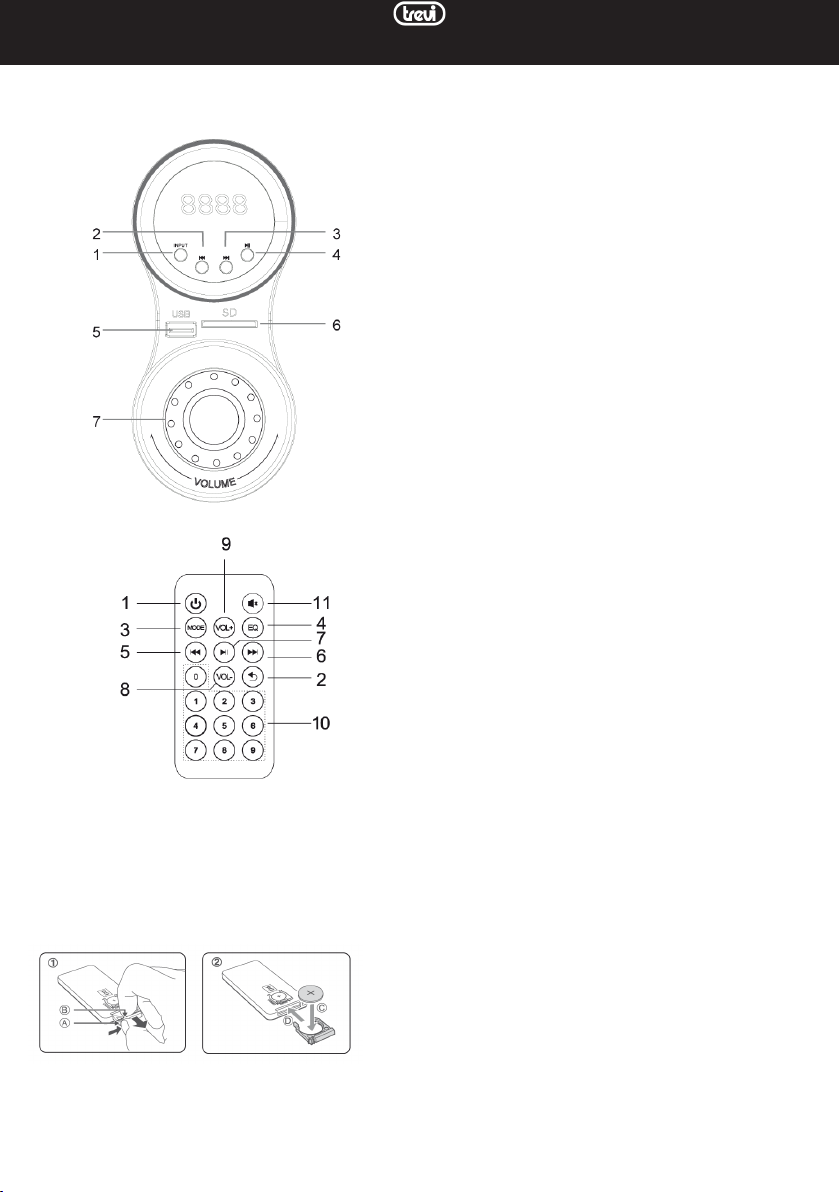
DESCRIPCIÓN DE LOS COMANDOS
1. Botón INPUT, para cambiar la fuente que se está reproduciendo
2. Botón PREV, pista anterior
3. Botón NEXT, pista siguiente
4. Botón PLAY / PAUSA, inicia / pausa la reproducción
5. Entrada de memoria USB
6. Ranura de memoria SD
7. Control de volumen
En la parte posterior del altavoz principal puede encontrar:
Interruptor de ENCENDIDO: Use este interruptor para
encender o apagar la unidad.
Tomas RCA OUTPUT: toma de conexión para los altavoces
derecho (R) e izquierdo (L).
Tomas RCA INPUT: entrada auxiliar para fuente externa.
Cable de alimentación principal: conecte este cable a la
toma de pared para alimentar la unidad.
CONTROL REMOTO
1. Botón de encendido / en espera
2. Botón REPEAT, repetición automática de pista
3. Botón MODE, para cambiar la fuente que se está reproduciendo.
4. Botón EQ, ecualizador preestablecido
5. Botón PREV, pista anterior
6. Botón SIGUIENTE, pista siguiente
7. Botón REPRODUCIR / PAUSA, inicia / pausa la reproducción
8. Botón VOL -
9. Botón VOL +
10. Teclas numéricas, para la reproducción directa de una pista
11. Botón MUTE, altavoz silenciado
ACTIVACIÓN Y SUSTITUCIÓN DE LA BATERÍA DEL MANDO A DISTANCIA
El control remoto está equipado con una batería CR2025
Para activar la batería del control remoto (incluida), retire la pestaña protectora de plástico.
Para reemplazar la batería (consulte la imagen en la parte posterior del control remoto):
1. Empuje la pestaña hacia la derecha
2. Retire la carcasa del soporte de la batería.
3. Reemplace la batería por una del mismo tipo CR2025
15
Page 16
AVX 615 BT
NOTAS DE USO
Este dispositivo es un instrumento electrónico de alta precisión; por lo tanto, evite usarlo en los siguientes casos:
• Cerca de fuentes de calor fuertes como calentadores y estufas.
• En lugares muy húmedos como baños, piscinas, etc.
• En lugares muy polvorientos.
• En lugares sujetos a fuertes vibraciones.
• Coloque el aparato de modo que siempre haya suciente espacio a los lados para la libre circulación del aire (al menos
5 cm).
• No bloquee las ranuras de ventilación.
• Si penetran líquidos en el interior del aparato, desconecte inmediatamente el enchufe de la toma de corriente y lleve
el aparato al centro de servicio autorizado TREVI más cercano.
• Antes de encender el aparato, compruebe siempre que los cables de alimentación y de conexión estén correctamente
instalados.
• El aparato no debe exponerse a goteos o salpicaduras de agua. No se deben colocar objetos llenos de líquido, como
jarrones, sobre el aparato.
• No deben colocarse sobre el aparato fuentes de llamas vivas, como velas encendidas.
• Conserve este manual.
CUIDADO Y MANTENIMIENTO
Para la limpieza, recomendamos utilizar un paño suave ligeramente humedecido. Evite disolventes o sustancias abrasivas.
IMPORTANTE
La buena construcción de este dispositivo garantiza su perfecto funcionamiento durante mucho tiempo. Sin embargo, en
caso de surgir algún problema, será aconsejable consultar con el Centro de Servicio autorizado más cercano.
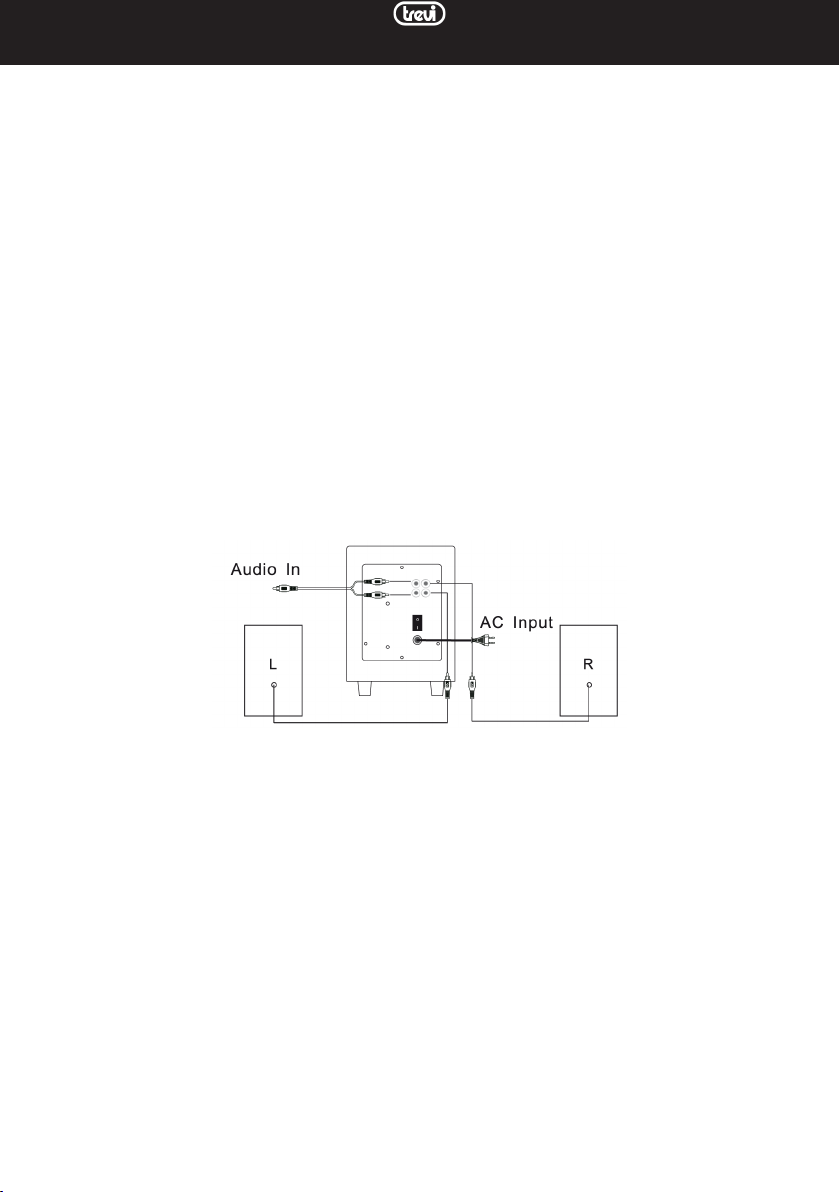
CONECTANDO LOS ALTAVOCES
1. Con el dispositivo desconectado, inserte el cable de enchufe RCA rojo del altavoz derecho en el enchufe de SALIDA
rojo (R) y el cable de enchufe RCA blanco del altavoz izquierdo en el enchufe de SALIDA blanco (L). Las tomas de
SALIDA están ubicadas en la parte trasera de la unidad de control.
ENCENDIDO / APAGADO
1. Gire el interruptor de ENCENDIDO a ON para encender el dispositivo.
2. Empiece a reproducir la fuente de audio deseada. Para cambiar la fuente, presione el botón INPUT (1).
3. Ajuste el volumen usando el control de volumen (7) en el altavoz principal o usando los botones VOL + y Vol- en el
control remoto.
Nota: los dos ajustes son independientes, en caso de volumen bajo, asegúrese de que el ajuste a través del mando a distancia
esté ajustado al nivel máximo.
Presione el botón MUTE (11) en el control remoto para silenciar inmediatamente los altavoces; presiónelo de nuevo
para volver a activar el sonido.
4. Gire el interruptor de ENCENDIDO a APAGADO para apagar el aparato.
REPRODUCTOR DE MP3
1. Inserte una memoria SD en la entrada (6) con los contactos eléctricos hacia arriba o un dispositivo USB en la entrada
(5). La reproducción comenzará automáticamente.
2. Presione el botón PLAY / PAUSE (4) para detener momentáneamente la reproducción. Presiónelo nuevamente para
reiniciarlo.
3. Presione el botón NEXT (3) o PREV (2) para pasar a la pista anterior o siguiente.
4. Presione el botón INPUT (1) para cambiar entre las entradas USB, SD, BT y LINE.
LINE IN
1. Conecte los conectores RCA del cable de audio a la toma INPUT en la parte posterior de la unidad de control y la
toma del cable a la toma de auriculares o salida de línea de una fuente de audio (TV / monitor, tableta, reproductores
de DVD / Mepg4, audio para ordenadores, teléfonos móviles, reproductores MP3, etc ...).
NOTA: es aconsejable no ajustar demasiado el volumen de la fuente de audio para no saturar la entrada del altavoz.
16
Page 17

AVX 615 BT
BLUETOOTH
1. Encienda el dispositivo y presione el botón INPUT (1) varias veces, o presione repetidamente el botón MODE (3) en
el control remoto hasta que aparezca la indicación BT en la pantalla.
2. BT comenzará a parpadear buscando dispositivos para emparejar.
3. Inicie la función Bluetooth en el dispositivo que desea emparejar y busque el altavoz llamado "AVX 615 BT".
4. Después del emparejamiento, el mensaje BT permanecerá fijo. Inicie la reproducción desde su dispositivo.
5. Utilice las teclas 4, 2, 3 en el altavoz o 7, 6, 8 en el mando a distancia para gestionar las pistas reproducidas, como para
utilizar el reproductor MP3.
FUNCION ECUALIZADOR
La barra de sonido tiene un sistema de ecualización preestablecido, presione los botones EQ del control remoto (4) durante
la reproducción para seleccionar la dinámica de audio que mejor se adapte al estilo de reproducción de la música (Clásico,
Pop, Jazz, Rock, Normal, Automático).
FUNCIÓN DE REPETICIÓN
Pulse el botón REPEAT (2) del mando a distancia para activar la repetición automática de todas las pistas (el LED de estado
parpadea rápidamente).
CARACTERÍSTICAS TÉCNICAS
Fuente de alimentación: ............. 220V-240V ~ 50Hz
Potencia máxima absorbida: ....................................... 20W
Potencia de transmisión Bluetooth: ......................... 2,5 mW
Frecuencia de transmisión de Bluetooth: .............. 2,4 GHz
Potencia máxima de audio: ..............15 W + 7,5 W (x2)
Respuesta de frecuencia: ....................80 Hz - 20 KHz
Dimensiones del subwoofer: .................150x230x220mm
Tamaño del altavoz: ....................85x155x85 mm
Advertencias para la correcta eliminación del producto.
El símbolo que aparece en el aparato indica que el residuo debe ser objeto de “recogida selectiva” por tanto el producto
no se debe eliminar junto con residuos urbanos.
El usuario deberá entregar el producto a los “centros de recogida selectiva” creados por las administraciones municipales
o bien al distribuidor cuando adquiera un nuevo producto.
La recogida selectiva del residuo y las sucesivas operaciones de tratamiento, recuperación y eliminación favorecen la fabricación de aparatos con materiales reciclados y limitan los efectos negativos en el medio ambiente y la salud causados por
una gestión incorrecta del residuo.
La eliminación abusiva del producto da lugar a la aplicación de sanciones administrativas.
17
Page 18

NOTE
AVX 615 BT
18
Page 19

AVX 615 BT
19
Page 20
DICHIARAZIONE DI CONFORMITÀ UE SEMPLIFICATA
SIMPLIFIED EU DECLARATION OF CONFORMITY
Il fabbricante TREVI dichiara che il tipo di apparecchiatura
AVX 615 BT è conforme alla direttiva 2014/53/UE.
Il testo completo della dichiarazione di conformità UE è
disponibile al seguente indirizzo Internet:
https://www.trevi.it/dms/zidi/TREVI/DOCAVX615BT.pdf
Hereby TREVI Spa declares that the equipment type
AVX 615 BT is in compliance with directive 2014/53/EU.
The full text of the EU declaration of conformity is
available at the following internet address:
Trevi S.p.a.
Strada Consolare Rimini-San Marino, 62
47924 Rimini (Rn) Italia
Tel. 0541/756420 Fax 0541/756430 www.trevi.it
E-mail: [email protected]
Made in CHINA
 Loading...