

Page 1
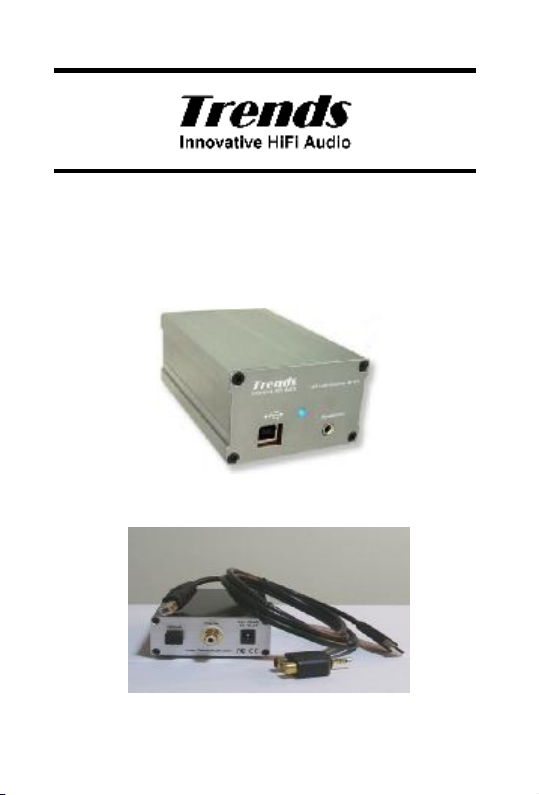
Trends Audio UD-10.1
USB Audio Converter
Version 1.1
User Guide
Trends UD-10.1
Trends UD-10.1 Lite
Page 2

Copyright Notice
Copyright © 2006 ITOK Media Limited, All rights reserved.
All rights in this publication are reserved and no part may be reproduced without the
prior written permission of the publisher. The contents of this publication are believed to
be correct at the time of going to press, but any information, specifications, products or
services mentioned may be modified, supplemented or withdrawn without further
notice.
Trademarks
Trends, Trends Audio, and ITOK are the trademarks owned by ITOK Media Limited
All other trademarks are the property of their respective owners.
ITOK Media Limited (Trends Audio)
Address: Unit E, 13/F, World Tech Centre,
Web: http://www.TrendsAudio.com
95 How Ming Street, Kwun Tong, Hong Kong
[email protected] (Support)
Page 3

Trends UD-10.1 User Guide
TTaabbllee OOff CCoonntteennttss
TABLE OF CONTENTS.......................................................................3
1. INTRODUCTION.....................................................................4
2. FEATURES.............................................................................4
3. OVERVIEW – TRENDS UD-10.1..............................................5
4. OVERVIEW – TRENDS UD-10.1 LITE......................................6
5. SETUP....................................................................................7
Connect your PC or Mac to your Hi-Fi system:.................................7
Connect your PC or Mac to your Hi-Fi systems DAC:.......................7
PC or Mac Headphone Amplifier:....................................................7
6. ADVANCE USE.......................................................................7
7. SPECIFICATION.....................................................................8
8. HINTS & TIPS.........................................................................9
9. TROUBLE SHOOTING............................................................9
10. CONTACT...............................................................................9
11. REGULATORY COMPLIANCE..............................................10
Table Of Contents
3
Page 4

Trends UD-10.1 User Guide
11.. IInnttrroodduuccttiioonn
Thank you for purchasing a Trends UD-10.1 USB Audio Converter
We have two products including Trends UD-10.1 Lite USB Audio Converter and Trends
UD-10.1 USB Audio Converter.
There are three main uses for the Trends UD-10.1 USB Audio Converter.
1. Connect your PC or Mac to your Hi-Fi system
2. Connect your PC or Mac to your Hi-Fi systems DAC(Digital to analog converter)
3. PC or Mac Headphone Amplifier
There are a lot of good quality audio DAC’s(Digital to analog converter)on the market.
But a good inexpensive audio source is still difficult to find. Trends Audio developed the
Trends UD-10.1 USB Audio Converter as an external sound card. It has four digital
outputs (optical x1, coaxial x2 (RCA & BNC), AES/EBU x1, Trends UD-10 only) and a
headphone socket. It effectively isolates the interference from within the PC/Mac case,
caused by high frequency data signals, the switching mode power supply and the fan
motors.
The Trends UD-10.1 USB Audio Converter upgrades your PC/Mac to be a hi-end audio
source. Thanks to the high quality components and engineering the Trends UD-10.1
USB Audio Converter makes your PC/Mac into a high-end CD Player. Trends UD-10.1
USB Audio Converter and PC /Mac combination provides better sound quality, larger
storage capacity and a more user-friendly interface than most standard CD players.
The computer hard disk is far superior to a CD transport, no matter the speed, stability,
error correction or jitter reduction.
22..
FFeeaattuurrees
- To stream digital audio with extreme sound quality.
- High-end Burr Brown DAC PCM2704 for USB audio conversion.
- Proprietary dual power regulation circuits design(Trends UD-10.1 only)
- Separate power and ground paths for digital and analogue circuits.
- High accuracy crystal clock and SMD resistors and capacitors
- Proprietary impedance matching circuits for digital outputs
- Plug-and-play without driver installation for most operating systems, e.g. PC
Windows OS, Mac OS and Linux.
- High quality components including Sanyo OS-CON solid-state electrolyte
capacitors and ELNA Silmic electrolyte capacitors and WIMA MKP10 film
capacitors
s
Section 1. Introduction / Section 2. Features
4
Page 5
Trends UD-10.1 User Guide
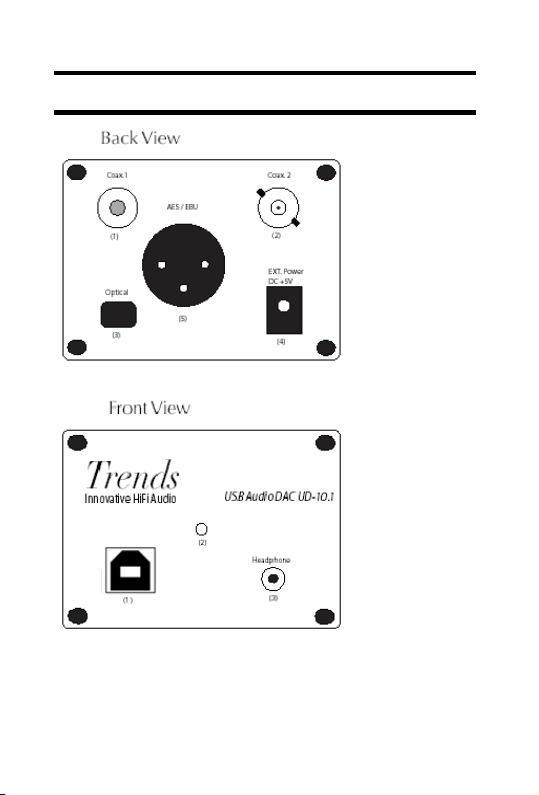
33.. OOvveerrvviieeww –– TTrreennddss UUDD--1100..11
1. Coaxial (RCA)
2. Coaxial (BNC)
3. Optical
4. AES/EBU(XLR)
5. Power Supply
Socket
1. USB Socket
2. Power Indicator
3. Headphone
Socket
Section 3 Overview – Trends UD-10.1
5
Page 6
Trends UD-10.1 User Guide
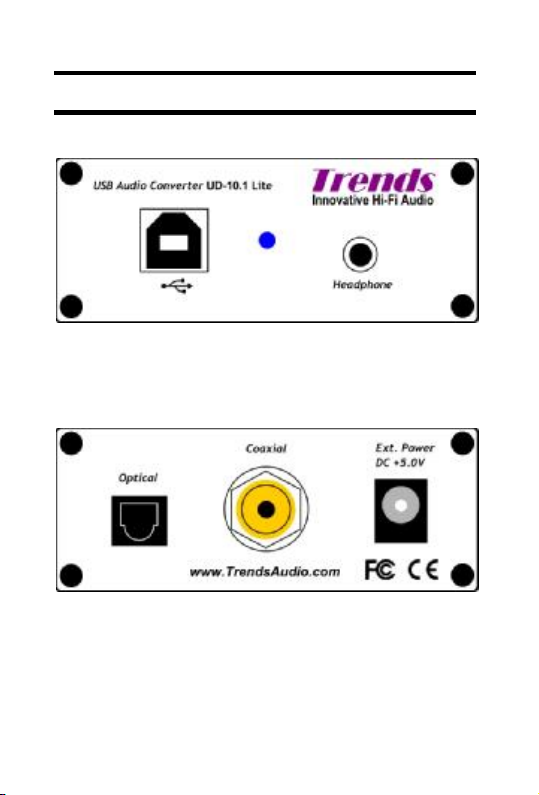
44.. OOvveerrvviieeww –– TTrreennddss UUDD--1100..11 LLiittee
Front View
1. USB Socket
2. Power Indicator
3. Headphone Socket
Back View
1. Optical
2. Coaxial RCA
3. Power Supply Socket
Section 4 Overview – Trends UD-10.1 Lite
6
Page 7

Trends UD-10.1 User Guide
55.. SSeettuupp
Plug-and-play without driver installation for most operating systems, e.g. PC Windows
2000, Windows XP, Vista and Mac OS X.
PC Users may need to select the Trends UD-10.1 USB Audio Converter as sound
output device: Select - My Computer – Sound Devices – USB Audio DAC
MAC Users may need to select the Trends UD-10.1 USB Audio Converter as sound
output device: Select – System Preferences – Hardware Sound – USB Audio DAC
Once set up the Trends UD-10.1 USB Audio Converter will interface with iTunes,
Foobar2000, QuickTime Player, Windows Media Player, Real Player, etc.
Connect your PC or Mac to your Hi-Fi system:
PC/Mac USB port - USB socket on the front of Trends UD-10.1 USB Audio Converter Headphone Socket Aux Input on amplifier / system. You can use an existing PHONO
cable with the supplied mini-jack to PHONO adaptor or a mini-jack to PHONO cable.
Connect your PC or Mac to your Hi-Fi systems DAC:
PC/Mac USB port - USB socket on the front of Trends UD-10.1 USB Audio Converter Select digital output on back of Trends UD-10.1 USB Audio Converter - Connect to
digital input on DAC.
PC or Mac Headphone Amplifier:
PC/Mac USB port - USB socket on the front of Trends UD-10.1 USB Audio Converter Headphone socket on front of Trends UD-10.1 USB Audio Converter
66.. AAddvvaannccee UUssee
Battery Power: It is possible to power the Trends UD-10.1 USB Audio Converter with
battery power for the best possible sound quality. Using the supplied battery box install
four recharges AA batteries, 2000mAh or larger capacity recommended this will give
you approximately 16hrs of playing time. Small capacity batteries are suitable but will
need recharging more frequently.
Do Not Be Tempted to use ordinary AA batteries as this could cause
irreparable damage. Rechargeable batteries (1.2V x4=5V). Normal batteries (1.5V
x4=6V).
Mains Power: You can power the Trends UD-10.1 USB Audio Converter directly from
the mains for improved sound quality and to reduce the currant draw on the USB bus
power; this will be an advantage when you are already using many USB peripherals. It
is recommended that you use a 5V power supply with Centre Pin (+) 5.5mm Diameter,
Pin 2.1mm
Section 5 Setup / Section 6 Advance Use
7
Page 8

Trends UD-10.1 User Guide
:
DC
mpliance:
77.. SSppeecciiffiiccaattiioonn
Model UD-10.1 UD-10.1 Lite
USB DAC IC Burr Brown PCM2704 USB DAC (digital to analog converter)
USB Input: USB Type B Female connector x 1
Clock 4 pin high accuracy crystal clock
Power Regulation
Digital Outputs: Optical connector:TOSLINK ü ü
Coaxial(RCA)connector:75 ohms ü ü
Coaxial(BNC) connector:75 ohms ü O
AES/EBU(XLR)connector:110 ohms
Audio format: linear PCM, 16 bits per sample
Sample rates: 32, 44.1, 48 kHz
Analog Output: Headphone 3.5mm jack (Volume Controlled by PC or Mac)
Signal-to-noise ratio 98dB, Dynamic Range: 98dB
THD+N: 0.006% (RL > 10 k, Self-Powered)
Audio Formats : Lossless Formats: APE, FLAC, WMA Lossless, Apple lossless or other
Uncompressed formats: WAV, AIFF, PCM or other
System Requirements:
Macintosh: Mac OS X 10.3 or later
Linux, PC LinuxOS 2007, Fedora core 7, Ubuntu 7.04 or other
Power Supply :
Dimensions :
Case only (W)76mm x (H)46mm x (D)114mm ü O
Incl. sockets & knob (W)76mm x (H)46mm x (D)128mm ü O
Case only (W)76mm x (H)29mm x (D)114mm O ü
Incl. sockets & knob (W)76mm x (H)29mm x (D)128mm O ü
Weight: 300g 250g
Case: Stylish aluminium
Accessories: 1.5m type A to type B cable x 1
Mini Jack to 2 Phono Sockets Adapter x 1
User Guide x 1
Warranty Card x 1
Optional Accessories :
Trends UD-10.1
Charger Kit:
LED Indications: Power on, but no battery connected : Black
Charging: Red
Charged/Float Charging: Green
Dimensions: (L)110mm x (W)80mm x (H)60mm
Weight: 300g
Warranty: One year parts and labor.
Regulatory Co
FCC
Compressed formats: MP3,AAC,Ogg Vorbis,MP2,MusePack,WMA or
other
All systems: 256MB RAM with 30MB hard disk space
Windows OS: Windows NT/2000/XP/Vista or later
USB Bus Power or External power(Optional): DC 4.35V – 5.25V(max)
(e.g. AA size rechargeable battery 1.2V x4=5V, don't use normal batteries
with 1.2V x4=6V, it would be too high for safety and good sound
performance)
The package includes charger, battery box and 4 AA size rechargeable
battery (1.2V x4=5V), AC Input: Universal AC 100V-240V / 50~60Hz,
Output: DC 5V /0.5A
CE
±10 ppm ±25 ppm
Dual regulated
power for analog
& digital, paths,
individually
Regulated
power for both
analog & digital
paths
ü O
Section 7 Specification
8
Page 9

Trends UD-10.1 User Guide
88.. HHiinnttss && TTiippss
- Always power the Trends UD-10.1 USB Audio Converter before starting
your media player.
- It’s impossible to advise on the suitability of every media
player, operating system, file type combinations, so for best results experiment
- Use battery power for a more open and spacious sound.
99.. TTrroouubbllee SShhoooottiinngg
Symptom Solution
No power Check battery pack is not flat & is
No sound Check USB cable is connected
Sound is intermittent Check battery pack it may need
No Sound & No power Check USB cable - battery pack
Volume very low Check PC/Mac master volume &
switched on.
Restart your media player
charging. Restart your media player
- power supply
media players volume setting
1100.. CCoonnttaacctt
ITOK Media Limited (Trends Audio)
Address: Unit E, 13/F, World Tech Centre,
Web: http://www.TrendsAudio.com
95 How Ming Street, Kwun Tong, Hong Kong
[email protected] (Support)
Section 8 Hints & Tips / Section 9 Trouble Shooting / Section 10 Contact
9
Page 10

Trends UD-10.1 User Guide
1111.. RReegguullaattoorryy CCoommpplliiaannccee
This device complies with Part 15 of the FCC Rules. Operation is subject to the
following two conditions: (1) this device may not cause harmful interference, and (2)
this device must accept any interference received, including interference that may
cause undesired operation. (3) Shielded USB cables must be used with this unit to
ensure compliance with the Class B FCC limits
Warning: Changes or modifications to this unit not expressly approved by the party
responsible for compliance could void the user's authority to operate the equipment.
NOTE: This equipment has been tested and found to comply with the limits for a Class B
digital device, pursuant to Part 15 of the FCC Rules. These limits are designed to provide
reasonable protection against harmful interference in a residential installation. This
equipment generates, uses and can radiate radio frequency energy and, if not installed and
used in accordance with the instructions, may cause harmful interference to radio
communications.
However, there is no guarantee that interference will not occur in a particular installation. If
this equipment does cause harmful interference to radio or television reception, which can
be determined by turning the equipment off and on, the user is encouraged to try to correct
the interference by one or more of the following measures:
- Reorient or relocate the receiving antenna.
- Increase the separation between the equipment and receiver.
- Connect the equipment into an outlet on a circuit different from that to which the
receiver is connected.
- Consult the dealer or an experienced radio/TV technician for help.
Section 11 Regulatory Compliance
10
 Loading...