

Page 1
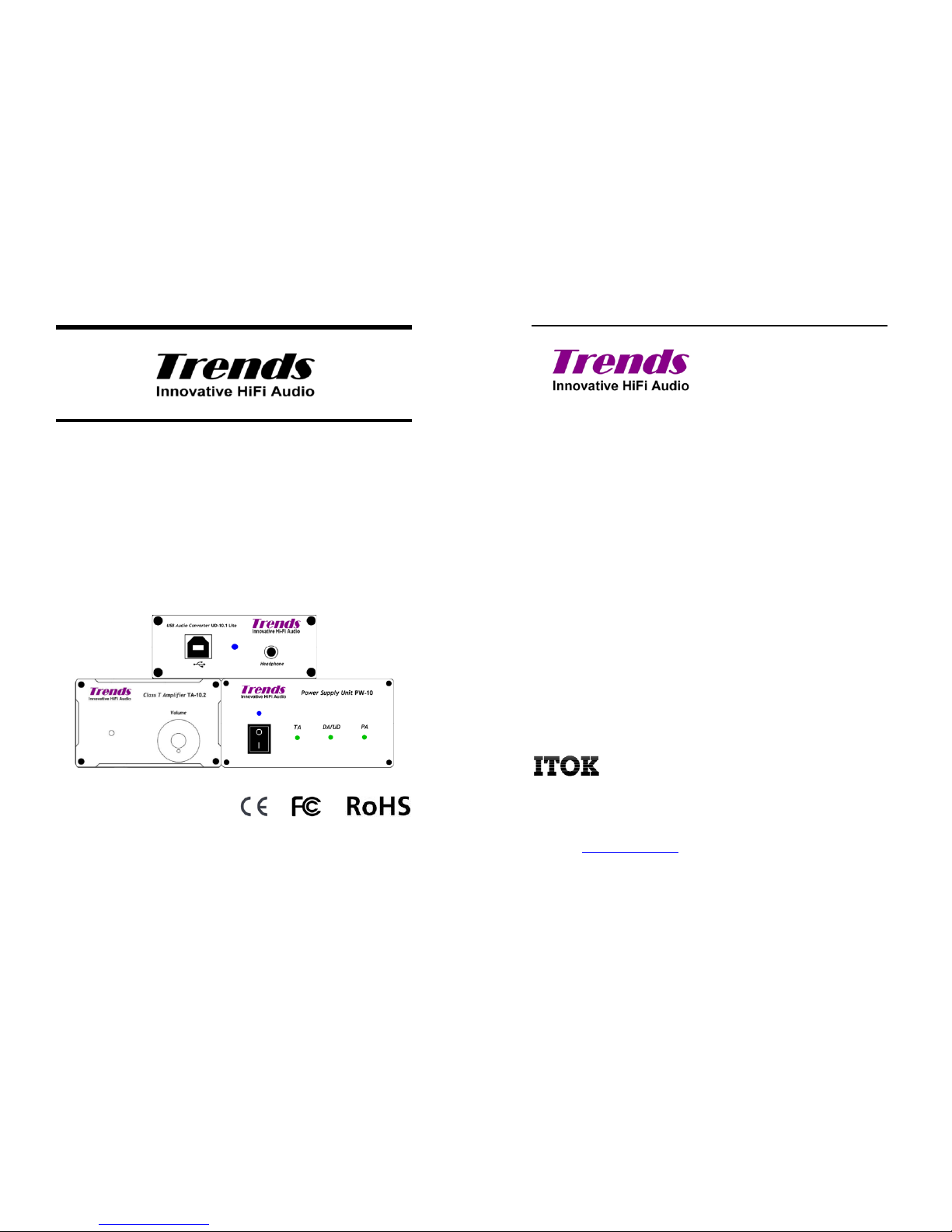
Trends Combo 12 Desktop Hi-Fi System User Guide
Trends Combo 12
Desktop Hi-Fi System
Version 1.0
USER GUIDE
Trends Combo 12 Desktop Hi-Fi System User Guide
Copyright Notice
Copyright © 2006 ITOK Technologies Limited, All rights reserved.
All rights in this publication are reserved and no part may be reproduced without
the prior written permission of the publisher. The contents of this publication are
believed to be correct at the time of going to press, but any information,
specifications, products or services mentioned may be modified, supplemented or
withdrawn without further notice.
Trademarks
Trends, Trends Audio, and ITOK are the trademarks owned by ITOK Technologies
Limited
Tripath is the registered trademark owned by Tripath Technology Inc.
All other trademarks are the property of their respective owners.
ITOK Technologies Limited
Rm. K, 11/F, Kwun Tong Ind. Centre, Phase 1
472-484 Kwun Tong Road, Kowloon, Hong Kong
Page 2

Trends Combo 12 Desktop Hi-Fi System User Guide
Table of Content
3
TTaabblleeooffCCoonntteennt
t
TTAABBLLEEOOFFCCOONNTTEENNT
T
... ................ ... ... ................... ... ... ................ ... 3
1. SAFETY INSTRUCTIONS............... ... ... ................ ... ... ... ..... 4
2. INTRODUCTION ...... ... ... ................... ... ... ................ ... ... ... .5
3. PACKING LIST................. ... ... ... ................ ... ... .................. 5
4. FEATURES.. ... ................ ... ... ... ................ ... ... ................... 5
5. OVERVIEW.. ................... ... ... ................... ... ... ................ ... 7
5.1 TRENDS UD-10.1 LITE USB AUDIO CONVERTER .............................. ........ .... 7
5.2 TRENDS TA-10.2 SE CLASS-T POWER AMPLIFIER .......... ........ ...................... 8
5.3 TRENDS PW-10 PSU... ....................................... ........ ............................. 9
5.4 COMPLETE TRENDS COMBO 12.......... ....................................... ................10
6. CONNECTION AND OPERATION................. ... ... ............... 11
7. TECHNICAL NOTES (FOR PROFESSIONAL USER ONLY).. 11
7.1 CONFIGURE AS POWER AMPLIFIER (BY-PASS THE VOLUME CONTROL).......... ..... 11
7.2 OFFSET THE DC BIAS VOLTAGE OF THE SPEAKER TERMINALS.. ........ ...............12
8. SPECIFICATION............... ... ... ................... ... ... ................ 13
8.1 TRENDS UD-10.1 LITE USB AUDIO CONVERTER .............................. ........ ...13
8.2 TRENDS CQ-125 3.5MM RCAAUDIOPHILE CABLE (0.47M)....... ........ .............13
8.3 TRENDS PW-10 PSU... ....................................... ........ ............................14
8.4 TRENDS TA-10.2 SECLASS-T STEREO AUDIO AMPLIFIER ......................... ...14
9. TROUBLESHOOTING... ... ................... ... ... ................... ... . 15
10. ACCESSORIES.. ... ................... ... ... ................... ... ... ........ 15
11. REGULATORY COMPLIANCE .................. ... ... ... ............... 16
12. CONTACT US ...... ... ... ................... ... ... ................ ... ... ... ... 16
Trends Combo 12 Desktop Hi-Fi System User Guide
Section 1. Safety Instructions
4
11..SSaaffeettyyIInnssttrruuccttiioonns
s
Please take note the f ollowing instructions before installing your Trends Combo
12 Hi-Fi System, they will enable you to get the best performance and prolong the
life of the product.
1.) Ensure that Trends PW-10 PSU’s I/O switch is off when it does not
operate. It is recommended that you return your Trends PW-10 PSU to us or
a qualified dealer for any service or repair. Incorrect assembly may result in
electric shock or fire.
2.) To reduce the risk of electric shock, unplug the power supply from the outlet
before attempting any maintenance or cleaning. Turning off controls will not
reduce this risk.
3.) Never use an extension cord unless absolutely necessary. If an extension
cord must be used make sure that the pins on t he plug are the same
number, size and shape as those of the original power supply plug.
4.) Place the unit in an area that will allow air to flow freely around the unit. DO
NOT block or obstruct vent openings on the side/bottom of the unit.
5.) Your power supply should be grounded to reduce the risk of electric shock.
6.) The cord must be plugged into an outlet that is properly installed and
grounded in accordance with all local codes and ordinances. Never alter the
AC cord of plu g provided. If the cord will not fit the outlet, have a proper
outlet installed by qualified electrician. Improper connection can result in risk
of electric shock.
7.) This unit must not be exposed to dripping or splashing water or other liquids.
No objects filled with liquid, such as vases, shall be placed on the unit. In the
event, switch off immediately, disconnect from the main supply and contact
your dealer or us for advice.
8.) Do not route the power cable so that it can be walked upon or damaged by
other items near it.
9.) Electronic audio components have a running in period of around a week (if
used several hours per day). This will allow the new components to settle
down; the sonic properties will improve over this time.
10.) If you do not intend to use this unit for a long period of time, unplug it from
main socket.
11.) To clean the unit, wipe its case with a moist, lint-free cloth. Do not use any
cleaning fluids containing alcohol, ammonia or abrasives. Do not spray an
aerosol at or near any component of Trends Combo 12.
12.) These units are not user serviceable, never attempt to repair, disassemble or
reconstruct the unit if there seems to be a problem. A serious electric shock
could result if this precautionary measure is ignored. In the event of a
problem or failure, please contact your dealer or us.
Page 3

Trends Combo 12 Desktop Hi-Fi System User Guide
Section 2. Introduction / Section 3. Packing List / Section 4. Features
5
22..IInnttrroodduuccttiioon
n
Thank you for purchasing Trends Combo 12 Hi-Fi System.
This package provides a set of advanced Desktop Hi-Fi System. By conjoining
Trends UD-10.1 Lite USB Audio Converter, Trends TA-10.2 SE Class-T Stereo
Audio Amplifier, Trends PW-10 PSU, and any DAC, Trends Audio perfectly
integrates your PC/Mac and Smartphone into your audio system with better sound
quality, larger storage capacity and a more user-friendly interface than most
standard CD players.
Trends PW-10 PSU concurrently support THREE audio appliances: (TA-10, PA-10,
UD-10 or DA-10), making Trends Combo 12 perfect for integrating your Desktop PC,
iPhone/iPod/iPad or Smartphone into your audio system and achieves the sound
quality of high-end Hi-Fi but in a very affordable price.
33..PPaacckkiinnggLLiisst
t
- Trends UD-10.1 Lite USB Audio Converter (body) x 1 pcs
- Trends TA-10.2 SE Class-T Stereo Audio Amplifier (body) x 1 pcs
- Trends PW-10 Power Supply Unit x 1 pcs
- Trends CQ-125 3.5mm RCA Audiophile Cable x 1 pcs
44..FFeeaattuurrees
s
l One Transformer-based l inear mode power supply concurrently supports
THREE audio appliances: (UD-10.1 Lite, PA-10 & TA-10.2P or TA-10.2 SE).
l Compact design (mini-size & light weight), easy portable and setup for Hi-Fi
room, living room, sleeping room or even right beside your laptop computer.
l High-end Burr Brown PCM2704 IC for USB audio conversion.
l Separated digital/analog ground. The digital GND (network) and the analog
GND (solid) is totally separated except connected via a ferrite bread in a single
point. It effectively reduces interference between digital signals and analog
signals.
l Applied RS422 driving IC to c oncurrently drive 2 groups of digital outputs.
Audiophiles can compare the differences between these digital outputs
instantly or play for the Bi-DACs.
l Proprietary impedance matching circuits for Coaxial(75ohm) digital outputs.
l Applied the specially designed pulse transformers for Coaxial outputs to
further isolated interference from UD-10.1 Lite to the external DAC. The most
pure, accurate, standard digital signal is then regenerated with minimum
interference and jitter.
Trends Combo 12 Desktop Hi-Fi System User Guide
Section 4. Features
6
l Plug-and-play without driver installation for most PC/Mac operating systems,
e.g. Windows 7, Windows 2000, Windows XP and Mac OS X or above.
l Audiophile grade transformer is tailor-made for Trends Combo Hi-Fi System.
l Specific circuit design and components of Trends PW-10 PSU applied for
different power usage characteristics, which perfect match the different
applications in high-frequency, high-current, digital and/or analog circuits for
Trends Combo Hi-Fi System.
l High quality EMI noise filter in Trends PW-10 PSU is added to filter out those
high frequency noise inducted from the global electricity network from Trends
Combo Hi-Fi System.
l Built-in over-current protection and over-temperature protection design in the
power amplifier.
l Unique air-core inductor in power amplifier used (instead of magnetic-core) for
better sound.
l Innovative circuit design of low voltage hybrid (tube/transistor) & pure class-A
circuit pre-amplifier to provide the best sound performance and easy/safe
DIYer accessibility.
l Provide TWO sets of switchable audio inputs in the pre-amplifier. Besides the
normal CD input, the PC/iPod input with higher gain is provided for small
output PC/Mac/iPod/iPad.
l Besides the normal audio output in the back panel, ONE headphone output in
the front of the pre-amplifier to drive even high-impedance audiophile-grade
headphones.
l TWO precise screw-driving potentiometers for professional audiophiles to
adjust the tube’s bias voltage to guarantee the best working point for different
tubes.
l The stylish aluminium case provides outstanding shielding & grounding
capability to keeps the background silent and maximizes the S/N ratio.
Page 4
Trends Combo 12 Desktop Hi-Fi System User Guide
Section 5. Overview
7
55..OOvveerrvviieew
w
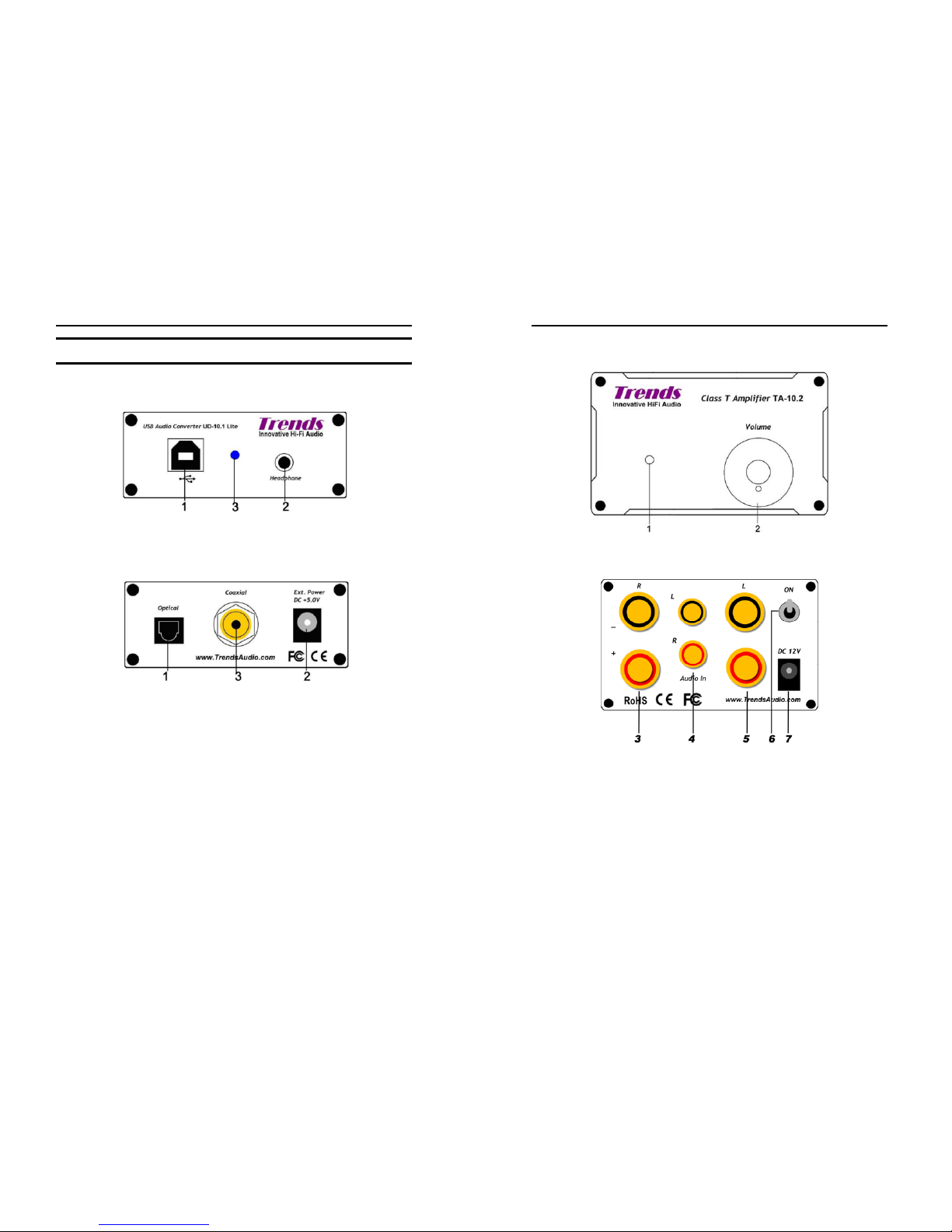
5.1 Trends UD-10.1 Lite USB Audio Converter
Front View
1. USB Socket
2. Headphone Socket
3. Power Indicator
Back View
1. Optical
2. Power Socket
3. Coaxial RCA
Trends Combo 12 Desktop Hi-Fi System User Guide
Section 5. Overview
8
5.2 Trends TA-10.2 SE Class-T Power Amplifier
Front View
1. Power Indicator
2. Volume Controller – Turn clockwise to lower down volume and vice versa
Back View
3. RIGHT Speaker Output – The negative (-ve) and positive (+ve) speaker terminals
of the RIGHT channel
4. Audio Input – The audio signal input (LEFT/RIGHT) connects from audio source
(e.g. CD player) to the amplifier by the RCA audio cable
5. LEFT Speaker Output – The negative (-ve) and positive (+ve) speaker terminals
of the LEFT channel
6. Power ON/OFF switch – pull up to power on and pull down to off
7. Power Supply Socket – Plug Trends PW-10 PSU to this socket to supply power
Page 5
Trends Combo 12 Desktop Hi-Fi System User Guide
Section 5. Overview
9
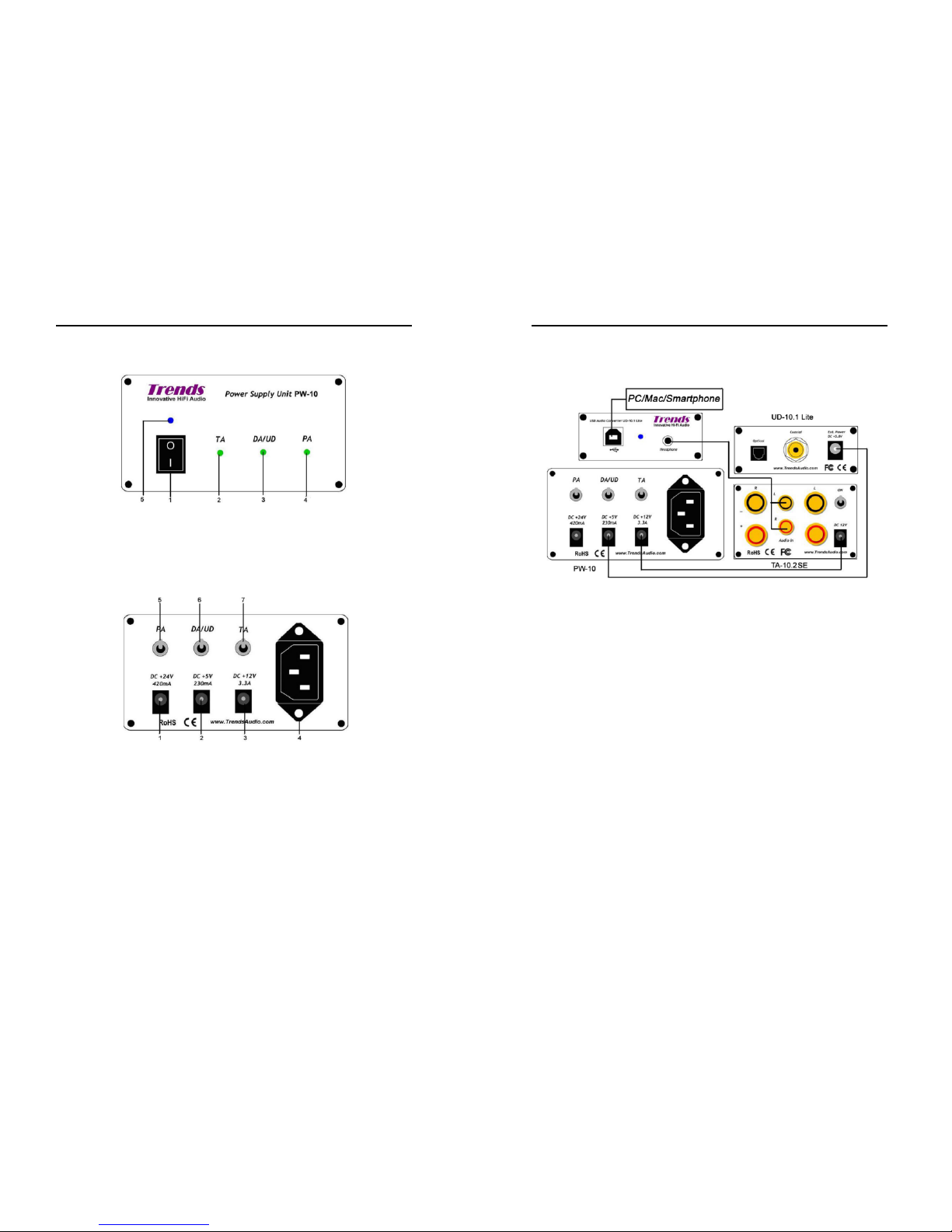
5.3 Trends PW-10 PSU
Front View
1. Power ON/OFF Switch
2. Power Indicator of the Amplifier Unit
3. Power Indicator of the Digital/Analogue Converter Unit
4. Power Indicator of the Pre-Amp Unit
5. Main Power Indicator
Back View
1. Power Supply Socket for the Pre-Amp Unit
2. Power Supply Socket for the DA/UD Unit
3. Power Supply Socket for the Amplifier Unit
4. Main Power Supply Socket
5. Power ON/OFF Switch - pull up to power on the Pre-Amp Unit, pull down to off
6. Power ON/OFF Switch - pull up to power on the DA/UD Unit, pull down to off
7. Power ON/OFF Switch - pull up to power on the Amplifier Unit, pull down to off
Trends Combo 12 Desktop Hi-Fi System User Guide
Section 5. Overview
10
5.4 Complete Trends Combo 12
Page 6

Trends Combo 12 Desktop Hi-Fi System User Guide
Section 6. Connection and Operation / Section 7. Technical Notes
11
66..CCoonnnneeccttiioonnaannddOOppeerraattiioon
n
WARNING! Before plugging the unit to the AC outlet, please check that your local
supply voltage is 110V AC or 220V AC (specific model should be selected, not
compatible)
· Turn off the I/O switch of Trends PW-10 PSU, unplug it from theAC outlet.
· Ensure that the connections are secure and tight.
· Plug the Trends PW-10 PSU into the AC outlet, and press the I/O switch of the
Trends PW-10 PSU to “I”, then “Blue” indicator in the switch illuminates.
· If the indicator fails to light, recheck the connection and AC outlet.
· Turn on DA/UD and observe that the “Green” indicator, and then switch on
Trends UD-10.1 Lite USB Audio Converter.
· Turn on TA and observe that the “Green” indicator, and then switch on Trends
TA-10.2 SE Class-T Stereo Audio Amplifier.
OPERATE IN A WELL VENTILATED OPEN AND COOL AREA. DO
NOT BLOCK THE OPENINGS AT THE FAN DISCHARGE ON THE
BOTTOM AND THE SUCTION OPENINGS ONTHE SIDES.
77.
.
TTeecchhnniiccaallNNootteess(
(
ffoorrpprrooffeessssiioonnaalluusseerroonnlly
y
)
)
7.1 Configure as power amplifier (by-pass the volume control)
You can simply configure the amplifier as an integrated amp ( with volume control
function) or as a pure power amp (no volume control function) by resetting t he
jumpers in J2 as follows:
O O O O
O O O O (integrated amp)
O O O O
O O O O (power amp)
Trends Combo 12 Desktop Hi-Fi System User Guide
Section 7. Technical Notes
12
7.2 Offset the DC bias voltage of the speaker terminals
There are two blue adjustable potentiometers (Rt) inside Trends TA-10.2 SE for
offsetting the DC bias voltage between the positive (+ve) and negative (-ve)
terminals of each channel. Offset this DC bias voltage can enhance the purity of the
sound and minimize the “pop” sound when power on and off. The DC bias has been
pre-set in factory. But after run-in for a period, it would be slightly changed that the
fine-tuning is needed.
Before you tune these, you need a screwdriver (take off the case), a small
screwdriver (turn the screw of the potentiometer) and a (digital) multi-meter to
detect the DC bias voltage.
1. Use screwdriver to take out the two top level screws in the front panel &
another two screws in the back panel. Then, open the upper case.
2. Power ON the amplifier.
3. Use the multi-meter to detect the DC voltage (200mV) between +ve & -ve
terminals of the RIGHT channel.
4. Turn the screw on the top of the LEFT (near the front panel) potentiometer by a
small screwdriver clockwise or anticlockwise until the voltage as close as to
±0mV.
5. Then, repeat step 3 and 4 for the LEFT channel by turning the screw on the top
of the RIGHT (near the back panel) potentiometer.
6. Power OFF the amplifier
7. Cover back the upper case and tighten the screws.
Page 7

Trends Combo 12 Desktop Hi-Fi System User Guide
Section 8. Specification
13
88..SSppeecciiffiiccaattiioon
n
8.1 Trends UD-10.1 Lite USB Audio Converter
USB DAC IC Burr Brown PCM2704 USB DAC (digital to analog converter)
USB Input USB Type B female connector x 1
Clock 4 pin high accuracy crystal clock:
±25 ppm
Power Regulation Regulated power for both analog & digital paths
Digital Outputs Optical connector: TOSLINK
Coaxial(RCA)connector:75 ohms
Audio format: linear PCM, 16 bits per sample
Sample rates: 32, 44.1, 48 kHz
Analog Output Headphone 3.5mm jack (Volume Controlled by PC/Mac/Smartphone)
Signal-to-noise ratio 98dB
Dynamic Range 98dB
THD+N 0.006% (RL > 10 k, Self-Powered)
Audio Formats Lossless Formats: APE, FLAC, WMA Lossless, Apple lossless or
other
Uncompressed formats: WAV, AIFF, PCM or other
Compressed formats: MP3,AAC,Ogg Vorbis,MP2,MusePack,WMA or
other
System
Requirements
All systems: 256MB RAM with 30MB hard disk space
Windows OS: Windows NT/2000/XP/Vista or later
Macintosh: Mac OS X 10.3 or later
Linux, PC LinuxOS 2007, Fedora core 7, Ubuntu 7.04 or other
Power Supply USB Bus Power or External power(Optional): DC 4.35V – 5.25V(max)
(e.g. AA size rechargeable battery 1.2V x4=5V. NOTE: Don't use
normal batteries with 1.5V x4=6V, it would be too high for safety and
good sound performance)
Other Switch & Knob LED Power Indicator (Blue) x 1
Dimensions
(W) x (H) x (D)
76mm x 29mm x 114mm [case only]
76mm x 29mm x 128mm [incl. sockets & knob]
Weight 250g
Case Stylish aluminum
Accessories 1.5m type A to type B cable x 1
Mini Jack to 2 Phono Sockets Adapter x 1
8.2 Trends CQ-125 3.5mm RCA Audiophile Cable (0.47m)
Braiding Shield Oxygen-Free Copper OFC
Snack-Skin Sleeve Yes
Ferrite Ring Noise Filter Yes
Plug 1 x 3.5mm Headphone Plug ~ 2 x RCA
Plug Material 24K Gold-Plated Pure Copper
Overall Diameter 6mm
Conductor Oxygen-Free Copper OFC
Color Black
Trends Combo 12 Desktop Hi-Fi System User Guide
Section 8. Specification
14
8.3 Trends PW-10 PSU
AC Power Input:
110V /50~60 Hz or 220V / 50~60Hz
(specific model should be selected, not compatible)
DC Power Output: TA: +12V/3.3A
DA/UD: +5V/230mA
PA: +24V/420mA
AC Input Socket: IEC
socket
IEC socket
DC Output Socket: DC 2.1 socket
LED Indicator: Main Power (Blue)
TA (Green)
DA/UD (Green)
PA (Green)
Power Switch: Main Power (Front)
TA (Back)
DA/UD (Back)
PA (Back)
Dimensions (DxWxH) 205mm x 105mm x 55mm
8.4 Trends TA-10.2 SE Class-T Stereo Audio Amplifier
T-Amp IC Tripath TA2024
Output Power 2x15W @4ohm
2x10W @8ohm
Signal-to-Noise Ratio
(SNR)
98dB
Dynamic Range 98dB
IHF IM Distortion 0.10% @ 1W, 4ohm
THD+Noise Audiophile Quality
0.03% @ 9W 4ohm
0.1% @ 11W 4ohm
0.1% @ 6W 8ohm
High Power
10% @ 15W 4ohm
10% @ 10W 8ohm
Power Efficiency 81% @ 15W 4ohm
90% @ 10W 8ohm
Input Audio IN RCA (Left/Right) x 1
Power Socket (5.5mm/2.1mm) x 1
Output Speaker OUT (Left) x 1 pair (+/-)
Speaker OUT (Right) x 1 pair (+/-)
Other Switch & Knob Power ON/OFF switch x 1
Power Indicator (Blue LED) x1
Volume Knob x 1
Power Supply DC 12V-13.2V (max.)
Dimensions(WxHxD) 46mm x 76mm x 114mm [case] / 150mm[i ncl. sockets & knob]
Weight 500g
*The warranty provides parts and labor for all components, except tubes.
**To continuously improve our product, we reserve the rights to change some
specifications without further notice.
Page 8

Trends Combo 12 Desktop Hi-Fi System User Guide
Section 9. Troubleshooting / Section 10. Accessories
15
99..TTrroouubblleesshhoooottiinng
g
If your Trends Combo 12 is out of order, it may not be very serious. Before you call
your local distributor or us to repair, you are suggested to check the following:
Symptoms Possible Reasons Handling Methods
power cords not properly
connected
properly connect the power
cords
cannot power ON
indicator not bright
power switch is OFF s witch ON the power
the volume level is too low turn volume level higher
the audio cable not properly
connected
properly connect the audio
cable
the audio source (e.g. CD
player) not started playing
start playing the audio
source
wrong input is selected check input selection
no sound at all
the speaker cables not
properly connected
properly connect the
speaker cables
sound out(s) out loose connection c heck input and output
connections. When all has
been double-checked
reduce volume and switch
unit back on
the Input voltage is very low Check that the input voltage
is 120V or 220 V, (specific
model should be selected,
not compatible)
The output voltage is 0 V or
very low
The unit is in current limit
condition due to overload
caused by large reactive
loading r by the output being
short circuited
Check the output terminals
are not shorted. Remove
the load. If the output
voltage gets restored, the
load is shorted or is offering
large reactive impedance
AC side fuse blows as soon
as power is turned on.
Unit is defective Call technical support or by
email
1100..AAcccceessssoorriiees
s
· 3 Pins Power Cord x 1 pcs (IEC plug and another plug wit h different country
standards)
· User Guide x1
· Warranty Card x1
Trends Combo 12 Desktop Hi-Fi System User Guide
Section 11. Regulatory Compliance / Section 12. Contact Us
16
1111..RReegguullaattoorryyCCoommpplliiaanncce
e
This device complies with Part 15 of the FCC Rules. Operation is subject t o the
following two conditions:
(1) this device may not cause harmful interference, and
(2) this device must a ccept any interference received, including interference that
may cause undesired operation.
Warning: Changes or modifications to this unit not expressly approved by the party
responsible for compliance could void the user's authority to operate the equipment.
NOTE: T his equipment has been tested and found to comply with the limits for a
Class B digital device, pursuant to Part 15 of the FCC Rules. These limits are
designed to provide reasonable protection against harmful interference in a
residential installation. This equipment generates, uses, and can radiate radio
frequency energy and, if not installed and used in accordance with the instructions,
may cause harmful interference to radio communications.
However, there is no guarantee that interference will not occur in a particular
installation. If this equipment does cause harmful interference to radio or television
reception, which can be determined by turning the equipment off and on, the user is
encouraged to try to correct the interference by one or more of the following
measures:
- Reorient or relocate the receiving antenna.
- Increase the separation between the equipment and receiver.
- Connect the equipment into an outlet on a circuit different from that to which
the receiver is connected.
- Consult the dealer or an experienced radio/TV technician for help.
1122..CCoonnttaaccttUUs
s
ITOK Technologies Limited (Trends Audio)
Address : Rm. K, 11/F, Kwun Tong Industrial Centre, Phase 1
472-784 Kwun Tong Road, Kowloon, Hong Kong
Tel : +852 2304 0730 (9am-6pm, GMT+8:00)
Fax : +852 2566-5740
Email : [email protected] (Marketing)
[email protected] (Technical Support)
Website : http://www.TrendsAudio.com
 Loading...