

Page 1
Trends BA-10 Bi-amp User Guide
- 2 -
Trends BA-10
Bi-amp Audio System
Trends BA-10 Bi-amp User Guide
Copyright Notice
Copyright © 2006 ITOK Media Limited, All rights reserved.
All rights in this publication are reserved and no part may be reproduced without the
prior written permission of the publisher. The contents of this publication are believed
to be correct at the time of going to press, but any information, specifications, products
or services mentioned may be modified, supplemented or withdrawn without further
notice.
Version 1.0
USER GUIDE
Trademarks
Trends, Trends Audio, and ITOK are the trademarks owned by ITOK Media Limited
All other trademarks are the property of their respective owners.
ITOK Media Limited
Unit E, 13/F, World Tech Centre,
95 How Ming Street, Kwun Tong, Hong Kong.
Tel: (852) 2566 5810
Fax: (852) 2566 5740
Email: [email protected]
http://www.TrendsAudio.com
Page 2
Trends BA-10 Bi-amp User Guide
- 3 -
TTaabblleeOOffCCoonntteenntts
s
- 4 -
11..SSaaffeettyyIInnssttrruuccttiioonns
s
22..IInnttrroodduuccttiioon
n
Trends BA-10 Bi-amp User Guide
1. SAFETY INSTRUCTIONS............................................................................. - 4 -
2. INTRODUCTION..........................................................................................- 4 -
3. FEATURES.................................................................................................. - 5 -
4. PACKING LIST............................................................................................ - 5 -
5. OVERVIEW.................................................................................................. - 6 -
6. TECHNICAL NOTES(FOR PROFESSIONAL USER ONLY) ......................... - 10 -
6.1 Jumper Setting for Different Tube Series..........................................- 10 -
6.2 DC Bias Voltage Tuning ....................................................................- 10 -
7. HINTS & TIPS............................................................................................ - 11 -
8. SPECIFICATION........................................................................................ - 12 -
8.1 Specification of the Pre Amplifier Unit ..............................................- 12 -
8.2 Specification of the Amplifier Unit.....................................................- 13 -
8.3 Specification of the AC Adaptor........................................................- 13 -
9. TROUBLESHOOTING................................................................................ - 14 -
10.ACCESSORIES ......................................................................................... - 14 -
11. REGULATORY COMPLIANCE................................................................... - 15 -
12.CONTACT US............................................................................................ - 15 -
13.TRENDS BI-AMP & COMBO PACKAGE..................................................... - 16 -
13.1 Trends Hi-Fi Systems...............................................................- 16 -
13.2 Trends Desktop Hi-Fi Systems.................................................- 16 -
Please take note the following instructions before installing your Trends BA-10 Bi-amp
Audio System, they will enable you to get the best performance and prolong the life of
the product.
This unit must not be exposed to dripping or splashing water or other liquids. No
objects filled with liquid, such as vases, shall be placed on the unit. In the event, switch
off immediately, disconnect from the main supply and contact your dealer or us for
advice
Do not route the power cable so that it can be walked upon or damaged by other items
near it.
Electronic audio components have a running in period of around a week (if used
several hours per day). This will allow the new components to settle down; the sonic
properties will improve over this time
If you do not intend to use this unit for a long period of time, unplug it from main socket
To clean the unit, wipe its case with a moist, lint-free cloth. Do not use any cleaning
fluids containing alcohol, ammonia or abrasives. Do not spray an aerosol at or near
Trends BA-10 Bi-amp Audio System.
These units are not user serviceable, never attempt to repair, disassemble or
reconstruct the unit if there seems to be a problem. A serious electric shock could
result if this precautionary measure is ignored. In the event of a problem or failure,
please contact your dealer or us
Thank you for purchasing a Trends BA-10 Bi-amp Audio System
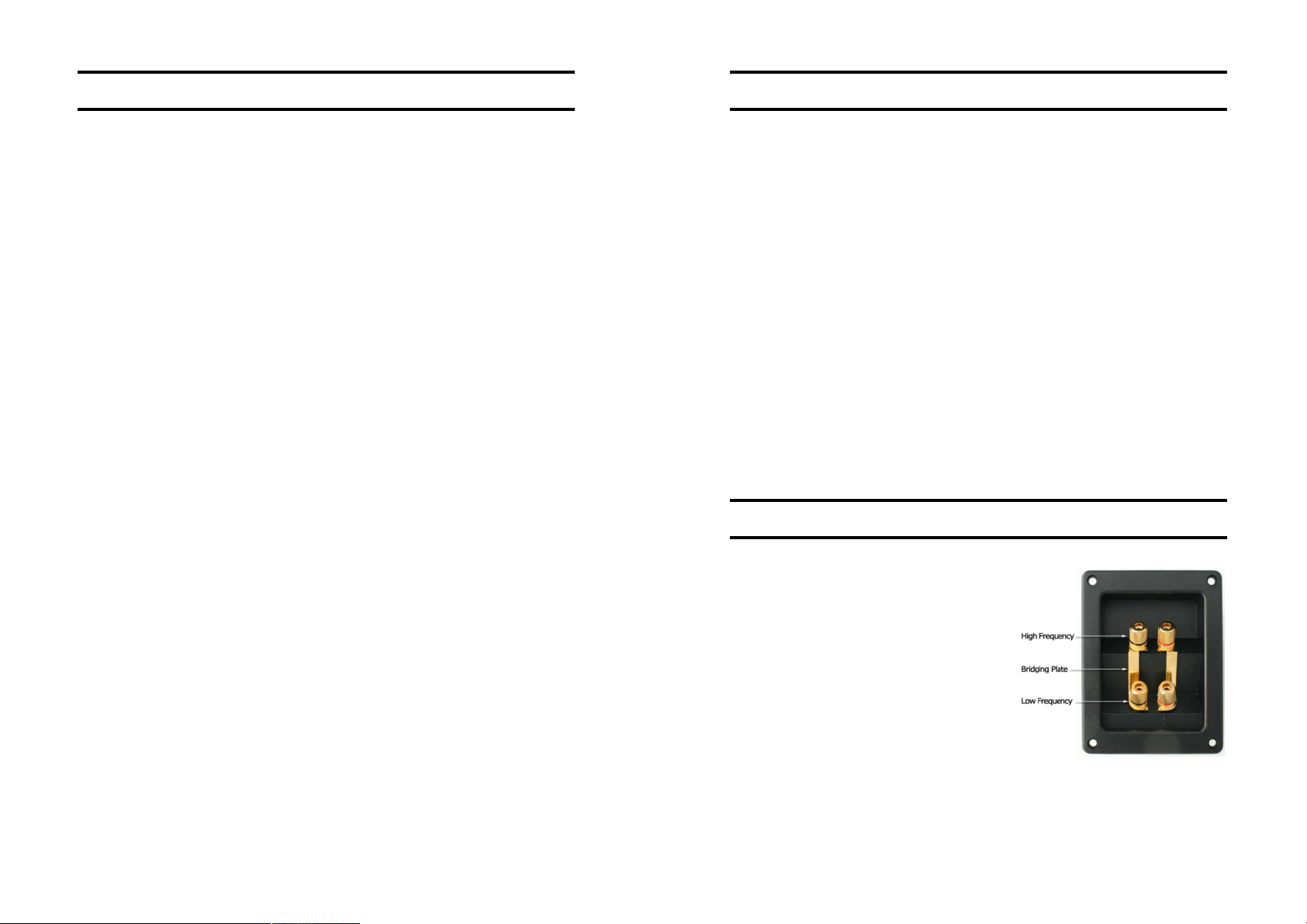
The package provides a complete
biamplification system. Many high end
speakers come with four sets of terminals on
the back, two red, and two black with each
pair of terminals supporting separate high
and low frequency signals to the correct
speakers. When supplied, the speakers will
usually have a ‘bridging plate’ across them
so that you only have to supply one cable to
the speaker. If you supply each pair of
terminals with a separate cable, from a
separate amplifier output, you will be
ensuring that each frequency gets a dedicated and consistent signal and this should
improve the sound quality.
Table Of Contents
Section 1 Safety Instructions / Section 2 Introduction
Page 3
Trends BA-10 Bi-amp User Guide
- 5 -
33..FFeeaattuurrees
s
44..PPaacckkiinnggLLiisst
t
- 6 -
55..OOvveerrvviieew
w
Trends BA-10 Bi-amp User Guide
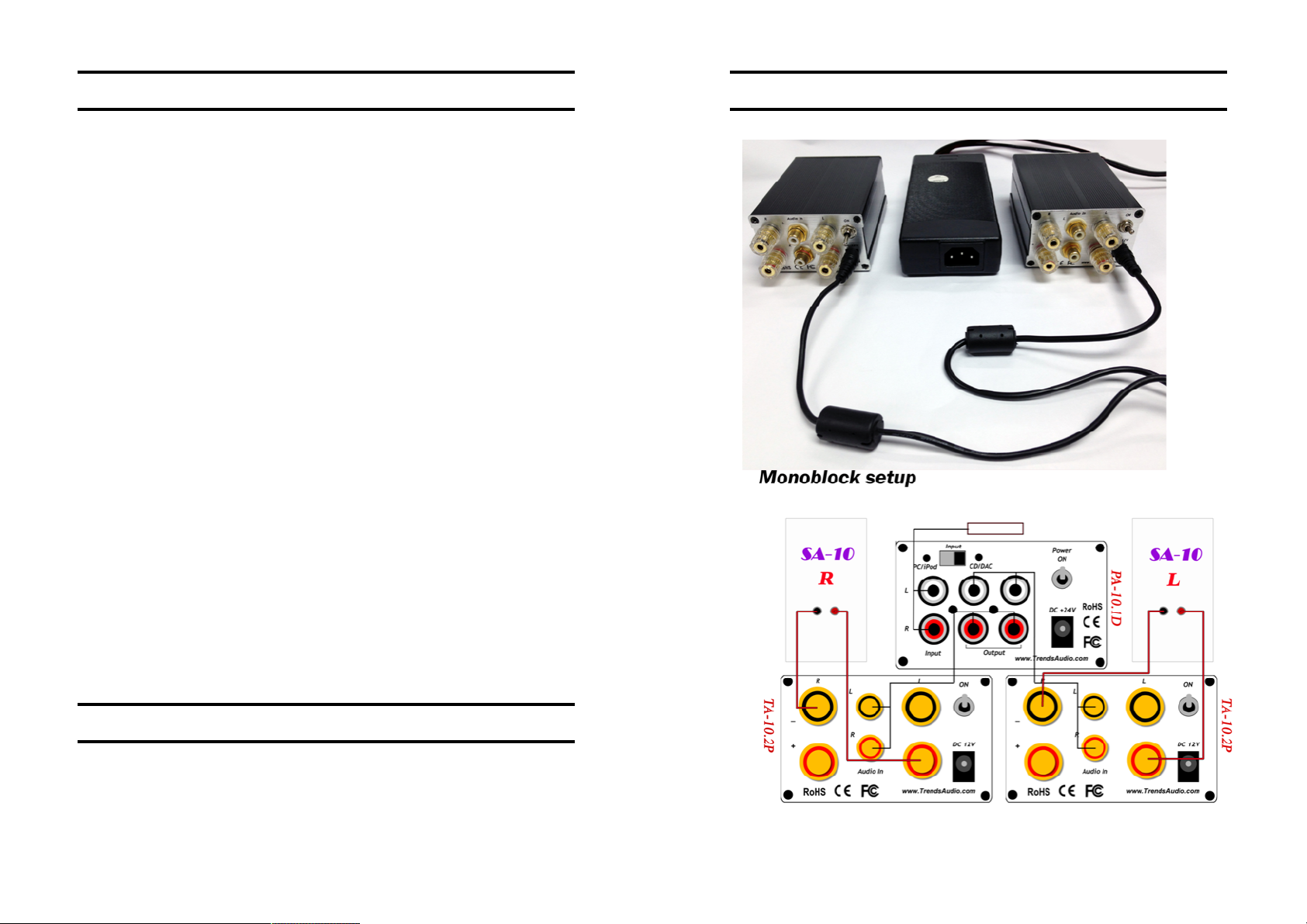
l Combine a pair of the award-winning Trends TA-10.2P Class-T Power Amplifier
and one set of Trends PA-10.1D Tube Headphone/Pre Amplifier (2 output).
l The input impedance of the Trends TA-10 amplifier is about 50k ohm
l Applied a dual power supply to supporting two TA-10.2P power amps.
l Provide all functions of headphone amplifier, pre-amplifier and power amplifier.
l Compact design (mini-size & light weight), easy portable and setup for Hi-Fi room,
living room and sleeping room.
l Ensure each frequency gets a dedicated and consistent signal and this should
improve the sound quality.
l Built-in over-current protection and over-temperation protection design in the
power amplifier.
l Unique air-core inductor in power amplifier used (instead of magnetic-core) for
better sound.
l Innovative circuit design of low voltage hybrid (tube/transistor) & pure class-A
circuit pre-amplifier to provide the best sound performance and easy/safe DIYer
accessibility.
l The pre-amplifier supports both 6DJ8/6922 series and 12AU7 series tubes by
simply switching the jumpers. DIYers can easily change their both series tubes to
enjoy the fun.
l ONE bi-triode 6DJ8/6922 or 12AU7 tube as voltage amplification and TWO
MOSFETs as output driver the pre-amplifier perform the warm, comfortable tube
sound and in addition, guarantee the high fidelity & sufficient driving power to the
next power amplifier stage.
l Provide TWO sets of switchable audio inputs in the pre-amplifier. Besides the
normal CD/DAC input, the PC/iPod input with higher gain is provided for small
output PC/Mac/iPod/iPad or PC/Mac.
l Use Apple Line Out cable or RCA cable connect to PC/iPod input and it works with
low output-voltage sources, making Trends Bi-amp Audio System perfect for
integrating your iPhone/iPod/iPad or PC/Mac into your audio system and achieves
the sound quality of high-end Hi-Fi.
l Besides the normal audio output in the back panel, ONE headphone output in the
front of the pre-amplifier to drive even high-impedance audiophile-grade
headphones.
l TWO precise screw-driving potentiometers for professional audiophiles to adjust
the tube’s bias voltage to guarantee the best working point for different tubes.
l The stylish aluminium case provides outstanding shielding & grounding capability
to keeps the background silent and maximize the S/N ratio.
A dual power supply for supporting two TA-10.2P power amps
- Trends TA-10.2P Class-T Power Amplifier (Body) x 2 pcs
- Trends PA-10.1D Tube Headphone/Pre Amplifier –incl. Tube
- Trends Audiophile Audio Cable (1 pair) x 2 pcs.
- Trends 7A AC/DC Dual Power Adaptor(for a pair of TA-10.2P) x 1 pcs.
Section 3 Features / Section 4 Packing List
Section 5 Overview
Page 4
Trends BA-10 Bi-amp User Guide
- 7 -
- 8 -
Trends BA-10 Bi-amp User Guide
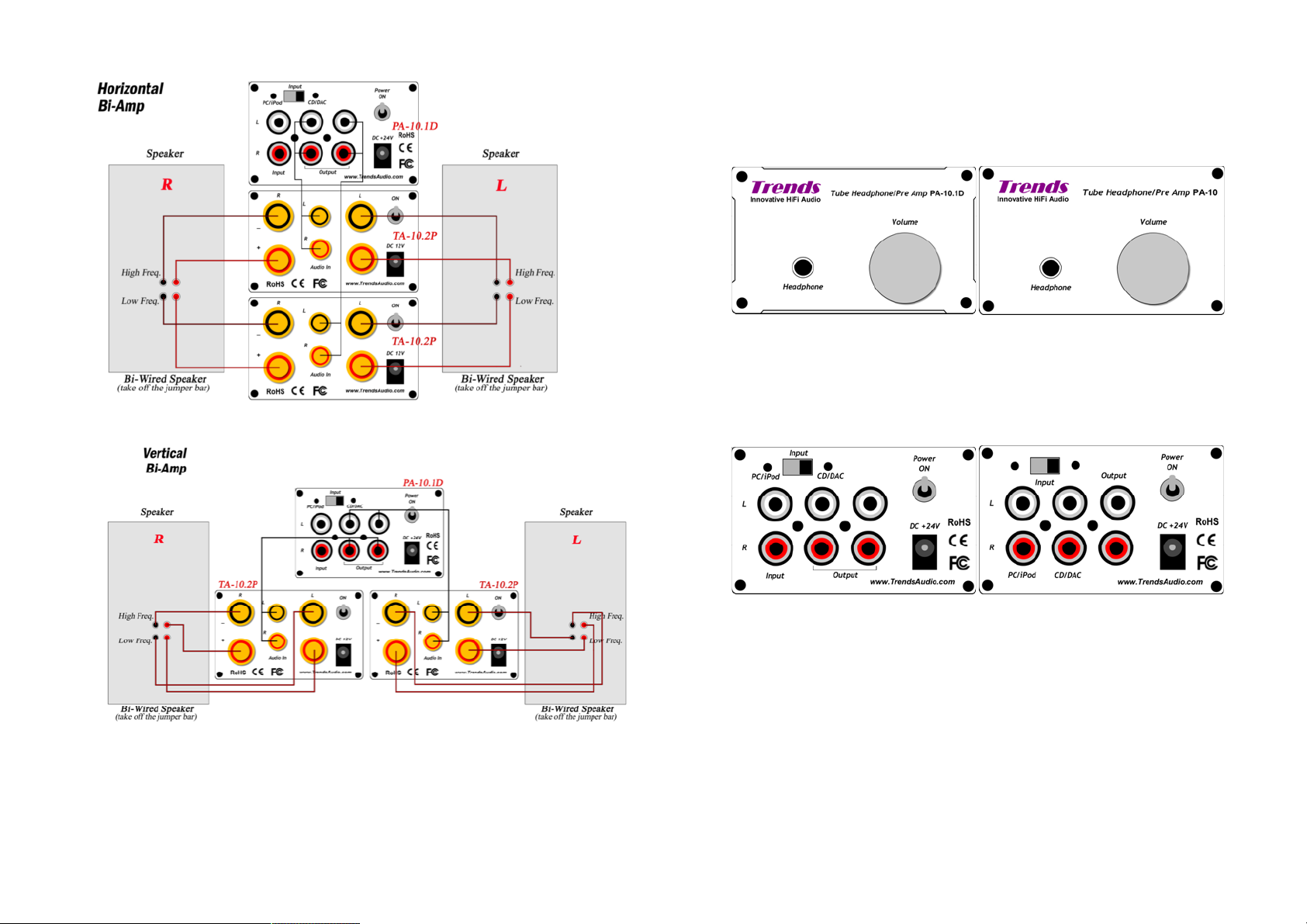
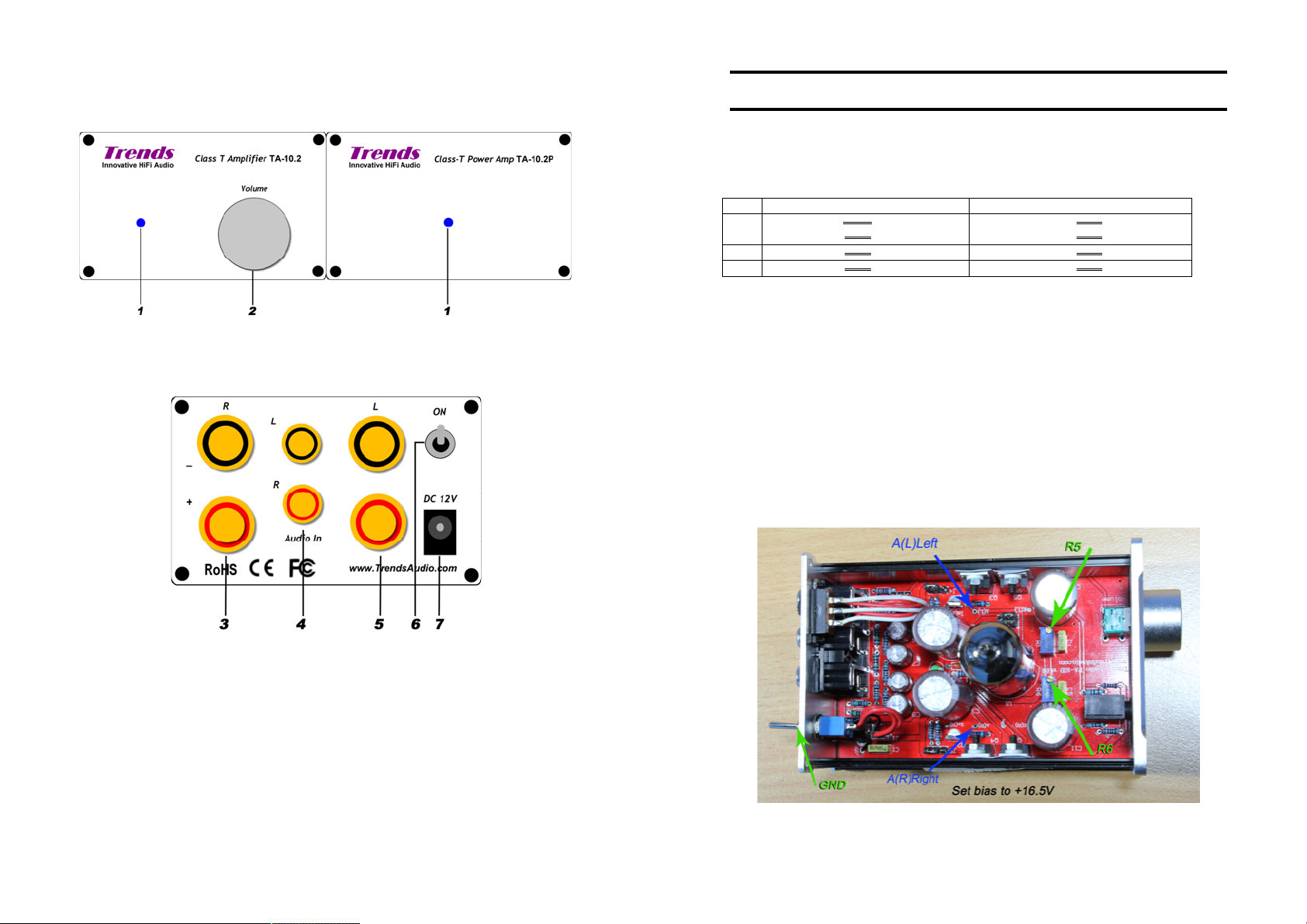
Trends PA-10/10.1D Tube Headphone/Pre-amp
Front View
PA-10.1D PA-10
1. Headphone Socket
2. Volume Controller – Turn Anti-clockwise to minimize the volume level and vice
versa.
Back View
PA-10.1D (2 Output) PA-10(1 Output)
Remark
Please consult with your dealer or experts if you have any queries for building the
Bi-amp solution
Section 5 Overview
3. PC/iPod – Input from PC/Mac/iPod/iPad/iPhone with higher gain using audio
cable (2RCA-2RCA)
4. CD/DAC - Input from CD/DAC using audio cable (2RCA-2RCA)
5. Input – Selection for CD/DAC or PC/iPod input. The default is CD/DAC input
6. Output – To any line level input on your amplifier using audio cable(2RCA-2RCA)
7. Power ON/OFF switch – pull up to power on the PA-10 and pull down to power
off.
8. Power Supply Socket – Plug the bundled AC Adaptor to this socket to supply
power.
Section 5 Overview
Page 5
Trends BA-10 Bi-amp User Guide
- 9 -
- 10 -
66..TTeecchhnniiccaallNNootteess((ffoorrpprrooffeessssiioonnaalluusseerroonnllyy)
)
6DJ8 series 12AU7 series
J3 O O O
O O O
O O O
O O O
J4 O O O O O O
J5 O O O O O O
Trends TA-10.2 integrated amp./TA-10.2P Power amp.
TA-10.2 TA-10.2P
Stereo amplifier Power amplifier
1. Power Indicator
2. Volume Controller – Turn clockwise to minimize the volume level and vice versa.
Trends BA-10 Bi-amp User Guide
6.1 Jumper Setting for Different Tube Series
You can simply configure the amplifier to support the two different tube series by
resetting the jumpers in J3, J4, J5 in the PCB as follows. (Remember to power OFF
the machine before setting)
6.2 DC Bias Voltage Tuning
Since each tube may derivate a bit in parameters, especially from different series, it
needs to re-tune the DC bias voltages to guarantee the machine is working in the best
point and performing the best sound quality.
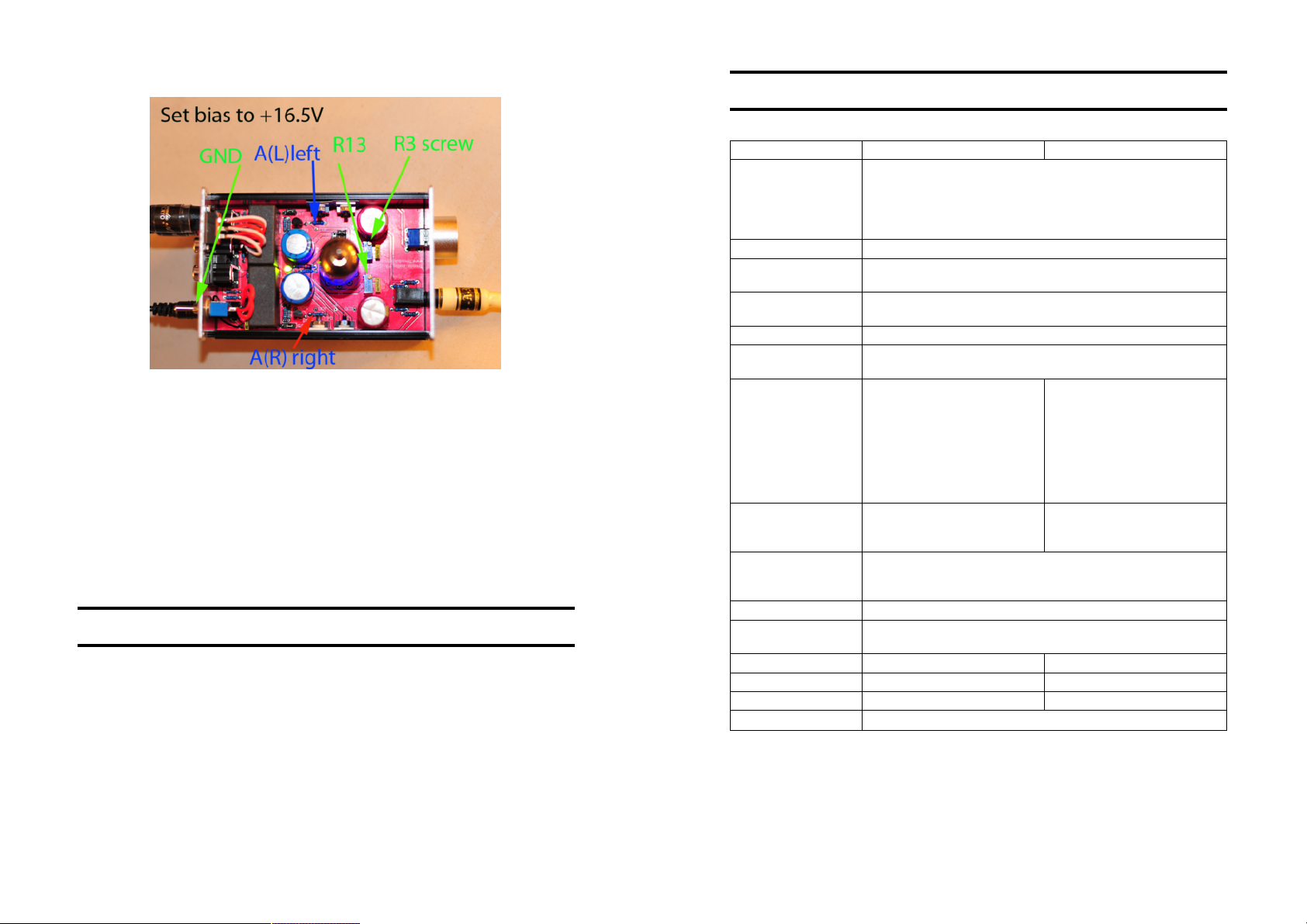
There are two blue precise adjustable potentiometers PA-10.1D R5/R6(L/R channel) ;
PA-10 R3/13(L/R channel) for tuning the DC bias voltage of each channel. The DC
bias has been tuned in factory. But after run-in for a period or changed another tube, it
would be deviated that the fine-tuning is needed.
Before you tune these, you need a screwdriver (take off the case), a small screwdriver
(turn the screw of the potentiometer) and a (digital) multi-meter to detect the DC bias
voltage.
PA-10.1D(2 Output) Bias Setting
3. RIGHT Speaker Output – The negative (-ve) and positive (+ve) speaker
terminals of the RIGHT channel.
4. Audio Input – The audio signal input (LEFT/RIGHT) connects from audio source
(e.g. CD player) to the amplifier by the RCA audio cable.
5. LEFT Speaker Output – The negative (-ve) and positive (+ve) speaker terminals
of the LEFT channel.
6. Power ON/OFF switch – pull up to power on the TA-10 amplifier and pull down to
power off.
7. Power Supply Socket – Plug the bundled AC Adaptor to this socket to supply
power to this amplifier.
Section 5 Overview
Section 6 Technical Notes
Page 6
Trends BA-10 Bi-amp User Guide
- 11 -
77..HHiinnttss&&TTiipps
s
- 12 -
88.
.
SSppeecciiffiiccaattiioon
n
PA-10(1 Output) Bias Setting
Trends BA-10 Bi-amp User Guide
1. Use screwdriver to take out the two upper level screws in the front panel &
another two screws in the back panel. Then, open the upper case.
2. Power ON the machine with no audio signal input.
3. Wait at least 5 minutes for the machine to run in.
4. Use the multi-meter to detect the DC voltage between the test point A(L) [red] in
the PCB & the GND [black] (e.g. the ring of the power switch or the outer ring of
those RCA sockets) of the LEFT channel.
5. Turn the screw on the top of the R5 of PA-10.1D or R3 of PA-10 potentiometer
by a small screwdriver clockwise or anticlockwise until the voltage as close as to
+16.5V.
6. Then, repeat step 4 and 5 for the RIGHT channel by changing the test point to
A(R) [red] and turning the screw on the top of the R6 of PA-10.1D or R13 of
PA-10 potentiometer.
7. Power OFF the amplifier.
8. Cover back the upper case and tighten the screws.
l Use cloth glove or baggie to hold the tubes, wipe off any fingerprints on glass
portion of tube with a soft cloth. Fingerprints can lead to premature tube failure
l Try not put excess force on the glass of the tube this can (rarely) cause the seal
between the glass and base to leak the vacuum.
l Do not leave Trends BA-10 Bi-amp Audio System unattended for long lengths of
time during the 22 hour initial burn-in
l The sound of Trends BA-10 will open up after about 5 minutes of warm-up. At
least half an hour of warm-up, if you are doing some audiophile listening
l Always wait at least 5 minutes prior to turning Trends BA-10 back on after
turning it off.
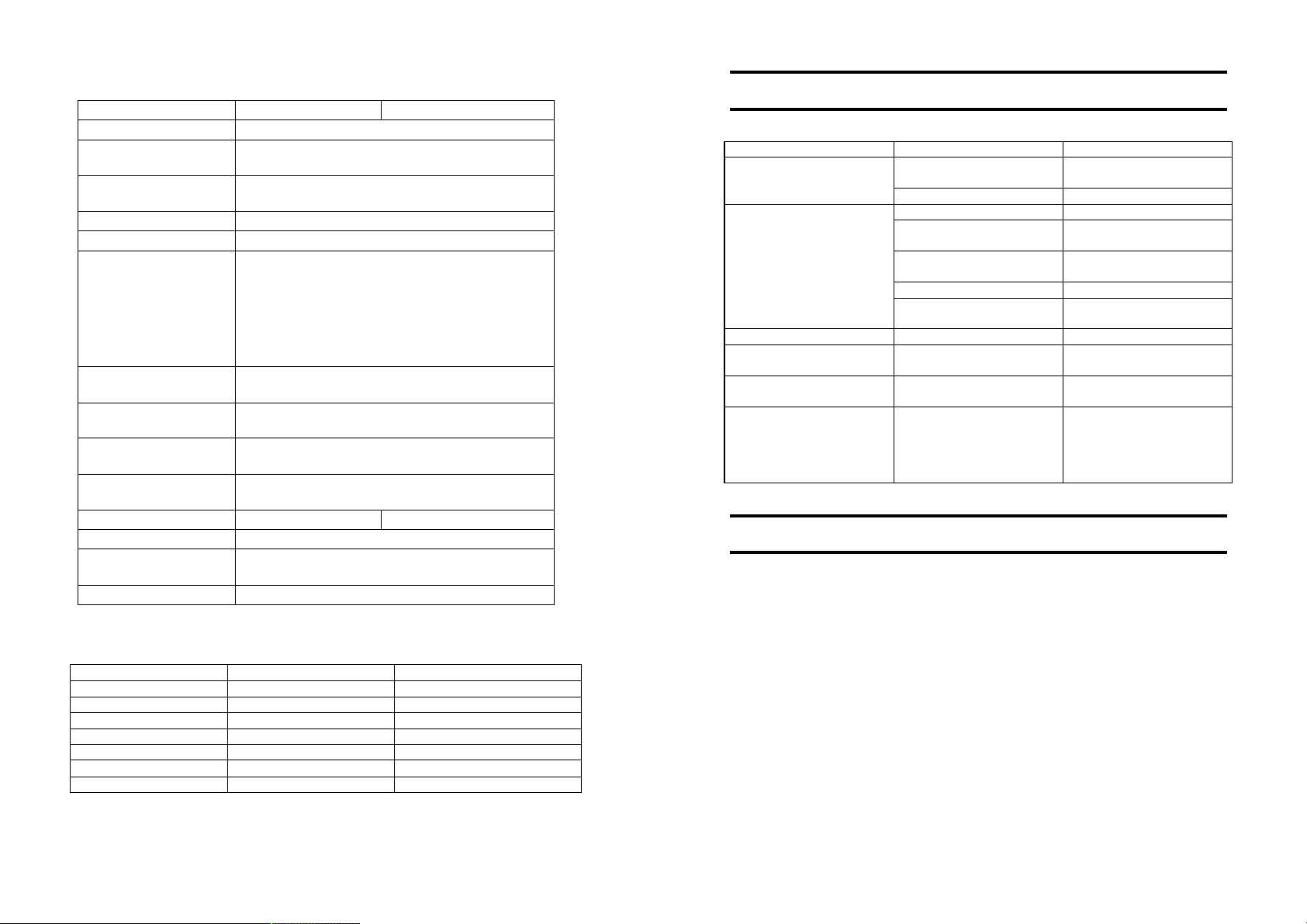
8.1 Specification of the Pre Amplifier Unit
Model PA-10 PA-10.1D
6DJ8/6922 series or 12AU7 series (exchangeable)
Vacuum Tube
Output Stage MOSFET x 2
Amplification Gain
Signal-to-Noise Ratio
(SNR)
Dynamic Range 92dB
THD+Noise
Input
Output
Other Switch & Knob
Power Supply DC 24V-26.5V (max.)
Dimensions(DxWxH)
Front Panel 1.5mm 4mm
System Package Trends Combo & Bi-amp BA-10 Bi-amp
Weight 380g 400g
Remark Provide all functions of Tube Headphone Amplifier
Standard Edition: Chinese 6N11 Tube
SE Edition: Russian 6H23n
GE Edition: USA 12AU7 Tube
x3 (for Audio CD/DAC IN)
x6 (for Audio PC/iPod IN)
92dB
0.05% @ 10k ohm
0.15% @ 33 ohm
Audio CD/DAC IN RCA
Two
(Left/Right) x 1 [3Vpp max.]
AND
Audio PC/iPod IN RCA
(Left/Right) x 1 [0.55Vpp max.]
Power Socket(5.5mm/2.1mm)
x 1
Audio OUT RCA(Left/Right) x
1
Headphone OUT (3.5mm) x 1
Audio IN selection switch x 1Power ON/OFF switch x 1
Power Indicator (Blue LED under Tube Socket) x1
Volume Knob x 1
114mm x 76mm x 46mm[case only]/145mm[incl.sockets &
knob]
Single(switchable)
Audio CD/DAC IN RCA
(Left/Right) x 1 [3Vpp max.]
Or
Audio PC/iPod IN RCA
(Left/Right) x 1 [0.55Vpp max.]
Power Socket(5.5mm/2.1mm)
x 1
Audio OUT RCA(Left/Right) x
2
Headphone OUT (3.5mm) x 1
Section 6 Technical Notes / Section 7 Hints & Tips
Section 8 Specification
Page 7
Trends BA-10 Bi-amp User Guide
- 13 -
- 14 -
99..TTrroouubblleesshhoooottiinng
g
1100..AAcccceessssoorriiees
s
8.2 Specification of the Amplifier Unit
Spec. (Amplif ier Unit): TA-10.2 TA-10.2P
T-Amp IC Tripath TA2024
Output Power
Signal-to-Noise Ratio
(SNR)
2 x 15W @ 4ohm
2 x 10W @ 8ohm
98dB
Dynamic Range >98dB
IHF-IM Distortion 0.10% @ 1W, 4ohm
"Audiophile" Quality
0.03% @ 9W, 4ohm
0.1% @ 11W 4ohm
THD+Noise
0.1% @ 6W 8ohm
High Power
10% @ 15W 4ohm
10% @ 10W 8ohm
Power Efficiency
Input
Output
Other Switch & Knob
81% @ 15W, 4ohm
90% @ 10W, 8ohm
Audio IN RCA (Lef t/Right) x 1
Power socket (5.5mm/2.1mm) x 1
Speaker OUT (Left) x 1 pair (+ / -)
Speaker OUT (Right) x 1 pair (+ / -)
Power ON/OFF switch x 1
Power Indicator (Blue LED) x 1
Volume knob Yes No
Power Supply DC 12V~13.2V(max.)
Dimensions(DxWxH)
114mm x 76mm x 46mm[case only]/150mm[incl.
sockets & knob]
Weight 500g
8.3 Specification of the AC Adaptor
Model Standard(7A) 10A Version(Optional)
AC Input: Universal AC 100V-240V/50-60Hz 100V-240V/50-60Hz
DC Output DC 12V 7A (84W) DC 12V 10A (120W)
Ripple & Noise <= 50mV <= 50mV
Over-load Protection 105%-150% 105%-150%
Over-voltage Protection 115%-150% 115%-150%
Dimensions(DxWxH) 141mm x 60mm x30.8mm 172mm x 72mm x 31.5mm
Weight 294g 540g
Trends BA-10 Bi-amp User Guide
If your machine is out of order, it may not be very serious. Before you call your local
distributor or us to repair, you are suggested to check the following:
Symptoms Possible Reasons Handling Methods
cannot power ON
indicator not bright
no sound at all
hum tube not fully pushed in insert Tube securely
sound out(s) out loose connection check input and output
· Tube x1
· +24V power supply(for preamp) x1
· Power cord x 1
· User Guide x1
· Warranty Card x1
power cords not properly
connected
power switch is OFF switch ON the power
the volume level is too low turn volume level higher
the audio cable not
properly connected
the audio source (e.g. CD
player) not started playing
wrong input is selected check input selection
the speaker cables not
properly connected
audio connector plug not
fully pushed in
incorrect input switch
position
properly connect the
power cords
properly connect the
audio cable
start playing the audio
source
properly connect the
speaker cables
insert plug securely
check the corresponding
input switch
connections. When all has
been double-checked
reduce volume and switch
unit back on
Section 8 Specification
Section 9 Troubleshooting / Section 10. Accessories
Page 8
Trends BA-10 Bi-amp User Guide
- 15 -
1111..RReegguullaattoorryyCCoommpplliiaanncce
e
1122..CCoonnttaaccttUUs
s
- 16 -
1133..TTrreennddssBBii--aammpp&&CCoommbbooPPaacckkaagge
e
Trends BA-10 Bi-amp User Guide
This device complies with Part 15 of the FCC Rules. Operation is subject to the
following two conditions:
(1) this device may not cause harmful interference, and
(2) this device must accept any interference received, including interference that may
cause undesired operation.
Warning: Changes or modifications to this unit not expressly approved by the party
responsible for compliance could void the user's authority to operate the equipment.
NOTE: This equipment has been tested and found to comply with the limits for a Class B
digital device, pursuant to Part 15 of the FCC Rules. These limits are designed to provide
reasonable protection against harmful interference in a residential installation. This
equipment generates, uses and can radiate radio frequency energy and, if not installed
and used in accordance with the instructions, may cause harmful interference to radio
communications.
However, there is no guarantee that interference will not occur in a particular installation.
If this equipment does cause harmful interference to radio or television reception, which
can be determined by turning the equipment off and on, the user is encouraged to try to
correct the interference by one or more of the following measures:
- Reorient or relocate the receiving antenna.
- Increase the separation between the equipment and receiver.
- Connect the equipment into an outlet on a circuit different from that to which the
receiver is connected.
- Consult the dealer or an experienced radio/TV technician for help.
ITOK Media Limited (Trends Audio)
Address: Unit E, 13/F., World Tech Centre,
95 How Ming Street, Kwun Tong, Kowloon, Hong Kong
Phone: +852 2304 0730 (9am-6pm, HKG Time)
Fax: +852 2566-5740
Email: [email protected] (Sales)
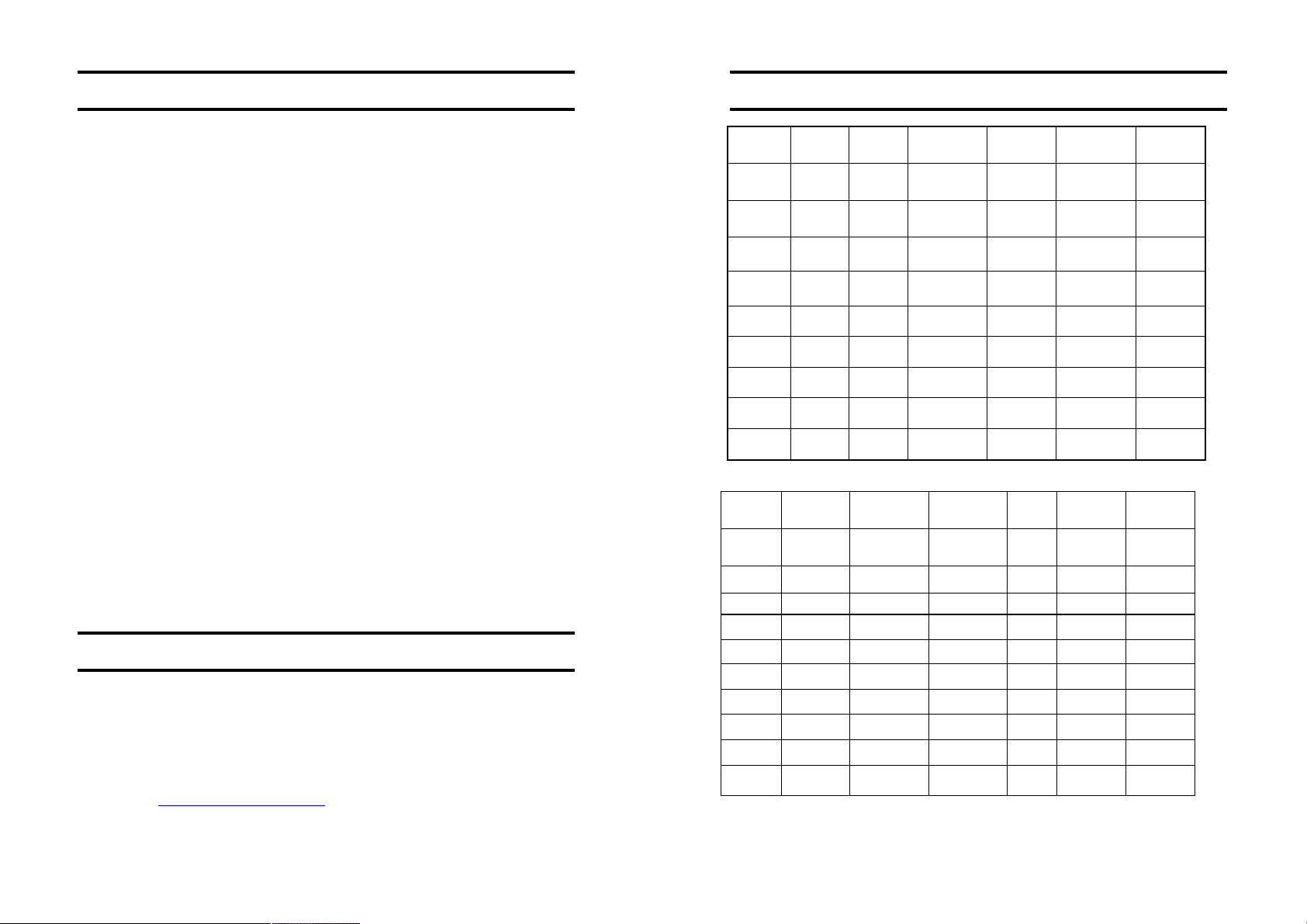
13.1 Trends Hi-Fi Systems
Trends BA-10 SE BA-1 0 GE C omb 1 SE C omb 1 GE iComb o SE iComb o GE
Model
TA-1 0..2P
PA- 10.1D SE
PA- 101D GE
PA- 10 SE
PA- 10 GE
PW-10 PSU
RCA Cable
Line Ou t
Cable
TAP+PADSE TA P+PADGE TAP+PASE TAP+ PA GE TAP+ PA SE TAP+PAGE
ü ü ü ü ü ü
ü
ü
ü ü
ü ü
ü ü ü ü
ü ü ü ü ü ü
ü ü
13.2 Trends Desktop Hi-Fi Systems
Trends Com bo 10 Com b 10 SE Comb 10 GE Com bo 12 Combo 14 SE Com bo 14 GE
Model
UD-10. 1 Lite
TA-1 0.2P
TA-1 0.2
PA- 10
PA- 10 SE
PA- 10 GE
PW-10 PSU
RCA Cable
3.5mm to
RCA Cable
UDL+TA P+PA UDL+TA P+ PA SE UDL+ TAP+ PA GE UDL+TA UDL+PASE UDL+PAGE
ü ü ü ü ü ü
ü ü ü
ü
ü
ü ü
ü ü
ü ü ü ü ü ü
ü ü ü
ü ü ü ü ü ü
Section 11. Regulatory Compliance / Section 12. Contact Us
Section 13 Trends Bi-amp & Combo Package
 Loading...