

Page 1
Quick Installation Guide
TEW-430APB
Page 2
Troubleshooting ........................................................................................
6
Version 09.28.2007
Page 3
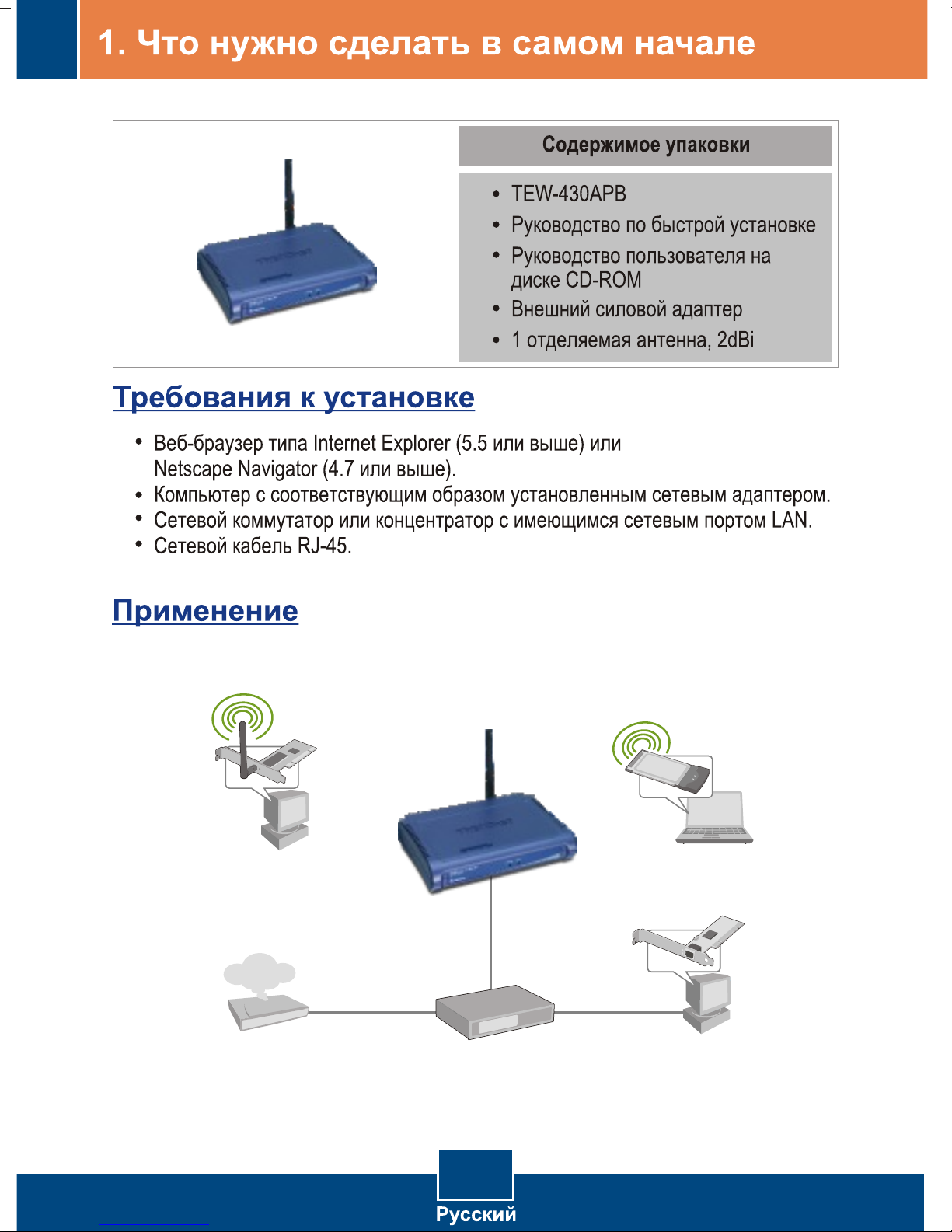
54Mbps 802.11g Wireless LAN Access Point
(TEW-430APB)
Workstation with
Wireless PCI Adapter
(TEW-423PI)
Internet
Cable/DSL
Modem
Cable/DSL 4-Port
Firewall Router
(TW100-BRF114)
1
Notebook with
Wireless PC Card
(TEW-421PC)
Workstation with
PCI Adapter
(TE100-PCIWN)
Page 4
Page 5
Page 6
Page 7
Page 8
Troubleshooting
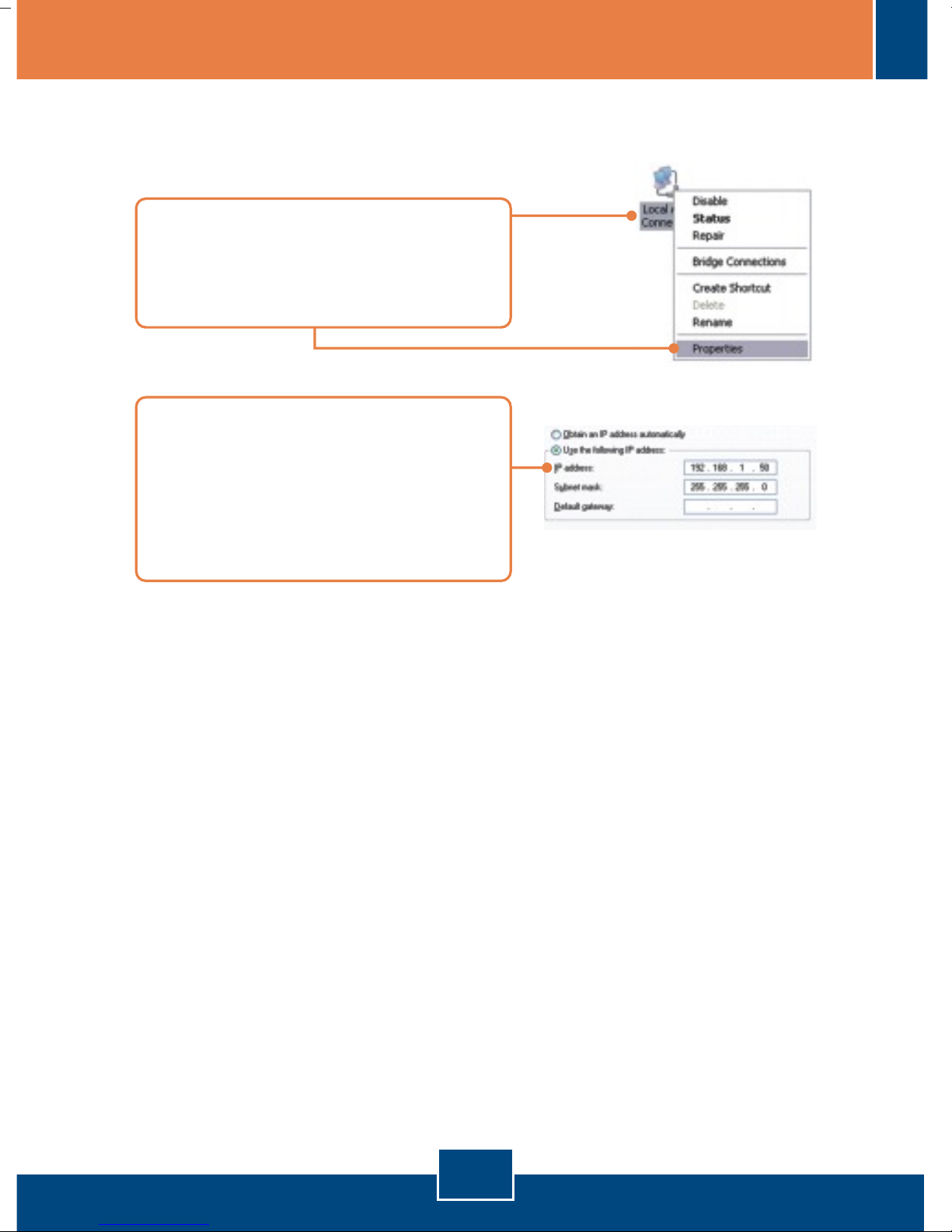
Q1: How do I configure TCP/IP settings on my computer?
1. Go into the Control Panel and double-
click the Network Connections icon,
right-click the Local Area Connection
icon and then click Properties.
2. Click Internet Protocol (TCP/IP) and
then click Properties. Then click on
Use the following IP address, and
make sure you assign your network
adapter an IP address in the subnet of
192.168.1.x.
I typed http://192.168.1.100 in my Internet Browser's Address Bar, but an
Q2:
error message says “The page cannot be displayed.” How can I get into the
TEW-430APB's web configuration page?
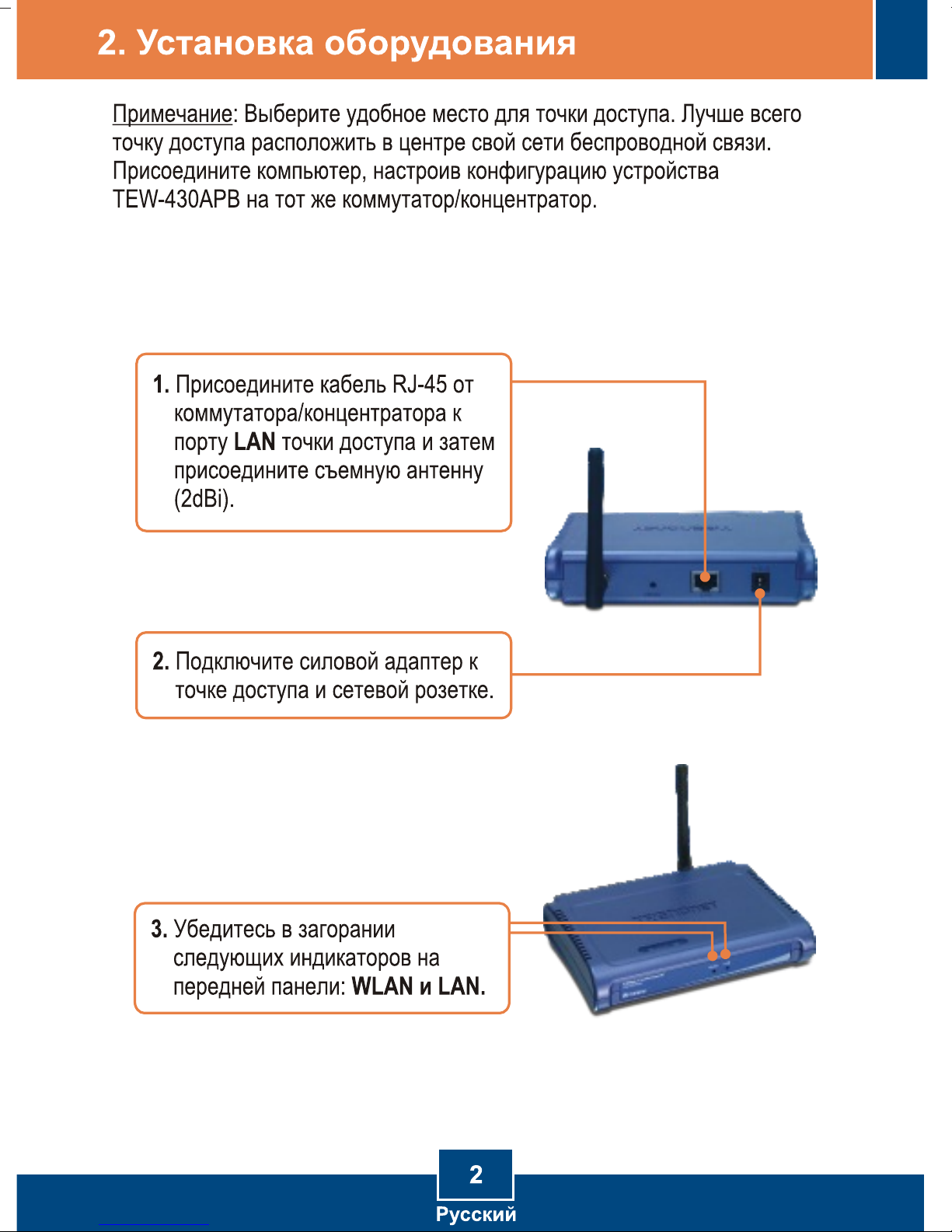
First, check your hardware settings again by following the instructions in
A2:
section 2. Second, make sure the LAN and WLAN lights are lit. Third, make sure
the TCP/IP settings are configured properly (see Q1). Fourth, since the Access
Point's default IP address is 192.168.1.100, make sure that no other network
devices are assigned an IP address of 192.168.1.100.
Q3:
If my network's IP is different than the Access Point's range, what should I
do?
You should still configure the Access Point first. After all the settings are
A3:
applied, go to the Access Point's configuration page, click on TCP/IP settings and
change the IP address of the Access Point to match your network's IP.
6
Page 9

Q4:
After I successfully configured the Access Point to meet my network settings,
I can not connect to my network using wireless computers.
A4:
If you have a DHCP server in your network, you need to go into TCP/IP
settings again and re-select "Obtain an IP address automatically" to allow the PC
to regain an IP address from your DHCP server.
Q5:
All the settings are correct, but I can not make a wireless connection to the
Access Point.
A5:
First, double check that the WLAN light on the Access Point is lit. Second,
power cycle the Access Point by unplugging the power to the Access Point. Wait
15 seconds, then plug the power back in. Third, contact the manufacturer of your
wireless network adapter. Make sure the wireless network adapter is configured
with the proper SSID. The default SSID of the Access Point is TRENDnet.
If you still encounter problems or have any questions regarding the TEW-430APB,
please contact TRENDnet's Technical Support Department.
7
Page 10
Certifications
( 01)07 898431242525
This equipment has been tested and found to comply with FCC and CE Rules.
Operation is subject to the following two conditions:
(1) This device may not cause harmful interference.
(2) This device must accept any interference received. Including interference that may
cause undesired operation.
Waste electrical and electronic products must not
be disposed of with household waste. Please
recycle where facilities exist. Check with you Local
Authority or Retailer for recycling advice.
NOTE: THE MANUFACTURER IS NOT RESPONSIBLE FOR ANY RADIO OR TV
INTERFERENCE CAUSED BY UNAUTHORIZED MODIFICATIONS TO THIS
EQUIPMENT. SUCH MODIFICATIONS COULD VOID THE USER’S AUTHORITY TO
OPERATE THE EQUIPMENT.
ADVERTENCIA
En todos nuestros equipos se mencionan claramente las caracteristicas del adaptador de
alimentacón necesario para su funcionamiento. El uso de un adaptador distinto al
mencionado puede producir daños fisicos y/o daños al equipo conectado. El adaptador
de alimentación debe operar con voltaje y frecuencia de la energia electrica domiciliaria
existente en el pais o zona de instalación.
Page 11
TRENDnet Technical Support
.
US Canada
Toll Free Telephone: 1(866) 845-3673
24/7 Tech Support
Europe (Germany France Italy Spain Switzerland UK)
Toll Free Telephone: +00800 60 76 76 67
English/Espanol - 24/7
Francais/Deutsch - 11am-8pm, Monday - Friday MET
. . . . .
Worldwide
Telephone: +(31) (0) 20 504 05 35
English/Espanol - 24/7
Francais/Deutsch - 11am-8pm, Monday - Friday MET
Product Warranty Registration
Please take a moment to register your product online.
Go to TRENDnet’s website at http://www.trendnet.com/register
20675 Manhattan Place
Torrance, CA 90501
USA
Copyright ©2007. All Rights Reserved. TRENDnet.
 Loading...