

Page 1

HD7
WIRELESS SPEAKER
USER’S MANUAL
Page 2
Thank you for choosing TREBLAB HD7!
This speaker provides superior sound quality and mobility combined with rugged
construction and the convenience of hands-free wireless technology.
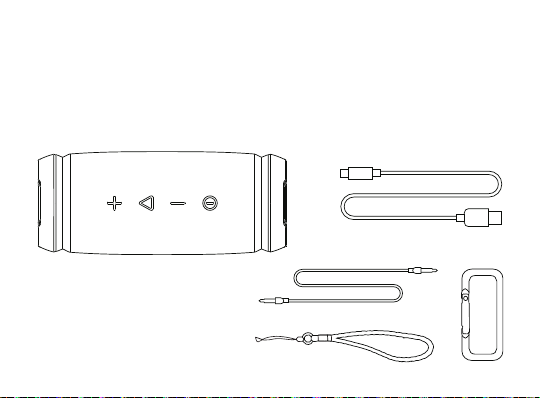
WHAT’S IN THE BOX
Speaker
Charging cable
3.5 mm audio cable
Carrying strap
Carabiner
HD7
Page 3
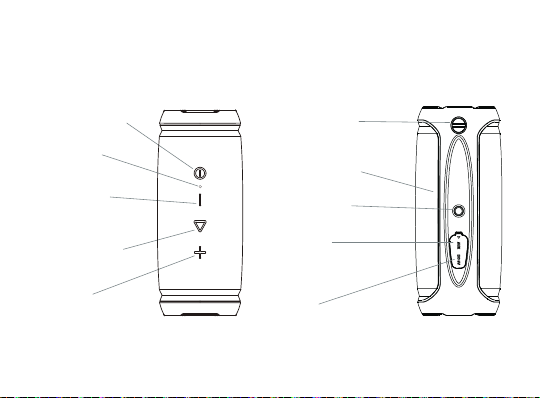
BUTTONS AND PARTS
POWER ON / OFF
LED
PREVIOUS /
VOLUME -
PLAY / PAUSE
NEXT /
VOLUME +
Place for the
carrying strap
Microphone (Mic)
Bike mounting 1/4-20 UNC
3.5 mm
cable port
MicroUSB
port
Page 4

Function
Power ON
Power OFF
Play / Pause
Volume +
Volume Answer phone call
Reject phone call
End phone call (hang up)
Redial
Next track
Previous track
Switch between Wireless /
3.5 Audio cable
TWS ON
(need two speakers)
Operation
Press and hold the POWER button for 3 seconds
Press and hold the POWER button for 5 seconds
Press the PLAY / PAUSE button
Press the VOLUME + button
Press the VOLUME - button
Press the PLAY / PAUSE button
Press and hold the PLAY / PAUSE button for 2 seconds
Press the PLAY / PAUSE button
Press and hold the PLAY / PAUSE button for 3 seconds
Press and hold the VOLUME + button for 2 seconds
Press and hold the VOLUME - button for 2 seconds
Press the POWER button
Place two speakers near each other. Turn them on
simultaneously. Double click the POWER button
on one of the speakers. Once paired, you will hear
“Stereo Mode” voice prompt
Page 5

TWS OFF
Factory reset
Press and hold the VOLUME + and VOLUME -
buttons simultaneously on one of the speakers until
you hear “Disconnected”
Press and hold the VOLUME + and VOLUME -
buttons simultaneously for 5 seconds
SETTING UP YOUR HD7
Turn ON
Press and hold the POWER button for 3 seconds. You will hear the sound cue,
and the BLUE LED light will start flashing.
Turn OFF
Press and hold the POWER button for 5 seconds. You will hear the sound cue,
and the flashing BLUE LED light will go OFF.
WIRELESS PAIRING
Make sure TREBLAB HD7 is fully charged and that the AUX cable is not
plugged in.
Page 6

Turn ON your speaker by pressing and holding the POWER button for 3 seconds.
1.
You will hear the sound cue, and the LED will start flashing BLUE indicating that the
speaker is in pairing mode.
Activate the WIreless Mode on your device (smartphone, tablet, laptop).
2.
Select TREBLAB HD7 from the Wireless devices list. Keep it within 3 feet / 1 meter
3.
of the speaker while pairing.
If necessary, enter passcode 0000.
4.
Once HD7 is successfully paired and connected, the LED will stop flashing and
5.
stay BLUE.
RE-PAIRING
After the initial pairing, the speaker will automatically connect to the previously
paired device when turned ON again. If the reconnection does not happen
automatically, the speaker will start looking for any other previously paired device
within the effective distance range. TREBLAB HD7 can remember up to 8
recently paired devices.
Page 7

TRUE WIRELESS STEREO (TWS) - PAIRING TWO SPEAKERS
The TWS technology allows you to pair wirelessly two speakers together to create
a dual-channel system for true stereo sound.
Turn OFF the Bluetooth mode on your smart device
Place two speakers near each other (the distance should not be over 3 feet /
1 meter)
Power ON both speakers simultaneously. You will hear the “Power on” voice
prompt, and the LED indicators will flash BLUE
Double click the POWER button on one of the speakers. The LED indicator on
this speaker will start flashing BLUE and GREEN indicating the pairing of the
speakers
Once paired, you will hear the “Stereo Mode” voice prompt, and one of the
speaker’s LED indicator will slowly flash BLUE. The other speaker’s LED will turn
BLUE
Turn ON the Bluetooth mode on your smart device
Choose TREBLAB HD7 from the list of paired devices and click Connect
You should hear “Connected,” and both speakers’ LED indicators will stay
BLUE
Page 8

Now you can use the speakers in stereo mode. Kindly note that the maximum
distance between speakers should not exceed 33 feet / 10 meters
NOTE: If the speakers were already paired with each other, you would skip the
TWS pairing steps, as they will switch to the stereo mode automatically. After
turning both speakers ON simultaneously, wait for “Stereo mode” voice
prompt. Then turn on the Bluetooth mode on your smart device, and the
speakers will connect to it seamlessly.
To disable the TWS function:
While both speakers are ON, press and hold the VOLUME + and VOLUME - buttons
simultaneously on one of the speakers until you hear the “Disconnected” voice
prompt indicating the connection is lost.
AUDIO PLAYBACK
To pause and resume the playback when connected wirelessly, press the PLAY
button.
To adjust the volume, press the VOLUME + or the VOLUME - button while
listening to music.
Page 9

To change the track on the HD7, press and hold the VOLUME + or the
VOLUME - button for 2 seconds.
3.5 MM AUDIO CABLE CONNECTION
You can connect TREBLAB HD7 to compatible devices using the supplied
3.5 mm audio cable.
Plug one end of the 3.5 mm audio cable into the 3.5 mm cable port on the bottom
side of the speaker (under the cover). Plug the other end into the 3.5 jack on your
device.
Turn the speaker ON. You will hear the sound cue and the LED light will turn
GREEN. Now you can play music and audio.
NOTE: On-device control is not supported for the VOLUME, NEXT, PREVIOUS and
PAUSE functions when using the 3.5 mm audio cable. Phone calls management
using the PLAY / PAUSE button is not supported. To make adjustments you will
need to use your smart device.
Page 10

PHONE CALLS
TREBLAB HD7 can be used to make and receive phone calls when
connected wirelessly. Audio playback will be paused during calls.
To Answer / End Call:
To Reject Call:
To Redial:
NOTE: For better call quality, face the microphone when you speak.
Press the PLAY / PAUSE button.
Press and hold the PLAY / PAUSE button for
2 seconds.
Press and hold the PLAY / PAUSE button for
3 seconds.
TROUBLESHOOTING
Problem
Not powering on
Solution
Make sure the speaker is fully charged.
Charge for 3 hours, if necessary.
Press and hold the POWER button for 3 seconds.
Page 11

Not pairing
Not finding
a wireless driver
on your laptop
Frequent
disconnection
and noise
Make sure the 3.5 mm audio cable is not plugged in.
Make sure the speaker is not paired with any other device,
as it can only pair with one device at a time.
Press the VOLUME + and VOLUME - buttons simultaneously
and hold for 3-5 seconds. This will make the speaker forget
previously paired devices. Repeat the steps for pairing
as previously described.
Alternatively, disconnect the device from your speaker and
remove HD7 from your device’s pairing list. Try to pair again.
Make sure your laptop supports wireless connections. If it
doesn’t, you will need an external wireless USB adapter
compatible with your laptop. For further details, consult with
your laptop manufacturer.
Make sure that the distance between your device and the
speaker is less than 33 feet / 10 meters.
Make sure that nothing is blocking the signal between your
device and the HD7.
Check if the music is on pause.
Page 12

Check if the volume level is set on both the source device and
the speaker.
Check if the speaker is running out of power.
CHARGING
One full battery charge provides up to 12 hours of playtime at maximum volume
and up to 25 hours at 50% volume. When the battery is running low, you will
hear a voice signal.
TREBLAB HD7 may be used while charging in both Wireless Mode and 3.5 mm
audio cable mode.
To charge the speaker, plug one end of the cable into the Micro-USB charging
port under the rubber cover at the side of the speaker. Plug the other end
of the charging cable into a standard USB port. Regarding the adaptor power,
it takes from 2 up to 4 hours to fully charge the speaker’s battery.
If the speaker is turned OFF, the LED light will turn RED. If the speaker is turned
ON, it will start flashing RED and BLUE. The RED light will go OFF when the
speaker is charged.
Be sure to use a 5V DC, 0.5-1.5 A adaptor or charger. Using the power source
with lower power will increase the overall charging time.
Page 13

Maximize the battery lifespan by charging your speaker through a computer’s
USB port.
Unplug HD7 from the charging cable and the cable - from the power source
when not in use.
If the speaker is left unused, make sure that it is charged, as this may lead
to the reduction of battery capacity. Even the fully charged battery will lose its
charge over time. We recommend fully charging the HD7 speaker at least twice
a month to maintain sufficient battery life.
RECYCLING
The speakers can be recycled, and they should be in order to keep our planet
clean. Where should you bring them?
In the US, there are a couple of options:
1.
Best Buy has a recycling program. Just take the broken earbuds with you next time
you visit a BestBuy store.
This link will help you find the best location:
https: //www.bestbuy.com/site/store-locator/
Page 14

2.
Check for other possible locations next to you on these websites (just enter your
ZIP to find a location):
https: //search.earth911.com
https: //recyclenation.com/find
https: //www.cta.tech/Consumer-Resources/Greener-Gadgets
In Canada, please visit the link below for help: https: //thinkreuse.net
In the UK, please visit the link below for help: https: //www.recycle-more.co.uk/
Page 15

SAFETY RULES
Don’t disassemble or modify your speaker for any reason. Doing this may cause the
speaker to malfunction or explosion. The damage to your device can void the
manufacturer’s warranty.
Do not let your device get wet by liquids – liquids can cause severe damage. Water
damage to your device can void the manufacturer’s warranty.
Make sure the speaker is completely dry before charging.
Clean only with a dry cloth.
Avoid exposing TREBLAB HD7 to extreme temperatures (below 37°F / 3°C or
above 112°F / 45°C). Extreme temperatures can cause deformation of HD7 components
and reduce battery life and the lifespan of your new speaker.
Don’t put the device's LED lights close to humans or animals’ eyes.
Do not use HD7 during a thunderstorm. Thunderstorms can cause serious
malfunction and increase the risk of electric shock.
Page 16

SPECIFICATIONS
Battery:
Up to 25 hours playtime
2500 mAh 3.7 V, rechargeable Li-Ion
Input 5 V / 0.5 A - 1.5 A
Charging time:
Wireless connection version:
Signal range:
Output power:
Water resistance:
Charging port:
Audio port:
Color:
Dimensions:
Weight:
3 hours
4.2 HFP, A2DP, AVRCP, GAVDP, AVDTP,
SPP, AVCTP
33 ft / 10 m
2x 6W
IPX6
Micro-USB
3.5 mm jack
Black
3 x 3 x 7.3 inches / 158.5 x 65 x 62.5 mm
13 oz / 365 g
Page 17

THANK YOU
We truly appreciate that you chose TREBLAB as your trusted brand of wireless
speakers and sincerely hope you enjoy the great sound and seamless usability
TREBLAB HD7 provides. We love making our customers happy by ensuring true
value of our products. If for any reason you are not completely satisfied with your
purchase or have any questions, please visit www.treblab.com/cotuct_us. We care
about our customers more than anything and are always here to help you.
Page 18
1 YEAR WARRANTY
Parts and Labor Warranty.
Please visi t www.treblab.com
to register YOU R product.
Manufacture d by: Producte ch Corp
Made in China
WARNING: Cancer and Reproductive
Harm - www.P65Warnings.ca.gov
HD7
WIRELESS SPEAKER
 Loading...