

Page 1
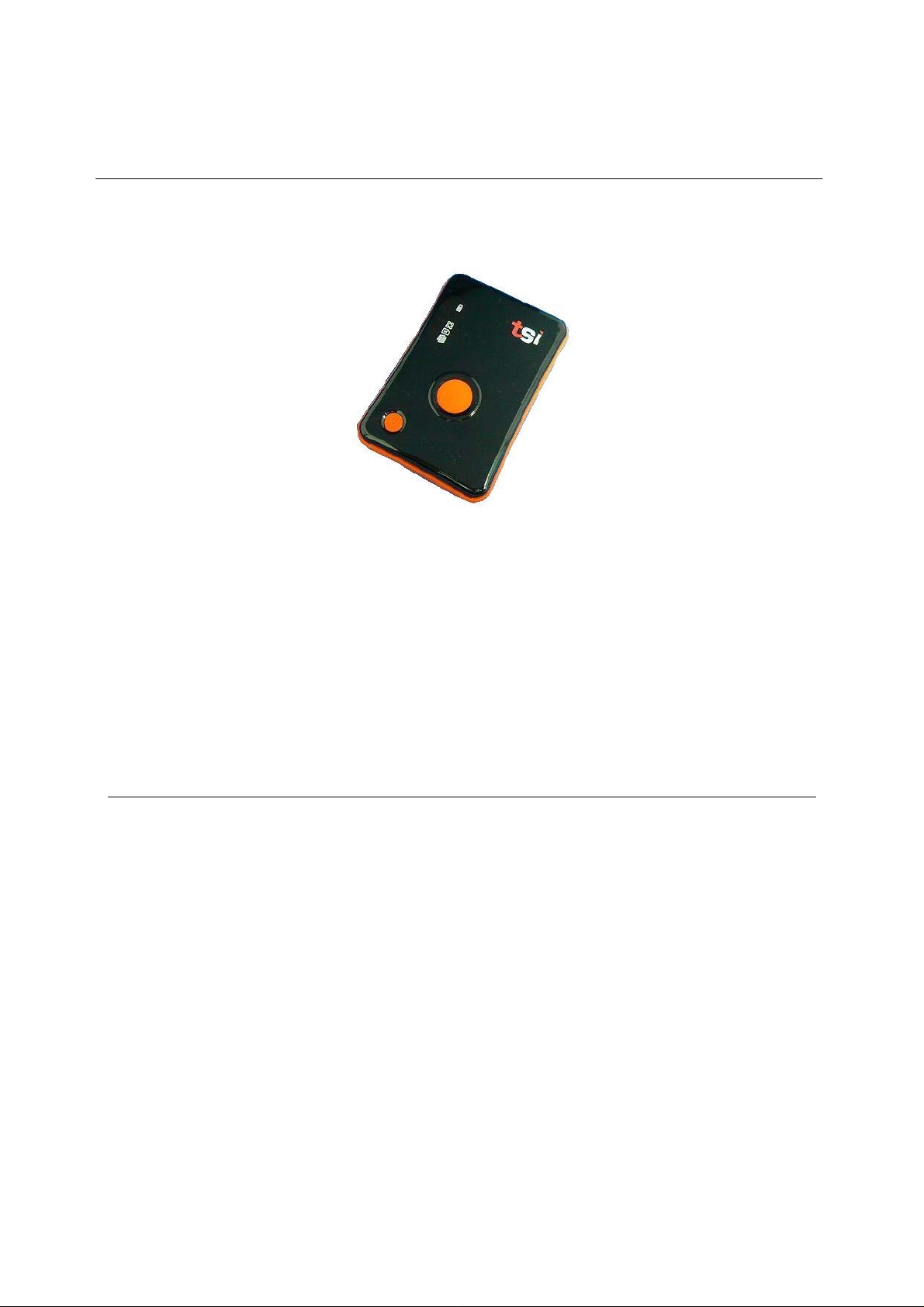
760 GPS Recorder
User’s Manual
Published 18-March-2010
*Specifications subject to change without prior notice.
© 2010 TRANSYSTEM INC. all rights reserved.
V0.1
Page 2

760 GPS Recorder
Table of Contents
1. Before you begin................................................................................................................3
1.1 Note and Warning................................................................................................... 3
1.2 Introduction............................................................................................................4
1.3 Features .................................................................................................................. 4
1.4 Applications ...........................................................................................................4
1.5 Package content......................................................................................................5
2 Getting Started....................................................................................................................6
2.1 Appearance.............................................................................................................6
2.2 Buttons ...................................................................................................................7
2.3 LED Display........................................................................................................... 8
2.4 POI confirmation....................................................................................................9
2.5 Getting Started........................................................................................................9
2.6 Helpful Tips.......................................................................................................... 11
3 Configure your GPS Recorder .........................................................................................12
3.1 Driver Installation ................................................................................................12
3.2 GpsView software................................................................................................12
3.2.1 Connect USB cable between GPS and laptop.......................................... 12
3.2.2 Execute GpsView Program......................................................................13
3.2.3 Download AGPS......................................................................................13
Appendix A. Specifications......................................................................................................16
Appendix B. Certification........................................................................................................ 19
Appendix C. Warranty Information..........................................................................................20
V0.1
2
Page 3

760 GPS Recorder
1. Before you begin
1.1 Note and Warning
z If 760 is used in temperature lower than -10°C or higher than 60°C, its Lithium-Ion
battery charging capability will decrease. Please leave your 760 far from heat or high
temperature environment. In addition, do not expose your 760 in temperature higher
than 140°F/60°C. The battery inside 760 may overheated and explode or burn itself,
and this will lead to very serious damage. The Lithium-Ion battery inside the 760
should be recycled.
z It is recommended to turn off 760 while in the hospital. Wireless GPS may interfere
with medical equipments which use radio frequency.
z Remove the battery from 760 and store it in dry/cool places if you are not using 760
for a long period of time.
z Keep the 760 and all accessories out of children’s reach.
z The manufacturer assumes no responsibility for any damages and loss resulting from
the use of this manual, or from deletion of data as a result of malfunction, dead battery,
or from misuse of the product in any way.
z Use only the supplied and approved accessories. Unauthorized accessories,
modifications or attachments could damage your 760, and may violate regulations
governing radio devices.
z Use a dry, clean soft cloth to clean the unit. Do not use harsh cleaning solvents,
chemicals, or strong detergents.
z Do not attempt to open the 760 yourself. Unauthorized hacking may damage the unit,
and void your warranty.
3
V0.1
Page 4

760 GPS Recorder
1.2 Introduction
GPS 760 features commercial grade GPS receiver to help manage your field team effectively.
Its water-proof, durable all-in-one design includes audible feedback and motion sensor to give
maximum battery life.
GPS 760 allows you to log your route by setting the interval of time/ distance/ speed. Easy to
use and durable button allow field personal to record point of interest by push of a button.
Through user friendly utility, it can display your track on Google Earth.
1.3 Features
z Durable push button for POI recording
z Smart log of time, distance and speed
z Log up to 250,000 waypoints
z High receiving sensitivity with AGPS capability
z IPX3 water-proof
z Embedded sensor for smart operation
z Smart auto on/off
z Vibrator / Buzzer (optional) for POI confirmation
z Rechargeable battery
z Optional BT connection capability
1.4 Applications
z Record your travels
z Manage trip expense
z Manage field team
z Point of interest recording
4
V0.1
Page 5

760 GPS Recorder
1.5 Package content
Congratulations on your purchase of GPS 760 with Lithium-Ion chargeable battery. Before
you start using 760, please make sure your package includes following items. If any item is
damaged or missing, please contact your local dealer at once.
1. 760 GPS Recorder ( include Li-Ion battery ) x 1
2. USB cable x 1
3. Power adapter x 1
4. CD Tool x 1 (user manual, software utility, driver)
5. Quick start guide x 1
* Unit package contents may vary depending on countries without prior notice.
* The power adapter can only be used to charge 760. Please don’t make use of it with devices
other than 760.
V0.1
5
Page 6
2 Getting Started
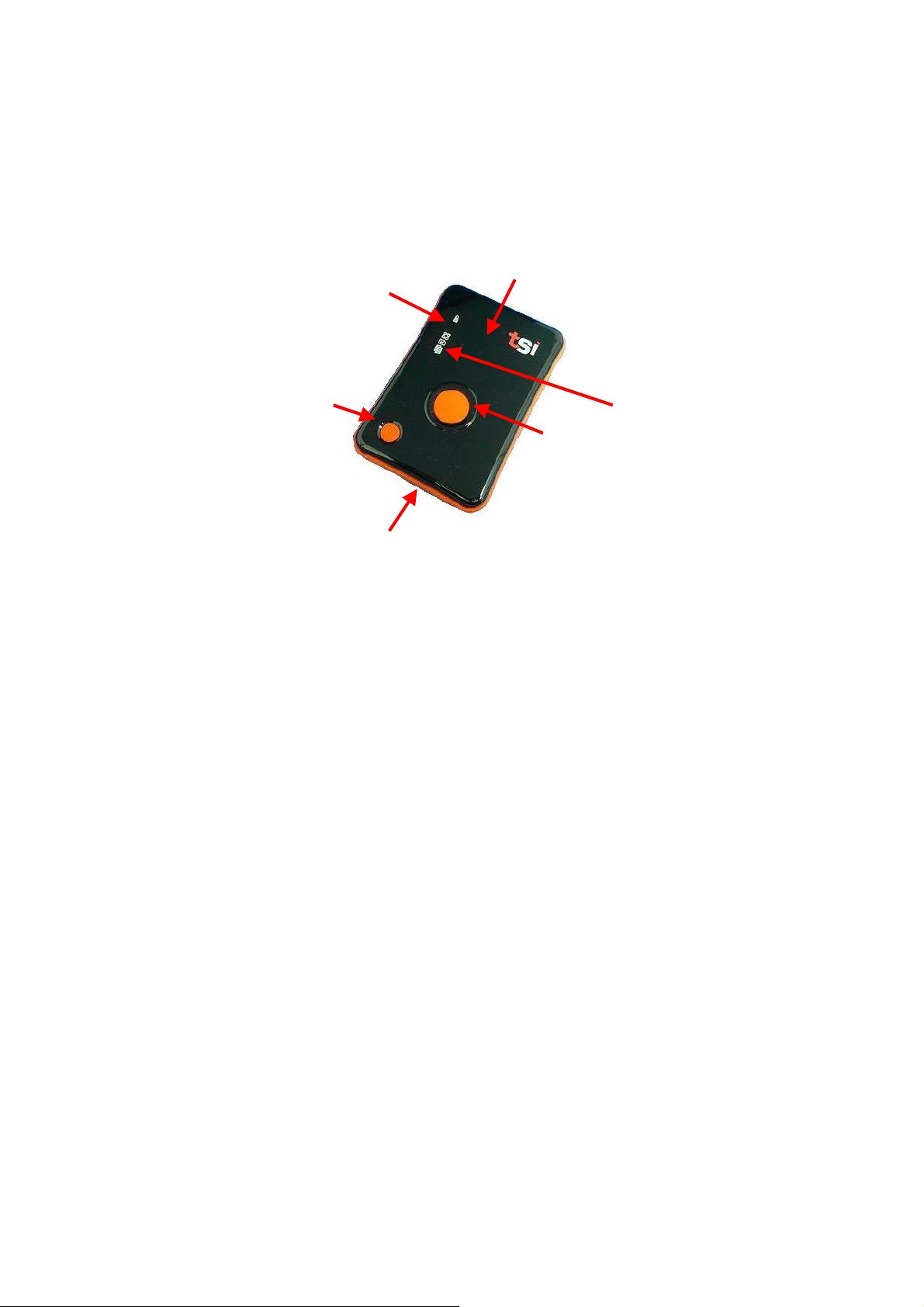
2.1 Appearance
760 GPS Recorder
4 & 5
6
1
2
7
8
9
1. Power bottom
2. Push to log (POI) bottom
3. USB connector (with cover)
4. Battery status LED (Red/Green)
5. GPS status LED (Orange)
6. Internal GPS antenna
7. Memory capacity LED (Red)
8. Mode LED (Blue)
9. BT LED (Blue) - Optional
3
V0.1
6
Page 7

760 GPS Recorder
2.2 Buttons
Name Description
Power Press and hold 2 seconds to turn On and Off your device
POI Push button to record Point of Interest (POI),
Memory status LED will blink 3 times to confirm button pressed
Power + POI Press both buttons at the same time will display battery level
V0.1
7
Page 8
760 GPS Recorder
2.3 LED Display
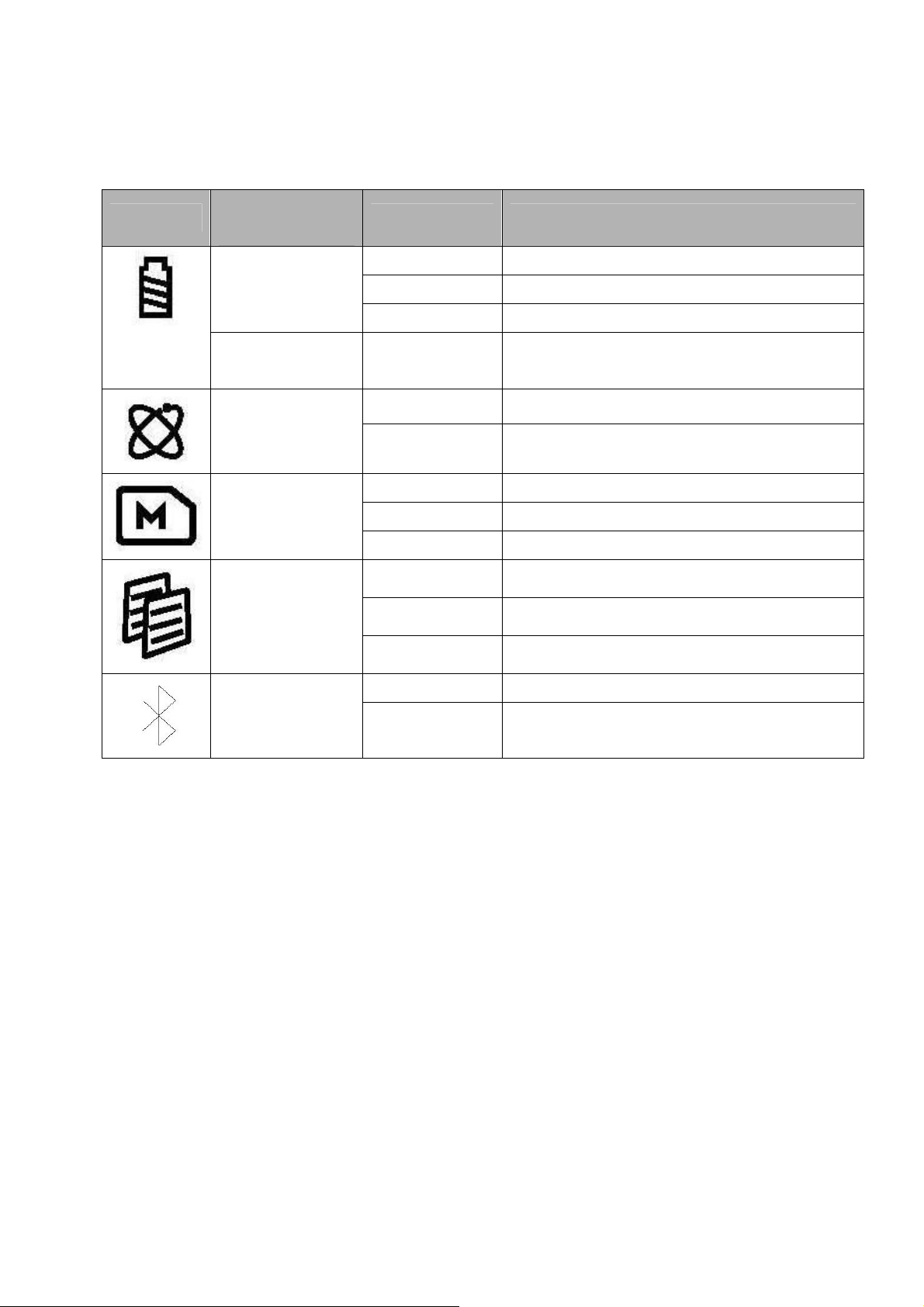
The 760 GPS Recorder has following LED displays for status update.
Symbol
Function /
Color
Battery Status
/Red
Green On / Off Power gauge when both POI and Power
GPS Status
/Orange
Memory capacity
/Red
Mode
/Blue
Status Description
Blinking Low battery level
On During power charging via USB port
Off Charging is completed
buttons are pressed at the same time
On Acquiring satellites, GPS position not fixed
Blinking GPS position is fixed
Blinking The device is logging position
Blink 3 times POI button is pressed
On The memory is >80% full
On Mode 1
Slow blinking Mode 2
Fast blinking Mode 3
Bluetooth Status
/Blue
(Optional)
Off
Blinking Bluetooth is connected for data transmission
Bluetooth disconnected
V0.1
8
Page 9

760 GPS Recorder
2.4 POI confirmation
GPS 760 uses following methods to confirm press of POI button:
Vibrator (default)
Memory capacity LED blinks 3 times (default)
Sound buzzer alarm (Optional)
2.5 Getting Started
Please follow the procedure step by step.
Step 1 Charging Your Battery
Connect your USB cable between 760 and the power source. Charging time is about 3~4
hours and you can charge from PC/ Notebook’s USB HOST or from cigarette-lighter in car or
home adapter.
For the 1st time you use the 760, please charge battery until it is full. Red Power LED will be
On during charging cycle and turns Off once the charging is completed.
Step 2 Turn on your GPS 760 and get position fix
Turn on your GPS 760 by press-and-hold the power button for 2 seconds. Power LED will
turn on after power on sequence is completed. The orange GPS status LED will stays on
before 760 get GPS position fix. Make sure your GPS 760 has clear sky view at this stage of
acquiring satellite signal. Depending on your surroundings, it normally takes around 40
seconds to 1.5 minutes before GPS status starts to blink which means 760 has acquired
necessary satellite signals and get position fix..
Step 3 Log your position
GPS 760 will start logging your position once it locks to satellites signal. It will log and mark
V0.1
9
Page 10

760 GPS Recorder
position upon press of POI button. A vibrator is used as means of confirmation. Optional
buzzer can also be used for confirmation purpose. This is only valid for specific setting when
ex-factory.
Step 4 Download logged data
Download your logged data via USB port to your PC. You can use utility AP included in the
CD-ROM for data downloading. Further management and analysis of the data can be done via
application specific application program. GPS 760 outputs in popular .csv or .bin format for
easy interface to application program.
V0.1
10
Page 11

760 GPS Recorder
2.6 Helpful Tips
z Some vehicles using heavy metallic sun protecting coating on windshields may affect
GPS signal reception.
z Streets with high rising buildings may affect GPS signal reception.
z Tunnel and indoor parking garage may affect signal reception.
z In general, GPS signal reception best in open space where it can see clear sky.
Weather condition will also affect GPS reception – rain & snow contribute to worse
sensitivity.
z Low battery status may affect signal reception.
z This device outputs coordinates data every second, therefore the actual position and
the position shown on your map may have slight time delay. This may happen when
you drive at higher speed or make a turn around a corner.
z For the device not in use over several days, allow it 1~3 minutes to obtain satellite
constellation information and fix your position, this is called “Cold Start”. Upon
battery replacement, GPS device will do Cold Start again.
z If your device can not fix position for more than 20 minutes, please change to another
location with open space and then try again.
z When using AGPS function, it is recommend to use GPSView to download the AGPS
data to your device via USB port. AGPS data will valid for 6 days for each download.
V0.1
11
Page 12
760 GPS Recorder
3 Configure your GPS Recorder
GpsView program only supports Microsoft Windows based platform.
3.1 Driver Installation
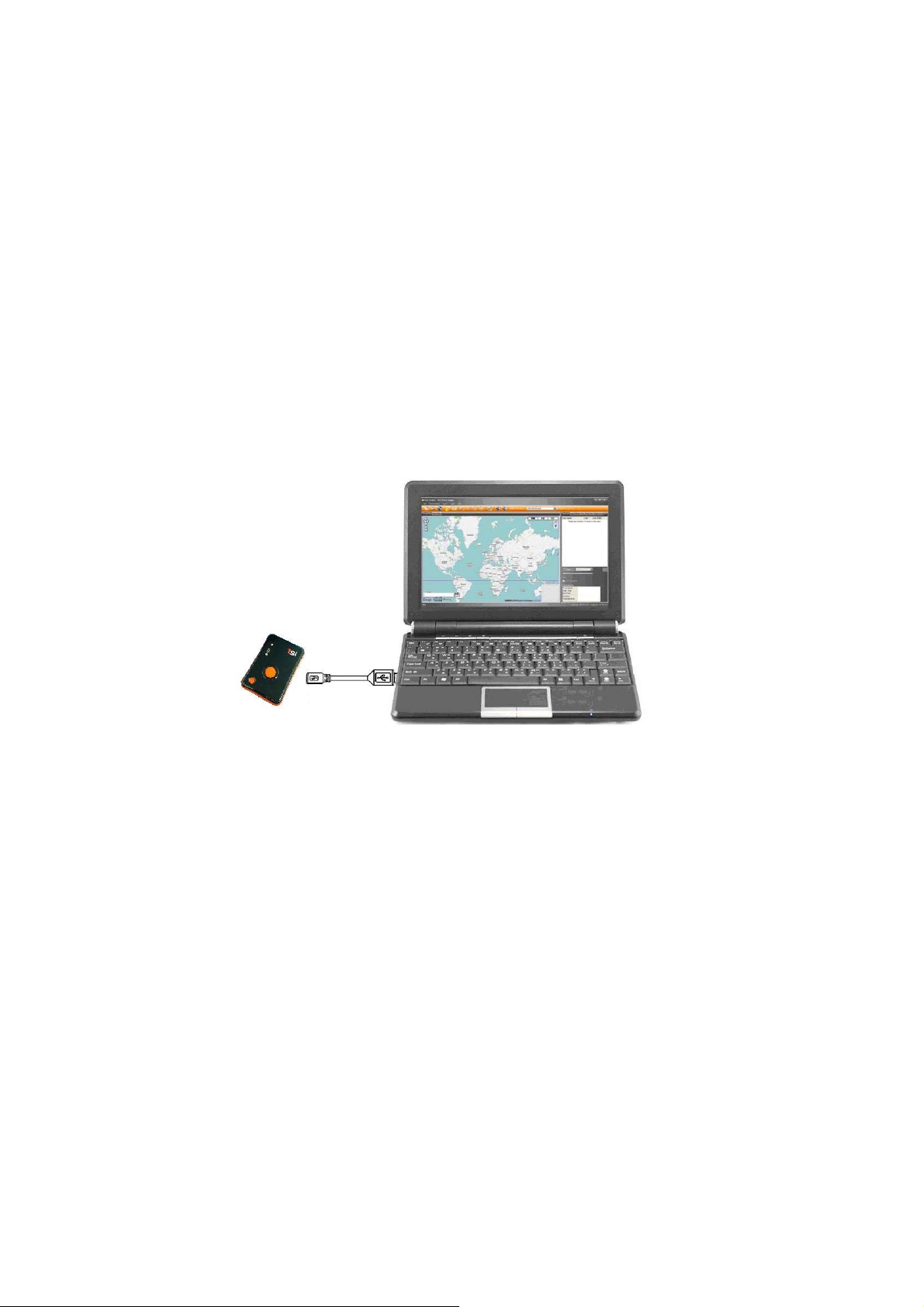
Before the USB connector plugs into your PC/ Laptop, please have your USB Driver
installation ready. (Install InstallDriver.exe driver for USB port from CD-ROM.)
3.2 GpsView software
Open the GpsView software, please select correct COM port and Baud Rate 115,200bps to
configure GPS.
3.2.1 Connect USB cable between GPS and laptop
V0.1
12
Page 13
760 GPS Recorder
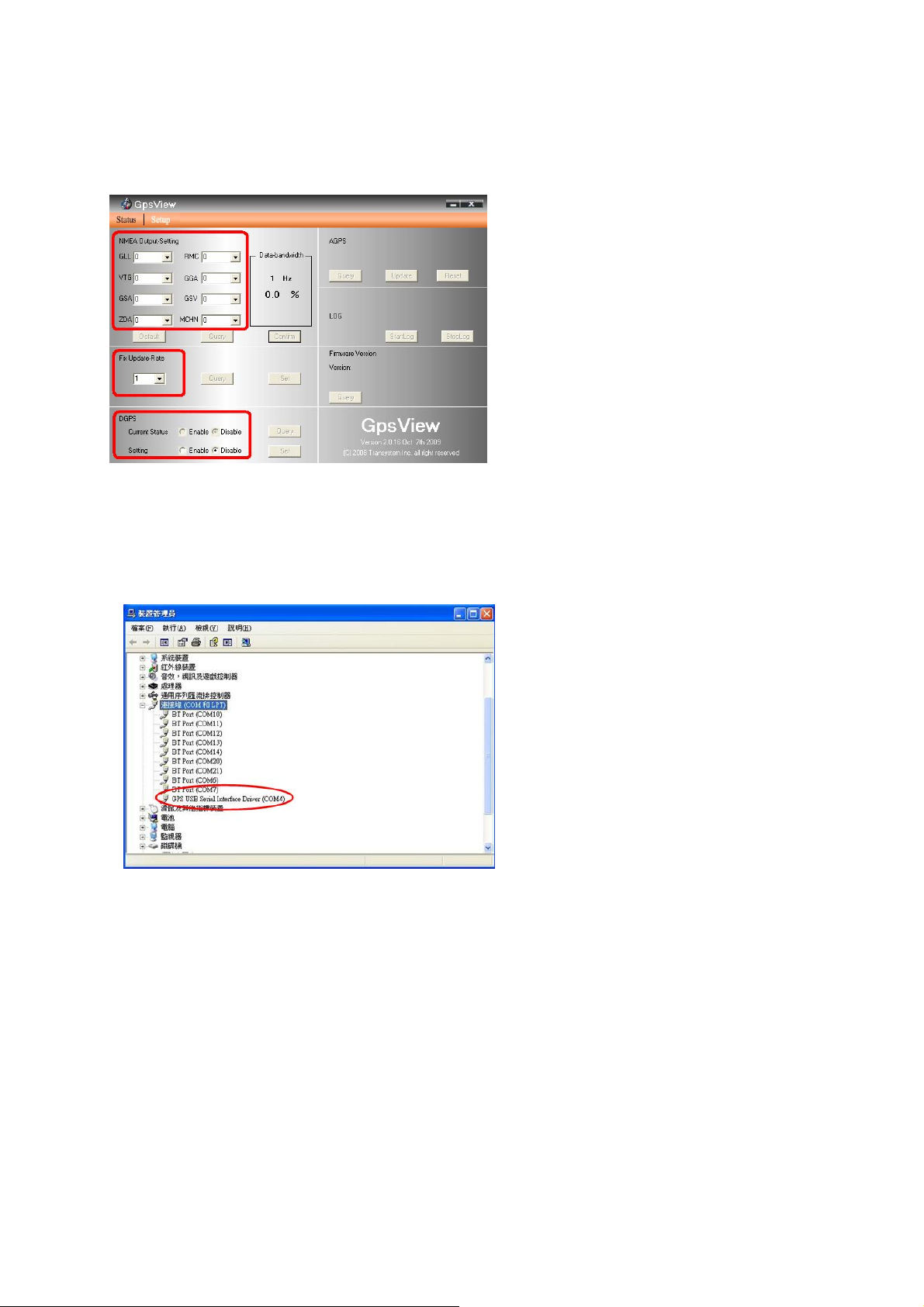
3.2.2 Execute GpsView Program
Click “Command” tap. Update Rate 1 ~ 5Hz is user configurable. And still more options for
choice of NMEA output, DGPS…etc. all available through pull-down menus.
3.2.3 Download AGPS
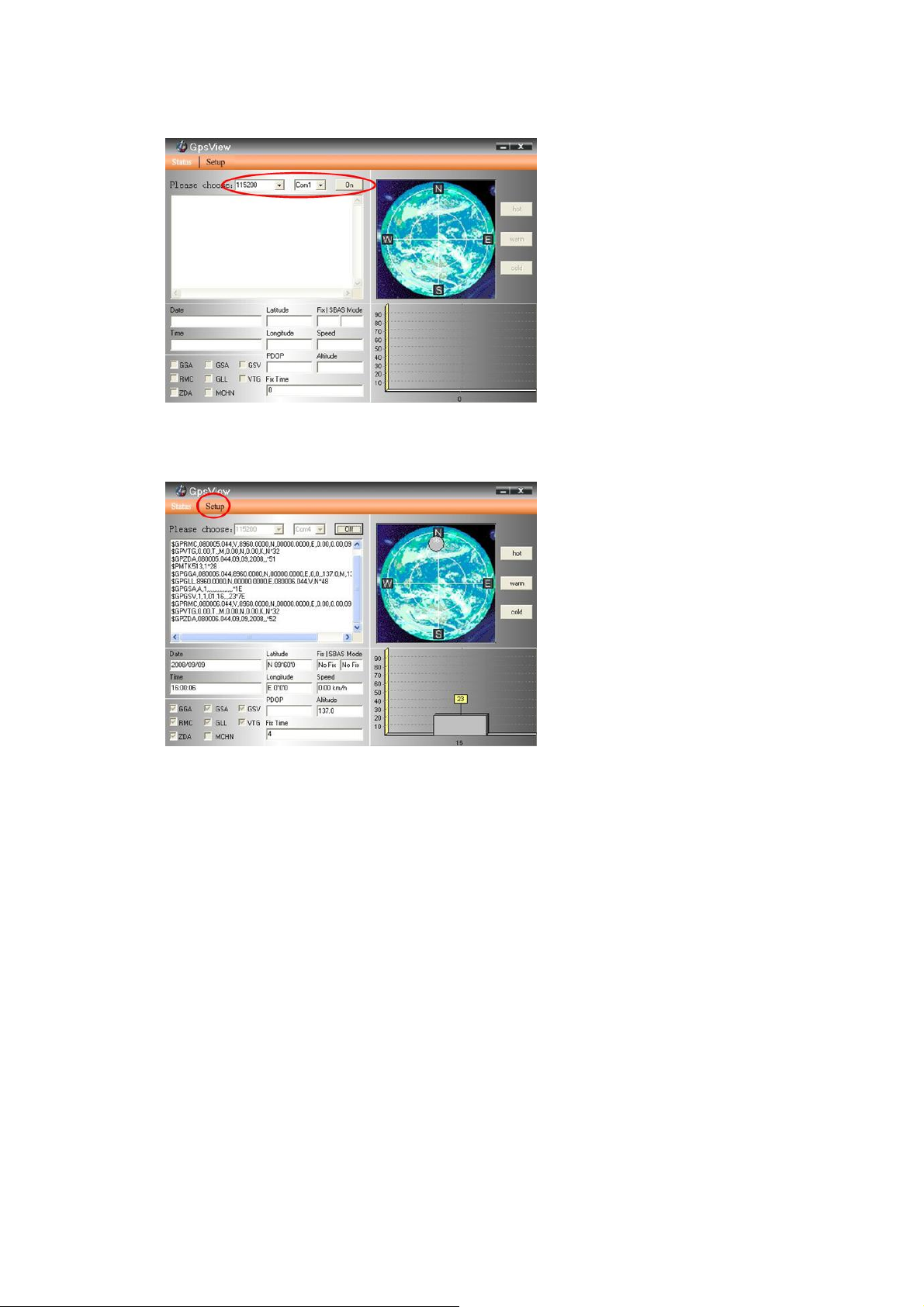
1. Start→Control Panel→System→Hardware→Device Management→Connector(COM
and LPT)Check Com port position。
V0.1
13
Page 14
760 GPS Recorder
2. Open GpsView.exe→Check Baud Rate and Com port→click On
3. Choose Setup
V0.1
14
Page 15
760 GPS Recorder
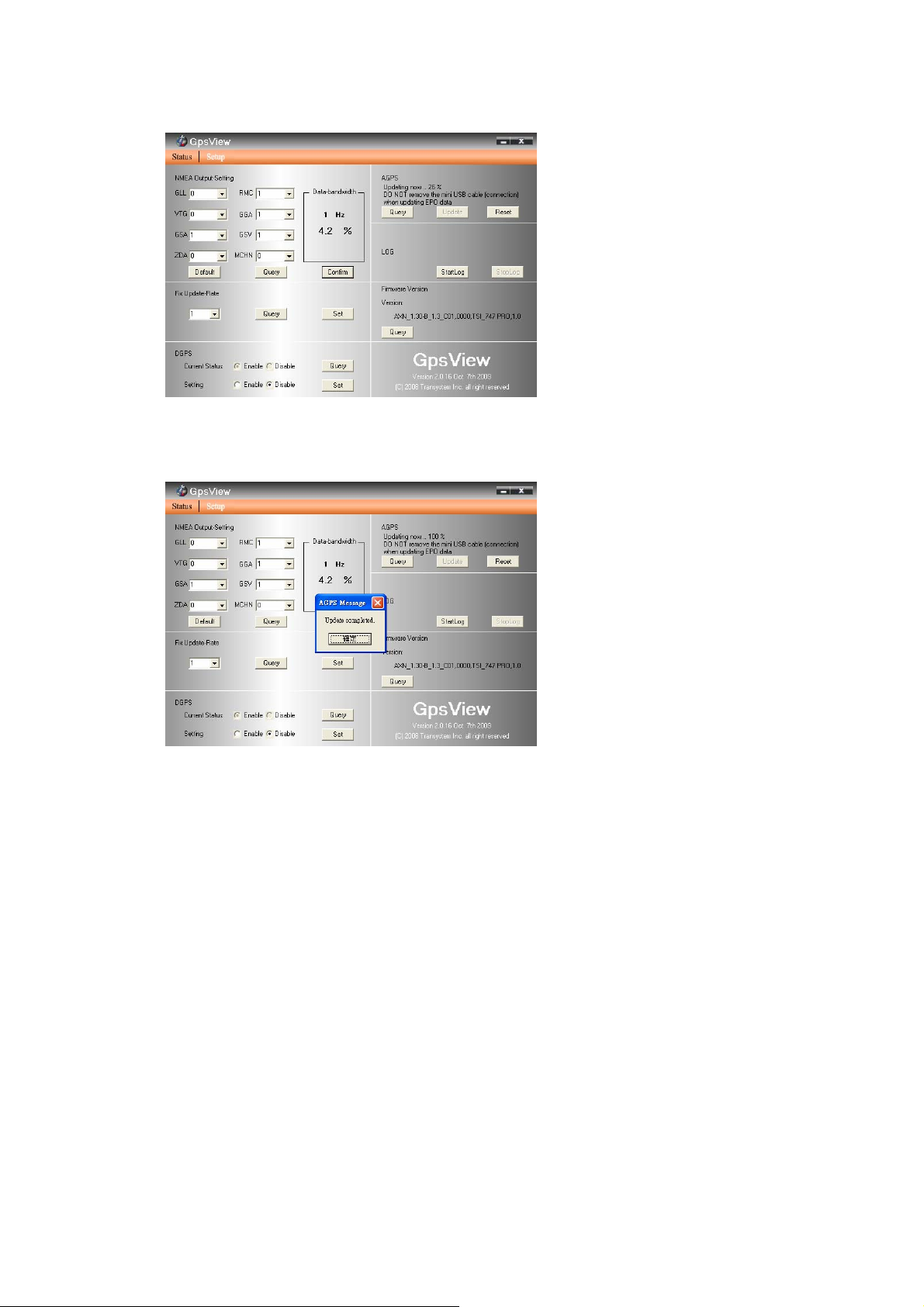
4. Choose Update
5. When Updating now…100%, click Enter complete。
NOTE: When you use AGPS function, we suggest use GpsView to download the AGPS data
via USB cable. AGPS data valid for 6 days after each download
V0.1
15
Page 16

760 GPS Recorder
Appendix A. Specifications
General
Frequency L1,1575.42MHZ
C/A Code 1.023MHZ
Datum WGS84
Performance Characteristics
Accuracy*
Reacquisition Time*
TTFF*
AGPS*
Sensitivity*
Dynamic
Altitude 18,000m max.
Velocity 515m/s max.
Acceleration 4g max.
Interface
Baud Rate 115200 bps (default)
Protocols
USB Bridge
<3m CEP, without aid
2.5m DGPS (WAAS, EGNOS, MSAS)
<1s
35 / 34 / 1.5s for Cold / Warm / Hot start respectively
<15s
Acquisition:-148dBm max / Tracking:-165dBm max
NMEA 0183 v3.01
Support WAAS / EGNOS
GGA,GSA,GSV,RMC(default); GLL,VTG(optional)
V0.1
16
Page 17

760 GPS Recorder
Standard Fully compliant with USB2.0
Speed 12Mbps
Connector Type A female
Data Log
Memory 32Mbit or 64Mbit (optional)
Way points 125,000 (default) or more
Log data
Update Rate 1Hz or 5Hz (optional), user configurable via utility AP
Power
Input Voltage
Battery Re-chargeable Lithium-Ion battery
Operation time 25 hrs
Environment
Operating Temperature
Storage Temperature
Charging
Relative Humidity
Waterproof
Physical
Dimension 52 x 82 x 19 mm
Bluetooth ( Optional )
Date, Time, Latitude, Longitude, Velocity, Height
Log GPS data by time interval/ distance/ speed limit
Via USB type A connector, 5.0V±5%
-20°C to +60°C
-20°C to +85°C
-0°C to +45°C
20% ~ 80% R.H. non-condensing
IPX3
Standard Fully compliant with Bluetooth V1.2
17
V0.1
Page 18

760 GPS Recorder
Output Power 0dBm (Typical), ClassII
Range Over 10 meters
Bluetooth Profile Serial Port Profile(SPP)
Frequency 2.4G ~ 2.4835GHz ISM Band
Security Yes
* Citation original chipset specifications
V0.1
18
Page 19

760 GPS Recorder
Appendix B. Certification
FCC Notices
This device complies with part 15 of the FCC rules. Operation is subject to the following two
conditions:
1. This device may not cause harmful interface, an d
2. This device must accept any interference received, including interference that may cause
undesired operation.
FCC RF Exposure requirements:
This device and its antenna(s) must not be co-located or operation in conjunction with any
other antenna or transmitter.
NOTE: THE MANUFACTURER IS NOT RESPONSIBLE FOR ANY RADIO OR TV INTERFERENCE
CAUSED BY UNAUTHOURIZED MODIFICATION TO THIS EQUIPMENT. SUCH MODIFICATIONS
COULD VOID THE USER’S AUT HORITY TO OPERATE THE EQUIPMENT.
CE Notices
Is herewith confirmed to comply with the requirements set out in the Council Directive on the
Approximation of the Laws of the Member States relating to Electromagnetic Compatibility
(89/336/EEC), Low-voltage Directive (73/23/EEC) and the Amendment Directive
(93/68/EE C), the procedures given in European Council Directive 99/5/EC and 89/3360EEC.
The equipment was passed. The test was performed according to the following European
standards:
EN 300 328-2 V.1.2.1 (2001-08)
EN 301 489-1 V.1.4.1 (2002-04) / EN 301 489-17 V.1.2.1 (2002-04)
V0.1
19
Page 20

760 GPS Recorder
EN 50371: 2002
EN 60950: 2000
Appendix C. Warranty Information
Thank you for your purchase of GPS product from the company.
The company warrants this product to be free from defects in materials and workmanship for
one year from the date of purchase. The warranty for accessories is six months. The stamp of
distributor or a copy of the original sales receipt is required as the proof of purchase for
warranty repairs. The company will, as its sole option, repair or replace any components,
which fail in normal use. Such repair or replacement will be made at no charge to the
customer for parts or labor. The customer is, however, responsible for any transportation
costs.
This warranty does not cover failures due to abuse, misuse, accident or unauthorized
alteration of repairs. The company assumes no responsibility about products which have been
improperly used, abused, damaged due to accident or natural disaster, or damaged due to
unauthorized uninstallation, repair or modification.
V0.1
20
 Loading...