

Page 1
u Quick Start Guide
RainbowHD
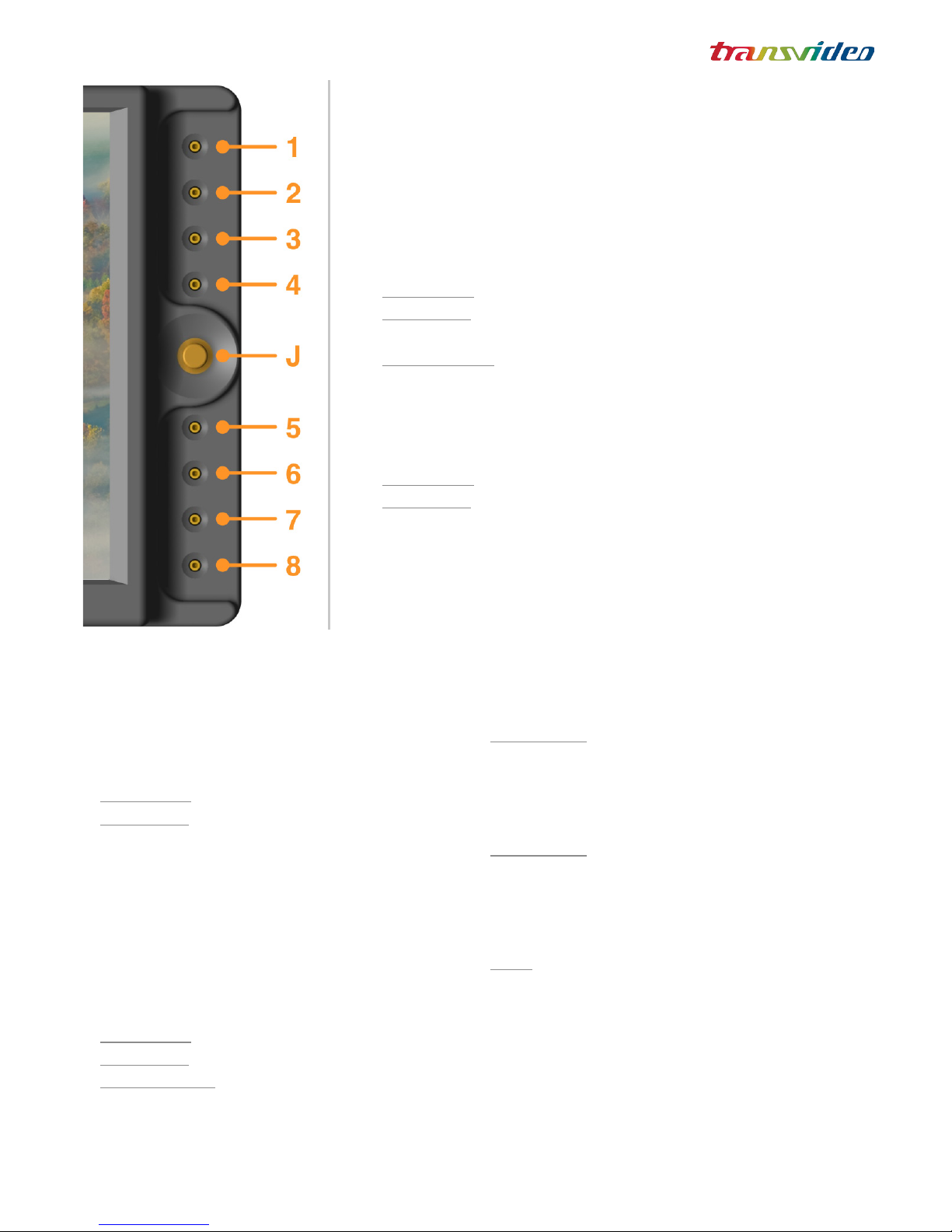
Zoom
Pixel to pixel, anamorphic & custom modes.
Short push: Toggles between zoom modes.
Long push: Adjusts the custom zoom mode.
Use the joystick to move in the picture.
Peaking
Activates/deactivates the peaking.
Use the joystick to adjust the peaking level.
Focus Helper
Activates/deactivates the focus helper.
Use the joystick to adjust the emphasis
color and level.
Markers
Short push: Shows/hides the active markers.
Long push: Adjusts the active markers.
Adjustments
Brightness, contrast, saturation & hue.
Aspect ratios & anamorphic desqueeze
Colorimetry D65 - D56 or full bright.
Proles (Linear, Rec709, S-Log, S-Log2,
Canon-Log, C-Log)
Input selection
Short push: Toggles between video inputs.
Long push: Displays the list of active inputs.
Input Selector: Long push to enter the Input
menu. Long push again to select the inputs
you want to toggle between.
Technical adjustments
Audio, image ips, backlight dimmer,...
Night Mode: Reverse the led behavior; an
activated function (ie peaking/Focus Helper/
Zoom ...) will have its LED OFF an and inactive
function will have its LED ON.
ScreenShot: When activated, allows user to do
a screenshot by pushing the central joystick,
when no others function is in setting state (led
associated to the function is ashing)
Note: In BodyRig* View, a push on the joystick
calls the Horizon menu (0CAL, Sensitivity, CAL on
TAP). If Screenshot is anebled, a long push will
be necessary to access the Horizon menu.
Joystick
Move and push.
With the Body-Rig view, gives access to the
Horizon settings.*
1
2
3
4
5
6
7
8
J
144TD0001 - Page 1/2 - Sept. 2015
* On RainbowHD SBL only
User interface
Keys 1-8 gives access to the functions.
Keys light up when the function is activated.
Keys blink when it is possible to adjust the function.
Joystick allows to adjust parameters (move and push).
Views
Pre-programmed modes feature a specic set assignment for
each job.
Short push: Toggles between different views
Long push: Displays the list of views (Operator, DIT, Body-
Rig*, ...)
View Selector: Long push to enter the View menu. Long push
again to select the views you want to toggle between.
Refer to the full user manual for more details
Page 2
u Quick Start Guide
RainbowHD
144TD0001 - Page 2/2 - Sept. 2015
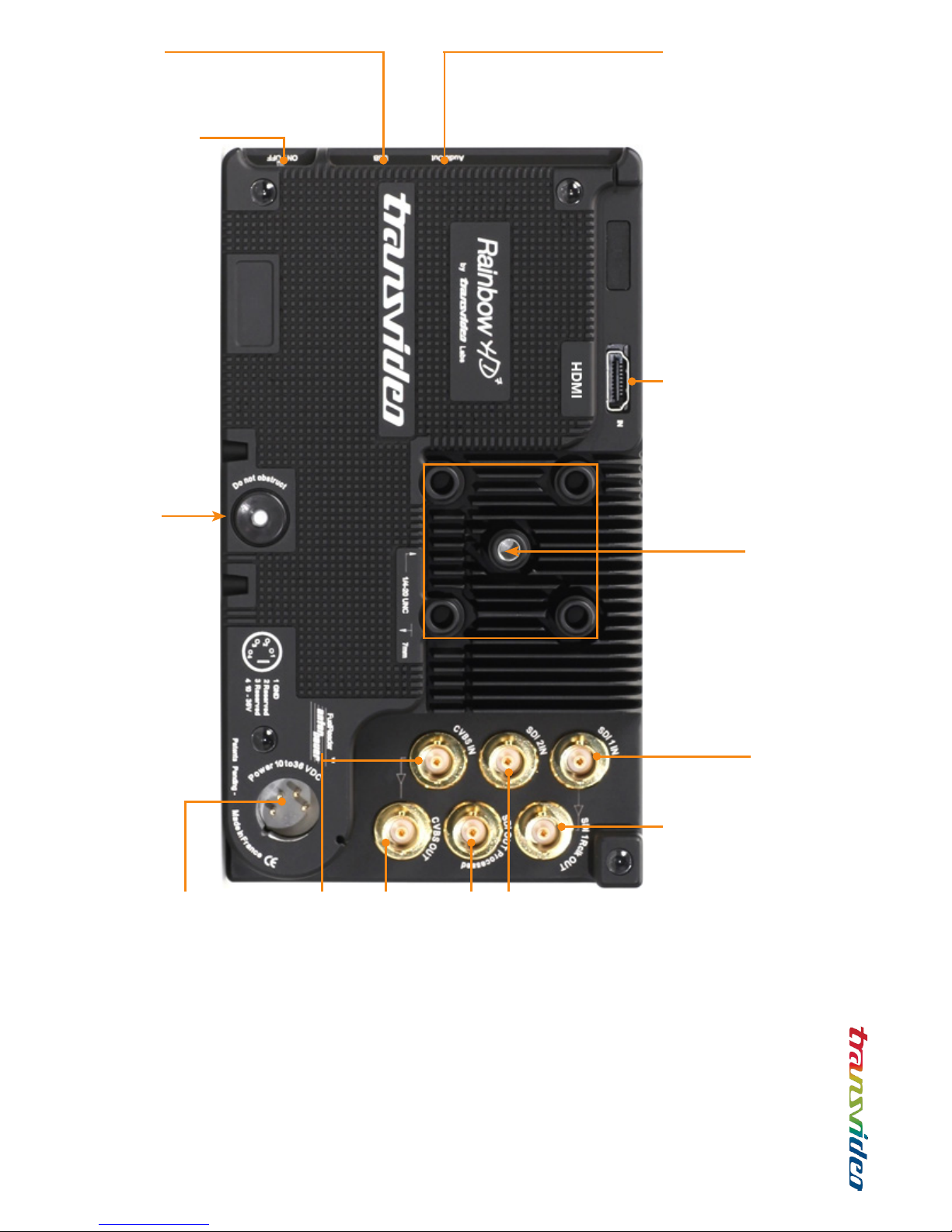
HDMI input
HDMI type A
3G/HD/SD SDI input 1 *
3G/HD/SD SDI reclocked output 1 *
Outputs the reclocked signal from SDI 1
3G/HD/SD SDI input 2
3G/HD/SD SDI processed output
Outputs the signal that the user is
watching, including aspect ratios.
CVBS input
CVBS output
Loop through
DC input
XLR 4-pins (-1, +4)
10 to 36V
1/4-20 thread (not shown)
To attach the monitor from the bottom
ON/OFF switch
Audio monitoring output *
Jack 3.5
USB
For software updates
Transvideo mounting system
To attach the monitor from the back
To mount a battery adapter
* On RainbowHD SBL only
 Loading...