

Page 1
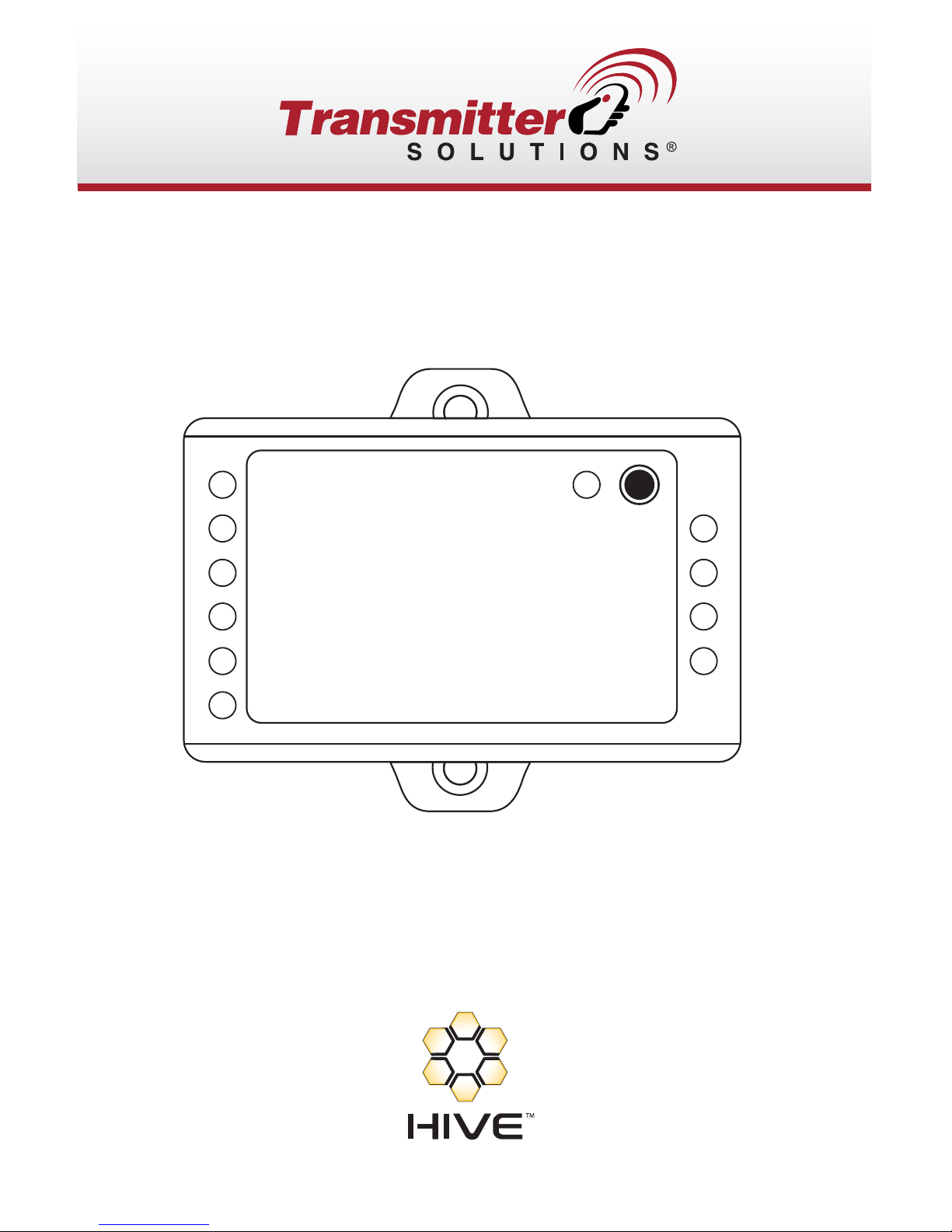
BEEP
LED
D1
D0
GND
+DC
IR
PULSE MINI
OPEN
NO
GND
(COM)
NC
INSTALLATION MANUAL
Page 2
INTRODUCTION
The Pulse Mini
is a mini single door control panel, can work with any Wiegand
26~37 bits output reader. It uses Atmel microcontroller to assure stable
performance, and equips with an infrared remote control for easy operation.
The Pulse Mini supports 1,000 users; all user data can be transferred.
Features
> 1,000 users’ user data can be transferred
> Multi access modes: Card, Card or PIN, Card with PIN and multi Cards/PINs
> C
an connect with any reader with Wiegand 26~37 bits output
> Can connect with any keypad reader
with 4bits, 8bits (ASCII), or
10bits Virtual number output
> Support Master Card function
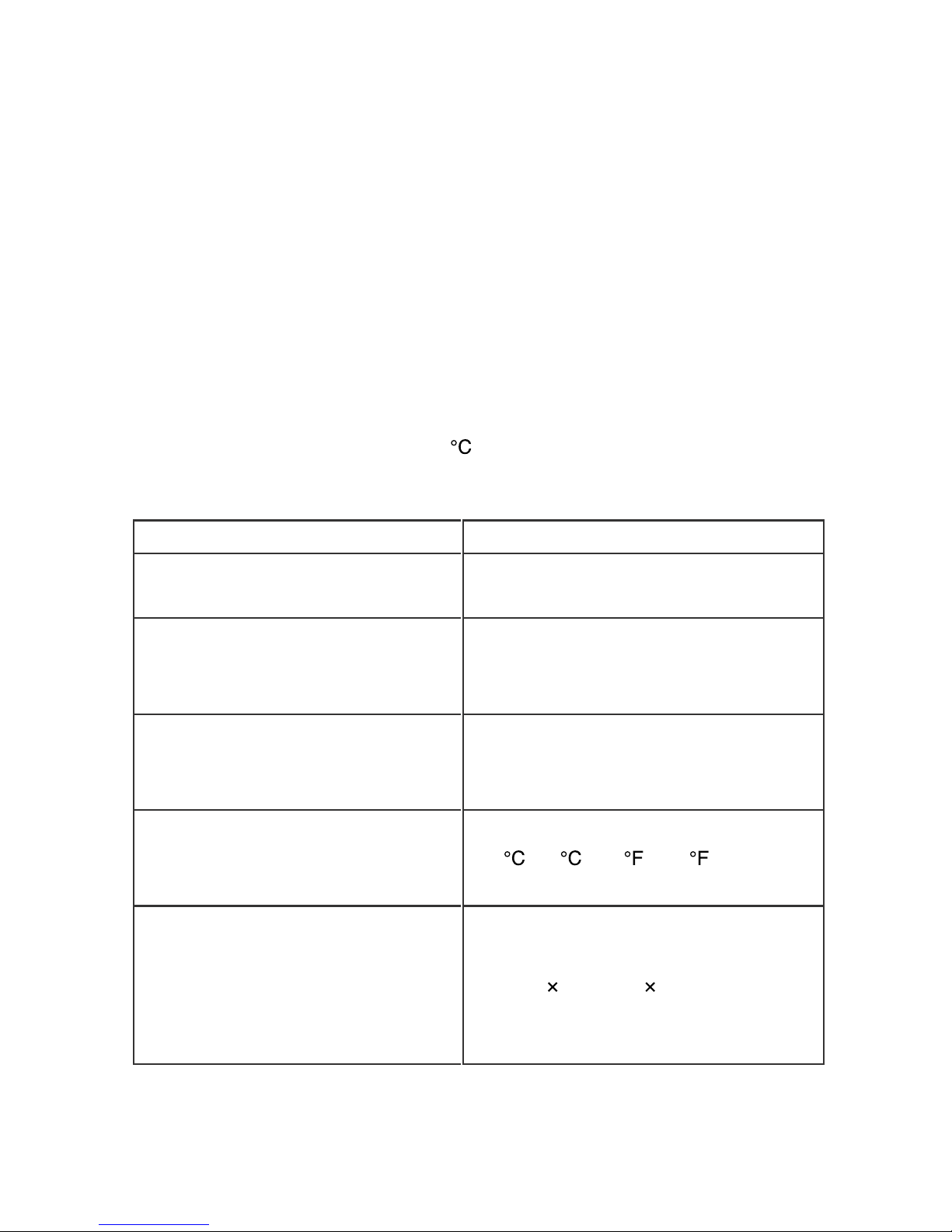
> Low temperature resistance (-40
)
Specifications
User Capacity
1,000
Operating Voltage
Idle Current
9~24V DC
<20mA
Relay
Adjustable Relay Output Time
Lock Output Load
1~99 Seconds (5 seconds default)
2 Amp Maximum
Wiegand Interface
Input
Output
Wiegand 26~37 bits
Wiegand 26~37 bits (for user transfer)
Environment
Operating Temperature
Operating Humidity
-40
~60 (-40 ~140 )
0~90%RH
Physical
Color
Dimensions
Unit Weight
Shipping Weight
ABS Shell
Black (White optional)
L65mm
W54mm D19mm
40g
100g
Page 3
Package Inventory
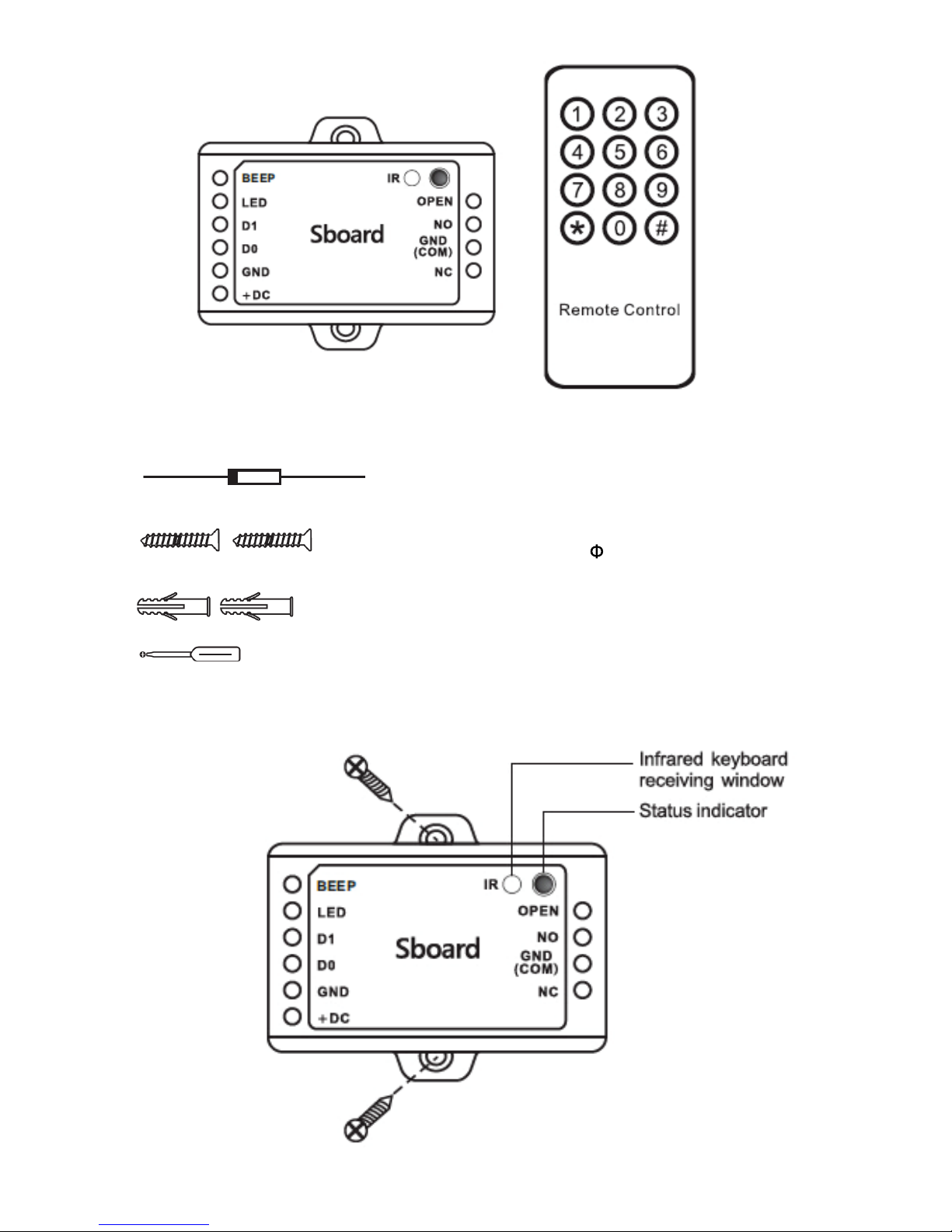
Pulse Mini Infrared Remote Control
Diode IN4004 (For relay circuit protection)
Self Tapping Screws:
3*25mm
Wall Anchors
Screw Driver
INSTALLATION
Page 4
Wiring
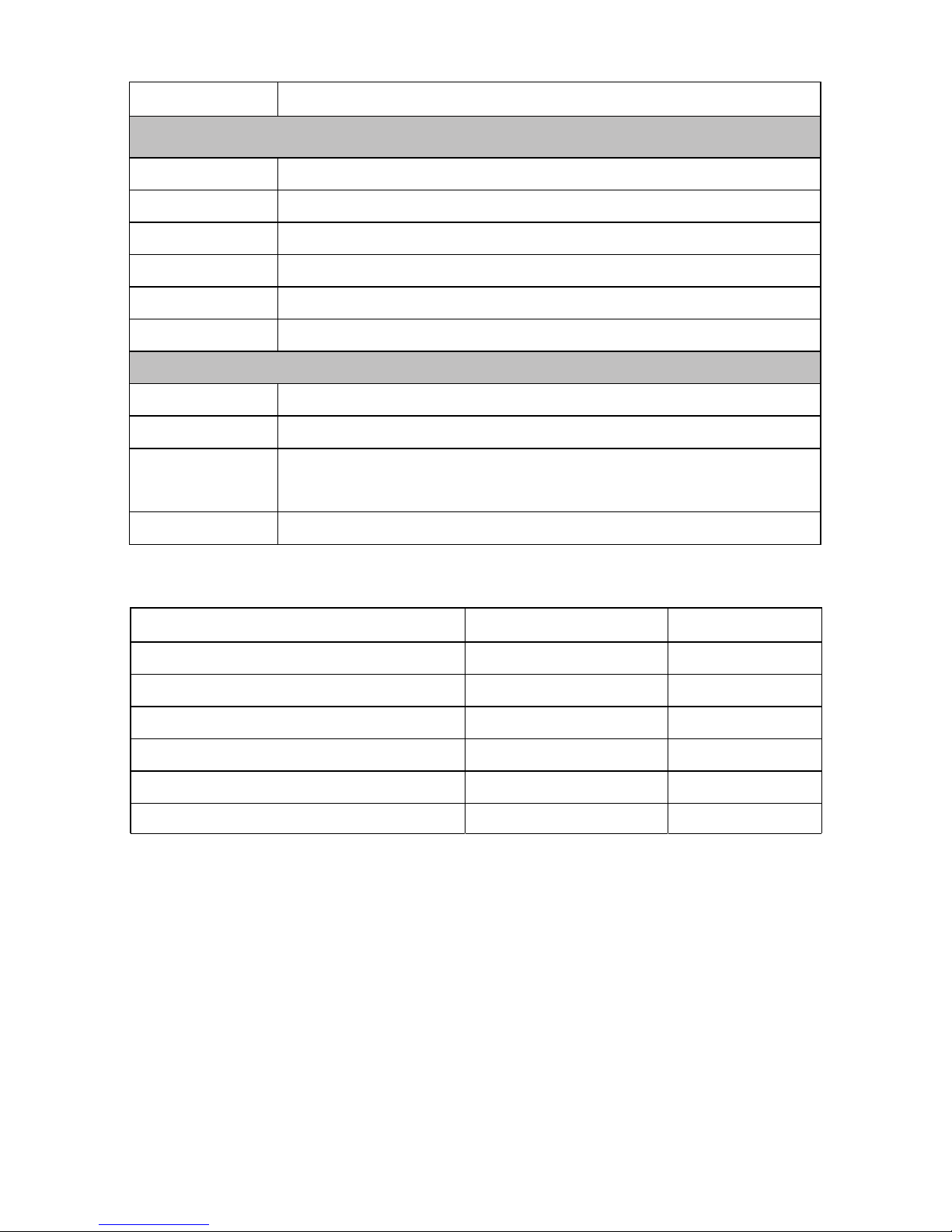
Name Notes
The Left Side
BEEP Beep/ Buzzer Control
LED Green LED Light Control
D1 Wiegand Input Data 1
D0 Wiegand Input Data 0
GND Negative Pole of DC (9~24V) Power Input
+DC Positive Pole of DC (9~24V) Power Input
The Right Side
OPEN Connect to One Wire of Exit Button
NO Normally Open Relay Output (install diode provided)
GND
(COM)
Negative Pole of Lock
(Common Connection for Relay Output)
NC Normally Closed Relay Output (Install diode provided)
Sound and Light Indication
Operation Status LED Buzzer
Stand by Red light bright -
Enter into programming mode Red light shines One beep
In the programming mode Orange light bright One beep
Operation error - Three beeps
Exit from the programming mode
Open lock
Red light bright
Green light bright
One beep
One beep
Page 5
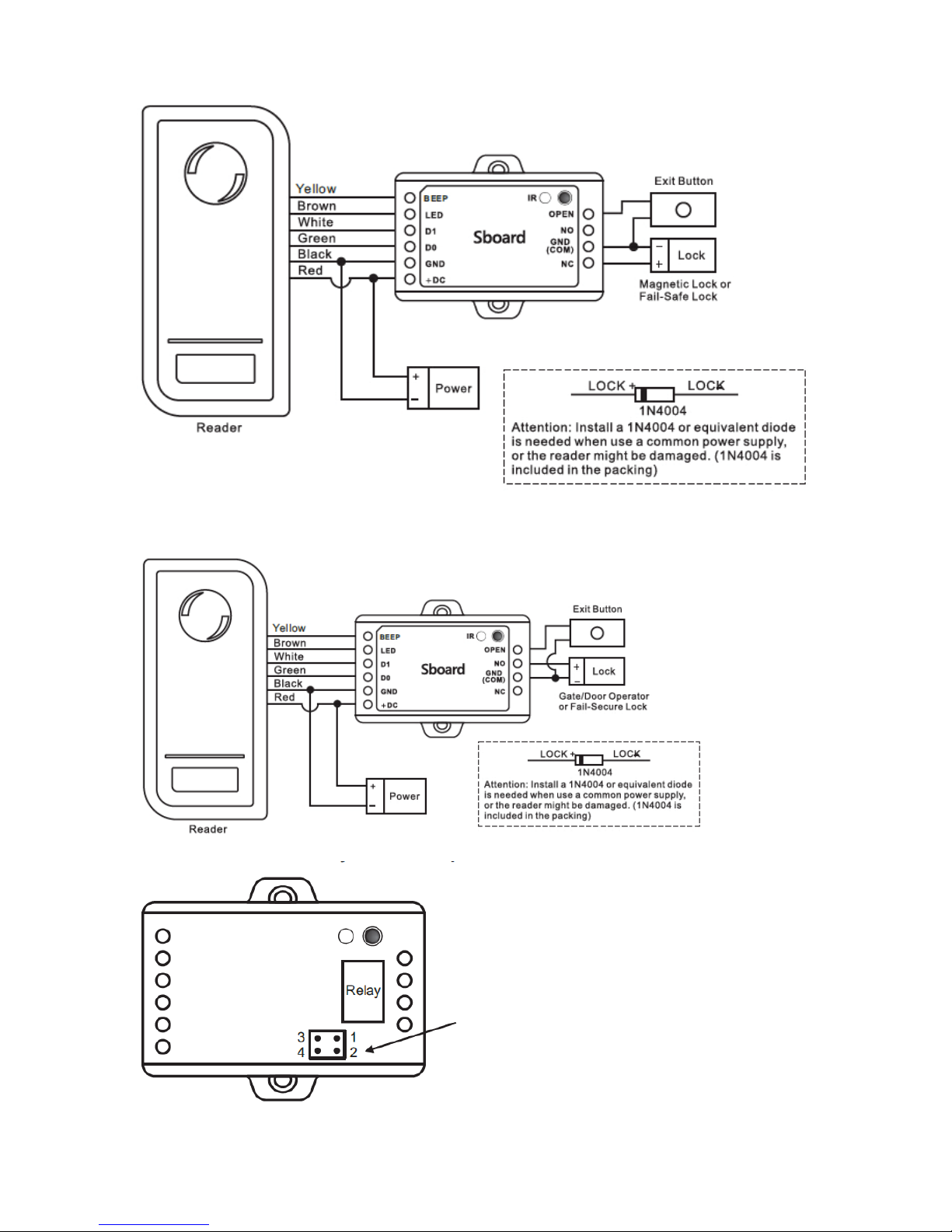
Connection Diagram
Magnetic Lock or Fail-safe Lock
Door/Gate Operator or Fail-secure Lock
When Use NO/NC/COM Dry Contact
Output
1) Remove the Pin Caps on points 1, 2 and
points 3, 4
2) Insert one of the Pin Caps on points 1, 3
3) Fix the back cover, and keep the other Pin
Cap well
Remark:
The power supply's voltage must be the
same with lock's supply voltage, or else, the
lock will not work properly or be damaged.
Page 6

Reset to Factory Default and Master Cards Programming
To reset to factory default, power off, press the Exit Button (or connect “OPEN”
and “GND” to be short circuit), hold it and power on, there will be two beeps,
and the LED light turns into orange, release the exit button (or disconnect
“OPEN” and “GND”), then read any two cards on the external reader, the LED
will turn into red, means reset to factory default successfully. Of the two cards
reading, the 1 one is Master Add Card, the 2 on
e is the Master Delete Card.
Remarks:
The Master Cards are not included in the standard packing. The type of the
Master Card is according to the external reader. For example: the external
reader is 125KHzHID Reader, then the Master Card must be 125KHz HID cards.
If no Master Cards added, must press the Exit Button for at least 10 seconds
before release.
Reset to factory default, the user's information is still retained.
PROGRAMMING
Programming will vary depending on access configuration. Follow the
instructions according to your access configuration.
Notes:
Remote Control: Please use the Infrared Remote Control to program the
Pulse Mini. The “IR” on the Pulse Mini is the infrared receiving window,
please direct the Remote Control to it.
User ID number: Assign a user ID to the access card in order to track it.
The commonuser ID number can be any number from 0~999.
IMPORTANT: User IDs do not have to be proceeded with any leading zeros.
Recording of User ID is crucial. Modifications to the user require the User
ID be available.
PIN: Can be any 4~6 digits except 8888 which is reserved.
Enter and Exit Program mode
Programming Step Keystroke Combination
1. Enter Program Mode
(Master Code) #
(Factory default is 123456
2. Exit Program Mode *
Page 7
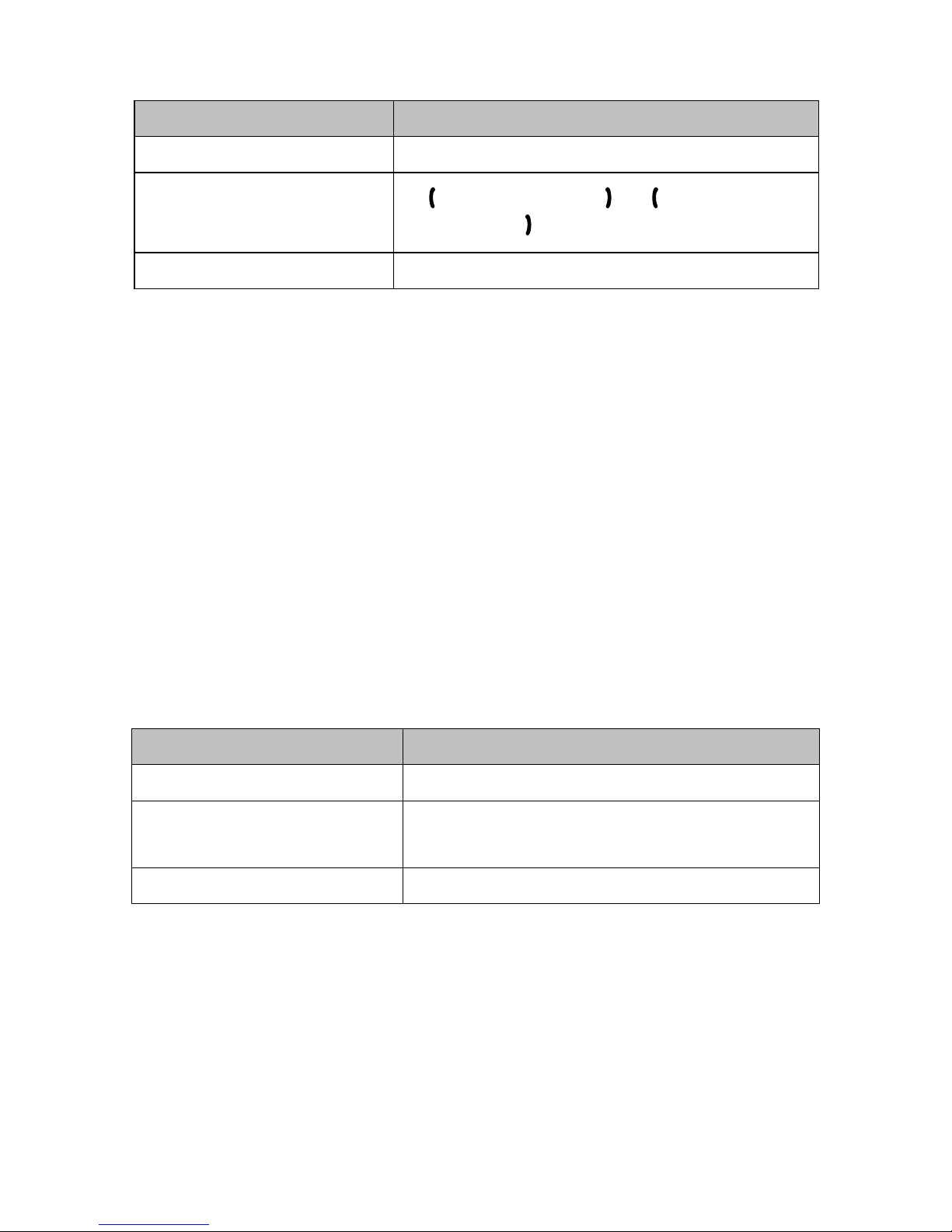
Set Master Code
Programming Step Keystroke Combination
1. Enter Program Mode * (Master Code) #
2. Update Master Code
0
New Master Code # Repeat New
Master Code
# (code: 6 digits)
3. Exit Program Mode *
Add Users with Remote Control
Pulse Mini Connected with Card Reader:
For the readers develop together with Pulse Mini, such as S series readers,
kip the below step 1; For other card readers, set the Pulse Mini's Wiegand
input as below step 1 according to the Wiegand output of the readers.
Pulse Mini Connected with Keypad Reader:
Can be any Keypad Reader with 4Bits, 8Bits (ASCII), 10Bits output format
Set the Pulse Mini as below step 1 according to t
he Wiegand output and PIN
output format of the Keypad Reader.
PIN(s) can be input/added on either the remote control or the external Keypad
Reader, except when the Keypad Reader is 10 digits virtual card number
ouput, the PIN(s) can only be input/added through the Keypad Reader.
Step 1
Programming Step Keystroke Combination
1. Enter Program Mode * (Master Code) #
2.Wiegand Input
bits
PIN Input
bits
8 (26~37) # (Factory default is
26bits)
8 (4 or 8 or 10) # (Factory default is
4bits)
3. Exit Program Mode *
Remarks: 4 means 4 bits, 8 means 8 bits, 10 means 10 digits virtual number.
Page 8

Step 2
Programming Step Keystroke Combination
Add Card User
1. Enter Program Mode * (Master Code) #
2. Add Card: Using Auto ID
(Allows Pulse Mini to assign Card to
next available User ID number)
OR
2. Add Card: Select Specific ID
(Allows Master to define a specific
User ID to associate the card to)
OR
2. Add Card: by Card Number
OR
2. Add Card: Block Learn
(Allows Master to add up to 1000
cards to the Reader in a single step.)
Takes 2 minutes to program
1 (Read Card on External Reader) #
Repeat Step 2 for additional user cards
1 (User ID) # (Read Card on External
Reader) #
The user ID is any number from 0-999
1 (Input 8/10 digits Card number) #
1 (User ID number) # (Card quantity) #
(The first card number) #
Cards' number must be consecutive;
Card quantity = # of card to be enrolled
3. Exit Program Mode *
Add PIN User
1. Enter Program Mode * (Master Code) #
2. Add PIN: Using Auto ID
(Allows Pulse Mini to assign PIN to
next available User ID number)
1 (Input PIN) #
Repeat Step 2 for additional user cards
(PIN: 4~6 digits)
2. Add PIN: Select Specific ID
(Allows Master to define a specific
1 (User ID) # (Input PIN) #
The user ID is any number from 0-999
User ID to associate the card to) (PIN: 4~6 digits)
3. Exit Program Mode *
Page 9
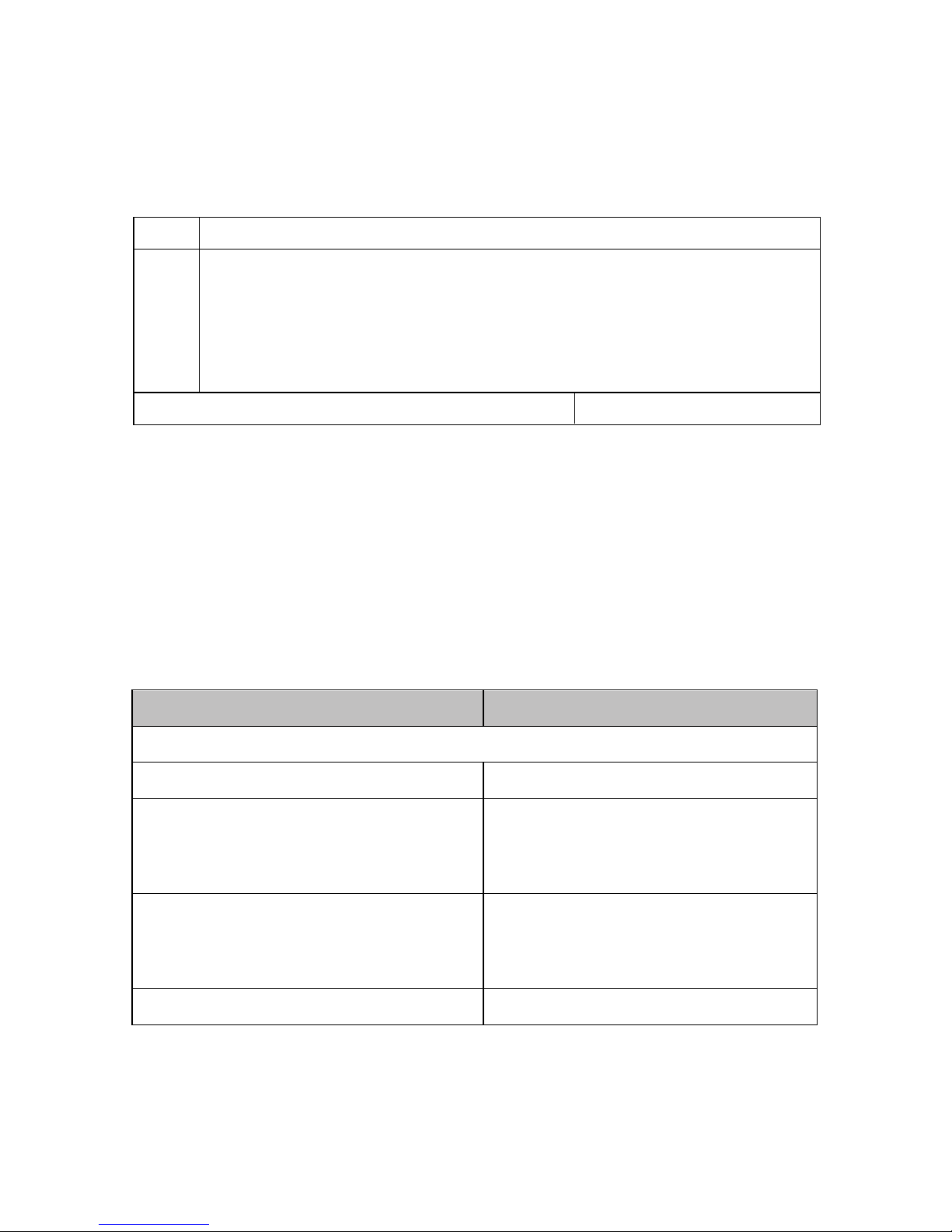
Pulse Mini Connected with Fingerprint Reader:
For example:
Connect F1 as the fingerprint reader to Pulse Mini, two steps to enroll the
(1) Add the Fingerprint (A) on F1
(2) Add the same Fingerprint (A) on Pulse Mini as below:
1 Enter Program Mode: * (Master Code) #
2
OR
2
1 (Press Fingerprint A on F1) (Repeat Fingerprint A on F1) #
(ID auto allocated)
1 (User ID) # (Press Fingerprint A on F1)
(Repeat Fingerprint A on F1) #
(Select specific ID)
3
Exit: *
Add Users by Master Add Card
Add card users
Master Add Card – Read User Card – Master Add Card (Cards can be
added continuously)
added continuously)
Add PIN users
Master Add Card – Input PIN – Master Add Card (PINs can be
Change PIN
Programming Step Keystroke Combination
Note: Done outside programming mode, users can perform this themselves
1. Enter Program Mode * (Master Code) #
1. Change the card associated PIN
(There will auto associate PIN (8888)
to cards when adding card users)
* (Read Card) (Old PIN) #
(New PIN) # (Repeat New PIN) #
(PIN: 4~6 digits)
1. Change the users' PIN
* (ID Number) # (Old PIN) #
(New PIN) #
(Repeat New PIN) #
(PIN: 4~6 digits)
2. Exit Program Mode *
valid fingerprint.
Page 10

Delete User Card(s) or PIN(s) by Remote Control
Programming Step Keystroke Combination
1. Enter Program Mode * (Master Code) #
2. Delete User By User ID
OR
2. Delete User – By Card
OR
2. Delete User – By Card number
OR
2. Delete User – By PIN
OR
2. Delete All User
2 (User ID ) #
2 (Read Card on External Reader) #
2 (Input 8/10 digits Card number) #
2 (Input PIN) #
2 (Mater Code) #
3. Exit Program Mode *
Delete Users by Master Delete Card
Delete card users
Master Delete Card – Read Card – Master Delete Card (Cards can be
Delete PIN users
Master Delete Card – Input PIN – Master Delete Card (PINs can be
Set Relay Configuration
The relay configuration sets the behavior of the output relay on activation.
Programming Step Keystroke Combination
1. Enter Program Mode * (Master Code) #
2. Pulse Mode
OR
2. Toggle Mode
3 (1~99) #
The relay time is 1~99 seconds. (1 is 50mS)
(Factory default is 5 seconds)
3 0 #
Sets the relay to ON/OFF Toggle mode
3. Exit Program Mode *
deleted continuously)
deleted continuously)
Page 11
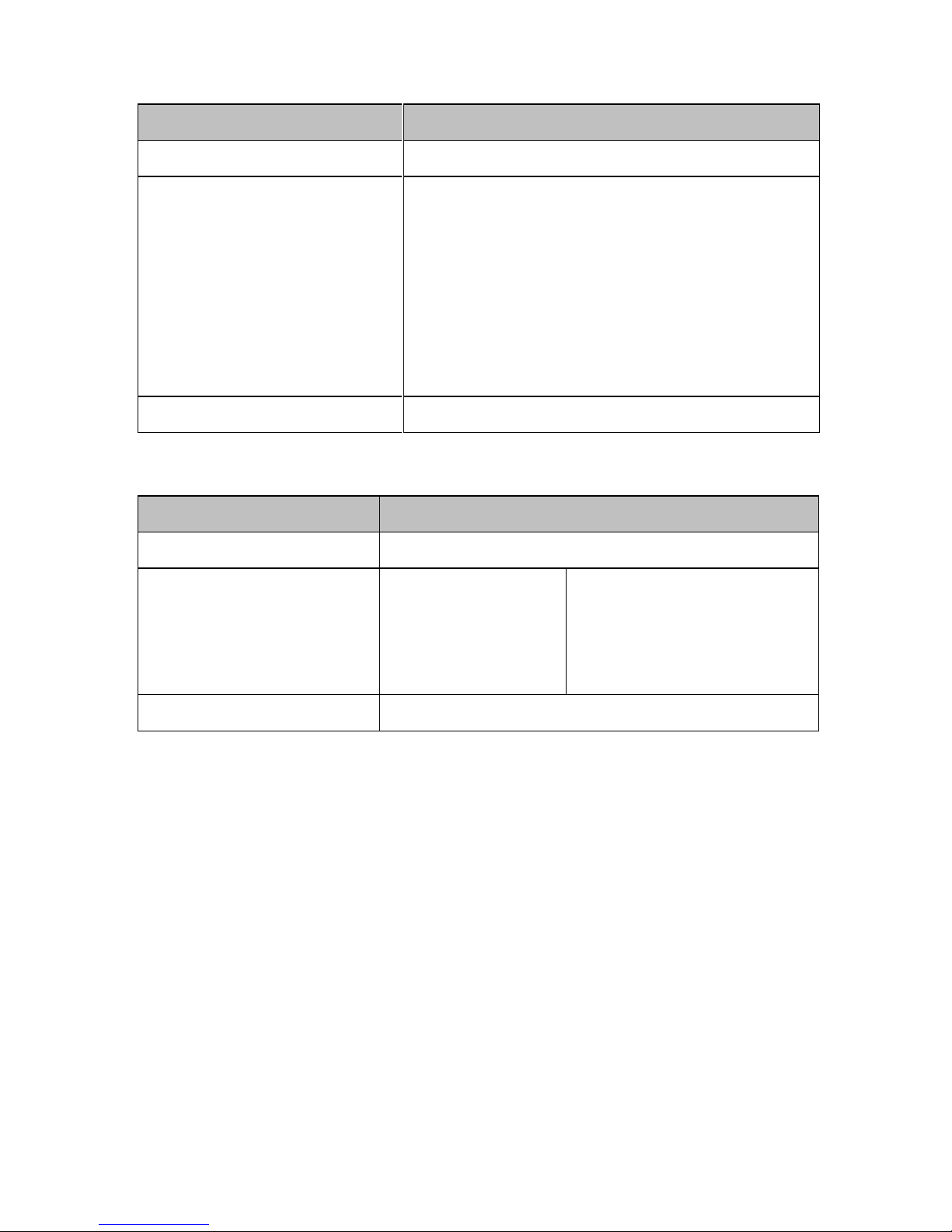
Set Access Mode
Programming Step Keystroke Combination
1. Enter Program Mode * (Master Code) #
2. Card access
OR
2. Card + PIN access
OR
2. Card or PIN access
OR
2. Multi cards/PINs access
4 0 #
4 1 #
4 3 (Factory default)
4 3 (2~9) #
3. Exit Program Mode *
Set Audible and Visual Response
Programming Step Keystroke Combination
1. Enter Program Mode * (Master Code) #
2. Control Sounds
OR
2. Control LED
OFF = 7 0 #
OFF = 7 4 #
ON = 7 1 #
ON = 7 5 #
(Factory defaults are ON)
3. Exit Program Mode *
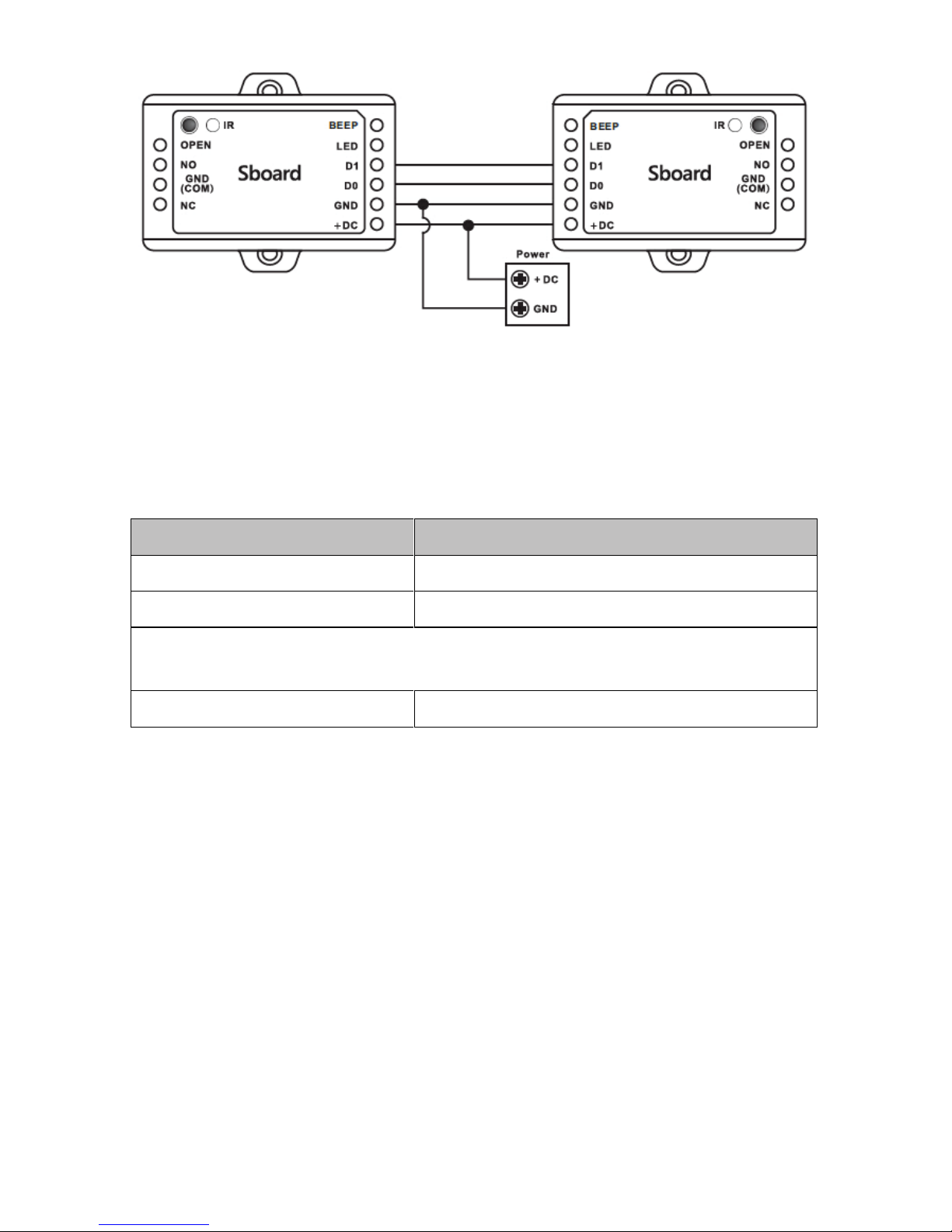
User Information Transfer
The Pulse Mini supports the User Information Transfer function, and the
enrolled user(cards, PINs) can be transferred from one (let's name it Master
Unit) to another(let's name it Accept Unit). Maximum 10pcs Accepts Units
can be transferred once.
Page 12
Programming Step Keystroke Combination
1. Enter Program Mode * (Master Code) #
2. Set transferring 9 6 #
Within 3 minutes, Green LED shines, that means the users' information
has been transferred successfully.
3. Exit Program Mode *
Connection Diagram:
Remarks:
The Master Units and Accept Units must be Pulse Mini or S1234 -X.
The Master Code of the Master Unit and the Accept Unit(s) must be set to the same.
Program the transfer operation on Master Unit only.
If the Accept Unit(s) are already with the users enrolled, it will be covered after
transfer. For full 1,000 users enrolled, the transfer takes 3 minutes.
Page 13

7380 S. Eastern Ave, Suite 124-320
Las Vegas, NV 89123
(866) 975-0101 • (866) 975-0404 fax
www.transmittersolutions.com
WARRANTY
The warranty period of Transmitter Solutions® Pulse Mini Receiver is 24 months.
This warranty shall begin on the date the transmitter is manufactured. During the
warranty period, the product will be repaired or replaced (at the sole discretion of
Transmitter Solutions®) if the product does not operate correctly due to a
defective component. This warranty does not extend to (a) the product case,
which can be damaged by conditions outside the control of
Transmitter Solutions®, or (b) battery life of the product. This warranty is further
limited by the following disclaimer of warranty and liability:
EXCEPT AS SET FORTH ABOVE, TRANSMITTER SOLUTIONS® MAKES NO WARRANTIES REGARDING THE GOODS, EXPRESS OR IMPLIED, INCLUDING WARRANTY OF
MERCHANTABILITY OR WARRANTY OF FITNESS FOR A PARTICULAR PURPOSE.
BUYER MAKES NO RELIANCE ON ANY REPRESENTATION OF TRANSMITTER SOLUTIONS®, EXPRESS OR IMPLIED, WITH REGARD TO THE GOODS AND ACCEPTS THEM
“AS-IS/WHERE-IS”. TRANSMITTER SOLUTIONS® SELLS THE GOODS TO BUYER ON
CONDITION THAT TRANSMITTER SOLUTIONS® WILL HAVE NO LIABILITY OF ANY KIND
AS A RESULT OF THE SALE. BUYER AGREES THAT TRANSMITTER SOLUTIONS®
SHALL HAVE NO LIABILITY FOR DAMAGES OF ANY KIND, WHETHER DIRECT, INCIDENTAL OR CONSEQUENTIAL DAMAGES, INCLUDING INJURIES TO PERSONS OR PROPERTY, TO BUYER, ITS EMPLOYEES OR AGENTS, AS A RESULT OF THE SALE. BUYER
ALSO AGREES TO HOLD TRANSMITTER SOLUTIONS® HARMLESS FROM ANY CLAIMS
BUYER, OR ANY THIRD PARTY, MAY HAVE AS A RESULT OF BUYER’S USE OR
DISPOSAL OF THE GOODS. BUYER HAS READ THIS DISCLAIMER AND AGREES WITH
ITS TERMS IN CONSIDERATION OF RECEIVING THE GOODS.
 Loading...