

Page 1
T R A N S F O R M I N G T E C H N O L O G I E S , L L C
O U T S T A N D I N G A L T E R N A T I V E S I N S T A T I C C O N T R O L
BFN™
Static Eliminators
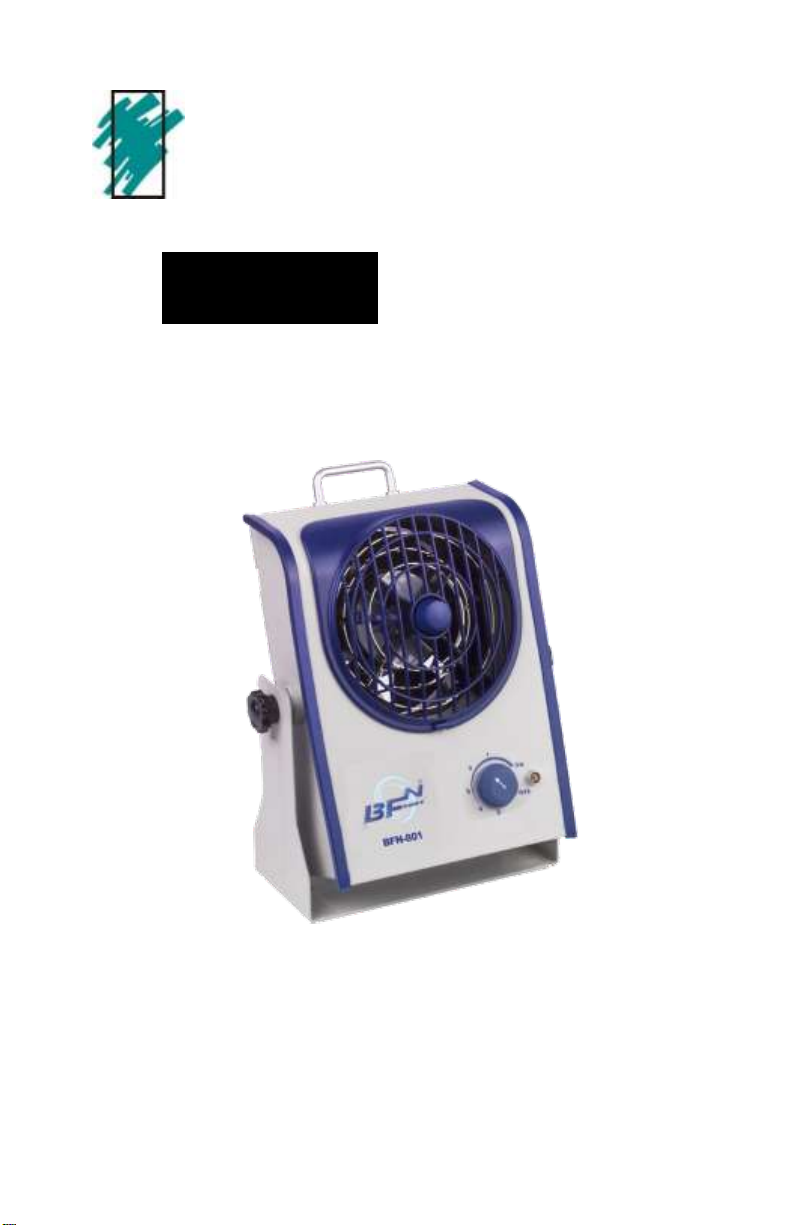
BFN 801 Ionizing Blowers
Instruction Manual
Page 2

Contents
BFN 801
Description 2
Features 2
Specification 2
Operation Guide 4
Power 4
Bracket Adjustment 4
Maintenance 4
Cleaning 5
Disassembly 6
Periodic Verification 8
Description
BFN® Series Ionizers
Dependable, Balanced and Fast. BFN® AC ionizers,
from Transforming Technologies, are built to last. Reliable AC ionization technology is combined with superior mechanical design to assure years of optimal
static neutralizing performance.
A full 1 year warranty.
CE certification.
All BFN® AC ionizers use titanium alloy emitter
points for long life.
Page 3

All BFN series AC ionizing blowers are designed for safe
operation under normal use. Safety switches under the
front and rear removable finger guards shut off the unit,
protecting the operator during maintenance.
Do not operate BFN series products in flammable
or explosive environments.
Do not insert foreign objects into the air inlet or
outlet.
Make certain the BFN ionizer is properly grounded
before operation.
Disconnect the BFN ionizer from any power source
before removing the finger guards.
Do not open or attempt to repair any BFN series
product. Breaking the manufacturing seal will void
warranty.
BFN 801: Bench top Blower Model
The BFN 801 bench top ionizing blower, with inherently stable AC technology, provides excellent balance
and rapid charge decay for secure workstation protection. Designed to protect most sensitive electronic devices, the BFN 801 uses corona ionizing technology to
continuously produce a balanced output of positive and
negative air ions.
Features
Stable AC ionization output
Integrated emitter cleaning device
Variable fan speed control
Removable finger guards with auto shut-off sensor
1 2
Page 4

Product Specifications
Power Input
120 V AC, 60 Hz., 36W
220 V AC, 50Hz.
Dimensions
7.0” W x 10.25” H x 3.75” D
(17.8W x 26.0H x 9.5D cm)
Weight
8.25 lb (3.75 kg)
Air Volume
50 CFM – 100 CFM (low— high)
RH Operating Range
20-60%, non-condensing
Audible Noise
44dB(A) (Distance 1 meter)
Enclosure
Steel
Finish
Powder coat, off white
Approvals
CE
Effective Coverage
1’x5’ area coverage
Balance
0 +10 volts
Decay Time
< 2 seconds @12”, 1000V100V, fan speed on high
Temperature
32-122° F (0-50° C)
Indicators
ON/OFF status light indicator,
detects presence of HV on emitter points
Packing list:
BFN 801 ionizing blower
Power cord
Instruction manual
Certificate of Conformance
BFN 801 Charge Decay Efficiency
(Discharge Time)
Tested in accord with
ANSI/ESD STM3.1-2006
Discharge times determined as per EOS/
ESD Standard No.3
using 6” x6” 20 pF
charge plate monitor.
Discharge times are in
seconds from 1000V
to 100 V, Discharge
times are slightly
longer for 230V, 50 Hz
Black: Hi Fan Speed
Red: Low Fan Speed
5 7 9
1
1 2 3
1
1. 2. 4 6
3 6 1 1
5 7 9
1
1 1 2 3
1’ 2’ 3’ 4’ 5’
Page 5

Operating guide
1. Power Connection
Properly locate and install the ionizer into the proper
position and connect the power cord. Rotate the on/
off, fan speed knob clockwise to turn on the unit.
Continue rotating the knob to achieve the desired fan
speed.
3. Periodic Maintenance
Note: Do not insert any object into the air inlet or outlet.
Note: Unit must be properly grounded before operating.
2. Bracket Adjustment
To adjust the angle of operation of the BFN 801 ionizer, loosen the mounting knobs that secures the
bracket and loosen the left gear completely. Now adjust the unit to the required angle and re-tighten the
knobs.
Note: Failure to loosen the bracket knobs sufficiently
may result in damage to the bracket mounting system.
The only maintenance required for BFN series ion-
izers is the periodic cleaning of the emitter points,
inlet and outlet finger guards and the fan assembly.
Emitter point cleaning affects the static decay ability
of the ionizer and is important for maintaining its optimal performance.
3
Page 6
A B C
Emitter point cleaning: All BFN series ionizing blowers
include an integrated emitter point cleaning brush on the
inlet fan guards. Turn the emitter point cleaners clockwise,
then counter clockwise several times, until points are clean.
When finished, return the point cleaning brush to its resting
position.
Internal fan cleaning: All BFN series ionizing blowers
offer convenient cleaning of the internal fan assembly. Use
the following procedure to maintain cleanliness.
Note: Always disconnect the ionizer from the power source
prior to internal cleaning.
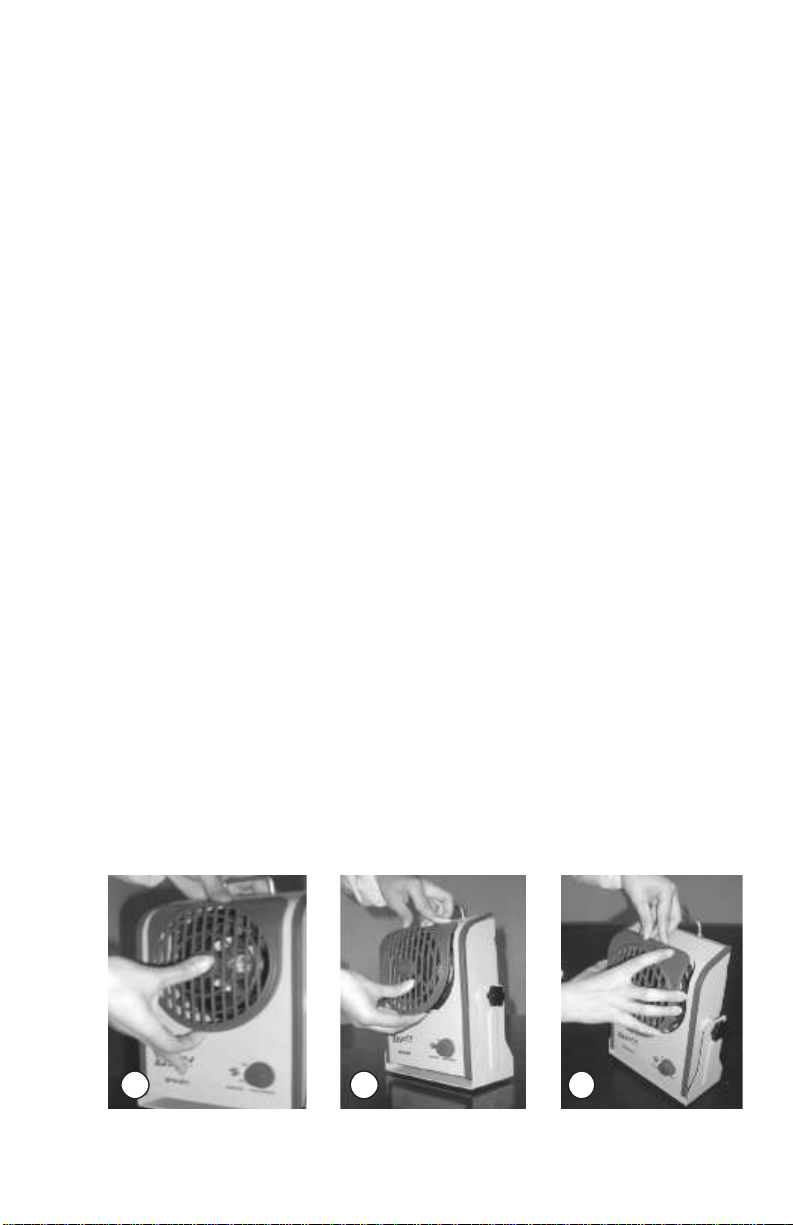
Air outlet disassembly
A. Press the button on the bottom of the plastic front cover
upwards and make the lower portion of the fan guard
separate from the metal housing.
B. Lightly pull the front cover downwards until it separates
from the blower.
C. Completely remove cover and set aside.
4
Page 7
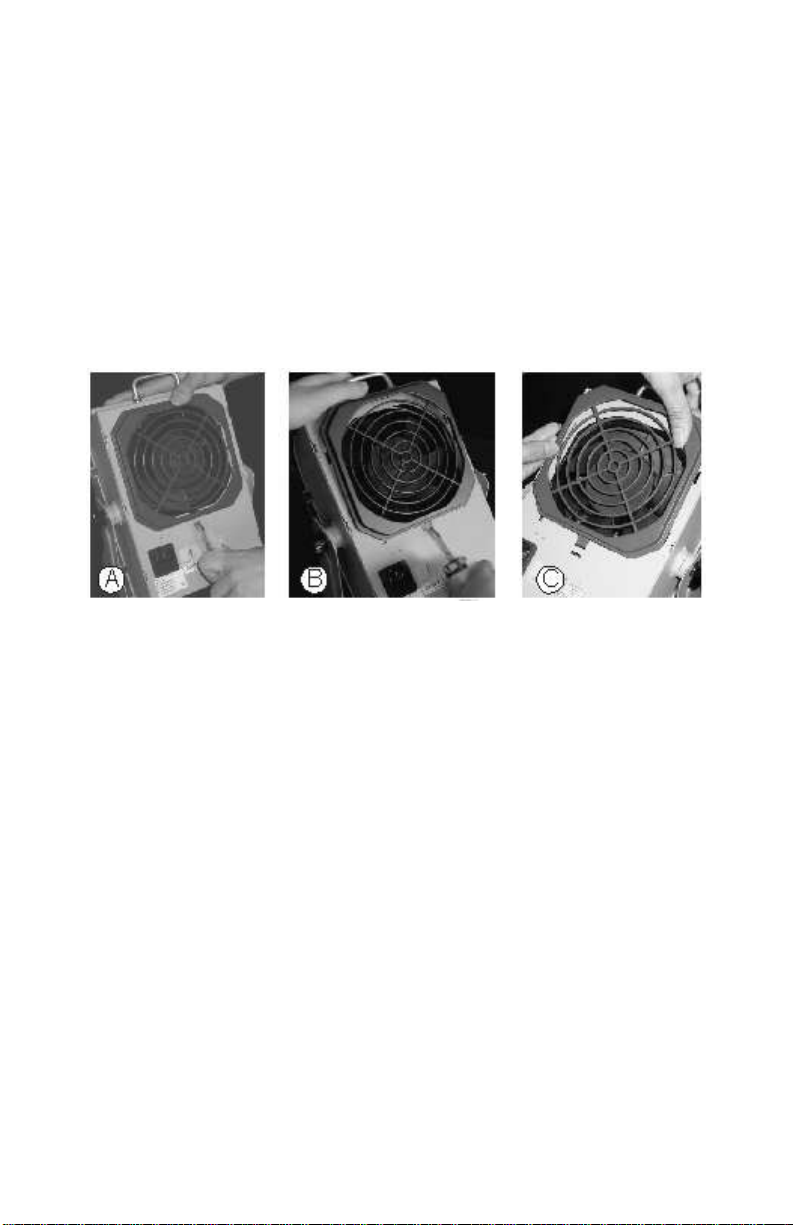
Air Inlet Disassembly
A. Press the recessed release point on the bottom of
the plastic rear cover using a flat blade screw-
driver.
B. Gently push the cover upwards.
C. Lift the rear cover up and away from the metal
casing.
After removing both front and rear fan guards, the emitter points and fan assembly will be unobstructed, for
easy deep cleaning. Use a soft brush, Isopropyl Alcohol
and compressed air to remove any foreign matter.
Note: The frequency of cleaning required for optimal
performance from BFN ionizers depends on the environment in which the BFN series ionizer operates.
When finished cleaning, replace both front and rear fan
guards.
5
Page 8
A B C D
A B C
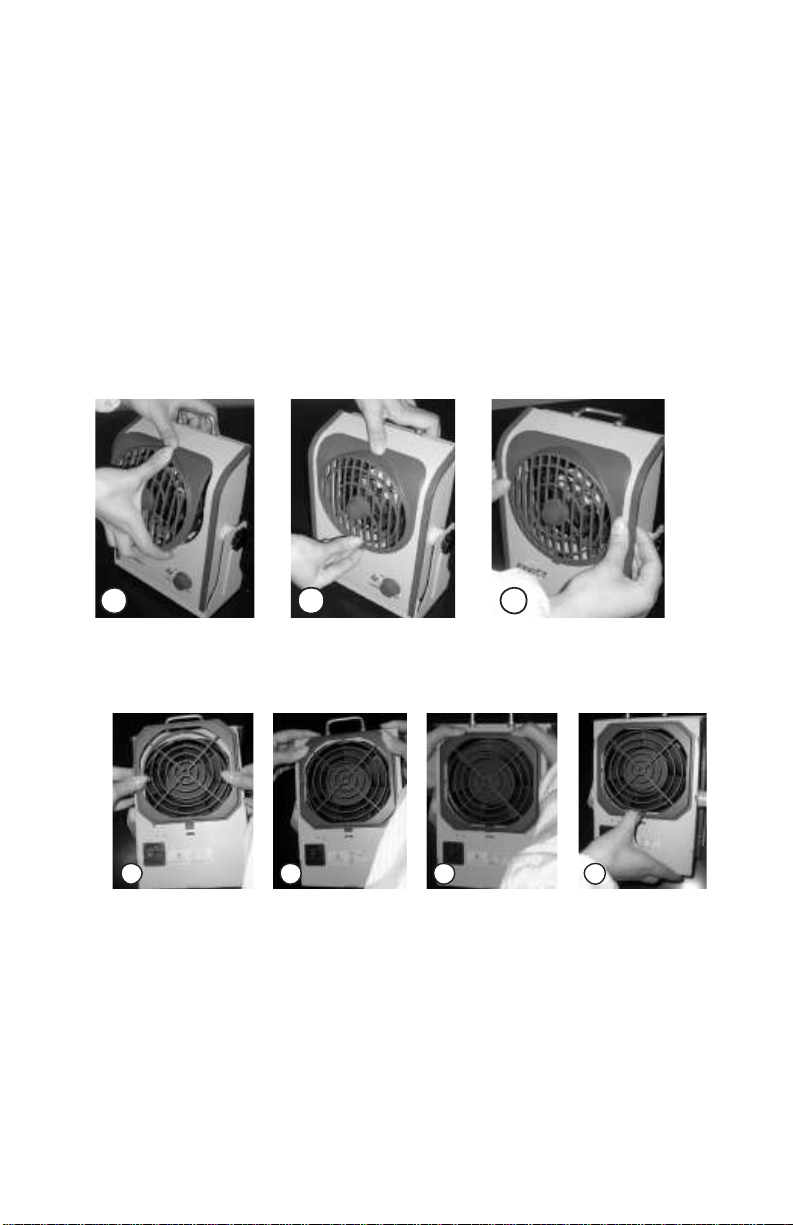
Air Outlet Assembly
A. Slide the slot on the upper back side of the front
fan guard onto the metal case.
B. Push upward from the bottom of the front fan and
gently press into the metal casing, until attached.
C. Press the sides of the cover in to make sure cover
is securely attached.
Air Inlet Assembly
A. Line up the clips on the rear fan guard with the slots
on the BFN fan housing.
B. Push the rear fan guard into the corresponding slots.
C. Slide the two sides of the rear fan guard down.
D. Lightly pull the very bottom of the rear fan guard
downward with your thumb to lock it securely.
6
Page 9

Caution: BFN series products have safety relay
switches where the front and rear fan guards attach to the unit. These relays disable the fan/
ionizer operation when either fan guard is removed. Take care when attaching the fan guards
to assure proper functioning of the product.
Periodic Verification:
BFN ionizer have no user serviceable parts and the
technology requires no calibration because of the inherently stable ionization output from the AC emission. Periodic verification is recommended, per ANSI/ESD
SP3.3-2006 Periodic Verification of Air Ionizers. Verification frequency may be set by the individual user, but
is recommended to be not less than one time per year.
7
Page 10

Service and Warranty
Transforming Technologies, LLC provides a
limited warranty for the BFN Series Ionizers. All
new products are guaranteed to be free from defects in material and workmanship for a period of
one (1) year from the date of shipment. Liability
is limited to servicing (after evaluating, repairing
or replacing) any product returned to Transforming Technologies. The company does not warrant
damage due to misuse, neglect, alteration or accident. In no event shall Transforming Technologies be liable for collateral or consequential damages.
To receive service under warranty, please contact Transforming Technologies Technical Support.
8
Page 11

About Transforming Technologies
Since 1998, Transforming Technologies has
helped electronic manufacturing facilities to protect their products and processes from the many
serious problems associated with static electricity.
Transforming Technologies offers a wide range
of unique and outstanding products to detect, protect, eliminate and monitor electrostatic charges.
Our products are integral components of an effective static control program.
9
Page 12

TRANSFORMING TECHNOLOGIES, LLC
3719 King Rd.
Toledo, Ohio 43617
Phone: 419-841-9552
Fax: 419-841-3241
E-mail: [email protected]
 Loading...