

Page 1

Super i-track
GPS Tracking Device
With 4-years Standby Battery
INTRODUCTION
This stand alone unit is a multi-function state-of-the-art GPS tracker that provides a 4 in 1
solution by utilising GPS/GSM/GPRS/SMS/DTMF; the most flexible tracking device in the world,
a great marriage of the latest technology and affordability.
With this multi-function tracker, you can track, remotely control and locate any object
Globally. The user can also check the real time location from a GPRS tracking web site, or by
using the supplied tracking software installed on any PC. Real time position can also be found via
the regular dial tone transmission (DTMF).
Super i-track is the best tracking solution for use in the widest range of applications, from motorhomes to horseboxes, from cars to caravans, from agricultural machinery to construction
equipment and from containers to golf carts; all the assets that you feel could be at risk,
especially if they do not have their own source of power.
FITTING
Position the tracker so that it isn’t completely surrounded by metal and ideally so that no metal is
above it’s location (if this isn’t possible, then test the operation in the desired positition, before
completing the installation). The waterproof case allows the tracker to function even when
positioned in the harshest of environments and the internal battery provides an independent
power supply even if there is no external power. The built-in movement sensor enables the
tracker to totally ‘switch off’ (10 mAh), which means that it can operate for over 4 years, if
stationary for long periods of time. Additionally, the tracker will not drain any external battery (ie if
connected to a leisure/vehicle battery etc).
FEATURES
Super i-track provides many advantages:
• Free GPRS tracking software Platform and server (if you have your own server we can
program the tracker with your server protocol)
• Worldwide coverage with NO additional software/programs to buy or install - no additional or
hidden costs!
• Built-in movement sensor with deep sleep mode (0.1mA)
• Built-in 5,500 mAh battery for independent power
• Stand-by time 4 yrs+ (depending on tracking needs)
• High sensitivity GPS receiver
• Multiple tracking modes
• Waterproof case
• Options for different tracking applications
• Strong Magnetic base/mount for easy attachment
• Stand alone (Internal Antenna - Self Contained Unit)
• Switch between the DTMF mode or GPRS
• Worldwide coverage using GSM/GPRS/SMS/DTMF
• Monitor both on demand, or at regular intervals
Page 2
• Ultra low power GPS
• All-in-one design
• 24/7 location of your assets
• 100% free DTMF live tracking with or without internet
• LIVE real-time tracking, configurable from between 30 seconds to every 72 hours via GPRS
updates
• Establish how long assets are being used (actual operations time)
• Warns when unauthorised movement takes place
• Provides security and accountability
• Enables the recovery of stolen assets
• View an asset's history online from any computer
APPLICATIONS
• GPS Asset Tracking
• GPS Cargo Tracking
• Surveillance Work
• Anti theft – both domestic and commercial
• Asset recovery
HOW IT WORKS
Once fully charged, the internal battery can last for over 4 years, depending on usage. The unit
also has a built-in movement sensor that can be configured directly to automatically alert you, via
your mobile phone, and via our server when the asset is moved. Additionally, it is also possible to
locate the asset at any time using DTMF (free to use – additional hardware required). The unit
can also be programmed to automatically report its position at regular pre-set time intervals, from
every 30 seconds to every 72 hours.
GETTING STARTED
1. Gently remove the waterproof side rubber seal and connect the 18 pin cable to the unit,
connect the other end to a PC USB port, or to the AC power outlet with the AC adaptor for
power charging.
2. Place the SIM card on the SIM card tray and slide it into the unit. When the SIM card
tray is correctly inserted, the unit will automatically switch on.
Page 3
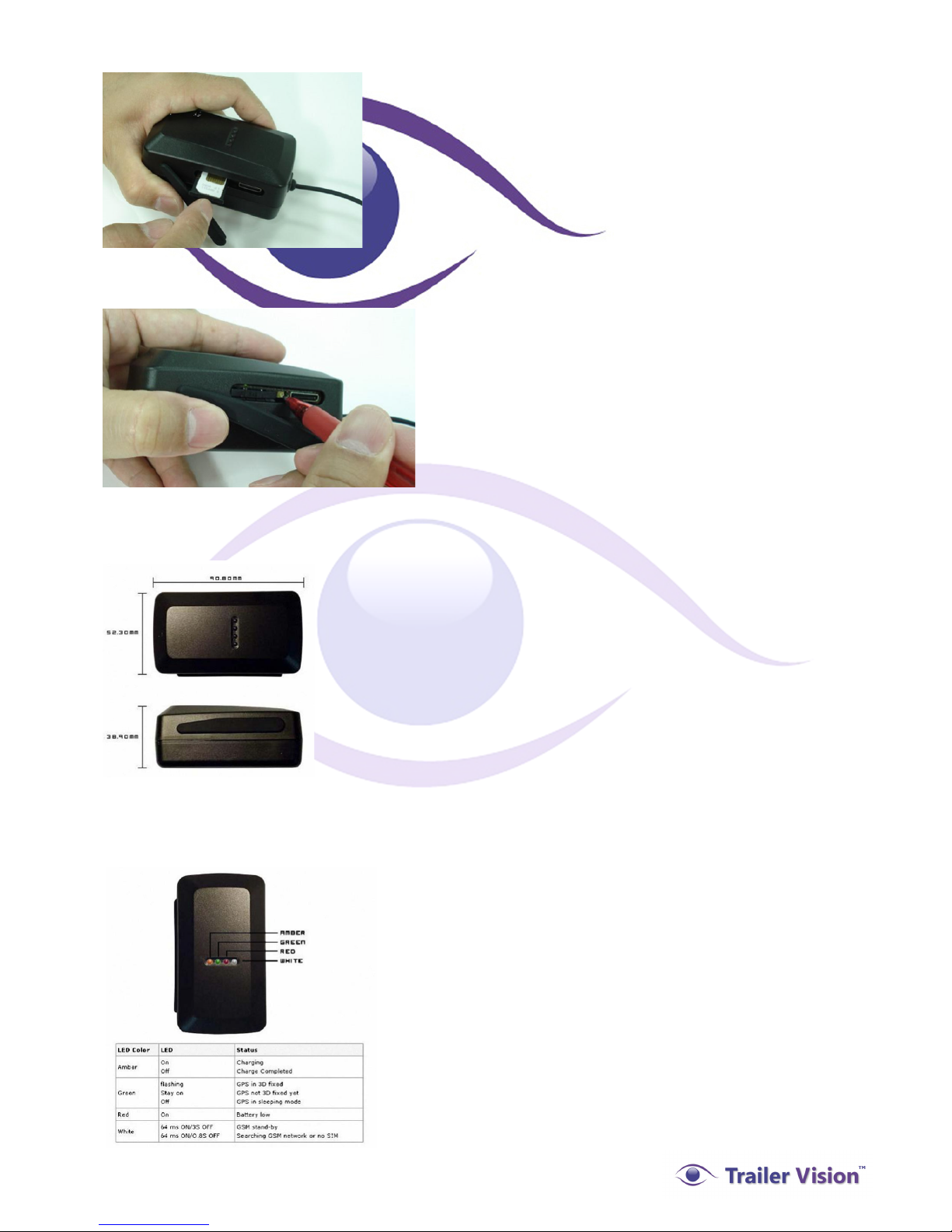
3. To switch off power, remove the SIM card/tray by pushing the yellow button.
DIMENSIONS
LED STATUS INDICATOR
Page 4

STANDARD PARTS:
1. Tracker unit.
2. 18 pin to USB cable.
3. AC power adaptor.
4. Mini CD.
5. User Manual.
USING SUPER I-TRACK WITH A MOBILE PHONE (Up to 3)
To program three ʻAlarmʼ call-back telephone numbers:
Call the tracker unit (SIM) and connect, you will then hear a tone, Enter ***, and the tone will stop.
Enter 0000, the 4 digit pass code. You will then hear a long tone, Enter 1, now Enter the first
(ʻalarmʼ) call-back telephone number. Enter *, to complete the procedure. You will hear a long
tone to verify the procedure, or a set of short tones to indicate that the procedure was incorrectly
completed. End the call, or to enter a 2nd call-back telephone number:
Enter 2, then Enter the second (ʻalarmʼ) call-back telephone number, Enter *, to complete the
procedure. End the call, or to enter a 3rd call-back telephone number:
Enter 3, then Enter the second (ʻalarmʼ) call-back telephone number, Enter *, to complete the
procedure.
To program three SMS ʻAlarmʼ numbers:
Call the tracker unit (SIM) and connect, you will then hear a tone, Enter ***, and the tone will stop.
Enter 0000, the 4 digit pass code. You will then hear a long tone, Enter 4, now Enter the first
ʻAlarmʼ SMS call-back telephone number. Enter *, to complete the procedure. You will hear a long
tone to verify the procedure, or a set of short tones to indicate that the procedure was incorrectly
completed. End the call, or to enter a 2nd SMS ʻAlarmʼ telephone number:
Enter 5, then Enter the ʻAlarmʼ call-back telephone number. Enter *, to complete the procedure.
End the call, or to enter a 3rd SMS ʻAlarmʼ telephone number:
Enter 6, then Enter the ʻAlarmʼ call-back telephone number. Enter *, to complete the procedure.
SMS coordinate call-back settings (21, 22, 23):
After programming the SMS call back numbers, call the tracker and connect, Enter ##, the tone
will stop, Enter 0000, the pass code and then Enter 21, the tracker will hang up.
You will then receive an SMS with real time location, the SMS message will look like this:
Page 5

* HC-V.3.5*SOS*V,N,52"47'52.2,W,000"12'45.0,020.3,358.2*
Key:
Latitude Longitude Speed (Knots) Direction (Degrees)
* HC-V.3.5*SOS*V,N,52"47'52.2,W,000"12'45.0,020.3,358.2*
V = GPS last location
A = GPS current location
SOS = SOS button triggered
ALARM = in-car alarm triggered
SENSOR = motion sensor initiated
The correct format for Google Maps etc is:
N 52 47'52.2",W 000 12'45.0"
To cancel the call-back telephone number 3 (for example):
Call the tracker unit (SIM) and connect, you will then hear a tone, Enter ***, Enter 0000, the pass
code, and you will then hear a long tone, Enter 3*. Hang up.
To Set the Movement Alarm:
Call the tracker unit (SIM) and connect, you will then hear a tone, Enter ***, Enter #0000, Enter
52, hang up.
Page 6
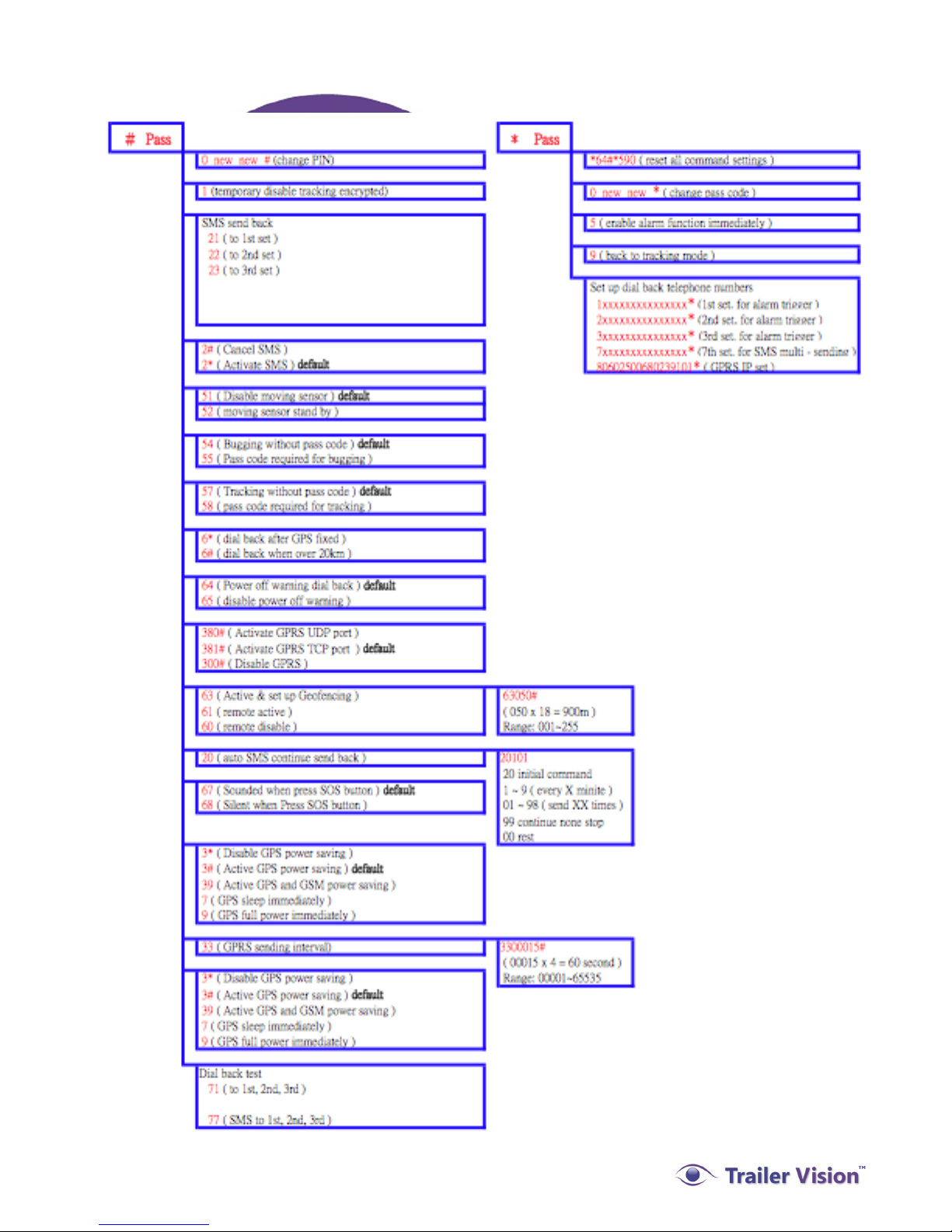
Command Table:
 Loading...