

Page 1
Tractive DOG 6
User Manual
Gebrauchsanleitung
Manuel d’utilisation
Manuale d’istruzioni
Manual de usuario
Page 2

Page 3

Get Started
ENGLISH
1
Page 4
EN
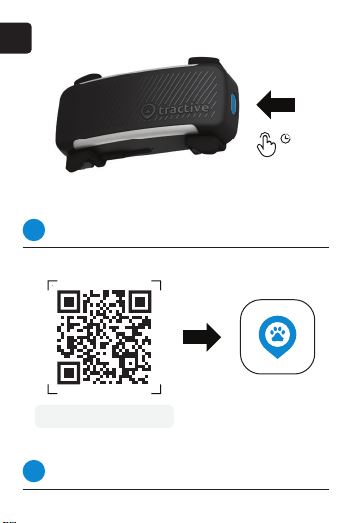
Turn on your tracker
1
Press and hold power button for 3 seconds to turn it on.
tractive.com/start-dog6
Download the app
2
Download the Tractive GPS app for iOS or Android.
2
3 s
Page 5
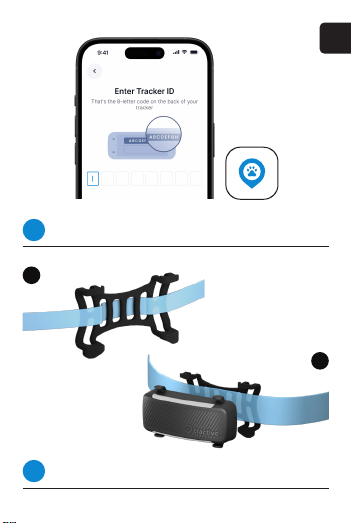
Activate your tracker
3
Follow the instructions in the app to set up your tracker.
A
Attach your tracker
4
Choose method A or B, depending on collar width.
EN
B
3
Page 6
EN
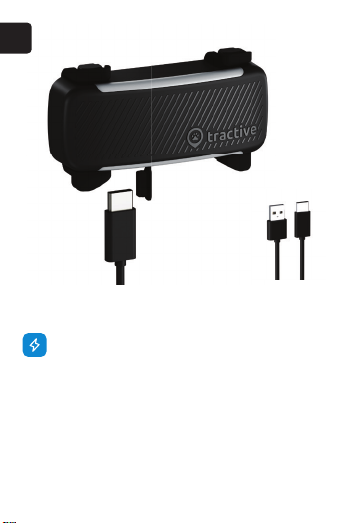
TRACKER CHARGING
Charge the tracker by inserting the USB-C cable into
the port as shown. The bottom LED bar will gradually
light up from left to right as the device charges.
The tracker is fully charged when the entire LED bar is
lit. A full charge takes around 2 hours.
Note: The device is still waterproof if the protective
cover gets lost. You can re-attach a spare part to your
device. Visit help.tractive.com for more information.
4
Standard USB-C
Charging Cable
Page 7
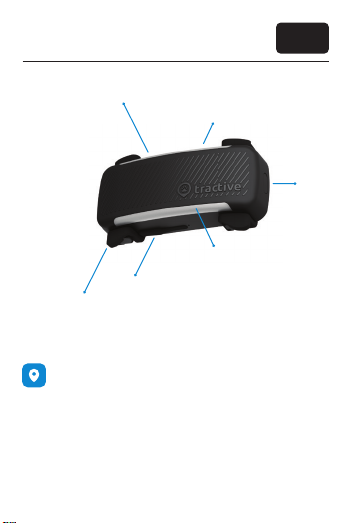
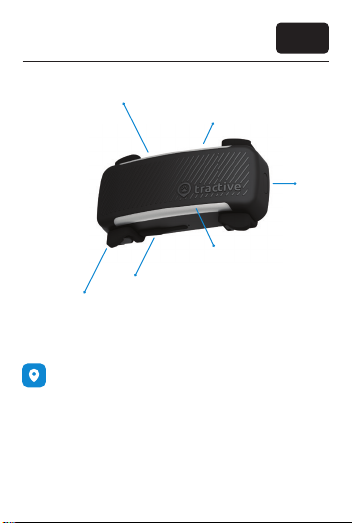
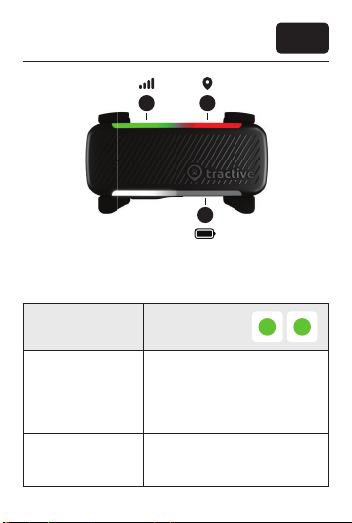
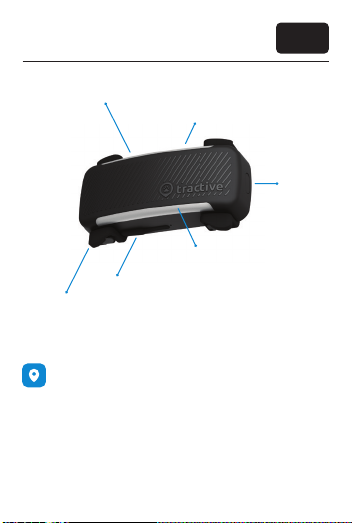
Get to know your device
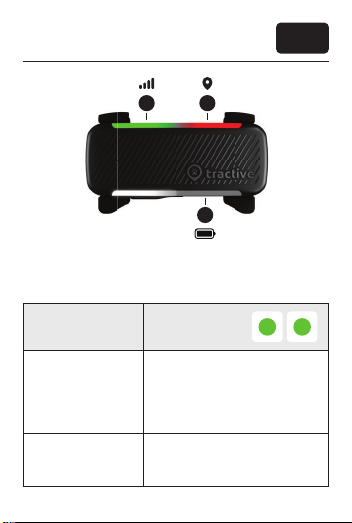
Network Status LED
GPS Status LED
Battery Status
USB Charging Port
Rubber
Attachment Clips
TRACKING MODES
There are 2 different tracking modes: default and
live tracking.
Default Tracking
From the moment your tracker is on, it will be in
“default tracking” mode. That means it’s sending
location updates every 2-10 minutes. That way, it
saves on battery.
EN
On/Off
Button
5
Page 8
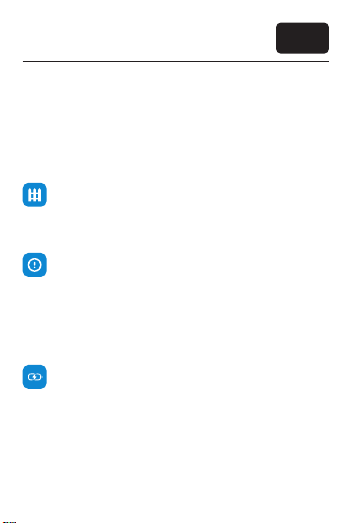
Get to know your device
LIVE Tracking
Press LIVE on the map screen in the app to go into LIVE
mode and get real-time location updates. It should
start quickly but can take up to around 30 seconds. As
LIVE Mode uses more battery, it turns off after 5
minutes (but you can extend this timeout in the app).
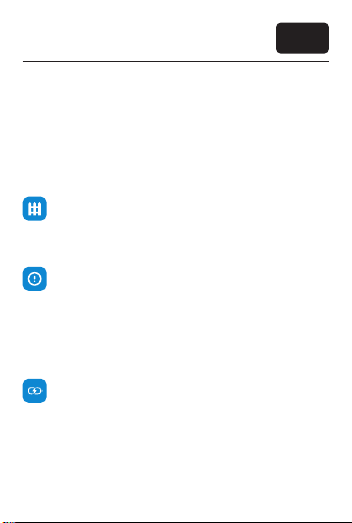
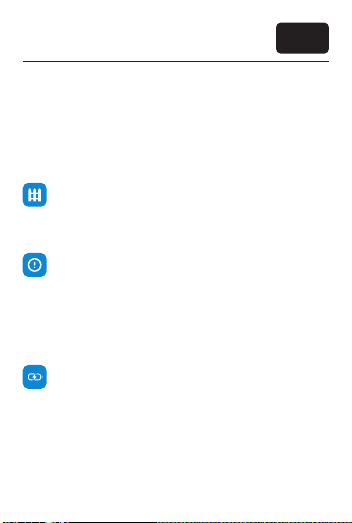
VIRTUAL FENCES
Set safe zones and no-go zones for your pet in the
app to get an alert when your pet leaves or enters one
of them.
WELLNESS MONITORING & HEALTH ALERTS
Once your tracker is up and running, use your tracker
regularly for several weeks, for at least 12 hours per
day. That way, you’ll get a Wellness Score to check on
your dog’s well-being and will activate Health Alerts in
case your dog’s activity and sleep show unusual
changes.
BATTERY LIFE
To extend your tracker’s battery life, set up a Power
Saving Zone at home with your Wi-Fi or Tractive Base
Station. As long as it’s in range, your tracker knows it’s
in “trusted territory”, and saves battery on location
updates.
Learn more about our features at help.tractive.com
6
EN
Page 9
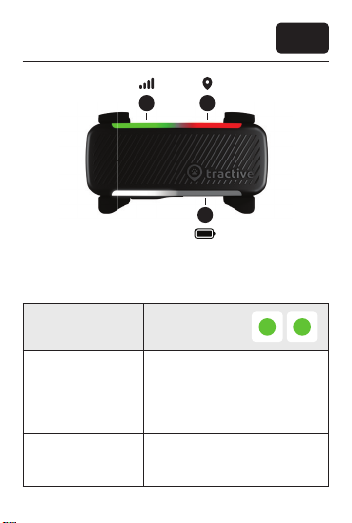
Troubleshooting
EN
1 2
3
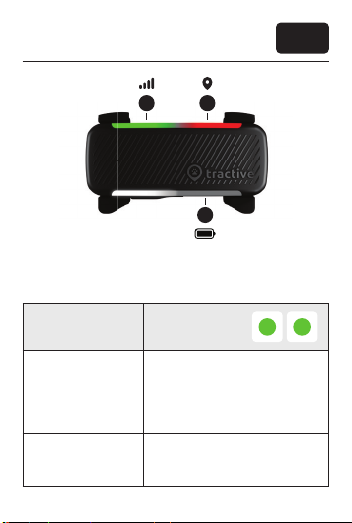
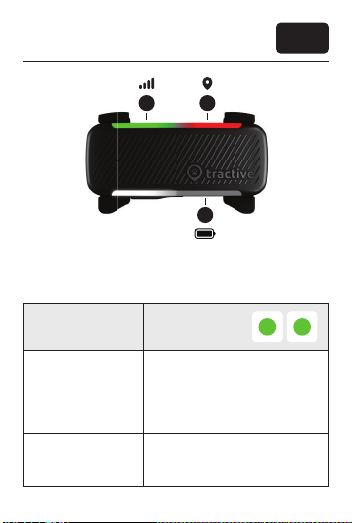
LED STATES
Press the power button shortly. If the tracker is on, the lights
show connection and battery status.
2
Status Green - Green
Green on left (1) shows good
What it means
network. Green on right (2) shows
good GPS. The tracker knows its
GPS location and can send it to
your phone.
1
What to do
Everything works as it should. You
are ready to start tracking.
7
Page 10
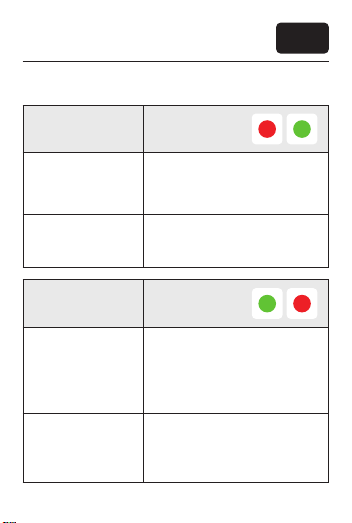
Troubleshooting
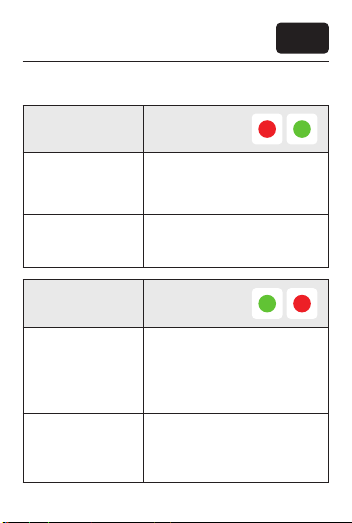
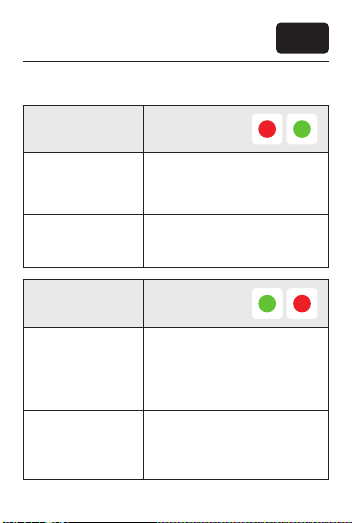
LED STATES
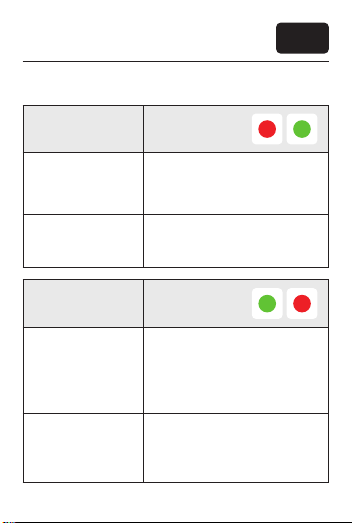
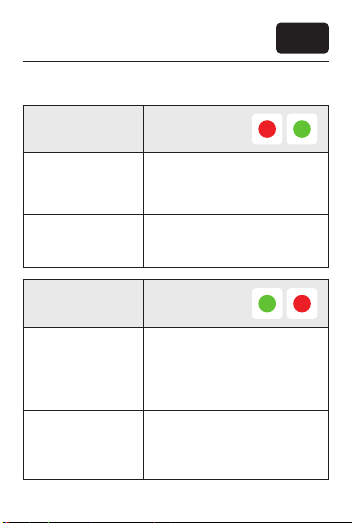
Status Red - Green
The tracker knows its GPS
What it means
What to do
Status Green - Red
What it means
What to do
8
location, but cannot connect to
cellular networks to send it to
your phone.
Move your device to an area with
good cellular network connection.
The tracker is connected to
cellular networks, but cannot
detect its GPS location. Your
device might be indoors or in an
area with limited GPS coverage,
like a forest.
If you are indoors with your device, go outside, wait for a minute,
and press the power button to
check the GPS status again.
EN
2
1
2
1
Page 11
Troubleshooting
LED STATES
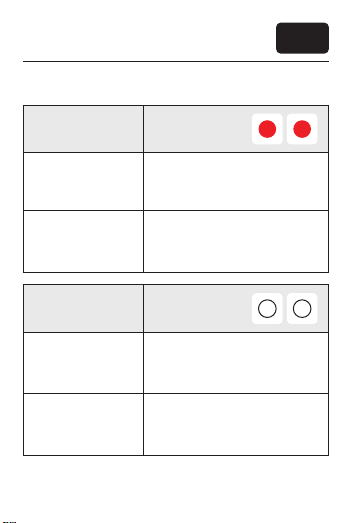
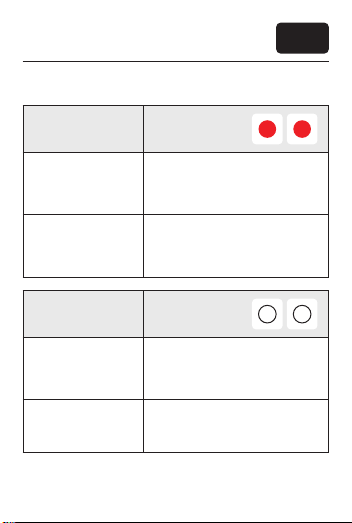
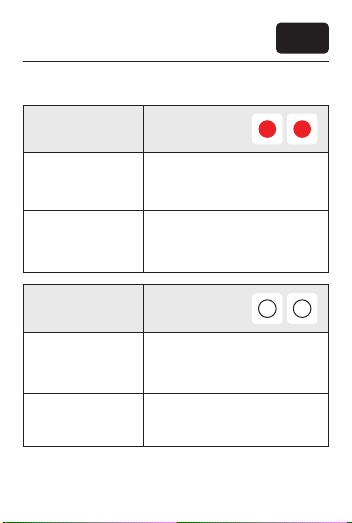
Status Red - Red
EN
2
1
What it means
What to do
Status White - White
What it means
What to do
The tracker does not know its GPS
location, and cannot connect to
cellular networks.
If you are indoors, go outside,
wait for a minute, and press the
power button to check the GPS
and network status again.
The tracker is in a Power Saving
Zone tied to your Wi-Fi or Tractive
Base Station.
LIVE Tracking will become
available again once your tracker
moves out of the Power Saving
Zone.
2
1
9
Page 12
Troubleshooting
LED STATES
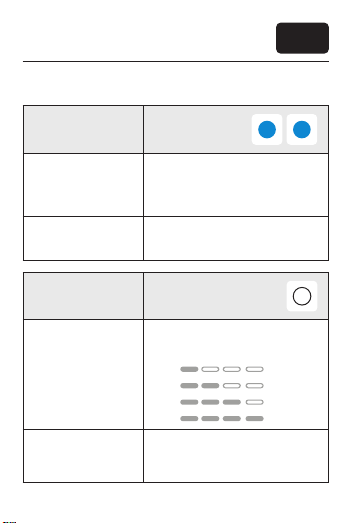
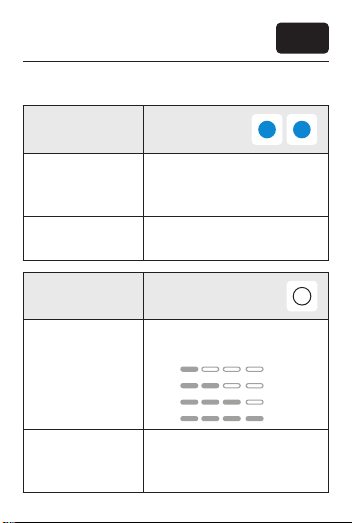
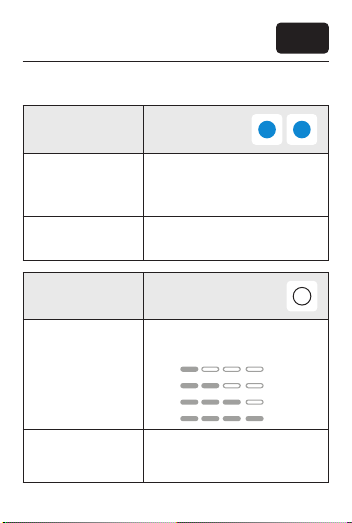
Status Blue - Blue
EN
2
1
What it means
What to do
Status White bottom light
What it means
What to do
10
There is water in the USB-C port
of your device and it cannot be
charged.
Open the charging port and allow
it to dry.
The bottom light bar shows your
tracker’s battery level.
25%
50%
75%
100%
Tap the power button to check
battery level before a longer walk.
Recharge if battery level is low.
3
Page 13
Troubleshooting
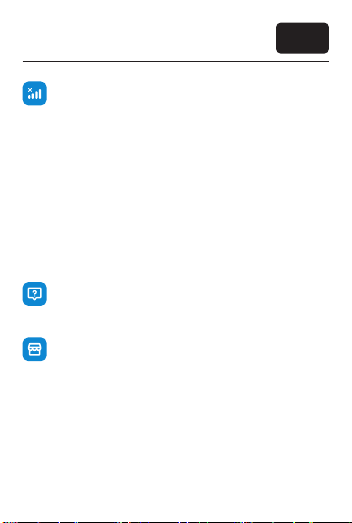
NO GPS OR NETWORK CONNECTION?
If the red lights on top (1 + 2) persist, try restarting the
app and resetting the tracker:
1. Hold the power button down for 10 seconds.
2. Release the power button. The LED will light up for 2
seconds and you will hear a high-pitched tone, this
means your tracker has been successfully reset.
3. Once reset, give the tracker around 10 minutes to
connect to local cell networks and determine
accurate GPS positions.
4. Try a short test walk outside with the tracker in hand
and LIVE tracking activated.
NEED MORE HELP?
If you continue to face difculties, please visit our Help
Center at help.tractive.com
CLIPS TOO SMALL FOR YOUR COLLAR OR HARNESS?
Buy spare accessories, like larger attachment clips, at
our shop at tractive.com
EN
11
Page 14

12
Page 15

Erste Schritte
DEUTSCH
13
Page 16
DE
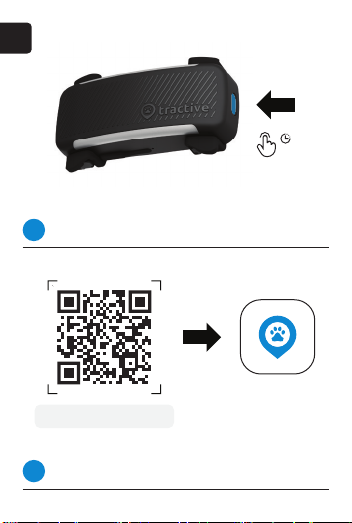
Tracker einschalten
1
Halte den Einschaltknopf für 3 Sekunden gedrückt.
tractive.com/start-dog6
App herunterladen
2
Lade die Tractive GPS App für iOS oder Android herunter.
14
3 s
Page 17
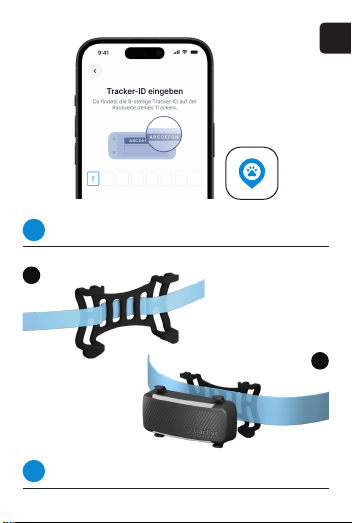
Tracker aktivieren
3
Folge den Anweisungen in der App.
A
Tracker befestigen
4
Wähle je nach Halsbandbreite Methode A oder B.
DE
B
15
Page 18
DE
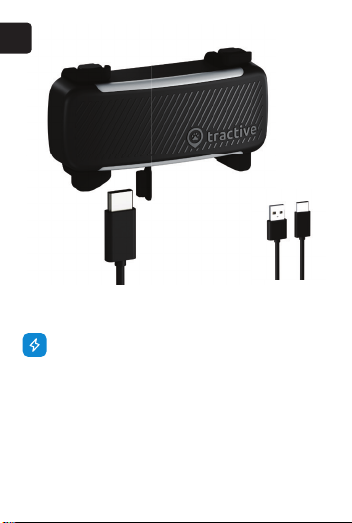
TRACKER LADEN
Stecke das USB-C-Kabel wie abgebildet in die
Öffnung, um den Tracker aufzuladen. Die untere
LED-Leiste leuchtet von links nach rechts auf, während
das Gerät geladen wird. Der Tracker ist nach etwa 2
Stunden vollständig aufgeladen, wenn die gesamte
LED-Leiste leuchtet.
Hinweis: Das Gerät ist auch nach Verlust der
Schutzkappe noch wasserdicht. Bestelle ein Ersatzteil
und besuche help.tractive.com für weitere
Informationen.
16
Standard-USB-
C-Ladekabel
Page 19
Alle Infos zu deinem Tracker
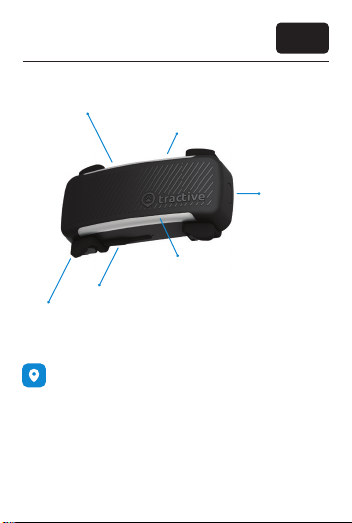
Netzwerk-Status
GPS-Status
Akkustand
USB-C-Ladeanschluss
Gummiklammern
TRACKING-OPTIONEN
Es gibt zwei verschieden Arten von Tracking: Standard
und LIVE
Standard-Tracking
Sobald dein Tracker eingeschaltet ist, bendet er sich
im Standard-Tracking-Modus. Das heißt, er sendet
alle 2-10 Minuten ein Standort-Update. Auf diese
Weise spart er Akku.
DE
Einschaltknopf
17
Page 20
Alle Infos zu deinem Tracker
LIVE-Tracking
Öffne die App und drücke auf “LIVE”, um in den
LIVE-Modus zu wechseln und Standort-Updates in
Echtzeit zu erhalten. Dies kann bis zu 30 Sek. dauern.
Da der LIVE-Modus mehr Akku verbraucht, schaltet er
sich nach 5 Min. ab (Anpassung in der App möglich).
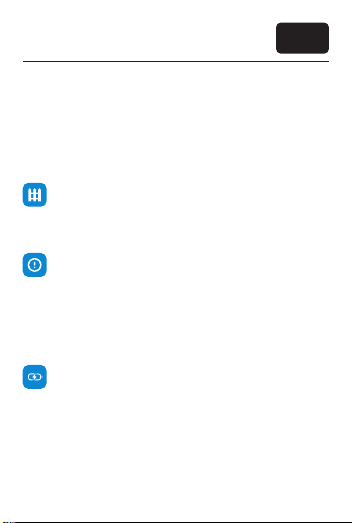
VIRTUELLE ZÄUNE
Lege in der App sichere Zonen sowie Tabuzonen fest,
damit du eine Warnung erhältst, falls dein Haustier
diese verlässt oder betritt.
WELLNESS-TRACKING & GESUNDHEITSWARNUNGEN
Verwende deinen Tracker mehrere Wochen lang
regelmäßig (mind. 12h pro Tag). So erhältst du einen
Wellness-Score, um das Wohlbenden deines Hundes
zu beobachten, und aktivierst Gesundheitswarnungen,
falls die Aktivität und der Schlaf deines Hundes
ungewöhnliche Veränderungen aufweisen.
AKKULAUFZEIT
Um die Akkulaufzeit deines Trackers zu verlängern,
kannst du mittels WLAN oder Tractive Base Station
eine Energiesparzone einrichten. Innerhalb deren
Reichweite weiß dein Tracker, dass er sich in einer
sicheren Zone bendet und spart bei Standort-Updates Akku.
Mehr Infos zu unseren Features auf help.tractive.com.
18
DE
Page 21
Problemlösung
DE
1 2
3
LED-STATUS
Drücke kurz auf den Einschaltknopf. Wenn der Tracker an ist,
zeigen die Lichter den Verbindungs- und Akkustatus an.
2
Status Grün - Grün
Grünes Licht links (1) bedeutet
Bedeutung
eine gute Netzwerkverbindung, grünes Licht rechts (2) ein
stabiles GPS-Signal. Der Tracker
kann Standortdaten senden.
1
Lösung
Es ist alles in Ordnung. Das Tracking kann losgehen!
19
Page 22
Problemlösung
LED-STATUS
Status Rot - Grün
Der Tracker kennt seinen
Bedeutung
Lösung
Status Grün - Rot
Bedeutung
Lösung
20
GPS-Standort, hat aber keine
Mobilfunkverbindung, um ihn an
dein Smartphone zu senden.
Suche einen Ort mit guter Mobilfunkverbindung auf.
Der Tracker ist mit dem Mobilfunknetz verbunden, kann aber
den GPS-Standort nicht ermitteln.
Es herrscht eingeschränkte
GPS-Abdeckung, wie z.B. im Wald
oder in Gebäuden.
Gehe ins Freie, warte eine Minute
und drücke kurz den Einschaltknopf, um den GPS-Status erneut
zu überprüfen.
DE
2
1
2
1
Page 23
Problemlösung
LED-STATUS
Status Rot - Rot
Der Tracker kann weder den
Bedeutung
Lösung
Status Weiß - Weiß
Bedeutung
Lösung
GPS-Standort ermitteln noch eine
Verbindung zum Mobilfunknetz
herstellen.
Gehe ins Freie, warte eine Minute
und drücke kurz den Einschaltknopf, um GPS-Status und Netzwerk erneut zu überprüfen.
Der Tracker ist in einer Energiesparzone (in Reichweite
deines WLANs oder einer Tractive
Base Station).
LIVE Tracking ist wieder verfügbar,
sobald dein Tracker die Energiesparzone verlässt.
DE
2
1
2
1
21
Page 24
Problemlösung
LED-STATUS
Status Blau - Blau
Es bendet sich Wasser im
Bedeutung
Lösung
USB-C-Anschluss deines Geräts,
weswegen es nicht geladen
werden kann.
Öffne den Ladeanschluss und
lass ihn trocknen.
DE
2
1
Status Weißes LED-Licht unten
Die untere Leiste zeigt den Akkustand deines Trackers an.
Bedeutung
Lösung
22
25%
50%
75%
100%
Drücke kurz den Einschaltknopf,
um den Akkustand vor Spaziergängen zu prüfen. Bei Bedarf
auaden.
3
Page 25
Problemlösung
KEINE GPS- ODER NETZWERKVERBINDUNG?
Wenn die beiden oberen Lichter (1 und 2) weiterhin rot
leuchten, starte die App neu bzw. setze den Tracker
zurück:
1. Halte den Einschaltknopf 10 Sekunden lang gedrückt.
2. Lass den Einschaltknopf los. Die LED leuchtet 2
Sekunden lang auf und du hörst einen hohen Ton, was
bedeutet, dass dein Tracker erfolgreich zurückgesetzt
wurde.
3. Gib dem Tracker nach dem Zurücksetzen etwa 10
Minuten Zeit, um sich mit dem lokalen Mobilfunknetz
zu verbinden und die genauen GPS-Positionen zu
bestimmen.
4. Mach mit dem Tracker einen kurzen Testspaziergang im Freien und aktiviere den LIVE-Modus.
HAST DU NOCH FRAGEN?
Falls du noch immer Probleme mit dem Tracker hast,
besuche unser Helpcenter auf help.tractive.com.
BEFESTIGUNGSKLAMMERN ZU KLEIN?
Hol dir Ersatzteile, wie größere Klammern, in unserem
Online-Shop auf tractive.com.
DE
23
Page 26

24
Page 27

Premiers pas
FRANÇAIS
25
Page 28
FR
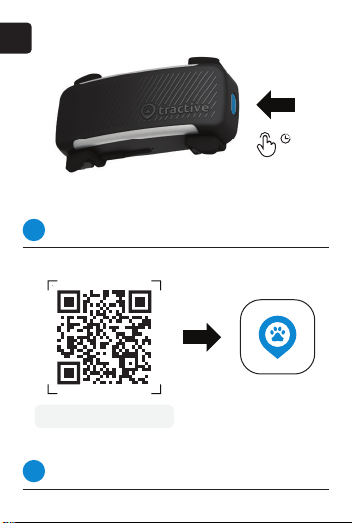
Allumer le traceur
1
Appuyez 3 secondes sur le bouton.
tractive.com/start-dog6
Télécharger l’application
2
Disponible pour Android et iOS.
26
3 s
Page 29
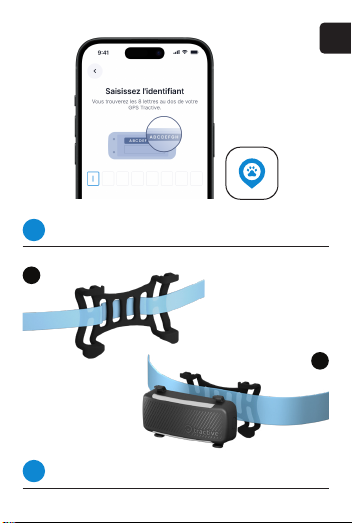
Activer le traceur
3
Suivez les instructions dans l’application.
A
Attacher le traceur
4
Différentes possibilités suivant la largeur du collier.
FR
B
27
Page 30
FR
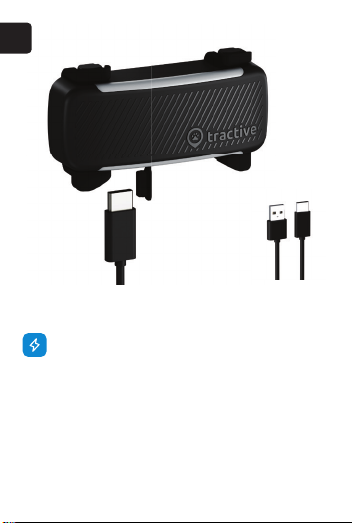
CHARGER LE TRACEUR
Pour charger le traceur, connectez un câble USB-C
comme indiqué. La barre LED s’allumera de gauche à
droite pour indiquer le niveau de charge. Une fois que
la barre LED est entièrement allumée, la batterie est
pleine. Une charge complète dure 2 h environ.
Attention : Le traceur reste étanche même si le
couvercle du port de charge est perdu. Une pièce de
rechange peut être insérée. Plus d’infos sur
help.tractive.com.
28
Câble de charge
USB-C standard
Page 31
Tout sur le GPS Tractive
Voyant réseau
Voyant GPS
Indicateur de batterie
Attache souple
MODES DE SUIVI
Le traceur dispose de deux modes de suivi : standard
et LIVE
Localisation standard
Le GPS se met en mode standard dès qu’il est allumé.
Il mettra à jour sa localisation toutes les 2 à 10 minutes
pour économiser la batterie.
Port de charge USB-C
FR
Bouton
29
Page 32
Tout sur le GPS Tractive
Mode LIVE
Activez ce mode avec le bouton LIVE dans
l’application pour une localisation en direct.
L’activation peut prendre jusqu’à 30 secondes suivant
les circonstances. Le mode LIVE est désactivé après 5
minutes pour économiser la batterie (réglable sur
l’application).
CLÔTURES VIRTUELLES
Dénissez des zones sûres et interdites sur la carte
pour obtenir des alertes lorsque votre animal y entre
ou en sort.
MONITEUR DE BIEN-ÊTRE & ALERTES DE SANTÉ
En utilisant régulièrement le traceur plus de 12 h par
jour pendant plusieurs semaines, vous permettrez à
l’application de calculer un indicateur de bien-être.
Vous pourrez aussi obtenir des alertes en cas de
changements inquiétants des niveaux d’activité et de
sommeil de votre chien.
AUTONOMIE
Créez une zone d’économie d’énergie chez vous à
l’aide de votre réseau Wi-Fi ou d’une station de base
Tractive. Tant que le traceur reste à portée en territoire
connu, il se connectera moins souvent pour optimiser
l’autonomie.
Découvrez nos fonctions sur help.tractive.com.
30
FR
Page 33
Dépannage
FR
1 2
3
VOYANTS LED
Appuyez brièvement sur le bouton. Si le traceur est allumé,
les voyants indiquent l’état de connexion et de la batterie.
2
Voyants Vert - Vert
Le traceur est connecté au ré-
Signication
seau mobile (voyant gauche [1])
et capte un signal GPS (voyant
droit [2]). Il peut se localiser et
vous envoyer ces données.
1
Solution
Tout est en ordre. Vous pouvez
utiliser le traceur.
31
Page 34
Dépannage
VOYANTS LED
Voyants Rouge - Vert
Le traceur peut se localiser, mais
Signication
Solution
Voyants Vert - Rouge
Signication
il n’a pas de connexion au réseau
pour envoyer les données obtenues à votre smartphone.
Déplacez-vous vers une zone
où la couverture mobile est
meilleure.
Le traceur est connecté au
réseau mobile, mais il ne capte
pas de signal GPS. Il se trouve
peut-être à l’intérieur ou à un
endroit où les signaux GPS sont
bloqués.
FR
2
1
2
1
Solution
32
Si vous êtes à l’intérieur, sortez,
attendez une minute et vériez de
nouveau l’état de connexion.
Page 35
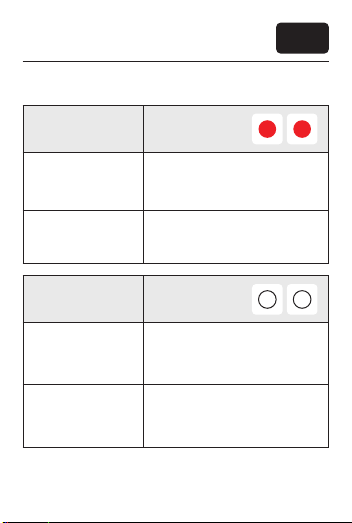
Dépannage
VOYANTS LED
Voyants Rouge - Rouge
FR
2
1
Signication
Solution
Voyants Blanc - Blanc
Signication
Solution
Le traceur ne peut pas se
localiser et n’est pas connecté au
réseau mobile.
Si vous êtes à l’intérieur, sortez,
attendez une minute et vériez de
nouveau l’état de connexion.
Le traceur se trouve dans une
zone d’économie d’énergie
(réseau Wi-Fi ou station de base
Tractive).
Le mode LIVE sera de nouveau
disponible dès que le traceur
sortira de la zone d’économie
d’énergie.
2
1
33
Page 36
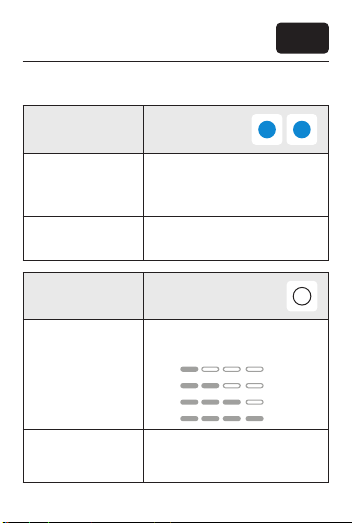
Dépannage
VOYANTS LED
Voyants Bleu - Bleu
FR
2
1
Signication
Solution
Voyants Barre LED blanche
Signication
Solution
34
Le port USB-C du traceur est
humide et le traceur ne peut pas
être chargé.
Ouvrez le port USB et laissez-le
sécher.
La barre LED sur le côté inférieur
indique le niveau de charge.
25%
50%
75%
100%
Appuyez sur le bouton pour vérier l’état de charge avant de sortir.
Rechargez si nécessaire.
3
Page 37
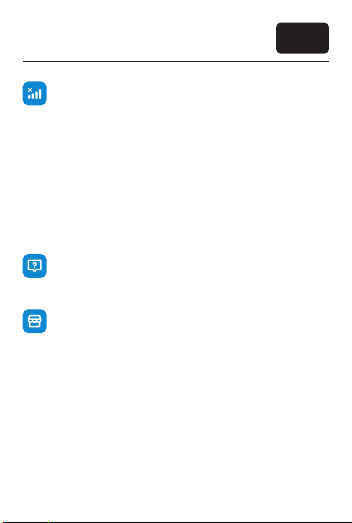
Dépannage
PROBLÈMES DE CONNEXION OU DE GPS ?
Si les voyants du haut (1 et 2) restent rouges, essayez
de relancer l’application et de réinitialiser le traceur.
1) Appuyez 10 secondes sur le bouton.
2) Lâchez le bouton. Le voyant s’allume 2 secondes et
un signal sonore conrme la réinitialisation.
3) Attendez environ 10 minutes an que le traceur
puisse se reconnecter et capter un signal GPS.
4) Sortez avec le traceur en main et testez-le lors
d’une petite promenade en mode LIVE.
BESOIN D’AIDE ?
Si vous rencontrez des difcultés, consultez notre
centre d’assistance sur help.tractive.com.
ATTACHES TROP PETITES ?
Vous trouverez des accessoires et des pièces de
rechange sur notre boutique en ligne tractive.com.
FR
35
Page 38

36
Page 39

Primi passi
ITALIANO
37
Page 40
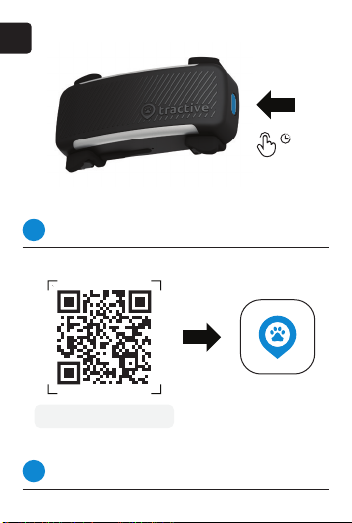
IT
Accendi il localizzatore
1
Tieni premuto il tasto di accensione per 3 secondi.
tractive.com/start-dog6
Scarica l’app
2
Scarica l’app Tractive GPS per iOS o Android.
38
3 s
Page 41
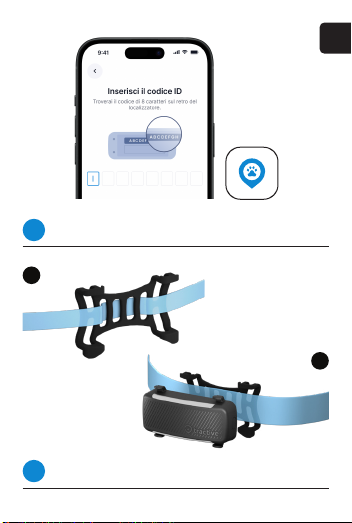
Attiva il localizzatore
3
Segui le istruzioni nell’app per completare l’attivazione.
A
Aggancia il localizzatore
4
Scegli il metodo A o B in base alla larghezza del collare.
IT
B
39
Page 42
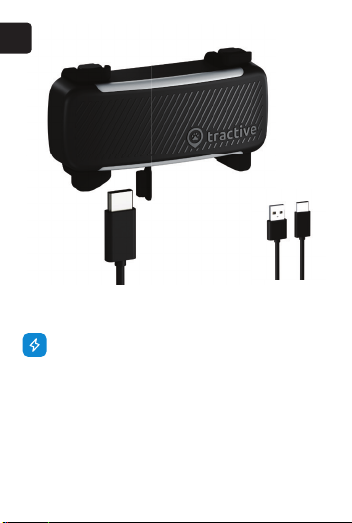
IT
RICARICA
Carica il localizzatore inserendo il cavo USB-C
nell’apposita porta. Le spie in basso si illumineranno
gradualmente all’aumentare del livello della batteria.
Quando tutte le spie sono accese, il dispositivo è
carico. Una ricarica completa richiede circa 2 ore.
N.B.: Il dispositivo è impermeabile anche senza lo
sportellino della porta di ricarica. Per informazioni su
pezzi di ricambio e altro, vai su help.tractive.com.
40
Cavo di ricarica
USB-C standard
Page 43
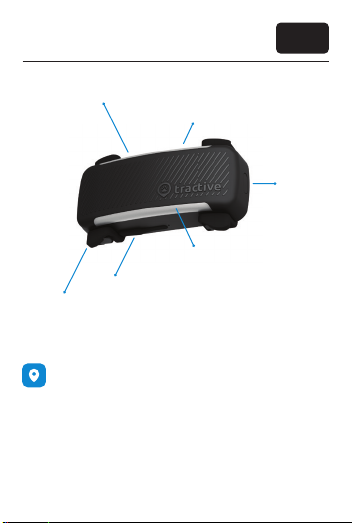
Il tuo localizzatore
Spia rete
Spia GPS
Livello della batteria
Clip di gomma
Porta di ricarica USB-C
MODALITÀ DI LOCALIZZAZIONE
Esistono 2 modalità di localizzazione: standard e LIVE.
Modalità standard
Il localizzatore è settato in modalità standard per
impostazione predenita. Questo signica che gli
aggiornamenti della posizione sono inviati ogni 2-10
minuti per risparmiare batteria.
IT
Tasto di
accensione
41
Page 44
Il tuo localizzatore
Modalità LIVE
Apri l’app e premi LIVE sulla mappa per ricevere
aggiornamenti della posizione in tempo reale. L’avvio
può richiedere no a 30 secondi. Poiché consuma più
batteria, il LIVE si disattiva automaticamente dopo 5
minuti (puoi modicare questa impostazione
dall’app).
RECINTI VIRTUALI
Imposta le zone sicure e quelle proibite per ricevere
una notica ogni volta che il tuo cucciolo ne supera i
conni.
MONITORAGGIO DEL BENESSERE
Usa il localizzatore regolarmente almeno 12 ore al
giorno per diverse settimane. Così potrai ricevere il
punteggio del benessere, per farti un’idea generale di
come sta il tuo cane, e gli avvisi di salute, inviati in
caso di variazioni insolite dell’attività o del sonno.
DURATA DELLA BATTERIA
Per estendere la durata della batteria, imposta una
zona di risparmio energetico in casa collegata alla
tua rete WiFi o a una stazione base Tractive. Finché è
all’interno della zona, il localizzatore sa di essere al
sicuro e non aggiorna la posizione.
Scopri le funzioni alla pagina help.tractive.com
42
IT
Page 45
Risoluzione dei problemi
IT
1 2
3
SPIE
Premi brevemente il tasto di accensione. Se acceso, il localizzatore mostrerà lo stato della connessione e della batteria.
2
Stato Verde - Verde
La spia di sx. (1) indica che la rete
Signicato
è stabile, quella di dx. (2) che il
segnale GPS è buono. Il localizzatore rileva la posizione e la invia
al tuo telefono.
1
Soluzione
Tutto funziona correttamente.
Puoi localizzare il tuo cane.
43
Page 46
Risoluzione dei problemi
SPIE
Stato Rosso - Verde
Il localizzatore riesce a rilevare
Signicato
Soluzione
Stato Verde - Rosso
Signicato
Soluzione
44
la sua posizione GPS, ma non a
connettersi alle reti mobili per
inviarla al tuo telefono.
Spostati in una zona con una
buona copertura mobile.
Il localizzatore si connette alle reti
mobili, ma non riesce a rilevare
la posizione. Potrebbe trovarsi
al chiuso o in una zona con una
scarsa copertura GPS.
Se sei al chiuso, esci e aspetta un
minuto. Poi premi brevemente il
tasto di accensione per vericare
lo stato del GPS.
IT
2
1
2
1
Page 47
Risoluzione dei problemi
SPIE
Stato Rosso - Rosso
IT
2
1
Signicato
Soluzione
Stato Bianco - Bianco
Signicato
Soluzione
Il localizzatore non rileva la
posizione GPS e non si connette
alle reti mobili.
Se sei al chiuso, esci, aspetta un
minuto e premi brevemente il
tasto di accensione per vericare
lo stato della rete.
Il localizzatore è in una zona di
risparmio energetico collegata a
un WiFi o a una stazione base.
Potrai usare il LIVE Tracking quando il localizzatore sarà fuori dalla
zona di risparmio energetico.
2
1
45
Page 48
Risoluzione dei problemi
SPIE
Stato Blu - Blu
IT
2
1
Signicato
Soluzione
Stato Spie bianche in basso
Signicato
Soluzione
46
La porta USB-C è bagnata, non è
possibile ricaricare il localizzatore.
Apri lo sportellino e aspetta che
la porta si asciughi.
Le spie in basso mostrano il livello
della batteria.
25%
50%
75%
100%
Prima delle passeggiate premi il
tasto di accensione per controllare il livello della batteria.
3
Page 49
Risoluzione dei problemi
GPS O RETE ASSENTE?
Se le spie in alto (1 e 2) continuano a essere rosse,
riavvia l’app e resetta il localizzatore.
1. Tieni premuto il tasto di accensione per 10 secondi.
2. Lascia il tasto. La spia si illuminerà per 2 secondi e
sentirai un suono acuto. Questo indica che il
localizzatore è stato resettato correttamente.
3. Una volta terminato il reset, aspetta 10 minuti per
permettere al localizzatore di collegarsi alle reti mobili
e rilevare la posizione GPS.
4. Fai una camminata all’aperto e attiva il LIVE per
vericare che tutto funzioni.
HAI BISOGNO DI AIUTO?
Se hai ancora difcoltà, visita il nostro Help Center al
link help.tractive.com
LE CLIP SONO TROPPO PICCOLE?
Sul sito tractive.com puoi acquistare clip più grandi e
altri accessori.
IT
47
Page 50

48
Page 51

Primeros
pasos
ESPAÑOL
49
Page 52
ES
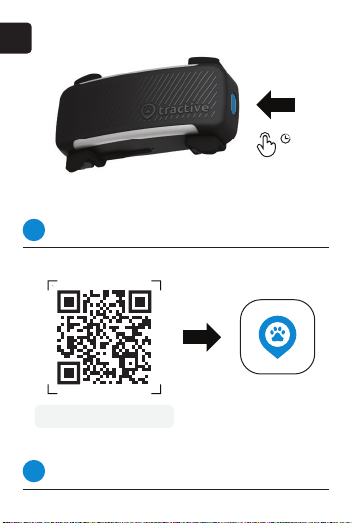
Enciende tu localizador
1
Pulsa el botón de encendido durante 3 s.
tractive.com/start-dog6
Descarga la app
2
Descarga la app Tractive para iOS o Android.
50
3 s
Page 53
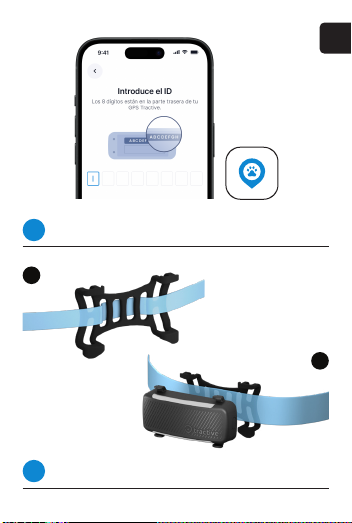
Activa tu localizador
3
Sigue los pasos en la app para completar la activación.
A
Coloca el localizador
4
Elige A o B, en función del ancho del collar.
ES
B
51
Page 54
ES
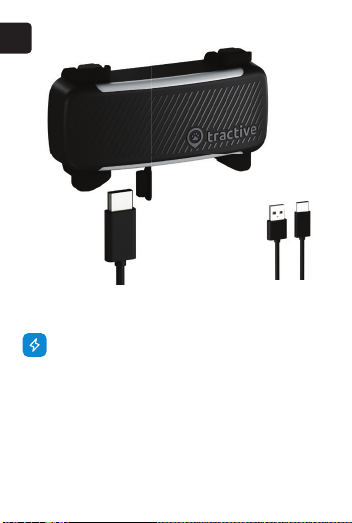
CARGA
Para cargar el localizador, introduce el cable USB-C
en el puerto. La barra inferior LED se iluminará
gradualmente de izquierda a derecha según se vaya
cargando. Cuando toda la barra LED esté iluminada,
el dispositivo estará cargado. Carga completa en
unas 2 horas.
Nota: el dispositivo es impermeable incluso sin la tapa
del puerto de carga. Para más información sobre
piezas de repuesto y mucho más, visita
help.tractive.com.
52
Cable de carga
USB-C estándar
Page 55
Todo sobre tu localizador
LED red
LED GPS
Nivel de la batería
Clips de goma
Puerto de carga USB-C
MODOS DE RASTREO
Existen 2 modos de rastreo: predeterminado y LIVE
Modo predeterminado
Tu localizador está en modo de “rastreo predeterminado” desde que está encendido. Envía actualizaciones de ubicación cada 2-10 minutos. De este
modo, además, ahorra batería.
ES
Botón de
encendido
53
Page 56
Todo sobre tu localizador
Modo LIVE
Pulsa LIVE en el mapa en la app para activar el modo
LIVE y recibir actualizaciones de ubicación en tiempo
real. Debería iniciarse pronto, pero puede tardar hasta
30 segundos. Como gasta más batería, se apaga tras
5 minutos (puedes prolongar este tiempo en la app).
VALLAS VIRTUALES
Congura zonas prohibidas y zonas seguras en la app
y recibe alertas si tu peludo entra o sale de alguna de
ellas.
MONITOR DE BIENESTAR Y AVISOS DE SALUD
Utiliza tu localizador con regularidad, al menos 12
horas al día, durante varias semanas. De este modo,
recibirás el indicador de bienestar, para hacerte una
idea sobre cómo está tu perro, y avisos de salud, en
caso de que se detecten cambios inusuales en su
sueño y actividad.
DURACIÓN DE LA BATERÍA
Para prolongar la duración de la batería de tu
localizador, congura una zona de ahorro de energía
en casa conectada a tu red wi o a una estación
base Tractive. Mientras esté dentro de la zona, el
localizador sabe que está a salvo y no actualiza su
posición.
Más sobre nuestras funciones en help.tractive.com.
54
ES
Page 57
Resolución de problemas
ES
1 2
3
LUCES LED
Pulsa brevemente el botón de encendido. Si está encendido,
las luces mostrarán el estado de conexión y batería.
2
Estado Verde - Verde
El localizador está conectado a la
Signicado
red (verde izquierda [1]) y capta
señal GPS (verde derecha [2]). El
localizador detecta la ubicación
y la envía a tu móvil.
1
Solución
Todo funciona correctamente. Ya
puedes empezar a localizar.
55
Page 58
Resolución de problemas
LUCES LED
Estado Rojo - Verde
El localizador conoce su
Signicado
Solución
Estado Verde - Rojo
Signicado
Solución
56
ubicación GPS, pero no puede
conectarse a la red móvil para
enviarla a tu teléfono.
Mueve tu dispositivo a una zona
con buena cobertura móvil.
El localizador está conectado a
redes móviles, pero no detecta
la ubicación. Puede estar en un
espacio interior o en una zona
con poca cobertura GPS.
Si estás en interior, sal, espera un
minuto, y pulsa brevemente el
botón de encendido para comprobar el estado del GPS.
ES
2
1
2
1
Page 59
Resolución de problemas
LUCES LED
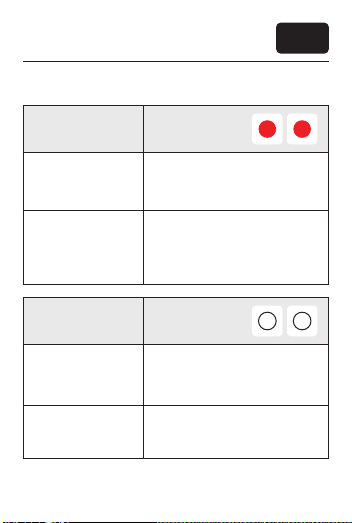
Estado Rojo - Rojo
ES
2
1
Signicado
Solución
Estado Blanco - Blanco
Signicado
Solución
El localizador no sabe su ubicación GPS ni se conecta a la
red móvil.
Si estás en interior, sal, espera
un minuto, y pulsa brevemente
el botón de encendido para
comprobar el estado del GPS y
de la red.
El localizador está en una zona
de ahorro de energía vinculada a
tu wi o estación base Tractive.
Podrás usar el modo LIVE de nuevo cuando el localizador salga de
la zona de ahorro de energía.
2
1
57
Page 60
Resolución de problemas
LUCES LED
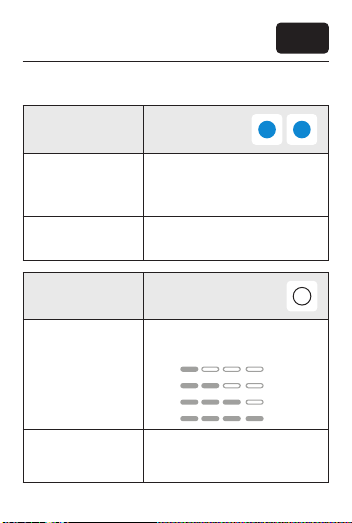
Estado Azul - Azul
ES
2
1
Signicado
Solución
Estado Luz inferior en blanco
Signicado
Solución
58
El puerto USB-C de tu dispositivo
está mojado y no se puede
cargar.
Abre el puerto de carga y deja
que se seque.
La barra de luz inferior muestra el
nivel de batería de tu localizador.
25%
50%
75%
100%
Antes de salir de paseo, pulsa el
botón de encendido para comprobar el nivel de batería.
3
Page 61
Resolución de problemas
¿PROBLEMAS DE CONEXIÓN O GPS?
Si las luces rojas de la parte superior (1 y 2) persisten,
prueba a reiniciar la app y el localizador:
1. Mantén pulsado el botón de encendido durante 10
segundos.
2. Suelta el botón de encendido. El LED se iluminará
durante 2 segundos y escucharás un pitido agudo.
Esto signica que se ha reiniciado correctamente.
3. Una vez reiniciado, espera unos 10 minutos para
que pueda conectarse a una buena red móvil local y
captar la señal GPS.
4. Da un pequeño paseo de prueba con el localizador
en la mano y el modo LIVE activado.
¿NECESITAS MÁS AYUDA?
Si sigues teniendo dicultades, visita nuestro Centro
de Ayuda en help.tractive.com.
¿LOS CLIPS SON MUY PEQUEÑOS?
Compra accesorios de repuesto, como clips más
grandes, en tractive.com.
ES
59
Page 62

60
Page 63

Page 64

 Loading...