

Page 1

Page 2

WELCOME!
Welcome to a new dimension of safety and security for your
vehicles with your purchase of the TrackMateGPS DASH 2.1 and
its advanced technology. You are now able to have control of
your vehicles, whether you operate a business with company
cars, a fleet of limousines, or you are a parent of a teenage
driver. The DASH 2.1 lets you know where your car is at all
times, and it can even signal you if someone exceeds your predetermined speed limit.
The DASH 2.1 is ideal for commercial or personal use, simple to
install and easy to use.
*Read this Registration / Installation Guide carefully before
installing your new DASH2.1.
STEP ONE: Registration and Activation
Before you turn on or install your DASH 2.1, you must create an
account, and register your device(s) on our website. At the
account setup page, you will be prompted to fill out the account
information form. Next you will be prompted to select one of
the service plans: saver, basic, premium or platinum. After
selecting a service plan you will be prompted to enter your
credit card information.
You will now be redirected to the homepagewhere you will be
able to enter the device’s serial number which can be found on
the device and on the box.
Page 3
Important notice: When shaking your DASH 2.1 device
you will hear what appears to be a loose part inside. In
reality, this is the internal shock sensor which is
intended to shake with any movement.
STEP TWO: Installation
Estimated time required for installation: 30 to 45 minutes for
experienced installer – 1 to 2 hours for novice.
It is recommended you use a professional car
electrician to install your tracker. However, if you're
handy, you may choose to install it on your own.
Tools needed for installation: voltage tester/meter,
wire stripper, electrical tape, wire connectors, fuse
taps.
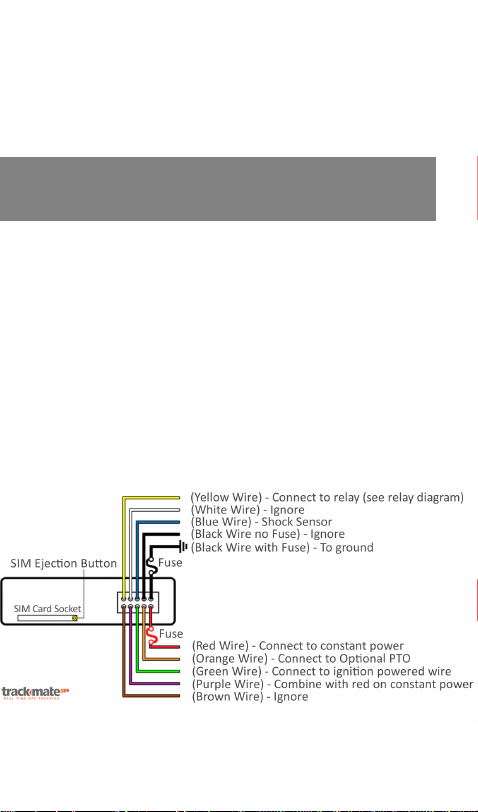
Wire Harness Diagram
Page 4
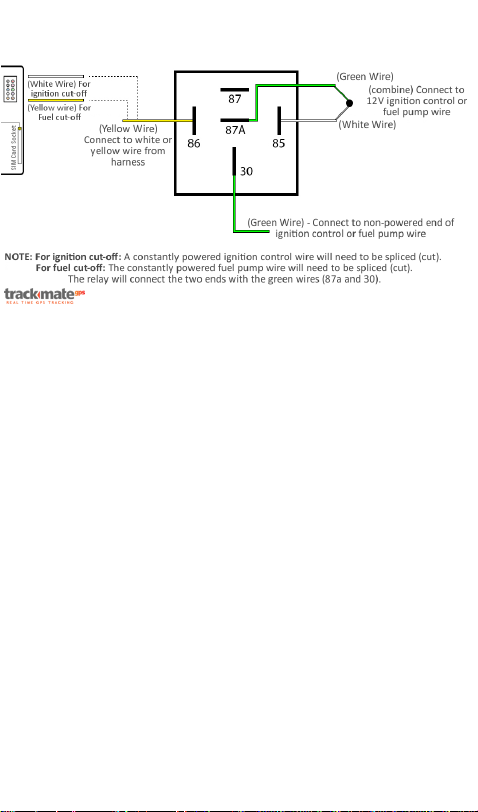
Relay Diagram(optional)
The tracker has to be connected to a power source
providing 9V-30V DC. The wiring must be connected
to constant power for correct tracking. The power
consumption is minimal (<30mA), and should not
affect your vehicle battery, unless the vehicle isnot
used for an extended period (several weeks) and the
vehicle battery is in poor condition.
The wiring harness has ten wires(approximately 3ft
long). First, you connect the black(fused) wire to
ground. The red and purple wires should be
combined and connected to a constant power source
(fuse or wire) providing between 9V and 30V. Last,
the green wire has to be connected to ignition or any
fuse/wire that are powered by ignition.
Your tracker is shipped with the SIM card pre-
installed and the back-up battery depleted.Secure
both antennas to the tracker as indicated. The GPS
antenna (about 10ft long) to the GPS connection and
the short, stubby antenna to the GSM connection.
Once connected to a 12V source, the LED light will
Page 5

begin flashing red. After several minutes it will turn
to a steady blue with an intermittent red flash in the
background. This indicates that the tracker is
transmitting tracking information.You can test your
device before actually installing it by checking off the
“Installed” box online.Your device will usually start
tracking within the hour.
Optimal installation locations are below the
dashboard or behind the glove compartment. For
additional installation options, view the attached
image. For best results, the GPS antenna should be
exposed, however, as long as the antenna is not
blocked by metal, it will track well. Many experts
install the GPS antenna in the A pillar of the vehicle
for optimal tracking. Installing in the engine
compartment is not recommended, because of the
extreme temperatures which can affect performance
of the device.
In the event the tracker does not begin tracking, please
contact us by phone at 718-878-4056 or email us at
[email protected] with your username in the
subject line. We will assist you promptly.
FREE TRIAL PERIOD
Your purchase includes a free trial period for7 days from the
date of your tracking. At time of registration the quarterly fee
will be put on hold on your credit card (please note that the free
trial period does not apply to any additional devices that you
add to the account).
Page 6

No contract or service agreement is required. The tracking fee is
billed automatically every three months. If you wish to
terminate service, a 10 day notice prior to renewal is required.
Service fees are not refundable.
OTHER IMPORTANT INFORMATION
Most electronic devices that rely on software to operate
occasionally become unresponsive (freeze) and require rebooting. This reboot can in most instances be done remotely by
us. However, occasionally the device has to be rebooted
manually.
Manual reboot instructions: 1) remove wiring harness from
device 2) pop SIM card out from tracker by inserting pointy
object in yellow button near SIM card tray 3) after about 10
seconds, re-attached wiring and push SIM card back in.
Feel free to contact us for any assistance or troubleshooting.
When you activate your DASH 2.1 unit, you acknowledge and
accept the terms and conditions of the service agreement.
Should you discontinue service, your SIM will be de-activated.
Re-activating your service might carry a $20 fee.
We reserve the right to occasionally request from you
to replace the SIM card with a new SIM card in order to
provide improved tracking reliability.
Page 7

THANK YOU!
Thank you for purchasing the TrackmateGPS™ DASH 2.1. We are
confident you will find the service and features a valuable part
of your personal or professional life. If you have any questions,
please feel free to contact us at:
Page 8

 Loading...