

Page 1

Mini 2G
GPS-TRACKER1
Page 2

Pack contents / product parts ....................................................................................................................... 3
General information ..................................................................................................................................... 4
Turning the tracker on ................................................................................................................................................................. 4
Functions ...................................................................................................................................................... 5
Checking the connection ............................................................................................................................................................. 5
SOS button ................................................................................................................................................................................... 6
Geofencing ................................................................................................................................................................................... 6
Speed alert ................................................................................................................................................................................... 6
Movement alert ........................................................................................................................................................................... 7
Low battery alert ......................................................................................................................................................................... 7
Light and sound meaning .............................................................................................................................. 9
Declaration of Conformity .......................................................................................................................... 11
Environmental Obligations ......................................................................................................................... 12
Page 3
3
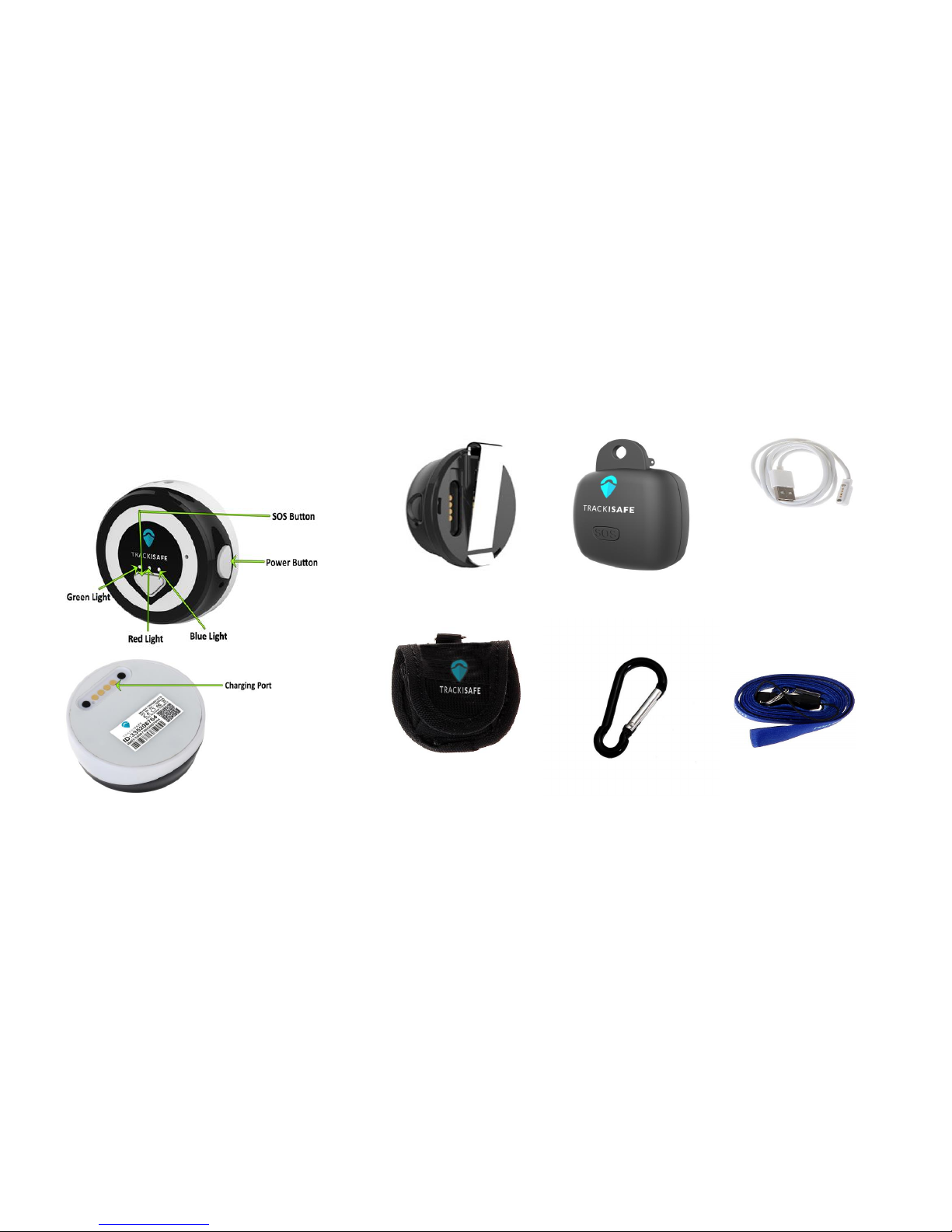
Pack contents / product parts
Clipper
Magnetic
Charging
Cable
Clip Box
Pouch
Lanyard
Clip catch
Page 4

4
General information
These operating
instructions are for the
Trackisafe Mini 2G GPS
Tracker, which will simply
be referred to as ‘tracker’ in the
following. It contains important
information regarding set-up and
operation.
Before using the tracker, please
read the operating instructions
carefully. This particularly applies to
the safety notes. Failure to adhere
to these operating instructions may
result in severe injury or damage to
the tracker.
The operating instructions are
based on the standards and rules
in force in the European Union.
When abroad, you must also observe
country-specific guidelines and laws.
Keep the operating instructions for
future use. If you pass the tracker
on to third parties, please be
absolutely sure to include these
operating instructions.
Turning the tracker on
1. Connect the charging plug of the
charging cable to the tracker with
the magnetic charging port.
2. Press and hold the on/off button
for at least 3 seconds.
The green light on the front of
the tracker should blink for a few
seconds.
3. Put the tracker down and wait for
at least 15 minutes.
Page 5

5
The tracker will carry out initial GPS
positioning. This is required for the
device to function correctly. The
tracker will then be ready for use
and can be activated.
Please note: this procedure is only required the
very first time the tracker is turned on.
Activating the tracker
1. Download the V by Vodafone app from the
Apple Store or Google Play store.
2. Register or log into your V by Vodafone account
and click on the + button to add a device.
3. Insert your tracker IMEI and follow the
instructions to activate your price plan.
4. Download the TrackiSafe app from the Apple
Store or Google Play.
5. Register or log into your TrackiSafe account.
6. Select "Activate device" in the operation menu
and follow the instructions.
Functions
Checking the connection
Press the on/off button to check
whether the tracker is on or off.
If the green light comes on, the
tracker is on. If no light comes on,
the tracker is off.
You can check the tracker’s activity
by pressing the SOS button quickly.
If the green light comes on, the
tracker is activated.
Note: You can save battery life by increasing the
tracking interval in the TrackiSafe app. As soon as
the battery level is low, the red light will start to
blink.
Page 6

6
SOS button
If you press the SOS button for at
least 3 seconds, the location and
a text message will be sent to the
e-mail you have provided.
Geofencing
A geofence is a self-defined virtual
boundary. You will receive a notification
If the tracker goes into or out of this area.
1. Select the tracker on the Trackisafe homepage
or in your app.
2. Click on “fence”.
3. Click on the “Create a new
fence” button.
A pink rectangular fence will be
created around your device’s
current location (or in the centre of
the map).
− You can also enter an address
to position a fence.
− You can choose a pre-defined
size.
− You can change the size
by making the sides of the
rectangle bigger or smaller, or
by moving the rectangle.
4. Once your fence has been
created, you can give your
geofence a name and click on
“Save”.
5. You will receive a notification in the TrackiSafe
app every time your tracker enters or leaves this
area. If you want to receive email notifications as
well, tap on "Share", then on “New contact”. You
will then be able to add an email address for this
alert.
Speed alert
You will receive a notification as
Page 7

7
soon as the tracker moves faster
than the speed pre-defined by you.
1. Select the tracker on the Trackisafe
homepage or in your app.
2. Go to “Settings”.
3. Enable the alert by checking the Speed alert
box.
4. Enter a speed.
5. Add a contact where required.
6. Click on “Save”.
7. If you want to receive a notification via email as
well, go to the Settings area in the app, swipe
right on the "Speed alert", then tap on "Share"
then on "New contact". You will then be able to
add an email address for this alert.
Movement alert
You will receive a notification as
soon as the tracker starts to move.
1. Select the tracker on the TrackiSafe app.
2. Go to “Settings”.
3. Set the "Start moving alert" ON.
4. Enable the alert by checking the "Start Moving
alert" box
5. Click on “Save”.
6. If you want to receive a notification via email as
well, go to the Settings area in the app, swipe
right on the "Moving Start alert", then tap on
"Share" then on "New contact". You will then be
able to add an email address for this alert.
Low battery alert
You will receive a notification in the TrackiSafe
app when battery level is low.
Page 8

8
1. Select the tracker in the TrackiSafe
app.
2.Go to “Settings”.
3. Set the “Low battery alert” ON
4. Click on “Save”
5. If you want to receive a notification via email as
well, go to the Settings area in the app, swipe
right on the "Low battery alert", then tap on
"Share" then on "New contact". You will then be
able to add an email address for this alert.
Page 9
9
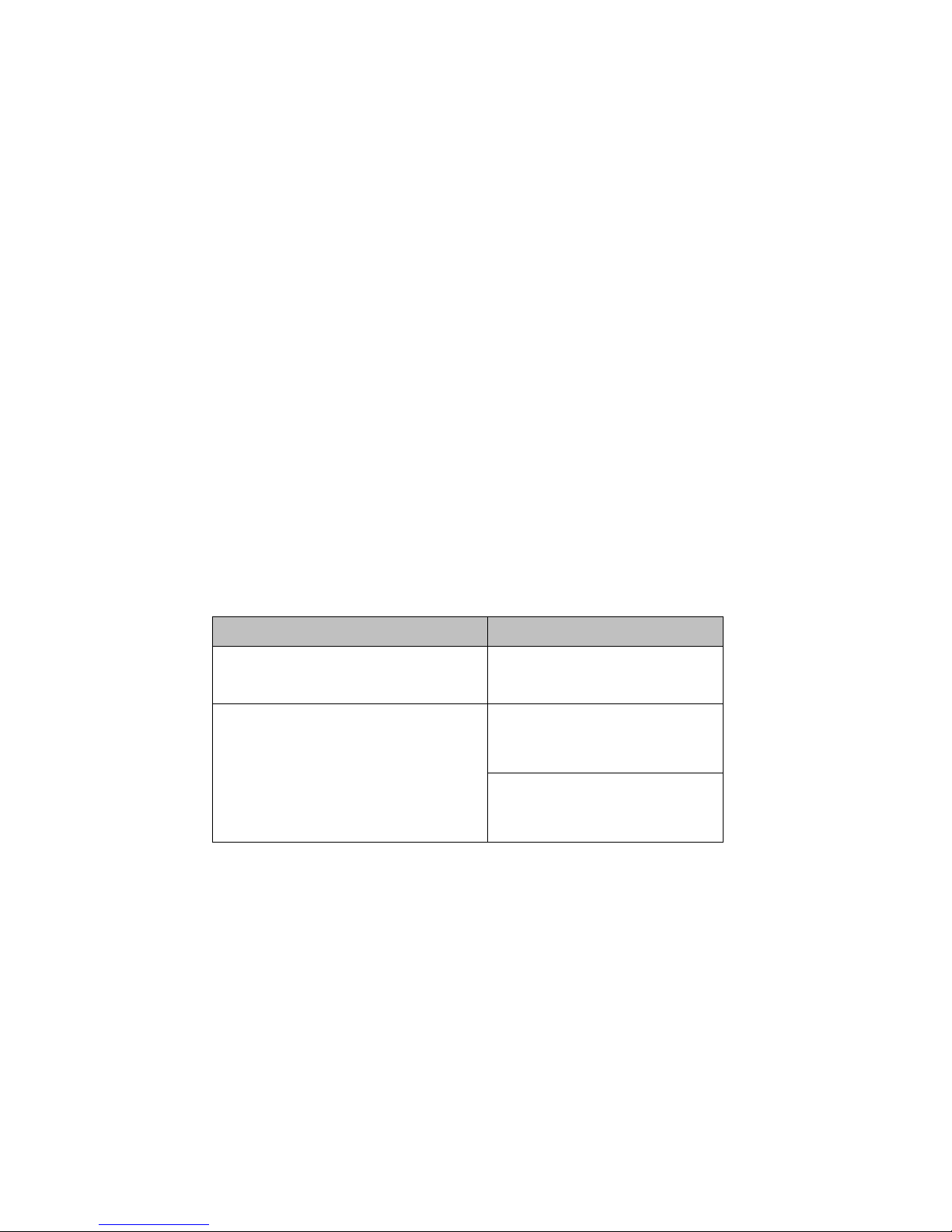
Light and sound meaning
Action
Light
Switch On: Press the on/off
button and hold for 3 seconds
Green light blinks twice,
the tracker starts up
Check if the device is to the
mobile network:
Press the on/off button and quick
release
If device is connected:
Green light turns on for
3 seconds
If device is not connected:
Red light blinks on and off
for about 5 seconds
Page 10
10
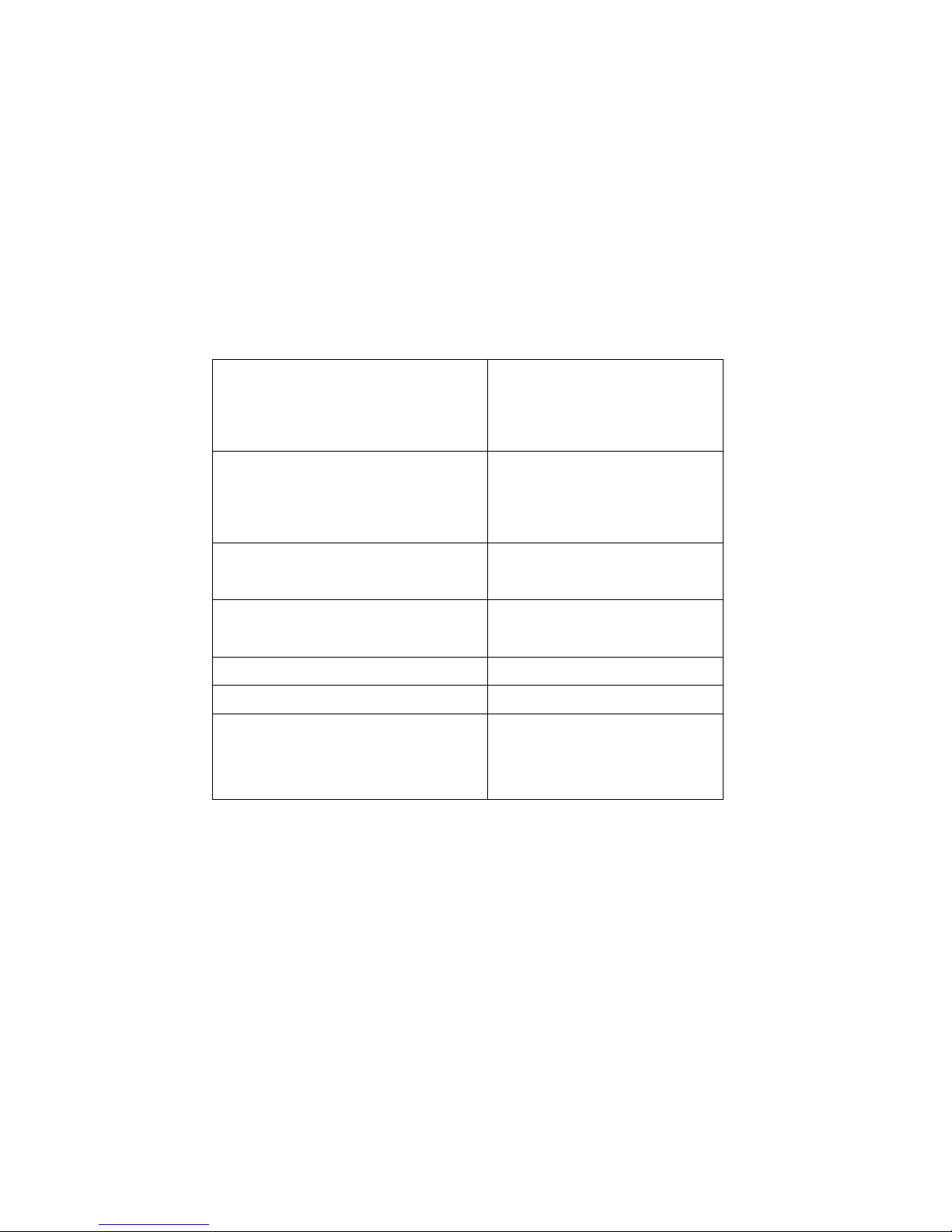
When device connects with
cellular network and GPS: Press
the on/off button and quick
release
Blue light turns on for
3 seconds
Check if the device is ON or OFF:
Press the on/off button quickly
If the device is on, green
lights turns on for 3 seconds.
If it is off, no lights turn on
Switch Off: Press the on/off
button and hold for 3 seconds
Red light blinks three
times, the tracker turns off
Press the SOS button
and hold for 2 seconds
Green light blinks twice
Low battery
Red light blinks
Battery is charging
Red light blinks slowly
Connected to a power
source and battery is
fully charged
Red light solidly lit up
Page 11
11
Declaration of Conformity
The NDM Network hereby
declares that the GPS tracker
radio equipment model
TRKM014 conforms with EU
Directive 2014/53/EU. The full text
for the EU Declaration of
Conformity can be found on the
following webpage:
www.trackisafe.com/conformity
Disposal
Disposing of the packaging
Dispose of the
packaging ensuring that
materials are correctly
separated. Dispose of
cardboard and carton as waste
paper and dispose of foils via the
recyclable material collection service.
Disposing of the tracker
(Applicable in the EU and other
European countries with systems
of separately collecting waste and
recyclables).
Old devices cannot be
disposed of as household
waste!
If the tracker can no longer
be used, all consumers are
legally obligated to separate old
devices from household waste,
e.g. by disposing of them using a
municipal/district collection point.
This ensures that old devices are
Page 12

12
properly recycled and avoids
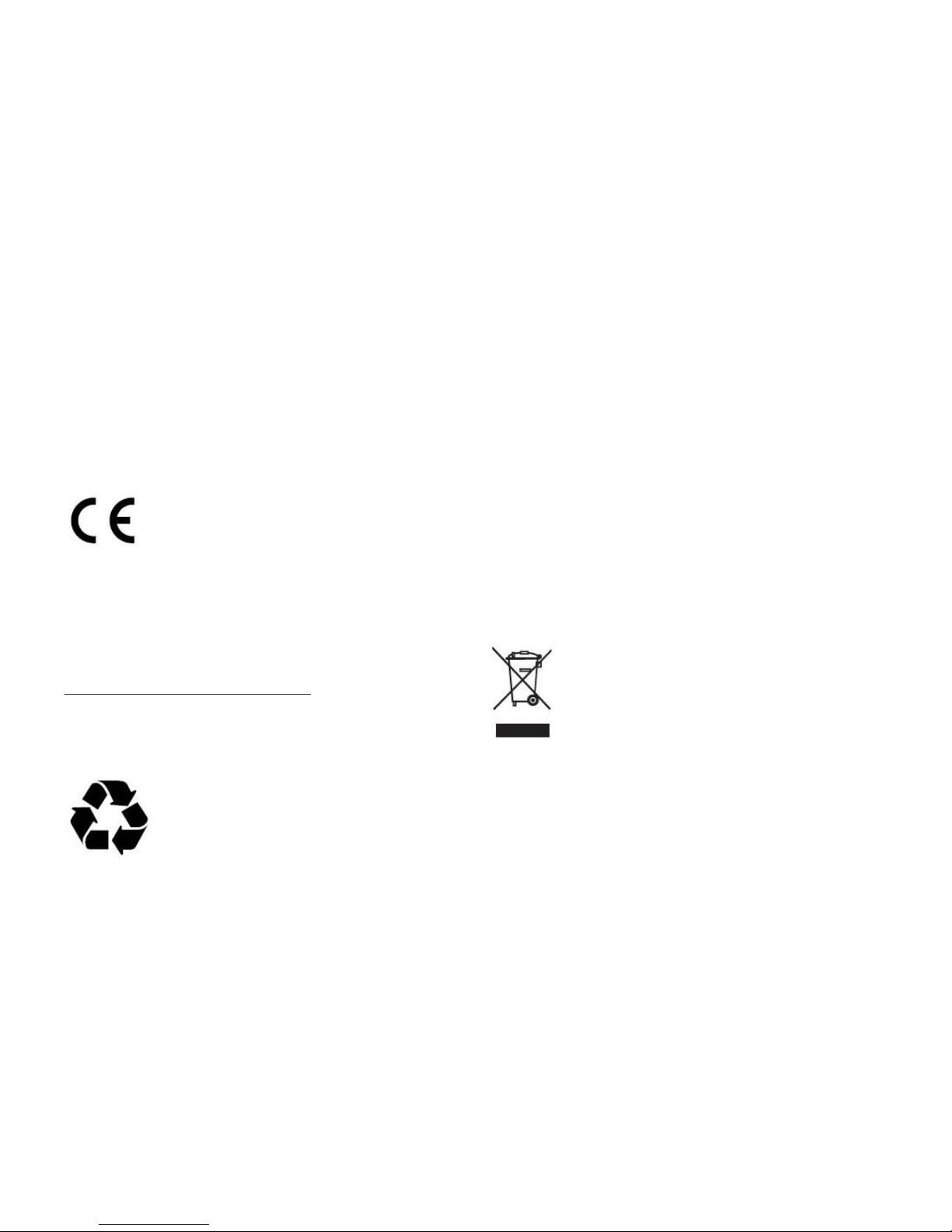
negative environmental impact. This
is why electronic devices are labelled
with the symbol shown here.
Batteries cannot be
disposed of as household
waste!
As a consumer, you are
legally obligated to dispose of all
batteries at a municipal/district collection point or
at a retailer, regardless of whether or not they
contain harmful substances*, so that they can be
disposed of in an environmentally friendly way.
*labelled as: Cd = cadmium,
Hg = mercury, Pb = lead
Environmental Obligations
Green dot system represents that,
Trackisafe fulfils the obligations of the
national packaging laws (Packaging
manufactures, fillers, retailers and importers),
have jointly decided to find an organization or
system to which trackisafe can transfer their
obligations. The task of these compliance schemes
is to co-ordinate the collection, sorting and
recycling of used packaging.
Manufacturer Address:
TRACKIMO
Grafenberger Allee 277-287,
D-40237 Düsseldorf
Phone Number: +492115476331
 Loading...