

Page 1
TRACKINGTHEWORLD
v
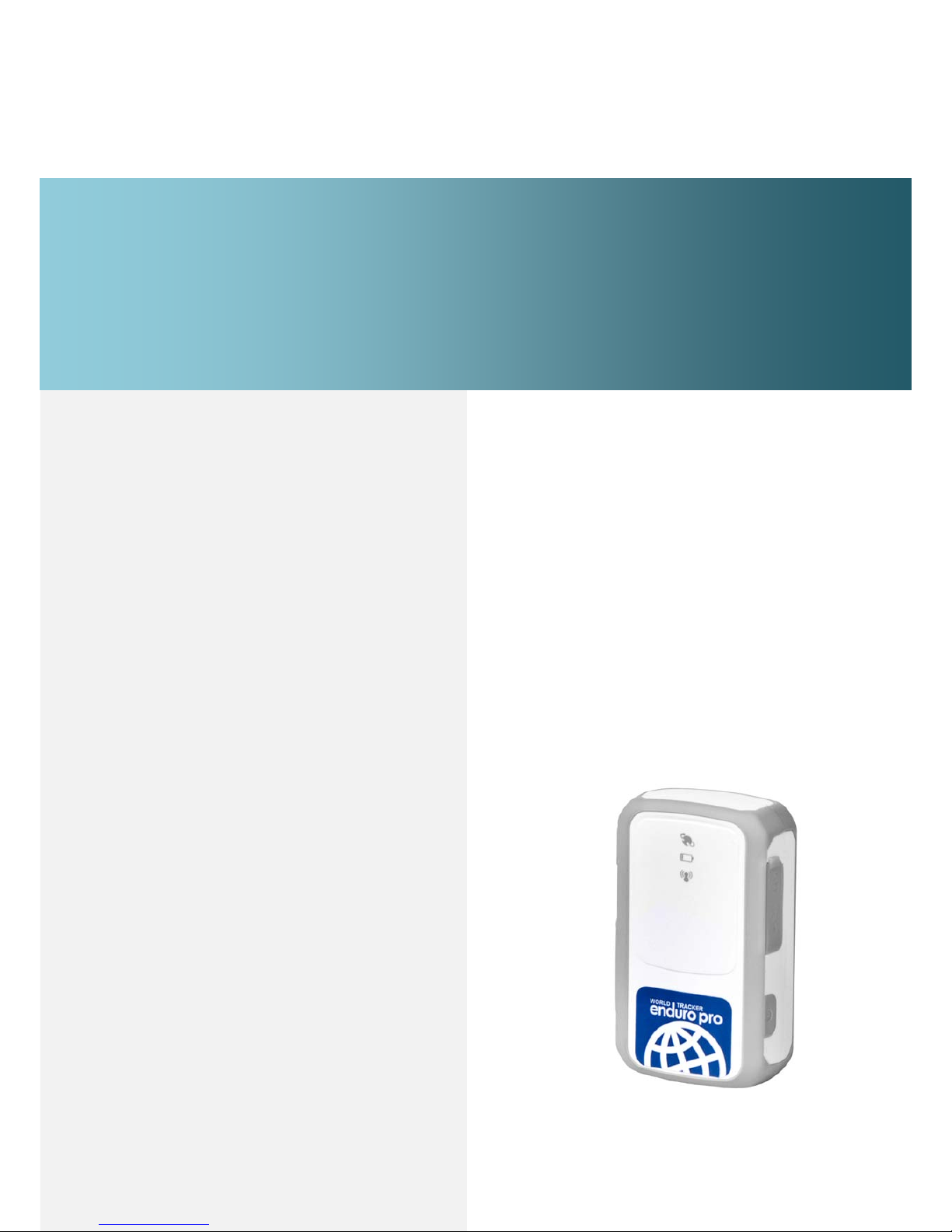
GSM/GPRS/GPS WorldTracker Enduro Pro
User Manual
Revision: 1.02
TrackingTheWorld
www.trackingtheworld.com
[email protected]
Page 2
WorldTracker Enduro Pro User manual TRACKINGTHEWORLD
- 1 -
Document T itle
WorldTracker Enduro Pro User manual
Version
1.02
Date
2010-12-20
Status
Release
Document Control ID
TRACGL200UM001
General Notes
TrackingTheWorld offers this information as a service to its customers, to support application and engineering
efforts that use the products designed by TrackingTheWorld. The information provided is based upon
requirements specifically provided to TrackingTheWorld by the customers. TrackingTheWorld has not
undertaken any independent search for additi onal relevant information, including any information that may be
in the customer’s possession. Furthermore, s ystem validation of this product des igned by TrackingTheWorld
within a larger electronic sy stem rem ains the responsib ility of the cust omer or the c ustomer’s syst em integ rator.
All specifications supplied herein are subject to change.
Copyright
This document contains proprietary technical in formation which is th e property of TrackingTheWorld, copying
of this document and giving it to other s and the using or communication of the contents thereof, ar e forbidden
without express authority. Offenders are liable to the payment of damages. All rights reserved in the event of
grant of a patent or the registration of a utility model or design. All specification supplied herein are subject to
change without notice at any time.
Copyright © TrackingTheWorld 2010
Page 3

WorldTracker Enduro Pro User manual TRACKINGTHEWORLD
- 2 -
Contents
Contents ....................................................................................................................................................................... 2
0. Introduction ............................................................................................................................................................. 3
1. Product Overview .................................................................................................................................................... 4
1.1. Appearance..................................................................................................................................................... 4
1.2. Buttons/Mini USB Interface Description ....................................................................................................... 4
1.3. LEDs Description .......................................................................................................................................... 5
1.4. External Power Interface................................................................................................................................ 5
1.4.1. External DC Charger Interface..................................................................................................... 5
1.4.2. External Battery Interface ............................................................................................................ 6
1.5. External GPS antenna specification ............................................................................................................... 7
1.6. Ignition Detection .......................................................................................................................................... 7
2. Getting Started ......................................................................................................................................................... 8
2.1. Parts List ........................................................................................................................................................ 8
2.2. Battery Charging ............................................................................................................................................ 9
2.3. WorldTracker Enduro Pro External Cable Interface ...................................................................................... 9
2.4. Install SIM Card ........................................................................................................................................... 10
2.5. Install Device Into The Holder..................................................................................................................... 10
2.6. Turn on/Turn off........................................................................................................................................... 10
3. Troubleshooting and Safety info ............................................................................................................................ 13
3.1. Troubleshooting ........................................................................................................................................... 12
3.2. Safety info .................................................................................................................................................... 13
Page 4

WorldTracker Enduro Pro User manual TRACKINGTHEWORLD
- 3 -
0. Introduction
WorldTracker Enduro Pro is a powerful GPS locator desi gned for v ehicle, pets and asset s
tracking. With superior receiving sensitivity, fast TTFF and GSM frequencies
850/900/1800/1900, its location can be re al time or sched ule trac ked by bac kend serv er or
specified terminals. Based on the embedded @Track protocol, WorldTracker Enduro Pro
can communicate with the backend server through GPRS/GSM network, and transfer
reports of emergency, Geo-fencing, device status and scheduled GPS position etc… It is
easy for Service providers to setup their tracking platform based on t he funct io nal @ Trac k
protocol.
Page 5
WorldTracker Enduro Pro User manual TRACKINGTHEWORLD
- 4 -
1. Product Overview
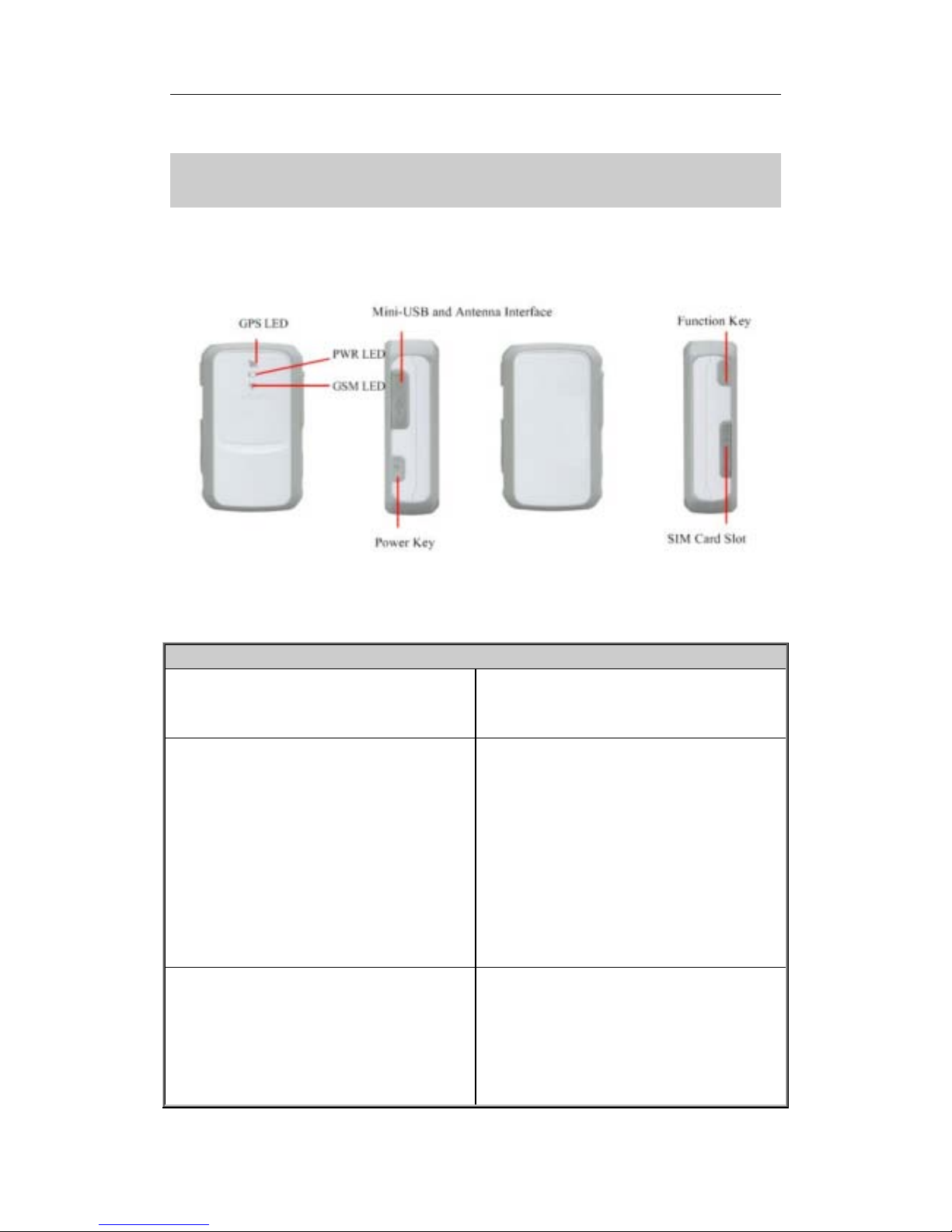
1.1. Appearance
1.2. Buttons/Mini USB Interface Description
Button /Mini USB Interface Description
Power Key Turn on WorldTracker Enduro Pro
Turn off WorldTracker Enduro Pro when
without charging. (If power key is enabled)
Function Key Geo-Fence mode
Long press the key to enable/disable
Geo-Fence ID0
Geo-Fence in current position mode
Long press the key to enable/disable
Geo-Fence ID0. If enable Geo-Fence ID0,
using the current position as the centre of
Geo-Fence 0.
SOS mode (default)
Long press the key to active SOS alarm
Mini USB interface
Connect a 5V DC adapter can power
WorldTracker Enduro Pro
and charge the
internal battery
Connect a 3.7V Li-ion or Li-Polymer
battery can power
WorldTracker Enduro
Pro
Page 6
WorldTracker Enduro Pro User manual TRACKINGTHEWORLD
- 5 -
Backend server developer or administrator
can use the Data_Cable_M to configure
1.3. LEDs Description
There are three LED in World Tr acker Enduro Pro, the description as following.
1.4. External Power Interface
1.4.1. External DC Charger Interface
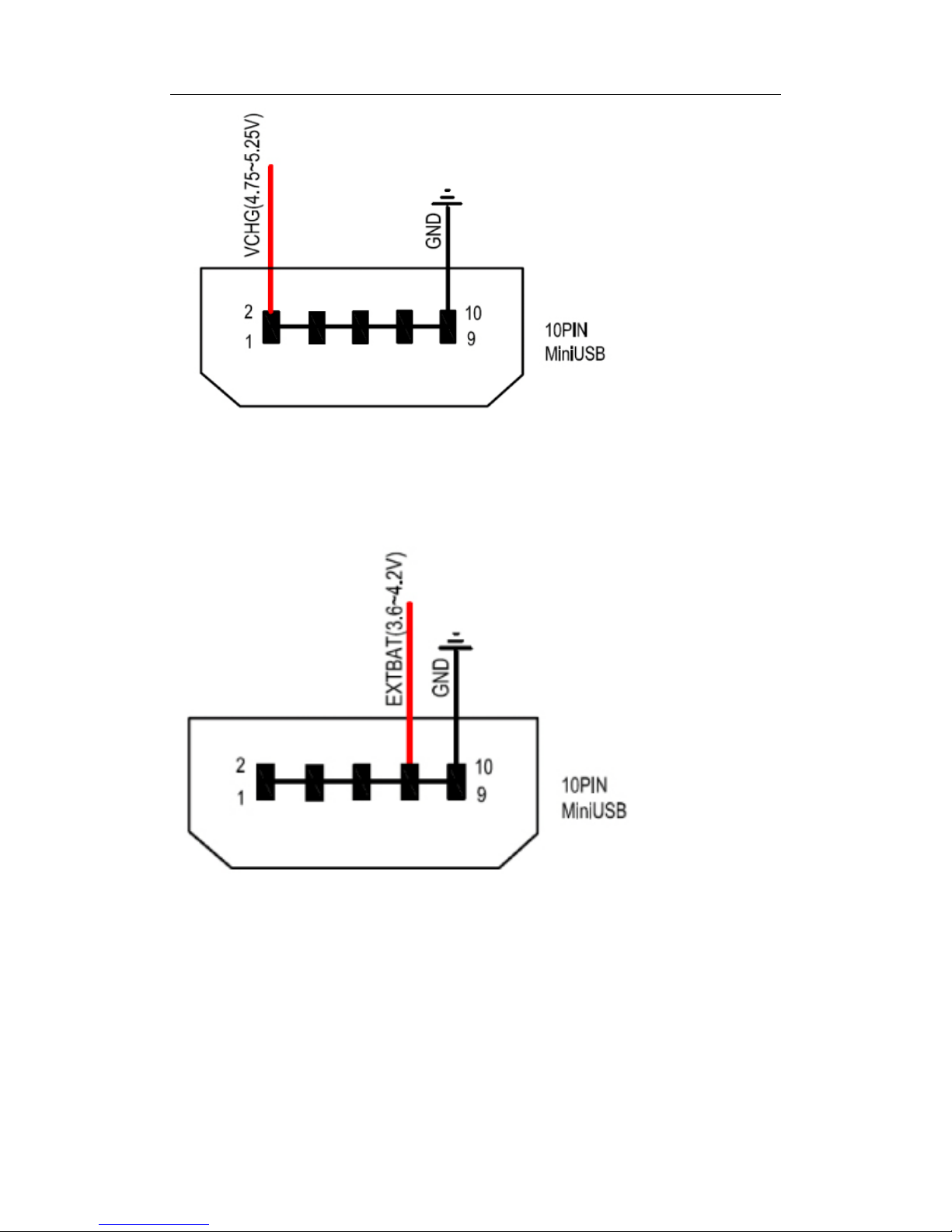
The Pin2 on Mini-USB connector are used for charging and named as VCHG pin. It can
be connected to a 5V DC power supply to power WorldTracker Enduro Pr o and charge the
internal battery.
Light Event State
GSM light
Searching network
Fast flash
Network has been registered Slow flash
Power off
Dark
GPS light GPS has fixed Solid
GPS is in fixing Fast flash
GPS is on and GPS data wrong Slow flash
GPS is off Dark
If “LED On” is not sel ected, and t he GPS LED will
not work after turn on 150 seconds.
Dark
Power light Power on and normal Dark
Charger inserted and charging completed Solid
Charger inserted and charging Fast flash
Power key was pressed and prepare to power off Fast flash
Abnormal
Fast flash
Power low alert
Slow flash
Power off or turn off the power light by command
Dark
Page 7
WorldTracker Enduro Pro User manual TRACKINGTHEWORLD
- 6 -
1.4.2. External Battery Interface
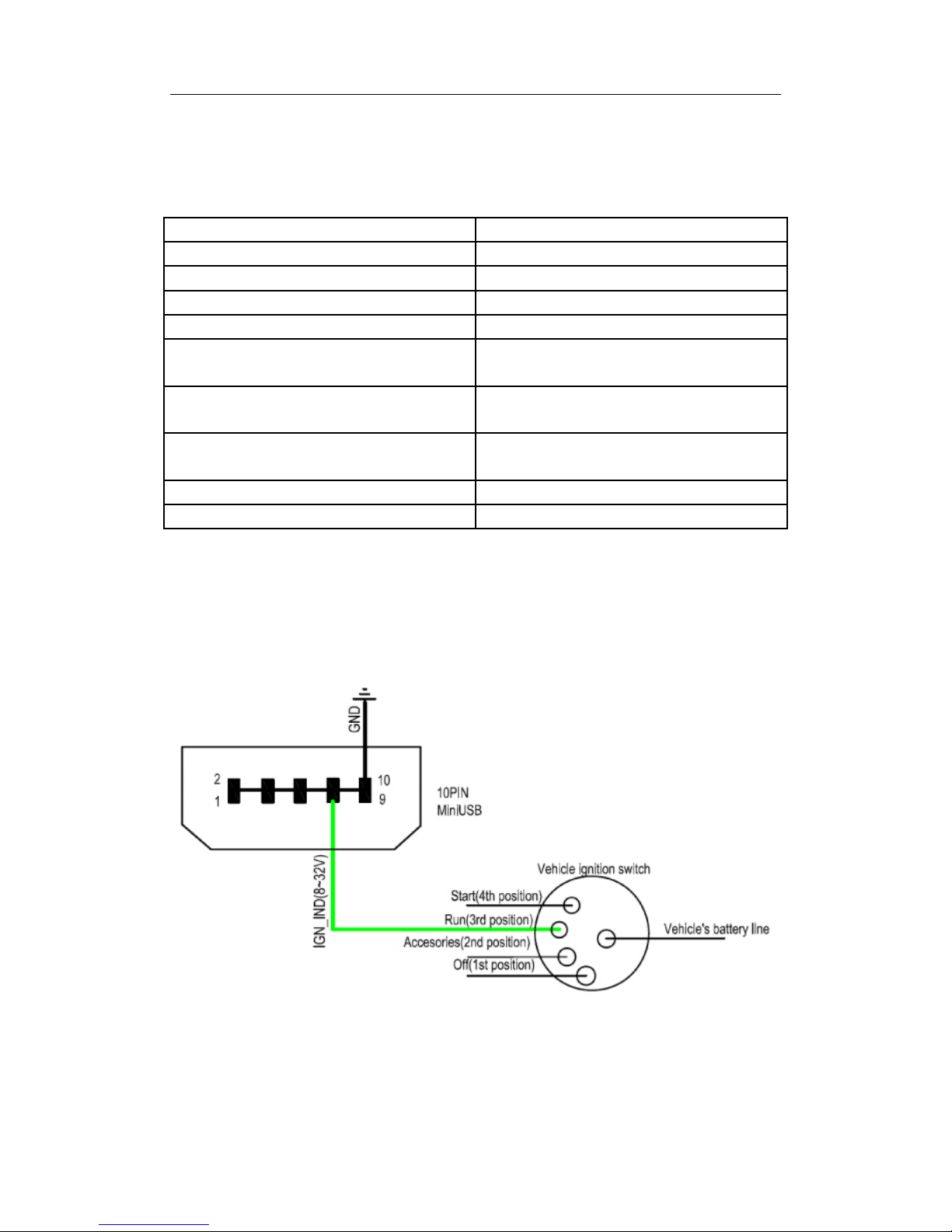
The Pin 8 on Mini-USB connector is for external battery and named as EXTBAT pin. It
can be connected to 3.7V Li-ion or Li-Polym er batt ery to power WorldTrack er End uro Pro.
Page 8
WorldTracker Enduro Pro User manual TRACKINGTHEWORLD
- 7 -
1.5. External GPS antenna specification
There is a MMCX RF connector on WorldTracker Enduro Pro and it is for the external GPS antenna.
The specification of the external GPS antenna is listed in the following table.
GPS antenna: Frequency: 1575.42MHz
Bandwidth: >5MHz
Beamwidth: >120 deg
Supply voltage: 3.3V
Polarization: RHCP or Linear
Gain: Passive: 0dBi minimum
Active: 15dB
Impedance:
50Ω
VSWR:
﹤2
Noise figure: <3
Connector MMCX
1.6. Ignition Detection
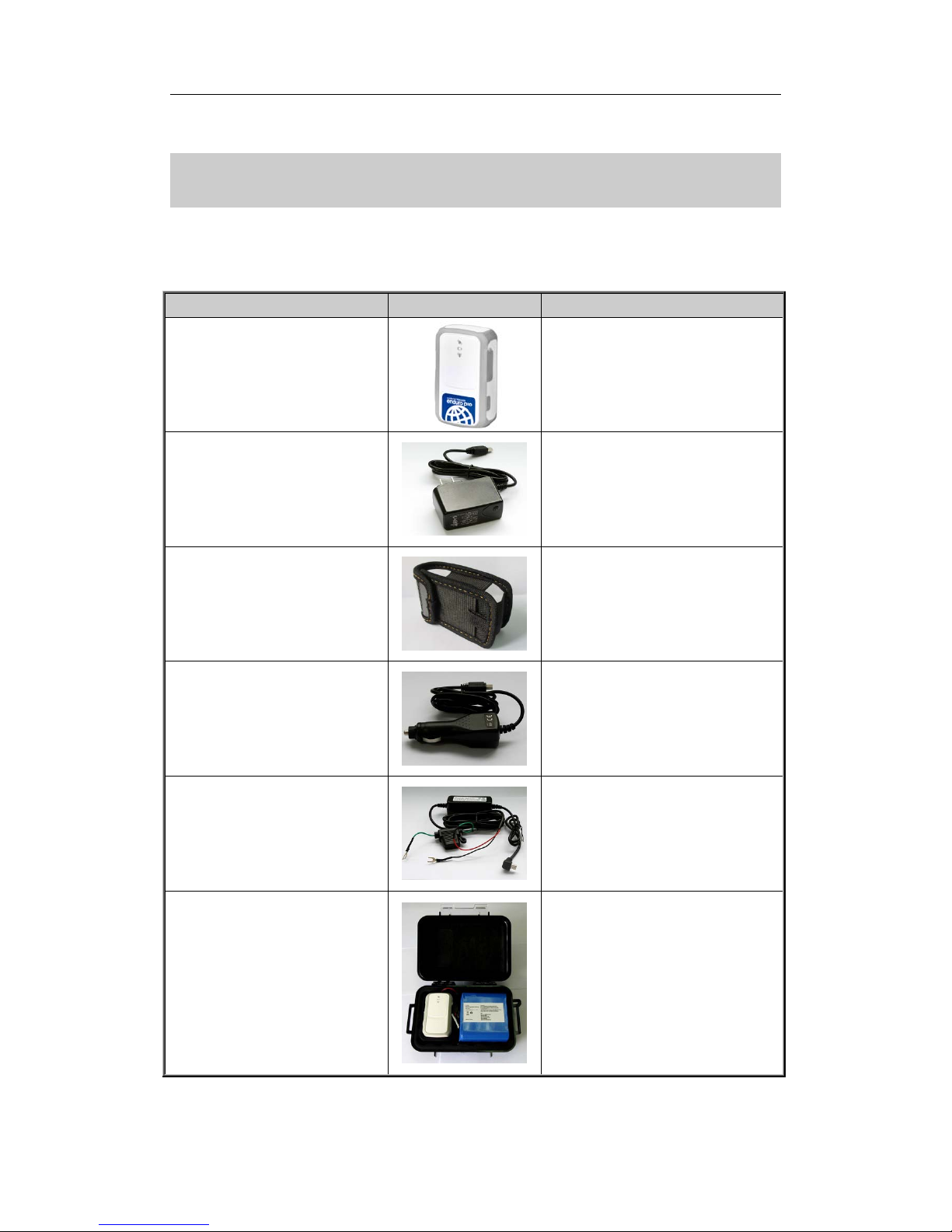
The Pin 7 on Mini-USB connector i s for ignition detection w hen WorldTracker Endur o Pro is
used in vehicle tracking application. It is named as IGN_IND pin.
Page 9
WorldTracker Enduro Pro User manual TRACKINGTHEWORLD
- 8 -
2. Getting Started
2.1. Parts List
Name Picture Remark
WorldTracker Enduro Pro Locater
The GSM/GPRS/GPS locator.
AC-DC Power Adapter
(Standard accessory)
used to charge the internal battery
WorldTracker Enduro Pro Sheath
(Optional accessory)
used to attach to a belt.
Car Cigarette Charger
(Optional accessory)
used to power the WorldTracker
Enduro Pro with a cigarette power
output on the vehicle.
Car Kit Charger
(Optional accessory)
used to power the WorldTracker
Enduro Pro with the batte ry output on
the vehicle.
External Battery Kit
(Optional accessory)
a set of accessories including an
external battery, and a pelican
waterproof case With a magnet. It will
greatly increase the time between
charges of The Enduro Pro and also let
the Enduro Pro be used for special
applications, like container tracking.
Page 10
WorldTracker Enduro Pro User manual TRACKINGTHEWORLD
- 9 -
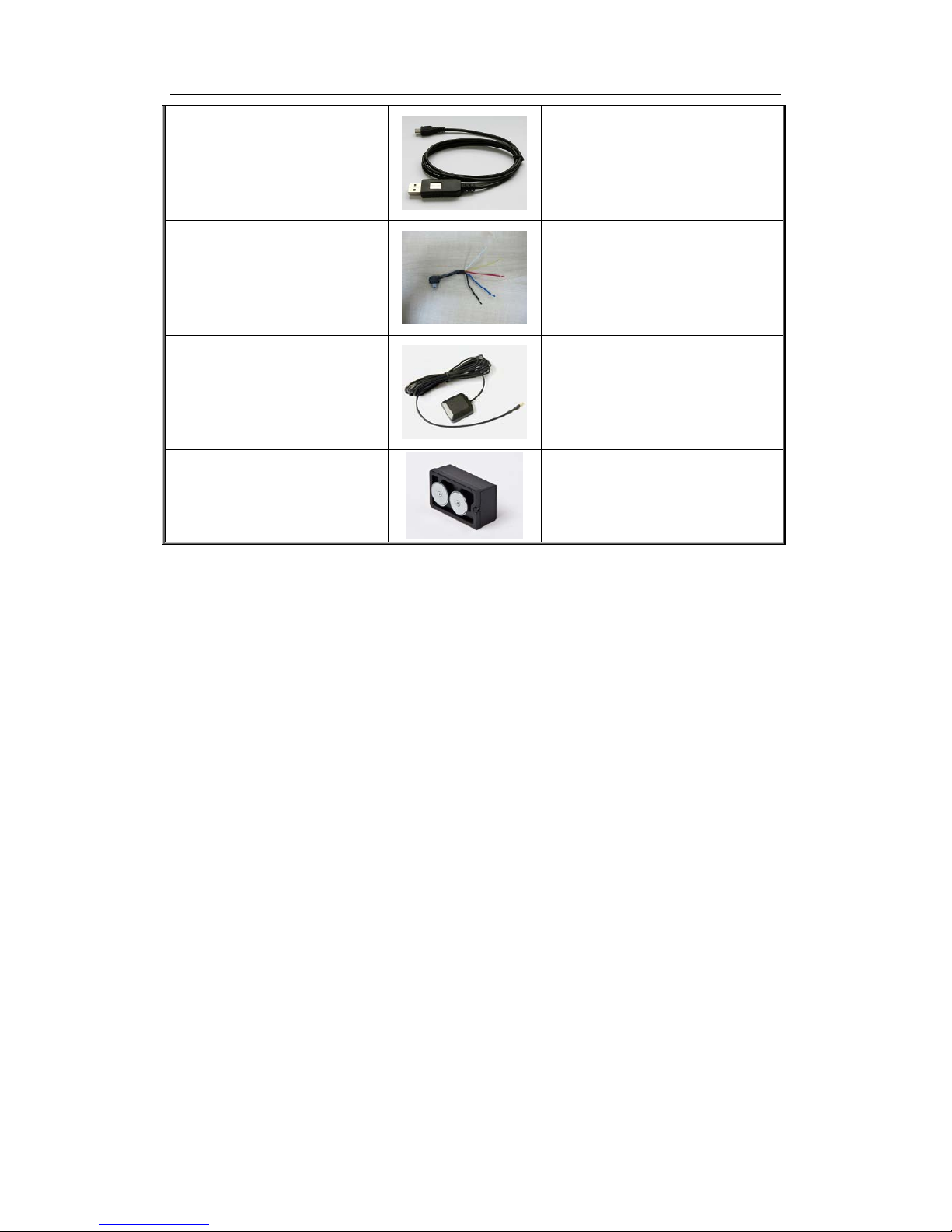
WorldTracker Enduro Pro Data
Cable
(Optional accessory)
the USB data cable which can be used
for firmware upgrading and
configuration.
WorldTracker Enduro Pro External
Cable
(Optional accessory)
the extend cable which includes the
charger interface and external battery
interface. It also includes the i gnition
detection interface.
WorldTracker Enduro Pro External
GPS Active Antenna
(Optional accessory)
External GPS active antenna is
optional according to application
scenarios.
WorldTracker Enduro Pro
Mini-Mag Magnetic Case
(Optional accessory)
used to hold the WorldTracker Enduro
Pro to metal with the magnet.
2.2. Battery Charging
Please connect AC-DC power adapter to WorldTracker Enduro Pro.
Insert the AC-DC power adapter into the power socket.
During charging, the
PWR LED will flash fast. When the battery is fulyl charged, the PWR LED
will be Ever-light.
You can also charge the battery by the USB cable, which connects the WorldTracker Enduro
Pro to a PC.
Charging time is about 5 hours.
Note: Before the first time using WorldTracker Enduro Pro, please full charge the battery.
Page 11
WorldTracker Enduro Pro User manual TRACKINGTHEWORLD
- 10 -
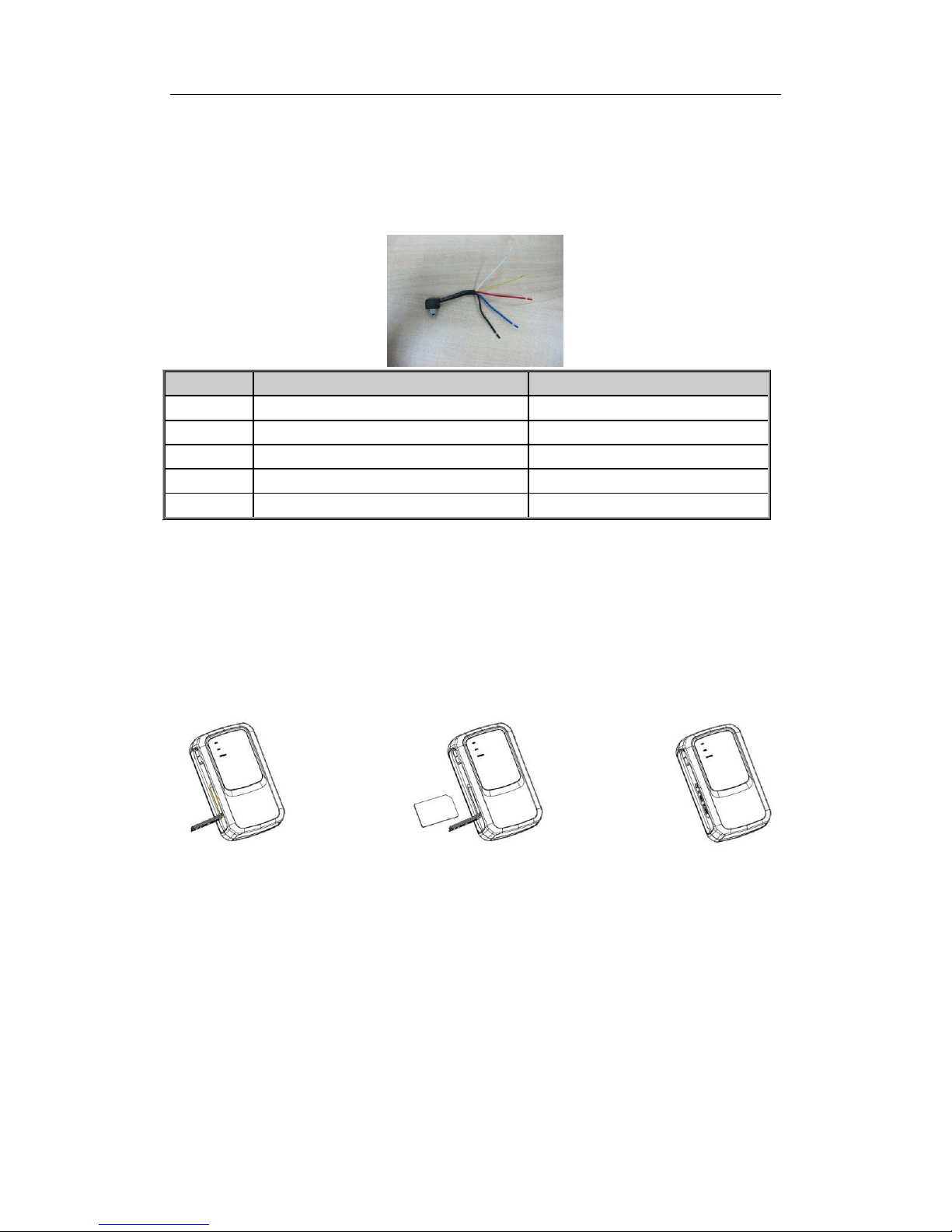
2.3. WorldTracker Enduro Pro External Cable Interface
WorldTracker Enduro Pro External Cable is a cable with a Mini USB connect or and four wires,
which include the external power interface and ignition detect for WorldTracker Enduro Pro.
Please find the detail description in following table.
Color Name Remark
RED External DC IN (5V) Please refer to 2.4.1 for detail
Black Ground Please refer to 2.4.1 for detail
Blue External Battery IN (DC 3.4V to 4.2V) Please refer to 2.4.2 for detail
White Ignition Detect Please refer to 2.6 for detail
Yellow Reserved Reserved for future use
2.4. Install SIM Card
First, open the cover of SIM card.
Then insert the SIM card into the slot of SIM card according to the direction shown.
Finally, cover the slot.
2.5. Install Device Into The Holder
Please install the WorldTracker Enduro into the Mini mage by:
Remove the Door by unscrewing it and lifting it out.
Slide the device into the case with the lights facing away from the magnets
Replace the door and screw into place.
Page 12

WorldTracker Enduro Pro User manual TRACKINGTHEWORLD
- 11 -
2.6. Turn on/Turn off
Turn on:
Method 1: Press the Power key at least 3 seconds and release it to turn on WorldTracker
Enduro Pro. At the same time,
PWR LED light will come on.
Method 2: Connect device to charger or external battery, and it will turn on automatically,
PWR LED light will tur n on.
Turn off:
Method 1: Press the pow er ke y about 2 seconds; PWR LED will flash fast and then turn
off. N o lig hts lit in dic ates that the WorldTracker Enduro Pro is turned off. The time of
power off is dependent on t h e quality of network. The maximum time of power off is 90
seconds. It can only be turned off when using internal battery. Please note the end-user
cannot power off the WorldTracker Enduro Pro when the power key is disabled by
protocol.
Method 2: If using external battery, device will power off when the external battery is
disconnected.
Page 13
WorldTracker Enduro Pro User manual TRACKINGTHEWORLD
- 12 -
3. Troubleshooting and Safety info
3.1. Troubleshooting
Trouble Possible Reason Solution
After WorldTracker Enduro Pro
is turned on, the GSM LED
flashes quickly always.
The SIM card is not inserted. Please insert t he SIM card into
WorldTracker Enduro Pro.
The signal is t oo weak;
WorldTracker Enduro Pro can’t
register to the network.
Please move WorldTracker
Enduro Pro into place with good
GSM coverage.
PIN locked Using SIM card without
SIM-PIN, or unl ock SIM-PIN.
Messages can’t be reported to
the backend server by GPRS.
The SIM card in WorldTracker
Enduro ro doesn’t support
GPRS.
Try a GPRS supported SIM card.
APN is wrong. Some APN
cannot visit the internet directly.
Ask the network operator for the
right APN.
The IP address or port of the
backend server is wrong.
Make sure the IP address for the
backend server is an identified
address in the internet.
Unable to power off
WorldTracker Enduro Pro.
The function of power key was
disabled by AT+GTSFR.
Enable the function of po wer key
by AT+GTFKS.
Unable to power off Enduro Pro
if charger connected or using
external battery.
Disconnect charger or external
battery, and try again.
No response from UART when
configure WorldTracker Enduro
Pro through UART
WorldTracker Enduro Pro is in
power saving mode.
Remove the Data_Cable_M, and
plug it in aga i n. After this
operation, Enduro Pro will exit
from power saving mode for 10
seconds.
Re-try Enduro Pro manager t ool
again, it will try to wake up
device.
WorldTracker Enduro Pro can’t
get successful GPS fixing.
The GPS signa l is weak. Please move Enduro Pro to a
place with open sky.
It is better to let the top surface
face to sky. (T he same surface
with indication LED)
Page 14

WorldTracker Enduro Pro User manual TRACKINGTHEWORLD
- 13 -
3.2. Safety info
Please do not disassemble the device by yourself.
Please do not storage the device in overly hot or humid places, avoid exposure to direct s unlight.
Too high temperature will damage the device or even cause the battery to explode.
Please do not use Worl dTrac ker Enduro Pro on an airplane or near medical equipment.
 Loading...