

Page 1
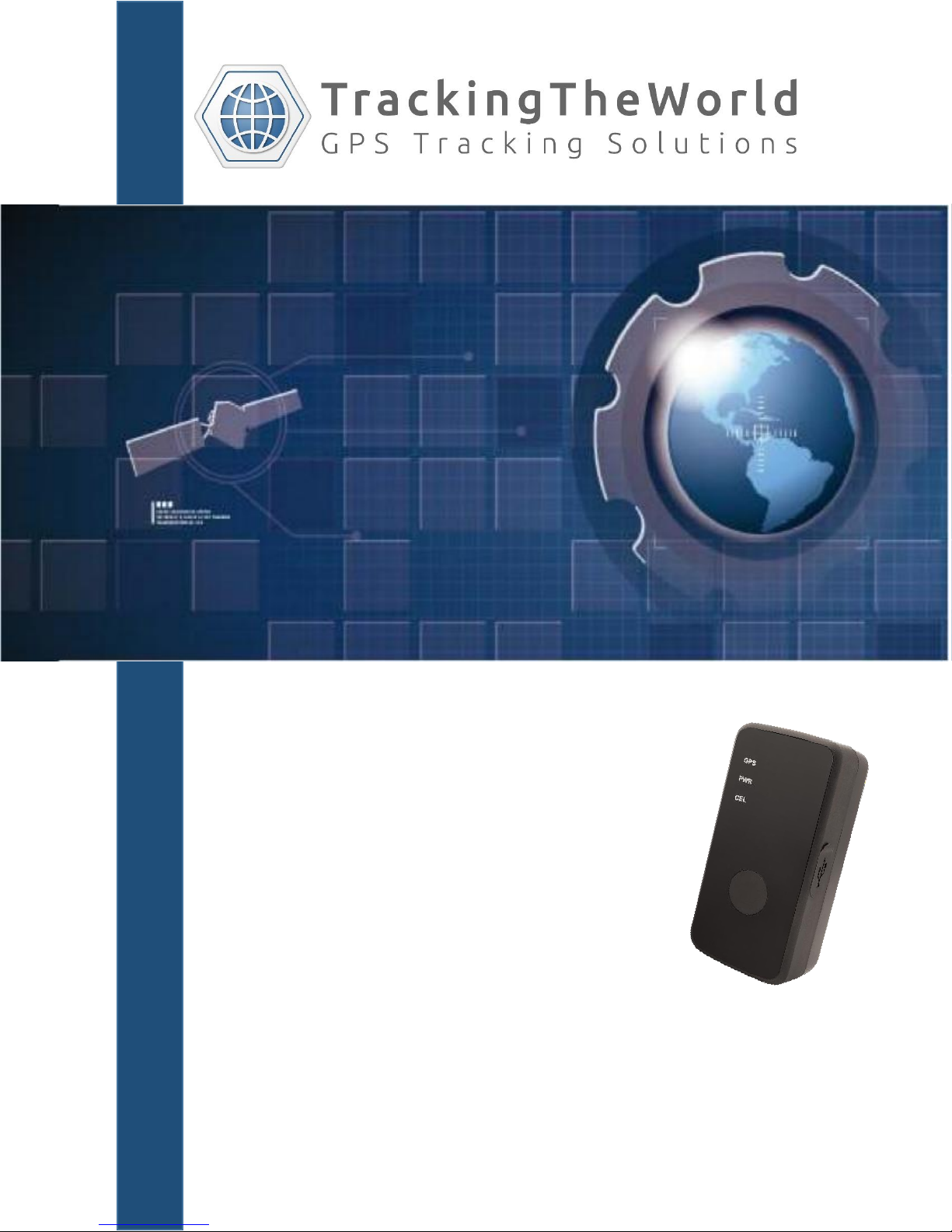
Enduro Plus CDMA
Multi-purpose
Tracking Device
USER MANUAL
TrackingTheWorld.com
Page 2
Enduro Plus CDMA User Manual
Document Title
Enduro Plus CDMA User manual
Version
1.01
Date
2015-07-01
Status
Release
Document Control ID
TTW-EnduroPlusCDMA-UM001
General Notes
TrackingTheWorld offers this information as a service to its customers, to support application and
engineering efforts that use the products designed by TrackingTheWorld. The information provided is
based upon requirements specifically provided to TrackingTheWorld by the customers. TrackingTheWorld
has not undertaken any independent search for additional relevant information, including any information
that may be in the customer’s possession. Furthermore, system validation of this product designed by
TrackingTheWorld within a larger electronic system remains the responsibility of the customer or the
customer’s system integrator. All specifications supplied herein are subject to change.
Copyright
This document contains proprietary technical information which is the property of TrackingTheWorld,
copying of this document and giving it to others and the using or communication of the contents thereof,
are forbidden without express authority. Offenders are liable to the payment of damages. All rights
reserved in the event of grant of a patent or the registration of a utility model or design. All specification
supplied herein are subject to change without notice at any time.
Copyright © TrackingTheWorld 2016
For More Information: Please contact TrackingTheWorld, 1633 Bayshore Highway, Suite 390, Burlingame, CA. 94010, USA
Copyright © TrackingTheWorld. All rights reserved. Information in this publication supersedes that in all previously published material. Specification and price
change privileges reserved. All trade names referenced are the service marks, trademarks, or registered trademarks of their respective companies.
TTW-EnduroPlusCDMA-UM001 - 2 -
Phone: +1.650.692.8100 – Email: [email protected] – Website: www.trackingtheworld.com
Page 3
Enduro Plus CDMA User Manual
Contents
Contents ........................................................................................................................................................ 3
0. Revision history ......................................................................................................................................... 4
1. Introduction .............................................................................................................................................. 5
2. Product Overview ..................................................................................................................................... 6
2.1. Appearance ........................................................................................................................................ 6
2.2. Buttons/Mini USB Interface Description............................................................................................ 6
2.3. LEDs Description ................................................................................................................................ 7
2.4. External Power Interface ................................................................................................................... 7
2.4.1. 2.4.1 External DC Charger Interface ...................................................................................... 7
2.4.2. 2.4.2 External Battery Interface ............................................................................................ 8
2.5. Ignition Detection .............................................................................................................................. 8
2.6. External Input Interface ..................................................................................................................... 9
3. Getting Started ........................................................................................................................................ 10
3.1. Parts List ........................................................................................................................................... 10
3.2. Battery Charging .............................................................................................................................. 10
3.3. ENDURO PLUS CDMA External Cable Interface ............................................................................... 11
3.4. Turn on/Turn off .............................................................................................................................. 11
4. Troubleshooting and Safety info ............................................................................................................. 12
4.1. Troubleshooting ............................................................................................................................... 12
4.2. Safety info ........................................................................................................................................ 12
For More Information: Please contact TrackingTheWorld, 1633 Bayshore Highway, Suite 390, Burlingame, CA. 94010, USA
Copyright © TrackingTheWorld. All rights reserved. Information in this publication supersedes that in all previously published material. Specification and price
change privileges reserved. All trade names referenced are the service marks, trademarks, or registered trademarks of their respective companies.
TTW-EnduroPlusCDMA-UM001 - 3 -
Phone: +1.650.692.8100 – Email: [email protected] – Website: www.trackingtheworld.com
Page 4
Enduro Plus CDMA User Manual
Revision
Date
Author
Description of change
1.00
2015/1/30
Abside Yu
Initial
1.01
2015/7/01
Abside Yu
Change Data cable M to MiniUSB cable
0. Revision history
For More Information: Please contact TrackingTheWorld, 1633 Bayshore Highway, Suite 390, Burlingame, CA. 94010, USA
Copyright © TrackingTheWorld. All rights reserved. Information in this publication supersedes that in all previously published material. Specification and price
change privileges reserved. All trade names referenced are the service marks, trademarks, or registered trademarks of their respective companies.
TTW-EnduroPlusCDMA-UM001 - 4 -
Phone: +1.650.692.8100 – Email: [email protected] – Website: www.trackingtheworld.com
Page 5

Enduro Plus CDMA User Manual
1. Introduction
The water resistant ENDURO PLUS CDMA is a powerful GPS/GNSS locator designed for lone worker,
vehicle, pet and asset tracking applications. The thumb sized button makes this device ideal for
applications requiring rapid notification of emergency alert or regular setting of geo-fences based on
current location. Its built-in GNSS receiver has superior sensitivity and fast time to first fix. Its
CDMA2000-1X allows the ENDURO PLUS CDMA's location to be monitored in real time or periodically
tracked by a backend server and mobile devices. Its built-in 3-axis accelerometer allows motion
detection and extends battery life through sophisticated power management algorithms. System
integration is straightforward as complete documentation is provided for the full featured @Track
protocol. The @Track protocol supports a wide variety of reports including emergency, geo-fence
boundary crossings, low battery and scheduled GPS/GNSS position.
For More Information: Please contact TrackingTheWorld, 1633 Bayshore Highway, Suite 390, Burlingame, CA. 94010, USA
Copyright © TrackingTheWorld. All rights reserved. Information in this publication supersedes that in all previously published material. Specification and price
change privileges reserved. All trade names referenced are the service marks, trademarks, or registered trademarks of their respective companies.
TTW-EnduroPlusCDMA-UM001 - 5 -
Phone: +1.650.692.8100 – Email: [email protected] – Website: www.trackingtheworld.com
Page 6
Enduro Plus CDMA User Manual
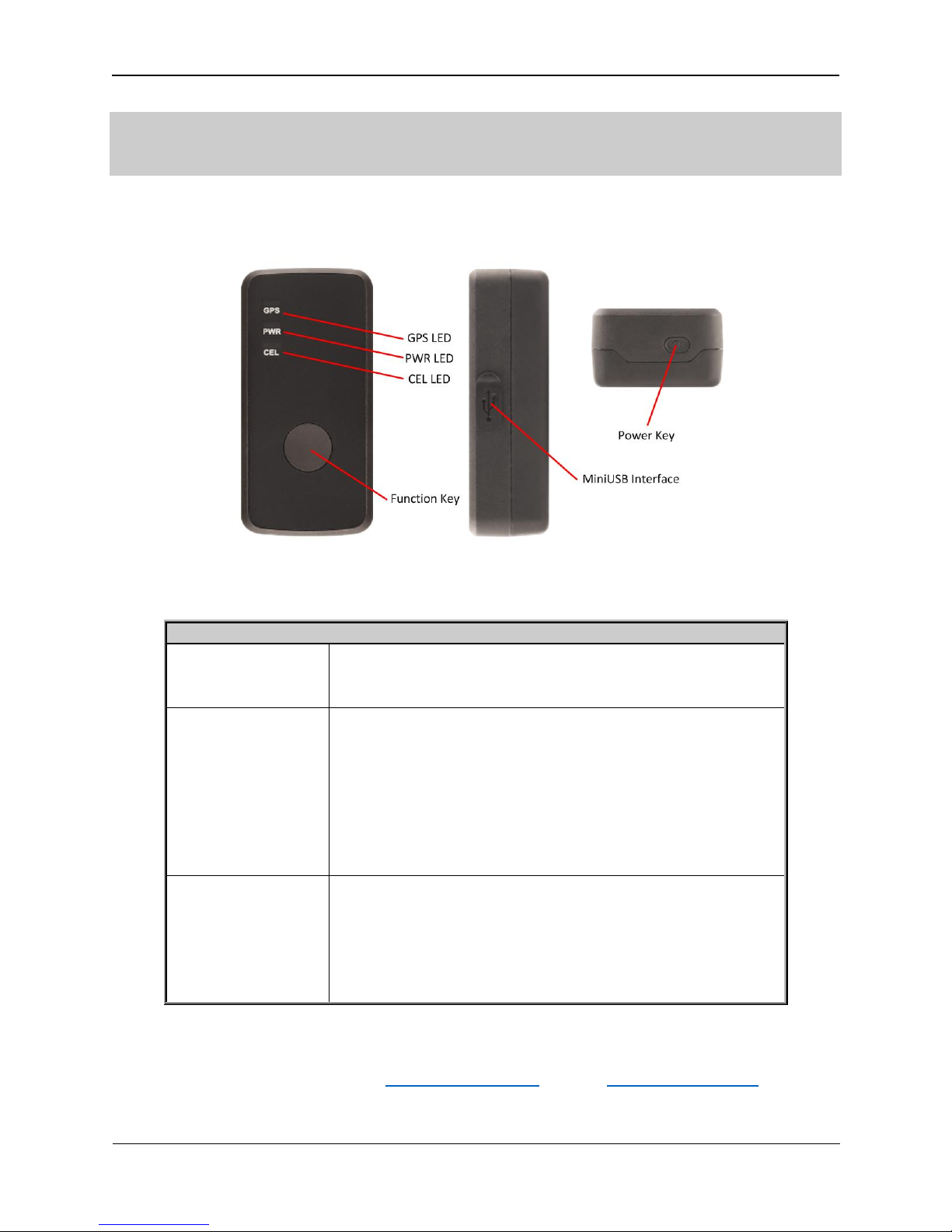
Button /Mini USB Interface Description
Power Key
Turn on ENDURO PLUS CDMA
Turn off ENDURO PLUS CDMA when without charging. (If
power key is enabled)
Function Key
Geo-Fence mode
Long press the key to enable/disable Geo-Fence ID0
Geo-Fence in current position mode
Long press the key to enable/disable Geo-Fence ID0. If
enable Geo-Fence ID0, using the current position as the
center of Geo-Fence 0.
SOS mode (default)
Long press the key to active SOS alarm
Mini USB interface
Connect a 5V DC adapter can power ENDURO PLUS CDMA
and charge the internal battery
Connect a 3.7V Li-ion or Li-Polymer battery can power
ENDURO PLUS CDMA
Backend server developer or administrator can use the
MiniUSB cable to configure ENDURO PLUS CDMA
2. Product Overview
2.1. Appearance
2.2. Buttons/Mini USB Interface Description
For More Information: Please contact TrackingTheWorld, 1633 Bayshore Highway, Suite 390, Burlingame, CA. 94010, USA
Phone: +1.650.692.8100 – Email: [email protected] – Website: www.trackingtheworld.com
Copyright © TrackingTheWorld. All rights reserved. Information in this publication supersedes that in all previously published material. Specification and price
change privileges reserved. All trade names referenced are the service marks, trademarks, or registered trademarks of their respective companies.
TTW-EnduroPlusCDMA-UM001 - 6 -
Page 7
Enduro Plus CDMA User Manual
LED
Event
State
CELL LED
Searching network
Fast flash
Network has been registered
Slow flash
Power off
Dark
<LED on> is 2
Dark
GPS LED
GPS has fixed
Solid
GPS is in fixing
Fast flash
GPS is on and GPS data wrong
Slow flash
GPS is off
Dark
If <LED on> is 0, 150 seconds later after powers on.
Dark
<LED on> is 2
Dark
PWR LED
Power on and normal
Dark
Charger inserted and charging completed
Solid
Charger inserted and charging
Fast flash
Power key was pressed and prepare to power off
Fast flash
Abnormal
Fast flash
Power low alert
Slow flash
Power off or turn off the power light by command
Dark
<LED on> is 2
Dark
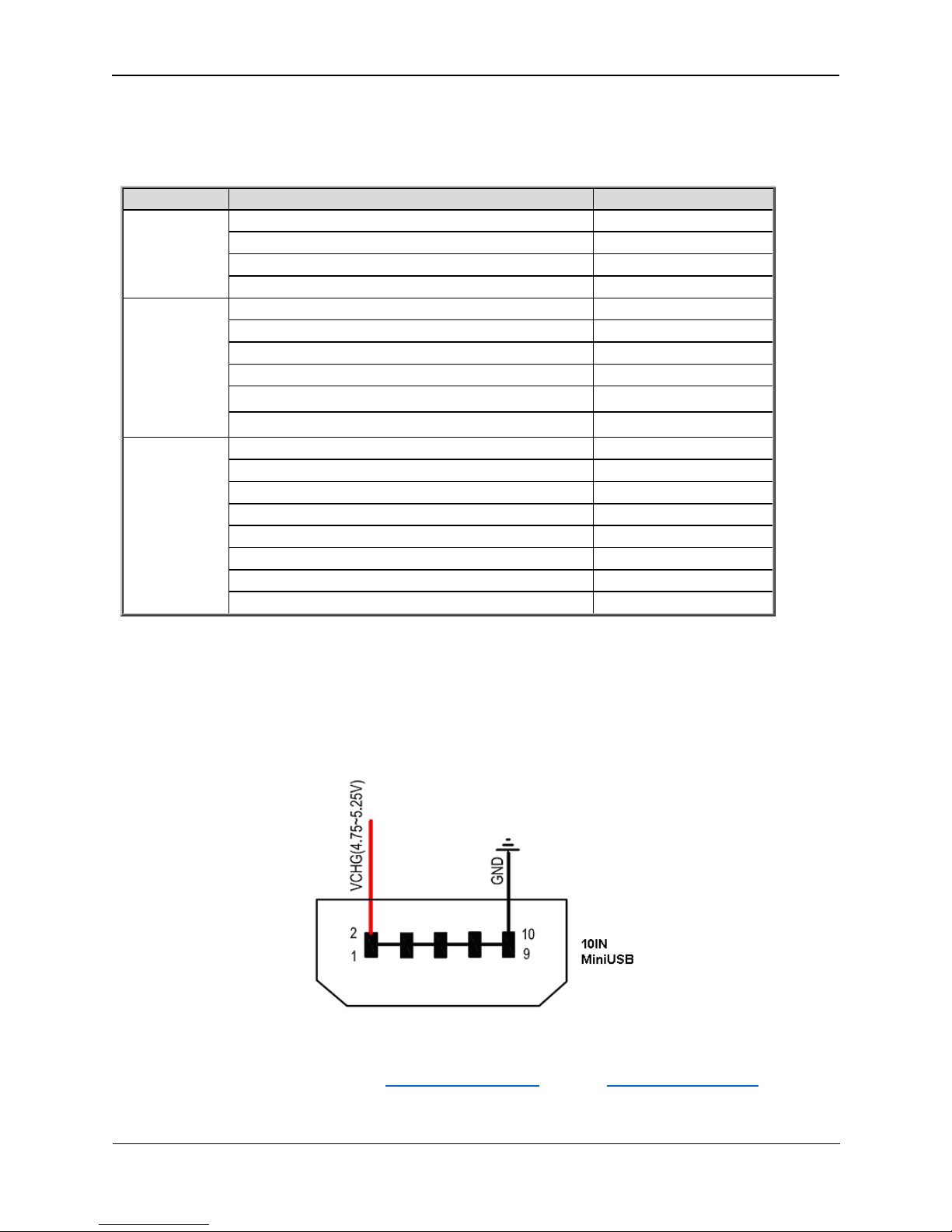
2.3. LEDs Description
There are three LED in ENDURO PLUS CDMA, the description as following.
2.4. External Power Interface
2.4.1. 2.4.1 External DC Charger Interface
The Pin2 on Mini-USB connector are used for charging and named as VCHG pin, It can be connected to a
5V DC power supply to power ENDURO PLUS CDMA and charge the internal battery.
For More Information: Please contact TrackingTheWorld, 1633 Bayshore Highway, Suite 390, Burlingame, CA. 94010, USA
Phone: +1.650.692.8100 – Email: [email protected] – Website: www.trackingtheworld.com
Copyright © TrackingTheWorld. All rights reserved. Information in this publication supersedes that in all previously published material. Specification and price
change privileges reserved. All trade names referenced are the service marks, trademarks, or registered trademarks of their respective companies.
TTW-EnduroPlusCDMA-UM001 - 7 -
Page 8
Enduro Plus CDMA User Manual
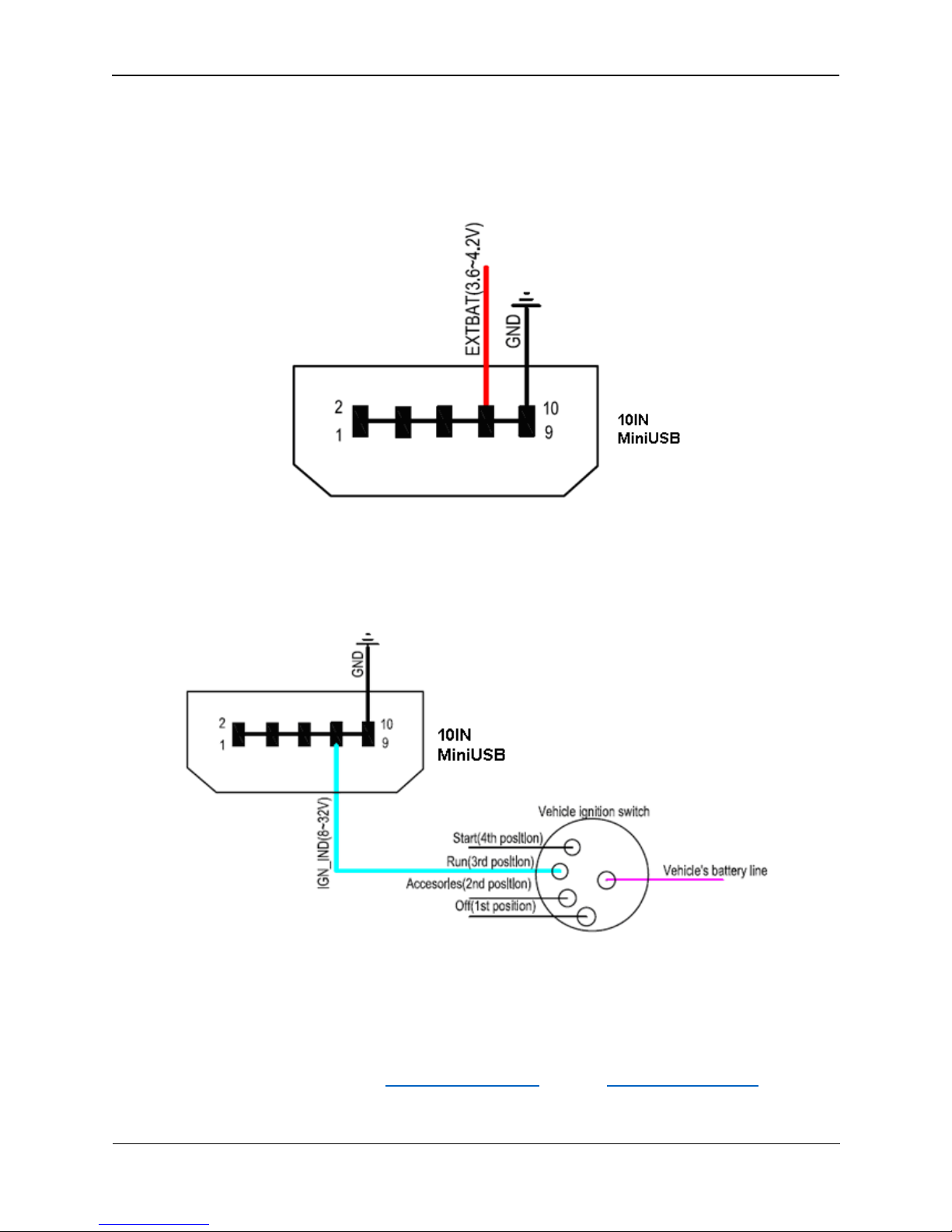
2.4.2. 2.4.2 External Battery Interface
The Pin 8 on Mini-USB connector is for external battery and named as EXTBAT pin, It can be connected to
3.7V Li-ion or Li-Polymer battery to power ENDURO PLUS CDMA.
2.5. Ignition Detection
The Pin 7 on Mini-USB connector is for ignition detection when ENDURO PLUS CDMA is used in vehicle
tracking application, It is named as IGN_IND pin.
Another easy way is to connect PIN7 to a power output in the fuse box of the vehicle which is only
enabled after the vehicle is ignition on. For example: the power output for radio FM.
For More Information: Please contact TrackingTheWorld, 1633 Bayshore Highway, Suite 390, Burlingame, CA. 94010, USA
Copyright © TrackingTheWorld. All rights reserved. Information in this publication supersedes that in all previously published material. Specification and price
change privileges reserved. All trade names referenced are the service marks, trademarks, or registered trademarks of their respective companies.
TTW-EnduroPlusCDMA-UM001 - 8 -
Phone: +1.650.692.8100 – Email: [email protected] – Website: www.trackingtheworld.com
Page 9
Enduro Plus CDMA User Manual
Logical State
Electrical State
Active
0V to 0.8V
Inactive
1.7V to 32V or Open
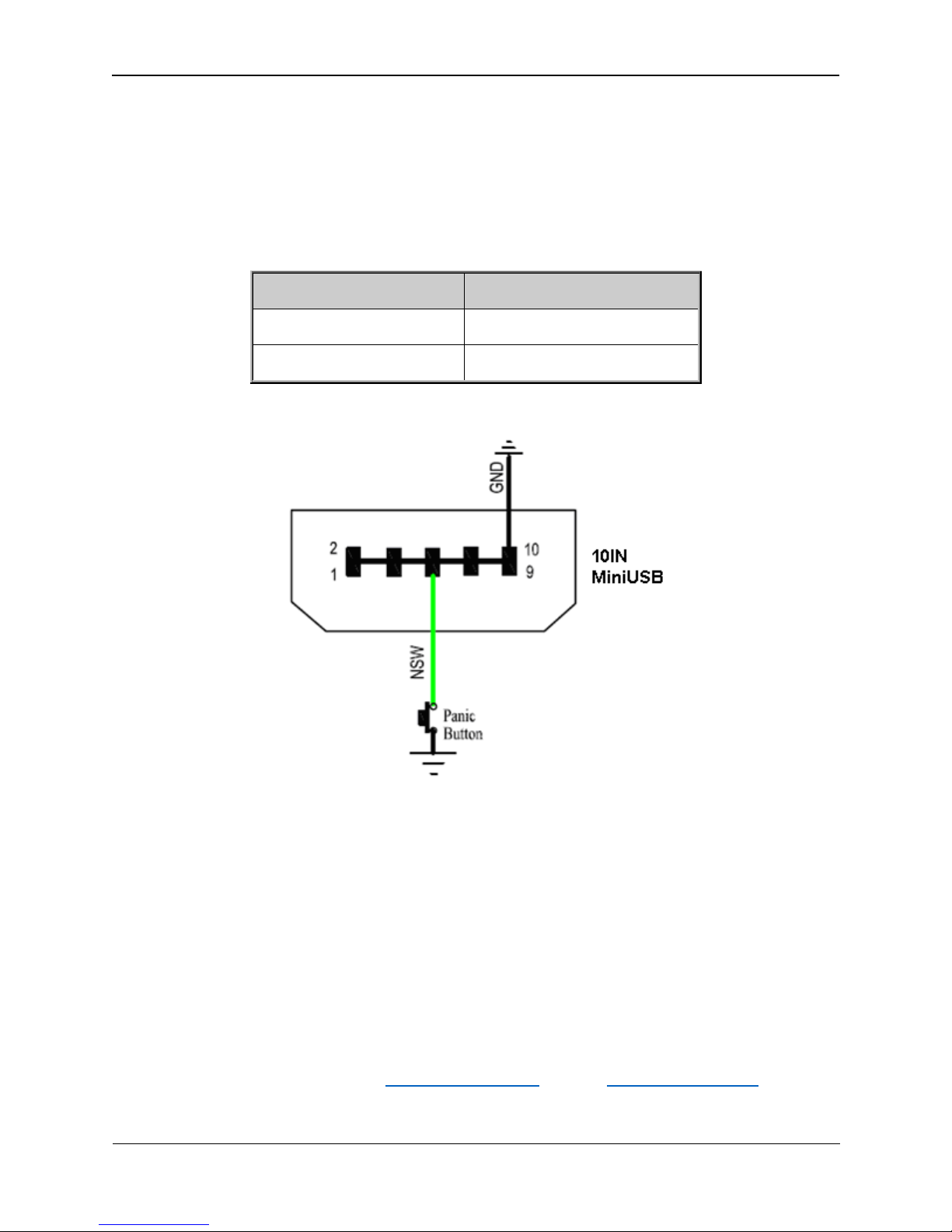
2.6. External Input Interface
The Pin 5 on Mini-USB connector is a negative trigger input in newer hardware version, It is named as
NSW pin.
For negative trigger input the electrical conditions are:
An input example is shown as following figures:
Example of NSW pin connect to a panic button
For More Information: Please contact TrackingTheWorld, 1633 Bayshore Highway, Suite 390, Burlingame, CA. 94010, USA
Copyright © TrackingTheWorld. All rights reserved. Information in this publication supersedes that in all previously published material. Specification and price
change privileges reserved. All trade names referenced are the service marks, trademarks, or registered trademarks of their respective companies.
TTW-EnduroPlusCDMA-UM001 - 9 -
Phone: +1.650.692.8100 – Email: [email protected] – Website: www.trackingtheworld.com
Page 10
Enduro Plus CDMA User Manual
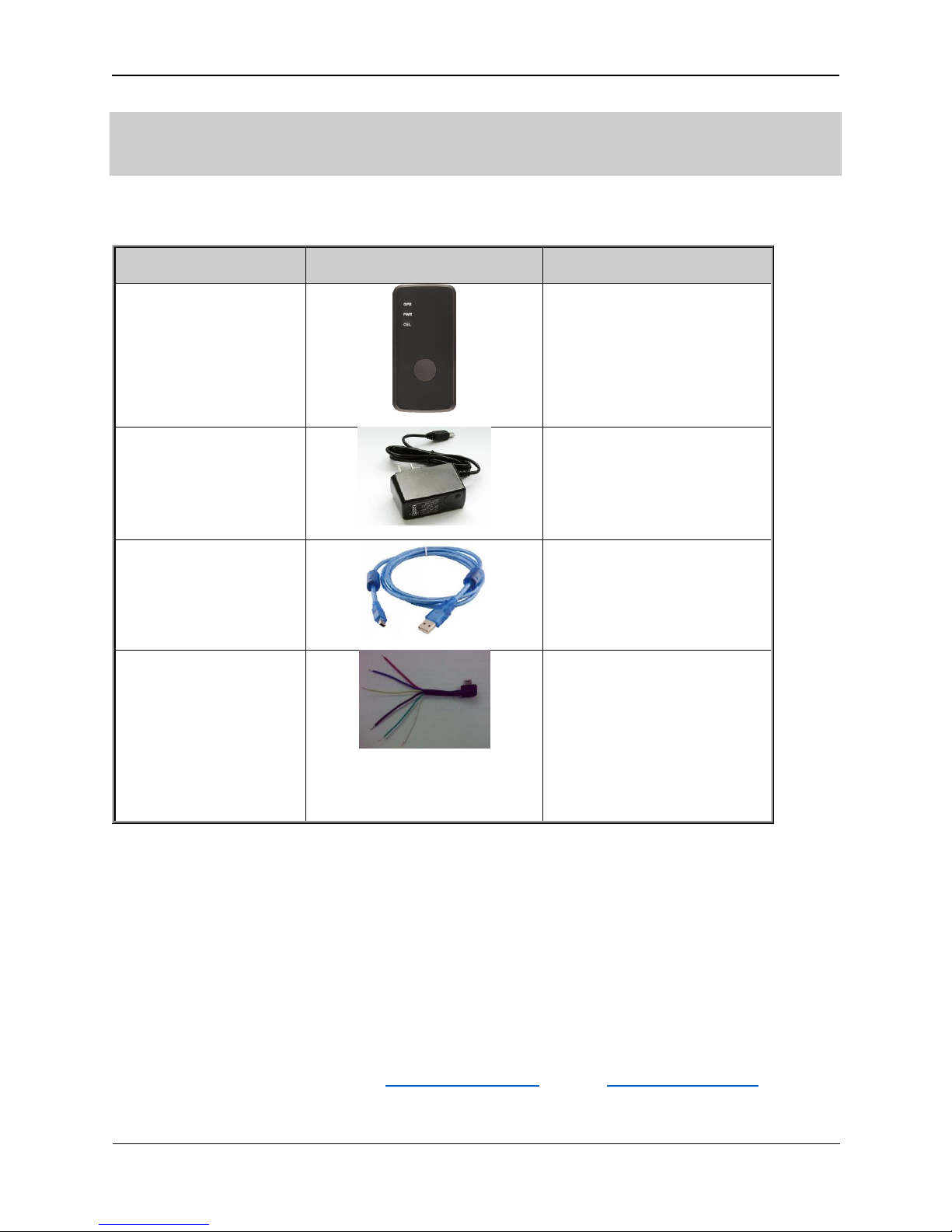
Name
Picture
Remark
ENDURO PLUS CDMA
Locater
The CDMA-1X/GPS locator.
AC-DC Power Adapter
(Standard accessory)
It is used to charge the
internal battery of ENDURO
PLUS CDMA.
ENDURO PLUS CDMA
MiniUSB Data Cable
(Optional accessory)
It is the MiniUSB Data Cable
which can be used for
firmware upgrading and
configuration.
ENDURO PLUS CDMA
External Cable
(Optional accessory)
It is the extend cable which
include the charger interface
and external battery interface
on ENDURO PLUS CDMA. It
also includes theignition
detection interface on the
ENDURO PLUS CDMA.
3. Getting Started
3.1. Parts List
3.2. Battery Charging
Please connect AC-DC power adapter with ENDURO PLUS CDMA.
Insert the AC-DC power adapter into the power socket.
During charging, the PWR LED is flashing fast. When the battery is full charged, the PWR LED will be
Ever-light.
You can also charge the battery by USB cable which connects ENDURO PLUS CDMA with the PC.
Charging time is about 5 hours.
Note: Before the first time using ENDURO PLUS CDMA, please full charge the battery.
For More Information: Please contact TrackingTheWorld, 1633 Bayshore Highway, Suite 390, Burlingame, CA. 94010, USA
Copyright © TrackingTheWorld. All rights reserved. Information in this publication supersedes that in all previously published material. Specification and price
change privileges reserved. All trade names referenced are the service marks, trademarks, or registered trademarks of their respective companies.
TTW-EnduroPlusCDMA-UM001 - 10 -
Phone: +1.650.692.8100 – Email: [email protected] – Website: www.trackingtheworld.com
Page 11
Enduro Plus CDMA User Manual
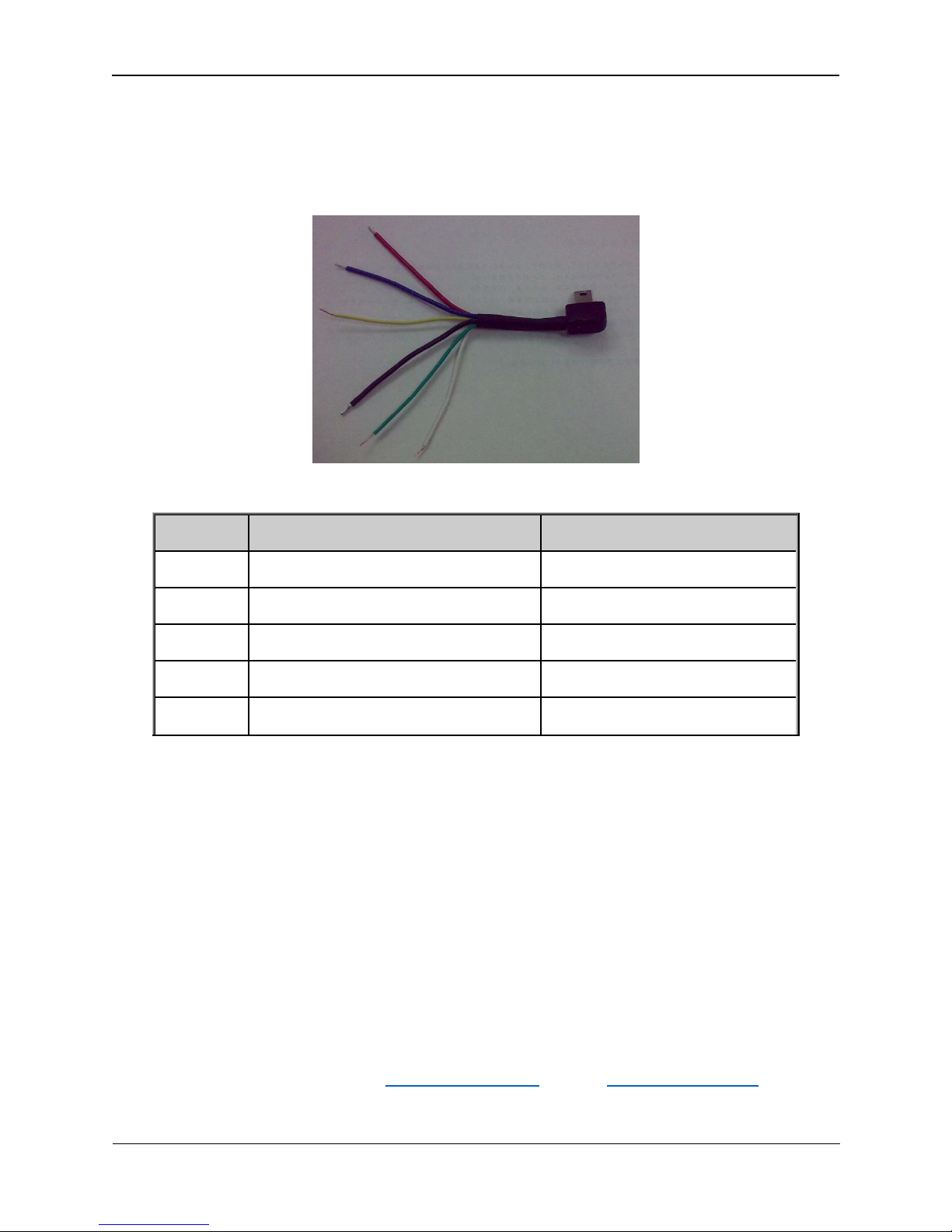
Color
Name
Remark
RED
External DC IN (5V)
Please refer to 2.4.1 for detail
Black
Ground
Please refer to 2.4.1 for detail
Blue
External Battery IN (DC 3.4V to 4.2V)
Please refer to 2.4.2 for detail
White
Ignition Detect
Please refer to 2.5for detail
Green
NSW(negative trigger input)
Please refer to 2.6 for detail
3.3. ENDURO PLUS CDMA External Cable Interface
ENDURO PLUS CDMA External Cable is a cable with a Mini USB connector and six wires which
include the external power interface, ignition detect and input interface for ENDURO PLUS
CDMA. Please find the detail description in following table.
3.4. Turn on/Turn off
Turn on:
Method 1: Press the Power key at least 3 seconds and release it to turn on ENDURO PLUS CDMA.
At the same time, PWR LED will light on.
Method 2: Connect device to charger or external battery, and it will turn on automatically, PWR
LED will light on.
Turn off:
Method 1: Press the power key about 2 seconds; PWR LED will fast flash and then turn off, it
indicates that ENDURO PLUS CDMA is turned off. The time of power off is depended on the
quality of network. The maximum time of power off is 90 seconds. It is only valid to turn off
when using internal battery. Please note the end-user can not power off ENDURO PLUS CDMA
when the power key is disabled by protocol.
Method 2: If using external battery, device will power turn-off when external battery disconnect.
For More Information: Please contact TrackingTheWorld, 1633 Bayshore Highway, Suite 390, Burlingame, CA. 94010, USA
Copyright © TrackingTheWorld. All rights reserved. Information in this publication supersedes that in all previously published material. Specification and price
change privileges reserved. All trade names referenced are the service marks, trademarks, or registered trademarks of their respective companies.
TTW-EnduroPlusCDMA-UM001 - 11 -
Phone: +1.650.692.8100 – Email: [email protected] – Website: www.trackingtheworld.com
Page 12
Enduro Plus CDMA User Manual
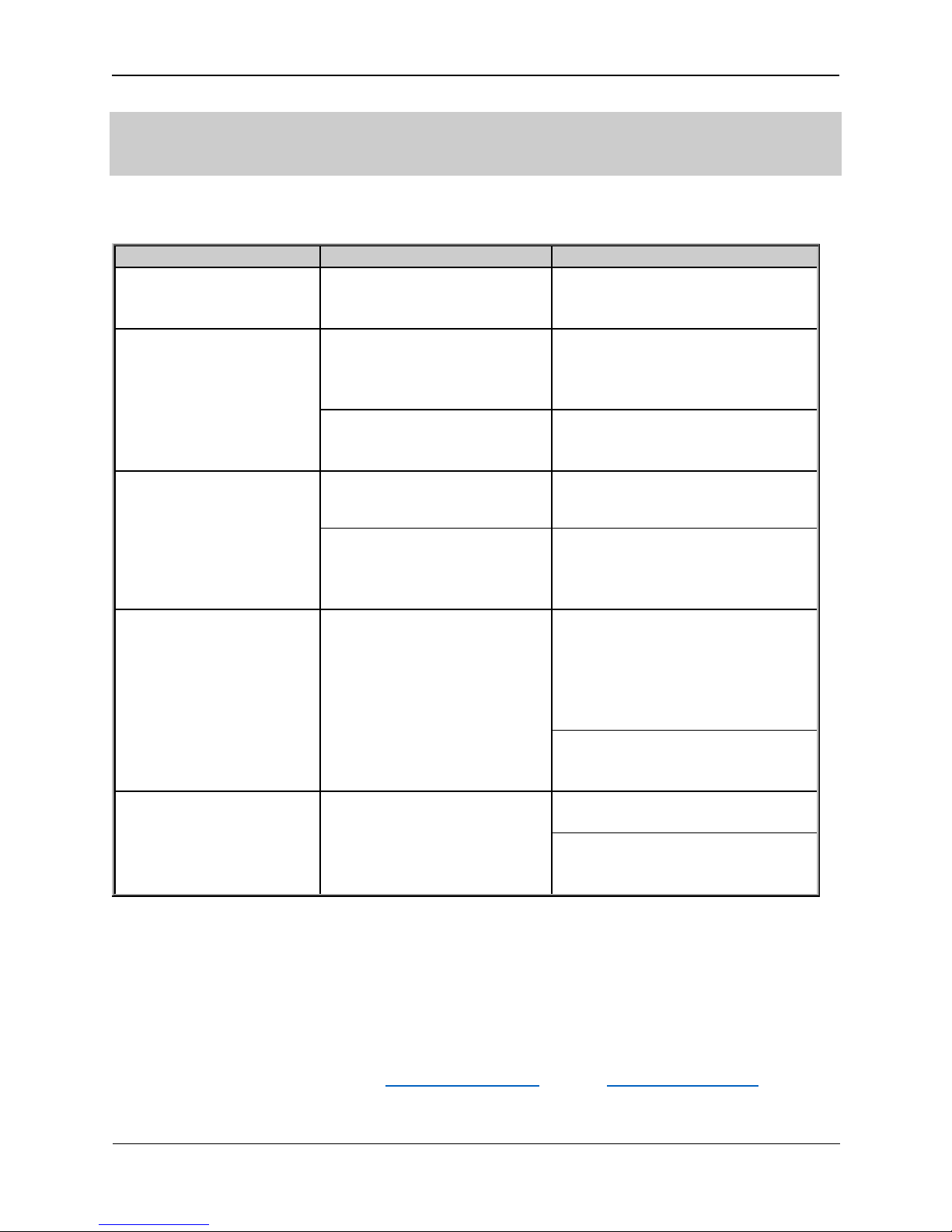
Trouble
Possible Reason
Solution
After ENDURO PLUS CDMA
is turned on, the CDMA-1X
LED flashes quickly always.
The signal is too weak; ENDURO
PLUS CDMA can’t register to the
network.
Please move ENDURO PLUS CDMA
into place with good CDMA-1X
coverage.
Messages can’t be reported
to the backend server by
CDMA.
User ID or User Pw is wrong.
Some User ID or User PW
cannot visit the internet
directly.
Ask the network operator for the
right User ID and User Password.
The IP address or port of the
backend server is wrong.
Make sure the IP address for the
backend server is an identified
address in the internet.
Unable to power off
ENDURO PLUS CDMA.
The function of power key was
disabled by AT+GTFKS.
Enable the function of power key by
AT+GTFKS.
Unable to power off ENDURO
PLUS CDMA if charger
connected or using external
battery.
Disconnect charger or external
battery, and try again.
No response from UART
when configure ENDURO
PLUS CDMA through UART
ENDURO PLUS CDMA is in sleep
mode.
Remove the MiniUSB cable, and
plug it in again. After this operation,
ENDURO PLUS CDMA will exit from
sleep mode for 10 seconds.
Re-try ENDURO PLUS CDMA manage
tool again, it will try to wake up
device.
ENDURO PLUS CDMA can’t
get successful GPS fixing.
The GPS signal is weak.
Please move ENDURO PLUS CDMA to
a place with open sky.
It is better to let the top surface face
to sky. (The same surface with
indication LED)
4. Troubleshooting and Safety info
4.1. Troubleshooting
4.2. Safety info
Please do not disassemble the device by yourself.
Please do not put the device on the overheating or too humid place, avoid exposure to direct
sunlight. Too high temperature will damage the device or even cause the battery explosion.
Please do not use ENDURO PLUS CDMA on the airplane or near medical equipment.
For More Information: Please contact TrackingTheWorld, 1633 Bayshore Highway, Suite 390, Burlingame, CA. 94010, USA
Phone: +1.650.692.8100 – Email: [email protected] – Website: www.trackingtheworld.com
Copyright © TrackingTheWorld. All rights reserved. Information in this publication supersedes that in all previously published material. Specification and price
change privileges reserved. All trade names referenced are the service marks, trademarks, or registered trademarks of their respective companies.
TTW-EnduroPlusCDMA-UM001 - 12 -
 Loading...