

Page 1

1
AVL-115 USER MANUAL
Page 2

2
Table of Contents
1. Safety Information…………………………………………………….3
2. Main Function…………………………………………………………….6
3. Getting start with AVL115…………………………………………..7
3.1 Accessories ………………………………………………………..8
3.2 Identify component ……………………………………………8
3.3 Insert SIM card…………………………………………8
3.4 Setting APN……………………………………………..10
3.5 LED Signal Definitions………………………………10
4. Operation………………………………………………………………….11
4.1 SMS Command list…………………………………………...11
4.2 Security alarm system……………………………………….12
4.3 Installation instruction………………………………….….12
4.4 Installation notice …………………………………………….13
5. Specification……………………………………………………………….
6. Fault and Solution……………………………………..………………14
Page 3

3
1. Safety Information
2. As this unit has the ability to track, users should make use of this unit in legal right.
Users have to take all the responsibilities if invading others’ rights by illegally using this
unit, for example: invading others’ secrets on purpose.
3. This unit gets relative position information through Global Positioning system (GPS). By
the limitation of GPS, it is normal if the position is drifted and unstable.
4. The accuracy of GPS mobile position and global positioning system is maintained by
DOD(United States Department of Defense). Base on public policy and national security,
USA reserves the right to change the GPS system and precision without warning.
5. This unit has GSMMHZ, 850/900/1800/1900MHz and GPRS module, Customer should
purchase a SIM card from local store. The service has to including the voice message,
SMS and is able to cancel the SIM code.
6. Before using this unit, please log on platform, click the operation guide and please follow
“Quick Start Guide” to configure the setup. Then the unit is ready to start working.
7. Do not dismount the antenna randomly, or use other antennas. This may interfere the
transmission, and increase the radiation as well. This may will damage human health.
8. After switch on, you can set anytime to transmit position information to service platform
for search.
9. This unit belongs to high frequent equipment. It may explode or damage in the
environment with flammable liquids.
10 . Do not disassemble or refit the unit
11 . Services should be requested if damage happens to this unit. For examples, any liquid or
dust contaminating this unit, exposure to rain or extreme humid environment, working
abnormality
Warning
1. If customers dissemble the machine by themselves, the guarantee will invalid.
2. The unit requires stable receptions from GPS and GSM systems. It may result in
positioning difficulty if reception signal is too low.
3. It is normal to hear the sound when you shake the unit because contain the motion sense.
Page 4

4
2. Main Function
1. Location and tracking: Getting address by SMS or GPRS or getting more information through
internet.
2. SMS: address and status feedback in multiple languages
3. Individual tracking software (free of charge):
Real-time
Multiple views
History tracking
Geo fence,
Speeding alert
4. Internal antenna
5. Back up battery in case thief cut cable line
6. LBS (location based service), GPS, and GSM mobile networks position
7. Multiple user management (admin, user, and more)
8. The AVL115 is Global Quad-Band GSM 850/900/1800/1900 Mhz and GPRS TCP/UDP
9. Send e-mail or SMS when alarm
10. Used map: Google map
11. Auto tracking: Setup the intervals you want the tracker report to you.
12. Movement Alert: Send SMS to the unit to start the movement alert function. When the vehicle is
moving, the unit will send the movement alert to the authorized numbers.
13. Supports multiple languages(English, Simple Chinese, Traditional Chinese, Spanish, Turkish)
Page 5
5
3. Getting start with AVL115
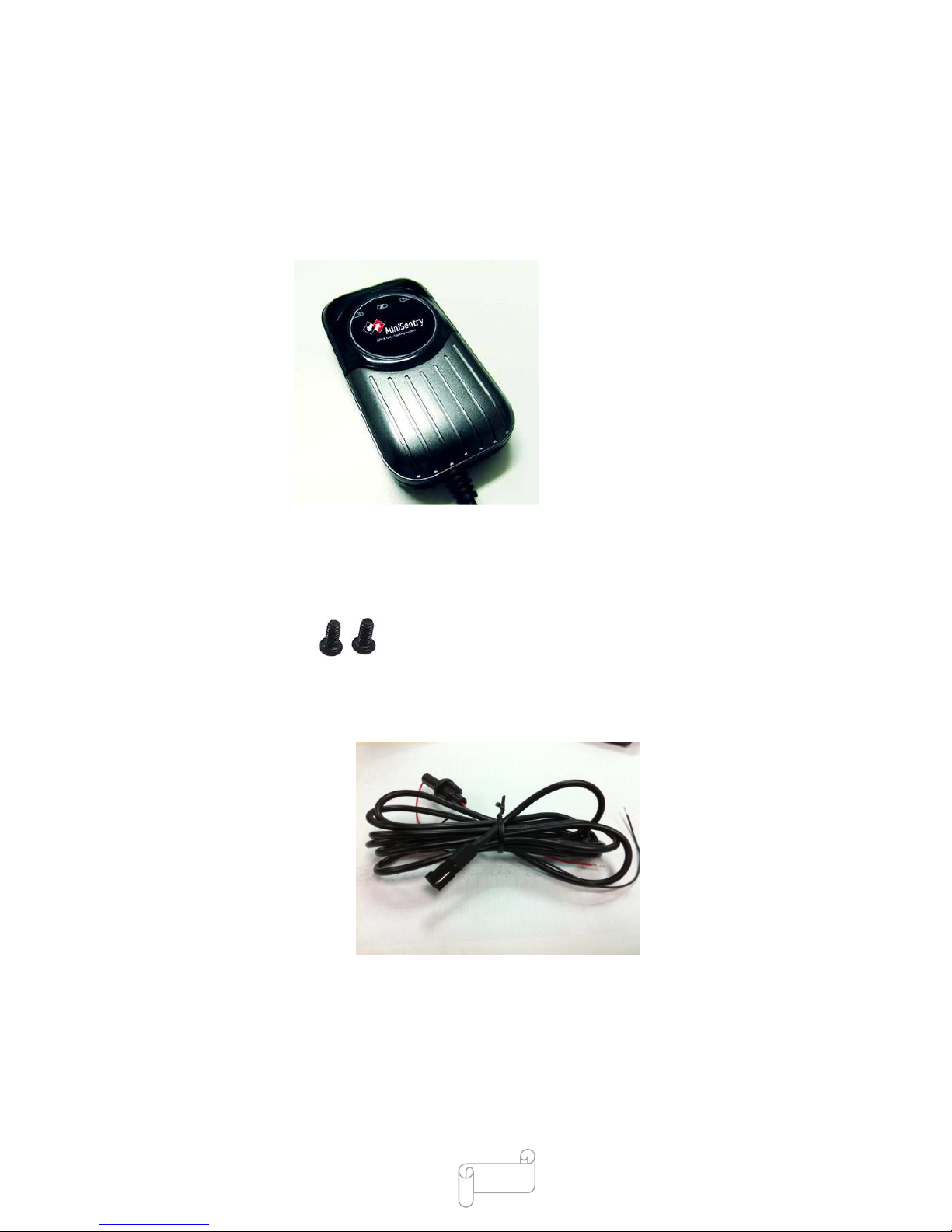
3-1Accessories
AVL 115 Tracker body
Two Screw
Wiring
User manual
Hardware description
Notice: If item is missing or damaged, repack the tracker and return it to your reseller.
Page 6
6
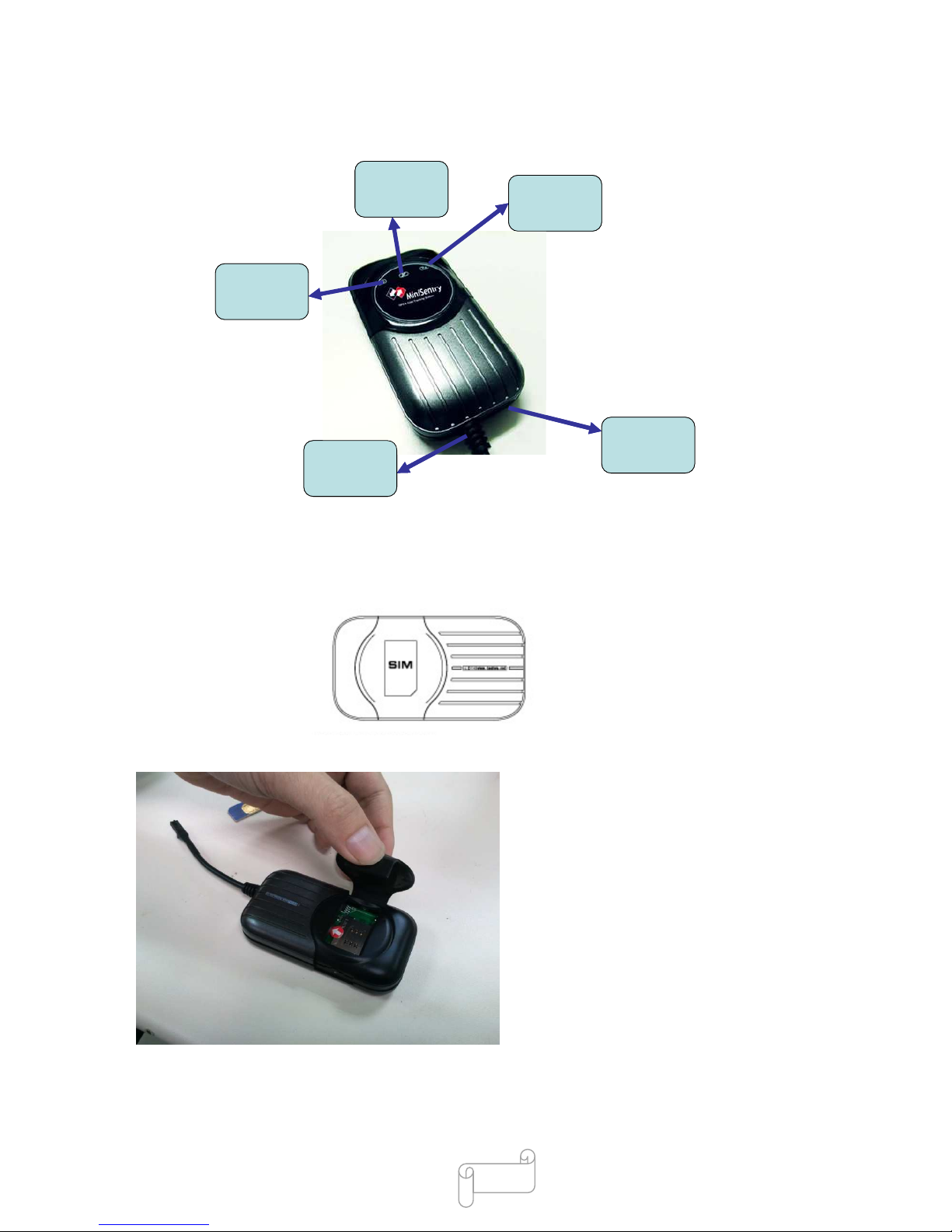
3-2Identifying Components
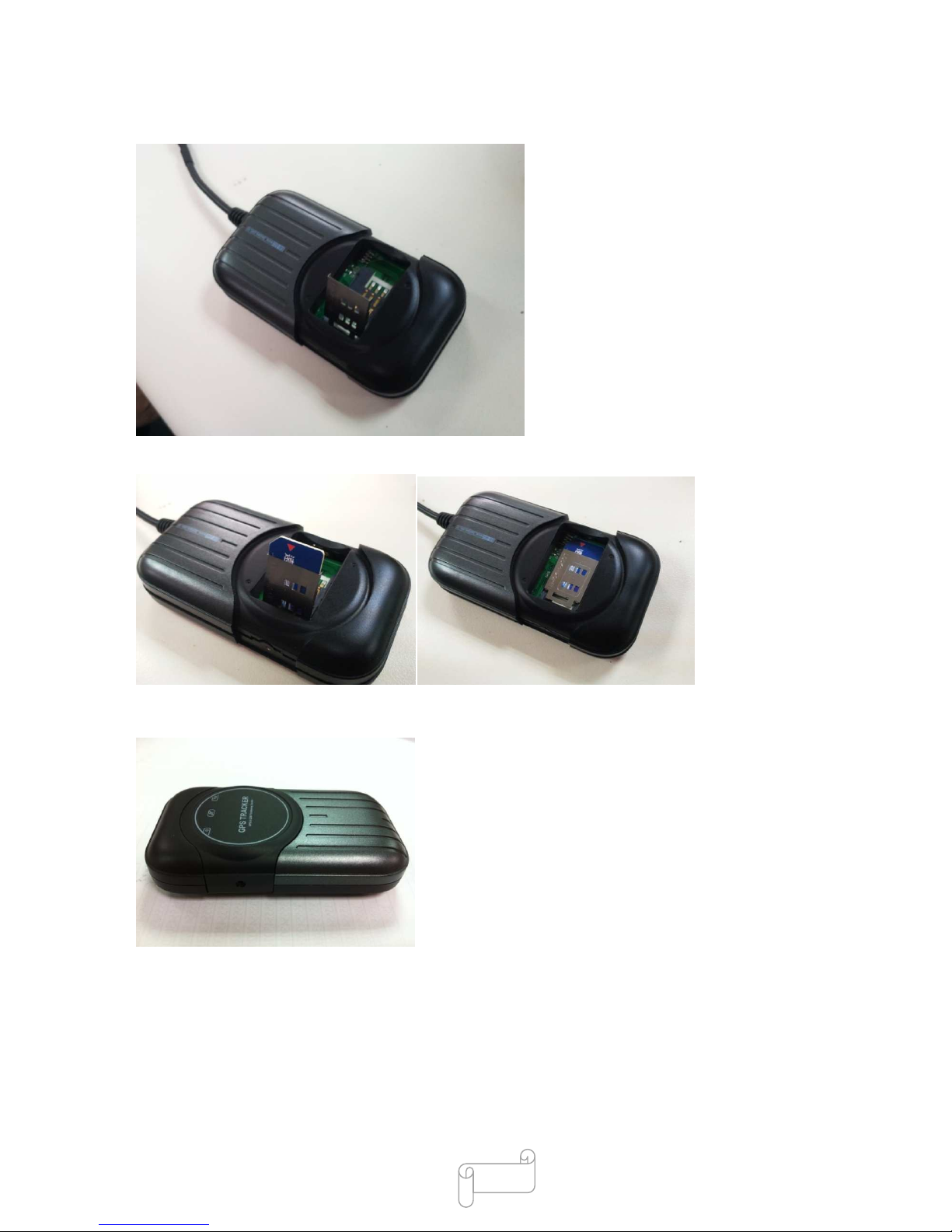
3-3Insert SIM card
Insert SIM as following, open the cover, and put the SIM card into the holder and turn the foil right.
Open the rear cover
Push the foil along and turn it up.
GSM LED
Setting Port
Power Cable
Power LED
GPS LED
GSM LED
Setting Port
Power Cable
Power LED
GPS LED
Page 7
7
Put the SIM card into the holder, and turn the foil right and fasten it in place.
Put the cover back
Note:
1. Make sure that the installed SIM card is workable.
2. Make sure that SIM card is cancelled.(Install SIM to mobile phone to cancel the SIM lock)
Page 8
8
3-4 Setting APN
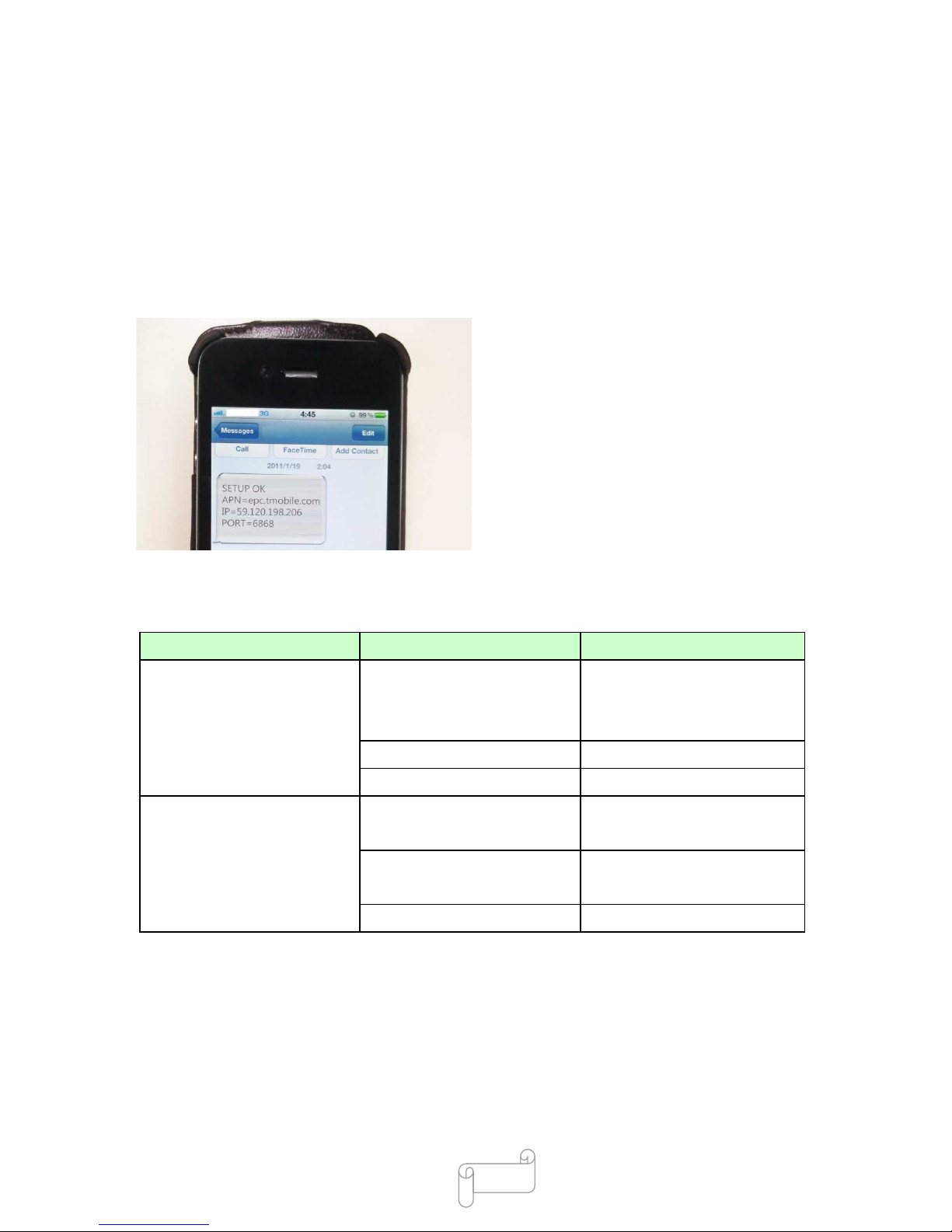
Using your mobile phone to set the APN, firstly, send SMS 510#0000#Internet to the unit number.
(0000 is your default password, internet is your local APN, APN is different in different area, for
example, APN in USA is epc.tmobile.com and therefore, user has to check your APN first from your
operator)
If APN is epc.tmobile.com and the setting is successful, the unit will send response “SETUP OK:
APN= epc.tmobile.com IP=59.120.198.206 PORT=6868”
(See more operation in 5-1)
3-5LED Signal Definitions
Indication Conditions LED display
Service Limit service (no sim card in) Red LED On ( Power)
Blue LED On ( GPS )
Orange LED On ( GPRS)
No GPRS service (no signal) Orange LED on
GPS Not Fixed Blue LED On
Mode
GPS Not Fixed
GPS Fixed
Blue LED On
Blue LED blinking
GPRS Not connection
GPRS connection
Orange LED on
Orange LED blinking
Working Red LED On
Page 9

9
4. Operation
4-1SMS Command list
To locate the GPS tracker position, if require anytime.
A:SMS: Send 720#0000 in SMS to unit to locate tracker position.
(0000 is password currently, please change in the platform.)
B: Voice Surveillance
Direct to locate SIM card position by phone, dial the tracker phone number and hang up after two
beep, the SMS will automatically be sent to the user to inform the location of the tracker.(Warning:
Remember to set SIM card display ID function)
SMS
Command
Example Response Description
001 001#0000 AVL115B101019Bestwe Acquire Version
111 111#0000 Current address SMS response address
410 410#0000 IMEI = 355543020119954 Response the number of IMEI
510 510#0000#cmnet SETUP OK: APN=cmnet
IP=59.120.198.206
PORT=6868
Setting APN/IP/Port
520 520#0000 APN=cmnet
IP=59.120.198.206
PORT=6868
Setting APN/IP/Port
720 720#0000 PARK OFF ! Unlock Park security alarm
721 721#0000 PARK ON ! Setting Park security alarm
937 937#0000#0 Engine OFF !
Cut off Engine (Oil)
937 937#0000#1 Engine ON ! Release
Park Alarm Tracker automatic send Park alarm: Current address After setting Park alarm. It will
send SMS to host if car move.
Car power off Tracker automatic send Car Power Off: current
address
If main power be cut, it will
change to use back up battery.
Call Tracker &
hand up
Tracker automatic send Current address SMS response address
4-2 Security alarm system
If tracker has been cut main power by thief, it will send SMS to inform customer and continue track
Page 10
10
the unit position by using back up battery. It will be powerful function to protect your property.
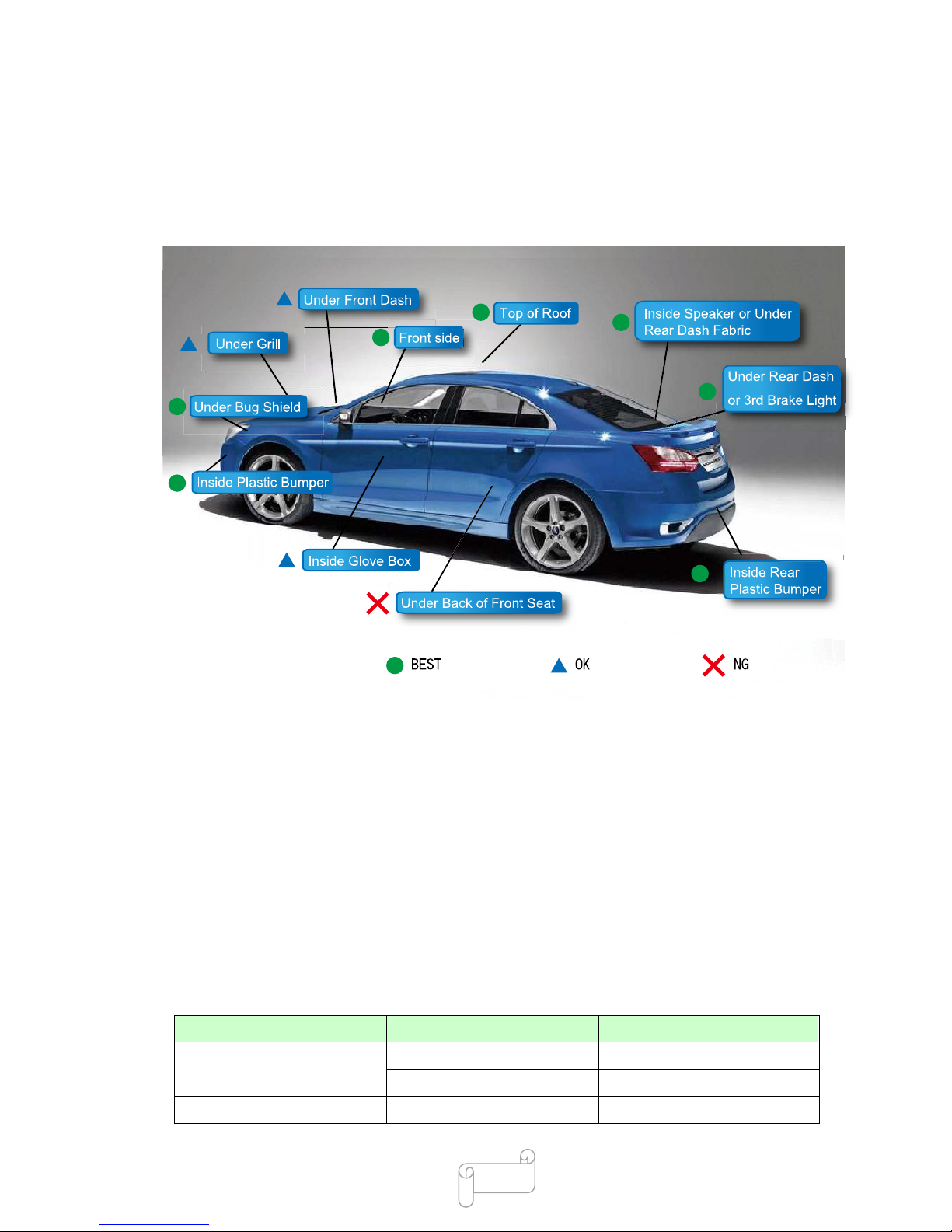
4-3 Installation instruction
Recommend setting position in car
1. Hide the tracker under windscreen.
2. Hide the tracker inside plastic bumper
3. Hide the tracker under rear dash or 3
rd
brake light
4. Hide the tracker under bug shield
5. Hide the tracker on top of roof
6. Hide the tracker inside speaker or under rear dash fabric
7. Hide the tracker inside rear plastic bumper
Environmental Specifications
Item Description Specification
Temperature Operating range -10 °C to 55 °C
Storage range -20 °C to 70 °C
Humidity up to 95% non-condensing
Page 11
11
Warning: If the windshield affixed to the metal Sun Control Film ,this will reduce the GPS signal reception and
cause malfunctioning GPS. Therefore, we recommend to replace the installation location.
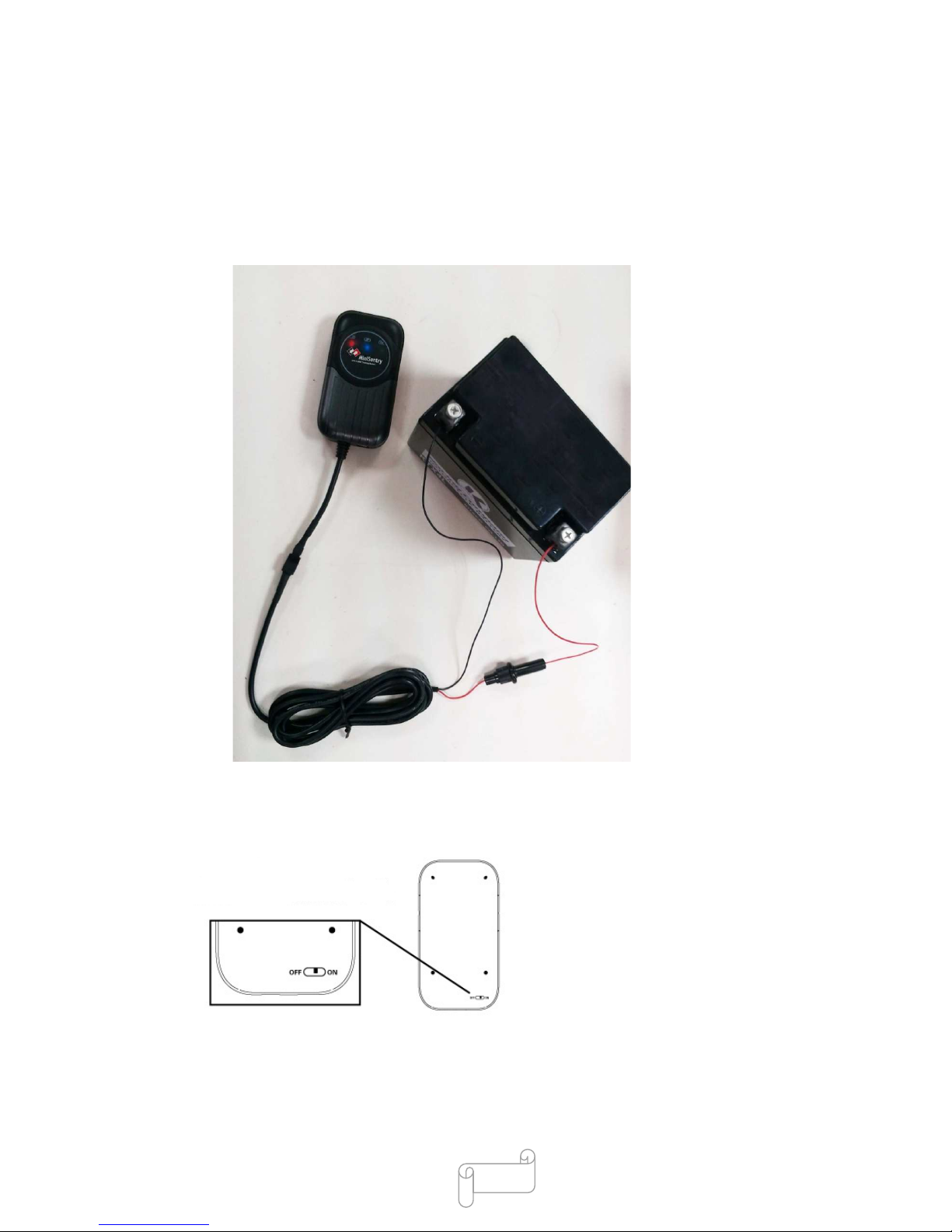
4-4 Installation notice
1. Connect with 12V battery. Remember to set positive and negative level on right
way.(Block is negative level)
2. Please remember setting as following; turn the back battery power on.
Page 12
12
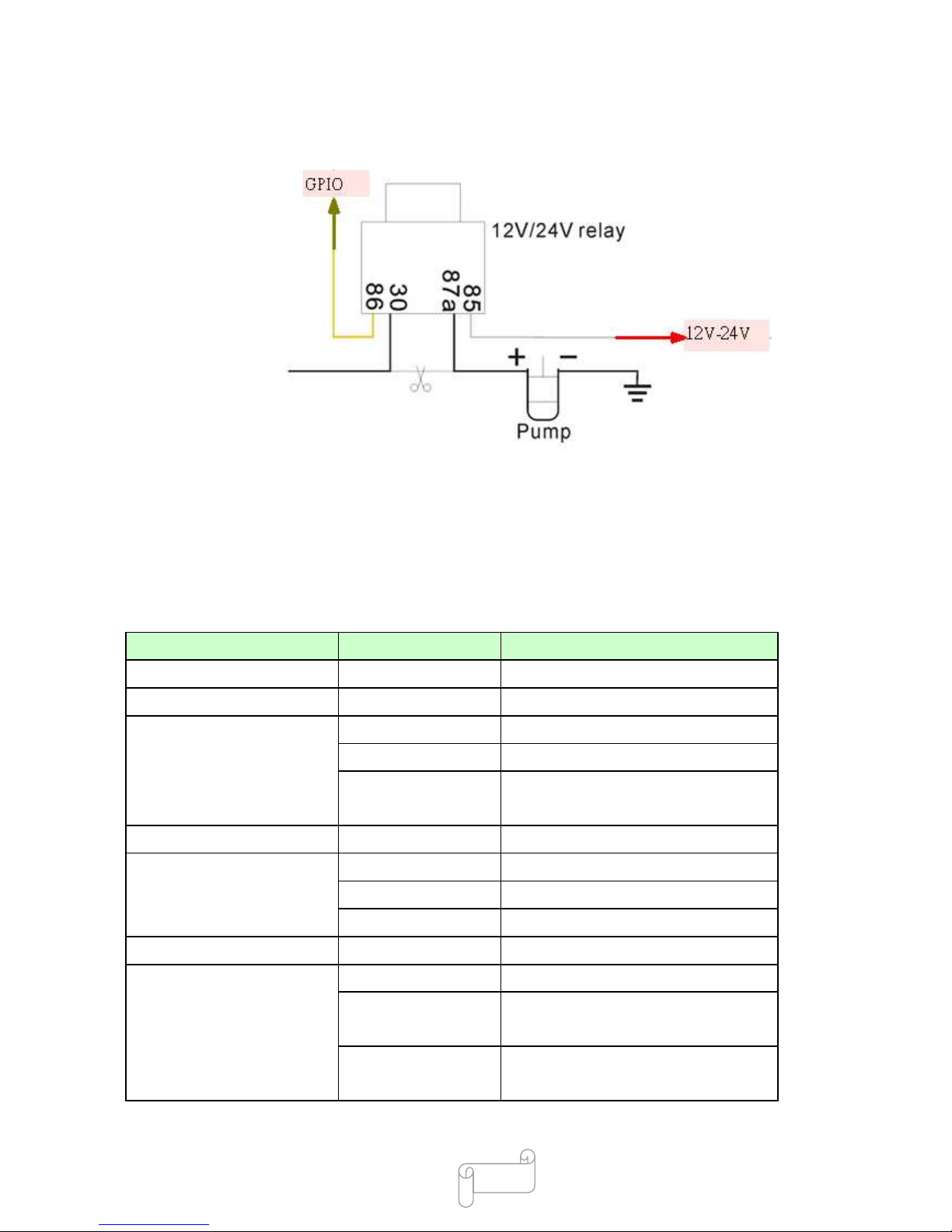
3. CUT off Engin (Oil)
5. Specification
GPS Specifications
Item Description Specification
Chipset Skytraq Venus638LPx
Sensitivity Tracking -161dBm
General Frequency L1, 1575.42 MHz
C/A code 1.023 MHz chip rate
Channels 51 Channel Acquisitions
14 Channel Tracking
Datum Default WGS-84
Accuracy Position 2.5m CEP
Velocity 0.1 meters/second
Time 300ns
Time to First Fix (TTFF) Reacquisition 0.1 sec., average
Open Sky & Stationary
Requirements
Hot start 1 sec., average typical
TTFF @ -130dBm
Warm start 28 sec., average typical TTFF
@
-130dBm
Cold start 29 sec., average typical TTFF
@
-130dBm
Page 13

13
Dynamic Conditions Acceleration 4g, max.
GSM/GPRS Specifications
Item Description specification
Air Interface GSM or GPRS Quad
Band
850/900/1800/1900MHz
Support Class 12 GPRS
Protocol Stack GSM Rel.97. STK Rel.99
GPRS Rel4.0 Class 10
Output Power
Class 4 (2W) at 850/900 MHz
Class 1 (1W) at 1800/1900 MHz
GSM Sensitivity
850/900 MHz -108 dBm
1800/1900 MHz -107 dBm
Messaging SMS concatenated Yes
Smart
messaging(GPRS)
Yes
Electrical Specifications
Item Description Specification
Supply voltage From Car Power 9 V – 40V
Power consumption Operation mode (GSM) 130mA~ 270mA
Standby mode (Trace On) 70±5mA
Power saving mode (Trace Off) 7mA
6. Fault and solution
The Chart below shows the possible unusual conditions and methods to solve the problems; you may
try solving the problem according to the suggested instructions before consulting the service engineer.
Fault Solution
The tracker is not able to be
activated.
Please check if the SIM Lock is cancelled.
All the three LED are on after
turning on the device.
Please check if the SIM card is installed properly.
Fail to receive the SMS report from
the tracker.
Dial the SIM number to check if this SIM is workable or not.
Check with the provider if this SIM runs out of credit or does not
open the SMS function.
The GPRS is unable to upload the
coordinates.
Make sure the APN and IP/Port settings are correct.
There is screw-like noise while The tracker is built-in with a sensor ball and it is normal to hear the
Page 14

14
shaking the tracker. noise while the sensor ball is moving.
7. Certification and Safety
Approvals/General Information Caution
Important information regarding safe and efficient operation: Read this information before using the
product. Users are not permitted to make changes or modify the device in any way. Any changes or
modifications not expressly approved by the party responsible for compliance could void the user’s
authority to operate the equipment.
Disclaimer
The information in this document is subject to change without notice. The manufacturer makes no
representations or warranties with respect to the contents hereof and specifically disclaim any
implied warranties of merchantability or fitness for any particular purpose. The manufacturer
reserves the right to revise this publication and to make changes from time to time in the content
hereof without obligation of the manufacturer to notify any person of such revision or changes.
Operation is subject to the following two conditions:
This device may not cause interference and 2) this device must accept any interference, including
interference that may cause undesired operation of the device.
Europe–EU Declaration of Conformity
This device complies with the specifications EN301489, EN55022, EN55024, EN300440, EN301511,
EN60950_1, EN50360 and EN62209_1 following the provisions of the R&TTE Directive
 Loading...