

Page 1
SPECIFICATIONS
Ranges: 0 to 199.9 uW/cm
0 to 1.9999 mW/cm
0 to 19.99 mW/cm
2
2
2
Resolution: 0.1 uW/cm2 (0 to 199.9 uW/cm2)
0.001 mW/cm2 (0 to 1.9999 mW/cm2)
0.01 mW/cm2 (0 to 19.99 mW/cm2)
Accuracy: ±2% full scale plus 2 digits
Wide band
wavelength: 320 to 390 nm
Sampling Time: Approximately 0.4 seconds
Data Output: PC serial interface
Case: ABS plastic
Fall safe: Low battery indicator
Power: One (1) 9-Volt alkaline battery
Accessories
Supplied: carrying case, UV sensor probe,
battery, desiccant Traceable®
Certicate, instructions.
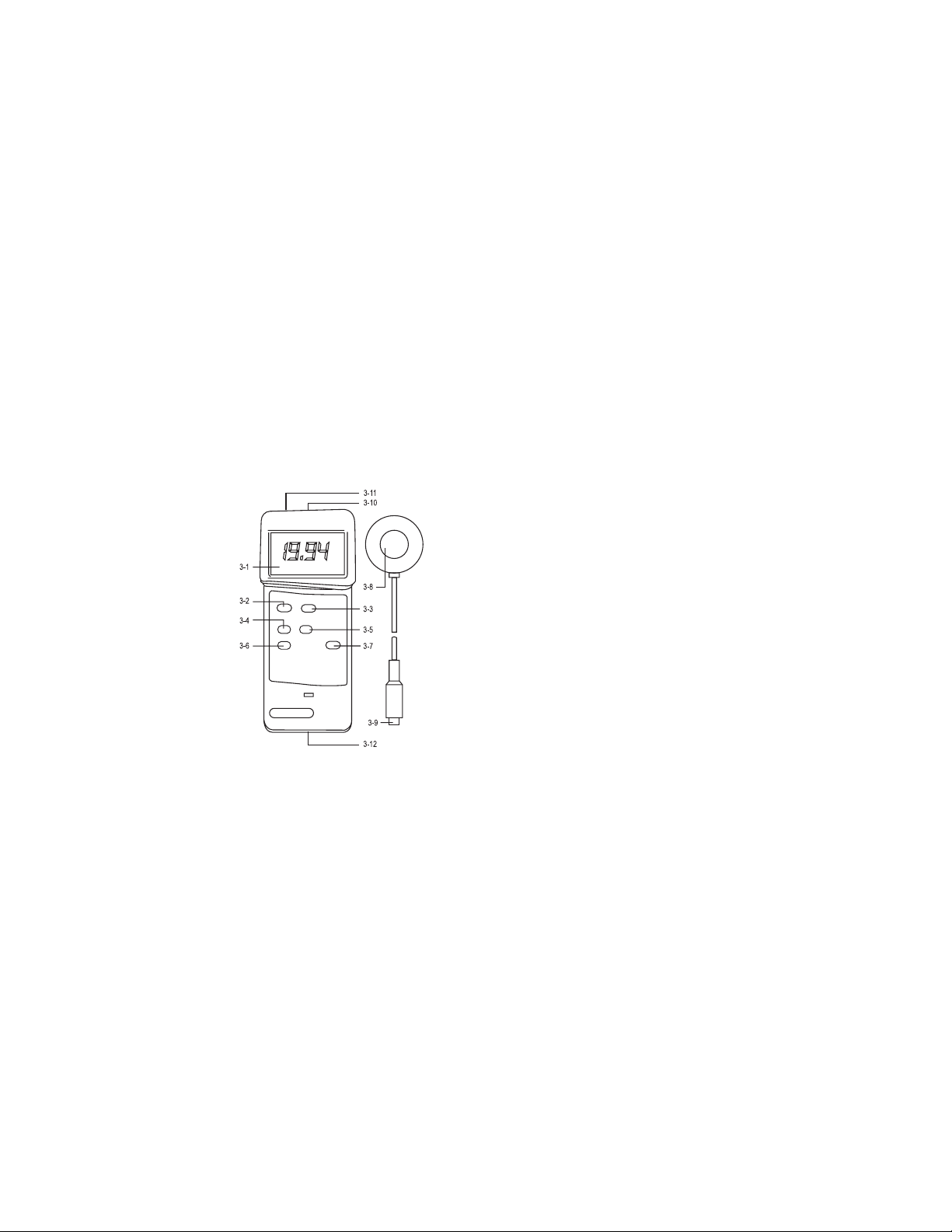
FIGURE 1:
DESCRIPTION
3-1 LCD
3-2 Power Button
3-3 Hold Button: press to hold reading
3-4 Record Button: press to record results
3-5 Recall Button: press to show minimum
and maximum readings
3-6 Zero Button
3-7 Range Switch
3-8 UV Sensor
3-9 Sensor Plug
3-10 Sensor Input Socket
3-11 Computer Output Socket
3-12 Battery Compartment
UV LIGHT METER OPERATION
1. Turn the meter on by pressing the POWER BUTTON
(3-2, g. 1).
2. Zero Adjustment: Set the RANGE SWITCH
(3-7, g. 1) to 199.99. This is the far left setting. Cover
the UV SENSOR (3-8, g. 1) with hand to protect
it from the environment for a more accurate zero
reading. Press the ZERO BUTTON (3-6, g. 1). The
display should read 0.0. Remove your hand.
NOTE: if the display shows: “CALO” the further
adjustment is needed. Turn the power off by pressing
the POWER BUTTON. Press and hold the ZERO
BUTTON. Press the POWER BUTTON again. The
bottom line of the display will show “0000”. Adjust the
VR9 by turning the knob on the right of the unit until
the top line of the display reads “0”.
3. Select the desired range by switching the RANGE
SWITCH (3-7, g. 1) NOTE: If the display shows “----”
then there is too much light for the meter to read in
this range. Select the next higher range.
4. Place the UV SENSOR (3-8, g. 1) directly under the
light source you wish to measure. Hold for at least 0.4
seconds. The meter will measure the light and display
the value. Limit the angle of light from the source
being measured to 45 degrees; if possible, limit the
angle of light to within 30 degrees.
5. To hold a measurement on the display, press the
HOLD BUTTON (3-3, g. 1) while a measurement is
being taken. The LCD will show DH in the upper left
portion of the display to indicate that the value is a
“held” value. To cancel the data hold feature, simply
press the HOLD BUTTON a second time.
6. To record a measurement, press the RECORD
BUTTON (3-4, g. 1) while a measurement is being
taken. The LCD will show REC in the lower left por-
tion of the display to indicate that the value is being
recorded. To deactivate the record function, press the
RECORD BUTTON again.
7. Memory Recall: Use the RECALL BUTTON (3-5, g.
1) to recall the minimum and maximum readings.
When the REC symbol appears or the display,
press the RECALL BUTTON (3-6, g. 1) once. The
maximum recorded value will be displayed. The
letters “Max” will also appear on indicating that this
is the maximum or highest reading. A second press
of the RECALL BUTTON will display the minimum
reading. The letters “Min” will also appear indicating
that this is the minimum lowest reading.
Note: The Data Record function must be in use to
utilize the Memory recall features. Once the RECORD
BUTTON has been pressed a second time to
deactivate the data record function, the minimum and
maximum values are no longer stored.
Find Quality Products Online at: [email protected]
www.GlobalTestSupply.com
Page 2

CARING FOR THE UV LIGHT METER
It is recommended that the meter be recalibrated every
year. The sensor is extremely sensitive to humidity. Store
in a low humidity environment by keeping it in its case
with the Humidity Sponge
™
provided. Proper storage
will extend the length of time between recalibration of
the unit.
COMPUTER SERIAL INTERFACE
This unit features computer output. A COMPUTER
OUTPUT SOCKET (3-11 g. 1) is located on the top
of the unit. To utilize this feature, connect the unit to a
PC with an accessory Data Acquisition System. See
Accessories.
Data is displayed in a 16 digit stream: D15 through D0.
Each digit indicates the following:
D0 end word
D1 to D4 Upper Display Reading, D1=LSD, D4=MSD
D5 to D8 Lower Display Reading, D5=LSD, D8=MSD
D9 Decimal Point (DP) for Upper Display:
0= no DP, 1= 1 DP, 2=2 DP, 3=3 DP
D10 Decimal Point (DP) for Lower Display:
0= no DP, 1= 1 DP, 2=2DP,3=3DP
D11/D12 Annunciator for Upper Display:
00= No Symbol, 01= °C, 02= °F, 03= %,
04= %RH, 05= %PH, 06= %O
07= mg/L,
2
08= m/s, 09= knots, 10= Km/h, 11= Ft/min,
12= mph, 13= µS, 14=mS, 15= Lux,
16= Ft-cd, 17=dB, 18=mV
D13 Annunciator for lower display: 0= No symbol,
1= 00., 2= °F
D14 Reading Polarity for the display:
0= both upper and lower displays are ~
1= upper is “-” and lower is “+”
2= upper is “+” and lower is “–”,
3= both upper and lower displays are “–”.
D15 Start Word
BATTERY LIFE
If the letters “LBT” appear on the left corner of the
display, it indicates the batteries are low and need to
be replaced. To replace the battery, slide the battery
cover located on the back of the unit away from the unit.
Remove the old battery and replace it with a new 9-Volt
alkaline battery. Use an alkaline battery, NOT a regular or
heavy duty battery. Property connect the battery. Replace
the battery cover. Incorrectly installed batteries may
damage electronics.
The unit has an automatic shut off feature to prolong
battery life. If no button on the unit is pressed for ten
minutes, the unit will automatically shut off. To deactivate
this feature, press the RECORD BUTTON while a
measurement is being taken.
ALL OPERATIONAL DIFFICULTIES
If this Ultra Violet Light Meter does not function properly
for any reason, please replace the battery with a new
9-Volt alkaline battery (see Low Batt section, above).
Low battery power can occasionally cause any number o
“apparent” operational difculties. Replacing the battery
with a new fresh battery will solve most difculties.
ACCESSORIES
Cat. No. 3150 Humidity Sponge™ Indicator Desiccant
(40 bags/pack)
Contains a blue indicating gel, which turns to pink when
the desiccant pack has achieved its moisture capacity and needs to be replaced. The desiccant (sodium
calcium aluminosilicate hydrate) is nontoxic and is a
“Generally Recognized as Safe” (GRAS) material. Packs
are certied as Class 100 Clean-Room compatible. Each
pack is 3 x 3 x ¼ inches.
Cat. No. 4138 Easy-Use Accessory Adaptor 115 VAC
Bonus Free Disk This demonstration disk shows the data
acquisition capabilities of this digital product when connected to a computer. See Cat No. 4136 below to order
complete Data Acquisition System.
Cat. No. 4136 Data Acquisition System Accessory
Powerful and easy to use computer data capture/data
logging program works with Traceable
®
Instruments with
computer output. Records interval readings from 1 to
10,000 seconds; displays minimum/maximum readings;
and utilizes an alarm mode that permits the user to be
notied visually, audibly, and by email when an alarm is
triggered. Data is stored to a le that can be printed in
any report or spreadsheet format. Networking server/
client capability allows the captured data to be monitored
on a remote workstation and/or by email. It is designed to
work with Windows® 98/Me/NT/2000/XP/Vista. Includes
a CD, a 6-foot cable (supplied USB and serial connections) that plugs into the instrument and computer.
Accessory extension cables expand cable length to 300
feet.
Cat No. 4325 Data Logger Complete DAS–4™ System
captures and stores up to 8000 bytes (over 1000
readings) from all meters. Reading may be taken at
intervals from 1 second to 99 hours. Stored readings
may be downloaded to any PC and viewed. Can be read
“as is” or imported to spreadsheets, databases, and
statistical programs. Supplied with 36-inch serial cable
with D9F computer plug, disk (Windows
®
), and four AA
alkaline batteries. Size is 5 x 3 x 1 inches. Weight is 7
ounces.
Cat. No. 4326 Accessory Adaptor 115 VAC for
Data Logger
Find Quality Products Online at: [email protected]
www.GlobalTestSupply.com
Page 3

CONTROL COMPANY
Control Company is ISO 9001:2008 Quality-Certied
by DNV and ISO/IEC 17025:2005 accredited as a
Calibration Laboratory by A2LA.
TRACEABLE
ULTRAVIOLET
LIGHT METER
INSTRUCTIONS
®
©2016 Control Company. 92-3253-10 Rev. 2 061516
Traceable
is a registered trademark of Control Company.
®
Find Quality Products Online at: [email protected]
www.GlobalTestSupply.com
 Loading...