

Page 1
FUNCTION SETTINGS
1. Enter function setting mode.
Press [ON/OFF] to turn the power off, Press [ZERO] first, then press
[ON/OFF], while keeping [ZERO] pressed, the display will show A_ON or
A_OFF.
2. Selection of auto backlight mode.
The balance enter function setting menu. Press [UNITS] key, the display will
show L_ON or L_OFF, press [ZERO], selection display L_ON, this means
auto backlight function active, press [ZERO] again, the display will show
L_OFF, this means auto backlight function inactive, i.e. shut off backlight
function.
3. Selection of auto shut off mode.
Press [UNITS] key, the display will show A_ON or A_OFF, press [ZERO],
selection display A_ON, this means auto shut off function active. Press
[ZERO] again, the display will show A_OFF, this means auto shut off
function inactive.
4. Return to weighing mode.
Press [ON/OFF] to turn the power off, press [ON/OFF] again to turn on the
power and the scale return to the weighing mode.
COMPACT SCALE/BALANCE
INSTRUCTION MANUAL
FEJ SERI
THINH PHAT SCALES JONT STOCK COMPANY
Tel : (08) 62.999.111 – 62.888.666 Fax (08) 3512.7699
www.canthinhphat.com
- Mail : [email protected]
Page 2
SAFETY PRECAUTIONS
All safety messages are identified by the following the words "WARNING" and
"CAUTION". These words mean the following:
△WARNING
Important information to alert you to a situation
that might cause serious injury and damage to
your property if instructions are not followed.
△CAUTION
Important information that tells how to prevent
damage to equipment.
When using the scale/balance, the following safety precautions should always be
followed.
△ WARNING
Use only the AC adaptor with the scale/balance. Other adaptor may cause damage.
(AC adaptor is optional)
△ CAUTION
Avoid installing the scale/balance in direct sunlight, this may cause discoloration or
malfunctions.
Do not mix the type of batteries. Replace all other batteries at the same time.
If the scale/balance is not to be used for a long period of time, remove all batteries
from the battery compartment to avoid leakage which may cause damage to the
instrument.
Avoid overloading that could cause damage to the scale/balance.
Do not drop water in the scale/balance that is not water-resistant. It causes damage,
if inside of the scale/balance is wet.
Matter charged static electricity could influence the weighing. Discharge the static
electricity. As example, the method is to use the electrification prevention spray, to
spray it to both side of weighing platform.
1
SPECIFICATIONS
Model number Capacity Division
FEJ -100 100g 0.01g
FEJ -150 150g 0.01g
FEJ -200 200g 0.01g
FEJ -300 300g 0.01g
FEJ -600 600g 0.01g
FEJ -750 750g 0.05g
FEJ -1200 1200g 0.05g
FEJ -1500 1500g 0.10g
FEJ -500 500g 0.10g
FEJ -1000 1000g 0.1/0.2g
FEJ -2000 2000g 1.00g
FEJ -1000 1000g 0.50g
FEJ -3000 3000g 1.00g
FEJ -5000 5000g 1.00g
Platter
φ115mm or 145 x 145mm
Net/gross weight 510/620g
Standard carton: 23×16×5(cm3)
Package
12 Units in one box: 48×35×20(cm
3
)
Operating Temperature
0-40℃(32-104℉)
6×AA Size Batteries or AC/DC
Power source
Adapter 9V/100mA
6
Page 3
CALIBRATION
When to calibrate
Calibration may be required when it is initially installed, if the scale/balance is
moved to a substantial distance.
This is necessary because the weight of a mass in one location is not necessarily the
same in another location. Also, with time and use, mechanical deviations may
occur.
How to calibrate
1. Before entering calibration mode, press [ON/OFF] to turn the power on for
1minutes.
2. Enter calibration mode
Press [ON/OFF] to turn the power off. Press [UNITS] first, then Press [ON/OFF],
while keeping pressing [UNITS], the display will show CAL then the A/D value.
3. Calibration by the weight
Wait for the stable indicator to be displayed, Press [UNITS] the display will show
flashed calibration weight.
4. Place the calibration weight on platform. After the stable indicator is displayed,
then press [UNITS], the display will show "-------" then the A/D value. Now
calibration is finished.
5. Press [ON/OFF], turn off the power, press [ON/OFF] to turn on the power again,
place the weight repeat steps 2-5.
6. Return to weighing mode
Press [ON/OFF] to turn the power off. Press [ON/OFF] again to turn on the power
and the scale/balance return to the weighing mode.
FEATURES
z Auto shut off (selectable). ● Auto calibration
z Auto zero tracking
● Auto backlight (selectable)
z Low battery indication
● g/oz…… conversion
z Large LCD (6digits 15 mm high)
● 1/30000&1/15000 division available
5
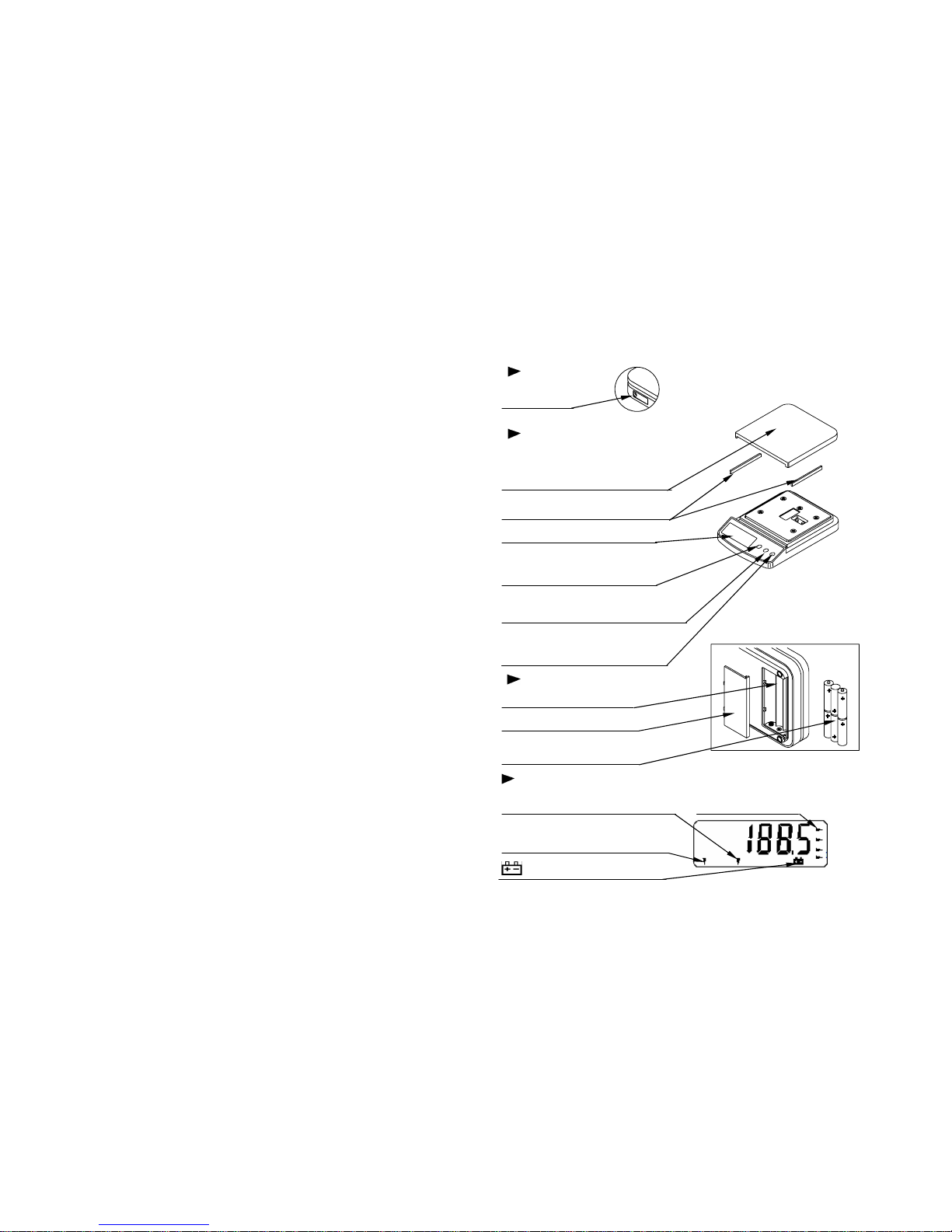
PARTS DESCRIPTION
LEFT SIDE
AC adaptor
Socket
TOP
Weighing platform
The arch face of platform is front.
Correct the direction of the pan.
Protector
Remove it before use
Display
ON/OFF key
Turns the scale/balance
Power on/off.
UNITS key
Changes weighing units
ZERO key
Sets display to zero or
Subtracts weight of a container.
BOTTOM
Battery compartment
Battery compartment cover
Batteries
Batteries are not included
DISPLAY
ZERO indicator
Indicates when the reading is “0” Weighing unit
STABLE indicator
Indicates when the reading is stable.
Low battery indicator
2
Page 4
PREPARATION
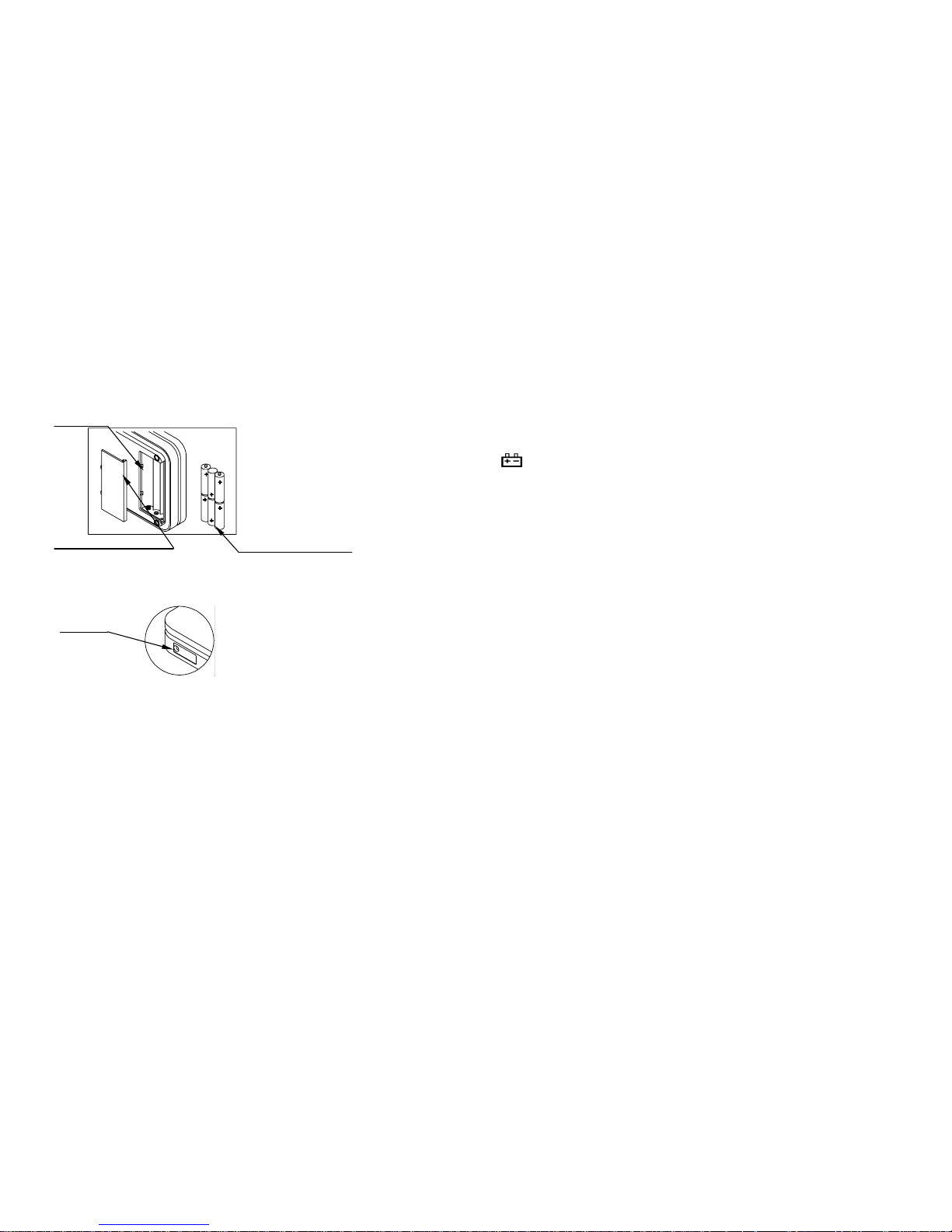
1.Installing batteries/Connecting the AC adaptor
Batteries
Battery Remove the battery compartment
compartment cover and insert six batteries(R6P/LR6
/AAsize) into the battery compartment,
taking extreme care that the polarities
plus and minus is observed.
R6P/LR6/AA size
Dry batteries.
Battery compartment cover (batteries are not included)
AC adapter (optional)
Plug the AC adapter to the AC
AC adaptor
adapter socket on the side.
socket
The AC input requirement could
be 110,120,220,230 or 240Volts
(50/60Hz) depending on the area
where used, so please verify that
the adaptor is correct
2.Setting up the scale/balance
△! CAUTION
Avoid installing the scale/balance in direct sunlight, that may cause discoloration or
malfunctions. Place your scale/balance on a firm weighing table so that the
scale/balance is level. (The scale/balance will not perform accurately when it is not
level.)
Place the scale/balance on the firm surface that is flat and level for an accurate
weighing.
WEIGHING
Before weighing
Whenever possible, please allow the balance to warm up for 10 minutes after first
turning to power on, so that the balance will function properly and accurately.
Error messages
Err-O: Overload
: Low battery
Calibration may be required before weighing.
Read "CALIBRATION" first and if necessary, calibrate your scale/balance for
accurate weighing.
Weighing procedures
1. Press [ON/OFF] to turn on the scale/balance.
When power is turned on, all display segments appear on LCD for a few seconds
and finally "0" will appear on the display.
2. Select the weighing unit with [UNITS].
Press [UNITS] to select a weighing unit, eg. "g"、" ct " ….
Once the unit has been selected, the selected unit will be displayed to the weight
value.
3. Start weighing
If you do not use a container for weighing,
Verify the reading is "0". If not, press [ZERO] to display "0".
Place objects on the weighing platform to weigh.
The weight will be displayed.
If you use a container for weighing,
Place an empty container on the platform.
Wait for the stability indicator to be displayed and press [ZERO].
Place the objects to be weighed in the container.
The weight will be displayed.
4
3
 Loading...