

Page 1
Deco X50
Superior Mesh Wi-Fi, Everywhere
User Guide
AX3000 Whole Home Mesh
Wi-Fi 6 System
1910013337 REV3.0.0 © 2023 TP-Link
Page 2

Contents
About This Guide ···················································· 1
Appearance ······························································· 2
Set Up Your Deco ··················································· 3
Troubleshooting ······················································ 7
Authentication ·························································· 8
Page 3
About This Guide
This guide provides a brief introduction to AX3000 Whole Home Mesh Wi-Fi 6 System and regulatory information.
Features available in Deco may vary by model and software version. Deco availability may also vary by region or ISP. All images, steps, and descriptions
in this guide are only examples and may not reect your actual Deco experience.
Conventions
In this guide, the following conventions are used:
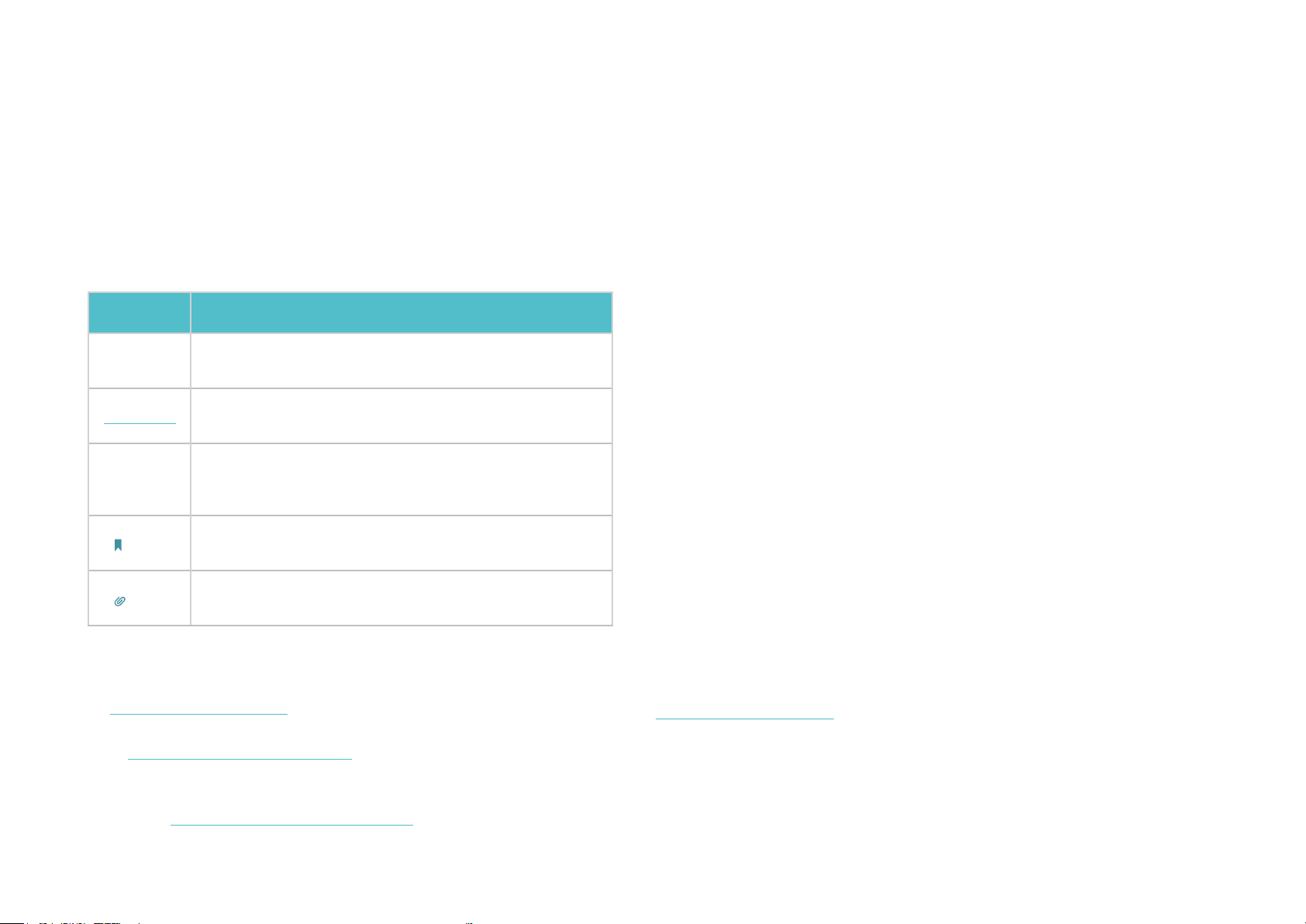
Convention Description
Deco
Underline
Teal
Note:
Tips:
More Info
• Specic product information can be found on the product page at
https://www.tp-link.com.
• A Technical Community is provided for you to discuss our products
https://community.tp-link.com.
at
• Our Technical Support contact information can be found at the
Help center of the Deco app and the Contact Technical Support
page at
Stands for Deco Whole Home Mesh Wi-Fi System/
Unit.
Hyperlinks are in teal and underlined. You can click to
redirect to a website or a specic section.
Key information appears in teal, including
management page text such as menus, items,
buttons and so on.
Ignoring this type of note might result in a malfunction
or damage to the device.
Indicates important information that helps you make
better use of your device.
https://www.tp-link.com/support.
Speed/Coverage/Device Quantity Disclaimer
Maximum wireless signal rates are the physical rates derived from IEEE
Standard 802.11 specications. Actual wireless data throughput and
wireless coverage, and quantity of connected devices are not guaranteed
and will vary as a result of network conditions, client limitations, and
environmental factors, including building materials, obstacles, volume and
density of trac, and client location.
MU-MIMO Disclaimer
Use of MU-MIMO requires clients to also support MU-MIMO.
IoT Compatibility Disclaimer
IoT compatibility refers only to smart devices that can be controlled via the
Deco app. Other wireless devices can still connect to Deco for normal Wi-Fi
use.
Seamless Roaming Disclaimer
Clients need to support 802.11k/v/r and may require additional set up.
Performance may vary depending on the client device.
HomeShield Disclaimer
HomeShield includes the Free Basic Plan. Fees apply for the Pro Plan. Visit
tp-link.com/homeshield for more information.
1
Page 4
Appearance
For connecting Deco to your modem, the Ethernet outlet,
solid yellow indicates a successful reset.
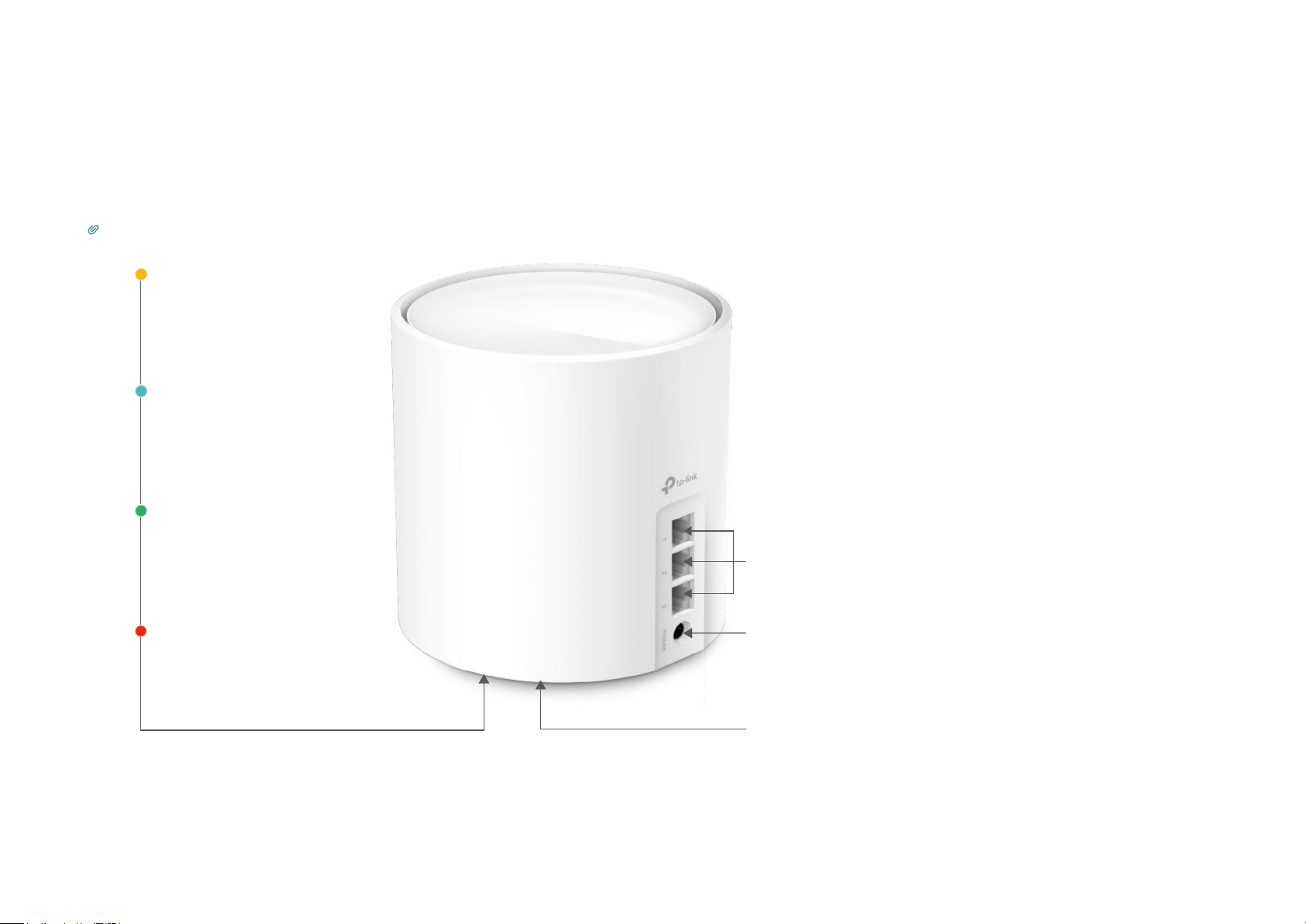
Each Deco has an LED that changes color according to its status, three RJ-45 Ethernet ports, a power slot, and a Reset button.
See the explanation below:
Tip: The product label can be found at the bottom of the product.
Pulse Yellow:
Deco is resetting.
Solid Yellow:
Deco is starting up.
Pulse Blue:
Deco is ready for setup.
Solid Blue:
Deco is setting up.
Pulse Green:
Deco is upgrading rmware.
Solid Green:
Deco is all set up and connected.
Ethernet Ports:
or for other internet services in Wireless Router mode.
Pulse Red:
The satellite Deco is disconnected
from the main Deco.
Solid Red:
Deco has an issue.
Power Slot:
For connecting Deco to the power socket via the provided
power adapter.
Reset Button:
Press for 1 second and release to reset Deco to factory
default settings. The light changing from pulsing yellow to
2
Page 5
Set Up Your Deco
First let's start by setting up the Deco network. Get the TP-Link Deco app for iOS or Android, then follow the app to walk through the setup.
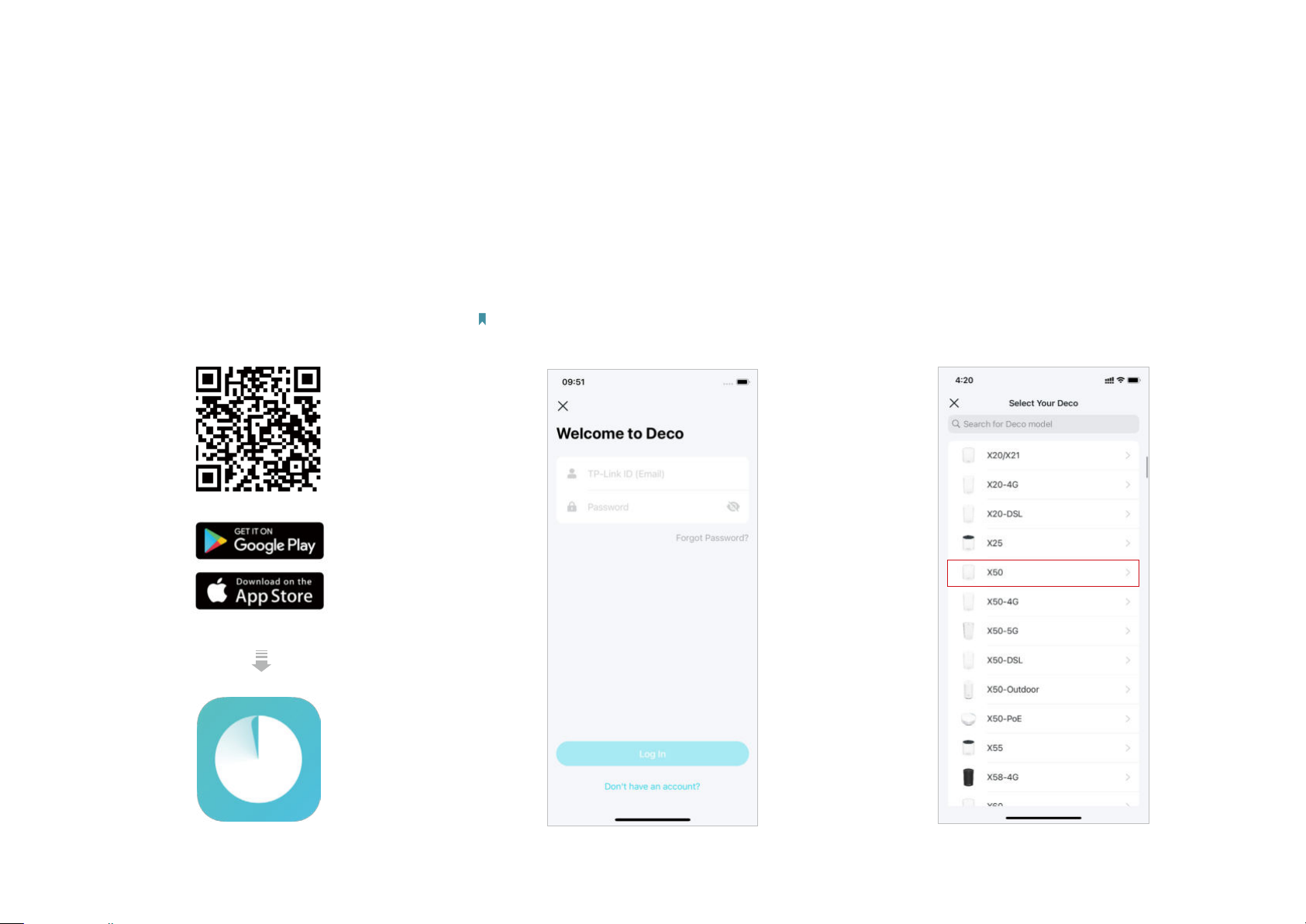
1. Get the Deco app
Scan the QR code below or go to Google
Play or the App Store to download the Deco
app. Install the app on your Android or iOS
smartphone or tablet.
or
2. Log in or sign up with TP-Link ID
Open the app and log in with your TP-Link ID. If
you don’t have a TP-Link ID, create one rst.
Note: If you forgot your login password, tap Forgot Password?.
The app will help you reset your password.
3. Select your Deco model
Search for and select your Deco model. If
you have more than one Deco model, tap the
question below the search box to check how
to maximize the overall network.
3
Page 6
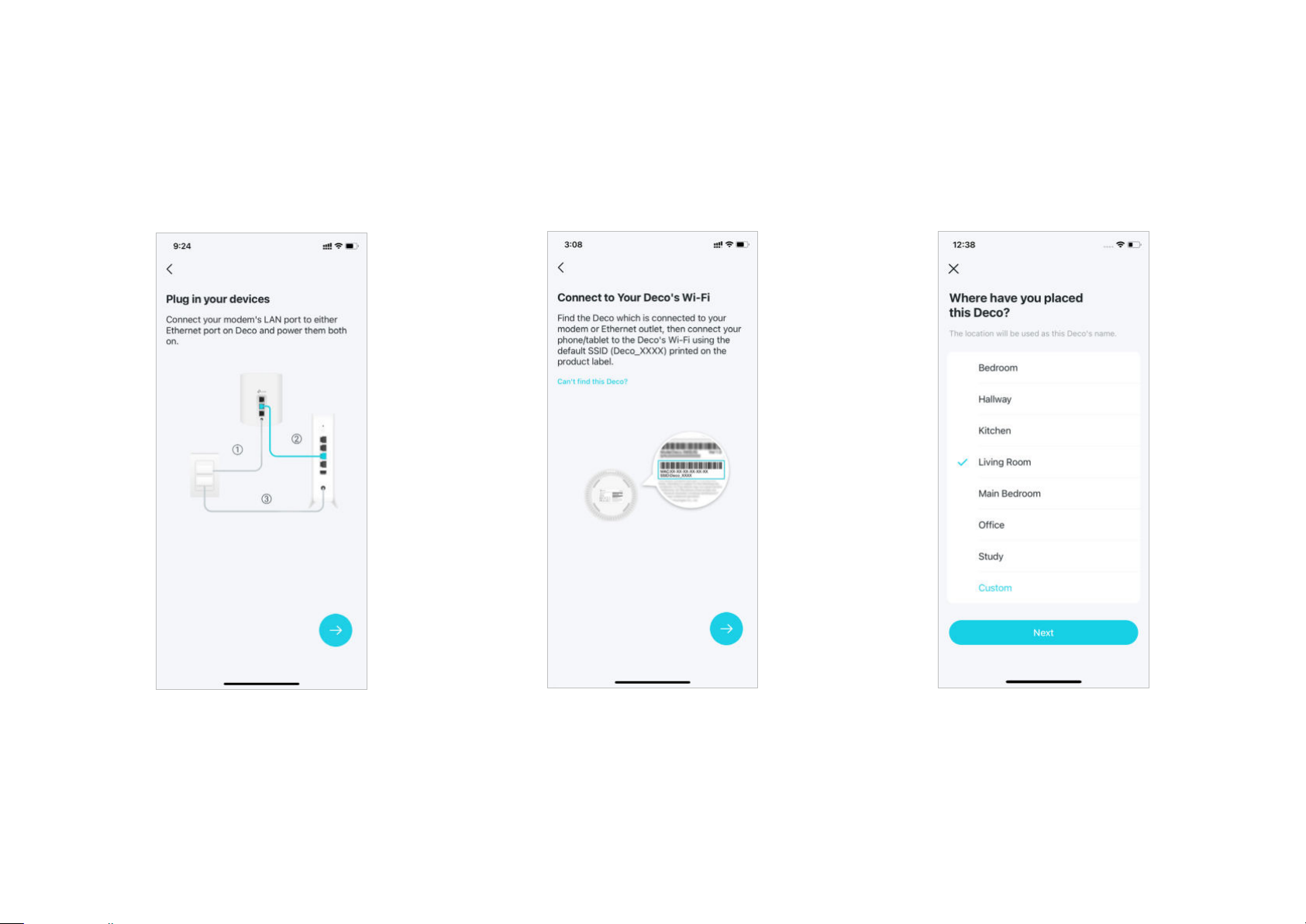
4. Plug in your Deco
5. Connect to your Deco's Wi-Fi
6. Specify your Deco's location
Power o your modem. Connect your Deco to
the modem and power them both on.
If you don't have a modem, connect your
Deco directly to the Ethernet outlet.
Connect your phone/tablet to the Deco's Wi-Fi
using the default SSID printed on the product
label.
Select or custom a location for your Deco.
The location will be used as the name of your
Deco.
4
Page 7
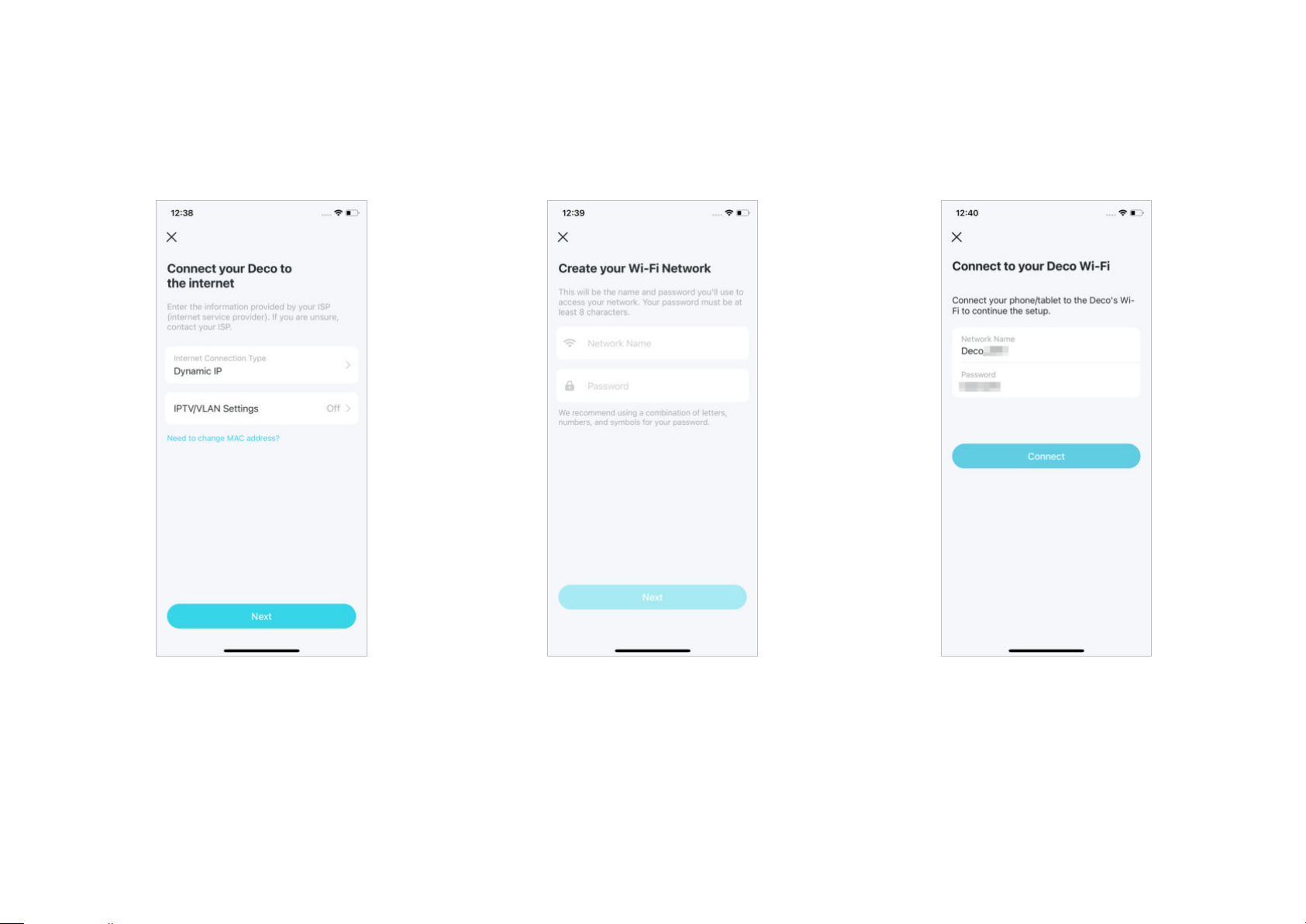
7. Connect your Deco to the internet
8. Create your Wi-Fi network
9. Connect to your Wi-Fi network
Select the internet connection type and enter
the information. If you are not sure, contact
your internet service provider.
Set a network name and a password. These
will be the name and password you use to
connect your devices to Wi-Fi.
Connect your phone/tablet to the Deco's Wi-Fi.
5
Page 8
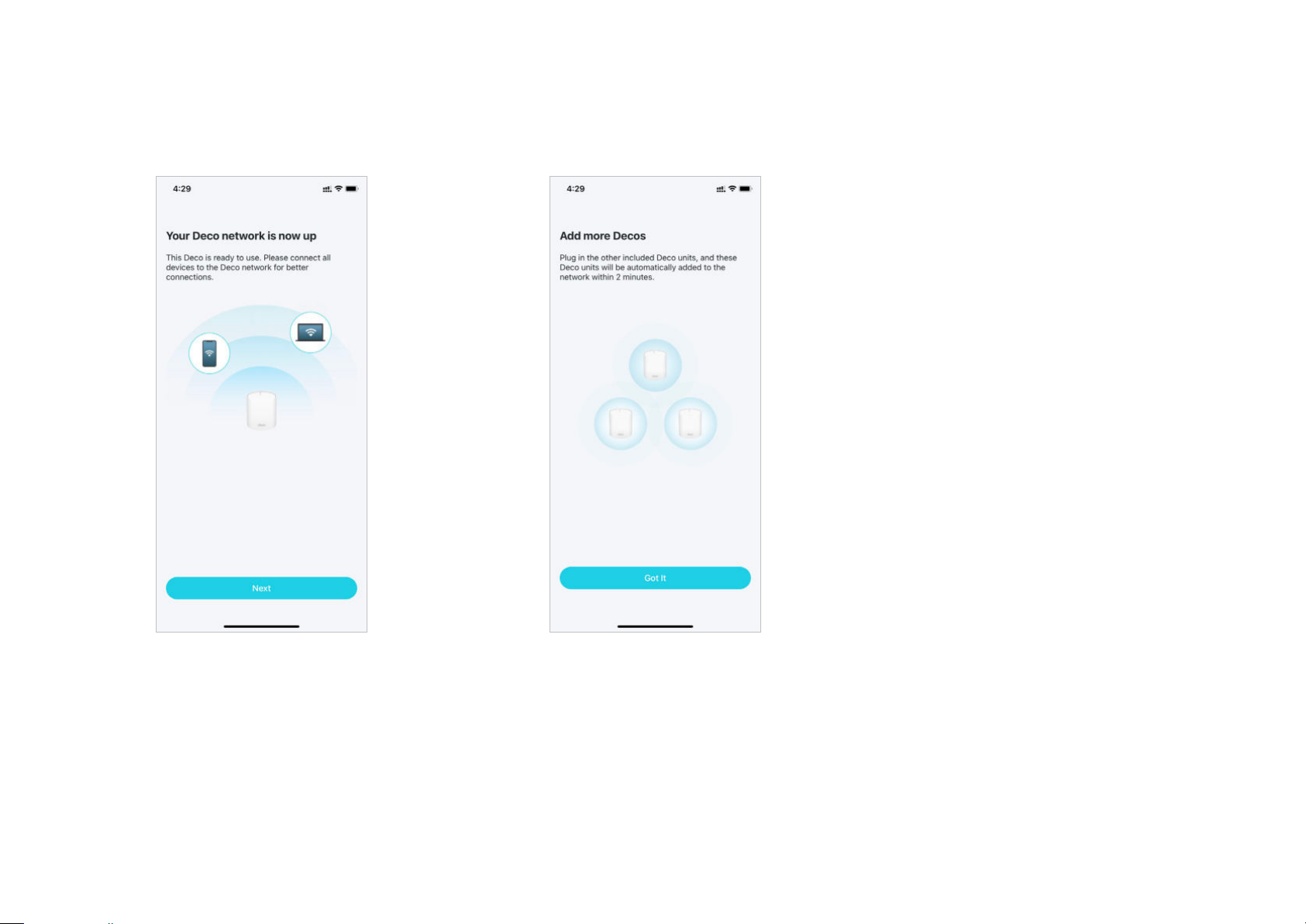
10. Setup complete
11. Add more Decos
Your Deco network is now up. You can connect
your devices to the Deco network.
Plug in the other included Decos, and they will
automatically join the network within 2 minutes.
6
Page 9

Troubleshooting
Solutions to common problems during setup or use are provided here for reference. Follow the steps and the provided link below to diagnose and solve
problems you might experience with your Deco.
If problems still exist, contact us:
Q1. What should I do if I fail to congure the main Deco and get stuck on “We couldn't nd Deco”?
Refer to the guide
Q2. What should I do if I fail to congure the satellite Deco and get stuck on “We couldn't nd another Deco”?
Refer to the guide
Q3. What should I do if I fail to congure the main Deco and get stuck on “Testing Internet Connection”?
Refer to the video
Q4. What should I do if my wireless devices cannot connect to Deco?
Refer to the guide
Q5. What should I do if Deco suddenly lost internet access?
Refer to the guide
https://www.tp-link.com/support/faq/2239/ or follow the video https://youtu.be/2HYuEYS9XJM
https://www.tp-link.com/support/faq/1447/ or follow the video https://youtu.be/iVgDzoo16T4
https://youtu.be/OSUrGdWH-i0
https://www.tp-link.com/support/faq/2718/
https://www.tp-link.com/support/faq/1454/
https://www.tp-link.com/support
Q6. How can I nd a suitable spot for my Deco?
Refer to the guide
Q7. What can I do if the Deco app isn't working properly?
Refer to the guide https://www.tp-link.com/support/faq/1456/
https://www.tp-link.com//support/faq/1446/
7
Page 10

Authentication
CE Mark Warning
This is a class B product. In a domestic environment, this product may cause radio interference, in which case the user may be required to take
adequate measures.
OPERATING FREQUENCY(the maximum transmitted power)
2412MHz—2472MHz (20dBm)
5150MHz—5350MHz (23dBm)
Frequency band 5150 - 5250 MHz:
Indoor use: Inside buildings only. Installations and use inside road vehicles and train carriages are not permitted. Limited outdoor use: If used outdoors,
equipment shall not be attached to a fixed installation or to the external body of road vehicles, a fixed infrastructure or a fixed outdoor antenna. Use
by unmanned aircraft systems (UAS) is limited to within the 5170 - 5250 MHz band.
Frequency band: 5250 - 5350 MHz:
Indoor use: Inside buildings only. Installations and use in road vehicles, trains and aircraft are not permitted. Outdoor use is not permitted.
EU Declaration of Conformity
TP-Link hereby declares that the device is in compliance with the essential requirements and other relevant provisions of directives 2014/53/EU,
2009/125/EC, 2011 /65/EU and (EU) 2015/863.
The original EU Declaration of Conformity may be found at https://www.tp-link.com/en/support/ce/
RF Exposure Information
This device meets the EU requirements (2014/53/EU Article 3.1a) on the limitation of exposure of the general public to electromagnetic fields by way
of health protection.
8
Page 11
The device complies with RF specifications when the device used at 20 cm from your body.
National restrictions
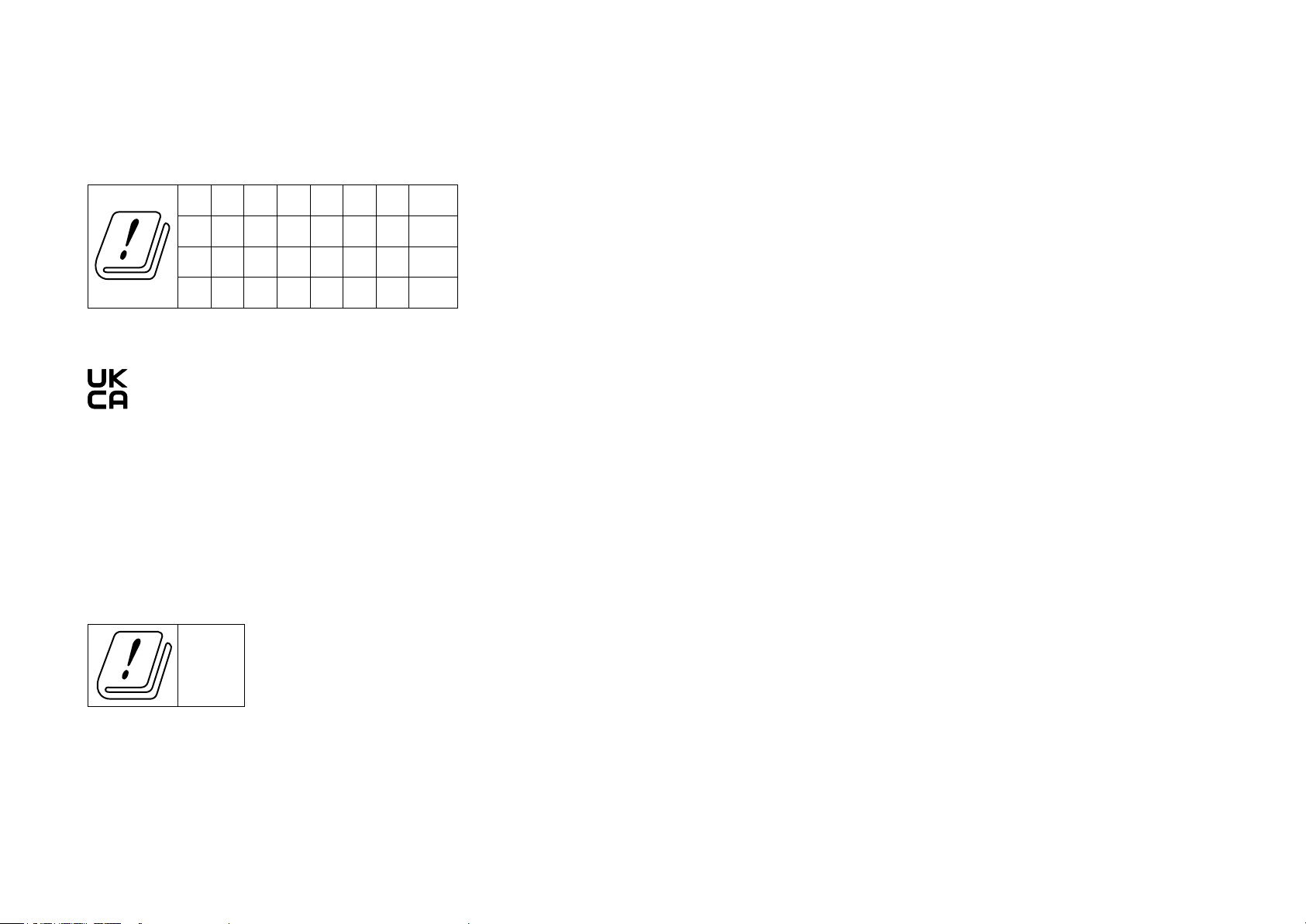
Attention: This device may only be used indoors in all EU member states and EFTA countries, and Northern Ireland.
AT BE BG CH CY CZ DE DK
EE EL ES FI FR HR HU IE
IS IT LI LT LU LV MT NL
NO PL PT RO SE SI SK UK(NI)
UKCA Mark
UK Declaration of Conformity
TP-Link hereby declares that the device is in compliance with the essential requirements and other relevant provisions of the Radio Equipment
Regulations 2017.
The original UK Declaration of Conformity may be found at https://www.tp-link.com/support/ukca/
National restrictions
Attention: This device may only be used indoors in Great Britain.
UK
Canadian Compliance Statement
This device complies with Industry Canada license-exempt RSS standard(s). Operation is subject to the following two conditions:
1. This device may not cause interference.
9
Page 12

2. This device must accept any interference, including interference that may cause undesired operation of the device.
Le présent appareil est conforme aux CNR d’Industrie Canada applicables aux appareils radio exempts de licence. L’exploitation est autorisée aux
deux conditions suivantes :
1. l’appareil ne doit pas produire de brouillage;
2. l’utilisateur de l’appareil doit accepter tout brouillage radioélectrique subi, meme si le brouillage est susceptible d’en compromettre le
fonctionnement.
Caution:
The device for operation in the band 5150–5250 MHz is only for indoor use to reduce the potential for harmful interference to co-channel mobile
satellite systems;
DFS (Dynamic Frequency Selection) products that operate in the bands 5250- 5350 MHz.
Avertissement:
Le dispositif fonctionnant dans la bande 5150-5250 MHz est réservé uniquement pour une utilisation à l’intérieur afin de réduire les risques de
brouillage préjudiciable aux systèmes de satellites mobiles utilisant les mêmes canaux;
Les produits utilisant la technique d’atténuation DFS (sélection dynamique des fréquences) sur les bandes 5250- 5350 MHz.
Radiation Exposure Statement:
This equipment complies with IC radiation exposure limits set forth for an uncontrolled environment. This equipment should be installed and operated
with minimum distance 20cm between the radiator & your body.
Déclaration d’exposition aux radiations:
Cet équipement est conforme aux limites d’exposition aux rayonnements IC établies pour un environnement non contrôlé. Cet équipement doit être
installé et utilisé avec un minimum de 20 cm de distance entre la source de rayonnement et votre corps.
Industry Canada Statement
CAN ICES-3 (B)/NMB-3(B)
10
Page 13
Korea Warning Statements:
당해 무선설비는 운용중 전파혼신 가능성이 있음.
NCC Notice & BSMI Notice:
注意!
取得審驗證明之低功率射頻器材,非經核准,公司、商號或使用者均不得擅自變更頻率、加大功率或變更原設計之特性及功能。
低功率射頻器材之使用不得影響飛航安全及干擾合法通信;經發現有干擾現象時,應立即停用,並改善至無干擾時方得繼續使用。
前述合法通信,指依電信管理法規定作業之無線電通信。
低功率射頻器材須忍受合法通信或工業、科學及醫療用電波輻射性電機設備之干擾。
應避免影響附近雷達系統之操作。
安全諮詢及注意事項
•請按照本產品注明的電源類型使用本產品。
•清潔本產品之前請先切斷電源。請勿使用液體、噴霧清潔劑或濕布進行清潔。
•注意防潮,請勿將水或其他液體潑灑到本產品上。
•插槽與開口供通風使用,以確保本產品的操作可靠並防止過熱,請勿堵塞或覆蓋開口。
•請勿將本產品置放於靠近熱源的地方。除非有正常的通風,否則不可放在密閉位置中。
•不要私自拆開機殼或自行維修,如產品有故障請與原廠或代理商聯繫。
限用物質含有情況標示聲明書
設備名稱:
Equipment name:
AX3000 Whole Home Mesh Wi-Fi 6 System
型號(型式):
Type designation (Type)
Deco X50
11
Page 14
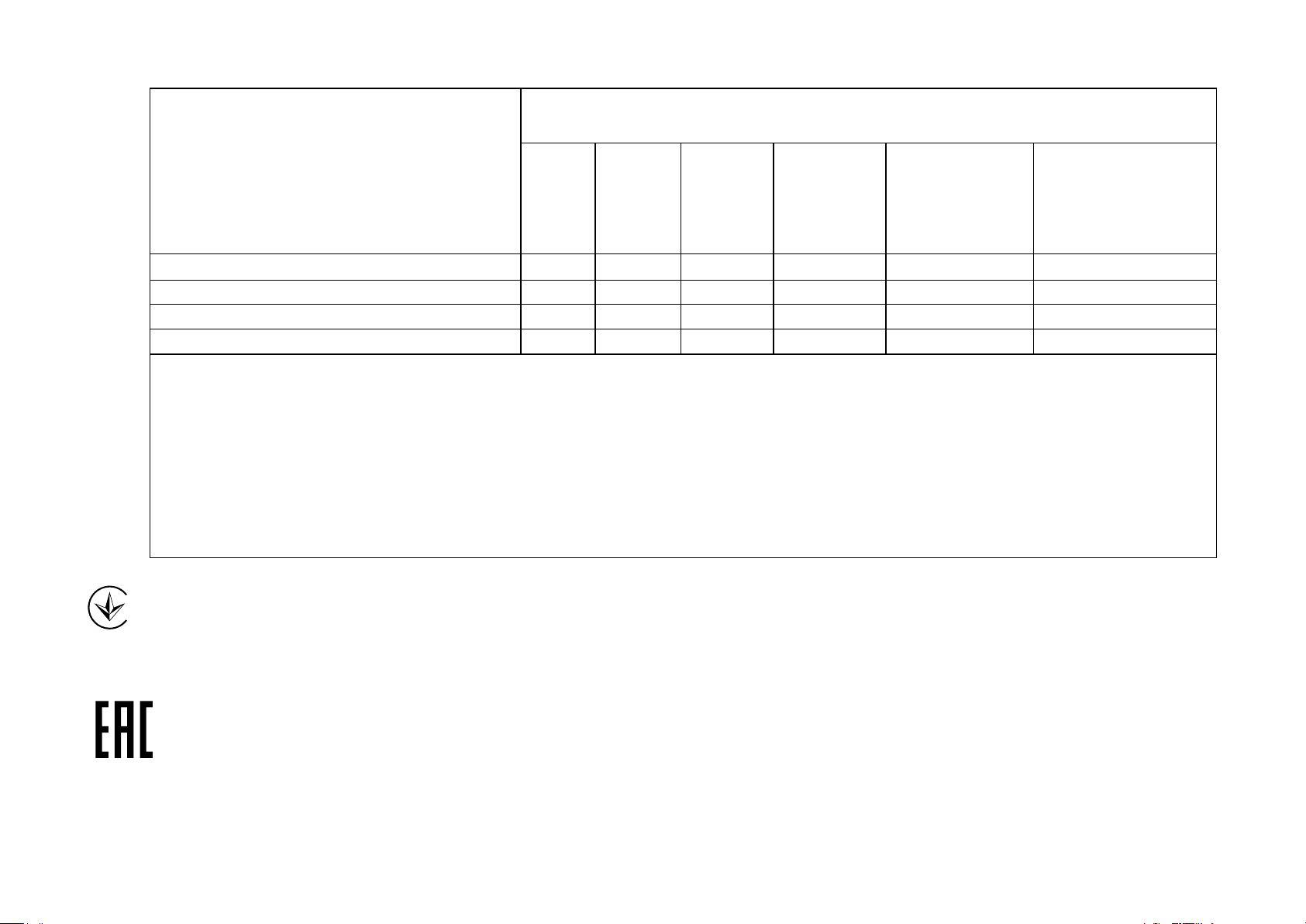
限用物質及其化學符號
Restricted substances and its chemical symbols
單元
Unit
PCB
外殼
電源供應器
其他及其配件
備考1.超出0.1wt%”及“超出0.01wt%”系指限用物質之百分比含量超出百分比含量基準值。
Note 1:“Exceeding 0.1 wt %” and “exceeding 0.01 wt %” indicate that the percentage content of the restricted substance exceeds the
reference percentage value of presence condition.
備考2.“○”系指該項限用物質之百分比含量未超出百分比含量基準值。
Note 2:“○” indicates that the percentage content of the restricted substance does not exceed the percentage of reference value of presence.
備考3.“−”系指該項限用物質為排除項目。
Note 3:The “−” indicates that the restricted substance corresponds to the exemption.
鉛
Lead
(Pb)
汞
Mercury
(Hg)
鎘
Cadmium
(Cd)
六價鉻
Hexavalent
chromium
(Cr+6)
多溴聯苯
Polybrominated
biphenyls
(PBB)
多溴二苯醚
Polybrominated
diphenyl ethers
(PBDE)
○ ○ ○ ○ ○ ○
○ ○ ○ ○ ○ ○
−
−
○ ○ ○ ○ ○
○ ○ ○ ○ ○
Продукт сертифіковано згідно с правилами системи УкрСЕПРО на відповідність вимогам нормативних документів та вимогам,
що передбачені чинними законодавчими актами України.
Safety Information
• Keep the device away from water, fire, humidity or hot environments.
12
Page 15
• Do not attempt to disassemble, repair, or modify the device. If you need service, please contact us.
• Do not use damaged charger or USB cable to charge the device.
• Do not use any other chargers than those recommended.
• Do not use the device where wireless devices are not allowed.
• Adapter shall be installed near the equipment and shall be easily accessible.
• Use only power supplies which are provided by manufacturer and in the original packing of this product. If you have any questions, please don’t
hesitate to contact us.
• Operating Temperature: 0°C~40°C (32°F~104°F)
• This product uses radios and other components that emit electromagnetic fields. Electromagnetic fields and magnets may interfere with pacemakers
and other implanted medical devices. Always keep the product and its power adapter more than 15 cm (6 inches) away from any pacemakers or
other implanted medical devices. If you suspect your product is interfering with your pacemaker or any other implanted medical device, turn off
your product and consult your physician for information specific to your medical device.
Please read and follow the above safety information when operating the device. We cannot guarantee that no accidents or damage will occur due to
improper use of the device. Please use this product with care and operate at your own risk.
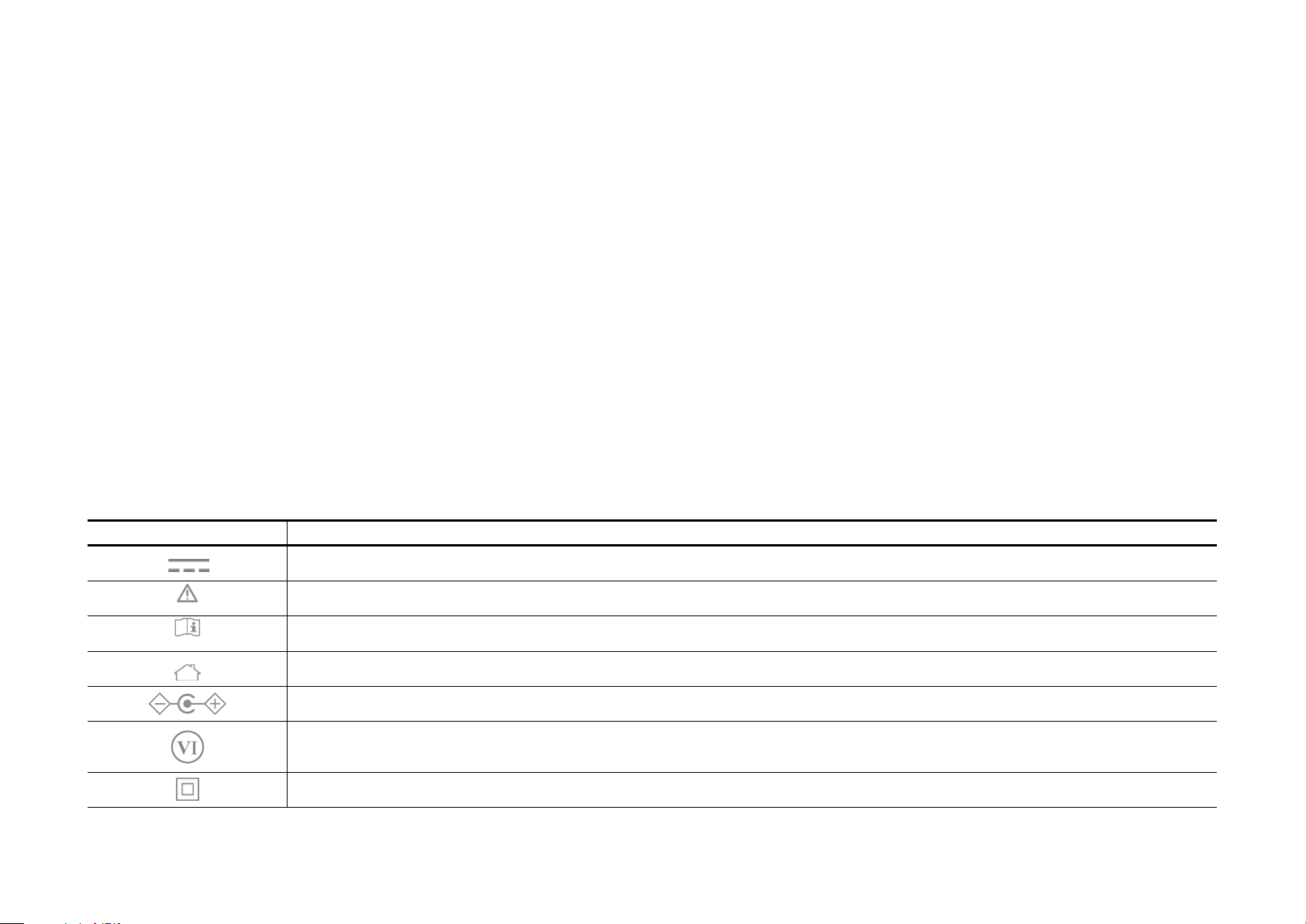
Explanation of the symbols on the product label
Symbol Explanation
DC voltage
Caution
Operator’s manual
Indoor use only
Polarity of d.c. power connector
Energy efficiency marking
Class II equipment
13
Page 16
Symbol Explanation
RECYCLING
This product bears the selective sorting symbol for Waste electrical and electronic equipment (WEEE). This means
that this product must be handled pursuant to European directive 2012/19/EU in order to be recycled or dismantled to
minimize its impact on the environment.
User has the choice to give his product to a competent recycling organization or to the retailer when he buys a new
electrical or electronic equipment.
14
 Loading...