

Page 1
TPG MOBILE BROADBAND
QUICK SETUP GUIDE
TPG USB E1762 Modem
Page 2
TPG MOBILE BROADBAND QUICK SETUP GUIDE
Thank you for choosing TPG Mobile Broadband and USB E1762 modem.
This User Guide provides step by step instructions that will take you through the setup
process to get started.
Content:
1. Getting to know your USB E1762 modem
2. Installing USB E1762 modem
3. Installing TPG Mobile Broadband Connection software (For Windows XP)
4. Installing TPG Mobile Broadband Connection software (For Mac OSX)
5. Your rst connection to TPG Mobile Broadband
6. Using the Software and USB E1762 modem
7. Checking your data usage online
TPG MOBILE BROADBAND QUICK SETUP GUIDE
SIMPLE STEPS TO GET CONNECTED
Page 3
TPG MOBILE BROADBAND QUICK SETUP GUIDE 1
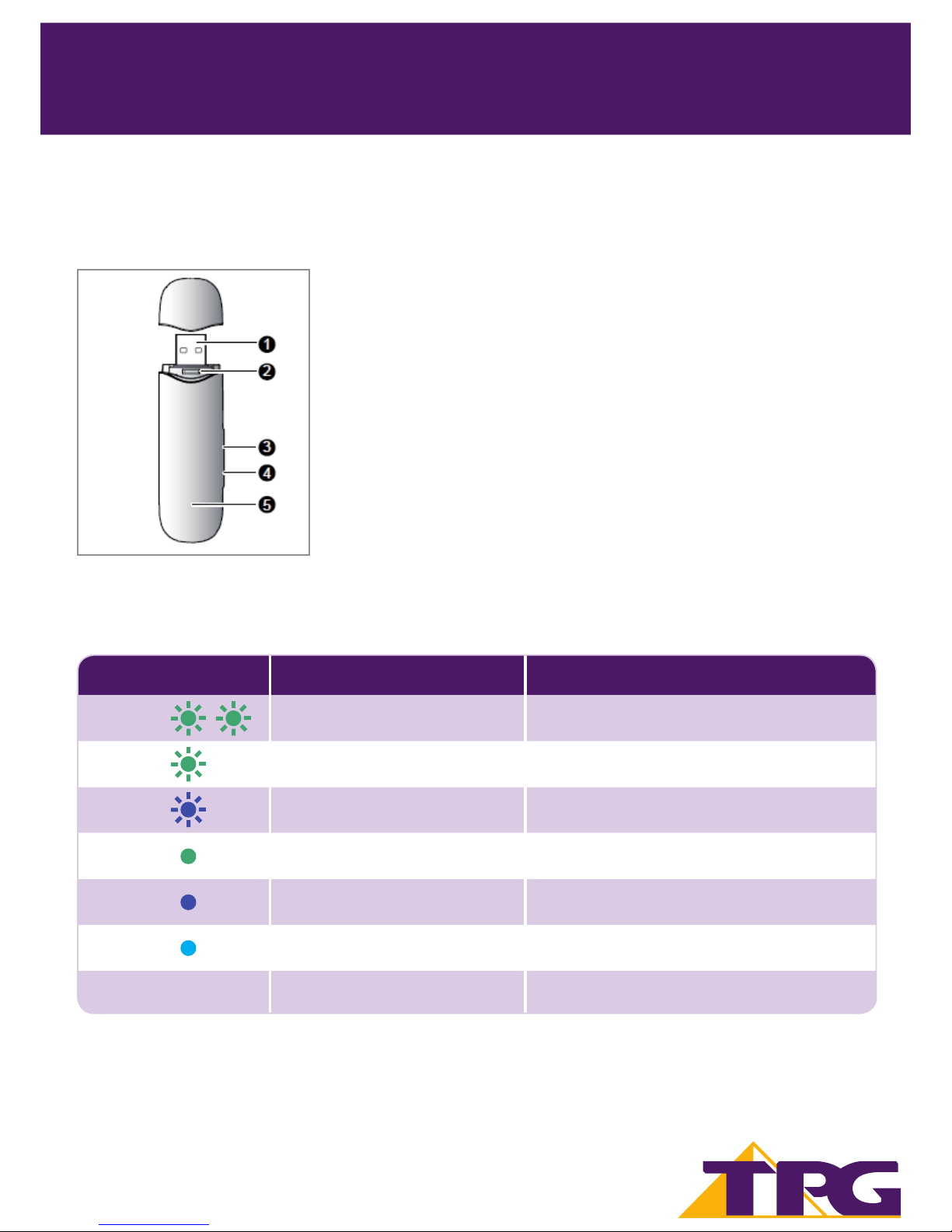
1. Getting to Know Your USB Modem
1. USB Interface – It connects the E1762 Modem to the USB Port of your PC.
2. SIM/Micro SIM Card Holder – Insert your TPG Mobile Broadband SIM or
Micro SIM here.
3. Micro SDCard Slot – This holds the Micro SD card (optional, not pro-
vided by TPG).
4. External Antenna Connection - Connect an external antenna
(optional, not provided by TPG) to boost your reception.
5. Indicator Light - Indicates the status of the USB modem.
Indicator Light Staus
Colour Status Meaning
Green Blinking twice every 3 seconds. The USB modem is on
Green Blinking once every 3 seconds.
2G network (GPRS network
- Weak coverage strength/slow speeds).
Blue Blinking once every 3 seconds.
3G network (UMTS network
- Good coverage strength/fast speeds).
Green On
2G network (GPRS network
- Weak coverage strength/slow speeds).
Blue On
3G network (WCDMA network
- Good coverage strength/fast speeds.
Cyan On
3G+ network (HSDPA network
- Strong coverage strength/super fast speeds.
No colour O The USB modem is removed.
TPG MOBILE BROADBAND QUICK SETUP GUIDE
SIMPLE STEPS TO GET CONNECTED
1
Page 4
TPG MOBILE BROADBAND QUICK SETUP GUIDE 2
2
TPG MOBILE BROADBAND QUICK SETUP GUIDE
SIMPLE STEPS TO GET CONNECTED
2. Installing USB Modem
NOTE: YOU MUST ACTIVATE THE SIM CARD BEFORE PROCEEDING TO THE NEXT STEP.
SIM ACTIVATION STEPS:
Step 1: Go to www.tpg.com.au/account
Step 2: Login with your Mobile Number or Customer ID and Password (Mobile Number and Customer
ID can be found in the Welcome Letter with SIM card attached. Password is what you nominated
during registration.)
Step 3: Choose “Mobile Broadband Service”
Step 4: Click on the ‘SIM Activation’ button
Step 5: Click on ‘Activate SIM now’
After you’ve completed the activation steps above, please allow up to 24 hours for your activation
request to be processed.
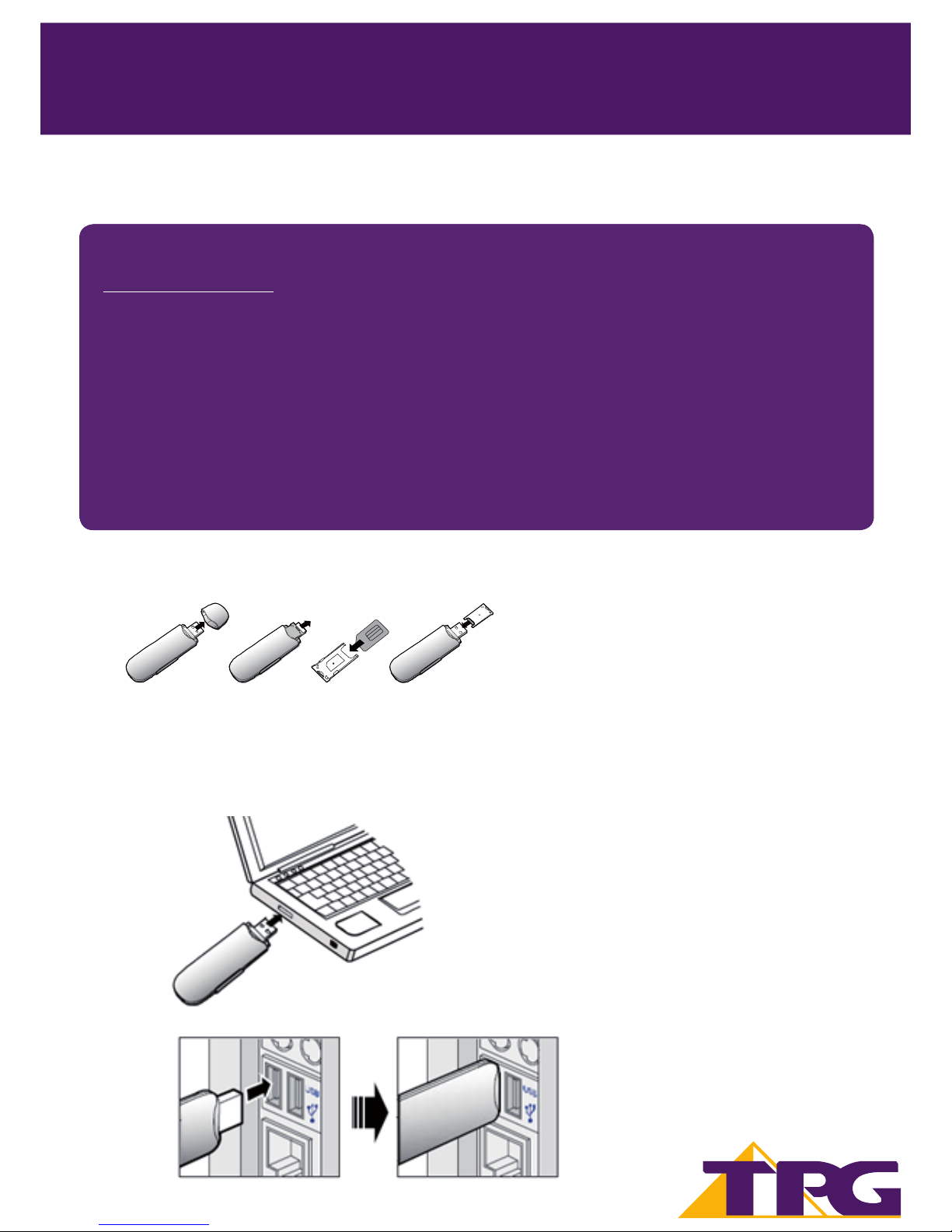
2.1. Insert the TPG SIM/Micro SIM card into the card holder. Make sure the SIM is properly inserted.
2.2. Power on your PC before connecting the USB modem with the PC. Otherwise the normal installation may
be a ected.
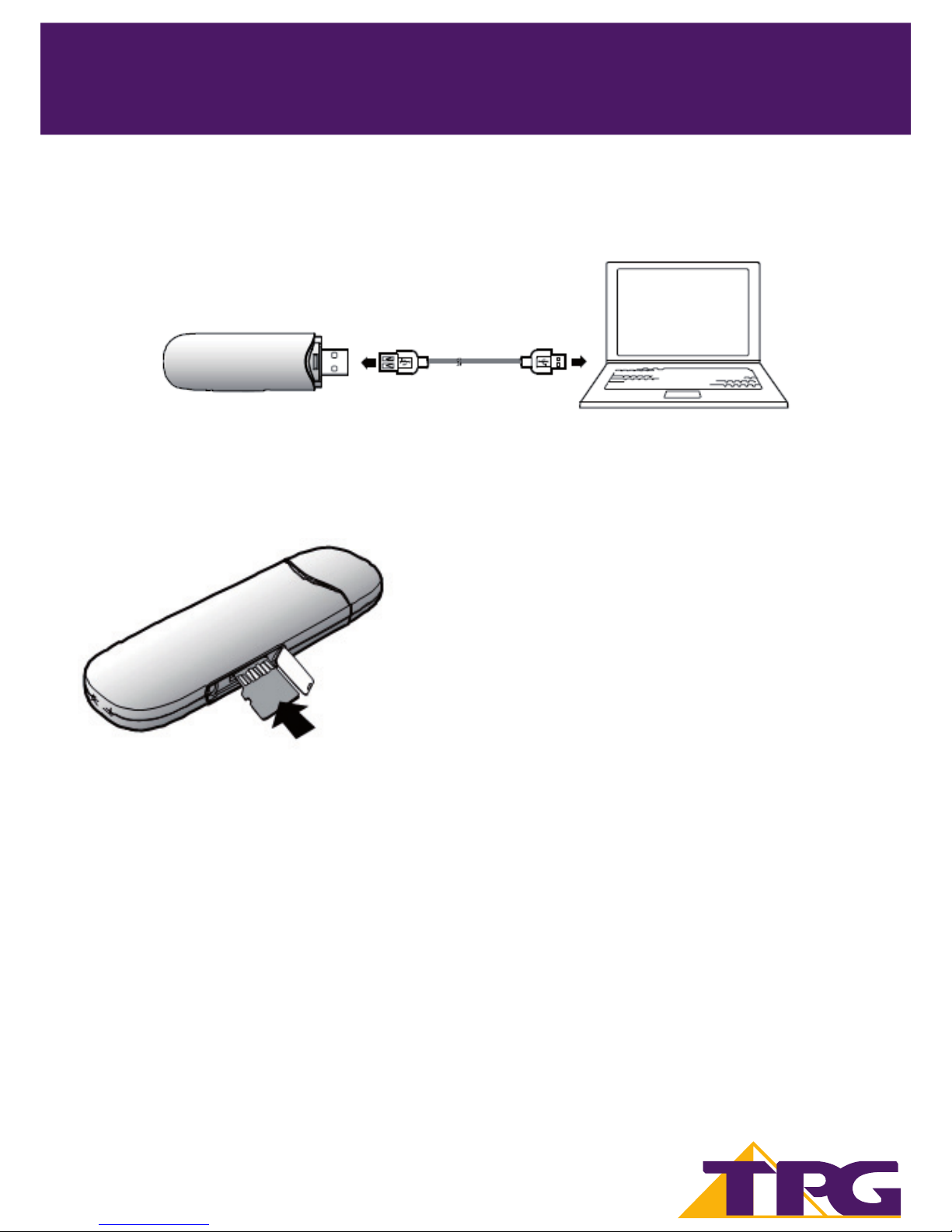
Method 1: Plug the E1762 Modem into the USB interface of the PC. OR
Page 5
TPG MOBILE BROADBAND QUICK SETUP GUIDE 3
Method 2: Connect the E1762 to a PC using the USB extension cable (included in the USB Modem pack).
2
TPG MOBILE BROADBAND QUICK SETUP GUIDE
SIMPLE STEPS TO GET CONNECTED
2. Installing USB Modem
2.3. Follow the relevant steps below to install the TPG Mobile Broadband Software.
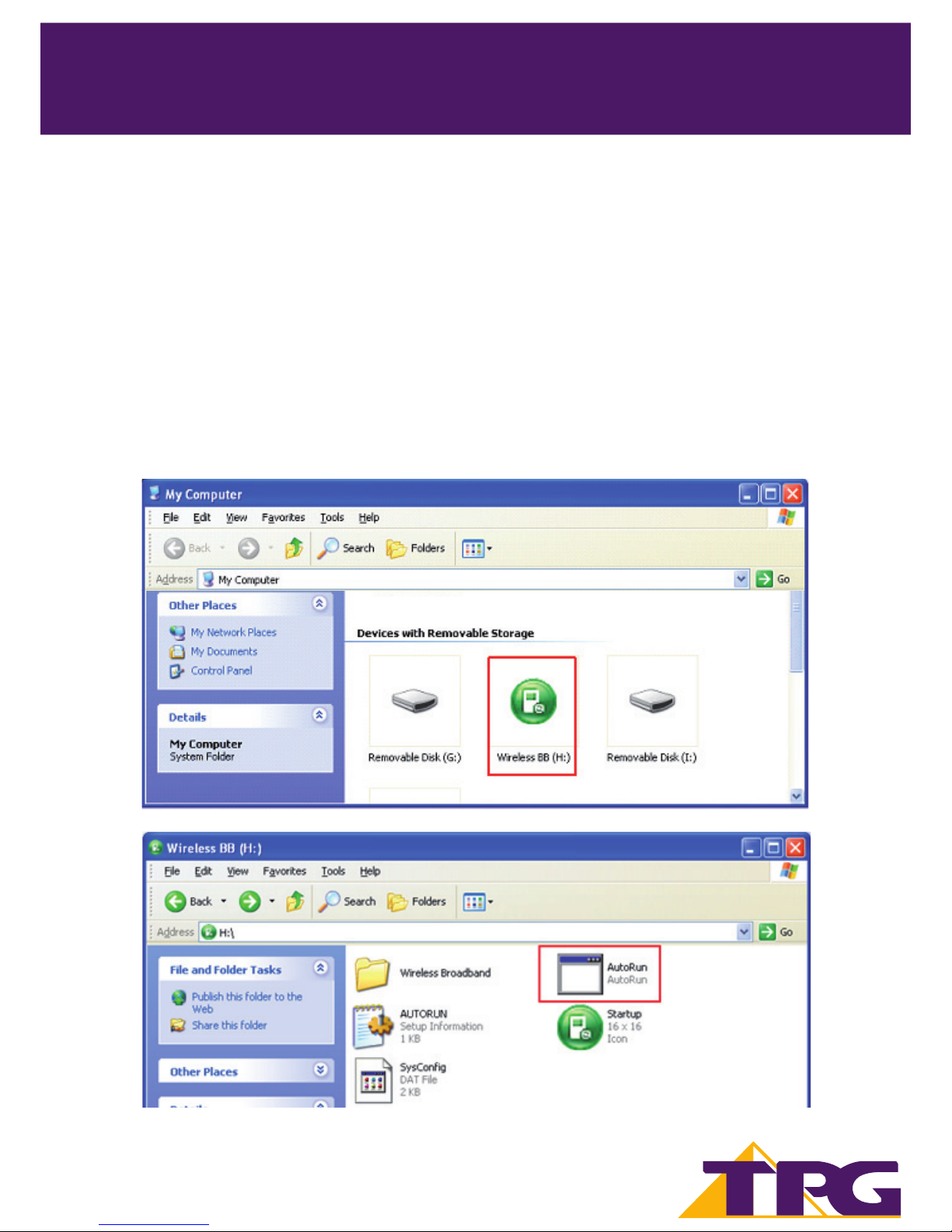
Optional Step: Insert the Micro SD card into the USB modem, as shown in the following gure.
Do not remove the Micro SD and the SIM/Micro SIM card when they are being used. Removing cards during
an operation may damage the cards as well as the device, and data stored on the cards may be corrupted.
Note: Micro SD card is an optional accessory
and is not provided by TPG in the package.
Page 6
TPG MOBILE BROADBAND QUICK SETUP GUIDE 4
3
TPG MOBILE BROADBAND QUICK SETUP GUIDE
SIMPLE STEPS TO GET CONNECTED
3. Installing TPG Mobile Broadband connection software
(Windows XP)
Note: The steps for installing the TPG Mobile Broadband software depends on the operating system (OS)
installed on your PC. The following sections primarily take Windows XP as an example.
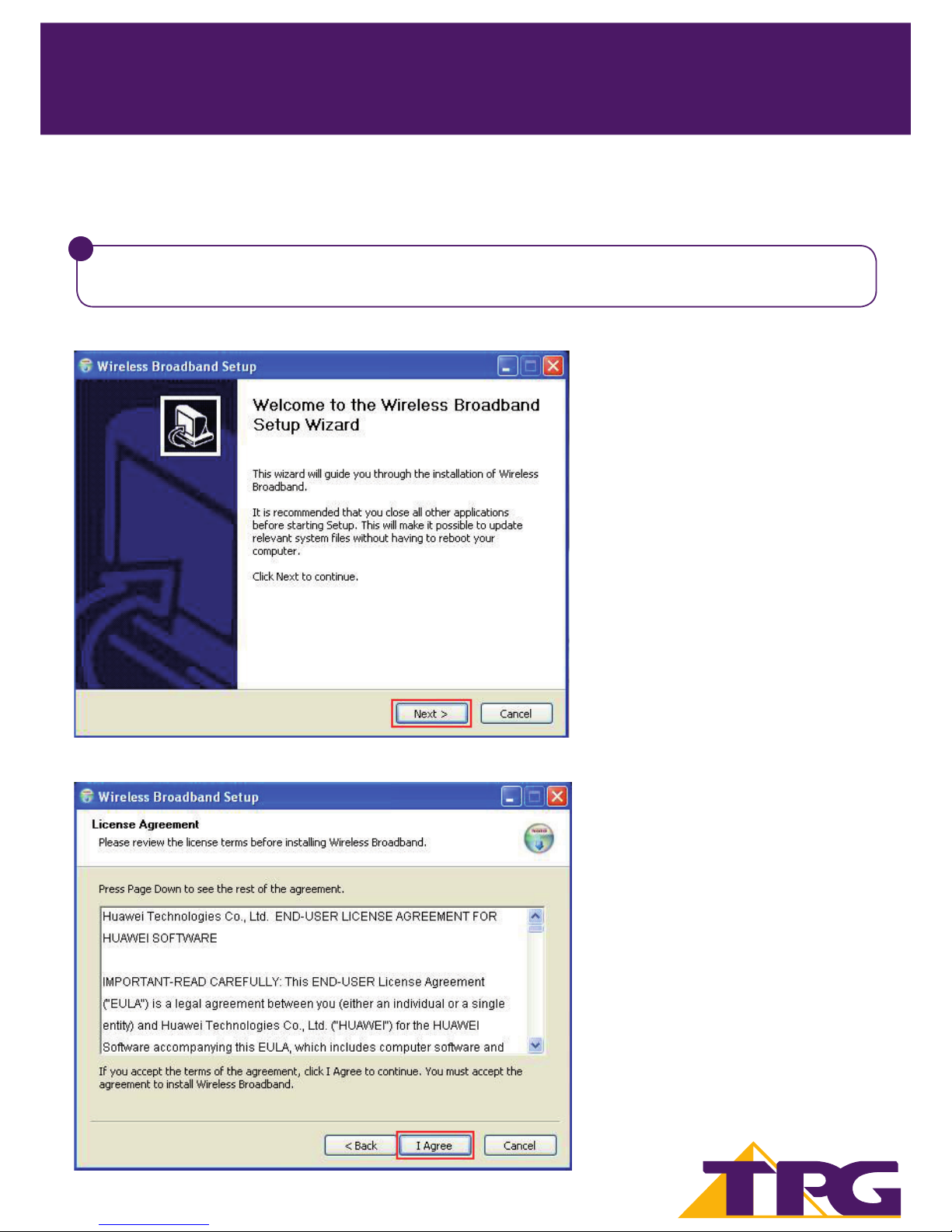
Once you plug in your USB modem to your computer, the OS automatically detects and recognises new
hardware and starts the installation wizard. The Auto Play window will follow up and please click on Run
AutoRun. exe.
If the software does not respond automatically, go to “My Computer”. Click on the disk drive labeled “Wireless
BB”, and then double-click on “AutoRun.exe”, to start the installation program.
Page 7
TPG MOBILE BROADBAND QUICK SETUP GUIDE 5
3
TPG MOBILE BROADBAND QUICK SETUP GUIDE
SIMPLE STEPS TO GET CONNECTED
3. Installing TPG Mobile Broadband connection software
(Windows XP)
For Windows Vista and Windows 7 from this point another window named User Account Control might
appear asking to Allow the Data Card Setup and please click on Ye s and then the Setup Software will run.
!
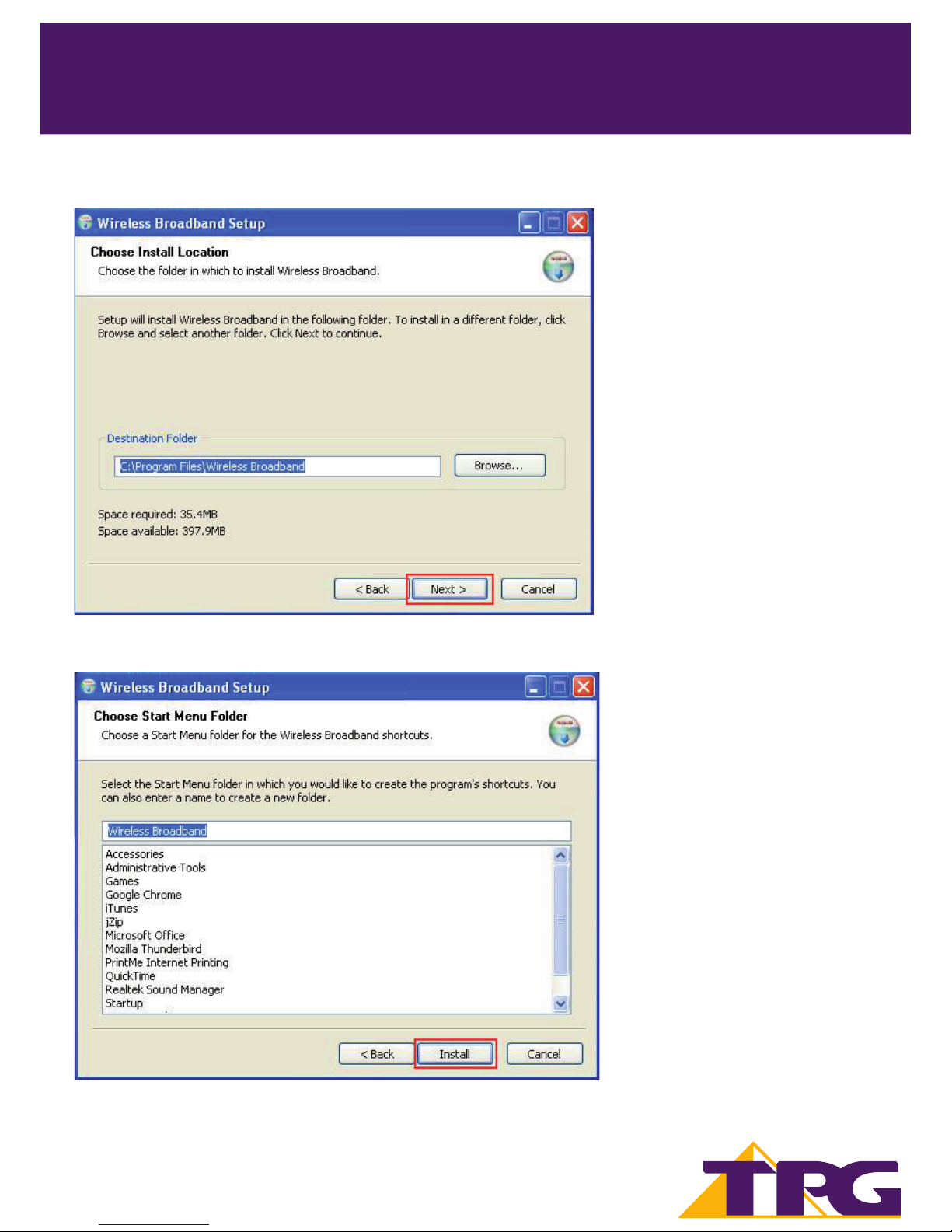
3.1. Choose Next and then click continue to proceed
3.2. Please read software Licence Agreement, and click I Agree to proceed.
Page 8
TPG MOBILE BROADBAND QUICK SETUP GUIDE
3
TPG MOBILE BROADBAND QUICK SETUP GUIDE
SIMPLE STEPS TO GET CONNECTED
6
3.3 Click Next to continue.
3.4 Click the Install button to start the installation process.
Page 9
TPG MOBILE BROADBAND QUICK SETUP GUIDE
3
TPG MOBILE BROADBAND QUICK SETUP GUIDE
SIMPLE STEPS TO GET CONNECTED
7
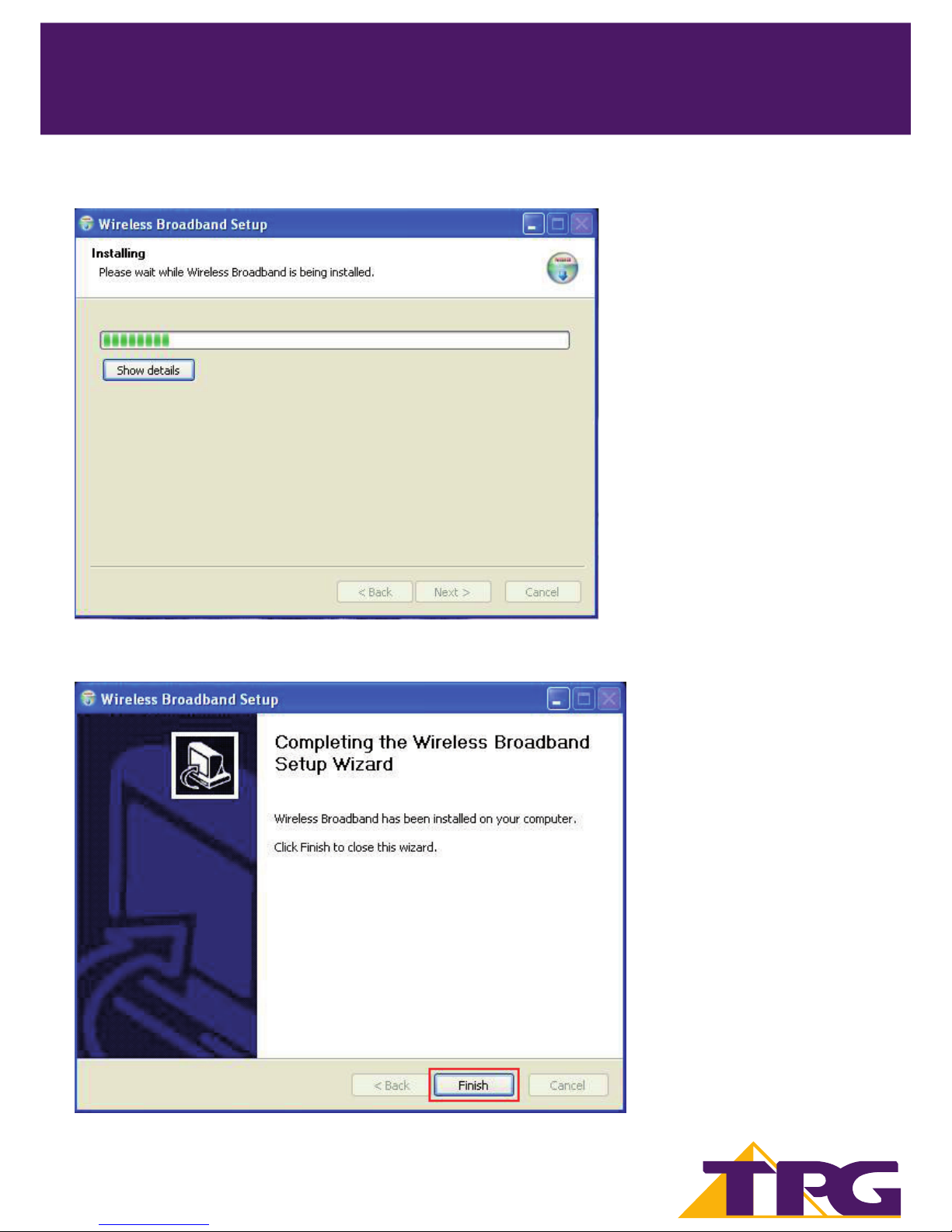
3.5 Please wait until the status bar is completed.
3.6. Once the software and drivers have installed, click Finish.
Page 10
TPG MOBILE BROADBAND QUICK SETUP GUIDE 8
TPG MOBILE BROADBAND QUICK SETUP GUIDE
SIMPLE STEPS TO GET CONNECTED
3
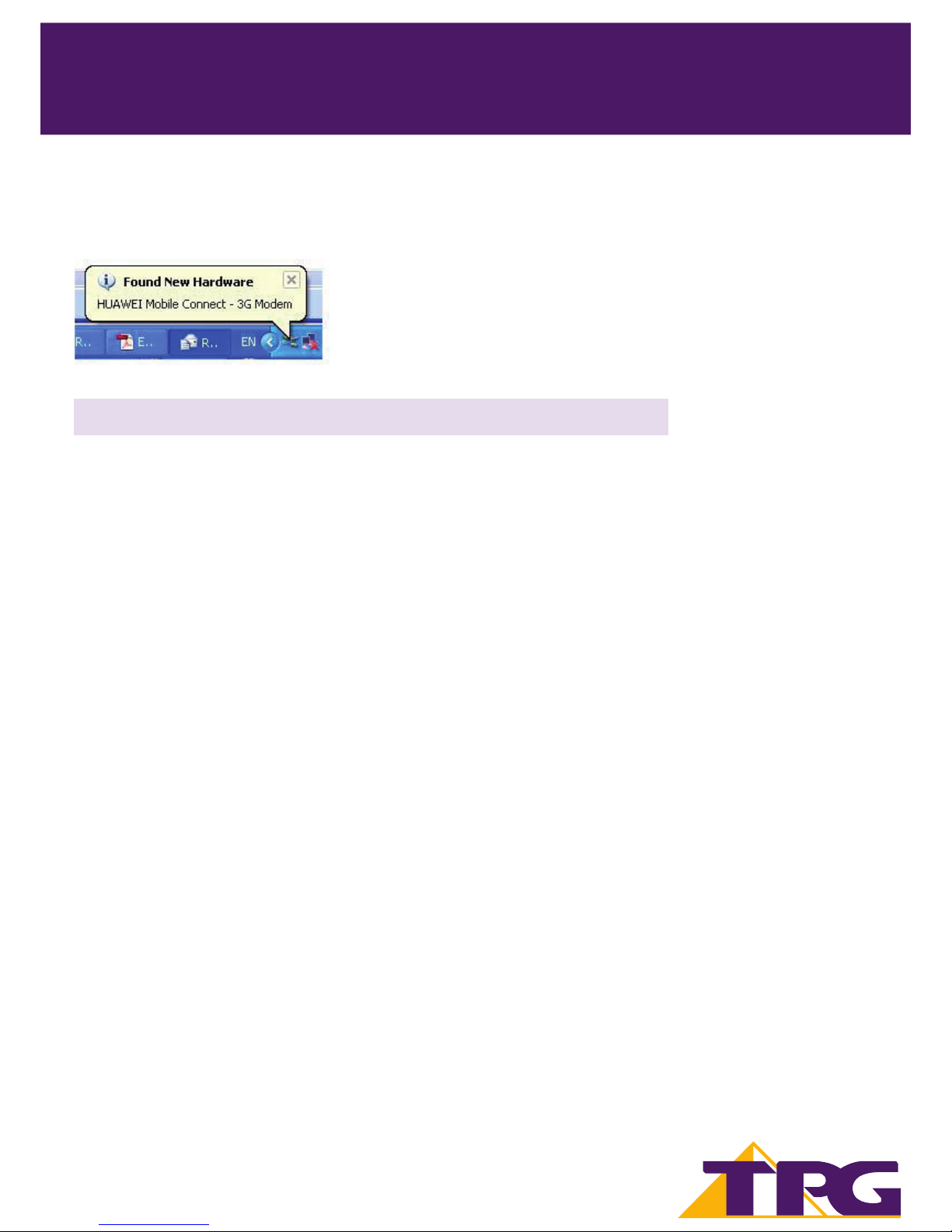
3.7. Your computer will use the software installed to con gure your USB modem. Please wait until the software
tells you it is nished. An information balloon will pop up from your System Tray area to con rm “Found New
Hardware”. Your new hardware is installed and ready to use”. This process may take several minutes.
If you are a Windows user then go to Section 5 and ignore Section 4 (Apple OSX).
Page 11
TPG MOBILE BROADBAND QUICK SETUP GUIDE 9
TPG MOBILE BROADBAND QUICK SETUP GUIDE
SIMPLE STEPS TO GET CONNECTED
4
4. Installing TPG Mobile Broadband connection software
(Apple OSX)
Once you plug in your USB modem to your computer, the OS automatically detects and recognises new
hardware allowing you to start the software installation.
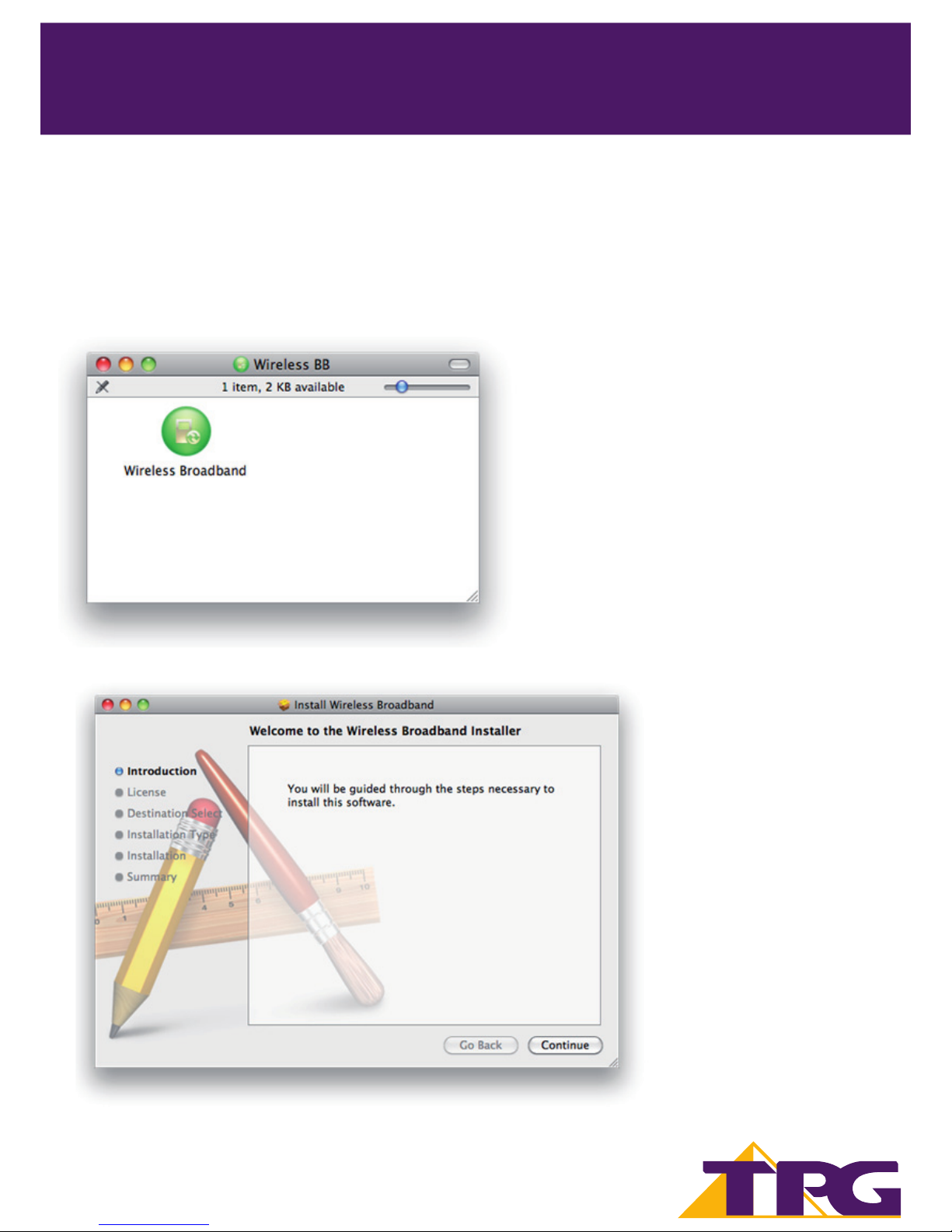
4.1. Double-click on “Wireless Broadband”, to start the installation program
4.2. The installation wizard will open, click Continue to proceed.
Page 12
TPG MOBILE BROADBAND QUICK SETUP GUIDE 10
TPG MOBILE BROADBAND QUICK SETUP GUIDE
SIMPLE STEPS TO GET CONNECTED
4
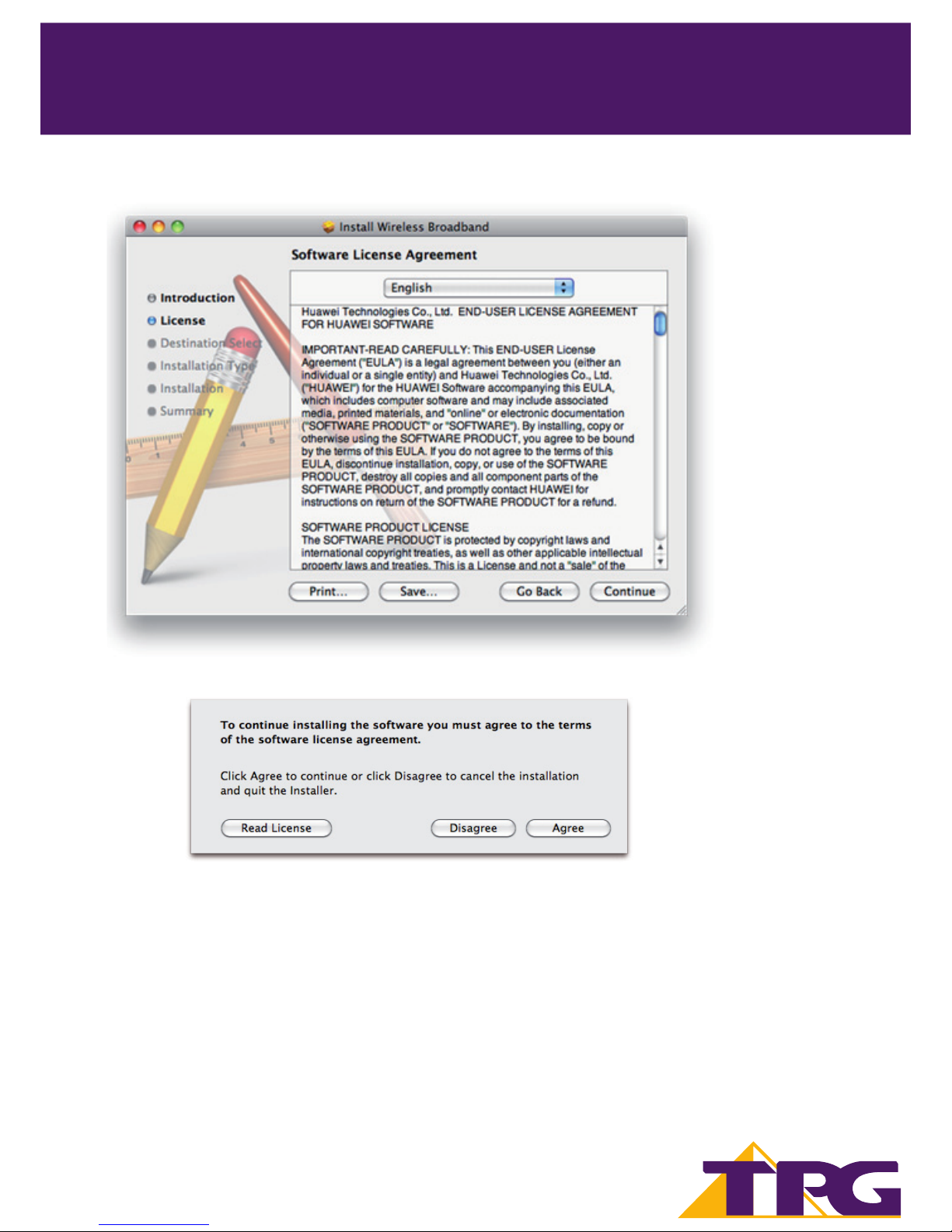
4.3. Please read software licence agreement, and click Continue to proceed.
4.4. If you agree to the terms of the software license agreement, click Agree to proceed.
Page 13
TPG MOBILE BROADBAND QUICK SETUP GUIDE 11
TPG MOBILE BROADBAND QUICK SETUP GUIDE
SIMPLE STEPS TO GET CONNECTED
4
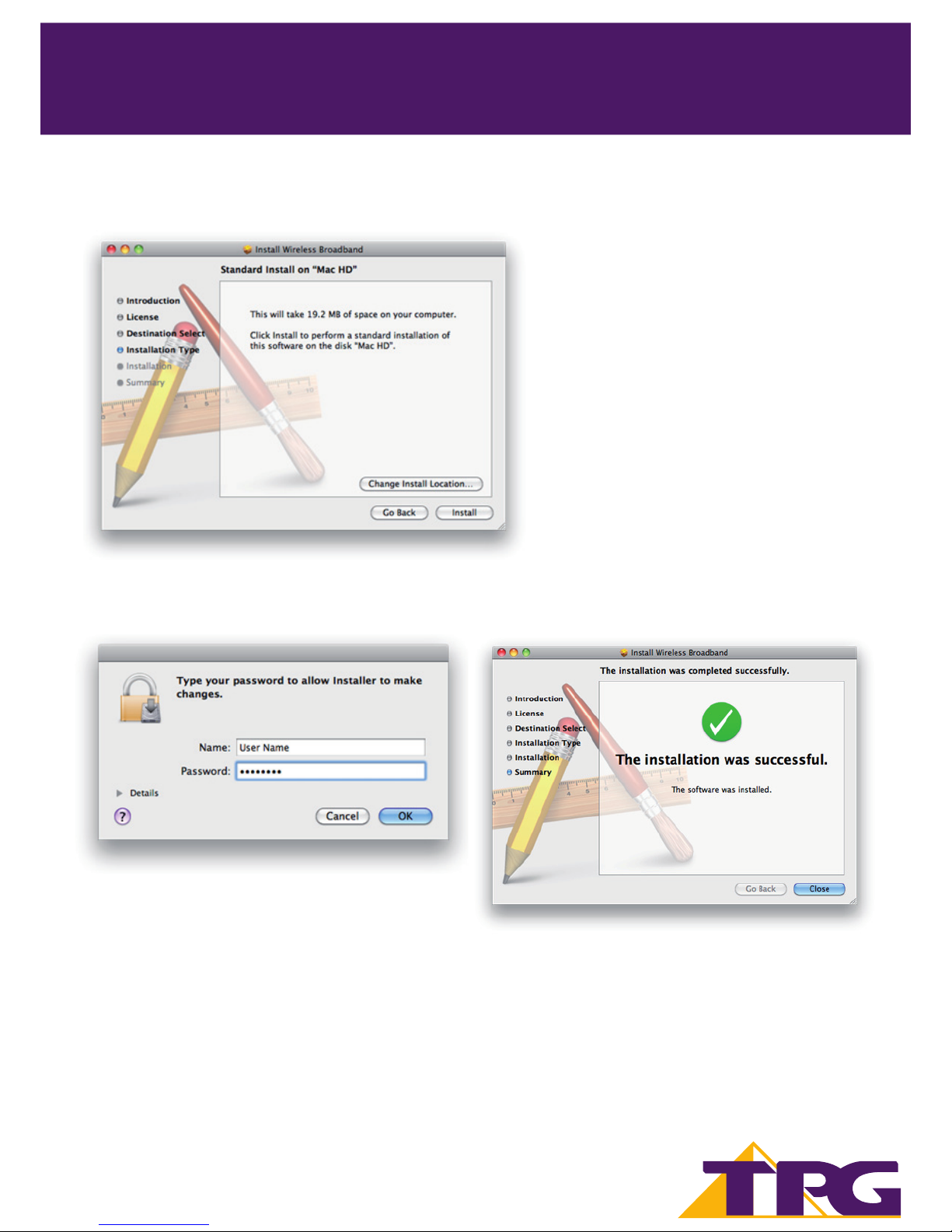
4.5. Click Install to perform a standard installation of the software, or Change Install Location if you wish to
change the default installation directory.
4.6. You will be prompted for an administrator password to allow the software to be installed. Enter the
password you use to log onto this computer. Click OK to proceed.
4.7. Once the software was installed, you see the message “The installation was successful.” Click Close to nish.
Page 14
TPG MOBILE BROADBAND QUICK SETUP GUIDE 12
TPG MOBILE BROADBAND QUICK SETUP GUIDE
SIMPLE STEPS TO GET CONNECTED
5
5. Your rst connection to TPG Mobile Broadband
5.1. Descriptions of the TPG Mobile Broadband Software
Launch the TPG Mobile Broadband Software
You need to start and connect the TPG Mobile Broadband software, before you can connect to the internet.
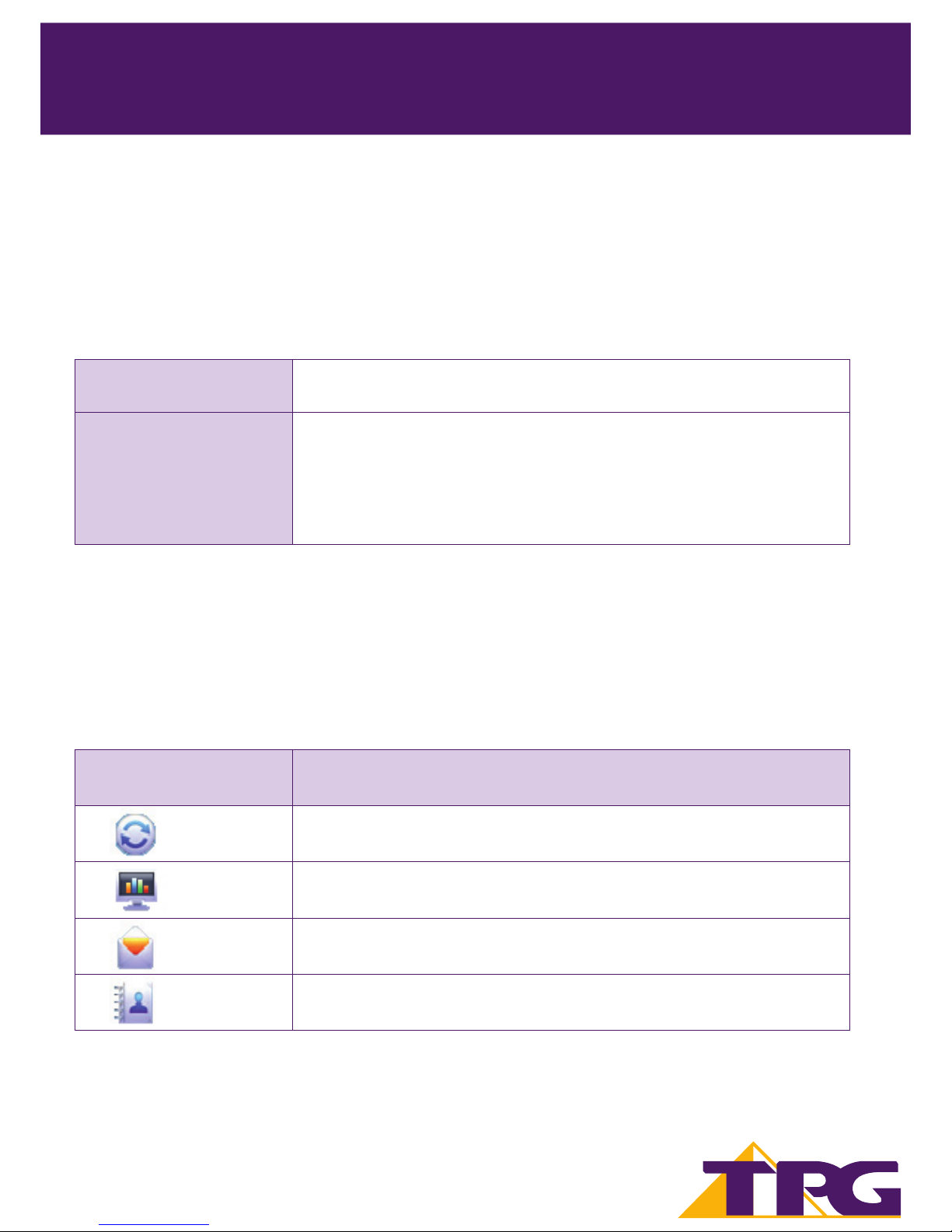
Interface Overview - Shortcut Icons
The following table lists the shortcut icons available in the TPG Mobile Broadband software.
To launch manually
Double-click the shortcut icon of the
Wireless Broadband on the desktop.
To launch automatically
You can set the TPG Mobile Broadband software to launch automatically
along with Windows and minimize the interface after the startup.
1. Choose Tools > Options > General.
2. Select the Launch on Windows startup check box.
3. Click OK.
Note:
• If you are asked to enter the Personal Identi cation Number (PIN) code, enter the correct one and
click OK. If you fail to enter the correct PIN or PIN Unblocking Key (PUK) code, you are not able to connect to
TPG Mobile Broadband.
Click... To...
Display the Connect interface.
Query the statistics of the transferred data.
Display the Tex t interface.
Display the Phonebook interface.
Page 15
TPG MOBILE BROADBAND QUICK SETUP GUIDE
TPG MOBILE BROADBAND QUICK SETUP GUIDE
SIMPLE STEPS TO GET CONNECTED
5
Status Information
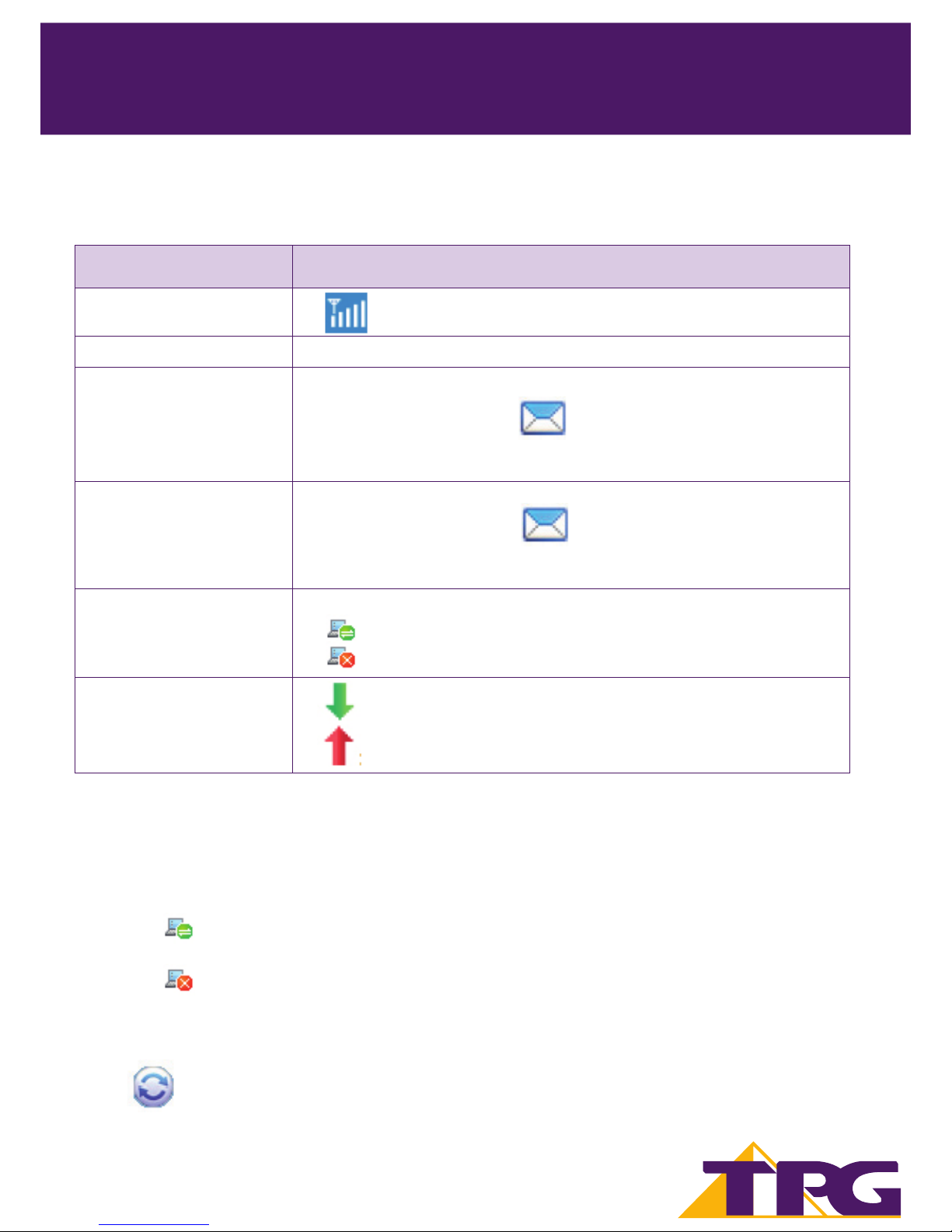
The following table lists all the possible status information.
Status Information Description
Network signal : Indicate the signal strength of the network
Network information Display the pro le of the current network
New message
If the Text message handling is enabled, when there is a new message:
• In the status bar, the icon ashes.
• On the lower right corner of the PC screen, the Prompt dialog box is
displayed.
Unread message
When there is an unread message:
• In the status bar, the icon ashes.
• When you move the cursor to the icon, the number of the unread
message(s) is displayed.
Network connection
The information of the network connection:
The network is connected.
The network is disconnected.
Transferred data
: Data download is in progress.
: Data upload is in progress.
5.2. Connecting to the TPG Mobile Broadband Service
Connection Status
The USB modem must be connected before you can surf the Internet.
• When the icon is displayed on the bottom of the TPG Mobile Broadband software, it indicates
that the network connection is established.
• When the icon is displayed on the bottom of the TPG Mobile Broadband software, it indicates
that the network connection is disconnected.
How to Connect
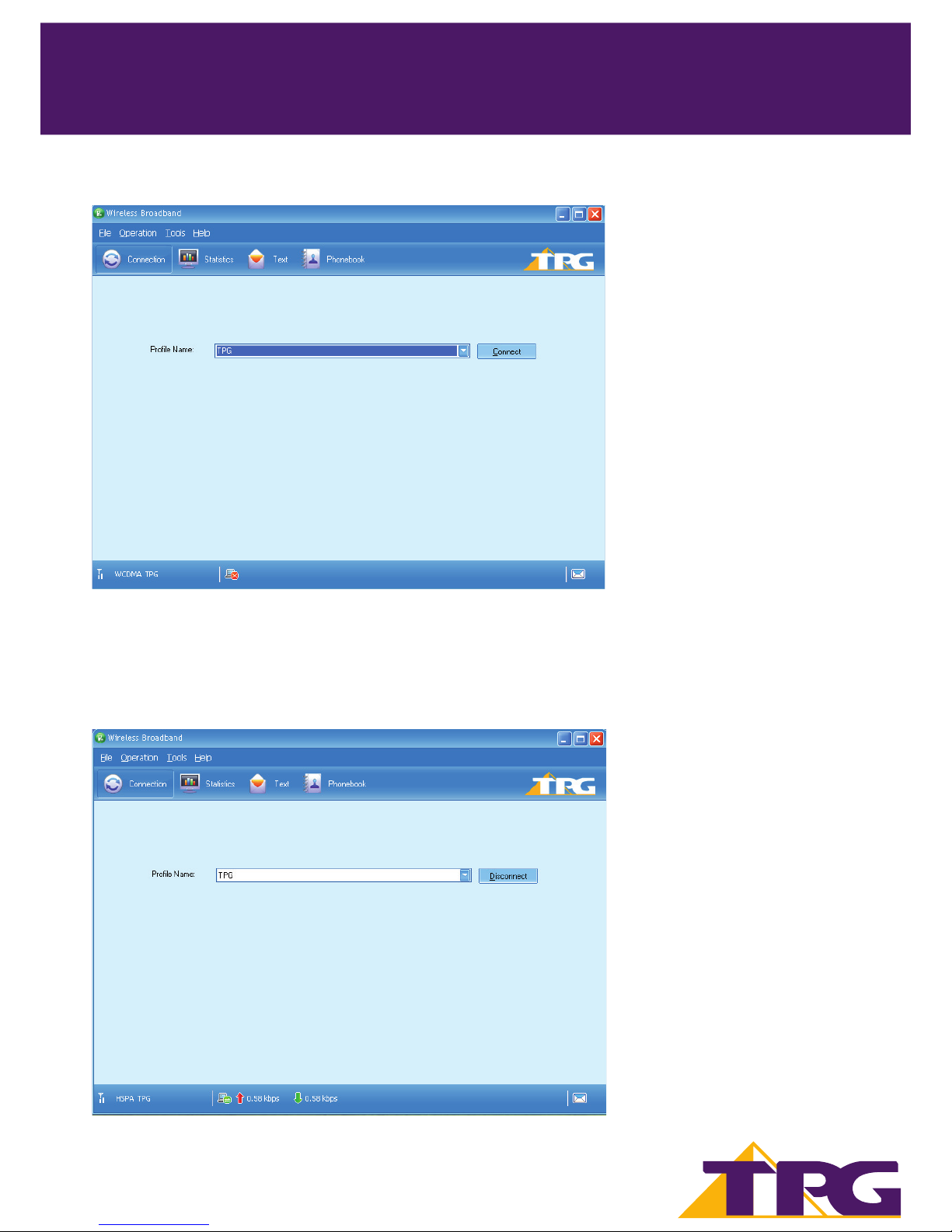
1. Click to display the Connection interface.
2. Customer must have the correct Pro le selected, by default it will be TPG.
13
Page 16
TPG MOBILE BROADBAND QUICK SETUP GUIDE
TPG MOBILE BROADBAND QUICK SETUP GUIDE
SIMPLE STEPS TO GET CONNECTED
5
3. Click Connect to set up the connection.
4. The data through the statistic will be displayed in the bottom status bar (next to signal strength), this
means your Mobile Broadband service is connected.
You can now launch the browser on the PC to access the internet.
14
Page 17

TPG MOBILE BROADBAND QUICK SETUP GUIDE 15
TPG MOBILE BROADBAND QUICK SETUP GUIDE
SIMPLE STEPS TO GET CONNECTED
6
6. Using the software and USB E1762 modem
Checking Status
Once plugged in, the USB E1762 Modem will immediately search for our network.
The information in the bottom left corner of the software indicates signal strength (the more bars, the better!)
and which network you are connected to a GPRS, UMTS or HSDPA network.
If you only pick up a 2G (GPRS) signal when connected to the Internet, try moving locations to improve your
connection. Like any mobile device, physical location and barriers (walls, basement) can a ect signal strength
and consequently your internet speeds.
Disconnecting Your USB Modem
Windows:
When you have nished browsing the internet it is important that you unplug your USB correctly.
• Double-click in the noti cation area. Then the Unplug or Eject Hardware dialog box appears.
• Select the corresponding hardware and then click Stop.
• When the message “It is safe to remove the device” appears, remove the USB Stick.
Apple OSX:
You can click Disconnect; close the software, or simply remove the USB Modem.
Page 18
TPG MOBILE BROADBAND QUICK SETUP GUIDE 16
TPG MOBILE BROADBAND QUICK SETUP GUIDE
SIMPLE STEPS TO GET CONNECTED
7
7. Checking your Data Usage online
Use Your Account to monitor your data usage and avoid excess charges.
Remember: Excess data rates will apply once you have reached your plan’s included monthly data allowance.
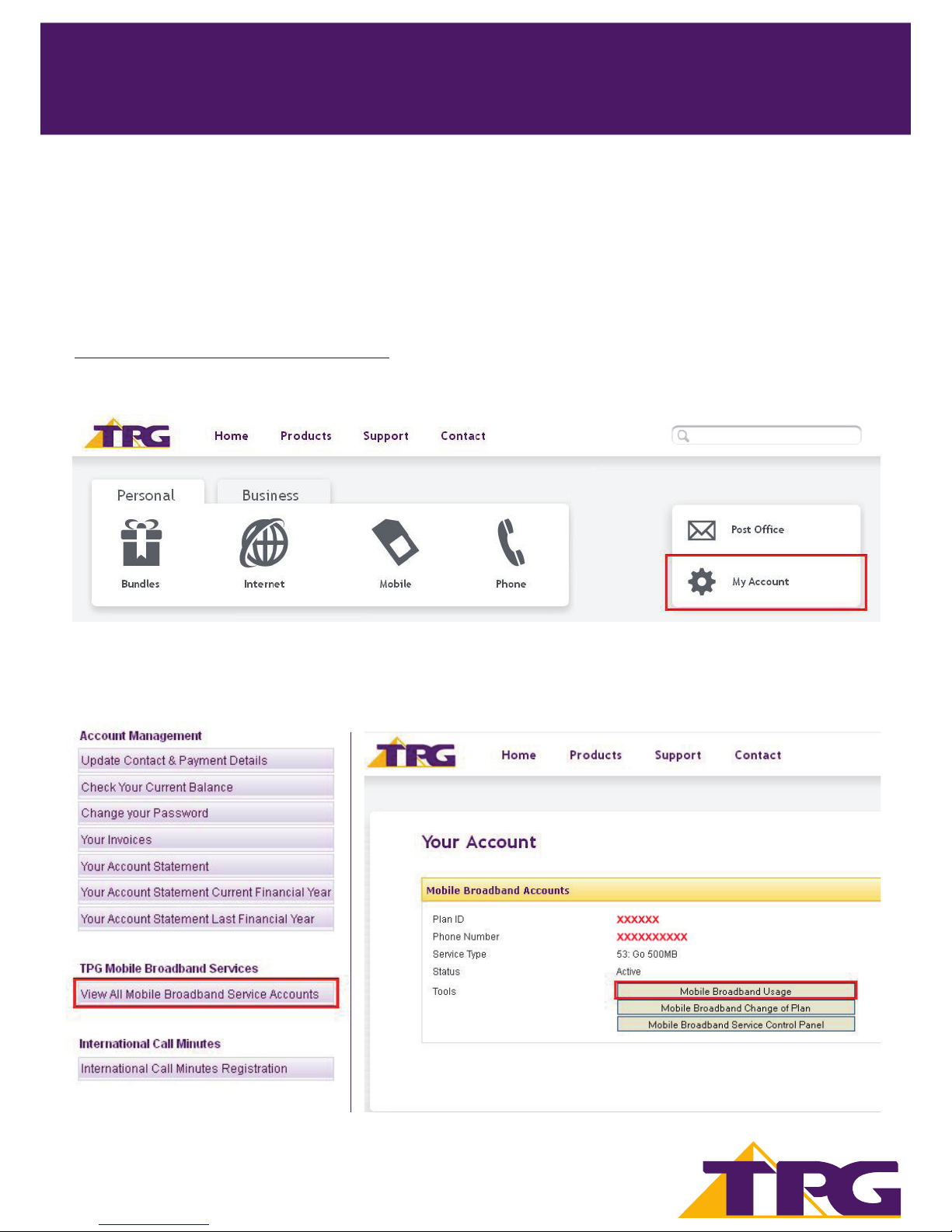
7.1. Login to your TPG account - You can monitor your usage by visiting
https://www.tpg.com.au/home/myaccount and logging in with your Customer ID and Password. Customer
ID can be found in the Welcome Letter with SIM card attached. Password is what you nominated during
registration.
7.2. Under TPG Mobile Broadband Services, click on “View All Mobile Broadband Service Accounts” then
“Mobile Broadband Usage”.
 Loading...