

Page 1

’06Camry_U (L/O 0507)
177
2006 CAMRY from July ‘05 Prod. (OM33708U)
OPERATION OF INSTRUMENTS AND
CONTROLS
Air conditioning system
Manual air conditioning system
Controls 178. . . . . . . . . . . . . . . . . . . . . . . . . . . . . . . . . . . . . . . . . . . . . . . . .
Air flow selector settings 181. . . . . . . . . . . . . . . . . . . . . . . . . . . . . . . . . .
Operating tips 181. . . . . . . . . . . . . . . . . . . . . . . . . . . . . . . . . . . . . . . . . . .
Automatic air conditioning system
Controls 184. . . . . . . . . . . . . . . . . . . . . . . . . . . . . . . . . . . . . . . . . . . . . . . . .
Air flow selector settings 188. . . . . . . . . . . . . . . . . . . . . . . . . . . . . . . . . .
Operating tips 188. . . . . . . . . . . . . . . . . . . . . . . . . . . . . . . . . . . . . . . . . . .
Side and rear vents 191. . . . . . . . . . . . . . . . . . . . . . . . . . . . . . . . . . . . . . . . .
Air conditioning filter 192. . . . . . . . . . . . . . . . . . . . . . . . . . . . . . . . . . . . . . . .
SECTION 1− 9
Page 2
’06Camry_U (L/O 0507)
178
2006 CAMRY from July ‘05 Prod. (OM33708U)
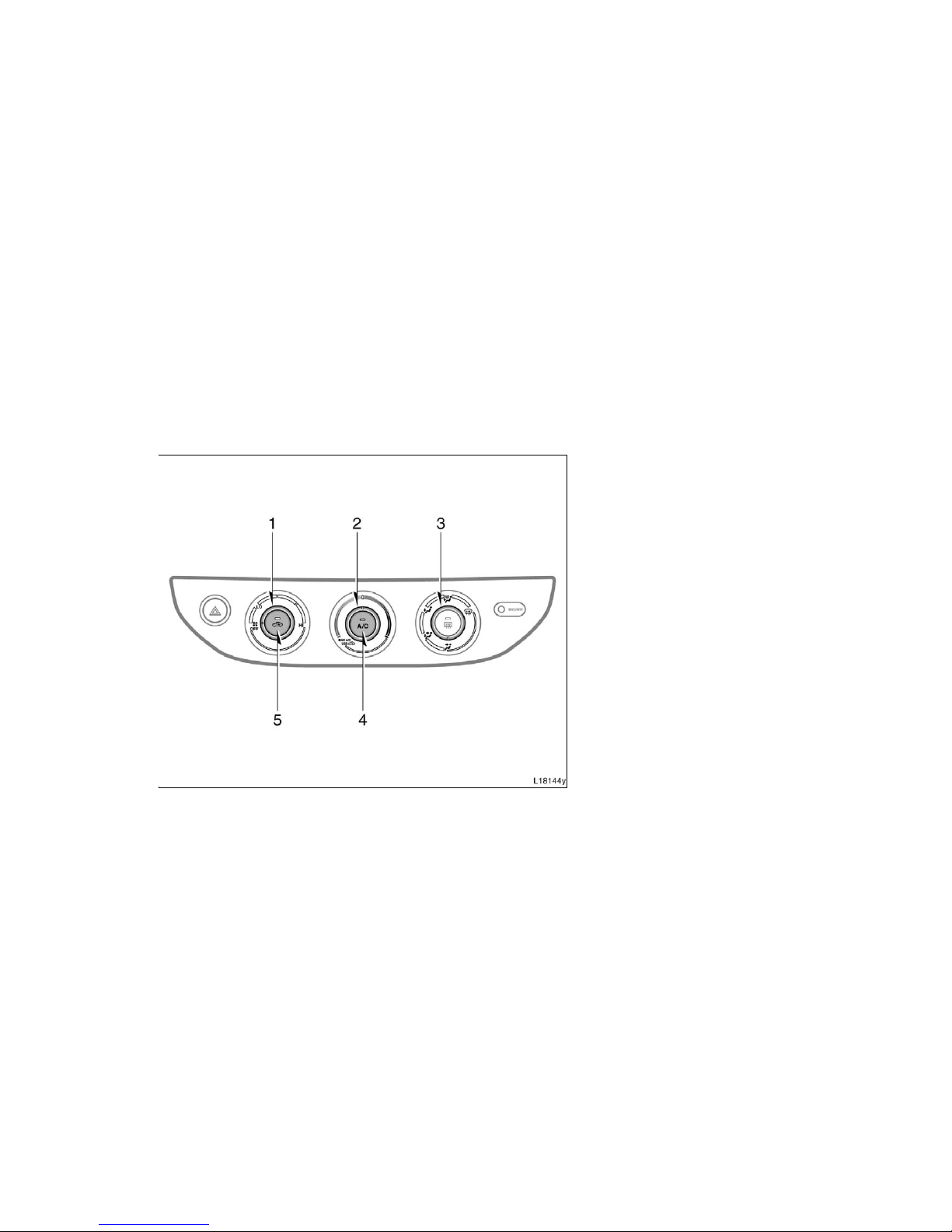
1. Fan speed selector
2. Temperature selector
3. Air flow selector
4. “A/C” button
5. Air intake selector
Manual air conditioning system—
—Controls
Page 3

’06Camry_U (L/O 0507)
179
2006 CAMRY from July ‘05 Prod. (OM33708U)
Fan speed selector
Turn the knob to adjust the fan speed—to
the right to increase, to the left to decrease.
Temperature selector
Turn the knob to adjust the temperature—
to the right to warm, to the left to cool.
Air flow selector
Turn the knob to select the vents used for
air flow.
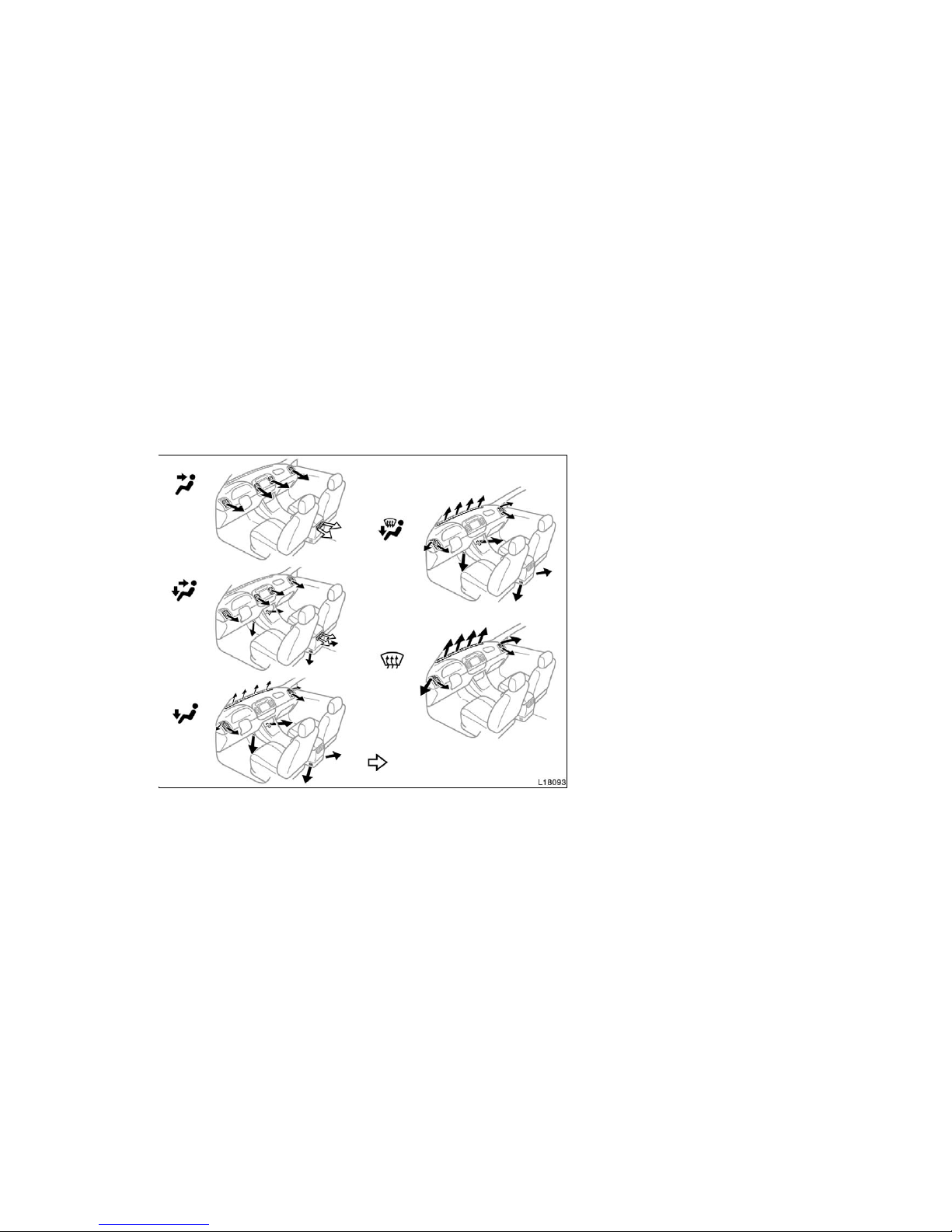
1. Panel—Air flows mainly from the
instrument panel vents.
2. Bi−level—Air flows from both the floor
vents and the instrument panel vent s.
3. Floor—Air flows mainly from the floor
vents.
4. Floor/Windshi eld—Air flows mainly
from the floor vents and windshield
vents.
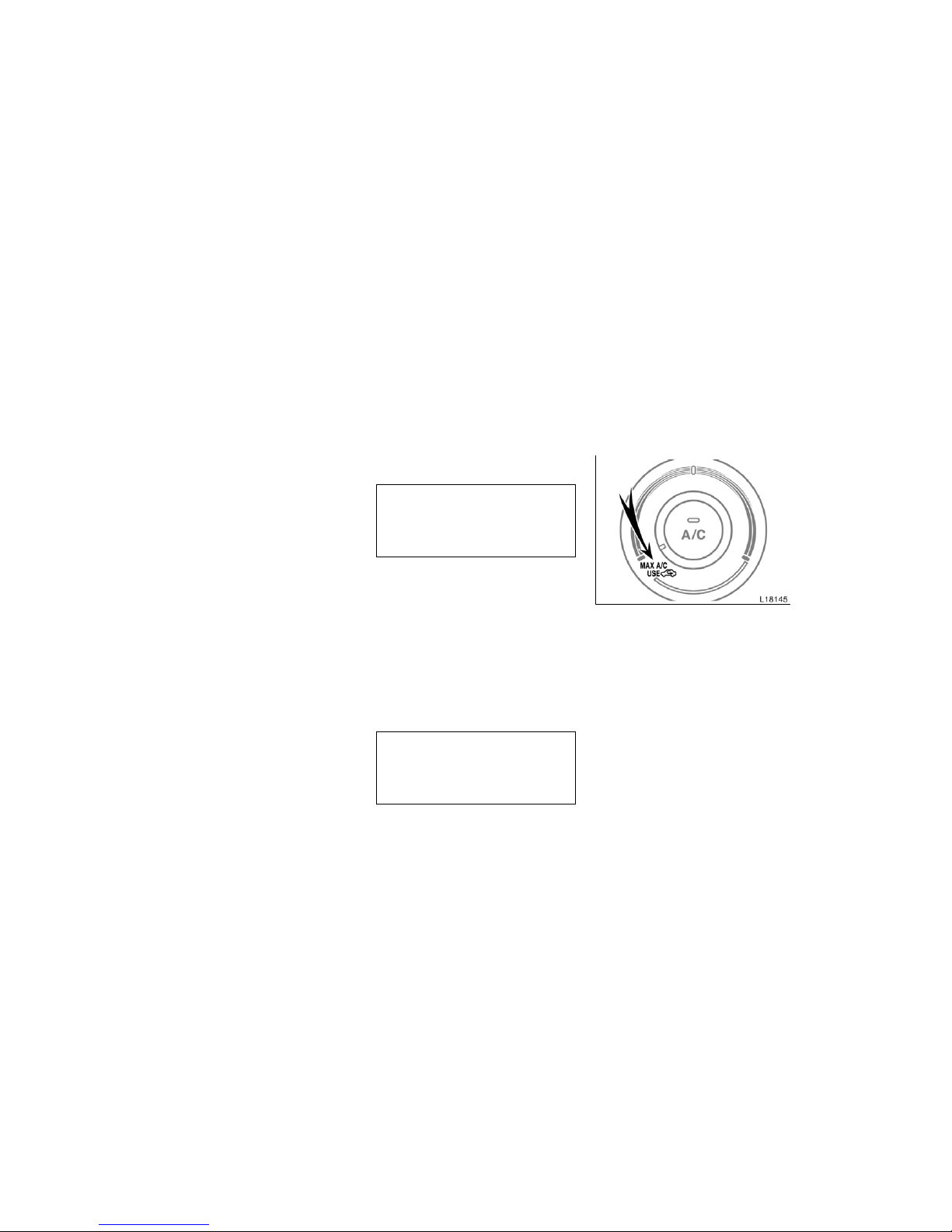
This position allows the air intake to
select FRESH automatically. This is to
clean up the front view more quickly.
If you want to return the setting to
RECIRCULATE mode, press the air intake selector button once again.
Press the “A/C” button for dehumidified
heating or cooli ng. This set ting clear s
the front view more quickly.
5. Windshield—Air flows mainly from the
windshield vent s.
Turning the air flow selector to the
windshield position turns on the defogging function with the purpose of clearing the front view.
In this position, the air intake selector
mode changes to FRESH automatically
to clean up the front view quickly. It is
not possible to return to RECIRCULATE
in this position.
Press the “A/C” button for dehumidified
heating or cooli ng. This set ting clear s
the front view more quickly.
For details about air flow sel ector settings,
see “—Air flow selector settings” described below.
Page 4

’06Camry_U (L/O 0507)
180
2006 CAMRY from July ‘05 Prod. (OM33708U)
Air intake selector
Press the button to select the air source.
1. RECIRCULATE (indicator light is on)—
Recircul ates the air inside the vehicle.
2. FRESH (indicator light is off)—Draws
outside air into the system.
To prevent foggi ng up of the windshield,
the air intak e mode may change automatically to FRESH depending on the condition of the air conditioning system.
“A/C” button
To turn on the air c onditioning, press t he
“A/C” button. The “A/C” button indicator
will come on. To turn the air condit ioning
off, press the button again.
If the “A/C” button indicator flashes, there
is a problem in the air c onditioning sy stem
and the air conditioning automatically
shuts off. If this happens, take your vehicle to a Toyota dealer for service.
Page 5
’06Camry_U (L/O 0507)
181
2006 CAMRY from July ‘05 Prod. (OM33708U)
D To cool off your Toyota after it has
been parked in the hot sun, drive with
the windows open for a few minutes.
This vents the hot air, allowing the air
conditioni ng to cool the interior more
quickly.
D Make sure the air intake grilles in front
of the windshield are not blocked (by
leaves or snow, for example).
D On humid days, do not blow cold air
on the windshield. The winds hield could
fog up because of the difference in air
temperature on the inside and outside
of the windshield.
D Keep the area under the front seats
clear to allow air to cir culate throughout the vehicle.
D On cold days, set the fan speed to
high for a minute to help clear the
intake ducts of snow or moisture. This
can reduce the amount of fogging on
the windows.
D When drivi ng on dusty roads, close all
windows. If dust thrown up by the vehicle is still drawn into the vehicle after
closing the windows, it is rec ommended
that the air intake selector be set to
FRESH and the fan speed selector to
any setting except “OFF”.
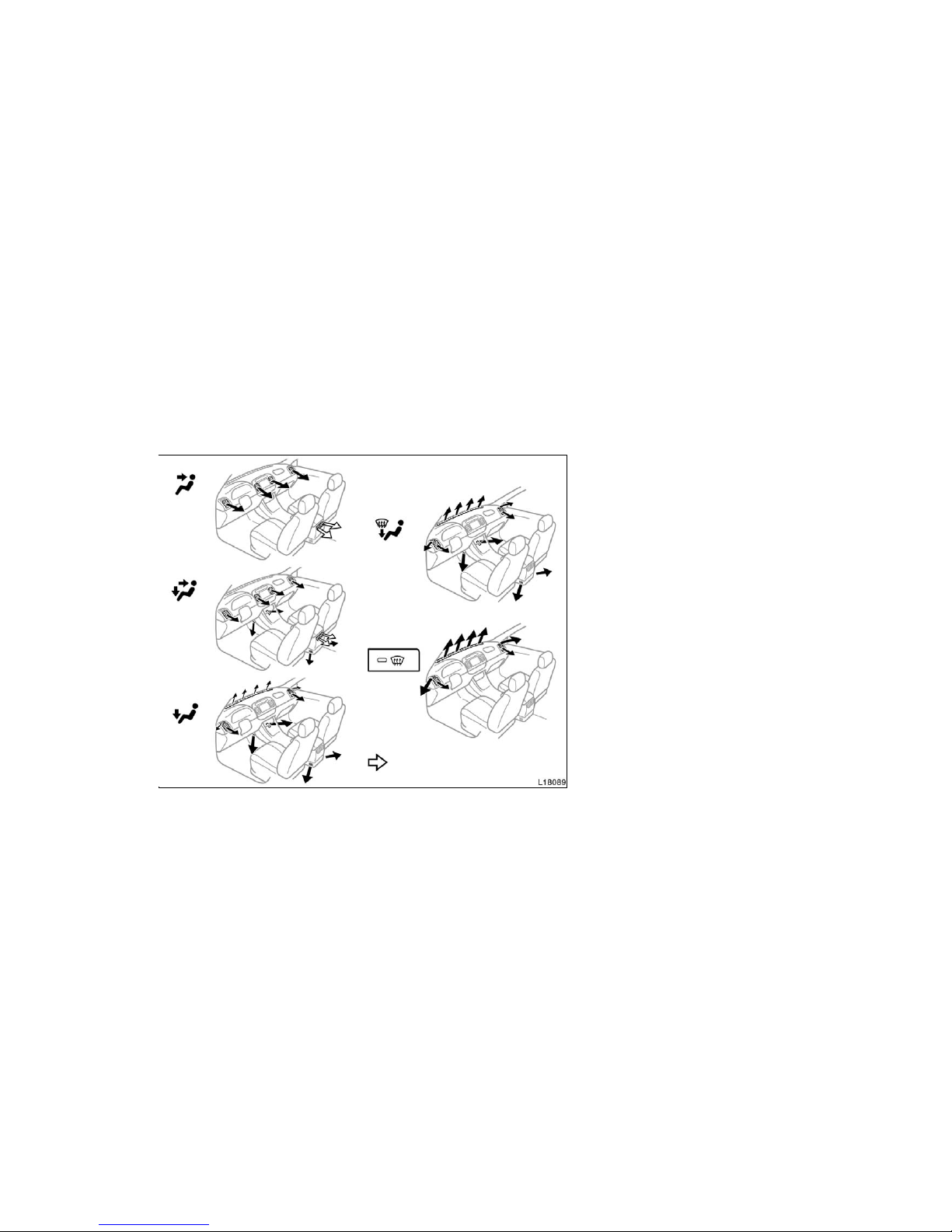
—Air flow selector settings
: With rear vents
—Operating tips
Page 6
’06Camry_U (L/O 0507)
182
2006 CAMRY from July ‘05 Prod. (OM33708U)
D If following another vehicle on a dusty
road, or driving in windy and dusty
conditions , it is recommended that the
air intake selector be temporarily set to
RECIRCULATE, which will close off the
outside pass age and prevent outside
air and dust from entering the vehicle
interior.
Heating
For best results, set controls as follows:
Fan speed—Any setting except “OFF”
Temperature—To wa r ds WARM
(red zone)
Air intake—FRESH (outsi de air)
Air flow—FLOOR
Air conditioning—OFF
D For quick heat ing, change the air in-
take selector mode to RECIRCULATE.
To keep the windows from fogging, return to FRESH mode after the vehicle
interior has been warmed.
D Press the “A/C” button on for dehumidi-
fied heating.
D Turn the air flow selector to the floor/
windshield pos ition to heat the vehicle
interior while defrosting or defogging
the windshield.
Air conditioning
For best results, set controls as follows:
Fan speed—Any setting except “OFF”
Temperature—To wa r ds COLD
(blue zone)
Air intake—FRESH (outsi de air)
Air flow—PANEL
Air conditioning—ON
D For quick c ooling, turn the temperature
selector knob fully towards COLD and
change the air intake selector mode to
RECIRCULATE.
Page 7

’06Camry_U (L/O 0507)
183
2006 CAMRY from July ‘05 Prod. (OM33708U)
Ventilation
For best results, set controls as follows:
Fan speed—Any setting except “OFF”
Temperature—To wa r ds COLD
(blue zone)
Air intake—FRESH (outsi de air)
Air flow—PANEL
Air conditioning—OFF
Defogging
The inside of the winds hield
For best results, set controls as follows:
Fan speed—Any setting except “OFF”
Temperature—To wa r ds WARM
(red zone) to heat;
COLD (blue zone) to
cool
Air intake—FRESH (outsi de air)
Air flow—WINDSHIELD
Turning the air flow selector to the windshield position turns on the defogging
function with the purpose of clearing the
front view.
When turning the air flow selector to the
windshield position, the air intake selector
mode changes to FRESH automatically to
clean up the front view quickly. It is not
possible to return to RECIRCULATE in
this position.
Press the “A/ C” button for dehumidified
heating or cooli ng. This set ting clears the
front view more quickly.
D On humid days, do not blow cold air
on the windshield—the difference between the outside and inside temperatures could make the fogging worse.
Defrosting
The outside of the windshield
For best results, set controls as follows:
Fan speed—Any setting except “OFF”
Temperature—To wa r ds WARM
(red zone)
Air intake—FRESH (outsi de air)
Air flow—WINDSHIELD
Turning the air flow selector to the windshield position turns on the defrosting
function with the purpose of clearing the
front view.
When turning the air flow selector to the
windshield position, the air intake selector
mode changes to FRESH automatically to
clean up the front view quickly. It is not
possible to ret urn to RECIRCULATE in
this position.
Press the “A/C” button for dehumidified
heating. This setting clears the front view
more quickly.
D To heat the vehicle interior while de-
frosti ng the windshield, choose
floor/wi ndshield air flow.
Page 8
’06Camry_U (L/O 0507)
184
2006 CAMRY from July ‘05 Prod. (OM33708U)
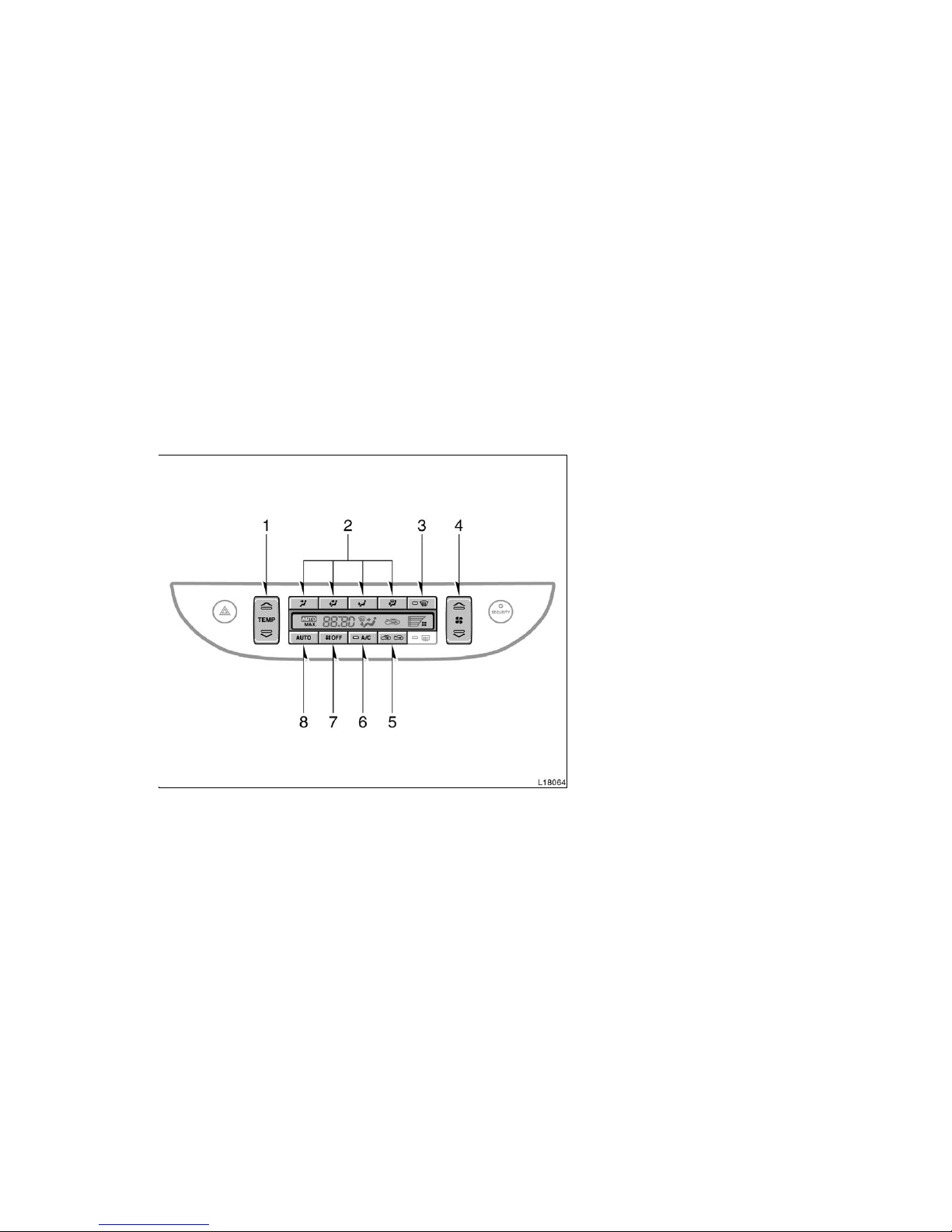
1. Temperature selector
2. Air flow selector
3. Windshield air f low button
4. Fan speed selector
5. Air intake selector
6. “A/C” button
7. “OFF” button
8. “AUTO” button
Automatic air conditioning system—
—Controls
Page 9

’06Camry_U (L/O 0507)
185
2006 CAMRY from July ‘05 Prod. (OM33708U)
“AUTO” button
For automati c operation of the air conditioning, press the “AUTO” button. “AUTO”
will appear on the dis play to show that
the automatic oper ation mode has been
selected.
In the automatic operation mode, the air
conditioni ng selects the most suitable fan
speed, air flow, air intake and on−off of
the air condit ioning acc ording to the temperature.
When you press the “AUTO” button with
the air intake mode at FRESH, internal
circulation may be applied for maximum
cooling.
You may use manual c ontrols if you want
to select your own settings.
Fan speed selector
Push the “Ɯ” (increase) or “Ɲ” (decrease)
side of the button to adjust the fan speed.
In automatic operation, you do not have
to adjust the fan speed unless you desi re
another fan speed mode.
Temperature selector
To increas e the temperature, pr ess the
“Ɯ” side, to decrease it, press the “Ɲ”
side.
“MAX. COLD” appears when you adjus t to
maximum cooling, and “MAX. HOT” when
you adjust to maximum warming.
“OFF” button
Push the button to turn off the air conditioning system.
Air flow selector
Push the buttons to select the vents used
for air flow.
In automatic operation, you do not have
to select the air flow unless you desire
another air flow mode.
1. Panel—Air flows mainly from the
instrument panel vents.
2. Bi−level—Air flows from both the floor
vents and the instrument panel vent s.
3. Floor—Air flows mainly from the floor
vents.
Page 10

’06Camry_U (L/O 0507)
186
2006 CAMRY from July ‘05 Prod. (OM33708U)
4. Floor/Windshi eld—Air flows mainly
from the floor vents and windshield
vents.
This position allows the air intake to
select FRESH automatically. This is to
clean up the front view more quickly.
If you want to return the setting to
RECIRCULATE mode, press the air intake selector button once again.
Press the “A/ C” button for dehumidified
heating or cooli ng. This set ting clear s
the front view more quickly.
Windshield air flow button
When this button is pressed, air flows
mainly from the windshield vent s and
turns on the defogging function with the
purpose of clearing the front view.
Pressing this button once again returns
the air flow mode to the last one used.
This button allows the air intake to select
FRESH automatically. This is to clean up
the front view more quickly. It is not possible to return to RECIRCULATE in this
mode.
Press the “A/ C” button for dehumidified
heating or cooli ng. This set ting clears the
front view more quickly.
For details about air flow sel ector settings,
see “—Air flow selector settings” described below.
Air intake selector
Press the button to select the air source.
1. RECIRCULATE—Recirculates the air in-
side the vehicle.
2. FRESH—Draws outside air into the
system.
To prevent foggi ng up of the windshield,
the air intak e mode may change automatically to FRESH depending on the condition of the air conditioning system.
Page 11

’06Camry_U (L/O 0507)
187
2006 CAMRY from July ‘05 Prod. (OM33708U)
“A/C” button
To turn on the air c onditioning, press t he
“A/C” button. The “A/C” button indicator
will come on. To turn the air conditioning
off, press the button again.
If the “A/C” button indicator flashes, there
is a problem in the air c onditioning sy stem
and the air conditioning automatically
shuts off. If this happens, take your vehicle to a Toyota dealer for service.
Page 12
’06Camry_U (L/O 0507)
188
2006 CAMRY from July ‘05 Prod. (OM33708U)
D To cool off your Toyota after it has
been parked in the hot sun, drive with
the windows open for a few minutes.
This vents the hot air, allowing the air
conditioni ng to cool the interior more
quickly.
D Make sure the air intake grilles in front
of the windshield are not blocked (by
leaves or snow, for example).
D On humid days, do not blow cold air
on the windshield. The winds hield could
fog up because of the difference in air
temperature on the inside and outside
of the windshield.
D Keep the area under the front seats
clear to allow air to cir culate throughout the vehicle.
D On cold days, set the fan speed to
high for a minute to help clear the
intake ducts of snow or moisture. This
can reduce the amount of fogging on
the windows.
D When drivi ng on dusty roads, close all
windows. If dust thrown up by the vehicle is still drawn into the vehicle after
closing the windows, it is rec ommended
that the air intake selector be set to
FRESH and the fan speed selector to
any setting except “OFF”.
—Air flow selector settings
: With rear vents
—Operating tips
Page 13

’06Camry_U (L/O 0507)
189
2006 CAMRY from July ‘05 Prod. (OM33708U)
D If following another vehicle on a dusty
road, or driving in windy and dusty
conditions , it is recommended that the
air intake selector be temporarily set to
RECIRCULATE, which will close off the
outside pass age and prevent outside
air and dust from entering the vehicle
interior.
Heating
For best results, set controls as follows:
For automatic oper ation—
Press in the “AUTO” button.
Temperature—To the desired
temperature
Air intake—FRESH (outsi de air)
Air conditioning—OFF
For manual operation—
Fan speed—To the desired fan speed
Temperature—To wa r ds WARM
Air intake—FRESH (outsi de air)
Air flow—FLOOR
Air conditioning—OFF
D For quick heat ing, sel ect recirculat ed
air for a f ew minutes. To keep the
windows from fogging, select fresh after the vehicle interior has been warmed.
D Press the “A/C” button on for dehumidi-
fied heating.
D Choose floor/windshiel d air flow to heat
the vehicle inter ior while defrosting or
defogging the windshield.
Air conditioning
For best results, set controls as follows:
For automatic oper ation—
Press in the “AUTO” button.
Temperature—To the desired
temperature
Air intake—FRESH (outsi de air)
Air conditioning—ON
For manual operation—
Fan speed—To the desired fan speed
Temperature—To wa r ds COLD
Air intake—FRESH (outsi de air)
Air flow—PANEL
Air conditioning—ON
D For quick c ooling, sel ect recirculat ed
air for a f ew minutes.
Page 14

’06Camry_U (L/O 0507)
190
2006 CAMRY from July ‘05 Prod. (OM33708U)
Ventilation
For best results, set controls as follows:
For automatic oper ation—
Press in the “AUTO” button.
Temperature—Towards low temperature
Air intake—FRESH (outsi de air)
Air conditioning—OFF
For manual operation—
Fan speed—To the desired fan speed
Temperature—To wa r ds COLD
Air intake—FRESH (outsi de air)
Air flow—PANEL
Air conditioning—OFF
Defogging and defrosting
—The inside of the windshield
For best results, set controls as follows:
—For automatic operation
Temperature—To wa r ds high temperature
to heat; low temperature
to cool
Air intake—FRESH (outsi de air)
Air flow—WINDSHIELD
—For manual operation
Fan speed—To the desir ed fan speed
Temperature—To wa r ds high temperature
to heat; low temperature
to cool
Air intake—FRESH (outsi de air)
Air flow—WINDSHIELD
Pressing the windshiel d air flow button
turns on the defogging function with the
purpose of clearing the front view.
When pressing the windshield air flow button, the air intake selects FRESH automatically. This is to clean up the front
view more quickly. It is not possible to
return to RECIRCULATE in this mode.
Press the “A/C” button for dehumidified
heating or cooli ng. This set ting clears the
front view more quickly.
D On humid days, do not blow cold air
on the windshield—the difference between the outside and inside temperatures could make the fogging worse.
—The outside of the windshield
For best results, set controls as follows:
—For automatic operation
Temperature—Towards high temperature
Air intake—FRESH (outsi de air)
Air flow—WINDSHIELD
—For manual operation
Fan speed—To the desired fan speed
Temperature—Towards high temperature
Air intake—FRESH (outsi de air)
Air flow—WINDSHIELD
Pressing the windshield air flow button
turns on the defrosting function with the
purpose of clearing the front view.
When pressing the wi ndshield air flow button, the air intake selects FRESH automatically. This is to clean up the front
view more quickly. It is not possible to
return to RECIRCULATE in this mode.
Page 15
’06Camry_U (L/O 0507)
191
2006 CAMRY from July ‘05 Prod. (OM33708U)
Press the “A/ C” button for dehumidified
heating or cooli ng. This set ting clears the
front view more quickly.
D To heat the vehicle interior while de-
frosti ng the windshield, choose
floor/wi ndshield air flow.
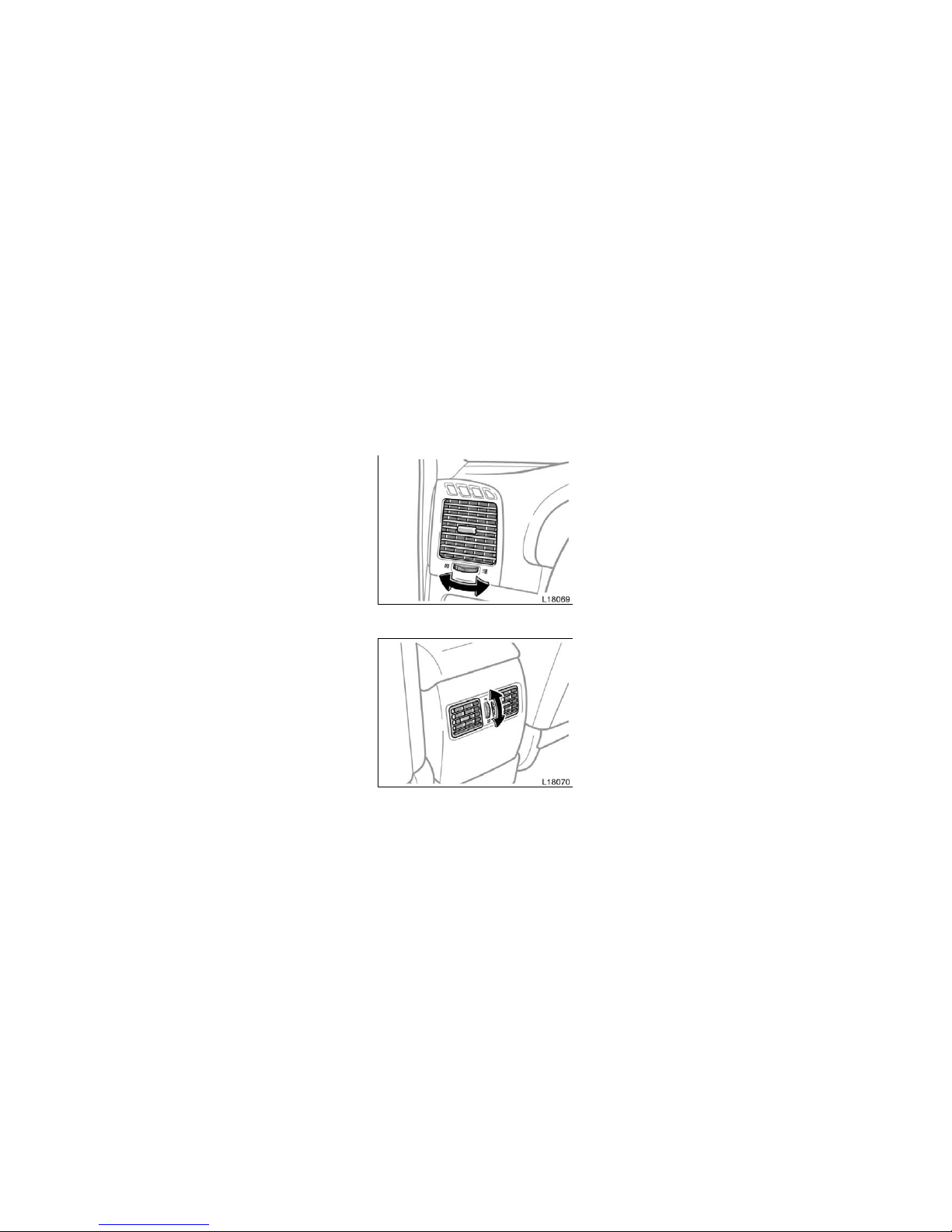
Side vents
Rear vents
If air flow control is not satisfactory, check
the side and rear vents. The side and rear
vents may be opened or cl osed as shown.
Side and rear vents
Page 16
’06Camry_U (L/O 0507)
192
2006 CAMRY from July ‘05 Prod. (OM33708U)
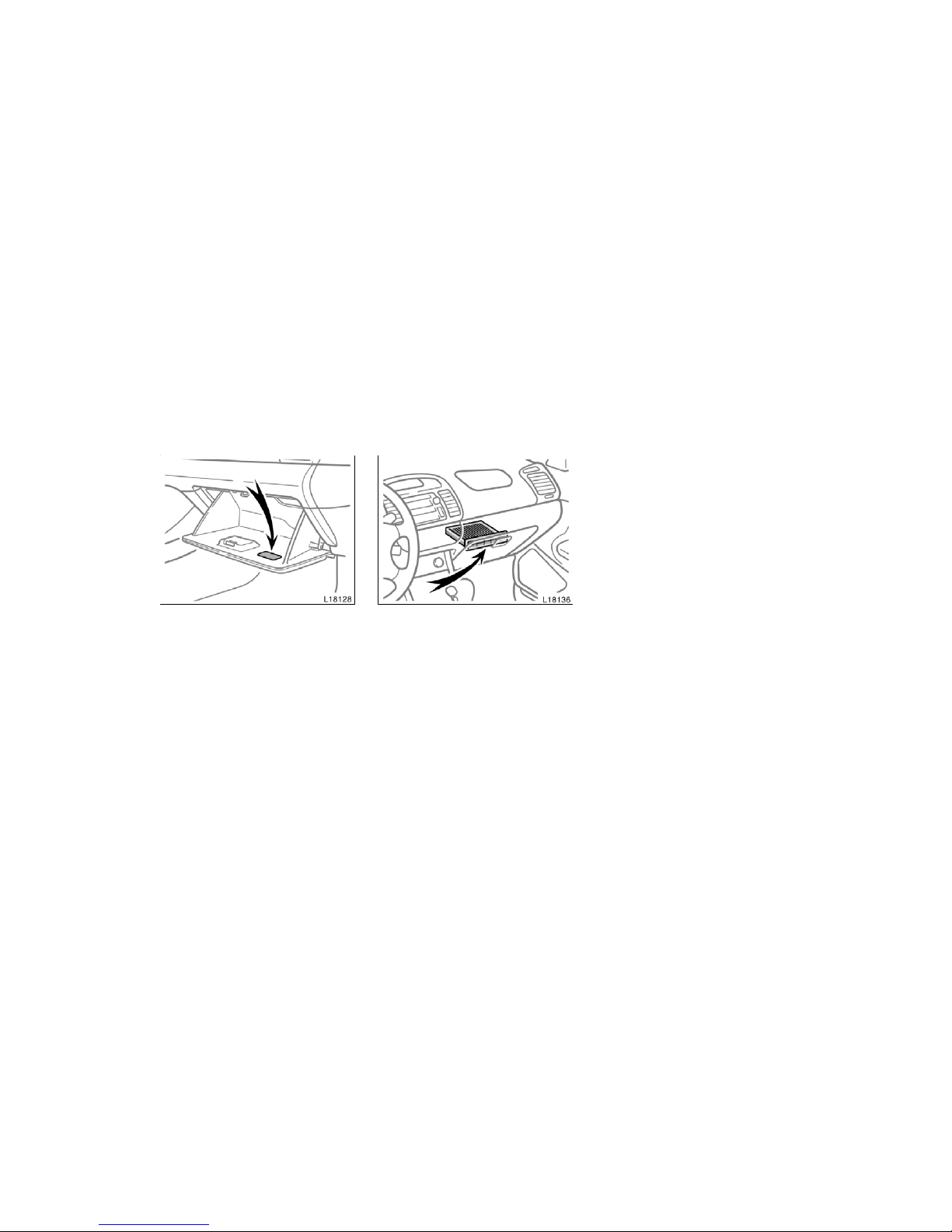
The air conditioning filter informat ion
label is placed inside of the glove box
as shown and indicates that a filter has
been installed.
The air conditioning fil ter prev ents dust
from entering the vehicle through the air
conditioni ng vent.
The air conditioning filter is behi nd the
glove box.
The air conditioning fi lter may clog after long use. The filter may need to be
replaced if the air flow of the air conditioning and heater experiences extreme
reductions in oper ating effi ciency, or if
the windows begin to fog up easily in
FRESH mode.
To maintain the air conditioning efficiency,
inspect and r eplace the air conditioning
filter according to the maintenance schedule. In dusty areas or areas with heavy
traffic fl ow, such as inner city or desert
areas, earl y replacement may be required.
(For scheduled maintenance information,
please refer t o the “Scheduled Maintenance Guide” or “Owner ’s Manual Supplement”.)
Air conditioning filter—
—Checking and replacing the
air conditioning filter
Page 17
’06Camry_U (L/O 0507)
193
2006 CAMRY from July ‘05 Prod. (OM33708U)
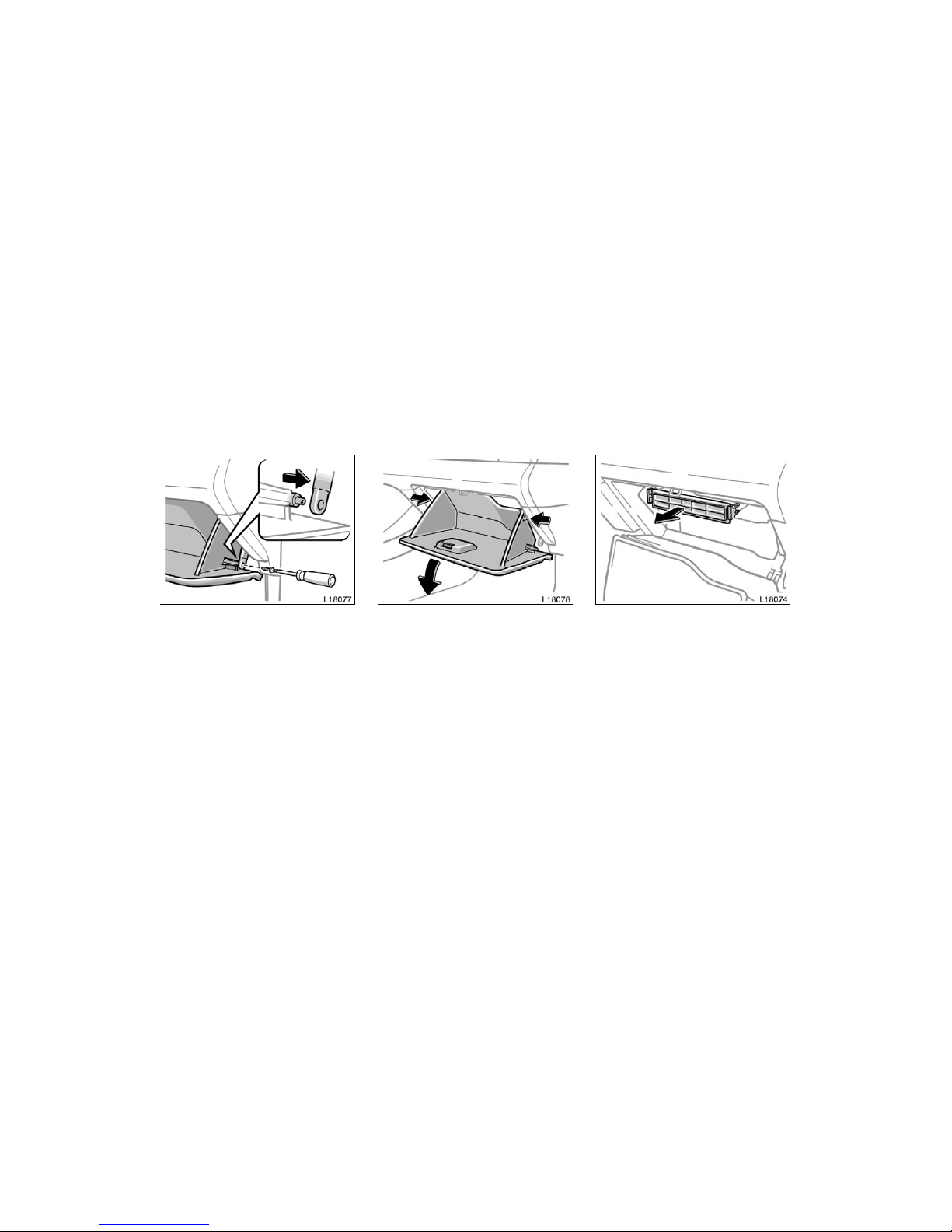
1. Open the glove box. Remove the
screw with a Phillips−head screw-
driver and slide the hook as shown.
2. Push in each side of the glove box
to disconnect the claws.
3. Remove the filter case fr om the filter
outlet as shown in the illustrati on.
Page 18
’06Camry_U (L/O 0507)
194
2006 CAMRY from July ‘05 Prod. (OM33708U)
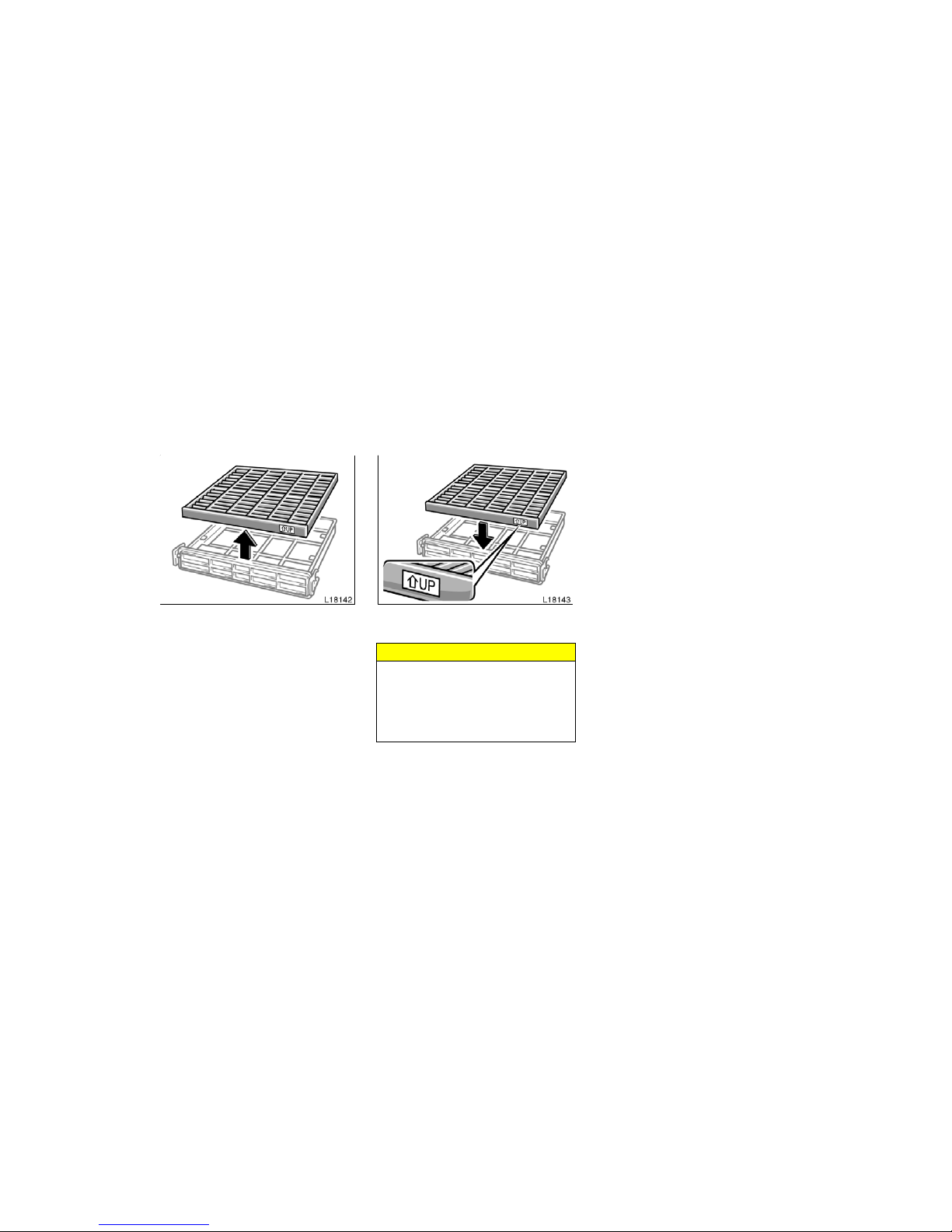
4. Remove the filter from the filter
case.
5. Inspect the filter on the surface.
If it is the just moderat ely dusty, it may
be cleaned by blowing compressed air
from the reverse surface. Do not wash or
oil the filter.
If it is dirty, it should be replaced.
When installing the filter in the filter
case, keep the “°UP” mark pointing up.
INFORMATION
The air filter shoul d be instal led properly in position. The use of air conditioning with the air filter removed
may cause deteriorated dustproof performance and then affect air conditioning perfor mance.
 Loading...