

Page 1
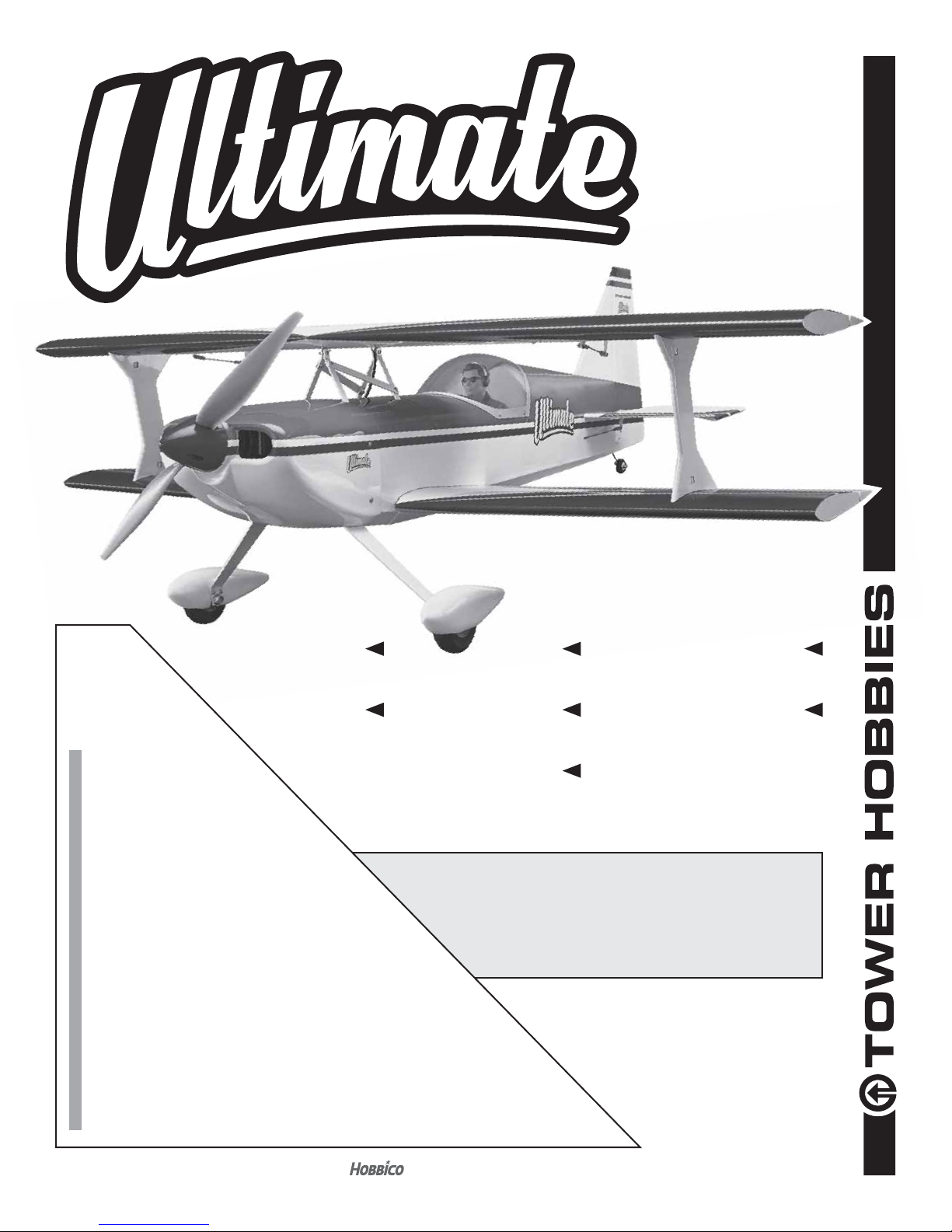
INSTRUCTION MANUAL
®
Tower
Hobbies®
guarantees
this kit to be
free from defects
in both material and
workmanship at the
WARRANTY
date of purchase. This
warranty does not cover any
component parts damaged by
use or modica tion. In no case shall
Tower Hobbies’ liability exceed the
original cost of the purchased kit. Further,
Tower Hobbies reserves the right to change
or modify this warranty without notice.
In that Tower Hobbies has no control over the nal
assembly or material used for nal assembly, no
liability shall be assumed nor accepted for any damage
resulting from the use by the user of the nal user-assembled
product. By the act of using the user-assembled product, the
user accepts all resulting liability.
If the buyer is not prepared to accept the liability associated with the
use of this product, the buyer is advised to return this kit immediately in
new and unused condition to the place of purchase.
To make a warranty claim send the defective part or item to Hobby Services at
the address below:
Hobby Services • 3002 N. Apollo Dr. Suite 1 • Champaign IL 61822 • USA
Include a letter stating your name, return shipping address, as much contact information as
possible (daytime telephone number, fax number, e-mail address), a detailed description of
the problem and a photocopy of the purchase receipt. Upon receipt of the package the problem
will be evaluated as quickly as possible.
WINGSPAN
45.5 in [1155 mm]
RADIO
4– 5 channel
LENGTH
50 in [1270 mm]
WING AREA
840 sq in [54.2 dm2]
WEIGHT
6.0– 7.25 lbs. [2720– 3290 g]
READ THROUGH THIS MANUAL
BEFORE STARTING CONSTRUCTION.
IT CONTAINS IMPORTANT INSTRUCTIONS
AND WARNINGS CONCERNING THE
ASSEMBLY AND USE OF THIS MODEL.
WING LOADING
16 – 20 oz/ ft2 [49– 61 g/dm2]
POWER
.46 – .55 2-stroke glow,
.72– .81 4-stroke glow,
RimFire .55 42-60-480,
6S LiPo, 75A ESC
TOWER HOBBIES
Champaign, Illinois
(217) 398-8970 ext. 5
airsupport@hobbico.com
®
®
© 2016 Tow er Ho bb ies.
A subsidiary of Hobbico, Inc.
TOWA2050
1
Page 2

TABLE OF CONTENTS
INTRODUCTION . . . . . . . . . . . . . . . . . . . . . . . . . . . . . . . . 2
ADDITIONAL ITEMS REQUIRED . . . . . . . . . . . . . . . . . . 2
Radio/Servos . . . . . . . . . . . . . . . . . . . . . . . . . . . . . . . .2
Glow Engine & Accessories for Glow . . . . . . . . . . . . .3
Brushless Electric Motor . . . . . . . . . . . . . . . . . . . . . . .3
LiPo Battery Charger. . . . . . . . . . . . . . . . . . . . . . . . . . 3
ADHESIVES. HARDWARE
OTHER ACCESSORIES. . . . . . . . . . . . . . . . . . . . . . . 3
KIT INSPECTION . . . . . . . . . . . . . . . . . . . . . . . . . . . . . . .4
CONTENTS . . . . . . . . . . . . . . . . . . . . . . . . . . . . . . . . . . . . 4
PREPARATIONS . . . . . . . . . . . . . . . . . . . . . . . . . . . . . . . .5
ASSEMBLE THE WINGS . . . . . . . . . . . . . . . . . . . . . . . . . 7
Install the Aileron Servos. . . . . . . . . . . . . . . . . . . . . . . 7
Hook Up the Ailerons. . . . . . . . . . . . . . . . . . . . . . . . . . 9
ASSEMBLE THE FUSELAGE. . . . . . . . . . . . . . . . . . . . . . 9
Install the Horizontal Stabilizer
and Vertical Stabilizer . . . . . . . . . . . . . . . . . . . . . . . . . 9
Hinge the Elevators and Rudder . . . . . . . . . . . . . . . . 11
Hook Up the Elevator and Rudder. . . . . . . . . . . . . . . 13
Mount the Motor . . . . . . . . . . . . . . . . . . . . . . . . . . . . 13
Mount the ESC. . . . . . . . . . . . . . . . . . . . . . . . . . . . . . 14
Mount the Engine. . . . . . . . . . . . . . . . . . . . . . . . . . . . 16
Install the Fuel Tank. . . . . . . . . . . . . . . . . . . . . . . . . . 18
AND
Hook Up the Throttle . . . . . . . . . . . . . . . . . . . . . . . . . 19
Mount the Cowl . . . . . . . . . . . . . . . . . . . . . . . . . . . . . 20
Finish the Radio Installation. . . . . . . . . . . . . . . . . . . . 22
Mount the Main Landing Gear. . . . . . . . . . . . . . . . . . 23
Attach the Belly Pan . . . . . . . . . . . . . . . . . . . . . . . . . 24
Assemble the Canopy Hatch. . . . . . . . . . . . . . . . . . . 25
Mount the Wings . . . . . . . . . . . . . . . . . . . . . . . . . . . . 26
Make the Aileron Pushrods . . . . . . . . . . . . . . . . . . . . 30
PREPARE THE MODEL FOR FLIGHT . . . . . . . . . . . . . . 30
Apply the Decals . . . . . . . . . . . . . . . . . . . . . . . . . . . . 30
Set the Control Throws . . . . . . . . . . . . . . . . . . . . . . . 30
Check the C.G. . . . . . . . . . . . . . . . . . . . . . . . . . . . . .31
Balance the Model Laterally . . . . . . . . . . . . . . . . . . . 31
PREFLIGHT . . . . . . . . . . . . . . . . . . . . . . . . . . . . . . . . . . .31
Engine/Motor Safety Precautions . . . . . . . . . . . . . . . 31
Propeller Selection for a Brushless Motor. . . . . . . . . 32
Battery Precautions. . . . . . . . . . . . . . . . . . . . . . . . . . 33
Range Check . . . . . . . . . . . . . . . . . . . . . . . . . . . . . . . 34
AMA SAFETY CODE. . . . . . . . . . . . . . . . . . . . . . . . . . . . 34
General . . . . . . . . . . . . . . . . . . . . . . . . . . . . . . . . . . . 34
Radio Control. . . . . . . . . . . . . . . . . . . . . . . . . . . . . . . 34
Know Before You Fly . . . . . . . . . . . . . . . . . . . . . . . . .34
FLYING. . . . . . . . . . . . . . . . . . . . . . . . . . . . . . . . . . . . . . . 35
INTRODUCTION
Congratulations and thank you for purchasing the Tower
Hobbies Ultimate bipe. In spite of its aerobatic appearance, the
Ultimate is a cinch to takeoff, y and land and is unexpectedly
stable. But when you’re ready to lay down some aerobatics
the Ultimate is ready to respond when it’s time to move the
sticks to the corners!
Powered by a .46 2-stroke glow, the Ultimate ies surprisingly
well. But if aggresive aerobatics is your preference a 2-stroke
glow is not the optimum choice. With a 2-stroke the Ultimate
still performs all the expected sport aerobatic maneuvers
such as loops (inside and outside), rolls, point rolls, stalls,
spins, inverted ight and even knife-edge ight. Even if the
Ultimate doesn’t have unlimited vertical with a 2-stroke, a
2-stroke is still the lightest setup which you will actually be
able to feel when it’s in the air.
Because of the large propellers it can swing, the Ultimate
becomes a monster with a Rim re .55 and a 6S battery.
Performance when powered by an O.S. .72 is a close second.
For the latest technical updates or manual corrections to the
Utimate ARF visit the Tower Hobbies web site at towerhobbies.
com and visit the page for the Ultimate ARF. If there is new
technical information or changes to this model a “tech notice”
box will appear on the page.
ADDITIONAL ITEMS REQUIRED
Radio/Servos
The Ultimate can be own with a 4-channel radio, but a
computer radio such as the Tactic TTX650 is recommended
because of the simplicity and exibility a computer radio offers
in addition to the convenience of multiple model memory:
❍ Tactic TTX650 6-channel programmable radio
(TACJ2650)
❍ Tactic TR625 6-chanel receiver (TACL0625)
❍ Hobbico 2S (6.6V) LiFe receiver pack (HCAM6411)*
❍ On-off receiver switch (TACM2000)*
* If powering your Ultimate with a brushless electric motor,
you may power the receiver and servos from the BEC in
the ESC, so a receiver battery or on/off receiver switch
will be not required.
The Ultimate was designed for mini servos, but regular servos
with minimum torque of 55oz-in [4.0 kg-cm] may be used
simply by enlarging the servo mounts in the wing and fuselage.
Tactic TSX25 mini digital high-speed 2 ball bearing servos
(TACM0225) or Tactic TSX20 mini high-speed 2 ball bearing
servos (TACM0220) are recommended.
The Ultimate may be own with two or four aileron servos.
With two servos, the ailerons in the top wing are operated
by pushrods connected directly to the bottom ailerons. With
four servos, each aileron is operated by its own servo. The
advantage of two servos is economy and less weight. The
advantage of four servos is increased response and precision.
2
Page 3
SERVO CHART
Electricpowered
Wing
conguration
Total number
of servos
required
The quantity and lengths of servo extensions can get
complicated depending upon whether you want to mix all four
aileron servos electronically, or mix them mechanically with
Y-harnesses, and whether you plan to remove the wings for
transport (then, you’ll want a servo wire connection from the
top aileron servos alongside one of the rear cabane struts that
can be easily connected and disconnected). The instruction
manual illustrates both two aileron servos in the bottom wing
only and four aileron servos in the top and bottom wings, but
for both options all the aileron servos were connected into
one channel with Y-harnesses as listed below.
SERVO EXTENSIONS and Y-HARNESS for
CONNECTING AILERON SERVOS INTO ONE CHANNEL
20"[508mm]
Y-h arness
5"
[130—150 mm]
Y-h arness
—
4 aileron
servos
6475
2 Aileron Servos 4 Aileron Servos
(1) TACM2500 (2) TACM2500
6"
Not Required (1) VNRM1668
2 aileron
servos
Glow-
powered
4 aileron
servos
2 aileron
servos
in the instruction manual because it is compact, durable,
programmable and features data logging. The discharge
wires from the ESC require lengthening to reach the battery
and order numbers for the wire are provided below.
❍ 42-60-480 RimFire .55 (GPMG4715)
❍ Brushless motor mount for medium motors
(GPMG1255)
❍ M3 x 6 screws for mounting motor to motor mount
(DTXC8650 or HPIC0351)
❍ APC 16 x 8 thin E prop (APCQ4015)
❍ Castle Creations Edge Lite 75 (CSEM1200)
❍ (2) FlightPower 3S 3800 30C (FPWP3383) and Great
Planes Series adapter (GPMM3143)
OR
❍ FlightPower 6S 3800mAh 30C (FPWP3386)
❍ Adhesive-back Velcoro for mounting batteries
(GPMQ4480)
❍ 10 gauge silicone wire to extend discharge wires
from ESC
➊ CSEC0030 3’ black
➋ CSEC0031 3’ red
➌ 3/16" heat shrink tubing (GPMM1056)
➍ T-style Star connector (HCAM4001)
LiPo Battery Charger
Glow Engine & Accessories for Glow
The Ultimate is suited for a .46 – .55 2-stroke or .72 – .81
4-stroke. Because the engine is side-mounted, 2-stroke
engines require a Bisson Pitts-style muf er:
❍ O.S. FS72-a 4-stroke with muf er (OSMG0877)
❍ *O.S. 46AXII 2-stroke with muf er (OSMG0548)
❍ O.S. 55AX ABL 2-stroke with muf er (OSMG0557)
❍ Bisson Pitts-style muf er (BISG4046)
❍ 1/4" [6.4mm] R/C foam rubber (HCAQ1000)
❍ Great Planes Dead Center Hole Locator (GPMR8130)
❍ 3’ [.9m] medium silicone fuel line (GPMQ4131)
❍ Optional: Aluminum fuel line plug (GPMQ4166)
❍ Dubro Fuel Clunk Standard (DUBQ0637)
❍ Suitable propeller for your engine
* With the O.S. .46 AXII an APC 12.5 x 6 (APCQ9905)
was preferred
Brushless Electric Motor
The electric setup for the Ultimate is straightforward: a Great
Planes ElectriFly RimFire .55 on a 6S battery in the 3800mAh
range with a 75A ESC. Propeller selection depends upon your
preference and ying style, but we preferred the APCX 16 x
8E (full discussion on prop selection on page 32). A Castle
Creations Edge Lite 75 is also recommended and illustrated
To charge a 6S 3800mAh LiPo at 1C, a charger capable of
at least 95 watts is required (6S x 4.2V/cell = 25.2V x 3.8 A =
95 Watts). The Triton2 EQ is just enough charger with 100W
output AC and 120W output DC (GPMM3156).
ADHESIVES. HARDWARE AND
OTHER ACCESSORIES
Other than common hobby tools here is a list of the rest of
the items required:
❍ 30-minute epoxy (GPMR6043)
❍ Epoxy brushes (GPMR8060)
❍ Mixing cups (GPMR8056)
❍ Mixing sticks (GPMR8055)
❍ Threadlocker thread locking cement (GPMR6060)
❍ Thin CA (GPMR6001)
❍ Medium CA (GPMR6007)
❍ CA applicator tips (HCAR3780)
❍ A #50 (.070") drill (for drilling out servo arms for the
pushrod wires)
❍ Optional: 1/5-scale Sport pilot (GPMQ9015)
❍ Optional: Zap Adhesives Formula 560 Canopy Glue
(PAAR3300)
3
Page 4
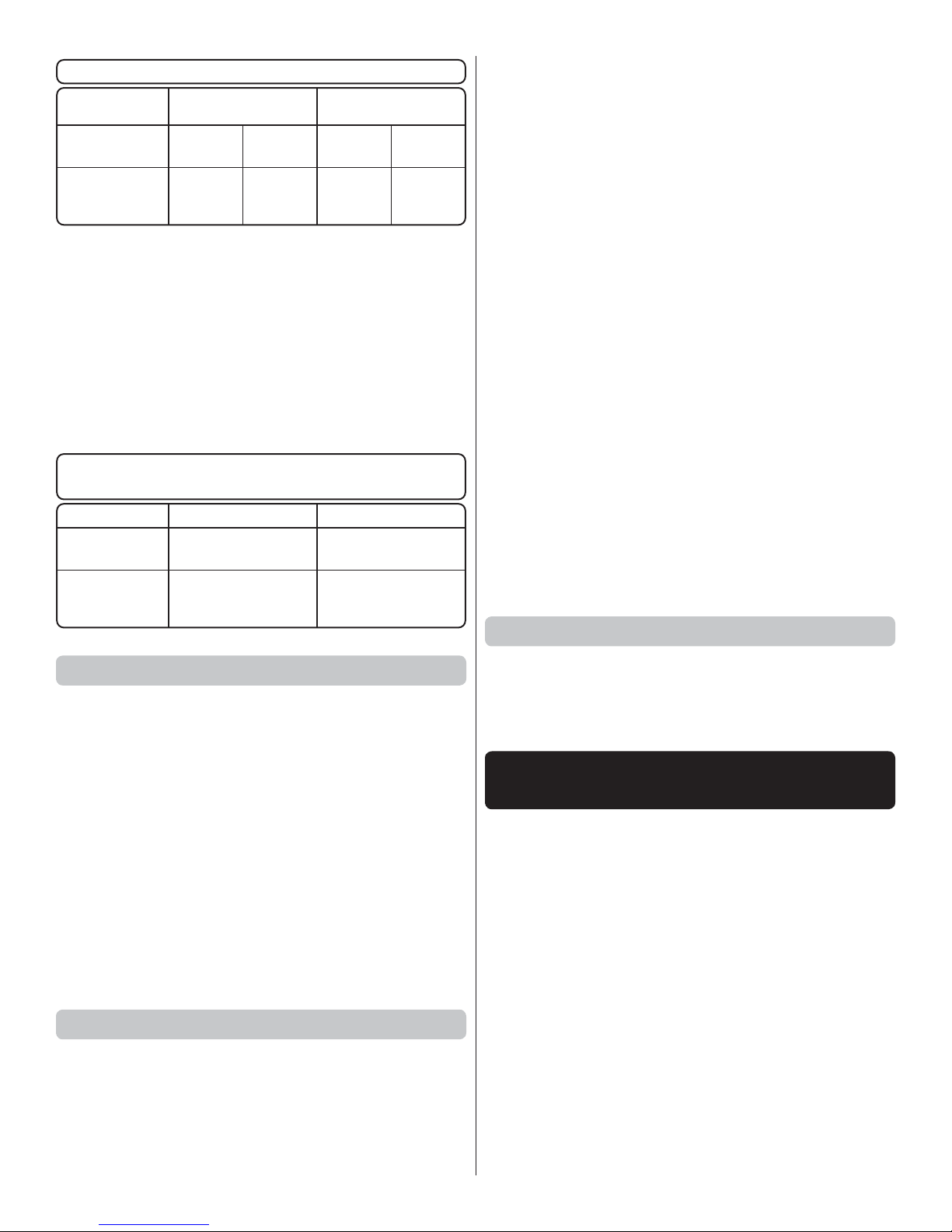
A Robart Super Stand II (ROBP1402) is also indispensable
for working on your Ultimate.
A covering iron with a cover sock may be required for
tightening and re bonding the covering to the model that may
have loosened between the time the plane was manufactured
and the time the model was removed from the box. The 21st
Century iron is preferred because of its long cord, contoured
shoe and precisely adjustable temperature range. A trim iron
is also handy for detailed covering tasks.
❍ Coverite 21st Century Sealing Iron (COVR2700)
❍ Coverite 21st Century Cover Sock (COVR2702)
❍ Coverite 21st Century Trim Seal Tool (COVR2750)
KIT INSPECTION
Before starting to build, take an inventory of this kit to make
sure it is complete, and inspect the parts to make sure they
are of acceptable quality. If any parts are missing or are not of
acceptable quality, or if you need assistance with assembly,
contact Product Support. When reporting defective or
missing parts, use the part names exactly as they are written
in the Kit Contents list.
Hobbico Product Support
3002 N. Apollo Drive, Suite 1 Ph: (217) 398-8970, ext. 5
Champaign, IL 61822 Fax: (217) 398-7721
E-mail: airsupport@hobbico.com
REPLACEMENT PARTS LIST
Order No. Description
TOWA4050
TOWA4051
TOWA4052
TOWA4053
TOWA4054
TOWA4055
TOWA4056
TOWA4057
TOWA4058
TOWA4059
TOWA4060
TOWA4061
TOWA4062
TOWA4063
TOWA4064
TOWA4065
TOWA4066
TOWA4067
TOWA4068
Fuselage set
Upper wing set
Lower wing set
Tail surface set
Cowl
Landing gear
Wheel pants
Interplane struts
Cabanes
Canopy
Hatch
Belly pan
Thumb screw set
Lower wing bolts (2)
Spinner
Fuel tank
Decals
Tail wheel set
Engine mount set
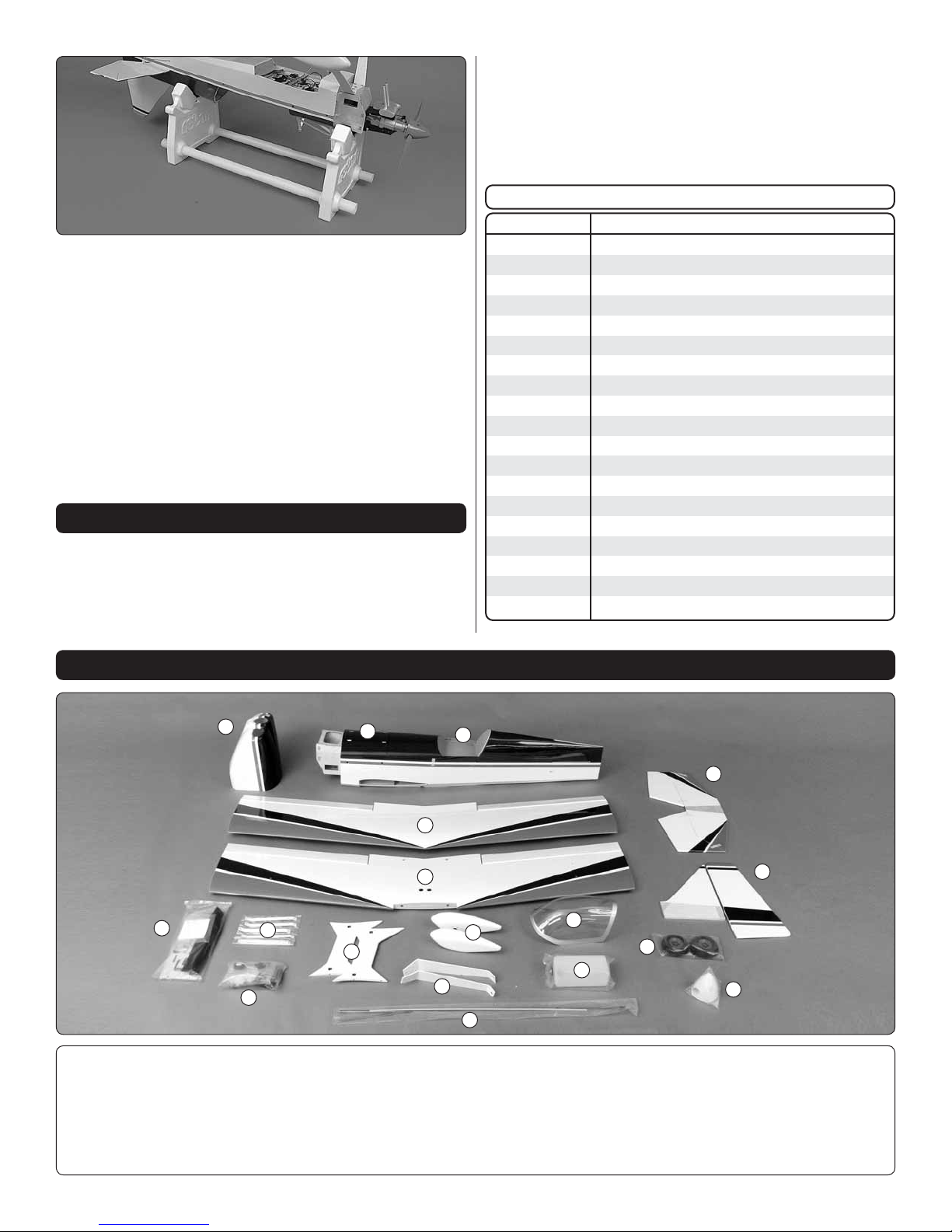
1
8
1. Cowl
2. Fuselage
3. Canopy Hatch
4. Top Wing
5. Bottom Wing
6. Horizontal Stabilizer
CONTENTS
2
9
11
10
7. Vertical Stabilizer
8. Hardware / Wood Parts
9. Cabane Struts
10. Hardware
11. Wing Struts
12. Wheel Pants
3
6
4
5
12
13
18
14
16
15
7
17
13. Main Landing Gear
14. Canopy
15. Fuel Tank
16. Main Wheels
17. Spinner
18. Pushrods
4
Page 5
PREPARATIONS
NOTE: If you’re already familiar with iron-on coverings, you
may nd that the covering on the Ultimate requires less heat
than other coverings you’ve worked with. Too much heat
causes seams and edges to separate as the covering tightens.
The optimum temperature measured on the surface of a cover
sock on a cover iron is about 280ºF [140ºC] which requires
a dial setting of about 300ºF [150ºC] or “medium” heat on
most covering irons. You can go a little higher if necessary,
but be careful around seams and overlapping edges. If the
covering blisters up and cannot be pressed back down, the
iron may be too hot, or you are leaving it in one location for
too long—try reducing the heat or moving the iron a little
faster. Another option is perforating the blister in a few areas
with a #11 hobby blade.
A covering iron with a cover sock is preferred over a heat
gun. With a covering iron you can apply heat only where
required. With a heat gun you may inadvertently overheat a
seam causing separation.
Pull hard on each aileron to check the hinges. Apply thin CA
to any hinges that may not be secure.
Perform the steps 3 through 7 if installing aileron servos
in the top wing.
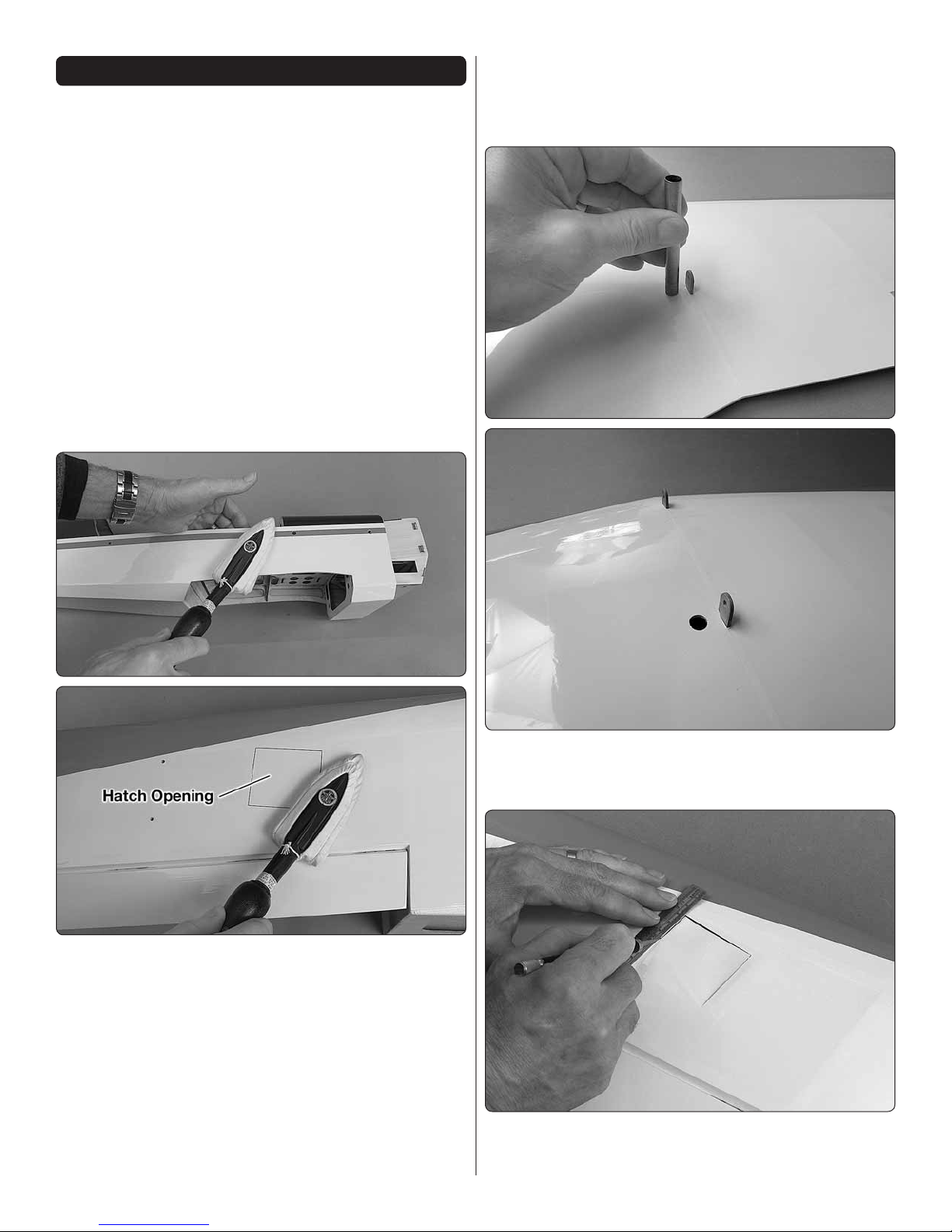
1. Use a covering iron with a cover sock to tighten any
❏
loose covering. Wherever the covering is attached to wood,
press down on the iron to thoroughly bond the covering to
the balsa underneath. Where possible, reach inside the model
and support sheeted areas while tightening the covering to
prevent the sheeting from bending inward. If you’ll be using
the top wing aileron servos, also be sure to securely bond
the covering to the structure on the bottom of the top wing
around the aileron hatch openings. (The area of the hatch has
been outlined with a felt-tip pen for illustration in the image.)
2. Before proceeding with assembly, now would be a good
❏
time to make sure all the hinges in the ailerons are secure.
3. Use a hobby knife (or a 3/8" brass tube sharpened on
❏
the end) to cut a hole in the bottom of the top wing where
shown for the servo wire.
4. Use a straightedge as a guide to cut the covering
❏
approximately 3/16" [5mm] inside the edges of the aileron
hatch openings.
5
Page 6
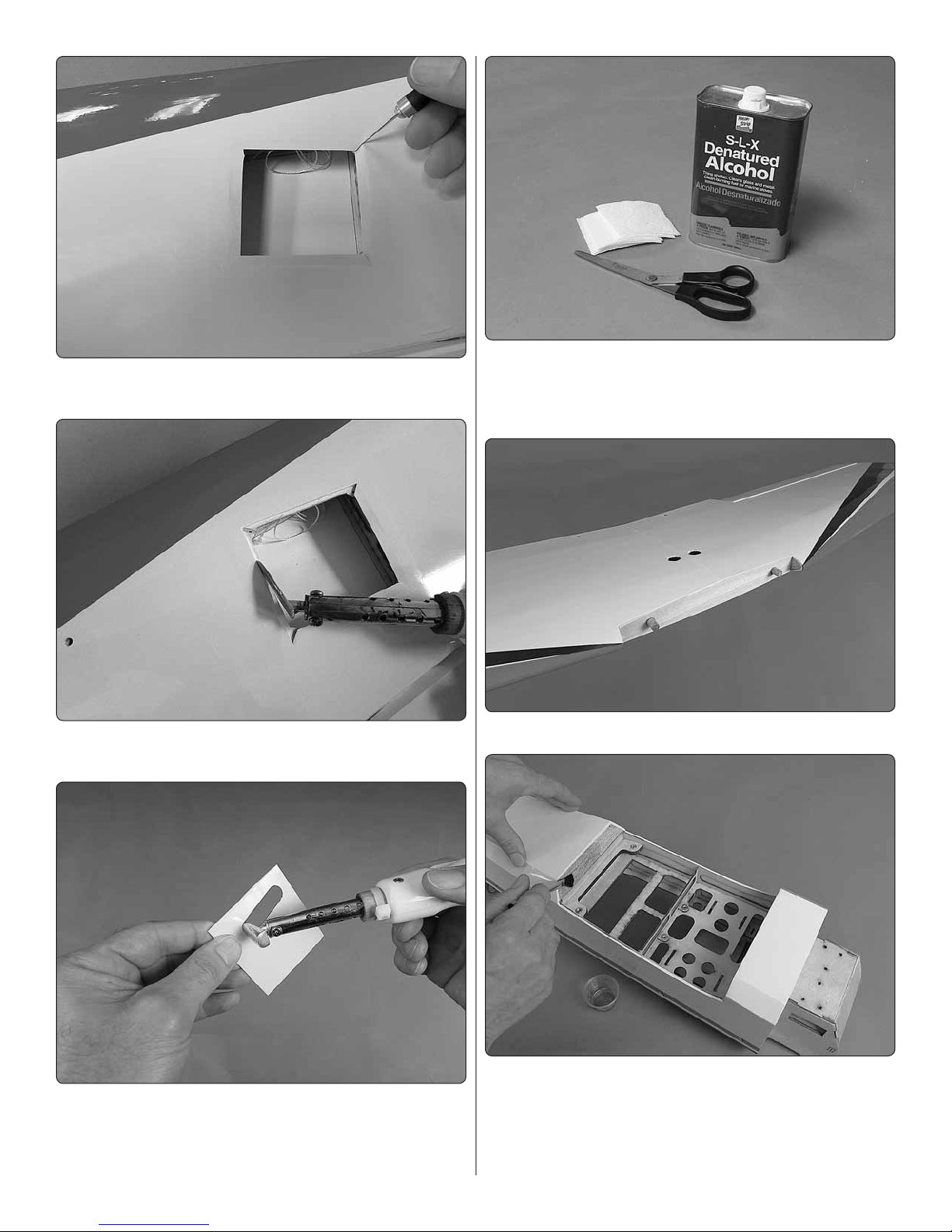
5. Slit the corners of the covering up to the corners of
❏
the hatch opening.
6. Use a trim iron to bond the covering down inside
❏
the openings.
8. A few paper towels stacked on top of each other cut
❏
into small squares will come in handy for wiping off excess
CA and/or epoxy as you proceed with assembly. For epoxy
clean up later, dampen the squares with denatured alcohol.
9. Glue the wood dowels into the bottom wing.
❏
7. Cut the covering from the servo arm openings and
❏
the four screw holes in the corners of the top aileron hatch
covers. Use a trim seal tool to seal the covering around the
edges of the openings.
10. If powering your Ultimate with a glow engine, fuelproof
❏
any areas that may be exposed to raw fuel or oily engine
exhaust such as the openings in the fuselage at the front
and back of the bottom wing, the front of the bottom wing,
inside the belly pan around the wing bolt holes and the back
of the rewall.
6
Page 7
ASSEMBLE THE WINGS
Install the Aileron Servos
Part of installing the aileron servos is deciding how you are
going to connect the servos to your receiver. If you’re using
only the two servos in the bottom wing you can connect them
with a standard Y-connector and guide the male end of the Y
that goes into the receiver out the wing. Or, you may connect
the servos to separate channels in your receiver mixing them
electronically through programming in your transmitter.
But if you’re using four servos there are even more ways to mix
the servos depending on how many channels are available in
your radio. One way would be to connect each aileron servo
to separate channels in the receiver, controlling them with a
programmable mix. The advantage here would be the ability
to independently adjust each servo’s sub trim and end points
for the ultimate in precision and tuning. But then at least a
7-channel receiver would be required and all the additional
servo extensions to connect each one to the receiver.
Another way is with a standard 2-aileron wing mix found
under the “wing type” mix in most transmitters. This mixes
two aileron servos, but then you will have to “Y” the top and
bottom servos on each wing half and will not have the ability
to adjust the sub trims and end points of each servo.
But since all options (other than controlling the servos
separately with four channels) eliminate adjusting the servos
independently with end points and sub trims, we just kept it
simple and “Y’d” the servos in the top wing to each other and
“Y’d” the servos in the bottom wing to each other, then “Y’d”
the “Y’s” together inside the fuselage into a single aileron
channel. The advantage with this option is only one servo
wire coming from the top wing which is simpler and more
aesthetically pleasing.
The following instructions illustrate installing and
hooking up the ailerons in the bottom wing. If installing
servos in the top wing too, simply perform the steps
for all four servos.
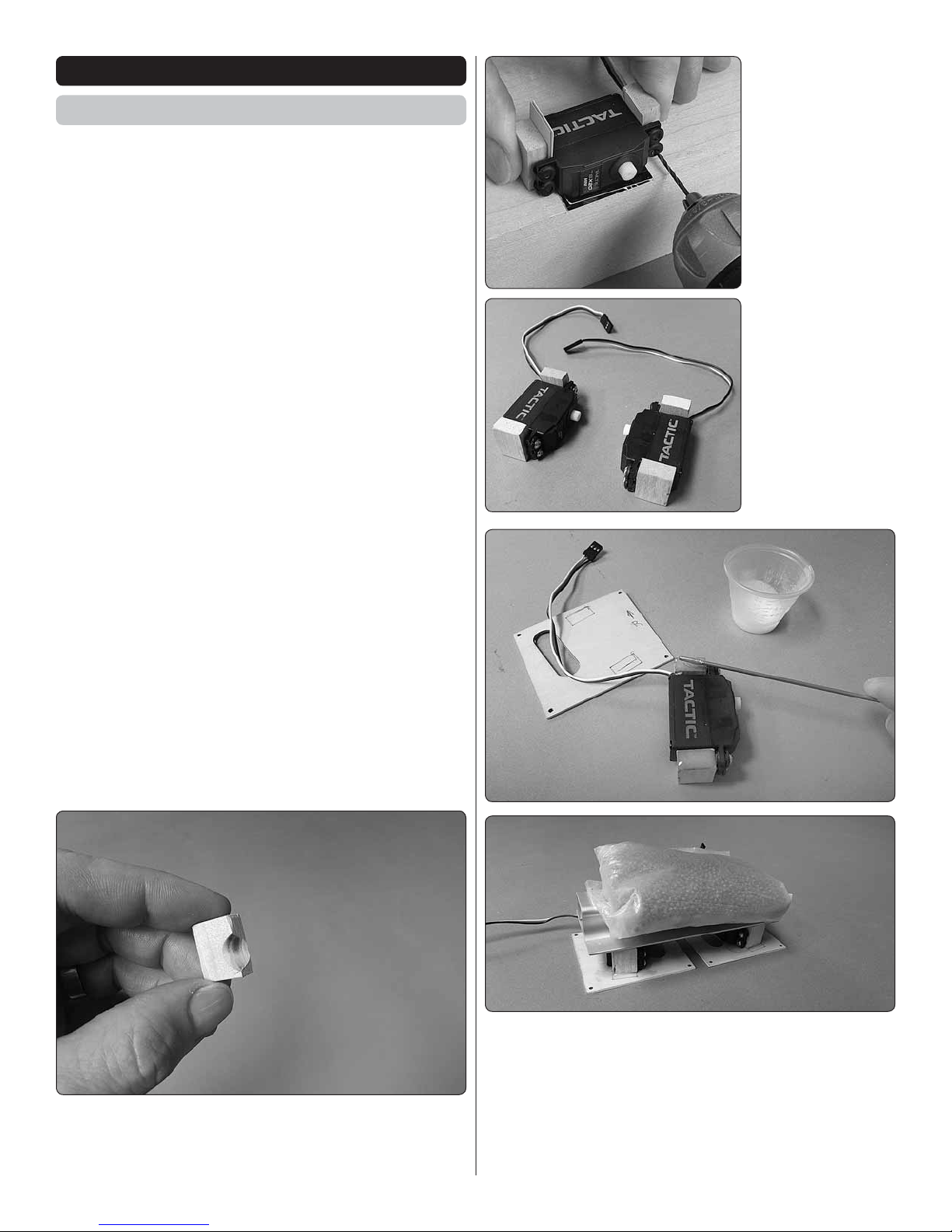
2. Hold two
❏
blocks to the servo
with thin cardstock
between the blocks
and the servo and
under the servo
between the servo
and your workbench
as shown. Drill 1/16"
[1.6mm] holes into
the blocks for the
servo mounting
screws.
3. Make another
❏
aileron servo/mount
block assembly
mirroring the first
and drill the holes
and mount to the
servo.
1. Trim one of the 5/16" x 9/16" x 3/4" [8 x 15 x 20mm]
❏
servo mount blocks to accommodate the servo wire where
it exits the servo case.
4. Apply 30-minute epoxy to the bottom of the mount
❏
blocks where they contact the hatch covers. Also wipe a
lm of epoxy onto the hatch covers where the mount blocks
will land. Wait a few minutes for the epoxy to soak into the
mount blocks, apply more epoxy if needed, then position
the servos on the hatch covers so the servo arms will be
centered in the cutouts. Use weights or clamps to hold the
servo blocks to the hatches until the epoxy hardened.
7
Page 8
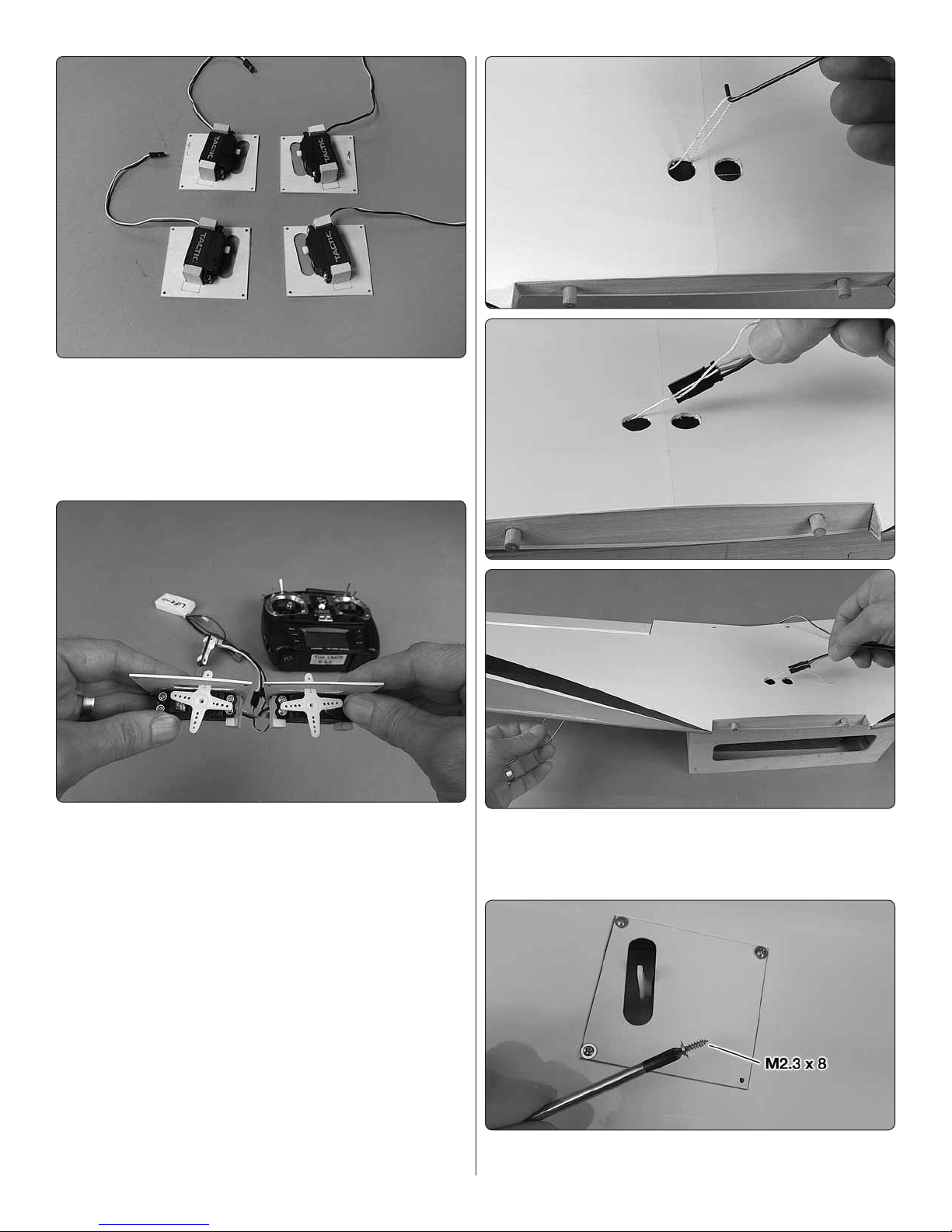
If installing all four aileron servos, this is what the servos and
hatch covers should look like.
5. Connect the bottom aileron servos to your receiver
❏
(with or without a Y-harness; whichever is your preference)
with a battery and turn on your transmitter to power up the
system so you can operate the servos.
6. Fit servo arms on the servos positioned so the arms
❏
will be angled forward approximately as shown—it’s more
important to have the arms on each servo angled the same
than it is to have any precise angle. The arms just need to
be angled forward so the pushrods will be approximately
perpendicular with the servo arms when connected to the
control horn on the aileron.
7. Cut the unused arms from the servo arm and enlarge the
❏
holes in the servo arm with a #50 (.070") drill for the pushrod
wires. Fasten the arms to the servos with the screws that
came with the servos.
8. Cut the covering from one of the servo wire holes in
❏
the top of the bottom wing. Use the string in the wing to pull
one side of the 20" [508mm] Y-harness through the hole and
out one of the aileron hatch openings.
9. Connect the Y-harness to the servo and mount the
❏
hatch/servo to the wing with M2.3 x 8 washer-head screws.
8
Page 9
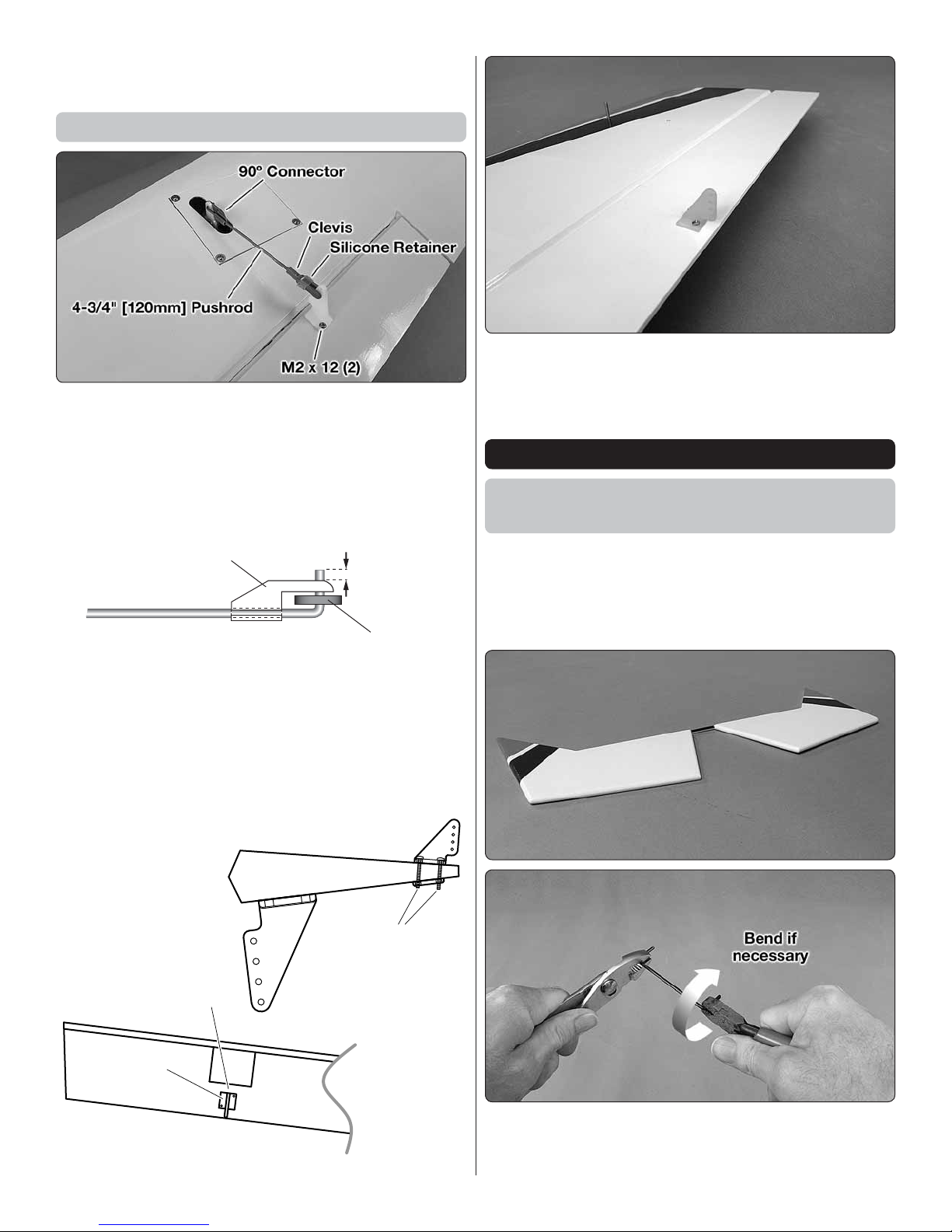
10. Pull the other end of the Y-harness through the other
1/16" [1.5 mm]
Servo Arm
90º Connector
M2 x 10
For Bottom Ailerons Only
Small Control Horn
Centered Behind
Mounting Plate
❏
side of the wing and mount the other hatch.
Hook Up the Ailerons
Refer to this image while mounting the aileron servos
and hooking up the ailerons.
Do the left wing rst…
1. Thread a clevis about fteen full turns onto a 4-3/4"
❏ ❏
[120mm] aileron pushrod. Make a second assembly the
same way.
3. If not installing aileron servos in the top wing, mount
❏ ❏
a small control horn to the top surface of the bottom ailerons
in the location illustrated in the image above and in the
illustration on the bottom of the column to the left.
ASSEMBLE THE FUSELAGE
Install the Horizontal Stabilizer
and Vertical Stabilizer
2. Bend and cut the pushrods to the correct length,
❏ ❏
then connect the aileron servos to the ailerons using the
hardware shown. Drill 1/16" [1.6mm] holes into the ailerons
for the M2 x 12 screws. After installing the screws, remove
the screws, add a few drops of thin CA to the holes, allow to
harden, then reinstall the screws. Adjust the clevises on the
pushrods so the ailerons will be centered when the servos
are centered.
1. If you haven’t already done so, remove the masking tape
❏
holding the elevators to the horizontal stabilizer. Any residual
glue from the masking tape can be removed with naptha
(lighter uid) and a small paper towel square. If necessary,
use your covering iron to tighten the covering.
2. Test- t the elevator joiner wire to the elevators. If the
❏
elevators do not align with each other (as in the image), use
pliers to “tweak” the joiner to get the elevators aligned.
9
Page 10
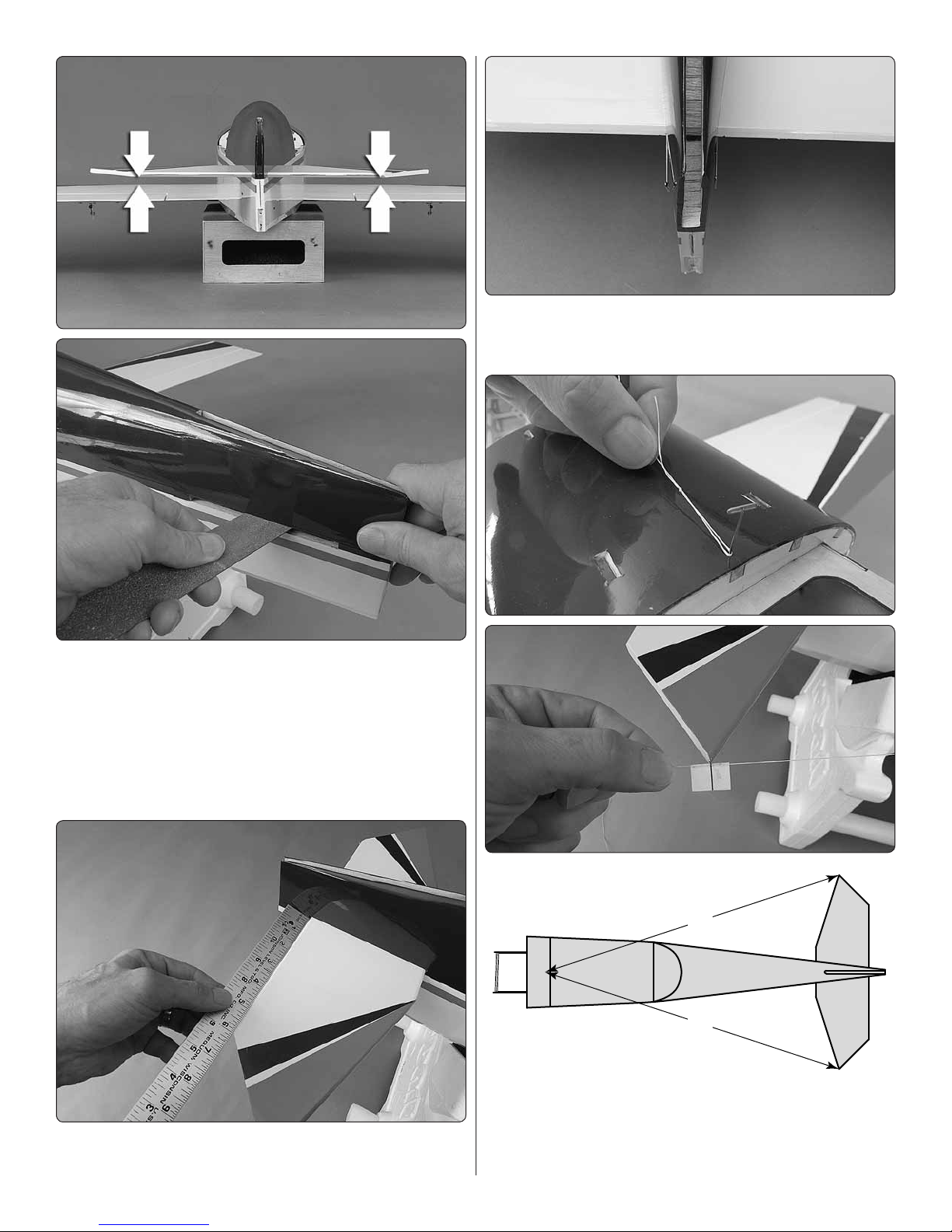
3. Temporarily bolt the bottom wing to the fuselage with the
A = A'
A
A'
❏
two included nylon wing bolts. Slide the horizontal stabilizer
into position and view the model from behind. Check the
alignment between the stab and the wing. If necessary,
remove the stab and lightly sand the slot to align the stab
with the wing.
4. Perform a trial-run of nal stab alignment before doing
❏
it with glue;
B. Once the stab is centered, insert pins into the trailing
edge tightly against both sides of the fuselage to lock the
trailing edge into place.
A. Center the stab laterally taking measurements from both
sides of the fuselage.
C. Insert a pin into the fuselage centered over the stringer at
the front of the hatch opening. Use an inelastic string around
the pin with a line drawn on a strip of masking tape to check
rotational stab alignment. Slide the tape along the string and
rotate the stab until both tips align with the line on the tape.
10
Page 11
5. Remove one of the pins from the trailing edge and slide
❏
out the stab. Install the elevator joiner wire into the stab slot
in the fuselage, making certain to keep the correct orientation
so the elevators will align when re tted to the joiner.
6. Add a liberal amount of 30-minute epoxy to the top and
❏
bottom of the exposed balsa in the middle of the stab. Be
certain not to forget to install the elevator joiner wire
into the stab slot as instructed in the previous step! Slide
the stab into place removing excess epoxy as you proceed.
Reinsert the pin to align the trailing edge and make sure the
stab is properly aligned as previously described with the string
and tape. Make sure you’ve cleaned up all residual epoxy
and do not disturb the model until the epoxy has hardened.
Hinge the Elevators and Rudder
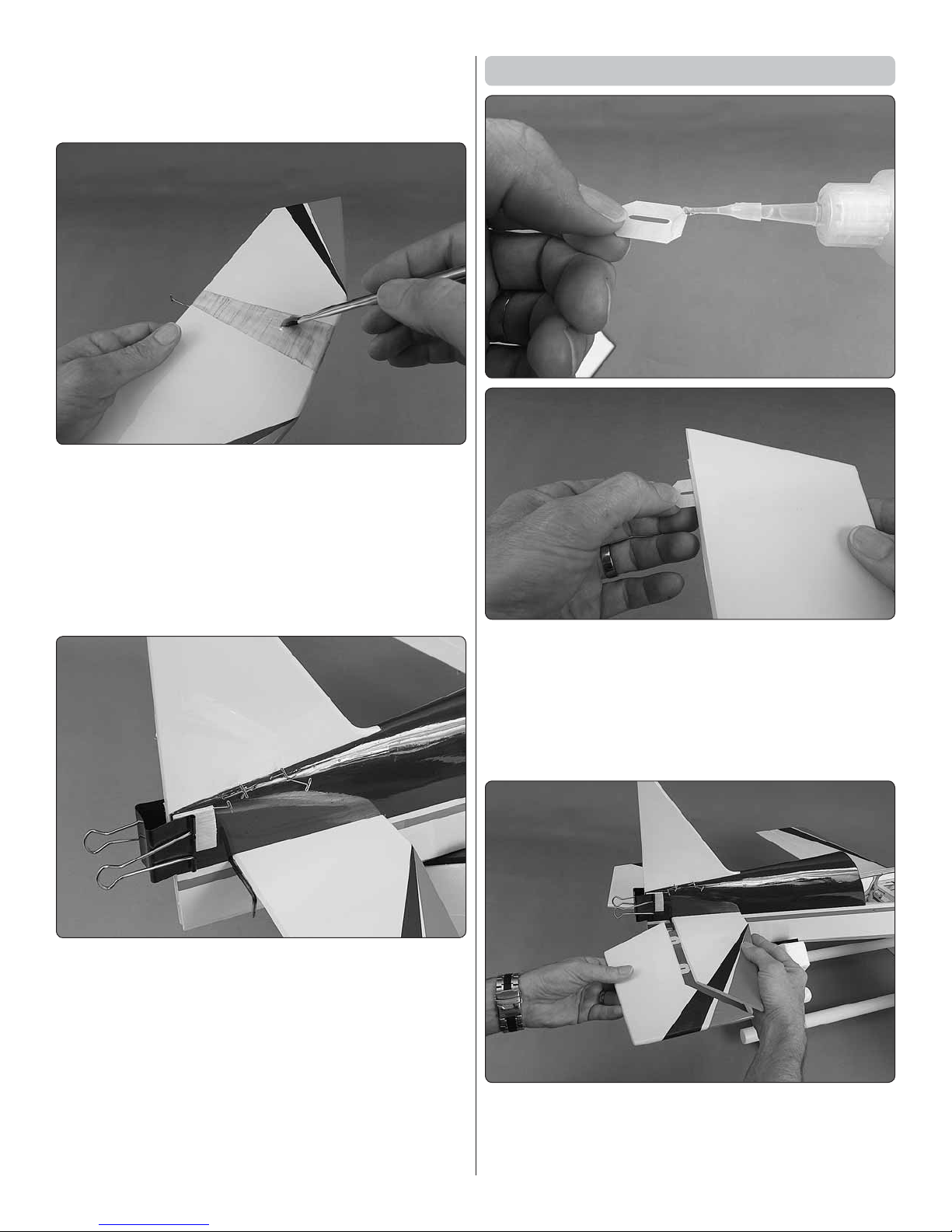
1. Add a small drop of medium CA to the end of one of the
❏
hinges. Insert the hinge halfway into one of the hinge slots in
one of the elevators—do not use any CA accelerator! This
will be just enough CA to keep the hinge from shifting while
joining the control surfaces to the stab and n.
2. Tack-glue the rest of the hinges into the hinge slots in
❏
both elevators.
7. Te s t- t the vertical stabilizer ( n) into position. Make
❏
any adjustments necessary for a good t and to make sure
the n is vertical, then permanently glue it into place with
30 -minute epoxy. Use T-pins or clamps as necessary to close
any gaps between the n and the llet blocks. Any pinholes
from T-pins can be reduced later with a covering iron.
3. After the CA has hardened and all the hinges are in
❏
place, test- t the elevators to the stab and joiner. Make sure
the surfaces move easily and smoothly.
11
Page 12

4. Remove the elevators. Add epoxy into the holes in the
❏
elevators for the joiner wires. Rejoin the elevators to the stab
and joiner wire and wipe away excess epoxy.
5. Use a thin applicator tip to apply 6 drops of thin CA
❏
to the top and bottom of each hinge waiting a few seconds
between drops for the hinges to absorb the CA. Excess CA
that doesn’t wick into the hinges can be absorbed with the
edge of a small paper towel square.
6. Test t the tail gear. Same as was done with the elevator,
❏
tack-glue the hinges into the rudder, then test- t the rudder
to the n. Make any adjustments necessary for a good t,
then remove the rudder and tail gear.
7. Using care not to get any epoxy into the hinge points
❏
around the tail gear wire, insert the hinges into the fuselage
with 30-minute epoxy. Add epoxy into the hole in the rudder
for the “arm” part of the tail gear wire, then t the rudder to
the assembly.
8. Permanently attach the rudder to the n and fusealge
❏
by gluing the hinges with thin CA.
9. After the CA on all the hinges has hardened, pull hard
❏
on all the control surfaces to make sure they are secure and
all the hinges are thoroughly glued into place.
12
Page 13

Hook Up the Elevator and Rudder
3. With the surfaces centered, mark, bend and cut the
❏
pushrods and connect them to the servos. You can bend
and cut the pushrods while they are in the fuselage, but it
will be easier to cut and bend them out of the fuselage (but
then the clevises will have to be temporarily removed so the
pushrods can be reinserted from the front of the guide tubes).
4. Drill 1/16" [1.6mm] holes through the servo tray and
❏
mount the servos to the servo tray with the screws included
with the servos.
5. You can temporarily connect the servos to the receiver
❏
and operate the servos and adjust the length of the pushrods
now, or later when performing nal radio setup.
1. Thread a clevis onto two 26" [660mm] pushrods and
❏
connect them to two large control horns. Mount the horns
to the elevator and rudder with M2 x 12 machine screws and
backing plates as shown.
Mount the Motor
If using a glow engine skip to Mount the Engine on page 16.
1. Mount the motor to an Electri y Brushless Motor Mount
❏
for Medium Motors (not included), but do not use the M3
x 10 screws that came with the motor because they are
too long and may protrude into the motor and contact the
copper windings. Use M3 x 6 screws instead (DTXC8650
or HPIC0351).
2. Place the elevator and rudder servos in the servo tray
❏
(enlarge the tray as necessary to accommodate your servos).
Install servo arms that will be perpendicular to the pushrods
as shown and cut off the unused arms.
2. Cut the brushless motor mount template from the
❏
back of the instruction manual (or from the card that came
with the brushless motor mount) and tape it to the rewall
aligning the cross marks. Use a pin to mark the mounting
screw holes into the rewall.
13
Page 14

3. Remove the template from the rewall. Drill 1/16" [1.6mm]
❏
pilot holes through the rewall at the marks. Enlarge the holes
with a 13/64" (or 7/32") drill.
Mount the ESC
1. You may copy the battery and ESC installation shown in
❏
the manual, or do it another way if you have a different ESC.
However you mount the ESC, plan and test- t the battery
and ESC before cutting wires or performing any other steps
that cannot be undone. Here, the ESC has been temporarily
mounted to make sure it all ts and to determine the wire
length. Now, we know the ESC will t inside the cowl, but
the discharge wires from the ESC to the battery will have to
be lengthened.
4. Use an M4 x 12 SHCS (socket-head cap screw) with a
❏
stack of washers and a 3mm Allen wrench to draw the M4
blind nuts into the back of the rewall.
5. Mount the brushless motor mount to the rewall with
❏
four M4 x 12 SHCS and M4 washers; it’s a little easier to rst
loosely fasten the mount with the bottom two screws, then
the top two screws before tightening them all down.
6. If necessary, ream or drill the back plate of the spinner
❏
to t on the prop shaft, then t the back plate. Adjust the
mount so the back plate will be 4-3/4" [120mm] from the
rewall, then use a 3/32" Allen wrench to tentatively tighten
the screws on both sides of the mount to temporarily lock
the halves together.
2. Prepare your ESC as required to work with your setup.
❏
For the Edge Lite 75 we extended the discharge wires an
additional 8-1/2" [215mm] and soldered the female 4mm
bullet connectors to the motor wires.
14
Page 15

a battery strap (like one of the straps shown on page 18)
from the included Velcro strips and mount the battery to
the battery tray.
5. If the motor mount bolts protrude from the back of the
❏
rewall, cut two 3" [80mm] pieces from the included 1/4" x
¼" x 8" [6 x 6 x 200mm] balsa stick. Glue the sticks to the
back of the rewall to prevent the bolts from puncturing the
front of the battery in the event of a crash.
3. Mount the ESC, connect the ESC to the motor and
❏
guide the discharge wires through the fuselage where they
can connect to the battery.
4. Attach a strip of the softer, “loop” side of adhesive-
❏
back Velcro (not included) to the bottom of the battery and
strips of the rougher, “hook” side to the battery tray. Make
6. Install the battery tray making sure the front of the tray
❏
keys into the short balsa sticks right behind the rewall to
hold the front of the tray down. Fasten the battery tray with
one of the nger-turn ¼-20 nylon bolts included. Make sure
the discharge wires from the ESC can reach the discharge
wires from the battery.
CAUTION: If powering the receiver and servos through
the BEC in the ESC, whenever operating the radio in the
workshop, be certain to do so without the propeller
mounted. Do not operate the radio with the propeller
installed until you are outdoors when checking the motor
or ying the plane. If powering the servos and ESC with a
separate receiver battery, the radio may be safely operated
without concern for the propeller turning if the motor battery
is not connected to the ESC.
Skip ahead to Mount the Cowl on page 20.
15
Page 16

Mount the Engine
The process for mounting a 4-stroke and a 2-stroke are the
same, but most of the instructions show a 4-stroke. Where
necessary or helpful, photos and notes for installing a 2-stroke
are also provided.
1. Mount a at stick or the back plate of your spinner to
❏
the engine. Hold one of the engine mounts to the engine
sliding it along the engine until the distance between the
back of the engine mount and the back of the spinner will
be 4-3/4" [120mm].
4. If tapping threads, use a 3mm tap to thread the hole – if
❏
care is used you can chuck the tap in a hand drill to make
the procedure easier and faster.
2. Holding the mount to the engine, mark one of the holes
❏
in the engine onto the engine mount – a Great Planes DeadCenter Hole Locator is indispensable for this.
You can fasten the engine to the mount with the included M3
x 25 cap screws and M3 nuts, or drill and tap M3 threads
into the mount so no nuts will be required.
3. If using nuts, drill a 1/8" [3.2mm] hole through the mark
❏
made in the previous step. If you are going to tap 3mm
threads, drill a 2.4mm (or 3/32") hole through the mark – in
either case, use a drill press if you have access to one to
ensure the hole is perpendicular to the surface of the mount.
If you don’t have a drill press, do your best to hold the drill
vertically so the hole will be perpendicular.
5. Fasten the engine mount to the engine with an M3 x 25
❏
cap screw, an M3 lock washer and at washer and an M3
nut (if you didn’t tap threads). Mark the location of the other
engine mount bolt hole onto the mount.
6. Remove the mount from the engine. Drill the 2nd hole
❏
in the mount and fasten the mount back onto the engine.
7. Position the other mount half on the other side of the
❏
engine and mark and drill the holes the same way, then fasten
the mount to the engine.
8. If using an O.S. FS .72 or .46AX, cut the appropriate
❏
Engine Mount Template from the back of the instruction
manual. If using a different engine, place your engine over
the templates to see if one of them happens to match the
mount hole spacing for the engine mounts on your engine.
16
Page 17

9. If neither template matches the spacing of the mount on
❏
your engine, you can make your own template out of one of
the existing ones. Measure the distance between the holes
of the mount halves.
10. Mark “crossmarks” on the vertical lines above and
❏
below the centerline half the distance of the measurement
you came up with in the previous step.
12. Remove the template from the rewall. Drill 1/16"
❏
[1.6mm] pilot holes through the rewall at the pinpoints.
Enlarge the holes with a 13/64" (or 7/32") drill.
11. Tape the template to the rewall with the crossmarks
❏
on the template aligned with the crossmarks on the rewall.
Push a pin into the rewall through the marks in the template
that align with the mounting holes in the engine mounts.
13. Use an M4 x 20 SHCS (socket-head cap screw) with
❏
a stack of washers and a 3mm Allen wrench to draw the M4
blind nuts into the back of the rewall. Note: If the top of
the engine mount box interferes with the top two blind nuts,
grind one edge of the blind nuts so they will t.
17
Page 18

rolling them on your workbench under a hobby knife blade.
Option: Insert the third aluminum tube through the stopper
and attach another pickup line and clunk (not included) for
a fueling/defueling line so you won’t have to detach the fuel
line from the engine to fuel and as you will with a single-line.
3. Insert the stopper into the tank with the vent line at the
❏
top of the tank. Write TOP on top of the tank (or just insert
the stopper with the vent at the side of the tank with the
molded-in logo and capacity).
14. Mount the engine mount to the rewall with four M4
❏
x 20 SHCS and M4 washers and threadlocker. (For the O.S.
.72, the engine mounts had to be temporarily removed from
the engine to insert two of the SHCS in the mount.)
Install the Fuel Tank
1. Remove the stopper from the fuel tank and shake out
❏
the aluminum tubes and the silicone fuel line.
4. Cut a 2" x 5-1/2" [50 x 140mm] sheet of ¼" [6.4mm] RC
❏
foam rubber. Make two fuel tank straps from 8" [200mm]
strips of Velcro overlapping 5" [130mm]. Fasten the fuel tank
to the fuel tank tray and connect approximately 8" of fuel
line to each line coming out of the tank.
2. Assemble the stopper assembly with the pickup line as
❏
shown—the aluminum tubes can easily be cut to length by
18
Page 19

5. Install the fuel tank tray into the fuselage guiding the fuel
Thread-on retainer
(USE THREALOCKER!)
Screw-lock
M3 set screw
❏
lines out the hole in the rewall—make sure the front of the
tray keys into the short balsa sticks right behind the rewall
to hold the front of the tray down. Position the tray as far
forward as possible without causing the lines to kink against
the engine, then secure the tray with one of the nger-turn
¼-20 nylon bolts included.
Hook Up the Throttle
1. Plan your throttle setup. Determine where to locate the
❏
throttle pushrod and the throttle servo (depending on the
location of the carburetor arm on the engine and locations
available for the throttle servo). The carburetor arm on both
the O.S. engines shown is above the fuel tank tray, so it’s
easiest to position the pushrod and servo above the tray
as well. The throttle servo may be installed in the servo tray
next to the elevator and rudder servos, but make sure the
servo won’t interfere with the wing bolt. If the throttle servo
will not t in the servo tray, perhaps the servo arm on the
elevator or rudder servo could be ip- opped allowing that
servo to be relocated to make room for the throttle servo.
Or, the throttle servo could be mounted on either side of the
engine mounting box inside the cowl.
2. Being certain to avoid the fuel tank, drill a 1/8" [3.2mm]
❏
hole through the rewall in-line with the carburetor arm for
the throttle guide tube – a 1/8" [3.2mm] brass tube sharpened
on the end makes this an easy job. Otherwise, the engine
will have to be removed from the rewall and the hole drilled
with a regular 1/8" [3.2mm] drill.
19
Page 20

3. Cut the throttle guide tube and the throttle pushrod to
❏
the correct length, then mount and connect the throttle servo
to the carburetor arm using the screw-lock assembly. Glue
one or two of the guide tube braces into position where
necessary to brace the throttle pushrod guide tube. Note:
The screw-lock assembly is a little tricky; do not over tighten
the thread-on retainer or else the screw-lock will not pivot in
the servo arm causing the throttle pushrod to bind. Because
of this, threadlocker must be used on the thread-on retainer
so it does not come off.
4. While we’re still working “under the hood,” mount the
❏
muf er and connect the fuel line to the carb and the vent
line to the pressure tap off the muf er (the dangling fuel line
in the photo will be for fueling/defueling).
Mount the Cowl
Disregard the landing gear and wings that appear in following
images. Your landing gear and wings should not yet be
mounted.
1. Glue the ½" x ½" x 1" [13 x 13 x 25mm] hardwood
❏
cowl mount blocks to front of the fuselage even with the
fuselage sides.
20
Page 21

2. Position the cowl onto the fuselage over the engine/motor
❏
and install the spinner back plate onto the prop shaft with a
prop and prop nut. (For glow engines, temporary removal of
the muf er and needle valve may be required to t the cowl.).
3. Insert shims from balsa or card stock the thickness of the
❏
desired spinner gap (approximately 3/32" [2.5mm]) between
the front of the cowl and the back plate of the spinner and
tightly tape the spinner to the cowl. Note: If you’re using a
brushless motor with the Great Planes adjustable brushless
motor mount, no need for the shims; after the cowl has been
mounted, simply adjust the mount to move the motor forward
until the desired spinner gap has been achieved.
5. Measure the distance from the lines on the fuselage to
❏
the middle of the cowl mount blocks. Mark dots from the aft
edge of the cowl the distance you measured.
6. Drill 1/16" [1.6mm] holes through the cowl at the marks.
❏
7. Same as before, reinstall the cowl, spinner back plate
❏
and shims (if used for a glow engine) and tape the cowl to
the spinner. Make sure the cowl is accurately aligned with the
spinner back plate and the stripes on the cowl are aligned
with the stripes on the fuselage.
4. Use a ne-point felt-tip pen to mark the aft edge of
❏
the cowl onto both sides of the fuselage. Remove the cowl.
8. Drill 1/16" [1.6mm] holes through the holes in the cowl
❏
into the cowl mount blocks.
9. Remove the cowl. Enlarge the holes in the cowl with a
❏
3/32" [2.4mm] drill.
21
Page 22

10. If you’ve mounted an electric motor with the adjustable
❏
brushless motor mount, move the motor forward the distance
of the desired spinner gap. Test-mount the cowl to the
fuselage with four M2.6 x 8 washer-head wood screws.
11. If you’ve mounted a glow
❏
engine, use a Dremel 569 and/
or 570 Dremel grout removal
bit and a sanding drum to cut
holes in the cowl for the glow
plug igniter, muffler, needle
valve and fueling/defueling line.
Caution: Be certain to wear
eye and respiratory protection
when cutting berglass.
the receiver where desired. Use tape to hold the receiver
antennas perpendicular to each other as speci ed in the
instructions that came with your radio control system.
Finish the Radio Installation
Mount the receiver battery and on/off switch (if used) and the
receiver where practical and convenient. Review the following
steps to see the options. An optional universal mounting
tray is included for the receiver and/or receiver battery and
another optional battery tray is also included to mount a
receiver battery in the nose. If you’ve installed an electric
motor, the receiver should be mounted on the bottom of
the servo tray in the wing saddle so as not to interfere with
installation/removal of the battery tray.
2. If using the optional universal mounting tray, glue
❏
the ½" x ½" x ¼" [13 x 13 x 6mm] hardwood tray mount
blocks into position where shown. Fit the tray and drill
1/16" [1.6mm] holes and mount the tray with four M2.3 x 8
washer-head screws.
1. If not using the universal mounting tray, use double-
❏
sided foam adhesive tape or adhesive-back Velcro to mount
22
Page 23

Mount the Main Landing Gear
1/8"
[3mm]
1/4"
[6mm]
1. Fasten the wheel axles to the main landing gear with an
❏
8mm lock nut – be certain to use threadlocker on the threads
as the threaded portion of the axles does not engage the
nylon locking part in the nuts.
3. If using the optional battery tray, mount the receiver
❏
battery to the tray and glue it into position with two pieces
of the included ¼" x ¼" [6 x 6mm] balsa stick.
4. If using an on/off switch, use the mounting plate as
❏
a template to cut holes in the fuselage for the switch, then
mount the switch.
2. Use a reinforced cutoff wheel and/or a metal le to grind
❏
a ¼" [6mm] at spot 1/8" [3mm] from the end of both axles.
23
Page 24

Collar
M3 x 8
M3 x 5
M3 x 5
Wheel
pant
Attach the Belly Pan
1. Mount the bottom wing to the fuselage with the included
❏
¼ - 20 x 1" nylon wing bolts and 5/8" x ¾" [16 x 19mm] wing
bolt plates.
2. Carefully cut just into the covering around the wing bolt
❏
plates. Do not cut into the wood.
3. Refer to the image to see which is the right and which
❏
is the left main landing gear (the gear sweeps aft). Using
threadlocker on all the screws, mount the wheels to the axles
with the wheel collars as shown, then fasten the wheel pants
with M3 x 8 Phillips screws.
4. Make sure the wheels are centered in the opening in the
❏
pants and roll smoothly. If necessary, remove the wheel pant
and adjust the location of the wheel on the axle by moving
the wheel collars, then retighten tightly.
3. Remove the wing bolts and the wing bolt plates. Remove
❏
the covering from under where the wing bolt plate was.
4. Glue the wing bolt plates to the wing using the wing
❏
bolts to hold them to the wing while the glue hardens.
5. Mount the landing gear to the fuselage with six M3 x 12
❏
Phillips screws and M3 washers and threadlocker.
24
Page 25

5. Position the belly pan using tape and/or weights to hold
❏
it in position. Use a ne-point felt-tip pen to mark the edges
of the belly pan onto the wing.
Assemble the Canopy Hatch
You’ll see the wings are attached in the following images, but
we determined it was easier to work on the canopy before
mounting the wings.
If using a brushless motor, the cockpit hatch may be held
to the fuselage with M3 screws and washers through both
sides of the fuselage into the tabs, or with the rubber band
hook and a rubber band. If using a glow engine, the rubber
band hook is not recommended so the screws should be
used to retain the canopy hatch.
6. Remove the belly pan. Use a pin to perforate the covering
❏
just inside the lines so glue will adhere.
7. Use your paper towel squares lightly dampened with
❏
denatured alcohol to wash the ink lines from the bottom
of the wing. Glue the belly pan to the wing with 30-minute
epoxy mixed with microballoons, or just 30-minute epoxy.
Use tape and/or weights to hold the belly pan down until
the epoxy hardens.
8. Remove the bottom wing to proceed with assembly.
❏
1. If installing a pilot or if using the rubber band hook to
❏
retain the canopy hatch, glue the cockpit oor doubler
to the bottom of the canopy hatch—the doubler should be
centered laterally and aft edge of the doubler should align
with the aft edges of the tabs. If using the rubber band to
retain the hatch also glue the hook into position.
2. Hold the pilot into position, then use the holes in the
❏
cockpit oor doubler as a guide to drill two 1/16" [1.6mm]
holes through the cockpit oor and into the base of the pilot.
3. The pilot may be fastened with #4 x ½" screws and #4
❏
washers only (not included), but if permanently gluing the
canopy on it is recommended to use screws and glue to
fasten the pilot to the cockpit oor.
25
Page 26

4. Mount the cockpit hatch to the fuselage with a rubber
❏
band around the hooks, or cut the covering from the screw
holes in the fuselage sides for the hatch screws and mount
the cockpit with two M3 x 14 Phillips screws and washers.
5. Tape the canopy to the cockpit making sure it is centered
❏
all the way around—pay particular attention to the back of
the canopy where it covers the gap between the turtledeck
and the former at the back of the hatch to make sure that
gap is covered.
6. Drill 1/16" [1.6mm] holes through the canopy into
❏
the hatch over the four hardwood screw doublers inside
the cockpit.
9. Fasten the canopy with four M2.6 x 8 washer-head
❏
Phillips wood screws.
Mount the Wings
NOTE: Whenever removing the wings in the future, the
bottom wing cannot be easily removed without rst removing
the top wing with the outer wing struts attached to it, so
whenever the wings require removal, undo the aluminum
thumb nuts holding the bottom of the struts to the bottom
wing, then remove the top wing rst taking the struts with it.
1. If you’ve installed servos in the top wing, review the
❏
wing mounting procedure and look at the images to think
about how you will route the aileron servo wire(s) from the
top wing into the fuselage and to the receiver.
7. Carefully remove the tape and take off the canopy.
❏
Enlarge the holes in the canopy with a 3/32" [2.4mm] drill. Trim
any ashing from the inside of the canopy around the holes.
8. If the canopy needs cleaning, wash in warm, soapy
❏
water, then dry.
2. It will be easier to cut the hole in the top of the fuselage
❏
for the aileron wire now, before the cabanes are in position.
26
Page 27

A clean way to cut the hole for the servo wire is to cut two
Longer
(bottom)
Shorter
(top)
Front
cabane
Aft
cabane
Cross-brace
Hole
Hole
holes with a 1/8" [3.0mm] brass tube sharpened on the end,
then join the holes by removing material between them as
shown in the image. Or just cut carefully with a hobby knife.
3. Being certain to use threadlocker on all the screws,
❏
loosely fasten the forward and aft cabane struts to the
fuselage with four M3 x 8 Phillips screws. Hint: For inserting
the screws, the fuselage may be placed on its side and the
screws can be lifted on your screwdriver through the holes.
4. Loosely attach the cross-braces to the cabanes with
❏
four more M3 x 8 Phillips screws and M4 nuts and threadlocker.
27
Page 28

5. Insert the four 3 x 12mm alignment pins into the wing
Bottom of top wing
4-5/8"
[117mm]
❏
struts, then securely glue them into place with a few drops
of thin CA.
two knurled thumb nuts onto the stud to act as a stop-nut
and turn them to turn in the stud. The studs should stop
when they get about halfway in.
7. Mark the recommended C.G. on the bottom of the
❏
top wing 4-5/8" [117mm] back from the leading edge at the
middle of the wing. Also mark the forward and aft range 4"
[102mm] and 5-1/4" [133mm] back. One good way to mark
the C.G. is with narrow strips of tape so you can feel the
lines with your ngers when suspending the plane during
the C.G. check later.
6. Thread the four M3 x 35 threaded studs into both wings.
❏
If any of the studs are dif cult to thread in, you can thread
28
Page 29

is suggested). Guide the open end of the Y-harness (or servo
extension) up through the fuselage so it will be accessible
from inside the cabin for connecting to the extension coming
down from the top wing when the plane is upright. Mount
the bottom wing to the fuselage.
10. Attach the top wing to the cabanes while joining the
❏
struts to the bottom with two more knurled nuts and M3 x
12 Phillips screws and M3 nuts and threadlocker through
the top of the cabanes.
8. Attach the wing struts to the top wing as shown—the
❏
struts t to the wings only one way, but if you’re not sure you
can tell the top of the strut (that adjoins the top wing) is shorter
than the bottom of the strut. You may consider threadlocker
on the threads if running a glow engine, but for an electric
motor no threadlocker should be required. Of course, check
the security of the struts between ights.
9. Connect the aileron servos from the bottom wing to the
❏
receiver using whatever method you’ve chosen (a Y-harness
11. If you’ve mounted aileron servos in the top wing, guide
❏
the servo wire down through the hole you cut in the top of
the fuselage. Connect the wire to the wire to the Y-harness
(or servo extension) from the receiver—be certain to route
the wires where they will not interfere with the battery tray
(if you’ve installed an electric motor).
12. Use tape or a nylon tie wrap to secure the aileron servo
❏
wire from the top wing to the cabane strut.
29
Page 30

Make the Aileron Pushrods
1/4"
[6mm]
1/4"
[6mm]
5-7/8"
[150 mm]
Skip this section if you’re using four aileron servos.
1. Make two 5-7/8" [150mm] pushrods by cutting an equal
❏
amount from both ends of a 6-3/8" [160mm] pushrod. Use
a metal le or a cutoff wheel to remove any burrs from the
cut ends of the wire.
4. Adjust the length of the pushrod so the ailerons will
❏
be in synch with each other. Operate the ailerons with your
transmitter to make sure everything moves smoothly.
5. Hook up the other aileron the same way.
❏
2. Prepare the pushrods as shown with a clevis and silicone
❏
retainer on both ends and a small control horn on one end.
(The clevis is in the second-from-the-outer hole in the horn.)
PREPARE THE MODEL FOR FLIGHT
Apply the Decals
Cut the included decals from the decal sheet and apply
them to the plane.
Set the Control Throws
In addition to the C.G., the control throws have a major effect
on how the model ies and whether or not your rst ight will
be successful. Do not skip this important step and make sure
the throws are as speci ed. If necessary, use programming in
your transmitter and/or change the locations of the pushrods
in the servo arms and/or control horns to adjust the throw.
CAUTION: If using a brushless motor and powering the
receiver and servos through the BEC in the ESC, the throws
should be set and checked without the propeller mounted
to the motor. If the throttle is inadvertently bumped the
motor will turn possibly causing injury or damage, so make
sure the propeller is removed while operating the radio in
the workshop.
3. Turn the model upside-down. Connect one of the
❏
pushrods to the aileron horn previously mounted to the bottom
aileron, then mount the other horn to the aileron on the top
wing with two more M2 x 10 screws and the back plate.
1. Before checking the throws, be certain to set the
❏
Fail Safe function in your transmitter so that, in the case
of signal loss (or if the transmitter is inadvertently turned off
before power is disconnected from the motor) the motor will
not turn. Refer to the instructions that came with your radio
control system to set the Fail Safe.
With Tactic radios, the Fail Safe is set by pressing the “Link”
button in the receiver while the transmitter and receiver
are powered. When signal is lost, the throttle will go to the
setting where the throttle stick was when the Link button
was pressed, so to set the Fail Safe correctly make sure the
throttle stick is all the way down (motor off) when pressing
the Link button.
30
Page 31

You can check the Fail Safe by having an assistant hold the
model or by removing the prop. Run the motor and turn off
the transmitter. Be prepared for the propeller to keep turning
or even speed up in case the Fail Safe has not been set
correctly. If the Fail Safe has been correctly set the motor
will stop when the transmitter is turned off.
2. Use a box or something similar to prop up the fuselage
❏
so the horizontal stabilizer will be level. Check and set the
control throws according to the following measurements:
NOTE: The throws are measured at the widest part of the
elevator and rudder.
These are the recommended control surface throws:
LOW RATE HIGH RATE 3D RATE
be too stable and unresponsive to control inputs. If the C.G.
is too far aft the model may be too responsive and unstable.
1. If you have not yet done so, mount the propeller and
❏
spinner. The model should be completely ready to y with
all components installed (including the motor battery if
using a brushless motor or with the fuel tank empty if using
a glow engine).
2. Lift the model with your ngertips on the C.G. lines you
❏
marked on the bottom of the top wing back on page 28. As
long as the model balances anywhere within the speci ed
range it is acceptable, but less-experienced pilots should
perform rst ights with the Ultimate balanced in the middle
or forward half of the range.
3. If the Ultimate doesn’t balance where speci ed, relocate
❏
the receiver battery or motor battery or add stick-on lead
ballast to the nose or tail to achieve the correct C.G.
4. If you’ve made any adjustments by adding ballast or
❏
moving components, check the C.G. again before ying.
Balance the Model Laterally
1. Lift the Ultimate several times by the propeller shaft
❏
and the tail to see if one wing drops.
2. If one wing drops consistently, add weight to the
❏
opposite tip by sticking it to the outside or strategically
concealing it inside the wing tip. An airplane that has
been laterally balanced will track better in ight and
maintain its heading better during maneuvers when
the plane is climbing.
Up & Down
AILERONS
ELEVATOR
RUDDER
As mentioned in the introduction, the Ultimate is a pretty
gentle yer, so extreme exponential values are not necessary.
For low and high rates approximately 20% - 25% exponential
(negative exponential for Futaba and Tactic) is preferred. But
for 3D throws more exponential may be preferred (30% - 40%).
1/2 "
[13mm]
12°
Up & Down
3/4"
[19mm]
11 °
Right & Left
2"
[51mm]
19°
Up & Down
3/4"
[19 mm]
19°
Up & Down
1"
[25mm]
14°
Right & Left
2-3/4"
[70mm]
27°
Up & Down
1"
[25mm]
24°
Up & Down
3-1/2"
[89mm]
61°
Right & Left
4"
[102 mm]
42°
Check the C.G.
Same as the control throws, the C.G. has a great effect on how
the model ies. If the C.G. is too far forward the model may
PREFLIGHT
Engine/Motor Safety Precautions
Failure to follow these safety precautions may result
in severe injury to yourself and others.
● Keep all engine fuel in a safe place, away from high heat,
sparks or ames, as fuel is very ammable. Do not smoke
near the engine or fuel; and remember that engine exhaust
gives off a great deal of deadly carbon monoxide. Therefore
do not run the engine in a closed room or garage.
● Get help from an experienced pilot when learning to
operate engines.
● Use safety glasses when starting or running engines.
● Do not run the engine in an area of loose gravel or sand;
the propeller may throw such material in your face or eyes.
● Keep your face and body as well as all spectators away
from the plane of rotation of the propeller as you start and
run the engine.
● Keep these items away from the prop: loose clothing, shirt
sleeves, ties, scarfs, long hair or loose objects such as
pencils or screwdrivers that may fall out of shirt or jacket
pockets into the prop.
31
Page 32

● Use a “chicken stick” or electric starter to start the engine.
Do not use your ngers to ip the propeller. Make certain
the glow plug clip or connector is secure so that it will not
pop off or otherwise get into the running propeller.
● Make all engine adjustments from behind the rotating
propeller.
● The engine gets hot! Do not touch it during or right after
operation. Make sure fuel lines are in good condition so
fuel will not leak onto a hot engine, causing a re.
● To stop a glow engine, cut off the fuel supply by closing
off the fuel line or following the engine manufacturer’s
recommendations. Do not use hands, ngers or any other
body part to try to stop the engine. To stop a gasoline
powered engine an on/off switch should be connected to
the engine coil. Do not throw anything into the propeller
of a running engine.
WARNING: For brushless electric motors, never have the
motor battery connected to the ESC without the transmitter
turned on – after each ight (or any time after running the
motor) always disconnect the battery before turning off
the transmitter. And when ready to y (or whenever running
the motor for any reason), always turn on the transmitter
rst before connecting the motor battery.
Also make certain your failsafe is programmed correctly
so in the event the receiver ever loses signal the motor
will not turn (or, if you inadvertently turn off the transmitter
before disconnecting the battery or vice-versa). Follow the
instructions that came with your radio control system to
check and set the failsafe.
Propeller Selection for
a Brushless Motor
The recommended RimFire .55 is rated for 45A constant
current and 80 A surge current, so load (prop) the motor to
operate within that range. The closer to 45 A the longer you
can y full-throttle and the closer to 80A the less you can
y full-throttle until the motor gets too hot.
For starters, an APC 15 x 8E (on a 6S LiPo) draws momentary,
maximum peaks of about 60A in the air, but averages a
little less than approximately 33A with “normal” throttle
use (resulting in a recommended ying time of around 5-1/2
minutes). This is a suitable propeller choice for the RimFire
.55 on a 6S battery and ies the Ultimate well performing the
type of aerobatic routine for which it was intended.
But we’ve also own the Ultimate with a 16 x 8E and a 15 x
10E. Of the props tested, the 16 x 8E is preferred, but the peak
current draw will be a little higher (around 65 A). Depending
on your ying style and throttle usage, this could result in
shorter or even longer ight time.
In any regard, keep in mind the Ultimate is not a pylon racer
(where the throttle is pegged the entire ight!). The Ultimate
is an aerobatic airplane and the motor is therefore propped
accordingly, so it cannot be own full-throttle inde nitely
unless you prop down signi cantly, but then the Ultimate
it will not be very aerobatic. So always use prudent throttle
management to be certain you do not overheat the motor.
Use a ight timer with an alarm to indicate when it’s time
to land before the battery becomes over discharged. For
starters, set a conservative time (4 minutes for example) until
A
BCDEFG
FORMULAS
Flight Time
(.10 ths )
Recharge
Capacity
1
2
3
4
5
6
7
8
9
10
B / A D x .8 E / C B/1000 / (A /60)
mAh/minute
Battery
Capacity
32
Target Capacity
to Use in Flight
Recommended
Flight Time
Avg. In-Flight
Current
Page 33

you have own enough times and gathered enough data to
This is a SERIES battery adapter
that connects two batteries in series.
(3-Cell) 3200 mAh
(2-Cell) 3200 mAh
11.1V
7. 4 V
These are two 3200mAh batteries (one 11.1V and the
other 7.4V). When joined in SERIES, the result will be
a 18.5V, 3200 mAh battery.
This is a PARALLEL battery adapter that
connects two batteries in parallel.
(3-Cell) 1500 mAh
(3-Cell) 1500 mAh
11.1V
11.1V
These two 1500mAh batteries (both 11.1V) are being
joined in PARALLEL. The result will be one 11.1V,
3000mAh battery.
make the calculations for setting maximum ight time (see
the worksheet on page 32). When the timer sounds, land.
When you charge the battery note how much capacity it
took to recharge (indicating how much capacity (mAh) was
used for the ight). Strive to use no more than 80% of the
battery’s capacity.
Battery Precautions
Before mounting the motor and setting up the ESC and
battery, read the following important battery precautions:
IMPORTANT: If using multiple battery packs that are
connected with an adapter, never charge the batteries
together through the adapter. Always charge each
battery pack separately. Charge the batteries, then read
the following precautions on how to connect multiple
packs for ying the model:
Battery Precautions:
There are two ways to connect multiple battery packs: In
Series and in Parallel.
You can also use a LiPo battery tester like the one in the
image (GPMM3205) to check the resting (unloaded) voltage.
The individual cell voltage should not be below 3.75V/cell
measured a few minutes after you land. Adjust your timer
according to the voltage remaining and/or capacity used
for the ight.
Use the worksheet on page 32 to determine optimum ight
times based on how much battery capacity was used for
a ight.
CAUTION: Never run the motor on the ground for more
than a few seconds. Otherwise, you may overload the
motor, battery or ESC.
1. Connecting batteries in “Series” means to connect the
+’s to the –’s and the –’s to the +’s. This combines the
batteries’ Voltages, but the capacity remains the same.
2. Connecting batteries in “Parallel” means to connect
the +’s to the +’s and the -’s to the -’s. This combines the
batteries’ capacities, but the Voltage remains the same.
33
Page 34

PARALLEL
adapter
(2-Cell)
(3-Cell)
11.1V
7. 4 V
PARALLEL
(3
NEVER connect battery packs with different Voltages in
(3-Cell) 3200mAh
11.1V
(3-Cell) 1250mAh
11.1V
SERIES
adapter
SERIES
Parallel–only combine in Series. Otherwise, the batteries
will try to “equalize” with the larger one trying to “charge”
the smaller one, thus causing heat and likely a re.
2) I will not y my model aircraft higher than approximately
400 feet within 3 miles of an airport without notifying the
airport operator. I will give right-of-way and avoid ying in the
proximity of full-scale aircraft. Where necessary, an observer
shall be utilized to supervise ying to avoid having models
y in the proximity of full-scale aircraft.
3) Where established, I will abide by the safety rules for the
ying site I use, and I will not willfully and deliberately y my
models in a careless, reckless and/or dangerous manner.
5) I will not y my model unless it is identi ed with my name
and address or AMA number, on or in the model. Note: This
does not apply to models while being own indoors.
7) I will not operate models with pyrotechnics (any device
that explodes, burns, or propels a projectile of any kind).
Radio Control
1) I will have completed a successful radio equipment ground
check before the rst ight of a new or repaired model.
2) I will not y my model aircraft in the presence of spectators
until I become a qualified flier, unless assisted by an
experienced helper.
Also NEVER connect battery packs with different capacities in Series or in Parallel.
Range Check
Don’t forget to perform your usual ground range checks as
written in the instruction manual that came with your radio
system to be certain it is operating correctly.
AMA SAFETY CODE
Read and abide by the following excerpts from the Academy
of Model Aeronautics Safety Code. For the complete Safety
Code refer to Model Aviation magazine, the AMA web site
or the Code that came with your AMA license.
3) At all ying sites a straight or curved line(s) must be
established in front of which all ying takes place with the
other side for spectators. Only personnel involved with ying
the aircraft are allowed at or in the front of the ight line.
Intentional ying behind the ight line is prohibited.
4) I will operate my model using only radio control frequencies
currently allowed by the Federal Communications Commission.
5) I will not knowingly operate my model within three
miles of any pre-existing ying site except in accordance
with the frequency sharing agreement listed [in the
complete AMA Safety Code].
9) Under no circumstances may a pilot or other person
touch a powered model in ight; nor should any part of the
model other than the landing gear, intentionally touch
the ground, except while landing.
Know Before You Fly
As a new owner of an unmanned aircraft system (UAS), you
are responsible for the operation of this vehicle and the safety
of those around you. Please contact your local authorities
to nd out the latest rules and regulations.
In the United States, please visit:
General
1) I will not y my model aircraft in sanctioned events,
air shows, or model ying demonstrations until it has
been proven to be airworthy by having been previously,
successfully ight tested.
knowbeforeyou y.org faa.gov/uas
34
Page 35

FLYING
As mentioned in the introduction, in spite of its aerobatic
design the Ultimate is an easy yer. If you’ve prepared your
Ultimate using suggested components as described in
the manual (whether glow or electric), the wing loading is
relatively light which facilitates its landing and general ying
characteristics. But no matter what is written here, you still
have to y a successful maiden and see for yourself to gain
con dence, so make sure the throws and C.G. are set up as
speci ed. Intermediate pilots should takeoff and y the rst
few minutes on low rates until the Ultimate is trimmed for
straight-and-level ight. Learn the Ultimate’s slow- ight and
stall characteristics at a high altitude where there is plenty of
time and altitude to recover. The Ultimate doesn’t exhibit any
particular ight characteristics that you need to be warned
about ahead of time, but we can tell you that landings will
be easier and gentler if you drag the Ultimate in with three
or four clicks of power to arrest the sink rate allowing it to
gently settle onto the runway.
Brushless Motor
Mount Template
FS .72
UpUp
.46AX
O.S. Max FS .72A
Engine Mount Template
O.S. Max .46AX
Engine Mount Template
35
Page 36

®
© 2016 Tower Hobbies.
A subsidiary of Hobbico, Inc.
TOWA2050
 Loading...