

Page 1
January 2015
900946-001 Rev. 00
Media Player FRU
Included in this Package
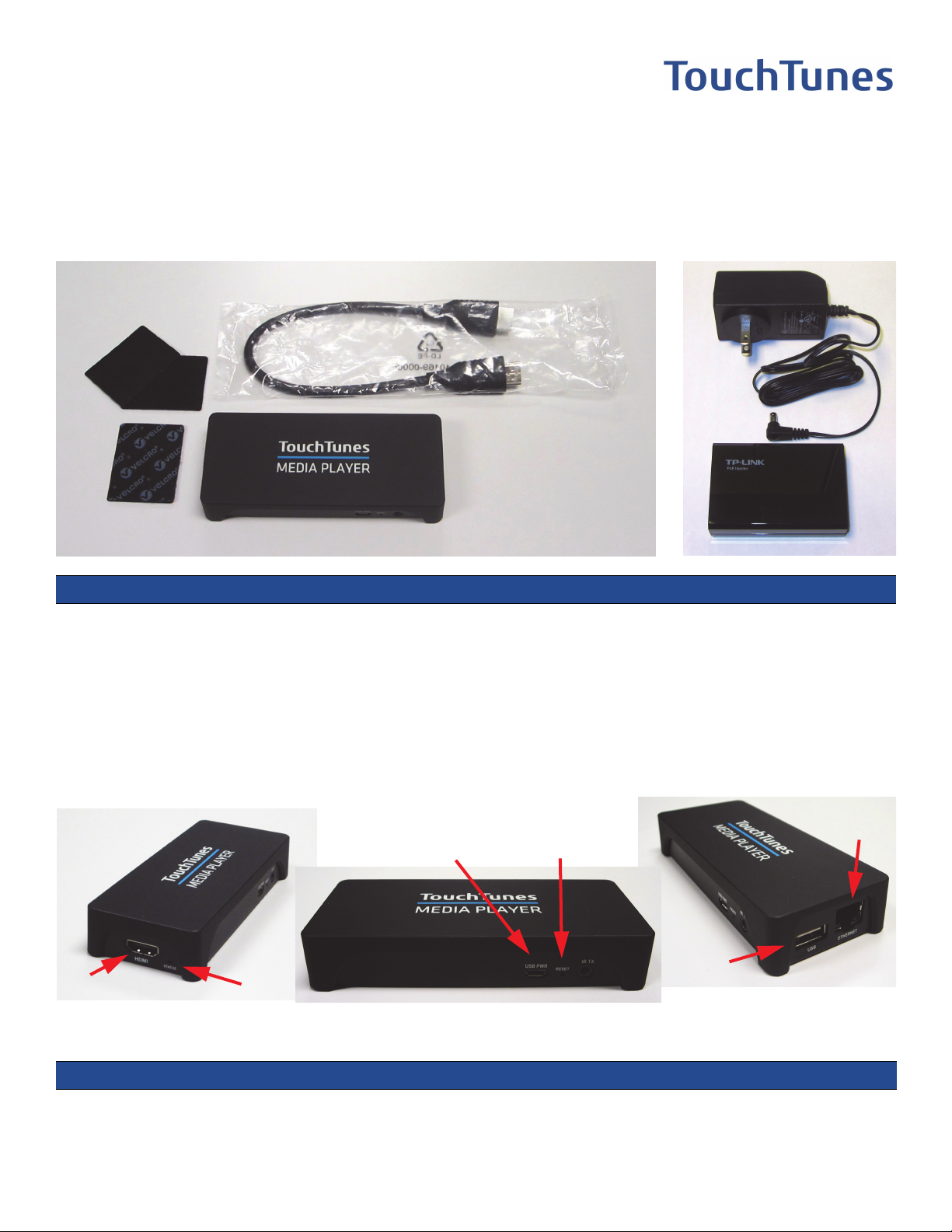
The following items are included in this Media Player FRU package:
2
3
1
Qty. Description Part #
1 1- TouchTunes Media Player 700752-001
1 2- HDMI male-to-male cable, 12” 300919-012
2 3- Adhesive velcro pad sets, 1x2”, black 401310-001
1 4- Power-over-Ethernet (PoE) Injector (with power supply) 700764-001
1 This document 900946-001
4
Media Player Device Specifications
USB Power
(not used)
Reset
Ethernet
(to switch)
HDMI (to HDTV)
Electrical Specifications:
Power over Ethernet (802.3af PoE) USB Power
Voltage: 48V DC Voltage: 5V DC
Current: 100mA Current: 1A
Power: 5W Power: 5W
Status
USB
(not used)
1 of 3
Page 2
Installation
C
ZON
E3LINEI
N
t
u
o
C
opute
Note: Full installation instructions for the Media Player are provided as part of the Installation guides for the
services requiring a Media Player.
If you are replacing an existing Media Player, disconnect all cables from the original Media Player, then reconnect these cables to the replacement. Where necessary, attach a velcro pad to the replacement Media
Player so that you can attach it where the original used to be. Replace the PoE with the replacement from this
kit if necessary.
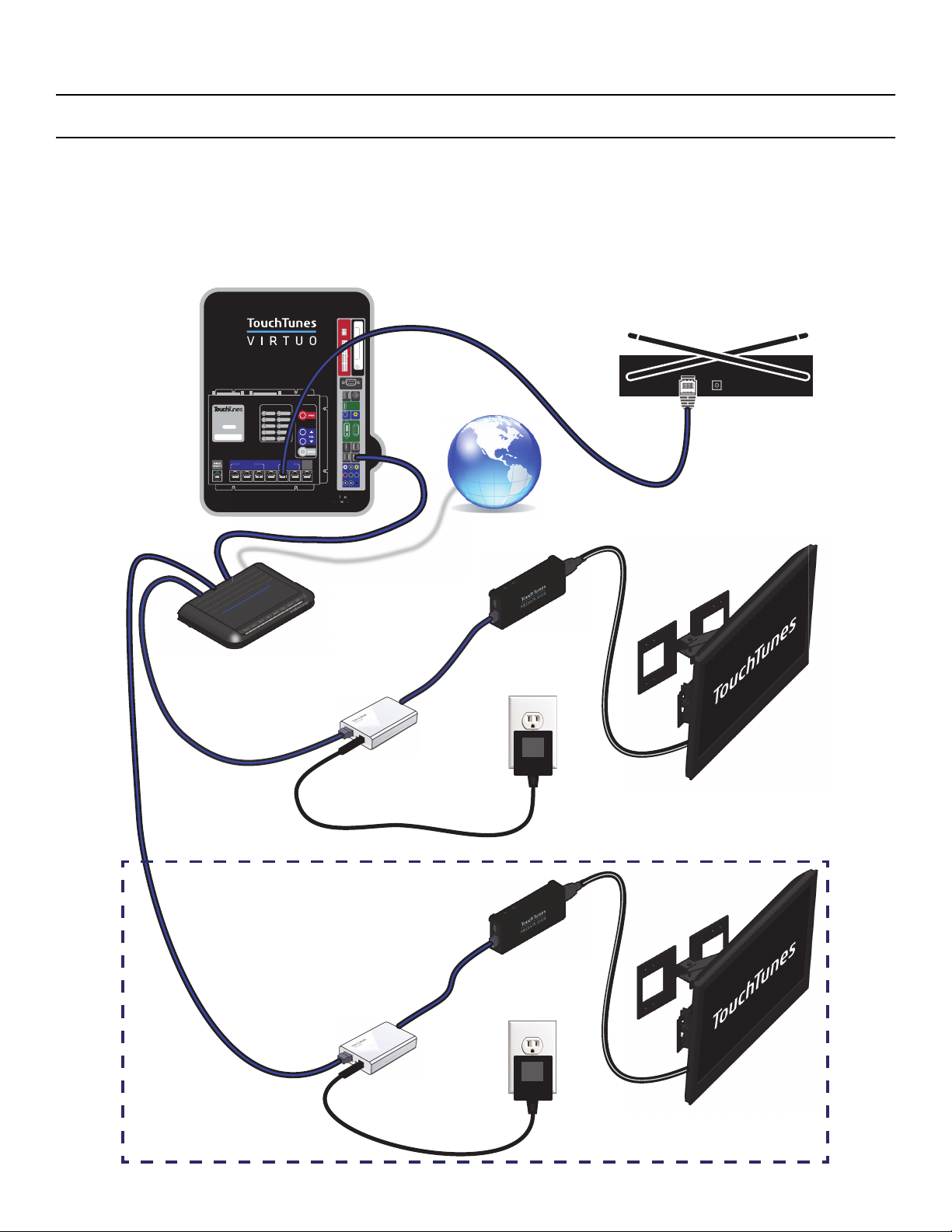
If you are installing an extra Media Player, in order to use one more HDTV in the venue, use the following
diagram to help you wire everything up:
Ethernet
Cable
Ethernet
Cable
Ethernet
Cable
I/O Board
I/O BOARD
P/N: 400867-001
REV:
SERIAL NUMBER:
12 123
STATUS
DIAG
HEAT
REM
BILL
COIN
ZONE OUT MIC IN
AUX
CONTROL
24V/3W
12V/5W
24V
12V
5V
POWER HARD DISK
USB
OPTICAL SPDIF
DVI VGA
DATA USB
External
Lightshow
DMX
MIC 1
ZONE 3 LINE IN
Virtuo
Computer
PoE Injector
SERIAL
SPI
HDMI
I/O
Wireless
Microphone
Receiver
ZONE 1 ZONE 2
MIC 2
Internet Connection
HDMI
Cable
Media
Ethernet
Player
Cable
HDTV 1
PoE Injector’s
Power Supply
When connecting to more than one HDTV
HDMI
Cable
Ethernet
Cable
Ethernet
Media
Player
Cable
PoE Injector
HDTV 2, 3, etc.
PoE Injector’s
Power Supply
2 of 3
Page 3

Note: When using multiple TVs for Karaoke, all TVs at the venue must use only VIMs or only Media Players.
The jukebox cannot output to both VIMs and Media Players simultaneously.
Contacting TouchTunes Support
If you need help with or have questions about this document, contact TouchTunes by:
• Using the email links on the Contacts page on the TouchTunes Dashboard at
https://operator.touchtunes.com.
• Calling TouchTunes 24/7 Service Hotline at 847-353-1954.
To help us assist you more effectively with problem reports, the following information may be required when
contacting TouchTunes Support:
• Jukebox ID.
• The serial number of any component you believe to be defective.
• The date/time of the problem.
• Actions performed immediately before the problem occurred.
TouchTunes Interactive Networks, Inc.
400 Sainte Croix Avenue, Suite 200 E
Montreal, Quebec,
Canada, H4N 3L4
TouchTunes Interactive Networks, Inc.
850 Third Ave, Suite 15C
New York, NY 10022
USA
Copyright © 2015 TouchTunes Interactive Networks
Technical Support
847-353-1954
www.touchtunes.com
3 of 3
 Loading...