

Page 1
M301/M307
Personal Scales
Weighing Indicator
REV: C1, November, 2014
(v3.09-3.014A)
Page 2

M301/M307 Series Personal Scales Technical Manual
- 1 -
CONTENTS
1. PRECAUTIONS……………………………………………………………..2
2. INTRODUCTION……………………………………………………………3
3. SPECIFICATIONS……………………………………………………….....4
3.1Specifications………………………………………………………………...4
3.2 Load Cell Specification...............................................................…...5
4. INSTALLATION……….…………………………………………………….6
5. DESCRIPTION……….....................................................................8
6. OPERATION………………………………………………………………..10
1. Power ON/OFF…………………………………………………………10
2. Zero……………………………………………………………………...10
3. Tare……………………………………………………………………...10
4. Change unit………………………………………………………………...10
5. Hold function…………………………………………………………....11
6. Print and function……………….…………………………………….11
7. BMI function…………………………………………………………….11
8. Precision*10…………………..……………………………………………11
7. PARAMETER……………………………………………………………….12
8. CALIBRATION……………………………………………………………..14
9. PRINT FORMAT..……………………………………………………………..16
10. BATTERY OPERATION…………………………………………………..17
11. MAINTENANCE……………………………………………………………18
10.1 General………………………………………………………………..18
10.2 Error codes……………………………………………………………19
10.3 Determine the Problem……………………………………………...19
10.4 Check the Load Cell…………………………………………………20
10.5 Check PCB Voltages………………………………………………...20
10.6 Trouble Shooting……………………………………………………..21
12. DISPOSAL……………………………………………………………………23
13. WARRANTY……………………………………………………………………24
Page 3
M301/M307 Series Personal Scales Technical Manual
- 2 -
WARNING
DISCONNECT ALL POWER TO THIS UNIT
BEFORE INSTALLING, CLEANING, OR
SERVICING. FAILURE TO DO SO COULD
RESULT IN BODILY HARM OR DAMAGE THE
UNIT.
CAUTION
Permit only qualified persons to service the instrument
Before connecting or disconnecting any components, remove the
power.
Failure to observe these precautions bodily harm or damage to or
destruction of the equipment.
1. PRECAUTIONS
Follow the instructions in the instructions for use.
Keep the operating instructions and the declaration of
conformity in a safe place.
Ensure that the scale is standing firmly on a smooth, level
surface.
Do not drop the scale or subject it to violent shocks.
When using the scale with a mains unit, ensure that the
supply cable is routed in such a way as to exclude any type
of tripping hazard.
Use only the type of battery stated.
Have scale serviced and re-calibrated on a regular basis.
Have repairs carried out only by authorized persons.
Page 4

M301/M307 Series Personal Scales Technical Manual
- 3 -
2. INTRODUCTION
The M301/M307 series personal scales, that amplifies signals from a load
cell, converts it to digital data and displays it as a mass value.
BMI with bar graph.
Wheels at bottom, easy to move.
Rubber mat on the surface of the platform.
25 mm LCD with white LED back light display
7 keypads are light touch switches
Battery provide up to 22 hours of continues use (without backlight)
Capacity up to 250kg / 550lb
Height measurement: 90cm---200cm or 35inch---80 inch.(M301)
Page 5
M301/M307 Series Personal Scales Technical Manual
- 4 -
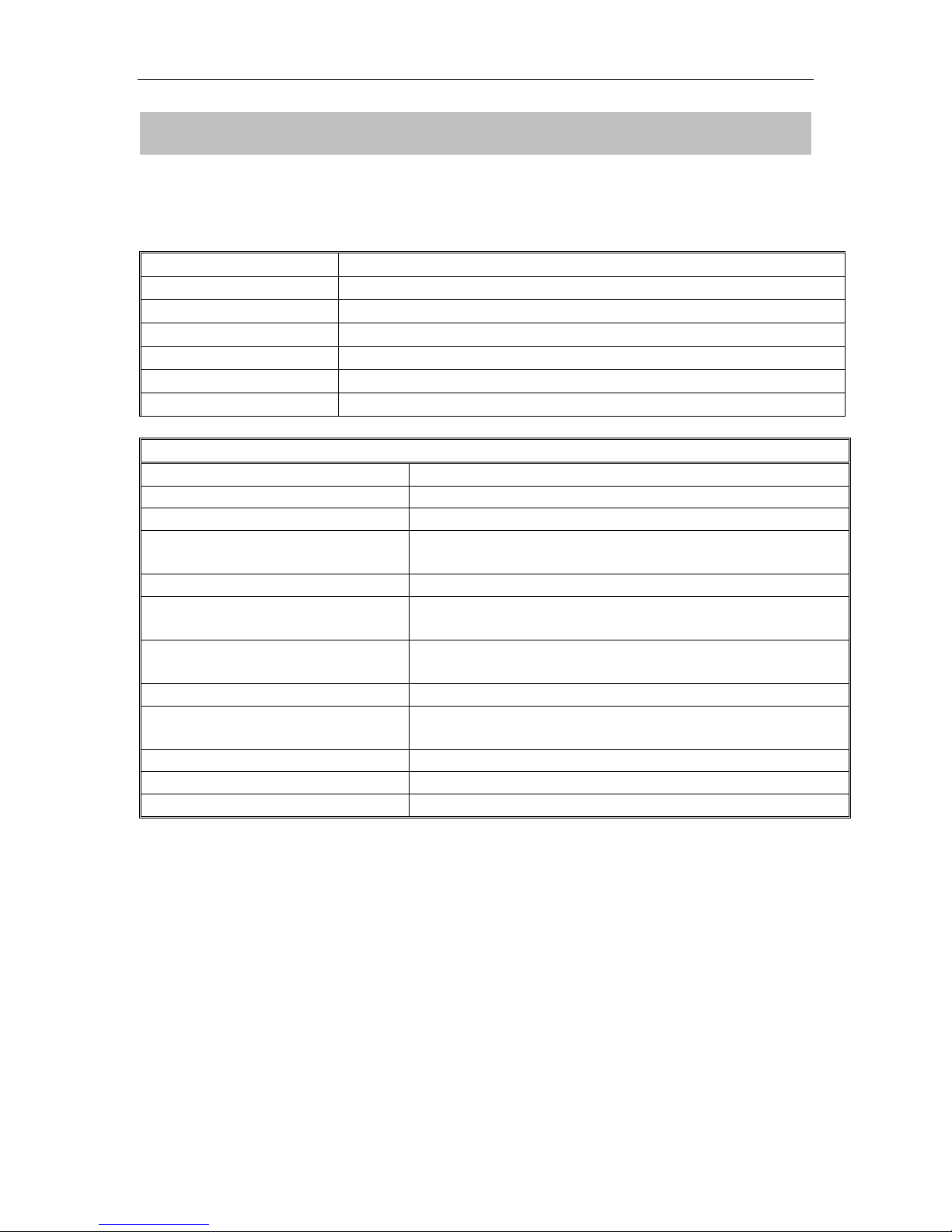
Model
M301/M307
Maximum Capacity
250kg/550lb
Readability
100g
Resolution
1/2,500
Tare range
-249.9kg
Minimum Capacity
200g
Linearity ±
20g
Common Specifications
Interface
RS-232 Output Optional
Stabilisation Time
2 Seconds typical
Operating Temperature
0°C - 40°C / 32°F - 104°F
Power supply (external)
12V/500mA AC power adapter or 2000mAh Ni-MH
batteries (optional, size AA)
Calibration
Automatic External
Calibration as per Directive
90/384/EEC
Class III medical approval
Medical product as per
Directive 93/42/EEC
Class I
ADC
Σ-Δ
Display
25 mm high 6 digits LCD with auto backlight and
loading bar graph
Housing
Aluminium pan and pole, ABS plastic indicator
Pan Size
355x360mm
Height measuring range
From approx. 90cm to 200 cm (2'11'' to 6'8'')
3. SPECIFICATION
3.1 Specifications
Page 6
M301/M307 Series Personal Scales Technical Manual
- 5 -
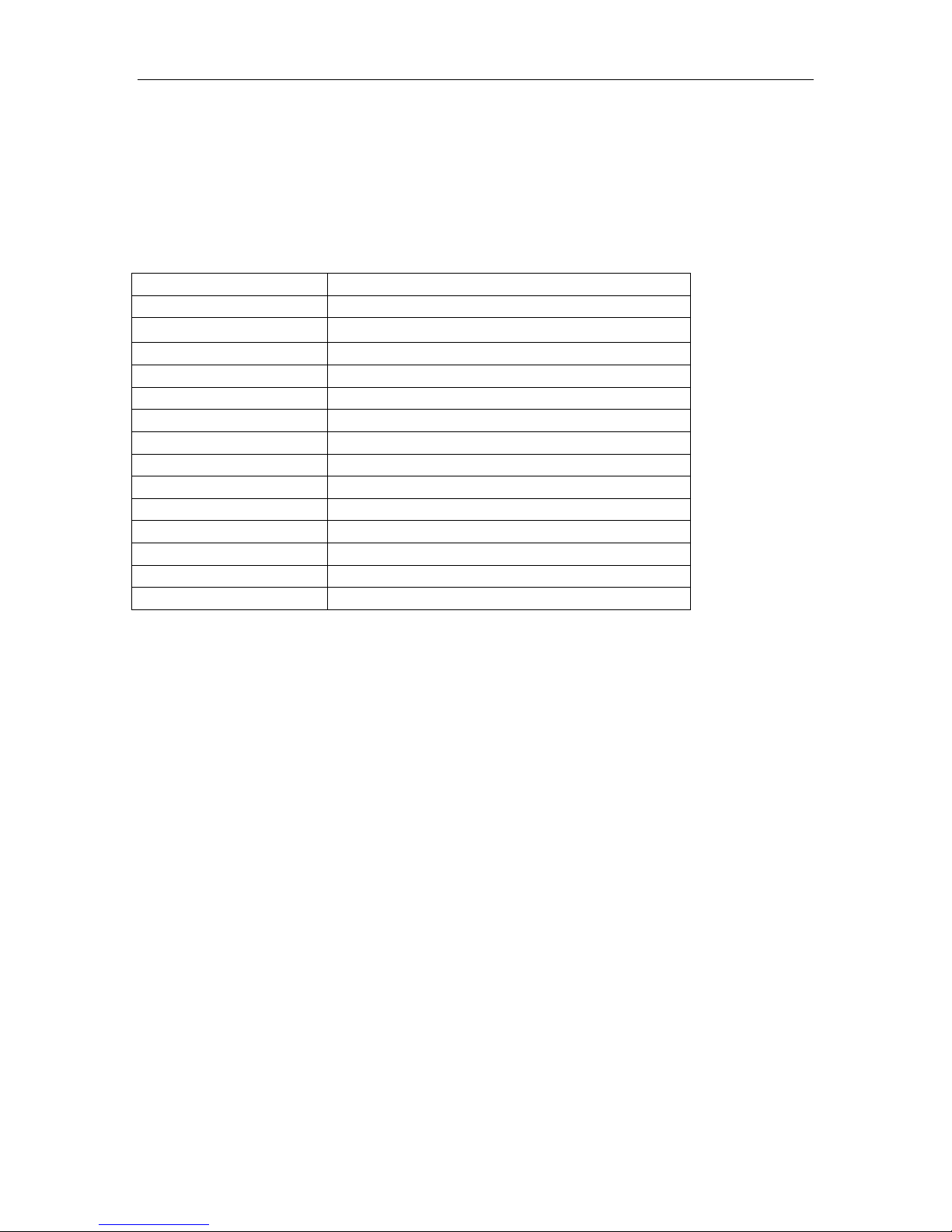
Model No
L6E
Rated Capacity (kg)
2.5/3/5/6/8/10/15/20/30/35/40/50
Sensitivity
2.0±0.2 mv/v
Excitation Voltage
5~12V
Material
Aluminum
Cable
0.3~3m Φ 4mm
Input Resistance
409Ω ±6Ω/1065Ω ±15Ω
Out put Resistance
350Ω ±3Ω/1000Ω ±10Ω
Temperature Range
-35°C ~ +65°C
Safe overload
150%F.S
Ultimate overload
300%F.S
Error
±0.0233%F.S
Creep (20min)
±0.020%F.S
Zero Balance
0±5%mV/V
Max. Platform Size
250x350mm
3.2 Load Cell Specifications
Page 7
M301/M307 Series Personal Scales Technical Manual
- 6 -
4. INSTALLATION
Unpacking
Carefully take the balance out of its package, make it sure its not damaged and
all accessories are included.
Remove the weighing scale from the carton.
Remove the protective covering. Store the packaging and to use if you
need to transport the scale later.
Inspect the scale and terminal for damage.
Make sure all components are included
Accessories,
1. Balance
2. Adaptor
3. Product manual
Level Adjusting
Place the scale on a table.
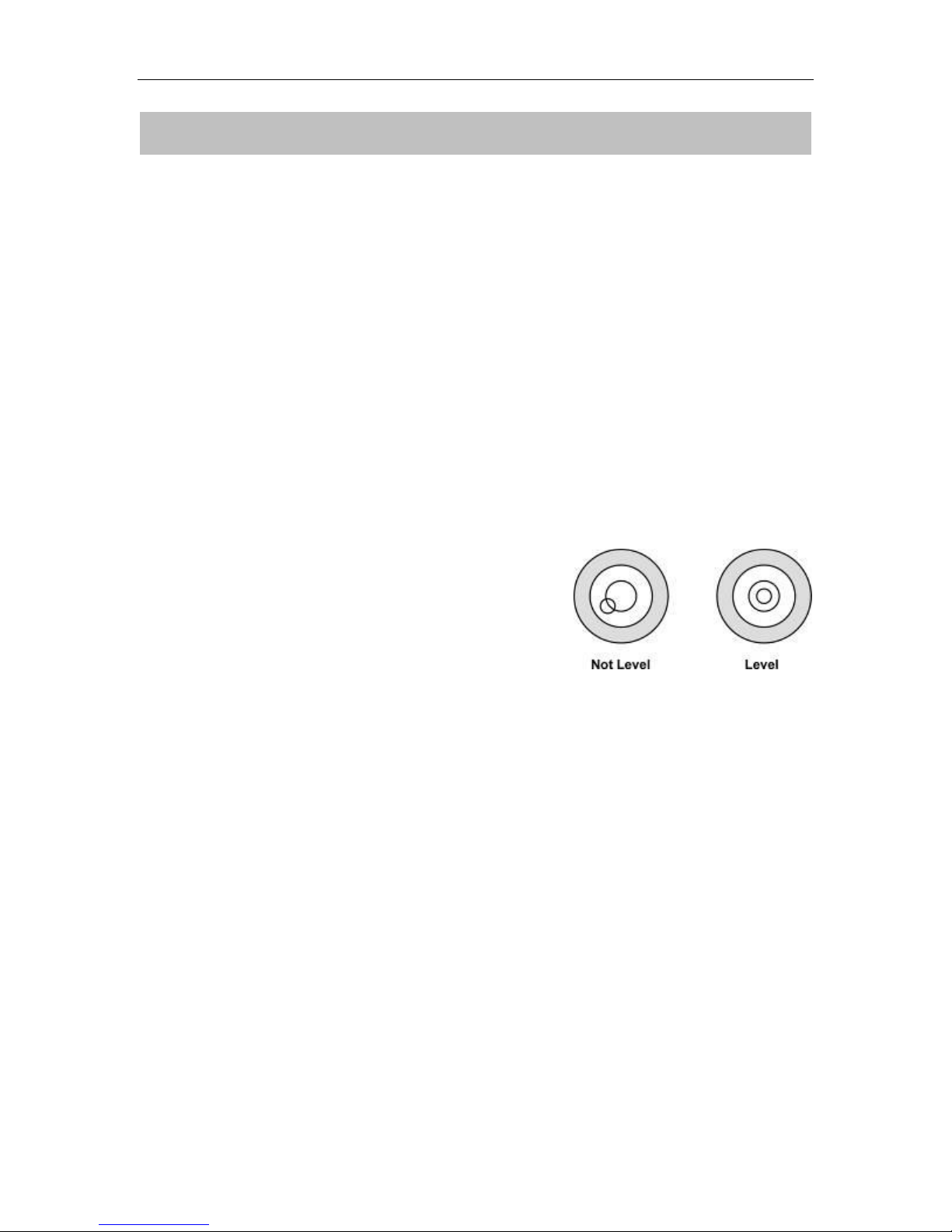
Check the water mark. If, bubble is not centre
adjust the leveling feet until reach centre. Check
the level when you change the location.
Charging Battery
To charge the battery insert the adaptor pin to jack, jack is locating rear side
of the scale. Adaptor simply plug into the mains power. The scale no
needs to be turned on.
The battery should be charged for 12 hours for full capacity.
In the display there is an indicator show the status of battery charging.
When the scale is plugged into the mains power the internal battery will be
recharged. If the indicator off, the battery has a full charge. If it is on, the
battery is nearly discharged and if yellow, the battery is being charged.
Do not use any other type of power adaptor than the one supplied with the
scale.
Verify that the AC power socket outlet is properly protected.
Note: Please charge the battery before using the scale for the first time
Page 8
M301/M307 Series Personal Scales Technical Manual
- 7 -
Installation
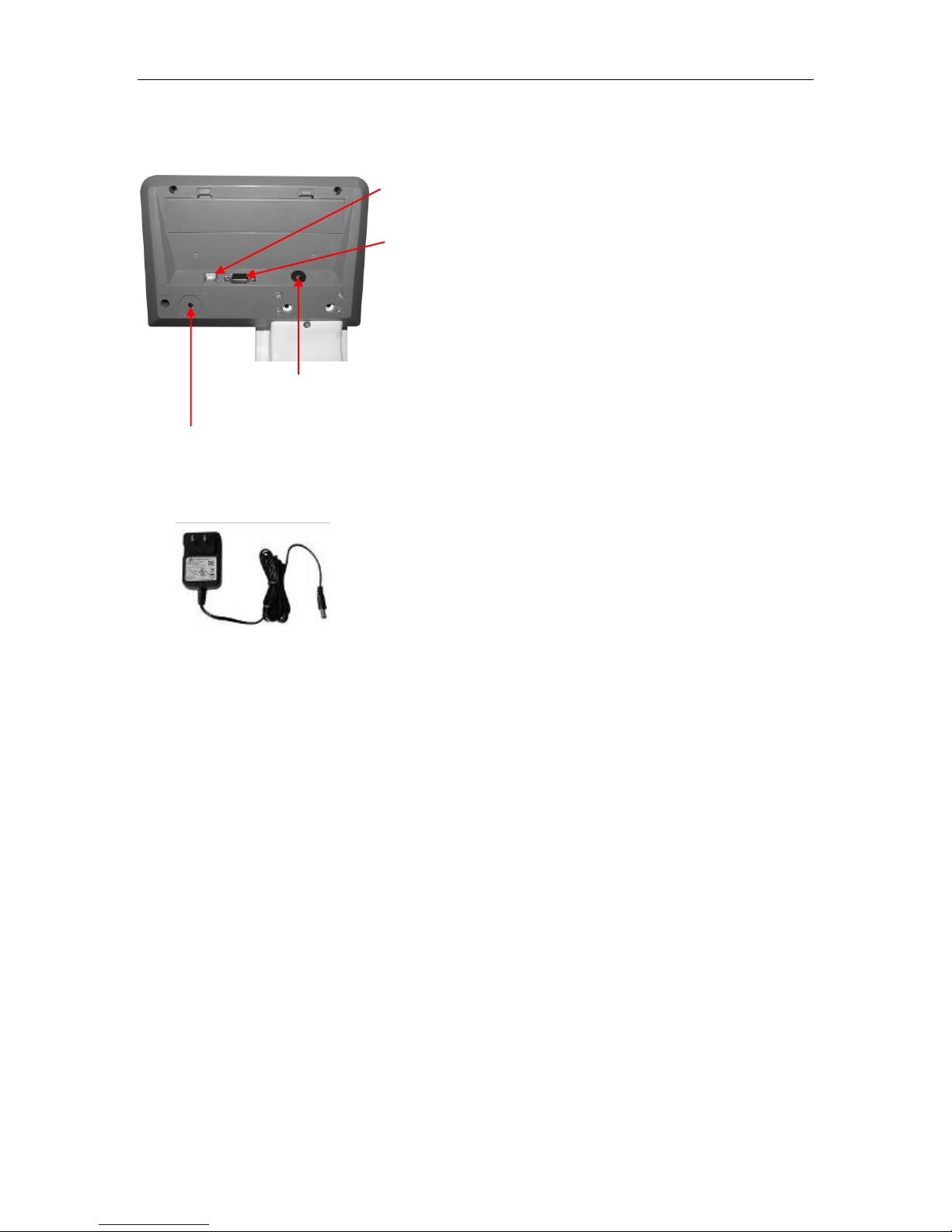
USB Connecter (selectable)
RS-232 Connecter (selectable)
Adaptor Jack
Calibration switch
Place the scale on a table.
Connect the adaptor pin in to the scale adaptor jack. Adaptor jack is
locating, rear side of the scale.
Adaptor connects into your AC power socket.
Pluggable equipment must be installed near
an easily accessible socket outlet with a
protective ground/ earth contact.
Display will show the version number and will
start self checking.
After self checking, display will be come to normal weighing mode.
Warm-up time of 15 minutes stabilizes the measured values after
switching on.
Calibrate with exact calibration weights, minimum 1/3 of the scale capacity
want to use for calibration. For calibration see details in parameter.
Then you can start your operation
Page 9
M301/M307 Series Personal Scales Technical Manual
- 8 -
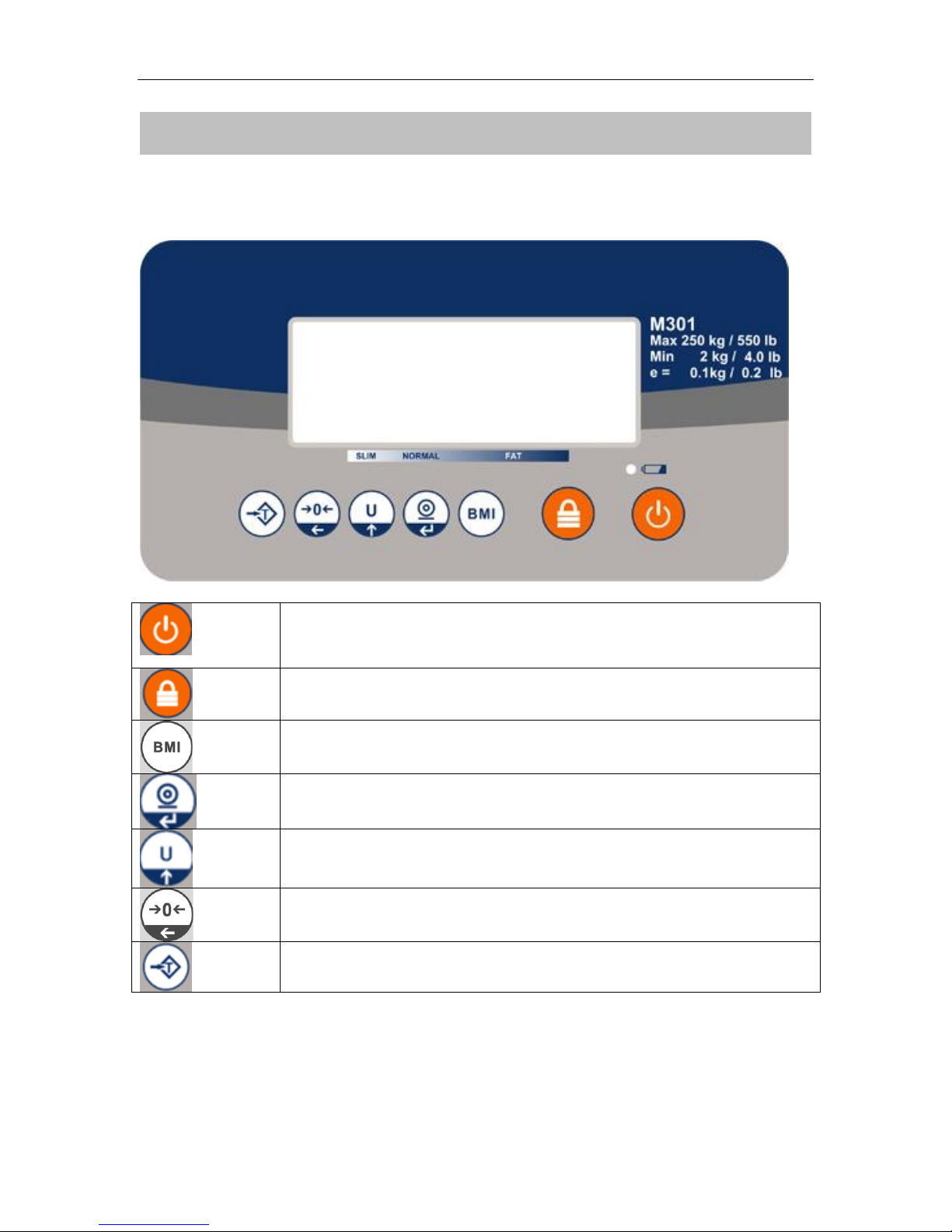
Turns the scale power On / Off
Set to hold mode
Set to BMI mode
Set pre-tare
Change unit: kg / lb
Sets display to Zero
Subtracts weight of container
5. DESCRIPTION
Key Board
Page 10
- 9 -
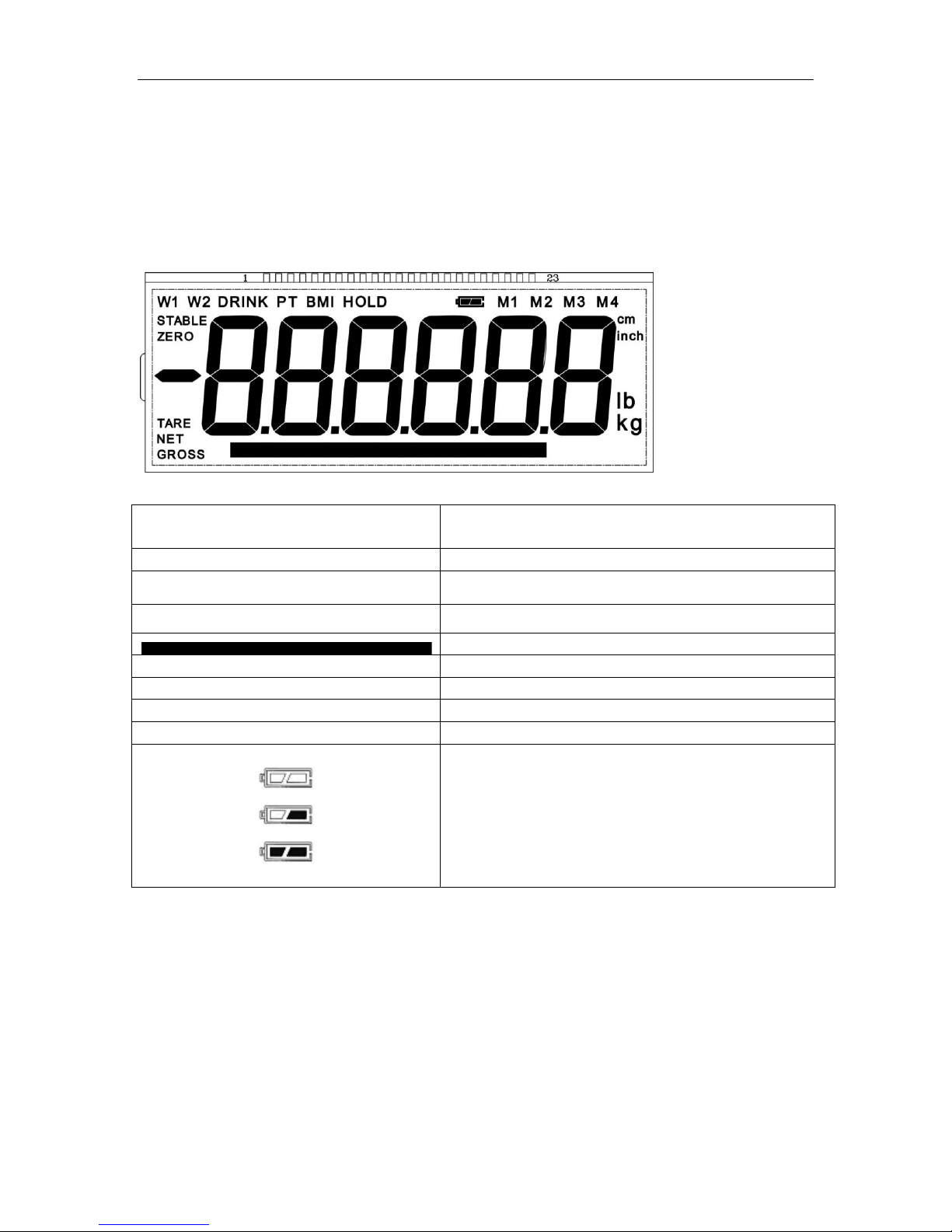
DISPLAY
FUNCTION
STABLE
Indicator for Display stability
ZERO
Indicator for Zero display
TARE
Indicator for Tare display
Indicator for weighing capacity graph
NET
Indicator for Net weight
GROSS
Indicator for Gross weight
Cm/inch
Indicator for measuring units
Lb/kg
Indicator for weight units
Indicator for Charging status of battery
Voltage has dropped
Low Voltage
Fully Charged
Display
M301/M307 Series Personal Scales Technical Manual
Page 11
M301/M307 Series Personal Scales Technical Manual
- 10 -
6. OPERATION
Initial Start-up
Warm-up time of 15 minutes stabilizes the measured values after switching on.
6.1 Power ON/OFF
Switch on the scale by pressing . The display is switched on and the
self test is started.
If you want to switch off press the key again.
6.2 Zero
Environmental conditions can lead to the balance exactly zero in spite
of the pan not taking any strain. However, you can set the display of
your balance to zero any time by pressing key and therefore
ensure that the weighing starts at zero.
6.3 Tare
You can tare the weight of any container by pressing key so that
with subsequent weighing the net weight of the object being weighed is
always displayed.
Load weight on the pan.
Press key. Zero is displayed, and tare is subtracted.
Remove weight from the platform. Tared weight is displayed. It can
set only one tare value. It can display with a minus value.
Press key. Zero is displayed, tare weight is cleared.
6.4 Change unit
In weighing condition, you can press to change the unit: kg / lb.
If you want to change the unit of height measurement, please set it in
parameter F5 stu. (page 13)
Page 12
M301/M307 Series Personal Scales Technical Manual
- 11 -
6.5 Hold function
Press before load at the pan, so HOLD is active now. "Hold " and "---
--" appeared at the display.
After put load at the pan no indication until a stable non-zero weights is
detected. During this period "----" is indicated. (no indication of unstable
value).You will hear an acoustic beep, when stable weight (>20d)is detected.
It will show calculated HOLD-value with small "HOLD" in display.
After unloading the pan the value is indicated for 10 Seconds. After that
normal weight displaying is resumed.
Pressing , while the HOLD-function is active, will cancel the HOLD-
function.
In hold function, you can’t do ZERO and TARE operation.
6.6 Print function
Press key to print the weight value, you can disable this function (see the
parameter on Section 7)
6.7 BMI function
Press key on the weighing mode, display will show the last height “xxxxxx”,
use key to change digit, and press key to increase the value, press
key confirm it, display will enter into the BMI mode, “BMI” indicator will be
shown, people stand on the platform display will show the BMI value and the BMI
bar, Press key will turn back to weighing mode.
6.8 Precision*10
If you want to see more accurate weight value, press and hold for 2
seconds, display will show one more decimal place, the last digit will twink for 5
seconds, then it will go back to normal weighing value automatically.
Page 13
M301/M307 Series Personal Scales Technical Manual
- 12 -
Menu
Sub
Menu
Description
F1 off
0/ 3/ 5/ 15/ 30
To set the auto power-off time.
Unit is minutes.
If you select 0,it will not auto power-off.
F 2 swt
off
Disable print function.
prt
Enable print function.
F1 off
7. PARAMETERS
Enter the Menu
Press during self checking(9--0), display will show
Choose the Menu
Press , it can choose menu block or options one by one.
Enter the Selected Menu
Press , it can confirm which will be shown displayed.
Enter in to TECH
Note: Before enter the tech menu, press calibration switch, which is
locating below the scale
When display showed Pi n , press and keys to enter the
function
Escape from the Menu
Press key, it can escape from the menu to weighing mode.
Parameter Block
Page 14
M301/M307 Series Personal Scales Technical Manual
- 13 -
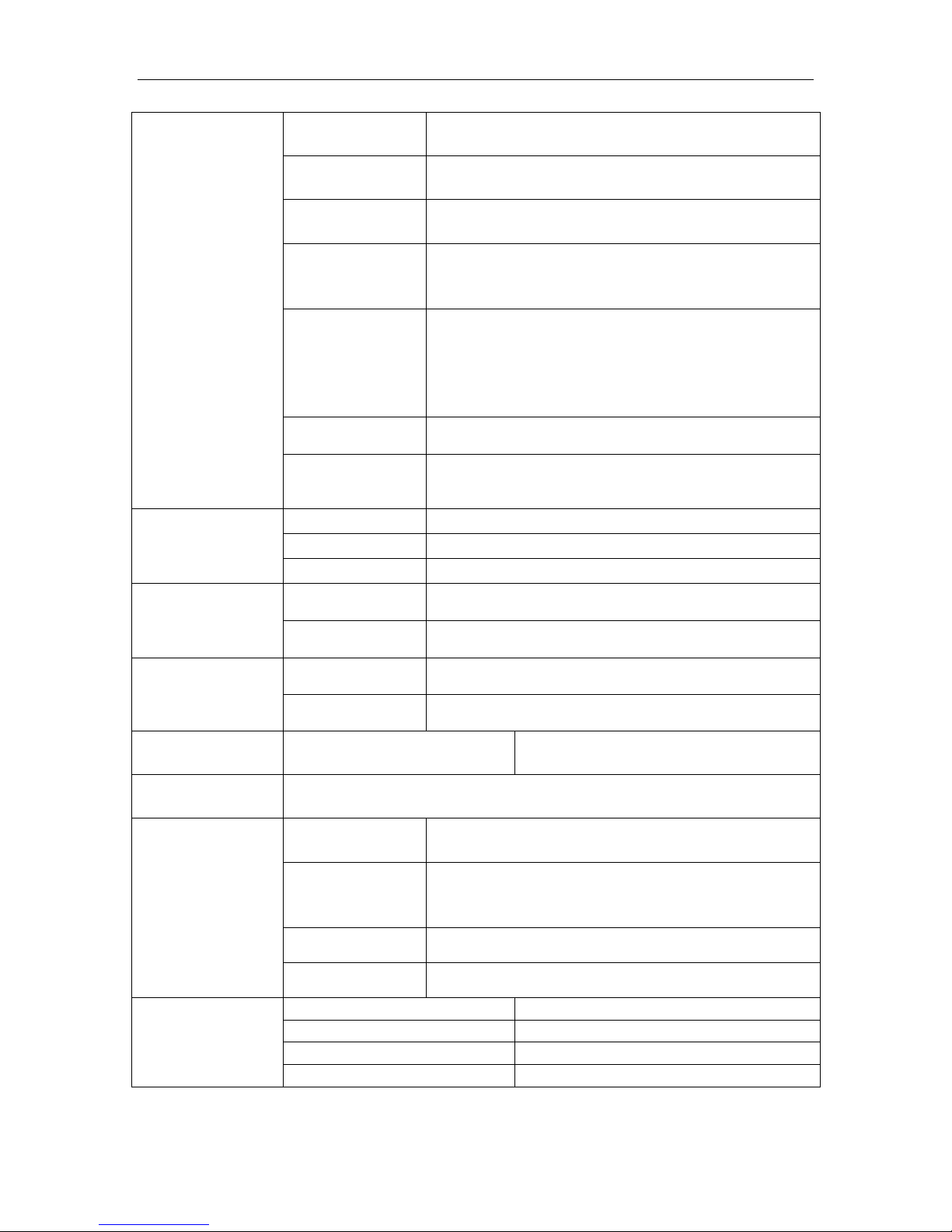
F3 prt
Seire
Also send data continuous
P prt
By pressing Print key , weighing value will be
added to the memory and print the print out
P cont
Send data continuous
P auto
Automatic accumulation.
Individual weighing values are automatically
added
ask
ASK mode
Command R: read data
Command T: Tare
Command Z: Zero
P cnt2
Send data another continuous mode.
P stab
Send data when the weighing values is
stable
F4 bk
Bl on
Set the backlight always on.
Bl off
Set the backlight always off.
Bl au
Set the backlight automatically on.
F5 stu
cm
Select unit cm
inch
Select unit inch
F6 unit
Kg on/ off
Enable/ disable unit kg
Lb on/ off
Enable/ disable unit lb
tch
pin
Enter the password
P 1 spd
Set A/D convert speed(7.5/15/30/60)
P 2 Cal
desc
To set decimal points.
Options: 0,0.0, 0.00, 0.000, 0.0000
inc
To set increment
Options: 1, 2, 5, 10, 20, 50 (kg)
Options: 2, 5, 10, 20, 50, 100 (lb)
cap
Set capacity
cal
Enter into calibration
P 3 pro
tri
Deprecated function
count
To show the scale internal count
reset
Reset the scale
setgra
Set the gravity value
Page 15
M301/M307 Series Personal Scales Technical Manual
- 14 -
F1 off
tch
pin
P1 spd
P2 cal
Cal
unLoad
pass
desc
00100.0
Load
8. CALIBRATION
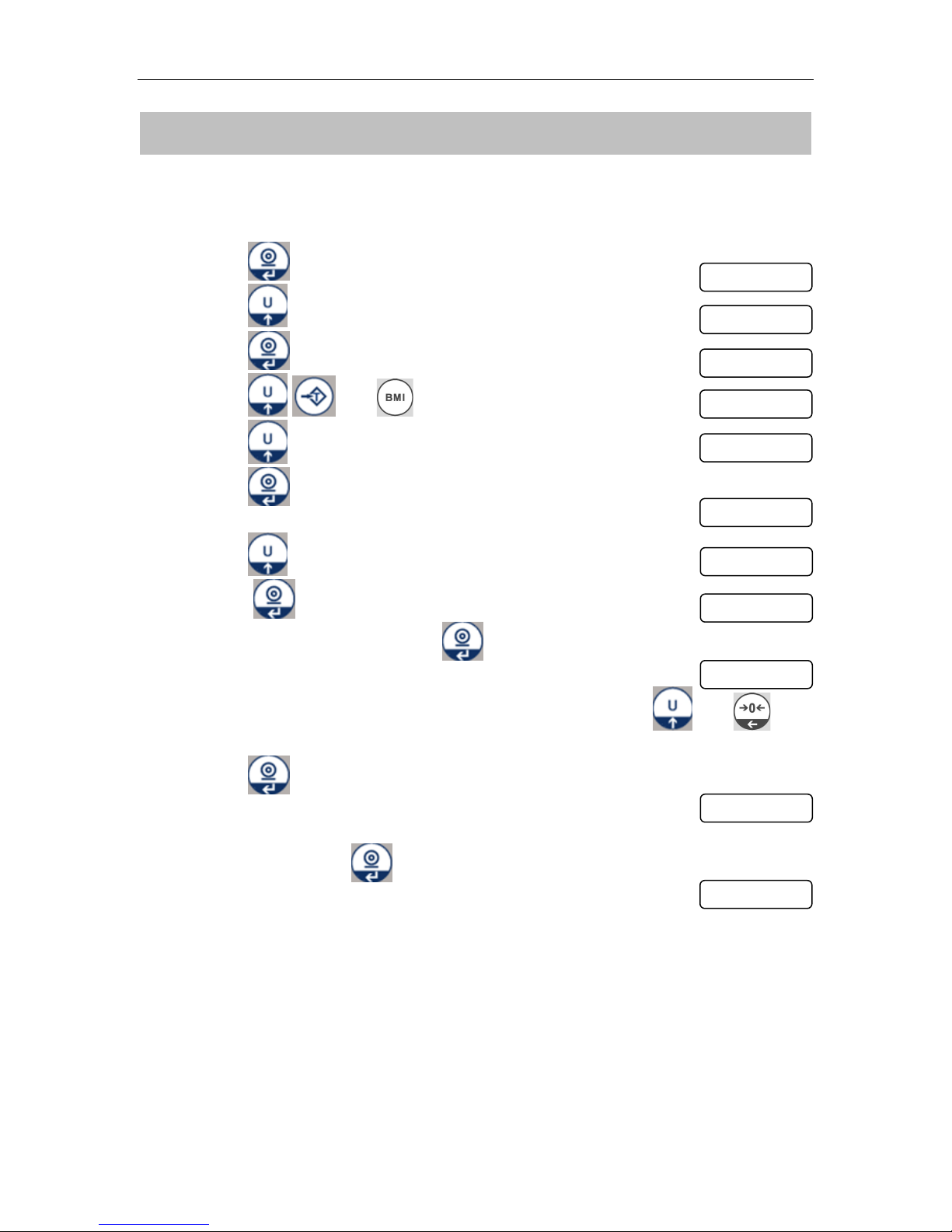
Calibration Settings in the Parameter;
Turn on the scale
Press key during self checking, display will show
Press key until to display
Press key to confirm display will show
Press and keys, display will show
Press key to show display
Press key to enter calibration,
Display will show
Press key until display show
Press key into calibration, display will show
When scale get stable, Press key,
Display will be show last calibration weight,
If it’s required, change calibration weight value by using and
keys
Press key to confirm the value
Display will be show
Place the test weight on the platform.
After stable, press key confirm
Display will be show
Then will start self-test, unload test weight during the self test.
Scale will come to normal display
Note: the unit (kg / lb) is the same as the last displayed one.
That is: before you restart the scale to do calibration, if you see the unit is kg, then
in calibration, the unit is kg; if you want to change to lb, you need to press U key to
change the unit before you restart it.
Page 16
M301/M307 Series Personal Scales Technical Manual
- 15 -
unLoad
pass
00100.0
Load
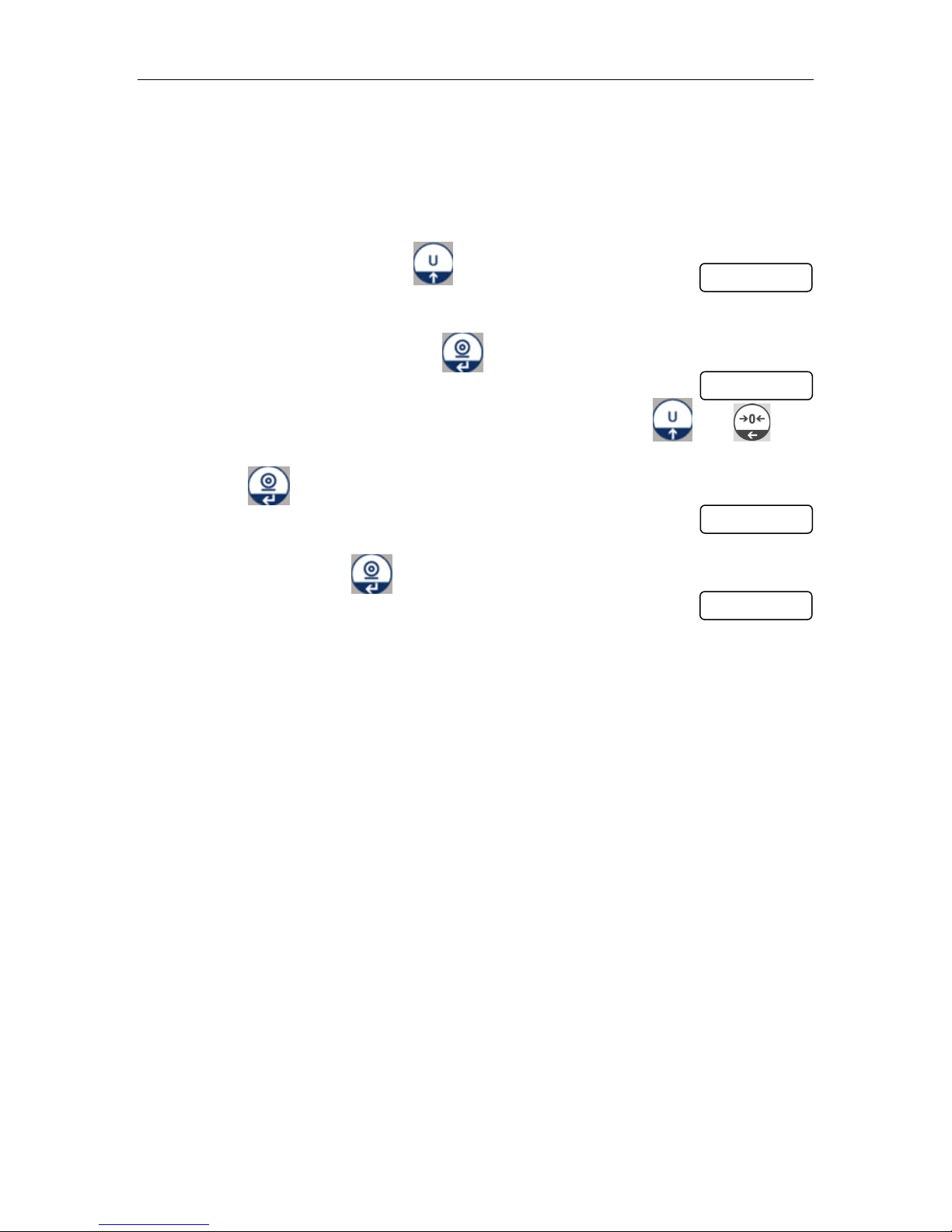
Note: During the calibration end, when display shows pass and start self test, test
weights should be want to unload before showing normal display for to avoid Err 19.
Normal Calibration
Turn on the scale
During the self-test, press key
Keep empty platform
When scale get stable, Press key,
Display will be show last calibration weight,
If it’s required, change calibration weight value by using and
keys
Press key to confirm the value
Display will be show
Place the test weight on the platform.
After stable, press key confirm
Display will be show
Then will start self-test, unload test weight during the self test.
Scale will come to normal display
Page 17
M301/M307 Series Personal Scales Technical Manual
- 16 -
PRT
Print format
0
2012/08/09 11:00
60.0 kg
1
2012/08/09 11:00
60.0 kg
170.0cm
20.7BMI
2
60.0 kg
3
60.0 kg
170.0cm
20.7BMI
9. PRINT FORMAT
Note: TPUP can’t print out the date and time.
Page 18

M301/M307 Series Personal Scales Technical Manual
- 17 -
10. BATTERY OPERATION
The Medical Scales can be operated from the battery if desired. The battery life
is 16 hours (backlight) and 22 hours (without backlight).
When the battery needs charging a symbol on the weight display will turn on. The
battery should be charged when the symbol is on. The scale will still operate for
about several minutes after which it will automatically switch off to protect the
battery.
To charge the battery simply plug into the mains power. The scale does not need
to be turned on.
The battery should be charged for 12 hours for full capacity.
Just under the quantity display is an LED to indicate the status of battery
charging. When the scale is plugged into the mains power the internal battery
will be charged. If the LED is green the battery has a full charge. If it is Red the
battery is nearly discharged and yellow indicates the battery is being charged.
As the battery is used it may fail to hold a full charge. If the battery life becomes
unacceptable then contact your distributor.
Note: useless battery should be recycled, not throw away as household refuse.
Page 19
M301/M307 Series Personal Scales Technical Manual
- 18 -
WARNING
DISCONNECT ALL POWER TO THIS UNIT
BEFORE INSTALLING, CLEANING, OR
SERVICING. FAILURE TO DO SO COULD
RESULT IN BODILY HARM OR DAMAGE THE
UNIT.
CAUTION
Permit only qualified persons to service the instrument
Before connecting or disconnecting any components, remove the
power.
Failure to observe these precautions bodily harm or damage to or
destruction of the equipment.
11. MAINTENENCE
10.1. General
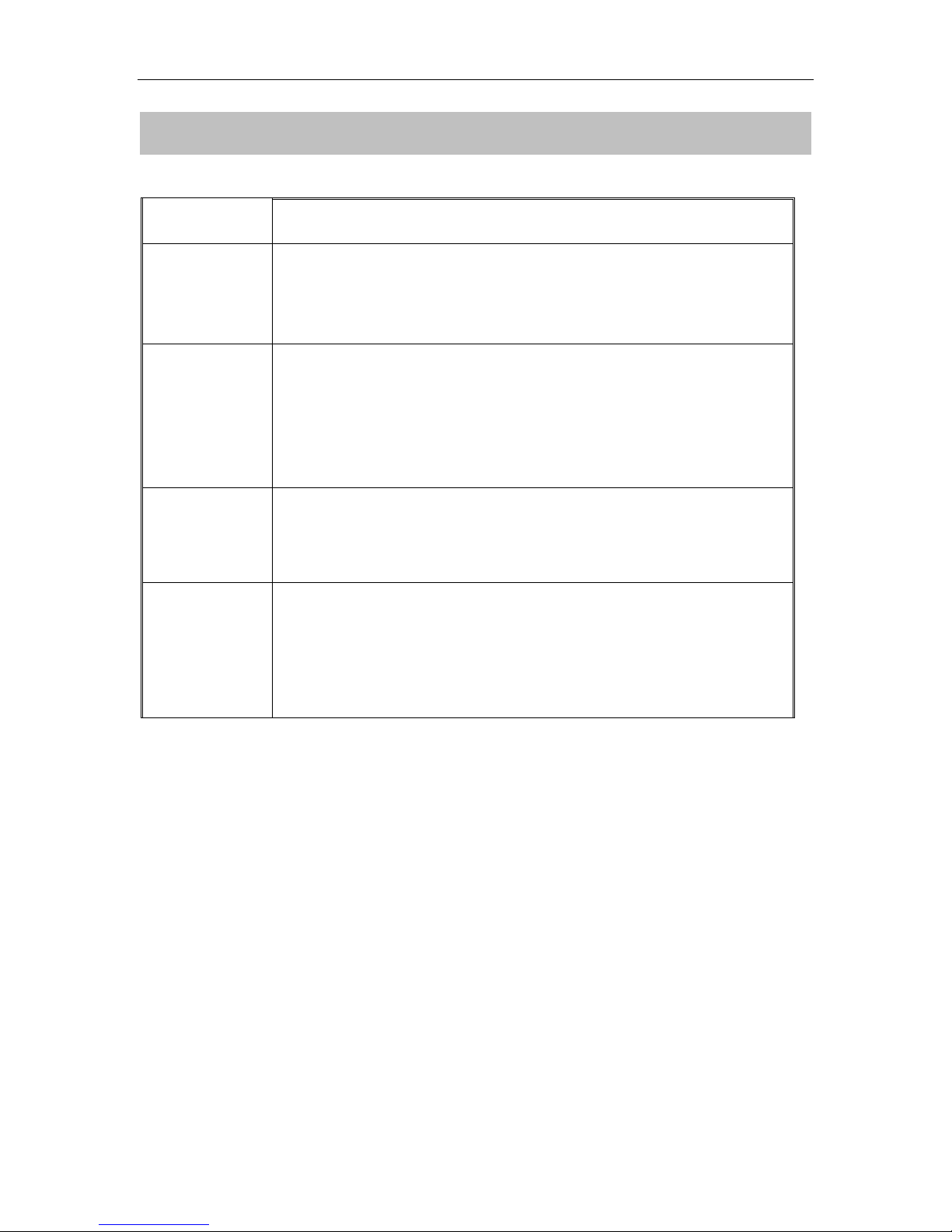
If the scale does not operate properly, find out the problem as possible.
Determine whether the problem is constant or alternate. Be aware that problems
can be caused by mechanical or electrical influences.
Check the following.
Water
Corrosive materials
Vibrations or temperature or wind
Physical damage
Check the scale cables for damage, and check all connections and connecters
for any loose contact or incorrect connection
Page 20
M301/M307 Series Personal Scales Technical Manual
- 19 -
Error Code
Description
POSSIBLE CAUSES
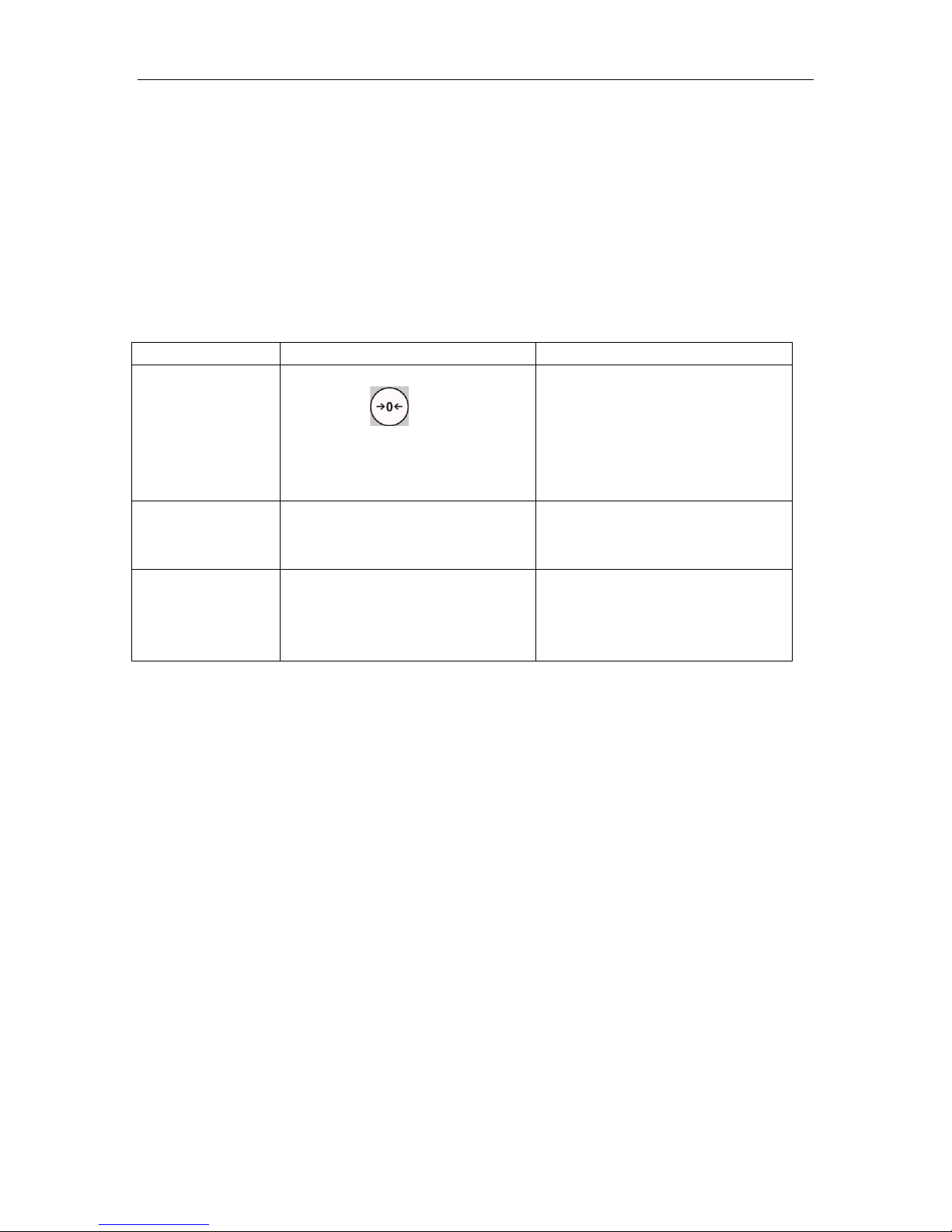
Err 4
Exceed manual zero range
(pressing )
Goods on the platform
Overload, when
zeroing the scale.
Improper calibration
Load cell problem
PCB problem
Err 6
A/D Count out of the range
Platform not installed
Load cell problem
PCB problem
Err 19
Exceed Auto Zero range
When switch on the scale
Goods on the platform
Improper calibration
Load cell problem
PCB problem
Cleaning
Disconnect the power before cleaning.
Use a cloth with mild suds and light cleaning agents.
Make sure that fluid not able to get into the device.
Use a clean and soft cloth for rub off.
10.2. Error Codes
10.3. Determine the Problem
Determine whether the problem is in the PCB or the Load Cell
Remove power from the system, and disconnect the load cell connection
from the PCB
Connect the PCB to a load cell simulator
Reapply power and test the PCB
If problem goes away, its source is probably in the Load cell. Check the
wiring, connecter, load cell and mechanical components of the load cell.
If problem persists, its source is probably in the PCB. Check the PCB voltages,
connecters, cables and function programs
Page 21
M301/M307 Series Personal Scales Technical Manual
- 20 -
Measuring Points
Resistance
Red (+ Exc) to White ( –Exc)
420 ±20Ω
Green (+Sig) to Black ( –Sig)
350Ω ±5Ω
10.4. Check the Load cell
Remove power from the system, and disconnect the PCB from the Load
cell
Check the moisture, or foreign material inside.
Make sure all leads are connected and correctly.
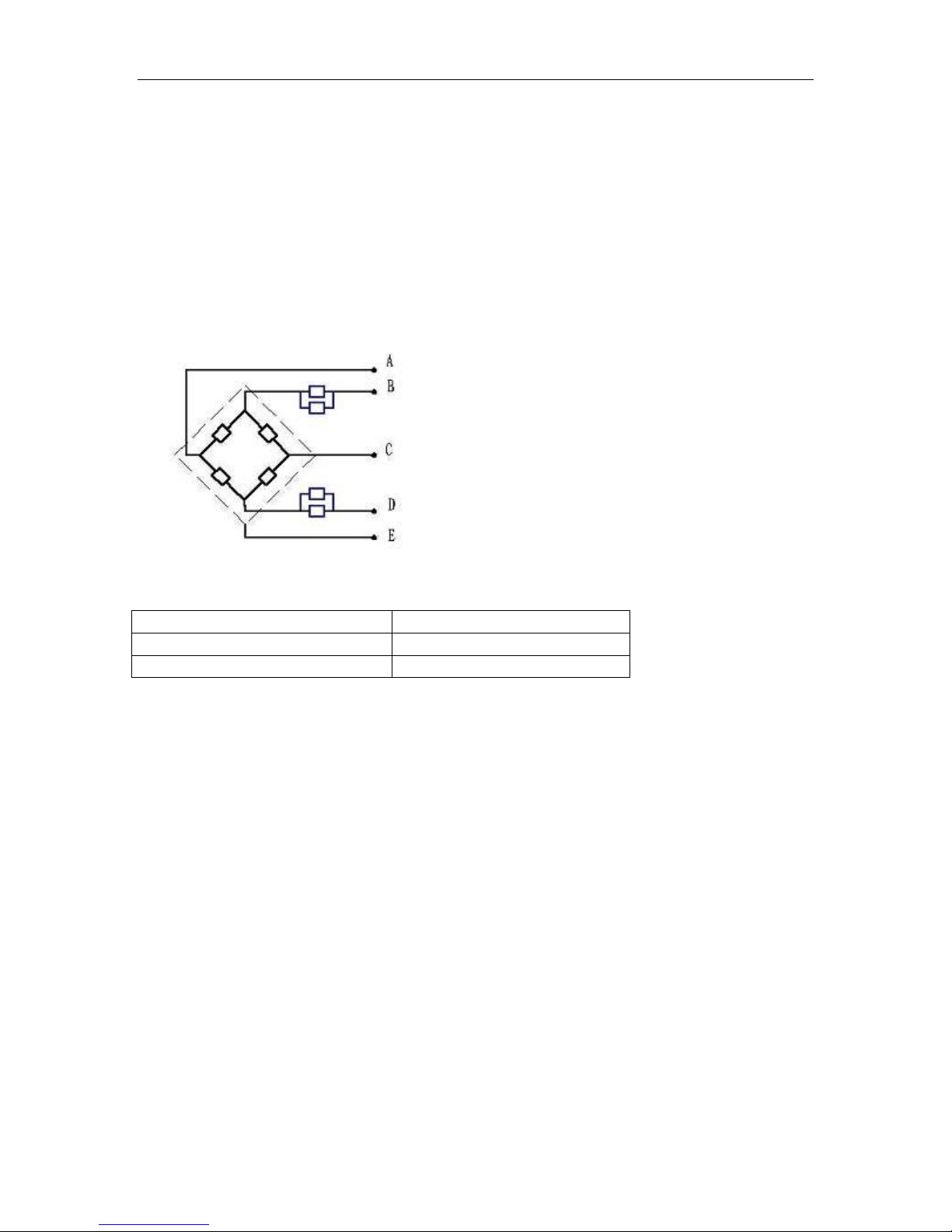
Check load cell for proper input and output resistances
Load Cell Connections
Signal + Green
Supply + Red
Signal - Black
Supply - White
Shield
10.5. Check PCB Voltages
If the problem is in the PCB, use a multimeter to check the following voltages
10.5.1 AC Power
Check the AC power socket out put voltage.
Voltage must be a -20% and +10% of the normal AC voltage.
10.5.2 Adaptor Voltage
Check the adaptor output cable connecter voltage
Voltage must be minimum 9VDC and maximum 15VDC
Page 22

M301/M307 Series Personal Scales Technical Manual
- 21 -
Problems
Possible cause
Common Solutions
Display is blank.
No self test
Mains power is turned
off. Power supply faulty
or not plugged. Internal
battery is not charged.
On/Off switch problem
Check power is getting inside the
scale and on/off switch is working.
Verify the voltages, which is on the
power labels.
Blank display
after self test
Pan not installed.
Unstable weight, load
cell damaged
Check the pans are installed
correctly. Try to turning on again.
OL or -------
Maximum capacity
exceeded. Load cell or
mechanics damaged.
Power supply faulty
Check the platform is installed
correctly. Try to turn on the scale
again. Do the calibration again
------- or NULL
displayed
Weight is on the
platform is below
permissible limit. Pan
not installed correctly.
Power supply faulty.
Load cell or
mechanism faulty
Check the platform is installed
correctly. Try to turn on the scale
again.
Do the calibration again
10.5.3 PCB Input Voltage
Check the PCB input power connecter voltage
Voltage must be minimum 9VDC in to the pin AD+
10.5.4 Check Battery Voltage and Charging Voltage
1. Check the Battery Voltage,
Voltage must be minimum 6VDC. If below the 6VDC connect the adaptor
for charging
The battery voltage below the 5.5VDC, replace the battery and install new
6V/3.4Ah battery.
2. Check the Battery Charging Voltage;
Remove the battery connection terminals (Red and Black) from the battery.
Connect the power and turn on the scale
Voltage into the terminal minimum 6.5VDC
10.6 Trouble Shooting
Page 23

M301/M307 Series Personal Scales Technical Manual
- 22 -
Display is
unstable
Goods touching
somewhere. Air
variation or any
vibrations.
Temperature
changed . Load cell or
connections faulty.
Power supply faulty
Check the scale is in acceptable
location.
Check the connecters and load cell.
Check the power supply and battery
Weight value
incorrect
Calibration error.
Platform of load cell
touching somewhere.
Wrong weighing unit
Use accurate weight for to do the
calibration
Check the pan and load cell is
installed proper and touching.
Check the parameter settings.
Check the load cell and connecters
Can not use full
capacity
Over load protection
stoppers or transport
locks are not removed.
Parameters are set
incorrectly.
AD problem.
Load cell or
mechanism damaged
Check the stoppers and locks under
the platform.
Check the weighing unit and
parameter settings.
Check the load cell.
Platform Corner
Weight different
Over load protection
stoppers or transport
locks are not removed.
Load cell or
mechanism damaged
Check the stoppers and locks under
the platform.
Use accurate weight for to do the
calibration
Check the load cell.
Battery not
charging
Mains voltage problem
Charging circuit
problem
Battery Problem
Check the mains and adaptor.
Check the battery.
Check the charging circuit
Page 24

M301/M307 Series Personal Scales Technical Manual
- 23 -
12. DISPOSAL
Disposing of the device
Do not dispose of the device in domestic waste. The device must be disposed of
properly as electronic waste. Follow the national regulations which apply in your
case. For further information, contact our service department at:
[email protected]
Batteries
Do not throw used batteries away in domestic waste.
col
lection points in the
harmful substances and containing no mercury
vicinity.
When buying new
Dispose
batteries,
(Hg),
cadmium
of
batteries
select those low in
(Cd)
or lead (Pb).
at
Page 25

M301/M307 Series Personal Scales Technical Manual
- 24 -
13. WARRANTY
A two-year warranty from date of delivery
ma
terials
rechargeable
be made good for the customer at no charge on production of the receipt. No
further claims can be entertained. The costs of transport in both directions will
be borne by the customer should the
the customer’s premises. In the event of transport damage, claims under
warranty can be honoured only if the complete original
any transport
when
A claim under warranty will not be honoured if the equipment is opened by
persons not
customers abroad to contact their local
matter.
or
workmanship. All moveable
and the scale secured and attached in that packaging just as it was
originally
expressly authoried
batteries
packed. All the packaging should therefore be retained.
etc. are
excluded.
by T-scale to do so. We would ask our
applies
parts
Defects which come under warranty will
equipment
sales
to defects
batteries,
be located
agent in the event of a
attributable
cables,
anywhere
packaging
mains
to poor
units,
other than
was used for
warranty
 Loading...