

Page 1
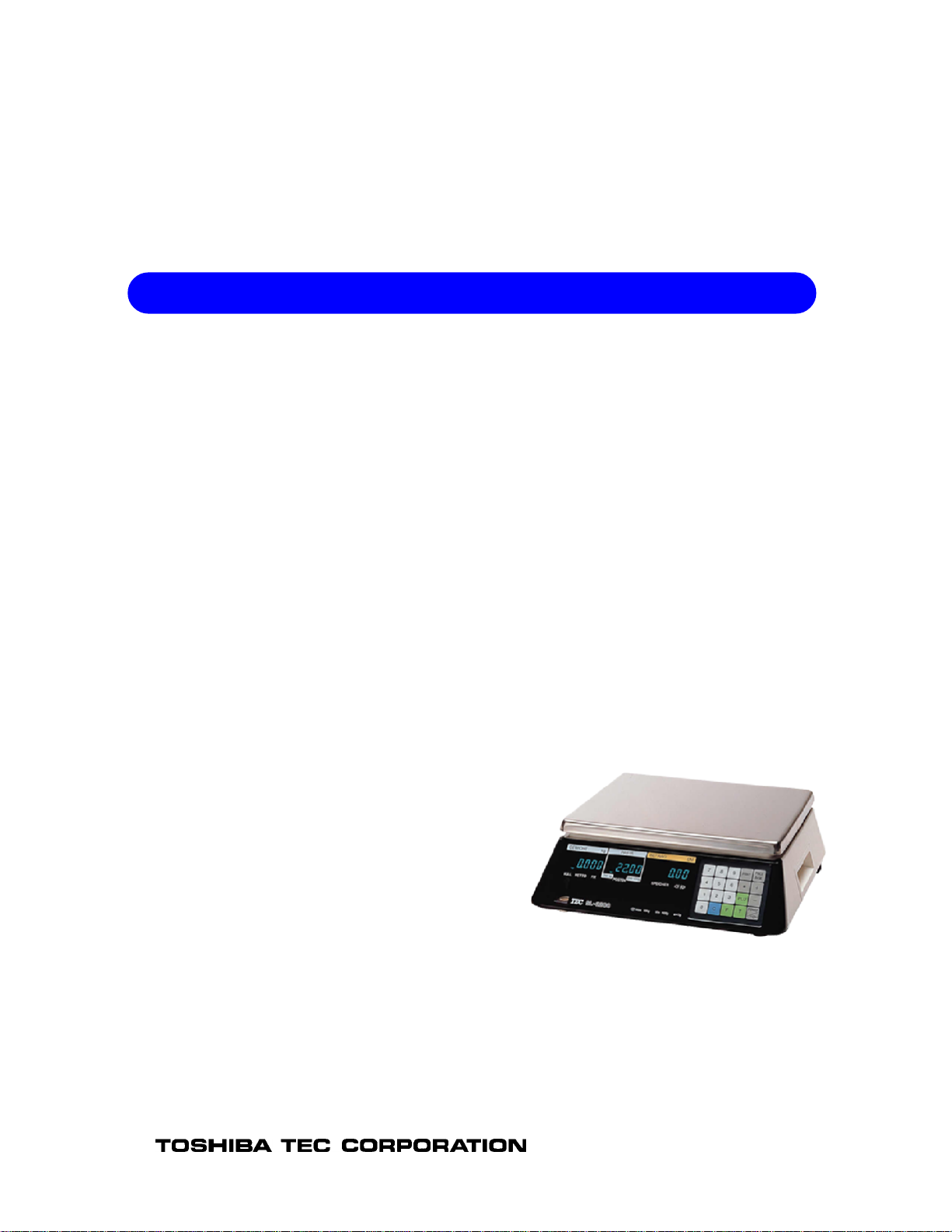
TEC Electronic Computing Scale
Table of Contents
SL-2200 US/CA Version
Owner's Manual
Document No. EM1-31066C
TEC
PRINTED IN JAPAN
Page 2

Page 3
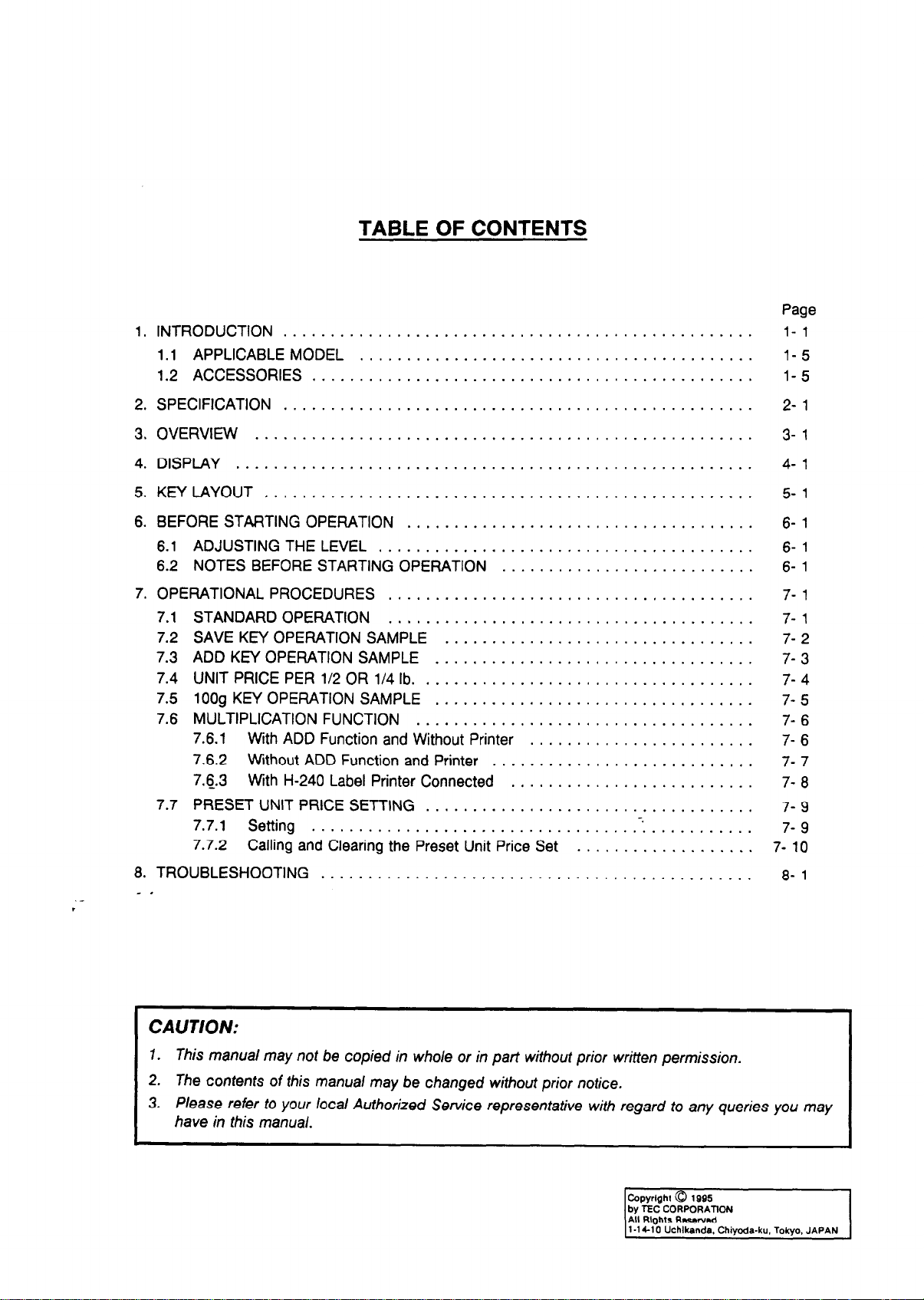
TABLE OF CONTENTS
1. INTRODUCTION ..................................................
1.1 APPLICABLE MODEL ..........................................
1.2 ACCESSORIES ...............................................
Page
l- 1
l- 5
l- 5
2. SPECIFICATION ..................................................
3. OVERVIEW .....................................................
4. DISPLAY .......................................................
5. KEY LAYOUT ....................................................
6. BEFORE STARTING OPERATION .....................................
6.1 ADJUSTING THE LEVEL ........................................
6.2 NOTES BEFORE STARTING OPERATION ...........................
7. OPERATIONAL PROCEDURES .......................................
7.1
STANDARD OPERATION
SAVEKNOPERATIONSAMPLE”:::::::::::::::::::::::::::::::::
7.2
7.3
ADD KEY OPERATION SAMPLE
7.4
UNIT PRICE PER l/2 OR l/4 lb.
7.5
1009 KEY OPERATION SAMPLE
7.6
MULTIPLICATION FUNCTION
7.6.1 With ADD Function and Without Printer
7.6.2 Without ADD Function and Printer
7.6.3 With H-240 Label Printer Connected
7.7
PRESET UNIT PRICE SETTING
7.7.1 Setting
7.7.2 Calling and Clearing the Preset Unit Price Set
8. TROUBLESHOOTING . . . . . . . . . . . . . . . . . . . . . . . . . . . . . . . . . . . . . . . . . . . . . .
.-
.
_ ,
..................................
..................................
...................................
..................................
....................................
........................
............................
..........................
...................................
.5 ...........
...................
2- 1
3- 1
4- 1
5- 1
6- 1
6- 1
6- 1
7- 1
7- 1
7- 2
7- 3
7- 4
7- 5
7- 6
I- 6
7- 7
7- 8
7- 9
7- 9
7- 10
8- 1
CAUTION:
I
1. This manual may no? be copied in whole or in part without prior written permission.
2. The contents of this manual may be changed without prior notice.
3. Please refer to your local Authorized Service representative with regard to any queries you may
have in this manual.
k]
l-1 Cl 0 Uchlkanda. Chiyode-ku. Tokyo. JAPAN
Page 4

Page 5
1. INTRODUCTION
1. lNTRODUCTlON
1. INTRODUCTION
We thank you very much for purchasing the TEC Electronic Computing Scale SL-2200 Series.
This series has been designed with TEC reliability.
The TEC SL-2200 Series offers state-of-the-art-electronics in a durable, compact enclosure. The
microcomputer provides immediate and highly accurate weighing and price calculation.
operator and customer displays provide easy to read transaction data. More than just a weight
device, the SL-2200 Series allows both weighed and non-weighed entries for multiple item
accumulation.
Should you have any questions concerning the scale, please refer to this manual. Be sure to keep
this manual for future reference.
This equipment has been tested and found to comply with the limits for a Class A digital device,
pursuant to Part 15 of the FCC Rules. These limits are designed to provide reasonable protection
against harmful interference when the equipment is operated in a commercial environment.
equipment generates, uses, and can radiate radio frequency energy and, if not installed and used in
accordance with the instruction manual, may cause harmful interference to radio communications.
Operations of this equipment in a residential area is likely to cause harmful interference in which case
the user will be required to correct the interference at his own expense. (for USA only)
Both the
This
Changes or modifications not expressly approved by manufacturer for compliance could void the user’s
authority to operate the equipment.
I
“This Class A digital apparatus meets all requirements of the Canadian Interference-Causing Equipment
Regulations. “
“Cet appareil numerique de la classe A respecte
brouilleur du Canada. “
toutes
les exigences du Reglement sur le materiel
-. (for CANADA only)
Safety Summary
I
Personal safety in handling or maintaining the equipment is extremely important. Warnings and
Cautions necessary for safe handling are included in this manual. All warnings and cautions
contained in this manual and written inside or outside of the scale should be read and understood
before handling or maintaining the equipment.
Do not attempt to effect repairs to this equipment. If a fault occurs that cannot be rectified using the
procedures described in this manual, turn off the power, unplug the machine, then contact your
authorized TEC representative for assistance.
I
l- 1
Page 6
1. INTRODUCTION
1. INTRODUCTION
Safety Precautions
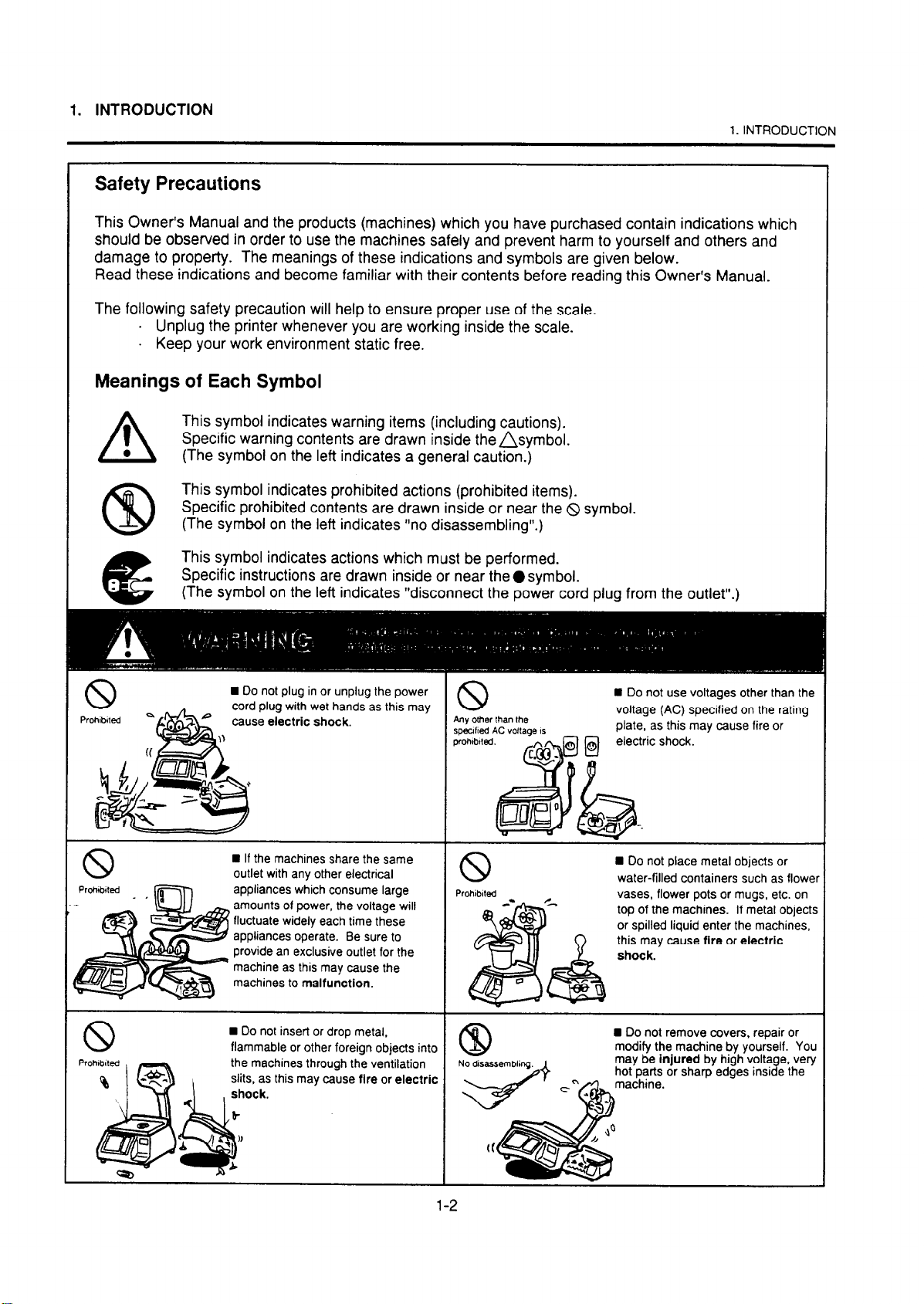
This Owner’s Manual and the products (machines) which you have purchased contain indications which
should be observed in order to use the machines safely and prevent harm to yourself and others and
damage to property. The meanings of these indications and symbols are given below.
Read these indications and become familiar with their contents before reading this Owner’s Manual.
The following safety precaution will help to ensure proper use of the scale.
. Unplug the printer whenever you are working inside the scale.
. Keep your work environment static free.
Meanings of Each Symbol
This symbol indicates warning items (including cautions).
Specific warning contents are drawn inside the&ymbol.
(The symbol on the left indicates a general caution.)
This symbol indicates prohibited actions (prohibited items).
Specific prohibited contents are drawn inside or near the &I symbol.
(The symbol on the left indicates “no disassembling”.)
This symbol indicates actions which must be performed.
Specific instructions are drawn inside or near theOsymbol.
(The symbol on the left indicates “disconnect the power cord plug from the outlet”.)
A
CQ
1
l
n
Do not plug in or unplug the power
cord plug with wet hands as this may
cause electric shock.
appliances which consume large
amounts of power, the voltage will
fluctuate widely each time these
appliances operate. Be sure to
provide an exclusive outlet for the
machine as this may cause the
machines to malfunction.
n
Do not insert or drop metal,
flammable or other foreign objects into
the machines through the ventilation
this may cause fire or electric
slits, as
n
Do not use voltages other than the
voltage (AC) specified on the rating
plate, as this may cause fire or
electric shock.
n
Do not place metal objects or
water-filled containers such as flower
vases, flower pots or mugs, etc. on
top of the machines. If metal objects
or spilled liquid enter the machines,
this may cause fire or electric
n
Do not remove covers, repair or
modify the machine by yourself.
You
Page 7
1. INTRODUCTION
1. INTRODUCTION
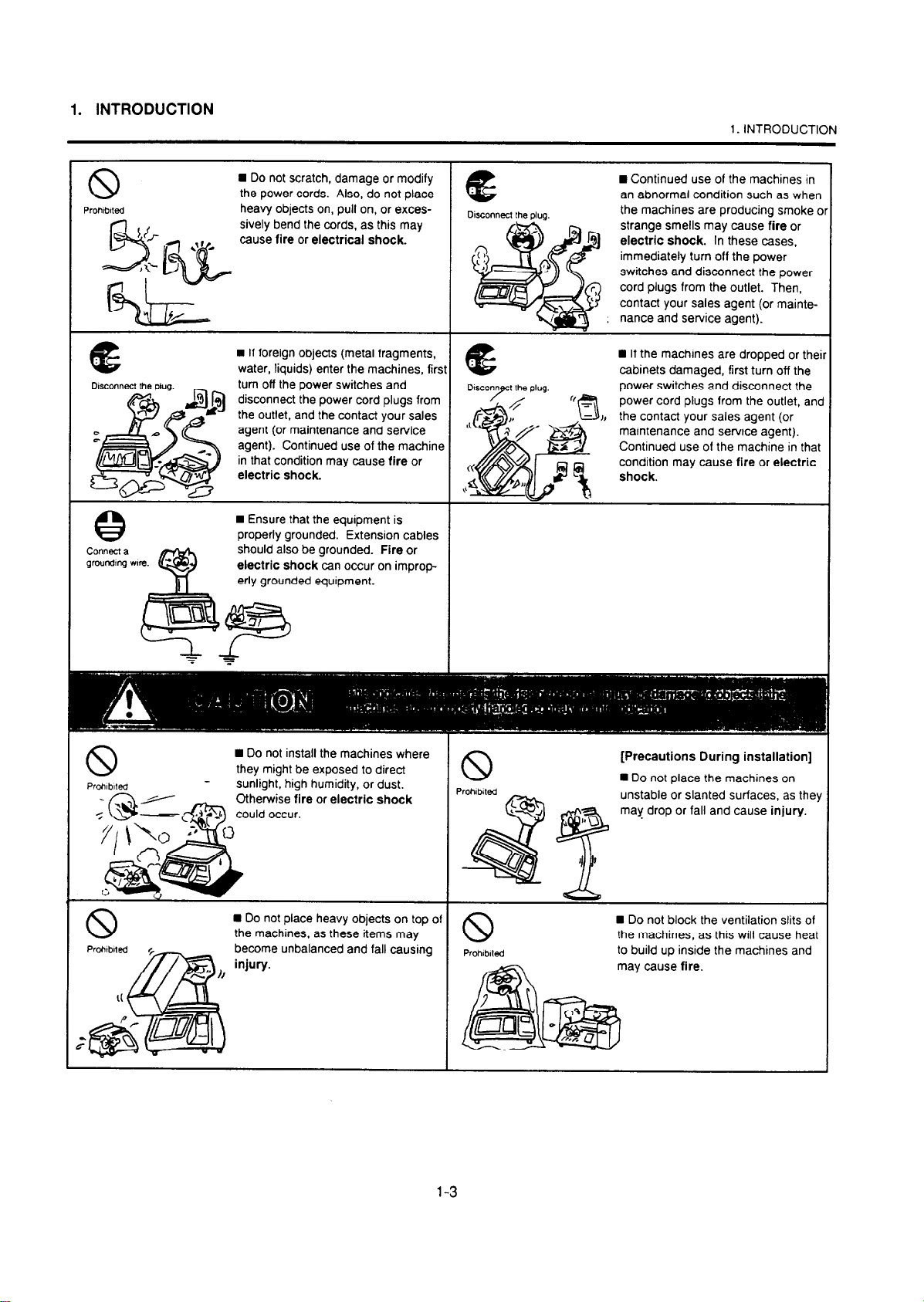
the power cords. Also,
heavy objects on, pull o
sively bend the cords, a
disconnect the power cord plugs from
the outlet, and the contact your sales
agent (or maintenance and service
n
Ensure that the equipment is
properly grounded. Extension cables
should also be grounded. Fire or
electric shock can occur on improperly grounded equipment.
an abnormal condition such
the machines are producing
strange smells may cause fi
electric shock. In these ca
immediately turn off the
switches and disconnect the power
cord plugs from the outlet. Then,
contact your sales
power switches
power cord plugs from the outlet, ant
J, the contact your sales agent (or
maintenance and service agent).
Continued
use of the machine in that
on may cause fire or electric
power
agent (or mainte-
and disconnect the
W Do not install the machines where
they might be exposed to direct
- sunlight, high humidity, or dust.
become unbalanced and fall causing to build up inside the machines and
[Precautions During installation]
n
Do not place the machines on
unstable or slanted surfaces, as they
may drop or fall and cause injury.
the machines, as this will cause heat
may cause fire.
1-3
Page 8
1. INTRODUCTION
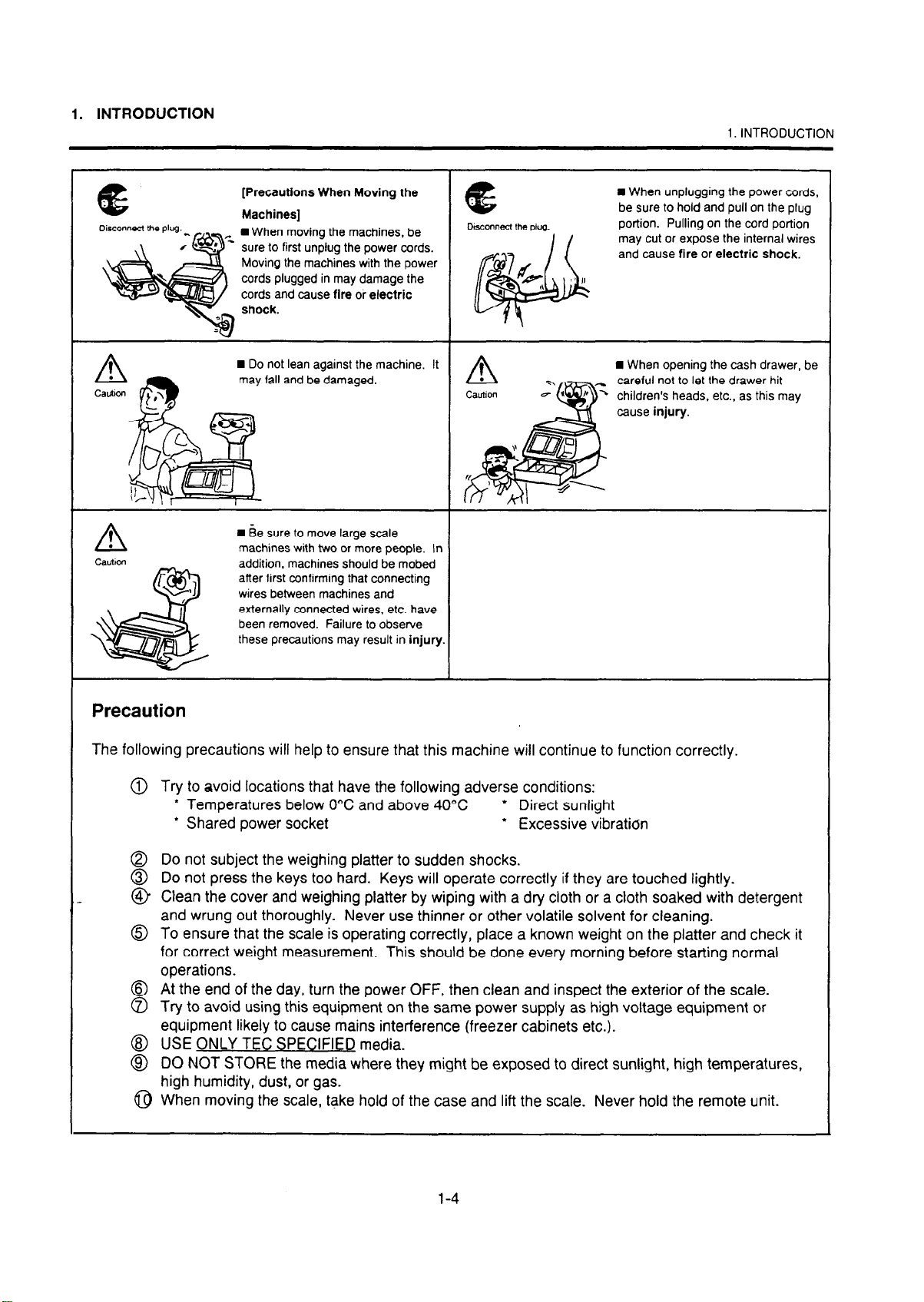
[Precautions When Moving the
n
When moving the machines, be
sure to first unplug the power cords.
Moving the machines with the power
cords plugged in may damage the
cords and cause fire or electric
n
Do not lean against the machine. It
may fall and be damaged.
n
Be sure to move large scale
machines with two or more people. In
addition, machines should be mobed
after first confirming that connecting
wires between machines and
externally connected wires, etc. have
been removed. Failure to observe
these precautions may result in injury.
1. INTRODUCTION
n
When unplugging the power cords,
be sure to hold and pull on the plug
portion. Pulling on the cord portion
may cut or expose the internal wires
and cause fire or electric shock.
n
When opening the cash drawer, be
careful not to let the drawer hit
children’s heads, etc., as this may
Precaution
The following precautions will help to ensure that this machine will continue to function correctly.
@ Try to avoid locations that have the following adverse conditions:
* Temperatures below 0°C and above 40°C * Direct sunlight
l
Shared power socket
@ Do not subject the weighing platter to sudden shocks.
@ Do not press the keys too hard. Keys will operate correctly if they are touched lightly.
@ Clean the cover and weighing platter by wiping with a dry cloth or a cloth soaked with detergent
and wrung out thoroughly. Never use thinner or other volatile solvent for cleaning.
6)
To ensure that the scale is operating correctly, place a known weight on the platter and check it
for correct weight measurement. This should be done every morning before starting normal
operations.
@ @ At the end of the day, turn the power OFF, then clean and inspect the exterior of the scale.
Try to avoid using this equipment on the same power supply as high voltage equipment or
equipment likely to cause mains interference (freezer cabinets etc.).
@ USE ONLY TEC SPECIFIED media.
@ DO NOT STORE the media where they might be exposed to direct sunlight, high temperatures,
high humidity, dust, or gas.
@ When moving the scale, take hold of the case and lift the scale. Never hold the remote unit.
l
Excessive vibration
l-4
Page 9
1. INTRODUCTION
1 .l APPLICABLE MODEL
. SL-2200~38-CO-US
. SL-2200-39M-HO-CA
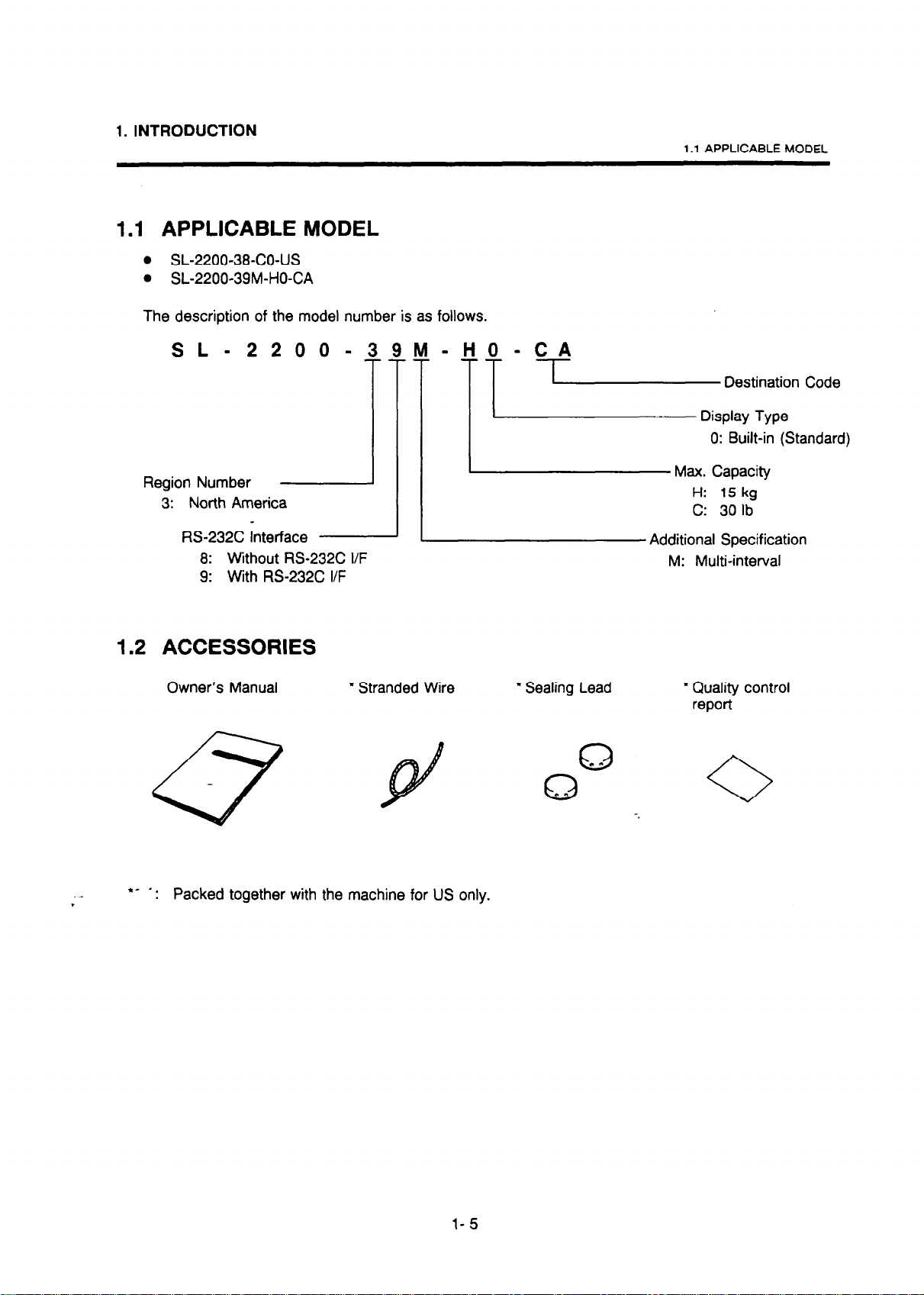
The description of the model number is as follows.
1 .l APPLICABLE MODEL
SL-
Region Number
3: North America
RS-232C interface
8: Without RS-232C I/F
9: With RS-232C I/F
2 2 0 0 -39&l-&O-CA
-~
1.2 ACCESSORIES
Owner’s Manual
~\s-D;tii;Aiy Code
l
Stranded Wire * Sealing Lead
0: Built-in (Standard)
Max. Capacity
H: 15 kg
C: 30 lb
Additional Specification
M: Multi-interval
* Quality control
report
*- a.
. Packed together with the machine for US only.
l-5
Page 10

2. SPECIFICATION
2. SPECIFICATION
2. SPECIFICATION
Item
Maximum Capacity
Minimum Scale Division
Using Weight Range
Display Range
Tare
Display:
Weight
Unit Price
Total Price
Temperature Limits
Weight (approx.)
RS-232C Interface
Unit Price Presettable
Minimum Price Display
Display Designations
US Type
CA Type
Power Requirement
Current Consumption
Relative Humidity
IDimensions (approx.)
(width X depth x height)
IOption Device (TEC Label Printer)
SL-2200-39M-HO-CA
15 kg
O-6 kg: 0.002
16-M
10 - 15.025 kg
IUp to 1.000 kg
‘5 digits
‘5 digits
!$O.Ol
1$0.01
IZERO/ZcRO, NET, PREPACWPRC-EMBALLC, 100 g
‘ITEM#/ARTICLE#, ACCUMIADDITION
AC 12OV+ lo%/-15%, 60Hz
kg: 0.005 kg
O- 15 kg
4 digits
0°C 8 kg
Standard
NET, PREPACK, ITEM#, ACCUM
0.2A at 12OV, 60Hz
+40°c
- 99.99
35% - 85%
336.8
mm (13.3”) X345 mm (13.6”) X 137.5 mm (5.4”)
kg
RH (no condensation)
sL-22oo-39-co-us
I
30
Ibs.
0.01 Ibs.
- 30
0
0
Up to 30 Ibs.
4 digits
4 digits
5 digits
32’F - 104’F
17.6 Ibs.
Option (Local procurement)
Ibs.
- 30.05
Ibs.
Ii-240~QQ
2-
1
Page 11

3. OVERVIEW
3. OVERVIEW
Level
3. OVERVIEW
- HY232C I/F
CA : Standard
3- 1
Page 12

4. DISPLAY
4. DISPLAY
n
US Type
,
WEIGHT Ibs 1 lPRlCE/lb $ 1 /TOTAL PRICE
4.
DISPLAY
I z?z SL-2200
n
CA Type
ZERO
Z&O
TM: SL-2200
4 Key Function
NET Lamp : Lights when tare is subtracted.
PREPACK Lamp : Lights when the 1-1 key is depressed.
- .
ACCUM Lamp :
ITEM# Lamp :
ZERO Lamp (for CA type only) : Lights when the Zero Point is correct.
100 g Lamp (for CA type only) : Lights when the [1009) key is pressed.
NET PREPACK
k0 I IPRI~UPRIX~~IY
NET PREPACK
PRG-EMBALLli
1oog
ITEM ACCUM
CAPACITY 30X0.01 Ibs
1 ITOTAL .% 1
ITEM ACCUM
ARTICLE#
-.
Blink when the ADD function is working.
Lights when the item number is indicated on the Unit Price display.
4- 1
Page 13

5. KEY LAYOUT
5. KEY LAYOUT
5. KEY LAYOUT
n
Key Functions
Name of Key
LEAR Kev
r-l
umeric Keys
El-El
er l/2, l/4 Keys
3r US type only)
(for US type only)
c
(for CA type only)
Function
This key is used to clear the unit price, to release the scale from
Save or Error mode, to clear the price when a scale printer is
:onnected, clear the PLU number when a scale printer is
zonnected, and to clear the total amount being displayed. It is also
Jsed to change from the Unit Price Setting mode to Weigh mode.
n Stand-alone mode, these keys are used to enter the unit price
snd tare weight.
Nhen the SL-2200 is connected to a printer, these keys are used
:o enter PLU number, unit price, and tare weight.
t is
also
used to preset a unit price or used for PLU settings.
These keys are used to calculate the unit price by l/2 lb. or l/4 lb.
VOTE: When the 11/21 (or @ ) key is depressed, the unit price is
multiplied by 2 (or 4).
OOg Key (for CA type only)
1 oog
cl
(Multiplication) Key
rrEM
X
El
This key is used to set a unit price in units of 1009.
This key is used for multiplication.
unit price in Unit Price Setting mode.
5 1
It is also used to call the preset
Page 14

5. KEY LAYOUT
5. KEY LAYOUT
Name of Kev
‘LU Key
PLU
0
‘OWERIZERO Key
POWER
i&
I-- 1
FtINT/MEMORY PLUS Key
PRINT
I+
El
iAVE Key
l=l F-l)
Function
This key is used to call and display PLU data stored in the scale
printer.
It is also used to change from Weigh mode to Unit Price Setting
mode.
It is also used to call the preset unit price.
This key is used to supply power to the main circuit and to adjust
the “ZERO” point.
This key is used to print labels when the scale is connected to a
label printer and the
the “MANUAL” position.
It is also used to add the total price to the total memory. When this
key is depressed, the amount of the total memory and item count
are displayed.
NOTE: Item Number:
Total Amount: 5 dioits
This key is used to save a tare weight and/or unit price after taking
the commodity off the platter.
LABEL ISSUE
2 digit (max. 99 items)
switch of the label printer is in
rARE Key This key is used to subtract a tare weight.
It is also used to preset a tare weight through the numeric keys OI
m ( m)
rOTAUMEMORY CLEAR Key This key is used to display the totat. amount; and when it is
NOTES:
1. The Load Cell in the unit is turned ON when the power plug is connected to an AC
The power of the Load Cell cannot be turned OFF by the [POWER/ZERO [ key.
2. When the rf OWEFVZERO 1 key is turned on within about 16 seconds after
plug is connected to an AC out/et, the test scanning sequence is made, ZEROS are
displayed and the scale is ready for use.
3. When the 1 POWEFUZERO 1 key is turned on over about 76 seconds atler the power plug
is connected to an AC outlet, a// ‘8”s appear in all areas of the display for a moment, then
AEROs are displayed and the scale is ready for use.
clear the tare weight.
depressed twice successively, the total memory is cleared.
outlet.
the power
5- 2
Page 15

6. BEFORE STARTING OPERATION
6. BEFORE STARTING OPERATION
6.1 ADJUSTING THE LEVEL
Set the scale on a stable and level surface. Level the scale
by turning the Adjustable Legs so that the air bubble may
settle inside the center circle of the gauge.
6.1 ADJUSTING THE LEVEL
Level Gauge
5
(b
5
‘... . . . .
0
When the air bubble moves toward the left
side, turn the Adjustable Legs on the
righthand side clockwise.
When the air bubble
the front Adjustable Legs clockwise.
moves
toward rear, turn
6.2 NOTES BEFORE STARTING OPERATION
1. Be sure to insert the power cord plug into an AC outlet.
Correct
Incorrect
2. -When turning on the ~POWEFUZERO 1 key within about 16 seconds after inserting the power cord
plug into an AC outlet, the scale enters the test scanning sequence, such as 00000, 0000, 00000,
then
11111, 1111, 11111 . . .
3. While the scale is in the test sequence, do not put anything on the platter.
4. Do not move the unit while it is in operation. Should it become necessary to move it at any time,
turn OFF the power and be sure to readjust the level after relocating the scale.
5. Should a power failure occur during operation, turn OFF the power and remove the commodity
from the platter, and turn ON the power again when power is restored.
6. If scale is used with an unrated power source or inaccurate scaling, other errors may occur.
7. If the Zero Point has shifted during scaling and no tare is displayed, adjust the Zero Point by
depressing the IPOWfFVZfRO1 key twice.
until ZEROS are shown on all displays.
6- 1
Page 16

7. OPERATIONAL PROCEDURES
7. OPERATIONAL PROCEDURES
(Example : SL-2200-38-CO-US type)
7.1 STANDARD OPERATION
7.1 STANDARD OPERATION
Enter the tare weight.
(Example 0.20 lb.)
Press:
Place the tare on
the platter.
0’0
\
I
I 1
0
v
T
0.20 lb.
1,
-Ty
‘NET
F F
‘I’
d
WEIGHT
1
(o.00)
0.20 lb.
(0.20)
J
(o.00)
T
-$ NET
NOTES:
Remove the
commodity
together with the
tare.
L-l
1. Tare subtraction is available up
the CA type. When tare subtraction is in operation, however, the scalable range for
net weight becomes less
(Net weight = Gross weight-Tare)
2. Preset tare
(lb
scale).
3. When the display does not show “0” even after a commodity is removed from the
Platter during operation, press the ~POWERI+Oc] key twice.
must
be a multiple of 2 g
to
30.00 lb. for the US type, and up to 1 .OOO kg for
by
the amount of the tare.
for
CA type
7- 1
(kg
scale) and 0.01
I6 for US type
Page 17

7. OPERATIONAL PROCEDURES
7.2 SAVE KEY OPERATION SAMPLE
7.2 SAVE KEY OPERATION SAMPLE
Place the tare on the
platter.
(Example: 0.20 lb.)
Press:
Enter the unit price.
(Example: $1.25/lbJ
Unit Price and Tare
Weight are saved.
Place the commodity
on the platter.
(Example: 5 Ibs.)
-tr I
0.20 lb.
WEIGHT
(T)
(o.00)
-* NET
-g NET
1
-+$ PREPACK
<5.oo)(-FE-)
-% NET
-g PREPACK
(T)
(7)
(T) (o.00)
PRlCEitb
TOTAL PRICE
(T)
(o.00)
(o.00)
(o.00)
(6.25)
Clear the unit price and
save mode.
Clear the tare weight.
Press: (for US type)
Press: (for US type)
Remove the
commodity
together with the
tare.
r-l
I
Tare Weight and Unit Price are not yet cleared. (for US type)
Tare Weight is automatically cleared and Unit Price is not cleared.
(for US type)
7- 2
(-0.20)(T)
-g NET
I
(-0.20)
7% NET
(-0.20)
-$ NET
(o.00)
-& PREPACK
I
(T)< )
C---K)
c
0.00 >
(o.00)
1
Page 18

7. OPERATIONAL PROCEDURES
7.3 ADD KEY OPERATION SAMPLE
7.3 ADD KEY OPERATION SAMPLE
Enter the unit price.
Place the commodity on the
platter.
(Example: 5 tbs.)
Press:
Place the other commodity
on the platter.
(Example: 3.5 tbs.)
-ii,
IIIGI
5 Ibs.
WEIGHT
(T)
(o.00)
(--Ti-](T)(T]
(o.00)
(1.25)
(1.25)
PRlCEnb
TOTAL PRICE
c 0.00 )
(
-f
6.25 )
ACCUM
Enter the unit price.
Press:
_
.
- ,
Total amount display is
cleared.
Total memory is cleared.
Total memory is cleared.
(NOTE: 3)
NOTES :
EbEl
PRIM
M+
(3.50)
5;
/
c 0.00 1
(o.00)
(i-50><-7%-)
;$ ACCUM
(T)(yzq
ITEMX
-k
-.
-k ACCUM
I
(-7Gi-)(-J
-$
(-i-)(---j
ITEM
-*
-$
ACCUM
ACCUM
(T)
1. /tern count and total amount are added up in the total memory by depressing the
1 PRINT/M + 1 while price is being displayed.
2.
By
depressing the [TOTAL/MC ], the addition memory is cleared and display is
disappeared.
3. To c/ear the memory in US Add function, depress the -1 key twice.
7- 3
Page 19

7. OPERATIONAL PROCEDURES
7.4 UNIT PRICE PER l/2 OR l/4 lb.
7.4 UNIT PRICE PER l/2 OR l/4 lb.
WEIGHT PRICE/lb
Place the commodity on
the platter.
(Example: 5 Ibs.)
I
1
Enter the unit price.
(Example:
$3.00 per l/2 lb.)
Press:
(7)(-x6-) (15.00)
(-YE-)(~)(3o.oo)
(for US type only)
TOTAL PRICE
Unit Price Change
(Example:
$2.50 per l/4 lb.)
Press:
NOTES: 1. The US type will check details of unit price, and if the unit price after calculation (twice
for 112 lb., four times for l/4 lb.) exceeds 4 digits, then the unit price will be cleared.
2. The 11/21 or 11/41 key should be depressed after keying in the unit price.
3. The (1/2 or 11141 key after saving a unit price will function the same as the ( key.
(-7x-)(-G-)(~)
7- 4
Page 20

7. OPERATIONAL PROCEDURES
7.5 1OOg KEY OPERATION SAMPLE
7.5 1 OOg KEY OPERATION SAMPLE
Place the commodity
on the platter.
(Example: 2.002 kg)
Enter the un& price.
(Example: $3.0011 kg)
Press:
(Example: $3.001100 g)
0
1 oog
d
(for CA type only)
Unit Price Change
(Example: $2.50/l kg)
Press:
(Example: $2.50/l 00 g)
1 oog
4
Remove the
commodity.
Cl
NOTES: 1. The CA type will check details of price, and if the price after calculation exceeds 5 digits,
then the rice display will be blanked.
2. The
3. The 110091 key after saving a unit price will function the same as the m key.
100s key should be depressed after keying in the unit price.
el
7- 5
Page 21

7. OPERATIONAL PROCEDURES
7.6 MULTIPLICATION FUNCTION
7.6.1 With ADD Function and Without Printer
7.6 MULTIPLICATION FUNCTION
To call the preset unit price:
Depress:
Depress:
Enter the multiplier.
PLU
:
PRINT
5+
WEIGHT
PRlCEilb
TOTAL PRICE
1
(>(.)<V)
(-)(77i-)(oo)
ITEM#
-*
ACCUM
-*
Depress:
Depress:
NOTES: 1.
2. The multiplier must be an integer from 7 to 99.
Ir
(yEi--)
-$
ACCUM
4
TOTAL
/
C
MC
This function can be used only when the unit price is being displayed in the
Weighing mode. (GROSS = 0: Multiplication allowed)
7- 6
Page 22

7. OPERATIONAL PROCEDURES
7.6.2 Without ADD Function and Printer
7.6 MULTIPLICATION FUNCTION
To call the preset unit price:
Depress:
Depress:
Enter the multiplier.
ml
1
PLU
ITEM
/
WEIGHT PRICE/lb
(T)(T)(T)
TOTAL PRICE
(T)(T)(T)
(~)(-xii-)(~-
x
(-)(m)(v)
(--(T--T-)(~)
Depress:
Depress:
- ,
NOTES: 1.
2.
C
C
~
This function can be used only when the unit price is being displayed in the
Weighing mode. (GROSS = 0: Multiplication allowed)
The multiplier must be an integer from 1 to 99.
(-)(m)(T)
c 0.00 ) < 0.00 ) ( 0.00 )
7- 7
Page 23

7. OPERATIONAL PROCEDURES
7.6.3 With H-240 Label Printer Connected
7.6 MULTIPLICATION FUNCTION
To call the preset unit price:
(Key on the H-240)
Press:
(Key on the H-240)
Unit Price Change:
(Keys on the printer-can be
used only when unit prices
are changed.)
Press:
WEIGHT
PRICE/PRIxIkg TOTAL PRICE
Enter the multiplier.
Press:
(-)(-)<TG-)
,
NOTES: 1. The label is issued only when a PLU is called.
The label is issued.
I
2. When the H-240 printer is connected : AUTO: Display only
--I
MANUAL: Display and label issue
BY
COUNT:
No multiplication
7- 8
Page 24

7. OPERATIONAL PROCEDURES
7.7 PRESET UNIT PRICE SETTING
7.7.1 Setting
7.7 PRESET UNIT PRICE SETTING
Enter the password.
Enter a number of Nos. 1 to
26 to call and change the
preset unit price.
(Example: No. 26)
Depress:
WEIGHT
(o.00)
(-)(T)(n)
PRICE/lb TOTAL PRICE
(,9.99)(-o.o0)
Enter the new preset price.
Depress:
_ .
Depress:
c
0.00 ) ( 0.00 ) 0.00 ) (
7-
9
Page 25

7. OPERATIONAL PROCEDURES
7.7.2 Calling and Clearing the Preset Unit Price Set
7.7 PRESET UNIT PRICE SETTING
Call the
required preset unit
price by
entering the
required number (No. 1 to
26).
Depress:
Depress Clear Key, to clear
the called preset unit price.
Enter another No. through
numeric keys to clear the
No. already caked and
replace it with the new No.
(Example: 3)
Preset unit priceis cleared
by removing the commodity
from the platter.
3
L!l
1
Placing and removing
the commodity on the
platter and off the
planer
II
I
WEIGHT
(~)(-)(-Yiq
(T)(T)(V)
(T)(T)(T)
(-7ix-)(-T)(T)
PRICE/lb TOTAL PRICE
m&x)(TG--)( xxx>
I
I
XXX mark shows weight and total price
when place the commodity on the platter.
NOTES: 1. The number to call a preset unit price is in the range from No. I to 26.
2. When numeric keys are entered, the preceding preset unit price is cleared and the
number newly entered is displayed.
3. The operation sequence of “Placing and removing the commodity” differs depending on
the presencelabsence of the initial setting (Unit Price Auto C/ear) .
7- 10
I
Page 26

8. TROUBLESHOOTlNG
8. TROUBLESHOOTING
8. TROUBLESHOOTING
Problems Solution
l
“-----” is displayed at
power on.
Display unstable.
n
Before Yc3u Call for Service
We endeavour to provide products of superior quality. If, however any problem arises in
connection with this equipment please check the following points before placing a service call.
Was the power turned ON when something was on the platter?
+ Make sure nothing is on the platter and turn the power on
again.
a Is the platter mounted correctly?
-+ Mount the platter correctly and turn the power on again.
l
Is anything touching the platter?
+ If so, remove it.
0 is the machine in a windy location?
+ Avoid locations subject to the wind.
1.
Is the Power Cord fully plugged into an AC Outlet?
2.
Is the Power Switch turned ON?
3.
is AC Power being properly supplied to the outlet? (Check it using another electric
appliance.)
4.
Has the operation been carried out in the correct order?
WARNING:
Do not attempt
rectified using the procedures described in this manual, turn off the power, unplug the
machine, then contact your authorised TEC representative for assistance.
to
effect repairs to this equipment. If a fault occirs that cannot be
8- 1
Page 27

Page 28

PRINTED IN JAPAN
E
EM1-31066C 95121000
 Loading...