

Page 1
ECO
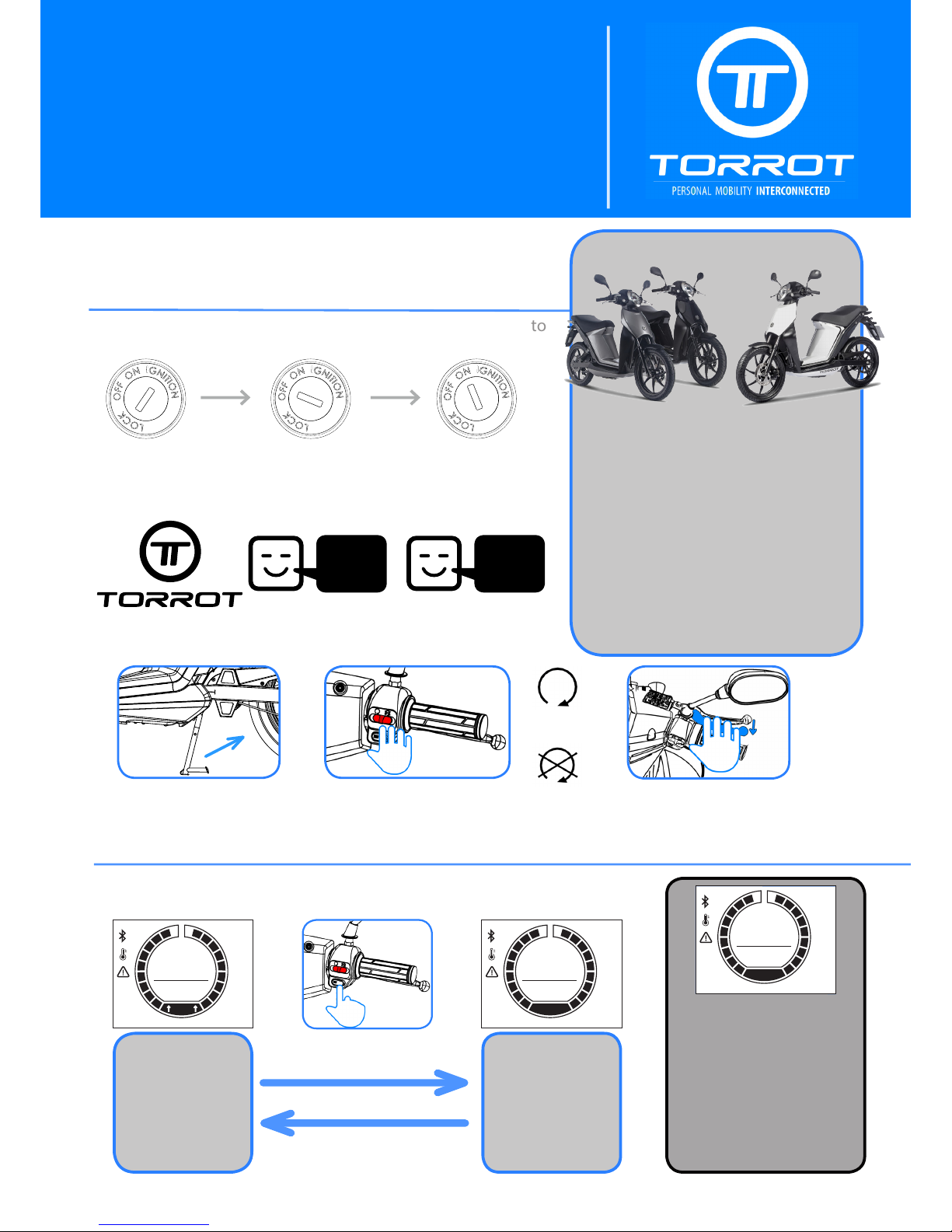
ECO mode without arrows, same characteristics but without being able to chang
to FULL mode. It self-activated when:
• The MUVI is turned on with only 1
battery
• The 2 batteries have a charging
dierence of more than a 20% between them.
• When a battery has the charge below the 20%.
Welcome to Torrot
¡Thanks for becoming a brand-new owner of one of our e-scooter
MUVI! Welcome to the Torrot product’s Family.
Follow this instruction in order to start enjoying your e-scooter
MUVI:
A. Basic Instructions
Turning ON the motorcycle MUVI
Firstly, introduce the key into the clausor and turn the key to
ON position.
Steering
Locked
Motorcycle
Turned ON
Steering
Unlocked
MUVI will perform the following checking process:
1. 2. 3.
Now MUVI is turned ON but stopped, a starting maneuver has
to be done to start your trip.
¡START ON A GOOD FOOT !
This sheet has been done in order to
make easier your rst steps with the e-
scooter MUVI.
For extended information about, look up
the MUVI User Manual and check all the
information. It can be found easily in the
USB provided by Torrot and in our website:
www.torrot.com/muvi
1.Fold the main stand
¡Now your MUVI is ready to be driven!
2.Check the starter button
Starter
Stopping 3. Trigger one of the two
brake levers.
Driving Modesroductos Torrot Electric.
The ECO mode is shown, by default, every time that the motorcycle is
turned on. It’s possible to change to FULL mode pushing SET button.
1.ECO mode.
Hold up SET button during
1 sec and release.
1.FULL mode.
TESTING
OK
22:4 5
TRIP
135.5
ODO
93450.6
RANGE
55
KM/H
+
1
2
ECO
85
22:4 5
TRIP
135.5
ODO
93450.6
RANGE
55
KM/H
+
1
2
FULL
85
22:4 5
TRIP
135.5
ODO
93450.6
RANGE
85
55
KM/H
+
1
2
ECO
ECO
ECO mode with arrows,
by default, manages and
controls the supplying
power to achieve higher
ranges. It’s possible to
change to FULL mode.
FULL
Mode that modify the performance of the motorcycle to give the maximum
power, aecting the nal
range.
Do it again to get back to
ECO mode.
Page 2
Batteries charging
B. Batteries: charging and correct use
VEHICLE FIRST USE
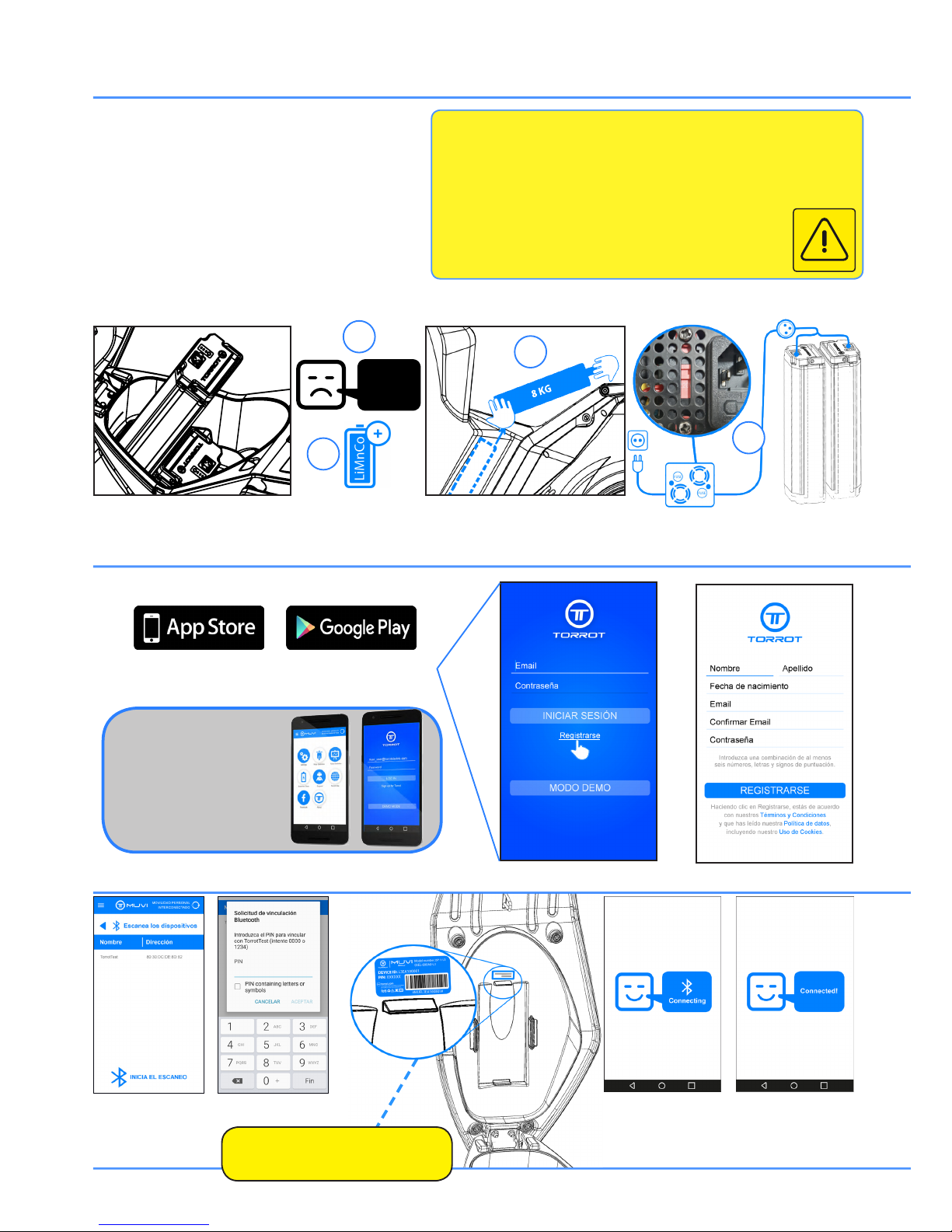
1. Power on the motorcycle and check that the low battery
voltatge picture is not shown.
2. Do not remove the batteries when vehicle is powered on.
3.These batteries are heavy, 8 Kg each one. It is essential
removing them very carefully, putting one hand in the handle
and the other one below the battery to avoid damages to the
vehicle, on the battery or even injuries caused by imbalance
or sliding.
4. Before the rst charge, check that the red switch of the
charger has the correct voltatge position related to your
country (110V/220V).
Register
1. DOWNLOAD OUR APP FOR FREE
2. Register in the APP lling out the gaps:
C. Synchronize MUVI with your smarthphone
Connection with the vehicle
¡NOW YOU ARE READY
TO SYNCHRONIZE
MUVI WITH YOUR
SMARTPHONE!
1. Start the scanner of
bluetooth devices
2. Select MUVI ID.
3. Introduce your MUVI
PIN Code
The ID device and PIN of the vehicle
is placed below the seat
4. Finally, after introducing the correct password, ¡Your smartphone will be connected to
MUVI!
3
4
1
LOW
BATTERY
WARNINGS AND BATTERIES MAINTENANCE
• Charge batteries to the maximum level before every use.
• Do not never let the battery level below the 20% of charge.
• The warranty of the batteries gets annul if the battery is without being
charged below the 20% of the battery level more than 40 days.
• Do never charge the batteries with the charger inside the vehicle.
• Avoid charging and exposing the batteries to extreme
cold or extreme hot.
• Avoid hits, vibrations or high humidity environments.
• It is forbbiden to manipulate the batteries or the charger.
5. Batteries’ are make up of High Energetic density Ion Lithium cells. Do not manipulate them in any case. Disobey this instruction
has electrical and chemical hazard and can involve material damages and serious personal harm.
5
 Loading...