

Page 1

GPS Watch Tracker
USER MANUAL
(Model: WT100)
TOPTEN ELECTRONICS TECHNOLOGY LIMITED
Address: Room2007, Tower B, Gaoke Building, Tianhe North Road, Guangzhou, China.
Tel: (+86)20-38351400, 38351401 Fax: (+86)20-38351400
Website:http://www.t10.cn Email: [email protected]
Version 2.0
(Date: Dec.3, 2010)
TOPTEN
Page 2

WT100 Personal Tracker User Manual V2.0
Page 1
CONTENT
Chapter 1 Preface...............................................................................................................2
Overview..........................................................................................................................2
Attention...........................................................................................................................2
Chapter 2 Introduction.......................................................................................................3
Features...........................................................................................................................3
Specifications...................................................................................................................4
Chapter 3 Preparation before Using.................................................................................5
Accessories......................................................................................................................5
Charge the Battery...........................................................................................................6
SIM card installation.........................................................................................................6
Chapter 4 How to Operate it..............................................................................................7
Check the GPS Coordinates...........................................................................................7
Check the Location by Google Map’s URL.....................................................................7
Check the Real Physical Address....................................................................................8
Monitor the Voice.............................................................................................................9
Two-way Talking...............................................................................................................9
Show the GPS Coordinates on LCD...............................................................................9
SOS Alert.........................................................................................................................9
Low Power Alert.............................................................................................................10
Geo-fence Alert..............................................................................................................11
Chapter 4 Parameters Setting.........................................................................................12
Change the User Password...........................................................................................12
Set the Working Mode...................................................................................................12
Set the SMS Center Number for Receiving Alarms......................................................12
Set the Time Interval for SMS Auto-reporting................................................................13
Set the Calling Phone No. for the Call Buttons.............................................................13
Set the Time Zone..........................................................................................................14
Geo-fence Settings Instructions....................................................................................14
Chapter 5 Setting for GPRS Connection.......................................................................16
Compositive SMS for GPRS Setting.............................................................................16
Set the Device ID...........................................................................................................16
Set APN (Access Point Name)......................................................................................17
Set the Server IP & Port................................................................................................17
Set the Time-interval for GPRS Uploading....................................................................17
Reset the Parameters with default settings...................................................................18
TOPTEN
Page 3

WT100 Personal Tracker User Manual V2.0
Page 2
Chapter 1 Preface
Overview
WT100 GPS watch tracker is a perfect combination of GSM
communication technology & GPS positioning technology. It has portable
size, nice figure & high positioning accuracy with integrated GPS & GSM
module, it provides the cost-effective solution for tracking the children, elder
people or those who need monitoring & safeguard.
As a professional factory of this tracker, we will continuously provide you
better products & service.
Attention
² Please read this manual thoroughly before you use the device; please
keep it for future reference.
² This user manual is just for your reference. If some contents and
operation procedures are different from the actual product, please
operate as the actual one. We do not offer further notice for any upgrade
of the product or any accessories.
² The default user password is 0000.
² The product is moderate water-proof, it is better to keep away from water.
² The product needs the valid GSM SIM card for normal use.
² The product can not work when power off or out of GSM coverage.
² At the first time when you power up the device, it might take about 2
minutes to search for the GPS satellites. That is normal.
² Please use the product in legal areas. Any illegal consequence will be
borne by the user.
(Note: the GPS module is of high-sensitivity. It is usual that the product
sometimes does not work well when in weak signal areas.)
TOPTEN
Page 4

WT100 Personal Tracker User Manual V2.0
Page 3
Chapter 2 Introduction
Features
² Check the location on the map by smart phone with the Google
map’s URL;
² Check the real physical address(e.g.:city name, street name..) freely
by SMS without setup of the center;
² Track by mobile SMS to get the GPS coordinates;
² Track on command or by time interval via SMS/GPRS;
² With LCD display to show the time & GPS coordinates information;
² Two-way talking function, with shortcut buttons for fast calling out 3
phone numbers;
² Low power alert, when the battery’s power is low, it will send out
warning message;
² Geo-fence alert; There are 5 fences for setup with different period
² SOS button to call for help in case of emergency;
² Inbuilt 512Kb memory to store the offline GPS data;
² High-sensitivity, high-tech, most advanced GPS chipset;
² Watch-like portable design;
² Power save mode for long time’s standby working status;
² Voice monitoring and real-time tracking without disturbance
² Auxiliary tracking by GSM base station code (LBS)
TOPTEN
Page 5

WT100 Personal Tracker User Manual V2.0
Page 4
Specifications
GSM module GSM 850/900/1800/1900
GPS chip Latest GPS chip
GPS sensitivity -159dBm
GPS center frequency L1, 1575.42MHz
GPS tracking accuracy 5~25 meters
GSM tracking accuracy 100~500 meters
Speed accuracy 0.1m/s
Time accuracy Synchronous GPS
Default data WGS-84
Hot start time 1 seconds
Warm start time 38 seconds
Working temperature -20~65℃
Humidity 5%~95%
Voltage Chargeable 500mAh battery
Power supply DC5V
Standby time >32 hours (in power save mode)
TOPTEN
Page 6
WT100 Personal Tracker User Manual V2.0
Page 5
Chapter 3 Preparation before Using
Accessories
² WT100’s main unit (1pcs)
² USB wire (1pcs)
² Charger (1pcs)
² 500mAh battery (2pcs)
² microphone wire (optional)
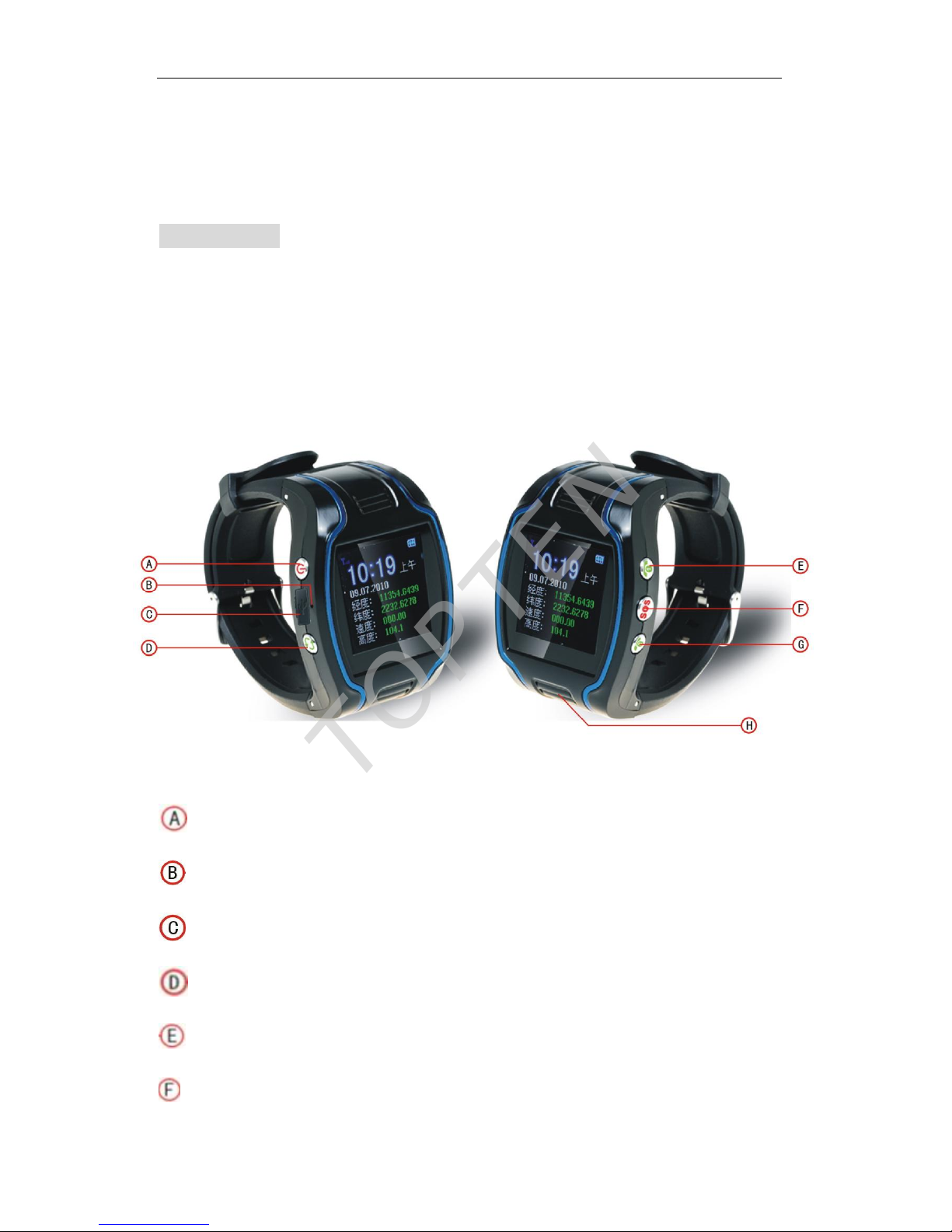
Upper left button: Switch-on/off and hold-on
: Microphone
: USB charger’s connector
Bottom left button: Switching interface between time & GPS coordinates
Upper right button: Call 1 phone No.
Middle right button: SOS button
TOPTEN
Page 7

WT100 Personal Tracker User Manual V2.0
Page 6
Bottom right button: Call 2 phone No.
: Speaker
Charge the Battery
Before using, please charge the battery for at least 4 hours with the USB
wire. It is strongly recommended to charge it for over 12 hours in shutdown
status, so as to lengthen the battery service life.
When the icon on the LCD is dynamic, the battery is in charging status;
when the icon on the LCD does flash, the charge is finished.
SIM card installation
Open the rear cover and you will find the SIM card slot. Put in the SIM
card rightly.
Select the SIM card:
² SIM card should be GSM card;
² SIM card has enough credit;
² Prepare an SIM card with function of caller ID display and sending &
receiving SMS. (For live tracking by platform, the SIM card needs the
support of GPRS service);
TOPTEN
Page 8

WT100 Personal Tracker User Manual V2.0
Page 7
Chapter 4 How to Operate it
Check the GPS Coordinates
SMS Command: 666password
Eg: 6660000
Send command (default password is 0000) to the system SIM card, and
then the mobile phone will get an SMS message from the tracker.
Data format:
Lat: Latitude Direction (+/-) Latitude Value
Long: Longitude Direction (+/-) Longitude Value
Speed: Speed KM/H
Direction: Direction
Date: Date YYYY-MM-DD
Time: Time HH:MM:SS (GMT)
BS: GSM Base Station code
Fix: Location state (A:available / V:shielded GPS signal )
ID: IMEI number
STATE: Message state
Note:
If the tracker can not get valid GPS signal in 2 minutes, it will send out the last
stored GPS coordinate.
Check the Location by Google Map’s URL
SMS Command: 999password
Eg: 9990000
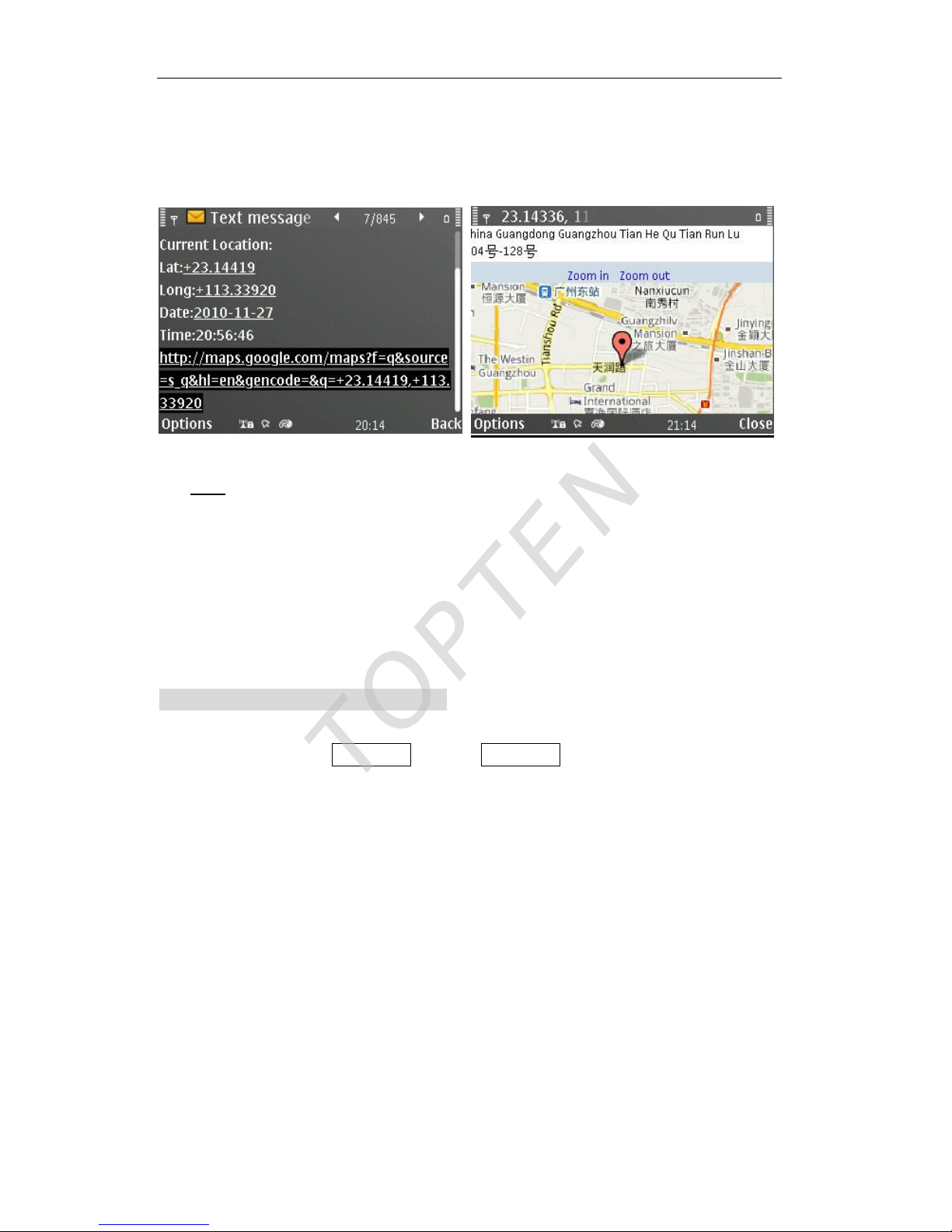
User can use any mobile phone to send SMS command 999password to
TOPTEN
Page 9
WT100 Personal Tracker User Manual V2.0
Page 8
the tracker SIM card number, the tracker will automatically send back the
location information with Google map’s URL, user can use smart phone(be
able to visit internet) to open the URL link, the car’s location will be showed
on the Google map.
Note:
The SIM card inside the tracker must be activated with the service of caller’s ID
display.
If the tracker can not get valid GPS signal or the last stored GPS coordinate in 2
minutes, it will send back this SMS to user “Can not get a valid location!”
Check the Real Physical Address
SMS command: ADDpassword or addpassword
Eg: add0000
When user sends this SMS command to the tracker, the tracker will
automatically send back the car’s real physical address (such as city name,
street name) to your mobile by SMS. There is no need for the user to setup
any server.
Remark: (1) The GPRS service of the tracker’s SIM card must be activated, and the
correct GPRS setting is needed, user can set up the GPRS upload time interval to 0 so
as to save the GPRS flow; (2) The physical address depends on the Google map’s
address information. If the place has very detailed information on Google map, then the
physical address by SMS is very detailed.
TOPTEN
Page 10

WT100 Personal Tracker User Manual V2.0
Page 9
Monitor the Voice
SMS command: 555password
Eg: 5550000
The user can send SMS command 555password to the tracker, then the
tracker will automatically call the user mobile phone. And the user can
secretly monitor the voice around about 10meter of the spot.
(Note: Only the call 1, call 2 & SMS center No. can monitor the voice)
Two-way Talking
The user uses any telephone to call the tracker’s SIM card number, the
tracker’s holder can shortly press SOS button to pickup the phone call (or
press hand-up button to deny the calling), after that, the user can talk with the
tracker holder freely as using normal mobile phone.
The tracker holder can press the call 1, call 2 or call 3 buttons to call out
the stored related telephone numbers which is set up by this SMS command:
#711# the 1st phone # the 2nd phone # the 3rd phone # Password ##
(Eg: #711#13922713571#0#0#0000##)
Show the GPS Coordinates on LCD
At mean time, users can press the hand-up button to show the GPS
coordinates (latitude, longitude, speed & GPS signal status) on the LCD.
SOS Alert
After setting up the SMS center number, when the tracker holder press
the SOS button for about 2 seconds, the tracker will send out the alert
message to the SMS center number(or GPRS platform), then it will call out
the 3 stored phone numbers in sequence.
TOPTEN
Page 11

WT100 Personal Tracker User Manual V2.0
Page 10
The SOS alert message is as following:
Data format:
Lat: Latitude Direction (+/-) Latitude Value
Long: Longitude Direction (+/-) Longitude Value
Speed: Speed KM/H
Direction: Direction
Date: Date YYYY-MM-DD
Time: Time HH:MM:SS (GMT)
BS: GSM Base Station code
Fix: Location state (A:available / V:shielded GPS signal )
ID: IMEI number
STATE: SOS
Low Power Alert
When the battery is low power, the tracker will automatically send out the
alert message to the SMS center number (or GPRS platform).
The low power alert message is as following:
Data format:
Lat: Latitude Direction (+/-) Latitude Value
Long: Longitude Direction (+/-) Longitude Value
Speed: Speed KM/H
Direction: Direction
Date: Date YYYY-MM-DD
Time: Time HH:MM:SS (GMT)
BS: GSM Base Station code
Fix: Location state (A:available / V:shielded GPS signal )
ID: IMEI number
STATE: LPD
TOPTEN
Page 12

WT100 Personal Tracker User Manual V2.0
Page 11
Geo-fence Alert
When the tracker is outside the certain fence during the period, the
tracker will automatically send out the alert message to the SMS center
number (or GPRS platform).
If the tracker is working at power save mode, this function can not work
properly.
Please refer to the later chapter for the setting of Geo-fence.
The Geo-fence alert message is as following:
Data format:
Lat: Latitude Direction (+/-) Latitude Value
Long: Longitude Direction (+/-) Longitude Value
Speed: Speed KM/H
Direction: Direction
Date: Date YYYY-MM-DD
Time: Time HH:MM:SS (GMT)
BS: GSM Base Station code
Fix: Location state (A:available / V:shielded GPS signal )
ID: IMEI number
STATE: OUT
TOPTEN
Page 13

WT100 Personal Tracker User Manual V2.0
Page 12
Chapter 4 Parameters Setting
Change the User Password
SMS command: #770#new password#old password##
Eg: #770#12aB#0000##
This instruction is used to change the user password. The length of the
user’s password is 4 digits. It can be combined with numbers and letters.
The default user password is: 0000
Set the Working Mode
SMS command: #700# mode No.#password##
Eg: #700#1#0000##
This SMS instruction is used to switch the tracker to 2 working mode.
Mode No. =0 (default setting): normal mode, in this mode, if there is valid
GPS signal, the GPS module will be opened on all the time, if there is no
GPS signal, the GPS module will be closed in intermittence(close for 5
minutes, then open for 1-2 minutes.).
Mode No. =1 : power save mode, in this mode, the GPS module will only
be opened when it needs to get the GPS location.
User can also press the hand-up button and hold for 3 seconds, then the
setting menu will be showed on the LCD, please select Work Mode to select
the option.
Set the SMS Center Number for Receiving Alarms
SMS command: #710#center No.#password##
Eg: #710#13922713571#0000##
TOPTEN
Page 14

WT100 Personal Tracker User Manual V2.0
Page 13
This SMS instruction is used to set the center number.
All the alarm SMS (including SOS alert, low-power alert, Geo-fence alert
etc.) will be sent to the SMS center number.
Set the Time Interval for SMS Auto-reporting
SMS command: #720# time interval #password##
Eg: #720#5#0000##
(The tracker will report the location by SMS to the center number for every 5
minutes)
This instruction is used to program the tracker to report the location to the
SMS center number automatically by the time interval.
Note:
² The value range of time interval is: 5~65535 (unit: minutes) , if time
interval=0, it will disable the auto-reporting function.
² If the SMS center number is empty, this SMS instruction will be invalid
& this function will not be enabled.
Set the Calling Phone No. for the Call Buttons
SMS command:
#711# the 1st phone # the 2nd phone # the 3rd phone # Password ##
(Eg: #711#13922713571#0#0#0000##)
After setting successfully, press the call 1 button, the tracker will
automatically call the 1st phone No.; press the call 2 button, the tracker will
automatically call the 2nd phone; press the SOS button, the tracker will
automatically send SOS alert message to the 3rd phone No, and call it later.
TOPTEN
Page 15

WT100 Personal Tracker User Manual V2.0
Page 14
Set the Time Zone
User can also press the hand-up button and hold for 3 seconds, then the
setting menu will be showed on the LCD, please select Gps Time Adjust to
select the option.
.
Geo-fence Settings Instructions
Set Geo-fence parameters
SMS command:
#600#fen-code#swtich#longitude#latitude#radius#start-time#end-time#
password##
Eg: #600#1#1#+113.9013#+22.5338#1000#09:30#15:00#0000##
Note:
Fen code : 1~5 (total 5 fences for different period)
switch : 1: ON, 0: OFF
longitude : East +.... , West -... (with +/- , in degree format)
latitude : North +.... ,South -... (with +/- , in degree format)
radius : 50~65535 ( unit: meters)
start-time: HH:MM (fixed time format in 24hours, with 0 before
number1~9, such as 09:05)
end-time: HH:MM (fixed time format in 24hours, with 0 before
number1~9, such as 20:05)
Switch ON/OFF Geo-fence function
SMS command:
#601#fen-code#swtich#password##
Note:
Fence code: 1~5 , (if it is 0,it stands for all the fences)
Switch : 1: ON, 0: OFF
TOPTEN
Page 16

WT100 Personal Tracker User Manual V2.0
Page 15
E.g.: #601#1#0#0000## turn off the 1st fence
#601#0#0#0000## turn off all the fences
#601#0#1#0000## turn on all the fences
Check the Setting of Geo-fence
SMS command:
#602#fen-code#password##
Note:
Fence code: 1~5 , (if it is 0,it stands for all the fences)
E.g.: #602#1#0000## check the setting of the 1st fence
The tracker will feed back SMS in the following format
Ffence-code,switch,longitude,latitude,radius,start-time,end-time
TOPTEN
Page 17

WT100 Personal Tracker User Manual V2.0
Page 16
Chapter 5 Setting for GPRS Connection
Compositive SMS for GPRS Setting
WWWpassword#IP:Sever domain or IP,COM port#APN:APN,APN-user,
APN-password#RPT:time interva,upload packet numbers#TCP:1 (0)##
e.g.:
WWW0000#IP:www.topten-track.com,8101#APN:CMNET,,#RPT:300,5#TCP
:1##
Note:
² IP: it can be Server IP or server domain name
² APN: access point name of the GSM SIM card
² RPT: time interval (5-65535) means sampling time interval. The
system will firstly sample the GPS data by this time interval, then
upload several data packets together to GPRS platform for saving
GPRS flow. The range of upload number is: 0-10.
² TCP: 1: open Gprs connection; 0: terminate the Gprs connection
Set the Device ID
SMS command: #801#deivce ID#password##
E.g.. #801#TK333#0000##
Note:
² The default setting of the device ID is the IMEI number of the tracker,
users are suggested to used the default setting & do not change it.
² The Device ID is only used for GPRS tracking.
² The device ID can be combined by letters & numbers.
² The length of the device ID is: 4-20 figures.
TOPTEN
Page 18

WT100 Personal Tracker User Manual V2.0
Page 17
Set APN (Access Point Name)
SMS command: #802#APN#APN-user#APN-password#password##
Eg 1: #802#internet###0000##
Eg 2: #802#web.gprs.mtnnigeria.net#web#gprs#0000##
Note:
² The default setting of the APN is internet, APN user & APN password
are empty.
² When the APN user or APN password is guest or empty, you can use
0 or empty at the place.
Set the Server IP & Port
#803#server#port#password##
E.g.: #803#98.143.144.145#8500#0000##
Note:
² The server can the IP address or the domain name
Set the Time-interval for GPRS Uploading
SMS command:
#730#time interval(5-65535)#upload packets No.(0-10) #password##
E.g.. #730#30#5#0000##
(Uploading GPRS data packet is enabled, the tracker will sample one
data packet for every 30 seconds, then upload 5 packets at one time
to the GPRS server.)
#730#0#0#0000## (to cancel the uploading)
Note:
² Default setting of the time interval is 0, that is to cancel uploading
TOPTEN
Page 19

WT100 Personal Tracker User Manual V2.0
Page 18
² If time interval or upload packets No. is 0, uploading function is cancel
² The range of time interval is: 5~65535 seconds. (Minimum: 5 sec.)
² The range of upload packets No.: 0-10
² This setting is only available for the GPRS uploading. It is working for
SMS auto-reporting.
Reset the Parameters with default settings
Please hold the SOS button, and turn on power switch at the same time,
then the system will be reset with the factory default setting as following:
Working Mode: Normal mode
Password: 0000
Call 1, Call 2, Call 3 phone numbers: empty
SMS center number: empty
SMS Auto-reporting function: OFF
GPRS data uploading: OFF
Geo-fence function OFF
GPRS server IP www.topten-track.com COM: 8100
APN internet
Time zone 00.00
TOPTEN
 Loading...