

Page 1

EX-92633 User Manual
1
EX-92633 Box PC
User Manual
Release Date Revision
Oct. 2007 V0.1
®2005 TopsCCC. All Rights Reserved. Published in Taiwan
Page 2

EX-92633 User Manual
2
Warning!_______________________________
This equipment generates, uses and can radiate radio frequency energy and if not installed and
used in accordance with the instructions manual, it may cause interference to radio
communications.
It has been tested and found to comply with the limits for a Class A computing device pursuant to
FCC Rules, which are designed to provide reasonable protection against such interference when
operated in a commercial environment. Operation of this equipment in a residential area is likely
to cause interference in which case the user at his own expense will be required to take whatever
measures may be required to correct the interference.
Disclaimer
This information in this document is subject to change without notice. In no event shall
TopsCCC be liable for damages of any kind, whether incidental or consequential, arising from
either the use or misuse of information in this document or in any related materials.
Electric Shock Hazard – Do not operate the machine with its back cover removed. There are
dangerous high voltages inside.
Page 3

EX-92633 User Manual
3
Table of Contents______________________
Warning!…………………………………………………………………………….……..….2
Disclaimer………………………………………………………………….…………………2
Chapter 1 Getting Started
1.1 Features…....………………….………………………….…………..…...…4
1.2 Specifications………………………………………….………….……...…..4
1.3 Dimensions…………………………………...……………….…………......5
1.4.Mainboard…..………………………………………….……………..…...7
1.5 Safety Precautions……….………………….………….……….……….….9
1.6 Brief Description of EX-92633………………………….…………………10
Chapter 2 Hardware Installation
2.1 Installation of CPU...…...………………………………….……………11
2.2 Installation of HDD...…...………………………………….……………12
2.3 Installing the Memory.….………………………………….……………14
2.4 Installing the Jumpers………………………….………….……………15
2.5 Connectors on the Mainboard…..………………………….……………19
Chapter 3 Installations of BIOS
3.1 BIOS Setup……………………………………………….……………23
Chapter 4 Installations of Drivers
4.1 Installations of Drivers………………………………….….….……………42
Figures
Figure 1.1: Dimensions ……………………………………………………...6
Figure 1.2: Mainboard Overview …………………………………………...7
Figure 1.3: Rear View…..………………………..….………………………10
Page 4

EX-92633 User Manual
4
Chapter 1_____________________________
1.1 Features
z Intel Celeron M / Pentium M, up to 1.8GHz
z Fanless design
z Intel 852GM + ICH4
z 1 x 184-pin DDR DIMM with up to 1GB
z 2 x 10/100 Ethernet LAN, 1 x VGA connector
z 3 x COM ports & 4 x USB ports
z 1 x AC’97 Line-Out / 1 x MIC
z 1 x 2.5” anti-vibration slim HDD & 1 x CF Socket on board
z Support Single 11~28V/DC Input, support AT/ATX mode
1.2 Specifications
System
CPU:
Socket 479 for Intel Celeron M / Pentium M, up to 1.8GHz
Chipset:
Intel 852GM + ICH4
System Memory:
DDR DIMM with up to 1GB
DRAM Socket:
One 184-pin DDR DIMM
Drive Bay:
1 x 2.5” anti-vibration slim HDD
BIOS:
Award Flash
Watchdog Timer:
Generates system reset, 256 levels
I/O Port:
3 x COM ports, 4 x USB2.0 ports, 2 x PS/2 keyboard and mouse ports, 1x VGA, Audio Jack (AC’97,
Line-Out/MIC),
RJ-45 LAN Port:
2 x 10/100Mbps
VGA:
Built-in Intel® 82852GM+ICH4
Page 5

EX-92633 User Manual
5
Certifications:
FCC & CE Class A certified
Mechanical
Construction:
Heavy steel & Alu. Heatsink
Color:
Blue
Dimensions:
240(W) x 80(D) x 230mm(H)
Power Supply:
11~28V/DC Input, support AT/ATX mode
Environment
Operating temperature:
0~60 C°
Storage temperature:
-20°C ~ 80 C°
Relative humidity:
10~90% @ 40 C non° -condensing
Vibration:
5~17Hz, 0.1” double amplitude displacement
17~640Hz, 1.5G acceleration peak to peak
Shock:
10G acceleration peak to peak (11 millimeters)
Page 6

EX-92633 User Manual
6
1.3 Dimensions
Figure 1.1: Dimensions of the EX-92633
Page 7
EX-92633 User Manual
7
1.4 Mainboard
Introducing the Motherboard
Figure 1.2: Mainboard Overview
Table of Motherboard Components
LABEL COMPONENT
1 Processor 479 socket for Pentium M/Celeron M CPUs
2 CPU_FAN CPU cooling fan connector
3 DIMM1 184-pin DDR SDRAM slot
4 SYS_FAN System cooling fan connector
5 CF_PWR CF power voltage jumper
6 ATX_PWR Standard 20-pin ATX power connector
7 LPT LPT pin header
8 FDD Floppy disk drive connector
9 IDE2 Secondary IDE connector
Page 8

EX-92633 User Manual
8
10 IDE1 Primary IDE connector
11 PANEL Front Panel switch/LED header
12 CLR_CMOS Clear CMOS jumper
13 PCI slot 32-bit PCI add-on card slot
14 USB3 Front Panel USB header
15 DIO DIO port header
16 AUDIO Front panel Audio header
17 LVDS2 Low Voltage Differential Signaling Transmitter Channel B
18 LVDS1 Low Voltage Differential Signaling Transmitter Channel A
19 LVDS_PWR Low Voltage Differential Signaling Power header
20 COM4 Serial port header
21 JP2 COM3/COM4 Ring function selector
22 JP1 COM1/COM2 Ring function selector
23 SCN1 C.F. Socket for installing C.F.(Compact Flash) card
Specifications
System
CPU:
Socket 479 for Intel Celeron M / Pentium M, up to 1.8GHz
CPU FSB Frequency:
400MHz
Chipset:
Intel 852GM + ICH4
DRAM:
1 x 184 pin DDR DIMM max. up to 1GB
BIOS:
Award BIOS with 4 Mbit Flash ROM, ACPI supported
Watchdog:
Generates system reset; 256 levels
Power Supply:
Page 9

EX-92633 User Manual
9
11~28V/DC Input, support AT/ATX mode
Dimensions:
170mm x 170mm (6.69 x 6.69 inches)
Environment
Operating Temperature:
0~ 60° ℃ (32°~ 140℉)
Storage Temperature:
-20°~ 80℃ (68°~ 176℉)
Relative Humidity:
10~90% (non-condensing)
1.5 Safety Precautions
Follow the messages below to avoid your systems from damage:
* Avoid your system from static electricity on all occasions.
* Prevent electric shock. Don‘t touch any components of this card when the card is power-on.
Always disconnect power when the system is not in use.
*Disconnect power when you change any hardware devices. For instance, when you connect
a jumper or install any cards, a surge of power may damage the electronic components or
the whole system.
Page 10

EX-92633 User Manual
10
1.6 Brief Description of the EX-92633
The EX-92633 is a Fan-less High-efficiency Thermal Solution and ultra-compact standalone Box PC,
powered by an Intel Celeron M / Pentium M, up to 1.8GHz, and supporting 4 USB 2.0 ports, 3x COM
Ports, 1 x VGA and Audio etc. It is ideal for kiosks, POS systems, airport terminal controllers, digital
entertainments, etc. and running factory operations from small visual interface and maintenance
applications to large control process applications. The EX-92633 works very well along with any of our
Display Monitor series. It absolutely can provide an easy way to perform control and field maintenance.
It comes with a DC11~28V wide-ranging power input.
Figure 1.3: Rear View of EX-92633
Page 11

EX-92633 User Manual
11
Chapter 2 Hardware Installation
2.1 Installation of CPU
This section provides information on how to use the jumpers and connectors on the mainboard in
order to set up a workable system.
2.1.1 Installing the CPU
The mainboard supports a Socket 479 processor socket for Intel Pentium M or Celeron M processors.
The processor socket comes with a screw to secure the processor. As shown in the left picture below,
loosen the screw first before inserting the processor. Place the processor into the socket by making
sure the notch on the corner of the CPU corresponds with the notch on the inside of the socket. Once
the processor slides into the socket, fasten the screw.
Figure 2.1: Installation of CPU
Note:
Make sure the heat sink and the top surface of the CPU are in total contact to
avoid the overheating problem that would cause your system to hang or be unstable.
Page 12

EX-92633 User Manual
12
2.2 Installation of HDD
2.2.1 Removal of HDD Bracket
To remove the HDD bracket from its position,
j
ust unscrew the 4 screws as shown in the
picture.
2.2.2 Connecting Cable to HDD
Connect the cable to the HDD, making sure
that the red stripe of the cable is on the right
side (if connected with the top of the HDD
facing upward).
Page 13

EX-92633 User Manual
13
2.2.3 Tightening HDD
Tightly fasten the four screws as circled to
secure the HDD.
2.2.4 Installing HDD
Get the 4 screws tightened onto the chassis
as shown in the picture.
Page 14
EX-92633 User Manual
14
2.3 Installing the Memory
The mainboard supports one DDR memory socket for a maximum total memory of 1GB. The memory
module capacities supported are 128MB, 256MB, 512MB and 1GB. The following figure shows the
supported DDR DIMM configurations. The Intel 855GME supports configurations defined in the
JEDEC DDR DIMM specifications only. Non-JEDEC standard DIMMs such as double-sided x16 DDR
SDRAM DIMMs are not supported.
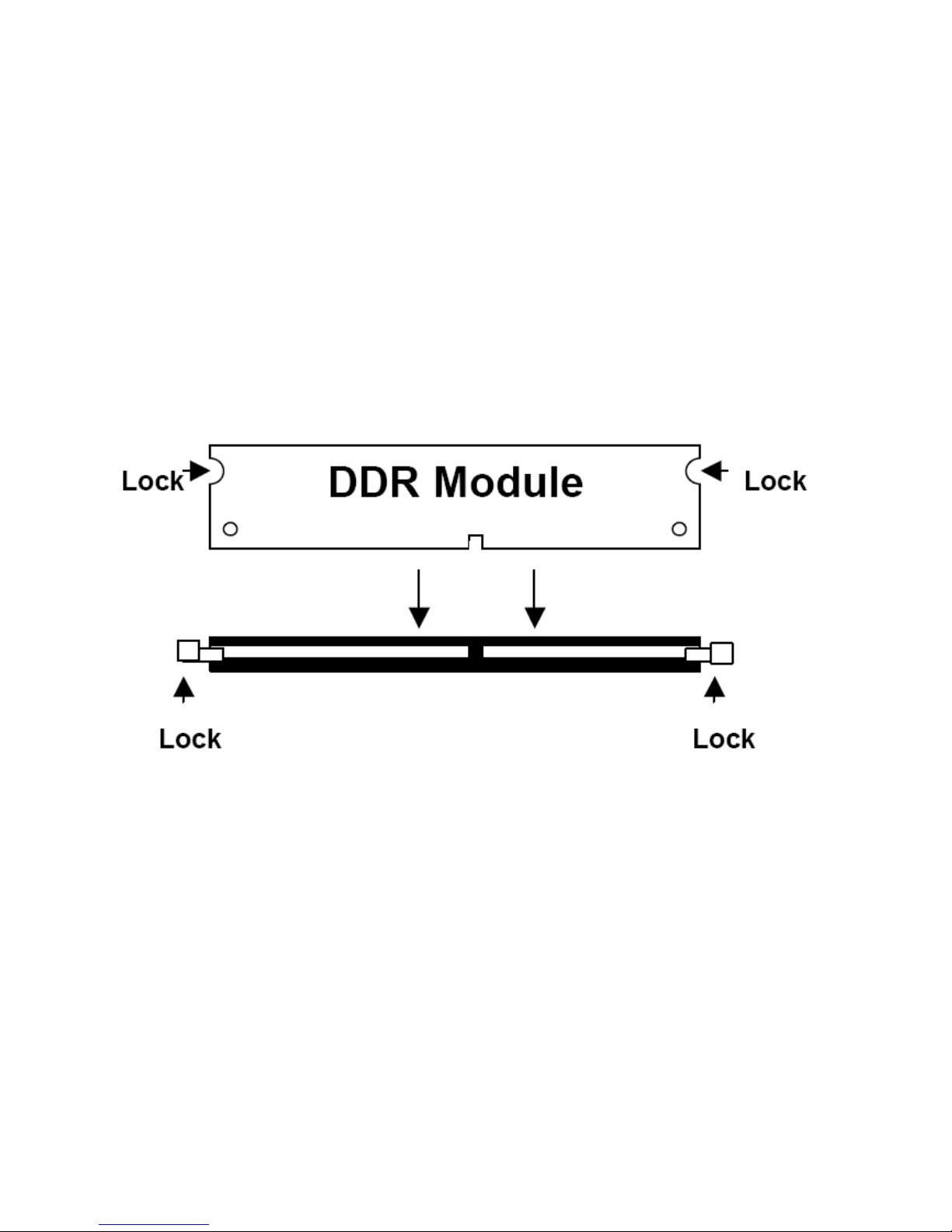
To install the DDR modules, locate the memory slot on the board and perform the following steps:
1. Hold the DDR module so that the key of the DDR module is aligned with those on the memory slot.
2. Gently insert the DDR module into the memory slot and lock the two levers in place.
3. To remove the DDR module, press the two levers with both hands.
Figure 3.3: Installation of Memory Module
Page 15
EX-92633 User Manual
15
2.4 Installing the Jumpers
Use the motherboard jumpers to set system configuration options. Jumpers with more than one pin
are numbered. When setting the jumpers, ensure that the jumper caps are placed on the correct pins.
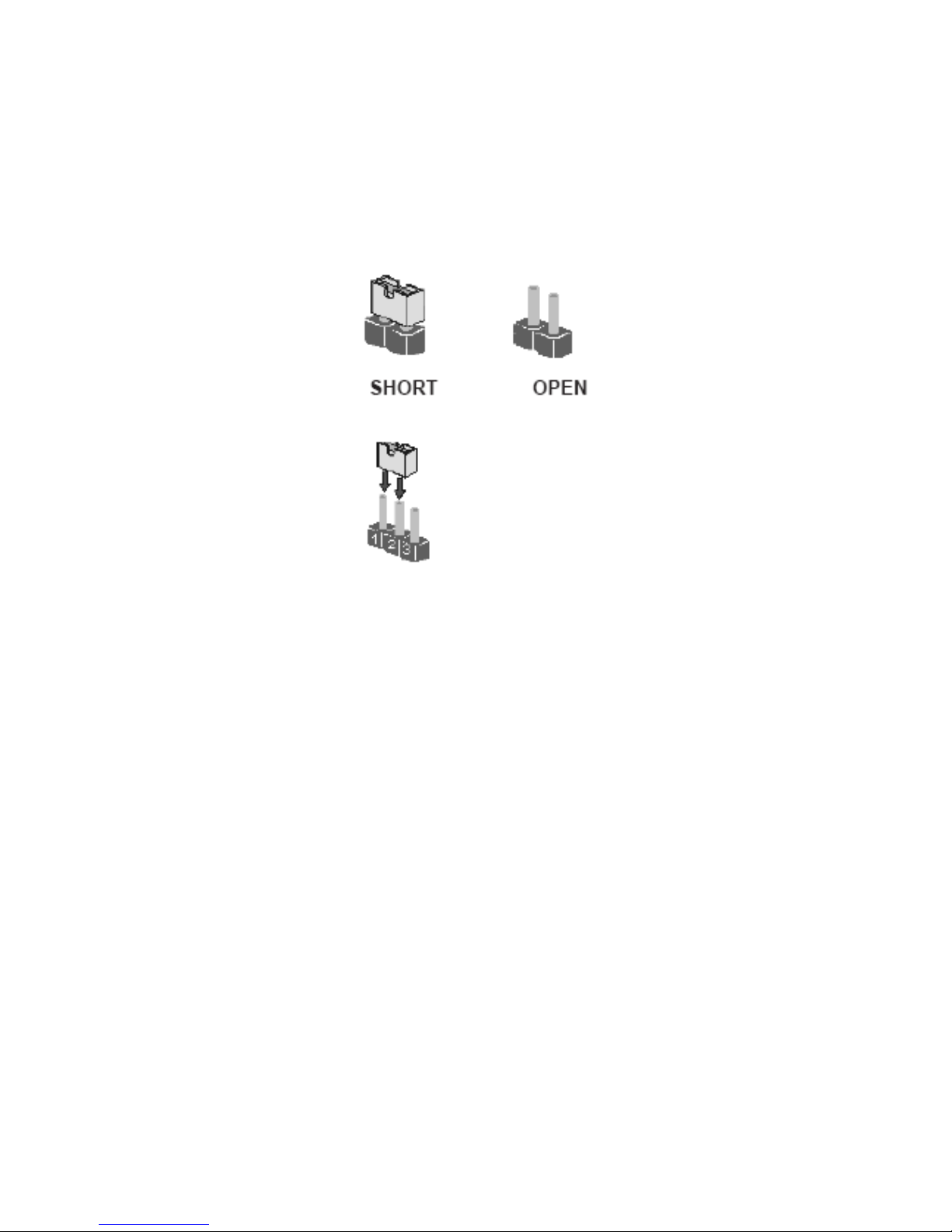
The illustrations show a 2-pin jumper. When the jumper cap is placed on both pins, the jumper is
SHORT. If you remove the jumper cap, or place the jumper cap on just one pin, the jumper is OPEN.
This illustration shows a 3-pin jumper. Pins 1 and 2 are SHORT
Checking Jumper Settings
The following illustration shows the location of the motherboard jumpers. Pin 1 is labeled.
Page 16
EX-92633 User Manual
16
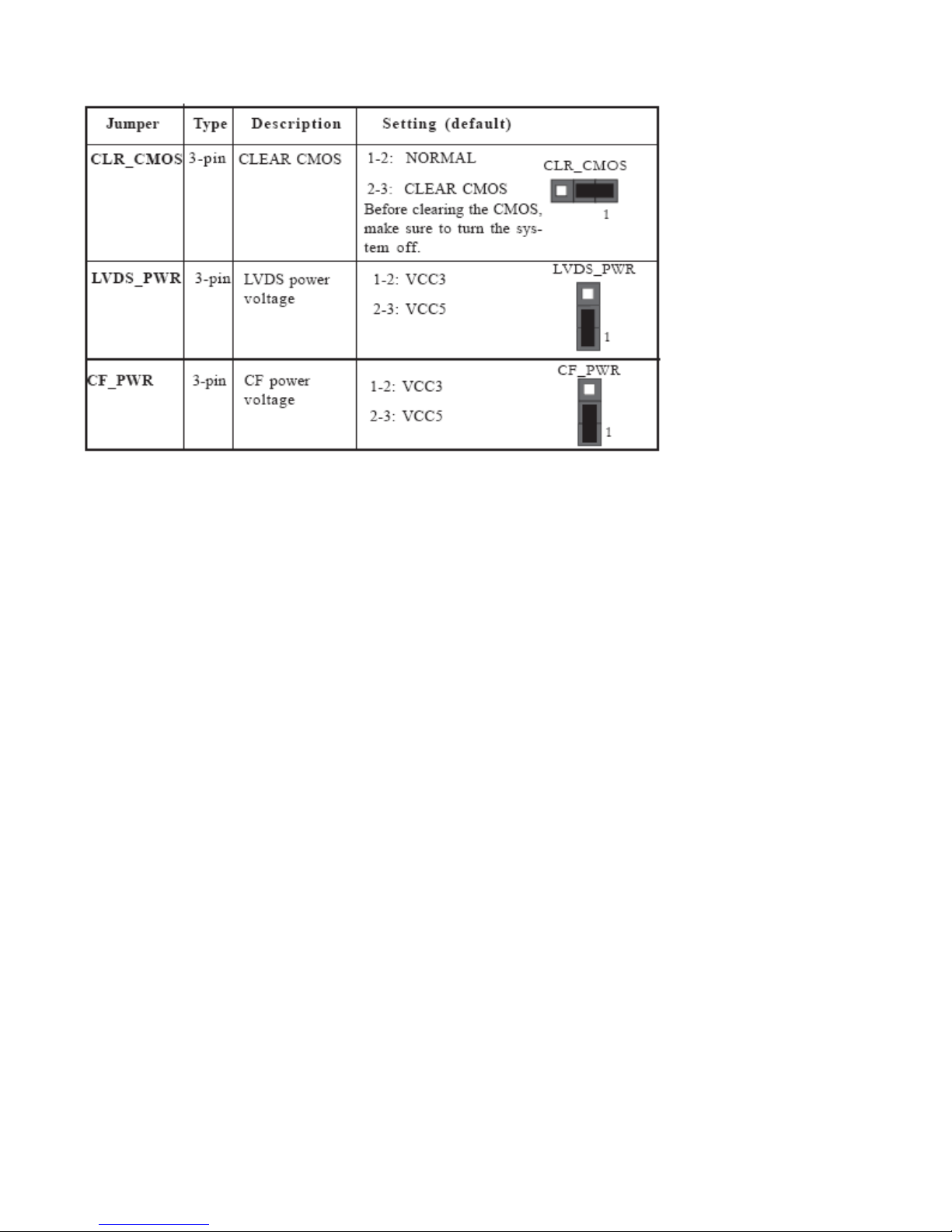
Jumper Settings
Connecting Case Components
After you have installed the motherboard into a case, you can begin connecting the motherboard
components. Refer to the following:
1 Connect the CPU cooling fan cable to CPU_FAN.
2 Connect the system cooling fan connector to SYS_FAN.
3 Connect the case switches and indicator LEDs to the PANEL.
4 Connect the standard power supply connector to ATX_POWER.
Page 17
EX-92633 User Manual
17
CPU_FAN/SYS_FAN: FAN Power Connectors
Pin Signal Name Function
1 GND System Ground
2 +12V Power +12V
3 Sense Sensor
ATX_POWER: ATX 20-pin Power Connector
Pin Signal Name Pin Signal Name
1 VCC3 11 VCC3
2 VCC3 12 -12V
3 GND 13 GND
4 VCC 14 PS-ON#
5 GND 15 GND
6 VCC 16 GND
7 GND 17 GND
8 PWROK 18 -5V
9 5VSB 19 VCC
10 +12V 20 VCC
Page 18

EX-92633 User Manual
18
Front Panel Header
The front panel header (PANEL) provides a standard set of switch and LED headers commonly found
on ATX or micro-ATX cases. Refer to the table below for information:
Pin Signal Name Function Pin Signal Name Function
1 HD_LED_P Hard Disk LED+ 2 FPPWR/SLP *MSG LED+
3 HD_LED_N Hard disk LED- 4 FP PWR/SLP *MSG LED
5 RST_SW_N Reset Switch 6 PWR_SW_P Power Switch
7 RST_SW_P Reset Switch 8 PWR_SW_N Power Switch
9 RSVD_DNU Reserved 10 Key No pin
*MSG LED (dual color or single color)
Hard Drive Activity LED
Connecting pins 1 and 3 to a front panel mounted LED provides visual indication that data is being
read from or written to the hard drive. For the LED to function properly, an IDE drive should be
connected to the onboard IDE interface. The LED will also show activity for devices connected to the
SCSI (hard drive activity LED) connector.
Installing the Motherboard
Power/Sleep/Message waiting LED
Connecting pins 2 and 4 to a single or dual-color, front panel mounted LED provides power on/off,
sleep, and message waiting indication.
Reset Switch
Supporting the reset function requires connecting pin 5 and 7 to a momentary-contact switch that is
normally open. When the switch is closed, the board resets and runs POST.
Power Switch
Supporting the power on/off function requires connecting pins 6 and 8 to a momentary-contact switch
that is normally open. The switch should maintain contact for at least 50 ms to signal the power supply
to switch on or off. The time requirement is due to internal de-bounce circuitry. After receiving a
power on/off signal, at least two seconds elapses before the power supply recognizes another on/off
signal.
Page 19
EX-92633 User Manual
19
2.5 Connectors on the Mainboard
The connectors on the mainboard allows you to connect external devices, such as keyboard, floppy
disk drives, hard disk drives, printers, etc. the following table lists the connectors on the Mainboard
and their respective functions
DIO: DIO port header
Pin Signal Name Pin Signal Name
1 GPIO 32 2 GPIO 36
3 GPIO 33 4 GPIO 37
5 GPIO 34 6 GPIO 38
7 GND 8 GND
AUDIO: Front Panel Audio header
This header allows the user to install auxiliary front-oriented microphone and line-out ports for easier
access.
Pin Signal Name Function
1 AUD_MIC Front Panel Microphone input signal
2 AUD_GND Ground used by Analog Audio Circuits
3 MIC_BIAS Microphone Power
Page 20

EX-92633 User Manual
20
4 AUD_VCC Filtered +5V used by Analog Audio Circuits
5 AUD_F_R Right Channel audio signal to Front Panel
6 AUD_RET_R Right Channel Audio signal to Return from
Front Panel
7 REVD Reserved
8 Key No Pin
9 AUD_F_L Left Channel Audio signal to Front Panel
10 AUD_RET_L Left Channel Audio signal to Return from
Front Panel
USB3: Front Panel USB header
The motherboard has four USB ports installed on the rear edge I/O port array. Additionally, some
computer cases have USB ports at the front of the case. If you have this kind of case, use auxiliary
USB connector to connect the front-mounted ports to the motherboard.
Pin Signal Name Function
1 VCC Power
2 VCC Power
3 USBP2-N Negative data signal of
4 USBP3-N Positive date signal of
5 USBP2-P Positive date signal of
6 USBP3-P Negative data signal of
7 GND System
8 GND System
9 Key No pin
10 OC# Over current detection of
* Please make sure that USB cable has the same pin assignment as indicated above.
A different pin assignment may cause damage or system hang-up.
LVDS1~LVDS2: Low Voltage Differential Signaling Transmitter interface Channel A~B
Pin Signal Name Pin Signal Name
1 VCC 2 VCC
3 VCC 4 VCC
5 Data: YAM0 6 Data: YAM3
7 Data: YAP0 8 Data: YAP3
9 GND 10 GND
11 Data: YAM1 12 Clocl:CLKAM
13 Data: YAP1 14 Clock: CLKAP
15 GND 16 GND
Page 21

EX-92633 User Manual
21
17 Data: YAM2 18 GND
19 Data: YAP2 20 GND
JP1~JP2: COM1~4 Ring function selectors
Pin Signal Name Pin Signal Name
1 VCC5 2 VCC5
3 XNRI1 4 XNRI2
5 VCC12 6 VCC12
7 XNRI1 8 XNRI2
9 NRI1 10 NRI2
LPT: LPT header
Pin Singal Name Function Pin Singal Name Function
1 STB# Strobe 2 D0 Data 0
3 D1 Data 1 4 D2 Data 2
5 D3 Data 3 6 D4 Data 4
7 D5 Data 5 8 D6 Data 6
9 D7 Data 7 10 ACK# Acknowledge
11 BUSY Busy 12 PE Paper End
13 SLCT Select 14 AFD# Auto Feed
15 ERR# Error 16 INIT# Initialize
17 SLIN# Select In 18 GND Ground
19 GND Ground 20 GND Ground
21 GND Ground 22 GND Ground
23 GND Ground 24 GND Ground
25 GND Ground 26 NC No pin
COM4: Onboard serial port header
Connect a serial port extension bracket to this header to add a second serial port to your system.
Pin Singal Name Pin Singal Name
1 DCDB 2 RxD
3 TxD 4 DTRB
5 Ground 6 DSRB
7 RTSB 8 CTSB
9 RI 10 KEY
Page 22

EX-92633 User Manual
22
Connecting I/O Devices
The backplane of the motherboard has the following I/O ports:
PS2 Mouse Use the upper PS/2 port to connect a PS/2 pointing device.
PS2 Keyboard Use the lower PS/2 port to connect a PS/2 keyboard.
Serial Port (COM1~COM3) Use the COM ports to connect serial devices such as mice or fax/
modems.
VGA Port Connect your monitor to the VGA port.
LAN Port (optional) Connect an RJ-45 jack to the LAN port to connect your computer to the
Network.
USB Ports Use the USB ports to connect USB devices.
Audio Ports Use the two audio ports to connect audio devices. The first jack (the orange one) is for
stereo line-out signal. The second jack is for microphone.
Page 23

EX-92633 User Manual
23
Chapter 3 BIOS Setup
3.1 BIOS Setup
About the Setup Utility
The computer uses the latest Award BIOS with support for Windows Plug and Play. The CMOS chip
on the motherboard contains the ROM setup instructions for configuring the motherboard BIOS.
The BIOS (Basic Input and Output System) Setup Utility displays the system’s configuration status
and provides you with options to set system parameters. The parameters are stored in
battery-backed-up CMOS RAM that saves this information when the power is turned off. When the
system is turned back on, the system is configured with the values you stored in CMOS.
The BIOS Setup Utility enables you to configure:
Hard drives, diskette drives and peripherals
Video display type and display options
Password protection from unauthorized use
Power Management features
The settings made in the Setup Utility affect how the computer performs. Before using the Setup Utility,
ensure that you understand the Setup Utility options.
This chapter provides explanations for Setup Utility options.
The Standard Configuration
A standard configuration has already been set in the Setup Utility. However, we recommend that you
read this chapter in case you need to make any changes in the future.
This Setup Utility should be used:
when changing the system configuration
when a configuration error is detected and you are prompted to make changes to the Setup
Utility
when trying to resolve IRQ conflicts
when making changes to the Power Management configuration
when changing the password or making other changes to the Security Setup
Entering the Setup Utility
When you power on the system, BIOS enters the Power-On Self Test (POST) routines. POST is a
series of built-in diagnostics performed by the BIOS. After the POST routines are completed, the
following message appears:
Page 24
EX-92633 User Manual
24
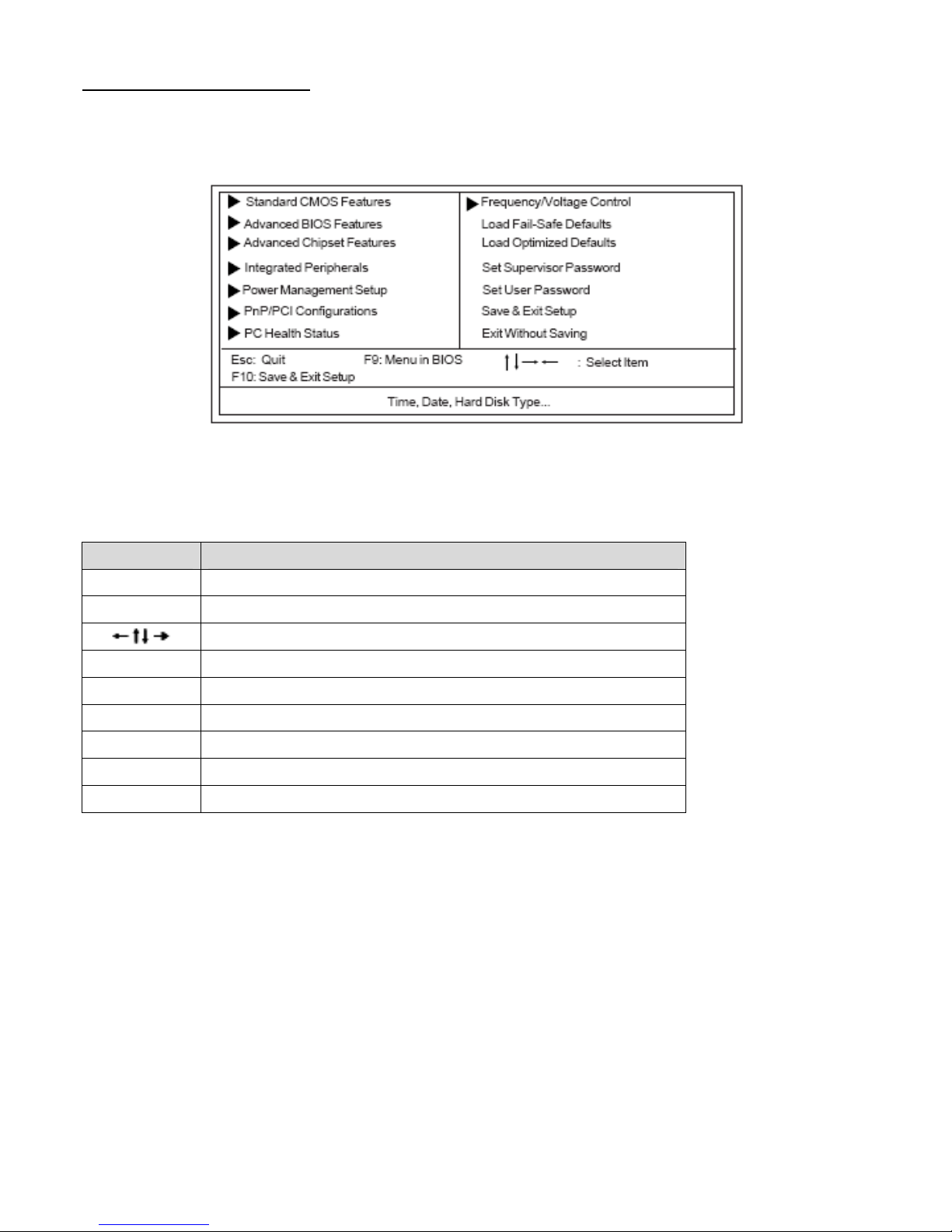
Press DEL to enter SETUP
Pressing the delete key accesses the BIOS Setup Utility:
Phoenix-AwardBIOS CMOS Setup Utility:
BIOS Navigation Keys
The BIOS navigation keys are listed below:
KEY FUNCTION
Key Function
Esc Exits the current menu
Scrolls through the items on a menu
+/-/PU/PD Modifies the selected field’s values
F10 Saves the current configuration and exits setup
F1 Displays a screen that describes all key functions
F5 Loads previously saved values to CMOS
F6 Loads a minimum configuration for troubleshooting
F7 Loads an optimum set of values for peak performance
Updating the BIOS
You can download and install updated BIOS for this motherboard from the manufacturer’s Web site.
New BIOS provides support for new peripherals, improvements in performance, or fixes for known
bugs. Install new BIOS as follows:
1 If your motherboard has a BIOS protection jumper, change the setting to allow BIOS flashing.
2 If your motherboard has an item called Firmware Write Protect in Advanced BIOS features,
disable it. (Firmware Write Protect prevents BIOS from being overwritten.
3 Create a bootable system disk. (Refer to Windows online help for information on creating a
bootable system disk.) 4 Download the Flash Utility and new BIOS file from the manufacturer’s
Web site. Copy these files to the system diskette you created in Step 3.
Page 25
EX-92633 User Manual
25
5 Turn off your computer and insert the system diskette in your computer’s diskette drive. (You
might need to run the Setup Utility and change the boot priority items on the Advanced BIOS
Features Setup page, to force your computer to boot from the floppy diskette drive first.)
6 At the A:\ prompt, type the Flash Utility program name and press <Enter>.
7 Type the filename of the new BIOS in the “File Name to Program” text box. Follow the onscreen
directions to update the motherboard BIOS.
8 When the installation is complete, remove the floppy diskette from the diskette drive and restart
your computer. If your motherboard has a Flash BIOS jumper, reset the jumper to protect the
newly installed BIOS from being overwritten.
Using BIOS
When you start the Setup Utility, the main menu appears. The main menu of the Setup Utility displays
a list of the options that are available. A highlight indicates which option is currently selected. Use the
cursor arrow keys to move the highlight to other options. When an option is highlighted, execute the
option by pressing <Enter>.
Some options lead to pop-up dialog boxes that prompt you to verify that you wish to execute that
option. Other options lead to dialog boxes that prompt you for information.
Some options (marked with a triangle ►) lead to submenus that enable you to change the values for
the option. Use the cursor arrow keys to scroll through the items in the submenu.
In this manual, default values are enclosed in parenthesis. Submenu items are denoted by a
triangle►.
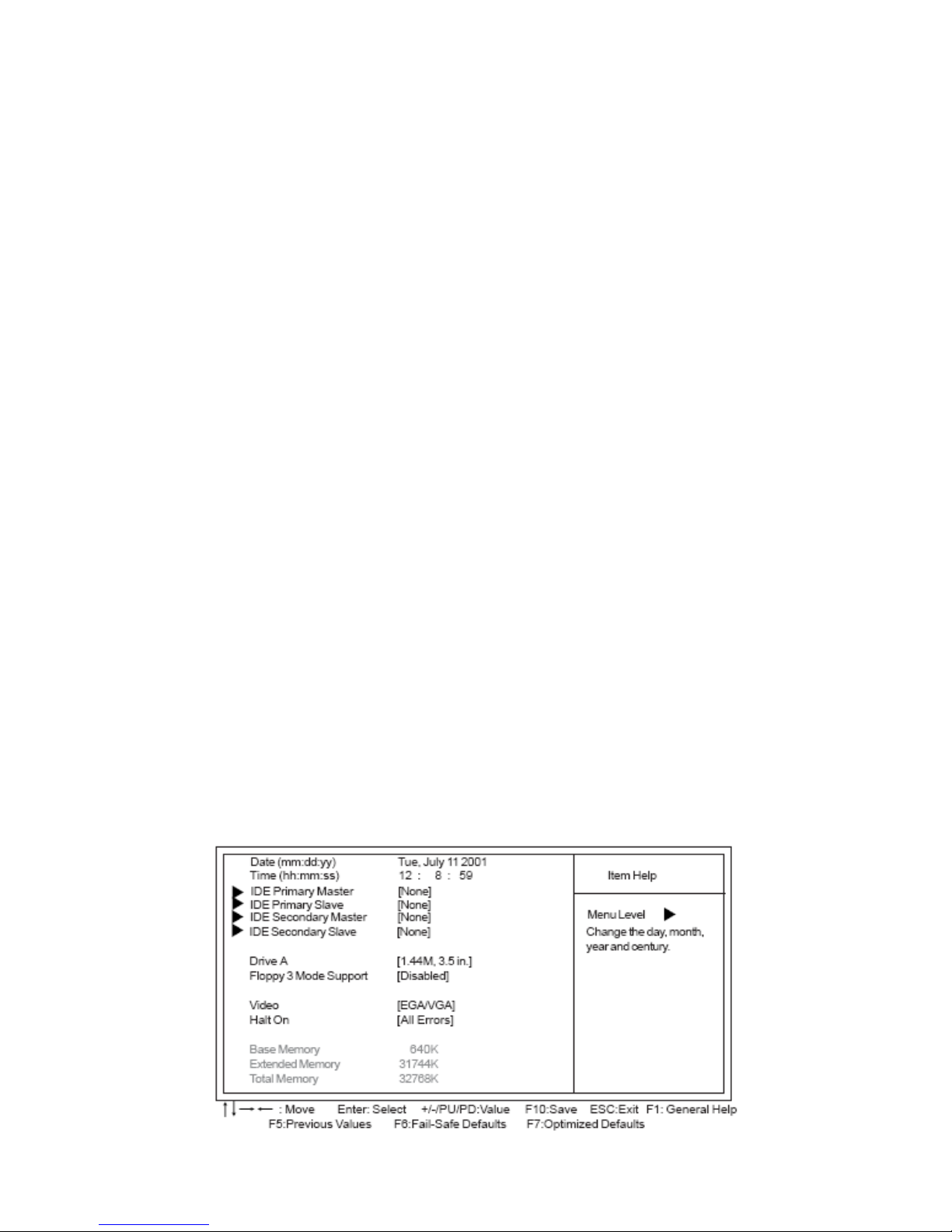
Standard CMOS Features
This option displays basic information about your system.
Phoenix-AwardBIOS CMOS Setup Utility
Standard CMOS Features
Page 26
EX-92633 User Manual
26
Date and Time
The Date and Time items show the current date and time on the computer. If you are running a
Windows OS, these items are automatically updated whenever you make changes to the Windows
Date and Time Properties utility.
►IDE Devices (None)
Your computer has two IDE channels (Primary and Secondary) and each channel can be installed with
one or two devices (Master and Slave). Use these items to configure each device on the IDE channel.
Press <Enter> to display the IDE submenu:
Phoenix-AwardBIOS CMOS Setup Utility
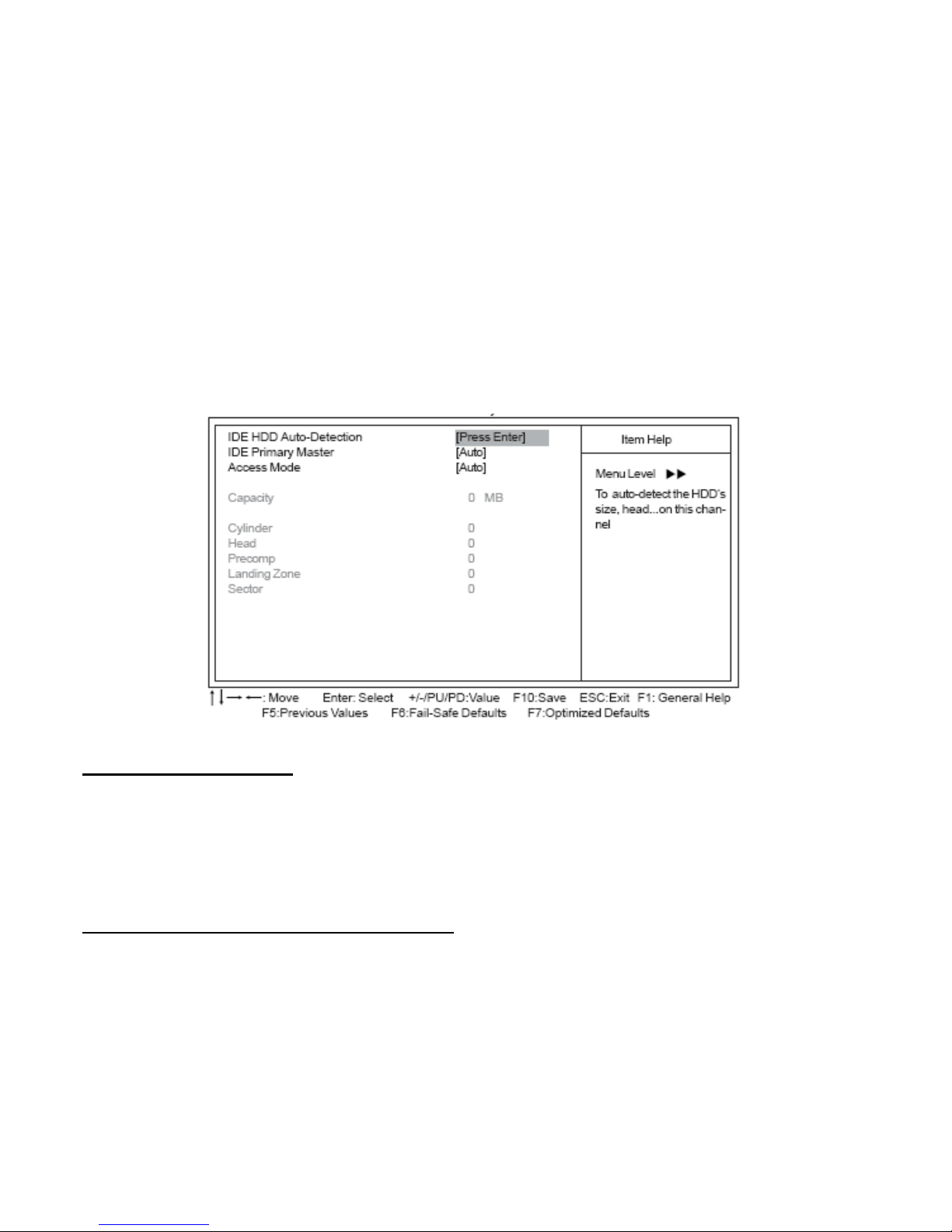
IDE Primary Master
IDE HDD Auto-Detection
Press <Enter> while this item is highlighted to prompt the Setup Utility to automatically detect and
configure an IDE device on the IDE channel.
*If you are setting up a new hard disk drive that supports LBA mode, more than one line will appear in the parameter box.
Choose the line that lists LBA for an LBA drive.
IDE Primary/Secondary Master/Slave (Auto)
Leave this item at Auto to enable the system to automatically detect and configure IDE devices on the
channel. If it fails to find a device, change the value to Manual and then manually configure the drive
by entering the characteristics of the drive in the items described below.
Refer to your drive’s documentation or look on the drive casing if you need to obtain this information. If
no device is installed, change the value to None.
Page 27
EX-92633 User Manual
27
*Before attempting to configure a hard disk drive, ensure that you have the configuration information supplied by the
manufacturer of your hard drive. Incorrect settings can result in your system not recognizing the installed hard disk.
Access Mode (Auto)
This item defines ways that can be used to access IDE hard disks such as LBA (Large Block
Addressing). Leave this value at Auto and the system will automatically decide the fastest way to
access the hard disk drive.
Press <Esc> to return to the Standard CMOS Features page.
Drive A (1.44M, 3.5 in.)
This item defines the characteristics of any diskette drive attached to the system.
Floppy 3 Mode Support (Disabled)
Floppy 3 mode refers to a 3.5-inch diskette with a capacity of 1.2 MB. Floppy 3 mode is sometimes
used in Japan.
Video (EGA/VGA)
This item defines the video mode of the system. This motherboard has a built-in VGA graphics system;
you must leave this item at the default value.
Halt On (All Errors)
This item defines the operation of the system POST (Power On Self Test) routine. You can use this
item to select which types of errors in the POST are sufficient to halt the system.
Base Memory, Extended Memory, and Total Memory
These items are automatically detected by the system at start up time. These are display-only fields.
You cannot make changes to these fields.
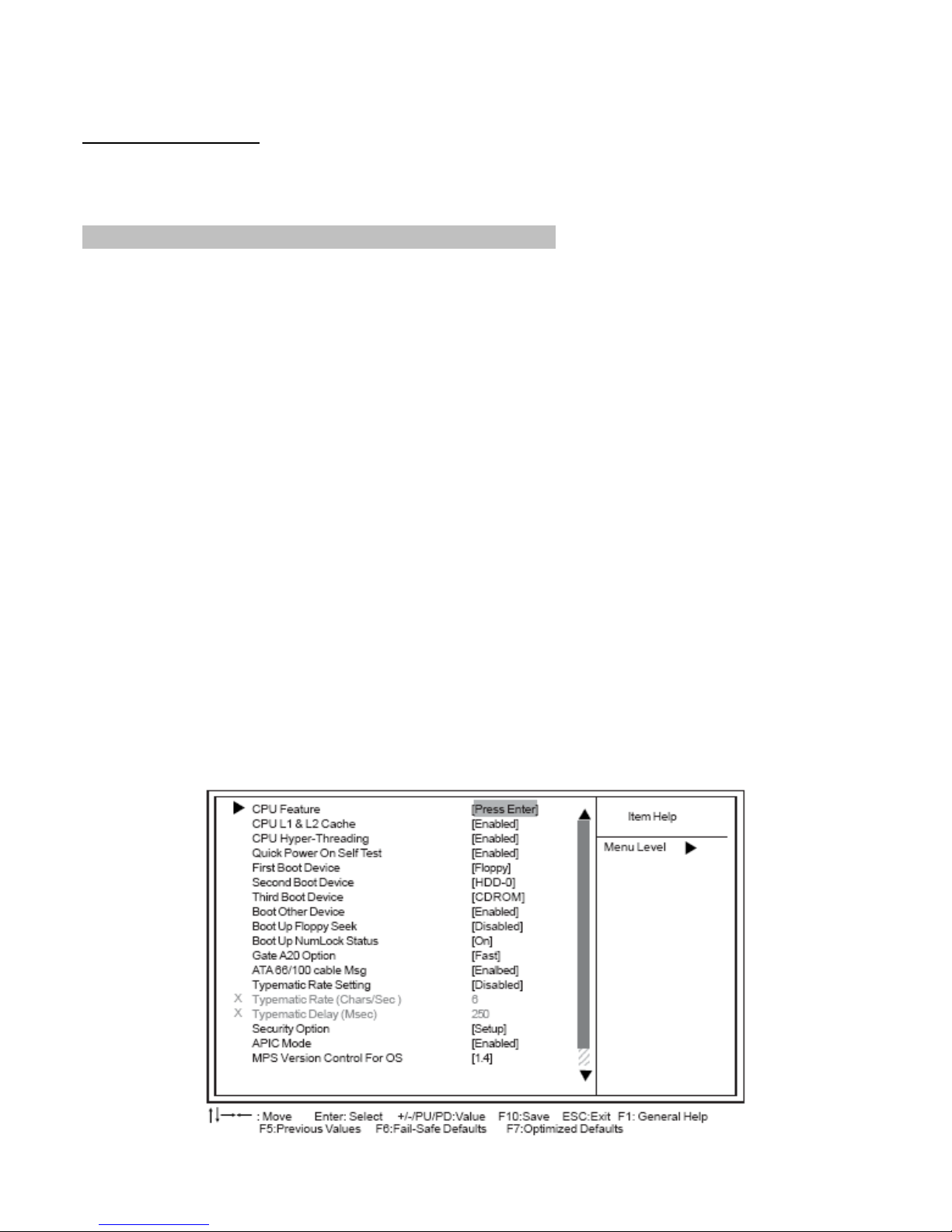
Advanced BIOS Features
This option defines advanced information about your system.
Phoenix-AwardBIOS CMOS Setup Utility
Advanced BIOS Features
Page 28
EX-92633 User Manual
28
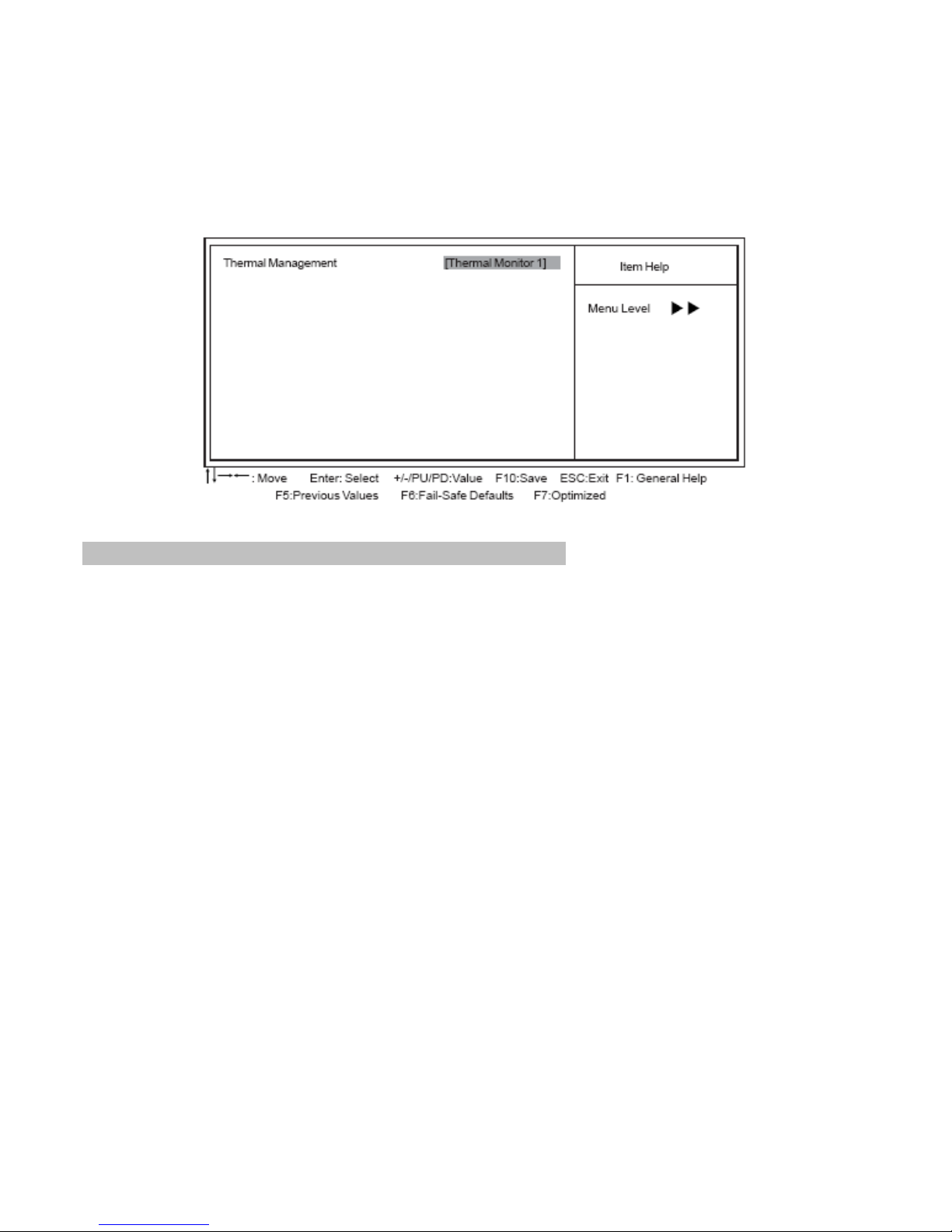
►CPU Feature (Press Enter)
Scroll to this item and press <Enter> to view the following screen, and the following items are available
when the motherboard doesn’t support Prescott CPU; however, when the motherboard supports
Prescott CPU, the items of TM2 Bus Ratio, TM2 VID and Limit CPUID MaxVal will be available.
Phoenix-AwardBIOS CMOS Setup Utility
CPU Feature
Press <Esc> to return to the Advanced BIOS Features screen.
CPU L1 & L2 Cache (Enabled)
All processors that can be installed in this motherboard use internal level 1 (L1) and external level 2
(L2) cache memory to improve performance. Leave this item at the default value for better
performance.
CPU Hyper-Threading (Enabled)
This item is only available when the chipset supports Hyper-Threading and you are using a
Hyper-Threading CPU.
Quick Power On Self Test (Enabled)
Enable this item to shorten the power on self testing (POST) and have your system start up faster. You
might like to enable this item after you are confident that your system hardware is operating smoothly.
First/Second/Third Boot Device (Floppy/HDD-0/CDROM)
Use these three items to select the priority and order of the devices that your system searches for an
operating system at start-up time.
Boot Other Device (Enabled)
When enabled, the system searches all other possible locations for an operating system if it fails to
find one in the devices specified under the First, Second, and Third boot devices.
Boot Up Floppy Seek (Disabled)
If this item is enabled, it checks the size of the floppy disk drives at start-up time. You don’t need to
enable this item unless you have a legacy diskette drive with 360K capacity.
Boot Up NumLock Status (On)
This item defines if the keyboard Num Lock key is active when your system is started.
Page 29

EX-92633 User Manual
29
Gate A20 Option (Fast)
This item defines how the system handles legacy software that was written for an earlier generation of
processors. Leave this item at the default value.
ATA 66/100 cable Msg (Enabled)
This item enables or disables the display of the ATA 66/100 Cable MSG.
Typematic Rate Setting (Disabled)
If this item is enabled, you can use the following two items to set the typematic rate and the typematic
delay settings for your keyboard.
Typematic Rate (Chars/Sec): Use this item to define how many characters per second are
generated by a held-down key.
Typematic Delay (Msec): Use this item to define how many milliseconds must elapse before
a held-down key begins generating repeat characters.
Security Option (Setup)
If you have installed password protection, this item defines if the password is required at system start
up, or if it is only required when a user tries to enter the Setup Utility.
APIC Mode (Enabled)
This option enables or disables APIC (Advanced Programmable Interrupt Controller) functionality. The
APIC is an Intel chip that provides symmetric multi-processing (SMP) for its Pentium systems.
MPS Version Control For OS (1.4)
The BIOS supports versions 1.1 and 1.4 of the Intel multiprocessor specification. Select the version
supported by the operation system running on the computer.
OS Select For DRAM > 64 MB (Non-OS2)
This item is only required if you have installed more than 64 MB of memory and you are running the
OS/2 operating system. Otherwise, leave this item at the default.
Report No FDD For WIN 95 (No)
Set this item to the default if you are running a system with no floppy drive and using Windows 95; this
ensures compatibility with the Windows 95 logo certification.
Small Logo (EPA) Show (Disabled)
Enables or disables the display of the EPA logo during boot.
Advanced Chipset Features
These items define critical timing parameters of the motherboard. You should leave the items on this
page at their default values unless you are very familiar with the technical specifications of your
system hardware. If you change the values incorrectly, you may introduce fatal errors or recurring
instability into your system.
Page 30
EX-92633 User Manual
30
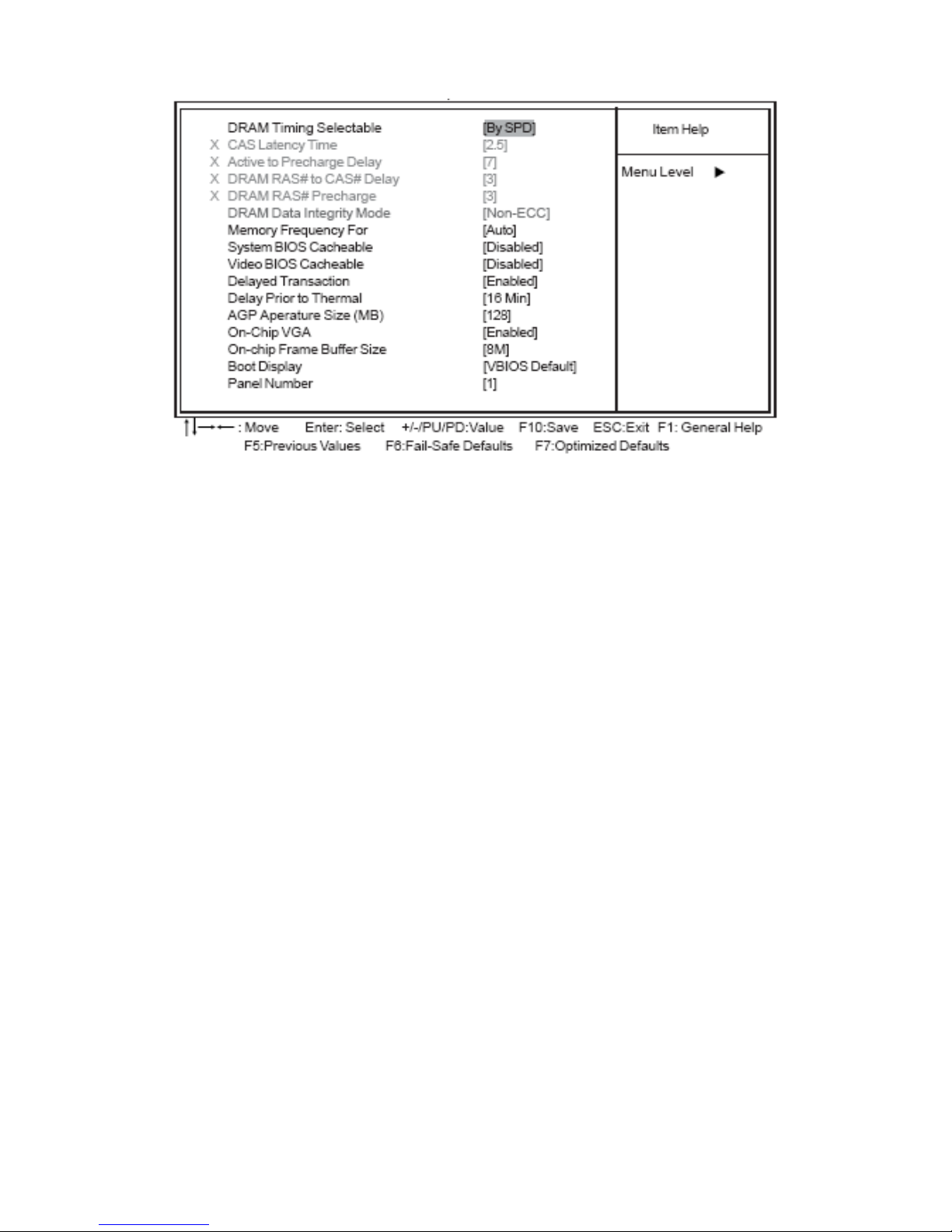
Phoenix-AwardBIOS CMOS Setup Utility
Advanced Chipset Features
DRAM Timing Selectable (By SPD)
The value in this field depends on performance parameters of the installed memory chips (DRAM). Do
not change the value from the factory setting unless you install new memory that has a different
performance rating than the original DRAMs.
CAS Latency Time (2.5): This item controls the timing delay (in clock cycles) before the
DRAM starts a read command after receiving it.
Active to Precharge Delay (7): This precharge time is the number of cycles it takes for DRAM
to accumulate its charge before refresh.
DRAM RAS# to CAS# Delay (3): This field lets you insert a timing delay between the CAS
and RAS strobe signals, used when DRAM is written to, read from, or refreshed. Disabled
gives faster performance; and Enabled gives more stable performance.
DRAM RAS# Precharge (3): Select the number of CPU clocks allocated for the Row Address
Strobe (RAS#) signal to accumulate its charge before the DRAM is refreshed. If insufficient
time is allowed, refresh may be incomplete and data lost.
DRAM Data Integrity Mode (Non-ECC)
This item is used to configure your RAM’s data integrity mode.
Memory Frequency For (Auto)
This item sets the main memory frequency. When you used an external graphics card, you can adjust
this to enable the best performance for your system.
System BIOS Cacheable (Disabled)
This item allows the system to be cached in memory for faster execution. Enable this item for better
performance.
Video BIOS Cacheable (Disabled)
When this is enabled, the Video RAM will be cached resulting to better performance. However, if any
Page 31
EX-92633 User Manual
31
program was written to this memory area, this may result to system error.
Delayed Transaction (Enabled)
The chipset has an embedded 32-bit posted write buffer to support delayed transaction cycles. Enable
this item to support compliance with PCI specification version 2.1.
Delay Prior to Thermal (16 Min)
Enables you to set the delay time before the CPU enters auto thermal mode.
AGP Aperture Size (MB) (128)
This item defines the size of the aperture if you use an AGP graphics adapter. The AGP aperture
refers to a section of the PCI memory address range used for graphics memory. We recommend that
you leave this item at the default value.
On-Chip VGA (Enabled)
Enables and disables the built-in on-chip VGA.
On-Chip Frame Buffer Size (8M)
This item allows you to set the VGA frame buffer size.
Boot Display (VBIOS Default)
This item is for Intel define ADD card only.
Panel Number (1)
This item is used to select the number to support LVDS panel.
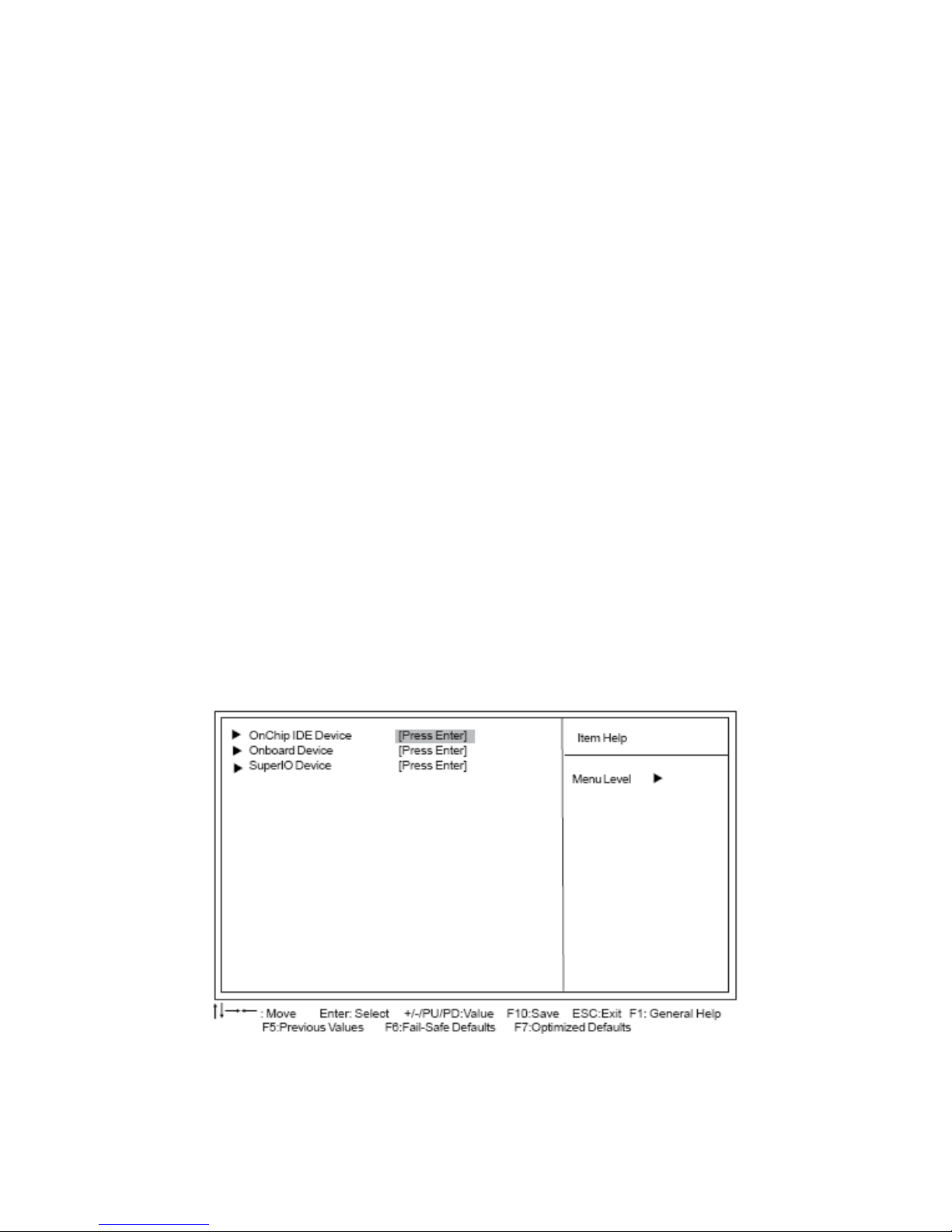
Integrated Peripherals
These options display items that define the operation of peripheral components on the system’s
input/output ports.
Phoenix-AwardBIOS CMOS Setup Utility
Integrated Peripherals
Page 32
EX-92633 User Manual
32
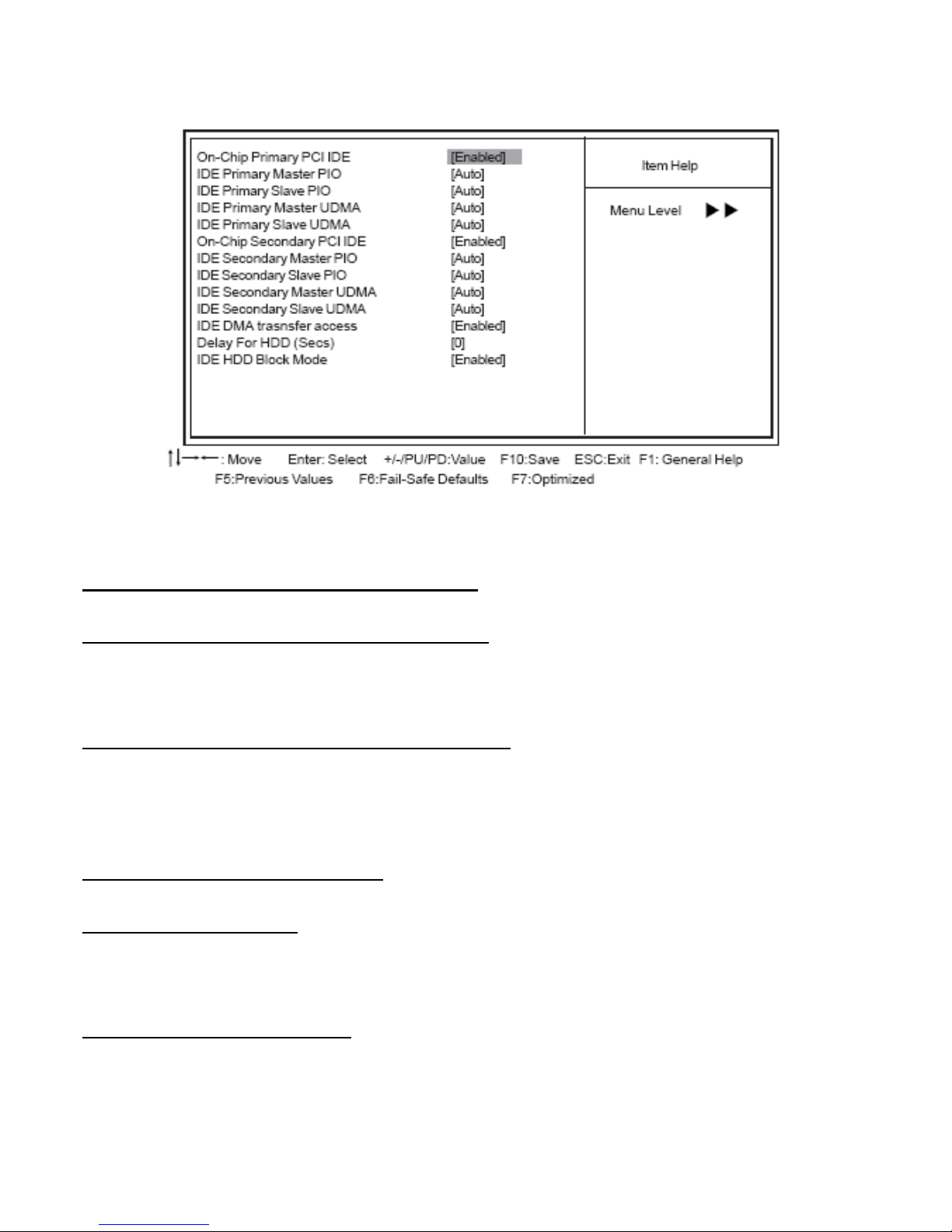
►OnChip IDE Device (Press Enter)
Phoenix-AwardBIOS CMOS Setup Utility
OnChip IDE Device
On-Chip Primary/Secondary PCI IDE (Enabled)
Use these items to enable or disable the PCI IDE channels that are integrated on the motherboard.
IDE Primary/Secondary Master/Slave PIO (Auto)
Each IDE channel supports a master device and a slave device. These four items let you assign the
kind of PIO (Programmed Input/Output) was used by the IDE devices. Choose Auto to let the system
auto detect which PIO mode is best, or select a PIO mode from 0-4.
IDE Primary/Secondary Master/Slave UDMA (Auto)
Each IDE channel supports a master device and a slave device. This motherboard supports
UltraDMA technology, which provides faster access to IDE devices. If you install a device that supports
UltraDMA, change the appropriate item on this list to Auto. You may have to install the UltraDMA driver
supplied with this motherboard in order to use an UltraDMA device.
IDE DMA transfer access (Enabled)
This item allows you to enable the transfer access of the IDE DMA.
Delay For HDD (Secs) (0)
Users may set a delay from 1 to 15 seconds in the cold boot process. Some hard disk drives need
extra time to spin up in order to identify correctly. If the system does not start after the memory test, try
to add times in this field.
IDE HDD Block Mode (Enabled)
Enable this field if your IDE hard drive supports block mode. Block mode enables BIOS to
automatically detect the optimal number of block read and writes per sector that the drive can support
and improves the speed of access to IDE devices.
Page 33
EX-92633 User Manual
33
Press <Esc> to return to the Integrated Peripherals page.
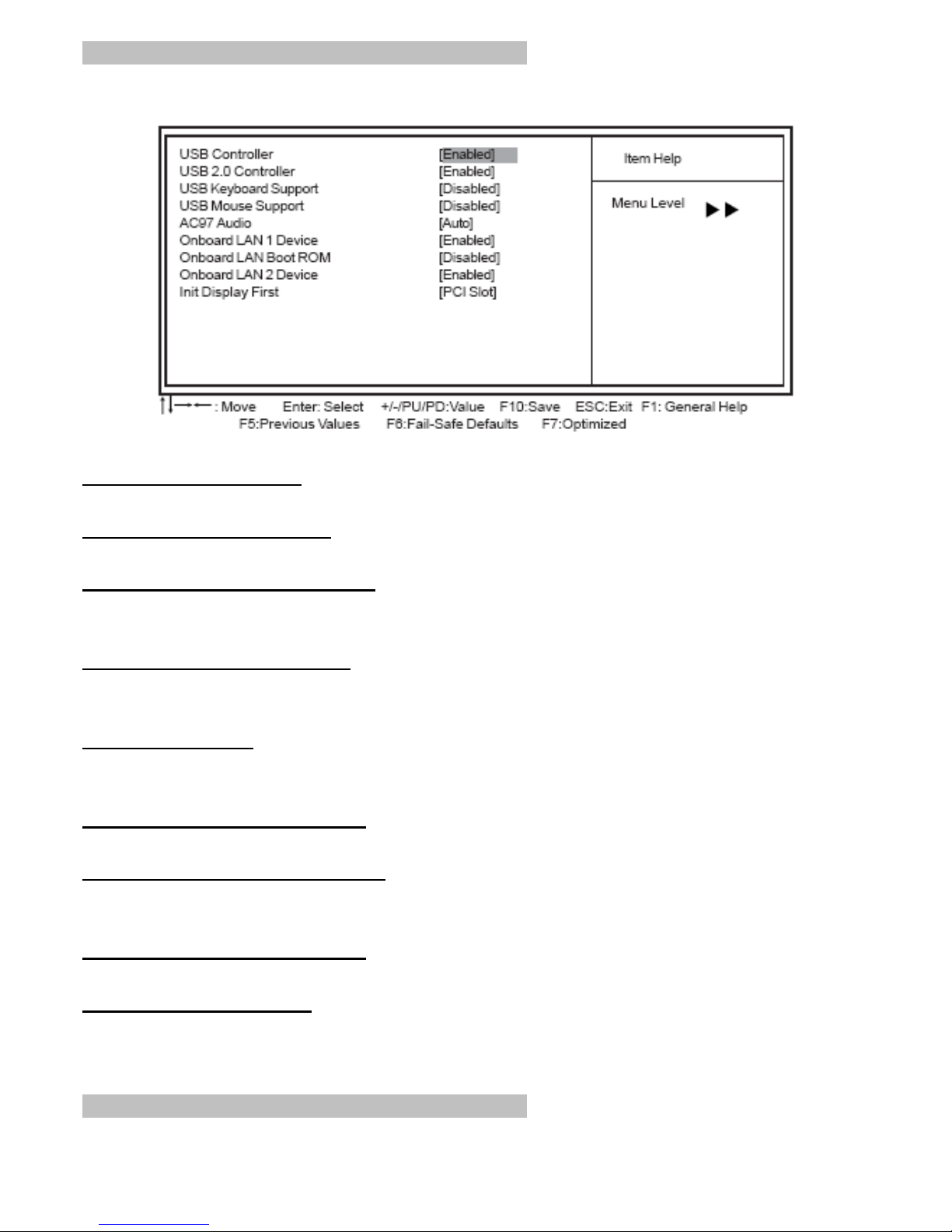
►Onboard Device (Press Enter)
Phoenix-AwardBIOS CMOS Setup Utility Onboard Device
USB Controller (Enabled)
Enable this item if you plan to use the Universal Serial Bus ports on this motherboard.
USB 2.0 Controller (Enabled)
Enable this item if want to use the USB 2.0.
USB Keyboard Support (Disabled)
Enable this item if you plan to use a keyboard connected through the USB port in a legacy operating
system (such as DOS) that does not support Plug and Play.
USB Mouse Support (Disabled)
Enable this item if you plan to use a mouse connected through the USB port in a legacy operating
system (such as DOS) that does not support Plug and Play.
AC97 AUDIO (Auto)
Enables or disables the onboard audio chip. Disable this item if you are going to install a PCI audio
add-on card.
Onboard LAN 1 Device (Enabled)
This option allows you to enable or disable the onboard LAN function.
Onboard LAN Boot ROM (Disabled)
Use this item to enable and disable the booting from the onboard LAN or a network add-in card with a
remote boot ROM installed.
Onboard LAN 2 Device (Enabled)
This option allows you to enable or disable the onboard LAN function.
Init Display First (PCI Slot)
Use this item to specify whether your graphics adapter is installed in one of the PCI slots or is
integrated on the motherboard.
Press <Esc> to return to the Integrated Peripherals page.
Page 34
EX-92633 User Manual
34
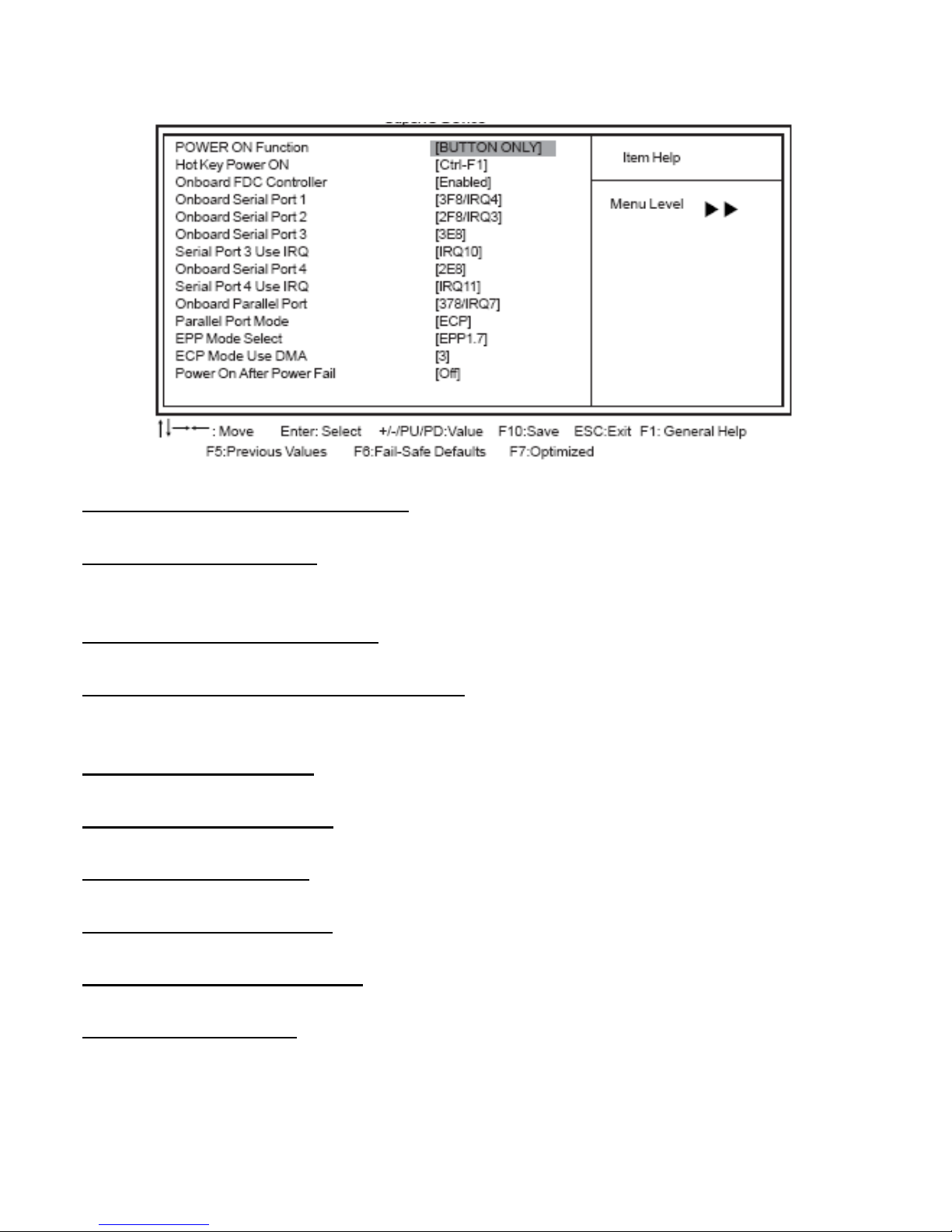
►SuperIO Device (Press Enter)
Phoenix-AwardBIOS CMOS Setup Utility
SuperIO Device
POWER ON Function (BUTTON ONLY)
This feature allows you to set the method by which your system can be turned on.
Hot Key Power On (Ctrl-F1)
When the POWER ON Function is set to Hot Key, use this item to set the hot key combination that
turns on the system.
Onboard FDC Controller (Enabled)
This option enables the onboard floppy disk drive controller.
Onboard Serial Port1~3 (3F8/IRQ4, 2F8/IRQ3)
These options are used to assign the I/O address and interrupt request (IRQ) for onboard serial
port1~2.
Onboard Serial Port3 (3E8)
These options are used to assign the I/O address and interrupt request (IRQ) for onboard serial port3.
Serial Port 3 Use IRQ (IRQ10)
This item is used to select an IRQ for the onboard serial port 3.
Onboard Serial Port4(2E8)
This option is used to assign the I/O address and interrupt request (IRQ) for onboard serial port4.
Serial Port 4 Use IRQ (IRQ11)
This item is used to select an IRQ for the onboard serial port 4.
Onboard Parallel Port (378/IRQ7)
This option is used to assign the I/O address and interrupt request (IRQ) for the onboard parallel port.
Parallel Port Mode (ECP)
Enables you to set the data transfer protocol for your parallel port. There are four options: SPP
(Standard Parallel Port), EPP (Enhanced Parallel Port), ECP (Extended Capabilities Port), and
ECP+EPP.
Page 35

EX-92633 User Manual
35
SPP allows data output only. Extended Capabilities Port (ECP) and Enhanced Parallel Port (EPP) are
bi-directional modes, allowing both data input and output. ECP and EPP modes are only supported
with EPP- and ECP-aware peripherals.
EPP Mode Select (EPP1.7)
The onboard parallel port is EPP spec. compliant, after you choose the onboard parallel port with EPP
function. Set the EPP version to 1.7 spec or 1.9 spec.
ECP Mode Use DMA (3)
When the onboard parallel port is set to ECP mode, the parallel port can use DMA3 or DMA1.
Power On After Power Fail (Off)
This item enables your computer to automatically restart or return to its last operating status after
power returns from a power failure.
Press <Esc> to return to the Integrated Peripherals page.
Power Management Setup
This option lets you control system power management. The system has various power-saving modes
including powering down the hard disk, turning off the video, suspending to RAM, and software power
down that allows the system to be automatically resumed by certain events.
The power-saving modes can be controlled by timeouts. If the system is inactive for a time, the
timeouts begin counting. If the inactivity continues so that the timeout period elapses, the system
enters a power-saving mode. If any item in the list of Reload Global Timer Events is Enabled, then any
activity on that item will reset the timeout counters to zero.
If the system is suspended or has been powered down by software, it can be resumed by a wake up
call that is generated by incoming traffic to a modem, a LAN card, a PCI card, or a fixed alarm on the
system realtime clock
Page 36
EX-92633 User Manual
36
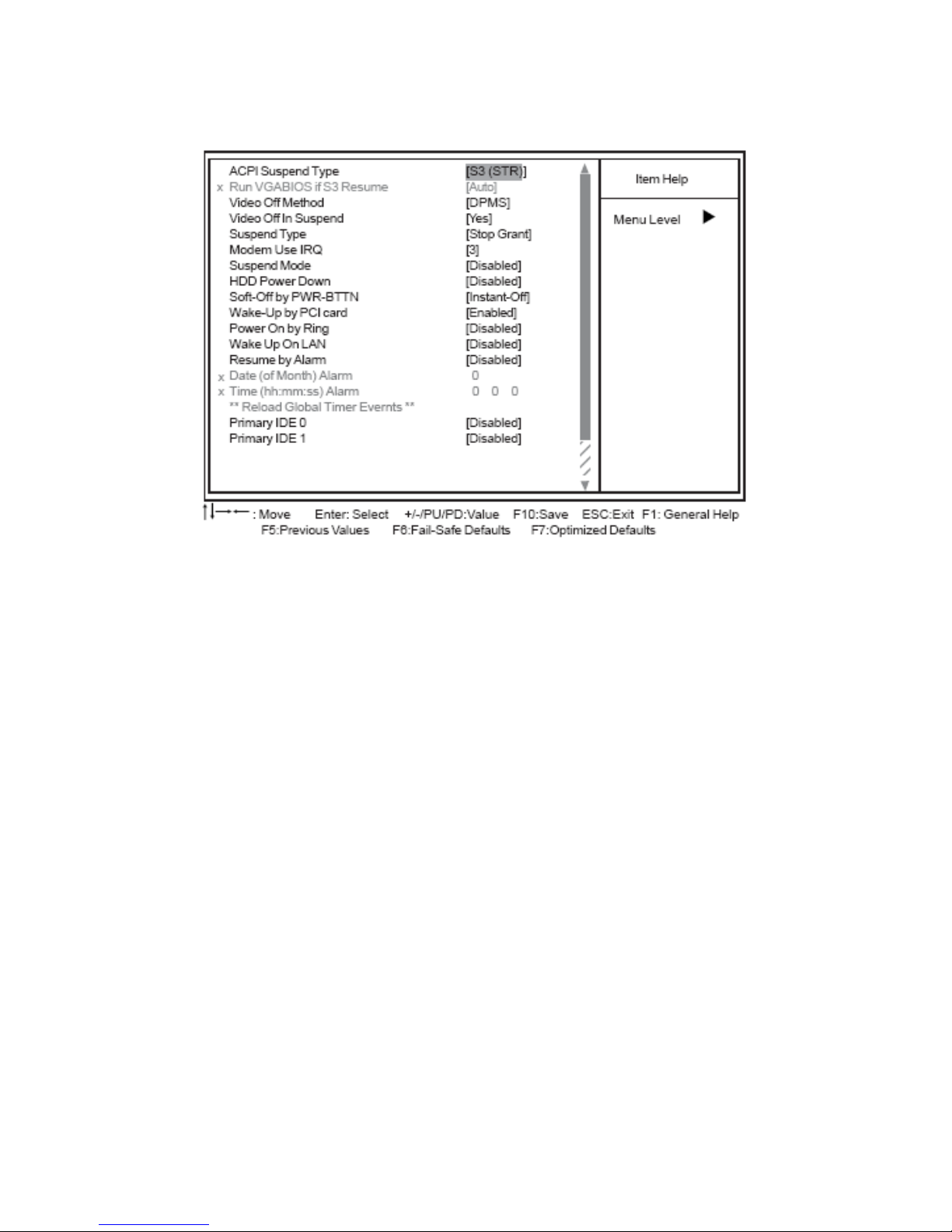
Phoenix-AwardBIOS CMOS Setup Utility
Power Management Setup
ACPI Suspend Type (S3(STR))
Use this item to define how your system suspends. In the default, S1 (POS), the suspend mode is
equivalent to a software power down. If you select S3 (STR), the suspend mode is suspend to RAM,
i.e., the system shuts down with the exception of a refresh current to the system memory.
z Run VGABIOS if S3 Resume (Auto): Use this item to initialize the VGA BIOS from S3 (Suspend to
RAM) sleep state.
Video Off Method (DPMS)
This item defines how the video is powered down to save power. This item is set to DPMS (Display
Power Management Software) by default.
Video Off In Suspend (Yes)
This option defines if the video is powered down when the system is put into suspend mode.
Suspend Type (Stop Grant)
If this item is set to the default Stop Grant, the CPU will go into Idle Mode during power saving mode.
MODEM Use IRQ (3)
If you want an incoming call on a modem to automatically resume the system from a power-saving
mode, use this item to specify the interrupt request line (IRQ) that is used by the modem. You might
have to connect the fax/modem to the motherboard Wake On Modem connector for this feature to
work.
Suspend Mode (Disabled)
The CPU clock will be stopped and the video signal will be suspended if no Power Manage¬ment
events occur for a specified length of time. Full power function will return when a Power Management
Page 37

EX-92633 User Manual
37
event is detected. Options are from 1 Min to 1 Hour and Disabled.
HDD Power Down (Disabled)
The IDE hard drive will spin down if it is not accessed within a specified length of time. Options are
from 1 Min to 15 Min and Disable.
Soft-Off by PWR-BTTN (Instant-Off)
Under ACPI (Advanced Configuration and Power management Interface) you can create a software
power down. In a software power down, the system can be resumed by Wake Up Alarms. This item
lets you install a software power down that is controlled by the power button on your system. If the
item is set to Instant-Off, then the power button causes a software power down. If the item is set to
Delay 4 Sec. then you have to hold the power button down for four seconds to cause a software power
down.
Wake-Up by PCI Card (Enabled)
When this item is enabled, the system power will be turned on if there is any PCI card activity.
Power On by Ring (Disabled)
If this item is enabled, it allows the system to resume from a software power down or a power-saving
mode whenever there is an incoming call to an installed fax/modem. You have to connect the
fax/modem to the motherboard
Wake Up On LAN (Disabled)
When set to Enabled, the system power will be turned on if the LAN port receives an incoming signal.
You have to connect fax/modem to the motherboard Wake On LAN connector for this feature to work.
Resume by Alarm (Disabled)
When set to Enabled, additional fields become available and you can set the date (day of the month),
hour, minute and second to turn on your system. When set to 0 (zero) for the day of the month, the
alarm will power on your system every day at the specified time.
z Date (of Month) Alarm (0): Date (on Month) Alarm lets you select a day from 1 to 31.
z Time (hh:mm:ss) Alarm (0:0:0): Time Alarm lets you select a time for the alarm in hours, minutes,
and seconds.
** Reload Global Timer Events **
Global Timer (power management) events are I/O events whose occurrence can prevent the system
from entering a power saving mode or can awaken the system from such a mode. In effect, the system
remains alert for anything that occurs to a device that is configured as Enabled, even when the system
is in a power-down mode.
Primary/Secondary IDE 1/0 (Disabled)
When these items are enabled, the system will restart the power-saving timeout counters when any
activity is detected on any of the drives or devices on the primary or secondary IDE channels.
FDD, COM, LPT Port (Disabled)
When this item is enabled, the system will restart the power-saving timeout counters when any activity
is detected on the floppy disk drive, serial ports, or the parallel port.
PCI PIRQ[A-D]# (Disabled)
When this item is enabled, any activity from one of the listed devices wakes up the system.
Page 38
EX-92633 User Manual
38
PNP/PCI Configurations
This section describes configuring the PCI bus system. PCI (Peripheral Component Inter¬connect) is
a system, which allows I/O devices to operate at speeds nearing CPU’s when they communicate with
own special components. All the options describes in this section are important and technical and it is
strongly recommended that only experienced users should make any changes to the default settings.
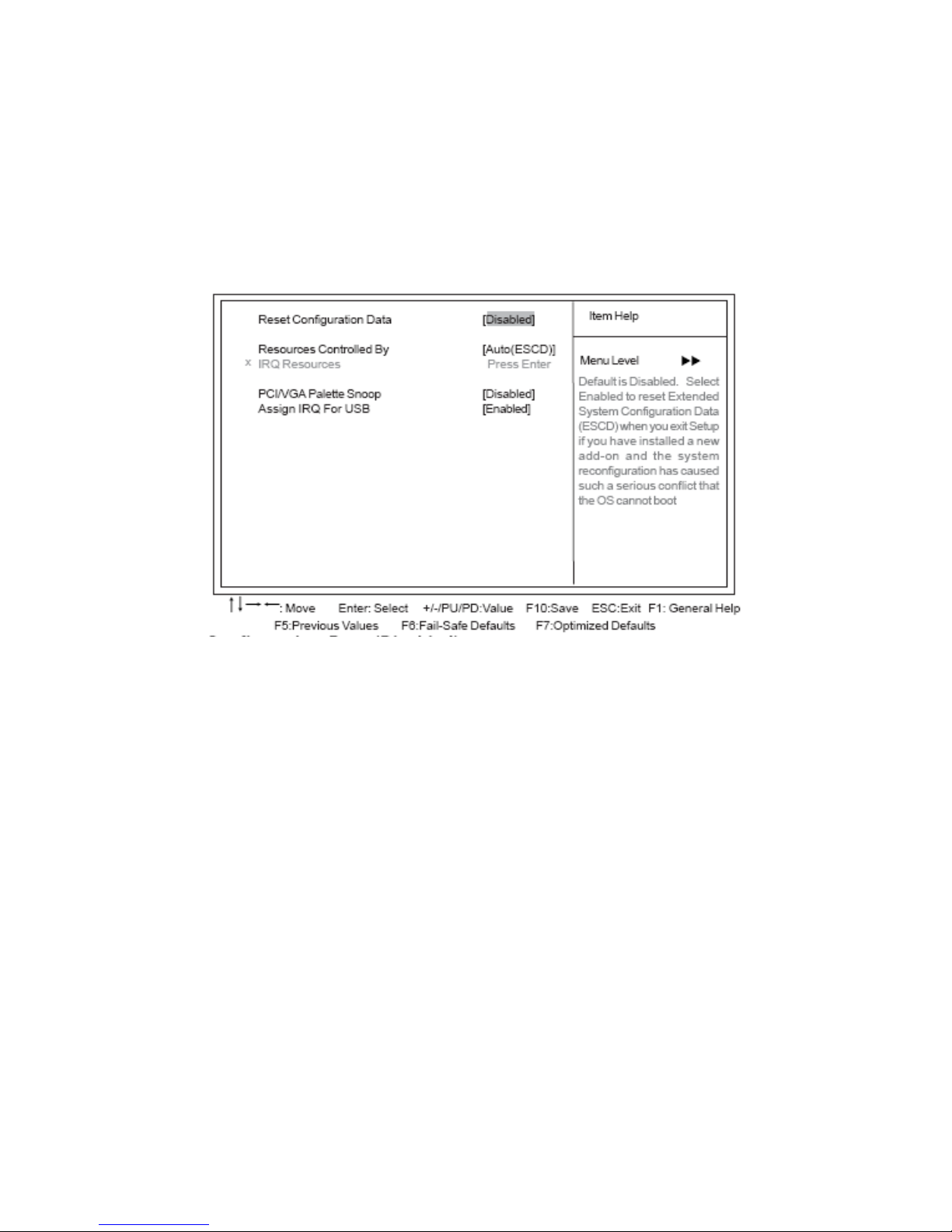
Phoenix-AwardBIOS CMOS Setup Utility
PnP/PCI Configurations
Reset Configuration Data (Disabled)
When you enable this item and restart the system, any Plug and Play configuration data stored in the
BIOS Setup is cleared from memory.
Resources Controlled By (Auto(ECSD))
You should leave this item at the default Auto(ESCD). Under this setting, the system dynamically
allocates resources to Plug and Play devices as they are required. If you cannot get a legacy ISA
(Industry Standard Architecture) expansion card to work properly, you might be able to solve the
problem by changing this item to Manual, and then opening up the IRQ Resources submenu.
z IRQ Resources:In the IRQ Resources submenu, if you assign an IRQ to Legacy ISA, then that
Interrupt Request Line is reserved for a legacy ISA expansion card. Press <Esc> to close the IRQ
Resources submenu. In the Memory Resources submenu, use the first item Reserved Memory
Base to set the start address of the memory you want to reserve for the ISA expansion card. Use
the section item Reserved Memory Length to set the amount of reserved memory. Press <Esc>
to close the Memory Resources submenu.
PCI/VGA Palette Snoop (Disabled)
This item is designed to overcome problems that can be caused by some non-standard VGA cards.
This board includes a built-in VGA system that does not require palette snooping so you must leave
Page 39
EX-92633 User Manual
39
this item disabled.
Assign IRQ For USB (Enabled)
“Enable” or “Disable” this item when users are to assign IRQ for the USB interface onboard.
PC Health Status
On motherboards that support hardware monitoring, this item lets you monitor the param¬eters for
critical voltages, critical temperatures, and fan speeds.
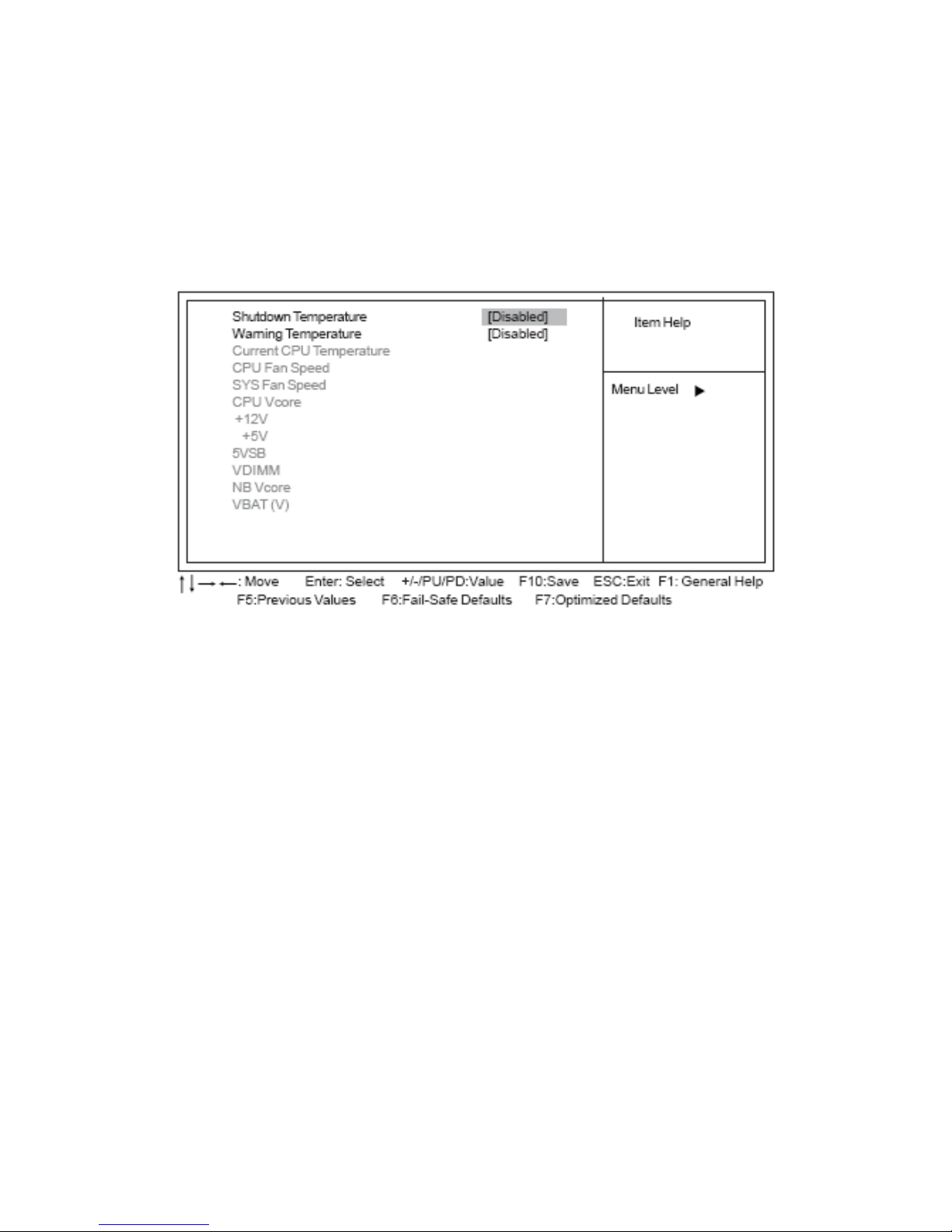
Phoenix-AwardBIOS CMOS Setup Utility
PC Health Status
Shutdown Temperature (Disabled)
Enables you to set the maximum temperature the system can reach before powering down.
Warning Temperature (Disabled)
Use this item to set the warning temperature level for the processor.
System Component Characteristics
These items allow end users and technicians to monitor data provided by the BIOS on this
motherboard. You cannot make changes to these fields.
z Current CPU Temperature
z CPU Fan Speed
z SYS Fan Speed
z CPU Vcore
z +12V
z +5V
z 5VSB
z VDIMM
z NB Vcore
z VBAT (V)
Page 40
EX-92633 User Manual
40
Frequency/Voltage Control
This item enables you to set the clock speed and system bus for your system. The clock speed and
system bus are determined by the kind of processor you have installed in your system.
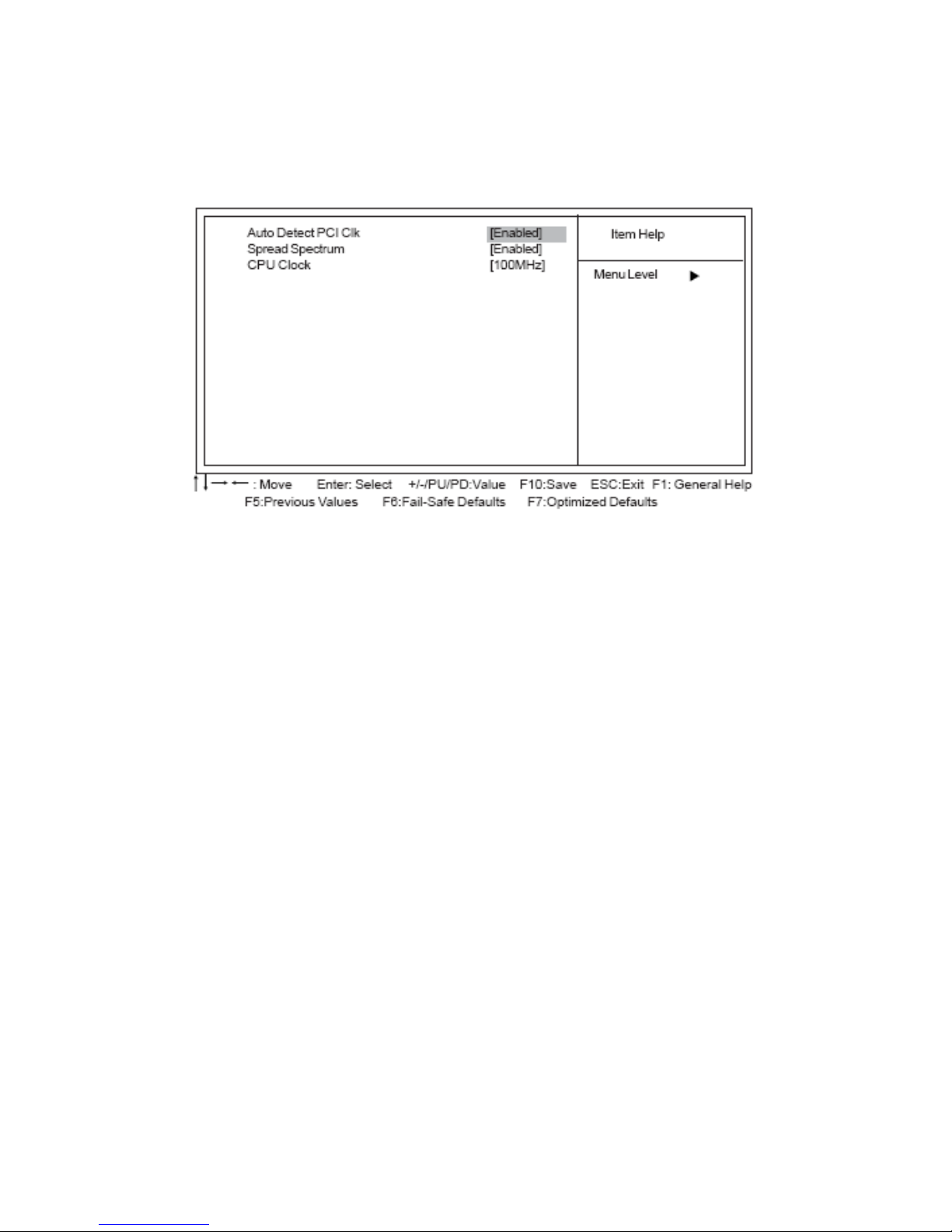
Phoenix-AwardBIOS CMOS Setup Utility
Frequency/Voltage Control
Auto Detect PCI Clk (Enabled)
When this item is enabled, BIOS will disable the clock signal of free PCI slots.
Spread Spectrum (Enabled)
If you enable spread spectrum, it can significantly reduce the EMI (Electro-Magnetic Interference)
generated by the system.
CPU Clock (100MHz)
Use the CPU Host Clock to set the frontside bus frequency for the installed processor (usually 200
MHz, 133 MHz, or 100 MHz).
Load Fail-Safe Defaults Option
This option opens a dialog box that lets you install fail-safe defaults for all appropriate
items in the Setup Utility: Press <Y> and then <Enter> to install the defaults. Press <N> and then
<Enter> to not install the defaults. The fail-safe defaults place no great demands on the system and
are generally stable. If your system is not functioning correctly, try installing the fail-safe defaults as a
first step in getting your system working properly again. If you only want to install fail-safe defaults for a
specific option, select and display that option, and then press <F6>.
Load Optimized Defaults Option
This option opens a dialog box that lets you install optimized defaults for all appropriate items in the
Setup Utility. Press <Y> and then <Enter> to install the defaults. Press <N> and then <Enter> to not
install the defaults. The optimized defaults place demands on the system that may be greater than the
performance level of the components, such as the CPU and the memory. You can cause fatal errors or
instability if you install the optimized defaults when your hardware does not support them. If you only
Page 41

EX-92633 User Manual
41
want to install setup defaults for a specific option, select and display that option, and then press <F7>.
*Users please remain the factory BIOS default setting of “Load optimized Defaults” when install Operation System onto
your system.
Set Supervisor/User Password
When this function is selected, the following message appears at the center of the screen to assist you
in creating a password.
ENTER PASSWORD
Type the password, up to eight characters, and press <Enter>. The password typed now will clear any
previously entered password from CMOS memory. You will be asked to confirm the password. Type
the password again and press <Enter>. You may also press <Esc> to abort the selection.
To disable password, just press <Enter> when you are prompted to enter password. A message will
confirm the password being disabled. Once the password is disabled, the system will boot and you
can enter BIOS Setup freely.
PASSWORD DISABLED
If you have selected “System” in “Security Option” of “BIOS Features Setup” menu, you will be
prompted for the password every time the system reboots or any time you try to enter BIOS Setup.
If you have selected “Setup” at “Security Option” from “BIOS Features Setup” menu, you will be
prompted for the password only when you enter BIOS Setup.
Supervisor Password has higher priority than User Password. You can use Supervisor Pass¬word
when booting the system or entering BIOS Setup to modify all settings. Also you can use User
Password when booting the system or entering BIOS Setup but can not modify any setting if
Supervisor Password is enabled.
Save & Exit Setup Option
Highlight this item and press <Enter> to save the changes that you have made in the Setup Utility and
exit the Setup Utility. When the Save and Exit dialog box appears, press <Y> to save and exit, or press
<N> to return to the main menu:
Exit Without Saving
Highlight this item and press <Enter> to discard any changes that you have made in the Setup Utility
and exit the Setup Utility. When the Exit Without Saving dialog box appears, press <Y> to discard
changes and exit, or press <N> to return to the main menu.
*If you have made settings that you do not want to save, use the “Exit Without Saving” item and press <Y> to discard any
changes you have made.
Page 42

EX-92633 User Manual
42
Chapter 4 Installation of Drivers
This chapter describes the installation procedures for software and drivers under the Windows 98SE,
Windows ME, Windows 2000 and Windows XP. The software and drivers are included with the
motherboard. The contents include Intel Chipset Software Installation Utility, VGA Drivers
Installation, AC97 Codec Audio Driver Installation, and Intel PRO LAN Drivers Installation.
I
Important Note:
After installing your Windows operating system (Windows 98SE/ME/2000/XP),
you must install first the Intel Chipset Software Installation Utility before
proceeding with the installation of drivers.
Page 43

EX-92633 User Manual
43
4.1 Installations of Drivers
Intel Chipset Software Installation
The Intel Chipset Drivers should be installed first before the software drivers to enable Plug&Play
INF support for Intel chipset components. Follow the instructions below to complete the installation
Under Windows 98SE/ME/2000/XP
1. Insert the TopsCCC product CD that comes with the board.
2. Click “ Intel® Chipset software installation Utility “
3. When the Welcome screen appears, please click “ Next “ to Continue.
Page 44

EX-92633 User Manual
44
Page 45

EX-92633 User Manual
45
Page 46

EX-92633 User Manual
46
VGA Driver installation
To install the VGA Driver follow the steps below to proceed with the installation.
Step 1. Insert the TopsCCC product CD That comes with the board.
Step 2. Click “ Intel® VGA 855GME Chipset “
Page 47

EX-92633 User Manual
47
Step 3. When the Welcome screen appears , click “Next” to continue.
Step 4. Click YES to agree with the license agreement and continue the installation.
Page 48

EX-92633 User Manual
48
Step 5. The Setup process is now complete. Click Finish to restart the computer as promoted and for
changes to take effect. When the computer has restarted, the system will be able to find some devices.
Restart your computer when prompted.
Page 49

EX-92633 User Manual
49
Intel PRO LAN Drivers installation
Follow the steps below to complete the installation of the Intel PRO LAN drivers.
Step 1. Insert the TopsCCC product CD That comes with the board.
Step 2. Click “Intel® Network Adapter “
Step 3. When the Welcome screen appears , click “Next” to continue.
Page 50

EX-92633 User Manual
50
Step 4. Click “Finish” to restart the computer and for changes to take effect
Page 51

EX-92633 User Manual
51
AC97 Codec Audio Driver installation
To install the Realtek AC97 codec Driver follow the steps below to proceed with the installation.
Step 1. Insert the TopsCCC product CD That comes with the board.
Step 2. Click “Realtek AC97 ‘ Sound system “
Page 52

EX-92633 User Manual
52
Step 3. When the Welcome screen appears , click “Next” to continue.
Step 4. Click “Finish” to restart the computer and for changes to take effect.
 Loading...