

Page 1

Add: Bldg. 46-2, No. 2, North Jingyuan Str., Be ijing Economic-Technological
Development Area, Beijing, P. R. China
Tel: +8610 6439 8830 Fax: +8610 6439 1594
Web: www.topreal.com.cn
Email: [email protected]
1
Beijing Topreal Technologies Co. Ltd
北京腾锐视讯科技有限公司
Topreal TP-3000 USB DVB-T
Receiver
---User Manual
Page 2
Beijing Topreal Technologies Co. Ltd
北京腾锐视讯科技有限公司
!!! Safety Instruction
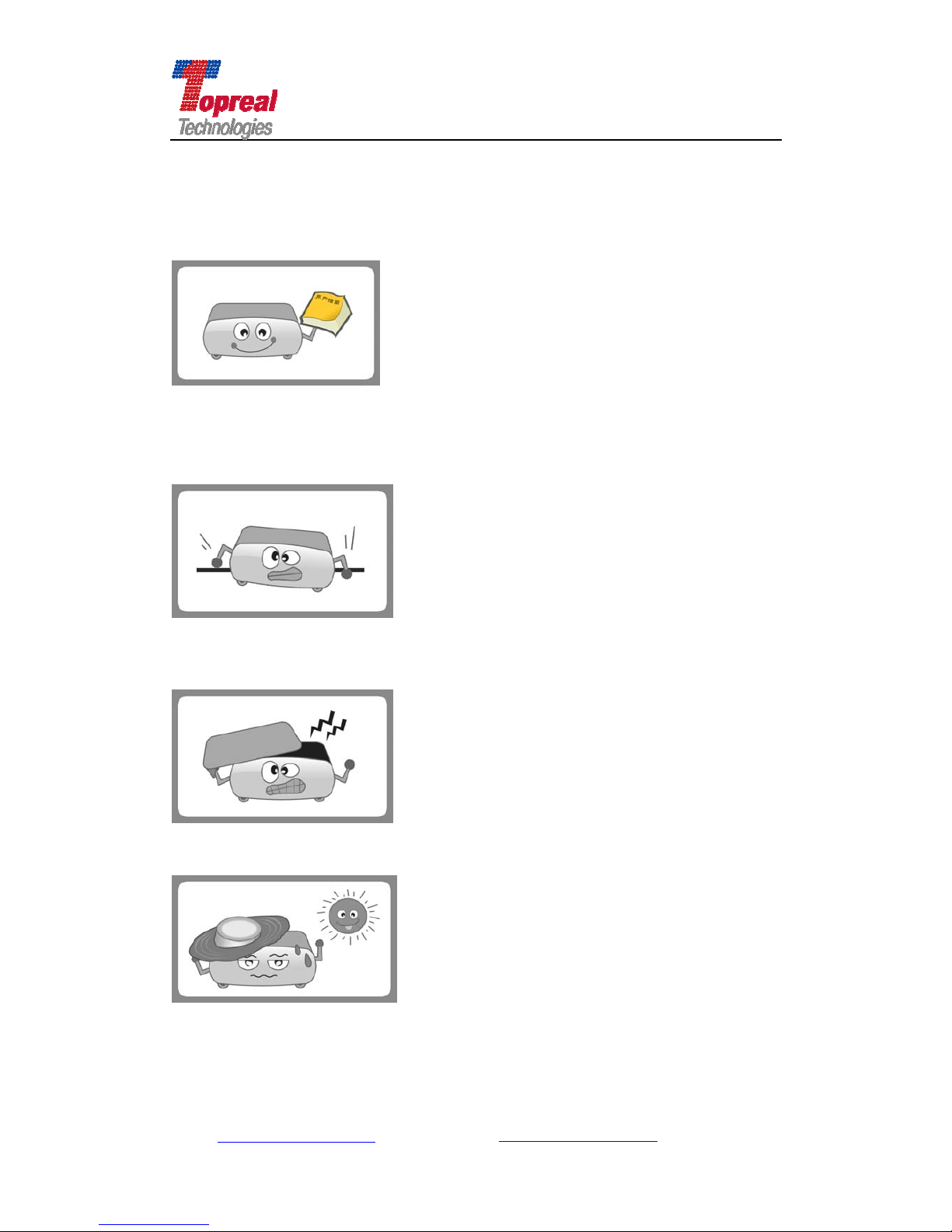
Please read the user manual before operating the box.
Place the box in a horizontal level; no severe vibration to avoid doing damage to
the STB.
Do not open the cabinet to avoid electric shocks or doing damage to the box.
Place the box in airy place, keep off the heat source.
If liquids flow into the box, turn off the power to prevent from fire or electric
Add: Bldg. 46-2, No. 2, North Jingyuan Str., Be ijing Economic-Technological
Development Area, Beijing, P. R. China
Tel: +8610 6439 8830 Fax: +8610 6439 1594
Web: www.topreal.com.cn
Email: [email protected]
2
Page 3
Beijing Topreal Technologies Co. Ltd
北京腾锐视讯科技有限公司
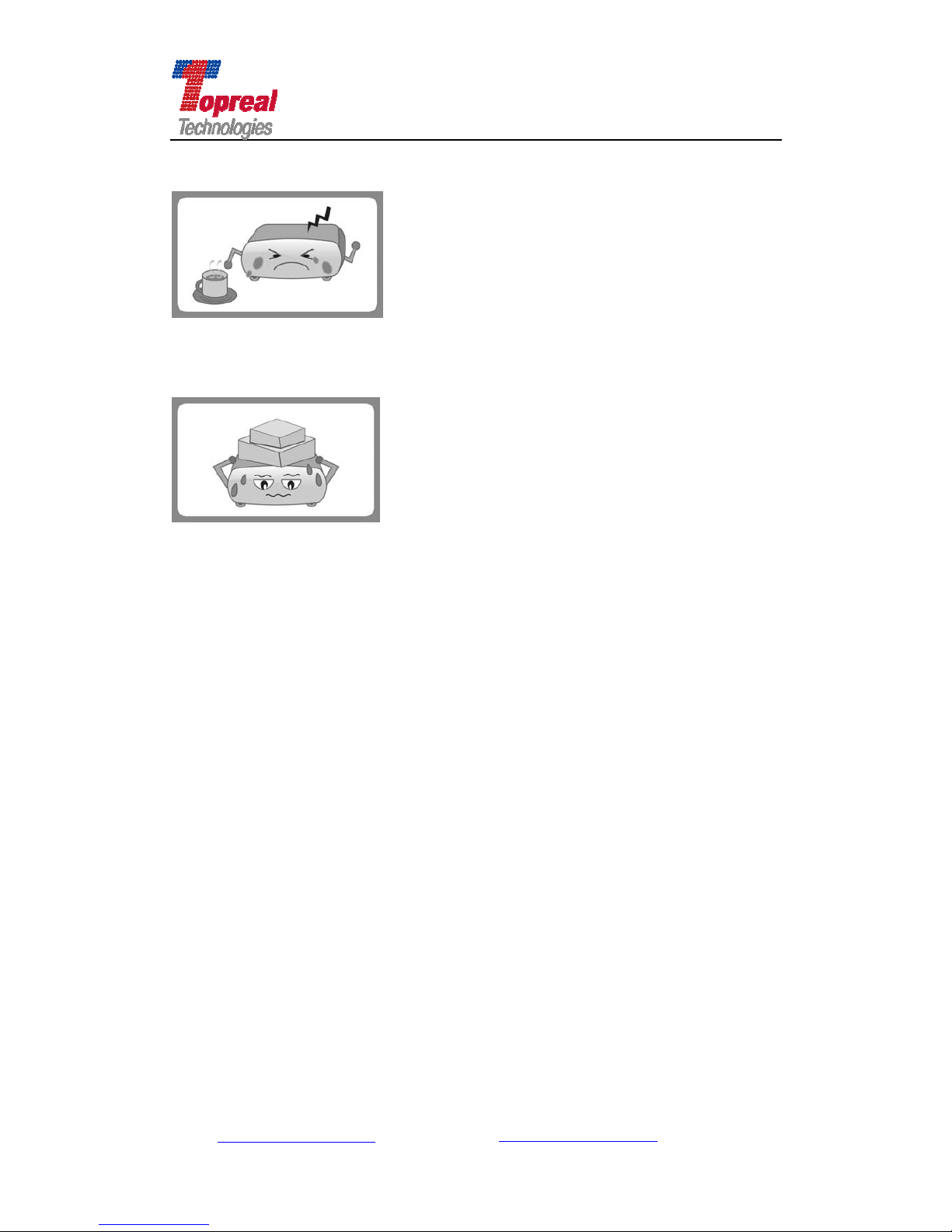
shocks, and then ask the after-sale staff to maintain it.
Do not put heavy things on the box.
Add: Bldg. 46-2, No. 2, North Jingyuan Str., Be ijing Economic-Technological
Development Area, Beijing, P. R. China
Tel: +8610 6439 8830 Fax: +8610 6439 1594
Web: www.topreal.com.cn
Email: [email protected]
3
Page 4

Add: Bldg. 46-2, No. 2, North Jingyuan Str., Be ijing Economic-Technological
Development Area, Beijing, P. R. China
Tel: +8610 6439 8830 Fax: +8610 6439 1594
Web: www.topreal.com.cn
Email: [email protected]
4
Beijing Topreal Technologies Co. Ltd
北京腾锐视讯科技有限公司
Content
Part One Summarize ……………………………………………6
1.1 Prologue ……………………………………………………6
1.2 Main Characteristic ……………………………………………7
1.3 Install Driver …………………………………………………..8
1.4 Requirement of Your PC or Laptop …………………………...8
1.5 Package Content ………………………………………………8
Part Two Hardware Description ………………………………...9
2.1 Front Panel ………………...……………………………………9
2.2 Rear panel ………………………………………………………10
2.3 Key Description for the Remote Control ………………………12
Part Three First Use Guide ………………………………..……14
3.1 System connection ………..……………………………………14
Part Four Menu Operation …...…………………………………15
4.1 Digital TV ………………………………………………………16
4.2 Electronic Program Guide (EPG) ………………………………16
4.3 Installation ……………………………….…………………….17
4.3.1 Manual Search ……………………………………………………….17
4.3.2 Auto Search …………..……………………………………………...19
4.3.3 Antenna Setup ……………………………………………………….19
4.3.4 Software Update ……………………………………………………..20
Page 5

Add: Bldg. 46-2, No. 2, North Jingyuan Str., Be ijing Economic-Technological
Development Area, Beijing, P. R. China
Tel: +8610 6439 8830 Fax: +8610 6439 1594
Web: www.topreal.com.cn
Email: [email protected]
5
Beijing Topreal Technologies Co. Ltd
北京腾锐视讯科技有限公司
4.4 System Setting ……………………………………………..…….21
4.4.1 System Information ………………………………………………….21
4.4.1.1 Channel Information …………………………………...……21
4.4.1.2 CA Status …………………………………………………….22
4.4.1.3 Loader Status ………………………………………………...23
4.4.1.4 IRD Status …………………………………………………...23
4.4.1.5 Mail Information …………………………………………….23
4.4.1.6 Announce Message ……………………………………….....24
4.4.2 Parental Control …………………………………………..…………24
4.4.3 Parameter Setting ……………………………………………………25
4.4.3.1 Audio/Video Control ……………………………………………..26
4.4.3.2 Menu Setting ……………….…………………………………….28
4.4.3.3 Time Zone Setting ………………………………………………..29
4.4.3.4 UHF Setting ……..……………………………………………...29
4.4.4 Restore the Default Setting ……………………………………………30
4.4.5 Game …………………………………………………………………..31
4.5 Program Manage ……...…………………………………………32
4.5.21 Program Edit ………………………………………………………....32
4.6.3 Program Reserve Management ………………………………………..33
Part Five Trouble Shooting ...........................................................34
Correct Disposal of the Product ………………………………...36
Page 6

Add: Bldg. 46-2, No. 2, North Jingyuan Str., Be ijing Economic-Technological
Development Area, Beijing, P. R. China
Tel: +8610 6439 8830 Fax: +8610 6439 1594
Web: www.topreal.com.cn
Email: [email protected]
6
Beijing Topreal Technologies Co. Ltd
北京腾锐视讯科技有限公司
Part One Summarize
1. 1 Prologue
Thank you for choosing Topreal TP-3000 USB DVB-T receiver.
The Topreal TP-3000 USB DVB-T Receiver (hereinafter TP-3000 receiver) is
fully compatible with DVB-T standard. It is embedded Conax, Irdeto, and many
other mainstream CAS. When connected to the high speed USB 2.0 interface, it
allows you to enjoy any free-to-air digital TV or encrypted programs on your
Notebook or PC. It is also a Digital Video Record that you can record your
favorite programs directly to the hard disk of your computer either real time or
scheduling. The Electronic Program Guide (EPG) shows you listings for all the
channels you receive. With time shifting you can pause and rewind live
broadcasts. All the function can be realized by the operation of remote control.
Power supplied by 5A power adapter.
Announcement: Beijing Topreal Te chnologies Co., LTD reserves the right
of any modification to the product described in the manual. If there is any
difference of the pictures or text in the manual from the physical object,
please take the actual receiver as a standard. We reserve the right to
upgrade our products to keep with advance technology.
Page 7

Add: Bldg. 46-2, No. 2, North Jingyuan Str., Be ijing Economic-Technological
Development Area, Beijing, P. R. China
Tel: +8610 6439 8830 Fax: +8610 6439 1594
Web: www.topreal.com.cn
Email: [email protected]
7
Beijing Topreal Technologies Co. Ltd
北京腾锐视讯科技有限公司
1.2 Main Characteristic
Watch and record digital terrestrial TV on PC or Laptop;
USB 2.0 Interface;
Supports time-shifting, scheduled and real time recording;
Support EPG (Electronic Program Guide), Teletext and subtitle;
Still image snapshots;
Remote control operation;
Full DVB-T bandwidth reception (6/7/8 MHz);
Support Microsoft BDA drivers;
With DVB-T radio receiving service;
Customized OSD menu;
Screen ratio has 4:3 and 16:9;
Auto search and manual search available;
Compact size and easy operation.
Page 8

Add: Bldg. 46-2, No. 2, North Jingyuan Str., Be ijing Economic-Technological
Development Area, Beijing, P. R. China
Tel: +8610 6439 8830 Fax: +8610 6439 1594
Web: www.topreal.com.cn
Email: [email protected]
8
Beijing Topreal Technologies Co. Ltd
北京腾锐视讯科技有限公司
1.3 Install Driver and Application
Before use the receiver, please install driver and application software first.
First please use the USB cable to connect TP-3000 receiver to your computer to
start the driver installation. There are two drivers in the CD , BDA 32 and BDA 64.
If the CPU of your PC is 32 bit, please install BDA 32. If not, please install 64. The
specific driver installation procedure is as follows:
1) Insert the included CD in your CD-ROM drive.
2) Computer will detect the new hardware and Found New Hardware
Wizard window will be popup. Please select “No, Temporary Not”, click
“Next”.
3) Please select “Install from a list or specific Location (Advanced)”.
4) Click “Next”;
5) Please select “Search for the best driver in these locations”. Click
“Browser” to find the driver location on CD-ROM directory. Choose
“BDA32” or “BDA 64”. Click “Next”. Click “Continue Anyway”.
6) Click “Finish” to exit. Then the driver is installed successfully in your
computer.
The installation of the Application Software:
First, find its location on CD-ROM directory, then click the Setup.exe file,
double click it, click “Next” to continue, the “Welcome to use
HonestechTVR2.5 InstallShield Wizard” interface, click “Next” to continue,
choose “I agree to accept the terms of the license agreement(A)”, click
“Next” to continue. Click “Next” to continue, Click “Next” to continue, click
“Finish” to exit. Then the application is installed successfully in your computer,
you will find an icon “honestech TVR 2.5 Trial” in the desktop.
Note: if errors occur in driver installation, please follow the following steps to
unload the driver.
Right click “My computer”, click “Properties”. Click “Device Manager”
from Hardware tab. Find “Sound, video and game controller” category and
you may see “USB 2861 Device” and USB Audio Device on the list. Right
click them and choose “Update Driver”. Then install the driver again as
described in 1.3.
Page 9

Add: Bldg. 46-2, No. 2, North Jingyuan Str., Be ijing Economic-Technological
Development Area, Beijing, P. R. China
Tel: +8610 6439 8830 Fax: +8610 6439 1594
Web: www.topreal.com.cn
Email: [email protected]
9
Beijing Topreal Technologies Co. Ltd
北京腾锐视讯科技有限公司
1.4 Requirement of Your PC or Laptop
CPU: Pentium4 2.0GHz or above;
Memory: 256M or more;
Main board: with USB 2.0 port;
VGA card: 16M or more;
Operation system: Windows 2000 or higher.
1.5 Package Content
Upon receiving the package, please check the following products contained
in the box:
One TP-3000 receiver;
One USB cable;
One antenna;
One CD contains driver and user manual;
One remote control;
One 5V/2A power adapter.
Page 10

Add: Bldg. 46-2, No. 2, North Jingyuan Str., Be ijing Economic-Technological
Development Area, Beijing, P. R. China
Tel: +8610 6439 8830 Fax: +8610 6439 1594
Web: www.topreal.com.cn
Email: [email protected]
10
Beijing Topreal Technologies Co. Ltd
北京腾锐视讯科技有限公司
Chapter Two Hardware Description
2.1 Left Panel
2.2 Right Panel
Page 11

Beijing Topreal Technologies Co. Ltd
北京腾锐视讯科技有限公司
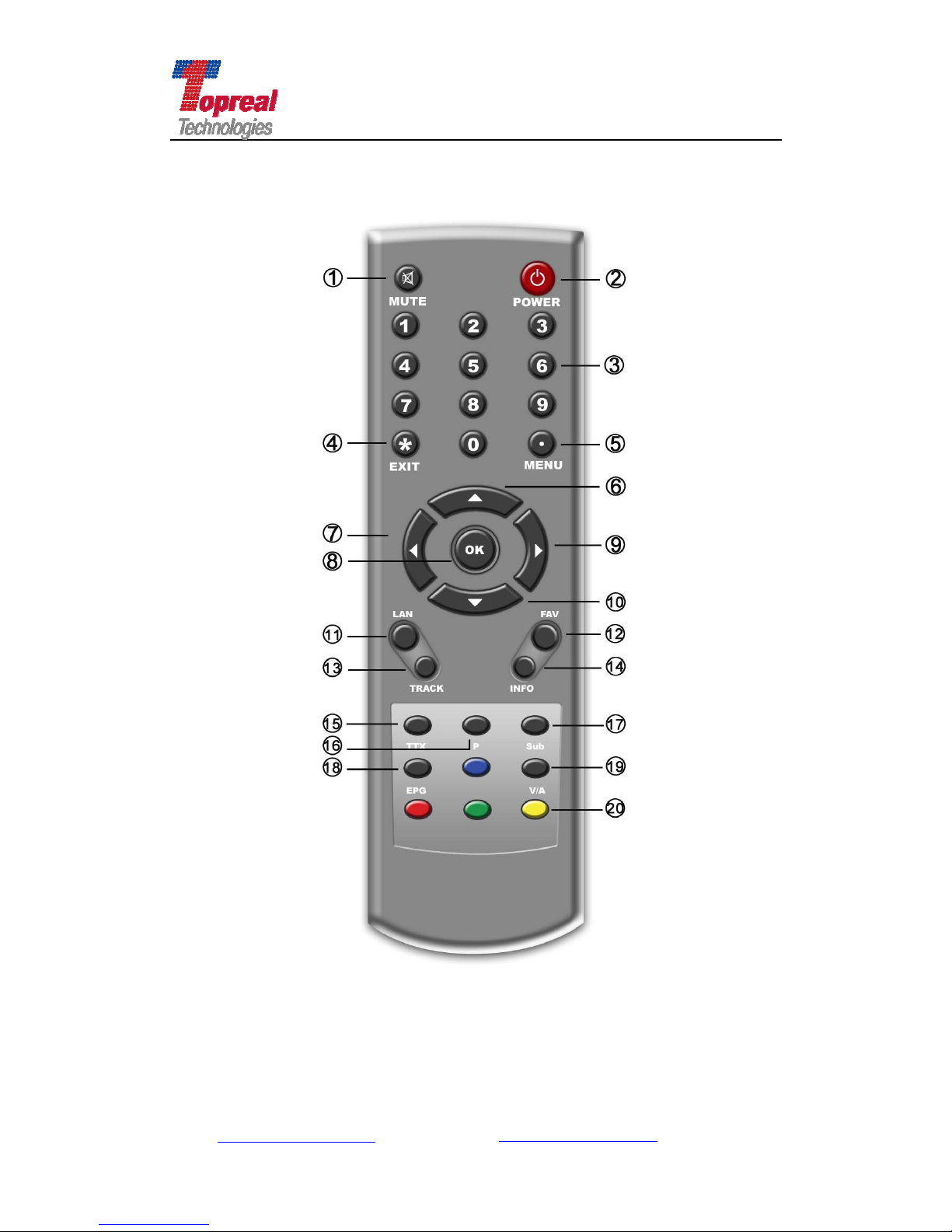
2.3 Remote Control Keys
1 Mute: press it, no sound output; press again to switch it back on.
2 Power: turn on/off the receiver.
3 Numeric key0~9: numeric keyboard area. They are used to input program
channel or specific value in menu operation.
4 Exit: exit menu operation and return to video display.
5 Menu: in video display, press it to display the main menu. When in menu
operation, press it to exit the current sub-menu operation.
7/9
: move the cursor to the previous or next service in the menu
operation; or when video displays, use them to increase volume or
decrease volume;
6/10
▲▼: move the cursor to the previous or next service in the menu
operation ; or when video displays, use them to switch to the
previous or next program.
8 OK: confirm operation.
11 Language: switch OSD language of the receiver.
12 Favorite: display the favorite TV/radio programs.
13Track: select an audio track and sound mode, left, right, or stereo.
14 Info: display the current channel information box. It also used to display
more information about a program.
15 Teletext: display the teletext info.
16 Pause: pause the live video
17 Subtitle: display subtitle.
18 EPG: display the electronic program guide.
19 Video/ Audio: switch from video channel to radio channel
20 Function key: these four keys have different functions per menu. They will
be guided by on-screen help.
Add: Bldg. 46-2, No. 2, North Jingyuan Str., Be ijing Economic-Technological
Development Area, Beijing, P. R. China
Tel: +8610 6439 8830 Fax: +8610 6439 1594
Web: www.topreal.com.cn
Email: [email protected]
11
Page 12
Beijing Topreal Technologies Co. Ltd
北京腾锐视讯科技有限公司
Add: Bldg. 46-2, No. 2, North Jingyuan Str., Be ijing Economic-Technological
Development Area, Beijing, P. R. China
Tel: +8610 6439 8830 Fax: +8610 6439 1594
Web: www.topreal.com.cn
Email: [email protected]
12
Page 13

Add: Bldg. 46-2, No. 2, North Jingyuan Str., Be ijing Economic-Technological
Development Area, Beijing, P. R. China
Tel: +8610 6439 8830 Fax: +8610 6439 1594
Web: www.topreal.com.cn
Email: [email protected]
13
Beijing Topreal Technologies Co. Ltd
北京腾锐视讯科技有限公司
Chapter Three First Use Guide
3.1 System Connection
When use TP-3000 receiver, first please connect the USB cable, then
connect the antenna, later connect the power adapter , finally turn on the
application player. When you stop to use the receiver, first please turn off the
application, then plug off the USB cable and power adapter.
Note: TP-3000 does not support hot plug-n-play power supply. Please
follow strictly the above steps when in use of it.
3.2 Remote Control Operation
When turn on the application, users can use the remote control to do all
operation like menu selection, program search and channel switch, etc. please
aim the remoter control directly to IR of TP-3000 receiver, rather than the
screen of your computer.
Page 14

Beijing Topreal Technologies Co. Ltd
北京腾锐视讯科技有限公司
Chapter Four Menu Operation
After connect all the cables, the TP-3000 receiver is in common receiving
working mode, the application screen shows the following figure.
If the antenna is connected, and there is program parameter stored in the
receiver, when turn on the application software, the screen will show the last
power off channel. If it is your first time to use the receiver, then you can press
OK, the receiver will begin to search channel automatically. When the receiver
have searched signal, it will enter play mode. Y ou can choose play in full screen
or common interface.
Note: the video quality in full screen is related with the video adapter of
your computer.
Specification of the Main Menu
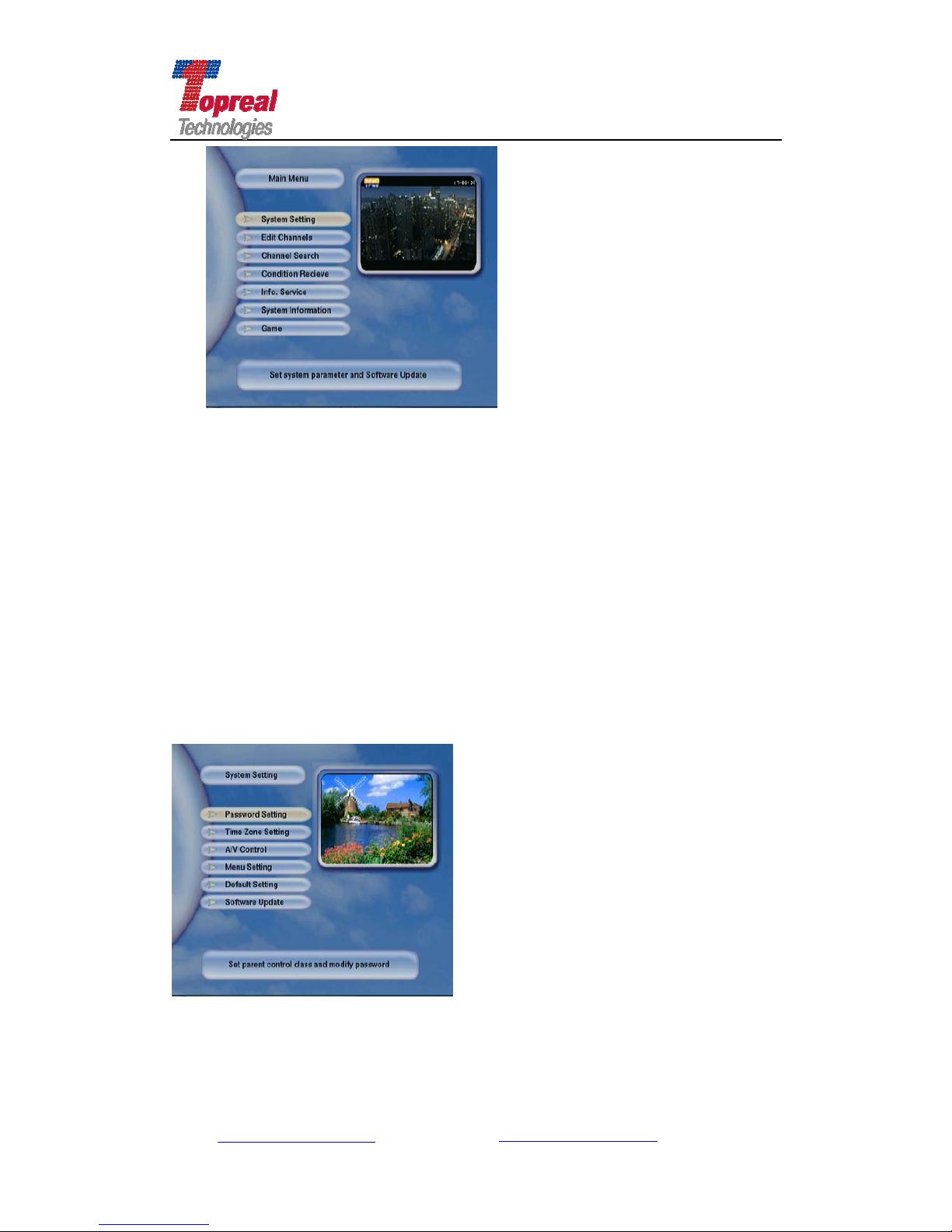
Press the Menu key of the remote control, the main menu interface will
popup (as the following picture shows). Press ▲ or ▼ key to move the cursor
to select System Setting, Edit Channels, Channel Search, Conditional Receive,
Info Service, System Information and Game submenu, press OK to enter the
submenu interface. Press Menu k ey to return to previous menu, press Exit key
to exit menu operation and return to video display.
Add: Bldg. 46-2, No. 2, North Jingyuan Str., Be ijing Economic-Technological
Development Area, Beijing, P. R. China
Tel: +8610 6439 8830 Fax: +8610 6439 1594
Web: www.topreal.com.cn
Email: [email protected]
14
Page 15
Beijing Topreal Technologies Co. Ltd
北京腾锐视讯科技有限公司
Take the main menu interface (as above figure shows) as an example to
introduce each part of the interface. The screen at the top right is the channel
you are viewing. Main Menu at the top left is the menu name; Menus below it are
submenus of it. Words at the bottom describe functions (or parameter setting
can be done) of the menu with cursor on. For example “Set system parameter
and Software Update” is the specification of System Setting.
4.1 System Setting
In the Main Menu interface, press ▼ key move the cursor to the System
Setting submenu, press OK to enter (the interface is as the following figure
shows).
Add: Bldg. 46-2, No. 2, North Jingyuan Str., Be ijing Economic-Technological
Development Area, Beijing, P. R. China
Tel: +8610 6439 8830 Fax: +8610 6439 1594
Web: www.topreal.com.cn
Email: [email protected]
15
Page 16

Beijing Topreal Technologies Co. Ltd
北京腾锐视讯科技有限公司
4.1.1 Password Setting
press ▼ key move the cursor to Password Setting menu, press OK to
enter . Y ou are asked to enter the PIN (Personal Identification Number), input the
default value 0000, then enter Password Set interface (as the following shows).
press ▼ key to move the cursor to Password on/off. Press to set
password on or off. When Set the password as on, then you can encrypt some
important service for TP-3000 receiver, and at the same time the Modify
Password is activated, press OK to set a new password. Y ou are asked to enter
the new password twice for confirmation.
Note: when you modify the password, please choose one that is
familiar and easy to memory. If input a wrong password, you can not do
some service for the receiver, and the receiver can not work normally.
Users should be cautious to do the password modification.
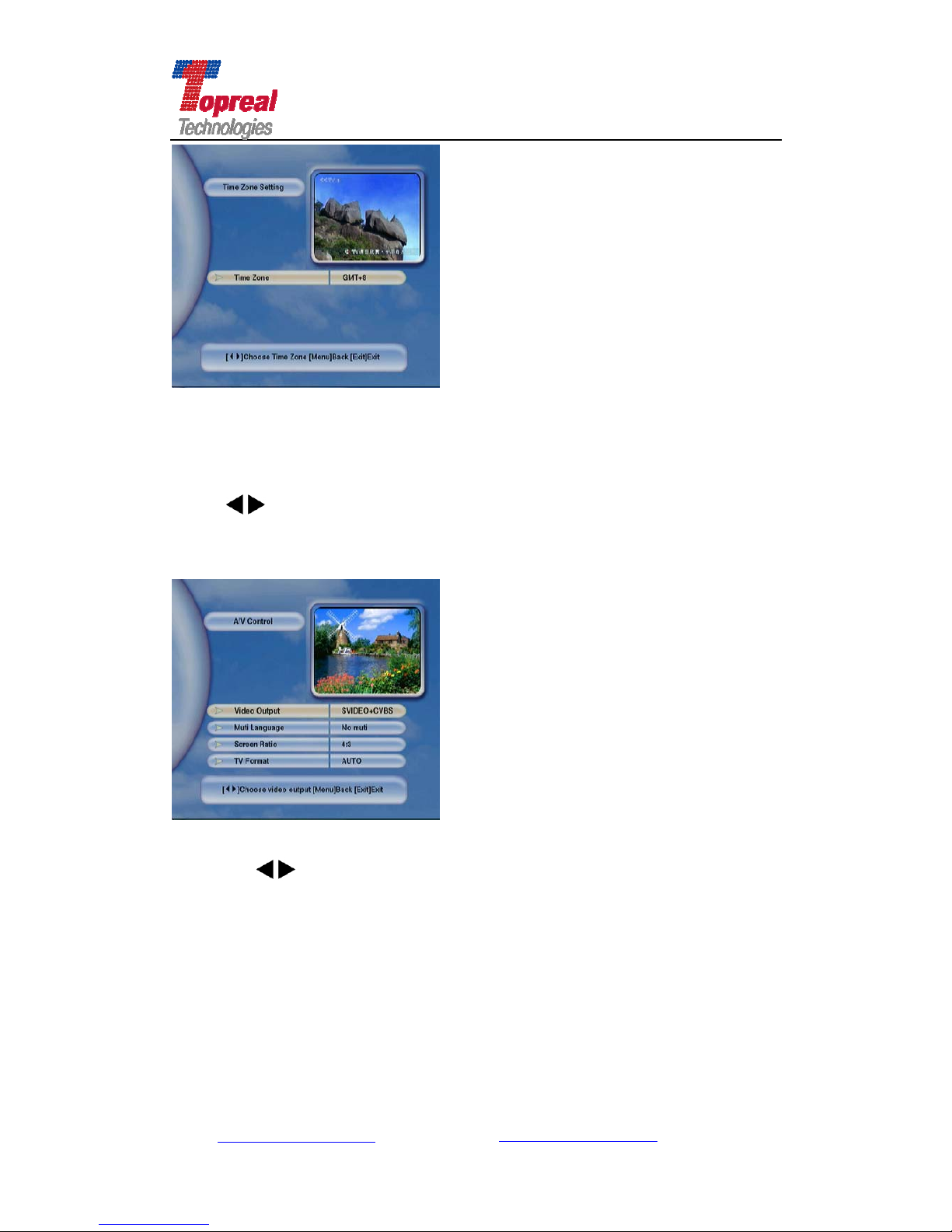
4.1.2 Time Zone Setting
In the System Setting interface, press ▼ key to move the cursor to
Time Zone Setting submenu, press OK to enter (interface is as the following
shows). The defaulted setting is Beijing Time zone, users can Press
key
to set the time zone of your country. After set, press Menu Key to save and
return to System Setting Interface.
Add: Bldg. 46-2, No. 2, North Jingyuan Str., Be ijing Economic-Technological
Development Area, Beijing, P. R. China
Tel: +8610 6439 8830 Fax: +8610 6439 1594
Web: www.topreal.com.cn
Email: [email protected]
16
Page 17
Beijing Topreal Technologies Co. Ltd
北京腾锐视讯科技有限公司
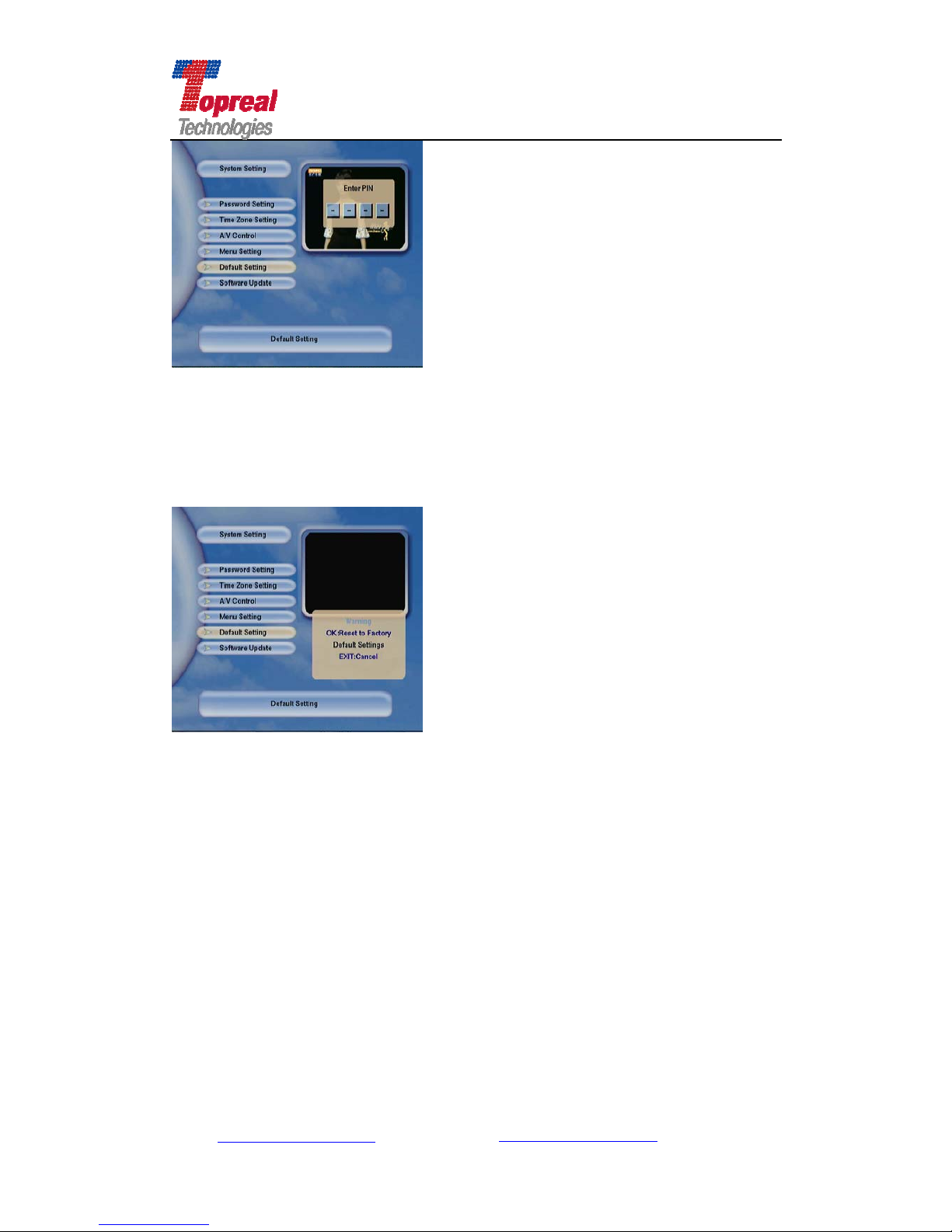
4.1.3 A/V Control
in the System Setting interface, press ▼ key to move the cursor to A/V
Control, press OK to enter A/V Control interface. In this interface, you can
Press
key to set parameter for Video Output, Multi language, Screen
Ratio, and TV Format, the default setting for these parameter is as the following
figure shows.
Video Output
Press
key to set the video output from SVIDEO+CVBS to YUV+CVBS.
Multi Language
At present there is no language accompanying for TP-3000 receiver.
Screen Ratio
There are two screen ratio, 4:3 and 16:9, their screen are as the following
two figures respectively. Users can choose the ration according to personal
preference.
Add: Bldg. 46-2, No. 2, North Jingyuan Str., Be ijing Economic-Technological
Development Area, Beijing, P. R. China
Tel: +8610 6439 8830 Fax: +8610 6439 1594
Web: www.topreal.com.cn
Email: [email protected]
17
Page 18

Beijing Topreal Technologies Co. Ltd
北京腾锐视讯科技有限公司
4:3 16:9
TV Format
TP-3000 receiver supports two television standards, PAL and NTSC. PAL is
adopted in European countries while NTSC is adopted in USA, Japan, Canada
and so forth.
If your channel is in PAL format, y ou have to set the TV format as PAL. I f you
switch to the service of the NTSC standard, the screen would have shinning
lights under the video. If you do not know which kind of standard adapts in y our
country, please set the TV format as Auto.
When finish all the setting, please press Menu to save setting and return to the
System Setting interface.
Note: when set parameter in this interface, the video would have
moment slight freeze, it is normal.
4.1.4 Menu Setting
In the System Setting interface, press ▼ key to move the cursor to Menu
Setting, press OK to enter. In the Menu setting interface (as the following
shows), you can set parameter for Menu Information Display Time (also the
channel info display time), OSD Transparency, OSD Brightness and Menu
Language. Press
key to do the setting. The default OSD language is
Finnish, you can press
key to set the language as English. When finish
setting, press Menu to save setting and return to the System Setting interface.
Add: Bldg. 46-2, No. 2, North Jingyuan Str., Be ijing Economic-Technological
Development Area, Beijing, P. R. China
Tel: +8610 6439 8830 Fax: +8610 6439 1594
Web: www.topreal.com.cn
Email: [email protected]
18
Page 19

Beijing Topreal Technologies Co. Ltd
北京腾锐视讯科技有限公司
Menu-Info Display Time
User can adjust the display time of the information box. the information bo x
is as the following figure. Press
to set, the available range is from 1S to
6S.
OSD Transparency
User can adjust the transparency level of the on-screen display. You can press
to set as you desired, the available range is from 30% to 70%.
OSD Brightness
User can adjust the brightness level of the on-screen display. You can press
to set as you desired, the available range is from 20% to 80%.
Multi Language Setting
The default language of the OSD menu of TP-3000 is Finnish. At present the
OSD language is Finnish and English. User can press
to set as you desired
one. Once you select one language, the menu will be immediately displayed in
the selected language. Or you can just simply press the Language button of the
remote control to switch the OSD language.
4.1.5 Default Setting
In the System Setting interface, press ▼ key to move the cursor to
Default Setting, press OK to enter. Then you are asked to input the PIN (as the
following shows),
Add: Bldg. 46-2, No. 2, North Jingyuan Str., Be ijing Economic-Technological
Development Area, Beijing, P. R. China
Tel: +8610 6439 8830 Fax: +8610 6439 1594
Web: www.topreal.com.cn
Email: [email protected]
19
Page 20
Beijing Topreal Technologies Co. Ltd
北京腾锐视讯科技有限公司
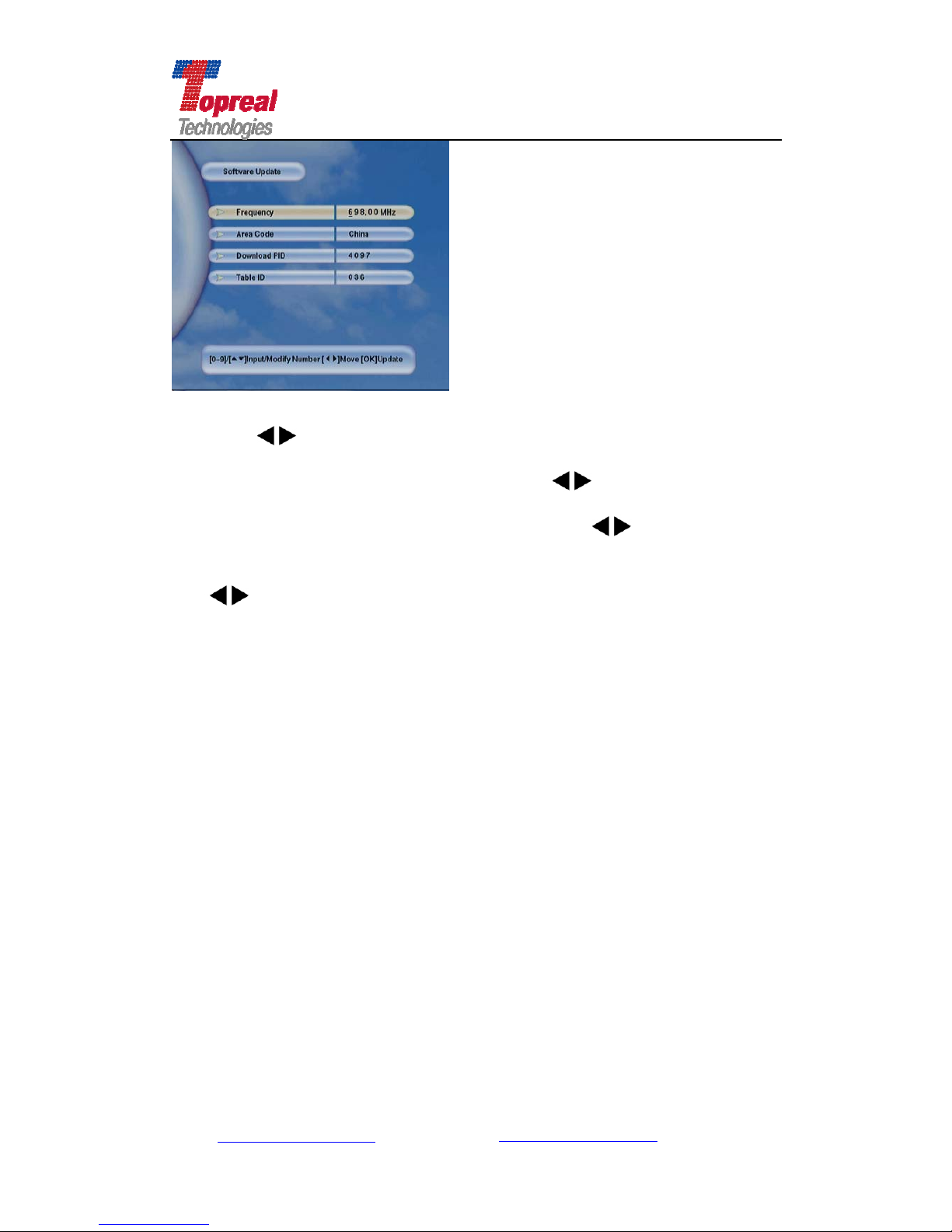
When input the default password 0000 (if you have modified the password
in Password Setting, please input the new password), the warning box would
pop up, as the following interface shows, press OK to restore all the par ameter
of the receiver to the factory setting. Then all the parameter setting you have
done will be restored to the factory setting. Or press Exit key to cancel this
operation.
4.1.6 Software Update
In the System Setting interface, press ▼ key to move the cursor to
Software Update, press OK to enter , then y ou are asked to input the password.
When input the correct password, the following interface will show,
Add: Bldg. 46-2, No. 2, North Jingyuan Str., Be ijing Economic-Technological
Development Area, Beijing, P. R. China
Tel: +8610 6439 8830 Fax: +8610 6439 1594
Web: www.topreal.com.cn
Email: [email protected]
20
Page 21
Beijing Topreal Technologies Co. Ltd
北京腾锐视讯科技有限公司
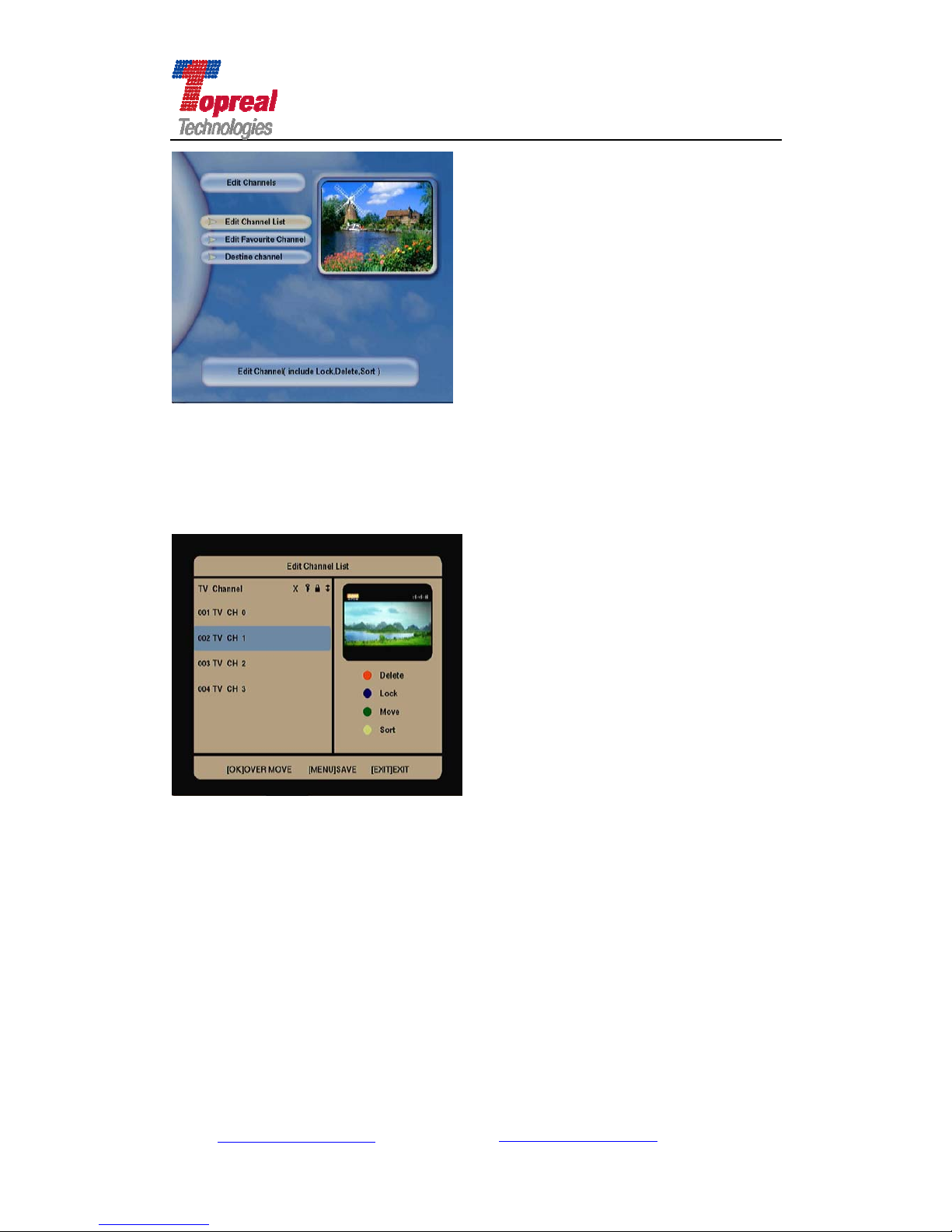
Press the key to set the frequency, modify the number with underline.
press▼key to move to the Area Code, press
key to select the area.
press ▼key to move to the Download PID, press the
key to modify PID,
modify the number with underline. press ▼key to move to the Table ID, press
the
key, modify the number with underline. When all setting has done,
press OK to upgrade software.
Note: users should get the correct transponder information appointed
by the operator when do software upgrade.
4.2 Edit Channel
In the Main Menu Interface, press ▼key to move the cursor to Edit
Channel, press OK to enter.
You will see three submenus, Edit Channel List, Edit Favorite Channel and
Destine (reserve) Channel, the interface is as follows.
Add: Bldg. 46-2, No. 2, North Jingyuan Str., Be ijing Economic-Technological
Development Area, Beijing, P. R. China
Tel: +8610 6439 8830 Fax: +8610 6439 1594
Web: www.topreal.com.cn
Email: [email protected]
21
Page 22
Beijing Topreal Technologies Co. Ltd
北京腾锐视讯科技有限公司
4.2.1 Edit Channel List
Press ▼key to move the cursor to the Edit Channel List , press OK, after
input the correct PIN, enter the Edit Channel list interface (which as the
following figure shows):
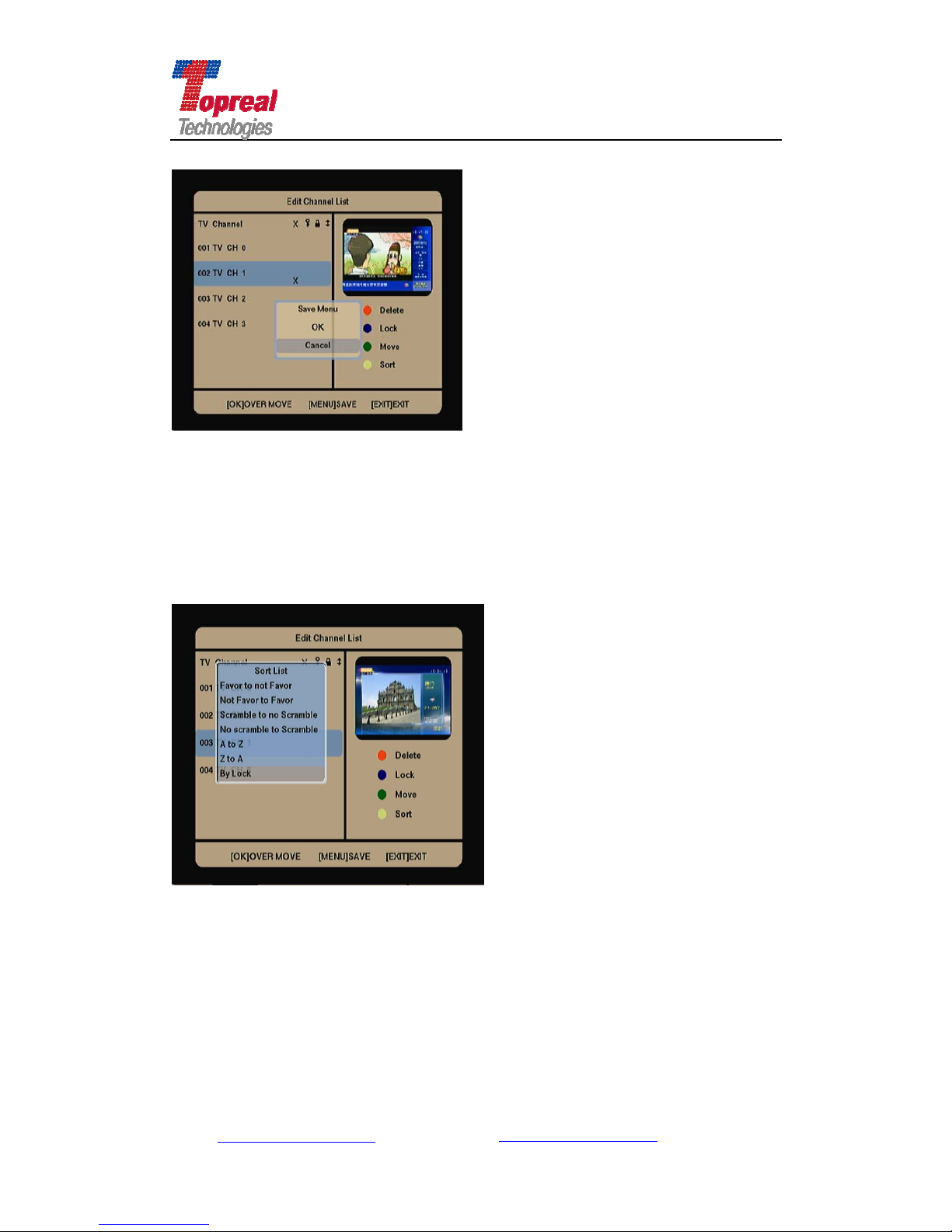
The left part of the interface displays the TV channel list that TP-3000
receiver received. Channel with cursor on is the channel you are viewing. For
example, video on the top right is the 002 TV CH 1. Below the video, there are
four color keys, the red key means to delete channel, the blue key means to lock
channel, the green key means to move channel to a new order, the yellow key
means to sort the channels. Press the color key once, begins to do the operation,
press it again to cancel the operation.
Press ▼key to move to the channel you would like to do operation. Press
the Red key , × will appear in the channel, which means you are going to delete
this channel. Press OK, the following interface will show, Press ▼key to move to
OK or Cancel. Press OK to delete this channel and return to Edit Channel
Add: Bldg. 46-2, No. 2, North Jingyuan Str., Be ijing Economic-Technological
Development Area, Beijing, P. R. China
Tel: +8610 6439 8830 Fax: +8610 6439 1594
Web: www.topreal.com.cn
Email: [email protected]
22
Page 23
Beijing Topreal Technologies Co. Ltd
北京腾锐视讯科技有限公司
Interface. Press Cancel to cancel deletion and return to Edit Channel Interface.
Press the Blue key, the key icon will shows in the channel, which means
whenever you turn on TP-3000 receiver, you will view this channel.
Press the Green Key, the icon will show, then press ▲▼key to move to the
channel to a new order. Then press OK to confirm.
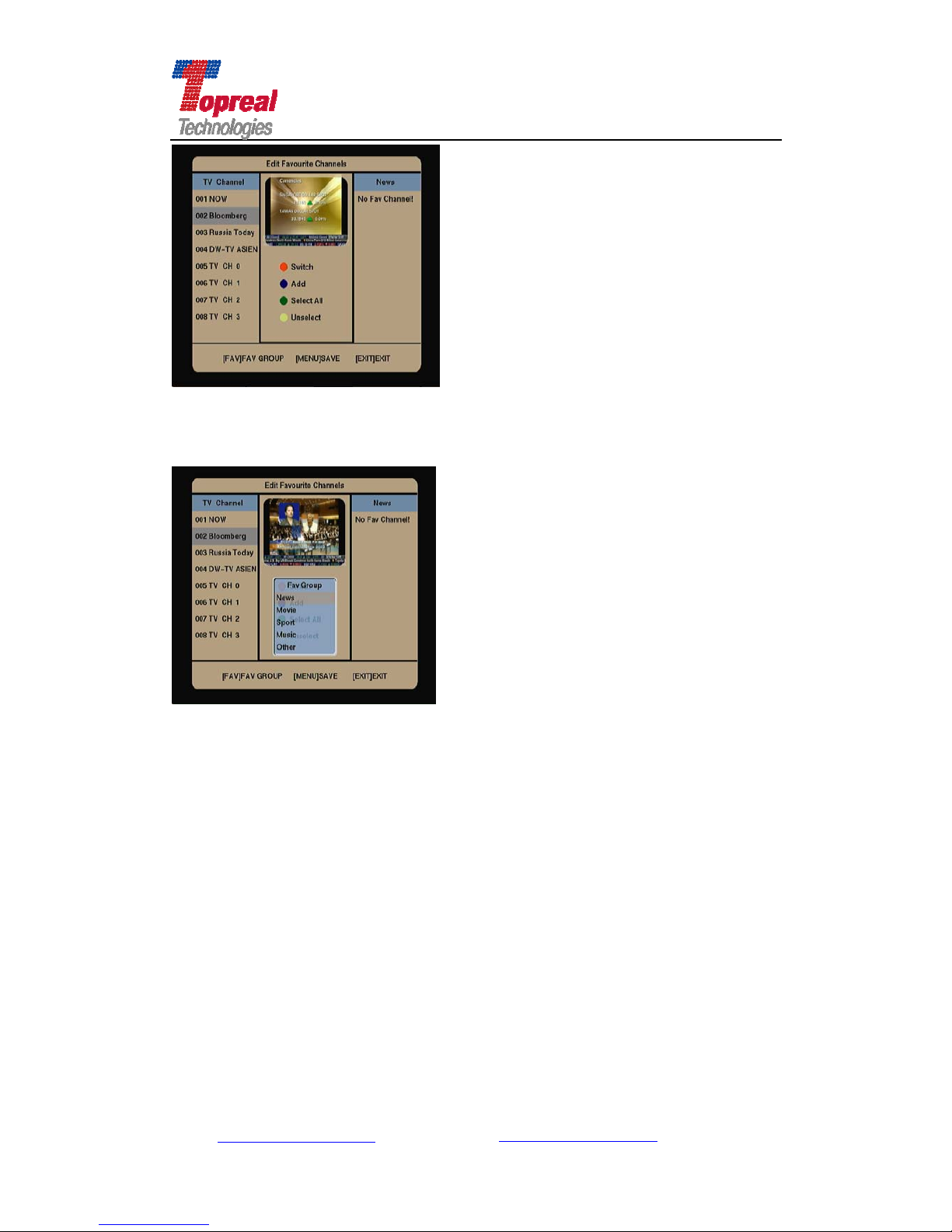
Press the Y ellow key , the sort list will popup, press ▲▼key to mo ve to the
channel to your chosen list. Press OK to confirm.
4.2.2 Edit Favorite Channels
Press ▼key to move the cursor to the Edit Favorite Channels , press OK to
enter, as the following figure shows:
Add: Bldg. 46-2, No. 2, North Jingyuan Str., Be ijing Economic-Technological
Development Area, Beijing, P. R. China
Tel: +8610 6439 8830 Fax: +8610 6439 1594
Web: www.topreal.com.cn
Email: [email protected]
23
Page 24
Beijing Topreal Technologies Co. Ltd
北京腾锐视讯科技有限公司
Press ▼key to move the cursor to the channel you want to edit, then press the
fav key of your remote control, the favorite group will popup, as the following
figure shows:
Then Press ▼key to choose the group, you can sort the channel according its
content into News, movie, Sport, music and other. When choose the group,
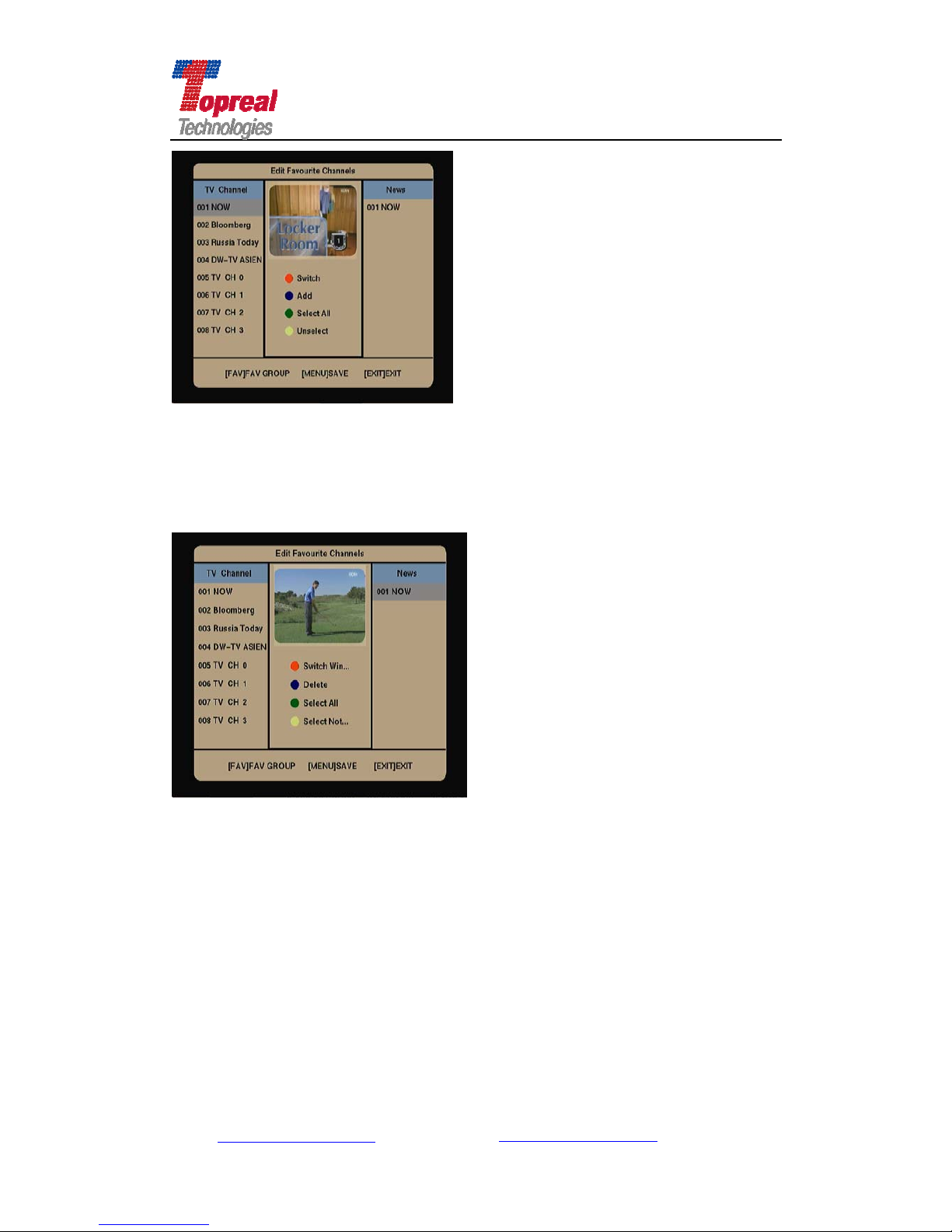
press OK. Then press the Blue key to add the channel to your chosen group. the
channel will appear in the list of the group. As the following figure shows, 001
NOW channel is added in News group.
Add: Bldg. 46-2, No. 2, North Jingyuan Str., Be ijing Economic-Technological
Development Area, Beijing, P. R. China
Tel: +8610 6439 8830 Fax: +8610 6439 1594
Web: www.topreal.com.cn
Email: [email protected]
24
Page 25
Beijing Topreal Technologies Co. Ltd
北京腾锐视讯科技有限公司
User can press the green key to select all the channels TP-3000 received, and
then press the Blue key to add them to your chosen gro up. Press the Y ellow key
is to cancel selecting all the channels.
If you would like to move the channel out of the favorite group , press the red key ,
the following figure will show,
Press the blue key is to move the channel out of the favorite group.
4.2.3 Destine Channel
In the Edit Channels interface, press ▼ key to move the cursor to
Destine Channel, press OK to enter, as the following figure shows:
Add: Bldg. 46-2, No. 2, North Jingyuan Str., Be ijing Economic-Technological
Development Area, Beijing, P. R. China
Tel: +8610 6439 8830 Fax: +8610 6439 1594
Web: www.topreal.com.cn
Email: [email protected]
25
Page 26
Beijing Topreal Technologies Co. Ltd
北京腾锐视讯科技有限公司
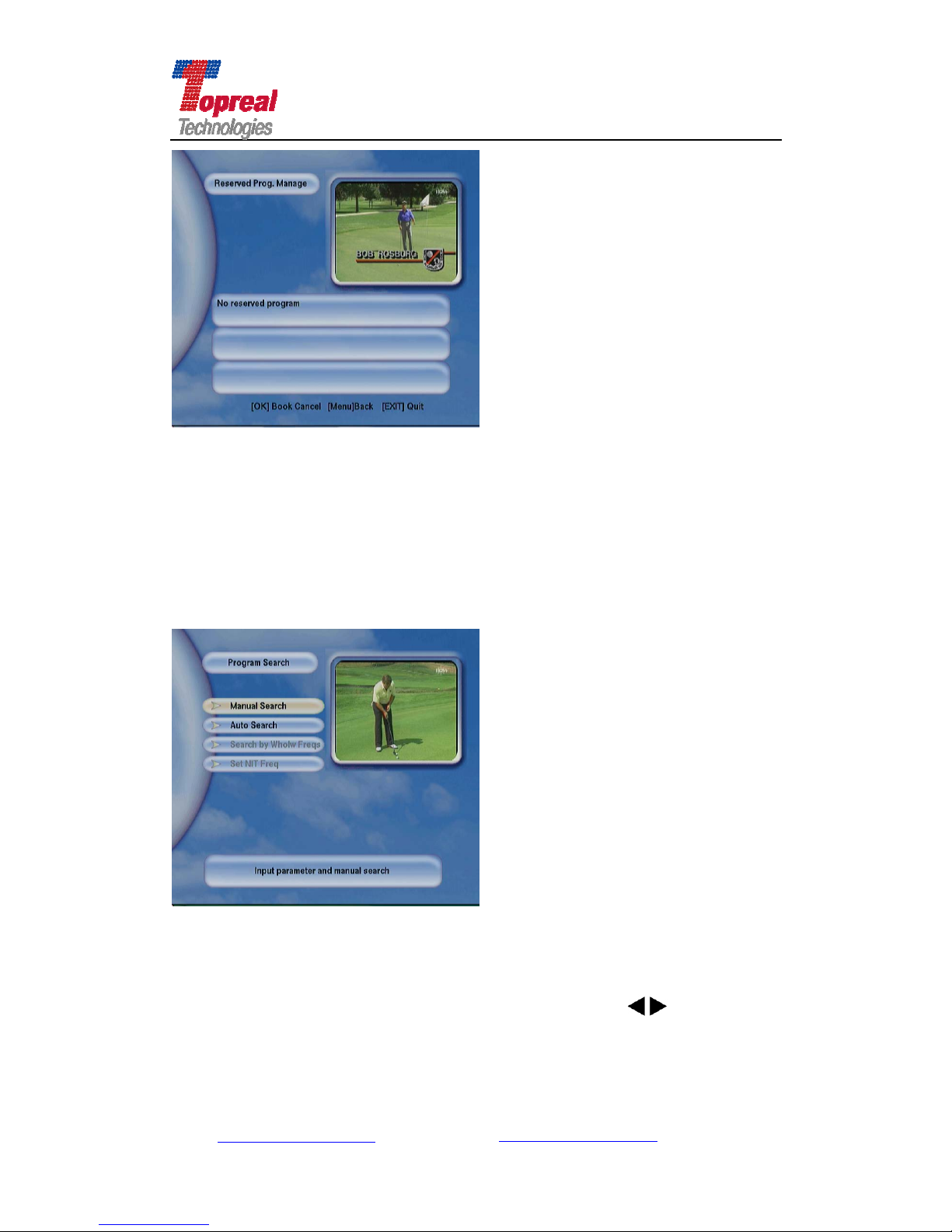
4.3 Channel Search
In the Main Menu interface, press ▼key to move th e cursor to Channel
Search, press OK to enter, you will see Manual Search, Auto Search, Search by
Whole frequency, set NIF Frequency (the last two submenus are not available
for TP-3000 receiver).
4.3.1 Manual Search
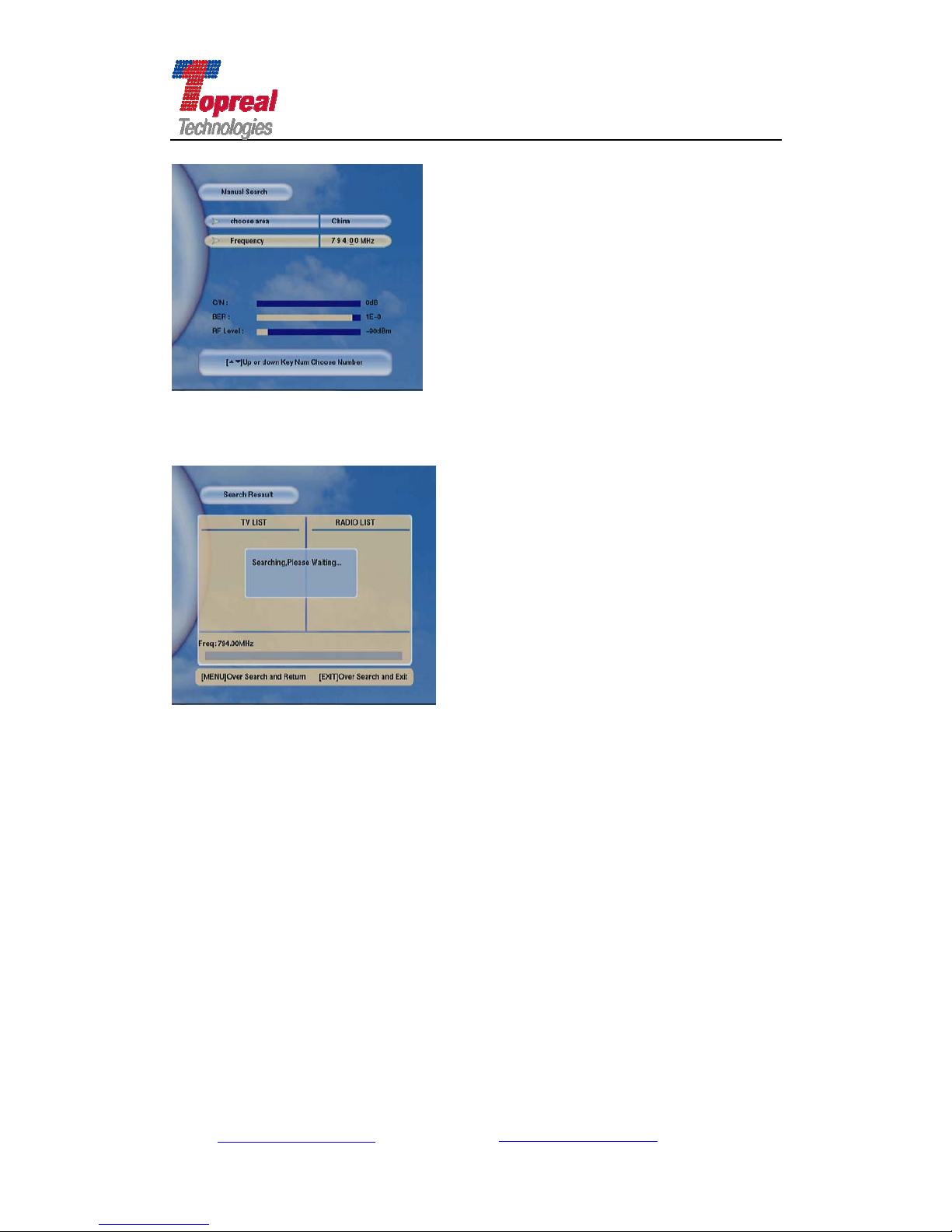
In Program Search interface, press ▼key to move the cu rsor to Manual
Search, press OK to enter the following interface. Press
key to choose
the area, press ▼key to move to Frequency bar, press ▲▼key to modify
Add: Bldg. 46-2, No. 2, North Jingyuan Str., Be ijing Economic-Technological
Development Area, Beijing, P. R. China
Tel: +8610 6439 8830 Fax: +8610 6439 1594
Web: www.topreal.com.cn
Email: [email protected]
26
Page 27
Beijing Topreal Technologies Co. Ltd
北京腾锐视讯科技有限公司
number with underline.
If there is signal under the area and frequency, the Lock light at the right
panel of TP-3000 receiver will on, and C/N, BER, RF level parameters are
changing. Press OK to begin search (the interface is as follows)
Note: when use Manual Search, the user should get the correct
transponder information appointed by the operator, then set the
frequency. The manual search allows slight difference, the receiver will
get signal anyway.
4.3.2 Auto Search
In Program Search interface, press ▼key to move the cursor to Auto
Search, press OK to enter, as the following figure shows:
Add: Bldg. 46-2, No. 2, North Jingyuan Str., Be ijing Economic-Technological
Development Area, Beijing, P. R. China
Tel: +8610 6439 8830 Fax: +8610 6439 1594
Web: www.topreal.com.cn
Email: [email protected]
27
Page 28

Beijing Topreal Technologies Co. Ltd
北京腾锐视讯科技有限公司
Press key to choose the area, press OK to begin search.
Before use Auto Search, user need to set the correct main Frequency i n the
menu Set main frequency first, then press Menu to exit, select Auto Search,
press OK to begin Auto program.
Note: usually, the main frequency of the TP-3000 receiver has been set
in the software. Users do not need to set it again. If there is no channel
searched, please ask the TV operator for the main frequency, then reset
the main frequency, and use auto search to search channel again.
4.4 Conditional Receive
In the Main Menu interface, press ▼ key to move the cursor to
Conditional Receive, press OK to enter. If you do not have entered your
subscription card, the following tip box would popup.
Add: Bldg. 46-2, No. 2, North Jingyuan Str., Be ijing Economic-Technological
Development Area, Beijing, P. R. China
Tel: +8610 6439 8830 Fax: +8610 6439 1594
Web: www.topreal.com.cn
Email: [email protected]
28
Page 29

Beijing Topreal Technologies Co. Ltd
北京腾锐视讯科技有限公司
Then please enter your subscription card. After enter your subscription card,
enter Conditional Receive interface, which includes Adult level setting, PIN
setting and Subscription Card Info.
4.4.1 Adult Level Setting
Press ▼key to move the cursor to Adult level setting, press OK to enter, in
this interface, you can set channel for different levels according to the viewer’s
age. When finish set, press menu to return to Conditional Receive interface.
4.4.2 PIN Setting
Press ▼key to move the cursor to PIN setting, press OK to enter. In this
interface, you can start, prohibit and modify the PIN (password). Press menu to
return to Conditional Receive interface.
4.4.3 Smart Card Info
Press ▼key to move the cursor to Smart Card Info, press OK to enter, in
this interface, you can view the current status of your smart card.
4.5 Info Service
In the Main Menu interface, press ▼key to move the cursor to Info
Service, press OK to enter the interface (as the following shows), which
contains NVOD,EPG, Stock and Browser (the last two service are not available
for TP-3000 receiver).
Add: Bldg. 46-2, No. 2, North Jingyuan Str., Be ijing Economic-Technological
Development Area, Beijing, P. R. China
Tel: +8610 6439 8830 Fax: +8610 6439 1594
Web: www.topreal.com.cn
Email: [email protected]
29
Page 30

Beijing Topreal Technologies Co. Ltd
北京腾锐视讯科技有限公司
4.5.1 NVOD (Near-Video-on-Demand)
In the info Service interface, press ▼key to move the cursor to NVOD,
press OK to enter. If there is….
4.5.2 EPG (Electronic Program Guide)
EPG is like an electronic TV newspaper, which is convenient for users get to
know the future programs. It is inserted by the TV operator in the Head-end
broadcasting system, user can simply press EPG button of the remote control to
enter EPG interface, in which you will view current or scheduled programs that
are or will be on each service with info like the broadcasting time, content and
brief introduction.
Press ▼key to move the curs or to Info Service in the Main Menu, Press
OK to enter, move the cursor to EPG, press OK to view the EPG info. Then
interface will as follows. If TV station has inserted EPG, then you will see the info.
In the EPG interface, use the red key to switch the select window, when switch
to program info window, use▲▼key to view the program info in different date
and time.
Or user can simply press EPG key of the remote control, then will view the
EPG info.
Add: Bldg. 46-2, No. 2, North Jingyuan Str., Be ijing Economic-Technological
Development Area, Beijing, P. R. China
Tel: +8610 6439 8830 Fax: +8610 6439 1594
Web: www.topreal.com.cn
Email: [email protected]
30
Page 31
Beijing Topreal Technologies Co. Ltd
北京腾锐视讯科技有限公司
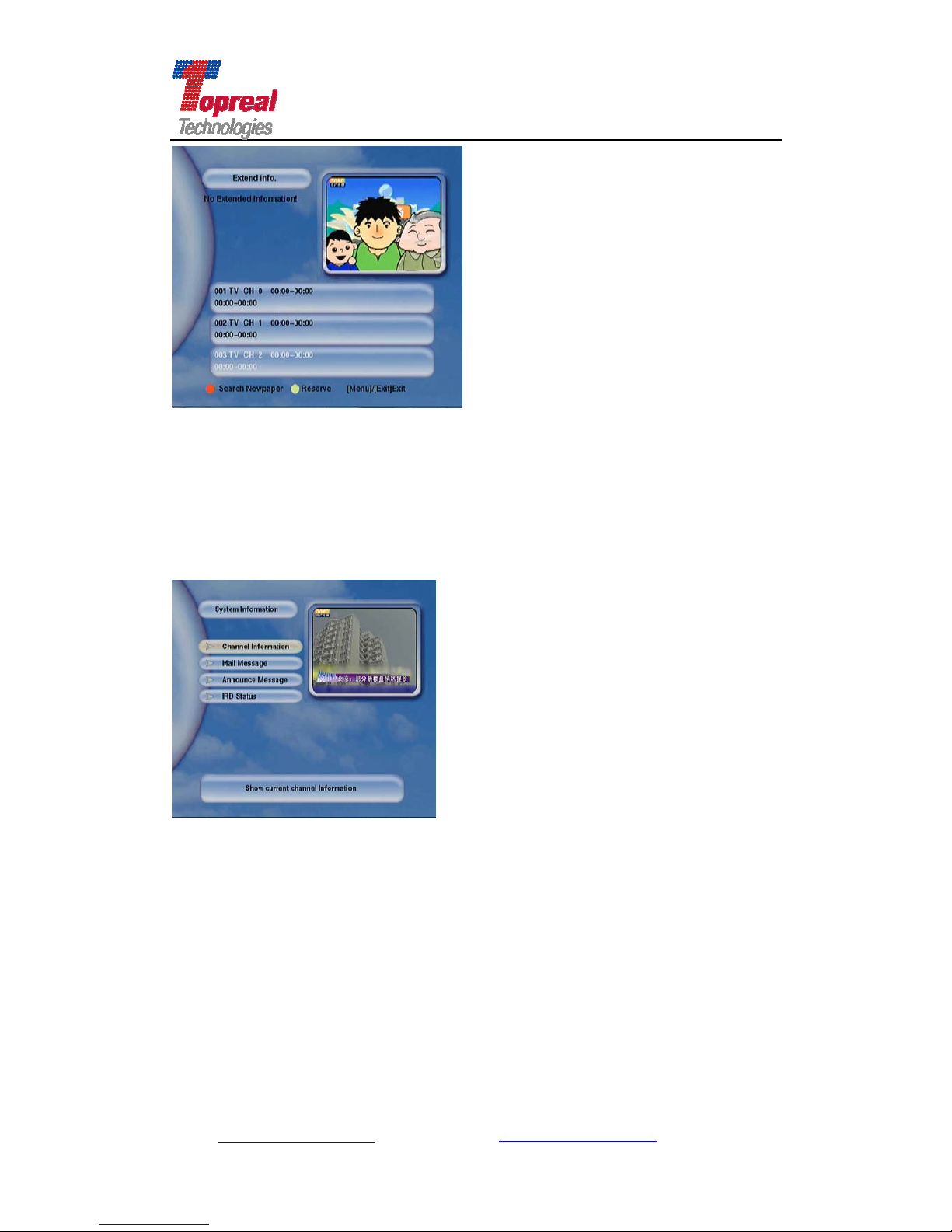
4.6 System Information
In the Main Menu interface, press ▼key to m ove the cursor to System
Information, press OK to enter the following interface, which contains
Channel Information, Mail Message, Announcement Message, IRD Status (as
the following shows).
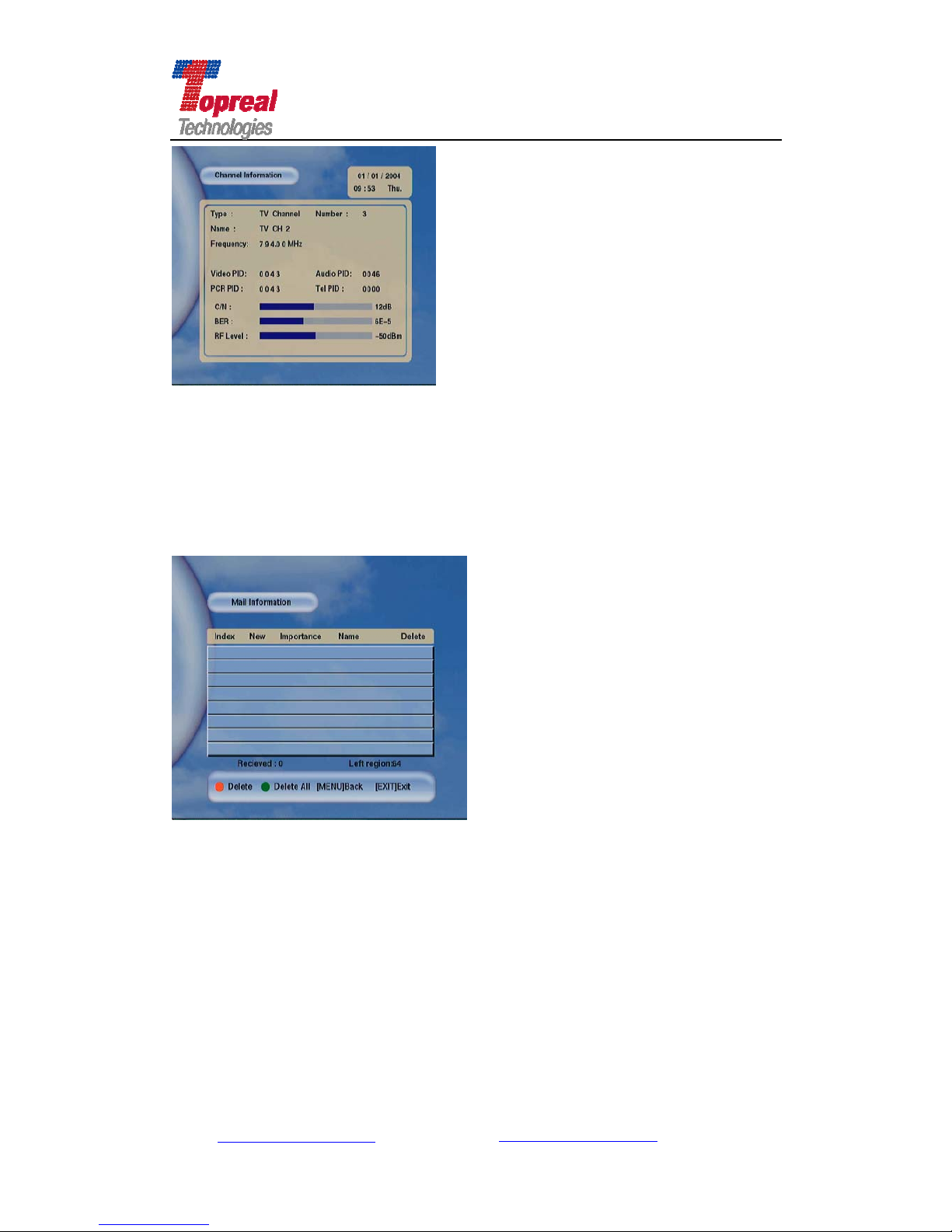
4.6.1 Channel Information
Press ▼key to move the cursor to Channel Information, press OK to
enter. The interface is as follows, it shows the info of present channel you are
viewing.
Add: Bldg. 46-2, No. 2, North Jingyuan Str., Be ijing Economic-Technological
Development Area, Beijing, P. R. China
Tel: +8610 6439 8830 Fax: +8610 6439 1594
Web: www.topreal.com.cn
Email: [email protected]
31
Page 32
Beijing Topreal Technologies Co. Ltd
北京腾锐视讯科技有限公司
4.6.2 Mail Information
Press Menu to return to System Info Interface, press ▼key t o move t h e
cursor to Mail Message, press OK to enter, then you will see the mail that the
TV operator send to you, press red key to delete the selected mail, press green
Key to delete all the mail received. Press Menu to return to system Info
Interface, press Exit key to return to the video.
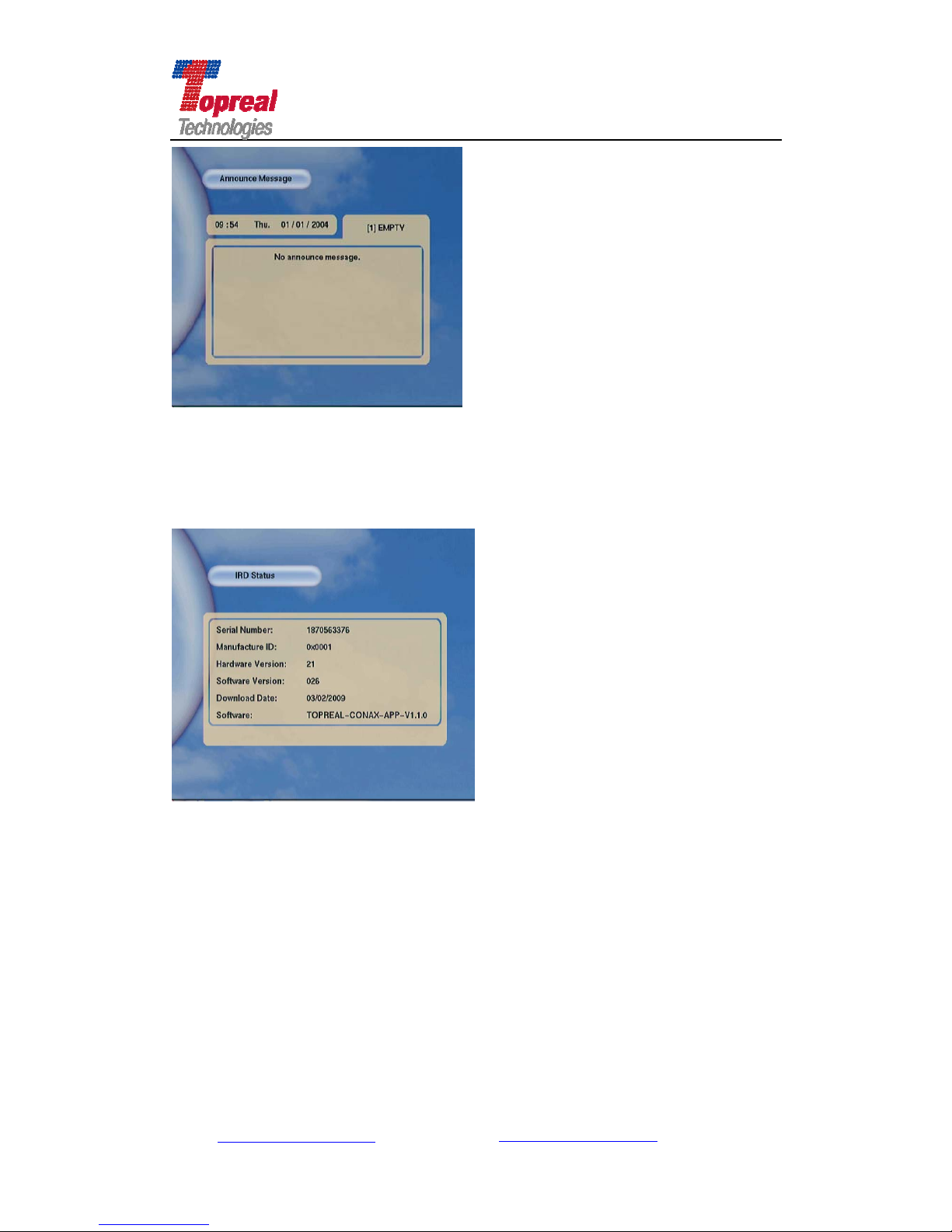
4.6.3 Announce Message
In the System Info Interface, press ▼ key to move the cursor to
Announce Message, press OK to enter , then you will see the notice that the TV
operator send to you, as the following interface shows:
Add: Bldg. 46-2, No. 2, North Jingyuan Str., Be ijing Economic-Technological
Development Area, Beijing, P. R. China
Tel: +8610 6439 8830 Fax: +8610 6439 1594
Web: www.topreal.com.cn
Email: [email protected]
32
Page 33
Beijing Topreal Technologies Co. Ltd
北京腾锐视讯科技有限公司
4.6.4 IRD Status
Press Menu to return to System Info Interface, press ▼key t o move t h e
cursor to IRD Status, press OK to enter, then you will view the status of your
TP-3000 receiver, as the following shows:
Press Menu to return to System Info interface or press Exit key to exit.
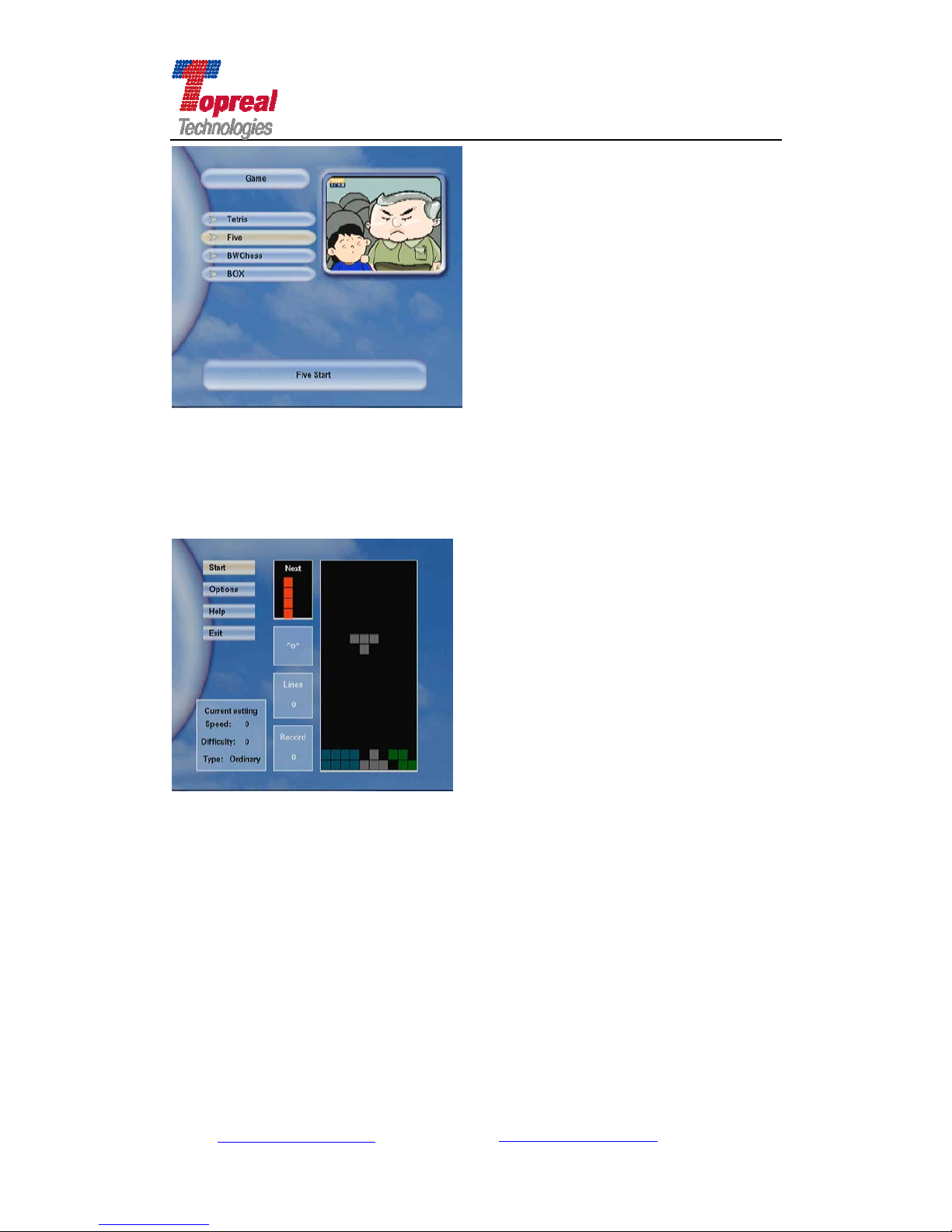
4.7 Game
To make the life more enjoyable, we offer some games in the TP-3000
receiver. In the Main Menu Interface, press ▼key to move the cursor to Game,
press OK to enter, the interface is as follows,
Add: Bldg. 46-2, No. 2, North Jingyuan Str., Be ijing Economic-Technological
Development Area, Beijing, P. R. China
Tel: +8610 6439 8830 Fax: +8610 6439 1594
Web: www.topreal.com.cn
Email: [email protected]
33
Page 34
Beijing Topreal Technologies Co. Ltd
北京腾锐视讯科技有限公司
There are four games in the receiver. Press ▲▼key to move the cursor to
game you want to play, press OK to enter.
Take Tetris for example, Press OK to entry .Use ▲▼ key to choose Start ,
Press OK to begin game. Press Help to get to know how to play the game.
Add: Bldg. 46-2, No. 2, North Jingyuan Str., Be ijing Economic-Technological
Development Area, Beijing, P. R. China
Tel: +8610 6439 8830 Fax: +8610 6439 1594
Web: www.topreal.com.cn
Email: [email protected]
34
Page 35

Add: Bldg. 46-2, No. 2, North Jingyuan Str., Be ijing Economic-Technological
Development Area, Beijing, P. R. China
Tel: +8610 6439 8830 Fax: +8610 6439 1594
Web: www.topreal.com.cn
Email: [email protected]
35
Beijing Topreal Technologies Co. Ltd
北京腾锐视讯科技有限公司
Chapter Five Conditional Receive
To view the encrypted programs, users need to insert the subscription card
to the slot at the right panel of TP-3000 receiver. The subscription card slot on
the receiver can be used for Conax, Irdeto, Topreal and many other mainstream
subscription cards. The specific way is: hold the subscription card horizontally
with the electronic chip (small square-shaped, yellow-gold in color) facing
upward, and insert the card into the slot.
After insert the entitled subscription card, connect the power adapter,
TP-3000 receiver is in working status.
If the antenna is well connected, and there is program parameter stored in
the receiver , when turn on the application softw are, the screen will show the last
channel. When the receiver have searched signal, it will enter play mode.
Note: when insert the subscription card, user can view and modify the
parameter of Conditional Receiver (sector 4.4).
Page 36

Add: Bldg. 46-2, No. 2, North Jingyuan Str., Be ijing Economic-Technological
Development Area, Beijing, P. R. China
Tel: +8610 6439 8830 Fax: +8610 6439 1594
Web: www.topreal.com.cn
Email: [email protected]
36
Beijing Topreal Technologies Co. Ltd
北京腾锐视讯科技有限公司
Chapter Six Trouble Shooting
Malfunction Possible Cause Solution
Shows” device
initialization
acquint fails"
Install driver errors, usually
occurs in the first time use
unload the driver and install it again
no audio or video,
but the power
light is on
the receiver is in standby
status
press the standby Key to motivate the
receiver
when playing
programs, the
audio is OK but
no video
1. the antennal is not
connected well
2. you are viewing radio
program
1. Reconnect the antennal.
2. press Audio/Video Key to switch to
Video program
video is playing
but audio fails
the USB driver is damaged
Right click “My computer”, click
“Properties”. Click “Device Manager”
from Hardware tab. Find “Sound, video
and game controller” category and you
may see “USB 2861 Device” and USB
Audio Device on the list. Right click them
and choose “Update driver”. Then follow
i.1 to install the driver again.
the application
screen is blank
the power adapter is not
connected well
reconnect it again
"no TV signal"
shows in the
screen
1. the antenna is not
connected well
2. the channel parameter is
set wrong
1. connect the antenna well
2. reset the channel parameter in the
or press the red key to research channel
The remote
control does not
work. TP-3000
receiver does not
react to the key
1. the battery has run out of
power
2.it did not aim directly to IR
of the receiver or it is too far
from the receiver
1. Change a new pair of battery
2. Aim the remote control to the IR of the
receiver or shorten their distance.
Page 37

Add: Bldg. 46-2, No. 2, North Jingyuan Str., Be ijing Economic-Technological
Development Area, Beijing, P. R. China
Tel: +8610 6439 8830 Fax: +8610 6439 1594
Web: www.topreal.com.cn
Email: [email protected]
37
Beijing Topreal Technologies Co. Ltd
北京腾锐视讯科技有限公司
Video freezes or
has mosaic
1. Weak signal.
2. the antenna did not
connect well
1. check the signal
2. check the connection of antenna
Page 38

Add: Bldg. 46-2, No. 2, North Jingyuan Str., Be ijing Economic-Technological
Development Area, Beijing, P. R. China
Tel: +8610 6439 8830 Fax: +8610 6439 1594
Web: www.topreal.com.cn
Email: [email protected]
38
Beijing Topreal Technologies Co. Ltd
北京腾锐视讯科技有限公司
Correct Disposal of the Product
This mark shown on the product or its literature indicates that it should not
be disposed with other household waste at the end of its working life. T o prevent
possible harm to the environment or human health from uncontrolled waste
disposal, please separate this from other types of waste and recycle it
responsibly to promote the sustainable reused of the material recourses.
Household users should contract either the retailer whey they purchased
this product or their local government office for details of where and how they
can dispose this products for environmentally safe recycling.
Business users should contract their supplier and check the terms and
conditions of the purchased contract. This product should not be mixed with
other commercial waste for disposal.
 Loading...