

Page 1

Introduction
Thank you very much for choosing this high quality Topower product. This manual
includes a brief description of the properties and technical details of the power supply,
which will give you a better idea of its performance characteristics and answer any
questions you may have right from the outset. Installation instructions should help you to
install the device in your PC case in a technically appropriate manner.
The power supply are provided with adequate power reserves based on its high power (up
to 600Watts) and the PSU comply with the ATX 12V 1.3 and 2.01 standard for Intel &
AMD processors.
Special Features
Topower PSUs support Intel P4 and AMD Opteron/ Athlon processors, high performance
graphic cards and up-to-date serial ATA hard disks. Topower innovative transformable
semi modular cable connectors enable a wide range use in different computer systems.
Topower products meet the goal of today’s challenge & requirement for high power
performance combined with the demand of near noise free environment in addition to
high reliability.
Plug & Energy
Flexible plug-in and removable rails harnesses on the power supply make it possible for
users to choose connector he/she needs exactly. Components to be supplied with the
current are those fore connected using a simple Plug & Energy unit. Various cables
harnesses are involved for the most multifarious configurations of a PC system. As a
result, you will establish enhanced cable order inside his/her case while improving air
circulation.
24-Pin/20 Pin ATX Main Board Connection
This adapter will allow the user to choice freely among main boards that of the featuring
20-pin connection and as well as main boards incorporating 24pin connection.
Consequently, user will be in a position of ensure a high level of compatibility with most
main boards
• ATX specification V2.1 & V2.2
• BTX V1.0a
• E-ATX server dual processor main board
EPS 12V Connection
The additional EPS 12V 8-pin (4+4) connection (8pin processor connection) makes it
possible to operate the power supply unit on E-ATX dual processor server boards
PCI Express VGA Connection
1
Page 2

A PCI Express VGA card connection (In Blue) is used for graphic card stabilization
purpose. The electronic device mounted directly upstream of the connection filters out
voltage peaks, thus offering safe protection to your hard ware.
S-ATA
Thanks to a total of four SATA plugs this power supply cab easily be used for serial
devices
Power Plug
The present power supply offers a multitude of possible connection. They incorporate six
4-pole drive plugs. The cables may have a length of up to 60cm as a result; they are
suitable even for large size computer cases.
Installation
Please read the following warnings and precautions before preceding with the following
installation steps
Warning:
• Danger! Do not open the PSU cover without authorization.
• Risk of high voltage hazard! Fatal injury can occur, especially if the power switch
is on and the power cord is plugged in.
• Do not use wet hands working with the PSU
• Do not insert any metallic objects (screwdrivers, wire etc.) into any opened slots
or into the fan windows of the PSU
• No user-serviceable components inside.
Caution
Malfunction, performance and life span degradation can occur if operating
• In an extremely hot environment.
• In a non ventilated environment.
• In a high humidity environment or
• If any liquid (coffee, tea etc...) or small metallic parts gets into the PSU.
• The PSU is not for outdoor use, only for indoor or office use.
2
Page 3

Installation Steps
I. Ensure the power supply ON/OFF switch is off.
II. In case of exchanging an old PSU, unplug the power cord from the PSU
III. Open the PC chassis unplug all connectors and take old PSU out.
IV. Mount the new Topower PSU using the 4(four) suitable screws (part of the
accessory kit delivered with the PSU) into the matching chassis holes prepared for
PSU installation
V. Connect the ATX 20+4 pin and 4+4pin connectors to the main board by carefully
following the main board’s instruction manual.
Note: the shape of the DC connector-with its marked nose-should prevent
incorrect insertion. The connector should fit easily. Do not insert the DC
connector forcibly with violence. Double check the correct connector
direction first otherwise damage can occur.
VI. Connect the 4 Pin molex connectors to your storage peripherals such as HDD,
CD-ROM or DVD drive etc...
VII. Connect the small 4 Pin device connector to your FDD
VIII. Connect the SATA 15pin power connector to your serial-ATA hard disk device.
IX. Connect 4-pin VGA power connector (blue color) to your VGA card, or connect 6
pin VGA power connector (Blue Color) to your PCI express VGA card.
X. Double check whether all the connectors to the main board and peripherals are
properly connected before proceeding with next step.
XI. Connect the AC power cord to the PSU and to wall jack, turn the power ON/OFF
switch to ON position and turn on you computer system.
3
Page 4
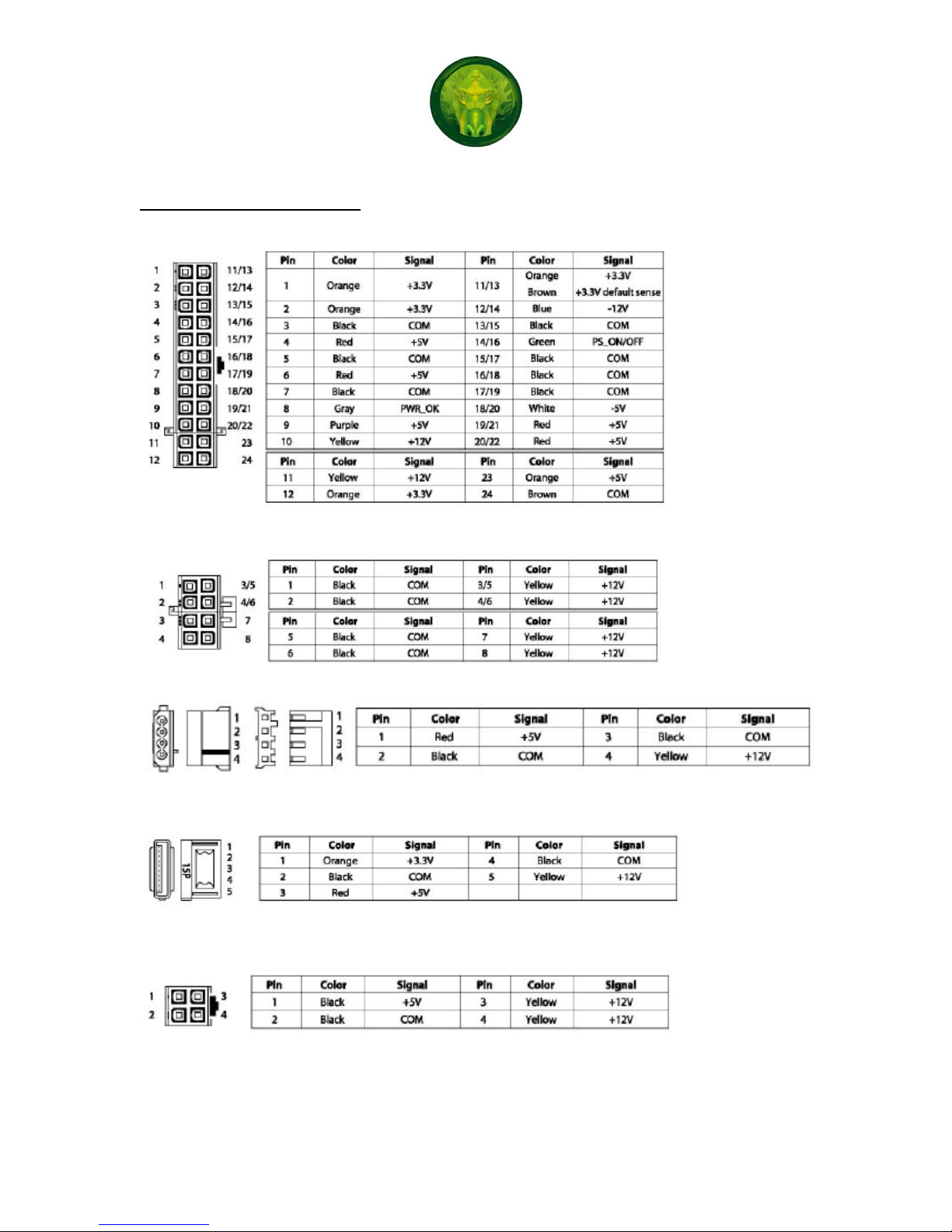
Connection Pin Assignment
a) 20+4 Main Board Connection
b) 4pin +4pin 12V
c) 4Pin Molex and FDD
d) SATA
e) 4Pin 12V
4
Page 5
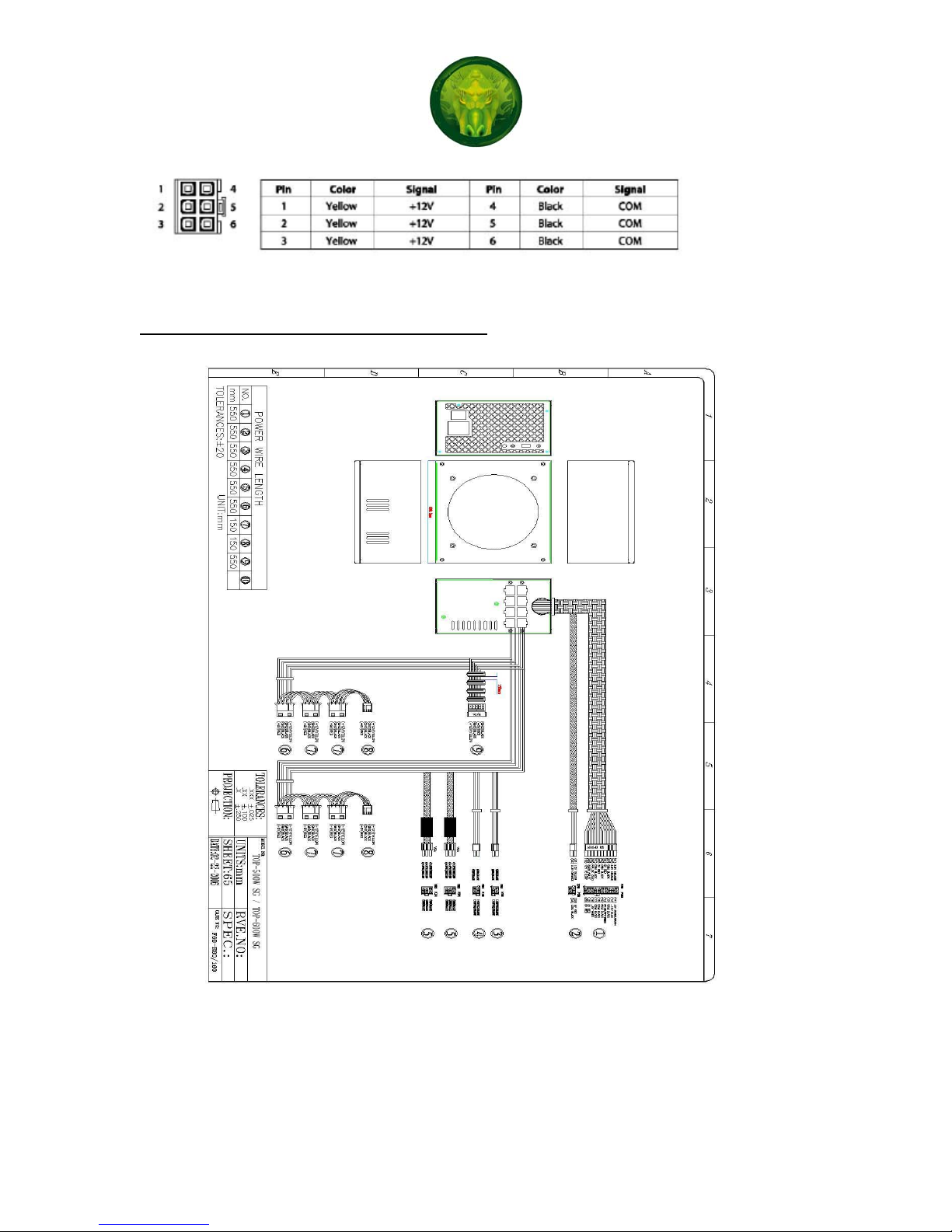
f) 6Pin PCI express VGA
Mechanical & Physical Specifications
5
Page 6

Troubleshooting
If the system shows no response when the power supply is turned ON, and then please
follows the following instructions to check for problem:
1) Ensure the power cord is connected tightly
2) Ensure all connectors are connected in the right direction
3) Ensure the on/off switch is turned in “ON” position
4) Check weather there is any short circuit problem or defective peripherals by
unhooking each peripheral one at a time.
5) Please wait for 10-30 seconds to release the power supply protection condition
after checking step 1 through 4 and then turn on the power supply again.
6) If the power supply still does not work, please send it back to local vender or
supplier for further analysis and repair
Electromagnetic Compatibility
The Topower Power supply complies with CISPR22, Class B. The Topower power
supplies (with Active PFC) meet the requirement of EN61000-3-2 Class D, and
EN61000-3-3 and Guidelines for Suppression of Harmonics in Appliances and General
Use Equipment Class D for Harmonic line current content at full rated power. Topower
Power Supply is also RoSH complied to provide a clean power supply.
Warranty Service
All Topower Retail boxed power supply carries limited three year warranty. Topower can
be contact at
www.topower.com or at 626.935.1688
6
 Loading...