

Page 1
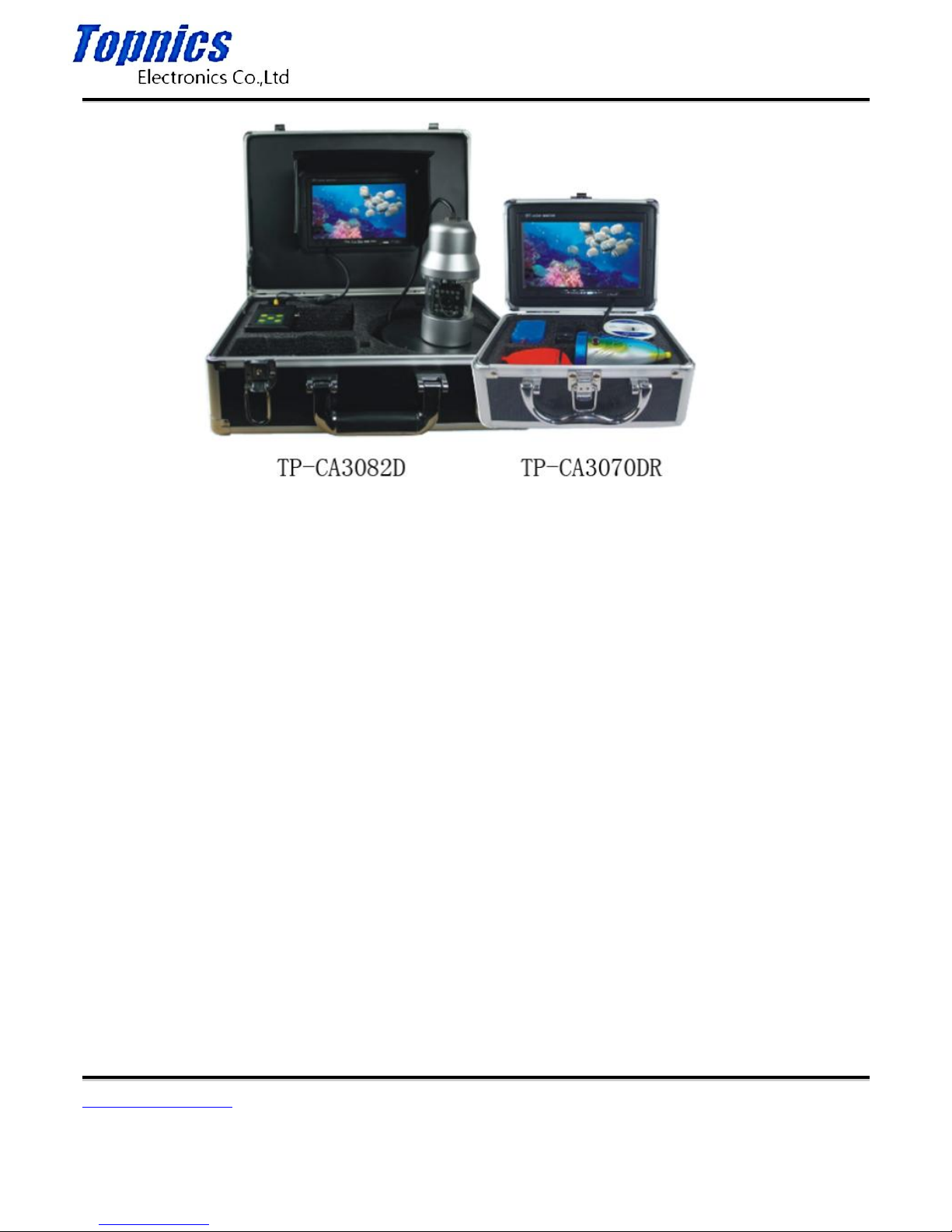
TP-CA3082D User Manual
Form one-stop shopping
your best choice and professional partner
http://www.topnics.com
Tel : +86 755 22202283 / +86 755 25932575
Fax : +86 755 25932565
Email : [email protected]
1/7
Instruction Manual
A. Safety Note
1.Please read the manual carefully before using it.
2. Handle it carefully during operation, avoid throwing down or pressing it heavily.
3. If the users disassemble or deliberately damage the machine. It will beyond the warranty.
4. After being used, turn off the display and pull our all the connection joints.
B. The Range of usage
The products is an underwater video camera and fish finder
1. Fish finder
2. Underwater breeding monitoring
3. Fishing monitoring
4. Underwater viewing
5. Underwater adventure
6. Water well monitoring
Page 2
TP-CA3082D User Manual
Form one-stop shopping
your best choice and professional partner
http://www.topnics.com
Tel : +86 755 22202283 / +86 755 25932575
Fax : +86 755 25932565
Email : [email protected]
2/7
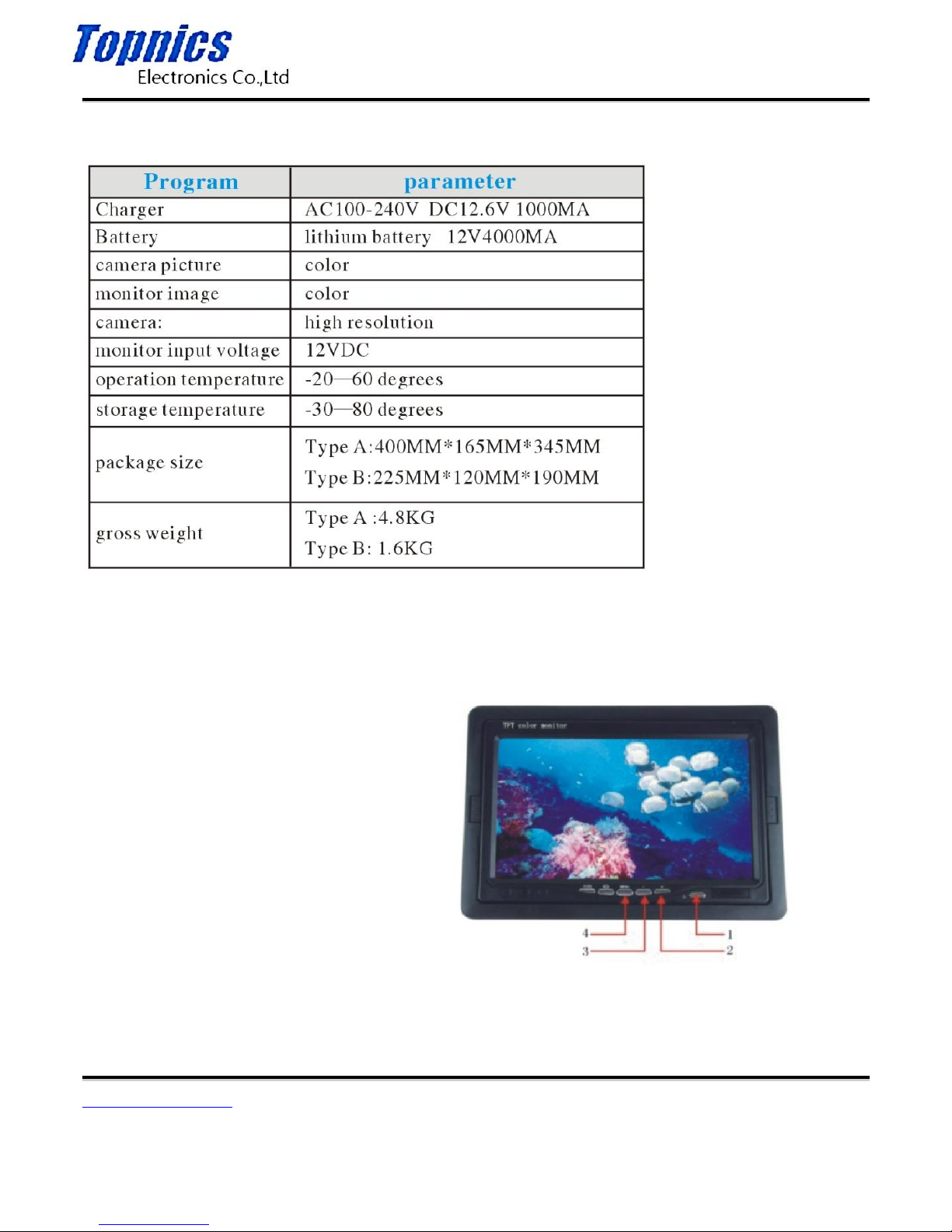
C. Specifications
D. Display operation interface instructions
1. power
2. adjustment +
3. adjustment –
4. menu
Page 3

TP-CA3082D User Manual
Form one-stop shopping
your best choice and professional partner
http://www.topnics.com
Tel : +86 755 22202283 / +86 755 25932575
Fax : +86 755 25932565
Email : [email protected]
3/7
E. How to operation
1. Boot
Connect all the connectors and press the power key, the system will start to work;
2. Menu Settings
1>Brightness
Press the MENU key to enter brightness setting, press the ”+ - ” key to set the brightness, and then press the MENU key
again to quit menu page after doing this.
2>Contrast
Continuously press the MENU key twice to enter contrast setting. Press the ”+ - ” key to set the contrast, and then press
the MENU key again to quit the menu after doing this.
3>Color setting
Continuously press the MENU key for three times to enter the color setting, press the ”+ - ”key to set the color, and then
press the MENU key again to quit the menu page after doing this.
3. Image mode
Press the “image mode” key, and the images will over turn in all directions.
Page 4
TP-CA3082D User Manual
Form one-stop shopping
your best choice and professional partner
http://www.topnics.com
Tel : +86 755 22202283 / +86 755 25932575
Fax : +86 755 25932565
Email : [email protected]
4/7
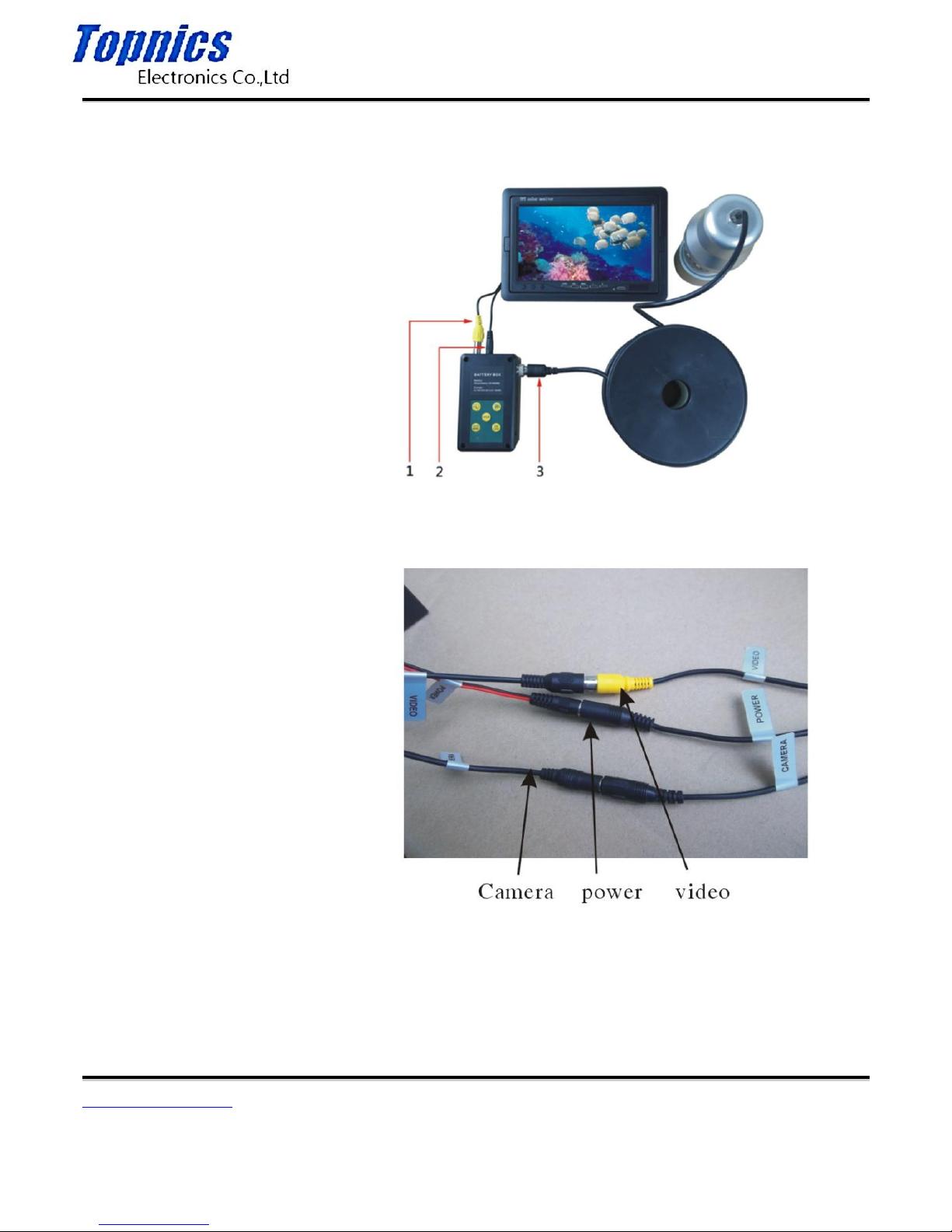
F. Connection
TP-CA3082D
1. monitor video
2. power of monitor
3. camera cable
TP-CA3070DR
Page 5
TP-CA3082D User Manual
Form one-stop shopping
your best choice and professional partner
http://www.topnics.com
Tel : +86 755 22202283 / +86 755 25932575
Fax : +86 755 25932565
Email : [email protected]
5/7
G. Charging
When the battery power is low, it needs charging, and the method is as below:
1. Take out the battery and charger from the box.
2. Connect the charger to the battery(red to red, black to black).
3. Connect the charger to the alternating current of 110-200v, the red indicator means charging.
4. The green indicator means finishing charging.
Notes: to make sure the battery using age longer, please recharge it timely; otherwise, it will make it can not recharged.
H. Product components and accessories
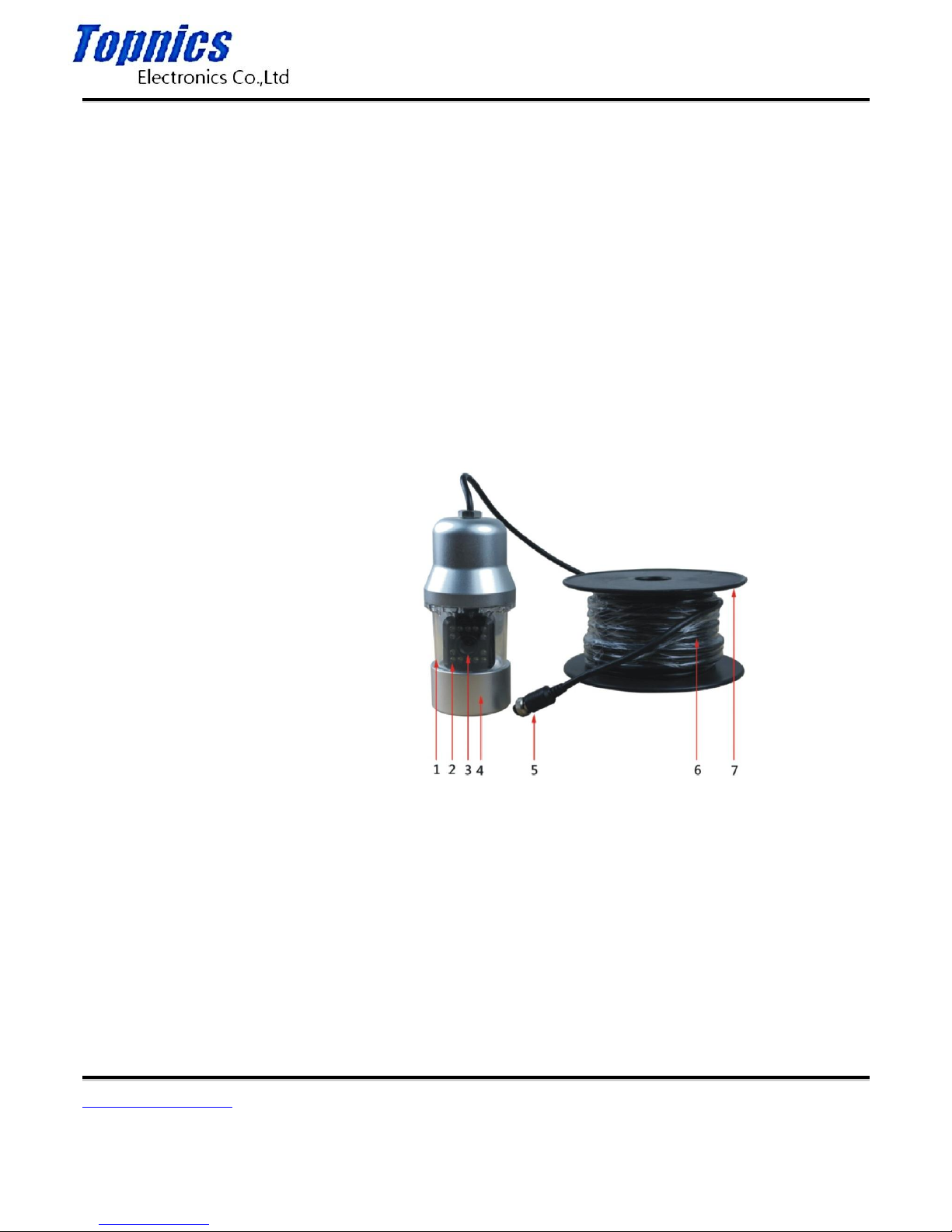
1> TP-CA3082D camera
1. Transparent case
2. Highlight night-vision
3. Lens
4. Metal casing
5. Camera connection
6. Cable
7. Reel
Feature of the camera:
(1) The casing of camera is all made of metal, firm and durable.
Page 6
TP-CA3082D User Manual
Form one-stop shopping
your best choice and professional partner
http://www.topnics.com
Tel : +86 755 22202283 / +86 755 25932575
Fax : +86 755 25932565
Email : [email protected]
6/7
(2) The visual angle of camera is 360 degree, the camera rotates automatically, manually, AB section.
(3) Rotation speed level control
(4) With 14 highlight night-vision lights, which can fill the light well.
(5) Night-vision LED light can be controlled by the switch.
(6) Applied ultra high definition camera board, with good camera shooting effect.
(7) With 20m/50m/100m special cold-resistant, water-proof, and anti-pressing cable.
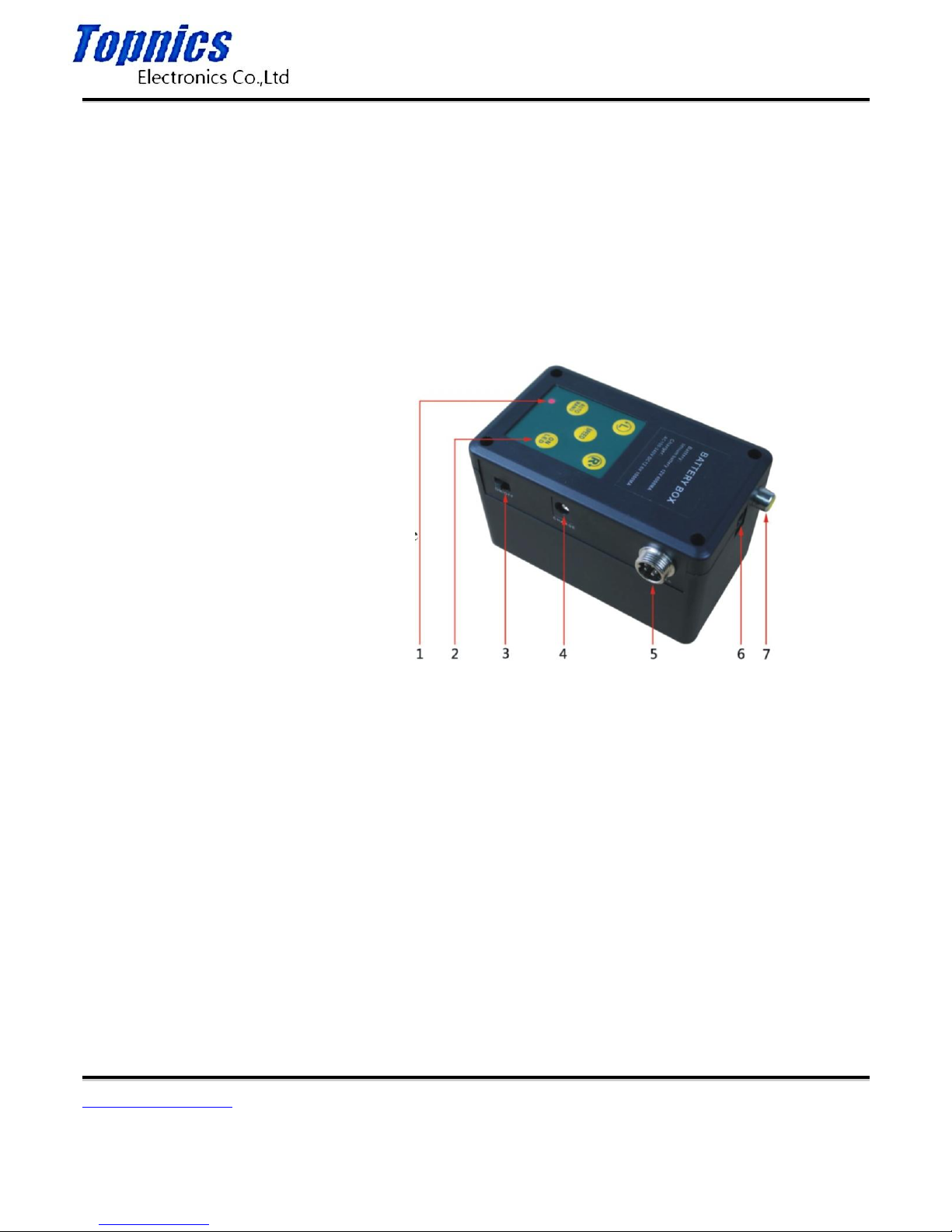
2> TP-CA3082D power box
1. Power ligh
2. Key
3. Power switch
4. Charging connecting base
5. Camera connector
6. Power of monitor
7. Monitor video
(1) Startup & shutdown
① Connect all connectors( camera aviation line and monitor line); turn the power switch to ON, the power light is on.
② Press “ON” on the keyboard, the machine starts operating under auto mode.
③ Press “L” and “R” at the same time, the machine stops.
④ Turn the power switch to “OFF”, and disconnect the connectors.
(2) Turn on the night-vision light.
Press “LED” on the keyboard to control the switch of night-vision of the camera. The light is on when starting up.
Page 7

TP-CA3082D User Manual
Form one-stop shopping
your best choice and professional partner
http://www.topnics.com
Tel : +86 755 22202283 / +86 755 25932575
Fax : +86 755 25932565
Email : [email protected]
7/7
(3) Rotate manually and automatically
① Press “AUTO/MANU” to switch manual and auto rotation. It will be auto when starting up, the camera will rotates right
under auto status.
② Turn left, press L under manual status, the camera turns left, press L again the camera stop.
③ Turn right, Press L under status, the camera turn right, press L again the camera stop.
④ Rotate to specified angle, Press R under auto status to choose angle A, then press R to chose angle B, the camera
rotates between A and B, press R again to cancel the rotation and turn to auto status.
(4) Rotation speed control
① Press SPEED under auto status and start high-speed rotation, press SPEED again to go back to normal speed.
② Press L under auto status, control the speed with 6 levels.
(5) Change the fuse
① Take down the side logo on the power box.
② Take down the four bolts on the corner of the power box.
③ Down the battery output fuse in the power box and change a new one. The fuse type is 3A.
 Loading...