

Topaz Systems GemView 10, GemView 10 Touch, D-LBK101VA-USB-R, TD-LBK101VT-USB-R User Manual & Software Set-up
Page 1
Copyright © 2019 Topaz Systems Inc. All rights reserved.
For Topaz Systems, Inc. trademarks and patents, visit www.topazsystems.com/legal.
User Manual & Software Set-Up
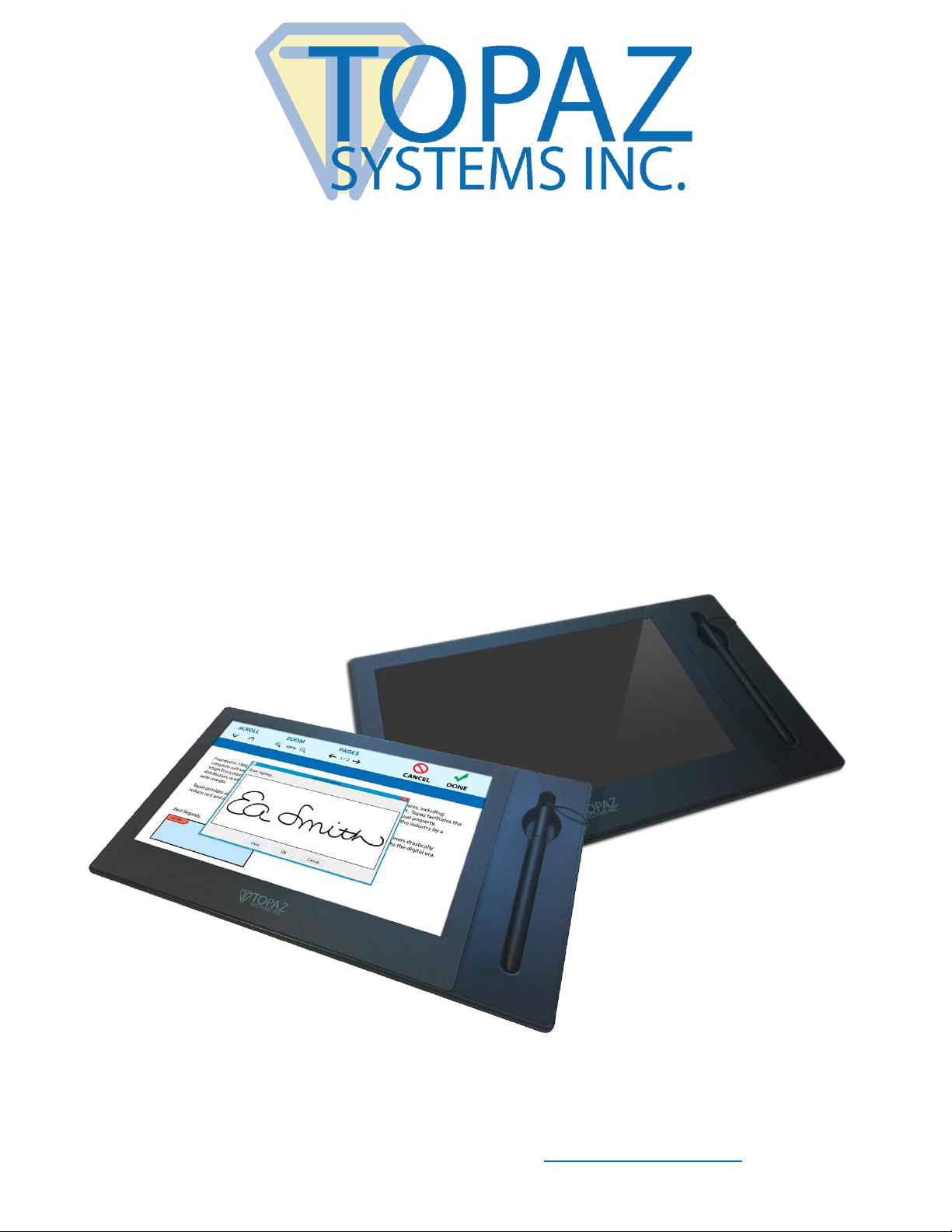
GemView® 10 & 10 Touch Tablet Display
TD-LBK101VA-USB-R & TD-LBK101VT-USB-R
Page 2

2 www.topazsystems.com Back to Top
GemView 10 & 10 Touch Tablet Display User Manual
Table of Contents
Compliance Information .......................................................................................................... 4
Important Safety Instructions ................................................................................................. 5
Copyright Information ............................................................................................................. 6
Introduction .............................................................................................................................. 6
Packing List ............................................................................................................................ 6
Product Overview ................................................................................................................... 7
Front and Side View ....................................................................................................................... 7
Rear View ....................................................................................................................................... 8
Interactive Electromagnetic Pen ..................................................................................................... 8
Installation ................................................................................................................................ 9
Connect Tablet Display to PC ................................................................................................ 9
Connect Pen to Tablet Display ............................................................................................. 10
Install DisplayLink Driver ...................................................................................................... 10
Configure Tablet Display for Installation ............................................................................... 10
Install GemView Tablet Display Driver ................................................................................. 12
Configure Tablet Display for Pen Input ................................................................................. 12
Install Bundled Topaz Software ............................................................................................ 15
Mounting Information ............................................................................................................ 15
GemView 10 Touch Tablet Display Set-Up .......................................................................... 16
Troubleshooting .................................................................................................................... 18
Screen Problems .................................................................................................................. 18
Problems of Interactive Electromagnetic Pen ....................................................................... 18
Page 3

3 www.topazsystems.com Back to Top
GemView 10 & 10 Touch Tablet Display User Manual
Table of Contents
Product Specification ............................................................................................................ 19
Screen .................................................................................................................................. 19
Interactive Electromagnetic Pen ........................................................................................... 20
Appendix ................................................................................................................................ 21
Replace the Pen Tip ............................................................................................................. 21
Page 4

4 www.topazsystems.com Back to Top
GemView 10 & 10 Touch Tablet Display User Manual
Compliance Information
This device complies with part 15 of FCC Rules. Operation is subject to the following two
conditions: (1) this device may not cause harmful interference, and (2) this device must accept
any interference received, including interference that may cause undesired operation.
This equipment has been tested and found to comply with the limits for a Class B digital device,
pursuant to part 15 of the FCC Rules. These limits are designed to provide reasonable protection
against harmful interference in a residential installation. This equipment generates, uses, and
can radiate radio frequency energy, and if not installed and used in accordance with the
instructions, may cause harmful interference to radio communications. However, there is no
guarantee that interference will not occur in a particular installation. If this equipment does cause
harmful interference to radio or television reception, which can be determined by turning the
equipment off and on, the user is encouraged to try to correct the interference by one or more
of the following measures:
• Reorient or relocate the receiving antenna.
• Increase the separation between the equipment and receiver.
• Connect the equipment into an outlet on a circuit different from that to which the receiver
is connected.
• Consult the dealer or an experienced radio/TV technician for help.
Warning: You are cautioned that changes or modifications not expressly approved by the party
responsible for compliance could void your authority to operate the equipment.
CE Conformity for European Countries
The device complies with the EMC Directive 2004/108/EC and Low Voltage Directive
2006/95/EC.
Following information is only for EU-member states:
The mark shown to the right is in compliance with the Waste Electrical and Electronic
Equipment Directive 2012/19/EU (WEEE). The mark indicates the requirement NOT
to dispose the equipment as unsorted municipal waste, but use the return and collection
systems according to local law.
If the batteries, accumulators and button cells included with this equipment, display
the chemical symbol Hg, Cd, or Pb, then it means that the battery has a heavy metal
content of more than 0.0005% Mercury or more than, 0.002% Cadmium, or more than
0.004% Lead.
Page 5

5 www.topazsystems.com Back to Top
GemView 10 & 10 Touch Tablet Display User Manual
Important Safety Instructions
1. DO NOT place objects on top of the device, as objects may scratch the screen.
2. DO NOT expose the device to dirty or dusty environments.
3. DO NOT place the device on an uneven or unstable surface.
4. DO NOT insert any foreign objects into the device.
5. DO NOT expose the device to strong magnetic or electrical field.
6. DO NOT expose the device to direct sunlight as it can damage the LCD Screen. Keep it
away from heat sources.
7. DO NOT use the device in the rain.
8. Please check with your Local Authority or retailer for proper disposal of electronic
products.
9. The device may produce some heat during normal operation or charging. To prevent
discomfort or injury from heat exposure, DO NOT leave the device on your lap.
10. POWER INPUT RATING: Refer to the rating label on the device. Only use accessories
specified by the manufacturer.
11. DO NOT use any sharp object to tap the screen.
12. Clean the touch screen with a soft cloth. If needed, dampen the cloth slightly before
cleaning. Never use abrasives or cleaning solutions.
13. Disconnect the device from an electrical outlet and power off before cleaning the device.
14. DO NOT disassemble the device. Only a certified service technician should perform
repair.
15. Users have to use the connection to USB interfaces with USB 2.0 version or higher
Page 6

6 www.topazsystems.com Back to Top
GemView 10 & 10 Touch Tablet Display User Manual
Copyright Information
Topaz Systems, Inc. shall not be liable for technical or editorial errors or omissions contained
herein; nor for incidental or consequential damages resulting from furnishing this material, or
the performance or use of this product. In the interest of continuing product improvement,
Topaz Systems, Inc. reserves the right to change product specifications without notice.
Information in this document may change without notice.
No part of this document may be copied, reproduced, or transmitted by any means, for any
purpose without prior written permission from Topaz Systems, Inc.
Introduction
Packing List
After unpacking, please confirm whether the following contents are included:
• Tablet display
• USB 2.0 cable
• Electromagnetic pen
• Pen tether
• 3 pen tips
• Pen tip replacement tool
• Installation instructions
For any part flaws or defects, please consult the original product dealer.
Page 7
7 www.topazsystems.com Back to Top
GemView 10 & 10 Touch Tablet Display User Manual
Product Overview
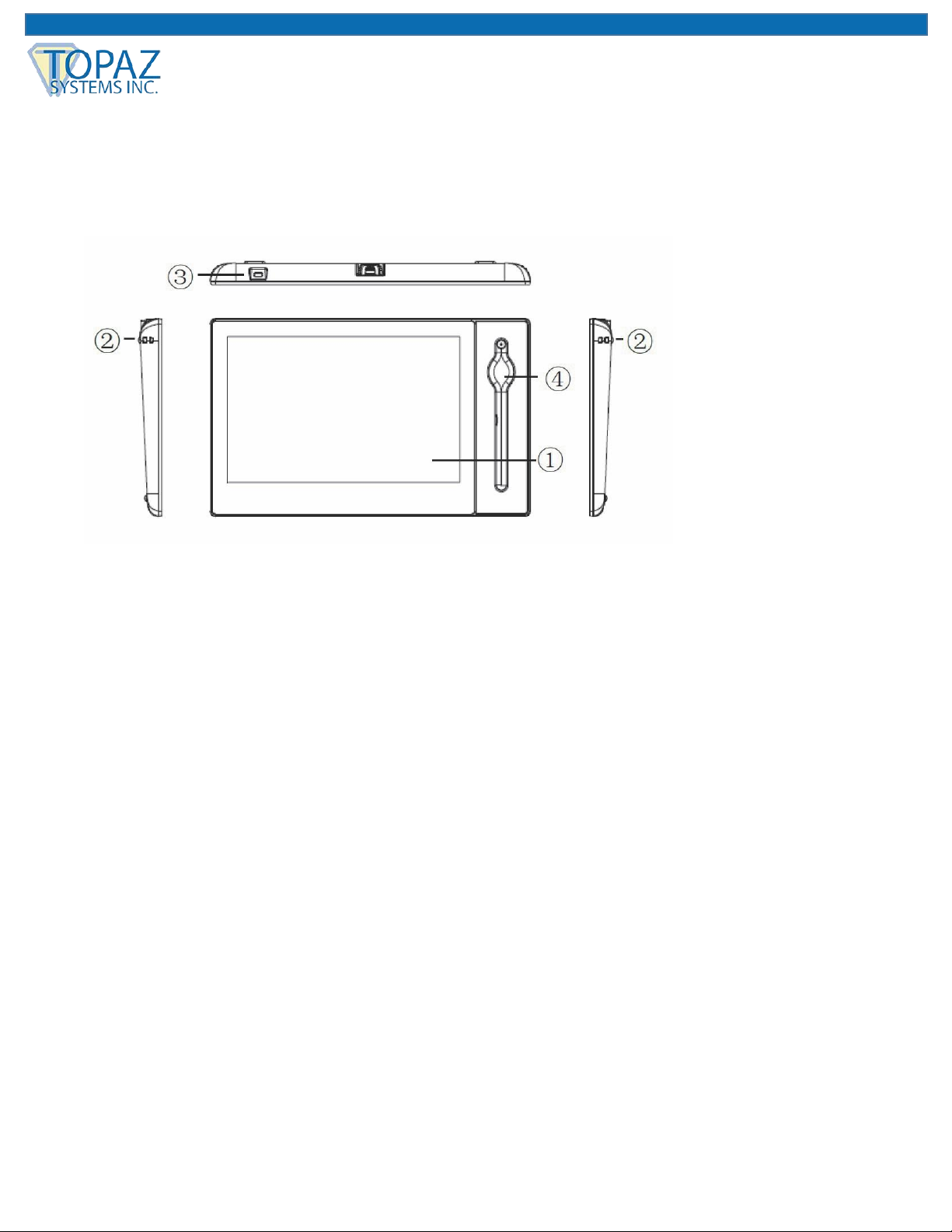
Front and Side View
1. Display and electromagnetic pen touch area
2. Tether hole
3. Kensington lock hole
4. Pen holder slot
Page 8
8 www.topazsystems.com Back to Top
GemView 10 & 10 Touch Tablet Display User Manual
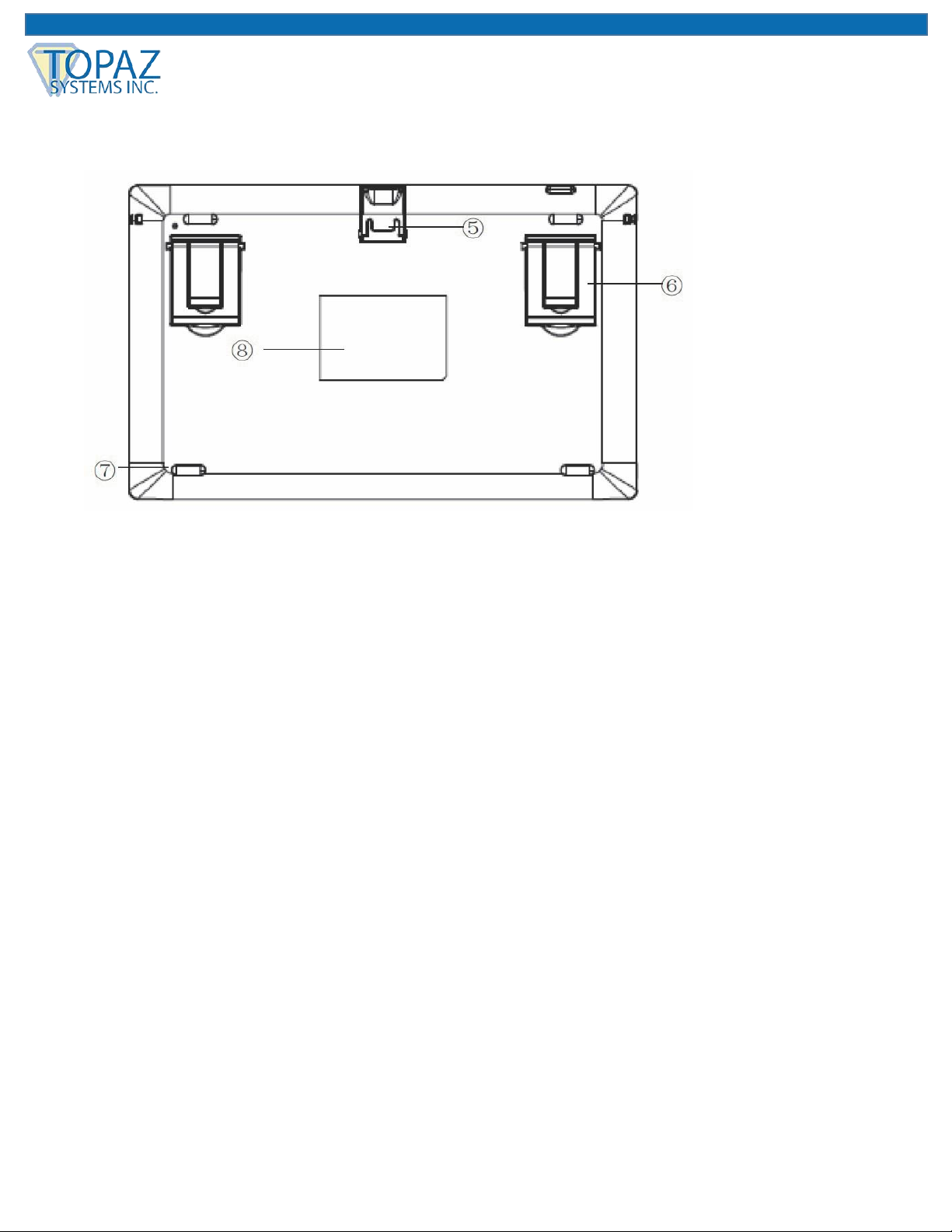
Rear View
5. USB connector
6. Large and small supports (x2), can be extended or retracted
7. Rubber foot pad (x4)
8. Product label
Note: Please don't open the enclosure; contact service personnel for any problem.
Interactive Electromagnetic Pen
The interactive electromagnetic pen is made with electromagnetic resonance technology and
does not require batteries.
Page 9
9 www.topazsystems.com Back to Top
GemView 10 & 10 Touch Tablet Display User Manual
Installation
Connect Tablet Display to PC
To begin, follow the steps listed below to connect your GemView Tablet Display:
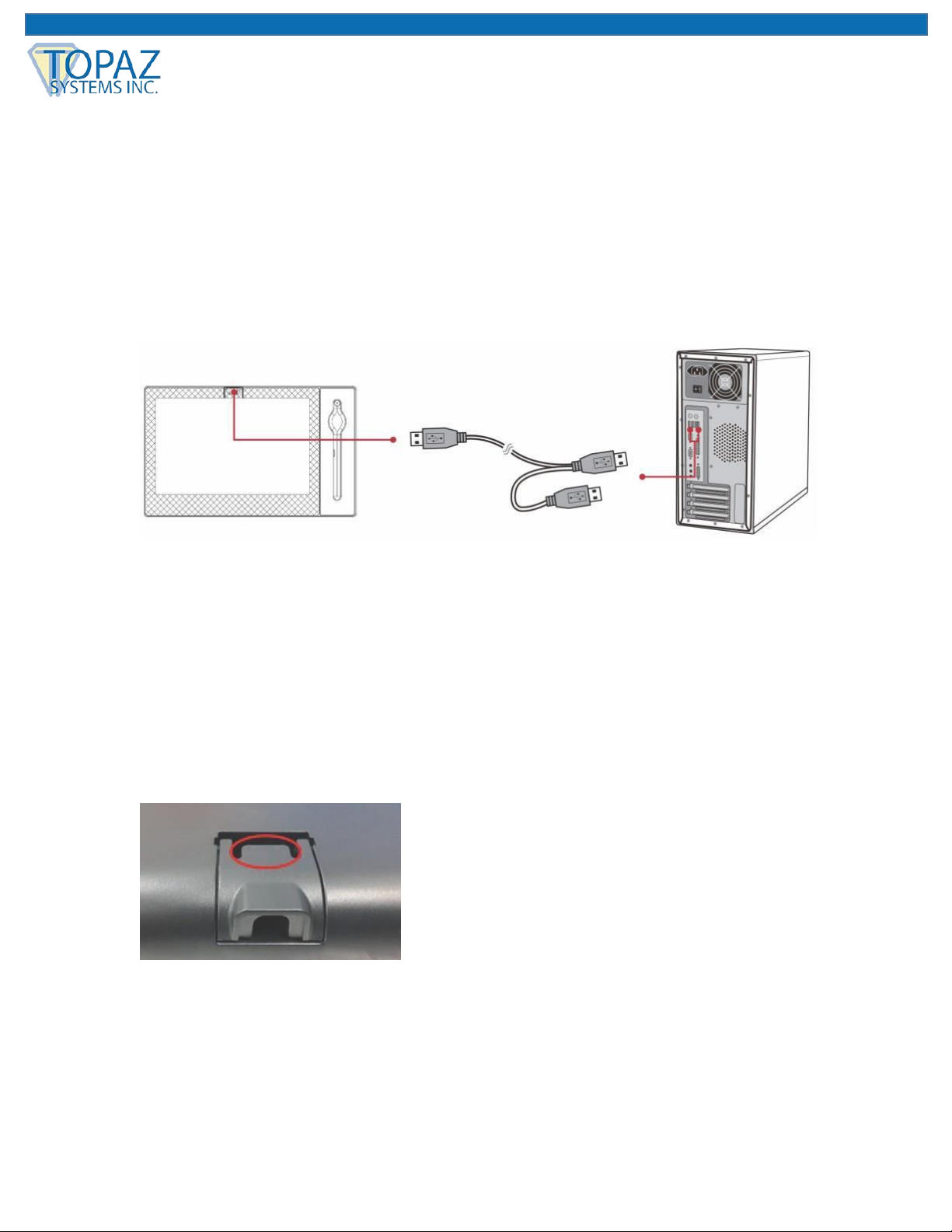
1. Connect the tablet display to the PC using the USB cable, as shown below.
Notes:
• Connect both USB connectors at one end of the cable to the PC, to ensure a stable power
supply. Due to the manner that Windows enumerates USB devices and the use of internal
USB hubs in some PCs, it may be necessary to changes the ports into which the USB
connectors are inserted.
• To open the USB cover on the back of the tablet display, press on the tab (highlighted in
red) with your forefinger, then lift the cover with your thumb.
Page 10

10 www.topazsystems.com Back to Top
GemView 10 & 10 Touch Tablet Display User Manual
Connect Pen to Tablet Display
If your pen is not already connected to the tablet display, follow these instructions:
1. Loop one end of the pen tether through the eye at the end of the pen.
2. Loop the other end of the pen tether through the tether hole on either side of the device.
3. Note that the pen can lie flat in the pen holder slot, or it can stand vertically in the hole at
the top of the pen holder slot.
Install DisplayLink Driver
Note: If you are installing the driver for a Citrix VDA machine, you should not perform this
step; continue to the section “Install GemView Tablet Display Driver”.
Download and run the DisplayLink installer from the Topaz website:
www.topazsystems.com/software/download/displaylink.exe. This software provides
extended display functionality for the tablet display.
For silent installation, use the command -silent. For more information, view:
https://support.displaylink.com/knowledgebase/articles/544789-installation-switchesfor-installing-displaylink-s.
Configure Tablet Display for Installation
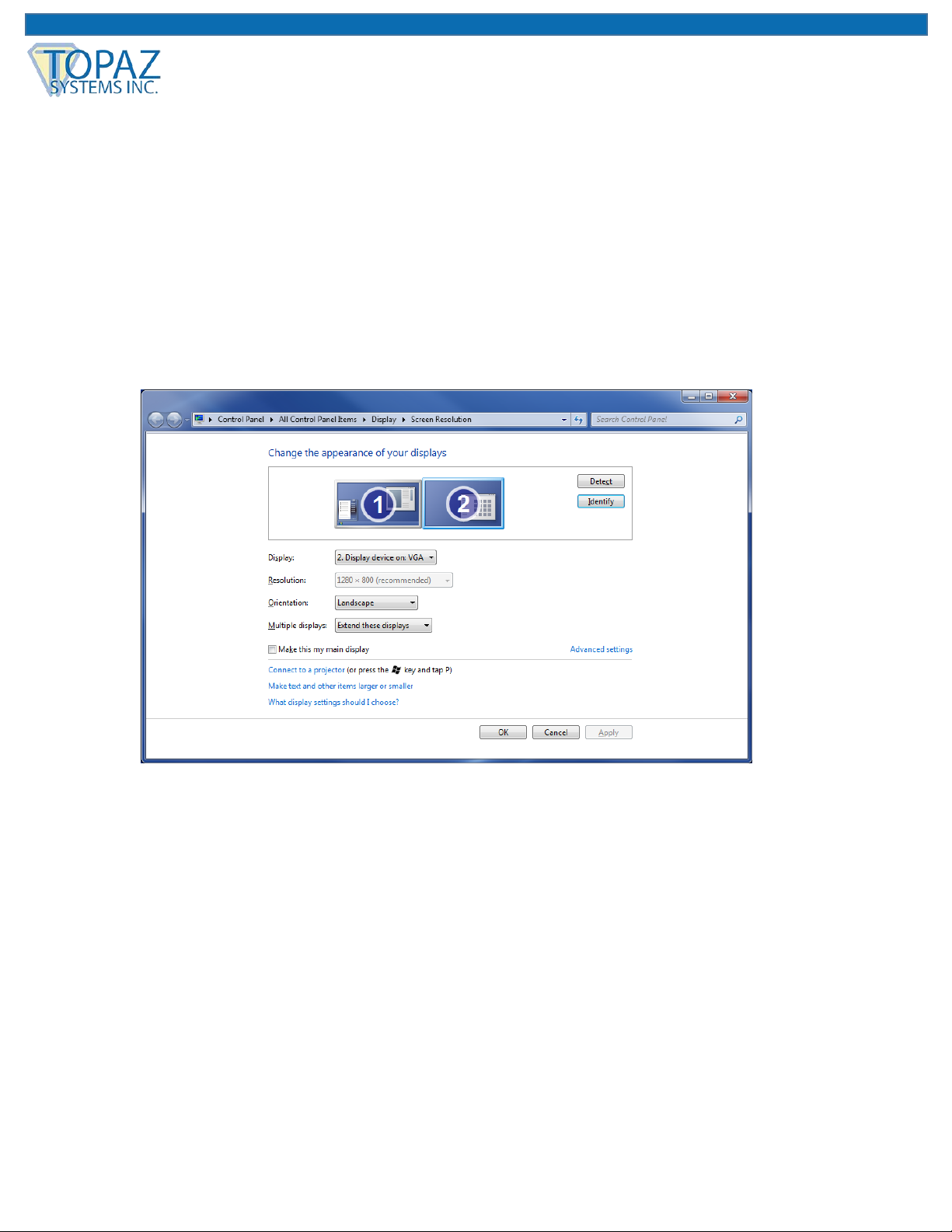
Use the Display program in the control panel to configure the tablet display for your installation
(see screenshot below). You may specify the following characteristics:
1. Resolution: Use the recommended resolution
2. Orientation: Landscape or portrait
3. Multiple displays: Extend these displays
4. Alignment: Make sure that the bottoms of the monitors are aligned as shown below, and
that the tablet display (Display 2) is on the side of the main display you want to use when
moving windows from the main display (Display 1).
Page 11
11 www.topazsystems.com Back to Top
GemView 10 & 10 Touch Tablet Display User Manual
After configuring the tablet display, you may test it as follows:
1. Click the identify button; the number 1 should appear on the main display and the number
2 should appear on the tablet display.
2. Move your mouse from the main display to the tablet display; it should track properly.
3. Move a window from the main display to the tablet display; it should appear normally and
respond to mouse interactions.
Page 12

12 www.topazsystems.com Back to Top
GemView 10 & 10 Touch Tablet Display User Manual
Install GemView Tablet Display Driver
Note: If you are using your computer in a Citrix environment, please refer to the
document GemView Tablet Displays in Citrix XenDesktop Environments. If you are
using your computer in VMWare Horizon environment, please refer to the document
GemView Tablet Displays in VMWare Horizon Environments. These guides will provide
setup and configuration instructions.
Download and run the GemView installer from the Topaz website:
www.topazsystems.com/software/download/gemview.exe. Note: You must reboot your PC
after the installation completes. This software provides pen input functionality for the tablet
display.
For silent installation, see the commands below:
1. Silent install: Gemview.exe /s –sps
2. For silent unistall, please run \Windows\rmtablet.exe
Configure Tablet Display for Pen Input
Follow the instructions below to configure your GemView Tablet Display for pen input:
1. In All Apps or All Programs, under GemView Tablet Display Manager, click on Tablet
Display Manager.
Page 13
13 www.topazsystems.com Back to Top
GemView 10 & 10 Touch Tablet Display User Manual
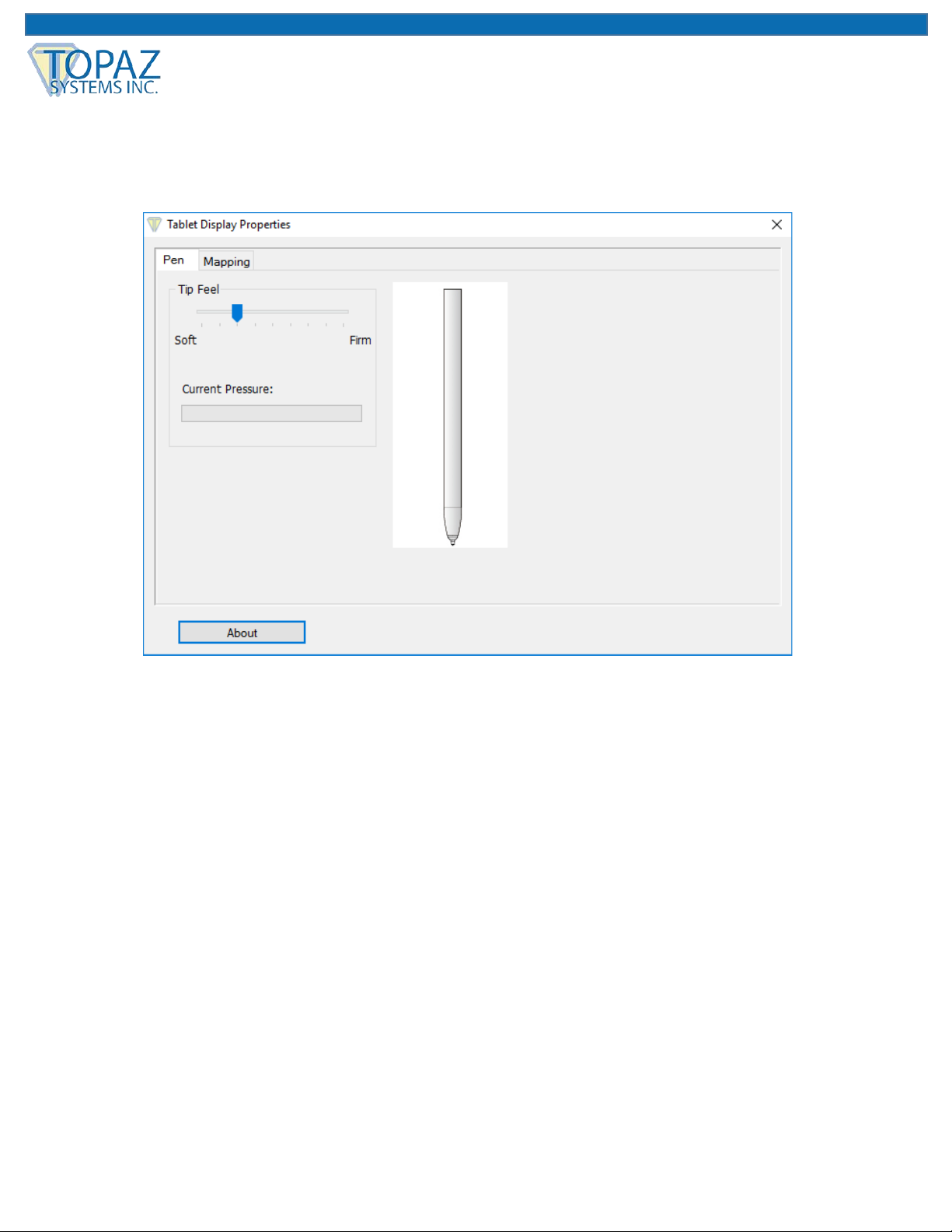
2. In the Tablet Display Properties window that opens, notice that the Pen tab is selected.
Write on the GemView Tablet Display with the pen and the current pressure will show as
a green bar. Adjust the tip feel slider between soft and firm to select the pressure desired.
The default setting is recommended for standard use.
Page 14
14 www.topazsystems.com Back to Top
GemView 10 & 10 Touch Tablet Display User Manual
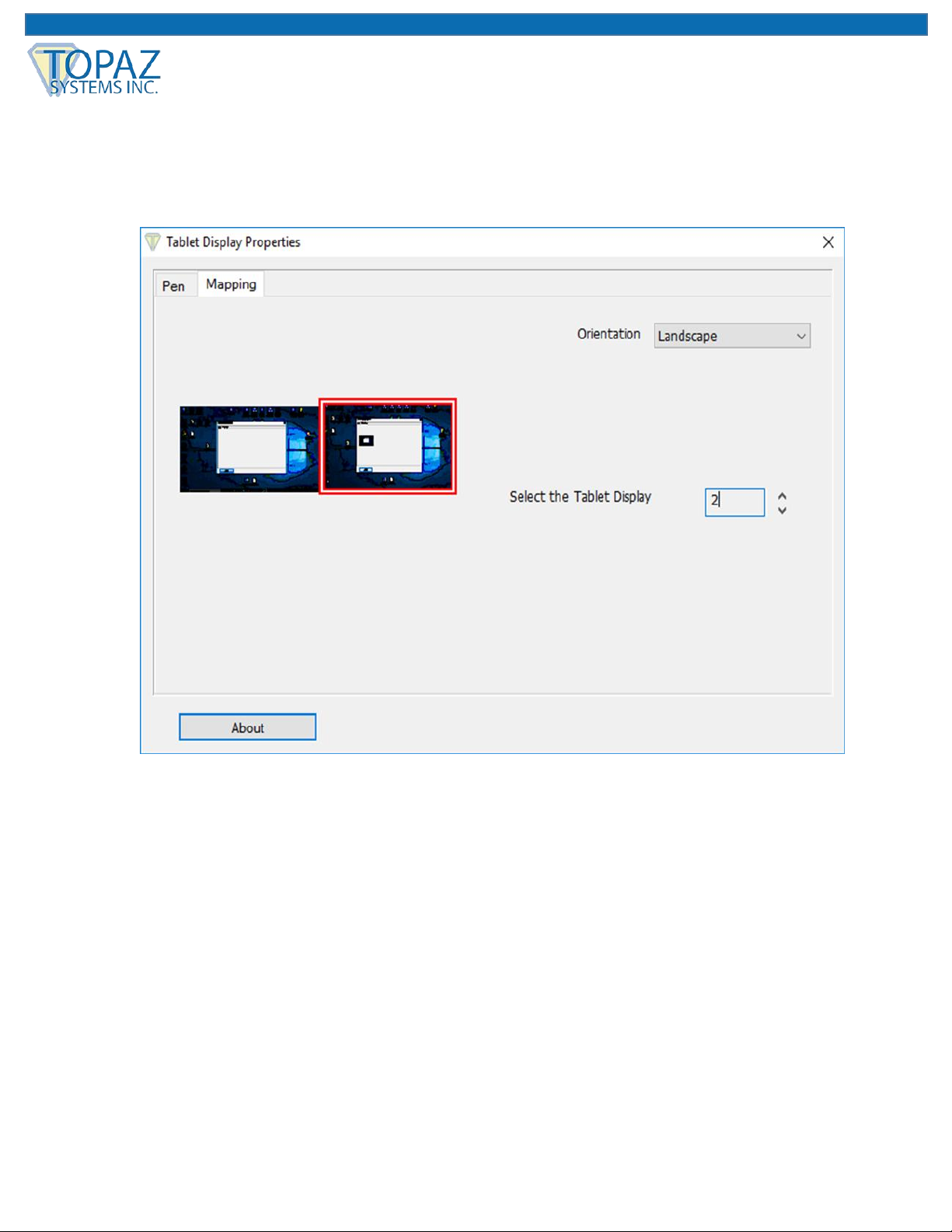
3. Click the Mapping tab to display the screen below. Select the number of the tablet
display from the drop down list. The numbering of the monitors follows that in the
Windows display settings. Select Landscape or Portrait for the orientation of the tablet
display. It should be the same orientation selected in the Windows display screen.
4. Click the About button to see information about the versions of the software driver and
the hardware.
Page 15

15 www.topazsystems.com Back to Top
GemView 10 & 10 Touch Tablet Display User Manual
Install Bundled Topaz Software
Topaz Systems provides software designed specifically to take advantage of the GemView
Tablet Displays’ large format, pen input capabilities. For detailed information on pDoc Signer®,
pDoc® Signer Duo, pDoc Pro, and other software packages and drivers, visit
www.topazsystems.com/gemview-software.html.
These software packages use the GemView Tablet Displays to provide the following functions:
1. Display full-page or half-page document images
2. Sign digital signature fields with the electronic pen
3. Fill in form fields (check radio buttons and check boxes, select items from lists, enter
text into text boxes using the on-screen keyboard)
4. Place comments on pages and enter text using the on-screen keyboard
5. Draw diagrams or write text onto a document page
6. Place stamps onto a document page
7. Navigate among the pages in a document
8. Zoom document pages in and out
Mounting Information
The GemView 10 can be mounted on counters, desks, walls, and many other surfaces through
its Kensington security slot holes.
Page 16
16 www.topazsystems.com Back to Top
GemView 10 & 10 Touch Tablet Display User Manual
GemView 10 Touch Tablet Display Set-Up
For users with the GemView 10 Touch Tablet Display (model TD-LBK101VT-USB-R), follow
these steps for set-up:
1. The GemView 10 Touch Tablet Display (GemView 10T) looks and performs like the
standard GemView 10 Tablet Display, but it responds to finger touch input in addition to
pen input. Follow the installation instructions provided earlier in this manual, then
continue below.
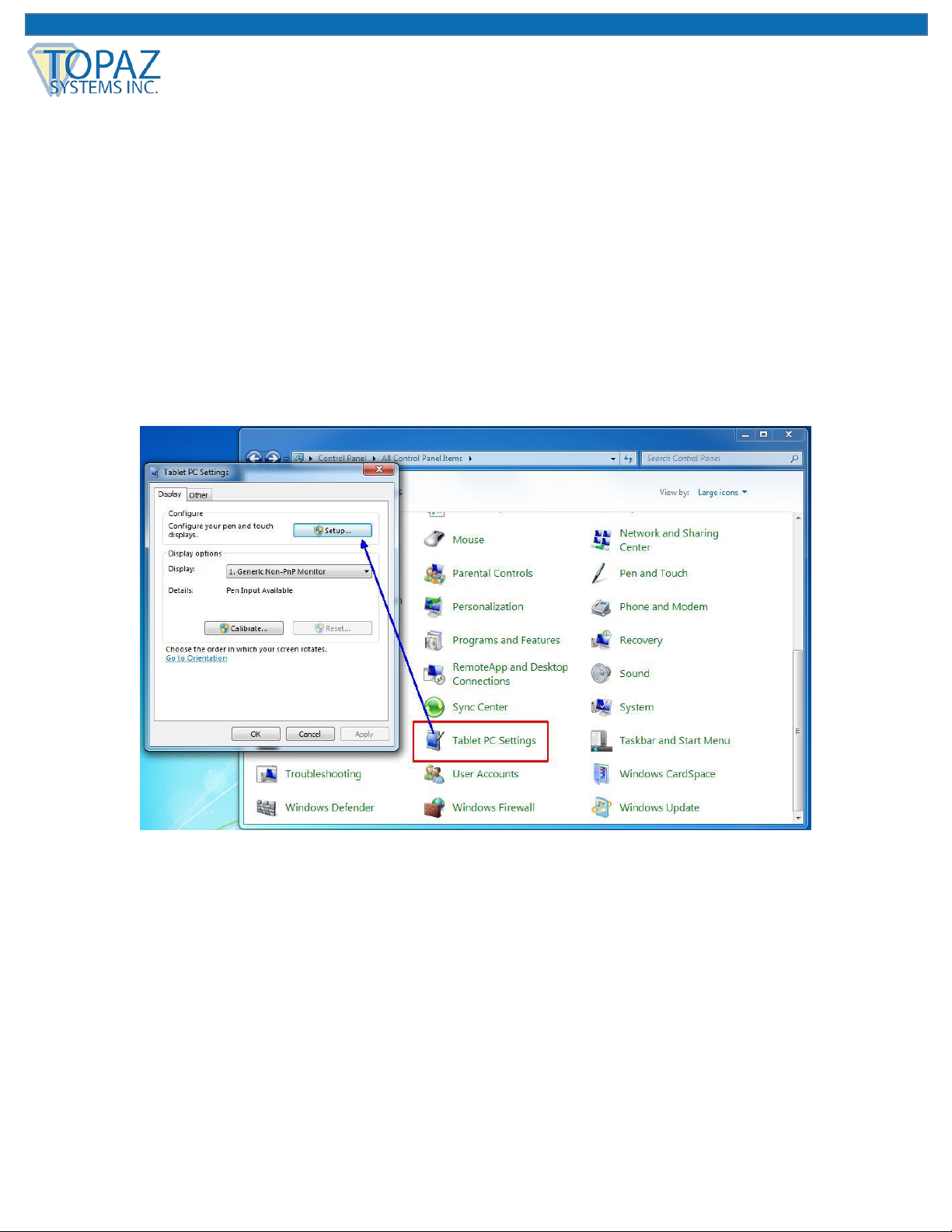
2. With the GemView 10T connected to your PC, go to Control Panel → Tablet PC
Settings. In the Display tab, click the “Setup…” button.
Page 17

17 www.topazsystems.com Back to Top
GemView 10 & 10 Touch Tablet Display User Manual
3. Your PC screen(s) and the GemView 10T screen will turn white and the following
message will appear on one of them:
4. Selecting the GemView 10T:
a. If the screen on which the message appears is the GemView 10T,
touch it with your finger; the screens will revert to displaying their original content
and the system will recognize the GemView 10T for touch input.
b. If the screen on which the message appears is not the GemView 10T,
press the Enter key on your keyboard; the message will disappear from the
screen it was on and appear on another screen. Continue to press the Enter key
until the message appears on the GemView 10T screen; then, touch it with your
finger. The screens will revert to displaying their original content and the system
will recognize the GemView 10T for touch input.
Page 18
18 www.topazsystems.com Back to Top
GemView 10 & 10 Touch Tablet Display User Manual
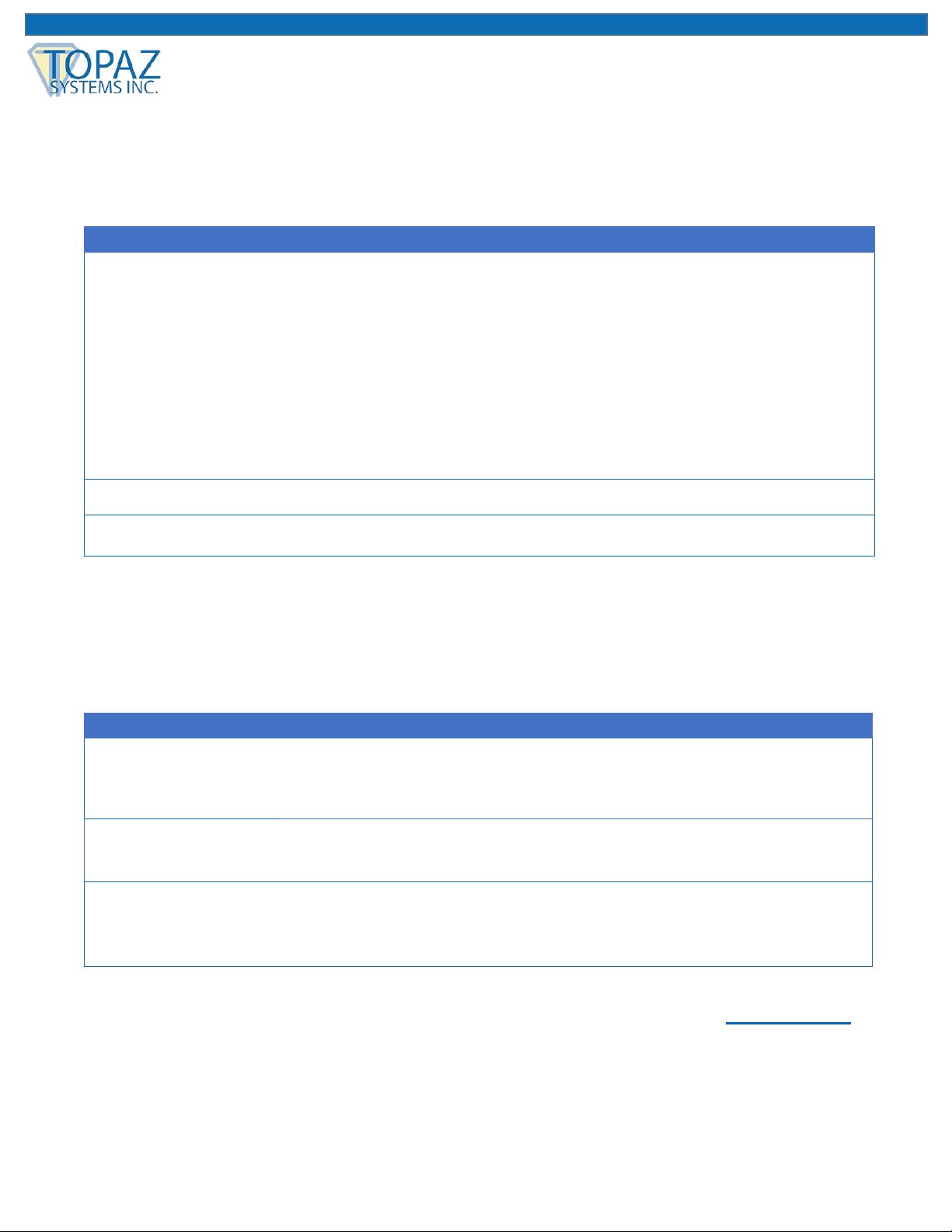
Troubleshooting
Screen Problems
Problems
Recommended actions
No picture
• Check whether USB cables at computer end and screen end are connected
properly.
• Try to use another USB interface of the computer.
• Confirm whether the computer is under sleep mode. Press the keyboard or
move the mouse, and reboot the system.
• Try to adjust the brightness.
• Confirm whether the computer is starting up.
• With a laptop, please confirm whether the outer-link (RGB) output is selected.
• Check whether the driver is installed.
Image noise
• Other electrical devices may trigger electrical disturbances.
Image blur
• Using the original resolution of 1280 x 800 may provide the optimum quality.
Note: Do not open the enclosure. For assistance, contact technical support.
Problems of Interactive Electromagnetic Pen
Note: Please don't open the enclosure electric shock hazard. For assistance, contact Topaz.
Problems
Recommended actions
Electromagnetic
pen does not work
• Try to confirm by mouse. If the mouse does not work, please reboot the
computer or the application.
• Try to re-install the GemView driver.
Pen tip is too
short
• Please check whether the pen tip is too short. If yes, please replace the pen
tip.
Abnormal cursor
movement
• Remove the disturbances caused by adjacent electrical devices.
• Try to reboot the computer to confirm.
• Confirm both ends of USB cable are connected to PC.
Page 19
19 www.topazsystems.com Back to Top
GemView 10 & 10 Touch Tablet Display User Manual
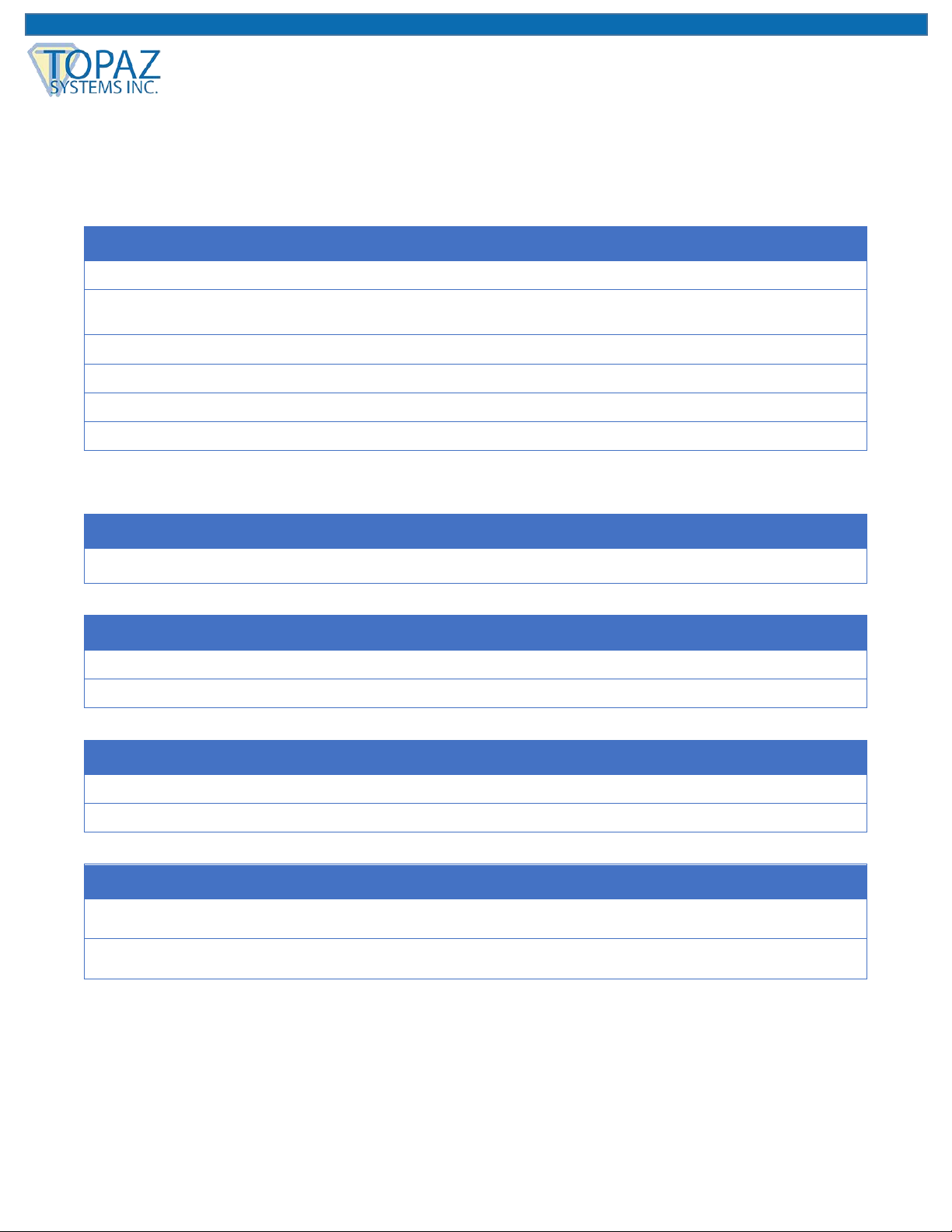
Product Specification
Screen
Display
Model
10.1 inch TFT LCD, LED backlight
Screen Type
8H tempered glass; Anti-scratch, anti-glare, and
anti-fingerprint coating
Resolution
1280 x 800
Brightness
160 cd/m2 (typical) / 200 cd/m2 (max.)
Angle of Visibility
Horizontal 170°, vertical 170°
Response Time
Tr+Tf: 25ms (typical) / 50ms (max.)
Connector
USB
USB x1
Power Supply
Input
DC5V/1A, USB power supply
Power Consumption
Start-up 5W, sleep < 1.0W
Body
Equipment Dimension
300mm x 185mm x 22mm
Equipment Weight
Net weight: 0.85 kg, total weight: 1.3 kg
Environment
Temperature Range
Operation: 0°C ~ +50°C
Storage: -10°C ~ +60°C
Relative Humidity
Operation: 20% ~ 80%
Storage: 10% ~ 90%
Page 20
20 www.topazsystems.com Back to Top
GemView 10 & 10 Touch Tablet Display User Manual
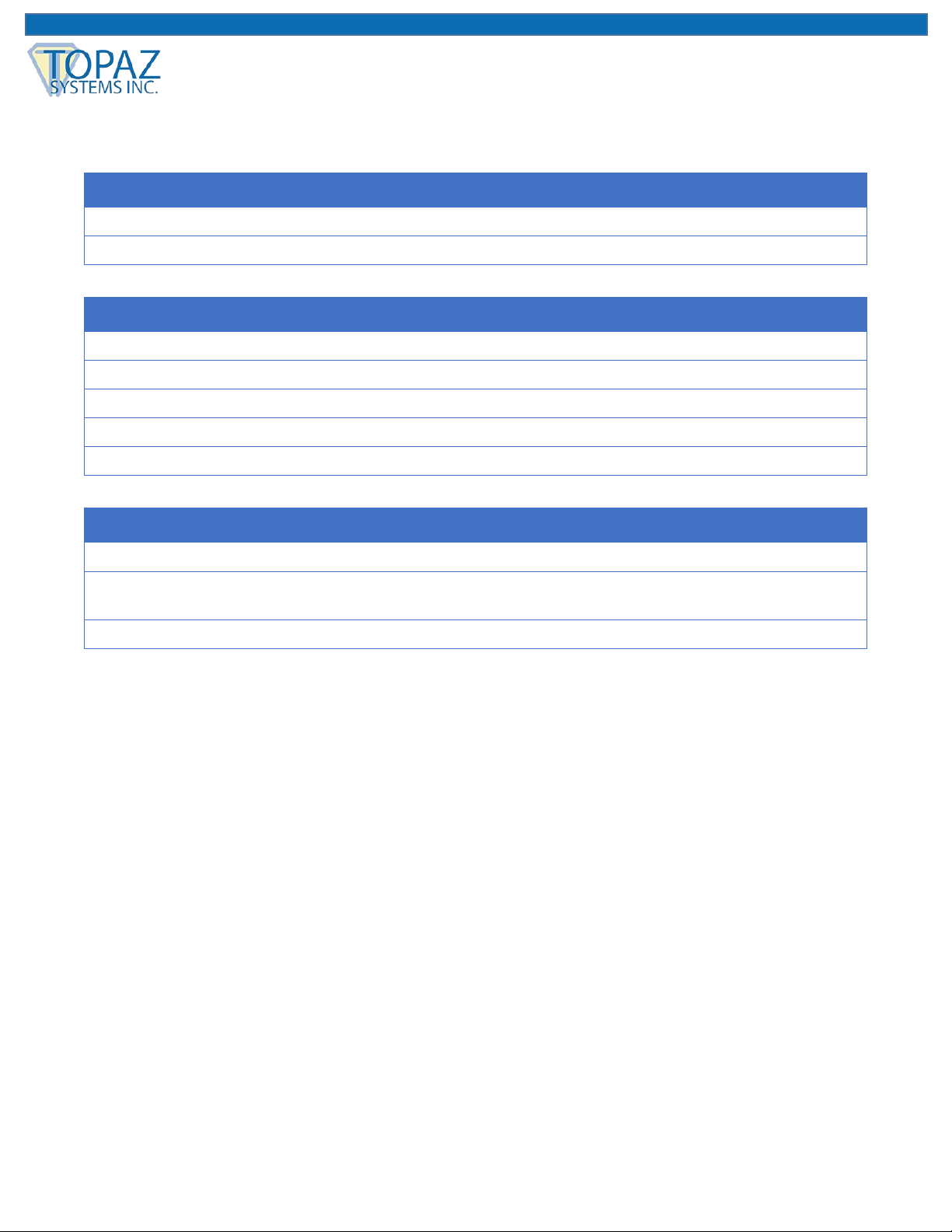
Interactive Electromagnetic Pen
Model
Technique
Electromagnetic
Action Area
Full screen
Technical Specifications
Resolution
5080 LPI (lines per inch)
Tracking Velocity
200 PPS (dots per second)
Pressure Sensing
2048 Levels
Accuracy Rating
± 0.5mm (center), ± 2mm (edges and corners)
Readable Height
5mm
Electromagnetic Pen
Model
Pressure sensing, wireless
Inclination of Detectable
Pressure Sensitive Pen
Inclination range: ± 45°
Pen Tip
Replaceable
Note: The specification is subject to change without prior notice.
Page 21
21 www.topazsystems.com Back to Top
GemView 10 & 10 Touch Tablet Display User Manual
Appendix
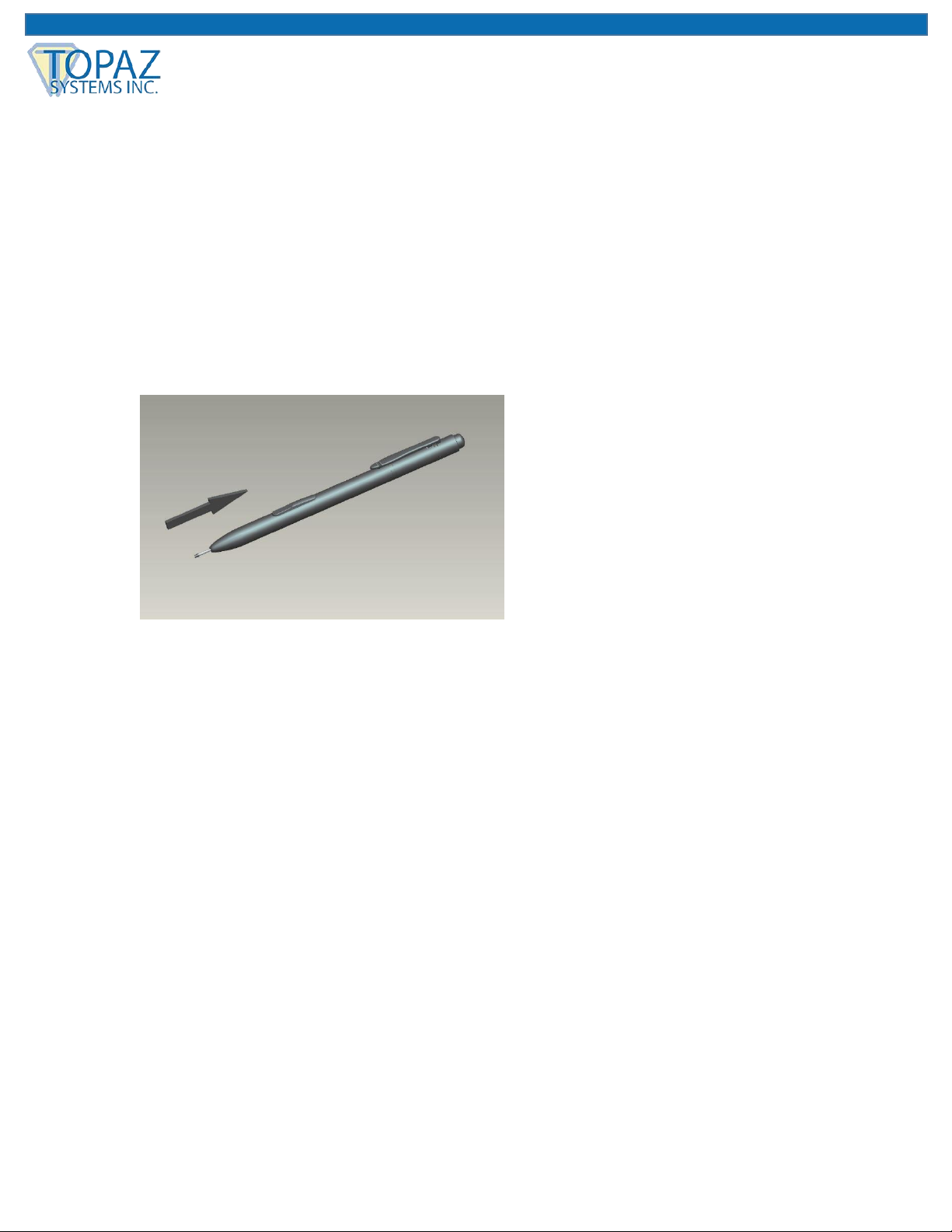
Replace the Pen Tip
If the pen tip is too short or exists the sharp edge, it can be replaced to the back-up tip. Please
replace according to the following steps:
1. Pull out the pen tip from electromagnetic pen straightly with tool.
2. Insert new pen tip into the handwriting pen and then push in the pen tip until the tip does
not move.
 Loading...