

Page 1
INSTRUCTION
Ed : 09/17 Rev : 00
APP READY
Page 2
4
The main technical parameters
Input supply voltage:220V
Working temperature: 0-40 ℃
Speed range: 1.0-16 KM/ H
Incline range:16 level Motor incline
Max. user weight: 130kg
Distance display range: 0.00-99.9km
Calories display range: 000-999
Time display range: 00:00-99:59 (min : sec)
Heart rate range: 50-200 (time / min)
Running surface: 480*1400mm
Product size: 1820*750*1450mm
Folding size: 1150*750*1600mm
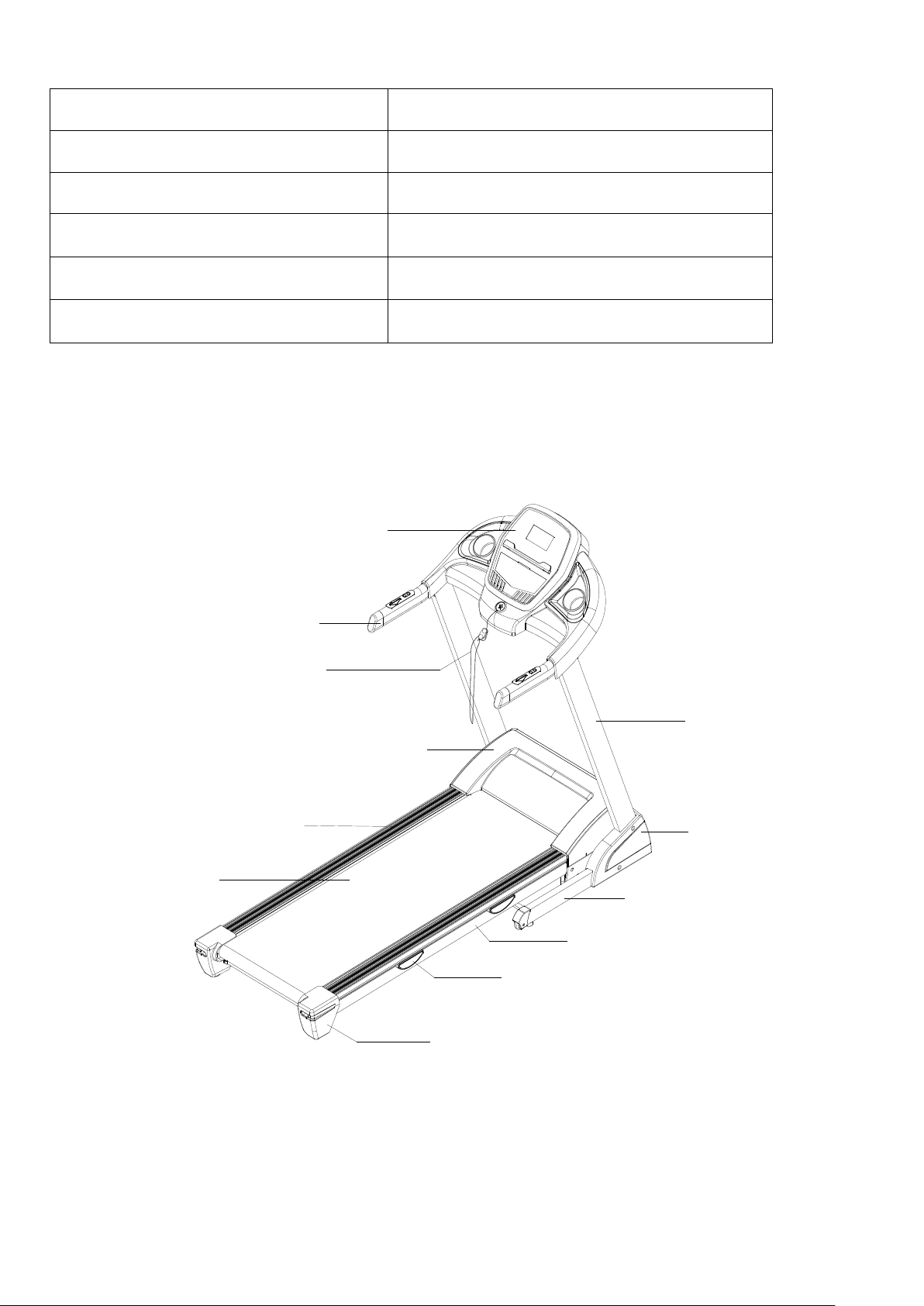
Product Overview
Handrail
Console
Safety key
Upright
Motor cover
Side cover
Base Frame
Main Frame
Cushion
End cap
Side rail
Running belt
Page 3
5
AASSSSEEM
MBBLLYY IINNSSTTRRUUCCTTII
O
ONNSS
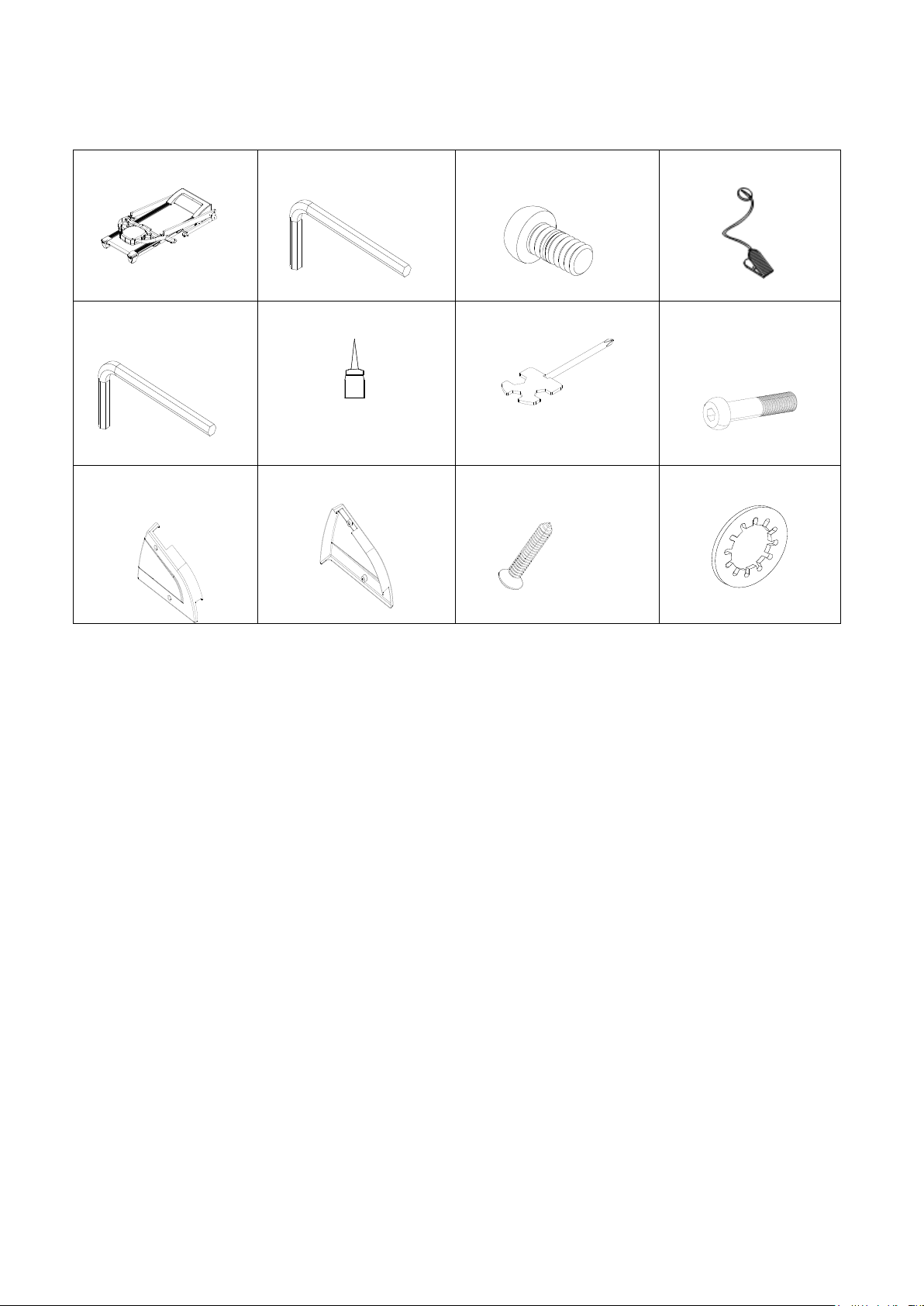
WHEN YOU OPEN THE CARTON, YOU WILL FIND THE BELOW SPARE PARTS:
Main frame 1 set
D2 Allen wrench 6mm 1
pc
D13 Round hex bolt
M8*15 2pcs
C13 Safety key 1pc
D3 Allen wrench 5mm
1pc
B18 Silicon oil 1 pc
D1 Screw driver 1 pc
D15 Round head hex
bolt M8*40 4 pcs
B11L Left side cover 1
pc
B11R Right side cover 1
pc
D48 Cross self-tapping
bolt ST4.2*19 4 pcs
D17 Washer M8 6pcs
Page 4
6
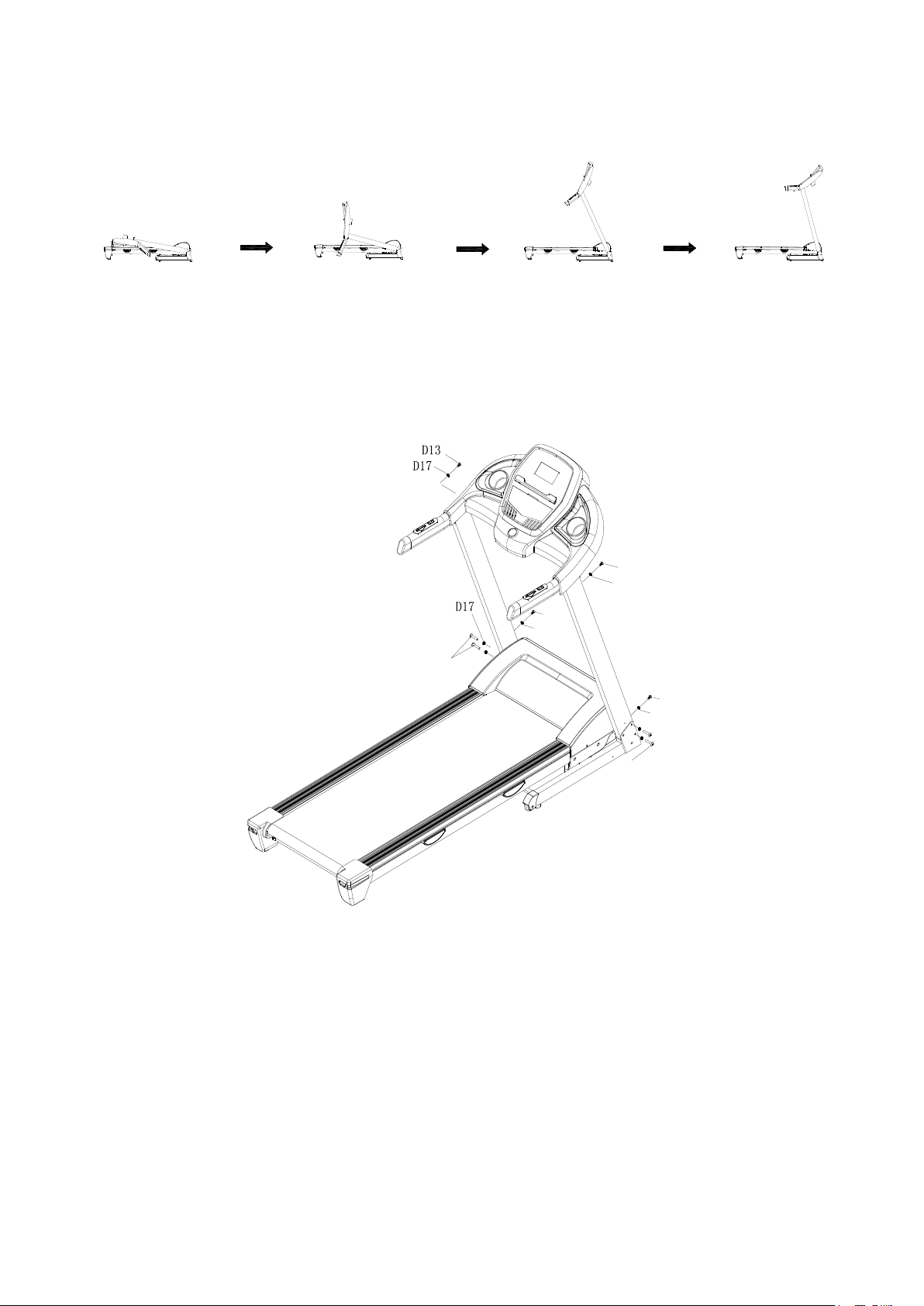
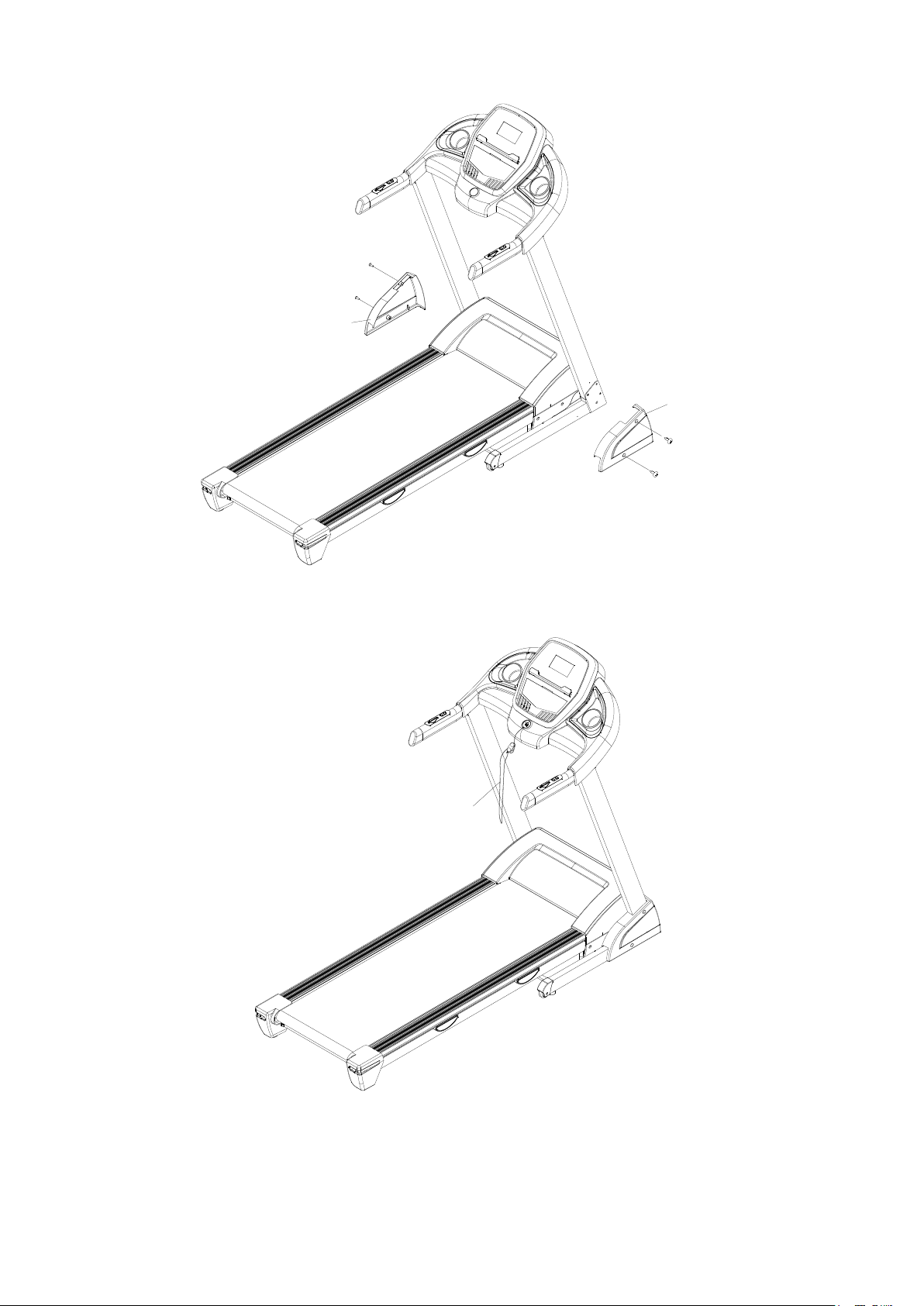
STEP 1:According to the following steps to lift up the computer bracket.
Be careful not press the line when folding.
STEP 2:Secure bottom frame with Round head hex bolt M8*40 (D15) and the Inner
washer M8 (D17). Then secure console frame with Round head hex bolt M8*15(D13)
and Inner washer M8 (D17).
D15
D17
D13
D15
D17
D13
D17
D13
Page 5
7
STEP 3:Lock the L/R Side cover (B11l/R) with Cross self-tapping bolt ST4.2*19(D48).
D48
D48
B11R
D48
B11L
D48
STEP 4: Put on the safety key (C13)
C13
Step 5:
To check if the running belt runs correctly, placing treadmill in folding position and tightening all the
bolts. Then set speed under 3km/h and see if running belt runs without problem.
Page 6

8
G
Grroouunnddiinngg
M
Meetthhooddss
This product must be grounded. If it should malfunction or breakdown, grounding provides a
path of least resistance for electric current to reduce the risk of electric shock. This product is
equipped with a cord having an equipment-grounding conductor and a grounding plug. The
plug must be plugged into an appropriate outlet that is properly installed and grounded in
accordance with all local codes and ordinances.
DANGER – Improper connection of the equipment-grounding conductor can result in a risk
of electric shock. Check with a qualified electrician or serviceman if you are in doubt as to
whether the product is properly grounded. Do not modify the plug provided with the product –
if it will not fit the outlet, Please find a proper outlet installed by a qualified electrician.
. This product is for use on a nominal 220~240V circuit and has a grounding plug . Make that
the product is connected to an outlet having the same configuration as the plug. No adapter
should be used with this product.
Page 7
9
O
Oppeerraattiioonn
G
Guuiiddee
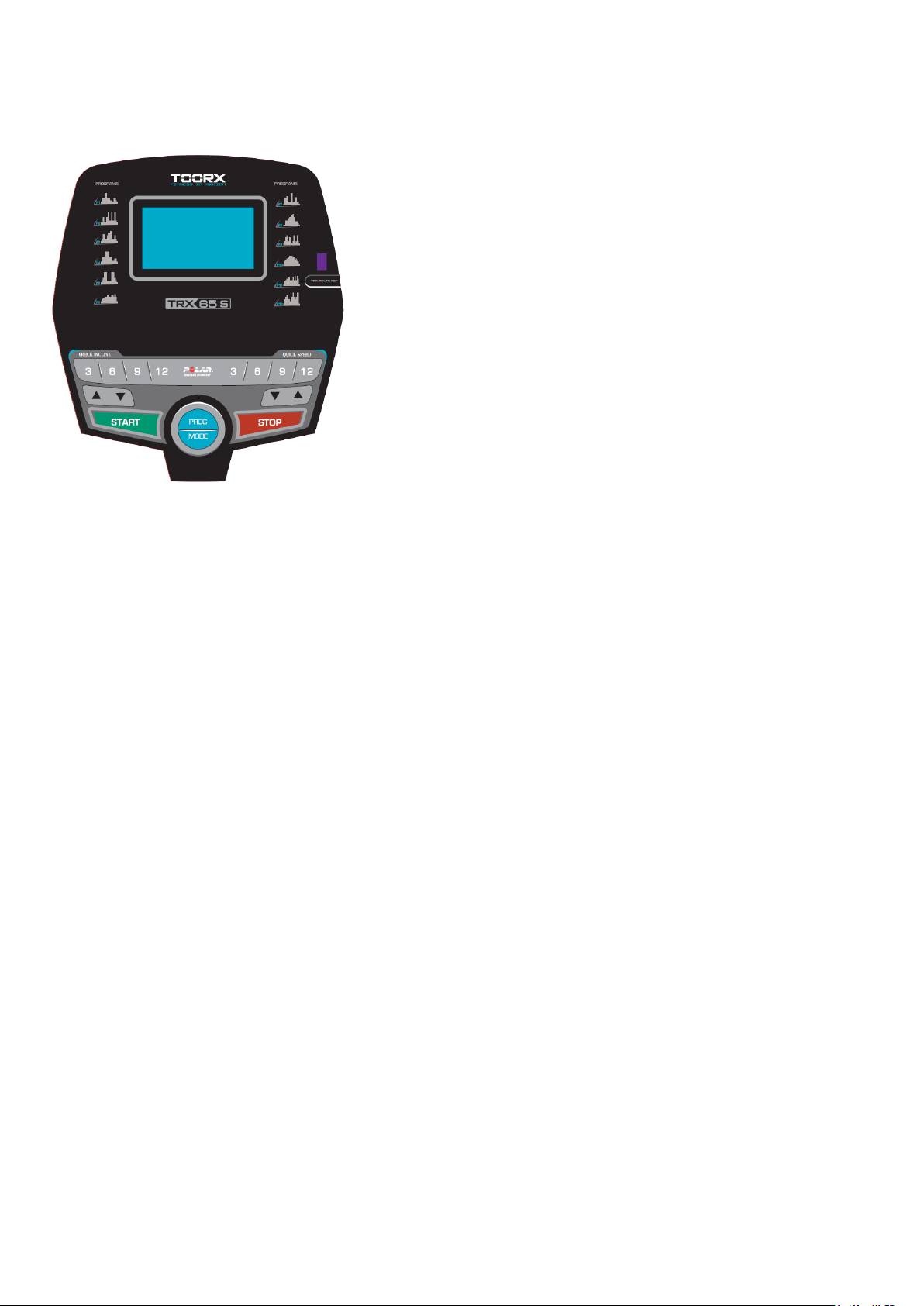
1.1. WINDOW DISPLAY
1.2 START
Normal start after 3 seconds countdown
1.3 PROGRAM
3 countdown function, 15 pre-set programs, 3 HRC mode, and 1 body fat program
1.4 SAFETY LOCK FUNCTION
The window shows"---" when take away the safety lock and the treadmill will stop quickly with "didi"
alarm noise. And put the safety lock on, the computer will display for 2 seconds and the date count
down to “0”
1.5 BUTTON FUNCTION
1.5.1 START/STOP
“START”--When the treadmill is not running, press this button to start, speed is “1.0”.
“STOP”--When the treadmill is running, press this button to stop, then set program default and then
return to manual mode after stopped.
1.5.2 “PROGRAM” BUTTON
When the treadmill is not running, press this button can circle choose from manual mode to pre-set mode
P1-P15 , U1-U3, HP1-HP3 and FAT
Page 8

10
1.5.3 “MODE” BUTTON
When the treadmill is not running, press this button to choose countdown modes:”H-1”,”H-2”,”H-3”.
H-1” is the time countdown mode, and “H-2” is the distance countdown mode, “H-3” is the calorie countdown
mode; press the “SPEED+/-” button to adjust the data.
After that, press the “START” button to start this treadmill
1.5.4 “SPEED +/- “BUTTON
SPEED +/– --Adjust speed when treadmill start, the increment is 0.1km/time in kilometer. Press the
button more than 2 seconds, and it will be up or down automatically.
1.5.5 SPEED QUICK BUTTON
Press the speed quick button 3km/h,6km/h,9km/h,12km/h to adjust the speed directly when the treadmill
is running.
1.5.5 INCLINE QUICK BUTTON
Press the incline quick button 3,6,9,12 to adjust the speed directly when the treadmill is running.
1.6. DISPLAY FUNCTION
1.6.1 SPEED
Display running speed.
1.6.2 TIME
Display the running time or countdown time.
1.6.3 DISTANCE
Display the running total distance or distance countdown.
1.6.4 CALORIE
Display the calorie or calorie countdown
1.6.5 PULSE
Display pulse data.
1.6.6 ALL WINDOW DISPLAY DATA RANGE
TIME:0:00 – 99.59(MIN)
DISTANCE: 0.00 – 99.9(KM)
CALORIES: 0.0 – 999 (C)
Page 9
11
SPEED: 0.8-14.0(km/h)
PULSE: 50 – 200 (BPM)
1.7 PULSE FUNCTION
When the treadmill is running, hold the hand pulse about 5 seconds, it will display pulse data. The
pulse data range is 50-200 times/ minute. It has heart-shaped graphics when testing pulse. This
data is only for reference, can not be as medical data.
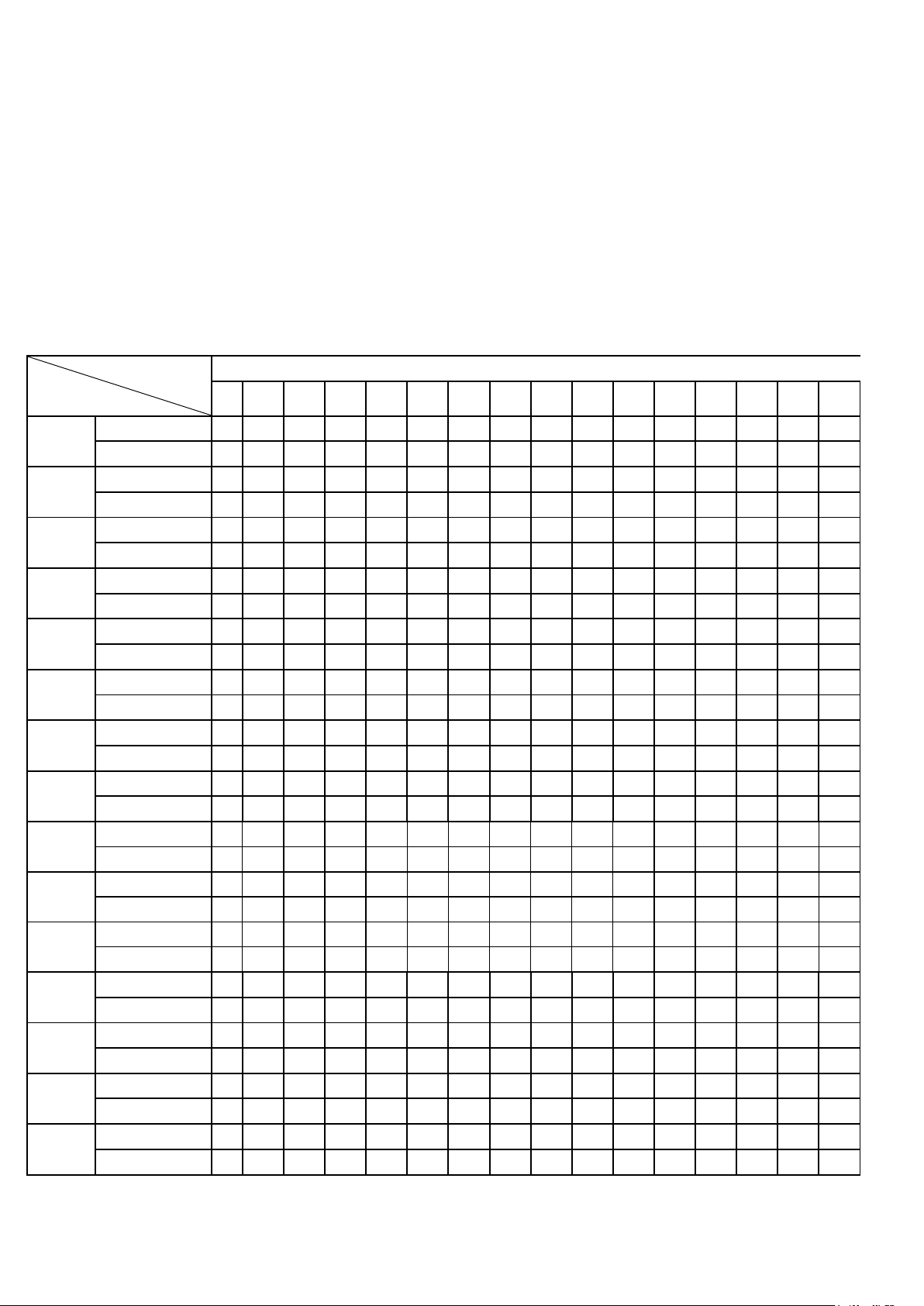
1.8 PROGRAM EXERCISE CHART
TIME
INTERVAL
MODE
SET TIME / 16 = EVERY GRADE TIME
1 2 3 4 5 6 7 8 9
10
11
12
13
14
15
16
P1
SPEED
2 5 5 5 10
10 5 5 5 3 3 2 5 5 3 2
INCLINE
0
0 1 1 1 1 2 2 2 2 3 3 3 2 2 0
P2
SPEED
2 2 7 2 2 7 7
12 4 4
12 4 4
12 4 2
INCLINE
0 1 2 2 3 3 2 2 3 3 2 2 3 2 2
0
P3
SPEED
2 4 9 9 4 4 8 8 10
10
12 4 4 8 4
2
INCLINE
0 1 2 3 4 5 4 5 4 2 1 2 3 2 1
0
P4
SPEED
2 6 6 6 12
12
12
12 6 6 3 3 3 5 5 2
INCLINE
0 1 2 3 4 5 6 7 6 6 5 4 3 2 1
0
P5
SPEED
2 4 6
12
12
12 3 3 3 3
12
12
12 6 4
2
INCLINE
0 2 4 6 4 2 1 0 1 1 2 2 2 2 3
0
P6
SPEED
2 4 5 5 6 6 8 8 6 6 8 8 6 9 6
2
INCLINE
0 1 3 4 4 3 3 1 2 1 2 1 2 1 2
0
P7
SPEED
2 7 7 9 9 4 4
12
12 4 4 8 8 4 4
2
INCLINE
0 1 1 2 2 3 3 4 4 3 3 2 2 1 1
0
P8
SPEED
2 2 6 6 6 8 9
10
11
12 9 5 5 5 3 2
INCLINE
0 1 2 4 2 1 2 4 2 1 2 4 2 1 2
0
P9
SPEED
2 4 8
10 2 4 8 10 2 4
10 2 4
10 4 2
INCLINE
0 1 2 3 4 5 6 7 8 9 8 6 4 2 1
0
P10
SPEED
2 5 6 7 8 9 10
11
10 9 8 6 7 5 4 2 INCLINE
0 1 2 4 6 6 6 4 4 4 2 2 2 1 1
0
P11
SPEED
2 5 6 7 9 9 6 9 6 9 6
10 6 10 7 2
INCLINE
0
2 2 2 3 3 3 4 4 4 5 5 5 4 4 0
P12
SPEED
2 6 8
10 8 6 4 6 8 12 8 6 8 12
12
2
INCLINE
0 1 1 3 3 5 5 7 7 5 5 3 3 1 1
0
P13
SPEED
2
12 4 12 4 12 4 12 4 12 4 12 4 12 4 2
INCLINE
0 8 10
13 4 8
10
13 4 8
10
13 4 8
10
0
P14
SPEED
2 8 10
12 4 8
10
12 4 8
10
12 4 8
10
2
INCLINE
0 8 12
13 4 8
12
13 4 8
12
13 4 8
12
0
P15
SPEED
2
12
10 8 12
12
10 8 12
12
10 8 12
12
10
2
INCLINE
0 3 4 5 6 8 7 8 8 7 7 6 5 4 3
0
Page 10

12
1.9 Manual model operation
1.9.1 Press start key, time count down 5 seconds, then treadmill will start to work with initial speed 1.0km/h
1.9.2 Press speed +/-, you can adjust the speed
1.9.3 Press stop, you can stop treadmill at working state
1.9.4 Press quick speed key, you can quickly adjust the speed you want
1.10 3 COUNTDOWN FUNCTION PARAMETER DATA
Countdown time initial setting 30:00 minutes,setting range 5:00---99:00 minutes , each step 1:00.
Countdown calorie initial setting 50therm, setting range 10---990 term,each step 10.
Countdown distance initial setting 1.0km,setting range 0.5---99.9 km,each step 0.1
Cycle switch order is: manual, time, distance, calories.
1.11 BODY TESTER(FAT)
At the beginning state, press “ PROGRAM” continually to enter “FAT“ body fat test,window display
“FAT”. Press “MODE” to enter (F1 SEX, F2 AGE, F3 HEIGHT, F4 WEIGHT). Press “SPEED+”,
“SPEED-” to set. After setting, the computer will display F5 and grasp the hand pulse, the window
will display your body quality index.
The body quality index is to test the relation between height and weight not the body scale.
The body FAT suits for any male and female to adjust the weight according together with other
body quality index. The ideal FAT should be between 20-25, if under 19, it means too thin. If
between 25 and 29, it means overweight, if over 30, it means obesity. (The data is just for
reference and can not be as medicinal data)
01 Sex 01 Male 02 Female
02 Age 10------99
03 Height 100----200
04 Weight 20-----150
05 FAT ≤19 Under weight
FAT = (19----26) Normal weight
FAT = (26---30) Over weight
FAT ≥30 Obesity
Page 11

13
1.12 HRC Program
There are 3 HRC programs (HRC1-HRC3) in total.
The parameter data setting order is “AGE” -> “THR(HRC) data” -> “TIME”.
HRC: Detect user’s actual heart rate through wireless receiver and set different the heart rate data as goal to
adjust speed and incline during running.
It’s recommended that user uses the wireless chest belt while running HRC function.
1.12.1 After turning on the power, press “PROG” key to choose HRC function. HRC function is turned on
when “HRC” characters shown on the screen.
User can use “SPEED +/-“ to adjust age (data from 13 to 80) after seeing the “30” shown on the screen.
1.12.2 Press “MODE” key to enter the setting of heart rate. The standard heart rate is fixed at different data
from HRC1 to HRC3. Heart rate data can be adjusted from 50 to 200. User can use “SPEED +/-“ to adjust the
data. (It’s recommended that standard heart rate data doesn’t need to be changed for physical health
condition.)
Formula is calculated as below:
HRC1 is T.H.R =(220-age)x60%,
HRC2 is T.H.R =(220-age)x70%,
HRC3 is T.H.R =(220-age)x80%.
After finishing the setting of HRC data, user can press “MODE” key to modify the time. When “TIME” window
flashes, it displays the default time as 30:00 minutes, and user can press “SPEED+/-“ to set up time.
1.12.3 Enter “START” key to begin the workout (Remember only can press “START” key after all setting is
completed.)
1.12.4 It’s suggested that user use wireless chest belt to detect the heart rate. If chest belt and hand pulse
are used at the same time, data from chest belt will show up only on the screen.
1.12.4 During the operating of HRC, speed and incline will adjust as below:
(1). If Target heart rate <THR-15,then the speed and incline will adjust automatically every 15 second, the
SPEED will increase 0.8KM/h and incline add 1 section until they reach the max. data
(2). If THR-5>Target heart rate >=THR-15,then the speed and incline will adjust automatically every 15
second, the SPEED will increase 0.4KM/h and incline add 1 section until they reach the max. data
(3). If THR+5>=Target heart rate >=THR-5,then the speed and incline will not change
(4). If THR+15>=Target heart rate >=THR+5,then the speed will adjust automatically every 15
Page 12

14
second, the SPEED will decrease 0.4KM/h and incline less1 section until they reach the min. data
(5). If Target heart rate >=THR+15,then the speed and incline will adjust automatically every 15
second, the SPEED will decrease 0.8KM/h and incline less2 section until they reach the min. data
1.13 OTHERS
1.13.1 The system will enter into power saving mode automatically if there is no any action within 10
minutes under IDLE MODE and there is no display and backlit on the computer. Press any key to
resume the system.
1.13.2 Countdown time, countdown calorie and countdown distance, you just can set one of them at
one time, press last item to set running, the setting parameter is countdown, others display normal data
1.13.3 On display – Distance covered, Calories burnt, Pulse reading, Body Fat test shown is
only for indicative purpose and may vary from machine to machine. Do not compare these
readings to a medical instrument.
1.13.4 Speed control: acceleration at 0.5km/s; deceleration at 0.5km/s.
1.13.5 If you need to use the APP function, the matching USB Bluetooth module into the treadmill
USB interface, open the phone Bluetooth and supporting APP, according to APP tips to connect
treadmill, connect after the use of APP function. (Note: In addition to matching treadmill, the
Bluetooth module is prohibited from plugging into other USB devices)
1.13.6 When the treadmill stops, 10 minutes without any key action, then enter the sleep state.
In the dormant state, press any key to wake up the electronic form.
Page 13
20
B27
B20
B4
B4
B3
B3
B6
B6
D57
D57
A2
B8
C35
D28
D28
D18
D4
D21
C2
C5
D60
D36
D60
D38
D38
D60
D60
D36
D55
D55
B32
B81
B42
B42
D45
Page 14
21
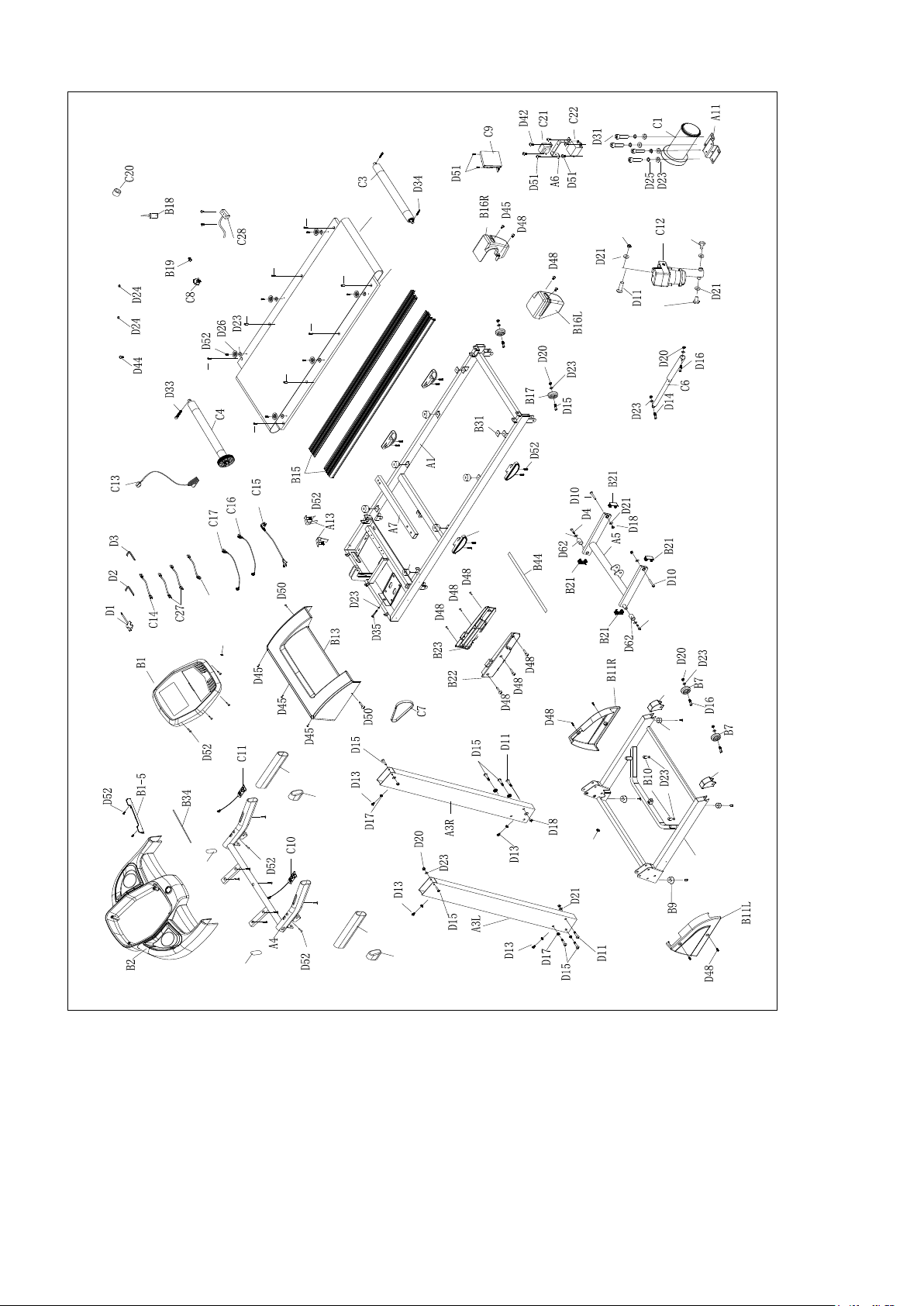
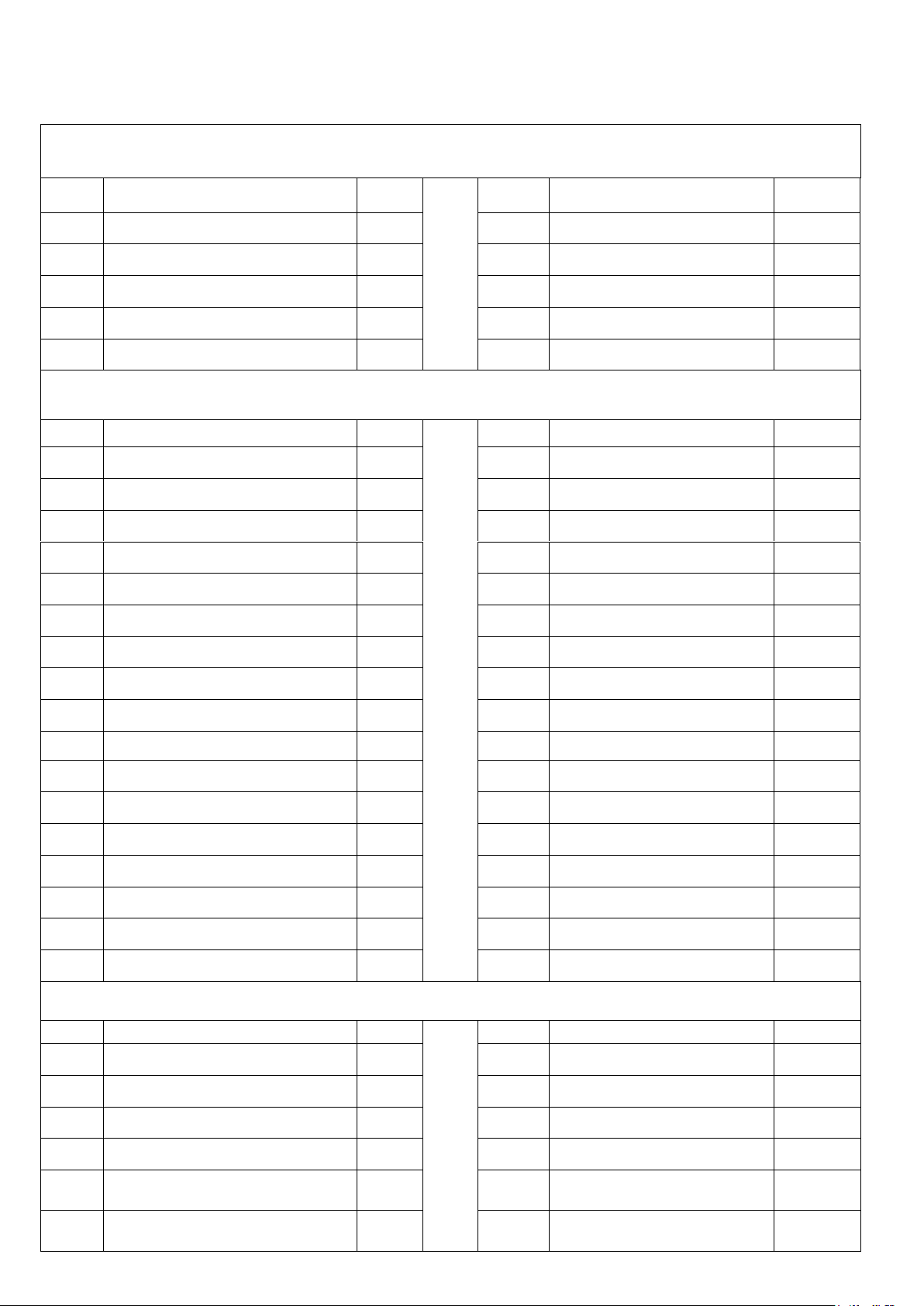
PPAARRTTSS LLIISSTT
A. Welding parts
No.
Description
Qty
No.
Description
Qty
A1
Main frame
1
A5
Incline frame
1
A2
Base frame
1
A6
Filter bracket
1
A3L
Left upright tube
1
A7
Running board tube
1
A3R
Right upright tube
1
A11
Motor bracket
1
A4
Handrail bracket
1
A13
Belt Guide
2
B. Plastic parts
No.
Description
Qty
No.
Description
Qty
B1
Console set
1
B16L
Left end cap
1
B1-1
Overlay
1
B16R
Right end cap
1
B1-2
Membrane key
1
B17
Adjust wheel
2
B1-3
Console panel
1
B18
Silicon oil
1
B1-5
I-pad Holder
1
B19
Power buckle
1
B2
Console cover
1
B20
Protecting wire plug
1
B3
Handrail foam
2
B21
Inner plug
4
B4
Handrail plug
2
B22
Left motor side cover
1
B6
Transport wheel cap
2
B23
Right motor side cover
1
B7
Transport wheel
2
B27
New cushion
6
B8
Flat pad
2
B31
Rubber pad
4
B9
U-shaped foot pad
2
B32
Cushion
2
B10
Limited cushion
2
B34
EVA pad(I-Pad holder)
1
B11L
Left side cover
1
B42
Handrail plug
2
B11R
Right side cover
1
B44
EVA pad(For #A7)
1
B13
Motor cover
1
B81
USB slot
1
B15
Side rails
2
C. Drive parts
No.
Description
Qty
No.
Description
Qty
C1
DC Motor
1
C13
Safety key
1
C2
Running belt
1
C14
Single line (Red) 300
1
C3
Rear roller
1
C15
Power code
1
C4
Front roller
1
C16
Computer upper line
1
C5
Running board
1
C17
Computer lower line
1
C6
Cylinder
1
C20
Magnetic ring
1
Page 15
22
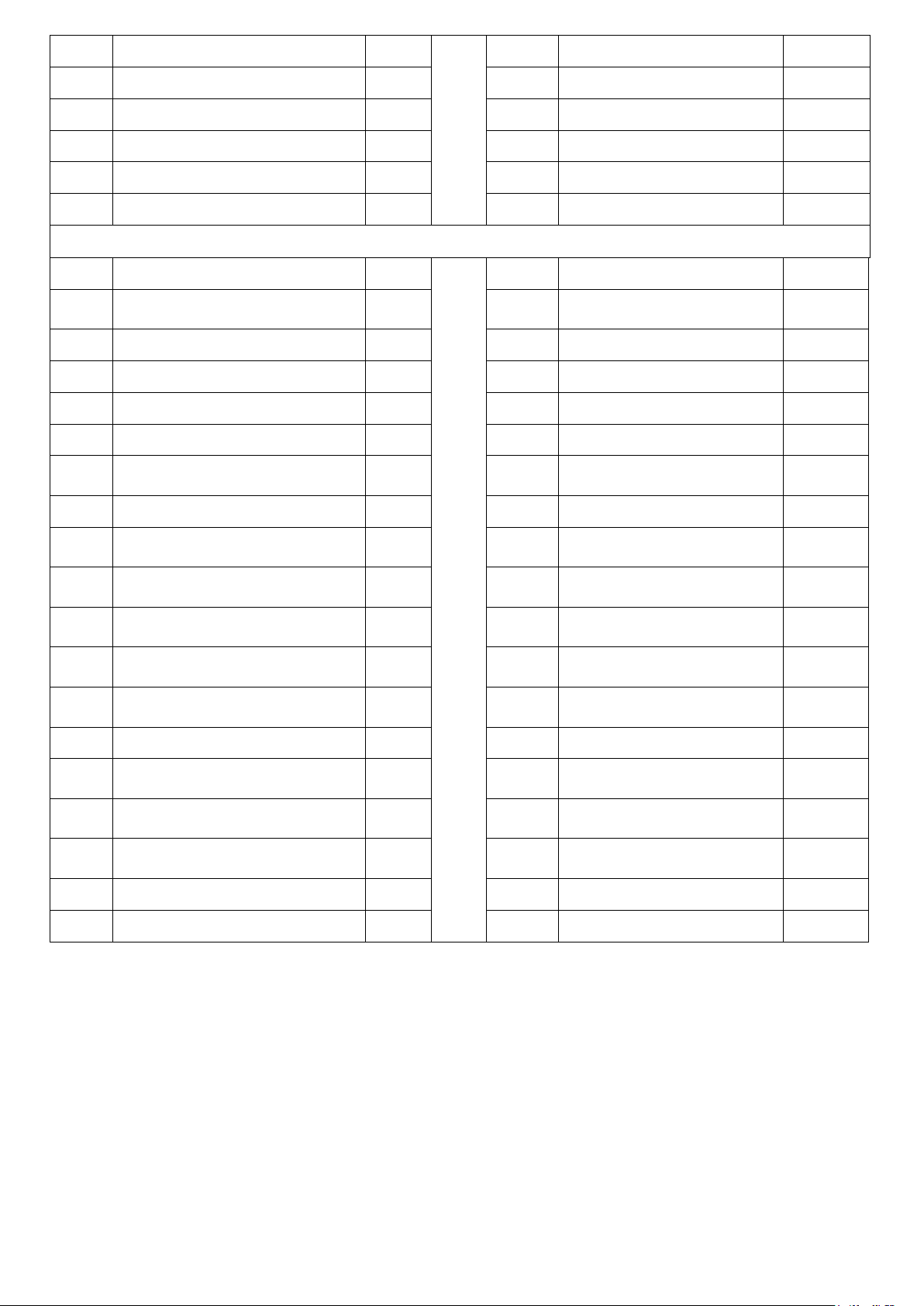
C7
Motor belt
1
C21
Inductor
1
C8
Power switch
1
C22
Filter
1
C9
Controller
1
C27
Single line (Black) 300
2
C10
Left short keys
1
C28
speed sensor
1
C11
Right short keys
1
C35
Single cord(CE)
1
C12
Incline motor
1
D. Hardware parts
No.
Description
Qty
No.
Description
Qty
D1
Screw driver
1
D28
Hex round head bolt
M10*20
2
D2
Allen wrench T6
1
D31
Hex round head bolt M8*20
4
D3
Allen wrench T5
1
D33
Hex round head bolt M8*55
1
D4
Round head hex bolt M10*65
2
D34
Hex round head bolt M8*60
2
D10
Round head hex bolt M10*45
2
D35
Hex round head bolt M8*80
1
D11
Round head hex bolt M10*50
3
D36
Cross head bolt M6X25,
washer
2
D13
Round head hex bolt M8*15
4
D38
Cross head bolt M6*30
2
D14
Round head hex bolt M8*30
1
D42
Cross head bolt M4*10,
washer
2
D15
Round head hex bolt M8*40
8
D44
Cross head bolt M5*12,
washer
1
D16
Round head hex bolt M8*45
3
D45
Cross head bolt M5*15,
washer
5
D17
Inner washer M8
8
D48
Cross self-tapping bolt
ST4.2*19
12
D18
Nylon nut M10
5
D50
Cross self-tapping bolt
ST4.2*25
2
D20
Nylon nut M8
8
D51
Cross bolt M5*8
6
D21
Flat washer M10
9
D52
Cross self-tapping bolt
ST4.2*16
23
D23
Flat washer M8
21
D55
Cross self-tapping bolt
ST4.2*45
2
D24
Spring washer M5
2
D57
Cross self-tapping bolt
ST4.2*25
4
D25
Spring washer M8
4
D60
Cross head bolt M6*20
4
D26
Bowl washer
6
D62
Shaft
2
Page 16

GARLANDO SPA
Via Regione Piemonte, 32 - Zona Industriale D1
15068 - Pozzolo Formigaro (AL) - Italy
www.toorx.it - [email protected]
 Loading...