

Page 1
ES
CAJA EXTERNA USB
Manual de usuario
EN
USB EXTERNAL ENCLOSURE
User manual
Manuales disponibles en:
Manuais disponíveis en:
Manuals available at:
Manuels disponibles sur:
Handbücher auf:
Manuali disponibili su:
www.tooq.com
TQE-2528B
TQE-2528BL
TQE-2528R
USB 3.1
Gen 1
Page 2

2
Page 3

3
ES
Page 4

4
Page 5
5
ES
Gracias por comprar la caja externa 2,5” de TOOQ.
Esta caja externa es “Plug & Play” (enchufar y listo), le
permite conectar su disco, HDD o SSD, SATA a través de
un puerto USB 3.1. Gen 1.
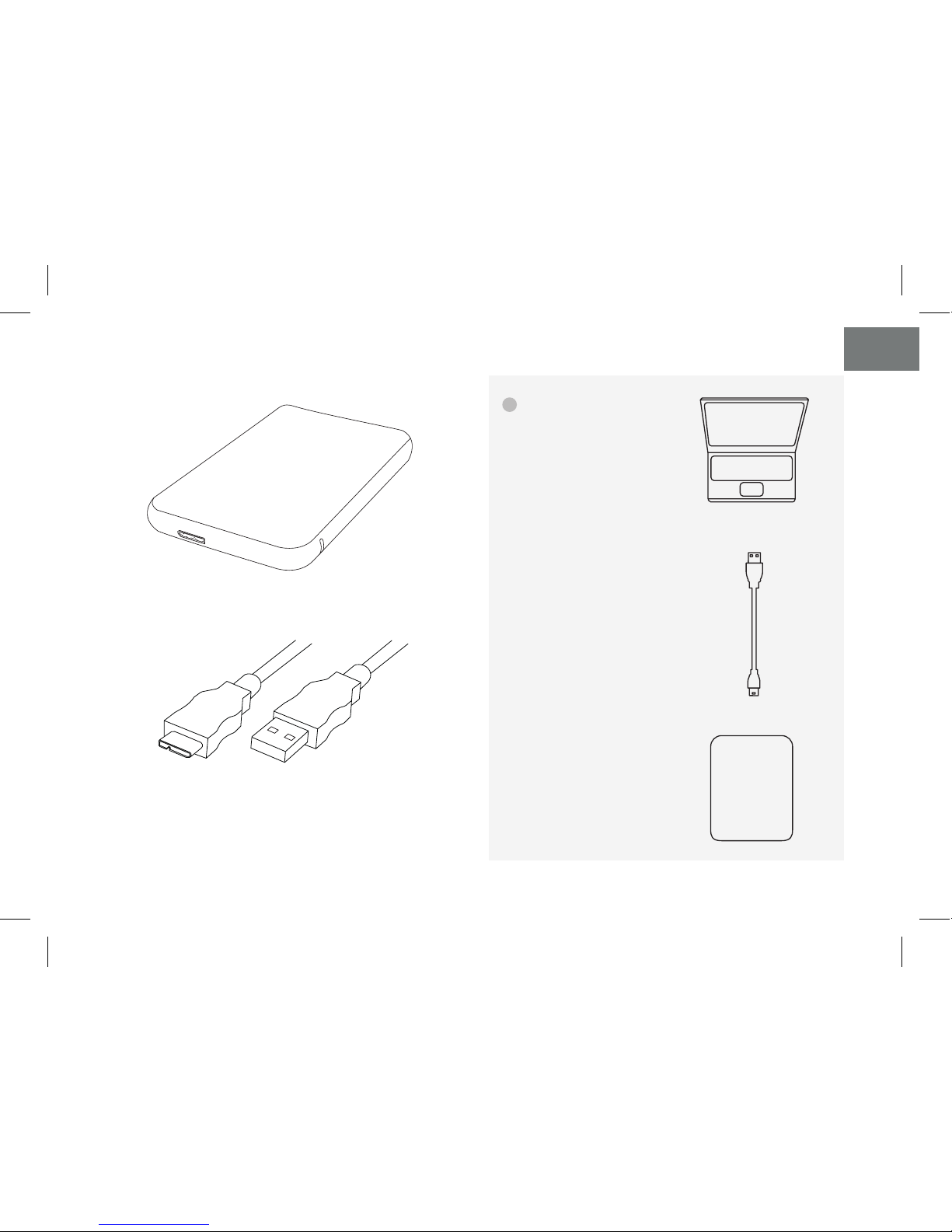
Contenido del paquete
• Caja externa
• Cable USB tipo Micro-B a USB-A
Por su seguridad y la satisfacción de usar este
producto, por favor, lea detenidamente este manual
de instrucciones antes de iniciar la instalación.
Características de la carcasa
• Interfaz USB 3.1. Gen 1. – Hasta 5 Gbps.
• Soporta discos de 2,5”, HDD y SSD, SATA I, II y III
de hasta 9,5mm. de alto.
• Soporta protocolo USB 3.1 UASP, TRIM y SMART.
• Enchufar y listo, sin necesidad de instalar controladores.
• Indicador LED de encendido y lectura.
• Botón de encendido.
• Carcasa de plástico.
• Alimentación de 5V CC a través del puerto USB,
no precisa de alimentación externa.
• Manual de usuario
Requisitos del sistema
• Disponer de un puerto USB
• Windows 2000/XP/Vista/7/8/10 o Mac OS 9.X/Mac OS
X/macOS o compilaciones de Linux como Ubuntu
(No se necesita instalar controladores)
• Windows 98/ME (Se necesita instalar controladores)
Por favor, utilice una pulsera antiestática o toque una
superficie de metal conectada a tierra (p. ej. Grifo
metálico) para liberar la electricidad estática antes de
iniciar la instalación de la caja.
Page 6
6
ES
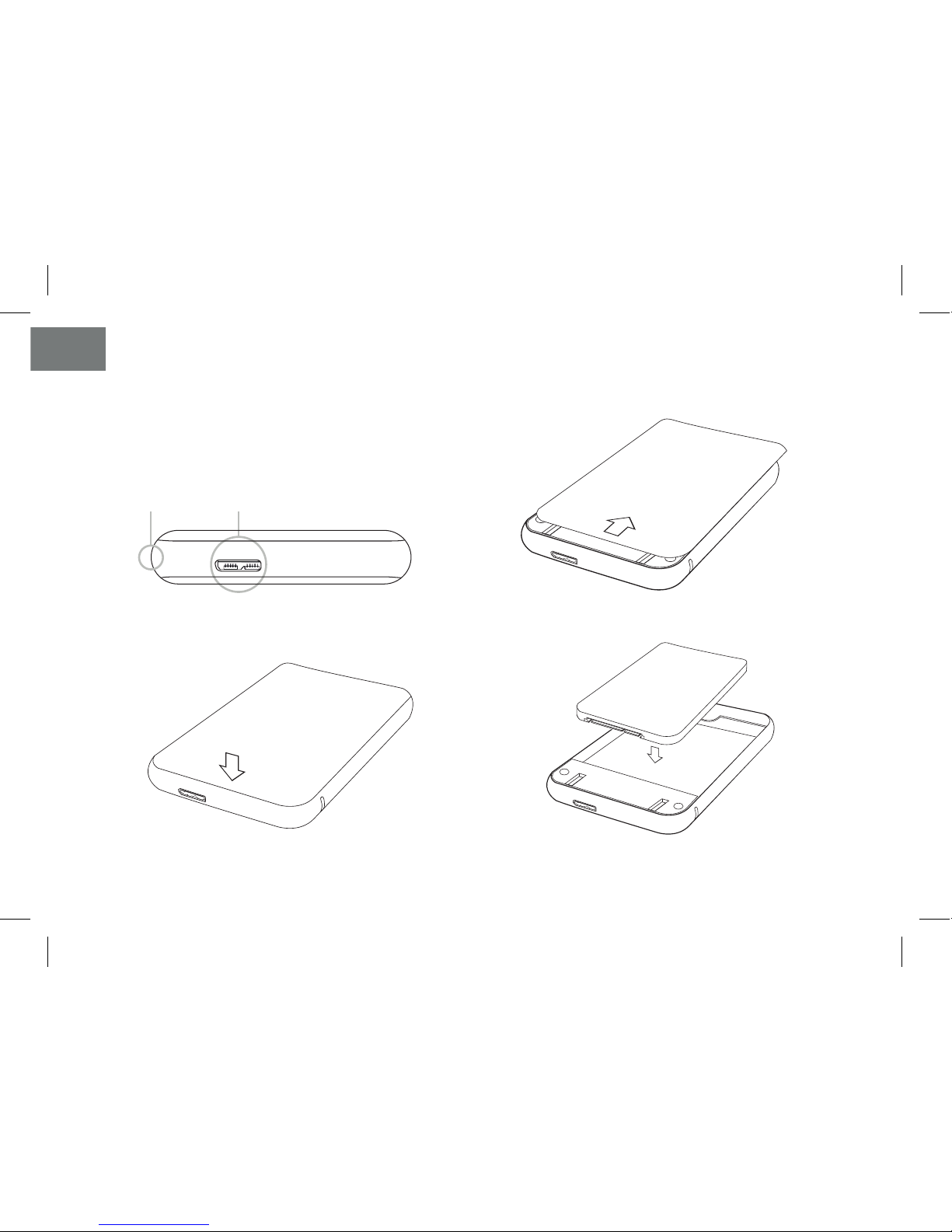
Instalación del disco en la carcasa
Nota: Las imágenes son orientativas y pueden variar
dependiendo del modelo adquirido.
Botón de encendido Puerto USB tipo Micro-B
1. Abra la caja externa.
2. Presione levemente la tapa frontal.
4. Instale el disco duro y vuelva a colocar la tapa frontal.
3. Deslice la tapa con suavidad hacía arriba.
Page 7
7
ES
5. Conecte el conector USB tipo Micro-B del cable
suministrado al puerto USB tipo Micro-B de la carcasa.
6. Conecte el conector USB tipo A al puerto USB del ordenador.
Pulse el botón de encendido para encender la caja externa.
Si conecta el conector USB 3.1 Gen 1 a un puerto USB 2.0 o
1.1 la velocidad se adaptará al tipo de conexión.
HDD/SSD
Cable
USB tipo Micro-B a USB-A
! Instrucciones
de conexión
Page 8
8
ES
Conexión con el PC en Windows 2000/XP/Vista/7/8/10
o posterior
No se necesita instalar controladores.
Conecte la carcasa externa al puerto USB del PC. Debe
aparecer un cuadro informando del nuevo dispositivo
detectado. Si no aparece la letra del disco duro en el
explorador de archivos, debería particionar y dar formato
a las particiones del disco.
Sobre formatos del sistema
Formatos del sistema de archivos de Windows:
Existen tres tipos de sistemas de archivos en Windows
en la actualidad: NTFS, FAT32 y ExFAT. Si solo va a
usar el disco en Windows utilice NTFS. Si desea crear
compatibilidad con otros sistemas operativos utilice
ExFAT ya que FAT32 tiene limitaciones de tamaño
de archivo. Use FAT32 si pretende utilizar el disco en
sistemas operativos que no son actuales. (Windows
XP o Mac OS 9.X)
Formatos de sistema de archivos en Mac:
Existen dos tipos de sistemas de archivos en Mac en la
actualidad: APFS y HFS+. Aunque es compatible con
FAT32 y ExFAT que utiliza Windows.
Si va a usar macOS a partir de High Sierra puede usar
APFS, para anteriores sistemas de Mac utilice HFS+.
Page 9
9
ES
Partición del disco
Si el disco es nuevo, no será reconocido por el sistema
hasta que no le cree particiones y dé formato.
Esta operación puede realizarla en sistemas basados en:
• Windows en el “Administrador de discos”, dentro
de las herramientas de administración del sistema.
(Equipo, botón derecho, Administrar…).
• Mac en “Utilidad de discos”, dentro de las
herramientas. (Finder, Ir…).
• Ubuntu en “Utilidad de discos”, dentro de administración
del sistema. (Sistema, Administración…).
Información sobre la garantía
El distribuidor de TOOQ o vendedor donde usted compró la
caja externa TOOQ, y/o los accesorios originales atenderá
su reclamación y/o proveerá servicio bajo garantía.
Por favor, devuelva la caja externa a su distribuidor o
vendedor para solicitar servicio bajo garantía. No devuelva
la caja externa a TOOQ. Para poder recibir servicio bajo
garantía, debe presentar recibo de compra o prueba
sustitutiva comparable de compra que lleve la fecha
de compra. La caja externa deberá mostrar también el
número de serie.
La garantía no será aplicable si el tipo o número de serie
en el producto han sido alterados, borrados, quitados, o
dañados de modo ilegible.
Lo que no está cubierto por la garantía.
• Los defectos y daños que resulten de la utilización del
producto para otro uso fuera de lo normal y habitual o
por no seguir las instrucciones de este manual de usuario.
• Los defectos o daños producidos por uso indebido,
accidente o negligencia.
• Los defectos o daños producidos por pruebas,
operaciones, mantenimiento o ajuste inadecuados, o
cualquier alteración o modificación de cualquier índole.
• Rotura o daño de la carcasa a menos que sea causado
directamente por defectos en el material o mano de obra.
• Defectos o daños debido a la humedad, alta temperatura
o derrame de líquidos.
• Toda superficie de plástico o metal y todas las partes
externas que estén rayadas debido al uso cotidiano.
• Productos alquilados temporalmente.
Page 10
10
ES
F.A.Q.
¿El sistema no reconoce la unidad?
Esta caja externa no precisa de drivers adicionales para los
sistemas operativos compatibles.
Más información en la sección Requisitos del sistema.
Si el disco es nuevo, no será reconocido por el sistema
hasta que no le cree particiones y dé formato.
Más información en la sección Partición del disco.
Indicaciones del LED:
El LED parpadeando significa acceso al disco ya sea para
identificarlo o lectura o escritura. Si está fijo solo indica que
está alimentado.
Especificaciones
Interfaz: USB 3.1 Gen 1 Tipo Micro-B.
Interfaz de disco: SATA III.
Material de la carcasa: Plástico.
Indicador tipo LED: Actividad de disco y encendido.
Botón de encendido.
Soporta UASP, TRIM y SMART.
Requisitos de alimentación: 5V CC suministrada
a través del puerto USB.
Temperatura de funcionamiento: 5°C a 50°C.
Temperatura de almacenamiento: -40°C a 70°C.
Humedad relativa: 5% a 90%, sin condensación.
Page 11

11
EN
Page 12

12
Page 13
EN
13
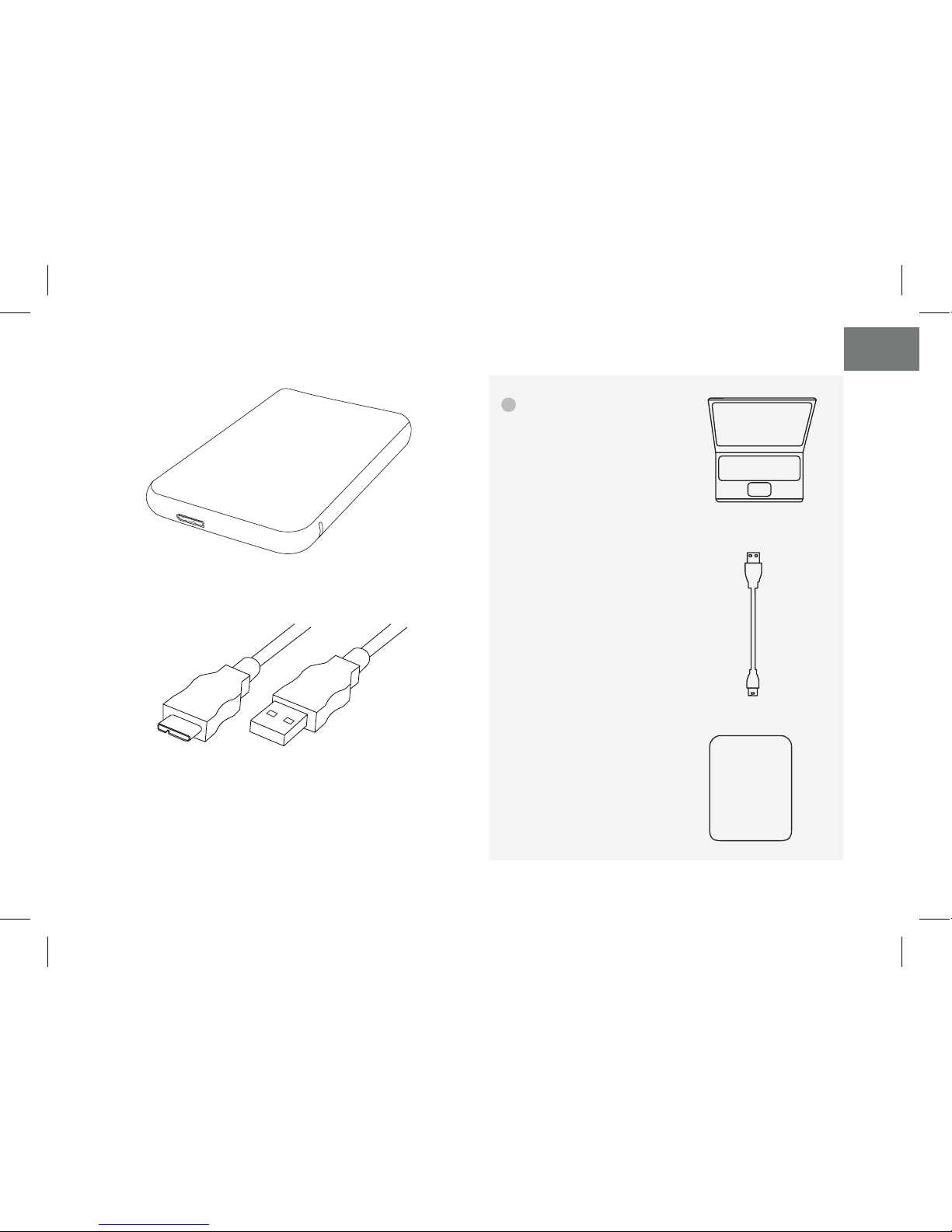
Package content Thank you for purchasing TOOQ 2.5” External enclosure.
This external enclosure is Plug & Play, allows you to connect
your SATA disk, HDD or SSD, through a USB 3.1 Gen 1. port. • External enclosure
• USB type Micro-B to USB-A cable
• User manual
For your safety and the satisfaction of using this
product, please read this instruction manual
carefully before starting the installation.
Features
• USB Interface 3.1 Gen1. - Up to 5 Gbps.
• Supports 2,5” SATA I, II and III disks, HDD and SSD, up to
9.5mm thick.
• Supports UASP, TRIM, SMART USB 3.1 protocol.
• Plug and play, no need to install drivers.
• LED indicates power and data access.
• Power button.
• Plastic enclosure.
• 5V DC power through the USB port, no external
power required.
System Requirements
• Available USB port
• Windows 2000/XP/Vista/7/8/10 or Mac OS 9.X/
Mac OS X/macOS or Linux builds like Ubuntu (No driver
installation required)
• Windows 98 / ME (Drivers need to be installed)
Please use an antistatic wrist strap or touch a grounded
metal surface (e.g. metal faucet) to release static
electricity before starting the enclosure installation.
Page 14
EN
14
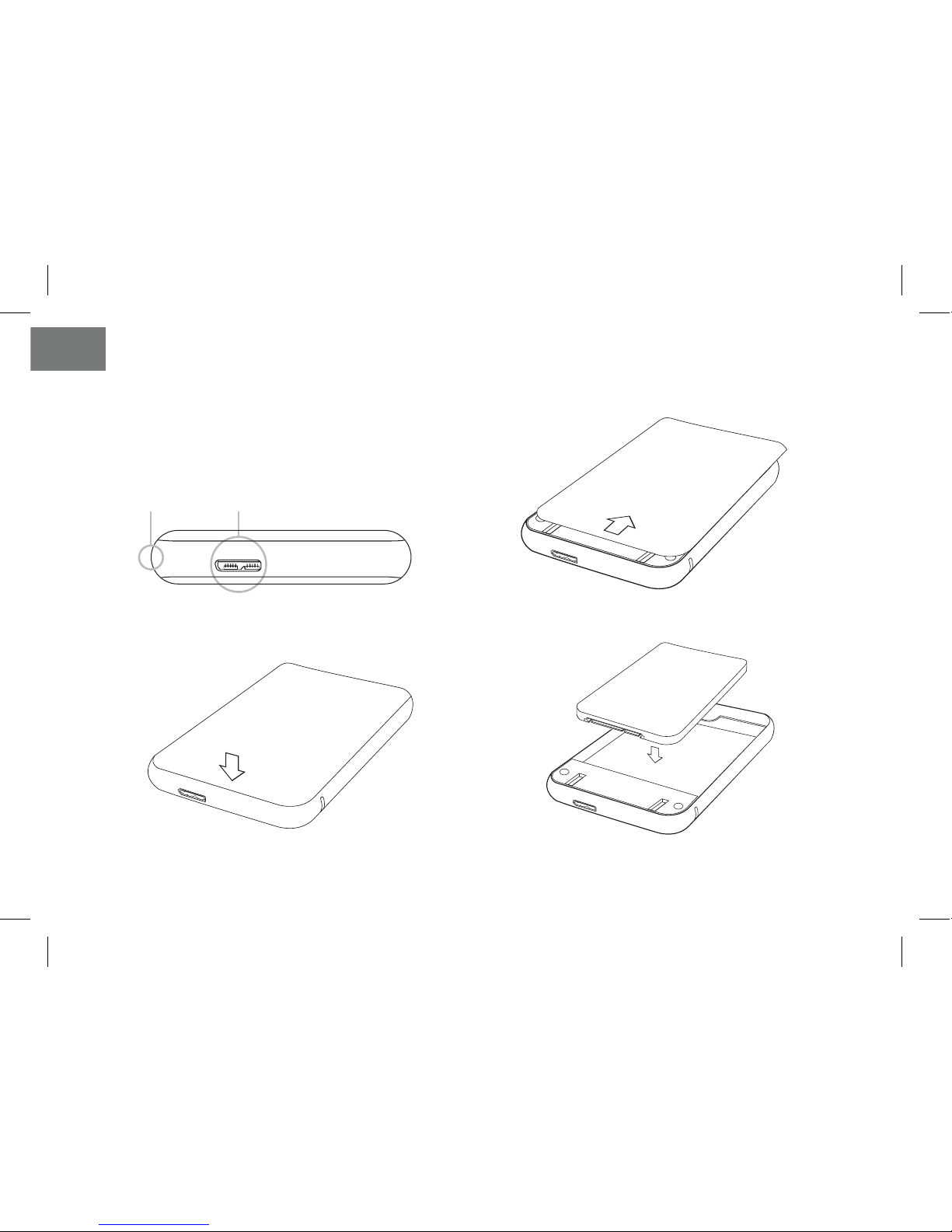
Hardware Instalation
Note: Images are for example only and may vary
depending on the model purchased.
Power button USB type Micro-B
1. Open the outer box.
2. Press the front cover lightly.
4. Install the hard drive and replace the front cover.
3. Gently slide the cover upwards.
Page 15
EN
15
5. Connect the USB type Micro-B connector of the
supplied cable to the USB type Micro-B port on the
enclosure.
6. Connect the USB type A connector to the USB port on
the computer.
Press the power button to turn on the external case.
If you connect the USB 3.1 Gen 1 connector to a USB
2.0 or 1.1 port the speed will be adapted to the type of
connection.
! Connection
instructions
HDD/SSD
USB type Micro-B
to USB-A Cable
Page 16
EN
16
Connecting to the PC in Windows 2000 / XP / Vista /
7/8/10 or later
Connect the external enclosure to the USB port on the PC.
You should see a box informing you of the new detected
device. If the hard drive letter does not appear in the
file browser, you should partition and format the disk
partitions.
About file system formats
Windows File System Formats:
There are three types of file systems in Windows today:
NTFS, FAT32 and ExFAT. If you are only going to use
the disk in Windows use NTFS. If you want to create
compatibility with other operating systems use ExFAT
because FAT32 has file size limitations. Use FAT32 if you
intend to use the disk in operating systems that are not
current. (Windows XP or Mac OS 9.X).
Mac File System Formats:
There are two types of file systems in Mac today: APFS
and HFS+. Although it supports FAT32 and ExFAT
Windows file systems.
If you are using macOS from High Sierra you can use
APFS, for previous Mac systems use HFS+.
Page 17
EN
17
Hard Drive Partition
If the disk is new, it will not be recognized by the system
until you create partitions and format the partitions.
This operation can be performed in systems based on:
• Windows in the “Disk Administrator”, within the
system administration tools. (Equipment, right
button, Manage...).
• Mac in “Disk Utility”, inside the tools. (Finder, Go ...).
• Ubuntu in “Disk Utility”, within system administration.
(System, Administration ...).
Warranty Information
The TOOQ dealer or retailer where you purchased the
TOOQ external enclosure, and/or original accessories will
respond to your claim and/or provide warranty service.
Please return the external enclosure to your dealer or
seller for warranty service. Do not return the external
enclosure to TOOQ.
In order to receive warranty service, you must present
proof of purchase or comparable replacement proof of
purchase that carries the date of purchase. The external
enclosure must also show the serial number.
The warranty does not apply if the type or serial number
on the product has been altered, deleted, removed, or
illegibly damaged.
What is not covered by the warranty
• Defects and damages resulting from use of the product
in other than its normal and customary manner or by not
following the instructions in this user manual.
• Defects or damages caused from misuse, accident or
negligence.
• Defects or damages caused from improper testing,
operation, maintenance or adjustment, or any alteration
or modification of any kind.
• Breakage or damage to the enclosure unless caused
directly by defects in material or workmanship.
• Defects or damage due to humidity, high temperature or
liquid spill.
• All plastic or metal surfaces and all external parts that are
scratched due to everyday use.
• Products temporarily leased.
Page 18
EN
18
F.A.Q.
The system does not recognize the unit?
This external enclosure does not require additional drivers
for the supported operating systems.
More information in the System Requirements section.
If the disk is new, it will not be recognized by the system
until you create partitions and format the partitions.
More information in the Partition of the disk section.
LED Indications:
The blinking LED means access to the disk either for
identification or reading or writing. If the LED is fixed it
only indicates that it is powered.
Specifications
Interface: USB 3.1 Gen 1. Type Micro-B.
Disk interface: SATA III.
Enclosure Material: Plastic.
LED Indicators: Disk activity and power on.
Power button.
Supports UASP, TRIM and SMART.
Power requirements: 5V DC supplied through the USB port.
Operating temperature: 5 ° C to 50 ° C.
Storage temperature: -40 ° C to 70 ° C.
Relative humidity: 5% to 90%, non-condensing.
Page 19
19
Page 20
©2018 by TOOQ technology, S.L.
Released in 2017/08.
AII Rights Reserved.
tooq.com
* Todas las especificaciones están sujetas a cambios sin
previo aviso. Por favor, consulte con su proveedor
para ofertas exactas. Los productos pueden no estar
disponibles en todos los mercados.
* El color del producto y las versiones del software
incluidas están sujetas a cambios sin previo aviso.
* Las marcas y nombres de productos mencionados son
marcas registradas de sus respectivas compañías.
* AII specifications are subject to change without notice.
Please check with your supplier for exact oers. Products
may not be available in all markets.
* Product color and bundled software versions are subject
to change without notice.
* Brand and product names mentioned are trademarks of
their respective companies.
 Loading...